ISSN : 2394-2231
http://www.ijctjournal.org
Page 124
SMART THEFT ALERT FOR ANDROID BASED DEVICES
1Mrs. Sharmila K.,
2Ms. Sivasankari A.
1M.Phil Research Scholar, Department of Computer Science DKM College for Women (Autonomous), Vellore,
TamilNadu, India.
2Assisant Professor, Department of Computer Science DKM College for Women (Autonomous), Vellore, TamilNadu,
India.
---
************************
---Abstract:
This paper presents a technique to improve anti-theft for android based mobile phones by using
different services like MMS instead of SMS. As the use of smartphones, tablets, phablets based on android
operating system is increasing, many scenarios related with anti-theft have already been proposed and many
software based on anti-theft have also been developed, but most of these software are not freely available
and it's difficult to identify the thief by using these software's e.g. GPS Tracking. We put forward a new
scheme, which enhances the present scenario, based on new technologies like Multimedia Messages. The
scenario proposed in this work is totally dependent on the hardware of your smartphone like camera (front &
back) and support for multimedia messages. Once this software is installed, it will work in the background,
stores the current SIM number in a variable and keeps checking continuously for SIM change, whenever
SIM gets changed from mobile, it will take snapshots and record a video in the background i.e., without
taking user permission and then it will send an MMS, and number of snap shots, to an alternate mobile
number and an email id, which was provided during installation. The enviable advantage of this software is
that it is very easy to configure and it keeps running in the background without interrupting the user. To
some extent it helps the owner to identify the thief.
Keywords—
Android, MMS, Multimedia Messages, Snapshots, Email.
---
************************
---I. INTRODUCTION
The latest mobile phone such as android based mobile phones, called smartphones, are changing he way live our live and has become a very important part of our life. Smartphone change the way of communication unlike fixed line phones, it provides and advantages of communicating with anyone virtually through video-conferencing, email, etc., and it also provides a facility to store contact numbers, email, in phone memory which reduces the concept of File-System to store personal contacts. Now a days, smartphones are acting like a computer, it can be used to store information, documents etc., and can be shared with anyone through internet. These latest smartphones are very helpful for doing business. Company related information and documents can be viewed anywhere can be shared with anyone. These days android based mobiles phone/devices are very popular because it provides a large number of utilities for
hand-held devices through which it acts as a computer in a pocket. Because of its open-source nature a large number of utilities has been developed and android operating system is getting used in many mobile phones.
Because of its small-size, it can be stored very easily and the confidential-information of any organization or personal details stored in the memory can be easily exposed.
II CONTROL MOBILE HARDWARE
ISSN : 2394-2231
http://www.ijctjournal.org
Page 125
Figure 2.1 Android Kernel ArchitectureAndroid is a set of programs that works together to produce a result e.g. an operating system and its applications. Android devices use the Linux kernel with some architectural changes made by Google. They need to develop hardware drivers to control the hardware for the kernel, that why OEM (Original Equipment Manufacturer) has a contribution in developing drivers. The mail n function of kernel is to control the hardware. It will acts as an intermediary between hardware and software
We can imagine the kernel as a monarch h which manages files, carries out data transfer between file system and the hardware. The good thing is that you don’t need to know how exactly the kernel is working; Android has provided Android System API’s to provide communication between hardware and kernel. Android SDK (Software Development Kit) provides tools and a long list of API’s to develop an application on android platform using JA VA. The Android SDK includes a virtual mobile device emulator, which acts like a real mobile device running on your computer. It provides you all the hardware features that any mobile device have including a display screen. The Andr oid SDK Manager contains the code of Android kernel, native libraries written in C/C++ and other packages to communicate with hardware, refer [2] for all the package description.
The android emulator mimics many h ardware including camera, using your computer webcam, which we will use in our application, for more about android architecture for real-time embedded system, see [3]
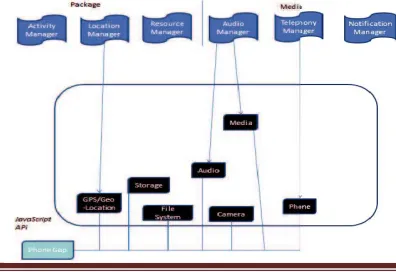
Figure 2.2: Packages included in Android SDK to control hardware.
A. Package to use Mobile Hardware
Android. Hardware: package gives us sup port for hardware feature like Camera & Sensors by providing different interfaces like Camera.PictureCallBack a nd its subsequent classes to control hardware. The hardware which you are going to use in your application should be declared in <manifest> xml file using <uses-feature> element, for more about manifest [4].
<manifest…>
<uses-feature android:name="android.hardware.camera" /><uses-feature
android:name="android.hardware.telephony" /> </manifest>
Android name specifies the hardware you are going to use in your application. In this paper we will u se three hardware which is front camera, rear camera and telephony service.
Depending on the availability of the front camera, if front camera is not present then o nly rear camera is going to be used.
Before declaring the use of hardware in <use-feature> you have to request fo r appropriate permission. When the permission is granted t hen your application accesses appropriate hardware with pro per compatibility.
<uses-permission android:
name="android.permission.camera" /> <uses-permission
android: name="android.permission.telephony" />
The permissions are granted by the users during the installation of the application. These are the security features built into the android operating system which reduces the difficult decision about security taken by user at run time.
ISSN : 2394-2231
http://www.ijctjournal.org
Page 126
video and taking pictures without user interaction andalso sending of an MMS or text message, for more about activities and services.
A. Activity
An ‘Activity’ is a component of an application which provides an interface to the user to communicate with the application like taking pictures, selecting songs to play. Android gives a screen to each activity to draw the UI.
An application can have ma ny activities, as like in Java has many classes but there is a main class, and a main activity which will run when an application gets executed for the first time and then there will be a transaction between different activities i.e., one activity can start another activity. Android uses stack to manage the activities, when an activity is created it is placed on the top of the stack and the previous activities remains below it. An object d erived from view class provides the user interface for the activity like ‘widgets’ views that gives you text-box, text-field, combo-box, etc. There is an XML layout file in an application which is commonly used to set the layout which has a unique resource Id which is used to set the layout of an activity by calling setContentView() method from an activity.
To create an activity you have to create a subclass of an Activity class where you have to implement a callback method e.g., onCreate (), this is a m ethod where you have to call setContentView(), this method is called by system when transition occurs. We have to declare an activity in a manifest file as we have already shown above.
<manifest ... > <application ... >
<activity android: name=".ExampleActivity" /> </application ... >
</manifest >
To start an activity from another activity you need to call startActivity() method by passing an object of an intent that describes the activity you want to start.
Intent intent = new Intent (this, ExampleActivity.class); startActivity(intent);
An application can have many activities and services that have an entry in a manifest file [5]. An activity has many states which is defined through activity methods which is implemented in an activity, defines the lifecycle of it. You must implement onCreate () method to take the initial setup for an activity. These are the methods:
protected void onStart (); protected void onRestart(); protected void onResume(); protected void onPause(); protected void onStop(); protected void onDestroy();
B. Services
A services is a component of an application which performs an operation in the background without user interaction, it does not have any user interaction so it is not included in Activity life cycle. A service can be started by any other component of an application by creating intent or it can be started by its own. Once a service is started, user can switch to another application, it will remain running continuously even that component which started service gets destroyed.
A service can destroy itself when its operation gets completed by calling stopSelf() method or it can be terminated by android system when there are no available resources and it will get started automatically when sufficient system resources are available again. Services are used for running long operations like internet downloading, playing music and in our case it is used to click snapshots and making video clips without user interaction and perform transaction.
To create a service you have to create a subclass of an Activity class where you have to implement some callback methods e.g., onStartCommand (), for more example, see [5].
public class MyService extends Service {
@Override
public int onStartCommand(Intent intent, int flags, int startId)
{
return Service.START_NOT_STICKY; }
}
For every services class you have to declare it in your manifest file.
<manifest ... > <application ... >
<service android:name=".ExampleService" /> </application>
</manifest>
A service is started by calling startService () method through another component, resulting in the call a method onStartCommand (). An activity in an application can start a service by calling startService () method and passing an intent that specifies a service class. e.g.,
Intent i= new Intent (context, MyService.class); i.putExtra ("Some Data", "Data to be passed to service"); context.startService (i);
A service should stop itself by calling stopSelf () or it can be stopped through another component by calling stopService () method.
ISSN : 2394-2231
http://www.ijctjournal.org
Page 127
The latest smartphones provide lots ofcapabilities like personal computers and in addition it provides different kinds of application which are used to store lots of information in an organized form. Because smart phones are getting smaller in size day-to-day, there is a lot of chance to drop it somewhere and also anyone can steal it without your knowledge. It contains lots of confidential documents, data and personal information which will be in danger. So it is important to find the thief, all the existing applications could not be able to identify the thief; it is only capable of locating the device.
In this application we introduce a new scenario of anti-theft by developing an application which is able to identify the thief. Suppose that someone has taken your phone, maybe a thief, now this application works as follows:
Once this application gets installed in your android mobile device, it will store your email id, alternate mobile number, and SIM unique identity number in the phone memory and keep running in the background by using services.
Then it will keep checking for SIM number, once a user/thief changes the SIM, it will detect that SIM is changed by comparing new SIM unique number with stored one and send the signal to start services.
Now as soon as signal is received, services gets started in the background which will start making video recording from front camera if present otherwise from back camera (atleast one camera is necessary) and also take 2-3 snapshots, which are stored in the SD card.
Now once these services get finished it will send signal to another service, where a service will send an MMS and an email with attached snaps or video clips to an alternate mobile number and to an email address respectively, once it receives proper setting for multimedia messages and internet connectivity.
Through this you will get a small clip and some snaps of a thief, who has stolen your handled devic e, at your email address and to your alternate mobile number, which is sufficient to identify the thief and also help the user to find the location of the handled device.
In the next section we will explain how this application works and how it capture snaps and make video clips and also how it sends an MMS and email.
V.HOW IT WORKS
The main advantage of this application is anyone can use it without having much knowledge about the device and without doing lots of settings, the user just needs to install the software by providing some information like email-id, login information etc., then it will work automatically in the background.
A. How to Install the Application
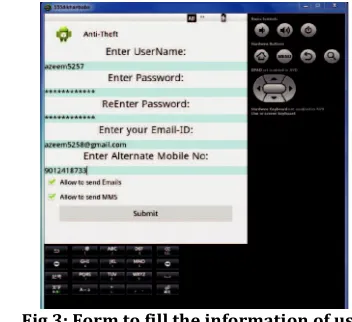
As we can see in this image, the use r has to run the program Application.apk and have to fill the information in the textboxes. Once it will be submitted, it starts running in the background. This makes our application very easy for users who do not have much technical knowledge.
Fig 3: Form to fill the information of user. B. How to Activate the Camera
In this section, we discuss how to control the camera in android without showing the preview of picture and click automatically.
To do this android SDK provides a fram ework API which gives an in built application of camera whe re you can request a picture or video from an already existing camera application. To use camera device, as we mentioned a bove, you have to declare camera permission in manifest file.
<uses-permission
android:name="”android.per mission.CAMERA" />
First of all, we should c heck for camera whether it is available or not, and also number of cameras’ available (front and rear). This can be done by calling this method
PackageManager.hasSystemFeature()and Camera.getNumberOfCameras () respectively.
The android framework pro vides Camera API and Camera Intent to capturing images an d videos. Camera intent is used directly i.e. without creating c amera object. Camera intent is a fast way to use camera application, it provides an intent action type to request a picture and a video clip from a camera
MediaStore.Action_Image_capture MediaStore.Action_Video_capture
ISSN : 2394-2231
http://www.ijctjournal.org
Page 128
onActivityMethod () where the data gets stored in the SDcard. The media files should be saved in external storage to save internal memory, to get the location of shared directory,
Environment.getExternalStoragePublicDirectory( Environment.DIRECTORY_PICTURES).
This method is used where me dia files should be stored.
Fig 4: Preview of picture or video from rear camera, this activity works in the background. C. How to Send an MMS & E mail
As we had mentioned, to use SIM services in an application one has to take permission by declaring in manifest file. MMS is an http-post request, we have to request some extra network feature to send an MMS. MMS uses private API’s which is not ava ilable in android SDK. One way to send an MMS is to use Android GIT repositories [6][7][8][10][11] which gives internal packages to send MMS with any image or any audio or video files.
To send an email you have to set permission for internet services in manifest file to open a network socket for an application.
<Use-permission
android:name=""android.permission.INTERNET"/> To send an email without user interaction you can use many private APIS' like one provided by gmail. In this application we use three jar files mail.jar, activation.jar. additional.jar, which provide package to send an email automatically with attached image or video
VI CONCLUSION
This paper presents a novel anti-theft application for android based device. The application Deploys an enterprise security solution that meets users immediate and long term requirements by providing the images and videos of the thief, which make easy for the user to identify the theif and make him/her get caught and arrested. We are enhancing this application by providing the information about the location of the android based smartphones with the help of text messages.
With the advent of time, technology is evolving every day. Our application will further be developed and improved. Currently this application is available for
android based mobile phone. Future work involves development of the application for iOS, Symbian, Windows mobile OS etc.
REFERENCES
1. Reto Meier, Professional Android 2 Application
Development, 2nd edition Wiley Publishing Inc., 2010. 2. J.F. DiMarziio, Android a programmer's Guide, 1st
edition, McGraw-Hill Companies, 2008.
3. Claudio Maia, Lu¿¿s Nogueira, Lu¿¿s Miguel Pinho, "Evaluating Android OS for Embedded Real-Time Systems", CISTER Research Centre, Porto, Portugal,http://www.utdallas.edu/~cxl137330/cours es/ fall13/RTS/papers/4a.pdf
4. Google Developer, http://developer.android.com, last accessed on Sep 20, 2013.
5. Ed Burnette, Hello, Android: Introducing Google's Mobile Development Platform, 3rd edition, Pragmatic Bookshelf, 2010.
6. https://android.googlesource.com/, last accessed on Aug 06, 2013.
7. Chandra, Ankur, Shashank Jain, and Mohammed Abdul
Qadeer. "GPS Locator: An Application for Location Tracking and Sharing Using GPS for Java Enabled Handhelds." In Computational Intelligence and Communication Networks (CICN), 2011 International Conference on, pp. 406-410. IEEE, 2011. Abstract | Full Text: PDF (724KB) | Full Text: HTML
8. Kumar, Sandeep, Mohammed Abdul Qadeer, and
Archana Gupta. "Location based services using android." In IMSAA'09: Proceedings of the 3rd IEEE International Conference on Internet Multimedia Services Architecture and Applications, pp. 335-339. 2009. Abstract | Full Text: PDF (402KB) | Full Text: HTML
9. Imran, Ale, Mohammed A. Qadeer, and M. Khan.
"Asterisk VoIP private branch exchange." In Multimedia, Signal Processing and Communication Technologies, 2009. IMPACT'09. International, pp. 217-220. IEEE, 2009. Abstract | Full Text: PDF (1030KB) | Full Text: HTML
10. Qadeer, Mohammed Abdul, Ankur Chandra, and
Shashank Jain. "Design and Implementation of Location Awareness and Sharing System using GPS and 3G/GPRS." (2012): 125-140.
11. Chandra, Ankur, Shashank Jain, and Mohammed Abdul
Qadeer. "Implementation of location awareness and sharing system based on GPS and GPRS using J2ME, PHP and MYSQL." In Computer Research and Development (ICCRD), 2011 3rd International Conference on, vol. 1, pp. 216-220. IEEE, 2011. Abstract | Full Text: PDF (253KB) | Full Text: HTML
12. Qadeer, Mohammed A., Nadeem Akhtar, Shalini Govil,
ISSN : 2394-2231
http://www.ijctjournal.org
Page 129
2009. International Conference on, pp. 339-343. IEEE,2009. Abstract | Full Text: PDF (375KB) | Full Text: HTML
13. Salim, Mohammad, M. Sana Akhtar, and Mohammed A.
Qadeer. "Data Retrieval and Security Using Lightweight Directory Access Protocol." InKnowledge Discovery and Data Mining, 2009. WKDD 2009. Second International Workshop on, pp. 685-688. IEEE, 2009. Abstract | Full Text: PDF (456KB) | Full Text: HTML
14. Habeeb, Ahmad Ali, and Mohammed Abdul Qadeer.
"Interference evaluation and MS controlled Handoff Technique for FemtoCell." In Internet, 2009. AH-ICI 2009. First Asian Himalayas International Conference on, pp. 1-5. IEEE, 2009. Abstract | Full Text: PDF (1094KB) | Full Text: HTML
15. Qadeer, Mohammed A., Robin Kasana, and Sarvat
Sayeed. "Encrypted voice calls with ip enabled wireless phones over gsm/cdma/wifi networks." In Computer Engineering and Technology, 2009. ICCET'09. International Conference on, vol. 2, pp. 218-222. IEEE, 2009. Abstract | Full Text: PDF (397KB) | Full Text: HTML
16. Qadeer, Mohammed A., Rehan Ahmad, Mohd Siddique
Khan, and Tauseef Ahmad. "Real time video streaming
over heterogeneous networks." InAdvanced
Communication Technology, 2009. ICACT 2009. 11th International Conference on, vol. 2, pp. 1117-1122. IEEE, 2009. Abstract | Full Text: PDF (830KB) | Full Text: HTML
17. Habeeb, Ahmad Ali, Mohammed A. Qadeer, and
Shamshir Ahmad. "Voice communication over
GGSN/SGSN." In Advanced Communication
Technology, 2009. ICACT 2009. 11th International Conference on, vol. 1, pp. 682-687. IEEE, 2009. Abstract | Full Text: PDF (793KB) | Full Text: HTML 18. Imran, Ale, and Mohammed A. Qadeer. "Conferencing,
paging, voice mailing via Asterisk EPBX." In Computer Engineering and Technology, 2009. ICCET'09. International Conference on, vol. 1, pp. 186-190. IEEE, 2009. Abstract | Full Text: PDF (512KB) | Full Text: HTML
19. Qadeer, Mohammed A., Robin Kasana, and Sarvat
Sayeed. "Encrypted voice calls with ip enabled wireless phones over gsm/cdma/wifi networks." In Computer Engineering and Technology, 2009. ICCET'09. International Conference on, vol. 2, pp. 218-222. IEEE, 2009. Abstract | Full Text: PDF (397KB) | Full Text: HTML
20. Shahid, Mohammad, and Mohammed A. Qadeer.
"Novel scheme for securing passwords." In Digital Ecosystems and Technologies, 2009. DEST'09. 3rd IEEE International Conference on, pp. 223-227. IEEE, 2009. Abstract | Full Text: PDF (984KB) | Full Text: HTML
21. Qadeer, Mohammed Abdul, Kanika Shah, and Utkarsh
Goel. "Voice-Video Communication on Mobile Phones and PCs' Using Asterisk EPBX." InCommunication Systems and Network Technologies (CSNT), 2012 International Conference on, pp. 534-538. IEEE, 2012. Abstract | Full Text: PDF (634KB) | Full Text: HTML
22. Ansari, Abdullah Mohammad, Md Nehal, and
Mohammed Abdul Qadeer. "SIP-based Interactive Voice Response System using FreeSwitch EPBX." InWireless and Optical Communications Networks (WOCN), 2013 Tenth International Conference on, pp. 1-5. IEEE, 2013. Abstract | Full Text: PDF (650KB)
23. Gupta, Priyanka, Neha Agrawal, and Mohammed
Abdul Qadeer. "GSM and PSTN gateway for asterisk EPBX." In Wireless and Optical Communications Networks (WOCN), 2013 Tenth International Conference on, pp. 1-5. IEEE, 2013. Abstract | Full Text: PDF (904KB) | Full Text: HTML
24. Varshney, Abhishek, and Mohammed Abdul Qadeer.
"Mobile Peer to Peer Spontaneous and Real-Time Social Networking." In Advances in Computing and Communications, pp. 442-451. Springer Berlin Heidelberg, 2011. [CrossRef]
25. Deepak Kumar and Mohammed Abdul Qadeer, "SMS Based Emerging Techniques for Monitoring and Controlling Android Mobiles," International Journal of Engineering and Technology vol. 4, no. 6, pp. 798-802, 2012. [CrossRef]
26. Qadeer, Mohammed A., Rahul Agrawal, Amit Singhal, and Sarosh Umar. "Bluetooth enabled mobile phone remote control for PC." In Advanced Computer Control, 2009. ICACC'09. International Conference on, pp. 747-751. IEEE, 2009. Abstract | Full Text: PDF (764KB) | Full Text: HTML
27. Qadeer, Mohammed Abdul. "Dynamic call transfer through wi-fi networks using asterisk." In Proceedings of the International Conference on Soft Computing for Problem Solving (SocProS 2011) December 20-22, 2011, pp. 51-61. Springer India, 2012. [CrossRef]
BIOGRAPHIES