8.0
Configuration, Command,
and File Reference
ISBN: N/A
Publication date:
This Reference documents the server configuration and command-line utilities provided with Red Hat Directory Server 8.0.
Copyright©2008 Red Hat, Inc.
Copyright©You need to override this in your local ent file Red Hat. This material may only be distributed subject to the terms and conditions set forth in the Open Publication License, V1.0 or later with the restrictions noted below (the latest version of the OPL is presently available athttp://www.opencontent.org/openpub/).
Distribution of substantively modified versions of this document is prohibited without the explicit permission of the copyright holder.
Distribution of the work or derivative of the work in any standard (paper) book form for commercial purposes is prohibited unless prior permission is obtained from the copyright holder.
Red Hat and the Red Hat "Shadow Man" logo are registered trademarks of Red Hat, Inc. in the United States and other countries.
All other trademarks referenced herein are the property of their respective owners.
The GPG fingerprint of the [email protected] key is:
CA 20 86 86 2B D6 9D FC 65 F6 EC C4 21 91 80 CD DB 42 A6 0E 1801 Varsity Drive Raleigh, NC 27606-2072 USA Phone: +1 919 754 3700 Phone: 888 733 4281 Fax: +1 919 754 3701 PO Box 13588
Research Triangle Park, NC 27709 USA
2. Other Reading ... vii
3. Document Conventions ... viii
4. We Need Feedback! ...x
1. Introduction ... 1
1. Directory Server Configuration ... 1
2. Directory Server Instance File Reference ... 1
3. Using Directory Server Command-Line Utilities ... 1
4. Using Directory Server Command-Line Scripts ... 1
2. Core Server Configuration Reference ... 3
1. Server Configuration - Overview ... 3
2. Accessing and Modifying Server Configuration ... 8
3. Core Server Configuration Attributes Reference ...11
3. Plug-in Implemented Server Functionality Reference ... 107
1. Server Plug-in Functionality Reference ... 107
2. List of Attributes Common to All Plug-ins ... 127
3. Attributes Allowed by Certain Plug-ins ... 129
4. Database Plug-in Attributes ... 131
5. Database Link Plug-in Attributes (Chaining Attributes) ... 158
6. Retro Changelog Plug-in Attributes ... 167
4. Server Instance File Reference ... 171
1. Overview of Directory Server Files ... 171
2. Backup Files ... 173 3. Configuration Files ... 173 4. Database Files ... 173 5. LDIF Files ... 175 6. Lock Files ... 176 7. Log Files ... 176 8. PID Files ... 177 9. Tools ... 177 10. Scripts ... 178
5. Access Log and Connection Code Reference ... 179
1. Access Log Content ... 179
2. Common Connection Codes ... 191
3. LDAP Result Codes ... 192
6. Command-Line Utilities ... 195
1. Finding and Executing Command-Line Utilities ... 195
2. Using Special Characters ... 195
3. Command-Line Utilities Quick Reference ... 196
4. ldapsearch ... 197 5. ldapmodify ... 214 6. ldapdelete ... 221 7. ldappasswd ... 227 8. ldif ... 234 9. dbscan ... 235
7. Command-Line Scripts ... 241
1. Finding and Executing Command-Line Scripts ... 241
2. Command-Line Scripts Quick Reference ... 241
3. Shell Scripts ... 243
4. Perl Scripts ... 259
A. Using the ns-slapd Command-Line Utilities ... 277
1. Overview of ns-slapd ... 277
2. Finding and Executing the ns-slapd Command-Line Utilities ... 277
3. Utilities for Exporting Databases: db2ldif ... 277
4. Utilities for Restoring and Backing up Databases: ldif2db ... 279
5. Utilities for Restoring and Backing up Databases: archive2db ... 281
6. Utilities for Restoring and Backing up Databases: db2archive ... 282
7. Utilities for Creating and Regenerating Indexes: db2index ... 282
B. Revision History ... 285
Glossary ... 287
server based on the industry-standard Lightweight Directory Access Protocol (LDAP). Directory Server is the cornerstone for building a centralized and distributed data repository that can be used in an intranet, over an extranet with trading partners, or over the public Internet to reach customers.
This reference covers the server configuration and the command-line utilities. It is designed primarily for directory administrators and experienced directory users who want to use the command-line to access the directory. After configuring the server, use this reference to help maintain it.
The Directory Server can also be managed through the Directory Server Console, a graphical user interface. The Red Hat Directory Server Administration Guide describes how to do this and explains individual administration tasks more fully.
1. Directory Server Overview
The major components of Directory Server include:• An LDAP server – The LDAP v3-compliant network daemon.
• Directory Server Console – A graphical management console that dramatically reduces the effort of setting up and maintaining your directory service.
• SNMP agent – Can monitor the Directory Server using the Simple Network Management Protocol (SNMP).
• Directory Gateway – A web application which allows users to search for information in the Directory Server, in addition to providing self service access to their own information, including password changes, to reduce user support costs.
• Org Chart – A web application which shows a graphical view of the structure of your organization.
2. Other Reading
This reference does not describe many of the basic directory and architectural concepts to design, implement, and administer the directory service successfully. Those concepts are described in the Red Hat Directory Server Administration Guide. Read that book before continuing with this reference.
After becoming familiar with Directory Server concepts and doing some preliminary planning for the directory service, install the Directory Server. The instructions for installing the Directory Server components are contained in the Red Hat Directory Server Installation Guide.
designed primarily for directory administrators and experienced directory users who want to use the command line to access the directory. After configuring the server, use this reference guide to maintain it.
The document set for Directory Server also contains the following guides:
• Red Hat Directory Server Release Notes - Contains important information on new features, fixed bugs, known issues and work arounds, and other important deployment information for this specific version of Directory Server.
• Red Hat Directory Server Installation Guide. Contains procedures for installing Directory Server as well as procedures for migrating the Directory Server.
• Red Hat Directory Server Administration Guide. Contains procedures for the day-to-day maintenance of the directory service. Includes information on configuring server-side plug-ins. For the latest information about Directory Server, including current release notes, complete product documentation, technical notes, and deployment information, see the Red Hat Directory Server documentation main page athttp://www.redhat.com/docs/manuals/dir-server/.
3. Document Conventions
Certain words in this manual are represented in different fonts, styles, and weights. This highlighting indicates that the word is part of a specific category. The categories include the following:
Courier font
Courier font representscommands,file names and paths, andprompts. When shown as below, it indicates computer output:
Desktop about.html logs paulwesterberg.png
Mail backupfiles mail reports
bold Courier font
Bold Courier font represents text that you are to type, such as:service jonas start If you have to run a command as root, the root prompt (#) precedes the command:
italic Courier font
Italic Courier font represents a variable, such as an installation directory:
install_dir/bin/
bold font
Bold font represents application programs and text found on a graphical interface. When shown like this: OK , it indicates a button on a graphical application interface.
Additionally, the manual uses different strategies to draw your attention to pieces of information. In order of how critical the information is to you, these items are marked as follows:
Note
A note is typically information that you need to understand the behavior of the system.
Tip
A tip is typically an alternative way of performing a task.
Important
Important information is necessary, but possibly unexpected, such as a configuration change that will not persist after a reboot.
Caution
A caution indicates an act that would violate your support agreement, such as recompiling the kernel.
Warning
A warning indicates potential data loss, as may happen when tuning hardware for maximum performance.
4. We Need Feedback!
If you find a typographical error in this manual, or if you have thought of a way to make this manual better, we would love to hear from you! Please submit a report in Bugzilla:
http://bugzilla.redhat.com/bugzilla/against the product Red Hat Directory Server.
When submitting a bug report, be sure to mention the manual's identifier: Red Hat Directory Server 8.0
If you have a suggestion for improving the documentation, try to be as specific as possible when describing it. If you have found an error, please include the section number and some of the surrounding text so we can find it easily.
Introduction
Directory Server is based on an open-systems server protocol called the Lightweight Directory Access Protocol (LDAP). The Directory Server is a robust, scalable server designed to manage large scale directories to support an enterprise-wide directory of users and resources, extranets, and e-commerce applications over the Internet. The Directory Server runs as thens-slapd process or service on the machine. The server manages the directory databases and responds to client requests.
This reference deals with the other methods of managing the Directory Server by altering the server configuration attributes using the command line and using command-line utilities and scripts.
1. Directory Server Configuration
The format and method for storing configuration information for Directory Server and a listing for all server attributes are found in two chapters,Chapter 2, Core Server Configuration Reference
andChapter 3, Plug-in Implemented Server Functionality Reference.
2. Directory Server Instance File Reference
Chapter 4, Server Instance File Referencehas an overview of the files and configuration information stored in each instance of Directory Server. This is useful reference to helps administrators understand the changes or absence of changes in the course of directory activity. From a security standpoint, this also helps users detect errors and intrusion by highlighting normal changes and abnormal behavior.
3. Using Directory Server Command-Line Utilities
Directory Server comes with a set of configurable command-line utilities that can search and modify entries in the directory and administer the server.Chapter 6, Command-Line Utilitiesdescribes these command-line utilities and contains information on where the utilities are stored and how to access them. In addition to these command-line utilities, Directory Server also providesns-slapdcommand-line utilities for performing directory operations, as described in
Appendix A, Using the ns-slapd Command-Line Utilities.
4. Using Directory Server Command-Line Scripts
In addition to command-line utilities, several non-configurable scripts are provided with the Directory Server that make it quick and easy to perform routine server administration tasks from the command-line.Chapter 7, Command-Line Scriptslists the most frequently used scripts and contains information on where the scripts are stored and how to access them.Core Server Configuration Reference
The configuration information for Red Hat Directory Server is stored as LDAP entries within the directory itself. Therefore, changes to the server configuration must be implemented through the use of the server itself rather than by simply editing configuration files. The principal advantage of this method of configuration storage is that it allows a directory administrator to reconfigure the server using LDAP while it is still running, thus avoiding the need to shut the server down for most configuration changes.This chapter gives details on how the configuration is organized and how to alter it. The chapter also provides an alphabetical reference for all attributes.
1. Server Configuration - Overview
When the Directory Server is set up, its default configuration is stored as a series of LDAP entries within the directory, under the subtreecn=config. When the server is started, the contents of thecn=configsubtree are read from a file (dse.ldif) in LDIF format. This
dse.ldiffile contains all of the server configuration information. The latest version of this file is calleddse.ldif, the version prior to the last modification is calleddse.ldif.bak, and the latest file with which the server successfully started is calleddse.ldif.startOK.
Many of the features of the Directory Server are designed as discrete modules that plug into the core server. The details of the internal configuration for each plug-in are contained in separate entries undercn=plugins,cn=config. For example, the configuration of the Telephone Syntax Plug-in is contained in this entry:
cn=Telephone Syntax,cn=plugins,cn=config
Similarly, database-specific configuration is stored undercn=ldbm
database,cn=plugins,cn=configfor local databases andcn=chaining database,cn=plugins,cn=configfor database links.
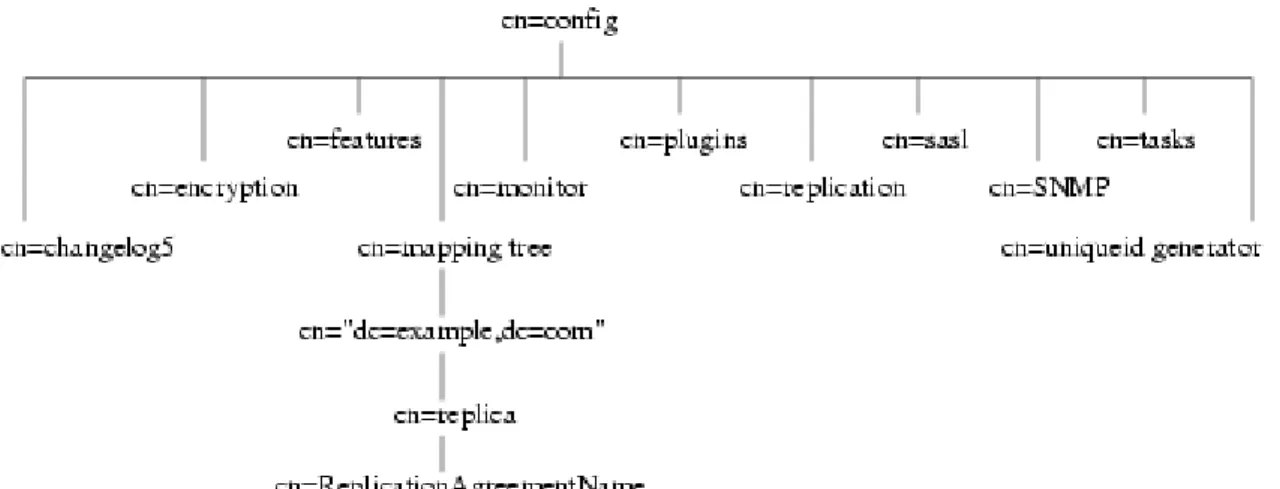
The following diagram illustrates how the configuration data fits within thecn=configdirectory information tree.
Figure 2.1. Directory Information Tree Showing Configuration Data
1.1. LDIF and Schema Configuration Files
The Directory Server configuration data is automatically output to files in LDIF format that are located in the/var/lib/dirsrv/slapd-instance_name/ldifdirectory on Red Hat Enterprise Linux and Solaris and/var/opt/dirsrv/slapd-serverID/ldifon HP-UX. Thus, if a server identifier isphonebook, then for a Directory Server on Red Hat Enterprise Linux 5, the configuration LDIF files are all stored under/var/lib/dirsrv/slapd-phonebook/ldif. This directory also contains other server instance-specific configuration files.
Schema configuration is also stored in LDIF format, and these files are located in /etc/dirsrv/slapd-instance_name/schema.
The following table lists all of the configuration files that are supplied with the Directory Server, including those for the schema of other compatible servers. Each file is preceded by a number which indicates the order in which they should be loaded (in ascending numerical and then alphabetical order).
Configuration Filename Purpose
dse.ldif Contains front-end Directory Specific Entries created by the directory at server startup. These include the Root DSE ("") and the contents ofcn=configandcn=monitor(acis only).
00core.ldif Contains only those schema definitions necessary for starting the server with the bare minimum feature set (no user schema, no schema for any non-core features). The rest of the schema used by users, features, and applications is found in01common.ldifand the other schema files. Do not modify this file.
Configuration Filename Purpose
01common.ldif Contains LDAPv3 standard operational schema, such assubschemaSubentry, LDAPv3 standard user and organization schema defined in RFC 2256 (based on X.520/X.521),inetOrgPersonand other widely-used attributes, and the operational attributes used by Directory Server
configuration. Modifying this file causes interoperability problems. User-defined attributes should be added through the Directory Server Console.
05rfc2247.ldif Schema from RFC 2247 and related pilot schema, from "Using Domains in LDAP/X500 Distinguished Names."
05rfc2927.ldif Schema from RFC 2927, "MIME Directory Profile for LDAP Schema." Contains the
ldapSchemasoperational attribute required for the attribute to show up in thesubschema subentry.
10presence.ldif Legacy. Schema for instant messaging presence (online) information; the file lists the default object classes with the allowed
attributes that must be added to a user's entry in order for instant-messaging presence information to be available for that user. 10rfc2307.ldif Schema from RFC 2307, "An Approach for
Using LDAP as a Network Information Service." This may be superseded by 10rfc2307bis, the new version ofrfc2307, when that schema becomes available. 20subscriber.ldif Contains new schema elements and the
Nortel subscriber interoperability specification. Also contains theadminRoleandmemberOf
attributes andinetAdminobject class, previously stored in the
50ns-delegated-admin.ldiffile. 25java-object.ldif Schema from RFC 2713, "Schema for
Representing Java® Objects in an LDAP Directory."
28pilot.ldif Contains pilot directory schema from RFC 1274, which is no longer recommended for new deployments. Future RFCs which succeed RFC 1274 may deprecate some or
Configuration Filename Purpose
all of28pilot.ldifattribute types and classes.
30ns-common.ldif Schema that contains objects classes and attributes common to the Directory Server Console framework.
50ns-admin.ldif Schema used by Red Hat Administration Server.
50ns-certificate.ldif Schema for Red Hat Certificate Management System.
50ns-directory.ldif Contains additional configuration schema used by Directory Server 4.12 and earlier versions of the directory, which is no longer applicable to current releases of Directory Server. This schema is required for replicating between Directory Server 4.12 and current releases.
50ns-mail.ldif Schema used by Netscape Messaging Server to define mail users and mail groups.
50ns-value.ldif Schema for servers' value item attributes.
50ns-web.ldif Schema for Netscape Web Server.
60pam-plugin.ldif Reserved for future use.
99user.ldif User-defined schema maintained by Directory Server replication consumers which contains the attributes and object classes from the suppliers.
Table 2.1. Directory Server LDIF Configuration Files
1.2. How the Server Configuration Is Organized
Thedse.ldiffile contains all configuration information including directory-specific entries created by the directory at server startup, such as entries related to the database. The file includes the root Directory Server entry (or DSE, named by"") and the contents ofcn=config andcn=monitor.
When the server generates thedse.ldiffile, it lists the entries in hierarchical order in the order that the entries appear in the directory undercn=config, which is usually the same order in which an LDAP search of subtree scope for basecn=configreturns the entries.
dse.ldifalso contains thecn=monitorentry, which is mostly read-only, but can have ACIs set on it.
NOTE
Thedse.ldiffile does not contain every attribute incn=config. If the attribute
has not been set by the administrator and has a default value, the server will not write it todse.ldif. To see every attribute incn=config, useldapsearch.
1.2.1. Configuration Attributes
Within a configuration entry, each attribute is represented as an attribute name. The value of the attribute corresponds to the attribute's configuration.
The following code sample is an example of part of thedse.ldiffile for a Directory Server. The example shows, among other things, that schema checking has been enabled; this is
represented by the attributensslapd-schemacheck, which takes the valueon.
dn: cn=config objectclass: top objectclass: extensibleObject objectclass: nsslapdConfig nsslapd-accesslog-logging-enabled: on nsslapd-enquote-sup-oc: off nsslapd-localhost: phonebook.example.com nsslapd-schemacheck: on nsslapd-port: 389 nsslapd-localuser: nobody ...
1.2.2. Configuration of Plug-in Functionality
The configuration for each part of Directory Server plug-in functionality has its own separate entry and set of attributes under the subtreecn=plugins,cn=config. The following code sample is an example of the configuration entry for an example plug-in, the Telephone Syntax plug-in. dn: cn=Telephone Syntax,cn=plugins,cn=config objectclass: top objectclass: nsSlapdPlugin objectclass: extensibleObject cn: Telephone Syntax nsslapd-pluginType: syntax nsslapd-pluginEnabled: on
Some of these attributes are common to all plug-ins, and some may be particular to a specific plug-in. Check which attributes are currently being used by a given plug-in by performing an
ldapsearchon thecn=configsubtree.
For a list of plug-ins supported by Directory Server, general plug-in configuration information, the plug-in configuration attribute reference, and a list of plug-ins requiring restart for
configuration changes, seeChapter 3, Plug-in Implemented Server Functionality Reference.
1.2.3. Configuration of Databases
Thecn=NetscapeRootandcn=UserRootsubtrees under the database plug-in entry contain configuration data for the databases containing theo=NetscapeRootsuffix and the default suffix created during setup, such asdc=example,dc=com.
These entries and their children have many attributes used to configure different database settings, like the cache sizes, the paths to the index files and transaction logs, entries and attributes for monitoring and statistics; and database indexes.
1.2.4. Configuration of Indexes
Configuration information for indexing is stored as entries in the Directory Server under the following information-tree nodes:
• cn=index,cn=NetscapeRoot,cn=ldbm database,cn=plugins,cn=config • cn=index,cn=UserRoot,cn=ldbm database,cn=plugins,cn=config
• cn=default indexes,cn=config,cn=ldbm database,cn=plugins,cn=config
For more information about indexes in general, see the Directory Server Administration Guide. For information about the index configuration attributes, seeSection 4.1, “Database Attributes under cn=config, cn=ldbm database, cn=plugins, cn=config”.
2. Accessing and Modifying Server Configuration
This section discusses access control for configuration entries and describes the various ways in which the server configuration can be viewed and modified. It also covers restrictions to the kinds of modification that can be made and discusses attributes that require the server to be restarted for changes to take effect.
2.1. Access Control for Configuration Entries
When the Directory Server is installed, a default set of access control instructions (ACIs) is implemented for all entries undercn=config. The following code sample is an example of these default ACIs.
aci: (targetattr = "*")(version 3.0; acl "Configuration Administrators Group"; allow (all)
groupdn = "ldap:///cn=Configuration Administrators,u=Groups, ou=TopologyManagement, o=NetscapeRoot";)
aci: (targetattr = "*")(version 3.0; acl "Configuration Administrator"; allow (all)
userdn = "ldap:///uid=admin, ou=Administrators, ou=TopologyManagement, o=NetscapeRoot";)
aci: (targetattr = "*")(version 3.0; acl "Local Directory Administrators Group"; allow (all)
groupdn = "ldap:///ou=Directory Administrators, dc=example,dc=com";) aci: (targetattr = "*")(version 3.0; acl "SIE Group"; allow(all)
groupdn = "ldap:///cn=slapd-phonebook, cn=Red Hat Directory Server, cn=Server Group, cn=phonebook.example.com, dc=example,dc=com, o=NetscapeRoot";)
These default ACIs allow all LDAP operations to be carried out on all configuration attributes by the following users:
• Members of the Configuration Administrators group.
• The user acting as the administrator, theadminaccount that was configured at setup. By default, this is the same user account which is logged into the Console.
• Members of local Directory Administrators group.
• The SIE (Server Instance Entry) group, usually assigned using the Set Access Permissions process the main console.
For more information on access control, see the Directory Server Administration Guide.
2.2. Changing Configuration Attributes
Server attributes can be viewed and changed in one of three ways: through the Directory Server Console, by performingldapsearchandldapmodifycommands, or by manually editing the dse.ldiffile.
NOTE
Before editing thedse.ldiffile, the server must be stopped; otherwise, the changes are lost. Editing thedse.ldiffile is recommended only for changes to attributes which cannot be altered dynamically. SeeSection 2.2.3, “Configuration Changes Requiring Server Restart”for further information.
The following sections describe how to modify entries using LDAP (both by using Directory Server Console and by using the command line), the restrictions that apply to modifying entries, the restrictions that apply to modifying attributes, and the configuration changes requiring restart.
2.2.1. Modifying Configuration Entries Using LDAP
The configuration entries in the directory can be searched and modified using LDAP either via the Directory Server Console or by performingldapsearchandldapmodifyoperations in the same way as other directory entries. The advantage of using LDAP to modify entries is changes can be made while the server is running.
For further information, see the "Creating Directory Entries" chapter in the Directory Server Administration Guide. However, certain changes do require the server to be restarted before they are taken into account. SeeSection 2.2.3, “Configuration Changes Requiring Server Restart”for further information.
NOTE
As with any set of configuration files, care should be taken when changing or deleting nodes in thecn=configsubtree as this risks affecting Directory Server
functionality.
The entire configuration, including attributes that always take default values, can be viewed by performing anldapsearchoperation on thecn=configsubtree:
ldapsearch -b cn=config -D bindDN -w password
• bindDN is the DN chosen for the Directory Manager when the server was installed (cn=Directory Managerby default).
• password is the password chosen for the Directory Manager.
For more information on usingldapsearch, seeSection 4, “ldapsearch”.
To disable a plug-in, useldapmodifyto edit thensslapd-pluginEnabledattribute:
ldapmodify -D cn="directory manager" -w password dn: cn=Telephone Syntax,cn=plugins,cn=config changetype: modify
replace: nsslapd-pluginEnabled nsslapd-pluginEnabled: off
2.2.2. Restrictions to Modifying Configuration Entries and Attributes
• Thecn=monitorentry and its child entries are read-only and cannot be modified, except to manage ACIs.
• If an attribute is added tocn=config, the server ignores it. • If an invalid value is entered for an attribute, the server ignores it.
• Becauseldapdeleteis used for deleting an entire entry, useldapmodifyto remove an attribute from an entry.
2.2.3. Configuration Changes Requiring Server Restart
Some configuration attributes cannot be altered while the server is running. In these cases, for the changes to take effect, the server needs to be shut down and restarted. The modifications should be made either through the Directory Server Console or by manually editing the
dse.ldiffile. Some of the attributes that require a server restart for any changes to take effect are listed below. This list is not exhaustive; to see a complete list, runldapsearchand search for thensslapd-requiresrestartattribute. For example:
ldapsearch -p 389 -D "cn=directory manager" -w password -s sub -b "cn=config"
"(objectclass=*)" | grep nsslapd-requiresrestart
nsslapd-cachesize nsslapd-certdir nsslapd-dbcachesize nsslapd-dbncache nsslapd-plugin nsslapd-changelogdir nsslapd-changelogmaxage nsslapd-changelogmaxentries nsslapd-port nsslapd-schemadir nsslapd-saslpath nsslapd-secureport nsslapd-tmpdir nsSSL2 nsSSL3 nsSSLclientauth nsSSLSessionTimeout nsslapd-conntablesize nsslapd-lockdir nsslapd-maxdescriptors nsslapd-reservedescriptors nsslapd-listenhost nsslapd-schema-ignore-trailing-spaces nsslapd-securelistenhost nsslapd-workingdir nsslapd-return-exact-case
3. Core Server Configuration Attributes Reference
This section contains reference information on the configuration attributes that are relevant to the core server functionality. For information on changing server configuration, seeSection 2, “Accessing and Modifying Server Configuration”. For a list of server features that areimplemented as plug-ins, seeSection 1, “Server Plug-in Functionality Reference”. For help with implementing custom server functionality, contact Directory Server support.
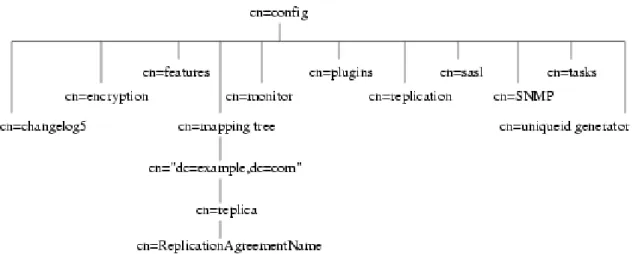
The configuration information stored in thedse.ldiffile is organized as an information tree under the general configuration entrycn=config, as shown in the following diagram.
Figure 2.2. Directory Information Tree Showing Configuration Data
Most of these configuration tree nodes are covered in the following sections.
Thecn=pluginsnode is covered inChapter 3, Plug-in Implemented Server Functionality
Reference. The description of each attribute contains details such as the DN of its directory entry, its default value, the valid range of values, and an example of its use.
NOTE
Some of the entries and attributes described in this chapter may change in future releases of the product.
3.1. cn=config
General configuration entries are stored in thecn=configentry. Thecn=configentry is an instance of thensslapdConfigobject class, which in turn inherits fromextensibleObject object class.
3.1.1. nsslapd-accesslog (Access Log)
This attribute specifies the path and filename of the log used to record each LDAP access. The following information is recorded by default in the log file:
• Operations performed (for example, search, add, and modify).
• Result of the access (for example, the number of entries returned or an error code). For more information on turning access logging off, see the "Monitoring Server and Database Activity" chapter in the Directory Server Administration Guide.
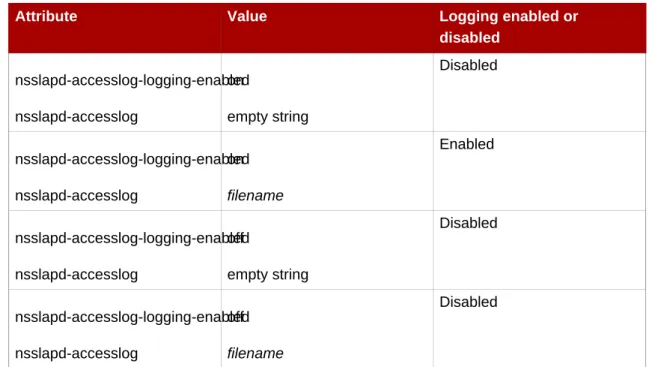
For access logging to be enabled, this attribute must have a valid path and parameter, and the
nsslapd-accesslog-logging-enabledconfiguration attribute must be switched toon. The table lists the four possible combinations of values for these two configuration attributes and their outcome in terms of disabling or enabling of access logging.
Attribute Value Logging enabled or disabled nsslapd-accesslog-logging-enabled nsslapd-accesslog on empty string Disabled nsslapd-accesslog-logging-enabled nsslapd-accesslog on filename Enabled nsslapd-accesslog-logging-enabled nsslapd-accesslog off empty string Disabled nsslapd-accesslog-logging-enabled nsslapd-accesslog off filename Disabled
Table 2.2. dse.ldif File Attributes
Parameter Description
Entry DN cn=config
Valid Values Any valid filename.
Default Value /var/log/dirsrv/slapd-instance_name/access
Syntax DirectoryString
Example nsslapd-accesslog:
/var/log/dirsrv/slapd-instance_name/access
3.1.2. nsslapd-accesslog-level
Parameter Description
Entry DN cn=config
Valid Values
• 0 - No access logging
• 4 - Logging for internal access operations • 256 - Logging for connections, operations,
and results
• 512 - Logging for access to an entry and referrals
• 131072 - Provides microsecond operation timing
• These values can be added together to provide the exact type of logging required; for example,516(4 + 512) to obtain internal access operation, entry access, and referral logging.
Default Value 256
Syntax Integer
Example nsslapd-accesslog-level: 256
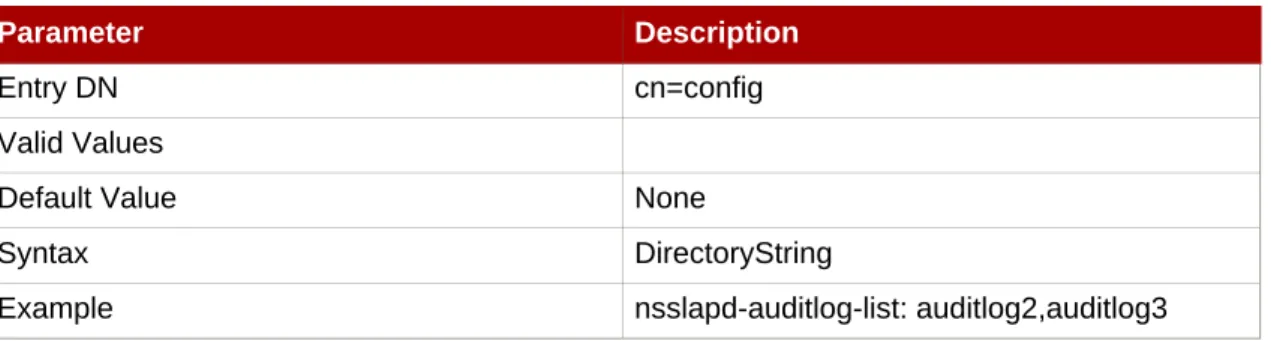
3.1.3. nsslapd-accesslog-list
This read-only attribute, which cannot be set, provides a list of access log files used in access log rotation.
Parameter Description
Entry DN cn=config
Valid Values
Default Value None
Syntax DirectoryString
Example nsslapd-accesslog-list:
accesslog2,accesslog3
3.1.4. nsslapd-accesslog-logbuffering (Log Buffering)
When set tooff, the server writes all access log entries directly to disk. Buffering allows the server to use access logging even when under a heavy load without impacting performance.
However, when debugging, it is sometimes useful to disable buffering in order to see the operations and their results right away instead of having to wait for the log entries to be flushed to the file. Disabling log buffering can severely impact performance in heavily loaded servers.
Parameter Description
Entry DN cn=config
Valid Values on | off
Default Value on
Syntax DirectoryString
Example nsslapd-accesslog-logbuffering: off
3.1.5. nsslapd-accesslog-logexpirationtime (Access Log Expiration
Time)
This attribute specifies the maximum age that a log file is allowed to reach before it is deleted. This attribute supplies only the number of units. The units are provided by the
nsslapd-accesslog-logexpirationtimeunitattribute.
Parameter Description
Entry DN cn=config
Valid Range 1 to the maximum 32 bit integer value (2147483647)
Default Value 1
Syntax Integer
Example nsslapd-accesslog-logexpirationtime: 2
3.1.6. nsslapd-accesslog-logexpirationtimeunit (Access Log
Expiration Time Unit)
This attribute specifies the units fornsslapd-accesslog-logexpirationtimeattribute. If the unit is unknown by the server, then the log never expires.
Parameter Description
Entry DN cn=config
Valid Values month | week | day
Default Value month
Syntax DirectoryString
Example nsslapd-accesslog-logexpirationtimeunit:
3.1.7. nsslapd-accesslog-logging-enabled (Access Log Enable
Logging)
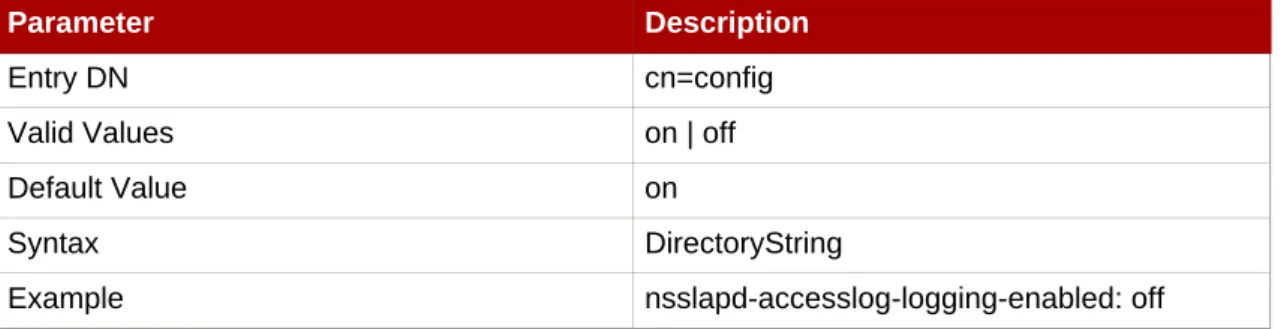
Disables and enables accesslog logging but only in conjunction with thensslapd-accesslog
attribute that specifies the path and parameter of the log used to record each database access. For access logging to be enabled, this attribute must be switched toon, and the
nsslapd-accesslogconfiguration attribute must have a valid path and parameter. The table lists the four possible combinations of values for these two configuration attributes and their outcome in terms of disabling or enabling of access logging.
Attribute Value Logging Enabled or Disabled nsslapd-accesslog-logging-enabled nsslapd-accesslog on empty string Disabled nsslapd-accesslog-logging-enabled nsslapd-accesslog on filename Enabled nsslapd-accesslog-logging-enabled nsslapd-accesslog off empty string Disabled nsslapd-accesslog-logging-enabled nsslapd-accesslog off filename Disabled
Table 2.3. dse.ldif Attributes
Parameter Description
Entry DN cn=config
Valid Values on | off
Default Value on
Syntax DirectoryString
Example nsslapd-accesslog-logging-enabled: off
3.1.8. nsslapd-accesslog-logmaxdiskspace (Access Log Maximum
Disk Space)
This attribute specifies the maximum amount of disk space in megabytes that the access logs are allowed to consume. If this value is exceeded, the oldest access log is deleted.
When setting a maximum disk space, consider the total number of log files that can be created due to log file rotation. Also, remember that there are three different log files (access log, audit log, and error log) maintained by the Directory Server, each of which consumes disk space. Compare these considerations to the total amount of disk space for the access log.
Parameter Description
Entry DN cn=config
Valid Range -1 | 1 to the maximum 32 bit integer value (2147483647), where a value of -1 means that the disk space allowed to the access log is unlimited in size.
Default Value 500
Syntax Integer
Example nsslapd-accesslog-logmaxdiskspace: 200
3.1.9. nsslapd-accesslog-logminfreediskspace (Access Log
Minimum Free Disk Space)
This attribute sets the minimum allowed free disk space in megabytes. When the amount of free disk space falls below the value specified on this attribute, the oldest access logs are deleted until enough disk space is freed to satisfy this attribute.
Parameter Description
Entry DN cn=config
Valid Range 1 to the maximum 32 bit integer value (2147483647)
Default Value 5
Syntax Integer
Example nsslapd-accesslog-logminfreediskspace: 4
3.1.10. nsslapd-accesslog-logrotationsync-enabled (Access Log
Rotation Sync Enabled)
This attribute sets whether access log rotation is to be synchronized with a particular time of the day. Synchronizing log rotation this way can generate log files at a specified time during a day, such as midnight to midnight every day. This makes analysis of the log files much easier because they then map directly to the calendar.
For access log rotation to be synchronized with time-of-day, this attribute must be enabled with thensslapd-accesslog-logrotationsynchourand
nsslapd-accesslog-logrotationsyncminattribute values set to the hour and minute of the
For example, to rotate access log files every day at midnight, enable this attribute by setting its value toon, and then set the values of thensslapd-accesslog-logrotationsynchourand
nsslapd-accesslog-logrotationsyncminattributes to0.
Parameter Description
Entry DN cn=config
Valid Values on | off
Default Value on
Syntax DirectoryString
Example nsslapd-accesslog-logrotationsync-enabled:
on
3.1.11. nsslapd-accesslog-logrotationsynchour (Access Log
Rotation Sync Hour)
This attribute sets the hour of the day for rotating access logs. This attribute must be used in conjunction withnsslapd-accesslog-logrotationsync-enabledand
nsslapd-accesslog-logrotationsyncminattributes.
Parameter Description
Entry DN cn=config
Valid Range 0 through 23
Default Value 0
Syntax Integer
Example nsslapd-accesslog-logrotationsynchour: 23
3.1.12. nsslapd-accesslog-logrotationsyncmin (Access Log Rotation
Sync Minute)
This attribute sets the minute of the day for rotating access logs. This attribute must be used in conjunction withnsslapd-accesslog-logrotationsync-enabledand
nsslapd-accesslog-logrotationsynchourattributes.
Parameter Description
Entry DN cn=config
Valid Range 0 through 59
Default Value 0
Syntax Integer
3.1.13. nsslapd-accesslog-logrotationtime (Access Log Rotation
Time)
This attribute sets the time between access log file rotations. The access log is rotated when this time interval is up, regardless of the current size of the access log. This attribute supplies only the number of units. The units (day, week, month, and so forth) are given by the
nsslapd-accesslog-logrotationtimeunitattribute.
Although it is not recommended for performance reasons to specify no log rotation since the log grows indefinitely, there are two ways of specifying this. Either set the
nsslapd-accesslog-maxlogsperdirattribute value to1or set the
nsslapd-accesslog-logrotationtimeattribute to-1. The server checks the
nsslapd-accesslog-maxlogsperdirattribute first, and, if this attribute value is larger than1, the server then checks thensslapd-accesslog-logrotationtimeattribute. See
Section 3.1.16, “nsslapd-accesslog-maxlogsperdir (Access Log Maximum Number of Log Files)”
for more information.
Parameter Description
Entry DN cn=config
Valid Range -1 | 1 to the maximum 32 bit integer value (2147483647), where a value of -1 means that the time between access log file rotation is unlimited.
Default Value 1
Syntax Integer
Example nsslapd-accesslog-logrotationtime: 100
3.1.14. nsslapd-accesslog-logrotationtimeunit (Access Log Rotation
Time Unit)
This attribute sets the units for thensslapd-accesslog-logrotationtimeattribute.
Parameter Description
Entry DN cn=config
Valid Values month | week | day | hour | minute
Default Value day
Syntax DirectoryString
Example nsslapd-accesslog-logrotationtimeunit: week
3.1.15. nsslapd-accesslog-maxlogsize (Access Log Maximum Log
Size)
This attribute sets the maximum access log size in megabytes. When this value is reached, the access log is rotated. That means the server starts writing log information to a new log file. If the
nsslapd-accesslog-maxlogsperdirattribute is set to1, the server ignores this attribute. When setting a maximum log size, consider the total number of log files that can be created due to log file rotation. Also, remember that there are three different log files (access log, audit log, and error log) maintained by the Directory Server, each of which consumes disk space. Compare these considerations to the total amount of disk space for the access log.
Parameter Description
Entry DN cn=config
Valid Range -1 | 1 to the maximum 32 bit integer value (2147483647), where a value of -1 means the log file is unlimited in size.
Default Value 100
Syntax Integer
Example nsslapd-accesslog-maxlogsize: 100
3.1.16. nsslapd-accesslog-maxlogsperdir (Access Log Maximum
Number of Log Files)
This attribute sets the total number of access logs that can be contained in the directory where the access log is stored. Each time the access log is rotated, a new log file is created. When the number of files contained in the access log directory exceeds the value stored in this attribute, then the oldest version of the log file is deleted. For performance reasons, Red Hat
recommends not setting this value to1because the server does not rotate the log, and it grows indefinitely.
If the value for this attribute is higher than1, then check the
nsslapd-accesslog-logrotationtimeattribute to establish whether log rotation is specified. If thensslapd-accesslog-logrotationtimeattribute has a value of-1, then there is no log rotation. SeeSection 3.1.13, “nsslapd-accesslog-logrotationtime (Access Log Rotation Time)”
for more information.
Parameter Description
Entry DN cn=config
Valid Range 1 to the maximum 32 bit integer value (2147483647)
Default Value 10
Syntax Integer
3.1.17. nsslapd-accesslog-mode (Access Log File Permission)
This attribute sets the access mode or file permission with which access log files are to be created. The valid values are any combination of000to777(these mirror the numbered or absolute UNIX file permissions). The value must be a 3-digit number, the digits varying from0 through7:
• 0- None • 1- Execute only • 2- Write only
• 3- Write and execute • 4- Read only
• 5- Read and execute • 6- Read and write
• 7- Read, write, and execute
In the 3-digit number, the first digit represents the owner's permissions, the second digit represents the group's permissions, and the third digit represents everyone's permissions. When changing the default value, remember that000does not allow access to the logs and that allowing write permissions to everyone can result in the logs being overwritten or deleted by anyone.
The newly configured access mode only affects new logs that are created; the mode is set when the log rotates to a new file.
Parameter Description
Entry DN cn=config
Valid Range 000 through 777
Default Value 600
Syntax Integer
Example nsslapd-accesslog-mode: 600
3.1.18. nsslapd-attribute-name-exceptions
This attribute allows non-standard characters in attribute names to be used for backwards compatibility with older servers, such as "_" in schema-defined attributes.
Parameter Description
Parameter Description
Valid Values on | off
Default Value off
Syntax DirectoryString
Example nsslapd-attribute-name-exceptions: on
3.1.19. nsslapd-auditlog (Audit Log)
This attribute sets the path and filename of the log used to record changes made to each database.
Parameter Description
Entry DN cn=config
Valid Values Any valid filename
Default Value /var/log/dirsrv/slapd-instance_name/audit
Syntax DirectoryString
Example nsslapd-auditlog:
/var/log/dirsrv/slapd-instance_name/audit
For audit logging to be enabled, this attribute must have a valid path and parameter, and the
nsslapd-auditlog-logging-enabledconfiguration attribute must be switched toon. The table lists the four possible combinations of values for these two configuration attributes and their outcome in terms of disabling or enabling of audit logging.
Attributes in dse.ldif Value Logging enabled or disabled nsslapd-auditlog-logging-enabled nsslapd-auditlog on empty string Disabled nsslapd-auditlog-logging-enabled nsslapd-auditlog on filename Enabled nsslapd-auditlog-logging-enabled nsslapd-auditlog off empty string Disabled nsslapd-auditlog-logging-enabled nsslapd-auditlog off filename Disabled
Table 2.4. Possible Combinations for nsslapd-auditlog
3.1.20. nsslapd-auditlog-list
Provides a list of audit log files.
Parameter Description
Entry DN cn=config
Valid Values
Default Value None
Syntax DirectoryString
Example nsslapd-auditlog-list: auditlog2,auditlog3
3.1.21. nsslapd-auditlog-logexpirationtime (Audit Log Expiration
Time)
This attribute sets the maximum age that a log file is allowed to be before it is deleted. This attribute supplies only the number of units. The units (day, week, month, and so forth) are given by thensslapd-auditlog-logexpirationtimeunitattribute.
Parameter Description
Entry DN cn=config
Valid Range 1 to the maximum 32 bit integer value (2147483647)
Default Value 1
Syntax Integer
Example nsslapd-auditlog-logexpirationtime: 1
3.1.22. nsslapd-auditlog-logexpirationtimeunit (Audit Log Expiration
Time Unit)
This attribute sets the units for thensslapd-auditlog-logexpirationtimeattribute. If the unit is unknown by the server, then the log never expires.
Parameter Description
Entry DN cn=config
Valid Values month | week | day
Default Value week
Parameter Description
Example nsslapd-auditlog-logexpirationtimeunit: day
3.1.23. nsslapd-auditlog-logging-enabled (Audit Log Enable
Logging)
Turns audit logging on and off.
Parameter Description
Entry DN cn=config
Valid Values on | off
Default Value off
Syntax DirectoryString
Example nsslapd-auditlog-logging-enabled: off
For audit logging to be enabled, this attribute must have a valid path and parameter and the
nsslapd-auditlog-logging-enabledconfiguration attribute must be switched toon. The table lists the four possible combinations of values for these two configuration attributes and their outcome in terms of disabling or enabling of audit logging.
Attribute Value Logging enabled or disabled nsslapd-auditlog-logging-enabled nsslapd-auditlog on empty string Disabled nsslapd-auditlog-logging-enabled nsslapd-auditlog on filename Enabled nsslapd-auditlog-logging-enabled nsslapd-auditlog off empty string Disabled nsslapd-auditlog-logging-enabled nsslapd-auditlog off filename Disabled
Table 2.5. Possible combinations for nsslapd-auditlog and
nsslapd-auditlog-logging-enabled
Space)
This attribute sets the maximum amount of disk space in megabytes that the audit logs are allowed to consume. If this value is exceeded, the oldest audit log is deleted.
When setting a maximum disk space, consider the total number of log files that can be created due to log file rotation. Also remember that there are three different log files (access log, audit log, and error log) maintained by the Directory Server, each of which consumes disk space. Compare these considerations with the total amount of disk space for the audit log.
Parameter Description
Entry DN cn=config
Valid Range -1 | 1 to the maximum 32 bit integer value (2147483647), where a value of -1 means that the disk space allowed to the audit log is unlimited in size.
Default Value 500
Syntax Integer
Example nsslapd-auditlog-logmaxdiskspace: 500
3.1.25. nsslapd-auditlog-logminfreediskspace (Audit Log Minimum
Free Disk Space)
This attribute sets the minimum permissible free disk space in megabytes. When the amount of free disk space falls below the value specified by this attribute, the oldest audit logs are deleted until enough disk space is freed to satisfy this attribute.
Parameter Description
Entry DN cn=config
Valid Range 1 to the maximum 32 bit integer value (2147483647)
Default Value 5
Syntax Integer
Example nsslapd-auditlog-logminfreediskspace: 3
3.1.26. nsslapd-auditlog-logrotationsync-enabled (Audit Log
Rotation Sync Enabled)
This attribute sets whether audit log rotation is to be synchronized with a particular time of the day. Synchronizing log rotation this way can generate log files at a specified time during a day, such as midnight to midnight every day. This makes analysis of the log files much easier because they then map directly to the calendar.
For audit log rotation to be synchronized with time-of-day, this attribute must be enabled with thensslapd-auditlog-logrotationsynchourandnsslapd-auditlog-logrotationsyncmin
attribute values set to the hour and minute of the day for rotating log files.
For example, to rotate audit log files every day at midnight, enable this attribute by setting its value toon, and then set the values of thensslapd-auditlog-logrotationsynchourand
nsslapd-auditlog-logrotationsyncminattributes to0.
Parameter Description
Entry DN cn=config
Valid Values on | off
Default Value off
Syntax DirectoryString
Example nsslapd-auditlog-logrotationsync-enabled: on
3.1.27. nsslapd-auditlog-logrotationsynchour (Audit Log Rotation
Sync Hour)
This attribute sets the hour of the day for rotating audit logs. This attribute must be used in conjunction withnsslapd-auditlog-logrotationsync-enabledand
nsslapd-auditlog-logrotationsyncminattributes.
Parameter Description
Entry DN cn=config
Valid Range 0 through 23
Default Value None (because
nsslapd-auditlog-logrotationsync-enabled
is off)
Syntax Integer
Example nsslapd-auditlog-logrotationsynchour: 23
3.1.28. nsslapd-auditlog-logrotationsyncmin (Audit Log Rotation
Sync Minute)
This attribute sets the minute of the day for rotating audit logs. This attribute must be used in conjunction withnsslapd-auditlog-logrotationsync-enabledand
nsslapd-auditlog-logrotationsynchourattributes.
Parameter Description
Entry DN cn=config
Parameter Description
Default Value None (because
nsslapd-auditlog-logrotationsync-enabled
is off)
Syntax Integer
Example nsslapd-auditlog-logrotationsyncmin: 30
3.1.29. nsslapd-auditlog-logrotationtime (Audit Log Rotation Time)
This attribute sets the time between audit log file rotations. The audit log is rotated when this time interval is up, regardless of the current size of the audit log. This attribute supplies only the number of units. The units (day, week, month, and so forth) are given by the
nsslapd-auditlog-logrotationtimeunitattribute. If the
nsslapd-auditlog-maxlogsperdirattribute is set to1, the server ignores this attribute. Although it is not recommended for performance reasons to specify no log rotation, as the log grows indefinitely, there are two ways of specifying this. Either set the
nsslapd-auditlog-maxlogsperdirattribute value to1or set the
nsslapd-auditlog-logrotationtimeattribute to-1. The server checks the
nsslapd-auditlog-maxlogsperdirattribute first, and, if this attribute value is larger than1, the server then checks thensslapd-auditlog-logrotationtimeattribute. SeeSection 3.1.32,
“nsslapd-auditlog-maxlogsperdir (Audit Log Maximum Number of Log Files)”for more information.
Parameter Description
Entry DN cn=config
Valid Range -1 | 1 to the maximum 32 bit integer value (2147483647), where a value of -1 means that the time between audit log file rotation is unlimited.
Default Value 1
Syntax Integer
Example nsslapd-auditlog-logrotationtime: 100
3.1.30. nsslapd-auditlog-logrotationtimeunit (Audit Log Rotation
Time Unit)
This attribute sets the units for thensslapd-auditlog-logrotationtimeattribute.
Parameter Description
Entry DN cn=config
Parameter Description
Default Value week
Syntax DirectoryString
Example nsslapd-auditlog-logrotationtimeunit: day
3.1.31. nsslapd-auditlog-maxlogsize (Audit Log Maximum Log Size)
This attribute sets the maximum audit log size in megabytes. When this value is reached, the audit log is rotated. That means the server starts writing log information to a new log file. If
nsslapd-auditlog-maxlogsperdirto1, the server ignores this attribute.
When setting a maximum log size, consider the total number of log files that can be created due to log file rotation. Also, remember that there are three different log files (access log, audit log, and error log) maintained by the Directory Server, each of which consumes disk space. Compare these considerations to the total amount of disk space for the audit log.
Parameter Description
Entry DN cn=config
Valid Range -1 | 1 to the maximum 32 bit integer value (2147483647), where a value of -1 means the log file is unlimited in size.
Default Value 100
Syntax Integer
Example nsslapd-auditlog-maxlogsize: 50
3.1.32. nsslapd-auditlog-maxlogsperdir (Audit Log Maximum
Number of Log Files)
This attribute sets the total number of audit logs that can be contained in the directory where the audit log is stored. Each time the audit log is rotated, a new log file is created. When the number of files contained in the audit log directory exceeds the value stored on this attribute, then the oldest version of the log file is deleted. The default is1log. If this default is accepted, the server will not rotate the log, and it grows indefinitely.
If the value for this attribute is higher than1, then check the
nsslapd-auditlog-logrotationtimeattribute to establish whether log rotation is specified. If thensslapd-auditlog-logrotationtimeattribute has a value of-1, then there is no log rotation. SeeSection 3.1.29, “nsslapd-auditlog-logrotationtime (Audit Log Rotation Time)”for more information.
Parameter Description
Parameter Description
Valid Range 1 to the maximum 32 bit integer value (2147483647)
Default Value 1
Syntax Integer
Example nsslapd-auditlog-maxlogsperdir: 10
3.1.33. nsslapd-auditlog-mode (Audit Log File Permission)
This attribute sets the access mode or file permissions with which audit log files are to be created. The valid values are any combination of000to777since they mirror numbered or absolute UNIX file permissions. The value must be a combination of a 3-digit number, the digits varying from0through7:
• 0 - None • 1 - Execute only • 2 - Write only
• 3 - Write and execute • 4 - Read only
• 5 - Read and execute • 6 - Read and write
• 7 - Read, write, and execute
In the 3-digit number, the first digit represents the owner's permissions, the second digit represents the group's permissions, and the third digit represents everyone's permissions. When changing the default value, remember that000does not allow access to the logs and that allowing write permissions to everyone can result in the logs being overwritten or deleted by anyone.
The newly configured access mode only affects new logs that are created; the mode is set when the log rotates to a new file.
Parameter Description
Entry DN cn=config
Valid Range 000 through 777
Default Value 600
Parameter Description
Example nsslapd-auditlog-mode: 600
3.1.34. nsslapd-certdir (Certificate and Key Database Directory)
This is the full path to the directory holding the certificate and key databases for a Directory Server instance. This directory must contain only the certificate and key databases for this instance and no other instances. This directory must be owned and allow read-write access for the server user ID. No other user should have read-right access to this directory. The default location is the configuration file directory,/etc/dirsrv/slapd-instance_name.
Changes to this value will not take effect until the server is restarted.
Parameter Description
Entry DN cn=config
Valid Values Absolute path to any directory which is owned by the server user ID and only allows read and write access to the server user ID Default Value /etc/dirsrv/slapd-instance_name
Syntax DirectoryString
Example /etc/dirsrv/slapd-phonebook
3.1.35. nsslapd-certmap-basedn (Certificate Map Search Base)
This attribute can be used when client authentication is performed using SSL certificates in order to avoid limitations of the security subsystem certificate mapping, configured in the certmap.conffile. Depending on thecertmap.confconfiguration, the certificate mapping may be done using a directory subtree search based at the root DN. If the search is based at the root DN, then thensslapd-certmap-basednattribute may force the search to be based at some entry other than the root. The valid value for this attribute is the DN of the suffix or subtree to use for certificate mapping. For further information on configuring for SSL, see the "Managing SSL" chapter in the Directory Server Administration Guide.
3.1.36. nsslapd-config
This read-only attribute is the config DN.
Parameter Description
Entry DN cn=config
Valid Values Any valid configuration DN
Default Value
Parameter Description
Example nsslapd-config: cn=config
3.1.37. nsslapd-conntablesize
This attribute sets the connection table size, which determines the total number of connections supported by the server.
The server has to be restarted for changes to this attribute to go into effect.
Parameter Description
Entry DN cn=config
Valid Values Operating-system dependent
Default Value The default value is the system's max descriptors, which can be configured using theSection 3.1.67, “nsslapd-maxdescriptors (Maximum File Descriptors)”attribute.
Syntax Integer
Example nsslapd-conntablesize: 4093
Increase the value of this attribute if Directory Server is refusing connections because it is out of connection slots. When this occurs, the Directory Server's error log file records the message Not listening for new connections -- too many fds open.
A server restart is required for the change to take effect.
It may be necessary to increase the operating system limits for the number of open files and number of open files per process, and it may be necessary to increase theulimitfor the number of open files (ulimit -n) in the shell that starts the Directory Server. See
Section 3.1.67, “nsslapd-maxdescriptors (Maximum File Descriptors)”for more information.
3.1.38. nsslapd-csnlogging
This attribute sets whether change sequence numbers (CSNs), when available, are to be logged in the access log. By default, CSN logging is turned on.
Parameter Description
Entry DN cn=config
Valid Values on | off
Default Value on
Syntax DirectoryString
3.1.39. nsslapd-ds4-compatible-schema
Makes the schema incn=schemacompatible with 4.x versions of Directory Server.
Parameter Description
Entry DN cn=config
Valid Values on | off
Default Value off
Syntax DirectoryString
Example nsslapd-ds4-compatible-schema: off
3.1.40. nsslapd-enquote-sup-oc (Enable Superior Object Class
Enquoting)
This attribute is deprecated and will be removed in a future version of Directory Server. This attribute controls whether quoting in theobjectclassattributes contained in the
cn=schemaentry conforms to the quoting specified by Internet draft RFC 2252. By default, the Directory Server conforms to RFC 2252, which indicates that this value should not be quoted. Only very old clients need this value set toon, so leave itoff.
Turning this attribute on or off does not affect Directory Server Console.
Parameter Description
Entry DN cn=config
Valid Values on | off
Default Value off
Syntax DirectoryString
Example nsslapd-enquote-sup-oc: off
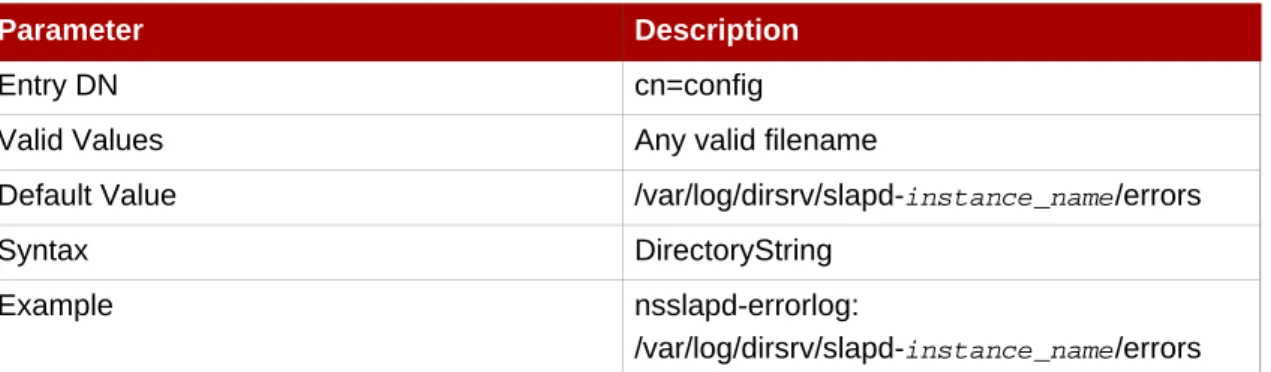
3.1.41. nsslapd-errorlog (Error Log)
This attribute sets the path and filename of the log used to record error messages generated by the Directory Server. These messages can describe error conditions, but more often they contain informative conditions, such as:
• Server startup and shutdown times. • The port number that the server uses.
This log contains differing amounts of information depending on the current setting of the Log Level attribute. SeeSection 3.1.42, “nsslapd-errorlog-level (Error Log Level)”for more
information.
Parameter Description
Entry DN cn=config
Valid Values Any valid filename
Default Value /var/log/dirsrv/slapd-instance_name/errors
Syntax DirectoryString
Example nsslapd-errorlog:
/var/log/dirsrv/slapd-instance_name/errors
For error logging to be enabled, this attribute must have a valid path and filename, and the
nsslapd-errorlog-logging-enabledconfiguration attribute must be switched toon. The table lists the four possible combinations of values for these two configuration attributes and their outcome in terms of disabling or enabling of error logging.
Attributes in dse.ldif Value Logging enabled or disabled nsslapd-errorlog-logging-enabled nsslapd-errorlog on empty string Disabled nsslapd-errorlog-logging-enabled nsslapd-errorlog on filename Enabled nsslapd-errorlog-logging-enabled nsslapd-errorlog off empty string Disabled nsslapd-errorlog-logging-enabled nsslapd-errorlog off filename Disabled
Table 2.6. Possible Combinations for nsslapd-errorlog Configuration
Attributes
3.1.42. nsslapd-errorlog-level (Error Log Level)
This attribute sets the level of logging for the Directory Server. The log level is additive; that is, specifying a value of3includes both levels1and2.
Parameter Description
Entry DN cn=config
Valid Values
• 1 — Trace function calls. Logs a message when the server enters and exits a function. • 2 — Debug packet handling.
• 4 — Heavy trace output debugging. • 8 — Connection management. • 16 — Print out packets sent/received. • 32 — Search filter processing. • 64 — Config file processing.
• 128 — Access control list processing. • 2048 — Log entry parsing debugging. • 4096 — Housekeeping thread debugging. • 8192 — Replication debugging.
• 16384 — Default level of logging used for critical errors and other messages that are always written to the error log; for example, server startup messages. Messages at this level are always included in the error log, regardless of the log level setting. • 32768 — Database cache debugging. • 65536 — Server plug-in debugging. It
writes an entry to the log file when a server plug-in callsslapi-log-error.
• 131072 — Microsecond resolution for timestamps instead of the default seconds. • 262144 — Access control summary
information, much less verbose than level 128. This value is recommended for use when a summary of access control processing is needed. Use128for very detailed processing messages.
Parameter Description
Default Value 16384
Syntax Integer
Example nsslapd-errorlog-level: 8192
3.1.43. nsslapd-errorlog-list
This read-only attribute provides a list of error log files.
Parameter Description
Entry DN cn=config
Valid Values
Default Value None
Syntax DirectoryString
Example nsslapd-errorlog-list: errorlog2,errorlog3
3.1.44. nsslapd-errorlog-logexpirationtime (Error Log Expiration
Time)
This attribute sets the maximum age that a log file is allowed to reach before it is deleted. This attribute supplies only the number of units. The units (day, week, month, and so forth) are given by thensslapd-errorlog-logexpirationtimeunitattribute.
Parameter Description
Entry DN cn=config
Valid Range 1 to the maximum 32 bit integer value (2147483647)
Default Value 1
Syntax Integer
Example nsslapd-errorlog-logexpirationtime: 1
3.1.45. nsslapd-errorlog-logexpirationtimeunit (Error Log Expiration
Time Unit)
This attribute sets the units for thensslapd-errorlog-logexpirationtimeattribute. If the unit
is unknown by the server, then the log never expires.
Parameter Description
Entry DN cn=config
Parameter Description
Default Value month
Syntax DirectoryString
Example nsslapd-errorlog-logexpirationtimeunit: week
3.1.46. nsslapd-errorlog-logging-enabled (Enable Error Logging)
Turns error logging on and off.
Parameter Description
Entry DN cn=config
Valid Values on | off
Default Value on
Syntax DirectoryString
Example nsslapd-errorlog-logging-enabled: on
3.1.47. nsslapd-errorlog-logmaxdiskspace (Error Log Maximum Disk
Space)
This attribute sets the maximum amount of disk space in megabytes that the error logs are allowed to consume. If this value is exceeded, the oldest error log is deleted.
When setting a maximum disk space, consider the total number of log files that can be created due to log file rotation. Also, remember that there are three different log files (access log, audit log, and error log) maintained by the Directory Server, each of which consumes disk space. Compare these considerations to the total amount of disk space for the error log.
Parameter Description
Entry DN cn=config
Valid Range -1 | 1 to the maximum 32 bit integer value (2147483647), where a value of -1 means that the disk space allowed to the error log is unlimited in size.
Default Value 500
Syntax Integer
Example nsslapd-errorlog-logmaxdiskspace: 500
3.1.48. nsslapd-errorlog-logminfreediskspace (Error Log Minimum
Free Disk Space)
This attribute sets the minimum allowed free disk space in megabytes. When the amount of free disk space falls below the value specified on this attribute, the oldest error log is deleted until enough disk space is freed to satisfy this attribute.
Parameter Description
Entry DN cn=config
Valid Range 1 to the maximum 32 bit integer value (2147483647)
Default Value 5
Syntax Integer
Example nsslapd-errorlog-logminfreediskspace: 5
3.1.49. nsslapd-errorlog-logrotationsync-enabled (Error Log
Rotation Sync Enabled)
This attribute sets whether error log rotation is to be synchronized with a particular time of the day. Synchronizing log rotation this way can generate log files at a specified time during a day, such as midnight to midnight every day. This makes analysis of the log files much easier because they then map directly to the calendar.
For error log rotation to be synchronized with time-of-day, this attribute must be enabled with the
nsslapd-errorlog-logrotationsynchourandnsslapd-errorlog-logrotationsyncmin
attribute values set to the hour and minute of the day for rotating log files.
For example, to rotate error log files every day at midnight, enable this attribute by setting its value toon, and then set the values of thensslapd-errorlog-logrotationsynchourand nsslapd-errorlog-logrotationsyncminattributes to0.
Parameter Description
Entry DN cn=config
Valid Values on | off
Default Value on
Syntax DirectoryString
Example nsslapd-errorlog-logrotationsync-enabled: on
3.1.50. nsslapd-errorlog-logrotationsynchour (Error Log Rotation
Sync Hour)
This attribute sets the hour of the day for rotating error logs. This attribute must be used in conjunction withnsslapd-errorlog-logrotationsync-enabledand