Secure Employee Information System to Manage
Integrated Network Services
P.Rama Rao
1, O.Obulesu
2Department of IT,SVEC,Tirupati,A.P.,India
Department of IT,SVEC,Tirupati,A.P.,India
Abstract
—
Automation of network administration activities is essential for large network architecture maintenance. This work carried out here with is supported by network administrator for automation of their regular activities. It provides a database that can store all employees’ information in NGRI. Network administrator uses this database to create user accounts in the server with the help of designed user interface. Administrator can easily manage the user accounts with provided user interface. These user accounts help to manage network services such as file sharing, internet browsing.etc. In Intranet there are different network services such as DNS service, DHCP service, File sharing, internet access, etc. Here DHCP service will assign IP address to all devices which are connected to LAN. In order to restrict unauthorized users and systems, it is necessary to configure DHCP and internet access service. These things are performed with the help of NetRegister, Squid and Dansguardian servers. NetRegister authenticates each user with the provided username and password. NetRegister will get all systems MAC address for DHCP to assign valid IP Address. Squid proxy server will authenticate each user who is currently accessing the internet and blocks internet access, when authentication fails. DansGuardian does content filtering of the webpage to take care of virus attacks and also logs web usage by client. Dansguardian helps to block the list of websites that are prohibited to access from internet.Keywords
—
Authentication, Dansguardian, LDAP, NetReg, SquidI. INTRODUCTION
In large organizations it is difficult for network administrator to maintain the user accounts in the server. Network administrator should meet each employee personally and should get all the information, to create user account in to the domain. It takes much time to gather all this information. It is necessary to design a user interface for administrator to maintain the server easily. We designed Secure Employee Information System which helps the administrator to gather all employee’s information remotely and to up load on the server. At present there is no mechanism to restrict unauthorized devices to connect to LAN and internet. So we configure the DHCP service in such a way that it should allocate valid IP Address to a system if and only if that system MAC address is present in NetRegister. Each new device should register its MAC address in NetRegister server to get intranet and internet access. It is common to use one persons system to be used by another person for Internet access. At this time there is no way to pin point to a person who misused the internet. We configure the Squid and Dansguardian to ask authentication [1] information
before internet access. If the authentication success then Squid server will allow to internet access and make the log of the user access to web. This log files will help to pin point the employee who misused the internet.
II. O
VERVIEWA.
Secure Employee Information System
NGRI IT group wants to increase the security of network architecture. They create a new domain, in which all the user should login. With this feature usage no other outside user can use the system. So it requires to create user accounts for all around 500 users in NGRI. All these accounts in the server automatically will expire based on the retirement date of the employee. If employee retirement date extended then that employee need to consult network administrator to change account expire date. The guest user should also need to meet the network administrator to change account expire from previous date to new date. This is time consuming process and the administrator should always available. We designed Secure Employee Information system to overcome these difficulties. With this user account creation and maintains becomes more easy. This application designed in secure mode. It means that, the data to be transferred from client machine will be encrypted and transferred across the media. At the server side the received data will be decrypted. Even though the hacker hacks the data, he may not understand the data. Security is implemented because, the employee will send sensitive data such as username and password. Because of this data, security is more important. SSL protocol is enabled in Tomcat. For this the server certificate will be installed in the machine on which the Tomcat server is running.
B.
Managing Integrated Network Services
Network services are configured on corporate local area networks to ensure security and user friendly operation. They help the LAN run smoothly and efficiently. Corporate LANs use network services such as Domain Name System (DNS) to give names to IP and MAC addresses, and Dynamic Host Configuration Protocol (DHCP) to ensure that everyone on the network has a valid IP address. DHCP eases administrative burden by automating the IP assignment of nodes on the network. Adding or removing nodes from the network doesn’t create problems with IP address retrieval; the Dynamic Host Configuration Protocol (DHCP) service handles this automatically. Authentication servers are another network service, they allow every user to have their own account, and everything they do on that account is logged under their user name. This means that not only users are accountable for anything they do
while on the network, but also it increases security as anyone wanting to access the LAN must have a registered user name and password.
Doing network administration without having user accounts to track user activity or DHCP to automate IP assignment to nodes, or DNS to simplify IP address access would be troublesome indeed. Enabling these few network services automates complex and time consuming administration to the network, and thus eases downtime for network administrators. E-mail, printing and network file sharing services are also network services. They are seldom not used in a LAN environment, as they allow users to access any printer connected to the network, files on the server or other nodes connected, and streamline data transfer within the network. They require users to have permissions to access the resources shared, and are simple to configure security and access rights for, with the directory service- also a network service.
1. NetRegister
NetReg is an automated network registration system that requires client computers that use DHCP to register their hardware (MAC) address before they can gain full network access. DHCP is a standard protocol that automates the process of configuring network hosts by allowing hosts to obtain IP addresses and configuration parameters through the network. The NetReg DHCP server is configured with two address pools per subnet. One pool of addresses is assigned to unregistered clients and the other pool is assigned to registered clients. The TCP/IP information passed to unregistered clients has either a non-routable IP address or an IP address that is restricted or completely blocked on your firewall, and a bogus DNS server. The bogus DNS server is designed so it resolves all names back to a Network Registration Web Server. When a user starts a web browser, the web browser connects to the NetReg server and redirects all URLs to the NetReg Registration Page. From the Registration Page, the user reads and agrees to your "Acceptable Use Policy", then enters a username/password that is authenticated against a server. If the user authenticates successfully, the computer gets registered. After the client reboots, the computer will have full access to the network and the Internet.
2. Squid: Squid server is a popular open source proxy and web cache. It has a variety of uses, from speeding up a web server by caching repeated requests, to caching web, name server query, and other network lookups for a group of people sharing network resources.
Two important goals are to:
Limit access to the Web to only authorized users.
Reduce Internet bandwidth charges.The Squid web caching proxy server can achieve these fairly easily.
Users configure their web browsers to use the Squid proxy server instead of going to the web directly. The Squid server then checks its web cache for the web information requested by the user. It will return any matching information that finds in its cache, and if not, it will go to the web to find it on behalf of the user. Once it finds the information, it will populate its cache with it and also forward it to the user's web browser.
This reduces the amount of data accessed from the web. Another advantage is that we can configure your firewall to only accept HTTP web traffic from the Squid server. Squid can then be configured to request usernames and passwords for each user that
uses its services. This provides simple access control to the Internet. Squid server is a popular open source proxy and web cache. It has a variety of uses, from speeding up a web server by caching repeated requests, to caching web, name server query, and other network lookups for a group of people sharing network resources. It is primarily designed to run on Linux / Unix-like systems. Squid is a high-performance proxy caching server for Web clients. Unlike traditional caching software, Squid handles all requests in a single, non-blocking, I/O-driven process. Squid keeps meta data and especially hot objects cached in RAM, caches DNS lookups, supports non-blocking DNS lookups, and implements negative caching of failed requests. Squid consists of a main server program squid, a Domain Name System lookup program (dnsserver), a program for retrieving FTP data (ftpget), client tools.
3. Dansguardian:
Dansguardian is content-control software, designed to control which websites users can access. It also includes virus filtering and usage monitoring features.DansGuardian must be installed on a Unix or GNU/Linux computer, such as a server computer. Its filtering extends to all computers in an organization, including Windows and Macintosh computers. DansGuardian is used by schools, businesses, value-added Internet service providers, and others.Your normal web filter such as Cyber Patrol, squidGuard, Net Nanny, etc, has a very large list of bad sites. If you try to go to these sites you will get blocked. I.e. your web access is filtered by web address. The web is a fast changing place and even large web search engines such as Google or Altavista or Yahoo don't even know of half of it. This makes filtering by web address (URL) difficult as sites change and new ones come up all the time. It is impossible to have comprehensive filtering using just URLs. What is needed is something to check every page you (or your children) ever access for 'bad' subjects such as drugs, profanities, hate, pornography, etc, and disallow it if it's not suitable. This is called 'Content Filtering'.This is why you need DansGuardian as it makes the web a cleaner, safer, place for you and your children.
III.
Secure Employee Information System
This Secure Employee Information System mainly deals on the aspect of computerizing all the related information of the employee and computers. In the present system the administrator is provided with many files and records which hold huge information. It might be troublesome for the administrator to manage and maintain such large information in files. This process puts more stress on everyone involved. The main idea here is to develop a system compatible to both employee and administrator which mainly relieves much of the burden. We have developed a new database which stores all the employee information. We have written programs to gather that data from employee over the intranet and to store them into the database. The administrator feels easy to upload this information on to the server, with several mouse clicks, instead of typing whole information using keyboard. This system is deployed in Apache Tomcat in SSL [2] mode. The Secure Employee Information System is developed in java to contact LDAP database [3].
A. UML Class Model
Fig. 1 UML Class Model for employee information system
The UML class diagram for Secure Employee Information System is shown in Figure. It has seven major classes. The Employee class is a super class for NGRIEmployee and GuestUser classes. Each NGRIEmployee class will associate one are more computer. ActiveDirectory class has set of methods to manage the server.
B. Use Case Diagrams
1. Employee Use Case
Employee can perform different activities such as registration, which helps to post their personal information. Computer registration activity helps to register more than one systems, it helps to get more than one username and password. Edit activity update user information in the server. Reset password activity resets the account password in server.
Employee without computer
Guest User Computer Registration
Edit Registration
Reset Password NGRI Employee
Fig. 3 : Use Case for NGRI Employee and Guest User
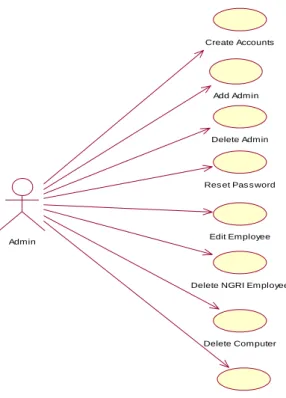
2. Admin Use Case
Add Admin
Delete Admin
Res et Pas s word
Edit Employee
Delete NGRI Employee
Delete Computer
Delete Gues t Em ployee Create Accounts
Admin
Fig. 2 Admin Use Case for Employee Information System
Create Accounts activity deals with the creation of user accounts in the server. Add admin and Delete Admin activities manage the admin count. Delete NGRI Employee and Guest Employee activities deletes the user accounts from server.
IV. Managing Integrated Network Sevices
A. NetRegister
Configure how NetReg [4] will authenticate users Edit Variables.pm in /usr/lib/perl5/site_perl/Net/NetReg. If you want NetReg to authenticate against a Radius server:
Change $AUTH_METHOD to “RADIUS”.Change @RADIUS_SVRS to the IP Address of your Radius servers. If you have more than one Radius server then enter the server’s IP address in quotes separated by a comma.
Example: @RADIUS_SVRS = (“10.1.1.1”,”10.2.1.1”);
If you want NetReg to authenticate against a LDAP server:
Change $AUTH_METHOD to “LDAP”.Change @LDAP_SERVERS to the hostname or IP Address of your LDAP servers.
Example: @LDAP_SERVERS = ("10.3.1.1", "10.4.1.1");
Change $LDAP_BASE to your LDAP user base.
Example: "ou=users,dc=yourdomain,dc=edu";
Change $LDAP_AUTH_ATTR to the user attribute, which is either "uid" or “cn”. To authenticate against Microsoft’s Active Directory, change $LDAP_AUTH_ATTR to "cn".
Change $LDAP_USE_ADS to 1 if you wish to use Microsoft's Active Directory Server as your authentication source.
For example: $LDAP_ADS_DOMAIN = “yourdomain.edu”; The above examples show you how to authenticate against Microsoft’s Active Directory. To authenticate against other LDAP entities, there are other LDAP variables that you may need to change in Variables.pm.
B. Squid
Squid will be installed in Linux [5] based systems. With Access Control Lists we can limit users’ ability to browse the Internet. Each ACL line defines a particular type of activity, such as an access time or source network, they are then linked to an http_access statement that tells Squid whether or not to deny or allow traffic that matches the ACL.Squid matches each Web access request it receives by checking the http_access list from top to bottom. If it finds a match, it enforces the allow or deny statement and stops reading further. We have to be careful not to place a deny statement in the list that blocks a similar allow statement below it. The final http_access statement denies everything, so it is best to place new http_access statements above it.Squid [6] has a minimum required set of ACL statements in the ACCESS_CONTROL section of the squid.conf file.
Restricting Web Access By Time:
We can create access control lists with time parameters. For example, we can allow only business hour access from the home network, while always restricting access to host.
#Add this to the bottom of the ACL section of squid.conf acl home_network src 172.27.0.0/24
acl business_hours time M T W H F 9:30-18:00 acl RestricedHost src 172.27.0.66
#Add this to the top of http_access section of squid.conf http_access deny RestrictedHost
http_access allow home_network business_hours
Restricting Web Access by IP Address:
We can create an access control list that restricts Web access to users on certain networks.
#Add this to the bottom of the ACL section of squid.conf Acl office_network src 172.27.0.0/255.255.255.0
We also have to add a corresponding http_access statement that allows traffic that matches the ACL:
#Add this at the top of the http_access section of squid.conf http_access allow office_network
C. Dansguardian
Dansguardian [7] needs a proxy server such as Squid that Squid gives better performance. Squid has caching capabilities which means it uses less bandwidth. After successful installation of Dansguardian
1. Bannediplist
This list contains IP addresses of client machines to disallow web access. Only put IP addresses here, but not host names.
Note: This is not the IP of web servers you want to filter. Eg: 172.27.3.251
172.27.0.240
2. Bannedextensionlist
This list contains file extensions with executable code. This means they can potentially carry a virus to infect our computer.
Eg: .ade # Microsoft Access project extension .adp # Microsoft Access project .asx # Windows Media Audio / Video .com # Microsoft MS-DOS program
3. Bannedsitelist
The bannedsitelist is for blocking ALL of a site. We need to edit to add and remove categories we want.
Eg:
badboys.com freshersworld.com
4. Banneduserlist
This list contains the users names, who, if basic proxy authentication is enabled, will automatically be denied web access.
It includes the users to whom the organization’s network services are blocked or rejected.
Eg: Guest users
V. R
ESULTSA
.Secure Employee Information System
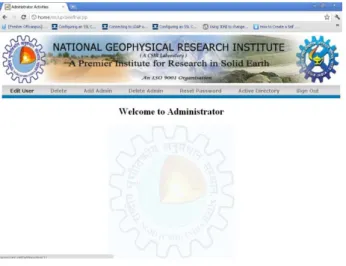
Secure Employee Information System deployed on the server and it successfully browses to post user information. Admin is able to create user accounts on the server with the designed interface. The following page is used by the employee to post his profile information on to the sever.After upload of profile information on to the server, the administrator uses the following page to create user account in the server. This page reduces the administrator typing work to create user accounts.
Fig. 5 Administrator home page
B. Successful management of network services
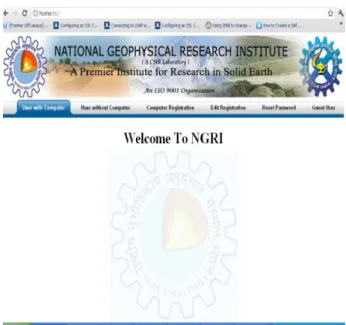
If system MAC address is not present in the NetReg server, user will be forwarded to NetReg home page when he tries to browse the internet. In NetReg home page employee need to enter the username and password to get valid IP address. If those account details are present in the LDAP database, it will display user registration success information. Now the system will get valid IP address, which can be considered as authorized system to use in LAN.
Squid proxy server successfully configured to authenticate each user who accesses the web. It will authenticate each user against the LDAP data base. When Squid is configured properly, browser will request username and password before loading the url. Employee should enter provided username and password in order to access the internet.
Fig. 6 Client Authentication by Squid for Internet Access
Dansguardian mainly configured to provide content filtering feature. If employee tries to access harmful and unwanted websites, Danguardian will deny the page access.
Fig. 7 Web access deny by Dansguardian
VI. C
ONCLUSIONA
NDF
UTUREWORKFor large network architectures, security and server maintains are more important features that should be provided with network administrator. In our project we designed automation system which helps the administration ease. This system satisfies the basic activities of network administration. This Secure Employee Information System can be useful to any Windows and Linux server maintenance. Based on the organization requirements it used MS access data base. In future it can be adapted to SQL database, to increase the data security. To increase security of the network architecture, we restricted the network access by unauthorized users and computers. The internet access also restricted to users if their authentication fails. The security feature is achieved with use of NetReg, Squid and Dansguardian software’s. In future we can make the bio-metric authentication mechanism to authenticate user, to increase the security of the network architecture.
A
CKNOWLEDGMENTThis work was carried out at National Geophysical Research Institute (NGRI), Hyderabad and supported by the Scientists and Head-IT Group of NGRI.
R
EFERENCES[1] S. Farrell, “AAA Authorization Requirements”, RFC 2906, IETF, August 2000.
[2] Apache Tomcat configuration in SSL mode, Website: http:// www.tomcat.apcahe.org
[3] LDAP Programming with Java, Website:
http://java.sun.com/developer/Books/ldap/
[4] Installing NetReg v1.5, Revision 1.51, Instructions by Patrick M. Jaques.
[5] Ella Deon Lackey, “Red Hat Directory Server 8.1, Administration Guide”,2010.
[6] The Squid Guide, Website: http://dansguardian.org [7] Dansguardian true web content filtering for all”, Website: http://dansguardian.org
AUTHOR BIOGRAPHY
P.Rama Rao received B.Tech. degree in Computer Science and Engineering from JNTU,Hyderabad and Pursuing M.Tech. degree in Software Engineering from JNTUA, Anantapur. His interested areas are Software Engineering, Software Testing and Data Mining.
O.Obulesu received B.Tech. degree in Computer Science and Engineering from Sri Venkateswara University and M.Tech. degree in Computer Science from JNTUA, Anantapur. He received Gold Medal award in M.Tech (CS) Course in the year 2008.He is currently pursuing Ph.D. (CSE) in J.N.T.U.A, Anantapur. He has 4 years of teaching experience. He is currently working as Asst. Professor in the Information Technology Department at Sree Vidyanikethan Engineering College, Tirupati, Andhrapradesh, INDIA. His research areas are Spatial Data Mining and Spatiotemporal Databases