White Paper
EMC HADOOP AS A SERVICE SOLUTION
EMC Isilon, Pivotal HD, VMware vSphere Big Data Extensions
Hadoop for service providers
Virtualized and shared infrastructure
Global Solutions Sales
Abstract
This white paper describes how to compete in the Big Data market with a Hadoop as a service (HDaaS) platform solution that employs EMC® Isilon®,
Pivotal® Hadoop Distribution (HD), and VMware vSphere Big Data Extensions to
ensure maximum resource utilization while simplifying management. June 2013
Copyright © 2013 EMC Corporation. All Rights Reserved.
EMC believes the information in this publication is accurate as of its publication date. The information is subject to change without notice.
The information in this publication is provided “as is.” EMC Corporation makes no representations or warranties of any kind with respect to the information in this publication, and specifically disclaims implied warranties of
merchantability or fitness for a particular purpose.
Use, copying, and distribution of any EMC software described in this publication requires an applicable software license.
For the most up-to-date listing of EMC product names, see EMC Corporation Trademarks on EMC.com.
All trademarks used herein are the property of their respective owners. Part Number H12041
Hadoop as a Service Solution EMC Isilon, Pivotal HD, VMware vFabric Data Director, VMware vSphere
3
Table of contents
Executive summary ...5 Business case ...5 Solution overview...5 HDaaS architecture ...6Key results/ recommendations ...7
Introduction ...8 Purpose ...8 Scope ...8 Audience...8 Terminology ...8 Technology overview ... 10 Overview ... 10
Moving towards Hadoop as a service... 10
Pivotal HD ... 11
VMware Project Serengeti/vFabric Data Director for Hadoop ... 11
Clusters ... 11
EMC Isilon ... 12
VMware vCenter Orchestrator ... 13
VMware vCenter Chargeback ... 14
VMware WaveMaker ... 15
VMware vCloud Automation Center ... 16
Solution architecture ... 17
Solution functionality ... 17
Solution architecture ... 17
Software architecture ... 19
Workflows and APIs ... 21
Overview ... 21
User groups... 21
Service provider ... 21
Creating a tenant ... 21
Creating a service tier ... 24
Viewing cost summaries ... 24
Tenant admin ... 24
Adding a Data Scientist ... 25
Data scientist ... 26
Viewing cluster cost information ... 29
Design considerations ... 30
Hadoop clusters ... 30
Storage tasks ... 30
Isilon storage ... 30
Hadoop in the cloud ... 30
Hadoop cluster sizing ... 30
Isilon sizing and configuration ... 31
File folders and pools ... 31
Compute cluster sizing and configuration ... 33
Deployment ... 34
Operations and management ... 34
Metering and billing ... 35
Conclusion ... 37 Summary ... 37 Findings ... 37 References ... 38 Product documentation ... 38 Other documentation ... 38
Hadoop as a Service Solution EMC Isilon, Pivotal HD, VMware vFabric Data Director, VMware vSphere
5
Executive summary
Business case
Solution overview
Business intelligence and data analytics are the single biggest area of IT spending for enterprises. The Big Data segment is capturing an ever-increasing share of this market, with Apache Hadoop featuring prominently. Hadoop-based offerings therefore present a rapidly growing business opportunity for analytics.
At the same time, more and more workloads, including analytics workloads, are being served from private or public cloud infrastructures. This means that a significant opportunity is available for private and public service providers to create new offerings with Hadoop delivered as a service for their customers.
The EMC® Hadoop as a service (HDaaS) solution is designed to provide a multitenant
Big Data analytics solution for organizations, including:
Service providers (SPs) offering public or virtual private services to enterprise customers and consumers. More enterprises want to gain the benefits of Big Data analytics but cannot or do not want to acquire and maintain the
necessary infrastructure for deep data analysis. These enterprises are looking to their SPs for ways to access an infrastructure to perform data analytics at a lower cost.
IT departments offering services in large enterprises to other parts of the organization. Even in enterprises with mature analytics platforms, there is a strong push towards consolidating infrastructure and provisioning services. Most of these IT departments are on the path to a private cloud and want to offer virtualized Big Data analytics services to internal customers.
Independent software vendors (ISVs) wanting to make their software available as a service either by using SPs or by becoming SPs themselves. The main user group of Hadoop as a technology platform for distributed data management and analysis are developers and data scientists. The HDaaS solution enables SPs to target their customers’ data scientists, so that the data scientists can spend their time doing analytics work rather than managing Hadoop environments. By conservative estimates, the total addressable market for HDaaS in 2012 was $130 million, growing by 145 percent to $318 million in 2013. Growth will remain strong in subsequent years as well.1
This solution combines the functionality of VMware vSphere Big Data Extensions with the EMC Isilon® storage and enables private and public SPs to offer HDaaS to their
customers. The HDaaS solution enables data scientists to store unstructured data in a persistent Hadoop Distributed File System (HDFS) and to process unstructured data using MapReduce jobs.
1 Sources:
IDC’s Worldwide Hadoop-MapReduce Ecosystem Software 2012-2016 Forecast (2012)
JMP Securities’ Overall IT Spending Forecast (Nov 2011)
Cloud Market Forecasts in Pring et al, Gartner, June 2011; Gens et al, IDC, Jund 2011; Fellows et al, The 451 Group, Dec 2011; Reid and Kisker, Forrest, Mar 2011
Using this solution, data scientists can instantly provision as much or as little capacity as they like to perform data-intensive tasks for applications, such as:
Web indexing
Data mining
Log file analysis
Data warehousing
Machine learning
Financial analysis
Scientific simulation
Bioinformatics research
The HDaaS solution enables data scientists to focus on analyzing their data without having to worry about the time-consuming set up, management, and fine-tuning of Hadoop clusters, or the computational capacity.
Note: HDaaS is a platform as a service solution for a technical data scientist audience, not an end-to-end software as a service analytics solution for end users who just want to run certain queries and reports. However, data scientists can use the HDaaS platform to build such higher-level services for analytics end users. HDaaS architecture
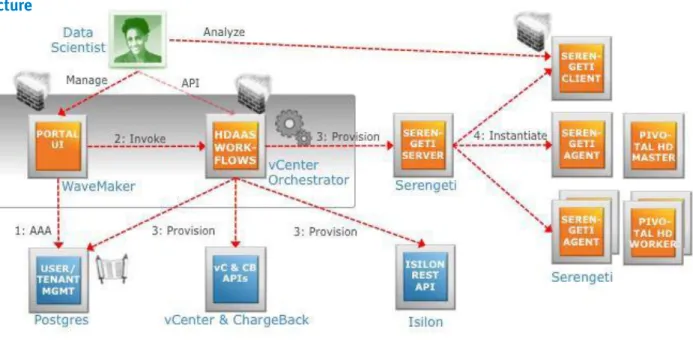
From a conceptual architecture perspective, as shown in Figure 1, the HDaaS solution has a customized front-end portal that enables you to load data into a shared EMC Isilon HDFS storage back end and to submit Hadoop jobs.
Hadoop as a Service Solution EMC Isilon, Pivotal HD, VMware vFabric Data Director, VMware vSphere
7
Figure 1. Conceptual architecture
The portal’s functionality is implemented as VMware vCenter Orchestrator (vCO) workflows. The core task of this functionality is to create and initialize a virtualized Hadoop cluster using Pivotal® HD and the virtualized Hadoop provisioning
framework. Key results/
recommendations
The HDaaS solution maximizes the value of a SP infrastructure by using virtualization and shared storage for a Hadoop service rather than dedicating physical
infrastructure. Like virtualization of other applications and application environments, this can increase resource utilization five to ten times.
For SP customers, with data scientists as the eventual service consumers, the HDaaS solution provides an on-demand Hadoop environment without the hassle and expense of managing it. Data scientists can spend their time analyzing data rather than administering infrastructure.
Introduction
PurposeScope
Audience
Terminology
This white paper provides a description of the HDaaS solution that maximizes the utilization of your infrastructure and provides on-demand Hadoop environments for customers.
This white paper discusses the architectural decisions and the technologies used. This white paper provides the solution architecture, configuration, and some design considerations for deploying this HDaaS solution.
The white paper also describes how the technologies work together to provide the HDaaS solution.
This white paper is intended for EMC employees including business developers and solution architects, EMC partners, and EMC customers such as product managers, and service providers’ technologists and architects.
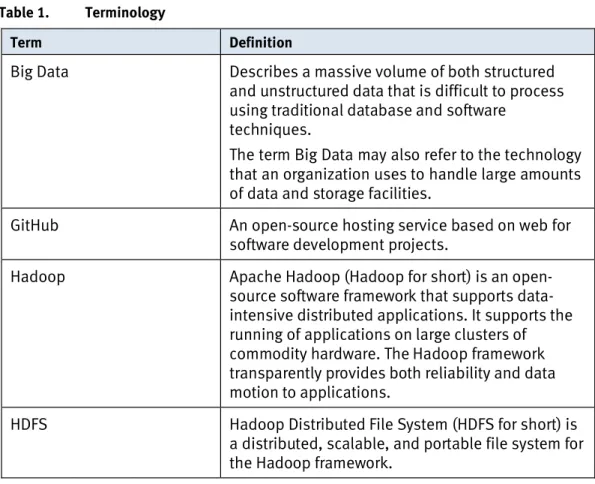
The reader should have a basic knowledge of Hadoop technologies. Table 1 shows some of the terminology used in this white paper.
Table 1. Terminology
Term Definition
Big Data Describes a massive volume of both structured
and unstructured data that is difficult to process using traditional database and software
techniques.
The term Big Data may also refer to the technology that an organization uses to handle large amounts of data and storage facilities.
GitHub An open-source hosting service based on web for
software development projects.
Hadoop Apache Hadoop (Hadoop for short) is an open-
source software framework that supports data- intensive distributed applications. It supports the running of applications on large clusters of commodity hardware. The Hadoop framework transparently provides both reliability and data motion to applications.
HDFS Hadoop Distributed File System (HDFS for short) is
a distributed, scalable, and portable file system for the Hadoop framework.
Hadoop as a Service Solution EMC Isilon, Pivotal HD, VMware vFabric Data Director, VMware vSphere
9
Term Definition
HBase And open-source, non-relational, distributed
database developed as Part of Hadoop project and runs on top of HDFS. It provides BigTable-like capabilities for Hadoop.
Hive Apache Hive (Hive for short) is a data warehouse
infrastructure providing data summarization, query, and analysis built on top of Hadoop.
MapReduce A computational paradigm implemented by
Hadoop. It processes large data sets and executes distributed computing on clusters of computers.
Pig A high-level platform for creating MapReduce
programs.
Postgres PostgreSQL (Postgres for short) is an object-
relational database management system (ORDBMS) available for many platforms. It has extensible data types, operators, index methods, functions, aggregates, procedural languages, and a large number of extensions written by third parties.
ZooKeeper Apache ZooKeeper (ZooKeeper for short) is a
software project providing an open-source
distributed configuration service, synchronization service, and naming registry for large distributed system.
Technology overview
OverviewMoving towards Hadoop as a service
This section provides an overview of the primary technologies used in this solution.
Pivotal HD
VMware Project Serengeti/vSphere Big Data Extensions
EMC Isilon
VMware vCenter Orchestrator
VMware vCenter Chargeback
VMware WaveMaker (not core technology)
VMware vCloud Automation Center (not used in this solution)
Our approach to deliver HDaaS, as shown in Figure 2, is to go from a dedicated single- tenant environment to virtualized Hadoop, to shared storage, and then with added as-a-service functions. The as-a-service functions include a self-service portal, multi-tenancy, metering, and some other features.
Figure 2. Road to Hadoop as a service
With this approach, we2 chose the following technologies for this solution: Pivotal HD
vSphere Big Data Extensions
Isilon as shared Hadoop storage
Around this core, several additional technologies are required to provide the full HDaaS functionality.
2In this white paper, "we" and “our” refers to the EMC Solutions engineering team that
Hadoop as a service Solution EMC Isilon, Pivotal HD, VMware vFabric Data Director, VMware vSphere
11 EMC Hadoop as a Service Solution EMC Isilon, Pivotal HD, VMware vFabric Data Director, VMware vSphere
6 We also considered a couple of other products but decided not to use them. They are included at the end of this section.
Pivotal HD
VMware Project Serengeti/vFabric Data Director for Hadoop
Pivotal (formerly Greenplum) HD is a 100 percent open-source certified and
supported version of the Apache Hadoop stack that includes HDFS, MapReduce, Hive, Pig, HBase, and ZooKeeper. Pivotal HD is available as software or in a preconfigured EMC Pivotal Data Computing Appliance (DCA) module.
Pivotal HD supports the following features:
Yarn (the next generation of the Hadoop data processing framework)
Vaidya (a performance diagnostic tool for MapReduce jobs)
Spring Hadoop (integrates Spring framework to create and run Hadoop MapReduce, Hive and Pig jobs, HDFS, and HBase)
Pivotal Advanced Database Services (ADS) powered by HAWQ adds proven parallel SQL processing facilities. HAWQ is a parallel SQL query engine that combines the merits of the Pivotal Database Massively Parallel Processing (MPP) relational database engine with an underlying Hadoop file system.
Pivotal HD requires at least version 0.8 of Serengeti. For more information, see the Pivotal website.
There are a number of options for providing a multitenant environment for Hadoop that uses HDFS on Isilon.
Serengeti is an open-source project initiated by VMware to automate deployment and management of Hadoop clusters on virtualized environments such as vSphere. vFabric Data Director for Hadoop is the commercial version of Serengeti that includes a management portal and vendor support
Currently, VMware’s Project Serengeti only works with vSphere because they provide the required integration to work with vSphere. Serengeti cannot be deployed on a VMware vCloud environment to use its multi-tenancy because vCloud Director
provides a virtual data center and does not enable direct access to vCenter resources. Clusters
Serengeti creates Hadoop clusters by cloning a virtual machine template and
applying the different Hadoop node roles using Opscode Chef. Chef is an all-purpose, open-source configuration management system used by Serengeti. The cluster configuration is controlled by providing a JSON file with input parameters, such as size of virtual machine for each role, compute resource pool, storage style (shared storage or local storage), network, whether or not the master nodes need to be protected by fault tolerance, number of task tracker nodes, software features on the client machine, and other input parameters. In a large environment, it also enables you to pick the host for specific nodes based on the topology.
Having the Hadoop cluster in a virtual environment enables you to share the infrastructure with other workloads. You can use the environment for analytics concurrently with other workloads.
Serengeti together with vSphere provides resource isolation to control and reserve resources. Serengeti controls which resource pools to use while deploying the cluster and enables different clusters to have different distributions and versions of Hadoop. Each Hadoop cluster maps to the vSphere port groups on its own network and
controls the security independently on its own set of virtual machines.
Serengeti provides RESTful Web Services built on the Spring Framework using Tomcat as web server to manage various distributions of Hadoop in a vSphere environment. Serengeti also provides a Command Line Interface (CLI) based on SpringShell for an interactive user interface. Serengeti uses other open-source tools such as Fog, Ironfan, and Chef.
For more information about Serengeti, see the Project Serengeti website.
EMC Isilon EMC Isilon is a scale-out network-attached storage (NAS) platform. You can add more
nodes to a cluster to increase capacity and performance. The OneFS file system grows in capacity as new nodes are added and rebalances automatically.
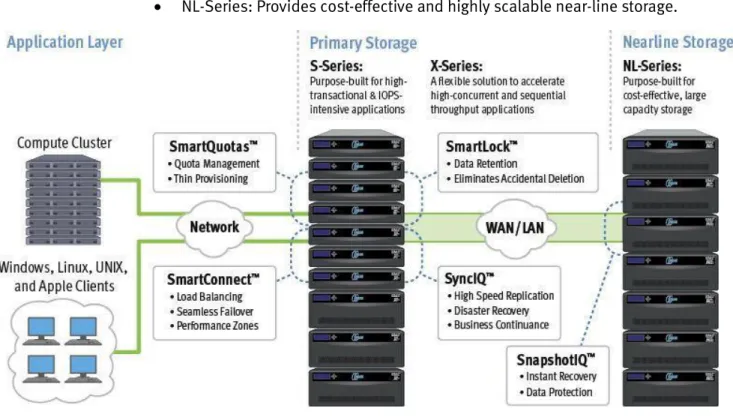
Isilon provides several flexible product lines as shown in Figure 3:
S-Series: Provides the best performance for high-transactional and IOPS- intensive applications.
X-Series: Provides the right balance between large capacity and high- performance storage.
NL-Series: Provides cost-effective and highly scalable near-line storage.
Figure 3. Isilon storage
Isilon can be accessed through various protocols, such as Common Internet File System (CIFS), Network File System (NFS), FTP, HTTP, and HDFS. If you use Isilon as
Hadoop as a Service Solution EMC Isilon, Pivotal HD, VMware vFabric Data Director, VMware vSphere
13 your primary file storage, data can easily be accessed through HDFS and can run
MapReduce jobs using that data.
Isilon storage, FileSystem OneFS, supports software models to handle additional enterprise-class features such as disaster recovery, quota management, and snapshots. FileSystem OneFS supports the following features:
InsightIQ™ (Data Management): A powerful, yet simple analytics platform.
SmartPools™ (Data Management): A single file system for multiple tiers.
SmartQuota™ (Data Management): Enables you to control and limit storage use, easily provision a single pool of Isilon scale-out storage, and present more storage capacity to applications and users. With SmartQuota, you can
seamlessly partition storage into segments at the cluster, directory,
subdirectory, group, and user levels through quota and through provisioning assignments and policies.
SmartConnect™ (Data Access): Supplies policy-based load balancing with failover.
SnapshotIQ™ (Data Protection): Supplies simple, scalable, and flexible data protection.
Isilon for vCenter (Data Protection): Manages Isilon functions from vCenter.
SyncIQ™ (Data Replication): Supplies fast and flexible file-based asynchronous replication.
SmartLock (Data Retention): Supplies policy-based retention and protection against accidental deletion.
Aspera for Isilon IQ™ (High-Performance Content Delivery): Supplies high- performance wide area file and content delivery.
Isilon enables you to define protection policies at the file level. This enables you to define less protection for the temporary data and to use the space for protecting important files.
VMware vCenter Orchestrator
VMware vCenter Orchestrator (vCO) is an IT process automation engine that helps to automate various technical workflows. It provides a user-friendly designer to
customize workflows based on your business processes and needs.
The workflow engine comes with many standard plug-ins to manage a vSphere environment and other back-end systems. You can add other plug-ins based on your needs.
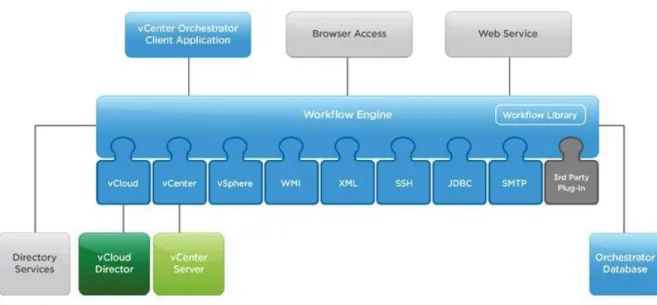
In the HDaaS solution, we used the HTTP-REST plug-in to interact with vFabric Data Director for Hadoop/Serengeti, VMware vCenter Chargeback, and Isilon.
Figure 4 shows the vCO workflow engine.
Figure 4. vCenter Orchestrator workflow engine
For more information about vCO, see the VMware website. VMware vCenter
Chargeback
VMware vCenter Chargeback, as shown in Figure 5, is a metering tool available as part of vCenter Operations Management Suite Enterprise Edition, which also contains vCenter Operations Manager, vCenter Configuration Manager, vFabric Hyperic, and vCenter Infrastructure Navigator.
vCenter Chargeback Manager enables you to configure billing policies and cost models to apply to vCenter-based hierarchies and entities. A hierarchy is a list of entities. Entities can be departments, business units, physical servers, resource pools, virtual machines, and so on. Each entity type is associated with a cost model that determines the rate for each unit of a used resource.
Hadoop as a Service Solution EMC Isilon, Pivotal HD, VMware vFabric Data Director, VMware vSphere
15
Figure 5. vCenter Chargeback architecture
In the HDaaS solution, two hierarchies are created for each tenant, which serves the purpose of cost reporting at both the service and the cluster levels.
A cost model can include fixed cost and variable cost based on resource use. The cost model is applied to a hierarchy to generate reports that can be viewed in different formats, such as DOC, PDF, CSV, and so on.
vCenter Chargeback also provides a RESTful interface to integrate with any orchestration tools or any custom portals.
VMware WaveMaker
For the implementation of the HDaaS portal, we used WaveMaker. WaveMaker is an open-source tool provided by VMware for Rapid Application Development.
WaveMaker eliminates Java coding for building Web 2.0 applications. WaveMaker is a visual what-you-see-is-what-you-get (WYSIWYG) development tool that runs in a standard browser. It supports many application servers, such as Tomcat, JBoss, GlassFish, WebSphere, and WebLogic, and runs in any standard J2EE environment. WaveMaker supports SOAP and REST web services.
In the HDaaS solution, we used SOAP access to connect to vCO. For more information on WaveMaker, see the WaveMaker website.
VMware vCloud Automation Center
VMware vCloud Automation Center (vCAC) tightly integrates with Microsoft Active Directory (AD) and has features to manage physical, virtual, and cloud environments. User policies and business operations across the globe can be centrally managed and you can choose the location where the blueprints need to be deployed.
This technology was considered but was not used in the solution because, currently, no ready-made endpoints are available to manage Serengeti environments using vCAC, which requires custom development using the vCAC Developer's Kit (CDK) plug- in for Microsoft Visual Studio.
Hadoop as a Service Solution EMC Isilon, Pivotal HD, VMware vFabric Data Director, VMware vSphere
17
Solution architecture
Solution functionality Solution architectureThe solution supports several user groups with their respective use cases:
Service provider admin:
Manages physical and virtual infrastructures
Defines compute resource pools
Defines storage pools and quotas for tenants
Adds and evicts tenants
Assigns resources to tenants
Accesses resource consumption information per tenant
Tenant admin:
Creates and removes data scientist accounts
Sets resource consumption limits for data scientists
Lists consumed resources
Reclaims unused resources
Data scientist:
Uploads data
Requests Hadoop cluster with specified characteristics
Conducts analytics
Releases resources
From its inception, Hadoop has followed a high-performance computing model in its design. For example, it is geared towards highly parallel processing across a
potentially large number of nodes. Equally, data is stored in a highly distributed way, where files are chunked up into blocks that are distributed across nodes and
replicated for reliability. The ideas of this design are to:
Be able to scale to sizes of data sets that were not usually used in commercial computing
Use commodity hardware for the cluster nodes
Bring computing to where data is rather than the other way around
While Hadoop has been successful by reaching these goals, it poses a number of problems in a service provider context:
Most Hadoop clusters show very poor CPU and storage use over time, as they are typically sized for peak loads.
As Hadoop clusters grow and their number increases, the management complexity grows accordingly.
There is no concept of multi-tenancy in Hadoop, which is a key requirement for most service provider scenarios.
Enterprises have come to expect enterprise-class data services around backup and disaster recovery, which Hadoop lacks.
Loading data from the place of its generation into a special Hadoop cluster for analytics processing is often slow or expensive. This cannot always be avoided, but if data is already generated or managed in a service provider environment, it makes sense to analyze that data without prohibitive loading and staging steps.
In order to address these challenges, we developed the architecture for the HDaaS solution using the following approach:
Virtualize Hadoop to increase CPU utilization
Share storage to increase storage efficiency, decouple compute from storage scaling, and use data protection services
Add the components that allow an environment to be offered “as a service”:
Self-service portal
Tenant/user management
Metering
Automated provisioning
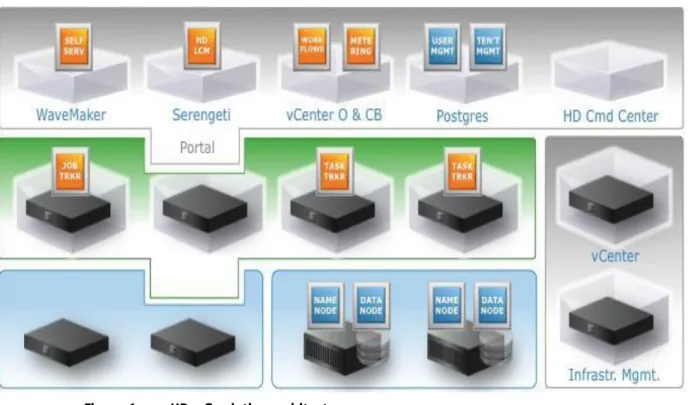
You can view the HDaaS solution architecture in three layers, as shown in Figure 6.
Figure 6. HDaaS solution architecture
The foundational layer is the physical infrastructure, which is comprised of compute nodes without any (significant) local storage and shared Isilon storage that provides all the HDFS functionality. This reflects one of the key architectural decisions in the HDaaS solution of separating compute and storage.
Hadoop as a Service Solution EMC Isilon, Pivotal HD, VMware vFabric Data Director, VMware vSphere
19 The second layer is the virtualization layer. Rather than running on a dedicated
physical server, Hadoop compute nodes run on virtual machines. The underlying physical infrastructure can be used more efficiently. The virtualization technology used in the HDaaS solution is vSphere.
The top layer is comprised of the components that make the HDaaS solution as a service, for example, user and tenant management, the self-service portal, and the technologies on which the portal functionality is implemented.
Along the right side of Figure 6 are the management components. Physical
infrastructure management is required for this type of solution, but this is beyond the scope of this white paper. Service providers usually have their solutions in place, and the solution is agnostic to those. Service providers similarly have solutions in place for the management of the virtual infrastructure, but here there is actually a
dependency, since the Hadoop Virtualization Extensions (HVE) currently only supports vSphere.
Software architecture
Figure 7 shows the interaction of the software components in the HDaaS solution.
Figure 7. Software interaction
The first interface for the users is the Portal User Interface that they can access through the web and which is implemented using WaveMaker. The Portal checks the user’s credentials against a user database before they are granted access. According to their respective roles, service provider admin, tenant admin, or data scientist, the Portal presents the respective functions to the user.
In order to deliver its functionality, the Portal invokes the HDaaS workflows, for example, all the use cases listed above and implemented using vCO. vCO comes with a number of adapters for EMC and VMware and makes it easy to integrate the
virtualization infrastructure and the Isilon storage. Isilon functions are exposed through REST APIs and consumed out of the vCO workflows.
The core function of the HDaaS solution is to create and initialize Hadoop clusters using Serengeti. Serengeti has a server-side component and an agent in every virtual machine it initializes. Serengeti also receives the information about which Hadoop distribution to use, which kind of virtual machines to spin up, and in which resource pool. The number of worker nodes and client nodes gets passed to Serengeti from the user’s input.
Once the Hadoop cluster is created, you can log into the client machine, with Secure Shell (SSH) for example, and can perform all the analysis tasks that you would do in any Hadoop cluster such as running MapReduce jobs, Pig scripts, and other tasks. You can also use the management web user interface that comes with the Hadoop distributions.
Hadoop as a Service Solution EMC Isilon, Pivotal HD, VMware vFabric Data Director, VMware vSphere
21
Workflows and APIs
Overview
User groups
Service provider
You can graphically design workflows in vCO or implement them by coding, and use adapters to other systems to invoke their functionality. The workflows of the HDaaS solution use functions that are exposed by Isilon, vSphere, vCenter Chargeback, and Serengeti. They can be invoked in turn by other systems through REST API calls, and are therefore the core integration points of the HDaaS solution.
The HDaaS solution has implemented a portal that invokes the workflows.
Screenshots of the portal are used in this white paper for illustration purposes, but it is assumed that you already have one or more portals in place and would therefore use the HDaaS solution by invoking the HDaaS workflows from those portals. The HDaaS solution supports several user groups: service provider admin, tenant admin, and data scientist. The workflows can be grouped into different categories based on the user groups.
The service provider admin role involves managing the tenants, compute service levels, and visibility into tenants cost summary.
Creating a tenant
When a service provider admin adds a tenant, the respective workflow performs the following steps:
1. Creates a tenant folder in the Isilon file system. 2. Creates an Isilon group for each tenant.
3. Creates an admin user account for each Isilon tenant.
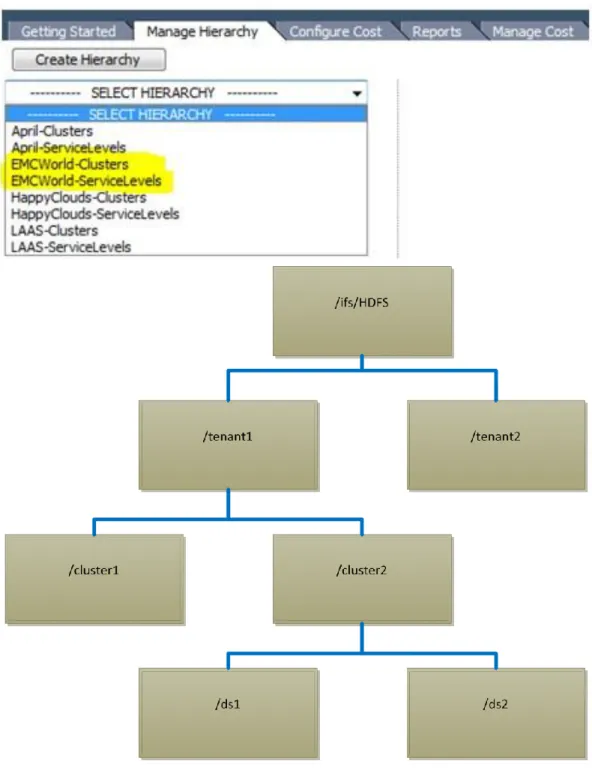
4. Adds a tenant admin user account to the Isilon tenant group. 5. Creates a tenant folder. (/ifs/HDFS/<Tenant org name>)
6. Restricts folder access to the tenant group to provide multi-tenancy. 7. Sets the Isilon quota at tenant folder (Org) level.
8. Creates chargeback hierarchies to provide metering and cost reports.
Tenants are secured from each other by applying folder permissions at the Isilon folder level. While the tenant users can seamlessly access the cluster folder where they are given explicit access, their home folders are secured with the individual data scientist user accounts.
Storage quota is also applied to the tenant folder to limit the storage capacity for a specific tenant. Isilon web services are used along with vCO HTTP-REST plug-in to automate the creation of users, groups, setting quotas, and so on.
SSH is used for creating and securing the folders. You can also use the Isilon object store interface instead of SSH.
For every tenant that gets added, two hierarchies on vCenter Chargeback are created.
<Tenant Name>_ServiceLevels hierarchy is created for the host and clusters view to generate reports based on service tiers.
<Tenant Name>_Clusters is created for the virtual machine and templates view to generate reports based on the cluster folder.
Hadoop as a Service Solution EMC Isilon, Pivotal HD, VMware vFabric Data Director, VMware vSphere
23 Figure 9 shows a sample vCenter Chargeback hierarchy list.
Creating a service tier
You can create compute service-level tiers by creating vSphere clusters based on processing power, memory, network, and datastore. You can assign those service tiers to tenants on which they can deploy Hadoop clusters.
You can create a new service tier by adding a new computer cluster and creating a Hadoop resource pool. To create a service tier:
1. Create a new compute cluster. 2. Create a new cost model.
3. Create a new Hadoop Resource pool, which uses the above compute cluster as its vCenter resource.
Figure 10. Service tier creation workflow
The portal gets input from the service provider admin for the unit cost for each service tier and creates a cost model on vCenter Chargeback.
We used vCO vCenter plug-in to create the compute clusters, resource pools, and others on vCenter and used Serengeti web services and vCO HTTP-REST plug-in to define the resource pools, datastores, and network for the tenant.
Tenant admin
Viewing cost summaries
You can view the cost summary of all tenants on their virtualization cost (which includes the cost of compute, network, and VMDK storage) and their HDFS cost based on their consumption. We used vCenter Chargeback web services along with vCO HTTP-REST plug-in to create the hierarchy for each tenant and run reports against that hierarchy. For the HDFS cost information, we used Isilon Quota usage information.
For details of the vCO workflows, see References.
The tenant admin workflow involves managing the data scientists, assigning data scientists to specific groups under the tenant, and viewing and changing the
Hadoop as a Service Solution EMC Isilon, Pivotal HD, VMware vFabric Data Director, VMware vSphere
25 organization and data scientist quota. The tenant admin release the resources of the service tiers that are not being used. The tenant admin can view the cost of the tenant organization both at service tier and Hadoop cluster level.
Figure 11 shows the data scientist accounts, quotas, and clusters in the Tenant Admin view.
Figure 11. Tenant Admin view
Adding a Data Scientist
The Tenant Admin can create new Data Scientist accounts with following workflows: 1. Creates a new Isilon user and add the user to the tenant default group. 2. Creates a new Isilon folder under the tenant root folder only, with the data
scientist user permissions applied to prevent the access from other users. (For example, /ifs/HDFS/TenantOrg/DS1)
Data scientist
Figure 12. Data scientist creation workflow
The data scientist can list the Hadoop clusters that were provisioned by that user, delete that Hadoop cluster, access the client node, resize the cluster, and create the cluster with customizable options. The data scientist can also change the user’s quota and manage snapshots of the user’s home folder.
Figure 13 shows the nodes of all clusters accessible by the data scientist in the Data Scientist view.
Hadoop as a Service Solution EMC Isilon, Pivotal HD, VMware vFabric Data Director, VMware vSphere
27 Creating a Hadoop cluster
The inputs from the portal are translated into respective inputs of the JSON file, and presented for cluster creation. You can easily understand the translation of the attributes used in the cluster creation by comparing the portal cluster creation with the JSON file, as shown in Figure 14.
Figure 14. Creation of Hadoop cluster
You can create a cluster using the following workflows:
1. For every new cluster, the Isilon folder structure, a group with the cluster name is created and the folder is secured with the cluster group.
2. Current Data Scientist user ID is added to the Isilon cluster group.
3. Future Data Scientist accounts can be added to the existing cluster group from the tenant admin login.
4. Invoke Serengeti to create the cluster nodes with the respective Service levels with or without fault tolerance according to the inputs sent from the portal. 5. Add a new cluster entity to the vCenter Chargeback hierarchy.
Figure 15. Hadoop cluster creation workflow
Hadoop as a Service Solution EMC Isilon, Pivotal HD, VMware vFabric Data Director, VMware vSphere
29 Viewing cluster cost information
Figure 17 shows the cost information of each cluster that the user has access to along with the Isilon folder cost.
Figure 17. Cluster and Isilon folder cost
Based on the Tenant Org Name and Data Scientist membership in the Isilon cluster group, reports are generated in vCenter Chargeback in a single table for the
respective hierarchy. Isilon folder usage costs are also generated at the same time and shown in the same table for the relevant data scientist.
Design considerations
Hadoop clusters Hadoop clusters were originally designed for physical machines that have compute,
local storage, and networking. Users needed to add more machines based on the demands in order to scale. Running a Hadoop cluster in a virtual environment brings many benefits, such as, consolidating the resources, providing high availability for the Master nodes and Name nodes using optional Fault Tolerant virtual machines. Hadoop clusters typically use the local storage and provide fault tolerance by replicating the data to other nodes.
Serengeti supports several rack topologies to assist in choosing the target nodes for protecting the data. Hadoop Virtual Edition is fully aware of virtualization
environment and can identify where the Hadoop cluster nodes are hosted.
“Host as Rack” assumes all the virtual machines in a host are treated in the same way as the physical machines hosted on a rack.
“Rack as Rack” considers the physical racks the same as the logical rack. Note: For the Hadoop Virtual Edition and Rack as Rack models, you need the
physical layout mapping file to provide the relationship of physical hosts to physical racks.
Pivotal HD 1.2 supports Hadoop Virtual Extension. In a large environment, during the cluster creation, compute nodes can be placed on specific hosts based on the topology selection. Storage tasks Isilon storage Hadoop in the cloud Hadoop cluster sizing
The storage tasks are handled by Name node for the Metadata and Data node for IO operations. The tasks consume some CPU cycles on the node if the roles are shared on same machine or need dedicated machines.
Isilon architecture is almost similar in nature to Hadoop (in the sense that both are scale-out architectures) and provides the HDFS protocol access to the data stored on Isilon storage. Having it on Isilon, the data can be hosted by using various other user- friendly protocols, such as NFS, CIFS, FTP, and so on. Isilon also provides snapshot and replication features to protect the data. With Isilon, you can define the protection policy at file level. This enables you to set one set of policies for the temporary data files and more protection copies for the result data.
Serengeti supports the deployment of Hadoop in a vSphere environment. If you need to deploy it in a different cloud environment, the code is available on GitHub and needs to be updated to provision the other environment.
The maximum number of map and reduce tasks for each node depends on cluster node instance type (Small/Medium/Large/Extra Large). The selection of node instance type affects the performance tuning of java_child_opts, java_child_ulimit, and other performance tunings.
Max number of map tasks per node = 2 + cores*2/3 Max number of reduce tasks per node = 2 + cores*1/3
Hadoop as a Service Solution EMC Isilon, Pivotal HD, VMware vFabric Data Director, VMware vSphere
31 Isilon sizing and
configuration
Heap size = max of 550 or 0.75 * RAM/1000/(max number of map tasks + max number of reduce tasks)
child_ulimit = 2* heap_size * 1024
You create service tiers using Smartpools on Isilon. Group the nodes of Isilon nodes with similar characteristics typically by the node models, this means group all S- Series nodes, all NL-Series nodes, and all X-Series nodes together. You need at least three nodes of same model to create a service tier. You can add more nodes to the tier to add more capacity or performance.
File folders and pools
You can control the service tier of particular files by assigning file pool policies at the folder level to redirect to specific service tier, as shown in Figure 18.
Figure 18. Configure file matching criteria
Each tenant has its own folder. The storage capacity is limited by setting the quota for that folder. The folders can be charged based on the usage of the data, as shown in Figure 19.
Figure 19. Isilon folder quota usage details
Isilon local groups are created for each tenant. Users of each tenant are members of the created group. The folder for the tenant is secured by the created group.
Isilon also provides Access Zones to pick the authentication providers for each tenant. The authentication providers can be Active Directory, LDAP, NIS, file based, or Isilon system based.
Isilon enables you to create various subnets for each tenant and also pick to which Isilon cluster nodes they can connect. SmartConnect optimizes storage performance with its intelligent, automatic client-connection load balancing, and failover
capabilities. With SmartConnect, you can dedicate specific Isilon node ports for a given tenant.
Hadoop as a Service Solution EMC Isilon, Pivotal HD, VMware vFabric Data Director, VMware vSphere
33 Isilon provides a single file system that can be accessed through CIFS, NFS, HTTP,
FTP, and HDFS. To access the file system through HDFS, Isilon needs a separate license and can be configured using the CLI tool, as shown in Figure 20.
Figure 20. Isilon CLI Tool
In the HDaaS solution, we set the root path as /ifs/HDFS folder. Any folders below that are visible through HDFS protocol to the customers and they cannot access any other folder on /ifs.
Note: If specific Isilon nodes are dedicated to a tenant, a HDFS rack can be defined for that tenant network with specific Isilon cluster nodes.
HDFS protocol performance reports can be monitored using InsightIQ or Ganglia, an open-source monitoring resource, as shown in Figure 21.
Compute cluster sizing and configuration
Figure 21. Performance reporting
Serengeti vApp contains two virtual machines. One is Management Server that provides the web services. The other is Hadoop node template that gets cloned during the Hadoop cluster creation.
A resource pool is needed for each tenant for accounting purposes. A compute cluster on vCenter can host up to 32 hosts for each cluster. Based on the processor speed and memory, you need to determine the number of virtual machines for each host. You can determine the maximum number of virtual machines for each cluster. The number should not exceed 4,000. For more details on maximum numbers supported by VMware, refer to the VMware vSphere Configuration Maximums Guide.
Deployment
Operations and management
You can download packages from EMC Communities and import packages to any vCO instance. The package contains the solution portal and the vCO workflows. Any site specific configuration changes will be prompted. Refer to the Readme file in the package for details.
In the Hadoop clusters along with vSphere environments, you can view the HeatMap of the infrastructure by using vCenter Operations Manager. You can expand and view the metrics to identify the root cause of the problem.
Figure 22 shows the tile view of infrastructure. The green status means it operates normally.
Figure 22. VMware vCenter Operations Manager
In Serengeti 0.8, Hadoop clusters can also be monitored using Ganglia.
The cluster can be powered up or down based on the needs and specific nodes using the Serengeti CLI. Select vFabric Data Director for Hadoop to display the graphical user interface.
Hadoop as a Service Solution EMC Isilon, Pivotal HD, VMware vFabric Data Director, VMware vSphere
35 Figure 23 shows the graphical user interface of vFabric Data Director for Hadoop. The interface shows the Hadoop cluster node information.
Figure 23. Cluster Node Information
Isilon can be managed using the management portal or using SSH. The metrics of Isilon can be collected using InsightIQ or Ganglia.
Metering and billing
We used two tools to collect the metering information. One is vCenter Chargeback, the other is Isilon Quota. vCenter Chargeback provides the metering information of Hadoop cluster nodes hosted on vSphere. Isilon Quota reporting provides the metering information stored on HDFS.
Figure 24 shows a tenant that has its own resource pool on various service tiers of compute clusters.
Figure 25 shows metrics to set the based rates. Rates are assigned to service tiers.
Figure 25. Chargeback pricing model
A report of all tenants is provided to the service provider based on service tiers. And is provided to data scientists based on the Hadoop cluster. Tenant admin can view both service tier report and cluster based report.
On vCenter Chargeback, two hierarchies are created for each tenant. One contains host and clusters view for the service level reporting, the other contains virtual machine and templates view for each tenant to provide cluster level reporting. For service tier on host and clusters view, the report is generated based on each service tier applying the pricing model. For service tiers on the virtual machine and templates view, if all the nodes are hosted on same service tier, the report is generated at the cluster level. If not, the report is generated at the node group level applying the pricing model for the corresponding service tiers.
Isilon Quota reports are collected from Isilon. The report displays specific tenant organization or users.
Hadoop as a Service Solution EMC Isilon, Pivotal HD, VMware vFabric Data Director, VMware vSphere
37
Conclusion
Summary
Findings
This HDaaS solution provides a reference architecture for implementing HDaaS, which enables service providers to quickly deploy an HDaaS and enables data scientists to spend their time on analytics rather than Hadoop cluster management.
The solution also demonstrates the benefits of virtualizing Hadoop, separating compute from storage, and using shared storage rather than local storage. The solution can result in a five to ten times increase in CPU utilization, and a reduction of disk space overhead from 200 percent to 20 percent.
References
Product documentation Other documentation Other websiteFor additional information, see the product documents listed below:
EMC Isilon Scale-out Storage with VMware vSphere 5 Performance and Sizing Guide
EMC Isilon OneFS Platform API Reference
For additional information, see the documents listed below:
VMware vSphere Configuration Maximums Guide
Serengeti User Guide
Virtualizing Apache Hadoop
Hadoop Virtualization Extensions
For additional information, see the website listed below: