White Paper: Business Intelligence
Business Intelligence with AxCMS.net
®
Abstract / Summary
AxCMS.net supports Business Intelligence allowing you to have a complete overview about what is going on in your web-applications (page view, user actions, search, email campaigns, registrations, etc.). It can be integrated with other enterprise applications in your company to give you a big picture without handing out your business data to third parties. AxCMS.net Business Intelligence architecture is flexible and easily extendable on any level.
Reporting Template project enables an easy start into business intelligence world. Start your data mining today and learn many interesting facts about your business.
Business Case / Use Case
Various web sites, marketing campaigns, ERP system, etc. generate a substantial amount of data, which, if properly analyzed, could give you very interesting insights into your business. Unfortunately in real life it is often hardly possible to integrate such data across application barriers. Thus many interesting facts about your business are likely not to be discovered.
One possibility to solve this would be to use an external tracking & analysis service, like Google Analytics. This approach has at least one important drawback: you hand out data about the Internet-behavior of your customers in real time to a 3rd party – but this does not comply with your typical handling of sensitive business information.
A professional in-house analysis solution can boost your company’s ability to recognize trends, risks and possibilities. It supports your decision-making processes and helps you to understand your customers. You can even define automatic response actions according to pre-defined patterns (e.g. certain recommendations or sales actions based on sales data).
Concept
Business Intelligence
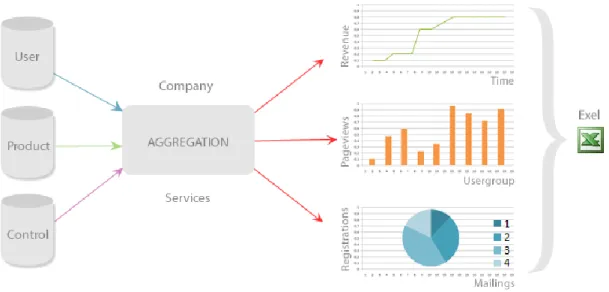
A set of technologies, applications and practices used to achieve previously stated goals is known under the name Business Intelligence (BI). Typical business intelligence solution employs a Data Warehouse (DW). Data warehouse is a repository of organization’s electronic data, stored in a way designed to facilitate reporting and analysis. In contrast to data warehouses, operational systems store data in a way that it optimized for transaction processing. Obviously there is a need to extract the data from operational systems (note the plural here!), transform them to fit the data warehouse format (and its long-term storage pattern) and load into the data warehouse. These steps are known as ETL-processes (Extract, Transform, and Load).
Fig. 1 Business Intelligence system
One more well known term in a BI-environment is OLAP, which stays for On-Line Analytical Processing (as an opposite of OLTP – On-Line Transactional Processing). It is an approach to quickly answer multi-dimensional analytical queries. At the core of any OLAP system is the concept of an OLAP cube (also called a multidimensional cube or a hypercube). It consists of numeric facts called
measures which are categorized by dimensions. The cube metadata is typically created from a star schema or snowflake schema of tables in a relational database. Measures are derived from the records in the fact table and dimensions are derived from the dimension tables. Data Warehouse from the Fig. 1 typically loads source data into a relational database and then creates an OLAP cube out of it.
The output of an OLAP query is typically displayed in a matrix (or pivot) format. The dimensions form the rows and columns of the matrix; the measures form the values. There are numerous analytical tools on the market which can access OLAP data and visualize it with tables, graphs, charts, etc.
Microsoft Way
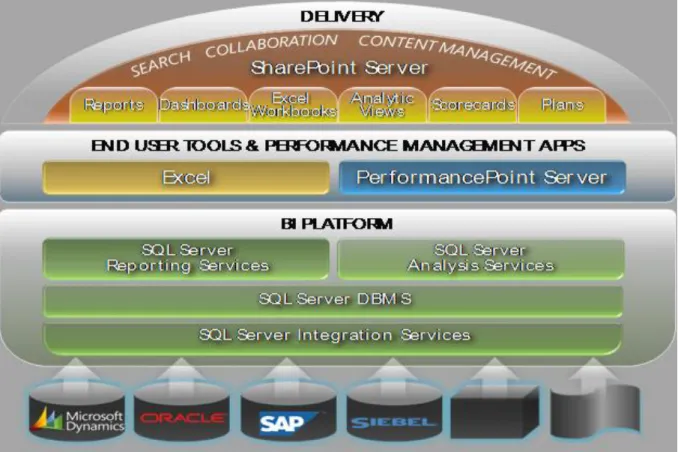
Microsoft entered the OLAP-market with SQL Server 2000 and is now a market leader. SQL Server provides business intelligence tools for all fields from the Fig. 1:
SQL Server Database Engine – for data sources and relational part of the Data Warehouse SQL Server Integration Services (SSIS) – for ETL
SQL Server Analysis Service (SSAS) – for the OLAP-cube
SQL Server Reporting Services (SSRS) – for reporting & analytics
Additionally Microsoft Excel 2007 is a very powerful and easy to use analytics tools.
Further Microsoft products, like Office SharePoint Server 2007 integrate well with SQL Server Analysis Service.
Developers create BI-solutions using Business Intelligence Studio (an extension to Visual Studio).
AxCMS.net Way
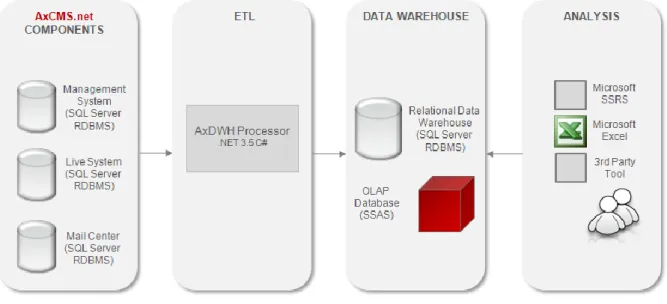
To combine already said before: AxCMS.net supports Business Intelligence and uses Microsoft tools. AxCMS.net components like Management System, Live System and MailCenter serve as data
sources.
Data warehouse is an additional component which is introduced with AxCMS.net Reporting. (If you are already using a data warehouse for OLAP, you can integrate AxCMS.net instance into this data warehouse.)
For ETL AxCMS.net comes with its own tool: AxDWH_Processor.
For reporting we suggest using MS Excel 2007. Most of the popular 3rd party tools can be used as well. It is even possible to integrate simple reports in AxCMS.net Management System itself (using custom reports in MDX).
Fig. 3 AxCMS.net Business Intelligence Architecture
How it works
Data Sources
Typically 3 data sources are used with an AxCMS.net installation: Management System Database
Live System Database
MailCenter Database (if Newsletter is used or otherwise MailCenter is used; see the white paper “Email Marketing with AxCMS.net” for more details).
Management System (MS) and Live System (LS) provide information about the central AxCMS.net-objects:
Pages Documents
Categories / Navigation Users / Members
Both MS and LS provide an extensible logging mechanism, which allows collecting information about everything interesting, what happens in the system. Particular logged facts are called “Actions” and are stored in AxActionLog table in MS- resp. LS-database. There are a plenty of pre-defined actions, like:
MS:
Login (user login into MS)
Every activity (aka “Bulk Operation”) which is performed on some element(s), e.g. Publishing, Check-In/Check-Out, Classify, Clone, Delete, Create version, etc.
LS:
Page view, Document view (these actions are similar to the data collected in a web-server log file, but it better fits the AxCMS.net context – relations to users, categories, navigations, referrers are captured and can be analysed)
Login (a member login)
Register (a member registration)
Search (for tracking which keywords are the most wanted ones) Teaser (for track which items appear in the lists / teasers)
Click on a link (every link in any page or newsletter can be made trackable) Subscribe / Unsubscribe (for newsletter subscriptions)
As a developer you can create your own actions and let AxCMS.net log them (“custom actions”) and turn on/off existing actions. Read more about logging actions in the developer documentation:
http://en.help.axcms.net/en_help_cms_dev_actionlog.AxCMS.
AxCMS.net Modules come with built-in logging functionality, which extends the standard AxCMS.net logging.
MailCenter exposes data about mails sent (“MailCenterArchive”). All mails resulted for a single mailing are grouped using the same OrderID (which typically matches the ID of the newsletter).
Non-AxCMS.net-Sources
You can add additional data sources to your system to create an integrated solution. To do this, you extend the ETL-configuration-file (see below). To achieve the most you should aim for re-using the dimensions (like Users, Time, Categories).
ETL / Data Warehouse (relational)
After the data is collected, the next step is, to extract the data from all sources, transform it into a form more suitable for further processing and to load it into the data warehouse. Axinom tool AxDWH_Processor is used for this purpose. With this tool you can define the schema of your data warehouse (DWH) and the mapping between the data sources and DWH.
You describe the mapping with an XML configuration file (referred as etl.config). The fundamental things you define here are:
Dimension tables Fact tables
Facts in AxCMS.net context are basically actions (see above). Actions are classified along different dimensions (User, Category, Page, Document, Time, etc.). For every known Action a special Fact
Table is created. It helps better modeling of the dimensions of a particular fact. For all other Actions a default fact table (so called BulkFact table) is used. Only basic analysis options are available for the bulk facts.
Fig. 4 Sample ETL-configuration for the dimension “DimSearch” and the fact table FactLSSearch (Action “Search”).
AxDWH_Processor can create a new data warehouse according to the XML-definition at the beginning. It can also delete the data from the source after processing. For AxActionLog it makes sense, because otherwise the operational database keeps growing rapidly, especially if you log frequent actions like “Page View”.
Slowly Changed Dimensions
DWH stores all historical data (and never deletes data). This is why the changes in the dimensions data are a problem. Comparing to the facts, dimensions are changing not so often, this is why one speaks about “slowly changing dimensions”.
Example. Say, you analyze registrations on your site, and you have a user, who registered in January 2009 and relocated from Nuremberg to Munich in June 2009. If you just change the field “Location” of the user from “Nuremberg” to “Munich”, you will automatically fake the data for January-May (you will have 1 more user from Munich and 1 less from Nuremberg as it really was).
There are different strategies for handling slowly changing dimensions: Type 0: do not consider changes at all
Type 1: simply overwrite the data and accept the loss of the historical data. Sometimes it is really not that important.
Type 2: create multiple versions of the records in the dimensional tables to keep track of changes. In the example above you will end up with 2 records for the same user: one with
Location=Nuremberg valid from January to May and another one with Location=Munic starting in June.
Type 3: tracks changes using separate columns. Whereas Type 2 had unlimited history
preservation, Type 3 has limited history preservation, as it's limited to the number of columns we designate for storing historical data.
AxDWH_Processor supports Type 1 (SCDType="Changing") and Type 2 (SCDType="Historical") methodologies.
SSIS vs. AxDWH_Processor
In principle you can use SQL Server Integration Services (SSIS) as ETL tool. We tried it out, but due to some technical issues with it (e.g. it opens too many simultaneous connections and sometimes hangs up without any error message) decided to create our own ETL tool specifically for out integrations scenarios.
Data Warehouse (multidimensional), aka OLAP-Cube
ETL-tool puts the data into relational data warehouse. This database uses star-schema: with fact-tables and dimension-fact-tables.
For OLAP analysis a special multidimensional data structure is built on top of this database, known as OLAP-cube. The definition of the cube includes measures, dimensions and relations between them. The cube is defined in a special Analysis Services Project using Business Intelligence Development Studio. The cube is deployed to SQL Server Analysis Services and synchronizes automatically with relational data warehouse.
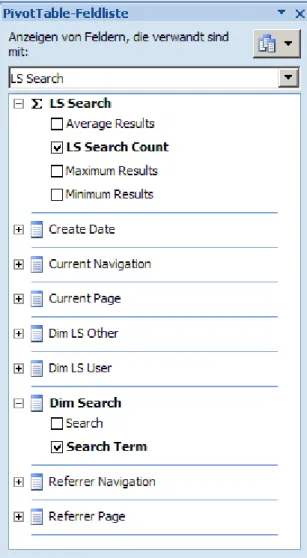
Fig. 5 Cube structure for the action “Search”
You see a measure group “LS Search” with 4 measures. “Search Count” shows, how often a certain term was searched for, and the results-measures explain how many results were found (average, max, min). The measures are related to 8 dimensions:
Dim Search – search term
Create Date – date of the search (Time dimenstion/hierarchy)
Current Page – the page on which the search was activated (refers to AxPage and its hierarchy Page Type / Page Template / Page Name)
Current Navigation – navigation point to which current page is attached Referrer Page – the referrer page to the page, where the seach was activated Referrer Navigation – navigation point to which current page is attached Dim LS Other – IP-address of the user, who activated the search (if exists) Dim LS User – the user, who activated the search (if logged in)
Most of these dimensions are also applicable to other facts/measures. Some (like “Dim Search”) are specific for this measure group only.
Analysis
To analyze the data in the OLAP-cube you can use any tool of your choice, as long as it supports SQL Server Analysis Services. We recommend Microsoft Excel 2007 because it is easy to use, powerful and widespread.
Microsoft Excel 2007
In Excel you can connect to the cube and access the measures, dimensions and hierarchies which are defined there. You can use all Excel features like Pivot Tables and Diagrams to visualize the data:
Fig. 6 Visualization of the search data in Microsoft Excel 2007
Reporting Services
You can also use SQL Server Reporting Services (SSRS) to access the data in the data warehouse – both relations and multidimensional.
Remote Access
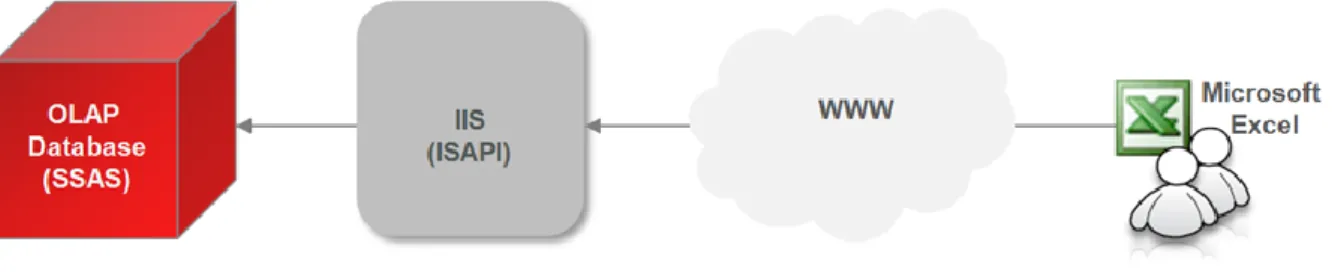
To access a cube via Excel from the Internet (outside your windows domain), you should use an IIS as a gateway. There is an ISAPI filter for IIS available for this purpose. You configure this filter to run under a certain URL and in Excel you provide this URL and the username and password. On the last screen make sure to activate the “save password” option, otherwise Excel cannot connect (according to our tests).
For more information refer to this MSDN-article:
http://msdn.microsoft.com/en-us/library/cc917711.aspx
How to get started
The easiest way to start is to acquire Reporting Template Project offered by Axinom exclusively for AxCMS.net Solution Providers.
Reporting Template Project
Reporting Template Project is Axinom product which helps enables you to use Business Intelligence tools around AxCMS.net. Deliverables include:
AxCMS.net 8.5
AxCMS_ReportingSample – a sample AxCMS.net project, delivered in source code as a Visual Studio solution, which demonstrates how to log all possible actions correctly and how to create your own actions.
AxDWH_Processor – an ETL-tool
Etl.config – an XML file, defining DWH tables and the mapping between AxCMS.net source databases and DWH
Cube_ReportingSample – an Analysis Services Project containing a cube definition, which is based on the DWH (see etl.config)
Cube_ReportingSample_MC – a separate cube for the MailCenter
Sample.xlsx – an Excel 2007 file, containing sample reports (pivot tables & diagrams) working with an OLAP cube
Note. If you wish to analyze MailCenter data as well, you need to acquire additionally Newsletter Template Project – another Axinom offering.
We suggest you to start with getting familiar with provided sample solution first. After you installed, configured and run Reporting Template project, you will get an idea how the parts are working together. Later you can copy parts of the OLAP infrastructure into your own solution and customize it.
Pre-Requisites
You need some additional components from Microsoft to start working with Reporting Template Project, comparing with an ordinary AxCMS.net solution.
To be able to deploy the OLAP-cube you need:
SQL Server Analysis Services – a component of the SQL Server. It is available in Standard Edition and above. It is not available with Express Edition.
To be able to open the Cube-projects in Visual Studio you need:
Business Intelligence Development Studio – it is also a client component of the SQL Server, but actually it extends Visual Studio which is installed on your workstation. (If Visual Studio is not installed, BI Development Studio can run standalone.) BI Development Studio allows you to open Analysis Services Projects.
You can develop your solution on one PC (your development workstation) and deploy cubes to a server, so avoiding a need of SQL Server Standard Edition for the workstations.
Windows Vista
For Windows Vista some additional configuration is needed, e.g. some programs need to run “as admin”. This is described in the developer documentation.
Data sources / Actions
Out of the box you will find support for: Management System
Live System MailCenter
The following actions are logged with AxCMS_ReportingSample solution: LS:
AxPageViewAction AxDocumentViewAction AxLoginAction
AxRegisterAction AxSearchAction AxTeaserAction MS:
AxCMSLoginAction CheckinActivity PublishPage
PublishDocumentActivity PublishNewsletterActivity PublishMailTemplateActivity MailCenter:
Sent Mail
Additionally it is shown how to log and analyze actions from the BannerModule and VotingModule.
Date Warehouse / Cube
The following dimension tables are built for analyzing the data: DimLSUser
DimMSUser DimCategory DimPage DimDocument DimLSElementType DimMSElementType DimSearch
DimLSOther DimMSOther
DimMailRecepient DimMailOrder DimVoteInfo DimTime
Most of them are self-explanting. “MS” or “LS” shows the origin of the data. Time-dimension does not use any source data, but is built using predefined hierarchies.
Most of the actions are put into their own fact table. Any action, which has no own fact table defined is integrated into a so called “Bulk fact table” – there is one in MS and one in LS. Bulk fact table have a generic structure and allows some basic analysis.
Fact tables: FactLSPageView FactLSDocumentView FactLSNewsletterView FactLSSearch FactLSUserLogin FactLSUserRegistration FactLSNewsletterSubscription FactLSNewsletterDesubscription FactLSElementTeaser FactMSElementCheckin FactMSUserLogin FactMSPublishPage FactMSPublishDocument FactMSPublishNewsletter FactMSPublishMailTemplate
FactLSBannerClick – for Banner Module; every click on a banner is a fact
FactLSBannerImpression – for Banner Module; every banner impression is a fact here FactLSVote – for Voting Module; every vote is a fact
FactMCSentMails – every mail, sent via MailCenter is a fact Bulk Fact Tabes:
FactLSOtherActions FactMSOtherActions
Cube
Cube structure reflects the schema of the data warehouse, but adds some features to help analyzing. For example, the dimension table DimCategory provides the data for the following dimensions: Current Navigation
Referrer Navigation Newsletter Category Banner Area
Banner Campaign Banner Format
Fact tables provide the material for measures and measure groups. Most measures are simple Counts for the number of facts in its fact table. But there are some exceptions, like number of results for a search. There is a matching matrix showing which dimensions are available for which measure groups.
Excel
In Excel after you connect to the cube you see on the right side a list of all dimensions (with fields and hierarchies) and measure groups (with measures) available from the cube. You can select your desired measures and decide which dimension(s) you use for rows and columns and how you would like to filter the cube.
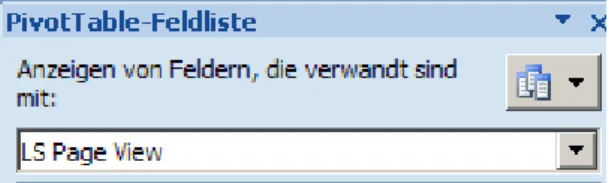
To ease your analysis you should first select a measure group from the drop down list at the top:
Fig. 8 Measure Group Filter
It will show then only the dimensions and measures relevant for this measure group. Finally you get fancy charts (see Fig. 6).
How to use
After getting known AxCMS.net Business Intelligence using Reporting Template Project you might want to use these features in your own projects. Technically it is easy – copy AxDWH_Processor, its configuration and the cube-project to your solution, attach to your sources, release/deploy, run and you are ready to access your own cube with e.g. Excel. From here you can customize the solution on many different levels:
Create custom reports in Excel Change the cube definition Change the way DWH is built Add new actions via configuration Program your custom actions Add other data sources Add other analysis tools
He we would like to list some common analysis scenarios and how to implement them.
Web Log Analysis
IIS creates an entry in a log file for every hit (every client request). There are many tools around helping you to analyze them and get valuable information out of them. There are products you use in-house, like Sawmill or Webalizer or services you can use adding a pixel to every web page, like Google Analytics. A disadvantage of all these tools is – they do not know anything beside the client request, incl. the URL requested.
In AxCMS.net you can do the same analysis logging PageView and DocumentView actions and analyzing the corresponding fact tables. A big advantage here is: AxCMS.net knows more about the
pages/document being called. It knows their meta-information, it knows, to which navigation node they belong and if a user is logged in, all the user information can be analyzed together with a page view. Even referrer information is available – not just as an URL but also as an AxCMS.net page attached to a particular navigation node.
Fig. 9 Page impressions depending on the navigation hierarchy and calendar weeks
Existing web logs analysis tools are more mature analyzing a demographics of your users based on their IP-addresses. AxCMS.net does log the IP-address; more features for extended geo-analysis will be added soon. As long as you analyze authenticated users, you can use LS User Dimension and all its properties. You can combine both tools to get an optimal result.
To analyze page view you need to turn on PageView action in the web.config of the Live System. If you do it, the Action Log grows rapidly, so ensure you integrate often and truncate the log for already integrated records.
Registrations
To analyze registrations of new users (or e.g. subscriptions of the new users for your newsletter) implement a call to AxRegisterAction in your registration code and enable it in the web.config. Then you can analyze LS User Registration facts. The most interesting dimensions here are certainly Dim LS User (everything about registered user) and time. But you can even analyze which page brought the most registrations (if you have multiple registration forms) or which referrer pages are the most successful.
Similar considerations apply for Logins.
If you wish to analyze your user pool (current state, not the new registrations), you need to define a new measure in the cube, which is “count(*) from AxUsers” and dimensions like Gender, Country, Age, etc. (all available from the AxUsers-table).
Search
Which search terms are most wanted for your users? Google provides such statistics if you use, say, AdSense for Search. AxCMS.net does it as well.
In your search form implement a call to a predefined AxSearchAction. It can log the search term and the number of results. If you analyze then “LS Search Count” measure by the dimension “Dim Search”, you know, what is searched for most of the time. Of course you can include the other interesting information like, “who searched?”, “from which page?”, “under which navigation?”, “when?”, etc. (see Fig. 6)
Teaser
With AxCMS.net you typically use dynamical lists. E.g. news-lists showing a list of pages base on some criteria, like publication date. And you wonder how often a certain page was listed on your web site to the users. AxTeaserAction makes it possible. Call a predefined AxTeaserAction every time a list item is rendered and pass the id of the shown page as a parameter. Later you can analyze “LS Element Teaser Count” together with “Teasered element”. The second dimension could be: “Current Page” (on which pages my articled was teasered?), “Time” (when my article was teasered?) or “LS User” (who saw a teaser for my article?).
AxTeaserAction – if used extensively – can generate a lot of data. So the same considerations apply like for the AxPageView.
Modules
Every AxCMS.net modules (Banner Module, Voting Module, etc.) comes with some logging mechanism. Consult its documentation to learn, how to analyze the module data appropriately. Ask Axinom before you decide to implement a custom logging / analysis scheme for a module.
Link Tracking
Interested how the links in your content are visited?
First, let your editor set a checkbox “Track Link” on a link edit page. It is helpful for external links or links in a newsletter (other internal links would generate a PageView Action anyway for the target page/document).
Fig. 10 Track links
If you decide to track a link, the link is replaced with a link to a redirection-page in the Live System. This page makes a call to AxTrackedLinkAction and then redirects the browser to the real target. Enable the AxTrackedLinkAction in the web.config. Afterwards you can analyze these actions. Current version of the Reporting Template Project lacks a special fact table for tracked links, so you will find them in the “LS Other Action” measure group. Set filter on Action = “AxTrackedLinkAction”. The link is attached to this action, from “Current Page” you can read, on which Page/Newsletter the link was clicked and if a user is authenticated (or you deal with a newsletter), “Dim LS User” will even tell you, who clicked.
Analysis in the Management System
All above was about analyzing events in the Live System because they are more interesting. You can analyze what happens in the Management System pretty the same way.
The first action to analyze would be AxCMSLoginAction (and “MS User Login” measure). Attached to MS User it will help you to understand who works how often with your AxCMS.net instance.
Next step would be to analyze publishing process. There are actions for publishing pages, documents, newsletters and mail templates. So you can see, at which times there are publishing peaks, or you can see most often re-published pages and so on.
If you look deeper, every activity (aka Bulk Operation) can be logged. Activities are carried on elements, which are described with Element Type and Element ID. Examples of activities are Publish, CheckIn/CheckOut, MoveUp/MoveDown, Approve/Revoke, etc.
You can implement any other custom actions and call them from your extensions in the MS.
Success Control for Email Campaigns
First you need your subscribers. How to analyze subscription behavior or subscriber pool - see above under “Registrations”.
To analyze the newsletters themselves including publishing – see above under “Analysis in the Management System”.
Of course you are interested how the users click on the links in your newsletter. Refer to “Link Tracking” above. Set the filter for your particular newsletter and you can see all the single links with a number of clicks.
To analyze the sending process you need the data from the MailCenter. It has “MC Sent Mail” measure. Set the filter for OrderID (should be equal to the ID of your newsletter). You see all the recipients and bounces status. You can filter the mails, which were undeliverable (by reason or by recipient).
Read more about Email marketing in our white paper “Email marketing with AxCMS.net”.
References
Reporting Template Project
http://en.axcms.net/en_axcms_template_reporting.AxCMS
http://en.help.axcms.net/en_help_cms_reporting.AxCMS - developer documentation Newsletter Template Project
http://en.axcms.net/en_axcms_template_newsletter.AxCMS
White Paper: Email Marketing with AxCMS.net
http://en.axcms.net/en_axcms_wp_email_marketing.AxCMS
AxCMS.net Solution Provider Program
http://en.axcms.net/en_SolutionProvider.AxCMS
Slowly Changing Dimensions
http://en.wikipedia.org/wiki/Slowly_changing_dimension
Logging Actions – developer documentation
http://en.help.axcms.net/en_help_cms_dev_actionlog.AxCMS
AxCMS.net Class Reference – developer documentation
Axinom International Holding is the leading European technology integrator specializing in the Microsoft enterprise platform and Enterprise Content Management solutions. Axinom creates value for its customers by leveraging Microsoft enterprise technology to design, build, and deploy customized, reliable architectures and scalable infrastructures. With AxCMS.net® Axinom provides a completely .NET based Enterprise
Content Management System completely free of license costs. AxCMS.net® won the "Microsoft .NET Server Innovation Cup„, is "Certified
for Microsoft Windows Server 2003“ and is the base for the worldwide AxCMS.net® Solution Provider Program.