2007-10-11/ Ver. B
Installation and Operation Manual
TAP Application on the Open Java Server
Contents
1 Introduction... 1
1.1 Abbreviations and Glossary ... 1
1.2 Functionality ... 1
2 Protocol Mapping... 2
2.1 Unite Communications ... 2
3 Installation... 4
3.1 Configuration ... 4
3.2 Uploading the TAP Application software to the OJS ... 4
4 Requirements ... 5
5 Limitations/Concerns ... 6
6 Local Modifications ... 6
7 Related Documents ... 7
2007-10-11/ Ver. B 1
1
Introduction
TAP is an acronym for Telocator Alphanumeric Protocol. It is a known protocol for sending messages between paging systems.
This document describes the TAP output module. The TAP output module consists of the TAP application software installed on an Open Java Server (OJS). The TAP application converts incoming messages from for example Unite, or System 900, into the TAP protocol before sending them to an external system.
TAP OJS Unite System External system using TAP message paging LAN 001 RS232 TAP v1.8 Unite System 900 A-bus
Figure 1. A paging is addressed to an external system with a TAP interface. The TAP application receives the message, converts it and then sends it to the addressee.
1.1
Abbreviations and Glossary
FTP: File Transfer Protocol:
a protocol to transfer and copy files over the internet. TAP: Telocator Alphanumeric Protocol:
This is an industry standard protocol for the input of paging request.
1.2
Functionality
The incoming messages are put into the application’s internal queue. The application can receive 100 messages at the time, with maximum 200 characters in each. The converted message will be sent to the external system, and a response code will be sent back to the sending module.
The TAP application sends success or failure response codes, on every incoming and completed paging to the module that sent the message. See chapter 2 Protocol Mapping on page 2.
2
Protocol Mapping
The TAP application software sends a response code for each paging, either by success or failure condition, to the module that the paging was sent from. Long messages might be truncated, see chapter 5 Limitations/Concerns on page 6 for more information.
2.1
Unite Communications
Success codes:
Acceptance 200: The TAP application received the message successfully.
Trying 200: The message is put in queue to be sent to the external system. Completed 200: The message has successfully been sent to the external system.
Failure codes:
Acceptance 320: Congestion, the queue is full, try again. Completed 410: Message not understood.
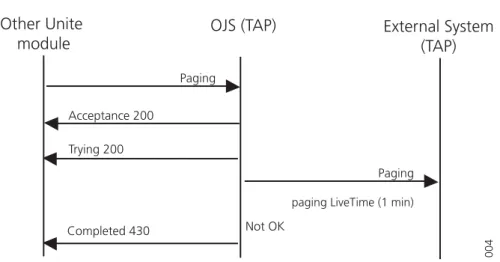
Completed 430: The pagingTTLMillis (time-to-live) or pagingLiveTimeMillis (the time for resending) has elapsed. The message will be deleted.
Example - Completed 200
OJS (TAP)
External System
(TAP)
Other Unite
module
Paging Acceptance 200 Paging Completed 200 002 Trying 200 OKFigure 2. A paging is successfully sent.
The TAP application sends an acceptance code to Unite that it has received the paging. When the paging is successfully sent to the addressee, a completed success code is sent to Unite.
2007-10-11/ Ver. B 3 Example - Acceptance Failure 320
OJS (TAP)
External System
(TAP)
Other Unite
module
Paging Acceptance 320 Internal queue full 003Figure 3. A paging failure, queue full.
The TAP application receives a paging from a Unite module. Since there are already too many messages in the internal queue it will not be able to store the message. An
acceptance code is sent back that it has received the paging but it is not put in queue, the message will be deleted.
Example - Completed failure 430
Completed 430
OJS (TAP)
External System
(TAP)
Other Unite
module
Paging Acceptance 200 Paging 004paging LiveTime (1 min) Not OK
Trying 200
Figure 4. The paging did not reach its destination address.
The TAP application receives a paging from a Unite module. It sends an acceptance code back that it has received the paging. The paging is sent to the addressee. For some reason, the paging is not received, and the TAP application is trying to resend it for 1 minutes (default). When the time has expired without any delivery success, a completed failure code is sent to Unite. The message will be deleted.
3
Installation
See also Installation and Operation Manual Open Java Server (OJS), TD 92185GB.
3.1
Configuration
1 Open the parameterList.txt file. In the parameterList.txt file you have to set up the parameters for the serial communication on TAP.
Parameter Settings Property name
maximumQueueSize: Max. 100 messages in queue (default). It is not recommended to increase the amount of stored messages.
pagingLiveTimeMillis: The time for resending a paging before it is deleted. It is by default set to 60 000 ms (1 min.).
pagingTTLMillis: The time the paging would be allowed to stay in the paging queue. The paging will be deleted when the time has expired. The default is set to 300 000 ms (5 min.).
extendedLogging The extended logging is by default OFF. It can be set to ON for quick response on error messages.
debugging: The debugging is by default OFF and should only be set to ON while debugging.
Parameters for serial connection
parity: The parity can be set as; even (PARITY_EVEN), odd (PARITY_ODD), or none (PARITY_NONE)
baudRate: The data speed. The baudrate is by default set to 9600. Max value is 115200.
charSize: The charSize is set to 7 or 8. It is by default set to 8 bit. :
2 Change the baudrate to what the external system is using. The baudrate can differ depending on what the external system is using for its TAP connection. See the external system’s TAP parameter settings to find which baudrate to use.
3 Save the settings.
4 To make the OJS into a TAP output module, the file parameterList.txt must be uploaded together with the .class files, to the OJS FTP area. See 3.2 Uploading the TAP Application software to the OJS below.
There are more parameters that can be changed for error logging, see the
2007-10-11/ Ver. B 5 4 Restart the application from the OJS administration page. The restart is accessed on
http://xxx.xxx.xxx.xxx/apprestart (xxx.xxx.xxx.xxx is the IP address of the OJS). The user "ftpuser" can be used.
5 Perform a functionality test of the uploaded application.
4
Requirements
Open Java Server (OJS)
– Software version 2.21 or later (2.23 recommended)
– Additional licence (OJS-LT) needed to be able to receive messages from Ascom messaging systems and transmit it to a GSM phone
See also the Data Sheet Open Java Server (OJS), TD 92186GB.
PC Software
- For FTP, Microsoft Internet Explorer 6.0 or later
External System - TAP 1.8 server
Optional Requirements:
Enhanced System Services, ESS:
5
Limitations/Concerns
• Modem connection is not supported.
• The TAP application can handle up to 5 messages per seconds, which means that in practise the communication limit is set by the external system.
• Max. 100 messages can be stored in the TAP application.
• Long messages are truncated to 200 characters before they are delivered to the external system.
Note: Some special characters might require more than 1 byte
6
Local Modifications
To adapt to different systems, it might be necessary to make modifications in the source code. The complete source code is available together with the TAP application.
Note: The application software is available freely, to be used with the hardware (including licenses) indicated in the release notes and according to instructions in included manuals. Ascom Wireless Solutions will accept support responsibility for the version available in the download container, any changes in the software will void this responsibility.
2007-10-11/ Ver. B 7
7
Related Documents
Data Sheet, Open Java Server (OJS) TD 92186GB
Installation Guide, ELISE2 TD 92232GB
8
Document History
Version Date Description