Siebel Business Process
Framework: Workflow
Guide
Siebel Innovation Pack 2013
Version 8.1/8.2
Copyright © 2005, 2013 Oracle and/or its affiliates. All rights reserved.
This software and related documentation are provided under a license agreement containing restrictions on use and disclosure and are protected by intellectual property laws. Except as expressly permitted in your license agreement or allowed by law, you may not use, copy, reproduce, translate, broadcast, modify, license, transmit, distribute, exhibit, perform, publish, or display any part, in any form, or by any means. Reverse engineering, disassembly, or decompilation of this software, unless required by law for interoperability, is prohibited.
The information contained herein is subject to change without notice and is not warranted to be error-free. If you find any errors, please report them to us in writing.
If this is software or related documentation that is delivered to the U.S. Government or anyone licensing it on behalf of the U.S. Government, the following notice is applicable:
U.S. GOVERNMENT END USERS: Oracle programs, including any operating system, integrated software, any programs installed on the hardware, and/or documentation, delivered to U.S. Government end users are “commercial computer software” pursuant to the applicable Federal Acquisition Regulation and agency-specific supplemental regulations. As such, use, duplication, disclosure, modification, and adaptation of the programs, including any operating system, integrated software, any programs installed on the hardware, and/or documentation, shall be subject to license terms and license restrictions applicable to the programs. No other rights are granted to the U.S. Government.
This software or hardware is developed for general use in a variety of information management applications. It is not developed or intended for use in any inherently dangerous applications, including applications that may create a risk of personal injury. If you use this software or hardware in dangerous applications, then you shall be responsible to take all appropriate fail-safe, backup, redundancy, and other measures to ensure its safe use. Oracle Corporation and its affiliates disclaim any liability for any damages caused by use of this software or hardware in dangerous applications.
Oracle and Java are registered trademarks of Oracle and/or its affiliates. Other names may be trademarks of their respective owners.
Intel and Intel Xeon are trademarks or registered trademarks of Intel Corporation. All SPARC trademarks are used under license and are trademarks or registered trademarks of SPARC International, Inc. AMD, Opteron, the AMD logo, and the AMD Opteron logo are trademarks or registered trademarks of Advanced Micro Devices. UNIX is a registered trademark of The Open Group.
This software or hardware and documentation may provide access to or information on content, products, and services from third parties. Oracle Corporation and its affiliates are not responsible for and expressly disclaim all warranties of any kind with respect to third-party content, products, and services. Oracle Corporation and its affiliates will not be responsible for any loss, costs, or damages incurred due to your access to or use of third-party content, products, or services.
Documentation Accessibility
For information about Oracle's commitment to accessibility, visit the Oracle Accessibility Program website at http://www.oracle.com/pls/topic/lookup?ctx=acc&id=docacc.
Access to Oracle Support
Oracle customers have access to electronic support through My Oracle Support. For information, visit http://www.oracle.com/pls/topic/lookup?ctx=acc&id=info or visit
Contents
Siebel Business Process Framework: Workflow Guide 1
Chapter 1: What’s New in This Release
Chapter 2: Overview of Siebel Workflow
About Siebel Workflow 15
Business Requirements That Siebel Workflow Can Meet 15
Technologies That Siebel CRM Uses to Automate Business Processes 17 Objects That Siebel Workflow Uses 18
Scenario That Resolves Service Requests 19 Viewing Example Workflow Processes 21 Overview for Using This Book 22
Chapter 3: Architecture That Siebel Workflow Uses
About the Architecture of a Workflow Process 25
Architecture You Use to Develop a Workflow Process 26 Architecture You Use to Simulate a Workflow Process 27 Architecture You Use to Deploy a Workflow Process 29 Run-Time Architecture That Siebel Workflow Uses 30 Object Hierarchy That Workflow Processes Use 33Chapter 4: Developing Workflow Processes
Roadmap for Developing Workflow Processes 37
Process of Analyzing Business Requirements 38
Gathering Information for Planning a Workflow Process 38 Identifying Actions That the Business Process Performs 39 Identifying an Automation Solution 40
Process of Planning Workflow Processes 43
Determining the Workflow Process Mode 43 Determining How to Start a Workflow Process 43Determining the Decision Logic That the Workflow Process Uses 45 Determining the Actions the Workflow Process Must Perform 48 Determining Error Handling 50
Examining Seed Workflow Processes 51
Contents ■
Job Roles That You Use to Develop a Workflow Process 53
Chapter 5: Using the Siebel Workflow Development
Environment
Preparing Siebel Tools to Develop a Workflow Process 55
Displaying Object Types You Use to Develop a Workflow Process 56
Locating a Workflow Process in the Workflow Processes List 56
Displaying Properties of a Workflow Process 57
Using the Process Designer 57
Making a Workflow Process Editable 59
Using the Workflow Task Editor Toolbar 60
Chapter 6: Creating a Workflow Process
Creating the Workflow Process Object Definition 63
Reviewing Existing Workflow Processes 63Copying a Workflow Process 64 Modifying a Workflow Process 64 Revising a Workflow Process 65 Creating a New Workflow Process 66
Defining the Primary Business Component 66
Diagramming a Workflow Process 67
Displaying the Label for a Connector 68 Adding or Removing a Connector Point 68
Chapter 7: Adding Workflow Process Steps
Overview of Workflow Process Steps 69
Adding a Step to a Workflow Process 69Naming a Workflow Process Step or a Process Property 70 Configuring the Properties of a Workflow Process Step 71
Adding Steps and Connectors 71
Overview of Step Types 72 Adding a Start Step 72
Adding a Business Service Step 73 Adding a Decision Point 75
Adding a Sub Process Step 76 Adding a Siebel Operation Step 78 Adding a Task Step 85
Contents ■
Adding a Stop Step 89 Adding an End Step 92
Adding a Workflow Process Connector 92
Defining a Property for a Workflow Process Step 92
Chapter 8: Manipulating Data in a Workflow Process
Using Process Properties 95
Overview of the Process Property 95
Arguments That You Can Define for a Process Property 98 Using the Multi Value Property Window 99
Using Predefined Process Properties 103 Defining a Custom Process Property 105
Using Process Properties to Manipulate Data 107
Passing Data to and from a Workflow Process 111
Passing Values to a Workflow Process 112 Passing Values from a Workflow Process 112
Passing a Parameter from a Workflow Process to a Global Variable 113 Passing a Constant from a Workflow Policy Action to a Workflow Process 113 Examples Scripts That Pass Data to and from a Workflow Process 114
Configuring a Decision Condition for a Workflow Process 116
Configuring a Decision Condition 116Configuring Fields in the Compose Condition Criteria Dialog Box 120 Configuring Expressions in the Expression Builder 121
Accessing Data from a Run-Time Event in a Workflow Process 126
Using the Timestamp 128
Chapter 9: Testing a Workflow Process
About the Testing Tools 129
Validate Tool 129Process Simulator 130
Business Service Simulator 132 Event Logs 133
Process of Testing a Workflow 133
Validating the Workflow Process 133Preparing to Use the Process Simulator 134 Using the Process Simulator 135
Verifying Functionality 138
Contents ■
Chapter 10: Administering a Workflow Process
Process of Deploying a Workflow Process 141
Preparing the Run-Time Environment 141 Publishing a Workflow Process 146Activating a Workflow Process 146
Process of Migrating a Workflow Process 148
Developing a Migration Strategy 148Migrating a Workflow Process 153
Process of Administering a Workflow Process 156
Viewing Run-Time Instances of a Workflow Process 156 Administering Workflow Process Instances 158Stopping a Workflow Process Instance 158 Deactivating a Workflow Process Instance 159
Removing a Workflow Process from the Run-Time Environment 160
Monitoring a Workflow Process 161
Overview of Monitoring and Troubleshooting Tools 161 Setting Monitoring Levels for a Workflow Process 162
Setting Monitoring Levels for Tracing and the Event Log 164 Collecting Data About the Properties of a Workflow Process 165 Collecting Timing Data 166
Collecting Information About System Behavior and Server Component Behavior 167
Diagnosing a Workflow Process That Has Failed 167
Diagnosing a Workflow Process That Has Failed in a Production Environment 168 Troubleshooting Problems That Occur While a Workflow Process Runs 171
Recovering a Workflow Process 174
Overview of the Workflow Recovery Manager 174 Process of Using the Workflow Recovery Manager 176 Recovering Workflow Process Instances 178
Guidelines for Recovering a Workflow Process 179
Upgrading a Workflow Process 180
Chapter 11: Options for Configuring a Workflow Process
Setting the Workflow Mode Property 183
Types of Workflow Process Modes 183 Options for the Workflow Mode Property 185 Options for an Interactive Workflow Process 186 Options for a Long-Running Workflow Process 195 Enabling Workflow Persistence 197Contents ■
Starting a Workflow Process from a Workflow Policy 198 Starting a Workflow Process from a Run-Time Event 199 Starting a Workflow Process from a Business Service 203
Starting a Workflow Process from Another Workflow Process 205 Starting a Workflow Process from the Workflow Process Manager 205 Starting a Workflow Process from the Application Object Manager 208 Starting a Workflow Process from a Script 208
Starting a Workflow Process from a Custom Toolbar 209 Other Configurations That Start a Workflow Process 212
Handling Errors 212
Using an Error Exception Connector to Handle Errors 212 Using a Stop Step to Handle Errors 217
Using an Error Workflow Process to Handle Errors 217 Recovering a Failed Workflow Process 219
Configuring Events 219
Configuring Run-Time Events 219 Configuring a User Event 224
Configuring Batch Processing 226
Configuring a Workflow Process for a Multilingual Environment 228
Using Literal Values in a Multilingual Environment 229Using Expressions in a Multilingual Environment 229 Using Wait Steps with Global Time Calculations 230 Using the Locale Code Parameter 230
Chapter 12: Example Workflow Processes
Defining a Workflow Process That Creates an Activity for a Sales Representative 233
Creating the Workflow Process 233Adding Steps and Connectors to the Workflow Process 234
Defining Properties and Arguments for Workflow Process Steps 236 Defining the Run-Time Event That Starts the Workflow Process 236 Defining a Decision Condition for the Decision Point 237
Preparing This Example for Testing 239 Simulating the Workflow Process 239
Deploying and Verifying the Workflow Process 240
Defining a Workflow Process That Traverses a Record Set to Close Service Requests
241
Creating the Child Business Component 241
Creating a Relationship Between the Child and the Business Object for the Primary 243 Creating the Workflow Process 244
Contents ■
Defining a Decision Condition for the Decision Point 248 Configuring the Remaining Workflow Steps 249
Preparing Test Records 252
Validating and Simulating the Workflow Process 253 Preparing the Workflow Process for Production 257
Defining a Workflow Process That Attaches an Activity Plan to an Opportunity 258
Creating the New Workflow Process 259Defining Properties for Workflow Process Steps 260 Preparing Example Data for the Simulation 261 Validating and Testing the Workflow Process 261
Configuring the Button That Starts the Workflow Process 262 Deploying the Workflow Process 264
Verifying the Functionality of the Workflow Process 265
Defining a Workflow Process That Manages Research Activities for a Service Request
265
Creating the Workflow Process 266
Configuring the Workflow Process Steps and Connectors 267 Testing, Deploying, and Verifying the Workflow Process 268
Defining a Workflow Process That Creates a Service Request 268
Creating the Workflow Process 269Defining Connectors for the Workflow Process 270 Defining Properties for the Siebel Operation Steps 273 Defining Input Arguments That Set the Commit Time 274 Testing, Deploying, and Verifying the Workflow Process 276
Defining a Workflow Process That Creates a Service Request and Navigates the User
277
Modifying the Existing Workflow Process 278 Testing and Deploying the Workflow Process 280 Verifying Functionality of the Workflow Process 280
Chapter 13: Example Workflow Processes That Call a
Business Service
Examples That Use the Server Requests Business Service 283
Using the Server Requests Business Service to Start a Workflow Process from a Script 283
Using the Server Requests Business Service to Call EIM 284
Examples That Use the Outbound Communications Manager Business Service 286
Using the Outbound Communications Manager with a Substitution 287Contents ■
Externalizing Properties When Using a Business Service 293
Overview of Externalizing Properties 293Defining Input Arguments for an EAI Business Service 295 Example of Defining Input Arguments in an XML Hierarchy 295 Example of Defining Input Arguments in Siebel eScript 296 Maintaining the XML File 298
Chapter 14: Using Predefined Workflow Policies
About Workflow Policies 299
Overview of Workflow Policy Objects 299 Structure of a Workflow Policy 303
Sequence That a Workflow Policy Uses 306 Hierarchy of Workflow Policy Objects 307
Types of Predefined Workflow Policy Programs 308
Overview of Predefined Workflow Policy Programs 309 Workflow Policy Program That Sends a Page 311 Workflow Policy Program That Sends an Email 312Workflow Policy Program That Sends a Broadcast Message 313 Workflow Policy Programs That Run a Database Operation 314 Workflow Policy Program That Runs an External Program 315
Using Predefined Workflow Policy Programs 316
Using a Workflow Policy Program to Manage the Service Request Close Date 316 Using a Workflow Policy Program to Assign a Service Request Owner 318
Using a Workflow Policy Program to Escalate a Service Request 318 Using a Workflow Policy Program to Send a Quote Through a Pager 320
Using Predefined Workflow Policy Programs for Siebel Marketing 321
Using a Workflow Policy Program to Send Email for a Marketing Campaign 321 Using a Workflow Policy Program to Create Activities for a Marketing Campaign 322 Using a Workflow Policy Program to Assign a Contact to a Marketing Campaign 322 Developing a Workflow Policy That Manages a Marketing Campaign 322
Configuring a Predefined Workflow Policy 327
Viewing Groups of Predefined Workflow Policies 327Configuring a Predefined Workflow Policy for Messaging 328 Identifying Objects That the Workflow Policy Must Modify 329
Chapter 15: Defining Custom Workflow Policies
Process of Planning a Workflow Policy 331
Creating a Plan for the Workflow Policy Group 331 Creating a Plan for the Workflow Policy 332
Contents ■
Determining Requirements for the Workflow Policy 333 Creating a Plan for the Workflow Policy Action 334 Examining Predefined Workflow Policies 334
Creating a Plan for the Test and Migration Strategy 335 Examples of Planning a Workflow Policy 335
Process of Defining a Workflow Policy 338
Defining a Workflow Policy Group 339 Defining a Workflow Policy Action 339 Defining a Workflow Policy 343Examples of Configuring Workflow Policies 346
Examples of Configuring a Workflow Policy Action 346 Examples of Configuring a Workflow Policy 353Customizing Workflow Policy Objects 355
Displaying Workflow Policy Object Types 356 Configuring a Custom Workflow Policy Column 357 Configuring a Custom Workflow Policy Object 359 Configuring a Custom Workflow Policy Component 359Configuring a Custom Workflow Policy Component Column 360 Configuring a Custom Workflow Policy Program 362
Configuring a Workflow Policy Program Argument 363
Defining Conditions for a Workflow Policy 365
Using Standard Comparisons in the Conditions List 365 Using Specialized Operators in the Conditions List 367 Using Date Calculations in the Conditions List 370
How Siebel CRM Interprets a Field That Is Not Known 370
Chapter 16: Administering, Testing, and Migrating
Workflow Policies
Administering Workflow Policies 371
Confirming Workflow Policies Installation 371
Administering Database Triggers on the Workflow Policy Server 372 Administering Email Manager and Page Manager 378
Running a Workflow Policy with the Workflow Action Agent 385 Running a Workflow Policy with Workflow Monitor Agent 386 Configuring a Workflow Policy to Run in Batch Mode 396 Moving a Workflow Policy to a Different Group 399 Converting a Workflow Policy to a Workflow Process 400
Configuring a Workflow Policy to Reference Multiple Tables 400 Expiring a Workflow Policy 401
Contents ■
Monitoring, Testing, Troubleshooting, and Migrating a Workflow Policy 405
Tracing a Workflow Policy 405Using Charts and Reports for Workflow Policies 406
Using the Workflow Policy Log to Monitor a Workflow Policy 407 Testing a Workflow Policy 408
Fixing a Workflow Policy That Does Not Trigger 409
Migrating Workflow Policies to the Production Environment 410
Appendix A: Reference Materials for Siebel Workflow
Fields and Arguments of Process Properties 411
Predefined Business Services 415
Server Requests Business Service 415
Workflow User Event Service Business Service 420 Workflow Utilities Business Service 421
Workflow Admin Service Business Service 423
Other Business Services That a Workflow Process Uses 425
Glossary
1
What’s New in This Release
No new features have been added to this guide for this release. This guide has been updated to reflect only product name changes.
What’s New in Siebel Business Process Framework: Workflow Guide,
Version 8.1, Rev B and Version 8.2 Rev A
Table 1 lists changes in this version of the documentation to support this release of the software. Table 1. What’s New in Siebel Business Process Framework: Workflow Guide, Version 8.1, Rev B
and Version 8.2 Rev A
Topic Description
“Configuring the Operation Property” on page 82
New topic. If your configuration uses a DB2 for z/OS database, and if you must use a Siebel operation step to query this database, then it is recommended that you set the Operation property to QueryBiDirectional.
“Backing Up Workflow Processes” on page 152
Modified topic. Starting with Siebel CRM version 8.0, if you use SIF export and import in Siebel Tools to back up objects, then Siebel Tools includes Siebel Workflow objects in this backup. It does not include these objects prior to Siebel CRM version 8.0.
Properties of Siebel Workflow and Properties of Workflow Policies
Deleted topics. These topics were moved to Siebel Object Types Reference.
2
Overview of Siebel Workflow
This chapter describes an overview of Oracle’s Siebel Workflow. It includes the following topics: ■ About Siebel Workflow on page 15
About Siebel Workflow
This topic describes an overview of Siebel Workflow. It includes the following topics: ■ Business Requirements That Siebel Workflow Can Meet on page 15
■ Technologies That Siebel CRM Uses to Automate Business Processes on page 17
■ Objects That Siebel Workflow Uses on page 18
■ Scenario That Resolves Service Requests on page 19
■ Viewing Example Workflow Processes on page 21
■ Overview for Using This Book on page 22
Business Requirements That Siebel Workflow Can Meet
The benefits of managing a business process are often not realized because the organization does not manage the business process consistently. This situation can occur due to the large number of business processes that exist in the business environment, or because of the dynamic nature of the information that the process monitors.Managing important events is central to managing a business process. Workflow management is the act of managing an event in a way that properly handles the event. For example, a service
department uses processes to manage an open service request or to meet a measurable response time. A workflow process can increase the visibility of these business processes in your organization and make sure that your organization handles them correctly.
Siebel Workflow is a customizable business application that allows you to define, manage, and enforce your business processes and establish process automation in Siebel CRM. Siebel Workflow coordinates the process automation technologies that Siebel CRM provides.
A workflow process is a graphically sequenced series of automation steps that support a business process. It specifies inputs and outputs for individual steps and for the entire workflow process. A workflow process can be simple, such as entering a product order, or complex, such as managing a call center. A workflow process can perform operations on data, can include conditional logic, and can call a business service, task UI, or subprocess.
You can use a workflow process to do the following: ■ Escalate an event
Overview of Siebel Workflow ■ About Siebel Workflow
■ Notify people that an event is escalated ■ Route and assign work
■ Process work
■ Enforce authorization and transition rules
A business is often managed according to the business processes that enforce the following items: ■ Efficiency
■ Quality of service
■ Adherence to contractual agreements ■ Profitability
The following are some examples of these business processes:
■ Meet response time objectives for customer callbacks and open service requests
■ Define review policies for important processes, such as contracts, quotes, or product shipments ■ Monitor service requests or opportunities over time
Examples of Meeting Business Requirements
A service department can use a workflow process that meets the following business requirements: ■ Implement standards to process calls. If Siebel CRM assigns a Severity 1 call, then send a
page to the new owner.
■ Meet contracted service agreements. If a customer purchases a support agreement, then make sure a callback occurs within two hours and make sure the problem is resolved within four hours.
A sales department can use a workflow process to meet the following business requirements: ■ Implement discount authority. If a sales representative quotes a discount that exceeds the
maximum discount allowed, then get the approval of the district sales manager or VP of Sales. ■ Manage the pipeline. To promote sufficient levels of prospects at each stage of the sales cycle,
each sales representative manages their own pipeline. If an area of the pipeline requires attention, then alert the representative or manager.
■ Make sure forecasting is accurate. If a user forecasts an opportunity but never closes it, then flag the opportunity. If a forecast includes a wide discrepancy from the actual revenue, then flag the opportunity.
Overview of Siebel Workflow ■ About Siebel Workflow
Technologies That Siebel CRM Uses to Automate
Business Processes
This topic describes some of the technologies that Siebel CRM uses to automate a business process. Siebel Workflow coordinates workflow processes and other repository objects, such as workflow policies, to implement a complete workflow process. Each of these technologies helps to automate a business process. To coordinate the services that these technologies provide, a workflow process calls each technology directly or interacts with them through the Siebel event model.
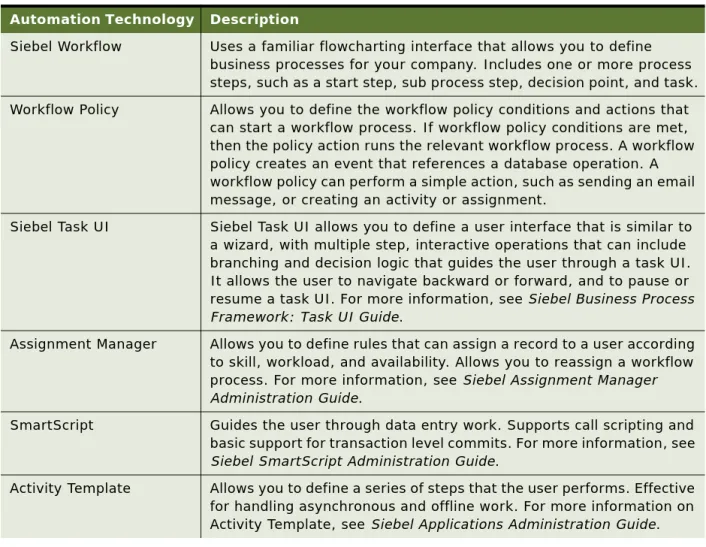
Table 2 describes technologies that Siebel CRM uses to automate business processes.
Table 2. Technologies That Siebel CRM Uses to Automate Business Processes
Automation Technology Description
Siebel Workflow Uses a familiar flowcharting interface that allows you to define business processes for your company. Includes one or more process steps, such as a start step, sub process step, decision point, and task. Workflow Policy Allows you to define the workflow policy conditions and actions that
can start a workflow process. If workflow policy conditions are met, then the policy action runs the relevant workflow process. A workflow policy creates an event that references a database operation. A workflow policy can perform a simple action, such as sending an email message, or creating an activity or assignment.
Siebel Task UI Siebel Task UI allows you to define a user interface that is similar to a wizard, with multiple step, interactive operations that can include branching and decision logic that guides the user through a task UI. It allows the user to navigate backward or forward, and to pause or resume a task UI. For more information, see Siebel Business Process Framework: Task UI Guide.
Assignment Manager Allows you to define rules that can assign a record to a user according to skill, workload, and availability. Allows you to reassign a workflow process. For more information, see Siebel Assignment Manager Administration Guide.
SmartScript Guides the user through data entry work. Supports call scripting and basic support for transaction level commits. For more information, see
Siebel SmartScript Administration Guide.
Activity Template Allows you to define a series of steps that the user performs. Effective for handling asynchronous and offline work. For more information on Activity Template, see Siebel Applications Administration Guide.
Overview of Siebel Workflow ■ About Siebel Workflow
Objects That Siebel Workflow Uses
Figure 1 includes some of the objects that you can use to create a workflow process, such as the start step, decision point, Siebel operation step, and connector.
Explanation of Callouts
State Model Manages how and when the user can change the status of a record according to a current value and the user position. Can also enforce directional progression of status. For example, to force an opportunity to move forward but not backward through a pipeline. For more information on the State Model, see Siebel Applications Administration Guide.
Personalization Engine Handles run-time events, such as application events, applet events, and business component events. A workflow process uses the Personalization engine to handle these events. A workflow process that a run-time event starts or resumes registers itself with the Personalization engine when Siebel CRM activates this workflow process. If a run-time event occurs in a user session, then the Personalization engine calls Siebel Workflow in the local object manager.
Figure 1. Basic Objects of a Workflow Process
Table 2. Technologies That Siebel CRM Uses to Automate Business Processes
Overview of Siebel Workflow ■ About Siebel Workflow
1 Workflow Events. The following items can start a workflow process:
■ A run-time event
■ a workflow policy
■ Script
For more information, see “Determining How to Start a Workflow Process” on page 43. 2 Workflow rules. A workflow decision rule is a rule that determines the flow in a workflow
process. It can reference business component data or a local variable in the workflow process. You can use the Siebel Query Language to define a rule. For more information, see “Determining the Decision Logic That the Workflow Process Uses” on page 45.
3 Workflow actions. A workflow action is an action in a workflow process that can use data as input, modify or examine data, or product data as output. A workflow action can perform an operation on a database record or call a business service. For more information, see “Determining the Actions the Workflow Process Must Perform” on page 48.
Scenario That Resolves Service Requests
The scenario in this topic describes how a workflow process can automate a business process. In this scenario, a service manager for a high volume service agency thinks the organization cannot resolve customer issues in a timely manner. To improve how the organization tracks and manages service requests, the service manager decides to use a workflow process that automates the service request management process.
The goal is to meet a Service Level Agreement commitment that makes sure the organization resolves new service requests (SRs) within a specific amount of time. The service manager requires Siebel CRM to assign SRs according to the representative who is available and who possesses the skills that are required to resolve the SR. If the SR requires immediate attention, then Siebel CRM must notify the SR owner.
Overview of Siebel Workflow ■ About Siebel Workflow
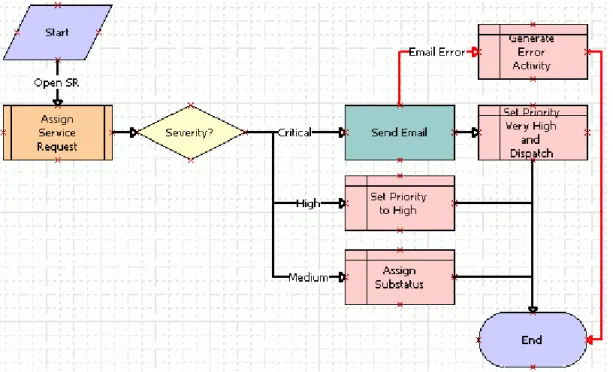
The developer uses the Process Designer in Siebel Tools to define the business process that Siebel CRM uses when a user creates a new service request. Figure 2 includes the workflow process that the Process Designer displays. It includes the steps and decision point that Siebel CRM uses if a new service request comes into the organization.
If a user creates an SR, then Siebel CRM starts the workflow process. It calls the Siebel Assignment Manager to assign the SR to the service representative who is available and who possesses the skills required to resolve the SR. According to the SR severity, the workflow process can use the Siebel Communications Server to send an email message that notifies the representative. Automating this process helps the company achieve faster turnaround time to resolve SRs and to meet service commitments.
Steps That the Service Request Scenario Uses
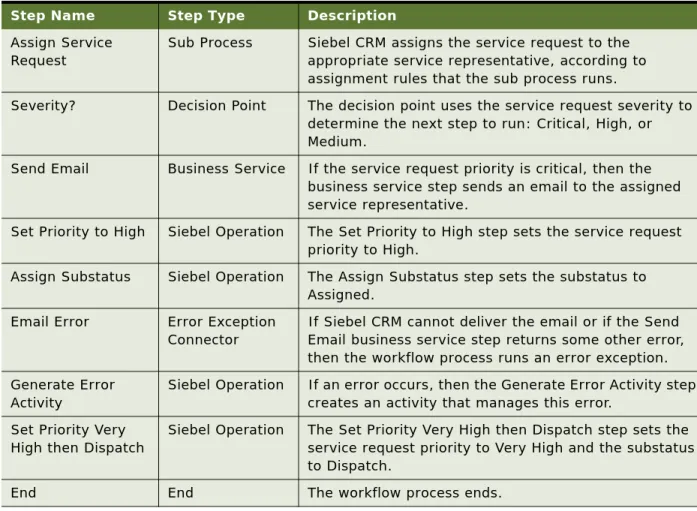
Table 3 describes each step that the service request scenario uses.
Figure 2. New Service Request Workflow Process in the Process Designer
Table 3. Steps That the Service Request Scenario Uses
Step Name Step Type Description
Start Start Every workflow process includes a start step that it uses to start the workflow process.
Overview of Siebel Workflow ■ About Siebel Workflow
Viewing Example Workflow Processes
This topic describes how to view some example workflow processes in Siebel Tools. To examine how to configure some workflow processes, see Chapter 12, “Example Workflow Processes.” To examine some predefined workflow processes, see “Examining Seed Workflow Processes” on page 51.
To view example workflow processes
1 In Siebel Tools, in the Object Explorer, click Workflow Process.
2 In the Workflow Processes list, query the Comments property for the following value:
*Sample*
3 Right-click a record in the Workflow Processes list, and then choose Edit Workflow Process. Assign Service
Request
Sub Process Siebel CRM assigns the service request to the appropriate service representative, according to assignment rules that the sub process runs.
Severity? Decision Point The decision point uses the service request severity to determine the next step to run: Critical, High, or Medium.
Send Email Business Service If the service request priority is critical, then the business service step sends an email to the assigned service representative.
Set Priority to High Siebel Operation The Set Priority to High step sets the service request priority to High.
Assign Substatus Siebel Operation The Assign Substatus step sets the substatus to Assigned.
Email Error Error Exception Connector
If Siebel CRM cannot deliver the email or if the Send Email business service step returns some other error, then the workflow process runs an error exception. Generate Error
Activity
Siebel Operation If an error occurs, then the Generate Error Activity step creates an activity that manages this error.
Set Priority Very High then Dispatch
Siebel Operation The Set Priority Very High then Dispatch step sets the service request priority to Very High and the substatus to Dispatch.
End End The workflow process ends.
Table 3. Steps That the Service Request Scenario Uses
Overview of Siebel Workflow ■ About Siebel Workflow
Overview for Using This Book
This book uses the following terms:■ A user is a person who uses the client of a Siebel Business Application to access Siebel CRM data. ■ The client is the client of a Siebel Business Application. Siebel Call Center is an example of a
Siebel Business Application.
■ The server is the Siebel Server, unless noted otherwise.
■ An administrator is anyone who uses an administrative screen in the client to configure Siebel CRM. The Administration - Server Configuration screen is an example of an administrative screen.
Computer font indicates a value you enter or text that Siebel CRM displays. For example:
This is computer font
Italic text indicates a variable value. For example, the n and the method_name in the following format description are variables:
Named Method n: method_name
The following is an example of this code:
Named Method 2: WriteRecord
A predefined object is an object that comes already defined with Siebel CRM. The objects that Siebel Tools displays in the Object List Editor immediately after you install Siebel Tools and the SRF (Siebel Repository File) but before you make any customization are predefined objects.
The term focus indicates the currently active object in the client. To indicate the object that is in focus, Siebel CRM typically sets the border of this object to a solid blue line.
Depending on the software configuration you purchase, your Siebel Business Application might not include all the features that this book describes.
How This Book Describes Objects
For brevity, this book describes how an object, such as a user property, does something. For example:
The Copy Contact user property copies contacts.
In reality, the Copy Contact user property only includes information that some other Siebel CRM component uses to copy contacts.
For brevity, to describe how Siebel CRM uses the value that a property contains, this book typically only describes the property name. For example, assume Siebel CRM displays the value that the Display Name property contains. This is a property of a tree node object. This book only states the following:
Overview of Siebel Workflow ■ About Siebel Workflow
How This Book Describes Relationships Between Objects
An object definition includes properties and a property includes a value. For example, the Business Object property of the Account Address view contains a value of Account. To describe this
relationship, this book states the following:
The Account Address view references the Account business object.
Sometimes the relationship between objects occurs through multiple objects. For brevity, this book does not always describe the entire chain of relationships that exists between objects through the entire Siebel object hierarchy. For example, because the Account business object references the Account business component, and the Account Address view references the Account business object, this book states the following:
The Account Address view references the Account business component.
Getting Help from Oracle
If you require help from Oracle for using object types, you can create a service request (SR) on My Oracle Support. Alternatively, you can phone Global Customer Support directly to create a service request or get a status update on your current SR. Support phone numbers are listed on My Oracle Support. You can also contact your Oracle sales representative for Oracle Advanced Customer Services to request assistance from Oracle's Application Expert Services.
3
Architecture That Siebel
Workflow Uses
This chapter describes the architecture that Siebel Workflow uses. It includes the following topics: ■ About the Architecture of a Workflow Process on page 25
About the Architecture of a Workflow
Process
This topic describes the workflow process architecture. It includes the following topics: ■ Architecture You Use to Develop a Workflow Process on page 26
■ Architecture You Use to Simulate a Workflow Process on page 27
■ Architecture You Use to Deploy a Workflow Process on page 29
■ Run-Time Architecture That Siebel Workflow Uses on page 30
■ Object Hierarchy That Workflow Processes Use on page 33
The following topics include more information of an architectural nature: ■ Overview of Workflow Policy Objects on page 299
Architecture That Siebel Workflow Uses ■ About the Architecture of a Workflow Process
Architecture You Use to Develop a Workflow Process
Figure 3 describes a typical approach to developing a workflow process.
Explanation of Callouts
You do the following to develop a workflow process:
1 Define. You use Siebel Tools to define the workflow process. You create an object definition for the workflow process, define the process properties, add steps and connectors, and so on. For more information, see “About Siebel Tools” on page 27.
2 Save. You frequently save the workflow process to the local database. This database includes repository tables. When you edit a workflow process in Siebel Tools, Siebel CRM stores it in the repository tables. When you deploy this workflow process, Siebel CRM adds it to the run-time tables. 3 Test. You use the Siebel client to test the workflow process. You use the Administration-Business Process screen in the client to administer workflow processes and workflow policies. For more information, see “Process of Testing a Workflow” on page 133.
4 Debug. You use Siebel Tools, the Siebel client, and the local master or test database to publish, activate, and debug the workflow process. You check out the workflow process from the repository into the local database, where you can modify and debug it locally before you check it into the master repository. To access server components, such as the Server Request Broker, you must debug and test with a server database or test database instead of debugging locally. You can optionally do the following in Siebel Tools:
■ Check the workflow process into and from your master database. Figure 3. Typical Approach to Developing a Workflow Process
Architecture That Siebel Workflow Uses ■ About the Architecture of a Workflow Process
5 Verify. To verify that the workflow process works correctly, you can use the Siebel client to run it with the local master or test database.
6 Migrate. You migrate the workflow process from the master database to the staging database or production database. You can use Application Deployment Manager (ADM) to migrate workflow processes from one Siebel environment to another environment. For more information, see
“Migrating with Application Deployment Manager” on page 150.
You can use the following types of files to import or export a workflow process: ■ XML file. You can export a workflow process as an XML file.
■ SIF File. You can export a workflow process as a sif (Siebel archive) file. For more information, see “Backing Up Workflow Processes” on page 152.
About Siebel Tools
Siebel Tools is an integrated development environment (IDE) that you can use to develop and debug a workflow process. You use the Object List Editor to define the object definition of a workflow process. A workflow process references a project.
You use the Process Designer in Siebel Tools to develop a workflow process. You typically define process properties in the Process Designer but you can also enter configuration information through unbounded drop-down lists. Configuration data is available in the Process Designer but run-time data is not available.
You design and test the workflow process, and then save it to repository tables. Siebel Tools allows you to use a top down development framework to create business logic, beginning with creating a workflow process, and then providing plugable services and data objects that can run the workflow process.
For more information, see Chapter 5, “Using the Siebel Workflow Development Environment” and Using Siebel Tools.
Architecture You Use to Simulate a Workflow Process
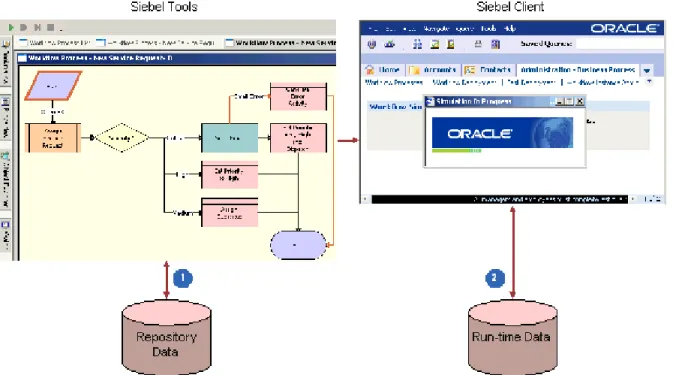
You can use the Process Simulator to test a workflow process. Testing your workflow process before you migrate it to the production environment makes sure that it works correctly and that the results meet your business requirements.Architecture That Siebel Workflow Uses ■ About the Architecture of a Workflow Process
Figure 4 describes the architecture that you use to simulate a workflow process.
Explanation of Callouts
You use the following items to simulate a workflow process:
1 Repository data. The Process Simulator accesses object definitions from the repository that are part of the workflow process or that the workflow process references.
2 Run-time data. Siebel Tools accesses or modifies data during the simulation, depending on how you define the workflow process. It can access data in the run-time database, such as customer data that resides in various fields of an opportunity.
If you run a workflow process from the Process Simulator, then it runs in the Application Object Manager. You can start a workflow process in the Application Object Manager or in a server session of the Workflow Process Manager.
For more information, see “About the Testing Tools” on page 129. Figure 4. Architecture You Use to Simulate a Workflow Process
Architecture That Siebel Workflow Uses ■ About the Architecture of a Workflow Process
Architecture You Use to Deploy a Workflow Process
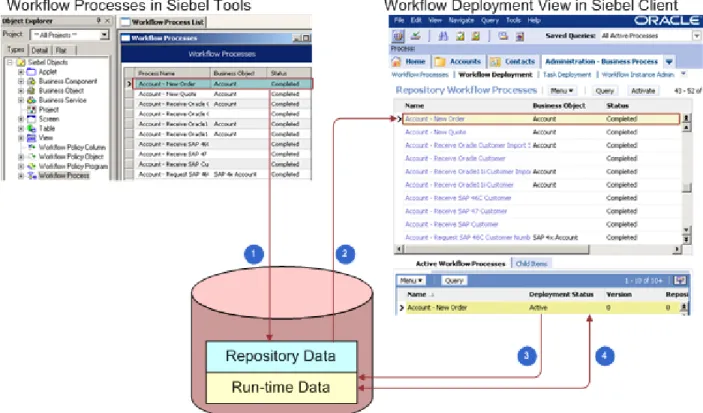
It is not necessary to compile the SRF or to do a merge to deploy a workflow process. You define workflow objects in Siebel Tools and store them in the repository that Siebel Tools uses. You must publish the workflow process in Siebel Tools, and then activate it in the Siebel client before you can run it as a server task or from the Siebel client. If you use Publish/Activate in Siebel Tools rather than Publish, then it is not necessary to separately activate the workflow in the Siebel client. To deploy a workflow process, you do the following work:1 Publish. Siebel CRM reads the object definitions that exist for this workflow process in the Siebel repository tables, and then writes them, along with deployment parameters, into the run-time tables. For more information, see “Publishing a Workflow Process” on page 146.
2 Activate. Siebel CRM makes the workflow process available for use in the Siebel client. For more information, see “Activating a Workflow Process” on page 146.
Figure 5 describes how you use Siebel Tools and the Siebel client to deploy a workflow process.
Explanation of Callouts
Siebel CRM does the following to deploy a workflow process: 1 Marks the workflow process Completed for deployment. Figure 5. Architecture You Use to Deploy a Workflow Process
Architecture That Siebel Workflow Uses ■ About the Architecture of a Workflow Process
3 When activated, writes the workflow process to the run-time tables.
4 You can modify some parameters of the deployed workflow process in the Siebel client.
Run-Time Architecture That Siebel Workflow Uses
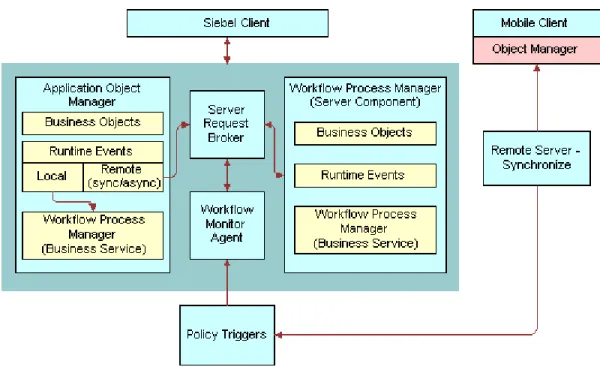
A workflow process can run as a business service or as a server component in the run-time environment. The Workflow Engine interacts with other server components through the Server Request Broker. The Workflow Engine works as a business service that calls a server component. To call a server component that Siebel CRM:■ Uses as a specialized service, the Workflow Engine calls the signature for this service. For example:
■ To send an email, the Workflow Engine calls the Communications Server as the Outbound Communications Manager business service.
■ To assign an object to a user, the Workflow Engine calls Assignment Manager as the Synchronous Assignment Manager Requests business service.
A signature is the definition of a method, the name, the expected parameters, the return values, and any exceptions that exist.
■ Does not use as a specialized service, the Workflow Engine uses the predefined Server Requests business service. This business service sends a generic request to the Server Request Broker. For more information, see “Server Requests Business Service” on page 415.
Architecture That Siebel Workflow Uses ■ About the Architecture of a Workflow Process
Explanation of Callouts
The run-time architecture that Siebel Workflow uses includes the following items:
1 Server Request Broker. For more information, see “Server Request Broker Server Component” on page 31.
2 Workflow Process Manager. For more information, see “Workflow Process Manager Server Component” on page 31.
Server Request Broker Server Component
The Workflow Engine sends a request to the Server Request Broker synchronously or asynchronously, and then the Server Request Broker brokers the request to the appropriate server component. It does the following work:
■ Sends asynchronous messages from an interactive server component to the Workflow Engine ■ Communicates, synchronously and asynchronously, between the Workflow Engine and batch
components
■ Schedules repeated server tasks that Siebel CRM runs periodically in the Workflow Engine The Server Request Broker also does load balancing. If it receives a request, then it routes this request to a server component that resides in the current server. If this server component is not available in the current server, then the Server Request Broker sends it to other servers where the Workflow Process Manager is active. It does this on a round robin basis.
A workflow process also uses the Server Request Broker to resume a workflow process that is waiting. The Server Request Broker periodically queries a database table to identify server tasks that it must resume.
For more information, see “Server Requests Business Service” on page 415 and Siebel System Administration Guide.
Workflow Process Manager Server Component
The Workflow Process Manager (WfProcMgr) is a server component that uses the Siebel Object Manager. It runs a workflow process as a business service. It hosts the business object layer and the data object layer that allows Siebel CRM to run multiple object managers and multiple server tasks for each object manager. The term Workflow Process Manager refers to the Workflow Engine and the workflow server components.
The Workflow Process Manager can be in one of the following states:
■ Online. The Workflow Process Manager is active and can receive and process requests.
■ Not online. For example, Inactive, Shutdown, or Offline. Siebel CRM cannot process requests to the Workflow Process Manager or Workflow Process Batch Manager (WfProcBatchMgr) server components. If Siebel CRM saves a request to the Siebel database, and if it sends this request in DirectDb, then it can resend the request later when the Workflow Process Manager comes back online. If Siebel CRM does not save this request, then the request is lost.
Architecture That Siebel Workflow Uses ■ About the Architecture of a Workflow Process
How the Business Service Determines Where the Workflow Process
Runs
The Workflow Engine includes the Workflow Process Manager business service and the Workflow Process Manager (Server Request) business service. To run Siebel Workflow in an Application Object Manager, Siebel CRM starts the workflow process as a business service. The Workflow Engine uses output arguments to send information to this business service and it uses input arguments get information from this business service.
Table 4 describes how the business service determines where the workflow process runs.
How Siebel Workflow Runs in the Workflow Process Manager Server
Component
A Workflow Process Manager server component that Siebel CRM configures and optimizes to run the Workflow Process Manager business service can run a workflow process in the background. The Workflow Process Manager server component works as the object manager that runs the workflow process, including any application logic that the workflow process uses.
The Workflow Process Manager accepts the workflow process name in the following ways:
■ Through the Process Name server component parameter. For example, if Siebel CRM starts a server task from the Server Manager or from a repeating server component request.
■ Through the Encoded Args server component parameter. For example, if the Workflow Monitor Agent business service or the Server Requests business service sends the request.
If a workflow policy starts a workflow process, then the Workflow Monitor Agent typically uses the Encoded Input Arguments parameter to send input arguments to the Workflow Process Manager. However, setting Encoded Input Arguments in the Component Request Parameters applet fails because it is not in a format that the Workflow Process Manager server component can recognize.
Components of the Workflow Management Server Component Group
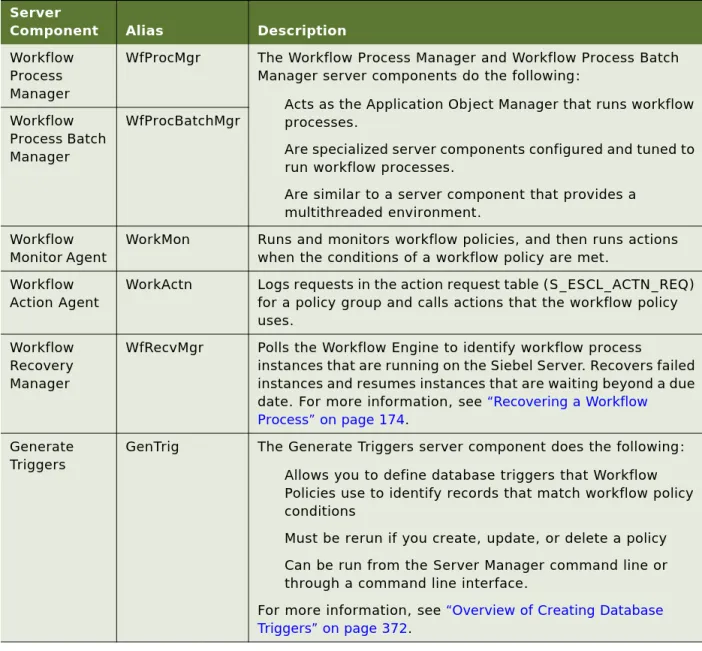
Table 5 describes server components that the Workflow Management server component group contains.
Table 4. How the Business Service Determines Where the Workflow Process Runs
Business Service Location Where the Workflow Process Run
Workflow Process Manager The object manager of the Siebel application. Workflow Process Manager (Server
Request)
Architecture That Siebel Workflow Uses ■ About the Architecture of a Workflow Process
Object Hierarchy That Workflow Processes Use
You use Siebel Tools to modify predefined Siebel objects and to define new objects that meet a business requirement for your organization. Just as you use Siebel Tools to modify the data model, modify business logic, and to define the user interface, you can also use Siebel Tools to define a workflow process that Siebel CRM uses to automate a business process for your organization. Table 5. Components in the Workflow Management Server Component Group
Server
Component Alias Description
Workflow Process Manager
WfProcMgr The Workflow Process Manager and Workflow Process Batch Manager server components do the following:
■ Acts as the Application Object Manager that runs workflow processes.
■ Are specialized server components configured and tuned to run workflow processes.
■ Are similar to a server component that provides a multithreaded environment. Workflow Process Batch Manager WfProcBatchMgr Workflow Monitor Agent
WorkMon Runs and monitors workflow policies, and then runs actions when the conditions of a workflow policy are met.
Workflow Action Agent
WorkActn Logs requests in the action request table (S_ESCL_ACTN_REQ) for a policy group and calls actions that the workflow policy uses.
Workflow Recovery Manager
WfRecvMgr Polls the Workflow Engine to identify workflow process
instances that are running on the Siebel Server. Recovers failed instances and resumes instances that are waiting beyond a due date. For more information, see “Recovering a Workflow Process” on page 174.
Generate Triggers
GenTrig The Generate Triggers server component does the following: ■ Allows you to define database triggers that Workflow
Policies use to identify records that match workflow policy conditions
■ Must be rerun if you create, update, or delete a policy ■ Can be run from the Server Manager command line or
through a command line interface.
For more information, see “Overview of Creating Database Triggers” on page 372.
Architecture That Siebel Workflow Uses ■ About the Architecture of a Workflow Process
Figure 7 includes the Object Explorer window and the Workflow Processes list in the Object List Editor window.
The Object Explorer allows you to navigate between each group of object definitions of a particular object type.
An object type is an entity that you can use as a template that Siebel Tools uses to create an object definition. Siebel Tools displays object types in the Object Explorer.
An object definition implements one piece of the software. It includes a predefined set of object properties, which are characteristics of that piece of the software. Siebel Tools displays object definitions in the Object List Editor.
If Siebel Tools does not display an object type in the Object Explorer, then you must display it. For more information, see “Displaying Object Types You Use to Develop a Workflow Process” on page 56. Figure 7. Object Explorer and Object List Editor
Object List Editor Object Explorer
Architecture That Siebel Workflow Uses ■ About the Architecture of a Workflow Process
Relationships Between Object Types of a Workflow Process
A parent and child relationship is a type of hierarchical relationship that exists between one object type and another object type. Figure 8 illustrates how the Object Explorer displays this parent and child relationship as a hierarchical tree.
If you choose the Types tab in the Object Explorer, then Siebel Tools displays tree items as icons in a hierarchy. An object type that is beneath and slightly to the right of another object type is the child of the parent and child relationship. The object type that is above the child object type is the parent object type for the child. A parent object type can contain multiple child object types. For example, WF Process Metric, WF Process Prop, and WF Step are child object types of the Workflow Process object type.
Figure 8. Parent and Child Relationship Between Object Types in the Object Explorer
Parent and child relationship between the Workflow Process parent object type and the WF Step child object type.
Architecture That Siebel Workflow Uses ■ About the Architecture of a Workflow Process
Object Properties
If you click Workflow Process in the Object Explorer, then the Workflow Processes list in the Object List Editor displays a list of workflow processes that the SRF contains. One row in the Workflow Processes list represents one object definition. For example, values in the properties in the Contact-New Order workflow process constitute one object definition.
Siebel Tools displays each object property in one column in the list. You can edit the value of a property. You cannot change the set of properties that constitute an object definition.
You can also use the Properties window to edit the properties of the object definition that is currently chosen in the Object List Editor. Changing a value in the Properties window also changes the corresponding value in the Object List Editor.
This guide assumes that you understand the basics of using Siebel Tools. You must possess the following skills:
■ Use the Siebel Tools application, particularly the Object Explorer and Object List Editor ■ Define object properties, applets, and applet controls
■ Use the Siebel Tools menu bar ■ Check out and check in projects
4
Developing Workflow Processes
This chapter describes how to develop a workflow process. It includes the following topics: ■ Roadmap for Developing Workflow Processes on page 37
■ Process of Analyzing Business Requirements on page 38
■ Process of Planning Workflow Processes on page 43
■ Job Roles That You Use to Develop a Workflow Process on page 53
Roadmap for Developing Workflow
Processes
To develop a workflow process, perform the following processes: 1 Process of Analyzing Business Requirements on page 38
2 Process of Planning Workflow Processes on page 43
3 Preparing Siebel Tools to Develop a Workflow Process on page 55
4 Creating the Workflow Process Object Definition on page 63
5 Diagramming a Workflow Process on page 67
6 Process of Testing a Workflow on page 133
7 Process of Deploying a Workflow Process on page 141
8 Process of Migrating a Workflow Process on page 148
Developing Workflow Processes ■Process of Analyzing Business Requirements
Process of Analyzing Business
Requirements
This process is a step in “Roadmap for Developing Workflow Processes” on page 37. To analyze business requirements, do the following tasks:
1 Gathering Information for Planning a Workflow Process on page 38
2 Identifying Actions That the Business Process Performs on page 39
3 Identifying an Automation Solution on page 40
The first step in developing a workflow process includes analyzing your business requirements. You determine the rules and business processes that the workflow process must automate. An
implementation project team typically spends a significant amount of time performing requirements analysis, with this step requiring as much as 30% of the total implementation effort. To define the processes to automate, a business analyst uses a Siebel CRM application, and then determines the most appropriate automation solution. The developer who defines the workflow process often participates as a technical consultant during this analysis.
Gathering Information for Planning a Workflow Process
This task is a step in “Process of Analyzing Business Requirements” on page 38.You can gather information for workflow process planning.
To gather information for planning a workflow process
1 Determine how your organization currently handles business processes.
For more information, see “Analyzing Existing Performance of a Business Process” on page 38. 2 Determine how the business process must perform in the future.
For more information, see “Identifying Areas for Improvement” on page 39.
Analyzing Existing Performance of a Business Process
Current business processes provide the basis of what you define when you use Siebel Workflow. If you currently use an automated system, then you must gather information about the business processes that this system handles. It is also important to understand the limitations or problems of the current system that the workflow process must solve.
To analyze existing performance of a business process ■ Research the following areas for your current business process:
Developing Workflow Processes ■Process of Analyzing Business Requirements
The following sources might include existing process information: ■ Current business processes that are automated
■ Management guidelines
■ Written guidelines for business process rules or approval paths ■ Written or unwritten internal procedures
For example, assume you must document the lifecycle for a new work item, such as a service request, from the moment that someone opens the service request to the moment someone closes it. You can include information about the decision points in the business process. For example, if someone must escalate a service request or to describe the approval path that Siebel CRM must run if the service request is high priority compared to low priority.
Identifying Areas for Improvement
After you gather the required information about existing business processes, review it to determine if improvement opportunities exist or if a new business process is required.
To identifying areas for improvement
■ Consider each of the following areas for improvement:
■ New management guidelines or business requirements that must be considered
■ Current problems that must be solved
■ Areas you must make more visible
■ Customer satisfaction issues
■ Workflow processes you must automate
Identifying Actions That the Business Process Performs
This task is a step in “Process of Analyzing Business Requirements” on page 38.A business process includes actions that your organization must perform to meet business
requirements. Siebel CRM provides a number of predefined actions. The following are some example predefined actions:
■ Notifications. Send an email, page, or fax.
■ Siebel Operations. Insert or update information in the Siebel database.
■ Integration Messages. Request to send or receive data from an external system. ■ Assignment. Use Assignment Manager to assign an object to someone.
■ Navigation. Navigate a user to a specific view through a user interact step or a call to Siebel Task UI.
Developing Workflow Processes ■Process of Analyzing Business Requirements
Siebel CRM calls a business service method to start each of these actions. This situation is true except for a Siebel operation. You can use these actions in a variety of settings and technical configurations. For example, you might identify a specialized action that calls a workflow process, such as calculate credit risk. You can define a custom business service to use a specialized action. A workflow process can call a predefined business service or a custom business service. For more information, see
Chapter 13, “Example Workflow Processes That Call a Business Service” and Integration Platform Technologies: Siebel Enterprise Application Integration.
To identify actions a business process performs
■ Map the requirements you identified in “Gathering Information for Planning a Workflow Process” on page 38 to potential predefined Siebel actions.
Identifying an Automation Solution
This task is a step in “Process of Analyzing Business Requirements” on page 38.
After you determine business process requirements and the actions that must be performed to meet those requirements, you can identify an automation solution.
To identify an automation solution
1 Identify the solution that most closely meets the business process requirements.
For more information, see “Identifying the Solution That Most Closely Meets the Requirements” on page 41.
2 Determine if a workflow process or a workflow policy can meet the requirement.
For more information, see “Determining if a Workflow Process or Workflow Policy Meets the Requirement” on page 42.
Developing Workflow Processes ■Process of Analyzing Business Requirements
Identifying the Solution That Most Closely Meets the Requirements
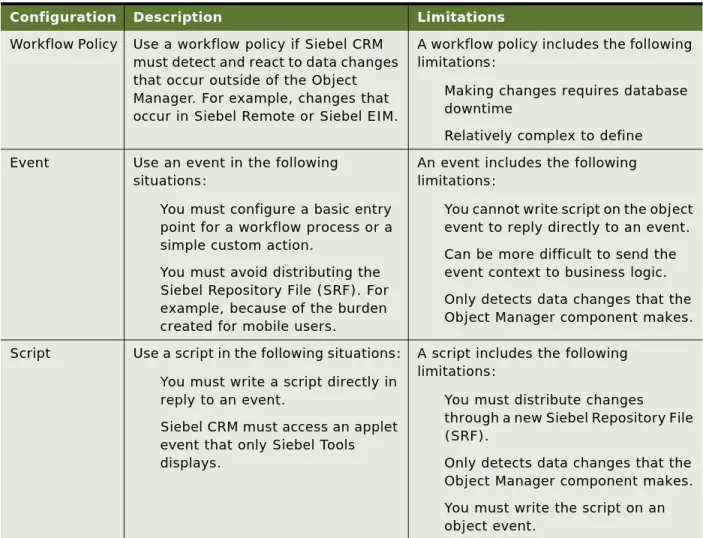
Table 6 compares a workflow process to other Siebel automation solutions.
Table 6. Comparison of a Workflow Process to Other Siebel Automation Solutions
Solution Advantages Limitations
Workflow Process
This solution includes the following advantages:
■ Visual representation of business logic is simple to understand and maintain
■ Remote synchronous and
asynchronous capability provides compatibility across Siebel CRM for scalability and long-running
transactions
This solution includes the following limitations:
■ The semantics for control are not as rich as with scripting
■ Limited control of flow for iteration through record sets
■ Limited direct access to object methods
Workflow Policy
This solution includes the following advantages:
■ Replies to a database event regardless of whether or not an Object Manager server component starts the policy
■ Can realize higher transaction throughput for a simple transaction
This solution includes the following limitations:
■ Policy changes might require database downtime
■ More difficult to define than other alternatives
■ Provides only a limited range of actions
Siebel Script This solution includes the following advantages:
■ Familiar to many developers ■ Provides a set of semantics ■ Is flexible
This solution includes the following limitations:
■ More difficult to maintain and upgrade
Developing Workflow Processes ■Process of Analyzing Business Requirements
Determining if a Workflow Process or Workflow Policy Meets the
Requirement
Table 7 summarizes common requirements and recommends to use a workflow process or a workflow policy. For more information, see Chapter 15, “Defining Custom Workflow Policies.”
Table 7. Determining if a Workflow Process or a Workflow Policy Can Meet the Requirement
Requirement Possible Solution
Capture business layer logic. Use a workflow process. Workflow Process Manager and run-time events capture business layer logic.
Use features that a workflow process supports but that
workflow policy does not support.
Use a workflow process. A workflow process can provide pause, stop, and error handling capabilities.
Implement complex comparison logic or flow management.
Use a workflow process. A workflow process is recommended to develop and deploy, and to perform complex comparison logic and flow management. For example, through IF, THEN, ELSE, or CASE.
Call a business service. Use a workflow process. A workflow process can call a business service.
Use a repeating component request.
Use a workflow process. You can set up a workflow process from a repeating server component request but not from a workflow policy.
Repetitive, manual processing. Use a workflow process. A workflow process is recommended for repetition, timeliness, and for cross functional routing through a business process.
Process an event in a timely fashion.
Perform escalations and notifications.
Capture data layer logic. Use a workflow policy. Workflow Policy Manager captures data layer logic. Data coming into Siebel CRM in the data layer is not captured in the business layer. This requirement typically indicates a potential candidate for a workflow policy. Example data coming into Siebel CRM in the data layer includes data coming through EIM or MQ channels.
Use features that a workflow policy supports but that a workflow process does not support.
Use a workflow policy. A workflow policy can support some features that are not available or that are difficult to support with a workflow process. For example, email consolidation, duration, and quantity.
Do bulk data uploads. Use a workflow policy. Workflow Policy Manager is recommended if bulk data upload occurs through EIM. Do data quality cleaning in the Use a workflow policy. Workflow Policy Manager is