Providing High Availability to the
OpenStack Cloud Controller on Oracle Solaris
with Oracle Solaris Cluster
Release 1.0
Table of Contents
Introduction
1
Oracle Solaris Cluster Features
3
Overview of the High Availability Cloud Controller Configuration
5
Oracle Solaris Cluster Framework and Infrastructure Setup
7
Configuration assumptions... 8
Configure zpools on shared storage and a dataset per node for later usage...9
Zone cluster installation...9
OpenStack Components on the HA Cloud Controller
12
Database - MySQL...12
Configure cluster infrastructure objects for HA MySQL within zone cluster os-db...12
Install and configure the MySQL database within zone cluster os-db...12
Configure the MySQL database as HA MySQL failover cluster resource os-mysql-rs
within zone cluster os-db... 16
Message Queue - RabbitMQ... 19
Configure cluster infrastructure objects for HA rabbitmq within zone cluster os-mq...19
Configure rabbitmq using the cluster option with mirrored queues within zone cluster
os-mq... 19
Configure rabbitmq as scalable cluster resources within zone cluster os-mq...20
Configure cluster infrastructure objects for OpenStack components running within zone
cluster os-api... 21
Keystone... 21
Create Keystone database within zone cluster os-db... 22
Configure Keystone within zone cluster os-api... 22
Configure the Keystone SMF service as a failover cluster resource within zone cluster
os-api...23
Glance...23
Create the Glance database within zone cluster os-db...25
Configure Glance services within zone cluster os-api...26
Configure Glance SMF services as failover cluster resources within zone cluster
os-api...27
Nova...28
Create the Nova database within zone cluster os-db...29
Configure Nova services within zone cluster os-api...29
Configure the Nova SMF services as failover cluster resources within zone cluster
os-api...30
Horizon...32
Configure the horizon/https services within zone cluster os-api...33
Configure horizon/https services as HA Apache scalable cluster resource within zone
cluster os-api... 33
Neutron... 34
Elastic Virtual Switch (EVS) Controller...34
Neutron server...37
Neutron L3 and Neutron DHCP agent... 39
Create the Cinder database within zone cluster os-db...45
Configure the Cinder services within zone cluster os-api...45
Configure the Cinder SMF services as failover cluster resources within zone cluster
os-api...46
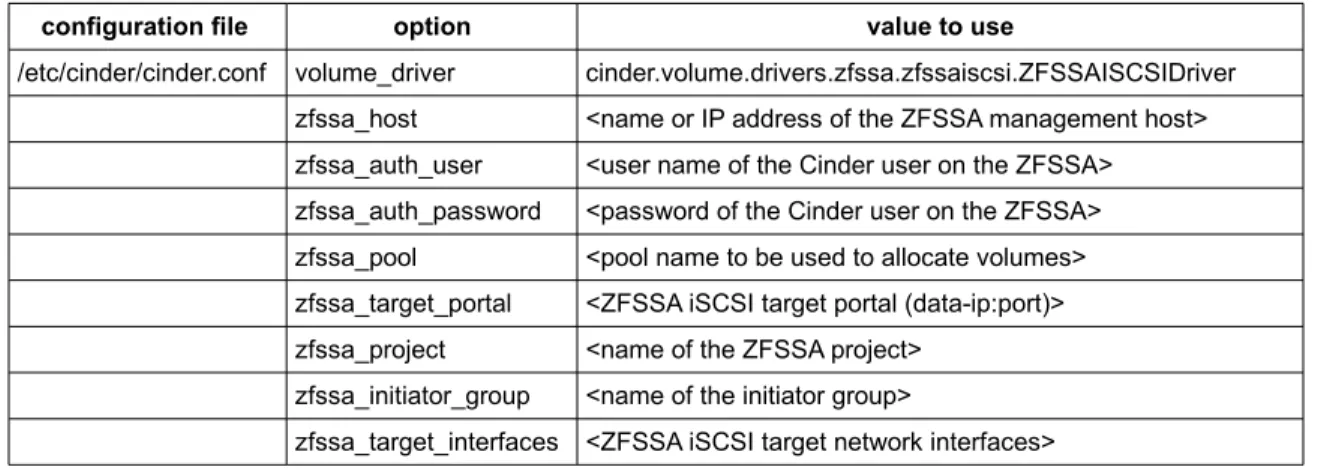
Cinder-volume services when using the ZFSSAISCSIDriver volume driver for the ZFS
Storage Appliance... 47
Configure the cinder-volume SMF services within zone cluster os-api...47
Configure the cinder-volume SMF services as GDSv2 based failover cluster
resources within zone cluster os-api...48
Swift... 49
Configure swift-proxy-server service within zone cluster os-api...50
Configure the swift-proxy-server SMF service as a failover cluster resource within
zone cluster os-api... 50
OpenStack Components Not Running on the HA Cloud Controller
51
References
52
Appendix
53
SMF manifest for service system/cluster/osc-clpriv-ip-forwarding-disable...53
SMF method script for service system/cluster/osc-clpriv-ip-forwarding-disable...54
SMF wrapper script to manage the cinder-volume services...55
Introduction
Oracle Solaris delivers a complete OpenStack distribution which is integrated with its core
technologies such as Oracle Solaris Zones, the ZFS file system, or its image packaging system (IPS).
OpenStack in Oracle Solaris 11.2 helps IT organizations to create an enterprise-ready Infrastructure as
a Service (IaaS) cloud, so that users can quickly create virtual networking and compute resources by
using a centralized web-based portal [1].
Any enterprise-type OpenStack deployment requires a highly available OpenStack infrastructure that
can sustain individual system failures [11],[12].
Oracle Solaris Cluster is deeply integrated with Oracle Solaris technologies and provides a rich set of
features which provide high availability to Oracle Solaris based OpenStack services [2].
The primary goals of the Oracle Solaris Cluster software are to maximize service availability through
fine-grained monitoring and automated recovery of critical services and to prevent data corruption
through proper fencing.
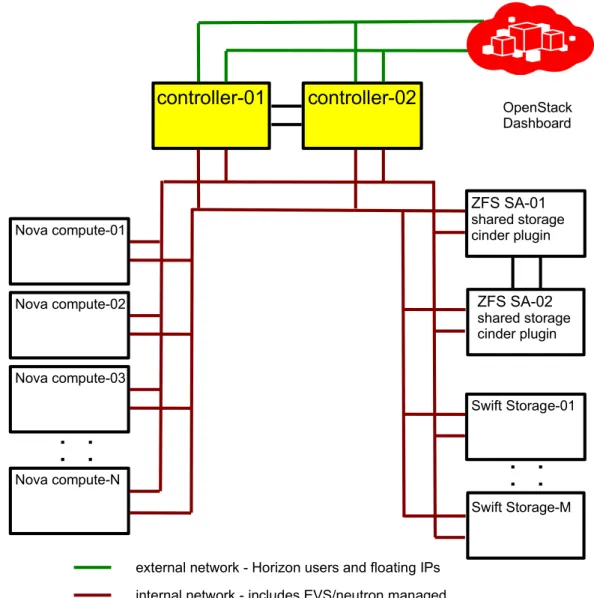
Figure 1 below depicts just one example on a highly available physical node OpenStack infrastructure
deployment. The two cloud controller cluster nodes in yellow represent the highly available OpenStack
cloud controller configuration described in the sections to follow. Of course, the OpenStack cloud
controller can be deployed on a larger cluster, based on the capacity required by the deployment and
on the qualified configurations documented within the Oracle Solaris Cluster 4 Compatibility Guide [3].
The usage of OpenStack Swift object storage nodes is optional. High availability for the Swift object
storage is achieved by Swift's clustering features by configuring a Swift ring [4]. Only the
swift-proxy-server
service will be hosted by the HA cloud controller.
The clustered Oracle ZFS Storage Appliance (ZFS SA) is used to provide highly available shared
storage to the cloud controller cluster, and is also used to provide Cinder volume storage through the
corresponding Oracle ZFS Storage Appliance iSCSI Cinder driver [5].
This white paper describes further how to provide high availability to an OpenStack cloud controller
that is deployed on Oracle Solaris with Oracle Solaris Cluster.
Figure 2: Basic HA node deployment
controller-01
controller-02
ZFS SA-02
shared storage
Cinder plugin
ZFS SA-01
shared storage
Cinder plugin
Swift Storage-01
Swift Storage-M
Nova compute-01
Nova compute-02
Nova compute-N
Nova compute-03
external network - Horizon users and floating IPs
internal network - includes EVS/Neutron-managed
multi-tenant networks
OpenStack
Dashboard
Figure 1: Basic HA node deployment
controller-01
controller-02
ZFS SA-02
shared storage
cinder plugin
ZFS SA-01
shared storage
cinder plugin
Swift Storage-01
Swift Storage-M
Nova compute-01
Nova compute-02
Nova compute-N
Nova compute-03
external network - Horizon users and floating IPs
internal network - includes EVS/neutron managed
multi-tenant networks
OpenStack
Dashboard
Oracle Solaris Cluster Features
The Oracle Solaris Cluster environment extends the Oracle Solaris operating system into a cluster operating system. A cluster is a collection of one or more nodes that belong exclusively to that collection. The following explains some of the key features offered by Oracle Solaris Custer and used in this example to provide high availability to the OpenStack cloud controller services.
»
Resources, Resource Groups, Resource Types, and the Resource Group ManagerThe Resource Group Manager (RGM) subsystem manages applications put under Oracle Solaris Cluster control and the resources that they require to function. More specifically, the RGM ensures that cluster applications have the resources they need on the cluster nodes they are running. A cluster application is called a data service, often abbreviated to just a service.
The RGM uses specific agents to manage each data service. An RGM-managed resource is an instance of a resource type that is defined cluster wide. Several resource types are pre-defined as either generic, such as a logical hostname, or application specific, such as HA for MySQL. RGM-managed resources are placed into groups, called resource groups, so that they can be managed as a unit. A resource group is migrated as a unit if a failover or switchover is initiated on the resource group.
To allow orchestration of multiple resource groups and resources within the cluster, the RGM provides a rich set of resource group affinities and resource dependencies types. They are used to specify the various relations that exist between application resources, even distributed across global-cluster and zone-cluster nodes.
Optionally one can configure a set of load limits for each cluster node and assign load factors to resource groups. When starting a resource group, the RGM chooses a node from the resource group's preferred node list that best satisfies the configured load distribution policy.
»
Global Cluster and Zone ClustersIn a cluster that runs on the Oracle Solaris Cluster framework, two types of clusters can exist: a global cluster that exists by default, and zone clusters which can be added. A global cluster consists of the set of Oracle Solaris global zones, while a zone cluster consists of a set of non-global zones (one per global-cluster node) that are configured to behave as a separate “virtual” cluster.
The ability to run multiple zone clusters within a global cluster, and the rich set of resource group affinities and resource dependencies provided by the RGM, enables deployment of multi-tiered applications, and securely separates application layers from each other. The ability to automatically orchestrate application components to orderly start and stop during normal operation, as well as during reconfigurations triggered by failures, is
preserved with zone clusters. Further, the ability of Oracle Solaris zones to configure resource management, such as to specifically assign system resources like CPU and memory, can be leveraged with zone clusters.
»
Failover, Scalable, and Multi-Master ApplicationsA cluster application that runs on only one node at a time is a failover application.A cluster application that runs an instance on multiple nodes at a time is either a multi-master or scalable application. The later takes advantage of Oracle Solaris Cluster built-in network load balancing.
»
Failover and Scalable IP AddressesThe Oracle Solaris Cluster software provides two mechanisms through which client applications can access services on the cluster: logical IP addresses (also called logical hostnames, abbreviated as LH) and global IP addresses (also called shared addresses or scalable addresses, abbreviated as SA).
Logical IP addresses are used by failover services. Global IP addresses are used for scalable services that can run on more than one node concurrently. The cluster framework provides a load balancing feature by the global networking service for scalable outbound IP traffic, to distribute TCP and/or UDP client requests across the
configured nodes for a scalable service. The load balancer can be configured for the packet distribution mechanism and load weights to be used.
»
Failover and Scalable Mount PointsThe SUNW.HAStoragePlus resource type is designed to make local and global file system configurations highly available. You can also use the SUNW.HAStoragePlus resource type to synchronize the startup of resources and device groups on which the resources depend.
The SUNW.ScalMountPoint resource type represents a scalable file-system mount point,where the file-system type can be a QFS shared file system or a network-attached storage (NAS) device, such as an NFS share from an Oracle ZFS Storage Appliance.
»
Data Service for MySQLOracle Solaris Cluster provides a standard data service to manage a MySQL database, which implements a mechanism for orderly startup and shutdown, fault monitoring, and automatic failover of the MySQL service.
»
Data Service for ApacheOracle Solaris Cluster provides a standard data service to manage the Apache web server as a failover or scalable service for http and https access, which implements a mechanism for orderly startup and shutdown, fault monitoring, and automatic failover.
»
Data Service for Oracle Solaris ZonesThis standard data service provides high availability for Oracle Solaris Zones through three components in a failover or multi-master configuration:
sczbt: The orderly booting, shutdown, and fault monitoring of an Oracle Solaris zone.
sczsh: The orderly startup, shutdown, and fault monitoring of an application within the Oracle Solaris zone (managed by sczbt), using scripts or commands.
sczsmf: The orderly startup, shutdown, and fault monitoring of an Oracle Solaris Service Management Facility (SMF) service within the Oracle Solaris zone managed by sczbt.
With Oracle Solaris Cluster 4.2, the sczbt component supports cold migration (boot and shutdown) of solaris and solaris10 branded zones, and cold and warm migration for kernel zones on Oracle Solaris 11.2. Using warm migration (suspend and resume of a kernel zone) can minimize planned downtime, for example, in case a cluster node is overloaded or needs to be shut down for maintenance.
»
Data Service for HA SMF Proxy ResourcesOracle Solaris Cluster includes three SMF proxy resource types that can be used to enable SMF services to run with Oracle Solaris Cluster in a failover, multi-master, or scalable configuration. The SMF proxy resource types enables you to encapsulate a set of interrelated SMF services into a single resource, the SMF proxy resource, to be managed by Oracle Solaris Cluster. In this feature, SMF manages the availability of SMF services on a single node. Oracle Solaris Cluster extends this capability to multiple nodes and helps to provide high availability and scalability of the SMF services.
»
Generic Data Service (GDSv2)The Generic Data Service is a mechanism for making simple network-aware and non-network-aware applications highly available by plugging them into the Oracle Solaris Cluster Resource Group Manager (RGM) framework. This mechanism does not require coding a data service, which you typically must do to make an application highly available. It can be used for cases where no standard data service is part of Oracle Solaris Cluster exists for a given application.
More information about the Oracle Solaris Cluster capabilities can be found within the Oracle Solaris Cluster Concepts Guide [2] and within the Oracle Solaris Cluster 4.2 documentation library [6].
Overview of the High Availability Cloud Controller Configuration
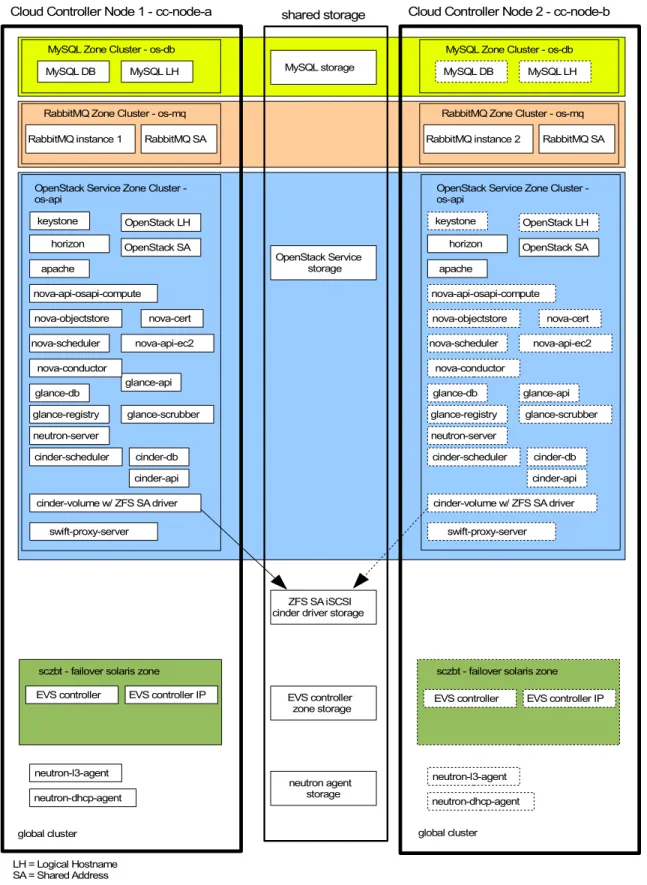
Figure 2 below reflects the high-level setup of the HA OpenStack cloud controller. In this example, the services running on the OpenStack cloud controller are organized within four runtime environments:
»
Dedicated zone cluster to host the MySQL database (named os-db), used by all OpenStack components»
Dedicated zone cluster to host the central messaging service RabbitMQ (named os-mq), used by all OpenStackcomponents
»
Dedicated zone cluster for all OpenStack services (named os-api) that can be run within a non-global Solaris zone»
Global cluster to host the Elastic Virtual Switch (EVS) controller within a failover zone and the Neutron agent servicesThis is an example on how to achieve secure isolation between services, and concurrently define all the required dependencies for proper startup and stopping between services which is orchestrated by the cluster framework. The granularity of service separation can be further increased, specifically within the OpenStack services hosted by the os-api zone cluster. Additional zone clusters can be created and also distributed across multiple physical cluster nodes, depending on runtime performance requirements for individual OpenStack services. Only services that are required to run within the global zone context are configured within the global cluster.
The OpenStack cloud controller provides various API endpoints. From an initial setup perspective, high availability needs to be considered already at installation time.
Oracle Solaris Cluster offers built-in HA data services for several OpenStack components (like MySQL, Apache), which are used in this implementation.
Most OpenStack components are managed by one or more corresponding SMF services on Oracle Solaris. If Oracle Solaris Cluster does not offer the corresponding HA data service, for most of those SMF services the data service for HA SMF Proxy resources is used to provide HA for those components.
The generic approach to provide HA for OpenStack SMF services can be summarized as follows:
»
Failover services (stateful active/passive)- Configure either a SUNW.HAStoragePlus or SUNW.ScalMountPoint cluster resource to store dynamic file system content
- Configure a SUNW.LogicalHostname resource for the service endpoint(s) - Configure a SUNW.Proxy_SMF_failover resource for each SMF service
»
Scalable service (stateless active/active)- Ensure static content is replicated identical across all cluster nodes or zones
- Configure a failover resource group with SUNW.SharedAddress resource for the service endpoint(s) - Configure a scalable resource group with a SUNW.Proxy_SMF_scalable resource for each SMF service The cluster load balancer is used to distribute client access between the scalable SMF services.
Other OpenStack components that need to access the highly available OpenStack endpoints have to be configured to use the logical hostname that is managed by the cluster.
Figure 2: HA OpenStack cloud controller MySQL Zone Cluster - os-db MySQL DB
RabbitMQ Zone Cluster - os-mq RabbitMQ instance 1
MySQL LH
RabbitMQ SA
OpenStack Service Zone Cluster -os-api keystone horizon apache OpenStack LH OpenStack SA nova-scheduler glance-db glance-api nova-api-ec2 glance-scrubber neutron-server nova-cert nova-objectstore nova-api-osapi-compute nova-conductor glance-registry cinder-scheduler
MySQL Zone Cluster - os-db MySQL DB
RabbitMQ Zone Cluster - os-mq MySQL LH
OpenStack Service Zone Cluster -os-api keystone horizon apache OpenStack LH OpenStack SA nova-scheduler nova-api-ec2 nova-cert nova-objectstore nova-conductor MySQL storage OpenStack Service storage LH = Logical Hostname SA = Shared Address
Cloud Controller Node 1 - cc-node-a shared storage Cloud Controller Node 2 - cc-node-b
global cluster global cluster
RabbitMQ instance 2 RabbitMQ SA
nova-api-osapi-compute cinder-db cinder-api glance-db glance-api glance-scrubber neutron-server glance-registry cinder-scheduler cinder-db cinder-api
sczbt - failover solaris zone EVS controller EVS controller IP
sczbt - failover solaris zone EVS controller EVS controller IP EVS controller zone storage neutron-l3-agent neutron-dhcp-agent neutron agent storage neutron-l3-agent neutron-dhcp-agent
cinder-volume w/ ZFS SA driver cinder-volume w/ ZFS SA driver
swift-proxy-server swift-proxy-server
ZFS SA iSCSI cinder driver storage
When customizing the various OpenStack components' configuration files for a failover service, directories and file system paths that point to /var/lib/<component>/ hosting dynamic data have to be changed to point to a directory on shared storage that is managed by the cluster. IP addresses for the various services have to be defined and configured to use the logical or scalable cluster IP in those configuration files as well. This is done to make sure that the failover service is switched together with the storage data and service IP-address.
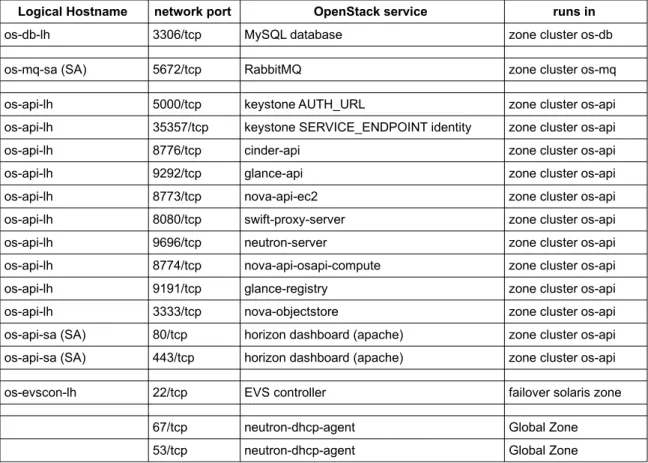
The following Table 1 outlines the example mapping of cluster-managed IP addresses to the OpenStack services: Logical Hostname network port OpenStack service runs in
os-db-lh 3306/tcp MySQL database zone cluster os-db
os-mq-sa (SA) 5672/tcp RabbitMQ zone cluster os-mq
os-api-lh 5000/tcp keystone AUTH_URL zone cluster os-api
os-api-lh 35357/tcp keystone SERVICE_ENDPOINT identity zone cluster os-api
os-api-lh 8776/tcp cinder-api zone cluster os-api
os-api-lh 9292/tcp glance-api zone cluster os-api
os-api-lh 8773/tcp nova-api-ec2 zone cluster os-api
os-api-lh 8080/tcp swift-proxy-server zone cluster os-api
os-api-lh 9696/tcp neutron-server zone cluster os-api
os-api-lh 8774/tcp nova-api-osapi-compute zone cluster os-api
os-api-lh 9191/tcp glance-registry zone cluster os-api
os-api-lh 3333/tcp nova-objectstore zone cluster os-api
os-api-sa (SA) 80/tcp horizon dashboard (apache) zone cluster os-api os-api-sa (SA) 443/tcp horizon dashboard (apache) zone cluster os-api
os-evscon-lh 22/tcp EVS controller failover solaris zone
67/tcp neutron-dhcp-agent Global Zone
53/tcp neutron-dhcp-agent Global Zone
Table 1: Cluster IP address and port mapping to OpenStack services
When configuring Keystone, endpoints for the various OpenStack service components are defined. To change a specific standard OpenStack service into a highly available service with Oracle Solaris Cluster, the Keystone endpoint needs to be configured to use the highly available IP address managed by the cluster framework.
Oracle Solaris Cluster Framework and Infrastructure Setup
Instructions in this white paper provide details on how to set up the OpenStack components under Oracle Solaris Cluster control. As a prerequisite, the Oracle Solaris Cluster Image Packaging System (IPS) packages need to be installed on the Oracle Solaris systems, which should form the cluster, and the Oracle Solaris Cluster framework has to be configured. The Oracle Technology Network provides technical resources for Oracle Solaris Cluster [7], specifically the article “How to Install and Configure a Two-Node Cluster" [8] and the Oracle Solaris Cluster Software Installation Guide [9].
Configuration assumptions
This white paper assumes that the following configuration is used for HA OpenStack cloud controller cluster nodes:
»
At least two physical systems are configured as a global cluster with Oracle Solaris 11.2 SRU 7 and OracleSolaris Cluster 4.2 SRU 3 or newer. You can install more nodes in the cluster as required. In this example the global cluster node names are cc-node-a and cc-node-b.
»
The Image Packaging System publishers for Oracle Solaris (solaris) and Oracle Solaris Cluster (ha-cluster) are already configured for the corresponding support repositories on the cluster nodes.»
Oracle Solaris Cluster 4.2 SRU 3 or later is installed and configured with the ha-cluster-full group package.»
This example uses the OpenStack Havana release, which is delivered by Oracle Solaris 11.2.»
Each node has two spare network interfaces to be used as private interconnects, also known as transports, and at least two network interfaces configured as IPMP group sc_ipmp0, which is connected to the public cluster network and is also used for the OpenStack service endpoints. Further network adapters (protected by either IPMP or IP aggregation) can be configured as a dedicated network between the cloud controller and nova compute nodes that are managed by Neutron and the EVS. In this example, an aggregation aggr1 is used to configure a tagged VLAN for that purpose.»
The IP addresses used for the cluster nodes, zone cluster nodes, logical hostnames, and shared addresses resolve properly on all nodes and zones to the host aliases used in this example:cc-node-a, cc-node-b, os-db-z1, os-db-z2, os-db-lh, os-mq-z1, os-mq-z2, os-mq-sa, os-api-z1, os-api-z2, os-api-lh, os-api-sa, os-evscon-lh.
»
An Oracle ZFS Storage Appliance is configured on the cluster to provide shared storage. For more information, see "How to Install an Oracle ZFS Storage Appliance in a Cluster." [10].»
The cluster hardware is a supported configuration for Oracle Solaris Cluster 4.2 software. For more information, see the Oracle Solaris Cluster 4 Compatibility Guide [3].»
The global cluster nodes are configured as NTP clients, to synchronize time from a common source [9].»
The path /usr/cluster/bin has been added to the PATH variable defined within the root user .profile on all cluster nodes and zone cluster nodes.»
Throughout the examples, the short name for the cluster commands are used, for example, clrs instead of clresource. A list of cluster commands and their corresponding short names can be viewed by executing cluster list-cmds -v.»
Conventions on the command output:»
When a shell prompt is shown as:cc-node-a# command
execute command on only the specific node shown, cc-node-a.
»
When a shell prompt is shown as:all global nodes# command
»
When the shell prompt is shown as: both os-db zones# commandexecute command on both the zone cluster nodes as shown, in this example os-db-z1 and os-db-z2.
Configure zpools on shared storage and a dataset per node for later usage
Configure a zpool named os-db_zpwith mount point /failover/os-db to host the OpenStack MySQL database:
cc-node-a# zpool create -m /failover/os-db os-db_zp <shared storage device 1 cxtydz> cc-node-a# zpool export os-db_zp
Configure a zpool named os-api_zp with mount point /failover-os-api to host the data for OpenStack services configured as failover services:
cc-node-a# zpool create -m /failover/os-api os-api_zp \ <shared storage device 2 cxtydz>
cc-node-a# zpool export os-api_zp
Configure a zpool named os-gz-api_zp with mount point /failover/os-gz-api to host the data for the neutron-l3-agent and neutron-dhcp-agent services:
cc-node-a# zpool create -m /failover/os-gz-api os-gz-api_zp \ <shared storage device 3 cxtydz>
cc-node-a# zpool export os-gz-api_zp
Configure a dedicated dataset with mount point /zones for the zone cluster node zonepath within the rpool on all global cluster nodes:
all global nodes# zfs create -o mountpoint=/zones rpool/zones
Zone cluster installation
Create zone cluster os-db, which will host the HA MySQL configuration. The zone cluster nodes are named os-db-z1 and os-db-z2. The zone cluster is allowed to use the logical hostname os-db-lh and zpool os_db_zp: cc-node-a# vi /var/tmp/os-db.txt create set brand=solaris set zonepath=/zones/os-db set ip-type=shared set enable_priv_net=true set autoboot=true add node set physical-host=cc-node-a set hostname=os-db-z1 add net set address=os-db-z1 set physical=sc_ipmp0 end end add node set physical-host=cc-node-b set hostname=os-db-z2 add net
set address=os-db-z2 set physical=sc_ipmp0 end end add net set address=os-db-lh end add dataset set name=os-db_zp end commit exit
cc-node-a# sysconfig create-profile -o /var/tmp/os-db.xml -g \ location,identity,naming_services,users
=> go through the interactive session and provide input about DNS/LDAP/etc and root user information, as required
=> this creates /var/tmp/os-db.xml/sc_profile.xml cc-node-a# clzc configure -f /var/tmp/os-db.txt os-db
cc-node-a# clzc install -c /var/tmp/os-db.xml/sc_profile.xml os-db cc-node-a# clzc boot os-db
=> on both nodes: zlogin -C -e @ os-db
and verify the zone boots correctly on each node
Create zone cluster os-mq, which will host the HA RabbitMQ configuration. The zone cluster nodes are named os-mq-z1 and os-mq-z2. The shared address os-mq-sa will be used for this zone cluster:
cc-node-a# vi /var/tmp/os-mq.txt create set brand=solaris set zonepath=/zones/os-mq set ip-type=shared set enable_priv_net=true set autoboot=true add node set physical-host=cc-node-a set hostname=os-mq-z1 add net set address=os-mq-z1 set physical=sc_ipmp0 end end add node set physical-host=cc-node-b set hostname=os-mq-z2 add net set address=os-mq-z2 set physical=sc_ipmp0 end end add net set address=os-mq-sa end commit exit
cc-node-a# clzc configure -f /var/tmp/os-mq.txt os-mq
cc-node-a# clzc install -c /var/tmp/os-db.xml/sc_profile.xml os-mq cc-node-a# clzc boot os-mq
=> on both nodes: zlogin -C -e @ os-mq
and verify the zone boots correctly on each node
Create zone cluster os-api, which will host the OpenStack services for the cloud controller configuration. The zone cluster nodes are named os-api-z1 and os-api-z2. The zone cluster is allowed to use the logical hostname os-api-lh, the shared address os-api-sa, and zpool os_api_zp:
cc-node-a# vi /var/tmp/os-api.txt create set brand=solaris set zonepath=/zones/os-api set ip-type=shared set enable_priv_net=true set autoboot=true add node set physical-host=cc-node-a set hostname=os-api-z1 add net set address=os-api-z1 set physical=sc_ipmp0 end end add node set physical-host=cc-node-b set hostname=os-ap-z2 add net set address=os-api-z2 set physical=sc_ipmp0 end end add net set address=os-api-lh end add net set address=os-api-sa end add dataset set name=os-api_zp end commit exit
cc-node-a# clzc configure -f /var/tmp/os-api.txt os-api
## Note: You can re-use the sysconfig profile used to setup zone cluster os-db cc-node-a# clzc install -c /var/tmp/os-db.xml/sc_profile.xml os-api
cc-node-a# clzc boot os-api
=> on both nodes: zlogin -C -e @ os-api
OpenStack Components on the HA Cloud Controller
Database - MySQL
Within a multi-node configuration of OpenStack on Oracle Solaris, the backend database is typically MySQL. The following OpenStack components store data within the MySQL database and are thus dependent on it:
»
Keystone»
Glance (glance-db)»
Nova (nova-conductor, nova-scheduler, nova-cert, nova-api-osapi-compute)»
Neutron (neutron-server)»
Cinder (cinder-db)»
Heat (heat-db)Providing HA for the MySQL database is critical for these OpenStack services to operate properly.
The HA MySQL data service is used to provide HA for the MySQL database [14]. This data service provides a variety of supported MySQL topologies. This example shows on how to configure MySQL as a failover database. Based on requirements to distribute load for the database, other supported topologies may be used.
Configure cluster infrastructure objects for HA MySQL within zone cluster os-db
Configure the resource group os-db-rg, logical hostname os-db-lh-rs, and HA zpool os-db-hasp-rs resources within zone cluster os-db for HA MySQL:
os-db-z1# clrt register SUNW.HAStoragePlus os-db-z1# clrg create os-db-rg
os-db-z1# clrslh create -g os-db-rg -h os-db-lh os-db-lh-rs both os-db zones# mkdir -p /failover/os-db
os-db-z1# clrs create -t SUNW.HAStoragePlus -g os-db-rg -p zpools=os-db_zp \ os-db-hasp-rs
os-db-z1# clrg online -eM os-db-rg
Install and configure the MySQL database within zone cluster os-db
Install the MySQL binaries and set up the database by using file system /failover/os-db on the HA zpool os-db_zp and the IP-address os-db-lh under cluster control:
both os-db zones# pkg install mysql-55 mysql-55/client cc-node-a# zfs create os-db_zp/mysql
os-db-z1# mkdir /failover/os-db/mysql/logs os-db-z1# mkdir /failover/os-db/mysql/innodb
os-db-z1# cp /etc/mysql/5.5/my.cnf /failover/os-db/mysql/ os-db-z1# vi /failover/os-db/mysql/my.cnf
--- my.cnf.orig Thu Jul 3 11:02:56 2014 +++ my.cnf Thu Jul 3 11:07:24 2014 @@ -18,7 +18,7 @@
[client]
#password = your_password port = 3306
-socket = /tmp/mysql.sock +socket = /tmp/os-db-lh.sock
# Here follows entries for some specific programs @@ -25,7 +25,7 @@
# The MySQL server [mysqld] port = 3306 -socket = /tmp/mysql.sock +socket = /tmp/os-db-lh.sock skip-external-locking key_buffer_size = 16K max_allowed_packet = 1M @@ -45,6 +45,8 @@ #skip-networking server-id = 1 +bind-address=os-db-lh +
# Uncomment the following if you want to log updates #log-bin=mysql-bin
@@ -59,18 +61,18 @@
#binlog_direct_non_transactional_updates=TRUE
# Uncomment the following if you are using InnoDB tables -#innodb_data_home_dir = /var/mysql/5.5 -#innodb_data_file_path = ibdata1:10M:autoextend -#innodb_log_group_home_dir = /var/mysql/5.5 +innodb_data_home_dir = /failover/os-db/mysql/innodb +innodb_data_file_path = ibdata1:10M:autoextend +innodb_log_group_home_dir = /failover/os-db/mysql/innodb # You can set .._buffer_pool_size up to 50 - 80 %
# of RAM but beware of setting memory usage too high -#innodb_buffer_pool_size = 16M
-#innodb_additional_mem_pool_size = 2M +innodb_buffer_pool_size = 16M
+innodb_additional_mem_pool_size = 2M
# Set .._log_file_size to 25 % of buffer pool size -#innodb_log_file_size = 5M -#innodb_log_buffer_size = 8M -#innodb_flush_log_at_trx_commit = 1 -#innodb_lock_wait_timeout = 50 +innodb_log_file_size = 5M +innodb_log_buffer_size = 8M +innodb_flush_log_at_trx_commit = 1 +innodb_lock_wait_timeout = 50 [mysqldump] quick
both os-db zones# cd /etc/mysql/5.5 both os-db zones# mv my.cnf my.cnf.orig
both os-db zones# ln -s /failover/os-db/mysql/my.cnf . os-db-z1# chown -R mysql:mysql /failover/os-db/mysql
os-db-z1# /usr/mysql/5.5/bin/mysql_install_db --user=mysql \
--datadir=/failover/os-db/mysql --basedir=/usr/mysql/5.5 Installing MySQL system tables...
OK
Filling help tables... OK
To start mysqld at boot time you have to copy
support-files/mysql.server to the right place for your system PLEASE REMEMBER TO SET A PASSWORD FOR THE MySQL root USER ! To do so, start the server, then issue the following commands: /usr/mysql/5.5/bin/mysqladmin -u root password 'new-password'
/usr/mysql/5.5/bin/mysqladmin -u root -h os-db-z1 password 'new-password' Alternatively you can run:
/usr/mysql/5.5/bin/mysql_secure_installation
which will also give you the option of removing the test databases and anonymous user created by default. This is strongly recommended for production servers.
See the manual for more instructions. You can start the MySQL daemon with:
cd /usr/mysql/5.5 ; /usr/mysql/5.5/bin/mysqld_safe & You can test the MySQL daemon with mysql-test-run.pl cd /usr/mysql/5.5/mysql-test ; perl mysql-test-run.pl
Please report any problems with the /usr/mysql/5.5/scripts/mysqlbug script!
os-db-z1# /usr/mysql/5.5/bin/mysqld --defaults-file=/failover/os-db/mysql/my.cnf \ --basedir=/usr/mysql/5.5 --datadir=/failover/os-db/mysql \
--user=mysql --pid-file=/failover/os-db/mysql/mysql.pid & 140704 11:15:20 [Note] Plugin 'FEDERATED' is disabled.
140704 11:15:20 InnoDB: The InnoDB memory heap is disabled
140704 11:15:20 InnoDB: Mutexes and rw_locks use GCC atomic builtins 140704 11:15:20 InnoDB: Compressed tables use zlib 1.2.3
140704 11:15:20 InnoDB: Initializing buffer pool, size = 16.0M 140704 11:15:20 InnoDB: Completed initialization of buffer pool
InnoDB: The first specified data file /failover/os-db/mysql/innodb/ibdata1 did not exist:
InnoDB: a new database to be created!
140704 11:15:20 InnoDB: Setting file /failover/os-db/mysql/innodb/ibdata1 size to 10 MB
InnoDB: Database physically writes the file full: wait...
140704 11:15:20 InnoDB: Log file /failover/os-db/mysql/innodb/ib_logfile0 did not exist: new to be created
InnoDB: Setting log file /failover/os-db/mysql/innodb/ib_logfile0 size to 5 MB InnoDB: Database physically writes the file full: wait...
140704 11:15:20 InnoDB: Log file /failover/os-db/mysql/innodb/ib_logfile1 did not exist: new to be created
InnoDB: Setting log file /failover/os-db/mysql/innodb/ib_logfile1 size to 5 MB InnoDB: Database physically writes the file full: wait...
InnoDB: Doublewrite buffer not found: creating new InnoDB: Doublewrite buffer created
InnoDB: 127 rollback segment(s) active.
InnoDB: Creating foreign key constraint system tables InnoDB: Foreign key constraint system tables created
140704 11:15:21 InnoDB: Waiting for the background threads to start 140704 11:15:22 InnoDB: 5.5.31 started; log sequence number 0
140704 11:15:22 [Note] Server hostname (bind-address): 'os-db-lh'; port: 3306 140704 11:15:22 [Note] - 'os-db-lh' resolves to '10.134.96.132';
140704 11:15:22 [Note] Server socket created on IP: '10.134.96.132'. 140704 11:15:22 [Note] Event Scheduler: Loaded 0 events
140704 11:15:22 [Note] /usr/mysql/5.5/bin/mysqld: ready for connections.
Version: '5.5.31' socket: '/tmp/os-db-lh.sock' port: 3306 MySQL Community Server (GPL)
## The following is only needed for the mysql_secure_installation script: os-db-z1# cd /tmp
os-db-z1# ln os-db-lh.sock mysql.sock
os-db-z1# export PATH=${PATH}:/usr/mysql/5.5/bin os-db-z1# /usr/mysql/5.5/bin/mysql_secure_installation
NOTE: RUNNING ALL PARTS OF THIS SCRIPT IS RECOMMENDED FOR ALL MySQL SERVERS IN PRODUCTION USE! PLEASE READ EACH STEP CAREFULLY! In order to log into MySQL to secure it, we'll need the current password for the root user. If you've just installed MySQL, and you haven't set the root password yet, the password will be blank, so you should just press enter here.
Enter current password for root (enter for none): OK, successfully used password, moving on...
Setting the root password ensures that nobody can log into the MySQL root user without the proper authorisation.
Set root password? [Y/n] y
New password: <mysqlrootpassword>
Re-enter new password: <mysqlrootpassword> Password updated successfully!
Reloading privilege tables.. ... Success!
By default, a MySQL installation has an anonymous user, allowing anyone to log into MySQL without having to have a user account created for them. This is intended only for testing, and to make the installation go a bit smoother. You should remove them before moving into a
production environment.
Remove anonymous users? [Y/n] Y ... Success!
Normally, root should only be allowed to connect from 'localhost'. This ensures that someone cannot guess at the root password from the network. Disallow root login remotely? [Y/n] n
... skipping.
By default, MySQL comes with a database named 'test' that anyone can access. This is also intended only for testing, and should be removed before moving into a production environment.
Remove test database and access to it? [Y/n] Y - Dropping test database...
... Success!
... Success!
Reloading the privilege tables will ensure that all changes made so far will take effect immediately.
Reload privilege tables now? [Y/n] Y ... Success!
Cleaning up...
All done! If you've completed all of the above steps, your MySQL installation should now be secure.
Thanks for using MySQL!
os-db-z1# /usr/mysql/5.5/bin/mysql -S /tmp/os-db-lh.sock -uroot \ -p'<mysqlrootpassword>'
mysql> use mysql; Database changed
mysql> GRANT ALL ON *.* TO 'root'@'os-db-z1' IDENTIFIED BY '<mysqlrootpassword>'; Query OK, 0 rows affected (0.00 sec)
mysql> GRANT ALL ON *.* TO 'root'@'os-db-z2' IDENTIFIED BY '<mysqlrootpassword>'; Query OK, 0 rows affected (0.00 sec)
mysql> UPDATE user SET Grant_priv='Y' WHERE User='root' AND Host='os-db-z1'; Query OK, 0 rows affected (0.00 sec)
Rows matched: 1 Changed: 0 Warnings: 0
mysql> UPDATE user SET Grant_priv='Y' WHERE User='root' AND Host='os-db-z2'; Query OK, 1 row affected (0.00 sec)
Rows matched: 1 Changed: 1 Warnings: 0
mysql> GRANT ALL ON *.* TO 'root'@'os-db-lh' IDENTIFIED BY '<mysqlrootpassword>'; Query OK, 0 rows affected (0.00 sec)
mysql> UPDATE user SET Grant_priv='Y' WHERE User='root' AND Host='os-db-lh'; Query OK, 1 row affected (0.00 sec)
Rows matched: 1 Changed: 1 Warnings: 0
Configure the MySQL database as HA MySQL failover cluster resource os-mysql-rs within zone cluster os-db
Configure the MySQL database instance as cluster resource os-mysql-rs within resource group os-db-rg: os-db-z1# mkdir /failover/os-db/cluster-config
os-db-z1# cd /failover/os-db/cluster-config os-db-z1# cp /opt/SUNWscmys/util/ha_mysql_config . os-db-z1# cp /opt/SUNWscmys/util/mysql_config . os-db-z1# vi ha_mysql_config RS=os-mysql-rs RG=os-db-rg PORT=3306 LH=os-db-lh-rs SCALABLE= LB_POLICY= RS_PROP= HAS_RS=os-db-hasp-rs ZONE= ZONE_BT=
PROJECT= BASEDIR=/usr/mysql/5.5 DATADIR=/failover/os-db/mysql MYSQLUSER=mysql MYSQLHOST=os-db-lh FMUSER=fmuser FMPASS= LOGDIR=/failover/os-db/mysql/logs CHECK=YES NDB_CHECK= os-db-z1# vi mysql_config MYSQL_BASE=/usr/mysql/5.5 MYSQL_USER=root MYSQL_PASSWD= MYSQL_HOST=os-db-lh FMUSER=fmuser FMPASS= MYSQL_SOCK=/tmp/os-db-lh.sock
MYSQL_NIC_HOSTNAME="os-db-z1 os-db-z2 os-db-lh" MYSQL_DATADIR=/failover/os-db/mysql
NDB_CHECK=
os-db-z1# /opt/SUNWscmys/util/mysql_register \
-f /failover/os-db/cluster-config/mysql_config sourcing /failover/os-db/cluster-config/mysql_config.
MySQL version 5 detected on 5.11.
Enter the MySQL admin password. => <mysqlrootpassword> Re enter the MySQL admin password.
Check if the MySQL server is running and accepting connections. Enter the MySQL fault monitor user password. => <fmuserpassword> Reenter the MySQL fault monitor user password.
Add faultmonitor user (fmuser) with its password with Process, Select, Reload, and Shutdown privileges to user table for MySQL database for host os-db-z1.
Add SUPER privilege for fmuser@os-db-z1.
Add faultmonitor user (fmuser) with its password with Process, Select, Reload, and Shutdown privileges to user table for MySQL database for host os-db-z2.
Add SUPER privilege for fmuser@os-db-z2.
Add faultmonitor user (fmuser) with its password with Process, Select, Reload, and Shutdown privileges to user table for MySQL database for host os-db-lh.
Add SUPER privilege for fmuser@os-db-lh. Create test-database sc3_test_database.
Grant all privileges to sc3_test_database for faultmonitor-user fmuser for host os-db-z1.
Grant all privileges to sc3_test_database for faultmonitor-user fmuser for host os-db-z2.
Grant all privileges to sc3_test_database for faultmonitor-user fmuser for host os-db-lh.
Flush all privileges.
MySQL configuration for HA is done.
os-db-z1# kill -TERM $(cat /failover/os-db/mysql/mysql.pid) os-db-z1# /opt/SUNWscmys/util/ha_mysql_register \
-f /failover/os-db/cluster-config/ha_mysql_config -e
Sourcing /failover/os-db/cluster-config/ha_mysql_config and create a working copy under /opt/SUNWscmys/util/ha_mysql_config.work.
remove the working copy /opt/SUNWscmys/util/ha_mysql_config.work. Enter the password for the faultmonitoring user. => <fmuserpassword> Re enter the password for the faultmonitoring user.
Encrypt the password. os-db-z1# cd
os-db-z1# clrg switch -n os-db-z2 os-db-rg
os-db-z2# /opt/SUNWscmys/util/ha_mysql_register \
-f /failover/os-db/cluster-config/ha_mysql_config -e
Sourcing /failover/os-db/cluster-config/ha_mysql_config and create a working copy under /opt/SUNWscmys/util/ha_mysql_config.work.
remove the working copy /opt/SUNWscmys/util/ha_mysql_config.work. Enter the password for the faultmonitoring user.
Re enter the password for the faultmonitoring user. => <fmuserpassword> Encrypt the password.
os-db-z1# clrg switch -n os-db-z1 os-db-rg os-db-z1# clrt register SUNW.gds
os-db-z1# /opt/SUNWscmys/util/ha_mysql_register \
-f /failover/os-db/cluster-config/ha_mysql_config
Sourcing /failover/os-db/cluster-config/ha_mysql_config and create a working copy under /opt/SUNWscmys/util/ha_mysql_config.work.
Registration of resource os-mysql-rs succeeded.
remove the working copy /opt/SUNWscmys/util/ha_mysql_config.work. os-db-z1# clrs enable os-mysql-rs
Once MySQL is started, under cluster control enable and disable the MySQL service by enabling and disabling the os-mysql-rs cluster resource through the Oracle Solaris Cluster CLI or BUI.
Example to enable the MySQL service through the CLI: os-db-z1# clrs enable os-mysql-rs
Example to disable the MySQL service through the CLI: os-db-z1# clrs disable os-mysql-rs
Message Queue - RabbitMQ
Oracle Solaris provides RabbitMQ as message queue software for the OpenStack configuration. The following OpenStack components make use of messages queues stored and managed by the rabbitmq SMF service and are thus dependent on it:
»
Glance (glance-api)»
Nova (nova-conductor, nova-scheduler, nova-cert, nova-api-osapi-compute)»
Neutron (neutron-server, neutron-l3-agent, neutron-dhcp-agent)»
Cinder (cinder-scheduler, cinder-api)Providing high availability for the rabbitmq service is critical for those OpenStack components to operate properly. There are also OpenStack services running outside the HA cloud controller, which make use of the rabbitmq service (such as nova-compute).
The rabbitmq SMF service can be made HA by using its own capability to cluster rabbitmq instances [17|, and to then configure mirrored messages queues [18]. That way, each instance has knowledge and content for each queue. Load balancing is delivered through the usage of the SUNW.SharedAddress resource type (provided by the Oracle Solaris Cluster built-in load balancer). Thus, all rabbitmq clients only need to be configured for one IP address (os-mq-sa); HA is transparent for them. The rabbitmq instances can be started through the SUNW.Proxy_SMF_scalable resource type as a scalable service.
Configure cluster infrastructure objects for HA rabbitmq within zone cluster os-mq
Configure the failover resource group os-mq-sa-rg for the shared address resource os-mq-sa-rs within zone cluster os-mq, which will be used by the highly available rabbitmq service later on:
os-mq-z1# clrg create os-mq-sa-rg
os-mq-z1# clrssa create -g os-mq-sa-rg -h os-mq-sa os-mq-sa-rs os-mq-z1# clrg online -eM os-mq-sa-rg
Configure rabbitmq using the cluster option with mirrored queues within zone cluster os-mq
Install the rabbitmq binaries and create an Erlang cookie, which can be used by both rabbitmq instances, and configure rabbitmq with the cluster option and mirrored queues on both zone cluster zones mq-z1 and os-mq-z2. The rabbitmq service will make use of the scalable IP-address mq-sa which is managed by the os-mq-sa-rs cluster resource:
both os-mq zones# pkg install rabbitmq
## Just create an erlang cookie that can be used by both instances by enabling ## and disabling the rabbitmq SMF service on one node, then copy that cookie to ## the other node.
os-mq-z1# svcadm enable rabbitmq os-mq-z1# svcadm disable rabbitmq
os-mq-z1# scp /var/lib/rabbitmq/.erlang.cookie os-mq-z2:/var/lib/rabbitmq/ os-mq-z2# chown rabbitmq:bin /var/lib/rabbitmq/.erlang.cookie
os-mq-z2# chmod 400 /var/lib/rabbitmq/.erlang.cookie os-mq-z1# vi /etc/rabbitmq/rabbitmq-env.conf
NODENAME=rabbit@os-mq-z1 NODE_IP_ADDRESS=os-mq-sa
os-mq-z2# vi /etc/rabbitmq/rabbitmq-env.conf NODENAME=rabbit@os-mq-z2
NODE_IP_ADDRESS=os-mq-sa
CONFIG_FILE=/etc/rabbitmq/rabbitmq
## Create a persistent cluster config for the rabbitmq instances: both os-mq zones# vi /etc/rabbitmq/rabbitmq.config
[{rabbit,
[{cluster_nodes, {['rabbit@os-mq-z1', 'rabbit@os-mq-z2'], disc}}]}]. both os-mq zones# chown rabbitmq:bin /etc/rabbitmq/rabbitmq.config both os-mq zones# svcadm enable rabbitmq
## Configure mirrored queues within the rabbitmq cluster: os-mq-z1# su - rabbitmq
rabbitmq@os-mq-z1$ rabbitmqctl set_policy HA '^(?!amq\.).*' '{"ha-mode": "all"}' Setting policy "HA" for pattern "^(?!amq\\.).*" to "{\"ha-mode\": \"all\"}" ... ...done.
rabbitmq@os-mq-z1$ exit
## Confirm the rabbitmq cluster is running correctly:
both os-mq zones# su - rabbitmq -c "rabbitmqctl cluster_status" Cluster status of node 'rabbit@os-mq-z1' ...
[{nodes,[{disc,['rabbit@os-mq-z1','rabbit@os-mq-z2']}]}, {running_nodes,['rabbit@os-mq-z2','rabbit@os-mq-z1']}, {partitions,[]}]
...done.
Cluster status of node 'rabbit@os-mq-z2' ...
[{nodes,[{disc,['rabbit@os-mq-z1','rabbit@os-mq-z2']}]}, {running_nodes,['rabbit@os-mq-z1','rabbit@os-mq-z2']}, {partitions,[]}]
...done.
## Disable the manual started rabbitmq SMF service: both os-mq zones# svcadm disable rabbitmq
Configure rabbitmq as scalable cluster resources within zone cluster os-mq
Create the scalable cluster resource group rabbitmq-rg with resource os-rabbitmq-rs, using the SUNW.Proxy_SMF_scalable resource type to manage rabbitmq as a scalable service. The cluster load balancer is configured to use the shared address os-mq-sa with TCP port 5672, with an even client access distribution between the rabbitmq instances:
os-mq-z1# clrg create -S rabbitmq-rg
both os-mq zones# mkdir -p /opt/HA-OpenStack/etc
both os-mq zones# vi /opt/HA-OpenStack/etc/rabbitmq-svclist.txt
<svc:/application/rabbitmq:default>,</lib/svc/manifest/application/rabbitmq.xml> os-mq-z1# clrt register SUNW.Proxy_SMF_scalable
os-mq-z1# clrs create -d -g rabbitmq-rg -t SUNW.Proxy_SMF_scalable \
-p proxied_service_instances=/opt/HA-OpenStack/etc/rabbitmq-svclist.txt \ -p Resource_dependencies=os-mq-sa-rs -p Port_list="5672/tcp" \
-p Load_balancing_policy="Lb_weighted" \
os-mq-z1# clrs enable os-rabbitmq-rs os-mq-z1# clrg online -eM rabbitmq-rg
Once rabbitmq is started under cluster control, enable and disable the rabbitmq service by enabling and disabling the os-rabbitmq-rs cluster resource through the Oracle Solaris Cluster CLI or BUI.
Configure cluster infrastructure objects for OpenStack components running within zone cluster
os-api
Configure the resource group os-api-rg with the logical hostname resource os-api-lh-rs and HA zpool resource hasp-rs, and the resource group sa-rg with the shared address resource os-api-sa-rs for all OpenStack components running within zone cluster os-api:
os-api-z1# clrg create os-api-rg
os-api-z1# clrslh create -g os-api-rg -h os-api-lh os-api-lh-rs both os-api zones# mkdir -p /failover/os-api
os-api-z1# clrt register SUNW.HAStoragePlus
os-api-z1# clrs create -t SUNW.HAStoragePlus -g os-api-rg -p zpools=os-api_zp \ os-api-hasp-rs
os-api-z1# clrg online -eM os-api-rg os-api-z1# clrg create os-api-sa-rg
os-api-z1# clrssa create -g os-api-sa-rg -h os-api-sa os-api-sa-rs os-api-z1# clrg online -eM os-api-sa-rg
Keystone
The Keystone identity service provides authentication and authorization services between users, administrators, and OpenStack services. Keystone is required to be available for all OpenStack components, therefore high availability for this service is essential.
The following SMF service will be managed by the HA SMF proxy failover resource:
»
svc:/application/openstack/keystone:defaultIn order for Keystone to use the configured cluster objects, the following configuration files and options need to be amended:
configuration file option value to use
/etc/keystone/keystone.conf admin_token ADMIN bind_host os-api-lh
log_dir /failover/os-api/keystone/log
connection mysql://keystone:<keystonepassword>@os-db-lh/keystone
Table 2: Keystone configuration parameters
In addition, other parameters not related to the HA setup may be amended as required [1].
The communication endpoints for the various OpenStack services configured within Keystone need to use the highly available IP addresses managed by the cluster for those services. In this example, the endpoints use the IP address that corresponds to os-api-lh.
Create Keystone database within zone cluster os-db
Create the Keystone database within MySQL and ensure that the Keystone user has access from all nodes and zones that are required to connect to the Keystone database. Access to the Keystone database needs to be directed to the logical hostname os-db-lh:
os-db-z1# mysql -h os-db-lh -u root -p mysql> CREATE DATABASE keystone; Query OK, 1 row affected (0.00 sec)
mysql> GRANT ALL PRIVILEGES ON keystone.* TO 'keystone'@'localhost' IDENTIFIED by \ '<keystonepassword>';
Query OK, 0 rows affected (0.00 sec)
mysql> GRANT ALL PRIVILEGES ON keystone.* TO 'keystone'@'%' IDENTIFIED BY \ '<keystonepassword>';
Query OK, 0 rows affected (0.00 sec)
Configure Keystone within zone cluster os-api
Install the Keystone packages within zone cluster os-api and amend the configuration file as described within the OpenStack installation guide [1] and Table 2:
both os-api zones# pkg install keystone mysql-55/client \
library/python-2/python-mysql-26 library/python-2/sqlalchemy-26 both os-api zones# vi /etc/keystone/keystone.conf
=> amend configuration parameters as described in [1] and table 2 ## Create directories used by keystone on shared storage:
os-api-z1# mkdir /failover/os-api/keystone os-api-z1# mkdir /failover/os-api/keystone/log
os-api-z1# chown -R keystone:keystone /failover/os-api/keystone ## run db_sync for keystone on os-api zone cluster
os-api-z1# su - keystone -c "keystone-manage db_sync" os-api-z1# svcadm enable keystone
os-api-z1# su - keystone -c "keystone-manage pki_setup" ## Sync the ssl config across zone cluster nodes: os-api-z1# cd /etc/keystone
os-api-z1# tar cpf ssl.tar ssl ec2rc os-api-z2# cd /etc/keystone
os-api-z2# scp os-api-z1:/etc/keystone/ssl.tar . os-api-z2# tar xpf ssl.tar
both os-api zones# rm /etc/keystone/ssl.tar
The Keystone package provides the sample script /usr/demo/openstack/keystone/sample_data.sh to populate the Keystone database with an administrative user using the SERVICE_TOKEN and SERVICE_ENDPOINT environment variables, the various OpenStack component users with their password, and the corresponding communication endpoints. Regardless of whether you set up the endpoints using the sample script or do it manually, you have to ensure that the logical hostnames that are configured with the corresponding cluster resources are used, as summarized in Table 1.
For this example, the OS_AUTH_URL variable needs to be defined as http://os-api-lh:5000/v2.0 and CONTROLLER_PUBLIC_ADDRESS, CONTROLLER_ADMIN_ADDRESS, and CONTROLLER_INTERNAL_ADDRESS need to be set to os-api-lh.
You can verify the configured Keystone endpoints:
os-api-z1# su - keystone -c "env SERVICE_ENDPOINT=http://os-api-lh:35357/v2.0 \ SERVICE_TOKEN=ADMIN keystone endpoint-list"
Disable the manually started Keystone SMF service: os-api-z1# svcadm disable keystone
Configure the Keystone SMF service as a failover cluster resource within zone cluster os-api
Configure the Keystone SMF service as SUNW.Proxy_SMF_failover resource os-keystone-rs within resource group os-api-rg, using the logical hostname os-api-lh and zpool os-api_zp. Within the global cluster, define a resource dependency on the HA MySQL resource os-mysql-rs:
both os-api zones# mkdir -p /opt/HA-OpenStack/etc
both os-api zones# vi /opt/HA-OpenStack/etc/keystone-svclist.txt
<svc:/application/openstack/keystone:default>,</lib/svc/manifest/application/openstack/keystone.xml>
os-api-z1# clrt register Proxy_SMF_failover
os-api-z1# clrs create -d -g os-api-rg -t SUNW.Proxy_SMF_failover \
-p proxied_service_instances=/opt/HA-OpenStack/etc/keystone-svclist.txt \ -p Resource_dependencies_offline_restart=os-api-hasp-rs,os-api-lh-rs \ os-keystone-rs
## also need a resource dependency on HA MySQL, configure in the global cluster: cc-node-a# clrs set -Z os-api -p Resource_dependencies+=os-db:os-mysql-rs \ os-keystone-rs
os-api-z1# clrs enable os-keystone-rs
Once Keystone is started under cluster control, enable and disable the Keystone service by enabling and disabling the os-keystone-rs cluster resource through the Oracle Solaris Cluster CLI or BUI.
Glance
The Glance image store service stores disk images of virtual machines (VM), which are used to deploy VM
instances. In Oracle Solaris, Glance images are Unified Archives. The images can be stored in a variety of locations, from simple file systems to object storage systems such as OpenStack Swift. Glance has a RESTful API that enables you to query image metadata as well as retrieve the image.
In this configuration, the Unified Archives are stored on a ZFS file system. The corresponding zpool os-api_zp is managed by the SUNW.HAStoragePlus resource os-api-hasp-rs.
The following SMF services will be managed by corresponding HA SMF proxy failover resources:
»
svc:/application/openstack/glance/glance-api:default»
svc:/application/openstack/glance/glance-db:default»
svc:/application/openstack/glance/glance-registry:default»
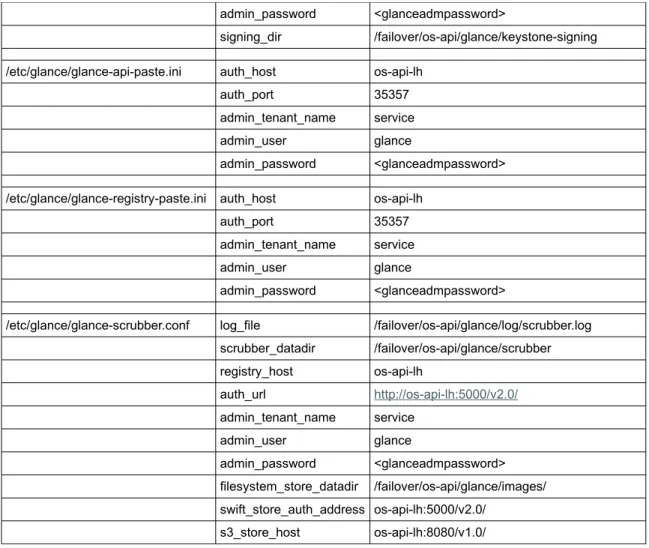
svc:/application/openstack/glance/glance-scrubber:defaultIn order for the Glance services to use the configured cluster objects, the following configuration files and options have to be amended in addition to options that you normally set up:
configuration file option value to use
/etc/glance/glance-api.conf bind_host os-api-lh
log_file /failover/os-api/glance/log/api.log sql_connection mysql://glance:<glancepwd>@os-db-lh/glance registry_host os-api-lh notifier_strategy rabbit rabbit_host os-mq-sa filesystem_store_datadir /failover/os-api/glance/images/ swift_store_auth_address os-api-lh:5000/v2.0/ s3_store_host os-api-lh:8080/v1.0/ scrubber_datadir /failover/os-api/glance/scrubber image_cache_dir /failover/os-api/glance/image-cache/ auth_uri http://os-api-lh:5000/v2.0 identity_uri http://os-api-lh:35357 admin_tenant_name service admin_user glance admin_password <glanceadmpassword> signing_dir /failover/os-api/glance/keystone-signing
/etc/glance/glance-cache.conf log_file /failover/os-api/glance/log/image-cache.log image_cache_dir /failover/os-api/glance/image-cache/ registry_host os-api-lh auth_url http://os-api-lh:5000/v2.0/ admin_tenant_name service admin_user glance admin_password <glanceadmpassword> filesystem_store_datadir /failover/os-api/glance/images/ swift_store_auth_address os-api-lh:5000/v2.0/ s3_store_host os-api-lh:8080/v1.0/
/etc/glance/glance-registry.conf bind_host os-api-lh
log_file /failover/os-api/glance/log/registry.log sql_connection mysql://glance:<glancepwd>@os-db-lh/glance auth_uri http://os-api-lh:5000/v2.0 identity_uri http://os-api-lh:35357 admin_tenant_name service admin_user glance
admin_password <glanceadmpassword>
signing_dir /failover/os-api/glance/keystone-signing
/etc/glance/glance-api-paste.ini auth_host os-api-lh
auth_port 35357
admin_tenant_name service
admin_user glance
admin_password <glanceadmpassword>
/etc/glance/glance-registry-paste.ini auth_host os-api-lh
auth_port 35357
admin_tenant_name service
admin_user glance
admin_password <glanceadmpassword>
/etc/glance/glance-scrubber.conf log_file /failover/os-api/glance/log/scrubber.log scrubber_datadir /failover/os-api/glance/scrubber registry_host os-api-lh auth_url http://os-api-lh:5000/v2.0/ admin_tenant_name service admin_user glance admin_password <glanceadmpassword> filesystem_store_datadir /failover/os-api/glance/images/ swift_store_auth_address os-api-lh:5000/v2.0/ s3_store_host os-api-lh:8080/v1.0/
Table 3: Glance configuration parameters
In addition, other parameters that are not related to the HA setup may be amended as required [1].
Other OpenStack components required to access the Glance endpoints have to use the highly available IP address managed by the cluster for those services. In this example, the access to glance-api and glance-registry has to be configured for the IP address os-api-lh.
Create the Glance database within zone cluster os-db
Create the Glance database within MySQL and ensure that the Glance user has access from all nodes and zones that are required to connect to the Glance database. Access to the Glance database has to be directed to the logical hostname os-db-lh:
os-db-z1# mysql -h os-db-lh -u root -p mysql> CREATE DATABASE glance;
Query OK, 1 row affected (0.00 sec)
mysql> GRANT ALL PRIVILEGES ON glance.* TO 'glance'@'localhost' IDENTIFIED by \ '<glancepassword>';
mysql> GRANT ALL PRIVILEGES ON glance.* TO 'glance'@'%' IDENTIFIED BY \ '<glancepassword>';
Query OK, 0 rows affected (0.00 sec)
Configure Glance services within zone cluster os-api
Install the Glance packages within zone cluster os-api and amend the configuration files as described within the OpenStack installation guide [1] and Table 3:
both os-api zones# pkg install glance glanceclient both os-api zones# cd /etc/glance
## Amend the following config files for glance on all os-api zones: both os-api zones# vi glance-api.conf
both os-api zones# vi glance-cache.conf both os-api zones# vi glance-registry.conf both os-api zones# vi glance-api-paste.ini both os-api zones# vi glance-registry-paste.ini both os-api zones# vi glance-scrubber.conf
=> amend configuration parameters for all the files as described in [1] and table 3
Create the required directories within zpool os-api_zp which is managed by the cluster framework: os-api-z1# mkdir -p /failover/os-api/glance/log
os-api-z1# mkdir /failover/os-api/glance/images os-api-z1# mkdir /failover/os-api/glance/image-cache os-api-z1# mkdir /failover/os-api/glance/keystone-signing os-api-z1# chmod 700 /failover/os-api/glance/keystone-signing os-api-z1# mkdir /failover/os-api/glance/scrubber
os-api-z1# chown -R glance:glance /failover/os-api/glance
Create the Glance database instance and enable the Glance SMF services: os-api-z1# su - glance -c "glance-manage db_sync" os-api-z1# svcadm enable glance-db
os-api-z1# svcadm enable glance-api os-api-z1# svcadm enable glance-registry os-api-z1# svcadm enable glance-scrubber
Verify that the Glance services run correctly, then disable them:
os-api-z1# su - glance -c "env OS_AUTH_URL=http://os-api-lh:5000/v2.0 \ OS_USERNAME=glance OS_PASSWORD=<glanceadmpassword> \ OS_TENANT_NAME=service glance image-list"
os-api-z1# svcadm disable glance-scrubber os-api-z1# svcadm disable glance-registry os-api-z1# svcadm disable glance-api os-api-z1# svcadm disable glance-db
Configure Glance SMF services as failover cluster resources within zone cluster os-api
Configure the Glance SMF services as SMF proxy failover resources within resource group os-api-rg. Within the global cluster, define the resource dependencies on the HA MySQL and HA RabbitMQ resources, where required: ## glance-db
both os-api zones# vi /opt/HA-OpenStack/etc/glance-db-svclist.txt <svc:/application/openstack/glance/glance-db:default>,\
</lib/svc/manifest/application/openstack/glance-db.xml>
## Note: The previous content needs to be all one line, without the \ character os-api-z1# clrs create -d -g os-api-rg -t SUNW.Proxy_SMF_failover \
-p proxied_service_instances=/opt/HA-OpenStack/etc/glance-db-svclist.txt \ -p Resource_dependencies_offline_restart=os-api-hasp-rs,os-api-lh-rs \ os-glance-db-rs
## also need a resource dependency on HA MySQL, configure in the global cluster: cc-node-a# clrs set -Z os-api -p Resource_dependencies=os-db:os-mysql-rs \ os-glance-db-rs
os-api-z1# clrs enable os-glance-db-rs ## glance-api
both os-api zones# vi /opt/HA-OpenStack/etc/glance-api-svclist.txt <svc:/application/openstack/glance/glance-api:default>,\
</lib/svc/manifest/application/openstack/glance-api.xml>
## Note: The previous content needs to be all one line, without the \ character os-api-z1# clrs create -d -g os-api-rg -t SUNW.Proxy_SMF_failover \
-p proxied_service_instances=/opt/HA-OpenStack/etc/glance-api-svclist.txt \ -p Resource_dependencies_offline_restart=os-api-hasp-rs,os-api-lh-rs \ -p Resource_dependencies=os-glance-db-rs os-glance-api-rs
## also need a resource dependency on HA SMF rabbitmq, configure in the ## global cluster:
cc-node-a# clrs set -Z os-api -p Resource_dependencies+=os-mq:os-rabbitmq-rs \ os-glance-api-rs
os-api-z1# clrs enable os-glance-api-rs ## glance-registry
both os-api zones# vi /opt/HA-OpenStack/etc/glance-registry-svclist.txt <svc:/application/openstack/glance/glance-registry:default>,\
</lib/svc/manifest/application/openstack/glance-registry.xml>
## Note: The previous content needs to be all one line, without the \ character os-api-z1# clrs create -d -g os-api-rg -t SUNW.Proxy_SMF_failover \
-p proxied_service_instances=/opt/HA-OpenStack/etc/glance-registry-svclist.txt \ -p Resource_dependencies_offline_restart=os-api-hasp-rs,os-api-lh-rs \
-p Resource_dependencies=os-glance-db-rs os-glance-registry-rs os-api-z1# clrs enable os-glance-registry-rs
## glance-scrubber
both os-api zones# vi /opt/HA-OpenStack/etc/glance-scrubber-svclist.txt <svc:/application/openstack/glance/glance-scrubber:default>,\
</lib/svc/manifest/application/openstack/glance-scrubber.xml>
os-api-z1# clrs create -d -g os-api-rg -t SUNW.Proxy_SMF_failover \
-p proxied_service_instances=/opt/HA-OpenStack/etc/glance-scrubber-svclist.txt \ -p Resource_dependencies_offline_restart=os-api-hasp-rs \
-p Resource_dependencies=os-glance-db-rs os-glance-scrubber-rs os-api-z1# clrs enable os-glance-scrubber-rs
## quick sanity check for glance:
os-api-z1# su - glance -c "env OS_AUTH_URL=http://os-api-lh:5000/v2.0 \ OS_USERNAME=glance OS_PASSWORD=<glanceadmpassword> \ OS_TENANT_NAME=service glance image-list"
Once the various glance-* SMF services are started under cluster control, you need to enable and disable the Glance services by enabling and disabling the corresponding os-glance-*-rs cluster resources by using the Oracle Solaris Cluster CLI or BUI.
Nova
The Nova compute virtualization service provides a cloud computing fabric controller that supports a variety of virtualization technologies. In Oracle Solaris, virtual machine (VM) instances are kernel zones or non-global zones. Zones are scalable high-density virtual environments with low virtualization overhead. Kernel zones additionally provide independent kernel versions, enabling independent upgrade of VM instances, which is desirable for a multi-tenant cloud.
The following SMF services will be managed by corresponding HA SMF proxy failover resources:
»
svc:/application/openstack/nova/nova-api-ec2:default»
svc:/application/openstack/nova/nova-api-osapi-compute:default»
svc:/application/openstack/nova/nova-cert:default»
svc:/application/openstack/nova/nova-conductor:default»
svc:/application/openstack/nova/nova-objectstore:default»
svc:/application/openstack/nova/nova-scheduler:defaultIn order for the Nova services to use the configured cluster objects, the following configuration files and options have to be amended in addition to options that you normally set up:
configuration file option value to use
/etc/nova/nova.conf my_ip os-api-lh
host os-api-lh state_path /failover/os-api/nova neutron_url http://os-api-lh:9696 neutron_admin_username neutron neutron_admin_password <neutronadmpassword> neutron_admin_tenant_name service neutron_admin_auth_url http://os-api-lh:5000/v2.0 rabbit_host os-mq-sa
rabbit_port 5672 rabbit_hosts $rabbit_host:$rabbit_port rabbit_userid guest rabbit_password <rabbitmqpassword> connection mysql://nova:<novapassword>@os-db-lh/nova auth_host os-api-lh auth_port 35357 auth_protocol http admin_tenant_name service admin_user nova admin_password <novaadmpassword>
/etc/nova/api-paste.ini auth_uri http://os-api-lh:5000/v2.0
identity_uri http://os-api-lh:35357
admin_tenant_name service
admin_user nova
admin_password <novaadmpassword>
signing_dir /failover/os-api/nova/keystone-signing
Table 4: Nova configuration parameters
In addition, other parameters that are not related to the HA setup may be amended as required [1].
Other OpenStack components required to access the nova endpoints have to make use of the high available IP address that is managed by the cluster for those services. In this example, the access to nova-api-* services has to be configured for the IP address os-api-lh.
Create the Nova database within zone cluster os-db
Create the Nova database within MySQL and ensure the Nova user has access from all nodes and zones that are required to connect to the Nova database. Access to the Nova database has to be directed to the logical hostname os-db-lh:
os-db-z1# mysql -h os-db-lh -u root -p mysql> CREATE DATABASE nova;
Query OK, 1 row affected (0.00 sec)
mysql> GRANT ALL PRIVILEGES ON nova.* TO 'nova'@'localhost' IDENTIFIED by \ '<novapassword>';
Query OK, 0 rows affected (0.00 sec)
mysql> GRANT ALL PRIVILEGES ON nova.* TO 'nova'@'%' IDENTIFIED BY '<novapassword>'; Query OK, 0 rows affected (0.00 sec)
Configure Nova services within zone cluster os-api
Install the Nova packages within zone cluster os-api and amend the configuration files as described within the OpenStack installation guide [1] and Table 4: