Device Feature Key Synchronization
Feature Description
Release 14.sp2
Document Version 1.2
DeviceFeatureKeySynchronizationFD
ExtraView Number 36498
9737 Washingtonian Boulevard, Suite 350 Gaithersburg, MD 20878
BroadWorks
®Guide
Copyright Notice
Copyright © 2012 BroadSoft, Inc. All rights reserved.
Any technical documentation that is made available by BroadSoft, Inc. is proprietary and confidential and is considered the copyrighted work of BroadSoft, Inc.
This publication is for distribution under BroadSoft non-disclosure agreement only. No part of this publication may be duplicated without the express written permission of BroadSoft, Inc. 9737 Washingtonian Boulevard, Gaithersburg, MD 20878.
BroadSoft reserves the right to make changes without prior notice.
Trademarks
BroadWorks® and BroadWorks Assistant–Enterprise™, BroadWorks Call Center™, BroadWorks Communicator™, BroadWorks Receptionist™, and BroadWorks Deployment Studio™ are trademarks of BroadSoft, Inc.
Microsoft, MSN, Windows, and the Windows logo are registered trademarks of Microsoft Corporation. Other product names mentioned in this document may be trademarks or registered trademarks of their respective companies and are hereby acknowledged. This document is printed in the United States of America.
Document Revision History
Version Reason for Change Date
0.1 Draft Created document. February 13, 2007 0.2 Draft Updated document. February 27, 2007 0.3 Draft Updated information about call center agent state. March 12, 2007 0.4 Draft Updated document after review and removed call center agent
state synchronization.
April 4, 2007
1.0 Approved Approved document. May 8, 2007 1.1 Edited and published document. May 8, 2007 1.2 Made changes as requested. May 31, 2012
Table of Contents
1 Feature Overview and Purpose ...5
2 Detailed Feature Description...6
2.1 Feature Description ... 6
2.1.1 Overview ... 6
2.1.2 Authentication ... 7
2.1.3 Assigned or Unassigned Features ... 7
2.1.4 Shared Lines ... 7
2.1.5 Redundancy ... 9
2.2 Call Flows ... 9
2.2.1 Initial SUBSCRIBE and NOTIFY ... 9
2.2.2 Feature Status Update from Application Server to Phone ... 12
2.2.3 Feature Status Update from Phone to Application Server ... 13
2.3 Execution Use Cases ... 14
2.3.1 User Activates Do Not Disturb Using SIP Phone ... 14
2.3.2 User Activates Do Not Disturb Using BroadWorks Web Portal or FAC ... 15
2.3.3 Administrator Assigns Do Not Disturb Feature to Subscriber ... 15
2.3.4 Administrator Unassigns Do Not Disturb Feature from Subscriber ... 15
2.3.5 User Activates Call Forward Always Using SIP Phone ... 15
2.3.6 User with Shared Call Appearance Activates Do Not Disturb Using BroadWorks Web Portal or FAC ... 16
2.4 Provisioning Steps ... 16
3 Appendix A: XML Schema Definitions ... 17
3.1 Phone Request Definitions ... 17
3.1.1 Set Do Not Disturb ... 17
3.1.2 Set Forwarding ... 17
3.2 BroadWorks Response Definitions ... 18
3.2.1 Do Not Disturb Event ... 19
3.2.2 Forwarding Event ... 19
Acronyms and Abbreviations ... 21
1
Feature Overview and Purpose
Many Session Initiation Protocol (SIP) phone users prefer to use the buttons on their phone to activate features, such as Do Not Disturb (DND), rather than the BroadWorks web portal. This feature permits these SIP phone users to use the buttons on their phones in just this way.
With this feature installed, supported SIP phones can synchronize with the BroadWorks Application Server on the status of the following features: Do Not Disturb, Call Forwarding Always (CFA), Call Forwarding Busy (CFB), and Call Forwarding No Answer (CFNA). If a user changes the status of one of these features via the web portal or a feature access code (FAC), the Application Server notifies the phone about the status change. Conversely, if the user changes the feature status via a button on his phone, the phone notifies the Application Server of the status change.
The synchronization protocol is based on the SIP events framework. To use this capability, the phone user must have a SIP phone that supports the “as-feature-event” event package.
2
Detailed Feature Description
2.1
Feature Description
2.1.1 OverviewThis feature introduces a SIP SUBSCRIBE/NOTIFY mechanism to enable feature status synchronization between BroadWorks and a SIP phone. The synchronized features include Do Not Disturb, Call Forwarding Always, Call Forwarding Busy, and Call Forwarding No Answer.
Feature status synchronization requires a subscription to the as-feature-event SIP event package at the Application Server. When a supported phone powers up, it sends a SIP SUBSCRIBE request to the Application Server to establish this subscription. The subscription is essential; without a subscription, the Application Server cannot send synchronization events to the phone. In accordance with the SIP events specification, RFC 3265 [1], the subscription has an expiration time that is determined when it is first created or refreshed. It is the responsibility of the phone to refresh the subscription to avoid the expiration. The Application Server persists the subscriptions to its database so that they survive a restart or a switch to the secondary Application Server in a failure scenario. Note that if the phone registers, it should complete the REGISTER transaction before it begins the SUBSCRIBE transaction.
The as-feature-event package makes use of message bodies in SUBSCRIBE requests and NOTIFY requests. The body is an XML format with the MIME content type
application/x-as-feature-event+xml. The schema for the XML originates from the CSTA XML Schema defined in Standards ECMA-323 and ECMA-269. The schema definitions are included in Appendix A: XML Schema Definitions. In some NOTIFY requests, the body is a multipart MIME body containing more than one XML document.
When a supported phone powers up, it receives the complete feature status information from the Application Server. The procedure is as follows: On power-up, the phone sends a SIP SUBSCRIBE request with an empty body to the Application Server for the as-feature-event event package. If the Application Server accepts the SUBSCRIBE request, then it creates a subscription for the phone and sends a 200 response. Immediately following the 200 response, the Application Server sends the phone a NOTIFY request. The NOTIFY request contains a body that indicates the complete status of all the assigned and supported features for the subscriber associated with that phone. Note that the empty SUBSCRIBE request body is significant, since it indicates to the Application Server that the phone wants complete status information.
A user may use the buttons on his SIP phone to change the status of a feature. To convey these phone-initiated status changes to the Application Server, the phone sends a SUBSCRIBE request – actually, a SUBSCRIBE refresh in a typical case – to the
Application Server with a body that indicates the desired changes. The Application Server normally accepts these changes, and then sends a 200 response to the SUBSCRIBE request. Immediately following the 200 response, the Application Server sends a NOTIFY request with a body that indicates the change to the feature status at the Application Server. In some cases, such as when the database locks or there are provisioning validation errors, the Application Server might be unable to accept the change to the feature status. In these cases, the phone must defer to the Application Server and accept the status it receives in the body of the NOTIFY request. Note that in this type of scenario, the Application Server sends only the status of the feature changed rather than the full status of all synchronized features. In the case of an XML error encountered while parsing, or an XML body received for unsupported feature or multipart body in a
SUBSCRIBE request, the Application Server responds with a 400 Bad Request to the phone. No NOTIFY is sent to phone.
Alternatively, a user may use the web portal, an FAC, or any other way to change the status of a feature. To convey this feature status change to the phone, the Application Server sends a NOTIFY request to the phone with a body that indicates the change. Note that in this scenario, the Application Server sends a delta status rather than the full status of all synchronized features.
2.1.2 Authentication
For the sake of security, BroadWorks supports SIP authentication of the SUBSCRIBE and NOTIFY requests. To enable authentication, the subscriber associated with the phone should have the Authentication service and appropriate credentials. When enabled, the Application Server challenges the SUBSCRIBE requests from the phone. In addition, if the phone challenges the NOTIFY requests, the Application Server resends the NOTIFY request with the assigned credentials.
2.1.3 Assigned or Unassigned Features
Special considerations apply when features Do Not Disturb, Call Forwarding Always, Call Forwarding Busy, and Call Forwarding No Answer are assigned or unassigned on BroadWorks.
When the phone sends a SUBSCRIBE request with an empty body, the Application Server sends a NOTIFY request with the status of all assigned features. If a feature is not assigned to the subscriber, then the NOTIFY request contains no XML data for that feature.
When an administrator first assigns a feature to a subscriber in BroadWorks, the Application Server sends the phone a NOTIFY request with the status of the newly assigned feature, provided the phone has a subscription for the as-feature-event package.
When an administrator unassigns a feature from a subscriber in BroadWorks, the Application Server sends the phone a NOTIFY request with the status of that feature set to “off,” provided the phone has a subscription for the as-feature-event package.
When a user tries to change the status of an unassigned feature using a button on the user’s phone, the phone sends a SUBSCRIBE request with a body, as it did before, but the Application Server sends back a NOTIFY request with an empty body, which indicates the feature is unassigned.
2.1.4 Shared Lines
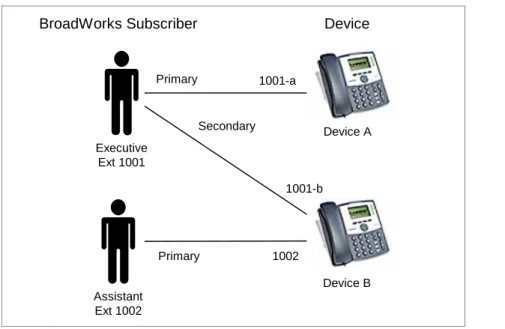
BroadWorks implements shared lines via the Shared Call Appearance (SCA) feature. SCA allows a BroadWorks subscriber to have a primary phone and zero or more secondary phones. One common arrangement of shared lines is the executive/assistant arrangement, as shown in Figure 1 Executive/Assistant Arrangement.
Executive Ext 1001 Assistant Ext 1002 Primary Primary Secondary 1001-a 1001-b 1002 Device A Device B
BroadWorks Subscriber Device
Figure 1 Executive/Assistant Arrangement
Feature status in BroadWorks is maintained according to the subscriber. This means that all SCA devices share the same feature status. In the executive/assistant case, if the executive were to enable Do Not Disturb, then incoming calls would get Do Not Disturb treatment and the assistant's phone would not ring. If feature synchronization were enabled, then both the executive's phone and the assistant's phone would show Do Not Disturb enabled for extension 1001.
To summarize the situation with shared lines, there may be only one subscription for each line-side address of record (AOR), that is, line/port. Because feature status is maintained according to the BroadWorks subscriber, all subscriptions for a subscriber’s primary and secondary devices share the same feature status. In the arrangement shown in Figure 1
Executive/Assistant Arrangement, there may be three subscriptions, since there are three
line-side AORs (1001-a, 1001-b, and 1002). Two subscriptions, those for 1001-a and 1001-b, share the same feature status, which is the status of the executive subscriber. The shared line feature update is optional on phone.
NOTE: When a phone is managing multiple private lines, the phone can implement a Do Not
Disturb and Call Forwarding state on a per-line basis or the Do Not Disturb and Call Forwarding State settings can apply to all lines configured on the phone. If the phone is synchronizing all lines on the phone, then the phone must ensure that all lines are synchronized when changes are made to one of the lines. When multiple lines are in use, each of the lines must subscribe to the as-feature-event package. If the Do Not Disturb feature is activated on BroadWorks for User 1, BroadWorks sends a NOTIFY message to the phone with the doNotDisturbOn field set to “true”. The phone then detects a status change for the Do Not Disturb feature on line 1. The phone must then send a re-subscribe to BroadWorks for each of the other lines on the phone. This re-subscribe must include the Do Not Disturb feature event with the doNotDisturbOn field set to “true”.
2.1.5 Redundancy
In a failover situation, the phone sends SUBSCRIBE requests to the secondary
Application Server. When the primary Application Server is restored, BroadWorks takes steps to migrate the subscription back to the primary Application Server. This migration occurs in the following way:
1) The phone sends a SUBSCRIBE request to the secondary Application Server. This might be a SUBSCRIBE to refresh an existing subscription.
2) When processing the SUBSCRIBE request, the secondary Application Server learns that the subscriber is now hosted on the primary Application Server.
3) The secondary Application Server sends the 200 response, as usual.
4) The secondary Application Server sends the NOTIFY request, as usual, but indicates that the subscription state is terminated.
5) The phone sends a SUBSCRIBE to the primary Application Server to create a new subscription.
2.2
Call Flows
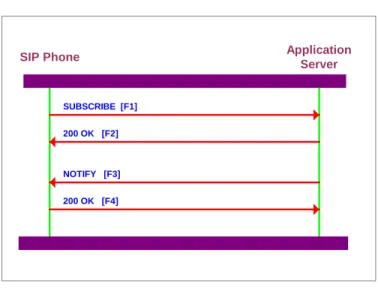
2.2.1 Initial SUBSCRIBE and NOTIFY
SIP Phone Application
Server
SUBSCRIBE [F1]
200 OK [F2]
NOTIFY [F3]
200 OK [F4]
Figure 2 Initial SUBSCRIBE and NOTIFY
When a supported phone powers up, it sends a SUBSCRIBE request to the Application Server to create a subscription for the as-feature-event package and to get the full feature status. The following call flow shows the messages sent and received for this scenario. To keep the flow simple, we exclude authentication. In most cases, the Application Server would require authentication from the phone in the SUBSCRIBE request.
In the first transaction, the phone sends a SUBSCRIBE request with an empty body to the Application Server and receives a 200 response.
F1: Phone to Application Server
SUBSCRIBE sip:[email protected] SIP/2.0 Via:SIP/2.0/UDP 192.168.6.20;branch=z9hG4bK
To:"2408881061"<sip:[email protected]> Call-ID: [email protected] CSeq: 8 SUBSCRIBE Contact:<sip:[email protected]> Event: as-feature-event Expires: 3600 Content-Length: 0
F2: Application Server to Phone SIP/2.0 200 OK
From: <sip:[email protected]>;tag=2006
To: "2408881061"<sip:[email protected]>;tag=2007 Call-ID: [email protected]
CSeq: 8 SUBSCRIBE
Via: SIP/2.0/UDP 192.168.6.20;branch=z9hG4bK Contact: <sip:[email protected]>
Event: as-feature-event Expires: 3600
Content-Length: 0
Following this transaction, the Application Server sends a NOTIFY request to the phone with a body that contains the complete feature status, and the phone sends a 200 response. The body is a MIME multipart body, containing an XML document for each feature assigned to the subscriber. If the size of NOTIFY is bigger than 1500 bytes, it is recommended that the phone use Transmission Control Protocol (TCP) instead of User Datagram Protocol (UDP) as a transport mechanism. In the NOTIFY shown here, the subscriber has Do Not Disturb, Call Forwarding Always, Call Forwarding Busy, and Call Forwarding No Answer. The Application Server reports the status of all these features. F3: Application Server to Phone
NOTIFY sip:[email protected] SIP/2.0 Via:SIP/2.0/UDP 192.168.6.20;branch=z9hG4bK From:<sip:[email protected]>;tag=2006 To:"2408881061"<sip:[email protected]>;tag=2007 Call-ID: [email protected] CSeq: 9 NOTIFY Contact:<sip:[email protected]> Max-Forwards: 10 Event: as-feature-event Subscription-State: active, 3500
Content-Type: multipart/mixed; boundary=UniqueBroadWorksBoundary Content-Length:2456 --UniqueBroadWorksBoundary Content-Type:application/x-as-feature-event+xml Content-Length:429 Content-ID:<sczbLo@broadworks> <?xml version="1.0" encoding="ISO-8859-1"?> <DoNotDisturbEvent xmlns="http://www.ecma-international.org/standards/ecma-323/csta/ed3"> <device>5559430902</device> <doNotDisturbOn>false</doNotDisturbOn> </DoNotDisturbEvent> --UniqueBroadWorksBoundary Content-Type:application/x-as-feature-event+xml Content-Length:458
Content-ID:<vZIKOJ@broadworks> <?xml version="1.0" encoding="ISO-8859-1"?> <ForwardingEvent xmlns="http://www.ecma-international.org/standards/ecma-323/csta/ed3"> <device>5559430902</device> <forwardingType>forwardImmediate</forwardingType> <forwardStatus>false</forwardStatus> </ForwardingEvent> --UniqueBroadWorksBoundary Content-Type:application/x-as-feature-event+xml Content-Length:463 Content-ID:<5U3iUD6@broadworks> <?xml version="1.0" encoding="ISO-8859-1"?> <ForwardingEvent xmlns="http://www.ecma-international.org/standards/ecma-323/csta/ed3"> <device>5559430902</device> <forwardingType>forwardBusy</forwardingType> <forwardStatus>false</activateForwardStatus> <forwardTo></forwardTo> </ForwardingEvent> --UniqueBroadWorksBoundary-- Content-Type:application/x-as-feature-event+xmll Content-Length:476 Content-ID:<5U3wsR@broadworks> <?xml version="1.0" encoding="ISO-8859-1"?> <ForwardingEvent xmlns="http://www.ecma-international.org/standards/ecma-323/csta/ed3"> <device>5559430902</device> <forwardingType>forwardNoAns</forwardingType> <forwardStatus>false</forwardStatus> <forwardTo></forwardTo> <ringCount></ringCount> </ForwardingEvent> --UniqueBroadWorksBoundary—
F4: Phone to Application Server SIP/2.0 200 OK
From: <sip:[email protected]>;tag=2006
To: "2408881061"<sip:[email protected]>;tag=2007 Call-ID: [email protected]
CSeq: 9 NOTIFY
Via: SIP/2.0/UDP 192.168.6.20;branch=z9hG4bK
Contact: <sip:[email protected]:5060;transport=UDP>
Event: as-feature-event
2.2.2 Feature Status Update from Application Server to Phone
SIP Phone Application
Server
NOTIFY [F1]
200 OK [F2]
Figure 3 Feature Status Update from Application Server to Phone
When the user uses the web portal or an FAC to change the status of a synchronized feature, the Application Server sends a NOTIFY request to the phone to tell it about the changed status. The Application Server does not send the complete status information of all the features; it only sends the status of the changed feature. The phone sends a 200 response to complete the transaction.
In this particular example, the user activated Do Not Disturb. F1: Application Server to Phone
NOTIFY sip:[email protected] SIP/2.0 Via:SIP/2.0/UDP 192.168.6.20;branch=z9hG4bK From:<sip:[email protected]>;tag=2006 To:"2408881061"<sip:[email protected]>;tag=2007 Call-ID: [email protected] CSeq: 10 NOTIFY Contact:<sip:[email protected]> Event: as-feature-event Subscription-State: active, 2400 Content-type: application/x-as-feature-event+xml Max-Forwards:10 Content-Length:200 <?xml version="1.0" encoding="ISO-8859-1"?> <DoNotDisturbEvent xmlns="http://www.ecma-international.org/standards/ecma-323/csta/ed3"> <device>5559430902</device> <doNotDisturbOn>true</doNotDisturbOn> </DoNotDisturbEvent>
F2: Phone to Application Server SIP/2.0 200 OK
From: <sip:[email protected]>;tag=2006
To: "2408881061"<sip:[email protected]>;tag=20007 Call-ID: [email protected]
CSeq: 10 NOTIFY
Via: SIP/2.0/UDP 192.168.6.20;branch=z9hG4bK
Contact: <sip:[email protected]:5060;transport=UDP>
Event: feature-event
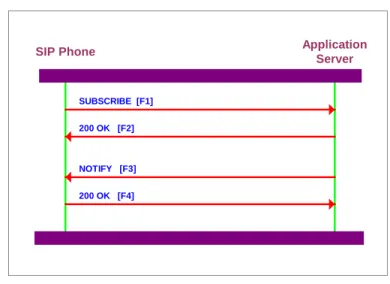
2.2.3 Feature Status Update from Phone to Application Server
SIP Phone Application
Server
SUBSCRIBE [F1]
200 OK [F2]
NOTIFY [F3]
200 OK [F4]
Figure 4 Feature Status Update from Phone to Application Server
When the user uses a button on the SIP phone to change the status of a synchronized feature, the phone sends a SUBSCRIBE request with a body to the Application Server to tell it about the changed feature status. The Application Server sends a 200 response to complete the transaction.
In this particular example, the user deactivated Do Not Disturb from the user’s phone. F1: Phone to Application Server
SUBSCRIBE sip:[email protected] SIP/2.0 Via:SIP/2.0/UDP 192.168.6.20;branch=z9hG4bK From:<sip:[email protected]>;tag=2006 To:"2408881061"<sip:[email protected]>;tag=2007 Call-ID: [email protected] CSeq: 11 SUBSCRIBE Contact:<sip:[email protected]> Event: as-feature-event Expires: 3600 Content-type: application/x-as-feature-event+xml Content-Length: 120 <?xml version="1.0" encoding="ISO-8859-1"?> <SetDoNotDisturb xmlns="http://www.ecma-international.org/standards/ecma-323/csta/ed3"> <device>5559430902</device> <doNotDisturbOn>false</doNotDisturbOn> </SetDoNotDisturb>
F2: Application Server to Phone SIP/2.0 200 OK
From: <sip:[email protected]>;tag=2006
To: "2408881061"<sip:[email protected]>;tag=2007 Call-ID: [email protected]
CSeq: 11 SUBSCRIBE
Via: SIP/2.0/UDP 192.168.6.20;branch=z9hG4bK Contact: <sip:[email protected]>
Expires: 3600
Content-Length: 0
Immediately after the Application Server sends the 200 response, it sends a NOTIFY request with a body to tell the phone about the current status of the feature.
In most cases, the NOTIFY reflects the change just requested by the SUBSCRIBE request. However, in some cases, the NOTIFY request may indicate a status different from the SUBSCRIBE request. The phone must accept the status of the NOTIFY request if it is different from the SUBSCRIBE request.
F3: Application Server to Phone
NOTIFY sip:[email protected]:5060 SIP/2.0 Via:SIP/2.0/UDP 192.168.6.20;branch=z9hG4bK From:<sip:[email protected]>;tag=2006 To:"2408881061"<sip:[email protected]>;tag=2007 Call-ID: [email protected] CSeq: 10 NOTIFY Contact:<sip:[email protected]> Event: as-feature-event Subscription-State: active, 2400 Content-type: application/x-as-feature-event+xml Max-Forwards:10 Content-Length:200 <?xml version="1.0" encoding="ISO-8859-1"?> <DoNotDisturbEvent xmlns="http://www.ecma-international.org/standards/ecma-323/csta/ed3"> <device>5559430902</device> <doNotDisturbOn>true</doNotDisturbOn> </DoNotDisturbEvent>
F8: Phone to Application Server SIP/2.0 200 OK
From: <sip:[email protected]>;tag=2006
To: "2408881061"<sip:[email protected]>;tag=20007 Call-ID: [email protected]
CSeq: 10 NOTIFY
Via: SIP/2.0/UDP 192.168.6.20;branch=z9hG4bK
Contact: <sip:[email protected]:5060;transport=UDP>
Event: feature-event
Content-Length: 0
2.3
Execution Use Cases
Unless specifically stated otherwise, assume in all cases that the user's SIP phone has a current subscription for the as-feature-event package at the Application Server.
2.3.1 User Activates Do Not Disturb Using SIP Phone
1) The user presses a button on the user’s SIP phone to turn on Do Not Disturb. 2) The SIP phone sends the Application Server a SUBSCRIBE refresh request with a
body to turn on Do Not Disturb.
4) The Application Server sends the SIP phone a NOTIFY request with a body that indicates Do Not Disturb is turned on.
5) The SIP phone sends a 200 response to the NOTIFY request.
2.3.2 User Activates Do Not Disturb Using BroadWorks Web Portal or FAC
1) From the BroadWorks web portal, the user turns on Do Not Disturb. Alternatively, the user dials an FAC to turn on Do Not Disturb from the SIP phone.
2) The Application Server sends the SIP phone a NOTIFY request with a body that indicates that Do Not Disturb is turned on.
3) The SIP phone sends a 200 response to the NOTIFY request.
4) The SIP phone changes its appearance to indicate that Do Not Disturb is on (a light, LCD message, or similar display).
2.3.3 Administrator Assigns Do Not Disturb Feature to Subscriber 1) An administrator assigns Do Not Disturb to the subscriber.
2) The Application Server sends the SIP phone a NOTIFY request with a body that indicates that Do Not Disturb is turned off.
3) The SIP phone sends 200 response to the NOTIFY request. 2.3.4 Administrator Unassigns Do Not Disturb Feature from Subscriber
1) An administrator unassigns Do Not Disturb from the subscriber.
2) The Application Server sends the SIP phone a NOTIFY request with a body that indicates that Do Not Disturb is turned off.
3) The SIP phone sends 200 response to the NOTIFY request. 2.3.5 User Activates Call Forward Always Using SIP Phone
1) The user activates Call Forwarding Always with the user’s SIP phone.
2) The SIP phone sends the Application Server a SUBSCRIBE refresh request with a body, which indicates the Call Forwarding Always is enabled and includes a forwarding number.
3) The Application Server sends the SIP phone a 200 response to the SUBSCRIBE request.
4) The Application Server validates the forwarding number. (The Application Server checks the number against any forwarding restrictions, such as those for Outgoing Calling Plan (OCP).)
5) If the number is allowed, then the Application Server sends the SIP phone a NOTIFY request with a body, which indicates that Call Forwarding Always is enabled and includes the forwarding number.
6) Alternatively, if the number is not allowed, then Application Server sends the SIP phone a NOTIFY request with a body, which indicates that Call Forwarding Always is disabled.
2.3.6 User with Shared Call Appearance Activates Do Not Disturb Using BroadWorks Web Portal or FAC
Assume the user has a primary SIP phone and a secondary SIP phone, both of which support feature synchronization. Also assume that both of the user’s SIP phones have current subscriptions for the as-feature-event package at the Application Server.
1) From the BroadWorks web portal, the user turns on Do Not Disturb. Alternatively, the user dials an FAC to turn on Do Not Disturb from either SIP phone.
2) The Application Server sends the primary and secondary SIP phone NOTIFY request with a body that indicates that Do Not Disturb is turned on.
3) Both primary and secondary SIP phones respond with a 200 OK response to the NOTIFY request.
4) The primary and secondary SIP phones change their appearance to indicate that Do Not Disturb is on (a light, LCD message, or similar display).
2.4
Provisioning Steps
No provisioning is required to enable the feature status synchronization for Do Not Disturb, Call Forwarding Always, Call Forwarding Busy, and Call Forwarding No Answer.
3
Appendix A: XML Schema Definitions
This appendix describes the XML schema definitions for the request bodies exchanged between SIP phones and the BroadWorks Application Server for feature synchronization. These XML schema definitions originate from the CSTA XML Schema defined in
Standards ECMA-323 [2] and ECMA-269[3].
3.1
Phone Request Definitions
These schema definitions describe the allowed XML bodies in SUBSCRIBE requests that the phone sends to the Application Server.
3.1.1 Set Do Not Disturb
<?xml version="1.0" encoding="UTF-8"?> <xsd:schema targetNamespace="http://www.ecma-international.org/standards/ecma-323/csta/ed3" xmlns:xsd=http://www.w3.org/2001/XMLSchema xmlns:csta="http://www.ecma-international.org/standards/ecma-323/csta/ed3" elementFormDefault="qualified" attributeFormDefault="unqualified"> <xsd:annotation> <xsd:documentation>CSTA-set-do-not-disturb</xsd:documentation> </xsd:annotation> <xsd:include schemaLocation="device-identifiers.xsd"/> <xsd:include schemaLocation="device-feature-types.xsd"/> <xsd:include schemaLocation="extension-types.xsd"/> <xsd:element name="SetDoNotDisturb"> <xsd:complexType> <xsd:sequence>
<xsd:element name="device" type="csta:DeviceID"/> <xsd:element name="doNotDisturbOn" type="xsd:boolean"/>
<xsd:element name="callOrigination" type="csta:CallOrigination" minOccurs="0"/>
<xsd:element name="callingDeviceList" minOccurs="0"> <xsd:complexType>
<xsd:sequence>
<xsd:element name="callingDevice" type="csta:DeviceID" minOccurs="0" maxOccurs="unbounded"/>
</xsd:sequence> </xsd:complexType> </xsd:element>
<xsd:element ref="csta:extensions" minOccurs="0"/> </xsd:sequence>
</xsd:complexType> </xsd:element> </xsd:schema>
The SIP phone sends the Set Do Not Disturb request when changing the state of the Do Not Disturb feature.
Following are the supported fields:
device – This is a mandatory field in the XML schema, but it is not used by
BroadWorks. The phone can set this to any value.
doNotDisturbOn – To activate Do Not Disturb, set to “true”. To deactivate Do Not
Disturb, set to “false”. 3.1.2 Set Forwarding
<?xml version="1.0" encoding="UTF-8"?>
<xsd:schema targetNamespace="http://www.ecma-international.org/standards/ecma-323/csta/ed3" xmlns:xsd="http://www.w3.org/2001/XMLSchema"
xmlns:csta="http://www.ecma-international.org/standards/ecma-323/csta/ed3" elementFormDefault="qualified" attributeFormDefault="unqualified"> <xsd:annotation> <xsd:documentation>CSTA-set-forwarding</xsd:documentation> </xsd:annotation> <xsd:include schemaLocation="device-identifiers.xsd"/> <xsd:include schemaLocation="device-feature-types.xsd"/> <xsd:include schemaLocation="extension-types.xsd"/> <xsd:element name="SetForwarding"> <xsd:complexType> <xsd:sequence>
<xsd:element name="device" type="csta:DeviceID"/>
<xsd:element name="forwardingType" type="csta:ForwardingType" minOccurs="0"/>
<xsd:element name="activateForward" type="xsd:boolean"/>
<xsd:element name="forwardDN" type="csta:DeviceID" minOccurs="0"/> <xsd:element name="ringCount" minOccurs="0">
<xsd:simpleType> <xsd:restriction base="xsd:long"> <xsd:minInclusive value="1"/> <xsd:maxInclusive value="100"/> </xsd:restriction> </xsd:simpleType> </xsd:element>
<xsd:element ref="csta:extensions" minOccurs="0"/> </xsd:sequence> </xsd:complexType> </xsd:element> <xsd:element name="SetForwardingResponse"> <xsd:complexType> <xsd:sequence>
<xsd:element ref="csta:extensions" minOccurs="0"/> </xsd:sequence>
</xsd:complexType> </xsd:element> </xsd:schema>
The SIP phone sends the Set Forwarding request when changing the state or address of the Call Forwarding variants on BroadWorks (Call Forward Always, Call Forward Busy, and Call Forwarding No Answer).
Following are the supported fields:
device – This is a mandatory field in the XML schema, but it is not used by
BroadWorks. The phone can set this to any value.
forwardingType – BroadWorks only supports the following forward types:
− forwardImmediate – To set the Call Forwarding Always data on BroadWorks
− forwardBusy – To set the Call Forwarding Busy data on BroadWorks
− forwardNoAns – To set the Call Forwarding No Answer data on BroadWorks
• ActivateForward – To activate forwarding, set to “true”. To deactivate forwarding, set to “false”.
• forwardDN – This should be set to the forward address.
3.2
BroadWorks Response Definitions
These schema definitions describe the allowed XML bodies in NOTIFY requests that the Application Server sends to the phone.
3.2.1 Do Not Disturb Event <?xml version="1.0" encoding="UTF-8"?> <xsd:schema targetNamespace="http://www.ecma-international.org/standards/ecma-323/csta/ed3" xmlns:xsd="http://www.w3.org/2001/XMLSchema" xmlns:csta="http://www.ecma-international.org/standards/ecma-323/csta/ed3" elementFormDefault="qualified" attributeFormDefault="unqualified"> <xsd:annotation> <xsd:documentation>CSTA-do-not-disturb-event</xsd:documentation> </xsd:annotation> <xsd:include schemaLocation="device-identifiers.xsd"/> <xsd:include schemaLocation="status-reporting.xsd"/> <xsd:include schemaLocation="device-feature-types.xsd"/> <xsd:include schemaLocation="extension-types.xsd"/> <xsd:element name="DoNotDisturbEvent"> <xsd:complexType> <xsd:sequence> <xsd:element ref="csta:monitorCrossRefID"/>
<xsd:element name="device" type="csta:SubjectDeviceID"/> <xsd:element name="doNotDisturbOn" type="xsd:boolean"/>
<xsd:element name="callOrigination" type="csta:CallOrigination" minOccurs="0"/>
<xsd:element name="callingDeviceList" minOccurs="0"> <xsd:complexType>
<xsd:sequence>
<xsd:element name="callingDevice" type="csta:DeviceID" minOccurs="0" maxOccurs="unbounded"/>
</xsd:sequence> </xsd:complexType> </xsd:element>
<xsd:element ref="csta:extensions" minOccurs="0"/> </xsd:sequence>
</xsd:complexType> </xsd:element> </xsd:schema>
The Application Server sends the Do Not Disturb event to indicate the current state of the Do Not Disturb feature on BroadWorks.
Following are the supported fields:
device – This is a mandatory field in the XML schema, but it is not used by
BroadWorks. The phone should ignore any value it receives from the Application Server.
doNotDisturbOn – To activate Do Not Disturb, set to “true”. To deactivate Do Not
Disturb, set to “false”. 3.2.2 Forwarding Event <?xml version="1.0" encoding="UTF-8"?> <xsd:schema targetNamespace="http://www.ecma-international.org/standards/ecma-323/csta/ed3" xmlns:xsd="http://www.w3.org/2001/XMLSchema" xmlns:csta="http://www.ecma-international.org/standards/ecma-323/csta/ed3" elementFormDefault="qualified" attributeFormDefault="unqualified"> <xsd:annotation> <xsd:documentation>CSTA-forwarding-event</xsd:documentation> </xsd:annotation> <xsd:include schemaLocation="device-identifiers.xsd"/> <xsd:include schemaLocation="status-reporting.xsd"/> <xsd:include schemaLocation="device-feature-types.xsd"/> <xsd:include schemaLocation="extension-types.xsd"/> <xsd:element name="ForwardingEvent"> <xsd:complexType> <xsd:sequence> <xsd:element ref="csta:monitorCrossRefID"/>
<xsd:element name="forwardingType" type="csta:ForwardingType" minOccurs="0"/>
<xsd:element name="forwardStatus" type="xsd:boolean"/>
<xsd:element name="forwardTo" type="csta:DeviceID" minOccurs="0"/> <xsd:element name="forwardDefault" type="csta:ForwardDefault" minOccurs="0"/>
<xsd:element name="ringCount" minOccurs="0"> <xsd:simpleType> <xsd:restriction base="xsd:short"> <xsd:minInclusive value="1"/> <xsd:maxInclusive value="100"/> </xsd:restriction> </xsd:simpleType> </xsd:element>
<xsd:element ref="csta:extensions" minOccurs="0"/> </xsd:sequence>
</xsd:complexType> </xsd:element> </xsd:schema>
The Application Server sends the forwarding event when changing the state or address of the Call Forwarding variants on BroadWorks (Call Forwarding Always, Call Forwarding Busy, and Call Forwarding No Answer).
Following are the supported fields:
device – This is a mandatory field in the XML schema, but it is not used by
BroadWorks. The phone should ignore any value it receives from the Application Server.
forwardingType – BroadWorks only supports the following forward types:
− forwardImmediate – For Call Forwarding Always data on BroadWorks
− forwardBusy – For Call Forwarding Busy data on BroadWorks
− forwardNoAns – For Call Forwarding No Answer data on BroadWorks
forwardStatus – If forwarding is activated, set to “true”. If forwarding is deactivated, set to “false”.
Acronyms and Abbreviations
This section lists the acronyms and abbreviations found in this document. The acronyms and abbreviations are listed in alphabetical order along with their meanings.
Admin Administrator AOR Address of Record
API Application Programming Interface AS Application Server
BW BroadWorks
CAP Client Application Protocol CDR Call Detail Record
CDS Call Detail Server CFA Call Forwarding Always CFB Call Forwarding Busy CFNA Call Forward No Answer CLI Command Line Interface CS Conferencing Server
CSTA Computer Supported Telecommunications Applications DN Directory Number
DND Do Not Disturb
EMS Element Management System FAC Feature Access Codes FS Functional Specification HTML Hypertext Markup Language
LSSGR LATA Switching Systems Generic Requirements MGCP Media Gateway Control Protocol
MS Media Server
NS Network Server
NSSync Network Server Synchronization OCI Open Client Interface
OCI-P Open Client Interface-Provisioning OS Operating System
OSS Operations Support System PM Performance Measurement SCA Shared Call Appearance SIP Session Initiation Protocol
SOAP Simple Object Access Protocol TCP Transmission Control Protocol UDP User Datagram Protocol
WS Web Server
References
[1] Roach, Adam, “Session Initiation Protocol (SIP)-Specific Event Notification”, RFC 3265, Internet Engineering Task Force, June 2002. Available from
[2] Standard ECMA-323. 2006. XML Protocol for Computer Supported
Telecommunications Applications (CSTA) Phase III. Available from
[3] Standard ECMA-269. 2006. Services for Computer Supported Telecommunications
Applications (CSTA) Phase III. Available from