Development of a Distributed Agent Based
Simulation Benchmark using D-MASON.
Cristina Peralta Quesada
Abstract
Agent-based models(ABM) are computational models that allow the simulation of systems focusing on the behavior and interactions of autonomous individuals (agents) within an environment, with the objective of recreating a complex system. As ABM simulations complexity grows, the computational resources needed to fulfill the simulations grow as well. Considering the fact that agents are independent entities and can be run in parallel, running ABMS on distributed systems brings a solution to the problem. This paper is focused on the implementation of a benchmark with DMASON ABM simulations framework, to evaluate its performance and compare it with other distributed ABMS frameworks . Keywords– D-MASON, MASON, Cluster, Agent-Based Model Simulations, Performance analysis
F
1
I
NTRODUCTIONA
GENT-BASED MODELS(ABM) are computational models that allow the simulation of systems fo-cusing on the behavior and interactions of au-tonomous individuals (agents) within an environment, with the objective of recreating a complex system.On ABM simulations, agents are autonomous individu-als that are set inside a previously defined environment and behave according to the rules defined on their algorithms. Agents are able to interact with other agents present on the environment and modify their behavior. The behaviour of the agents inside the environment determine the system be-havior. These kinds of simulations run until the system reaches a particular state, a certain amount of simulation steps or time.
ABM applications can grow to consume an important amount of computational resources as their number of agents and model complexity gets bigger. Therefore, it is interesting to approach this kind of applications with an HPC view, as agents are independent entities that may be run in parallel, even if that may suppose the raise of some other problems to consider, like agent synchronization and communications.
This paper goal is to implement and measure the per-formance of a benchmark developed using DMASON[4] framework to build and ABM application based on
Pris-oner’s Dilemma. The DMASON benchmark is derived
from a Repast HPC [3] version provided by the research group with which the project is developed. What may be in-teresting from this particular model is that it allows to mea-sure different metrics that are characteristic from ABM, as it includes parameters to control them.
Once implemented, the performance of the application will be compared with the with the one obtained using the same benchmark on other ABM frameworks, such Repast
HPC, FLAME[17], FLAME GPU[16] and EcoLab[18]. The rest of this paper is organized in the following
way: Section 2 Background, introducting ABMS and
DMASON related concepts, section 3 Methodology, ex-posing this project’s objectives and the steps that will be done to reach them, section 5 Benchmark, exposing Prisoner’s Dilemma model its benchmark implementation with DMASON framework, section 6 Results that will ex-pose the results obtained from testing the implemented benchmark, section 7 Conclusions and finally ACKNOWL-EDGEMENTS 8.
2
B
ACKGROUNDOn this section we will expose therms related to DMASON and ABM.
• Agent-Based Model Simulations (ABMS) An Agent-Based Model (ABM) is a kind of model that simulates the actions and interactions of different agents, that behave following determined rules inside a preestab-lished environment, with the objective of recreating the behaviour of a complex system.
• ClusterSet of computers (nodes) that work together, usually connected with fast local area networks.
• Java Message Service (JMS). [10] Java messaging standard that allows the exchange of messages be-tween two or more clients of a distributed applica-tion. It supports two different communication patterns, point-to-point and publish-subscribe.
• Message Passing Interface (MPI). [9] A standard li-brary for message passing designed to work on a wide variety of distributed systems that allows the commu-nication of data between processes and nodes.
• MASON.[12]Discrete-event ABM simulation toolkit written in Java based on Model-View-Controller paradigm that provides methods for the development and visualization of ABM simulations.
• DMASON.Agent-Based Modeling framework written in Java and derived from MASON that allows the implementation in distributed systems of ABM. It is based on master / worker paradigm, at the beginning of the simulations it creates a field, dividing a num-ber of regions with their agents between a set of avail-able workers that will run them, synchronizating be-tween each simulation step.Communications are based on JMS, and on its latest versions it does also allow MPI.
• FLAMEFramework for generating ABM simulations on distributed systems, where models are based on state machines. At each simulation step all agents, that are entities that hold variables and their behaviour is defined as a state machine, transition from their start to their end state.
• EcoLab. ABM framework that allows the users to write their models in C++. Agents are assigned to a node in a graph and are simulated using a Tool Com-mand Language script that creates agents, positions them on their nodes and calls the methods to run the simulation. For each simulation process there is a Tcl scrip with a graph that run its corresponding agents. Its communications are based on MPI.
• RepastHPC. ABMS toolkit written in C++ designed to be used in distributed platforms. It uses MPI for parallel operations and uses a schedule to proceed with its simulations. Each agent is encapsulated within a concept that has a projection associated to it (that may be grid, continuous space or network).
3
M
ETHODOLOGYThe aim of this project is to implement a benchmark with DMASON framework based on Prisoner’s Dilemma [1], and use it to measure DMASON’s performance compared with the previously developed benchmarks for similar ABM frameworks[15], as the ones for Repast HPC, FLAME, and EcoLab.
To reach this goal, the following tasks where fulfilled: 1. DMASON Documentation. First of all, it was needed
to look for DMASON documentation explaining both its functioning and examples of ABM simulations im-plemented using this framework.
2. Installation of DMASON.Install DMASON on Wilma cluster, where it will be used to develop and test our benchmark.
3. Implementation of the benchmark. Implementation of the benchmark application, derived from a provided version of the same benchmark developed by the re-search group with which the project was developed, for Repast HPC framework.
4. Definition of set of tests. Define a set of tests based on the ones performed for other ABM platforms on a previously published paper from the research group. 5. Measuring DMASON’s performance for the developed
application. Execute the tests to find out the perfor-mance of the benchmark developed for DMASON. 6. Results and conclusions. Extract the results and
con-clusions for the performed tests on DMASON’s bench-mark and the comparison of its performance with the other frameworks.
4
DMASON
DMASON is a parallel Agent-Based Simulation framework written in Java based on MASON toolkit, that aims to hide the complexity of the distribution of agents between nodes to the developers. It was originally developed to harness un-used computers on scientific centers that could take profit of distributing their MASON simulations and allows launch-ing simulations on distributed system in a simple way uslaunch-ing its provided Master and Worker applications.
The version that we will be using to develop our bench-mark is DMASON 3.2, which is the latest one available. It is possible to start simulations on this version from its .jar file, and they work with 3 components, one Master, one or more Workers and an ActiveMQ [2] server that handles communications. Master and Worker’s application work as follows:
• Master application
To run the Master application on a node we need to execute the following command:
java -jar DMASON-3.2.jar -m master
When launched, this application starts an Apache Ac-tiveMQ server on the node where it was executed, that will work as JMS provider to manage all the messages required for the simulations.
Apart of the communication server, it will also start a web
application athttp:
IP Master:8080 index.jps) with the control panel of the Master. It will have 4 panels:
1. Monitoring. Shows the available workers waiting to be assigned to a simulation. Allows to select one or more workers to setup a simulation.
2. Simulations. Shows the simulations awaiting to be started. Lets you start, stop and pause a simulation. 3. History. Log including the past finished or stopped
simulations, shows simulation parameters and execu-tion time.
4. Settings. Shows current settings for the simulation, as the ip and port of the ActiveMQ server among others. Master application is also in charge of sending to each peer the the region(s) that they must simulate, and simula-tion parameters when starting a simulasimula-tion.
• Worker application
To run Worker’s application on a node we need to execute the following command:
java -jar DMASON-3.2.jar -m worker -ip ipactivemQ -p portActivemq -ns M
WhereMis the maximum number of regions a node can
execute.
Once executed, the Worker application tries to connect with the communication server using the provided port and IP addresses. If the connection is successful, the worker waits until it receives one or more region to simulate. Worker nodes are the ones in charge to execute all the computation on DMASON simulations.
It is possible to run both Master and Worker applications in a single node, but it is recommended to run them on a different nodes.
4.1
Simulations with DMASON
Simulations run following a discrete-event schedule, where every simulation step is divided in two phases:
1. Communication / Synchronization phase. Workers send to their neighbors information regarding agents migrating to their fields and agents present on the Area of Interest (AoI) of their fields.
2. Simulation phase. Each Worker computes the agent step() function for every scheduled agent present on their portion of field.
Regions are simulated step by step with a synchroniza-tion phase between each simulasynchroniza-tion phase.
4.2
Communications
The default communication protocol in DMASON is JMS [5], provided by an Apache ActiveMQ server included on the Master’s application. At the latest versions it is also possible to use MPI.
Communications follow a Publish-Subscribe mecha-nism, where agents propagate its state information using multicast channels assigned to each regions that will be shared. Workers subscribe to the channels of the regions that overlap with their Area of Interest (AoI). For every sim-ulation step, agents located inside of the boundary region determined by the AoI are sent by the worker responsible of the region to their corresponding topic on the ActiveMQ server, where the neighbor nodes download them before the next simulation step.
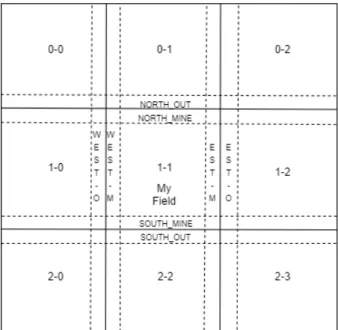
Every region of the field has boundaries defined by the AoI as the example on 1 shows, where we can see a 2D grid field on which MY FIELD determines the region that is be computed by the node that owes region 1-1, while the MINE regions are boundary regions belonging to the same node. Those regions are computed and sent to its neigh-bors. OUT regions are not computed and belong to differ-ent nodes, they are received from the topics where 1-1 is subscribed as a client.
Fig. 1: DContinuous2DGrid regions.
4.3
Architecture
DMASON 3.2 is divided in 4 main packages (Fig. 2) [6]:
• dmason.simComposed of 2 subpackages, engine and field. Engine holds the distributed simulation logic, and field holds the representation of space in a dis-tributed environment.
• dmason.utilPackages and classes for utility purpose. It does also add a subpackage to handle connections with of JMS, MPI and Socket using a Publish-Subscribe paradigm.
• dmason.exceptionContains exceptions for DMASON project.
• dmason.experimentals Contains 3 main subpackages that are used to manage its master and worker appli-cation and run simulations, adds batch and launcher functionality and provides some utility.
Fig. 2: DMASON 3.2 Architecture Most important objects on engine package are:
• DistributedState Abstract class extending MASON’s SimState that adds the necessary functionalities that MASON lacks for distributed environments, such as information of the number of agents, number of peers, ip and port adresses of the communication server, etc.
• DisttributedMultiSchedule Used for synchronization of multiples environments at every step of a simula-tion. It contains methods to execute the simulation scheduled steps and synchronize the neighbors once the step is over. It does also include a zombie agent to avoid finishing simulations when there are no agents alive.
• RemoteAgentJava interface that extends Steppable and must be implemented by all objects that are placed on the simulation schedule to be stepped. Provides an unique ID to allow agent migration between regions.
On field package we will findDistributedFieldinterface,
that represents an abstraction of a region and will have to be implemented by all the distributed regions of the sim-ulation. Apart from that, we can also find three subpack-ages that provide methods for distributed field creation and management, according to the different types of partition-ing available on DMASON (continuous, grid and network).
5
B
ENCHMARKThe developed benchmark is based on a Repast HPC adap-tation of [1] Prisoner’s Dilemma, where the agent behaviour has been designed to control communication volume and frequency, amount of computation, distribution and evolu-tion of the workload of the simulaevolu-tion. To measure these parameters, the following methods were implemented:
• WalkAgent change their position, moving to another
one at a distance of an unit.
• PlayAgents play withnum agentsneighbors that are
at a maximum radius determined byinteraction rad.
This function provides a way to control the communi-cation volume of the test.
• Compute Simulates the workload of agents by
per-forming a FFT, the size of which is controlled by
ta-ble sizeparameter.
• ReproductDetermines if an agent will be born from another agent according to its distance to a certain point in the map (birth center) with a probability of
birth rate, that decreases linearly from the birth cen-ter.
• Die Same as reproduct but with a death center and
death probability.
There is also a buffer that allows to add an extra weight
on agent’s communication (comm buffer), and its size is
regulated by COMM BUFF SIZE parameter on agent’s
code.
5.1
DMASON 3.2 installation
Installing DMASON on the cluste
1. Download DMASON 3.2 from
github wget
https://github.com/isislab-unisa/dmason/archive/master.zip
2. Unzip DMASON on a folder. unzip dmason-master
dmason-master.zip
3. Add JTransforms [11] java library (needed in order to perform the FFT on agent’s compute method) to DMASON’s pom.xml 1.
4. Build DMASON. mvn -Dmaven.test.skip=true clean
package
5. Set the ip (and port if needed) of the master node at
/target/resources/systemmanagement/master/conf/-config.propertiesthat will be used to connect with the ActiveMQ server. In this case:
ActiveMQ connection parameters activemq.ipmaster = 192.168.12.9 activemq.portmaster = 61616 1<d e p e n d e n c y> 2<g r o u p I d>com . g i t h u b . w e n d y k i e r p</ g r o u p I d> 3<a r t i f a c t I d>J T r a n s f o r m s</ a r t i f a c t I d> 4<v e r s i o n>3.1</ v e r s i o n> 5<c l a s s i f i e r>w i t h−d e p e n d e n c i e s</ c l a s s i f i e r> 6 </ d e p e n d e n c y> Listing 1: JTransforms
With this we should be able to execute simulations on DMASON. If it is needed to use the overrided finish method (explained at section 5.2.2) to check the simula-tion results, the code on Listing 2 must be added at the
end of run() method on CellExecutor class inside
dma-son.experimentals.systemmanagemen.worker. Once the code is saved, it is has to be compiled (adding DMASON-3.2.jar created when building DMASON to the classpath and compiling with javac). When the code is compiled, it is only needed to build again DMASON as explained before on this section.
1 i f ( i == p a r a m s . g e t M a x S t e p ( ) ){ 2 d i s . f i n i s h ( ) ;
3 }
Listing 2: Finish call at CellExecutor.run()
5.2
Implementation
The project is composed of the following classes:
• DPrisDilemmaModel code for the simulation. Repre-sents the distributed environment to be simulated.
• DPrisoner: Extends DRemotePrisoner and contains
the agent’s logic.
• DRemotePrisoner: Abstract class that implements
Re-motePositionedAgent and java Serializable. Contains the agent’s unique identifier and its current position on the field.
The model class with GUI has not been implemented for this project.
These classes are put together into a .jar file in order to import them as a simulation on DMASON’s master appli-cation.
5.2.1 DPrisDilemma
When creating the model object, class constructors get sim-ulation parameters from the master application.
The most important method for the model is start(), which is overrided from MASON’s SimState start function. It is the first function running before stepping the schedule, allowing the setup of the simulation environment. In this case, the start method creates the field executed by the cur-rent peer, sets its agents position, places them on the map and schedules every agent for the first simulation step. The agents position is always the same at the beginning of the simulation as it is loaded from a file.
In addition, it is also necessary to implement the follow-ing DistributedState methods:
• public void addToField(RemotePositionedAgent rm, E
pos). Addsrmagent into the field at a given position
pos. Used at agent migrations.
• public SimState getState() Returns the current state of
the simulation.
• public Distributed2DField getField() Returns
simula-tion field.
• public boolean setPortrayalForObject(Object o). This
function was not implemented as it is used for GUI. Returns false.
The finish method of the model is called at the end of the simulation and it is overrided from MASON’s SimState to get the final position of the agents at the end of the simula-tion and print agent’s payoffs from its play method, in order to check the correct functioning of the benchmark.
5.2.2 DPrisoner
Method step from the agent class overrides step from MA-SON’s Steppable class. This method is executed at every step for all the scheduled agents on the simulation.
• public Double2D move(DPrisDilemma mod,
Dou-ble2D current pos). Returns the position for the
agent’s next step. If it moves past the field boundaries the agent appears at the opposite side of the field.
• public void compute(DPrisDilemma st). Computes
a complex FFT of one dimension using as inpu st.fft input from the model.
• public void play(DPrisDilemma st, Double2D pos).
Gets all neighbors inside agent’s interaction radius and computes payoffs based on the agent and its neighbors collaboration. The number of agents to play with is limited to max agents to play.
• Boolean reproduct(Double2D pos, DPrisDilemma
mod) Returns true if the agent on position pos
re-products on this simulation step. The possibilities
for an agent to be born increase as they get closer to birth center.
• Boolean die(Double2D pos, DPrisDilemma mod)
Re-turns false if the agent on positionposdies on this
sim-ulation step.
5.3
Execution
The following steps are needed to execute our code : 1. Export DMASON classes to java classpath.
export CLASSPATH=$CLASSPATH:/home/ caos/cperalta/home Q5/cpq/3-0/dmason-master/target/DMASON-3.2.jar
2. Compile simulation code.
javac /dmason/sim/app/DPrisoner/*.java Where DPrisoner is your simulation folder 3. Create simulation .jar
jar cf /dmason/sim/app/DPrisoner/*.class It is not needed to add a manifest file to the .jar. 4. Launch the master and one or more workers4 5. Open master appAt firefox open master’s web app 4 6. Select workers for the simulationSelect the workers
for the simulation at the ”Monitoring” panel on the master web application.
7. Setup simulation parameters Once workers are se-lected, start new simulation using the option ”Add” shown at the bottom right corner. At this point, it is possible to upload the simulation jar created at 3 and assign the simulation parameters.
8. Execute simulationThe ”Simulation” panel opens giv-ing the option to execute the simulation.
Once the simulation is completed, the results are avail-able at ”History” panel. At the end of the simulation, a file for each worker containing its agents positions is created. Merging those files and plotting the result shows a map like the one on Fig. 3. This figure shows how the density of agents changes when they get closer to the death and birth center (set at (50,50) and (150,150) respectively). Apart from that, at the end of the simulation for each region, an
average of the payouts of the play method (cTotalandc) is
created as a checksum.
6
R
ESULTSOn this section are shown the results of the experiments ex-ecuted with the developed framework described on section 5. Every experiment runs 100 simulation steps and uses the average of the results of 3 executions. The experiments were run on Wilma cluster of DACSO department. It is composed of 12 nodes with 2 es with 2 AMD Opteron 4180 processors and 6 cores per processor. All the Repast HPC, FLAME or EcoLab results shown on this section are found on [15].
First of all, two experiments has been executed to test the scalability of DMASON’s benchmark. For the strong scal-ability test, the following parameters of the simulation were fixed: AoI of 10 units, communication buffer size 256B, 10.000 agents, an interaction radius of 10 units, field size of 300x300 units, the FFT input size of 16KB, while the number of regions created at the field was changed from 4 to 32. On DMASON every region runs as a thread. As
● ● ● ● ● ● ● ● ● ● ● ● ● ● ● ● ● ● ● ● ●● ● ● ● ● ● ● ● ● ● ● ● ● ● ●● ● ●● ● ● ● ● ● ● ● ● ● ● ● ● ●● ● ● ● ● ● ● ● ● ● ● ● ● ● ● ● ● ● ● ● ● ● ● ● ● ● ● ● ● ● ● ● ● ● ● ● ● ● ● ● ● ● ● ● ● ● ● ● ● ● ● ● ● ● ● ● ● ● ● ● ● ●● ● ● ● ● ● ● ●● ● ● ● ● ● ● ● ● ● ● ● ● ● ● ● ● ● ● ● ● ● ● ● ● ●● ● ● ●● ● ● ● ● ● ● ● ● ● ● ● ● ● ● ● ● ● ● ● ● ● ● ● ● ● ● ● ●● ● ● ● ● ● ● ● ● ● ● ● ●● ● ● ● ●●● ● ● ● ● ● ● ●● ● ●● ●●● ● ● ● ● ●● ●●●●●●●●● ● ● ● ● ● ● ● ● ● ● ● ● ●●● ●●● ●●●●● ●●● ●● ●● ●● ●●● ● ●●● ●●●●●●●● ●● ●●● ● ● ● ● ● ● ● ● ● ● ● ● ● ● ● ● ● ● ● ● ● ● ● ● ● ● ● ● ●●● ● ● ● ● ● ● ● ● ● ● ● ● ● ● ● ● ● ● ● ● ● ● ● ● ● ● ● ● ● ● ● ● ● ● ●● ● ● ● ● ● ● ● ● ● ● ● ● ● ● ● ● ● ● ● ● ● ● ● ●●● ● ● ● ● ● ● ● ● ● ● ● ● ● ● ● ● ● ● ● ● ● ● ● ● ● ●● ● ● ● ● ● ● ● ● ● ● ● ● ● ●● ● ●●● ● ● ● ● ● ● ● ● ● ● ● ● ● ● ● ● ● ● ● ● ● ●● ● ● ● ● ●● ● ● ● ● ● ● ● ● ● ● ●●● ● ● ● ● ● ● ● ● ● ● ● ● ● ● ● ● ● ● ● ● ● ● ● ● ● ● ● ● ● ● ● ● ● ● ● ● ●●● ● ● ● ● ● ● ● ● ● ● ● ● ● ● ● ●●●●●●●●●● ●●●●●●●● ● ● ● ●● ● ● ● ●● ● ● ●●●●● ●● ●● ●● ● ● ● ● ● ● ● ● ●●● ● ● ● ●●● ●● ● ●● ● ●●●●● ● ●●●●●●● ● ● ● ● ● ●● ●●●● ● ● ● ● ●● ●●●●●●● ●●● ● ●● ●● ● ●● ●●●●●● ● ●● ● ●● ●●●●● ●● ● ● ● ● ● ● ●● ● ● ● ● ● ● ● ● ● ● ● ● ● ● ● ● ● ● ● ● ● ● ● ● ● ● ● ● ● ●● ●● ● ● ● ● ● ● ● ● ● ● ● ● ● ● ● ● ● ● ● ● ● ● ● ● ● ● ● ● ● ● ● ● ● ● ● ● ● ● ● ● ● ● ● ● ● ● ● ●● ●● ● ● ● ●● ● ● ● ● ● ● ● ● ● ● ● ● ● ● ● ● ● ● ● ● ● ● ● ● ● ● ● ● ● ● ● ● ●● ● ● ● ● ● ● ● ● ● ● ● ● ● ● ● ● ● ● ● ● ● ● ● ● ● ● ● ● ● ● ● ● ● ● ● ● ● ● ● ● ● ● ● ● ● ● ● ● ● ● ● ● ● ● ● ● ● ● ● ● ● ● ● ● ● ● ● ● ● ● ● ● ● ● ● ● ● ● ● ● ● ● ● ● ● ● ● ● ● ● ● ● ● ● ● ● ● ● ● ● ● ● ● ● ● ● ● ● ● ● ● ● ● ● ● ● ● ● ● ● ● ● ● ● ● ● ● ● ● ● ● ● ● ● ● ● ● ● ● ● ● ● ● ● ● ● ● ●● ● ● ● ● ●●●● ● ●●●●●●● ● ● ●●●● ● ●●●● ● ● ● ● ●● ● ● ● ● ● ● ● ● ● ● ● ● ● ● ● ● ● ●●● ●●● ● ● ● ●●●●●●●● ● ● ● ●● ● ● ●●● ● ● ●● ●●●●● ●● ●●●●●●● ● ● ● ● ● ● ● ● ● ● ● ● ● ● ● ● ● ● ● ● ● ● ● ● ● ● ● ● ● ● ● ● ● ● ● ● ● ● ● ● ● ● ● ● ● ● ● ● ● ● ● ● ● ● ● ● ● ● ● ● ● ● ● ●● ● ● ● ● ● ● ● ● ● ●● ● ● ● ● ● ● ● ● ● ● ● ● ● ● ● ● ● ● ● ● ● ●● ● ● ●● ● ● ● ● ● ● ● ● ● ● ● ● ● ● ●● ● ● ●● ● ● ● ● ● ● ● ● ● ●● ● ● ● ● ● ● ● ● ● ● ● ● ● ● ● ● ● ● ● ●● ● ● ● ● ● ● ● ● ● ● ● ● ● ● ● ● ● ● ● ● ● ● ● ● ● ● ● ● ● ● ● ● ● ● ● ● ● ● ● ● ● ● ● ● ● ● ● ● ● ● ● ● ● ● ● ● ● ● ● ● ● ● ● ● ● ● ● ● ● ● ● ● ● ● ● ● ● ● ●● ● ● ● ● ● ● ● ● ● ● ● ● ● ● ● ● ● ● ● ● ● ● ● ● ●●● ● ● ● ●●● ● ● ●●●● ● ● ● ● ● ● ● ● ● ● ● ● ● ● ●●●●●● ● ● ●●●● ●● ● ● ●● ●●●●● ● ● ● ● ● ● ● ● ● ● ● ● ● ● ● ● ● ● ● ● ● ● ● ● ● ● ● ● ● ● ● ● ● ● ● ● ● ● ● ● ● ● ● ● ● ● ● ● ● ● ● ● ● ● ● ● ● ● ● ● ● ● ● ● ● ● ● ● ● ● ● ● ● ● ● ● ● ● ● ● ● ● ●● ● ● ● ● ● ● ● ● ● ● ● ● ● ● ● ●● ● ● ● ● ● ● ● ● ● ● ● ● ● ● ●● ● ● ● ● ● ●● ● ● ● ● ● ● ● ● ● ● ● ● ● ● ● ● ● ● ● ● ● ● ● ● ● ● ● ● ● ● ● ● ● ● ● ● ● ● ● ● ● ● ● ● ● ● ● ● ● ● ● ● ● ● ● ● ●● ● ● ● ● ● ● ● ● ● ● ● ● ● ● ● ● ● ● ● ● ● ● ● ● ● ● ● ● ● ● ● ● ● ● ● ● ● ● ● ● ● ● ● ● ● ● ● ● ● ● ● ● ● ● ● ● ● ● ● ● ● ● ● ● ● ● ● ● ● ● ● ● ● ● ● ● ● ● ● ● ● ● ● ● ● ● ● ● ● ● ● ● ● ● ● ● ● ● ● ● ● ● ● ● ● ● ● ● ● ● ● ● ● ● ● ● ● ● ● ● ● ● ● ● ● ● ●● ● ● ● ● ● ● ● ● ● ● ● ● ● ● ● ● ● ● ● ● ● ● ● ●●● ●● ●●● ● ●● ●●● ●●●●●●●●●●●● ● ● ● ● ● ● ● ● ●●● ●●●●●●●●● ● ● ● ● ● ● ● ● ● ● ● ● ● ● ● ● ● ● ● ● ● ● ● ●● ● ● ●● ● ●●● ●● ● ●●● ●●●●●●●●●●● ●●●● ●●●●●● ● ● ●● ● ●● ●● ● ● ● ●●●●● ●● ● ● ● ●●●●● ●●●●●●● ● ● ●● ●● ● ● ●●●●●● ● ● ● ● ● ● ● ● ● ● ● ● ●●● ● ● ● ● ● ● ● ● ● ● ● ● ● ● ● ● ● ● ● ● ● ● ● ● ● ● ● ● ● ●● ● ● ● ● ● ● ● ●●● ● ● ● ● ● ● ● ● ● ●● ● ● ● ●●●● ● ● ● ●● ● ● ●● ● ● ● ● ● ● ●● ● ● ● ● ● ●● ● ● ●● ● ● ● ● ● ● ● ● ● ● ● ● ● ● ● ● ● ● ● ● ● ● ● ●● ● ● ● ● ● ● ● ● ● ● ● ● ● ● ● ● ● ● ● ● ●●● ● ● ● ● ● ● ● ● ● ● ● ● ● ● ● ● ● ● ● ● ● ● ● ● ● ● ● ●● ● ● ● ●● ● ● ● ● ● ● ● ● ● ● ● ● ● ● ● ● ● ● ● ● ● ● ● ● ● ● ● ● ● ● ● ● ● ● ● ● ● ● ● ● ● ● ● ● ● ● ● ● ● ● ● ● ● ● ● ● ● ● ● ● ● ● ● ● ● ● ● ● ● ● ● ● ● ● ● ● ●●●●● ● ● ● ● ● ● ●● ●●●● ● ● ● ● ●● ● ● ● ● ● ● ● ● ● ● ● ●●●●●●●●● ●● ● ●● ● ● ● ● ● ● ● ● ● ●● ● ● ● ● ● ● ● ● ● ● ● ● ● ● ● ●●● ● ● ●● ●● ● ● ● ●● ● ●● ●●● ● ●● ● ● ●●● ●● ● ● ● ●●● ● ● ●● ● ● ● ●● ●●● ● ●● ●● ● ● ● ● ●●● ● ●● ● ● ● ●●●●● ● ●●●●●●●●●●●●●●●●● ● ● ● ● ● ● ● ● ● ● ● ● ● ● ● ● ● ●● ● ● ● ● ● ● ● ● ● ● ● ● ● ● ● ● ● ● ● ● ● ● ●● ● ● ● ● ● ● ● ● ● ● ● ● ● ● ● ● ● ● ● ● ● ● ●● ● ● ● ● ● ● ● ● ● ● ● ● ● ● ● ● ●● ● ● ● ●● ● ● ● ● ● ● ● ● ● ● ● ● ● ● ● ●● ● ●● ● ● ● ● ● ● ● ● ● ● ● ● ● ● ●● ● ● ● ● ● ● ● ● ● ● ● ● ● ● ● ● ● ● ● ● ● ● ● ● ●●● ● ● ● ● ● ● ● ● ● ● ● ● ● ● ● ● ● ● ● ● ● ● ● ● ● ●●● ● ● ● ● ● ● ● ● ● ● ● ● ● ● ● ● ●● ● ● ● ● ● ● ● ● ● ●● ● ● ● ● ● ● ● ● ● ● ● ● ● ● ● ● ● ● ● ● ● ● ● ● ● ● ● ● ● ● ● ● ● ● ● ● ● ● ● ● ● ● ● ● ● ● ● ● ● ● ● ●● ● ● ● ● ● ● ● ● ● ● ● ●● ● ● ● ● ● ● ● ● ● ● ● ● ● ● ● ● ● ● ● ● ● ● ● ● ● ●●● ● ● ● ● ●● ●●● ● ● ● ● ●●●●●●●● ● ● ●●●● ●●●●● ● ● ● ● ● ● ●● ●● ● ● ● ● ● ● ● ● ● ● ● ● ● ● ● ● ● ●● ● ● ● ● ●●● ●● ● ● ● ● ● ● ● ●●●●● ●● ●● ●●●●●●● ●●●● ● ●●● ●● ●●● ●●●● ● ● ● ● ● ● ● ● ●●●●● ● ● ● ● ● ● ● ● ● ● ● ● ● ● ● ●● ● ● ● ● ● ● ● ● ● ● ● ● ● ● ● ● ● ● ● ● ● ● ● ● ● ● ● ● ● ● ● ● ● ● ● ● ● ●● ● ● ● ● ● ● ● ● ● ●● ● ● ● ● ● ● ● ● ● ● ● ● ● ● ● ● ● ● ● ● ● ● ●●● ● ● ● ● ● ● ● ● ● ● ● ●● ● ● ● ● ● ● ● ● ● ● ● ● ● ● ● ● ● ● ● ● ● ● ● ● ● ● ● ● ● ● ● ● ● ● ● ● ● ● ● ● ● ● ● ●● ● ● ● ● ● ● ● ● ● ● ● ● ● ● ● ● ● ● ● ●● ● ● ● ● ●●● ● ●●●●● ● ● ● ● ● ● ● ● ● ● ● ● ● ●● ● ●● ● ●●●●● ● ● ● ● ● ● ● ● ● ● ● ●● ● ●●●●●●● ● ● ● ● ●● ● ● ●● ● ● ● ● ● ● ● ● ● ● ● ● ● ● ● ● ● ● ● ● ● ● ● ● ● ● ● ● ● ● ● ● ● ● ● ● ● ● ● ● ● ● ● ● ● ● ● ● ● ● ● ● ● ● ● ● ● ● ● ● ● ● ● ● ● ● ● ● ● ● ●● ● ● ● ● ● ● ● ● ● ● ● ● ● ● ● ● ● ● ● ● ● ● ● ● ● ● ● ● ● ● ● ● ● ● ● ● ● ● ●●● ● ● ● ● ● ● ● ● ● ● ● ● ● ● ● ● ● ● ● ● ● ● ● ● ● ● ● ● ● ● ● ● ●● ● ● ● ● ● ● ● ● ● ● ● ●● ● ● ● ● ● ● ● ● ● ● ● ● ● ● ● ● ● ● ● ● ● ● ● ● ● ● ● ● ● ● ● ● ●● ● ● ● ● ● ● ● ● ● ● ● ● ● ● ● ● ● ● ● ● ● ● ● ● ● ● ● ● ● ● ● ● ● ● ● ● ● ● ● ● ● ● ● ● ● ● ● ● ● ● ● ● ● ●● ● ● ● ● ● ● ● ● ● ●● ● ● ●● ● ● ● ● ● ● ● ● ● ● ● ● ● ● ● ● ●● ● ● ● ●● ● ● ● ● ● ●● ● ● ● ● ● ● ● ● ● ● ● ● ● ● ● ● ● ● ● ● ● ● ● ● ● ● ● ● ● ● ● ● ● ● ● ● ● ● ● ● ● ● ● ● ● ● ● ● ● ● ● ● ● ● ● ● ● ● ● ● ● ● ● ● ● ● ●● ● ●● ● ● ●●●●●●●●●● ●● ●●●●● ●●●●●● ●●●● ● ● ● ● ● ●● ● ● ● ● ● ● ● ● ● ● ● ● ● ● ● ● ● ● ● ● ● ● ● ● ● ● ● ●● ● ● ● ● ● ● ● ● ●● ●●●●●●●● ●●●●●●●●●●● ●● ●● ●●●●●● ●● ● ● ●● ● ● ●●● ● ● ● ● ● ●● ●●● ●● ●●● ● ● ● ●●●●● ● ●●● ● ● ● ● ● ● ● ● ● ● ● ● ● ● ● ● ● ● ● ● ●●● ● ● ● ● ● ● ● ● ●● ● ● ● ● ● ● ● ●●● ● ● ● ● ● ●● ● ● ● ● ● ● ● ● ● ● ● ● ● ● ● ● ● ● ● ● ● ● ● ● ● ● ● ● ●● ● ● ● ● ● ● ● ● ● ● ● ● ● ● ● ● ● ● ● ● ● ● ● ● ● ● ● ● ● ● ● ●● ● ● ● ● ● ● ● ● ● ● ●● ●● ●●● ● ●● ● ● ● ● ● ● ● ● ● ● ● ● ● ● ● ● ● ● ● ● ● ● ● ● ● ● ● ● ● ● ● ● ● ● ● ● ● ● ● ● ● ● ● ● ● ● ● ● ● ● ● ● ● ● ● ● ● ● ● ● ● ● ● ● ● ● ● ● ● ● ● ● ● ● ● ● ● ● ● ● ● ●● ● ● ● ● ● ● ●● ●●● ● ●●● ● ● ● ●●● ● ●● ● ● ●●●●●●●●●●● ●●● ●●● ● ● ● ● ● ● ● ● ● ● ● ●● ● ● ● ● ● ●●●●●●● ●●● ● ● ● ●● ●● ● ●●●●●● ● ●●●● ●●●●●●●●●● ● ● ●● ● ● ● ● ● ●● ● ● ●● ●● ●●●●● ● ● ● ● ● ● ● ● ● ● ● ● ● ●● ● ● ● ● ● ● ● ● ● ● ● ● ● ● ● ● ● ● ● ● ● ● ● ● ● ● ● ● ● ● ● ●● ● ● ● ● ● ● ● ●● ● ● ● ● ● ● ● ● ● ● ● ● ● ● ● ● ● ● ● ● ● ● ● ● ● ● ● ● ● ● ● ● ● ● ● ● ● ● ● ● ● ● ● ● ● ● ● ● ●● ● ● ● ● ● ● ● ● ● ● ● ● ● ● ● ● ● ●● ● ●● ● ● ● ●● ● ● ● ● ● ● ● ● ● ● ● ●● ● ● ● ● ● ● ● ● ● ● ● ● ● ● ● ● ● ● ● ● ● ● ● ● ● ● ● ● ● ● ● ● ● ● ● ● ● ● ● ● ● ● ● ● ● ● ● ● ● ● ● ● ● ● ●● ● ● ● ● ● ● ● ● ● ● ● ● ● ● ● ● ● ● ● ● ● ● ● ● ● ● ● ● ● ● ● ● ● ● ● ● ●● ● ● ● ● ● ● ● ● ● ● ● ● ● ● ● ● ● ● ● ● ● ● ● ● ● ● ● ● ●● ● ● ● ● ● ● ● ● ● ● ● ● ● ● ● ● ● ● ● ● ● ● ● ● ● ● ● ● ● ● ● ● ● ● ● ● ● ● ●● ● ● ● ● ● ● ● ● ● ● ● ● ● ● ●● ● ● ● ● ● ● ● ● ● ● ● ● ● ● ● ● ● ● ● ● ● ● ● ●● ● ● ● ●● ● ● ● ● ● ● ● ● ● ● ●● ● ● ● ● ● ● ● ● ● ● ● ● ● ● ● ●● ● ● ● ● ● ● ● ● ● ● ● ● ● ● ● ● ●● ● ● ● ● ● ● ● ● ● ● ● ● ●● ● ● ● ● ● ● ●● ● ● ● ● ●● ● ● ● ● ● ●● ● ● ● ● ● ● ● ● ● ● ● ● ● ● ● ● ●●●●●●●●●●●● ● ● ●● ● ● ● ●●● ● ●●● ●●● ● ● ●●●●●●●●●●●●● ● ● ● ● ● ● ● ● ● ● ●● ● ● ● ●●● ● ●●●●●●●● ● ●●● ●● ● ● ● ● ●● ● ● ● ● ● ● ●● ● ●●●●●●●●●●●●●●●● ● ● ● ●●●● ● ●●●●●●●●●●●●●● ● ●● ● ● ● ● ● ● ● ● ● ● ● ● ● ● ● ● ● ● ● ● ● ● ● ● ● ● ● ● ● ● ● ● ● ● ● ● ● ●●●●●● ● ● ●● ● ●● ●● ● ●● ● ● ● ● ● ● ● ● ● ● ● ● ● ● ● ● ● ● ● ● ● ●● ● ● ● ● ● ● ● ●● ●●● ● ● ● ● ●● ● ● ● ● ● ● ● ● ● ● ● ● ● ● ● ● ● ● ● ● ● ● ● ● ●● ● ●● ● ● ● ● ●●●●●●●● ● ● ● ● ● ● ● ● ● ● ● ● ● ● ● ● ● ● ● ● ● ● ● ● ● ● ● ● ● ● ● ●● ● ● ● ● ● ● ● ● ● ● ● ● ● ● ● ● ● ● ● ● ● ● ● ● ● ● ● ● ● ● ● ● ● ● ●● ● ● ●● ● ● ●● ● ● ● ● ● ● ● ● ● ● ● ● ● ●● ● ● ● ● ● ● ● ● ● ● ● ● ● ● ● ● ● ● ● ● ● ● ● ● ● ● ● ● ● ● ● ● ● ● ● ● ● ● ● ● ● ● ● ● ● ● ● ● ● ● ● ● ● ● ● ● ● ● ● ● ● ● ● ●● ● ● ● ●●● ● ● ● ● ● ● ● ● ● ● ● ● ● ● ● ●● ● ● ● ● ●● ● ● ● ● ● ● ● ● ● ● ● ● ● ● ● ● ● ● ● ● ● ● ● ● ● ● ● ● ●● ● ● ● ● ● ● ● ● ● ● ● ● ● ● ● ● ● ● ● ● ●● ● ● ● ● ● ● ● ● ● ● ● ●● ● ● ● ● ● ● ●● ● ● ● ●● ● ● ●● ● ● ● ● ● ●● ●●●●● ●●●●●● ●●● ● ● ● ● ● ● ● ● ● ● ● ● ● ● ● ● ● ● ● ●● ●●●●● ● ● ● ● ●● ● ●● ● ●●● ● ● ● ● ●●● ● ● ● ● ● ● ●● ● ● ● ●●●●● ● ● ● ● ● ● ●● ● ● ● ● ● ● ● ● ● ● ●● ● ● ● ● ● ● ● ●● ● ● ● ● ●● ● ● ● ● ● ● ● ● ● ● ● ● ● ● ● ● ● ● ● ● ● ● ● ● ● ● ● ● ● ● ● ● ● ● ● ● ● ● ● ● ● ● ● ● ● ● ● ● ● ● ● ● ● ● ● ● ● ● ● ● ● ● ● ● ● ● ● ● ● ● ● ● ● ● ● ● ● ● ●● ● ● ● ● ● ● ● ● ● ● ● ● ● ● ● ● ● ● ● ● ● ● ● ● ● ● ● ● ● ● ● ● ● ● ● ● ● ● ●● ● ● ● ● ● ● ● ● ● ● ● ● ● ● ●● ● ● ● ● ● ● ● ● ● ● ● ● ● ● ● ● ● ● ● ● ● ● ● ● ● ● ●●●●●● ● ● ●●● ●● ● ● ● ● ● ● ● ● ● ● ● ● ● ● ●●●● ● ●●●●●●● ●●●●●●●●●●●●● ● ● ● ● ● ● ● ● ● ● ● ● ● ● ● ● ● ● ● ● ● ● ● ●● ● ● ● ● ● ● ● ● ● ● ● ● ● ● ● ● ● ● ● ● ● ● ● ● ● ● ● ● ● ● ● ● ● ● ● ● ● ● ● ● ● ● ● ● ● ● ● ● ● ● ●● ● ● ● ● ● ● ● ● ●● ● ● ● ● ● ● ● ● ●● ● ● ● ● ● ●● ● ●● ● ● ● ● ● ● ● ● ● ● ● ● ●● ● ● ● ● ● ● ● ● ● ● ● ● ● ● ● ● ● ● ● ● ● ● ● ● ● ● ● ● ● ● ●● ● ● ● ●● ● ● ● ● ● ● ● ●● ● ● ● ● ● ● ● ● ● ● ● ● ● ● ● ● ● ● ● ● ● ● ● ● ● ● ● ● ● ● ● ● ● ● ● ● ● ● ● ● ● ● ● ● ● ● ● ● ● ● ● ● ● ● ● ● ● ● ● ● ● ● ● ● ● ● ● ● ● ● ● ● ● ● ● ● ● ● ● ● ● ● ● ● ●● ● ● ● ● ● ● ● ● ● ● ● ● ●● ● ● ● ● ● ● ● ● ● ● ● ● ● ● ● ● ● ● ● ● ● ●● ● ● ● ● ● ● ● ● ● ● ● ● ● ● ●● ● ● ● ● ● ● ● ● ● ● ● ● ● ● ● ● ● ● ● ● ● ● ● ● ● ● ● ● ● ● ● ● ● ● ● ● ● ● ● ● ● ● ● ● ● ● ●● ● ●●●● ●● ●●●●●●● ● ● ●●●●●●●●● ●● ● ● ● ● ●● ● ●●● ● ●● ● ● ● ● ● ● ● ● ● ● ● ● ● ●● ● ●●●● ● ● ●●●●●●●●●●●●●● ●●●●●●●●●●●●●●●●● ● ● ●●● ● ● ●●●● ● ● ● ● ● ●●●●●●●●● ● ● ●●● ● ● ● ● ●● ●● ●● ● ● ● ● ● ●● ● ● ● ● ● ● ● ● ● ● ● ● ● ● ● ● ● ● ● ● ● ● ●● ● ● ● ● ● ● ● ● ● ● ● ● ● ● ● ● ● ● ● ● ● ● ● ● ● ● ● ● ● ● ● ● ● ●● ● ● ● ● ● ● ● ●● ● ● ● ● ● ● ● ● ● ● ● ● ● ● ● ● ● ● ● ● ● ● ● ● ● ● ● ● ● ● ●● ● ● ● ● ● ● ● ● ● ● ● ● ● ● ● ● ● ● ● ● ● ● ● ● ● ● ● ● ● ● ●● ● ●● ● ● ● ● ● ● ● ● ● ● ● ● ● ●● ● ●● ● ●● ●●●●● ●●●● ● ● ●● ●● ● ● ● ● ● ● ● ● ● ● ● ● ● ● ●●●● ●● ●●● ●● ●● ●●●● ●● ● ●●●● ●●●● ●● ● ● ● ● ● ● ● ● ● ● ● ● ● ● ● ● ● ● ● ● ● ● ● ● ● ● ● ● ● ● ● ● ● ● ● ● ● ● ● ●● ● ● ● ● ● ● ● ● ● ● ● ● ● ● ● ● ● ● ● ● ● ● ● ● ● ● ● ● ● ● ● ● ● ● ● ● ● ● ● ● ● ● ● ● ● ● ● ● ● ● ● ● ● ● ● ● ● ● ● ● ● ● ● ● ● ●● ● ● ● ● ● ●● ● ● ●● ● ● ● ● ● ● ● ●● ● ● ● ● ● ● ● ● ● ● ● ● ● ● ● ● ● ● ● ● ● ● ● ● ● ● ● ● ● ● ● ● ● ● ● ● ●● ● ● ● ● ● ● ● ● ● ● ● ● ● ● ● ● ● ● ● ● ● ●● ● ● ● ● ● ● ● ● ● ●● ● ● ● ● ● ● ● ● ●● ● ● ● ● ● ● ● ● ● ● ●● ● ● ● ● ● ● ● ● ● ● ● ● ● ● ● ● ● ● ● ● ● ● ● ●● ● ● ● ● ● ● ●● ● ● ● ● ● ● ● ●● ● ● ● ● ● ● ● ● ● ● ● ● ● ● ● ● ● ● ● ● ● ● ● ● ● ● ● ● ● ● ● ● ● ● ● ● ● ● ● ● ● ● ● ● ● ● ● ● ● ● ● ● ● ● ● ● ● ● ● ● ● ● ● ● ● ● ● ● ● ● ●● ●● ●●● ● ●●●● ●● ●●● ● ● ● ● ● ●● ● ● ● ● ● ● ● ● ● ● ● ● ● ● ● ● ● ● ●● ● ● ● ● ● ● ● ● ● ● ●● ● ●● ● ● ●● ●●●●● ●● ●●●●●● ● ● ● ● ● ● ● ● ● ● ● ● ● ●● ● ● ● ●●●●● ● ● ●●●● ● ● ● ● ●●●● ● ● ●● ●●●●●●● ● ● ● ● ● ● ● ● ● ● ● ● ● ● ● ● ● ● ● ● ● ● ● ● ● ● ● ● ● ● ● ● ● ● ● ● ● ● ● ● ● ● ● ● ● ● ● ● ● ● ● ● ● ● ● ● ● ● ● ● ● ●● ● ● ● ● ● ● ● ● ● ● ● ● ● ● ● ● ● ● ● ● ● ● ● ● ● ● ● ● ● ● ● ● ● ● ● ● ● ● ● ● ● ● ● ● ● ● ● ● ● ● ● ● ● ● ● ● ● ● ● ● ● ● ● ● ● ● ● ● ● ● ●● ● ● ● ● ● ● ● ● ● ● ● ● ● ● ● ● ● ● ● ● ● ● ● ● ● ●● ● ●● ● ●● ● ●● ● ● ● ● ● ● ● ● ● ● ● ● ● ● ● ● ● ● ● ● ●● ● ● ● ● ● ● ● ● ● ● ● ● ● ● ●● ● ● ● ● ● ● ● ● ● ● ● ● ● ● ● ● ● ● ● ● ● ● ● ● ● ● ● ● ● ● ● ● ● ● ● ● ● ● ● ● ● ● ● ● ● ● ● ● ● ● ● ● ● ● ● ● ● ● ● ●● ● ● ● ●● ● ● ● ● ● ● ● ● ● ● ● ● ● ● ● ● ● ● ● ● ● ● ● ● ● ● ● ● ● ● ● ● ● ● ● ● ● ● ● ● ● ● ● ● ● ● ● ● ● ● ● ● ● ●●● ● ● ● ● ● ● ● ● ● ● ● ● ● ● ● ● ● ●●● ● ● ● ● ● ● ● ● ● ● ● ● ● ● ● ● ● ● ● ● ● ● ● ● ● ● ● ● ● ● ● ● ● ● ● ● ● ● ● ● ● ● ● ● ● ● ● ● ●● ● ● ● ● ● ● ● ● ● ● ● ● ● ● ● ● ●● ● ● ● ● ● ● ● ● ● ● ● ● ● ● ● ● ● ●●● ● ● ● ● ● ● ● ● ● ● ● ● ● ●● ● ● ● ● ● ●● ● ● ● ● ● ● ● ● ● ●● ●● ● ● ● ● ● ● ● ● ●● ● ● ● ● ● ●●● ● ● ● ● ● ● ●●● ● ● ● ● ● ●● ●● ●● ●●●● ● ● ● ●●●●●●● ● ● ● ● ● ● ● ● ● ●● ●●● ● ● ● ● ● ● ● ● ● ● ● ● ● ● ● ● ● ● ● ● ● ●● ● ● ● ●●● ● ●● ● ● ● ● ● ● ● ● ● ●●● ●●●●●●●●●● ●● ●●●●●●● ● ● ● ● ● ●●●● ● ● ● ● ● ● ● ●●●●●●●● ● ● ● ●● ● ●●●●●●● ●●●●●●●●●●●●● ● ● ●●● ● ● ●● ● ● ● ●●●●●●● ● ●●● ●●●●●●●●●●● ● ● ● ● ● ●● ● ● ● ● ● ● ● ● ● ● ● ● ● ● ● ● ● ● ● ● ● ● ● ● ● ● ● ● ● ● ● ● ● ● ● ● ● ● ● ● ● ● ● ● ● ● ● ● ● ● ● ● ● ● ● ● ● ● ● ● ●● ● ● ● ● ● ● ● ● ● ● ● ●● ● ● ● ● ● ● ● ● ● ● ●● ● ● ● ● ● ● ● ●● ● ● ● ● ● ●● ● ● ● ● ● ● ● ● ● ●●● ● ● ● ● ● ● ● ● ● ● ●● ● ● ● ● ● ●●●●●●●●● ● ● ● ●● ●●●●●●●●● ● ● ● ● ● ● ● ● ●● ●● ● ● ● ● ●● ● ●● ●● ● ●●● ● ● ● ● ●● ● ● ●● ● ● ●●● ● ● ● ● ●● ● ● ● ● ● ● ● ● ●● ● ● ● ● ● ● ● ● ● ● ● ● ● ● ● ● ● ● ● ● ● ● ● ● ● ● ● ● ● ● ● ● ● ● ● ● ● ● ●● ● ● ● ● ● ● ● ● ● ● ● ● ● ● ● ● ● ● ● ● ● ● ● ● ● ● ● ● ● ● ● ● ● ● ● ● ● ● ● ● ● ● ● ● ● ● ● ● ● ● ● ● ● ● ● ● ● ● ● ● ● ● ● ● ● ● ● ● ● ● ● ● ● ● ● ● ● ● ● ● ● ● ● ● ● ● ● ● ● ● ●● ● ● ● ● ● ● ● ● ●● ● ● ● ● ● ● ● ● ● ● ● ● ● ● ● ● ● ● ● ● ● ● ● ● ● ● ● ●● ● ● ● ● ● ● ● ● ● ● ● ● ● ● ● ● ● ● ● ● ● ● ● ● ● ● ● ● ● ● ●● ● ● ● ● ● ● ● ● ● ● ● ● ● ● ● ● ● ● ● ●● ● ● ● ● ● ● ●● ● ● ● ● ● ● ● ● ● ● ● ● ● ● ● ● ● ● ● ● ● ● ● ● ● ● ● ● ● ● ● ● ● ● ● ● ● ● ● ● ●● ● ● ● ● ● ● ● ●● ● ● ● ● ● ● ● ●● ● ● ● ● ● ● ● ● ● ● ● ● ● ● ● ● ● ● ● ● ● ●● ●● ●●●●●●●● ● ● ● ●●●● ●●● ●●●●●●● ● ● ● ● ● ● ● ● ● ● ● ● ● ● ● ● ●●● ● ● ● ● ●● ● ●●●● ●●●●●●● ●● ● ●●● ●● ● ● ● ●●● ●●● ●●●●●● ● ● ● ● ● ● ●● ● ● ● ● ● ● ●● ● ● ● ●● ● ● ● ● ● ● ● ● ●●● ● ● ● ● ● ● ● ●● ● ● ● ● ● ● ● ● ● ● ● ● ●● ● ● ● ● ● ● ● ● ● ● ● ● ● ● ●●●● ●● ● ● ● ● ● ● ●●●● ●● ● ● ● ●● ● ● ● ● ● ● ● ● ● ● ● ● ●● ● ● ● ● ● ● ● ● ● ● ● ●● ● ● ● ● ● ● ● ●● ● ● ● ● ● ● ● ● ● ● ● ● ● ● ● ● ● ● ● ● ● ● ● ● ● ● ● ● ● ● ● ● ● ● ● ●● ● ● ● ● ● ● ● ● ● ● ●● ● ● ● ● ● ● ● ● ● ●● ● ● ● ● ● ● ● ● ● ● ● ● ● ● ● ● ● ● ● ● ● ● ● ● ● ● ● ● ● ● ● ● ● ● ● ● ● ● ● ● ● ● ● ● ● ● ● ● ● ● ● ● ● ● ● ● ● ● ●● ● ● ● ● ● ● ● ● ●● ● ● ● ● ● ● ● ● ● ●● ● ● ● ● ● ● ● ● ● ● ● ● ● ● ●● ● ● ● ● ● ● ● ● ● ● ● ● ● ● ● ● ● ● ● ● ● ● ● ● ● ● ● ● ● ● ● ● ●● ● ● ● ● ● ● ● ●●●●●●●●●●●●●●●●●● ● ● ● ● ● ● ● ● ● ●●● ● ●● ●● ●● ● ●● ● ● ●● ● ●● ● ●● ●●●● ● ●●●●●●● ● ● ● ● ● ● ● ● ● ● ● ● ● ● ● ● ● ● ● ● ●● ● ● ● ●● ● ●● ●●● ●● ●●● ●●●●● ●●● ● ● ● ●● ●●●●● ● ● ● ● ● ● ● ●●●●● ●●●●● ●●● ● ● ● ●●●●●●● ●●●●● ●● ● ● ●●● ●●●●● ●● ●● ●● ●●●●●●●●●●●●●●●●● ●● ●● ● ● ● ● ● ● ● ● ● ● ● ● ● ● ● ● ● ● ● ● ● ● ● ● ● ● ● ● ● ● ● ● ● ● ● ● ● ●● ● ● ● ● ● ● ●●● ● ● ● ● ● ● ● ● ● ● ● ● ● ● ● ● ● ● ● ●● ● ● ● ● ● ● ● ● ● ● ● ● ● ● ● ● ● ● ● ● ● ● ● ● ● ● ● ● ● ● ● ● ●●● ● ● ● ● ● ● ● ● ● ● ● ● ● ● ● ● ● ● ● ● ● ● ● ● ● ● ● ● ● ● ● ● ● ● ● ● ● ● ● ● ● ● ●● ● ● ● ●● ● ● ● ● ● ● ● ● ● ● ● ● ● ● ● ●●●● ● ● ● ● ● ● ● ● ● ● ● ● ● ● ● ● ● ● ● ● ● ● ● ● ● ● ● ● ● ● ●● ● ● ● ● ● ● ● ● ● ● ● ● ● ● ● ● ● ● ● ● ● ● ● ● ● ● ● ● ● ● ● ● ●● ● ● ● ● ● ● ● ● ● ● ● ● ● ● ● ● ● ● ● ● ● ● ● ●●● ● ● ● ● ● ● ● ● ● ● ● ● ● ● ● ● ● ● ● ● ● ●● ● ● ● ● ● ● ● ● ● ● ● ● ● ● ● ● ● ● ● ● ●● ● ● ● ● ● ● ● ● ● ●● ● ● ● ● ● ● ● ● ● ● ● ● ● ● ● ● ● ● ● ● ● ● ● ● ● ● ● ● ●● ● ● ● ● ● ● ● ● ● ● ● ● ● ● ● ● ● ●●●● ● ● ● ● ● ●●●● ●●● ● ●●● ●●●●●●●● ●●●● ● ●● ●● ●● ● ●●●●●●● ●●●●●● ● ● ● ● ● ● ● ● ● ● ● ● ● ● ● ● ● ● ● ●●●● ● ● ● ● ● ●●●●●●●●●●●●●●●●●●● ●●● ●●●●●●●●●●● ● ● ● ●●● ● ● ● ●●●●● ●● ●●●●●●●● ●● ●● ●●●●●● ● ● ● ● ● ● ● ● ●● ● ● ● ● ● ● ● ● ●● ● ● ● ● ● ● ● ● ● ● ● ● ● ● ● ● ● ● ● ● ●● ● ● ● ● ● ●● ●● ● ● ● ●● ●● ● ● ● ● ● ● ● ● ● ● ● ● ● ● ● ● ● ● ● ● ● ● ● ● ● ● ● ● ● ● ● ● ● ● ● ● ● ● ● ● ● ● ● ● ● ● ● ● ● ● ● ● ● ● ● ● ● ● ● ● ● ● ● ● ● ● ● ● ● ● ● ● ● ● ● ● ● ●● ● ● ● ● ● ● ● ● ● ● ● ● ● ● ● ● ● ● ● ● ●● ● ● ● ● ● ● ● ● ● ● ● ● ● ● ● ● ●● ● ● ● ● ● ● ● ● ● ● ● ● ● ● ● ● ● ● ● ● ● ● ● ● ● ● ● ● ● ● ● ● ● ● ● ● ● ● ● ● ● ● ● ● ● ●● ● ● ● ● ● ● ● ● ● ● ● ● ● ● ● ●● ● ● ● ● ● ● ● ● ● ● ● ● ● ●● ●● ● ● ● ● ● ● ● ● ● ● ● ● ● ● ● ● ● ● ● ● ● ● ● ● ● ● ● ● ● ● ● ● ● ● ● ● ● ● ● ● ● ● ● ● ● ●● ● ● ● ●●● ● ● ● ● ● ● ● ● ● ● ● ● ● ● ● ● ● ● ● ● ● ●● ● ● ● ● ● ● ● ● ● ● ● ● ● ● ● ● ● ●●●●●●● ● ●●●●●●●●●●● ●● ●●●●●●●● ●●●●●● ● ● ● ● ● ● ● ● ● ● ● ● ● ● ● ● ●● ●● ●●●●●●● ●●●●●●●●●●●●●●●●● ● ● ●●● ●●●●● ●●●●●●●●●●●● ● ●● ● ● ●●●● ●●● ● ● ● ● ● ● ● ● ● ● ● ● ● ● ● ● ● ● ● ● ● ● ● ● ● ● ● ● ● ● ●● ● ● ● ● ● ● ● ● ● ● ● ● ● ● ● ● ● ● ● ● ● ● ● ● ● ● ● ● ● ● ● ● ● ● ● ●● ● ● ●●●●● ● ● ● ● ●●● ● ● ●● ●●●● ● ● ● ●● ● ● ● ● ●● ● ● ● ● ● ● ● ● ● ● ● ● ● ● ● ● ● ● ● ● ● ●● ● ● ● ● ● ● ● ● ● ● ● ● ● ● ● ● ● ● ● ● ● ● ● ● ● ● ●● ● ● ● ● ● ● ● ● ● ● ● ● ● ● ● ● ● ● ● ● ● ● ● ● ● ● ● ● ● ● ● ● ● ● ● ● ● ● ● ●● ● ● ● ● ● ● ● ● ● ● ● ● ● ●● ● ● ● ●● ●●● ● ● ● ● ● ●●● ● ● ● ● ●●● ● ● ● ● ● ● ●● ● ● ● ● ●●●●●●●●● ●●●●●●● ●●●● ● ●●●●●● ● ● ●● ● ● ● ● ● ● ● ● ● ● ● ● ● ● ● ● ● ● ● ● ● ● ● ● ● ●●● ● ● ● ● ● ● ● ● ● ● ● ● ● ● ● ● ● ● ● ● ● ● ● ● ● ● ● ● ● ● ● ● ● ● ● ● ● ● ● ● ● ● ● ● ● ● ● ● ● ● ●● ● ● ● ● ● ● ● ● ● ● ● ● ● ● ● ● ● ● ● ● ● ● ● ● ● ● ● ● ● ● ● ● ● ● ● ● ● ● ● ● ● ● ● ● ●● ● ● ●●● ●●●●● ● ● ●● ● ● ● ● ● ● ● ●●● ●●●● ● ● ●●● ● ● ●● ● ● ● ● ● ● ● ● ● ● ● ● ● ● ● ● ● ● ● ● ● ●● ● ● ● ●● ● ● ● ● ● ● ● ● ● ● ● ● ● ● ● ● ● ● ● ● ● ● ● ● ● ● ● ● ● ● ● ● ● ● ● ● ● ● ● ● ● ● ● ● ● ●● ● ● ● ● ● ● ● ● ● ● ● ● ● ● ● ● ● ● ● ● ● ● ● ● ● ● ● ● ● ● ● ● ● ● ● ● ● ● ● ● ● ● ● ● ● ● ● ● ● ● ● ● ● ● ● ● ● ● ● ● ● ● ● ● ● ● ● ● ● ● ● ● ● ● ● ● ● ●● ● ● ● ● ● ● ● ● ● ● ● ● ● ● ● ● ● ● ● ● ●● ● ● ● ● ● ● ● ● ● ● ● ● ● ● ● ● ● ● ● ● ● ● ● ●● ● ● ● ● ● ● ● ● ● ●● ● ● ● ● ● ● ● ● ● ● ● ● ● ● ● ● ● ● ● ● ● ●● ●● ● ● ● ● ● ● ● ● ● ● ● ● ● ● ● ● ● ● ● ● ● ● ● ● ● ● ● ● ● ● ● ● ● ● ● ● ● ● ● ● ● ● ● ● ● ● ● ● ● ● ● ● ● ● ● ● ● ● ● ● ● ● ● ● ● ● ● ● ● ● ● ● ● ● ● ● ● ● ● ● ● ● ● ● ●● ● ● ● ● ● ● ● ●●●●●●● ● ●● ●● ● ● ● ●● ●● ● ● ●●● ●● ● ● ● ● ● ●● ● ● ● ● ● ●● ●●●●●●●● ●● ● ● ● ● ● ● ● ● ● ● ● ● ● ● ● ●● ●● ● ● ● ● ● ● ● ● ● ● ● ● ● ●●●●●●●●●●●●●●●●●●●● ● ● ●● ● ●●● ● ● ● ●●●●●●● ●● ● ● ●●● ● ● ● ● ● ● ● ● ● ● ●●●●●●● ● ●● ●●●●●●●●●● ●●●●● ● ● ● ●● ● ● ●● ● ●● ●● ● ● ● ● ● ● ● ● ● ● ● ● ●● ● ● ● ● ● ● ● ● ● ● ● ● ● ● ● ● ● ● ● ● ● ● ● ● ● ● ● ● ● ● ● ● ● ● ● ● ● ● ● ● ● ● ● ● ● ● ● ● ● ● ● ● ● ● ● ● ● ● ● ● ● ● ● ● ● ● ●● ● ● ● ● ●● ● ● ● ●● ●●● ● ● ● ●● ●● ● ● ● ● ●● ● ●●●●●●●● ● ● ● ●● ● ●●● ●● ● 0 50 100 150 200 250 300 0 50 100 150 200 250 300 df100$V1 df100$V2
Fig. 3: Agents map at the end of a simulation
Fig. 4 shows, the simulation scales as the number of re-gions increases, where the computation time of the simula-tion decreases, reaching an speedup of x4,48 from 4 to 32 regions. Meanwhile the communication time increases as it is expected when the number of regions grow.
4 8 16 32 0 0.5 1 ·106 Number of regions T ime(ms) Execution time Computation time Communication time
Fig. 4: Strong Scalability Test
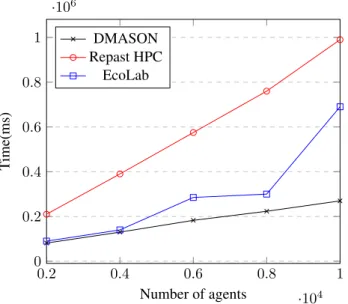
The second scalability test fixes the number of regions to 32 and varies the number of agents from 2.000 to 10.000, keeping other parameters as the ones used before. As Fig. 5 shows, with a workload grown of x5 (from 2.000 to 10.000 agents), there is an increase of about; x3,32 on DMASON, x4,7 on Repast HPC and x7,6 EcoLab execution times. The framework showing the best performance on this test is DMASON as it is x2,55 faster than EcoLab and x3,67 times faster than RepastHPC for 10.000 agents.
The third experiment is aimed to study the influence of communications on the simulation. In this case, simula-tion parameters are the same as the ones in scalability tests, but with a fixed number of 10.000 agents and 32 regions. The communication buffer changes its size to 16B, 64B and
0.2 0.4 0.6 0.8 1 ·104 0 0.2 0.4 0.6 0.8 1 ·106 Number of agents T ime(ms) DMASON Repast HPC EcoLab
Fig. 5: EcoLab vs Repast HPC vs D-MASON: scalability results from 2.000 to 10.000 agents
256B. Results of this test are shown at Fig. 6, where ona)
there is an increase of about 3,23% on DMASON’s
execu-tion time from 16 to 256B while onbthere is a x2 increase
on FLAME and a 10% increase on Repast HPC.
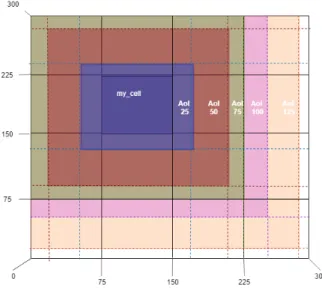
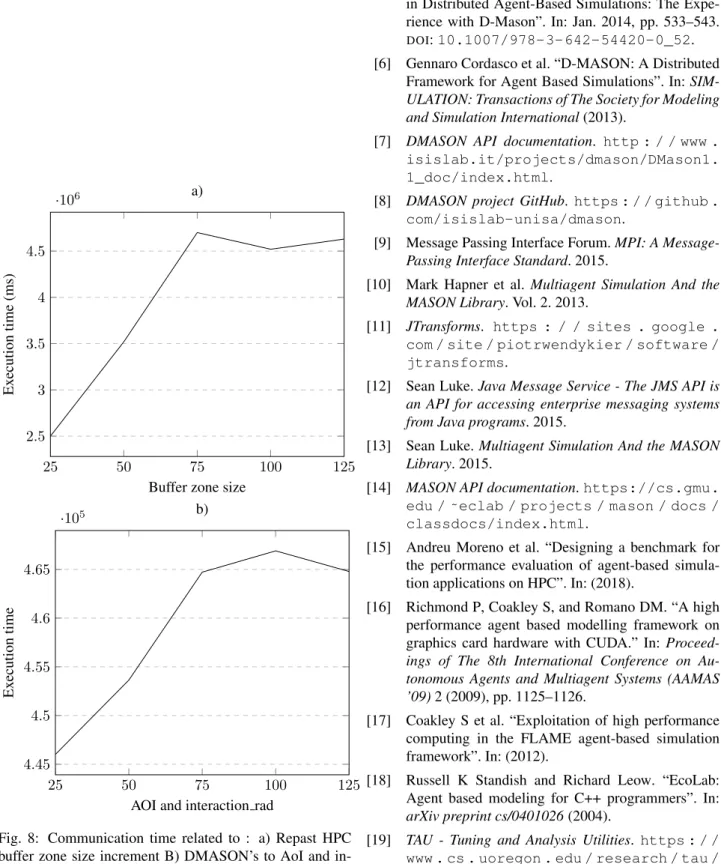
DMASON’s communication approach allows the com-munication of adjacent cells, as explained on section 4.2, on a similar way as Repast HPC does. To increase the num-ber of agents involved on communications, the AoI has been changed from the initial 10 to 25, 50, 75, 100 and 125, as well as the interaction radius of the agents, while the all other simulation parameters are kept the same as before but the number of regions that will be set to 16 (on a 4x4 grid) . That will result on a change of the area of the regions that will be shared (as the example on Fig. 7 shows). Fig 8 shows an increment for both Repast HPC and DMASON’s execution times between AoI 25 and 75, that corresponds on the area for the colliding cells. Once this area grows below 75, it will no longer show repercussion on the communica-tion time as it will surpass colliding cells and neither of the frameworks is communicating agents with cells further than an unit of distance.
7
C
ONCLUSIONSDMASON installation its not a complex task for either 3.2 nor 2.5 versions. However, there is a lack of documentation regarding the functioning of the framework itself, and the methods and classes that compose it. The few API docu-mentation available [7] is outdated. There is also no infor-mation in detail about how it treats other aspects, as bal-ancing or how and where are simulation steps executed. To know about those aspects (that are in fact, important mat-ters), the information has to be obtained looking thought DMASON’s code [8]. Even so, as DMASON has plenty of simulation code examples, combined with the extensive MASON documentation [14] [13] makes developing simu-lations with this framework an easy task.
From my point of view, having a GUI on master’s ap-plication makes launching a simulation on a remote cluster way slower than it could be if it were launched without it. If
16 64 256 2.58 2.6 2.62 2.64 2.66 2.68 2.7 ·105
Communication buffer size
Ex ecution time(ms) a) DMASON 16 64 256 0.8 1 1.2 1.4 1.6 1.8 ·106
Communication buffer size
Ex ecution time(ms) b) Repast HPC FLAME
Fig. 6: Execution time evolution when varyingcomm buff
size from 16 to 256B on : a) DMASON , b) Repast HPC and FLAME
Fig. 7: AOI size increment
your connection is slow, it is impossible to be able to open the firefox window you need to start a simulation. On the bright side, it is quite an easy tool to use and pretty intu-itive plus allows the users to visualize information of run-ning simulations, available workers and simulations history at all time.
The objective of this paper was to compare DMASON’s performance with other ABMs frameworks but it was not possible to make an extended comparison as TAU [19], used to measure the performance of the other ABM simulation frameworks on [15], may be influencing on their execution time. In the future, it would be interesting to use MPI option of DMASON instead of the JMS one, and either use java TAU to get the simulation execution times or find another way to measure them for the other ABMs frameworks so it is possible to compare them with DMASON. It’d be also interesting to check out the amount of bytes sent at commu-nications as communication times are way below the com-putation times shown on DMASON.
8
ACKNOWLEDGEMENTS
I would like to thank to my tutor Eduardo C´esar and to Anna Sikora who have helped me thought the development of this project.
R
EFERENCES[1] Rousset A et al. “A survey on parallel and distributed
multi-agent systems for high performance computing
simulations.” In:Comput Sci Rev22 (2016), pp. 27–
46.
[2] Apache ActiveMQ. http : / / activemq . apache.org/.
[3] Collier et al. “Parallel agent-based simulation with
Repast for High Performance Computing.” In: 89(10) (2013), pp. 1215–1235.
[4] Gennaro Cordasco et al. “A Framework for
25 50 75 100 125 2.5 3 3.5 4 4.5 ·106
Buffer zone size
Ex ecution time (ms) a) 25 50 75 100 125 4.45 4.5 4.55 4.6 4.65 ·105
AOI and interaction rad
Ex
ecution
time
b)
Fig. 8: Communication time related to : a) Repast HPC buffer zone size increment B) DMASON’s to AoI and in-teraction rad increment
[5] Gennaro Cordasco et al. “Communication Strategies
in Distributed Agent-Based Simulations: The Expe-rience with D-Mason”. In: Jan. 2014, pp. 533–543.
DOI:10.1007/978-3-642-54420-0_52.
[6] Gennaro Cordasco et al. “D-MASON: A Distributed
Framework for Agent Based Simulations”. In:
SIM-ULATION: Transactions of The Society for Modeling and Simulation International(2013).
[7] DMASON API documentation. http : / / www . isislab.it/projects/dmason/DMason1. 1_doc/index.html.
[8] DMASON project GitHub. https : / / github . com/isislab-unisa/dmason.
[9] Message Passing Interface Forum.MPI: A
Message-Passing Interface Standard. 2015.
[10] Mark Hapner et al.Multiagent Simulation And the
MASON Library. Vol. 2. 2013.
[11] JTransforms. https : / / sites . google . com / site / piotrwendykier / software / jtransforms.
[12] Sean Luke.Java Message Service - The JMS API is
an API for accessing enterprise messaging systems from Java programs. 2015.
[13] Sean Luke.Multiagent Simulation And the MASON
Library. 2015.
[14] MASON API documentation.https://cs.gmu. edu / ˜eclab / projects / mason / docs / classdocs/index.html.
[15] Andreu Moreno et al. “Designing a benchmark for
the performance evaluation of agent-based simula-tion applicasimula-tions on HPC”. In: (2018).
[16] Richmond P, Coakley S, and Romano DM. “A high
performance agent based modelling framework on
graphics card hardware with CUDA.” In:
Proceed-ings of The 8th International Conference on Au-tonomous Agents and Multiagent Systems (AAMAS
’09)2 (2009), pp. 1125–1126.
[17] Coakley S et al. “Exploitation of high performance
computing in the FLAME agent-based simulation framework”. In: (2012).
[18] Russell K Standish and Richard Leow. “EcoLab:
Agent based modeling for C++ programmers”. In:
arXiv preprint cs/0401026(2004).
[19] TAU - Tuning and Analysis Utilities.https : / / www . cs . uoregon . edu / research / tau / home.php.