Smart Objects for Attentive Agents
Christopher Peters
1; Simon Dobbyn
1; Brian Mac Namee
2; Carol O’Sullivan
1Image Synthesis Group1 Trinity College Dublin
Dublin 2 Republic of Ireland
Artificial Intelligence Group2 Trinity College Dublin
Dublin 2 Republic of Ireland
ABSTRACT
We present an extended framework for modelling agent-object interactions in virtual environments. Our framework is based on the concept of Smart Objects and provides agents with pre-programmed interaction information for the automatic generation of animations. The ability to generate such animations without human intervention is vital when constructing plausible, real-time agents. Unlike previous approaches, our model also contains information for directing the attention of agents when interacting with objects. Such information is useful for driving gaze behaviours, for example when grasping objects. Our framework supports both bottom-up (attention capture) and top-down, task driven, simulation of behavioural animation on a per-object basis. It also provides support for the management of the interactions of multiple agents with a single object. We show how objects are designed and provide a concrete example of using the modelling approach with a gaze controller in an animation system.
Keywords
Smart objects, attention, gaze, behavioural animation.
1 INTRODUCTION
The animation of autonomous agents is a challenging task. Agents must make high-level decisions for themselves and convert them into low-level animations, while maintaining plausibility in both planning and motion with respect to the viewer. Throughout a simulation, many of the animations that an agent conducts will be based on interactions with the outside world. In allowing the agent to conduct interactions with objects in the world, a number of general approaches may be taken. One option is to provide the agent with low level rules and a learning model, and allow the agent to learn how to use objects. Unfortunately, this approach is not suitable where ready-made worlds with competent actors are required. Also, endowing individual agents with different mental models for every object in a large
world would not be efficient in terms of storage. The other option is a system where there is a shared concept of how objects work. All agents in the system can have access to the same knowledge about how an object can be manipulated. Although this might at first seem to be a less realistic approach than the former, this may not be the case.
Within the fields of psychology and Human Computer Interaction (HCI) the concept of affordance [Gib77] suggests that the design of real world devices inform users in how to operate the device. The de-facto example of this is that the shape of a door handle (which matches the shape of a human hand) suggests to a human that the handle should be grasped and turned. However, the most compelling advantage to this approach is that it decreases the complexity of the task of performing realistic virtual human and object interactions enormously.
The most successful implementation of this latter approach is that of the smart object from accomplished work by Kallman and Thalmann [Kal98]. In this approach, objects themselves contain information and hints about how they should be interacted with by agents. Typically this information describes factors such as preconditions which must be
Permission to make digital or hard copies of all or part of this work for personal or classroom use is granted without fee provided that copies are not made or distributed for profit or commercial advantage and that copies bear this notice and the full citation on the first page. To copy otherwise, or republish, to post on servers or to redistribute to lists, requires prior specific permission and/or a fee. WSCG SHORT PAPERS proceedings
WSCG’2003, February 3-7, 2003, Plzen, Czech Republic.
met before objects can be used, how parts of an object should be grasped and how a character should be animated while using an object.
This paper will present two contributions to the smart object model. The first of these is to allow smart objects control the gaze behaviours of agents whilst they are using an object. Attention is an important aspect of agent animations, since it conveys a sense of presence and plausibility to viewers of the final animation. The per-object attention information is pre-processed during a modelling phase, and then used by a gaze manager to generate a number of gaze motions in a high-level manner when an agent decides to look at an object.
Our second contribution is to place objects at the centre of situation specific interactions between characters, allowing the objects inform characters on how they should interact whilst simultaneously using the object. As an example of this we will present a bar object which allows characters perform interactions based on the use of this object.
Section 2 of this paper will describe our smart object modelling architecture and how it is used to direct the low-level animation of agents. Section 3 reviews the gaze generation system and how it uses attention information defined during the modelling of an object. Section 4 looks at how smart objects are constructed and defined by users, using a bespoke 3D Studio Max plug-in. Section 5 contains our conclusions and suggestions for future work.
2 OBJECT
MODELLING
The primary impetus for this work is research conducted by Kallman and Thalmann [Kal98, Kal99a, Kal99b] on agent-object interactions using
smart objects. Smart objects extend the idea of object specific reasoning, whereby objects contain more information than just intrinsic object properties [see Lev96]. A smart object is an object that is modelled with its interaction features. Interaction features are defined as all parts, movements and descriptions of an object that have some important role when interacting with an agent.
Smart objects provide the needed parameters for motion generation. Features are identified in such a way as to provide important information to the motion generator. As well as defining intrinsic object properties such as position, mass and appearance, smart objects consist of extra properties:
Interaction information: positions and gestures. For example, hand interaction information such as hand shape.
Object behaviours: consisting of commands (connecting an action with an object part), variables for object states and consequent behaviours.
Behaviour-dependent object variables: if a door is closed, the agent cannot walk through and will need to open it.
Agent behaviours: behaviours that are expected from different interactions. When a door opens, have the agent walk to a predefined position so that it passes through the door.
Smart object applications provide a number of advantages over more commonplace approaches: they decentralise animation control, separate high level planning from low level object reasoning and allow the same object to be used in multiple applications. They also allow behaviours to be easily connected with high-level planners, and promote Object Oriented Design since each object encapsulates data. In this section, we describe a smart object model which is based on that from [Kal98], but has a number of compelling differences. The most important difference is that our smart object model is constructed in such a way as to promote the objects as being central to interactions between characters. Our smart object model is designed to be used with the Proactive Persistent Agent (PPA) architecture [Mac01] to drive the behaviour of virtual humans within simulations. Agents based on the PPA architecture are proactive in the sense that they can take the initiative and follow their own goals, irrespective of the actions of the player. Persistence
refers to the fact that at all times, all NPCs in a virtual world are modelled (at least to some extent), regardless of their location relative to that of the user. Although these two properties are considered an inherent part of the intelligent agent paradigm [Woo95] they have mostly been ignored in agent architectures used in simulations, and in particular computer games. The PPA architecture is designed in such a way as to promote situational intelligence, through techniques such as role passing [Mac02a], and our smart objects are designed to promote similar ideas.
The following sections will describe the key features of our smart object model.
2.1 User
Slots
and this implies what kind of interactions can be performed at that slot. Before any agent can begin to use a smart object they must first obtain a free user slot of an appropriate type.
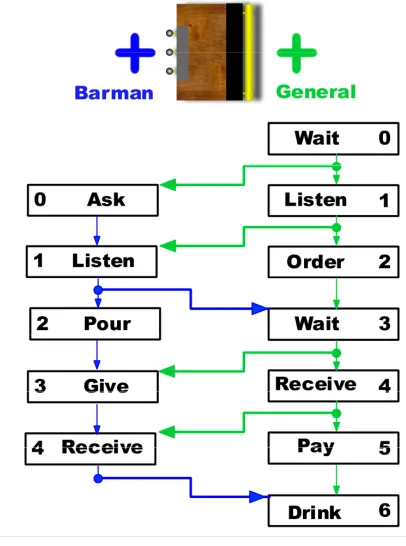
Figure 1 shows an illustration of a smart bar object. Two user slots are shown: the barman slot and the
general slot. The barman should stand at one side of the bar facing in the direction of the bar, while the customer (who uses the general slot) should stand at the other side of the bar, facing the agent at the barman slot.
User-slots are a departure from the smart object model used in [Kal98]. The main advantage of user slots is that they avoid many of the concurrency problems which arise through the use of rules alone (which is the way in which the original smart object model operates). This is particularly important if we are to have agent interactions centre around smart objects. For example, the bar object allows bar patrons to order a drink from the barman, the barman pours these drinks and gives them to the patrons, and the patrons pay for their drinks and drink them. All of this could lead to serious concurrency problems, making the user-slot notion particularly appealing. The biggest disadvantage of user slots is that they can lead to slightly repetitive behaviours as agents will always stand in the same position, follow the same series of steps etc. However, this can be overcome by providing a range of user slots for each object, and ensuring that animations are not too repetitive.
2.2 Usage
Steps
Each user slot contains a number of usage steps
which describe, in a step by step manner, how an agent should use an object. There are a number of key pieces of information at each usage step:
• The information required to animate the agent at this step.
• The conditions which must be met in order for the agent to move onto the next step.
• Details of any changes which are to be made to either the agent’s attributes or the object’s attributes on completion of this usage step. • Details of any information which should be
passed to users of this object on completion of this step.
• Whether or not the agent is free to socially interact with other agents while at this step. • Points of interest on the object upon which the
agent should focus while at this usage step. After the animation information, the most important aspect of a usage step is the condition which allows the character at that step to move on to the next usage
step. Conditions can take one of two forms. The first indicates that the agent must only wait for the animations required by the current step to be complete in order to move onto the next step.
The second, and more interesting, form that a condition may take is that an agent at a particular slot must wait for an agent at another slot to reach a particular usage step in order to move onto the next step. It is in this way that we allow character interactions to be centred around a smart object. Figure 1 shows an illustration of the usage steps involved in using a bar object at both the barman and general user slots. The arrows show the conditions involved in moving from one usage step to the next. Usage steps with arrows going directly from that step to the next (for example going from step 0 (ASK) to
step 1 (LISTEN) of the barman user slot) only require that the animations required by the first step have been performed in order to move on to the next step. If there is a point along an arrow moving from one step to the next out of which an arrow leads to the start of a step of another user slot, then the character at the current usage step must wait until the character at the other slot reaches the usage step indicated by this arrow. For example, if an agent at the general user slot is at step 1 (LISTEN), then they must wait
Figure 1. An illustration of a smart bar object indicating the object's user-slots, the usage steps involved in using the object at these slots, and the conditions involved in moving between
until the agent at the barman slot has reached step 1 (LISTEN), before they can move on to step 2 (ORDER). Once a usage step is complete, changes can be made to the attributes of both the users of an object, and the object itself, and these are listed in each usage step. Characters’ decisions to use particular objects are based on internal motivations crossing thresholds [Mac02a] and these motivations are then adjusted based on the user attribute changes listed in a particular usage step. Along with attributes changing, important pieces of information must often be passed between characters using the same object. These are also listed in the usage step.
Characters implemented through the PPA architecture are capable of performing a number of social interactions with each other [Mac02b]. These include joking, chatting, flirting etc. At some usage steps (for example the WAIT steps for the bar object) characters
are free to engage in these interactions with other nearby characters. Whether or not such interactions are allowed is indicated at each step.
Finally, each usage step also includes information about the important parts of the object upon which the user should focus their gaze while at this step. The gaze system will be explained in section 3.
3 GAZE
CONTOLLER
Gaze is an important consideration when animating characters; failure to look in expected directions can destroy the plausibility of an otherwise passable animation. A good example of this is grasping, where prehension by a human is normally preceded and accompanied by eye gaze towards important locations [Mac94]. A virtual character that can grasp objects without ever looking at grasp positions will tend to look robotic in nature.
Figure 2. The final position of the character after a number of basic gaze motions. From left to right: stare motion, look motion, glance motion. Motions differ in joint contributions of eyes, head and spine.
3.1 Attention Related Object Properties
The essential premise behind the gaze controller is that each object contains a number of pre-processed attention properties that guide gaze control when the system is running. Object properties are useful for controlling gaze behaviours after the agent has decided to look at a certain object in the scene. Note that the control of attention in deciding what object to look at in a scene is outside the scope of this paper, though such a controller would inevitably operate at a high level and use the gaze manager and smart objects to partially control gaze behaviours.3.1.1 Attention
Points
Attention points are the fundamental properties that can be applied to each object. An attention point represents an interesting or meaningful position on an object. Salient areas tend to draw attention in a bottom-up manner. Each attention point may also contain a tag defining some meaningful feature on the surface of the object at that position. Tags are strings that are interpreted at runtime. For example, a food package object may contain an attention point that is tagged with the label ‘SIGN INGREDIENTS’. This location will then be visited during gazing motions and can be linked in with the object’s behaviour scripts. Attention points can also be tagged as monitor positions, so that the agents can monitor locations. This is useful in a variety of situations: in the bar scene for example, it is important for the agent to monitor the bar table in anticipation of the drink object arriving. Attention points are added manually by the user during the modelling phase.
3.1.2 Face
Descriptors
Individual faces or groups of faces may be tagged with descriptors. Descriptors allow a single geometric object to be split up into a number of conceptually separate parts. This is useful for components that span multiple faces, but may be represented by a single part of a texture. For example, the label of a bottle object will span multiple faces. These faces can be assigned a tag ‘SIGN LABEL1’. At runtime, an attention point is generated for these faces.
3.2 Gaze
Manager
The gaze manager provides high-level animation functions for controlling eye and gaze movements. Requests are made to the gaze manager for movements and the gaze manager arbitrates and initialises the low-level animations as necessary. Coupled with attention information from the smart objects, the gaze manager uses a basic set of fundamental gaze motions to provide appropriate looking behaviour. The manager itself arranges gazes
using two queues: the first queue is used to store requests for gaze motions, while the second queue is ordered with winning requests.
3.2.1 Basic Gaze Functions
The gaze manager provides three general low-level gaze types: look, glance and stare. These gaze types differ by the contribution of the orienting joints, the spine, head and eyes, to the final orienting motion. Glance: these animations allow the eyes to move to their maximum extents. The head and spine contribute in lesser amounts to the final motion, with the spine providing the smallest contribution.
Look: these animations allow a moderate amount of movement with the eyes. The head is the main contributor to this type of motion, followed by the spine.
Stare: these animations do not allow any eye movements; the eyes stay in their rest orientation. Instead, only the head and spine are used in orienting towards a point of interest.
In cases where orienting is not necessary, there is simply eye movement and in some cases a small amount of head movement.
Figure 2 provides illustrations of the different gaze types. Note that the dwell time of the eye on the target and the speed of the orienting motion are not tied to the gaze type and are instead passed as parameters by the calling controllers.
3.2.2 Gaze
Requests
Gaze requests are made to the gaze manager through interface functions. A gaze request consists of a gaze type, a start time, a dwell time and a priority level. Dwell time is the amount of time that the eye should remain on the target position before continuing with further requests. It should be noted that there is no guarantee that gaze requests will run on time. It is possible that the gaze motion will be delayed or even cancelled by the manager, especially if it has a low priority and there are high-level gaze motions pending.
on the saliency value of the attention point, defined during the modelling phase.
High-level behaviours can be constructed from these primitive gaze requests. Search behaviour would be one example. For a bus-stop object, the search function could animate the virtual human in such a way as to search the object for an attention point tagged “SIGN TIMETABLE”. Such an attention point would mark the centre of all faces on the bus-stop object that have been tagged with “SIGN TIMETABLE”.
4 OBJECT
EDITOR
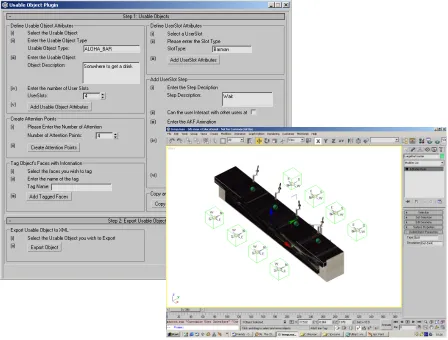
In order to allow world designers to define smart objects, an object editor plug-in (see figure 3) was created in 3D Studio MAX. This plug-in was written in MAX Script, which is a scripting language for 3D Studio MAX that allows the building of custom import/export tools.
The object editor provides an interface that allows the assignment of the interaction attributes (see section 2) to an object in 3D Studio Max and the exporting of these attributes to an XML file. In addition to this, the
object editor allows these attributes to be saved and loaded in the .max file along with the object.
The creation of a smart object begins with the selection (in 3D Studio MAX) of the 3D mesh used to represent the smart object in the real-time system. The plug-in then allows a user to create and transform a user-defined number of user slots for the object using 3D Studio MAX’s transform tools. Once the user slots are in place, the plug-in allows all of the previously discussed attributes to be defined, facilitating easy creation of smart objects. To reduce the designer’s workload, the plug-in also allows the copying and pasting of user slot attributes.
[image:6.595.72.520.101.441.2]With user slots and usage steps in place, the plug-in allows the creation and transformation of attention points, and the tagging of the object’s faces with descriptor information. The gaze manager uses this information to control gaze behaviour (see section 3). Once the smart object has been defined using the plug-in in 3D Studio MAX it can be exported to an XML file, which uses a proprietary DTD (Document Figure 3. The 3D Studio Max plug-in for creating smart-objects. Bar object is shown with dummy
Type Definition). This XML file can be loaded into the real-time system and provides the information on how virtual humans can interact with and attend to the object.
For example, in the case of a bar object represented by a mesh consisting of a bar counter and four bar taps, the plug-in was used to create four user slots of type barman and four user slots of type general. Using 3D Studio MAX’s transform tools, the barman
[image:7.595.71.285.257.419.2]user slots were positioned on the same side as the bar taps and orientated so that the barman faces the counter, while the general user slots were positioned on the other side of the bar counter and orientated so that any agents using these slots would face the barman.
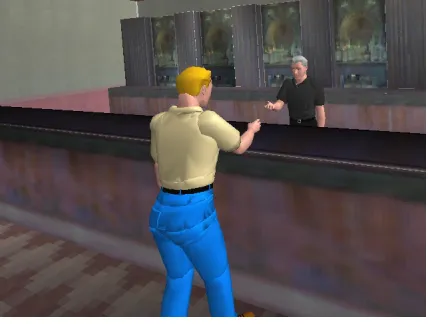
Figure 4. The smart bar object in action. A customer pays the barman for a drink. Once the user slots were created for the bar object, the plug-in was used to define the usage steps for each user slot. For example, in the case of the general
user slots, the third usage step is for the customer to order a drink (see right hand side of Figure 1). In the case of this usage step, the following attributes were defined using the plug-in:
• The step number: 3
• The name of the keyframe animation: ‘order’
• The agent cannot socially interact with other agents as he is dealing with the barman • The agent can proceed to the next usage step
once he has finished ordering his drink Once each usage step for the general and the barman
user slots were defined, the plug-in was used to copy and paste these usage steps since each specific type of user slots have the same usage steps.
Finally, the plug-in was used to create and transform the bar object’s attention points and to define face descriptors. In the case of this object, attention points were placed on the bar counter so that the customer
can anticipate the arrival of his pint, and also placed on the bar tap labels. The faces containing the label of the bar tap mesh were tagged with ‘SIGN LABEL1’ so that the customer can look at the different type of beers while he is waiting to be served.
5 CONCLUSIONS AND FUTURE
WORK
We have presented an extended framework based on the concept of smart objects. Our extension has built on previous work in a number of ways:
• Attention properties have been added to objects in order to facilitate automatic gaze control based on task context and salient features.
• Coordination of multiple agents provides object-centric agent interactions.
• An easy-to-use plug-in for modelling smart objects. The choice of 3D Studio Max allows designers to leverage prior knowledge of the product for fast smart-object definition.
A screenshot of the ALOHA system showing two virtual humans using a smart bar object is shown in figure 4. The use of a smart object allows this complicated series of agent-agent and agent-object interactions to be directed by the smart object. There is still more work to be done in a number of areas. One omission is the inability to spawn new consumable objects at runtime. For example, when an agent uses the bar object to obtain a drink, a new consumable drink object should be introduced into the world. Consumable objects should also be smart objects; however this will require a number of further extensions to our smart object implementation. As mentioned, with regard to the attention model, only information to assist per-object gaze motions is provided in the smart object description. Future work in this area will concentrate on an attention model that uses techniques to do attention processing at scene-level in order to determine the objects that the agent looks at. Once an object is the focus of the agent’s attention, the object properties presented in this paper will be useful in driving gaze motions. A scheme for automatically generating attention points on objects may also prove to be beneficial future research.
6 REFERENCES
[Gib77] Gibson, J.J., The Theory of Affordances, In R. Shaw & J. Bransford (eds.), Perceiving, Acting and Knowing. Hillsdale, NJ: Erlbaum,1977. [Gil01] Gillies, M., Practical Behavioural Animation
Based on Vision and Attention, PhD Thesis, University of Cambridge Computer Laboratory, Technical Report TR522, 2001.
[Kal98] Kallmann., M., and Thalmann, D. Modeling Objects for Interaction Tasks. Proc. EGCAS98, pp.73-86, 1998.
[Kal99a] Kallmann., M., and Thalmann, D. A. Behavioural Interface to Simulate Agent-Object Interactions in Real Time, Proc. CA99, pp.138-146, 1999.
[Kal99b] Kallmann., M., and Thalmann, D. A. Direct 3D Interaction with Smart Objects, Proc.
VRST99, pp.124-130, 1999.
[Lev96] Levison. L., Connecting Planning and Acting via Object-Specific Reasoning, PhD Thesis, Dept. of Computer and Information Science, University of Pennsylvania, 1996.
[Pra85] Pratt., M. J., and Wilson, P.R., Requirements for Support of Form Features in a Solid Modeling System, Report R-85-ASPP-01, CAM-1, 1985.
[Mac94] MacKenzie C.L., and Iberall, T. The Grasping Hand, Amsterdam, The Netherlands: Elsevier Science Publishers, 1994.
[Mac01] MacNamee, B., and Cunningham, P., Proposal for an Agent Architecture for Proactive Persistent Non Player Characters, Proc. of the 12th Irish Conference on AI and Cognitive
Science, 2001.
[Mac02a] MacNamee, B., Dobbyn, S., Cunningham, P. and O’Sullivan, C., Men Behaving
Appropriately - Integrating the Role Passing Technique into the ALOHA System, In
Proceedings of Animating Expressive Characters for Social interactions, Symposium of the AISB'02 Convention, Imperial College, London, 2002. [Mac02b] MacNamee, B. and Cunningham, P., The
µ-SIC System: A Connectionist Driven Simulation of Socially Interactive Agents, University of Dublin, Department of Computer Science, Technical Report TCD-CS-2002-43, 2002.