Technology (IJRASET)
Exploring Usability Effects of Increasing Security
in Click-Based Graphical Password
Rupali Navalkar1, Prof.P.L.Ramteke2
1
ME First Yr.(CSE), 2Associate Professor ME(CSE), M.Phil(CS),PhD(Pursuing) H.V.P.M’s COET, Amravati
Abstract--Graphical passwords have been proposed to address known problems with traditional text passwords. For example, memorable user-chosen text passwords are predictable, but random system assigned passwords are difficult to remember. We explore the usability effects of modifying system parameters to increase the security of a click-based graphical password system. Generally, usability tests for graphical passwords have used configurations resulting in password spaces smaller than that of common text passwords. In this paper focuses on the integrated evaluation of the Persuasive Cued Click Points graphical password authentication system, including usability and security. An important usability goal for authentication systems is to support users in selecting better passwords, thus increasing security by expanding the effective password space. We chose to study Persuasive Cued Click-Points (PCCP),a click-based graphical password system in which users select click-points on more than one image. PCCP has been shown to have good usability, while avoiding hotspots that have been shown to affect the security of other click-based graphical password systems .
Keywords--Graphical password, authentication, persuasive technology, usable security.
I. INTRODUCTION
The problems of knowledge-based authentication, typically text-based passwords, are well known. Users often create memorable passwords that are easy for attackers to guess, but strong system-assigned passwords are difficult for users to remember .Users also tend to reuse passwords across many accounts and this increases the potential impact if one account is compromised. Alternatives such as graphical passwords use images instead of text for authentication. We chose to study Persuasive Cued Click-Points (PCCP), a click-based graphical password system in which users select click-points on more than one image . PCCP has been shown to have good usability, while avoiding hotspots that have been shown to affect the security of other click-based graphical password systems. To address this, we explored increasing security in PCCP, conducting a study modifying two parameters: the size of the images presented, and the number of click-points in each password. The study included 82 participants who completed two sessions scheduled two weeks apart. Our results show that both manipulations affect the
usability of the system and memorability of the passwords. Moreover, when adjusted to provide the same level of security, both manipulations have similar effects on usability and memorability. This suggests that when increasing security, constraints of devices and user preferences might be accommodated. For example, when designing for mobile devices, smaller images and more click-points might be used due tosmaller screen sizes.
II. BACKGROUND
Graphical password systems are a type of knowledge-based authentication that rely on the human ability to better recognize and remember images than textual or verbal information. They fall into three main categories:
A. Recall
(Also known as drawmetric ) Users recall and reproduce a secret drawing on a blank canvas. Example systems include Draw-A-Secret and Pass-Go.
B. Recognition
Users recognize and identify images from a previously memorized portfolio from a larger set of decoy images. Example systems include PassFaces.
C. Cued-Recall
Technology (IJRASET)
memory cues to help recall these locations. Example systems include PassPoints and Persuasive Cued Click-Points.
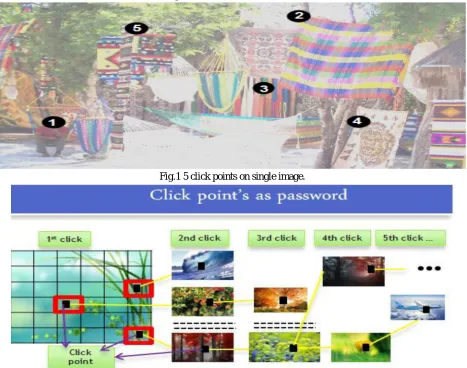
Click-Points:- one click-point on different images shown in sequence.Cued:- Next image displayed is based on the location of the previously entered point. Persuasive:-encouraging users to select more random point, and hence more difficult to guess, click-points. Other approaches to authentication are token-based systems and biometrics. While applicable in some cases, these have potential drawbacks, such as risks of loss, and privacy implications. In cued-recall click-based graphical passwords. passwords consist of clicking on specific locations on one or more images. To log in, the user must click on these previously selected locations. The user is not expected to repeat exact pixel selections.
In this paper, we focus on Persuasive Cued Click-Points (PCCP) . In PCCP, a user is presented with a number of images in sequence, and must choose one click-point per image. The first image is assigned by the system, but each subsequent image is determined by the user's previous click. PCCP is stronger against password-guessing attacks than other click-based password systems and also maintains login
[image:3.612.74.541.246.614.2]times and success rates comparable to text passwords.However, to be seriously considered as a replacement for text passwords, PCCP needs to be at least as secure as standard text passwords.
Fig.1 5 click points on single image.
Fig. 2 with CCP, users select one click-point per image. The next image displayed is determined by the current click-point.
III. METHODOLOGY
A. Persuasive Technology
Technology (IJRASET)
resulting passwords must be memorable. As detailed in the next section, our proposed system accomplishes this by making the task of selecting a weak password more tedious and time-consuming. The path-of-least resistance for users is to select a stronger password (not comprised entirely of known hotspots or following a predictable pattern). As a result, the system also has the advantage of minimizing the formation of hotspots across users since click points are more randomly distributed.
B. Persuasive Cued Click Points
[image:4.612.84.531.244.400.2]Previous models have shown that hotspots are a problem in click-based graphical passwords, leading to a reduced effective password space that facilitates more successful dictionary attacks. We investigated whether password choice could be influenced by persuading users to select more random click-points while still maintaining usability. Our goal was to encourage compliance by making the less secure task (i.e., choosing poor or weak passwords) more time-consuming and awkward. In effect, behaving securely became the path-of-least-resistance. Using CCP as a base system, we added a persuasive feature to encourage users to select more secure passwords, and to make it more difficult to select passwords where all five click-points are hotspots.
Fig. 3 PCCP Create Password interface. The viewport highlights part of the image
The theoretical password space for a password system is the total number of. unique passwords that could be generated according to the system specifications.
IV. SYSTEM MODULE
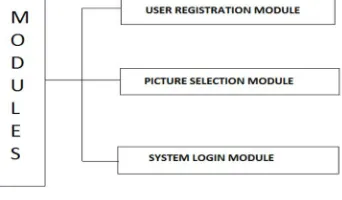
The system designed consist of three modules such as user registration module, picture selection module and system login module. Shown in (fig 4.)
Fig. 4 System design modules.
In user registration module user enter the user name in user name field and also suitable tolerance value (tolerance value is use to compare registration profile vector with login profile vector). When user entered the all registration phase, these user registration data stored in data base and used during login phase for verification. In picture selection phase. there are two ways for selecting picture password authentication.
User defines pictures: Pictures are selected by the user from the hard disk or any other image supported devices.
[image:4.612.219.390.491.591.2]Technology (IJRASET)
V. USABILITYLarge images and more click-point increases the theoretical password space but decreases usability.
Achieve better usability & memorability for approximately equivalent password space.
Hypothesis:
Increasing the number of click-points will decrease usability. Increasing the size of the image will decrease usability.
For conditions with approximately comparable theoretical password spaces, the condition with the larger image size will have better usability.
A. Usability Results
Success Rates
Lower value of p in session-2 supports both the Hypothesis 1 & 2.
B. Analysis of Password Distributions
Technology (IJRASET)
VI. ADVANTAGESHard disk locking.
System log in and log out process. Folder Locking.
VII. CONCLUSION
In this paper, we explored the issue of how increasing the security of a click-based graphical password scheme would affect usability and memorability. We tested PCCP with different parameters in order to evaluate its usability when the theoretical password space is increased. We found that increasing the number of click-points or increasing the image size both have usability and memorability impacts.
We explored the effects of number of click-points and image size on user behaviour resulting in clustering of click-points. We found no evidence that the number of click-points had an effect, but it appeared that larger images led to less clustering. An important usability and security goal in authentication systems is to help user‟s select better passwords and thus increase the effective password space. We believe that users can be persuaded to select stronger passwords through better user interface design. As an example, we designed Persuasive Cued Click-Points (PCCP) and conducted an usability study to evaluate its effectiveness. We obtained favorable results both for usability and security. PCCP encourages and guides users in selecting more random click-based graphical passwords.
VIII. ACKNOWLEDGEMENT
First of all we would especially like to express sincere gratitude to our parents. It gives us great pleasure and satisfaction in presenting the paper on “EXPLORING USABILITY EFFECTS OF INCREASING SECURITY IN CLICK-BASED GRAPHICAL PASSWORD”
Before we get into the depth of the things, we show our sincere gratitude towards respected teachers, guide, colleagues and all who have directly or indirectly helped us in the completion of this paper successfully
REFERENCES
[1] S. Chiasson, A. Forget, R. Biddle, and P. C. van Oorschot. Inuencing users towards better passwords: Persuasive Cued Click-Points.
[2] S. Chiasson, R. Biddle, and P. van Oorschot, “A Second Look at the Usability of Click-Based Graphical Passwords,” Proc. ACM Symp. Usable Privacyand Security (SOUPS), July 2007.
[3] S. Chiasson, A. Forget, R. Biddle, and P. van Oorschot, “Influencing Users towards Better Passwords: Persuasive Cued Click- Points,” Proc. British HCI Group Ann. Conf. People and Computers: Culture, Creativity, Interaction, Sept. 2008.