Technology (IJRASET)
Cloud Resource Virtualization: A Survey
Ms. Sajjan R.S. 1, Ms. Noorjahan Mohammed Rafique2Department of Computer Science and Engineering, V.V.P. Institute of Engineering and technology Solapur, Maharashtra, India
Abstract— Internet, it is a large collection of networks where resources are globally networked, in internet cloud computing plays a major role in order to share the data and one of the important technology in the cloud computing is virtualization. Mainly it is used to maintain the collection IT resources which are used by the cloud providers. The main aim of the virtualization is ability to run the multiple operating systems on a single machine buy sharing all the resources that belong to the hard ware as well as it enables industry or academic IT resources through on-demand allocation dynamically. The resources have different forms such as network, server, storage, application and client. In this paper our main goal is to provide the basic knowledge about the virtualization technology in cloud computing and how it acts in the cloud computing environment. And we also discuss about, how to maintain the virtualized environment with the optimized resources. This paper presents an overview of the cloud computing scenario . It provides the types of cloud, different examples of the cloud services, different enterprises in the field of cloud computing, overview of Virtualization, Hypervisors, their types and example, types of virtualization and its benefits are being discussed in this paper.
Keyword: Virtualization, virtualized Servers, cloud computing, Network virtualization, Hypervisor.
I. INTRODUCTION
Now a days in our global software markets, our business need plays a major role, and these business needs has to respond faster or they should upgrade to the changes that happening in the software market, and on the basis of the customer demands and the growth opportunities In order to happen this we need have an infrastructure that should be upgraded to the current changes in the market means it is nothing but the agile infrastructure. As cloud computing continues to gain in popularity and usage, service providers face serious challenges in terms of scalability and complexity. From the perspective of service providers, it is a big challenge to ensure the efficient usage of existing infrastructure and to accurately santicipate future demands.[1]
Cloud computing employs Internet-based services to move computations from self-managed resources within endpoints to on-demand resources in centralized infrastructures. Cloud computing removes the limitations that once existed in traditional computing paradigms, such as platform, hardware, software, architecture, and geographical location, thus becoming a leading trend in high performance computing. In the cloud computing paradigm, the end users contract with cloud vendors for customized Virtual Machines (VM), and interact with the VMs using only a console/browser through the Internet, with all the data and applications maintained on the remote servers accessible to end users from any device, anywhere, at any time[2].
The process of selecting a cloud provider(s) from a pool of options is not an easy task. For instance,
Microsoft Azure, Amazon EC2, Google App Engine,and Aneka are some examples of existing cloud-based infrastructure [1] Virtualization plays a major role in the cloud computing technology, normally in the cloud computing, users share the data present in the clouds like application etc., but with virtualization users shares the Infrastructure. the main usage Virtualization Technology is ,Normally cloud providers provide the applications with the standard versions to their cloud users, for suppose if the next version of that application is released, then cloud provider has to provide the latest version to their cloud users and practically it is possible but it is more cost expensive. To overcome this problem we use virtualization technology. By using virtualization, all severs and the software application which are required by other cloud providers are maintained by the third party people, and the cloud providers has to pay the money on monthly or annual basis.
Mainly Virtualization means, running multiple operating systems on a single machine but sharing all the hard ware resources. And it helps us to provide the pool of IT resources so, that we share these IT resources in order get benefits in the business.
II. LITERATURE REVIEW
Technology (IJRASET)
information related to this paper on this survey.Normally we can use virtualization and cloud Computing is combinely . But nowadays many people are connected to the internet so we require more memory to store this information as database so we can normally use the virtualization. For store large amount of data. And the cloud is user friendly. Suppose any customer want any information then they can use the internet and easily find it. That is cloud.
The research result also shows that which cloud type and service model will be used in the Big Data And it also shows how much beneficial to people. This literature review based on a large collection of Big Data and Cloud Computing academic papers and industry trade articles.
III. WHATISCLOUDCOMPUTING
A. Defining Cloud
Cloud Computing is a type of computing as a service over the Internet on a pay-as-you-use. Cloud computing, providing services to users based on their demands offers a new way of services by re-arranging various resources. It allows for the provision of a variety of business and customer services. As organizations experience increasing pressure to change or move organized to respond continuously to a changing environment.
Cloud computing is a recent technology, which is capturing the attention of both the organizations as well Individuals nowadays. It allows users to share various services in a cost effective manner.[1]
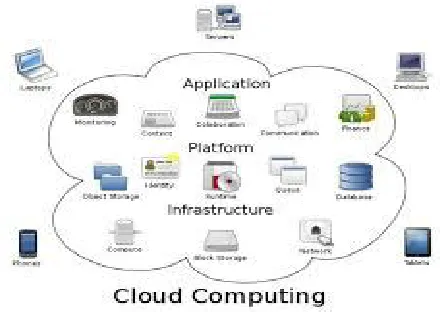
[image:3.612.202.422.334.490.2]B. Architectuer Of Cloud Computing
Fig 2.2 .Architecture of Cloud computing
C. Types Of Clouds
Three types of clouds exist-
1) Public cloud 2) Private cloud 3) Hybrid cloud.
Public cloud is external cloud. The pay-as-you-go services previously discussed available to the general public. In a public cloud configuration, a business does not own the core technology resources and services, but outsources these.
A private cloud is an internal data center of a business that is not available to the general public, but uses cloud in short this is own cloud for own business. In a private cloud configuration, resources and services are owned by the business, with the services accessible within the business through the intranet (world wide web). Since the technology is owned and used by the business, this type of cloud is more expensive and more costly than a public cloud, but is also more secure and protective.A private cloud is an internal cloud, placed inside the company’s, own business firewall and managed by the company or that business owner.
Technology (IJRASET)
D. Cloud Services
1) IaaS: This is a first layer of cloud services or we can say that first model which is providing the services for new way developer. No one can think about the spending money on the new resources, but the new generation developer thinking like that. The new thinking developer buying the new resources and rent the machine in the form of VM’s (virtual machine) and storage which can be used via some Wide Area Network. [1]
2) PaaS: PaaS is the middle layer or we can say the second model which is used by cloud environment. Platform as a service provides the platform to deploy the application. PaaS is just an extension of SaaS model which is providing customers to develop the new featuers.Paas model increases the security and feature capabilities.[1]
[image:4.612.220.412.211.394.2]3) SaaS: Saas is the cloud environment where the application developed by the developer is provided to customers. The customer then uses the software on demand through the internet (world wide web) . Just like a all world data is in small smart phone.[1]
Figure 2.4 cloud services
IV. VIRTUALIZATION
Virtualization is the ability to run multiple operating systems on a single physical system and share the underlying hardware resources.Virtualization is the abstraction of computer resources. Virtualization hides the physical characteristics of computing resources from their users, be they applications, or end users. The abstraction from the hardware state provided by virtualization allows not only multiple operating systems to coexist on the same hardware, but for one VMM to run on multiple different networked physical systems concurrently.
This includes making a single physical resource (such as a server, an operating system, an application, or storage device) appear to function as multiple virtual resources; it can also include making multiple physical resources (such as storage devices or servers) appear as a single virtual resource.
The underlying goal for such a virtualization is to provide a highly available and highly reliable environment so that clients can access resources on demand without the need to consider contingency plans in the event that the server or network fails[1].
A. Hypervisors
In virtualization technology, there is one piece of software that allows the physical servers can have multiple instances of virtual machines and it called as Hypervisor.
These instances are virtual machines that create in virtualization environment and the hypervisor is responsible for supervising and controlling these machines o communication, resource sharing and reallocating the virtual machines.
This connection between virtual parts and physical parts is very important in a cloud computing environment and it is the only path to the dynamic data centers which was our solution for new data centers [6].
B. Types of hypervisor
Technology (IJRASET)
[image:5.612.236.420.81.328.2]Fig. 4 Hardware Virtual Machine
Fig. 5 Software Virtual Machine
There are two types of hypervisor. The first is called as “Bare Metal Hypervisor” and the second one is called as “Hosted Hypervisor” [4].As shown in figure 3.2, the first type is directly installs on the hardware and controls all the resources. The hypervisor shares resources among the virtual machines and divided them as the policies are defining it.In figure 3.3, we can see other type of virtualization, which is we can install it on the traditional system with normal stack of hardware and software.Our focus is on the type one hypervisor that used for data centers. A hypervisor or virtual machine manager (VMM) is a piece of software which we can install it on hardware to allow us to use multiple operating system on hardware (type one).
When we talk about the high availability of cloud computing and moving instances (VM’s) between the servers, we must know that the virtualization has a major role in this ability of cloud computing [7].
Hypervisor is a software program that manages multiple operating systems on a single computer system.
The hypervisor manages the system's processor, memory, and other resources. It is also called as virtualization managers.This piece of software actually controls the all incoming and outgoing actions and it is a connector between hardware layer and virtual machines.
As shown it figure 3 which is Xen hypervisors designing, all the resources, converted into the virtual resources and manage them and it will give virtual resources to each the virtual machine [8].
These resources comprise a virtual processor (vCPU), virtual network, virtual storage and etc.
Fig. 6 The Structure of machine running the Xen Hypervisors
[image:5.612.195.433.555.691.2]Technology (IJRASET)
machines, and it is also responsible for communication between VM’s which usually called as virtual machines inter-VM communication.
[image:6.612.195.431.133.262.2]There are some approaches used for high speed inter-VM communication like Socket-Outsourcing , XenSockets Xway and XenLoop are using a simple shared memory channel for exchanging network packets.
Fig. 7 ZIVM Architecture
Although virtualization has become a new technological requirement that offers significant advantages[5], its increased usage has increased the scope of failure. To achieve the full benefits of this new technological requirement, effective planning is crucial for the successful implementation of a virtualized environment. In traditional computing systems, during a single system or hardware failure or crash, we deal with one server by transferring the load to other servers available in the cluster. However, in virtualization, the failure of a physical machine will halt all of the VMs running on it. Although it is possible to transfer the load to other available VMs, the damage incurred in this case would be comparatively larger than in the case of traditional computing systems. Apart from the failure in the physical machine, another problem in virtualization is the need to shut down all of the VMs when new hardware is to be introduced into the physical machine. Many methods are employed to overcome such issues,such as high-availability clustering[5].
V. VIRTUALIZATION TYPES
There are three major types of virtualization Server virtualization,Client virtualization and Storage virtualization.The architecture and categorization of virtualization techniques are illustrated in Fig.
Fig. 8 Virtualization types
A. Server Virtualization
In server virtualization, single server performs the task of multiple servers by partioning out theresources of an individual server across multi-environment.The hypervisor layer allows for hosting multiple applications and operating systems locally or remotely[1].The advantages of virtualization include cost savings, lower capital expenses,high availability and efficient use of resources.
B. Client Virtualization
[image:6.612.194.427.450.611.2]Technology (IJRASET)
hosted on a server machine and operated by the client across a network. Second, local or client hosted virtualization in which the secured and virtualized operating environment runs on local machine. Third, application virtualization [18] that provides multiple ways to run an application which is not in traditional manner. In this technique an isolated virtualized environment or partitioning technique is used to run an application. Storage Virtualization: It creates the abstraction of logical storage from physical storage. Three kinds of data storage are used in virtualization, they are DAS (Direct Attached Storage), NAS (Network Attached Storage) and SAN (Storage Area Network). DAS is the conventional method of data storage where storage drives are directly attached to server machine. NAS is the shared storage mechanism which connects through network. The NAS is used for file sharing, device sharing and backup storing among machines. SAN is a storage device that are shared with different server over a high accelerate network. Hypervisor is the software package that controls working access to the physical hardware of host machine. There are two kinds of hypervisor models as hosted and bare metal / native. Hosted hypervisor instance operates on top of the host operating system whereas bare metal based hypervisor operates directly on the hardware of host machine.
C. Storage virtualization
In data centers the data storage is little different. The physical storages are not directly connected to the servers; they are connected to the servers through the network. One of the most popular protocols use for storage virtualization is a storage area. Network (SAN) and network attached storage (NAS). For the fast interaction the use fiber channel and the protocol they are using is iSCSI (internet Small Computer System Interface). These protocols allow block storage to be accessible over the network by using a TCP/IP protocol. They use TCP for reliable communication. The storage virtualization also relies on a Redundant Array of Independent Disk (RAID) technology to protect data from lost in any physical failure occurs . In new virtual storage systems, they use the latest technology which called as Redundant Array of Independent Node (RAIN) rather than RAID. This new technology helps availability of data even if several servers go down [5].
The significant point of the storage virtualization is to hide geographical positions of the data over the cloud environment.For this significant point of the storage virtualization maps the logical storage to the physical storage as blocks of data .
In storage virtualization still the management of the data which can be distributed among the network is the one of the important issues in cloud storage [5]. Vendors promise to the scalability and on-demand of their cloud make the most important challenges for cloud providers. Performance and transfer rate became important issues not only for the cloud providers, but it will affect the user experience. To overcome this kind of problems, the bandwidth needs to be increased otherwise it can be a bottleneck for data transfer [4]; and it becomes a serious problem for the providers which affect the cost of services if they do not face the bandwidth limitation.
Another key issue for the cloud storage is the data security. Because of the multi tenancy of the cloud, user’s data may distribute among the different physical storage or even over other data centers. The management system should controls how own the data and should have access to the data. Transferring data over the network without proper protection may cause the security risk of user data .
D. Memory Virtualization
In virtualization concept also we have a virtual memory environment. The guest operating systems that loaded into different virtual machines, using virtual addresses and these addresses will mapped into the physical memory addresses. But guest operating systems can not directly access to the actual physical memory and responsible for controlling of this operation is a hypervisor.
We can say the hypervisor is the heart of the virtualization which maps virtual devices to the physical ones.VMs are using the virtual memories based on the paging techniques. In reality, there are three different types of memory we can enumerate here. One is used by the guest OS, we can call it as virtual memory. Another memory is addressed in the hypervisor and we can call it as real memory and the last one is the physical memory [25].
The guest OS map virtual memory to the real memory which controls by the hypervisor. After that, real memory or hypervisor memory maps to the physical memory. It means if an application needs to retrieve the data, before access the exact data, the virtual address should be translated into a physical address and then the VM can use that page of memory. So, the retrieving data take two times more than traditional hardware based systems in the same conditions.
E. Network virtualization
Technology (IJRASET)
two of virtual computer together. By help if virtualization even cables converted to the virtual cables and it reduced the time which the data center technicians spend on the cabling and maintaining the cables. The cloud computing systems are essentially using the TCP/IP based protocols on communication.It is like communication in LAN networks. Each computer has one specific, unique IP and they are communicating with each other. Here also the same with little different, instead of computers we have virtual computers or virtual machines (VM’s). The important thing here is the IP’s we talking about are differs from the IP’s we can configure on operating systems which we can set to our platform if we have that access (in case of IaaS service), statically or dynamically. These IP’s are
available from pool of network which we have learned about it in network virtualization.
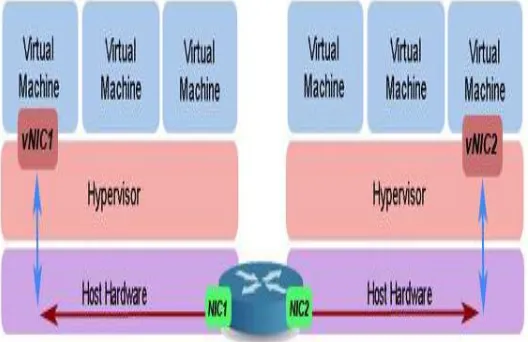
[image:8.612.209.436.264.395.2]Network virtualization also continues the term of scalability in a cloud environment. The important point also here is a dynamic scalability of network resources [15]. In cloud network communication,the physical devices will connect via the physical connection and they can communicate with their physical NIC’s, but virtual devices use the virtual NIC’s which is sdistributed within hosts [6]. If two VMs want to communicate to each other through a network, there are two scenarios. The first scenario is communication between two VM on a same physical host. In this case all devices will be virtualized devices like virtual switches or virtual firewalls. As shown in the figure, the base communication will be through a hypervisor.
Fig. 10 VM’S Communication on one physical host
In the second scenario, two VMs are on different physical host which communication is a combination of physical communication and virtual communication. As shown in the figure, the virtual NIC will be linked to the physical NIC of host one. After that the communication will be between physical NICs and at the last step, the packets will send to another virtual NIC [7].
Fig. 11 VM’S Communication on two physical host
[image:8.612.175.439.467.638.2]Technology (IJRASET)
release old resources such as network resources and reallocate in the new host. This releasing old IP and reassign new IP from the other network pool may make a problem for us.
Another challenge in such a network is communication between the VMs on the networks with IPv4 with other VMs on IPv6 networks. In some management software designers only considered only IPv6 or vice versa, but most of the heterogeneous data centers are must support both IP versions [19]. Thus, like all other types of networks, virtual network also and its management should consider such difficulties.
Service providers can deploy and manage customized end-to-end services on those virtual networks for the end users by effectively sharing and utilizing underlying network resources leased from multiple infrastructure providers. Such a dynamic environment will foster deployment of multiple coexisting heterogeneous network architectures without the inherent limitations found in theexisting Internet[7].
VI. VIRTUALIZATION AND CLOUD COMPUTING
One of the principal questions in this concept is: “are virtualization and cloud computing same?” The answer for this question is “No”. The virtualization is the ace of the layers in cloud computing architecture, but it has a major role in most of the abilities of cloud systems. Virtualization is one of the technologies that given the ability to create the abstraction of computer with ability to perform all the behavior of the actual computer. With the aid of these concepts, we can create other new technologies and one of them is cloud computing technology.
But we can say these two concepts are closely related to each other. The virtualization is an overall concept that holds lots of abilities for creating a computers or computer groups virtually and make network of these virtual computers. The most important thing is the virtual computer completely acts like real computers and any problem we can visualize for physical computer, can be appears here. For example, if in network with the physical computers we have a serious problem with the attackers of open ports or even unauthorized users, the same problem also here appears itself. It implies that all the security risks and security issues are in physical network, we will face it in virtual network of virtual computers.
With the help of all these facilities that virtualization provided for us, computer scientists took advantage of that and with few changes and controllers developed the cloud computing technology.
VII. PLACE OF VIRTUSALIZATION IN CLOUD COMPUTING
Virtualization is one of the major components of cloud computing that helps to emergence of cloud computing. To understand cloud computing it is important to understand the concepts like network virtualization or storage virtualization.
The main components of virtualization in the cloud are virtual machines, because all of the operating systems and applications are inside them. They are like a container which isolated and separated from each other, even in the same physical host.
Based on the basic role of cloud as-pay-you-go, the vendors give you that ability to access these provided virtual machines and in some cases they will make these virtual machines like an actual computer and you can purchase them for a limited time and take advantage of this ability without any worries about how they operate. That thing you are purchasing is the availability of these services. Vendors in exchange promise to give you these services without any interrupt that make the availability in high level.
VIII. BENEFITS OF VIRTUALIZATION
A. Sharing of resources helps cost reduction
B. Isolation: Virtual machines are isolatedfrom each other as if they are physically separated.
C. Encapsulation: Virtual machines encapsulate a complete computing environment.
D. Hardware Independence: Virtual machines run independently of underlying hardware.
E. Portability: Virtual machines can be migrated between different hosts.
IX. CONCLUSION
In the above sections we initially describe the basic virtual technology architecture that consists of cloud users and the service models, operating system and the hardware. And then we came to know how virtual servers are worked when compared to the traditional servers, and we also came to the pros and cons of both traditional and virtual servers.
Technology (IJRASET)
REFERENCES[1] Waseem Ahmed and Yongwei Wu_,” Estimation of Cloud Node Acquisition”, TSINGHUA SCIENCE AND TECHNOLOGY,IEEE,I S S N l l 1 0 07 - 0 2 14 l l 0 1 / 1 0 l l p p 1- 1 2, Volume 19, Number 1, February 2014
[2] Liang Hu, Xilong Che_, and Zhenzhen Xie,” GPGPU Cloud: A Paradigm for General Purpose Computing”,TSINGHUA SCIENCE AND TECHNOLOGY, IEEE,ISSNl l1007-0214l l03/12l lpp22-33,Volume 18, Number 1, February 2013.
[3] Yaxiong Zhao ? , Jie Wu, and Cong Liu,” On Peer- Assisted Data Dissemination in Data Center Networks:Analysis and Implementation”IEEE, TSINGHUASCIENCE AND TECHNOLOGY, ISSNll1007-0214ll06/10llpp51-64 Volume 19, Number 1, February 2014.
[4] Thomas Serling And Dylan Stark “Cloud Comuting HPC”,1521-9615/09/$25.00 © 2009 ieee, copublished by the ieee CS and the aip.
[5] G. J. Popek and R. P. Goldberg, "Formal requirements for virtualizable third generation architectures," Comm. ACM, vol. 17, no. 7, pp. 412-421,1974. [6] Krishna tej Koganti 1 , Eswar Patnala 2 , Sai Sagar Narasingu 3 , J.N. Chaitanya 4,” Virtualization Technology in Cloud Computing Environment”, (ISSN
2250-2459, ISO 9001:2008 Certified Journal, Volume 3, Issue 3, March 2013.
[7] Amol Selokar 1 , Prof.S.D.Zade 2 , Prof.C.U.Chavan 3,” Survey on Dynamic Resource Allocation Using Virtual Machines for Cloud Computing Environment”, Vol. 3, Issue 5, May 2014.
[8] N.M. Mosharaf Kabir Chowdhurya,1 , Raouf Boutaba b,c, “A survey of network virtualization”, IEEE Std 802.1Q-s2005 (May 2005).
[9] Chunye Gong, Jie Liu, Qiang Zhang, Haitao Chen and Zhenghu Gong “Cloud Computing Characterstics”, 1530-2016/10 $26.00 © 2010 IEEE DOI 10.1109/ICPPW.2010.
[10] Attila Kertesz (MTA SZTAKI),Gabor Kecskemeti (MTA SZTAKI) and SIvona Brandic,” Autonomic Resource Virtualization in Cloud-like Environments”, December 14, 2009.
[11] D. Armstrong and K. Djemame, Performance issues in clouds: An evaluation of virtual image propagation and I/O paravirtualization, The Computer Journal, vol. 54, no.6, pp. 836-849, 2011.
[12] L.S. Committee, IEEE Standard for Local and Metropolitan Area Networks—Virtual Bridged Local Area Networks, IEEE Std 802.1Q-s2005 (May 2006). [13] J.Praveen Immanuel Paulraj and R.KannigaDevi,” Efficient Resource Provisioning Using Virtualization Technology in Cloud Environment”, Volume 3,
Special Issue 3, March 2014.
[14] Jia Rao, Member, IEEE, Yudi Wei, Student Member, IEEE, Jiayu Gong, Member, IEEE, and Cheng-ZhongXu, “QoS Guarantees and Service Differentiation for Dynamic Cloud Applications”, 2012.
[15] D. Armstrong and K. Djemame, Performance issues inclouds: An evaluation of virtual image propagation and I/O paravirtualization, The Computer Journal, vol. 54, no.6, pp. 836-849, 2011.
[16] A. Quiroz, H. Kim, M. Parashar, N. Gnanasambandam, and N.Sharma, Towardsautonomicworkloadprovisioning for enterprise grids and clouds, in Grid Computing, 2009 10th IEEE/ACM International Conference on, 2009, pp. 50-57.
[17] N. Huber, S. Becker, C. Rathfielder, J. Schweflinghaus and R. H. Reussner, Performance modeling in industry:A case study on storage virtualization, in Proceedings of the 32nd ACM/IEEE International Conference on Software Engineering, Cape Town, South Africa, 2010.
[18] S. Verboven, K. Vanmechelen, and J. Broeckhove, Black box scheduling for resource intensive virtual machine workloads with interference models, Future Generation Computer Systems, vol. 29, no. 8, pp. 1871-1884, 2013
[19] P. Padala, K.-Y. Hou, K.G. Shin, X. Zhu, M. Uysal, Z. Wang, S. Singhal, and A. Merchant, “Automated Control of Multiple Virtualized Resources,” Proc. ACM European conf. Computer Systems (EuroSys ’09), 2009.
[20] P. Barham, B. Dragovic, K. Fraser, S. Hand, T. Harris, A. Ho, R. Neugebauer, I. Pratt, and A. Warfield, “Xen and the Art of Virtualization,” Proc. ACM Symp. Operating Systems principles (SOSP ’03), Oct. 2003.
[21] V. Aggarwal, X. Chen, V. Gopalakrishnan, R. Jana, K. K. Ramakrishnan, and V. Vaishampayan, “Exploiting virtualization for delivering cloud-based IPTV services,” in Proc. IEEE Conf.Computer Communications Workshops (INFOCOM WKSHPS), Apr.2011


![Fig. 7 ZIVM Architecture Although virtualization has become a new technological requirement that offers significant advantages[5], its increased usage has](https://thumb-us.123doks.com/thumbv2/123dok_us/8581667.861099/6.612.194.427.450.611/architecture-virtualization-technological-requirement-offers-significant-advantages-increased.webp)