ISSN: 2321-9653
I N T E R N A T I O N A L J O U R N A L F O R R E S E A R C H I N A P P L I E D S C I E N C E
AN D E N G I N E E R I N G T E C H N O L O G Y (I J R A S E T)
`
Page 471
Time Based Messenger - An Android Application
Jashanpreet Singh#1, Karan Mahajan*2
M.Tech-IT Research Scholar#, , Assistant Professor* #
Department of I T ,Chandigarh Engineering College, Landran Mohali
Abstract- The developed application is time based i.e the user can select the desired time limit (say x is starting limit and y is ending limit) and when the application is opened it automatically goes to the silent mode and when the other person calls the user , the message is sent from theuser phone to the caller that “I am busy and would call you after (x-y) hr ).
Keywords- : Android, permissions, Sdk, APK, Eclipse
I. INTRODUCTION
The scenario of mobile phone changed with the introduction of smart phones running Android[1]. Android posed serious threat to I phone market directly .Android phones are cheaper and offers more application as compared to I phone [1].The Android operating system is built on a modified Linux Kernel[1]. Java applications are included in Software stack(Fig No.1 )that run on a virtual machine and system components are written in Java, c, c ++and XML. Smart phones today are providing same computing power and similar capabilities as that of PC.A major difference between Apple App store and Android Market is that Apple App store is gated unlike Android Market. Developers must have to submit application to Apple Store while in Android Market developer can post his application directly[1]. Considering an architectural view ,Android applications are safer than iphone applications.[2]The reason behind this is each Android
application runs its own space and can’t access data from
other applications without explicit user permission while on the other hand iphone application can access other application space ,data without user persmission [2]. Google is giving services like an open developer market, open source and multiple phone service options through its Android operating system.
II ANDROID SDK AND ANDROID DEVELOPMENT TOOLS
The Android software development kit (SDK) includes a complete set of development tools[3]. These include a debugger, libraries, a handset emulator. Android Development Tools (ADT) is a plug-in for the Eclipse IDE that is designed to give you a powerful, integrated environment in which to build Android applications[3].
Eclipse is used for creation and debugging of Android applications[4],[5].
With ADT[4], we
can-1.
set up new Android projects,2.
Access tools for using virtual device3.
Compile and debug the application4.
Create a APK file of the projectThe platform used for developing is Ecllipse Gallileo 4.0 .
III ANDROID PERMISSIONS
Android Permissions are given to the user at the time they install the application through the Android Market (e.g. Google Play Store) on the web or the phone. When the Application Package (APK) is installed, the user is presented with the permission screen [7]. The list of permissions include Storage ,Phone Calls, Network and communication [7].The work flow of permissions is shown in the Fig 5. These application level permissions generalize access controls into
categories like “access location information” or “access the
network ” [8] . The only way for users to not install the
application after viewing the permissions is to use the physical back or home buttons on their phone [7]. The Android Market provides every application two installation pages [ 9] . The first one includes a description about the application, user reviews, snap shots and a Download Button. After pressing the download button , it takes the user to final installation
Permissions are displayed as a three-layer warning: a large label that describes the specific permission, and a hidden details dialog [6]. The Android user space library provides developers with a public API, i.e., the classes and methods that developers invoke when writing applications. It supports the insertion of advertisements into applications' user interfaces and re-lays data between the application and the Android system service[10].
IV TIME BASED APPLICATION FOR ANDROID
In this application, time based facility is provided to the user. The application automatically goes to the silent mode as soon as it is opened. The various mode options (Meeting, Driving, In class, Sleeping, Busy) is displayed to the user. The user can select the desired mode upon selecting the modes time options is displayed. It includes both manual and default . In manual default option fixed time of 2 hours is selected i.e.
the mode it will remain active for 2 hours and message “I am in meeting (mode selected) right now call u after 2 hours “ will be sent to the caller on the other hand in manual option, the user will be given the facility to enter his desired time limit in which the user wants to set his starting time and ending time . It forms the syn
to y, where x is starting time and y is ending time . By selecting the manual option , the message displayed will be specific in this case like if mode selected is Driving and time limit is 13:00 to 16:00 ,If the caller calls the user
layer warning: a large heading that states each permission’s general category, a small label that describes the specific permission, and a hidden
space library provides a public API, i.e., the classes and methods that developers invoke when writing applications. It supports the insertion of advertisements into applications' user tween the application and the
TIME BASED APPLICATION FOR ANDROID
-time based facility is provided to the user. The application automatically goes to the silent mode as soon as it is opened. The various mode options (Meeting, Driving, In class, Sleeping, Busy) is displayed he desired mode and upon selecting the modes time options is displayed. It includes both manual and default . In manual default
i.e. on selecting
ctive for 2 hours and message “I
right now call u after 2
“ will be sent to the caller on the other hand in
manual option, the user will be given the facility to enter his desired time limit in which the user wants to set his starting time and ending time . It forms the syntax like x to y, where x is starting time and y is ending time . By selecting the manual option , the message displayed will be specific in this case like if mode selected is Driving and time limit is 13:00 to 16:00 ,If the caller calls the user
Fig 1 Software Stack of Android
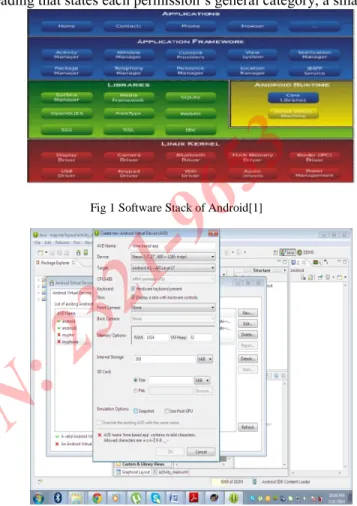
Fig 2 Creating Android virtual device
heading that states each permission’s general category, a small
Fig 1 Software Stack of Android[1]
ISSN: 2321-9653
I N T E R N A T I O N A L J O U R N A L F O R R E S E A R C H I N A P P L I E D S C I E N C E
AN D E N G I N E E R I N G T E C H N O L O G Y (I J R A S E T)
`
Page 473
Fig 3 Starting Virtual device[4]
Fig 4 Emulator Interface [6]
Fig 5 The figure above shows the work flow for installing applications and viewing application permissions. When the user clicks the Screen 1 shown as Amazon Kindle application , it takes the user to Screen 2 which allows him to Accept permissions and install the application or to click the “Show” button which leads the user to Screen 3 and 4 [7].
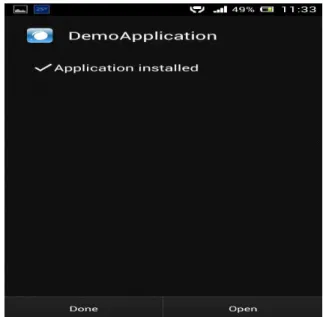
Fig 7 Application Installed
Fig 8 Various Modes Options, Silent mode activated on opening an application
Fig 9 Default and Manual Mode option for Meeting Mode
ISSN: 2321-9653
I N T E R N A T I O N A L J O U R N A L F O R R E S E A R C H I N A P P L I E D S C I E N C E
AN D E N G I N E E R I N G T E C H N O L O G Y (I J R A S E T)
`
Page 475
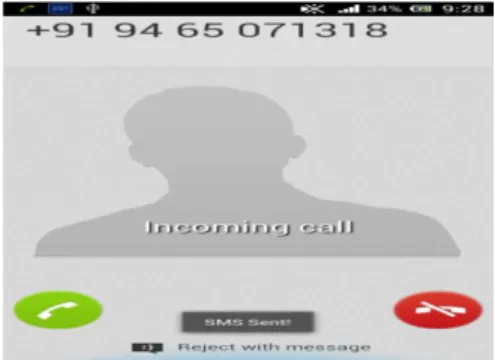
Fig 11 Caller Calling the user and SMS sent
Fig 12 Message Received by the caller and Time sent after calculating the time limits i.e. 2 hr 58 min
VI CONCLUSION
This application is one of the latest researches in the android market. The person needs not to pick the phone as the application in active mode automatically send the message to the caller based on the mode (Driving, Busy, Meeting) selected .The application plays a great role when the person is busy in meeting, driving as he cannot pick the phone.
VII FUTURE WORK
The application currently is time based .In future we will enhance the application by adding voice recognition.
REFERENCES
[1] Android: Changing the Mobile Landscape, Margaret Butler
[2] Kavita Sharma, Android in opposition to I phone
[3] Mark H. Goadrich, Michael P. Rogers, Smart Smartphone Development: IOS versus Android
[4] Niarg Gandewar, Rahila Sheikh, Google Android: An Emerging Software Platform For Mobile Devices
[5] Adrienne Porter Felt, Erika Chin, Steve Hanna, Dawn Song, David Wagner, Android Permissions Demystified.
[6] Adrienne Porter Felt, Elizabeth Hay, Serge Egelman,Ariel Haneyy, Erika Chin, David Wagner, Android Permissions: User Attention, Comprehension, and Behavior
[7] Patrick Gage Kelley, Sunny Consolvo, Lorrie Faith Cranor, Jaeyeon Jung, Norman Sadeh, David Wetherall, A Conundrum of Permissions: Installing Applications on an Android Smartphone
[8] Timothy Vidas, Nicolas Christin, Lorrie Faith Cranor, Curbing Android Permission Creep
[9] Ming Yan and Hao Shi, Smart living using Bluetooth Based Android Smartphone
[10] Paul Pearce, Adrienne Porter Felt,Gabriel Nunez,David Wagner, Privilege Separation for Applications and Advertisers in Android
[11] M. Grace, Y. Zhou, Z. Wang, and X. Jiang,Systematic detection of capability leaks in stock Android smartphones.In Proceedings of the 19th Network and Distributed System Security Symposium (NDSS), Feb. 2012
[12] Ryan Johnson, Zhaohui Wang,Corey Gagnon,Angelos Stavrou, Analysis of Android Applications Permissions
![Fig 3 Starting Virtual device[4]](https://thumb-us.123doks.com/thumbv2/123dok_us/8588180.863051/4.918.105.813.253.1039/fig-starting-virtual-device.webp)