A Framework for the Next Generation Screen Readers
for Visually Impaired
Prabhat Verma
Computer Science and Engg.
Department, Harcourt Butler
Technological Institute, Kanpur,
Uttar Pradesh, India
Raghuraj Singh
Computer Science and Engg.
Department, Harcourt Butler
Technological Institute, Kanpur,
Uttar Pradesh, India
Avinash Kumar Singh
Computer Science and Engg.
Department, Harcourt Butler
Technological Institute, Kanpur,
Uttar Pradesh, India
ABSTRACT
Despite shortcomings, Screen Readers have been the primary tool for using internet by visually impaired. In this paper, we present a framework for an advanced Screen Reader that aims at eliminating the drawbacks that are associated with the existing systems. The proposed framework makes the use of informed search technique to enhance the usability and navigability. Some of its features like background music to appraise the layout structure of web page, mouse hovering to speak out glimpses of the underlying text make the use of image processing techniques. These features are implemented independent of the rest development therefore they can also be used to enhance any existing Screen Reader.
General Terms
Human Computer Interaction, User Interfaces.
Keywords
Speech based web browser, Web-Accessibility, Navigability, Screen Readers, Text to Speech on Web.
1.
INTRODUCTION
One of the original goals of the proponents of internet was to provide equal access to information for all irrespective of their disabilities. After a success story of more than two decades of Internet, this goal is still only partially fulfilled. Findings of a study conducted by Enabling Dimensions, January 2002, New Delhi, reveal that accessing web content was “frustratingly difficult” for visually challenged, implying the need for availability of more accessible and usable web content as well as better software to use the Web effectively by them. Internet can become a very effective tool for visually impaired empowering them with the knowledge and information of choices available as regards employment, independent living etc [1].
Visually impaired users most often use the Internet for sending E-mails, looking for some specific information like reservation inquiry or examination result inquiry, mailing, Web based learning, accessing news sites or for chat. They may also wish to make some transaction on internet like purchase of an item or e-ticket. But due to various reasons inherent to the web pages as well as tools used to access these pages, they are not able to perform these tasks independently. As a result, they may require performing uncomfortable travels. The concept of e-Learning is well perceived by the visually impaired since it helps them in overcoming the basic problems of commuting by bringing the class room to their home: thereby circumventing any bias that human instructors or fellow students might have. Audio-only e-Learning through Internet can be much helpful for them but realizing such a
system has major challenges for describing visual elements like photographs, graphics, diagrams and charts.
The web has become an indispensable source of information and we use it for performing routine tasks as well. The primary mode of interaction with the web is via graphical browsers, which are designed for visual interaction. As we browse the Web, we have to filter through a lot of irrelevant data. Sighted individuals can process visual data in no time at all. They can quickly locate the information that is most relevant to them. Visual layout of the webpage also helps a lot in efficient browsing of the webpage. But, this task can be time consuming and extremely difficult for people with visual disabilities. They are not able to get any layout information of the web page. Speech based browsers are generally sequential in processing. Therefore, clever techniques must be applied for presenting the items available on the website as per the need of the user.
This paper describes a framework for an advanced screen reader. Using this framework, existing screen readers can also be made better usable to visually impaired users. The rest of the paper is organized as follows. Section 2 presents the existing systems and their shortcomings in brief. Section 3 describes the design and architecture of the proposed system. Section 4 presents the results and discussion of the work. And finally, section 5 summarizes the work.
2.
EXISTING SYSTEMS
Various systems have been developed using approaches like document reading rules, content analysis, text summarization, context prediction, summary/gist based, semantic analysis, sequential information flow in web pages etc. A brief survey of some important existing browsing systems is made in this section.
2.1
Screen Readers
Several research projects aiming to facilitate non-visual web access include work on browser level support [1, 2, 3], content adaptation and summarization [3, 4, 5], organization and annotation of web pages for effective audio rendition [3, 6, 7] etc.
Brookes Talk [8] is a web browser developed in Oxford Brookes University in 90’s. Brookes Talk provides function keys for accessing the web page. It read out the webpage using speech synthesis in words, sentences and paragraph mode by parsing the web page content. It also uses some mechanism for searching the suitable results using search engines and supports a conceptual model of website too. It supports modeling of information on web page and summarizes the web page content.
“Emacspeak”[9] is a free screen reader for Emacs developed principally by T. V. Raman (himself blind since childhood, and who has worked on voice software with Adobe Software and later IBM) and first released May 1995; it is portable to all POSIX-compatible Operating Systems. It is tightly integrated with Emacs, allowing it to render intelligible and useful content rather than parsing the graphics.
Csurf[10] is a context based browsing system. Csurf brings together content, analysis and natural language processing (NLP) and machine learning algorithm to help visually impaired to quickly identify relevant information. Csurf is composed of interface Manager, context analyzer, browser object from tress processor and dialog generator. Csurf web browser uses the functionality of VoiceXML, JSAPI, FreeTTS, Sphinx, JREXAPI, etc.
Hearsay [11] is developed at Stony Brook University, New York (USA). It is a multimodal dialog system in which browser reads the webpage under the control of the user. It analyzes the web page content like HTML, DOM tree, segments web page and on the basis of this generates VoiceXML dialogues.
Aster (Audio system for technical reading) [12], developed by TV Raman, permits visually challenged individuals to manually define their own document reading rules. Aster is implemented using EMACS as a main component for reading. It recognizes the markup language as logical structure of web page internally. Then user can either listen to entire document or any part of it.
IBM Talking web browser provides complete java script support on the webpage. This allows the software to speak all the information on the web page including correction of text, tables, graphics description, text in column format, image maps. Using this, visually impaired users can complete online forms for purchasing, selling and trading services over the web. It provides support for low vision by customizing the web page by changing text size and color etc.
BrowseAloud[13] reads web pages for people who find it difficult to read online. As the cursor is moved over words, they are spoken It can also be used to speech enable a website. BrowseAloud works only on websites that are made speech enabled using it.
Shruti-Drishti[14] is a Computer Aided Text-to-Speech and Text-to-Braille System for Persons with Visual Impairment. It has been developed at Media Lab Asia research hub at IIT Kharagpur in collaboration with CDAC Pune and Webel Mediatronics Ltd, (WML) Kolkata to enable persons with visual impairment to access conference websites. This has an integrated Text-to-Speech and Text-to-Braille system which enables persons with visual impairment conference attendees to access the electronic documents from the conference website in speech and Braille form.
SAFA(Screen Access for All)[15] has been developed in collaboration with National Association for the Blind, New
Delhi. It enables visually impaired users to use PC in Vernacular language using speech output. It gives speech output support for windows environment and for typing both for English and Hindi.
WebAnywhere [16] is an open source online Text To Speech System developed for surfing the web. It generates speech remotely and uses pre-fetching strategies designed to reduce perceived latency. It also uses a server side transformational proxy that makes web pages appear to come from local server to overcome cross-site scripting restrictions. On the client side, Javascript is used to support user interaction by deciding which sound to be played by the sound player.
WebAnyWhere requires no special software to be installed on the client machine and, therefore, enables visually disabled people to access the web from any computer. It can also be used as a tool to test the accessibility of a website under construction.
Many other browsers and screen readers like Lynx, Edbrowse, W3m, Alynx, Elinks, Emacs W3, Links, Net tamer, Webbie, Hamer etc. have also been developed to help the visually impaired over the web.
2.2
Accessibility Issues
There are many factors involved in evaluating the accessibility of a web page. These include the overall simplicity of a page, the amount of visual imagery it contains, and whether or not the page is functional when using only keyboard navigation instead of a mouse [17]. Currently, the vast majority of content published on the Internet is inaccessible to visually impaired users. Features of web 2.0 have further magnified the problem as now users are themselves web authors. They may not be aware of accessibility issues. There is a set of guidelines by W3C Web Accessibility Initiative (WAI) that guarantee the accessibility of pages. Three levels of compliance are used: A, AA, and AAA. There are several services available online which can perform an analysis of a given page (or an entire site) to determine its level of compliance with each particular level of accessibility. By using the results of such an analysis a web developer or webmaster can see which portions of a site need the most (or least) amount of work in order to achieve compliance. The most cost-effective means, by far, is to construct a site with accessibility issues in mind from the very beginning.
An Accessible search is one which gives priority to accessible sites containing the desired information and places these sites at the top of the search results so that a visually impaired user may get the desired information quickly
2.3
Problems with Screen Readers
There are many drawbacks with the existing Screen Readers available for visually impaired. Many of them are abused for reading out everything sequentially from first to last word which is not a desirable approach. Further, they may work well for web pages that are in confirmation with the W3C accessibility standards. Otherwise, they exhibit poor performance by not reading some portion of the web page.
Cases of Traps and indecisiveness are not uncommon during web surfing for visually impaired who use screen readers. Such cases should be effectively dealt using the proposed system. For general surfing, screen readers are important and useful tool to the visually disabled. But, in case of complex tasks like information query, complex navigation, form-filling
[image:3.595.51.548.135.398.2]or some transaction, they do not work to the level of satisfaction.
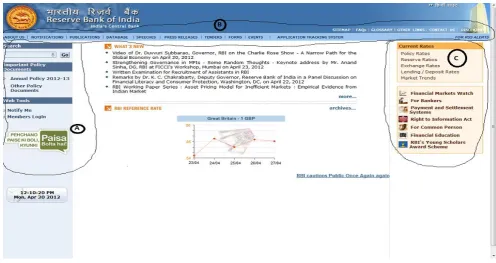
Fig 1: A Website with usual top and left layouts
3.
SYSTEM ARCHITECTURE
This section describes the design issues, conceptual architecture, and interactions among various sub components of the proposed framework.
3.1
Working Methodology
The proposed System has three modes of working:
3.1.1
Auto Sequential Access Mode
In this mode, the browser reads the web page sequentially similar to the most of the screen readers do. This mode may be useful for news reading, gathering knowledge on some topic, e-learning etc. This access mode can be started or stopped at any time pressing the assigned key e.g. CTRL key as in WebAnyWhere.
3.1.2
Manual Sequential Access Mode
In the second mode, the browser speaks outs the element currently under the focus. Up and down arrow keys are used to make the focus forth and back. This mode provides better control for moving around the web page and is helpful in form filling, making queries etc.
Still, navigability in this mode is limited to accessible web contents only. Thus, unreachable content may not be read using this mode.
3.1.3
Text Glimpse through mouse hover Mode
In the third mode, the browser speaks out glimpses of the portion on which mouse-hovering is performed by the user. This mode gives visually impaired user glimpse of some portion of the web page directly. Thus, s(he) can directly go to the portion of their interest on the web page using mouse click
after listening the underlying text. This approach may be sometimes useful in overcoming inaccessible content.
Visually impaired users rely on keyboard to perform user inputs; therefore mouse is not normally useful to them. But for making an assessment of webpage, mouse can made usable to visually impaired users by giving it a role somewhat like a touch screen device performs. This mode is primarily suitable for users with low vision who may not read the content of the text visible to them.
3.1.4
Switch over between two modes
Switch over to any of the available modes can be made by using designated key shortcut at any time. Thus, a visually impaired user may make the combination of the modes to perform navigation around the webpage in a more controlled way.
3.1.5
Key Shortcuts
3.1.6
Background Music to access the Web page
Layout
A novel feature of background music had been added in the framework. It gives the user the webpage layout information by assigning different background music to different regions of the webpage. Using this, a visually impaired user may get a better apprehension of the webpage structure. The background music is automatically changed when a user browses from one region to another using any of the three modes.
3.1.7
Informed Search
Screen Readers like WebAnywhere perform an uninformed depth first search on a web page to read out its contents. In contrast, the features of proposed system e.g. distinct background music and text glimpse using mouse hover make the search on a webpage informed. Thus, visually impaired user may reject or select a region by its background music. Text glimpse using mouse hover provides further heuristics for a more focused search within a region. Thus, using various available modes and features intuitively, visually impaired user may access his/ her text of interest very quickly.
3.2
Conceptual Architecture
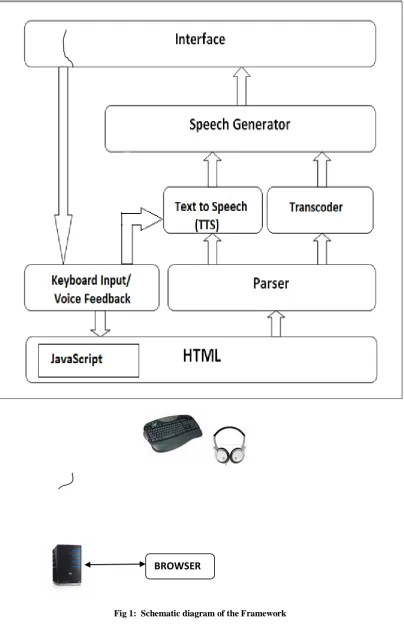
Fig. 2 describes the conceptual architecture of the prototype framework. Visually impaired user requests a web page by giving keyboard input on the web browser address bar. A speech based feedback is generated for each key press thereby assuring the user of correct key press. The requested web page is loaded on the browser. The web page is parsed to obtain its constituent elements. It is then sent to the Text to Speech (TTS) to generate the speech equivalent. The Transcoder is responsible for adding background music to make an assessment of the webpage layout. It also generates speech
glimpses for the text during mouse hovering event mode. It makes the use of advanced image processing algorithms. The output in the speech form may be accessed using headphone or speaker.
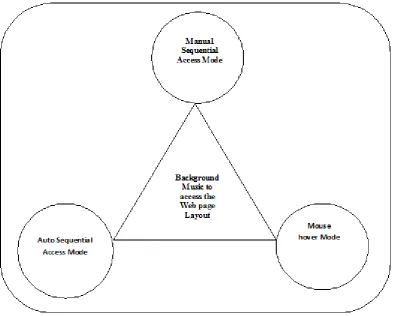
Fig. 3 depicts the interactions among various modes of working. The three modes in conjunction with background music to make an assessment of the webpage layout makes the complete system using which a visually impaired user can perform an informed search to get the content of his/ her interest. At any time, user can make switch over to another mode using the assigned key shortcut for that mode. Thus, visually impaired user can make intelligent guesses to access the relevant content with the help of available modes. Inaccessible code that may not be accessed using the keyboard may be accessed using the mouse hover mode.
[image:5.595.97.502.71.704.2]
Fig 1: Schematic diagram of the Framework
Fig 3: Interactions among various modes of working
3.3
Implementation Aspects
3.3.1
Module for Sequential Navigation Mode
Sequential access mode is already available in most of the screen readers. This is the normal access mode.
3.3.2
Module for Mouse hover Mode
BrowseAloud makes the use of JavaScript to provides the feature of Mouse hover. It Speak the active text when mouse hovers over some text. Unfortunately, BrowseAloud can perform this feature only on those websites which have been speech enabled using it.
To generalize this concept for any website, we had to use altogether different approach. We get the coordinates of the mouse location and recognize the underlying text around the coordinates from the screen shot of the page using text
recognition. The recognized text is sent to the TTS to utter the same.
3.3.3
Module for Background Music for Layout
Detection
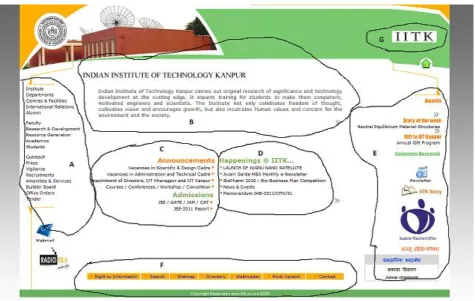
Fig 4: A typical grouping of the elements in the page layout
As this module independently makes the use of image processing techniques to work, it may also be attached as a plug-in with any available screen reader or web access system.
3.3.4
User Inputs
To avoid unreliability and malfunctioning of the system, speech recognition module is not included in this framework.. Only keyboard based input with speech feedback to the key presses is sufficient to give input by a visually impaired.
3.3.5
Platform and Language
Microsoft Windows 7 has been the chosen operating system for the implementation due to its popularity and wide acceptance. Further, due to flexibility provided by it in the development of applications, .Net platform with C# language has been used for development of the prototype Framework. Microsoft Language Interface provides better interface in term of functionality and processing power.
4.
RESULTS AND DISCUSSION
The proposed framework provides a robust and workable solution to the inaccessibility problem closely associated with screen readers. The architecture combines the best features of existing screen readers and the transcoders. Issues of indecisiveness and uncertainty during inter/ intra page navigation can be tackled effectively through the glimpse based approach and background music. These features make the use of image processing techniques. Enormous computing power of modern processors allows us to perform this task in real time. These features are implemented independent of underlying HTML DOM structure therefore; they can be used with any existing Screen Reader to enhance navigability.
5.
CONCLUSION
In this paper, we proposed the architecture and implementation aspects of a framework to advanced Speech based browser for visually impaired. The framework is designed with the aim of providing speech based web access systems with better navigability through informed search. The layout related information is provided by change of background music as user moves from one region to another on the page. The underlying text related information can be accessed by the way of mouse hover over text. Thus, user may access an otherwise inaccessible code using a combination of available modes. It is expected that the implemented system shall be helpful in empowering visually impaired through better control over information and resources.
6.
ACKNOWLEDGMENTS
This research is a part of the Major Research Project entitled “Design and Development of Web Browser for Visually Challenged” funded by the University Grants Commission, New Delhi running in Computer Science & Engineering Department of Harcourt Butler Technological Institute, Kanpur.
7.
REFERENCES
[1] Usage of Computers and Internet by the Visually Challenged: Issues and Challenges in the Indian context, Findings of a study conducted by Enabling Dimensions, January, 2002.
[2] C. Asakawa and T. Itoh: User interface of a home page reader. In ASSETS, 1998.
[3] S. Harper and N. Patel: Gist summaries for visually impaired surfers, In ASSETS’05: Proceedings of the 7th international ACM SIGCCESS conference on Computers and accessibility, pages 90-97, 2005.
[4] M. Hori, G. Kondoh, K. Ono, S. Ichi Hirose, and S. Singhal: Annotation-based web content transcoding, In WWW, 2000.
[5] Huang and N. Sundaresan: A semantic transcoding system to adapt web services for users with disabilities, In ASSETS, 2000.
[6] Freedom Scientific [http://www.freedomscientific.com/] access on June, 2012.
[7] Internet Speech [http://www.internetspeech.com] access on June, 2012.
[8] M. Zajicek, C. Powell, and C. reeves: Web search and orientation with Bookestalk, in Proceedings of tech. and Persons with disabilities Conf., 1999.
[9] T.V Raman, Aster: Audio System for technical reading.
[10]Jalal Mahmud, Yevgen Borodin and I. V. Ramakrishnan: CSurf: A Context-Driven Non-Visual Web-Browser, WWW2007/ Track: Browsers and User Interfaces.
[11]Ramakrishnan, A. Stent, and G. Yang, Hearsay: Enabling audio browsing on hypertext content, in www, 2004.
[12]Jeffery P. Bigham, Ryan S. Kaminsky, Richard E. Ladner, Oscar M. Danielsson, Gordon L. Hempten: WebInsight “Making Web images accessible” presented in Assets’06, USA.
[13]Browse Aloud [http://www.browsealoud.com] Access on June 2012.
[14]MEDIA LAB ASIA
[http://medialabasia.in/index.php/shruti-drishti]. Access on June 2012.
[15]NATIONAL ASSOCIATION FOR THE BLIND [http://www.nabdelhi.org/NAB_SAFA.htm] Access on May 2012.
[16]Bigham J., Prince C, AND Ladner R (2008) WebAnywhere: A Screen Reader On-the-Go., In W4A2008 -Technical, April 21-22, 2008, Beijing, China. Co-Located with the 17th International World Wide Web Conference.