Release Document 24 Jun 1988
This package contains version 3.6b of the Aztec C68k/ROM Cross Development System. It's used to develop, on a PCDOS or MSDOS host system, programs that will run on a 68k ROM-based system.
This release document contains the following sections: I. Product overview
2. New features 3. Known bugs 1. Product overview 1.1 Components
Aztec C68k/ROM consists of the following components: * The Aztec C68k/ROM software;
* Aztec C68k/ROM documentation;
*
Aztec C documentation, which describes features that are common to all Aztec C packages. This documentation describes the following topics: (a) library functions that are provided with all Aztec C packages; (b) an overview of these functions; (c) a general discussion on the writing of C programs; and (d) compiler error messages.Aztec C68k/ROM is used in conjunction with either Aztec Host PC, or the Developer or Commercial version of Aztec C86. Aztec C68k/ROM contains programs (such as the compiler, assembler, and linker) that are used to develop 68k/ROM programs, while Aztec Host PC or Aztec C86 contains programs that facilitates development
The documentation for Aztec C68k/ROM hasn't changed, except as described in this release document Th~ if you are a current user of Aztec C68k/ROM, this release document is the only documentation in your update.
1.2 Getting started
The Tutorial chapter of the Aztec C68k/ROM manual describes how to install and start using Aztec C68k/ROM
2. New features
ReI Doc 6/24/88 C68k/ROM, v3.6b, for pcnos Hosts 2.1 New features of the C68 rompiler
The following paragraphs describe features that are new in v3.6b of the c68 compiler.
2.1.1 Code Generator Control
The Xn option allows special control of the code generator. Each option takes the form of +Xn, where n is a decimal number indicating the option choice. It is possible to abbreviate these options by specifying + Xl, 2 ,3 instead of having a separate + X for each option. The extended options currently supported are:
+XI - Remove A6 from all lists. The compiler considers it not to exist
+X2 - Places data into code segment
+ X3 - Delays the popping of arguments until it is necessary. This saves some small amount of code when several functions are called one after another. Stack is corrected whenever it is necessary or if the number of bytes delayed exceeds 50 bytes. This affects the Db stack back trace command since DB checks the instruction at the return address to see how many arguments were passed to the function.
+X4 - Forces literal strings to be aligned on an even boundary. + X5 - If enabled, + X5 generates inline code for strcpyO, strcmp(), and strlenO or if the name used is preceded by BUILT·IN
_STRCPY(SI ,S2)
-2.2 Source level debugging
The -n option causes the compiler to generate source level debugging information. This information is passed as special lines and characters in the assembly language output file. The assembler automatically passes source level debugging information through to an object module.
2.3 Ubrary changes 2.3.1 Math libraries
There are now two math libraries supported by Aztec C68k/ROM: .. m881.1ib, for programs that perform floating point operations
using the 68881 coprocessor.
.. m68.lib, for programs that perform floating point operations using software emulation.
Source for m881.lib is in m881.arc. It should be dearchived into a new subdirectory of the lib directory, named m88l.
...
3. Kno~n bu~
... as68 doesn't support the .b and . w extensions for bsr, bra" etc. It also doesn't support the .s and .f extensions for the jmp and jsr instructions. However, these are generally not necessary, since the assembler generates the correct length instruction . ... as68 reports errors when the following is assembled with -c
and -d options: dseg regsave ds.l 16
cseg
public .begin entry .begin
movem.l dO-d7/aO-a7,regsave dbra dO,.2
If the code is assembled with -c, -d, and -n, no errors are reported
... The following code, when compiled with + f8, sends c68 v3.6b into an infinite loop.
long a; double b; mainO
{
Aztec: C68k/ROM v3.4b, for PCDOS/MSDOS Host Systems Release Documeat
8 Feb 1988
This package contains version 3.4b of the Aztec C68k/ROM Cross Development System. It's used to develop, on a PC DOS or MSDOS host system, programs that will run on a 68k ROM-based system.
This release document contains the following sections: 1. Product overview
2. New features
3. Known bugs 4. Packaging 1. Product overview 1.1 Compooents
Aztec C68k/ROM consists of the following components: • The Aztec C68k/ROM software;
• Aztec C68k/ROM documentation;
• Aztec C documentation, which describes features that are common to all Aztec C packages. This documentation describes the following topics: (a) library functions that are provided with all Aztec C packages; (b) an overview of these functions; (c) a general discussion on the writing of C programs; and (d) compiler error messages.
Aztec C68k/ROM is used in conjunction with either Aztec Host PC, or the Developer or Commercial version of Aztec C86. Aztec C68k/ROM contains programs (such as the compiler, assembler, and linker) that are used to develop 68k/ROM programs, while Aztec Host PC o·r Aztec C86 contains programs that facilitates development
The documentation for Aztec C68k/ROM hasn't changed, except as described in this release document Thus, if you are a current user of Aztec C68k/ROM, this release document is the only documentation in your update.
1.2 Getting started
The Tutorial chapter of the Aztec C68k/ROM manual describes how to install and start using Aztec C68k/ROM. The following paragraphs discuss topics that aren't covered in that chapter; namely, installation on floppy disks.
drives as needed One possible organization of files on the disks is this:
'" On one disk, put c68, as68, In68, srec68 or hex68, 'include' files, object module libraries. On this disk you could also put a text editor, such as the Z text editor that is in both the Aztec Host PC and Aztec C86 packages.
'" On another disk, put the less-frequently used programs such as the Aztec C68k/ROM object module utilities, and the grep and dil
f
utilities that are in Aztec Host PC and Aztec C86. '" On another disk, put the files that are used to create libraries,such as library source, lb68, and the arcv and make utilities that are in Aztec Host PC and Aztec C86. Copy libraries that you create to the first disk
'" On other disks, put your own files. 2. New features
This section describes the that have' been added to Aztec C68k/ROM in going from version 3.30c to 3.4b.
2.1 New features of the
as
mmpllerThe following paragraphs describe features that are new in v3.4b of the c68 compiler.
2.1.1 68020 support
The +2 option causes the compiler to generate 68020 code. 2.1.2 68881 support
A program's floating point operations can now be performed either by floating point emulation that conforms to the IEEE standard, or by a 68881 coprocessor~ , When emulation is selected, floating point operations are performed by calling softWare routines that are in
m68.lib. When 68881 support is selected, floating point operations are performed in-line as much as possible, and, when necessary, by calling the routines in the new m881.lib math library.
Two options have been added to. the c68 compiler, which define how floating point is to be performed
+
fi
The +fi
option, which is the default, selects software emulation. When this option is used, a program must be linked with m68.1ib (or its large code, large data version, m681Llib). Up to two register variables may be declared with this format; they reside in register pairsD4-D5 and D6-D7.C68k/ROM, v3.4b, for PCDOS Hosts ReI Doc 2/8/88 must be linked with m881.lib (or with its large code, large data version, m8811I.lib). Four register variables may be declared; they reside in registers FP4-FP7. 2.1.3 Stack depth dledd~ the +M optiCll
The compiler's new +m option causes stack-depth checking to be performed on function entry, by generating a call to the assembly-language function stkchk. If stkchk() detects that the stack has grown too large, it calls the C-Ianguagc routine _stkover{).
You' will need to modify stkover, since the supplied version simply returns. For example, stkover could print an error message and then exit
Since compiling with +m causes the code to be bigger and execute slower, the final version of your program should be compiled without this option.
2.2 Source level debuainl
The -n option causes the compiler to generate source level debugging information. This information is passed as special lines and characters in the assembly language output file. The assembler automatically passes source level debugging information through to an object module.
When object modules are linked together into a program, the -g option causes the linker to generate a special file that contains the source level debugging information.
These options require the use of an emulator that supports the source level debugging file created by the linker.
When source level debugging information is generated, object modules may increase significantly in size. However, the end program will remain the same size.
2.2.1 Other new features
The compiler now pre-defines the name AZTEC C, which can be used when writing compiler specific code that it is to'distributed
The compiler now pre-defines the names LARGE CODE and _LARGE_DATA when the +c and +d optionsare
given'-The compiler now supports the. enumerated data type.
Structure arguments and return values are now correctly handled 2.3 New features of the AS68 assembler
23.1 New Processor Suppcri
The assembler is partly redesigned· and supports the MC680 10, MC68020, and the MC68881 instruction sets and addressing modes in addition to those of the MC68000. By default, the assembler assumes that only the MC68000 instructiQns are valid The MACHINE and MC68881 directives enable and/or disable the additional instructions and addressing modes.
2.3.2 Optimization improvements
Space for the squeeze table that's used for optimizing a program is now dynamically allocated, so the -S option .is no longer needed or supported
A new algorithm is used to optimize assembly language code. It is orders of magnitude faster than the old algorithm on large files.
The new optimization algorithm is nonrecursive and therefore no longer requires more than a 4K stack
All instructions will be considered for squeezing. 23.3 Temporary Labels
Temporary labels of the form n$, where n. consists of decimal digits, are· now supported These labels are in effect till the next ·non-temporary label is encountered For example:
1$: move.l (aO)+,(al)+ dbra dO,I$ 23.4 Chanaes To Maaos
A number of changes have been made to the implementation of macros. First, the syntax of the macro definition has been expanded to allow the macro name to be an argument of the MACRO directive or to be taken from a label if present . For· example, previously a macro
could only be defined as: .
macro addnum
Now, however it can still be defined this way or as:
addnum macro
Macro arguments can now be referenced by either %n or
\n.
The %0 or \0 argument refers to the extension on the macro directive when invoked Macro arguments that contain a space or comma can be enclosed in bracketing'<'
and'>'
characters.C68k/ROM, v3.4b, for PCDOS Hosts Rei Doc 2/8/88 The symbol NARG is a special assembler symbol which indicates the number of arguments specified when the macro
was
invoked Outside of a macro, the value of NARG is O.2.3.S New operators
The following new operators are supported: - inclusive or
" - exclusive or - bitwise not / / - modulo 2.3.6 New direc:tives
The following new directives are supported: BLANKS
blanks on/off blanks yes/ no blanks Yin
The blanks directive controls whether the assembler will allow blanks or tabs in an instruction's operand field
The blanks off setting treats
a
blankas
the end of the operand fieldThe blanks on setting allows blanks to be placed between any two complete items. With this setting all comments must be' preceded by a';'.
By default, blanks are off, which causes the v3.4b assembler to
behave, in this respect, like the v3.3Oe assembler. CNOP
label cnop nI,n2
The cnop directive forces alignment on any boundary at a particular offset The first value, nI, is an offset while the second value, n2, specifies the alignment to be used as the base of the offset For example, to align to an even word boundary:
cnop 0,2
while to align to a long word boundary: cnop 0,4
and finally to align to a word beyond a long word boundary: cnop 2,4
align individual modules to long word boundaries. So, for this directive to work, it must either ~ the first module linked into the program, or else the + A option of the linker must be used to force long word alignment of modules.
EQUR
/abel equr register
This directive allows a register to be referenced by an alternate name. Reference to the new name is made without regard to case.
EVEN
/abel even
This directive forces alignment to a word (16 bit) boundary. FAIL
Jail
This directive causes the assembler to generate an error for this line. This can be used in macros which detect the incorrect number of arguments and wish to prevent assembly.
FREG
/abel freg ~gister list>
This directive is like the REG directive, except that it is used to specify the floating point registers of the MC68881. The list is either composed of the floating point registers FPO through FP7 or of the floating point control registers FPIAR/FPCR/FPSR, but not both.
IFCandIFNC
iJc 'string l' ,'string 2' iJnc 'slringl','slring2'
These conditionals check to see if the two strings are equal. If they are, the ifc will assemble the following code, while ;Inc will skip it
IFDandIFND ifd
ilnd
symbol symbol
C68k/ROM, v3.4b, for PCDOS Hosts Rei Doc 2/8/88 O1HERIFS
ifeq aMo~re_expre~wn if~ aMo~re_expre~wn
iJge abso~te_expre~ion
iJ/e abso~re_expre~wn
ifh a~wre_expre~wn
iJne absowte _expre~wn
These conditionals perform a comparison of the value of the absolute expression to zero. If the specified condition is true, then the following assembly language is processed, otherwise it is skipped
MAOIINE
machine MC68000
machine MC680 10 machine MC68020
This directive enables or disables the additional instructions and addressing modes associated with different processors in the MC68000 family.
MC68881
~68881
This directive enables the MC68881 floating point instructions to be recognized and assembled by the assembler.
SECllON
label label label
section name,CODE section name,DAT A section name,BSS
This directive performs the same functions as the cseg and dseg
directives. The name parameter, if present, is ignored at the current time. The type parameter is used to switch from CODE and back again. If only a name parameter is specified, the type defaults to CODE.
SET
label set expression
This directive assigns the value of the absolute expression to the symbol specified by label. This definition is similar to the EQU
TIL
ttl title_string
This directive sets the title of the current module being assembled This directive is implemented for compatibility with other assemblers and has no effect at the current time.
XDEF and XREF
xde/ symbol
xre/ symbol
These directives are used to specify the definition and reference of global symbols. Currently these are both mapped onto the PUBLIC directive.
2.4 Changes to the linker
The following paragraphs describe features that are new in v3.4b of the
In68 linker.
2.4.1 Renamed options
Several linker options are now preceded by a plus character (+) instead of a minus (-). These are:
+ R dd Use address register dd for small model operations. dd is a decimal value, and default to S (ie, address register AS). +C . xxxx Set origin of code section to the hex value xxxx
(default 0).
+ D xxxx Set origin of initialized data section to the hex value
xxxx (default immediately after the code section).
+U xxxx Set origin of the uninitialized data section to the hex value xxxx (default immediately after the initialized data section).
+S xxxx Set the size of the stack area to the hex value xxxx
(default 2k).
+J xxxx Set the program's initial stack pointer to the hex value
xxxx. (default stack area immediately follows uninitialized data section, with size specified by +S option; "stack pointer points to the top of this area).
2.4.2 New opticm
+ A Toggle 'long align' mode. When this mode is enabled, each module's code begins on a longword boundary; i.e. on a byte whose address is a multiple of 4. By default, this mode is disabled.
C68k/ROM, v3.4b, for peDOS Hosts 2.4.3 Source level debugging
Rei Doc 2/8/88
Two new options -g, and -q have been added to the linker to turn on/ off the collection of the symbol table information that will be used by emulators' source level debuggers.
-g Collect source level debug information. This information is put into a file whose name consists of filename.dbg, where filename is the name specified by the -0 option or defaults
to the name of the first object file listed The .dbg file is automatically looked for when you invoke sdb.
-q Tum off the collection of source level debug information for all files following it
Both options apply only to those Illes listed after the option on the command line. Both options may be used on the same command line,
-g will turn on the collection of information for all files after it until the end or a -q is encountered A -q will tum off collection of debug information until a -g is encountered
25 Ubrary changes 25.1 Math lilnries
There are now two math libraries supported by Aztec C68k/ROM: • mB8/.lib, for programs that perform floating point operations
using the 68881 coprocessor.
• m68.lib, for progtams that perform floating point operations using software emulation.
Source for mB8/.lib is in mB8/.arc. It should be dearchived into a new subdirectory of the lib directory, named m88l.
Source for m68.lib, which used to be in one archive named flt68.arc, is now in two source archives:
• mx ieee. arc, which should be dearchived into the subdirectory mx_ieee of the lib directory;
• math.arc which should be dearchived into the subdirectory math of the lib directory.
Changes have also been made to the /ibmak68.arc archive. 2.5.2 1be __ stkchk function
2.5.3 Changes to ro~.a68
Slight changes have· been made to the startup routine in rom68.a68 to
support __ stkchk. .
2.5.4 The wrlte() fundioo
The previous version of the write function made calls to the CP /M-68k bdos. This code has been removed from write, thus making it purely a skeleton function.· Like the other unbuffered i/o functions, you must flesh out the write function in order to use it
3. Known
wp
• as68 reports errors on the following: movep.l dO,O(aO)
It also gets errors on related forms of this instruction, such as movep. w, etc. However, when the displacement is non-zero, no error occurs.
• as68 doesn't support the .b and .w extensions for bsr. bra., etc. It also doesn't support the
.s
and .1 extensions for the jmp andjsr instructions.
• as68 reports errors when the folloWing is assembled with -c
and -d options: regsave dseg ds.l cseg public entry movem.1 dbra 16 .begin .begin
dO-d7 / aO-a7 ,regsave dO,.2
If the code is assembled with -c. -d, and -n, no errors are reported, but the object code doesn't list .begin as an entry point
• When invoked with the +/8 option, c68 generates incorrect
68881 code for calls to the floating point functions sqrt, sin, etc.
• The following code, when compiled with + f8, sends c68 v3.4b into an infinite loop, or makes it crash the OS:
long a; double b;
MainO
{
a = h++;
C68k/ROM, v3.4b, for PCDOS Hosts 4. Packaging
Rei Doc 2/8/88
Aztec C68k/ROM contains the following files: c68.exe as68.exe In68.exe 1b68.exe ord68.exe cnm68.exe obd68.exe hex68.exe srec68.exe Iibmak68.arc stdio.arc misc.arc mch68.arc rom68.arc mx ieee.arc math. arc m881.arc ctype.h errno.h fcntLh macros.h setjmp.h stath stdio.h Compiler Assembler Linker
Object module librarian Object module orderer Object module utility Object module utility
Binary-to-Intel-hex-record translator Binary-to-Motorola-S-record translator Libgen control files
Source for SlDIO functions Source for MISe functions Source for MCH68 functions Source for ROM68 functions
Using MANX Technical Support
We have put together a set of guidelines to help you take the most advantage of the technical support service offered by MANX. We ask that you read and follow these guidelines to enable us to continue to give you quality technical support.
Have everything with you.
Try to be organized When using our phone support, have everything you need with you at the time you call Our goal is to get you the help you need without keeping you on the phone too long. This can save you a lot of time, and if we can keep the calls as short as possible we can take more calls in the day. This can be to your advantage on days when we are busy and it's hard to get through. Also, have the following information ready when you call technical support We will ask you for this information first.
• Your name. This is necessary in case we need to get back to you with additional information.
• Phone number. In case we have additional information we will be able to contact you. This will never be given to anyone, so you need not worry.
• The product you are using, and the serial number. If you have a cross compiler please tell us both host and target, even if the problem is with just one side of the system.
• The revision
0/
the product you are using. This should include a letter after the number: i.e. 3.20d or 1.06d. TInS IS VERY IMPORTANT. The full version number may be found on your distribution disks or when you run the COMPILER• The operating system you are using, and also the version. • The type
0/
machine you are using.• Anything interesting about your machine configuration. ie. ram disk, hard disk, disk cache software etc.
Know what questions you wish to ask.
If you call with a usage question please try to have your questions narrowed down as much as possible. It is easier and quicker for all to answer a specific question than general ones.
a small program that reproduces the problem. If this program is small enough we will take it over the phone, otherwise we would prefer that you mail it to us, using the supplied problem report, or leave it on one of our bbs systems. Once we receive a "bug report" we will attempt to reproduce the problem and if successful we will try to have it fixed in the next release. If we can not reproduce the problem we will contact you for more information.
Use your C kmguage book and technical manuals first.
We have no qualms about helping you with your general C programming questions, but please check with a C language programming book first This may answer your question quicker and more thoroughly. Also, if you have questions about machine specific code, i.e. interrupts or dos calls, check with that machine's technical reference manual and/or operating system manual.
When to expect an answer.
A normal turn around time for a question is anywhere from 2 minutes to 2 days, depending on the nature of the question. A few questions like tracing compiler bugs may take a little longer. If you can call us back the next day, or when the person you 1alk to in technical support recommends, we will have an in-depth answer for you. But normally we can answer your questions immediately.
Utilize our 11Ulil-in service.
It is always easier for us to answer your question if you mail us a letter (We have included copies of our problem report form for your use). This is especially true if you've fo.und a bug with our compiler or other software in our package. If you do mail your question in, try to include all of the above information, and/ or a disk with the problem. Again, please write small test programs to reproduce possible bugs. The address for mail-in reportS is P.O. Box 55, Shrewsbury, N.J. 07701. If you have questions/problems concerning C Prime or Apprentice C, mail them to P.O. Box 8, Shrewsbury, N.J. 07701.
Updates. Availability, Prices.
Outside N.J. --> 1-800-221-0440
Inside N.J. --> 1-201-542-2121 (also for outside the U.S.A)
Bulletin board
system.
For users of Aztec C we have a bulletin board system available. The number is ...
1-(201)-542-2793 This is at 300/1200 bps. (all products)
Answer the questions that will be asked after you are connected When this is done you will be on the system with limited access. To gain a higher access level send mail to SYSOP. Include in this information your serial number and what product you have. Within approximately 24 hours you should have a higher access level, provided the serial number is valid This will allow you to look at the various information files and upload/download files.
To use the bulletin board best, please do not put large ( > 8 lines) source files onto the news Systellls which we use for an open forum question/answer area. Instead, upload the files to the appropriate area, and post a news item explaining the problem you are having. Also, the smaller the test program, the quicker and easier it is for us to look into the problem, not to mention the savings of phone time.
When you do post a news item, please date it and sign it This will be very helpful in keeping track of questions. Try to do the same with uploaded source files.
Phone support, number and hours.
Technical support for Aztec C is available between 10-12 am and 2-6 pm eastern standard time at 1-(201)-542-1795. Phone support is available to registered users of Aztec C with the exception of the Apprentice C and C Prime products. For those products, please use the mail-in support service and send questions/problems to P.O. Box 8, Shrewsbury, N.J. 07701.
Cross Development System
version 3.4 November 1987
Copyright (c) 1987 by Manx Software Systems, Inc. All Rights Reserved
Worldwide
Distributed by:
Manx Software Systems, Inc. P.O. Box 55
The components of the Aztec C68k/ROM software development system are licensed software products. Manx Software Systems reserves all distribution rights to these products. Use of these products is prohibited without a valid license agreement The license agreement is provided with each package. Before using any of these products the license agreement must be signed and mailed to:
Manx Software Systems P. O. Box 55 Shrewsbury, N. J 07701
The license agreement limits use of these products to one machine. Any uses of these products that might lead to the creation of or distribution of unauthorized copies of these products will be a breach of the licensing agreement and Manx Software Systems will excercise its right to reclaim the original and any and all copies derived in whole or in part from first or later generations and to pursue any appropriate legal actions.
Software that is developed with Aztec C68k/ROM software development system can be run on machines that are not licensed for these products as long as no part of the Aztec C software, Ii braries, supporting flIes, or documentation is distributed with or required by the software. In the latter case a licensed copy of the appropriate Aztec C software is required for each machine utilizing the software. There is no licensing required for executable modules that include runtime library routines.
RESTRICTED RIGHTS LEGEND
. Use, duplication, or disclosure by the Government is subject to restrictions as set forth in subdivision (b)(3)(ii) of the Rights in Technical Data and Computer Software clause at 52.227-7013. DAC #84-1, 1 March 1984. DOD Far Supplement
COPYRIGHT
DISCLAIMER
Manx Software Systems makes 00 represeotatioos or warraoties with
respect to the cODteots hereof and specifically disc:laims aoy implied warraoties of merchaotability or fitoess for aoy partiallar purpose. Maox Software Systems reserves the riabt to revise this publicatiOB aod to make chaoles from time to time io the cooteat hereof without oblilatioD of Manx Software Systems to ootify aay perSOD of such revision or chanaes.
TRADEMARKS
68k/ROM-specific Chapters
title code
Overview ... ov Tutorial Introduction ... tut The Compiler ... cc The Assembler ... as The Linker ... ~ ... In 68k/ROM Utility Programs ... util68k Library Generation ... libgen Technical Information ... tech Index ... index
Host-specific Chapters
(for a list of these chapters, see your release document)
System Independent Chapters
Contents
Overview ... ov Tutorial Introduction ... tutor 1. Installing Aztec C68k/ ROM ... ... 3 2. Creating Object Module Libraries ... 4 3. Translating a program into hex code ... 6 4. SJ)ecial Features ... 9 4.1 Memory moclels ... 9 4.2 Register usage ... 10 5. Where to go from Here ... 10 The compiler ... ... cc I. OJ:>erating Instructions ... ... ... ... 3 1.1 The C Source File ... 3 1.2 The Output Files ... ... ... 3 1.3 #include files ... 5 1.4 Memory Models ... 7 2. Compiler Options ... ... 11
1.1 The Input File ... ... ... ... 3 1.2 The Object Code File ... 4
Overview
Aztec C68k/ROM is a set of programs for developing programs in the C programming language; the resulting programs run on ROM-and/or RAM-based systems that use a Motorola 68000-family microprocessor. The development can be done on any of several host systems.
Some of the features of Aztec C68k/ROM are:
• The full C language, as defined in the book The C Programming Language, by Brian Kernighan and Dennis Ritchie, is supported
• An extensive set of user-callable functions is provided, in source form. To use these functions, you must first compile and assemble them, and create libraries of the resulting object modules. To use the standard and/or unbuffered
i/o
functions, you must write the unbuffered i/o functions. • Modular programming is supported, allowing the componentsof a program to be compiled separately, and then linked together.
• Assembly language code can either be combined in-line with C source code, or placed in separate modules which are then linked with C modules.
• Utility programs are provided that generate Motorola S-records and Intel hex S-records for a program. ROM chips generated from these records will contain the program's code and a copy of its initialized data.
• A ROM program
can
contain both initialized and uninitializcd global and static variables. When the program starts, its initialized variables in RAM will be automatically set from the copy in ROM, and its uninitialized variables will be clearedThe functions provided with this package are UNIX compatible and are compatible with Aztec C packages provided for other systems. Thus, once you have customized the functions, you can create programs that will run on UNIX-based systems ot on other systems supported by Aztec C with little or no change.
Host s}'Stems
The Aztec C68k/ROM software runs on several host systems, including:
Overview Aztec C68k/ROM • PCDOS/MSDOS systems, such as the IBM PC;
• Apple Macintosh;
• Digital Equipment VAX systems that use the Ultrix operatini system;
Compooents
Aztec C68k/ROM contains the following components: • c68, the compiler;
• as68, the assembler; • in68, the linker;
• 1b68, the object module librarian; • Source for the library functions; • Several utility programs.
Preview
This manual is divided into three separate sections, each of which is in turn divided into chapters. The first section presents 68k/ROM-specific information. The second describes host-68k/ROM-specific features. The third describes features that are common to all Aztec C packages.
The 68k/ROM-specific chapters and their identifying codes are: tUI describes how to get started with Aztec C68k/ROM: it discusses the installation of Aztec C68k/ ROM and gives an overview of the process for turning a C source program into Motorola S-records and Intel hex records;
cc, as, and In present detailed information on the compiler, assembler, and linker;
util68k describes the 68k/ROM-specific utility programs that are provided with Aztec C68k/ROM;
libgen describes the creation of object module libraries from the provided source;
tech discusses miscellaneous topics, including C-callable assembly language functions, and C language interrupt handlers.
The contents of the manual's host-specific section varies from host to host It usually contains a chapter that describes the special utility programs that are provided with your system; this chapter's code has the form utilxx, where xx identifies the host; for a PCDOS/MSDOS host, for example, the code is utilpc.
libo, presents an overview of the functions provided with Aztec C;
lib describes the system-independent functions provided with Aztec C68k/ROM;
style discusses several topics related to the development of C programs;
TUTORIAL Aztec C68k/ROM
Chapter Contents
Tutorial Introduction
This chapter describes how to quickly start using your Aztec C68k/ROM cross development software. It discusses the following topics: (1) installing the Aztec C68k/ROM software on your disks; (2) creating· object module libraries from the provided source; (3) translating a C program into Motorola S-records or Intel hex code; (4) special features of Aztec C68k/ROM; (5) introduction to the rest of the manual.
Ideally, this chapter should consist of a cookbook set of steps that you can follow to get started using Aztec C68k/ROM However, since one of those steps is a long and involved one, (ie, to modify the library functions and then generate libraries), we recommend that you follow the first step, which leads you through the installation of Aztec C68k/ROM on your system, and then simply read the rest of chapter to get a idea of how programs are developed using Aztec C68k/ROM. Then you can read the Library Generation chapter, make any needed revisions to the library function source, and generate your libraries. Finally, you can translate a C program into a ROM-burnable format, by following the steps in this chapter.
1. Installing Aztec C68k/ROM
To install Aztec C68k/ROM on your system, copy the files from the distribution media (disk or tape) onto your disks.
If your system is one (such as the IBM PC running PCDOS, or a UNIX system) that supports a hierarchical directory structure, we recommend that you place the Aztec C68k/ROM software in a set of related directories,
as
shown in the following diagram.Directory C68 BIN INCLUDE LIB STOIO MISC MCH68 ROM68 MATII MX IEEE M88T
Contents
executable programs header files
object module libraries stdio.arc files
misc.arc files mch68.arc files . rom68.arc files math.arc files mx ieee.arc files m881.arc files
TUTORIAL Azte<: C68k/ROM • Into the BIN directory, copy all executable Aztec C68k/ROM
programs.
• Into the INCLUDE directory, copy all "include files" (that is, ftles having extension .h).
• Into the LIB directory, copy the source archive /ibmake.arc.
The libraries that you create will reside in this directory. Extract the files from this archive using the am
command, and then delete libmake.arc from the LIB directory. To extract files from libmllke.arc follow these steps: (1) make sure that the BIN directory is in the path of directories that will be searched by the operating system for programs (on PCDOS and UNIX, this means adding the BIN directory name to the PAlH environment variable); (2) enter the appropriate command to make LIB the default or current directory (for example, on PCDQ§ this command is cd \C68\ LIB); (3) enter the command
arcv libmake.arc.
• Into the STOIO, MCH68, ... , and ROM68 directories, copy the corresponding source archive (for example, copy stdio.arc into the STOIO directory, mch68.arc into MCH68, and so on).
Extract the files from each archive using arcv, and then delete the archive.
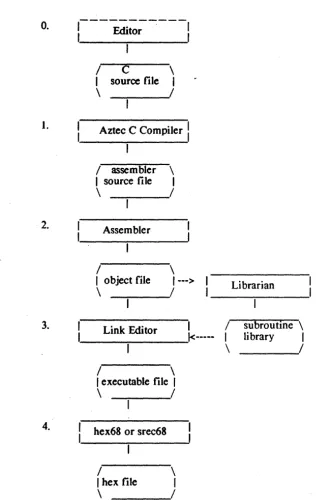
Each of these directories contains the source and object modules generated from the corresponding source archive file. For example, the source files in SIDIO were extracted from the stdio.arc source archive file by the arcv program. 2 Creating Object Module Libraries
I.
2.
3.
4.
/
C
\
I
source fileI
\
/
Aztec C Compiler
I
1/ assembler \ 1 source file 1
\
/
Assembler
/
\
lob ject file
1--->
\
-~-_/. _ _ L_iD_k-:-Edi_· to_r _ _
k--- (
\
/
\
1 executable file 1
\
/
hex68 or srec68
/
\
I hex file 1
\
/
Librarian
subroutine \ library
I
_ _ _ _
I
[image:42.403.41.372.45.549.2]TUTORIAL Aztec C68k/ROM 3. Tnmslatioa. propam Into hex code
In this section we will lead you through the steps necessary to translate a sample C program named exmpi.c into hex code that can be burned into ROM. For a diagram of this procedure, see figure I.
The code for this program will reside in ROM, beginning at memory location O. Its data will reside in RAM, beginning at location Ox8000.
3.1 Step 0: Oeate the Source PfOII'MI
The first step to creating a C program is, of course, to create a disk file containing its source. For this, you can use any text editor. We'll assume the source exists, in the file exmpi.c.
3.2 Steps 1 and 2: Compile and Assemble
To compile and assemble exmpLc enter the following command: 008 exmpLc
. This first starts the c68 compiler, which translates the C source that's in exmp/.c into assembly language source. When done, c68 starts the
as68 assembler. as68 assembles the assembly languase source for the sample program, translating it into object code and writing the object code to the file exmpl.r in the current directory. When done, as68
deletes the file that contains the assembly language source, since it is no longer needed
There are several compiler options that define a module's characteristics. For this example, we have let these options assume their default values. Later in this chapter we introduce some of these characteristics.
3.3 Step 3: Link
The object code version of the exmpl program must next be linked to needed functions that are in the c68.lib library of object modules and converted into a loadable format
Before entering this command, you must set the CLIB68 environment variable, to define the directory that contains the object module libraries. For example, on PC DOS, if the libraries are in
e:\ c68\ lib, the command to define CLIB68 is set CLIB68=e:\c68\lib\
Note the terminating slash: this is usually required, because of the way the linker builds the complete name of a Hbrary that is partially identified using the linker's -/ option. This is described below.
There's several parameters to this command, so let's go through them, one at a time.
3.3.1 Positioning
mete,
data, and stade the +D, +U, +C, +S, & +J options The linker organizes a program into three sections:Code Contains the program's executable code; Initialized data
Contains those of the program's global and static variables that are assigned an initial value (e.g. static int var=/);
Unini tialized data.
Contains the program's other global and static variables.
The linker supports options that allow you to position these segments in memory. The +D 8000 option used in the above command sets the starting address of the program's initialized data to Ox8000.
The linker's +U option sets the starting address of the program's uninitialized data. This option wasn't used in the above command, so the uninitiaJized data begins at its default address; i.e. immediately above the initialized data.
The linker's +C option sets the starting address of the program's code segment This option wasn't used in the above command, so the code area begins at its default starting address; i.e. location O.
The linker's +S and +J options set the starting address of the program's stack pointer and the size of the stack area These options weren't used in the above command, so they assume their default vaJues: the stack area begins immediately after the uninitialized data area, the area is 2k bytes long, and the stack pointer initially points at the top of this area
3.3.2 Namin. the output Ole: the -0 option
The -0 exmpl option tells the linker to place the linked program in the file named exmpL If this option wasn't used, the linker would have derived the name of the output file from that of the first object module, by deleting its extension.
3.3.3 The input object module Dies
rom68.r and exmp/.r are the names of two files whose object modules are to be included in the program.
TUTORIAL Aztec C68k/ROM segment; since the code segment begins at location 0,' these vectors will then be correctly positioned in memory.
When linking programs with rom68.r as the first listed module, you'll usually have to explicitly specify the name of the output file, using the -0 option. If you don't, the linker will place all such programs in the same file; ie. in the file named rom68.
3.3.4 Libnries aod the -L optioa
The -Lc68 option tells the linker to search the c68.lib library that's in the directory defined by the CLIB68 environment variable for needed functions.
As you can see, the -L option doesn't completely define the name of a library file; the linker generates the complete name by taking the letters that follow the -L, prepending them with the value of the CLIB68 environment variable, and appending the letters .Iib. Thus, when CLIB68 has the value e:\ c68\ Iib\, the -Lc68 option specifies the library whose complete file name is e:\ c68\ lib\ c68.lib.
During the link step, the linker will search the I~braries specified to it for modules containing needed functions; when such a module is found, the linker will include the module in the executable file it's building.
All C programs need to be linked with c68.1ib (or an equivalent, as described below). This library contains the non-floating point functions that are defined in the System Independent Functions chapter. It also contains "internal" functions that are called by compiler-generated code.
If a program performs floating point operations, it must also be linked with the m68.1ib math library (or an equivalent, as described
belOW). .
When a program is linked with a math library, that library must be specified before c68.1ib. For example, if exmpl.c performed floating point, the following would link it
In68 +d 8000 -0 exmpl rom68.r exmpl.r -lm68 -lc68
3.4 Step 4: Coovert to Motorola S-records or Intel hex records
The next step is to convert the memory image generated by the linker into Motorola S-records or Intel hex records, using srec68 or
hex68, respectively. In the following discussion, we'll generate S-records . using srec68. At the end of the section, we show how to generate Intel hex records using hex68.
srec68 exmpl
When the records generated by this command are fed into a ROM programmer, the resulting ROM code will contain the program's code segment followed by a copy of its initialized data segment
Note: when the system is started, its RAM contains random values; the Aztec startup routine sets up the RAM-resident initialized data segment from the ROM-resident copy.
These commands generate one or more files, each of which contains S-records for one 2k-byte, successively-higher addressed section of the program's code and initialized data. The files are
exmpl.mOO (containing first ROM chip's S-records), exmpl.mOJ
(containing the second ROM chip's S-records), and so on.
srec68 has several additional features. For example, you can explicitly define the size of each ROM chip, using the -P option; and you can have it place a program's even-addressed and odd-addressed bytes in separate ROM chips, using the -E and -0 options.
hex68 behaves just like srec68, except that it generates Intel hex records instead of Motorola S-records, and the extensions of the generated files are slightly different For example, the command to convert exmpl into Intel hex records is:
hex68 exmpl
This generates the files exmpl.hOO, exmp/.hOJ, and so on; where each file contains hex records for successively-higher-addressed 2k-byte ROM chips.
For complete descriptions of srec68 and hex68, see the Utility Programs chapter.
4. SpecIal features of Aztec C68k/ROM
That- concludes our step-by-step, cookbook introduction to Aztec C68kjROM. In the following paragraphs, we want to introduce several special features of Aztec C68kjROM
4.1 Memory models
Aztec C68kjROM allows you to define, when you compile and assemble a module, the "memory model" that the module will use. A module's memory model affects the module's speed, size, and the amount of data it can access. By default, a module will use the smtlll code, small data memory model, which makes it small and fast, but you can override this using compiler and assembler options.
Library modules have memory models, too. The makefiles that are provided with Aztec C68kjROM make two versions each of the "c68" and "m68" libraries: in one version of a library, the modules all
use
theTUTORIAL Aztec C68k/ROM large dala. If desired.. you can modify these makefiles to make other versions of these libraries, whose modules use different combinations of memory models.
Here's where to go for more information:
• For a complete description of memory models, see the Compiler chapter.
• The compiler options for selecting a module's memory model are +C and +D; they are discussed in the Options section of the Compiler chapter;
• The assembler options for selecting the default memory model are -C and -D; they are discussed in the Options section of the Assembler chapter;
• The assembler directives near and jar also define memory models; they are discussed in the Programmer section of the Assembler chaper;
• The creation of libraries is discussed in the Library Generation chapter.
4.2 Register
us.
By default, a program's register usage is as follows:
• Temporary results: data registers DO-D3; address registers AO-A2.
• Register variables: data registers D4-D7; address registers A3 and A4.
• Small model support register: AS. • Frame pointer: A6.
• Stack pointer. A7.
Using the compiler's + R option, you can define the registers used for temporary results, register variables, and the frame pointer.
Using the linker's + R option, you can define the register used to support modules that use a small memory model.
The makefiles that are provided with Aztec C68k/ROM generate libraries whose modules use the default registers.
S. Where to go from here
In this chapter, we've just begun to describe the features of Aztec C68k/ROM
We encourage you to use the make program-maintenance program to generate libraries, if such a program is available for your host system. To provide this encouragement, Aztec C68k/ROM provides "makefiles" that can be used by UNIX-compatible make programs. If your host system is one, such as PCDOS, that doesn't have its own make program, and if the Aztec make is available for your system, it will be included in your Aztec C68k/ROM package.
For more information on the sections of a program, see the Linker chapter.
The srec68 and hex68 programs support several options that haven't been discussed in this introduction. For a complete description of these programs, see the Utility Programs chapter.
The Technical Information chapter contains miscellaneous information on several topics, including the writing of assembly language functions and interrupt handlers.
COMPILER Aztec C68k/ROM
Chapter Contents
The compiler ... ... cc 1. OJ>etating Instructions ... ... 3 1.1 The C Source File ... 3 1.2 The Output Files ... ... 3
1.3 #i1JClude files ... S
The Compiler
This chapter describes c68, the Aztec C compiler for generic Motorola 68000-based systems. It is not intented to be a complete guide to the C language; for that, you must consult other texts. One such text is The C Programming Language, by Kernighan and Ritchie. The compilers were implemented according to the language description in the Kernighan and Ritchie book.
This description of the compilers is divided into four subsections~ which describe how to use the compiler, compiler options, information related to the writing of programs, and error processing.
1. Compiler Operating Instnactioos
c68 is invoked by a command of the form: c68 [-options] filename.c
where [-options] specify optional parameters, and filename.c is the name of the file containing the C source program. Options can appear either before or after the name of the C source file.
The compiler reads C source statements from the input file~ translates them to assembly language source, and writes the result to another file.
1.1 The C source file
The extension on the source file name is optional If not specifie~ it's assumed to be .c. For example, with the following command, the compiler will assume the file name is te xl.c:
c68 text 1.2 The OIItpat files
1.2.1 Creadnl an object code file
Normally, when you compile a C program you are interested in the relocatable object code for the program, and not in its assembly language source. Because of this, the compiler by default writes the assembly language source for a C program to an intermediate file and then automatically starts the assembler. The assembler then translates the assembly language source to relocatable object code, writes this code to a file, and erases the intermediate file.
COMPILER Aztec: C68k/ROM directory that contains the C source file. For example, if the compiler is started with the command
008 prose
the file prog.r will be created, containing the relocatable object code for the program.
The name of the file containing the object code created by a compiler-started assembler can also be explicitly specified when the compiler is started, using the compiler's -0 option. For example, the command
008 -0 myobj.rel prose
compiles and assembles the C source that's in the file prog.c, writing the object code to the file myobj.reL
When the compiler is going to automatically start the assembler, it by default writes the assembly language source to a temporary file named clmpxxx.xxx, where the x's are replaced by digits in such a way that the name becomes unique. This temporary file is placed in the directory specified by the environment variable CCTEMP. If this variable doesn't exist, the file is placed in the current directory.
When CCTEM P exists, the complete name of the temporary file is generated by simply prefixing its value to the ctmpXXx.xxx name. For example, if CCTEM P has the value
/RAM/TEMP/
then temporary files are placed in the /RAM/TEMP / directory.
For a description on the setting of environment variables, see your operating system manual.
If you are interested in the assembly language source, but still want the compiler to start the assembler, specify the option -T when you start the compiler. This will cause the compiler to send the assembly language source to a file whose name is derived from that of the file containing the C source by changing its extension to .Q. The C source
statements will be included as comments in the assembly language source. For example, the command
c68 -T prog.c
compiles and assembles prog.c, creating the files prog.Q and prog.r.
1.2.2 Creating just an assembly lanauaae file
When you compile a program using the -A option, you can tell the compiler the name and location of the file to which it should write the assembly language source, using the -0 option.
If you don't usc the -0 option but do use the -A option, the compiler will send the assembly language source to a file whose name is derived from that of the C source file by changing the extension to .a and place this file in the same directory as the one that contains the C source file. For example, the command
c68 -A prog.c
compiles, without assembling, the C source that's in prog.c, sending the assem bly language source to prog.a.
As another example, the command c68 -A -0 temp.asm prog.c
=ompiles, without assembling, the C source that's in prog.c, sending the membly language source to the file temp.asm.
When the -A option is used, the option -T causes the compiler to include the C source statements as comments in the assembly language ;ourcc.
1.3 _include Files
1.3.1 Searchlnl for #include files
You can make the compiler search for #inc/ude files in a sequence )f directories, thus allowing source files and # include files to be :ontained in different directories.
Directories can be specified with the -I compiler option, and with he INCL68 environment variable. The compiler itself also selects a "ew
areas.
to search. The maximum number of searched areas is eightIf the file name in the #include statement specifies a directory, just hat directory is searched
l.3.1.1 The -I option.
A -I option defines a single directory to be searched The area lescriptor follows the -I, with no intervening blanks. For example, the 'ollowing -/ option tells the compiler to search the /ram/include lirectory:
-II
rami
include.3.1.2 The INCL68 environment variable
COMPILER Aztec: C68k/ROM command sets INCL68 so that the compiler will search for include files in directories \C68\INCLUDE and \DVR\INCLUDE:
set INCL68=\ C68\INCLUDE;\DVR\INCLUDE
For a description of the command that's used on your system to set environment variables, see your operating system manual.
1.3.1.3 The sardl order for Indude files
Directories are searched in the following order:
1. If the #include statement delimited the file name with the double quote character, ", the current directory on the default drive is searched If delimited by angle brackets, < and >, this area isn't automatically searched
2. The directories defined in -I options are searched, in the order listed on the command line.
3. The directories defined in the INCL68 environment variable are searched, in the order listed
1.3.2 Preaopiled -Or/ude FlIes
To shorten compilation time, the compiler supports precompiled
# include files.
To use this feature, you first compile frequently-used header files, specifying the +h option; this causes the compiler to write its symbol table, which contains information about the contents of the header files, to a disk file. Then, when you compile a module that # includes some of these header files, you specify the +i option; this causes the compiler to load into its symbol table the pre-compiled symbol table information about the header files. When the compiler encounters a # include statement of a header file for which it has already loaded pre-compiled symbol table information, it ignores the #include statement This ignoring occurs even if the #inc/ude file was nested within another #include file in the C source from which the pre-compiled symbol table was generated
The compiler does much less work when it loads pre-compiled information into its symbol table than when it generates the same information from C source, and hence using pre-compiled #include files can considerably shorten the time required to compile a module.
c68 + Hinclude.pre x.c
The +1 option tells the compiler to read pre-compiled symbol table information from a file. The name of the file immediately follows the +1, with no intervening spaces. For example, to compile the file prog.c that accesses the header files that were defined in x.c, and to have the compiler preload the symbol table information for these files from
include. pre, enter the following command: c68 +Iinclude.pre prog.c
1.4 Memory Models
The memory model used by a program determines how the program's executable code makes references to code and data This in turn indirectly determines the amount of code and data that the program can have, the size of the executable code, and the program's execution speed
BefOre getting into the details of memory models, we want to describe the sections into which a C68k-generated program is organized The sections of a program are these:
• code, containing the program's executable code; • data, containing its global and static data;
• stack, containing its automatic variables, control information, and temporary variables;
• heap, an area from which buffers are dynamically allocated There are two attributes to a program's memory model: one attribute specifies whether the program uses the large data or the s111ll11 data memory model; the other attribute specifies whether the program uses the large code or small code memory model
1.4.1 Ituge dakl versus sm:Ul daIIl
The fundamental difference between a large data and a small data program concerns the way that instructions access data segment data: a large data program accesses the data using position-dependent instructions; a small data program accesses the data using position-independent instructions. An instruction makes position-dependent reference to data in the data segment by specifying the absolute address of the data; it makes a position-independent reference to data in the data segment by specifying the location as an offset from a reserved address register. Other differences in large data and small data programs result from this fundamental difference; these other differences are:
COMPILER Aztec C68k/ROM • For a smaU data program, an address register- must be reserved to point into the middle of the data segment For a large data program, an instruction that wan1S to access data in the data segment contains the absolute address of the data, and hence doesn't need this address· register.
• A code segment is larger when its program uses large data than when it uses small data, because a reference to data in a data segment occupies a 32-bit field in a large data instruction, and occupies a 16-bit field in a small data instruction.
• A program is slower when it uses large data than when it uses small data, because it takes more time for an instruction to access data when it specifies the absolute address of the data than when it specifies the data's offset offset from an address register.
1.4.2 large code versus srmll code
The fundamental difference between a large code and a small code program concerns the way that instructions in the program refer to locations that are located in the code segment for a large code program the reference is made using position-dependent instructions;. for a small code program, the reference is made using position-independent instructions. An instruction makes position-dependent reference to a code segment location by specifying the absolute address of the location; it makes a position-independent reference to a code segment location by specifying the location as an offset from the current program counter. Other differences in large . data and small data programs result from this fundamental difference; these other differences are:
• The size of a code segment is unlimited for both large code and small code programs. An instruction in a large code program can directly call or jump to the location, regardless of its location in the code segment
segment
When a small code program is Iinke~ the linker automatically builds the jump table: if the location to which an instruction wan1S to transfer control is outside the instruction's range, the linker creates a jump table entry that jumps to the location and transforms the pc-relative instruction into a position-independent call or jump to the jump table en try.
• A code segment can contain data as well as executable code. An instruction in a large code program can access data located anywhere in the code segment, because it accesses code segment data using position-dependent instructions, in which the location is referred to using a 32-bit, absolute address. An instruction in a small code program can only access code segment data that is located within 32k bytes of the instruction.
• For a sma/I code program to access the jump table, an address register needs to be reserved and set up to point into the middle of the program's data segment; if the program also uses small data, the same address register is used for both jump table accesses and normal accesses of data segment data. For a large code program, this address register is not needed for the referencing of locations in the code segment
• A code segment is larger when its program uses large code than when it uses small code, because instructions that reference code segment locations by specifying an absolute address use a 32-bit field to define the location, whereas instructions that reference data by specifying a pc-relative address or an offset from an index register use a 16-bit field to define the location.
• A program ·is usually slower when it uses large code than when it uses