pascal/MT+ Release 5 Language Reference and Applications Guide
Pascal/MT+
Release 5
Language Reference and
Applications.Guide
CopyrIght· (c): 1980 by MT ·MicroSYSTEMS
All Rights Reserved
Worldwide
pasca1/MT+ Release 5 Language Reference and Applications. Guide
COPYRIGH.T
'copyright (c) 1980 by MT MicroSYSTEMS. : All rights reserved. No part of this pUblication. may be reproduced, t~ansmitted, transcribed, stored in a retrieval system, or translated into any language or 'computer .l~nguage, in any form or by : any means, electrq~ic, mechanical, magnetic, optical, chemical, manual or otherwise, without prior written permission of MT MicroSYSTEMS, 1562 King~ Cross~ Drive, Cardiff, California, 92037.
permission is grant~d to reproduce or abstract the example programs shown in the enclosed ~igures for the purpose of inclusion within the
reader's programs.'
DISCLAIMER
MT MicroSYSTEMS makes no~£epresentations or warranties with respect to the contents hereof and specifically disclaims any implied' warranties of merchantability or fitness for any particulai purpos~. Further, MT MicroSYSTEMS reserves the right to revise this pUblication and·~o make changes f£om' time to 'time in the content h~reof without _obligation of
MTMicioSY~TEMS to notify any person of such revision or chang~s.
TRADEMARKS
Pascal/MT+ is ~~radema~k of MT MicroSYSTEMS. Credit·i~ given·· .. td Digital Reseaich of California for its trademarks: CP/M, MP/M-80, SID, and MAC. Credit is giv~n to Microsoft of. Wash~ngton state for its trademarks: MACRO-83," FORTRAN-80 and LINK-80. Any reference ·~t.9
CP/M,. MP/M, SID, MAC; "83, . FORTRAN, and L80 als~ refer to the~ ~appropriate trad~marked ~~ftware packages.
pascal/MT+· Release 5 Language Reference and Applications Guid~
Table of Contents·
System Overview.
. . . .
.
.
.
. .
.
. . .
.
.
.
.
. . . .
.
.
.
.
. . . .
. .
LANGUAGE GUIDE 1.0 2.0 3.0 5.0 6.0 7.0
8 • "
9.0
Introduction. • • • • • • • • • • • • • • • • • • • • • • 0 • • • • • • • • • • • it • •
Summary of the ·language.
.
.
. . . .
. . .
.
Notation, Terminology, and vocabulary ••Identifiers, Numbers and Strings •••••••
. . .
Constant definitions •••.
. .
.
.
. . .
. . . .
.
.
. .
Data type definitions ••••••••• 6.1 Sim~le types •••••••
6.1.1 Scalar types. 6.1.2 Standard types ••• 6.1.3 Subrange types •.
~
.
. . .
. .
6.2 Structured types •••6.2.1 Array types ••• 6.2.2 Record types ••• 6.2.3 Set types ••
6.2.4 File types.
.
. .
. . .
..
6.3 Pointer types ••••
.
..
Declarations and denotations of variables •• 7.1 Entire variables •••••••••
7 .2 Component var"iables ••• ." •••
7.2.1~Indexed variables ••
7".2.2 Field designators ••
7.2~3 File buffers ••••• 7.3 Referenced variables •••••• Expressions ••••••••••••••.• 8.1 Operators •.•••••.••••••
8.1.1 8.1.2 8.1.3
The operator not •• Multiplying operators. Adding operators ••••••• 8.1.4 Relational operators •• 8.2 Function d~signators •• ~.
Statements.
.
.
.
.
.
. .
.
. . . .
.
. .
.
. .
. .
.
. . . .
.
~.
9.1 Simple statements ••••••••••••9.1:1 Assignment statements •• 9.1.2 Procedure statements •••
9.1.3 Goto statements ••••••••
. . .
.
. .
. .
9.2 Structured statements ••••••Pascal/MT+" Release 5 Language Reference and Applicatiops Guide
Table of Contents"
---~---System Overview.
...
..
,... .
LANGUAGE GUIDE 1.0 2.0 3.0 4.0 5.0 6.0 7.0 8.0
Introduction.
.
. . .
.
. .
. . .
.
.
.
.
.
. .
.
.
.
. . .
~.
.
Summary of the "language.. . .
.
. .
.
.
.
.
. . .
.". ..
.,.
...
Notation, Terminology, and vocabulary ••Identifiers, Numbers and Strings ••••••• Constant definitions •••
.
.
.
. .
. .
.
. .
.
.
.
. .
.
Data type definitions •••6 • 1 S i m pI e type s • • • •• • • 6.1.1 Scalar types. 6.1.2 Standard types. 6.1.3 Subrang~ types ••
..
.
.
6.2 Structured types ••• 6.2.1 Array types ••• 6.2.2 Record types. 6.2.3 Set types •• 6.2.4 File types.
.
. . . .
.
.
.
·
....
-• .0 -•
..
'...
6.3 Pointer types •••• • • • • e.
Declarations and denotations of variables •• 7.1 Entire variables ••••••••••
7 .2 Component var"iables •••• " ••
7.2.l~Indexed variables. 7".2.2 Field designators.
7.2~3 File buffers •••• 7.3 Referenced variables. Expressions •••••••••••••• 8.1 Operators ••••••••••••
8.1.1 The operator not.
8.1.2 Multiplying operators. 8.1.3 Adding operators ••••• 8.1.4 Relational operators •• 8.2 Function d~signators •• ~ •••••• Statements.
. . .
.
.
.
.
.
.
.
. . .
.
. . .
.
. .
9.19.2
Simple statements ••••••••••••• 9.1.1 Assignment statements •• 9.1.2 Procedure statements •• 9.1.3 Goto statements •••••• Structured statements ••••••
9.2~1 Compound statements.
.
.
..
".
·
. . . .
.
. .
.
.
. .
.
. .
.
. .
• fa •pascal/MT+ Release 5 Language Reference and Applications Guide
pascal/MT+ APPLICATIONS GUIDE:
Table of Contents
1.0
2.0
3.0
5.0
Introduction •••••••••••••••••••••••
1 • 1
1.2 1.3
Purpose of Applications Guide. Compile' and run a sample program ••
Contents of Distribution disk •••• .0- . Compiler Operation •••••••••••••••••••• ; •••••••• 2.1 System requirements for running Pascal/MT+. 2.2 Run time requirements for pascal/MT+ ••
2.3 Invocation •.••.••••• 2.4 Compilation data •• 2.5 ComRiler toggles •• 2.6 Error messages.
Lin k e rope rat ion. • • .. • • • • • • • . • • . • . • • • 3.1
3.2
3.3
Invocation and commands •••••••• Attributes of linkable modules. Using other linkers.
Data Types ••
• 10 •
.
..• • ...!-,.,..
4 • 1
4.2 4.3 4.4 4.5 4.5 4.7 CHAR •••• B·OOLEAN. INTEGER.
...
-REAL •• BYTE •.• WORD •• STRING. 4.7.1 4.7.2 4.7.3De f i~n i t ion. Ass ignmen t.
·Compa r i sons.
4.8 SET •••••.•••••..••.
Summary of built-in procedures 5.1 5.2 5.3 5.4 5.5 5.6-5. 7
~-5.8
MOVERIGHT, MOVELEFT •• EXIT •••
TSTBIT, SETBIT, SHR, SHL ••••• HI, LO, SWAP. ADDR.
WAIT.
SIZEOF ••••• 5.9 FILLCHAR. 5.10 ·LENGTH. 5.11 CONCAT.
5 .12 COpy.
,
..
. .
.
.
5 .13 POS ••• 5.14 DELETE ••••
CLRBIT.
.
-.
.
'.
.
.
.
.
.
and parameters ••
pascal/ MT+· Release 5 L~nguag,e Reference and Applications Guide 6.0 7.0 8.0 9.0 10.0 11.0 12.0 13.0 14.0 15.0 i6.0
· ....
·
.
.
. .
·
... .
INSERT • ASS"rGN.WNB, GNB.
·
•.
• • • • • • • • • •.
. .
0 •.
. . .
.
. .
.
.
.
.
.
.
.
·
. .
. .
BLOCKREAD, BLOCKWRITE. • • a.-OPEN, OPENX •• ' •• .;
CLOSE, CLOSEDEL.
· .
.
.
.
.
. . . .
.
PURGE •••••••••••IORESULT ••••••••••••
. .
. . .
. .
.
. .
.
...
·
. . .
.
.
.
.
.
.
.
.
.
.
.
.
. . .
.
.
.
·
....
.
.
.
.
.
.
.
. 5.15 5.16 5.17 5.18 5.19 5.20 5.21 5.22 5.235.24 MEMAVAIL, MAXAVAIL ••••••••••••••••••••••••• Quick reference guide to built-in routines •••
Interrupt procedures •••••••••••••••••••••
·
. . .
.
INLINE and Mini assembler. 7.1
7.2 Syntax •••••••••••••••••••• Appl tcations ••• ~ ••••.••••••
.
.
7.2.1 Code examples •••••••••••• 7.2.2 Constant data generation ••·
....
INP and OUT arrays ••••••••••••••
.
.
.
.
.
.
.
. .
Chaining ••••••Disassembler •••••• 10.1 Instructions •••• 10.2 Sample ••••••••• Debugger ••••••••••••
11.1 Introduction. 11."2 Commands •••••
.
.
Run-time Environment •• 12.1 Library routines •• 12.2 Console I/O ••••••• 12.3 File I/O ... 12.4 ROM env i r.onmen ts ••· .
·
.
·
.
.
.
·
.
.
.
. .
·
. .
. . .
.
. .
pascal/MT+
.
.
Assembly Interfacing. 13.1 Assemblers ••••••••••••·
.
. .
.
13.2 Naming considerations ••·
.
.
13.3 Variable accessing ••·
.
13.4 Parameter passing ••· . . . .
13.5 Restriction~ ••••••· .
Run-time error handl ing ••••••0.
14.1~Range checking ••••••••••• 14.2 Exception checking ••••• ;. 14.3 User supplied handlers •••
. . . .
.
.
.
.
. ..
. .
.
· .
.
. · . . .
.
...
..
. -...
.
.
.
.
.
.
.
.
.
.
.
.
.
. .
• ••
• •· .
.
. . . .
. .
Index ••••••
. .
.
. . .
.
·
. .
.
. .
.
. . . .
.
. .
.
. .
.
. . .
Append ices ... ' ••••••i6.1 Error messages ••
6
·
. . .
.
. .
.
.
.
. . .
.
.
.
.
.
.
. . .
. . .
. .
.
.
.
.
.
.
. .
.
.
.
90 91. 92 93 94 95 96 87 98 99 100 103 103 10"3 104 105 106 107 110 110I I I
pascal/MT+ Release 5 Language Reference and Applications Guide
16.2 Rese'rved ,words ••••••••••••••••••••••••• ,... 155 16 • 3 Loa n g u age s y n t a x des c rip t ion. • • • • • • • • • • • • • • • • 15 6 16.4 S~mmary of option switches and toggles... 164
pascal/MT+ Release 5 Language Reference and Ap·plications Guide
0.0 system Overview
---~--PLEASE NOTE: THE PURPOSE OF THIS DOCUMENTATION IS NOT TO TEACH
THE pascal LANGUAGE BUT RATHER TO DESCRIBE IN DETAIL THE SPECIFIC·
IMPLEMENTATION CALLED Pascal/MT+. WE STRONGLY RECOMMEND THAT THE USER
PURCHASE EITHER Jensen and Wirth or Addyman and Wilson AS Pasbal
TEXTS {BOTH ARE AVAILABLE FROM BOOKSTORES AND BYTE M.AGAZINE-, AND ~OTH .
ARE·PUBLISHED.BY SPRINGER / VERLAG IN NEW YORK CITY.
-Contained in this manual is the documentation for the Pascal/MT+
software system. The Pascal/MT+ package consists of the following
software components:
pascal/MT+ Link/MT+ PASLIB.ERL RTP/MT+ Debug/MT+ Disasm/MT+ Pa tch/MT+
cpmpiler 1 inke r
run-time library relocatable object file run-time library source file
run~time debugging tool disassembler
System patch application program
Also included -is a group of utility programs written in
pascal/MT+ which ~re included for user information as well as their
intrinsic value as tools.
"The Pascal/MT+· system has evolved from an original goal as an
assembly language replacement tool into a full ISO (International
Standards Organization) Standard Pascal system including capability
for modular compilation. The Pascal/MT+ compiler is a completely new
compiler designed .from the beg~inning to implement· the entire Pascal
language and is not a revision of our popular Pascal/MT package.
Pascal/MT+ and pascal/MT have been used for-such diverse applications
as multi-processor measurment machines, ptocess controllers, business
applications and software tool development (compilers, assemblers,
etc.) • All of the features and facil i ties present in our Pascal/MT
iystem which has been sold to over 1000 users are present in
Pascal/MT+. Conformance to the ISO standard has required some
syntactic changes from Pascal/MT but the functionality of our
extensions to the Pascal language remain the same as Pascal/MT.
The Pascal/MT+ system/is designed to be an effective tool both
in computer resource and human resource utilization. The Pascal/MT+
compiler, linker, debugger and disassembler have been designed with an
eye to practical -user needs such as minimum wa i ting time and
visibility. We are -dedicated to the construction of useful software
"power tools" whiqh amplify the creative po~er of the
programmer/engineer. If after·having read this manual and/or having
-·used the pascal/MT+ system, you have any ideas for improving the
usability of our software please write or call. We would be glad to
hear from you.
pascal/MT+ Release 5 Languag~ Reference and Applications Guide
.pascal/~T+ Language Guide
pascai/MT+ Release 5" Language Reference and Appl ications Guide
l.~ Introduction
The purpose of this langu~g~ guid~ is to define the language
features of Pascal/MT+. This guide assumes that the reader is·
familiar with the Jensen and Wirth and/or the ISO. draft standard
(currently DPS/7l85). The standard Pascal features which are
different in pascal/MT+ than those "in the standard and in Jensen and
wirth's 'Report' are described by section. . In each section ~NF
(Backus Normal Form) syntax is provided for reference. The co~plete
BNF description of the language is present in section· 16.3 o-f the
applications guide. Each section corresponds to W~rth's 'Report'
beginning with section 2.
pascal/MT+ Release 5 .Lang~age Reference and Applications Guide
2.0· Summary of t~e language
The language compiled by Pascal/MT+ is identical to the ISO
draft standard (DPS/7185 as of 10/1/80) with the following add~ti6ns:
Additional pre-defined scalar types: BYTE, WORD, STRING Expressions may contain the pre-declared INP array
Assignments may be made to the pre-declared OUT array
For 16-bit CPU systems ·INpW and OUTW for WORD .1/0
Operators on integers & (and), !, I (or), and - ,\,? '(not)
Else on CASE statement .
Interrupt and External procedures
Additional built-in procedures and functions .Modular compil§tion facilIties
Re-direc'table I/O facilities (user written char I/O)
pascal/MT+ Release 5 Language' Reference and Applications Guide
3.0 Notation, terminology, 'and vocabulary
---~---~---<letter>
<d-igit>
<special
..
-..
- A B Ic
I D E F I G H I I f J IK L I M I N 0 P I Q R I
s
I T Iu
V Iw
I X Y Z I a b I c I d Ie f I g I h i j I k 1 I In I n I
n 0 I p I. q r s I t u I v I wi
x y I z I @
: : = .
~ 1 2 3 I 4 I 5 6 I 7 I 8 I 9 I·A B C D 1 E 1 F {only allowed in HEX numbers}
symbol>
..
..
-
- {r;-eserved words are listed in section l6.2}+ I I
*
II'
I=
I<>
I<
J>
I .<=
I>=
I I ) I .[ . I J I { I } I1 1-- I I I
,
I .... I.-
;{the following .are additional or substitutions:}
(. I .) I I \ I ? I I I I $ I &
(. is' a synonym for. [
.) is a s yn 0 n ym for 'J
, \, and? are synonyms
! , 'and.
I..
are synonyms&
(see section 8.1.1) (see section 8.1.2)' (see section 8.1.3)
The symbol '@' is a legal letter in addition to those listed in
the 'Report'. This has been added because all of our' run-time library
rou~ine are written using this'special character and this allowed us
to decide which routines should be written in Pascal and wh'ich should
be written in assembly language • .
A comment beg inning wi th '(*' must end wi th ,*)". A comment
beginning with '{' must end with I } I . To allow nested comments the
begin comment delimiter must be the same as the end comment
delimiter. Thus, in Pascal/MT+ the following is legal:
(* outer comment ••• { inner comment •••• } ••• outer comment *)
·pascal/M~+ ,Release 5 ·Language Reference and Applications. Guide
4.0 Identifiers, numbers,'and strings
<identifier>
<letter or digit> ::= ::= <letter> {<letter or digit or underscore>} <letter> I <dig it> I
<digit sequence> .<unsigned integer>
<unsigned real>
::= <digit) {<digit>}
::= $ <digit sequence> <digit sequence>
::= <unsigned integer> <digit sequence>
<unsigned integer> • <digit sequence> E <scale factor>
<unsigned integer> E <scale factor> .
::= <unsigned integer I <unsigned real>
<unsigned number> <scale factor>
< sign> ::= <unsigned integer>
I <sign><unsigned integer>
•• - + I
-..
-< string>' ::= , <character> {<ch~racter>}' I "
All identifiers are significant to 8 characters. External
identifiers are significant to either six or seven characters
depending upon usage (see section 14 of the _language guide and section 13.2 of the applications guide) The underscore character" ( ) is legal
between letters and digits in an identifier and is ignor~d by the
compiler (i.e. A B is equivalent to AB). Identifiers may begin with
an '@'. This is t~ allow declaration of "external run-ti~e, routines
within a Pascal program. Users are, in general, advised ~o ~void the
"'@' character to eliminate the chance of conflict with run-time routine names.
Numbers may be hex as well as decimal. Placing
a
'$'of an integer number causes it to be interpreted as a hex
the compiler. The symbol.<digit> now includes: 'A', '.B',
"E' and 'F'. The~e may b~ upper or lower case.
13
in front
number by
pascal/MT+ Release 5 Language Reference and Applications Guide
6.0 Data type difinitions
< type>
<type definition>
::= <simple type> <structured type> <pointer type>
::= <identifier> = <type>
6.1 Simple types
<simple type> ::= <scalar type> I'
<subrange type> 1
<type identifier>
<type identifier> ::=, <identifier>
6.1.1 Scala,r types
<scalar type> ::= <identifier> { , <identifier>} )
..
5.1.2' Standard types
T~e following types,are standard in Pascal/MT+
INTEGER REAL -BOOLEAN
CHAR
BYTE WORD STRING
Three additional standard types exist in Pascal/MT+. See the
applications guide for information on representation and usage of all standard and structured types.
STRING: Packed array [ 0 •• n ] of char~,
byte 0 is dynamic length byte bytes l •• n are characters.
BYTE Subrange 0 •• 255 with special attribute that it is compatible also with CHAR type
WORD .: Unsigned native machine word.
Guaranteed to be the same size as 3 pointer.
pascal/MT+ Release 5 . Languag~ Reference and Applications Guide
6.1.3 Subrange types
<subrange type> ::= <constant> •• <constant>
6.2 structured types
<structured type> ::= <unpacked structured type>
PACKED <unpacked structured -type>
<unpacked structured type> ::= <array type> I
<record type> I
<set type> I
<file type>
The reserved word PACKED is detected and handled by the pascal/MT+
compiler as follows~
All structures are packed at the BYTE level even if the
PACKED reserved word is not found. The user is refered
··to ~ection 13.0 in the applications guide for a
description of how "fields and contiguous variables
are allocated for variou~ target machines.
Array types
-<array type>
< s t ring . a r ray> <max leng th>
<intconst>
<int const id> <normal array>
"<index type> <component type>
::= <normal array> r
<string array>
::= STRING <max length~
::= [ <intconst> ] r
<empty> _
::= <unsigned integer> < int c"onst id>
::= <identifier>
::= ARRAY [ <index type> {,<index type>}] OF' <component type>
::= <simple" type>
: : = < type>
Variables of type STRING have a default length of 81 bytes (80
data characters). A different length' can be specified in square
brackets following the word STRING. The length must be a constant
. (either literal ~r declared e.g. STRING[S] or STRING[xyz] (where xyz
is a constant (xyz=10) ) ) and represents the length of the DATA
portion (i.e. one more byte is actually allocat~d for the length)~
Pascal/MT+ Release 5 Language Reference and Applications Guide
6.2".2 Record types
I
<record type> <field list>
<fixed part> <record section>
<variant p~rt>
<variant>
<case label list> <case label>
< tag field>
6.2.3· Set types
::= RECORD <field list> END
::= <fixed part>
<fixed part> ; <variant part> <variant part>
::= <record section> {;<record section>}
::= <field identifier> {,<field identifier>}
<empty>
-::= CASE <tag field> <type identifier> OF <variant> {;<variant>l
::= <case label list> : «field list»
<empty>
::= <case label> {,<case label>}
: : =
<constant>::= ; " <identifier> ': I
<empty>
<set type> <.ba se type>
::= SET OF <bas~ type>
::= <simple type>
: <type>
The maximum·range of a base type is 0.:255. For example, a set
of (0 •• 10000] is no~ legal but the set of CHAR or set of 0 •• 255 is
legal but set of 0 •• 256 is not •.
pascal/MT+ Release 5 Language Reference and Applications Guide
6.2.4 File types
<file type> :1:= file {of <type>}
Untyped files are allowed. They are used for CHAINING (see 9.0 in applications guide) and are also used with BLOCKREAD and BLOCKWRITE procedures (see 5.18 in applications guide)". The user should be extremely careful when using untyped files.
When wishing' to read a fil'e of ASCII characters. and using implied conversions for integers and reals the user should use the pre-defined type TEXT. TEXT is NOT exactly the same as FILE OF CHAR but has conversion implied in READ and WRITE procedure calls and also may be used with READLN and WRITELN.
6.1 Pointer types
<pointer type> ::= A <type identifier>
Pointer types are identical to the standard except that" weak type checking exists when the RELAXED type checking feature of the compiler is enabled (the default) (see sections 2.6' in t.he applications guide). In this case pointers and WORDs used as pointers are compatible in 'all cases.
Pascal/MT+ Release·S Language Reference and Applications Guide
7.0 Declarations and 'denotations of variables
---<variable>
·
·
.-
.-
<v.ar><externa'l var> <absolute var>
<external var>
·
·
.-
.-
EXTERNAL <var><absolute var>
·
·
.-
.-
ABSOLUTE [ <constant> ] '<var><var>
·
..
.-
- <'enti re var iable> I<component variable> I
<referenced variable>
ABSOLUTE vari~bles may be declared if the user knows the address
at compile time. The user declares variable(s) to be absolute using
special syntax, in.a VAR declaration. ABSOLUTE ,variables are, not
allocated any.space in the user's data segment by the compiler and the
user is responsible for making sure that no compiler allocated
variables confl ict wi th the absolute variables., NOTE: STRING
VARIABLES MAY NOT EXIST AT LOCATIONS <= 10·0H. This is done so that
the run-time routines can detect the gifference betw~en' a string
address' ahd a character on the top of the stack. Characters have· the
high byte of 0 when present on the stack. After the colon, (:) and
before the type of the variab1e(s) the user places the keyword
ABSOLUTE followed by the address of ·the variable in br~ckets ([ ••• ]):
Exampl~s:
I: ABSOLUTE [$8000] INTEGER;
SCREEN: ABSOLUTE [$C000] ARRAY[0 •• 151 OF ARRAY[0 •• 63] OF CHAR;
pascal/MT+ Release 5 Language' Reference and Applications Guide
7.1 Entire variables
<entire variqble> ::= <variable identifier> <variable identifier> ::= <identifier>
7.2. Component 'variables
<component variable> ::= <indexed variable> <field designator> <file buffer>
7.2.1 Indexed variables
<indexed variable> <?rray variable>
::= <array variable> [<expression> {,<expression>}] ::= <variable>
STRING variables are to be treated-as a PACKED array of CHAR for subscripting purposes. The valid range is ~ •• rnaxlength where
~axlength is 80 for a' default length (see section 7.~).
7.2.2 Field designators
<field designator> ::= <record variable> • <field identifier> <record variable> , ::= <variable>·
<field identifier> ::= <identifier>
7.2.3 File buffers
<file buffer> ::= <file variable> A
<file variable> ::= <variable> 7.3 Referenced variables
<referenced variab!e> ::= <pointer variable> A
pascal/MT+ Release 5 Language Reference and Applications Guide
8.0 Expressions
<unsigne~ constant> ::= <unsigned number> < str ing >
< factor>
<set> .
<element list> < element>
<term> , <simple expression>
<expression>
NIL
<constant identifier> ::= <variable>
<unsigned constant> <function ,designator>
( <expression> ) NOT <factor>
::= [ <element list> ] ::= <element> {,<element>}
<empty>
::= <expression>
<expression> •• <expression>
::= <factor> <multiplying operator> <factor>
::= <term>
<simple expression> <adding operator> <term> <adding operator> <term>
::= <simple expression>
<simple expression> <relational operat~r>· '<simple expression>
I
1
1
. The.pre-declared arrayINP is used in expres~ions to return a
~yte from an I/O port. The INP array is of type BYTE and·therefore may be used'with integers and CHAR variables. The arra~ is indexed by an expression. If the expression is a constant the compiler will . generate in-line code for the port access. Otherwise a subroutine is called for variable port numbers. The INPW array is present on the l6-bit CPU system for WORD oriented input ports. Allowable range fot port numbers is CPU dependent, 0 •• 255 for 808~/Z80, see the specific processor applicatidns' guide for more information on non-8080 type CPUs.
Example:
x := INP[$55];
x := INP[baseaddr+9];
'x may be of type BYTE, CHAR or INTEGER
An additional category of operators on l6-bit v~riables' are &,1 (also I), and·- (also \. and ?) denoting AND, OR and ONE's complement NOT, respectively. These have the same precedence as their equivalent boolean op~rators and- accept any type of operand with a size
<=
2 bytes.pascal/MT+ Release 5 Language Reference and Applications .Gu.ide
8.1 Operators
8.1.1 The operator not.
<logical not operator> ::= NOT \ ?
- (synonyms \ and ?) is a NOT operator for non-booleans.
8.1.2 Multiplying operators
---~--<multiplying operator> ::=
*
I / I DIV I MOD I AND I && is an AND operator on non-booleans.
8.1.3 Adding operators.
<adding operator>-::= + OR I. !
!. (synonym I) is an OR operator on n.on-booleanso
8.1.4 Relational operators
<relational operators> ::= = I <> I < I <= I > I >= I IN
8.2 Function ?esignat9rs .
-~---~---<function designator> ::= -~---~---<function identifier>
<function identifier> { <parrn> {,<parm> ) <function identifier> ::= <identifier>
pasdal/MT+ Release 5 Lang~age Reference and Applications Gulde
9.0 Statements
<~tatement~ ::= <label> <unlabelled statement> <unlabelled statement>
<unlabelled statement> ::= <simple statement> <structured statement> <label> ::= <unsigned integer>
9.1 Simple Statements
<simple statement ::= <assignment statement> <procedure statement> <goto statement>
<~mpty statement> <empty.statement> ::=,<empty> "
9 • 1.1 Assignment statements
<assignment statement> ::= <variable> := <expression>
<function·identtfier> := <expression>
pa$cal/MT+ implements a pre-declared BYTE array called OUT to which may be assigned items of type integer, byte, or char. OUT is
i~dexed by an expression. The range is CPU dependent and· is 0 •• 255 for 8080, 8085, and Z80. For··16-bit CPU systems the pre-declared WORD array OUTW is also present. For 808S systems the system accepts the strings: RIM85 and SIM8S as-subscripts for. INP and OUT. RIM85 and SIM85 are not stored in the symbol table but are examined for using a·
~tring comparision therefore users not compiling to "an 8085 target machine ·are not penalized. Consult the CPU applications guide for more information. As in the case of INP, if the expression is a constant the compiler will generate in-line code for the port access. Otherwise a subroutine is called to handle variable port numbers.
OUT [ po r t n urn 1 : = $ 8 8 ;
To the 1is~·of exceptions to assign~ent compatibility add: 1. Integer expressions may be assigned to variables of
type pointer. For example: TYPE X = RECORD
"(* fi~ld declarations *) END;
pascal/MT+ Release 5 Language Reference and Applications Guide
VAR P : A~;
I : INTEGER;
.
.
. . .
. . .
. .
.
.
.
.
.
.
P := 1+1;
2. Expressions of type CHAR may be assigned to variables of type STRING.
-3. Variables of type CHAR and literal characters may be assigned to variables of type BYTE.
4. Expressions evaluating to the type WORD may be assigned to pointer variables.
5. Expressions evaluating to the type INTEGER may be assigned to variables of type WORD
9.1.2 Procedure statements
<proce~ure statement>· ::
=
<procedure identifier> <procedure identifier><proc~dure identifier>::= <ideritifier>
<parm> ::= <procedure identifier>
9 .1.3 Goto statements
<function identifier> <expression>
<variable>
<goto statement> ::= goto <label>
9.2 Structured statements
<structured statement> ::= <repetitive statment> <conditional statement> <compound statement> <with statement>
9.2.1 Compound~tatments
< pa rm> {, < pa rm>} ) I
<compound statement> ::= BEG~N <statement> {,<statement>} END
pasca1/MT+ Release 5 .Languag~ Refer'ence and App1 ications Guide
9.2.2 Conditional stat~ents
<conditional, statement> ::= <case statement> <if statement>
9.2.2.1 If statements
<if statement> ::= IF <expression> THEN <statement> ELSE '<statement> .1
IF <expression> THEN <statement>
9.2.2.2 Case statements
<case statement> ::~ CASE <expression> OF
..
<case list> {,<case list>} {ELSE <statement>}
END
<case list> ::= <label list> <statement> <empty>
<label list> ::= <case label> {,<case label>}
Pascal/MT+ implements an ELSE clause on the case statement.. In addition if the .se1ecting expression does not match any of the case selectors the program flow will "drop through" the case statement. This is different than the s~andard which says this condition is an e r ro r •
.9.2.3
Example:
CASE CH OF
'A' : WRITELN('A');
• Q I : WRI TELN ( I Q ' ) ; ELSE
WRITELN('NOT A OR Q') END
Repetitive statements
. .
---~---<repetitive statement> ::= <repeat statement> <while statement) <for statement>
pascal/MT+ Release 5 La~guage.Reference and Applications Guide
9.2.3.1 While statements
---~---<while statement> ::= WHILE·<expression> 1;>0 <statement>
9.2.3.2 Repeat statements
<repeat statement> ::= REPEAT <statement> {,<statement>} UNTIL <expression>
9.2.1.3 For statements
<for statement>· <for list>.
::= FOR <ctrlvar> :=" <for list> DO <statement>
::~ <expression> DOWNTO <expression> I
<expression> TO <expression> ::= <variable)
<ctrlvar>
9 .2.4 W.i th sta tements <with statement)
<record variable list>
::= WITH <record variable list> DO <statment> ::= <record variable> {,<record variable>J
The user should note~that the ISO standard differs fro~ Jensen and Wirth in that only LOCAL variables are allowed as FOR loop control variables. This prevents such programming errors as the inadvertant use of a GLOBAL variable as a FOR control variable when burried 5 levels deep in nesting.
In a recursive stack.frame environment the user is limited to 16 .FOR and / or WITH statements in a single procedure / function. This "i 5 so tha t the compiler can allocate a fixed number of tempo ra ry
locations (16 words) in the data segment for the procedure / function. This environment is present in all CPUs except the 8080 / Z80 default environment (static allocation) • The 8080 / Z80 enter the stack frame environment using the $S switch.
•
pascal/MT+ Release 5 .Langu~ge Reference and Applications Guide
10.0 0 Procedure declarations
<procedure ~eclaration)
<block>
<procedure heading>
<parmlist>
<fparm>
<parm group>
<conformant array>
<conarray2>
<indxtyp>
<ordtypid>
<scalar type identifier>
<subrange type identifier>
<label declaration part>
<constant definition part>
<type definition part>
·
.-·
.-·
.-·
.-EXTERNAL <procedure heading>
<pr~ce~ure heading> <block> <label declaration part> <constant definition part> <type definition part>
<variable declaration part>" <procfunc declaration part> <statement part>
·
.-·
.-
PROCEDURE <identifier> <parmlist)PROCEDURE <identifier> ;
PROCEDURE INTERRUPT [ <constant> ] ;
·
.-..
-
(0 <fp~rm> {,<fparm>} ::= <procedure heading><function heading> VAR <parm group> <parm group>
I I' I
::= <identifier> {,<identifier>}
<type identifier> .
<identifier> {,<identifier>} <conformant array>
::= ARRAY [ <indxtyp> {;<indxtyp}""] OF
<conarray2>
::= <type identifier> <conformant array>
::= <identifier> •• <identifier>
·
.-...
-·
.-·
.-·
.-·
.-·
.-·
.-·
·
.-
.-<scalar type identifier> <subrange type identifier>
<identifier>
<identifier>
<empty> I
LABEL <label> {,<label>}
<empty> I
CONST
<constant definition> {;<constant definition} ;
::= <empty> I
TYPE
<type definition>
27
Pascal/MT+ Release 5 Language Reference and Applications Guide
{; <type defini tion>} . ; .
<variable declaration-part> ::= <empty> I
<procfunc part>
<proc or func>
<statement part>
VAR
<variable declaration>
{;<variable declaration>} ;
::= {<proc or func> ; }
::= <procedure declaration> I·
<function declaration>
::= <compound statement>
pascal/MT+ Release 5 Language Reference and Applications Guide
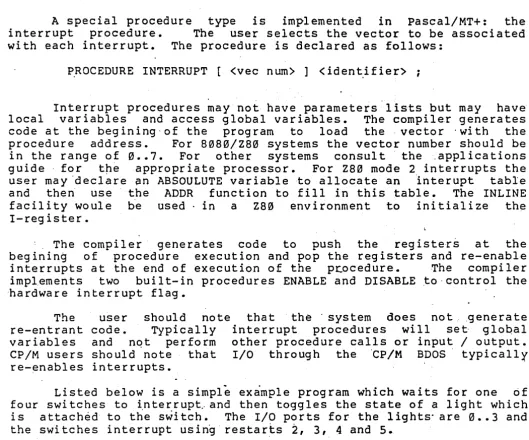
, A special procedu~e type is implemented in pascal/MT+, the
interrupt procedure. The user selects the vector to be ass~ciated
with each interrupt.' The procedure is declared as follows:
I
PROCEDURE INTERRUPT(vector number] procname;
The user is referred to section 6.~ of the applicati6ns 'gbide
for more information on using INTERRUPT procedures.
, The user should note that the ISO standard ha~ added the
CONFORMANT ·ARRAY SCHEMA for passing arrays of similar structure (i.e •.
same number of dimensions, compatible index type, ans same element
type), but different upper and lower bounds. The user may now pass,
for example, an array dimensioned as l •• l~ and an array 2 •• 50 to a
procedure which expecting an array. The user defines the'-array as a
VAR'parameter and in the process of declaring the array the use~
defines also variables,to hold the upper and lower b6und of the array.
These upper and lower bound items are filled in at RUN-TIME· by the
generated code. The user should note that in order to pass arrays in
this manner the index type 'must be compatible with the type of the
conformant array bounds.
.
'Below is an example of p~ssing two arrays to a procedure which.
displays the contents of the arrays on the file OUTPUT:
pascal/MT+ Release 5 ' ~~ngua~e Reference and Applications Guide
PROGRAM DEMOCON;
TYPE ,
N"ATURAL
=
0 •• MAXINT; (* FOR ,USE I~ CONFORMANT ARRAY DECLARATION *) VARAl : ARRAY [1 •• 10] OF INTEGER; A2 : ARRAY [2 •• 20] OF INTEGER; PROCEDURE DISPLAYIT(
VAR AR1 : ARRAY [LOWBOUND •• HIBOUND:NATURAL] OF INTEGER ) ;
(* THIS DECLARATION DEFINES THREE VARIABLES:
",..
AR1 THE PASSED ARRAY
LOWBOUND: THE LOWER BOUND OF ARI (PASSED AT RUN-TIME) HIBOUND THE UPPER BOUND OF ARI (PASSED AT RUN-TIME)
* ) ,
VAR
I NATURAL;
(* COMPATIBLE WITH THE INDEX TYPE OF THE CONFORMANT ARRAY *) BEGIN
FOR I := LOWBOUND TO HIBOUND DO
WRITELN('INPUT ARRAY[' ,1,']=' ,AR1[I) END;
BEGIN (* MAIN PROGRAM *) DISPLAYIT(A1);
DISPLAYIT (A2) END.
(* CALL DISPLAYIT AND PASS Al EXPLICITLY AND 1 AND 10 IMPLICITLY *)
(* CALL DISPLAYIT AND PASS A2 EXPLICITLY AND 2 AND 20 IMPLICITLY *)
pascal/MT+ Release 5 Language Reference and Applications Guide
10.1 ____ Standard procedures· L _____________ _
The following is a list tif pascal/MT+ built-in procedures
(except I/O which are listed in section 10.1.1). See the applications
.guide for parameters and usage. These procedures are pre~dec1ared in
a scope surrounding the program therefore any ·user routines of the
same name will take precedence.
NEW DELETE
DISPOSE
COpy CONCAT EXIT
INSERT
10.1.1 File. handling procedures
---~---All standard file handling procedures are included. In addition
the procedure ASSIGN(f,string) is added where f is a file and string
is a literal or variable string. ASSIGN assigns the .external file
name contained in string to the file f. It· is used preceeding a
RESET or REWRITE. See section 5.16 in_the Applications Guide for
details.
Listed below are the names of the file handling procedures:
GET ASSIGN OPEN CHAIN
PUT CLOSE OPENX PAGE
RESET CLOSEDEL BLOCKREAD
REWRITE PURGE
pascal/MT+ Release 5 Language Reference and Applications Guide
10.1.2 Dynamic allo~ation procedures
In addition to NEW and DISPOSE, MEMAVAIL andMAXAVAIL are alsu
included. See section 5.23 of the applications guide for a
description of these functions.
10.1.3 Data transfer procedures
PACK UNPACK
pascal/MT+ Release 5 Language Reference and Applications Guide
ll.~ Function declarations
<function ~ecl> ::= EXTERNAL <function heading> I
<function heading> <block>
<functon heading> ::= F~NCTION <identifier> <parmlist> : <result type> ;
FUNCTION <identifier> : <result type> ;
<result type> ::= <type identifier>
11.1 Standard functions
Listed below ar~ the names of the standard functions support~d:
ABS SQR SIN COS
EXP LN SQRT ARCTAN
ODD TRUNC ROUND ORO
WRD eHR SUCC PRED
EOLN EOF 'IORESULT MEMAVAIL
MAXAVAIL AD DR SIZEOF POS
LENGTH LENGTH
11. 1'.1 Arithmetic functions
11.1.2' Predicates
11.1.3 Transfei'functions
---~-~
WRD(x) : The value x .(a variable or expression) is treated as
the WORD (unsigned integer) value of x.
11.1.4 Further standard functions
pascal/MT+ Release 5 ~angu~ge Reference and Applications Gui~e
12." . Input and Output
I
Pascal/MT+supports all Standard Pascal I/O facilities.
In addition to the standard I/O facilities, Pascal/MT+ provides
a mechanism by which Pascal/MT+ programmers can write their own
character level I/O drivers in" Pascal/MT+. This facility" allows the
'ROM based program to be system independent and allows the user to use
the input and output format conversion routines with strings,_ '1/0
ports, etc.
-The re-directed I/O facility is simple and easy' to" .use. The
user must simply place the address of a routine, in square brackets,
after the left parenthesis and before the parameter list in a READ,
WRIT"E 0 r WRITELN staterne·nt.
"EXAMPLE :.
READ ( [ ADDR (getch) ]i ••• );
WRITELN ( ~ ADDR (putch) ], .".. );
The "getch" and "putch" routine~ may be written in pascal/MT+ or
in "assembly language. The parameter requirements for "these routine~
are as follows:
"FUNCTION getch : CHAR;
PROCEDURE putch( outpu~ch: CHAR);
The declaration 6f these "routines mu~t be as shown. The names
need not be getch/putch, but the parameters, none for getch and one
"for putch I. must be .exac·tly as shown, and the compi
J.
er does notcheck. The user may assign. the address of the procedure to an integer
using the ADDR function and then specify this integer (e.g.
READ([P] , ••• ) which does not save execution time but does save typing
time. Note that because EOLN and EOF require a file on which to
operate READLN and EOF/EOLN cannot be used with Ie-directed I/O.
pasca1/MT+ Release 5 Languag~ Reference and Applications Gui~e
12.1 . ~he,procedur~ read
---~---12.2 The procedure readln
---~---<readcall>
<read or readln>
< fi levar>
<var1ist>
·
.-..
-·
.-·
.-·
.-·
.-·
.-...
-<read or'readln> {( {<filevar> ,} {<varlist>} )}
READ I READLN
<variable>
<variable> {,<va~iable>}
12.3 The procedure write
12.4 'The procedre wtiteln
<writecall>
<write or writeln>
<expr1 ist>
<wexpr>
<width expr>
<dec expr>
·
.-·
.-·
.-..
-·
.-·
.-·
.-·
.-·
·
.-
.-·
.-·
.-<write or writeln> {( {<fi1evar> ,} {exprlist} )}
WRITE I WRITELN
<wexpr> {,<wexpr>}
< expression> {: <wid th expr> {:'<dec exp.r>}}
<ex,pression>
<expression>
12.5 Additional procedurep
See section 10.1.1
NOTES:
When reading or writing variables of type ,WORD the input
is in HEX and the output is in HEX. When reading variables of
type integer the user may force HEX input'by preceeding the
number with a '$' character. (e.g. $1F32)
pascal/MT+ Release 5 Language Reference and ~pplications Guide .
13.0· Programs
.---<program>
<program heading>
<module heading>
<prog parms>
.-·
.-·
.-·
.-·
.-·
.-·
.-<program heading> <block> • I
<module heading> .
<label declaration part> <constant definition part> <type definition part>
<variable declaration part> <procfunc declaration part> MODEND •
PROGRAM <identifier> ( <prog parms> ) ;
~ODULE ~identifier> ;
<identifier> {)<identifier>}
Identical to the standard with the addition of modules see section 14.0.
pasca1/MT+ Release 5 La~guage 'Reference' and App1 ications Guide
l4.~ Modular Compilation.
~asca1/MT+ supports a flexible m~du1ar ~ompilation system. Unlike other systems used for Pascal, such as UNITs, thePascal/MT~ system allows an easy transition from large monolithic programming to modular programming without a great deal of pre-planning. Progr~m ma~ be developed in a monolithic fashion until they become too large' to manage (or compile) and then split into modules at that time. The pasca1/MT+ modular compilation system allows full access to procedures and var iab1es in any module from any other module. A- compi~l'er 'togg 1e i s p r OV ide d to allow the use r ton hid e n (i • e. m,a k e p r i vat e ) any 9 r 0 u 1=
of variables or procedures. See section 2.5 in the applications guide for a discussion of the $E toggle.
The structure of a'module is similar to that of
a
program. It begins with the reserved word MODULE followed by an identifier anc~emi- colon(e~g. MODULE TESTl;) and ends with the reserved word,MODENI followed by a dot (e.g. MODEND.). In between these two lines the programmer may declare label, const, type, var, procedure and functior sections just as in a program. Unlike a program, however, there is nc BEGIN •• END section after the procedure· and function dec1ara~ions, just the word MODEND followed by a dot (.) .
Example: MODULE MODI;
'<label, const, type, var declarations>
<procedure~/ function declarations and bodies> MODEND.
In order to access variables, procedures and functions in othel modules (or in the main program)' a new reserved word~ EXTERNAL, ha~
been added and is used for two purpo~es.
First, the word EXTERNAL may be placed after the colon an( before the type in a GLOBAL variable declaration denoting that thi: variable list is not actually to be allocated in this module but i: really' in another module. No storage is allocated for variable: declared in this way.
Example:
I,J,K : EXTERNAL INTEGER; (* in another module *) R: EXTERNAL RECORD
END;
(* again in another module *)
(* some fields *)
pascal/MT+ Release 5 Language Reference and Applications G~iQe
Note that the pascal/MT~ system requires that the' user be
responsible for matching declarations id~ntically as the compiler and'
linker do not have the "ability to t~pe check.
Second, the EXTERNAL word is used· to
functions which exist in other modules.
appear before the first normal procedure or the module/program.
declare procedures and
These declarations must
function declaration in
Note, just as in variable declaration the pascal/MT+ system
requires that the user make sure that the 'number and typ~ of
parameters match exactly and that the returned type match exactly for
functions as the compiler and linker do not have the ability to type
check across modules. .
The user should note that in pascal/MT+ external' names are
significant only to seven characte'rs and not eight. When interfacing
to assembly language the~user must limit the length of identifiers
accessable by assembly language to six characters (see section 13.2 of
the applications g~ide 'for more information on external identifier
naming conventions).
Listed below ~re a main program skeleton and a module ,skeleton.
The mai'n program references variables and subprograms in the module
and the module references variables and subprograms in the' main
program. The only differences between a main program and a-module are
that at the beginning of a main program there are sixteen bytes of
header code and a main program body following the proce~~ies and
functions. ' ,
pas~al/MT+ . Release 5 . Language Reference and A~plication~ Guide
M~in Program Example:
PRQGRAM EXTERNAL_DEMO~
<label, constant, ~ype declarations>
VAR
I,J INTEGER; (* AVAILABLE 'IN OTHER MODULES *) ,
,K,L : EXTERNAL INTEGER; (* LOCATED ELSEWHERE *)
EXTERNAL PROCEDURE SORT(VAR Q:LIST; LEN:INTEGER); ,
EXTERNAL FUNCTI9N IOTEST:INTEGER;
PROCEDURE PROCl; BEGIN
IF IOTEST
=
1 THEN(* CALL'A~ EXTERNAL FUNC NORMALLY *)
END;
BEGIN
SORT ( •••• )
(* CALL AN EXTERNAL PROe NORMALLY *) END.
pascal/MT+ Release 5 Language'Reference and Applications Guide
Modl:lle Example: (Note. these. are separate files)'
MODULE MODULE_DEMO;
< label, const, type declarations>
VAR
I,J
K,L
EXTERNAL INTEGER;
INTEGER;
EXTERNAL PROCEDURE PROel;
PROCEDURE SORT{~ •• );
FUNCTION IOTEST:INTEGER;
(* USE THOSE FROM MAIN-PROGRAM *)'
(* DEFINE THESE HtRE *)
(* USE THE ONE FROM THE "MAIN PROG *)
(* DEFINE SORT HERE *)
(* DEFINE IOTEST HERE *)
<maybe other procedures and functions here>
MODEND.
pascal/MT+ Release 5 Language Reference and Applications Guide
pascal/MT+ Applications Guide
pascal/MT+ Release 5 Language Reference and Applications qui~e
pascal/MT+ ~PPLICATIONS GUIDE: Table of Contents
1.0 2.0 3.0 4.0 5.0 Introduction •••••••••••••••••••••••• 1.1 1.2 1.3
Purpose of Applications Guide •• Compile and run a sample program. Contents of Distribution disk •••• Comp'iler Operation· •••••••••••••••••••••
. .
. . .
.
....
'...
2.1 2.2 2.3 2.4 2.5 2.6System requirements for running Pascal/MT+~. Run time requirements for Pascal/MT+.
Invocation •••••• Compilation data •.
Compi~er toggles. Error messages.
Linker operation~ ••••••••••• 3.1 Invocation and commands ••
3.2 Attributes of linkable modules •• 3.3 Using other 1inkers •••••• ~ ••••• Data Types~.
4.1 CHAR •••••••••••• 4.2 BOOLEAN.
4.3 INTEGER. 4.4 REAL.
4 • 5 ByTE ••.••••• 4.6 WORD.
4 • 7 STRING •• 4.7.1 4.7.2 4.7.3
Definition'.
As~ignment •• Comparisons.
4.8 SET •••• 0 • • • • • • • • • • • •
. .
.
.
10 •
• eo· • •
Summary of built-in procedures and parameters ••
5.1 MOVERIGHT, MOVELEFT.
. . .
.
5.2 EXIT •••
.
. .
. . .
. . .
.
.
.
. .
.
.
. .
5.3 TSTBIT, SETBIT, CLRBIT.
. . . .
.
5.4 SHR, SHL •••••
.,
....
5.5 HI, LO, SWAP.
.
.
.
. .
.
5.6 ADOR ••
.
.
...
.
. .
.
.
.
.
.
.
.
.
5.7 WAIT.· •.
.
.
.
.
.
.,
.
5.8 SIZEOF.
..
)5.9 FILLCHAR ••
.
.
.
.
.
.
.
.
5.10 LENGTH.5.11 CONCAT.
. .
.
.
. . . .
.
5.12 COPY.
. . .
.
.
.
.
5.13 POS •••
.
.,.
..
.
5.14 ~'~LETE •
.
.
.
pascal/MT+ Release '5 Language Reference and Applications Guide 6.~ 7.~ 8.~ 11.~ 12.~ 13.~ l4.~ 15.~
16,. ~
5.15 INSERT •••
·
.
. . .
. .
.
. .
·
. .
. .
.
...
.
.
.
,5.16 ASSIGN •••·
.
. .
.
.
e.- •·
. . .
.
. . .
5.17 WNB, GNB.
·
.
. . .
.
· .
.
-
.
.
· .
.
.
.
·
.
5.18 BLOCKREAD, BLOCKWRITE ••
·
.
.
. .
.
·
.
. . . . .
5.19 OPEN, OPENX ••••.••.
. . · .
.
.
.
·
.
· .
.
. .
.
.
5. 2~ CLOSE, CLOSEDEL..
.'. . .
. ·
.,
.
.
.
. .
.
.
·
.
. . .
·
. . .
.
5.21 PURGE ••••••• ~ ••••••••
. .
·
.
.
.
·
.
. ·
. . .
.
5.22 IORESULT •••••••••••••••·
.
·
. .
.
5.23 MEMAVAIL, MAXAVAIL.: ••
·
~.
· .
· .
5.24 Quick reference guide to built-in routines •• o •
Interrupt procedures •••••••••••••••
.
.
.
. .
.
.
.
INLINE and Mini assembler.
.
.
.
.
7.17.2
Syntax •••• ~ ••••••••••• 'Applications •• ; ••••••
7.2.1 Code examples •••
·
.
. .
·
. .
.
. .
1.2.2 Constant data generation.
·
. .
.
INP and OUT arrays •••••••••••••••••••••••••••••••• Chaining ••••••
.
.
.
.
.
. .
.
. . .
.
. .
. . .
.
. .
.
.
. .
.
.
Disassembler •••
10.1 Instructions ••••• 10.2 Sample ••••••••
Debugger •••••••••••••••••••• 11.1 Introduction ••
ll.2-Commands •••••
. .
. .
.
.
· .
.
....
..
.
·
~.
. .
.
Run-time Environment •• 12.1 Library routines. 12.2 Cqnsole I/O ••••••
12~3 File I/O ••••••••• 12.4 ROM 'environments ••
.
.
.
.-
.
.
... .
.
.
.
.
· . .
.
.
. .
. .
.
.
pascal/MT+ Assembly Interfacing.1 3 • 1 As s em b 1 e r s • • • • • • • • • • • • • • •
13.2 Naming considerations. • •••• 13.3 variable accessing •••••••••• 13.4 Parameter passing ••••
13.5 Restrictions •••••••••
Run-time error handl ing
.0 ..
· .
.
14.1 Range checking ••••• ' ••
.
.
. ·
. .
·0.
.
. .
.
.
. .
.
.
.
14.2 Exception checking •••
·
. .
,...
14.'3 User supplied handlers ••
. . .
·
. .
Ind ex ••••••
.
.
. . . .
.
.
. . . .
.
. .
.
.
.
.
.
. .
.
. .
.
.
. .
.
.
.
...
Appendices ••• ~ •••••••••••••l6.1 0
Error messages. • ••••
· .
.
.
.
. ·0·
.
. .
430 90 91 92 93 94 95 96 87 98 99 10~ 1~3 1~3 103 1~4 1~5 106 107 ll~ 110
I I I
pascal/MT+ Release 5 Language'Reference and Applications Guide
16.2 Reserved words ••••••• , ••••••••••••••• .- ••••••• , 155 16.3,Language syntax description... 156 16.4 Summary of option swi tches an.d toggles... 164,
Pascal/MT+ Release 5 Language Reference and Applications Guide 1.0 Introduction
1.1 Purpose of Applications Guide
---~---The 'Pascal/MT+ system is a complex series of programs; moduleE and run-time library subroutines. This applications ~uide is intendec to help the pascal/MT+ user to understand how to use the.~features of Pascal(MT+. The applications guide contains information on how' tc operate the compiler, linker, debugger and disassembler; a descriptior of the implementation of Pascal/MT+ data types; a summary of built-ir features and examples of their usage; run-time considerations including interfacing with ~ther languages; and a list bf the compiler error messages with the most common cause for each message.
I.? Compile and run a sample program
Before compiling and running the sample program described in this section be sure. that you have made ~ backu~ of all of the disks included with this software release.
The follow~ng is a step-by-step guide to the basic "operation of the Pascal/MT+ system. You will compile, link and execute a sample program under the CP/M operating system. NOTE: If the pascal/MT+ system you have purchased generates code for other than 8080/Z80 type CPUs then refer to the CPU applications guide for further information regarding the execution -of programs on the target CPU.
The following 'di~cussion assu~e~ that the ciomputer on which 'you are about to execute pascal/MT+ has two 8" floppy disks: If you have other than this configuration then make the appropriate adjustments. Please read all the "documentation before attempting to operate the software so that you have an idea of what is being done.
STEP ONE: Put a CP/M syst~m on your COpy disk with the compiler on it or transfer distribution disk to your system disk.
of the distribution the files from the
STEP TWO: Place the disk now containing the compiler and CP/M into your 'A:~"drive.·
STEP THRE~: Place your COpy of the sample programs diskette into your 'B:' drive.
.
STEP FOUR: Boot your system and remain logged into the 'A:' drive.
pascal/MT+ Release 5 Language" Reference and Applications Guide
" STEP FIVE: Type the" following comm~nd «cr> signifi~s you typing
the return key on your system keyboard) :"
MTPLUS B:CALC(cr>
STEP SIX: The compiler should load and display the mess~ge"
'Pascal/MT+ S.xx' ,where 'xx' is the sub-release number for the verSlon
of the software which you have. The compiler should process the CALC
program by displaying the following: (or something close; we reserve
the right to change without reprinting all the manuals) •
Pascal/MT+ 5.xx
Code Gen:8~
+++++
Source lines: 87
phase 1
Available Memory: nnnrin
User Table Space: nnnnn
#1##
Remaining Memory: nnnnn
Phase 2
8080 SUBREAL ADDREAL TF
CALC CALCULAT
Lines : Errors: Code Da ta ":
Compilation
87
o
1734
42
Completed
{after pre-defined symbols}.
STEP SEVEN: After the compilation is complete verify that the
compiler properly placed the" CALC.ERL file on the destination disk by
typing 'DIR B:CALC.ERL' and having the CP/M system display:
B: CALC ERL
STEP EIGHT: ~ow to 1 ink the prog ram 1" Type:
LINKMT B:CALC,B:TRANCEND,B:FPREALS,B:PASLIB/S
followed by the retu~n ,key. You should see the following' output:
LINK/MT+ 5~00
Processing file- B:CALC .ERL
pascal/MT+ Release ,5 Language Reference and Applications Guide
processing file- B:FPREALS .ERL
P~ocessing file- B:PASLIB .ERL
Undefined Symb.ol~:
No Un'defined Symbols
nnnn (decimal) records written to CALC .COM
Total Da ta: Total Code: Remaining :
nnnnH bytes nnnnH bytes nnnnH bytes
Link/MT+ processing completed
STEP NINE: N~w verify that the lipker placed the CALC.COM file
on : the destination disk by typing: 'DIR B:CALC~COM' and receiving the
response:
B: CALC COM
from 'CP/M.
STEP TEN: Now to run the program!_ Type 'B:CALC'