Android based Library Book Availability and
Location Finder
Mrs Shwethashree A1, N Rakshita2, K Sri Divya, Ragini3
1, 2, 3
Department of Computer Science and Engineering, Ballari Institute of Technology and Management, Ballari, Karnataka, India.
Abstract: Library is a pool of books. This requires a proper arrangement and placement of books in an order that makes it simple for the client to locate a specific book.
In very large libraries having huge collection, finding a specific book and knowing the availability of the book is quite task. In such a condition there must be an easy way to access the location of the specified book by simply typing its name. Thereby, we propose an android application which helps the client to locate the book in fraction of seconds and even know the availability of the book in the library.
Keywords: Library, Availability, Location
I. INTRODUCTION
The “Book Location and Availability Finder System” is an approach that provides the location of the specified book in library by just accepting the required book name from the user.
This system uses an android application that generates a user interactive interface with the database of library in order to search for a particular book. The users can even know the availability of the book and if not available then the date when it will be available if it is issued for someone.
This eases the entire process of searching a book among huge collection of books in the library as it provides a very clear location of the book thereby reducing the effort of searching for a book in entire library for prolonged periods of time.
The design and implementation of this android application based library book availability and location finder system replaces the traditional man power of searching for a particular book in library.
Users can approach to the exact location of the required book to take that book using the generated output that contain section name, rack number, row number and column number, thereby easing their effort and improving their experience via an android application.
II. RELATED WORKS
In this paper [1] titled “Finding Books and Articles in Library”, George A. Smathers Libraries, University of Florida focuses on searching the Library Catalog to locate books, electronic books, multimedia, reports and other materials held by the Education Library and other UF Libraries across campus.
It uses database connectivity to store and retrieve the information of various books. Wi-Fi technology was adopted to connect to the library server and perform the searching operation on the data stored in the server. If the required book name is matched then the location of the book is retrieved to the user.
Paper [2] titled “IOT-based Library Automation and Monitoring system”, Majid Bayani, Alberto Segura and Mayra Loaiza developed an implementation framework for employing the IoT in renovating the conventional library systems to become smart online library schemes.
The IoT enables connectivity of physical object such as book with the real-time communication technology by using RFID tags and tiny sensors. It monitors the books in real-time and tracks labelled objects geographically.
In this paper [3] titled “SLMS: Smart Library Management System based on RFID Technology”, Mohammed I Younis, University of Baghdad proposed a system where the library staff handles a tedious task which involves sorting, lending, returning, tagging and eyeing of books using low cost passive tags in libraries. Each user has a unique identification ID. Similarly each book is attached with passive tag.
The PC is connected to the readers so that the location of the books read by the RFID reader is stored in the PC. Therefore, the user gets to know the location of the specified book.
III. DATA AND METHODOLOGY
A. Existing System
The existing system for book finder demands user to stand in long queues waiting for the authentication of the user to enter library and search for the book in entire library and the user won’t be knowing whether the book is available or not in spite of it user must search the entire library.
This consumes a lot of time that could rather be used productively. This drawback of the existing system propelled us towards the idea for developing a system that could ease this effort.
1) Disadvantages of Existing System
a) Wait in Long Queues
b) Time-management
c) Uncertainty of Finding the Book
B. Proposed System
The proposed system is an alternative for searching management that could reduce inconvenience to the user. The motivation of this system is depicted from an observation on the people searching for the book among pool of books without committing to the estimated time for their demand.
The proposed system makes use of an application that generates user interface which is connected directly to the database of library so that user can easily search for a book and find the location of that book in library and provides the availability of the book which eliminates the time of searching if the book is not available.
This drastically reduces the time required for searching for a particular book as the users do not have to search in all the racks for a long time. This approach can thereby reduce the effort of the users and save their time, which could possibly be used in a productive manner.
1) Advantages of the Proposed System a) Time-efficient
b) User-interactive
IV. IMPLEMENTATION DETAILS
The implementation stage in system project involves careful planning investigation of the current system and its constraints on implementation design of the methods to achieve change over etc. The errors in the code will be rectified during the phases of testing.
A. Major Modules
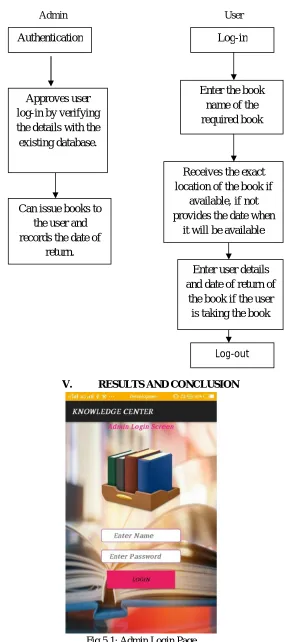
1) Admin Module: The admin logs-in to the system through a login page. The admin’s homepage consists of user approvals, option for updating the data of a new book and option to view the available books in library. In order to avoid fake entries, the admin has an “approval” option for approving genuine users to login. Admin views the details of the user applied for log-in and verifies the details of the user with the database. In case of unavailability of the requested book by the user then admin verifies the date of return of that book if issued to someone and gives the date of availability to the user. Admin is provided with a requests box where in admin gets a requests done by the users for getting any new books.
2) User Module: The users logs-in to the app by providing the username as User ID and the assigned password. The homepage consists of option for entering the required book name, if there are many different books with the same name then it displays all the book names with that name along with their authors and edition so that user can select the required book among them. The user has to provide the required book name and click on the “search” button to obtain the exact location of the book. To this, the user receives the location of the book if it is available else displays the availability date of that book if it has been issued to someone. If it is a new book which is not present in the library then the user can send a request for the admin regarding the book and tell the admin to get the book if possible.
B. Flow Diagram
Admin User
[image:3.612.165.453.81.723.2]
V. RESULTS AND CONCLUSION
Fig 5.1: Admin Login Page Authentication
Can issue books to the user and records the date of
return. Approves user log-in by verifying the details with the existing database.
Log-in
Enter the book name of the required book
Enter user details and date of return of
the book if the user is taking the book Receives the exact location of the book if
available, if not provides the date when
it will be available
The above figure shows the Admin Login Page where admin can login by entering username and password.
Fig: 5.2 User Login Page
The above figure shows the user login page where user need to enter USN and password. Authentication of the user is done by connecting to database to check whether the user is an authorized user or not.
The above shows the User Registration Form where a new user can register his/her details.
Fig: 5.4 Admin Main Screen
The above figure shows the operations that can be performed by the admin.
The above figure shows the operations that can be performed by the user.
Fig: 5.6 Search Page
The above figure displays the location of the book that is requested by the user by entering the book name.
Fig 5.7 Issued Books Details Page
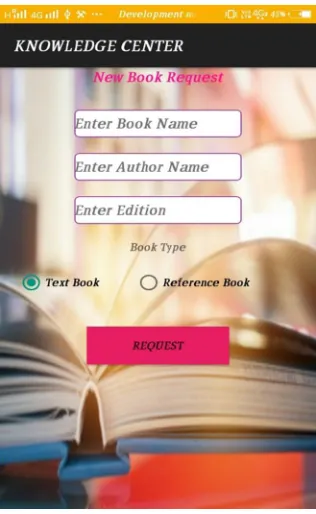
[image:6.612.226.387.395.664.2]Fig 5.8 New Book Request Page
The above figure shows New Book Request Page which allows the user to request for a new book.
VI. CONCLUSION
The traditional book availability and location finder system demands searching for longer period of time and searching in all racks of the library. Users face the issue of time management in this prevailing approach. The possibility of getting the book even after a long search is quite uncertain. This propelled us towards the idea of developing a new system that could reduce the inconvenience. The proposed system makes use of an application that takes the book name as input and provides the location of that book in library. It even indicates the availability of the book prior to searching which saves a lot of time. The interesting feature is that user can send a request regarding new book to admin and request to get that book to library if possible.
REFERENCES
[1] Wellish, Hans H. “Dewey Decimal Classification, Universal Decimal Classification and the Broad System of Ordering: The Evolution of Universal Ordering Systems”. College of Library and Information Sciences, University of Maryland.
[2] Moran. B.; Stueart. R; Morner. C (2013). Library and Information Center Management. California: Libraries Unlimited.
[3] Wofford, Azile. The School Library at Work: Acquisition, Organization, Use and Maintenance of Materials in the School Library. New York: H. W. Wilson Co., 1959.