ANDROID BASED FUSED LOCATION PROVIDER
API FOR LOCALIZATION ACCURACY
Ashpaqahmad Nadaf1 and Prof. B K Srinivas2
I.INTRODUCTION
The rapid development and enhancement in the smart phone devices becomes the important role in the moving world especially in the location accuracy for navigation based applications. This paper illustrate in improve location accuracy using Fused Location Provider API. There are 3 ways in which we can get real time locations in smart phones.
1. GPS based location provider in android using LocationManager.GPS_PROVIDER that makes use of satellite. It gives high accuracy of current location but need continuous power supply.
Figure1. GPS based location provider
2. Network based location provider using LocationManager.NETWORK_PROVIDER that makes use of Cellular Network points but the accuracy of using this is lesser than GPS. One advantage is the battery consumption is low.
1
Department of Information Science & Engg., RVCE, VTU Bengaluru, Karnataka, India
2
Department of Information Science & Engg., RVCE, VTU Bengaluru, Karnataka, India
DOI: http://dx.doi.org/10.21172/1.83.042 e-ISSN:2278-621X
Abstract- In fast moving world, Location accuracy become an important issue. Google provides API as Fused Location Provider which manages the accuracy, battery performance between GPS and Network provider. This paper details the mechanism which can be used to get best device’s location with high accuracy using fused location API provider.
provider. Here we can get accuracy because getting location service from system wide which keeps updating. Google Play Service Client is used to connect clients or your fragment (Activity). Immediately trying to get location because the Fused location provider maintains one process in background when at least one client connects, which calls get Last Location method in onConnected method. Here the result may be null. So to solve this we need to implement Google provided interface com. google. gms. location. LocationListener by using this we can get
periodic updates and it will switch off upon getting first update using onLocation Changed()callback[6].
Figure3. Location Manager Provider API
In Figure 3 the problem in the API called Location Manager provider was
1. developer to use the network location provider where GPS is not able to work in indoors 2. Battery decreases when to switch for exact location provider[7]
III.PROPOSED LOCATION PROVIDER
Fused Location Provider
Figure4. Fused Location Provider API
To adjust the required location upadates frequency, there are the different sensors that are used by Fused Location The five User states or activities are
1. in__vehicle 2. on__bicycle 3. on__foot 4. _still 5. _tilting
In some times actions of the user cannot be determined thus the state is UNKNOWN.
Applications which uses the location services must request for permissions in terms of location. Usally Android offers 2 permissions: ACCES__FINE__LOCATIONS, ACCES__ COARSE__LOCATIONS. Choice of permissions determines the location accuracy returned by application programming interface[6].
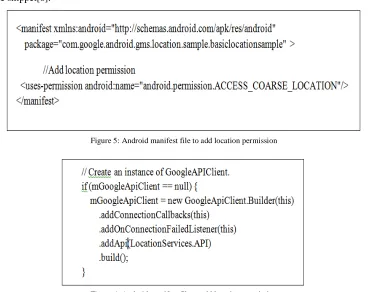
Add uses-permission element in manifest file depending on your choice of location permission shown in Figure 5. To connect to Google Location service API, first it is required to create an instance of the Google Play services API client i.e to add Location service API GoogleApiClient.Builder class is used which is shown in the Figure 6 code snippet[8].
Figure 5: Android manifest file to add location permission
Figure 7: Android manifest file to add location permission
IV. RESULTS
Google Fused Location provider Can be used in the following 3 steps
1. Connecting Location Client to API(Google). Get location After connecting locationClient. 2. getting current location of the user.
3. Continous updation of the location at particulars time of interval or the particular distances or may be both.
The following Table 1 shows the Google tested the location accuracy using Fused location provider API vs Location manager in the google nexus.
Table 1. Location problem solved by Google with user priorities
By looking to Table 1 we can list some Advantages of Using Fused API is
1. Simple APIs: Provides location with “low power” and “high accuracy rather than worrying about area suppliers.
2. Immediately Available: Gives our applications quick access to the best, latest area.
3. Power-Efficiency: Meets an extensive variety of necessities, from frontal area utilizes that need profoundly precise area to foundation utilizes that need intermittent area refreshes with insignificant power affect.
4. Versatility: Meets an extensive variety of necessities, from frontal area utilizes that need profoundly precise area to foundation utilizes that need intermittent area refreshes with insignificant power affect.
IV.CONCLUSION
REFERENCES
[1] Google, “Fused Location Provider API”, https://developer.android.com/training/location/retrievecurrent.html#play-services.
[2] Google,“Fused_Location_API”,https://developers.google.com/android/reference/com/google/android/gms/location/FusedLocationProvider Api
[3] Google ,“Location manager provider API” , https://developer.android.com/reference/android/location/LocationManager.html [4] Google ,“Location manager provider API” , http://javapapers.com /android/get-current-location-in-android/
[5] Google, “Fused Location Provider API”, http://blog.lemberg.co.uk /fused-location-provider
[6] Stack Overflow ,“Fused location and location manager” , http://stackoverflow.com/questions/33022662/androidlocationmanager-vs-google-play-services.
[7] Google ,“Location manager provider API”, https://developers_android_com/training/locations/change-locations-settings.html.#connect [8] Google, “Google’s Fused Location API for Androids”,http://www.tothenew.com/blog/googles-fused-location-api-for-android/