
Feasibility study and Interface design
74
0
0
Full text
(2) Preface. Sketchlab Feasibility study and Interface design Bachelor assignment. Preface In front of you is a report written as part of the bachelor assignment for the study Industrial Design at the University of Twente. The assignment has been executed in English as preferred by the client. I approached the Design Sketching teachers when I first heard about the Sketchlab proposal. My love for interface design, my experience in web design, and my experience as a Design Sketching assistant made me immensely interested in the subject matter.. Author Kevin van der Ven s10057078 Education Kevin van der Ven s10057078 Education Industrial Design University of Twente Client University of Twente PO Box 217 7500 AE Enschede Mentor CES/CELT Karen Slotman Mentor Design Sketching Pepijn van Passel, Jeroen Beeloo Examiner Maarten Bonnema. bachelor exam: 25-08-2016 publication date: 5-08-2016 Copies: 3 Pages: 91 Appendices:4. I could never have imagined that I was able to play such a vital part in the design phase of Sketchlab. I am grateful that Pepijn van Passel en Jeroen Beeloo saw the value in my additions and expertise. Postponing the bachelor assignment presentation, because of interfering schedules has given me the possibility to separate parts of the design phase from the main report, and display them as a separate design appendix. I want to thank Pepijn van Passel, Jeroen Beeloo, and Karen Slotman in particular, for escorting me during the bachelor assignment. I also want to thank Dennis Vierkant, Maaike Mulder-Nijkamp, and Charlotte Oude Alink for providing valuable information during the design process. I hope to keep working on Sketchlab and see it through to completion.. Enschede, 2016, Kevin van der Ven. page 03.
(3) Summary. Summary. Samenvatting. Summary. Dit verslag is gemaakt in het kader van de bachelor. worden ingezet om ook hier de kosten laag te houden.. This report has been made as part of the bachelor. The last part of the discovery phase included research. eindopdracht, voor de studie Industrieel ontwerpen. Door het gebruik van onervaren programmeurs zal. assignment of the study Industrial Design at the. on user experience and user interface design. By using. aan de Universiteit Twente. De opdracht betreft. ontwikkelen van het platform meer tijd kosten. Een. University of Twente. The assignment includes. UX and GUI principles combined with the information. het ontwerpen van een haalbare interface voor. traditionele ontwikkelingsmethode, met als doel. designing an interface for Sketchlab a platform to learn. gained from the research on social media apps and. Sketchlab, een digitaal platform voor het leren van. werkende prototypes die getest kunnen worden. to sketch to engineers.. e-learning platforms a general design direction was. schetsvaardigheden voor ingenieurs.. opleveren, zal als leidraad dienen.. De eerste stap in het ontwerpproces is een. Als laatste deel van de ontdekkingsfase is er. The design process started with an extensive. created. The design direction focusses on the optimal. analysis phase. The first research was done on the. ways to provide information, motivate users, and promote user communication.. uitgebreide analysefase. In het eerste onderzoek zijn. een onderzoek gedaan naar gebruikers interfaces, in. stakeholders and the target group. The target group. de belanghebbenden en doelgroep geanalyseerd.. specifiek social media apps en e-learning platforms.. consists out of students and teachers that need. De doelgroep bestaat uit studenten en docenten. Aan de hand van enkele UX en lesgeef heuristieken. a digital sketching platform that improves design. placement, color, size and the complexity of features. die behoefte hebben aan een digitaal platform dat. is vervolgens bepaald hoe de interface zich moet. education, lessens the workload, and makes sketching. amongst other things into account. A structure based. het tekenonderwijs verbetert door inzicht te geven,. gedragen om op een optimale manier informatie aan te. open in time and place.. on the program of requirements and a comprehensive. werklast te verminderen en schetsonderwijs open in. bieden, gebruikers te motiveren en communicatie moet. plaats en tijd te maken.. bevorderen.. Het tweede onderzoek betreft een analyse. Bij de ontwerpfase is er onder andere. The second Analysis was used to determine. During the design phase took elements. design phase culminated into four concepts. After. the goals of the platform, and to turn them into a. deliberate discussing with the client and the target. functionality overview that can be used to define. group all the concepts were combined into one final. Sketchlab features and structure.. concept.. naar de beoogde functionaliteit. Deze functionaliteit is. rekening gehouden met plaatsing, kleur, grootte, en. direct gebaseerd op de behoeftes en wensen van de. complexiteit van de interface. Een indeling gebaseerd. gebruikers en levert een eerste inzicht in de structuur. op het programma van eisen en een uitgebreide. that, to reach the user set goals in the best way. is a working interface. The interface is divided into a. van Sketchlab.. ontwerpfase zijn uiteindelijk uitgemond in een viertal. possible Sketchlab needs to be a web application. A. landing page, a personal page and a course material. concepten die. De concepten zijn na uitgebreid. first functional prototype can easily be achieved by. overview that accomplish all the predetermined goals.. haalbaarheid van het platform. Door middel van. overleg samengevoegd met nieuwe inzichten tot één. combining backend frameworks and several APIs. A. een vergelijkingsanalyse is bepaald dat Sketchlab. eindontwerp.. custom solution can be controlled by the University. Er is verder onderzoek gedaan naar de. bij voorkeur als een web applicatie moet worden. Het resultaat betreft een werkende interface. During the feasibility study, it was concluded. of Twente. This way proper media distribution rights. uitgewerkt. Door het combineren van een backend. voor een adaptieve web applicatie genaamd Sketchlab.. and correct usage of confidential information can be. frameworks en verscheidene APIs is het mogelijk om. De web app is opgedeeld in een hoofdpagina een. guaranteed.. in een korte tijd een werkend platform met specifieke. persoonlijke pagina en een les materiaal overzicht, die. functionaliteit te realiseren. Dit platform is volledig. voldoet aan alle vooraf gestelde eisen.. By focussing on vital functionality during the development of the platform, a large part of the. onder de controle van de universiteit en kan op die. budget can be redistributed to the programmers.. manier de juiste media distributierechten en gepaste. However, junior programmers (university students). omgang met vertrouwelijke informatie waarborgen.. will be used under the guidance of a senior developer. Door tijdens de ontwikkeling van de pilot. The final result of the bachelor assignment. to program the platform. This will keep the cost low. overbodige functionaliteit weg te laten is het mogelijk. but will demand more time. A traditional, incremental. om een groot gedeelte van het budget aan de. development method will be used to create prototypes. programmeurs te spenderen. Echter, studenten onder. that can be tested.. de begeleiding van een senior programmeur zullen. page 04. page 05.
(4) Table of contents. table of contents. Table of contents 1 Introduction. 10. 4 Analysis Conclusion. 48. 1.1 Introduction. 12. 4.1 Conclusion of the research. 50. 1.1.1 The client. 12. 4.1.1 Goals Features Function. 50. 1.1.2 TEM. 12. 4.1.2 Feasibility Sketchlab. 51. 1.1.3 Problem Context. 12. 4.1.3 Interface Design. 51. 1.1.4 Purpose of Sketchlab. 13. 4.1.4 Program of Requirements. 52. 1.1.5 Purpose of the Bachelor Assignment. 13. 5 Concept Phase. 56. 5.1 Concept Ideation. 58. 2 Analysis. 16. 2.1 User Analysis. 17. 5.1.1 Functionality Sketchlab. 58. 2.1.1 Target Group. 17. 5.1.2 Navigation and Content Mapping. 60. 2.1.2 Stakeholders. 17. 5.1.3 Page division. 62. 2.1.3 Personas. 21. 5.1.4 Wireframing. 63. 24. 5.1.5 Concepts. 64. 2.2 Function Analysis 2.2.1 Software Design Approach. 24. 2.2.2 Basic Platform Functionality. 24. 6 Final Concept. 72. 2.2.3 User Stories. 24. 6.1 Sketchlab Design. 74. 2.3 Comparative Analysis. 28. 6.1.1 Graphic Design. 74. 2.3.1 Problem Definition. 28. 6.1.2 Graphic Elements. 75. 2.3.2 Program Choices. 28. 2.3.3 Alternative Platforms. 30. 6.2.1 Navigation. 76. 2.3.4 Picking Suitable Platforms. 31. 6.2.2 Main Page. 76. 33. 6.2.3 Personal Page. 77. 2.4.1 Platform Cost Indication. 33. 6.2.4 Course Material Overview. 81. 2.4.2 Time Cost Quality. 34. 6.2.5The Teacher. 83. 2.4.3 Project Management. 35. 6.2.6 Prototype. 84. 2.4 Feasibility Analysis. 6.2 System Structure. 76. 3 Interface. 38. 7 Conclusion and References. 86. 3.1 Interface Design Principles. 40. 7.1 Conclusion and Recommendations. 88. 3.1.1 Analysis of User Interfaces. 40. 7.2 References. 90. 3.1.2 Interface of Popular Apps. 40. 3.1.3 Interface of E-learning Apps. 40. 3.1.2 Interface Design Principles. 43. 3.1.3 Digital Teaching Heuristics. 44. . page 06. . . page 07.
(5) Analysis. page 08. page 00.
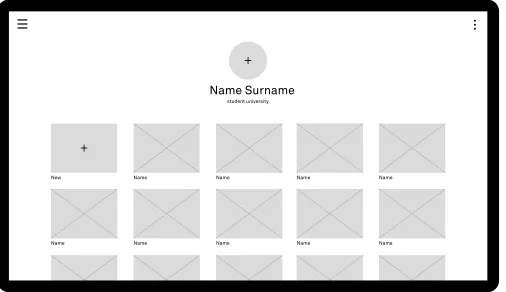
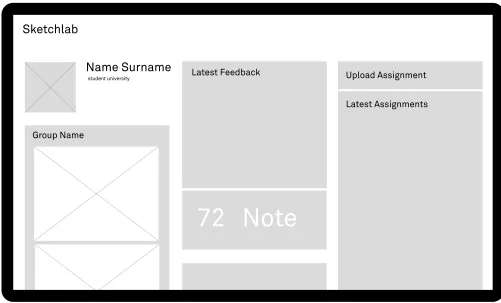
(6) Analysis. The report covers a variety of subjects that have been researched throughout the bachelor assignment. The bachelor assignment has been structured to provide a comprehensible report to the reader, even though the design phase and the analysis phase proceeded simultaneously. Instead of creating a glossary, short recaps of subjects can be found throughout the report to explain terminology before it is used. Explanatory images and summaries are used to clarify and complement information heavy text. The assignment description starts with the analysis phase in chapters 2 and 3. This research results in a program of requirements and design heuristics that are recapped in chapter 4 and serves as a foundation for the design phase. The design phase in chapter 5 will explain the process behind the concepts and concept choices. The concepts are combined into a final concept. he final part of the design phase is described in chapter 6 chapter. Chapter 6 will show an overview of the results and provide a link to the completed interface. The last chapter will conclude the bachelor assignment by giving a short overview of all the results and by recommending next steps and solutions to problems that have not been solved yet.. page 00. 1. Introduction. page 11.
(7) Introduction. Introduction. 1.1 Introduction This report includes research on feasibility and usability, a design process and a completed concept paired with development schematics. The development of Sketchlab was done for the University of Twente as part of a bachelor assignment. It will be used as a pedestal for the rest of the platform, and it is a fundamental tool for the development process.. Both the accumulated complexity of the design sketching courses and the diminishing teaching budgets contribute to the increasing importance of efficiency in education. It is important to educate students in such a matter that their skills also grow efficiently. The growth in design skills depends on several factors, which can be influenced directly during the. 1.1.1 The Client The University of Twente, UT for short, is a. Modular education, Project-based work, Personal. university located in Enschede, the Netherlands.. responsibility, Students learn together and Quick and. The university was founded in 1961 and it was. correct fit.. the third higher vocational institute of technology. TEM focusses on Student-driven learning. With. course, and the current way of teaching retains some of the most common issues that uphold low motivation amongst students according to Witteveen [4].. 1.1.4 Purpose of Sketchlab. in the Netherlands to become a university. The. student-driven learning, the student can take control of. Dutch government decided to locate the institute. their activities and pace. Teachers provide feedback on. in Enschede, the main city of Twente, because of. the result and the learning process and encourage the. its rich industrial history and to provide the local. students to gain new experience and explore unknown. economy a boost to compensate for the dwindling. subjects [2].. rules through both theoretical and practical examples. economic and social contributions to the region,. 1.1.3 Problem Context. increases the interaction between students, teachers,. which adheres to the entrepreneurial spirit of the. One might suspect that, with upcoming advanced. university.. visualization and communication methods like. textile industry. To this day the university provides. The University of Twente offers a broad. wireframe tools and 3d-computergraphics, sketching. selection of research and degree programs in the. skills are falling out of favor, but nothing is less true.. social sciences, behavioral sciences and engineering.. Designers have always used sketching as an important. There are five faculties at the university that in turn are. tool in the design process, and it is still one of the most. organized into several departments.. important skills in a designer’s ‘toolbox’ according. The bachelor assignment was provided by. to Roller [3]. Sketching in the design context is often. the faculty CTW (Constructive Technical Sciences), in. not a goal in itself, it can be considered as either. particular the design sketching department [1].. a visualization or communication tool, and it plays. 1.1.2 TEM. an important role in the solution seeking process. According to Baskinger sketching is an increasingly. All bachelor programs at the University of Twente are. sought after competence because of the diminishing. designed according to The Twente Educational Model. amount of qualified designers.. It is possible to provide a pragmatic teaching and learning solution by combining an e-learning environment, where students can learn basic sketching at their pace, with a communicative environment that and teaching-assistants. This platform will put more focus on the development of self-confidence during the practical design courses and increases the potency of the platform. The main purpose of the platform is to improve both the expediency and the quality of the design sketching education by providing a digital tool or platform that complements or replaces the status quo. Thus, the platform will be used to abridge design sketching education, encompass the students current perceptions and to provide teachers with a tool that can be used to make the design education immersive, more attractive and more efficient.. 1.1.5 Purpose of the Assignment At the incipience of Sketchlab more research needs to be done before the development of the platform and the production of the content could commence. The client, partly due to the insistence of SURF, wishes for a feasibility study on Sketchlab and an exploration of alternative platforms and tools. Particularly tools and platforms that focus on uploading and maintaining content, giving peer feedback, and monitoring participants are to be included in the study [5]. The research will provide a pedestal on which the platform can be built. The client also wishes for a structured, visual interface which can and will be used as a usability research tool, as a blueprint for the platform, and as a communication tool between all the involved parties.. Methods and Procedures The feasibility study will be done by analyzing the users and usability, by doing a literature review to analyze the preferred and needed functionality, by exploring and explaining alternatives and competitors, and by looking into development strategies and ICT management techniques. The analysis of these subjects will result in a program of requirements that is used with the design and development of the platform. The design results will be presented as an interactive model and as several flowcharts that will aid in the user research phase and development phase. Conclusions and suggestions are obtained by research data analysis and research results generalization.. (TEM). TEM can be described by five pillars:. page 12. page 13.
(8) Analysis. page 14. page 00.
(9) Analysis. In this chapter, the consecutive parts of the feasibility study and the theoretical foundation for the design phase will be discussed and explained. The acquired information from several analyses will be used as the base for the recommendations and as a starting point for the user experience and graphic user interface design. The first study is a user analysis. The user analysis is used to determine characteristics of primary and secondary users that will influence or shape the design process of the interface. This information can then be used to form use cases based upon workflow tasks and are thus vital to the composition of the software documentation. The second study is a functionality analysis. In this analysis, the goals of the platform, set by CTW, CES/CELT and SURF, and the needs of the users will be transformed into functions that can, in turn, be used for the design and development phase. The third study is a comparative study that researches and compares tools and platforms that are able to provide the functionality needed for Sketchlab. This analysis provides the foundation for the feasibility study. The final study includes a summation of the cost and quality calculations concerning digital product development and recommendations based on the previous analyses and several ICT management techniques.. page 00. 2. Analysis. page 17.
(10) User Analysis. User Analysis. 2.1 User analysis The platform is based on the user-centered design framework (UCD). This philosophy tries to optimize the product around the needs, wants and limitations of the end users (target group), rather than forcing the users to change their behavior. The platform requirements will be based on the functionality which in turn is based on the ‘wants’ and ‘needs’ of the trivial users. 2.1.1 Target group. 2.1.2 Stakeholders. The target audience for Sketchlab consists of. The term stakeholder has been broadened to include. anyone that wants to be acquainted with design. anyone who has an interest in the subject matter and. sketching, and in particular engineers from the. without whose support the platform would cease to. University of Twente.The target group can be divided. exist. This paragraph will give a general description of. into two primary users, the teacher and the student.. the important stakeholders.. SURF. Stakeholders. SURF is a collaborative information technology. Important users, contributers and. organization for higher education and research in. shareholders of Sketchlab.. the Netherlands. Surf offers students, lecturers, and scientists access to internet and ICT facilities. The SURF holding serves as a platform where organizations. Client. work together to develop ICT innovations that are of. One of the the most important stakeholders. strategic importance in the field of ICT, education, and. is the client. The client includes teachers from. research.. Industrial Design Sketching and researchers. SURF honored the Sketchlab project proposal. from CES/CELT.. and provided a subsidy for the project on several conditions. They advise looking at alternative solutions. Sponsor. and platforms that focus on peer-feedback and. SURF provides a substantial amount of the. monitoring because an existing platform might make. development cost. CES/CELT acts as their. the chance for adoption bigger.. direct representative.. Platform Users. Target group. The actual users of the design sketching platform will. The target group includes Design Sketching. not just be the primary users. When making a product. students and teachers. They are intended to. there will always be secondary and even tertiary users. ultimately use the product routinely.. Sketchlab has to provide an appropriate solution for both groups.. Design sketching department. The student group can be divided into several. The design sketching department at the University of. smaller factions. There are the students that currently. Twente conceptualized the first concept of Sketchlab. attend design education at the ‘University of Twente’,. and feels the need for a new platform that relates to. students that attend design education at another. the TEM, provides engineers with better Sketching. university, university students that don’t attend design. education, and makes design sketching less teacher. education, and people without university affiliations. dependent. The design sketching department co-. and prior design education. According to the Sketchlab. created the Sketchlab proposal with CES/CELT.. proposal, the focus group for the pilot will be first-year students of Creative Technology at the University of. CES/CELT. Twente. These students can be considered as one of. Both CES (Centre for Educational Support) and CELT. the primary users of the platform when creating the. (Centre of Expertise in Learning and Teaching) of the. first concept.. University of Twente helped with the creation of the. The teachers could be anyone with design. Sketchlab proposal and are thus intertwined with the. sketching teaching experience. However, for the pilot. subject matter. They provide information on several. the current teachers of the design sketching courses. educational aspects concerning the platform and. that are affiliated with the University of Twente can be. wish for educational improvements in digital design. considered as part of the main target group.. education.. you need to cater to. Below you will see a list of all the users that are important to keep in mind throughout the. Primary Users. several stages of the design process.. The target group belongs to the primary users, or the users that directly interact. Student. with the system. Other primary users are. The student is one of the main users of the platform.. super-users, programmers and moderators.. The focus group for the pilot will be first-year Creative. Different roles can overlap.. Technology students at the University of Twente. The student has an average age of 18-22 years and is. Secondary Users. used to current technology.. Important secondary users of Sketchlab are. The student is an avid user of information and. users that don’t interact with the platform. communication platforms and can quickly adapt to. directly but are still affected by it. Both the. new platforms. They have little to no design sketching. hosting company and the administrator are. experience and are taking the course as an obligated. important secondary users.. part of the curriculum.. page 18. page 19.
(11) User Analysis. User Analysis. fig 01. Stakeholder engagement [6]. Student Persona Teacher. 2.1.3 Personas. The teacher is a main user of Sketchlab. The focus. The personas are used to model, summarize and. This is Ben; he is 19 years old and just started studying. group for the pilot will be teachers that are currently. communicate research about a group of people.. Creative Technology at the university of Twente. He just. lecturing students in Design Sketching at the University. Even though a persona is depicted as an individual, it. moved out of his parent’s place and now lives by himself. of Twente.. represents a big portion of the target group.. in a small room on campus. Ben has never been very. These personas are created to determine. The teacher is approximately 30-40 years old. disciplined. Nevertheless, Ben finished high school with. and grew up with computers. The teacher can adapt to. the essential functionality of the platform and any. an average seven out of ten, and started studying Creative. new digital tools and platforms even though he or she. wishes the users might have based on their needs. technology because it seemed like something he might. is less used to the social media paradigm than the next. and desires. The situation that is depicted in the next. enjoy.. generation.. couple of descriptions is based on environmental. Ben usually starts working on his assignments. factors, social aspects, and the use of technology.. during the course lectures because he often finds the. Student assistant. One extreme user has been identified to represent. lectures long and tedious. He would rather be playing. The student assistant is a student at the University. possible barriers.. video games, watching videos on Netflix, or going out with friends.. of Twente that has shown excellence in the design. Ben hardly uses a laptop anymore, he consumes. sketching subject matter. He or she now works as a teacher assistant and helps other students with any. altering users and information. In the pilot the teachers. most media on his mobile devices. He uses too many. questions they might have about sketching.. will also act as the platforms moderators. They are. social media, to share personal information, but it is an. able to change information or add information to the. integral part of his life. And because all his favorite social. platform.. media have an application nowadays Ben hardly visits. The student assistants that will be used in the pilot have completed the first year of industrial design or creative technology. In the future a design sketching expert might be used to provide feedback.. websites anymore.. Administrator The system administrator or Admin manages. Programmer. the technical details required to running a site.. Finish first year of Creative Technology. The term programmer refers to a software or web. Administrators can create new sections and sub-. to finish his first year of CT Ben has to complete all first-. developer. The programmers write, test, debug and. sections and perform database operations.. year courses including Design Sketching for Create.. maintain the platform. A group of Information Technology students under the supervision of a senior programmer will be. The admin for Sketchlab will be a programmer affiliated to the platform.. Get more free time Ben wants to have more free time to do the things he. used to create the platform that will be utilized for the. Hosting Company. likes but to accomplish that goal he has to start managing. pilot.. The platform will be hosted on University of Twente. his time more efficiently.. owned servers.. Moderator. Most of the university -owned platforms. Keep up with digital trends. A moderator or Mod is a user that is granted access to. are self-hosted to ensure safety, confidentiality and,. To stay in touch with friends and to keep current Ben has. change all the information on the platform. Common. intellectual property. The hosting company has their. to use all the new apps that his surroundings are using.. privileges of the moderator are removing, moving and. own hierarchy of system administrators.. page 20. fig 02. Student Persona, Ben. page 21.
(12) User Analysis. User Analysis. Student Persona. Extreme Persona. This is Sasha; she is 30 years old. Sasha has been lecturing. This, is mark; he is a 22 year old student that has to redo. students in design sketching for two years now.. his first year of creative technology because he failed most. Sasha uses Facebook to keep in contact with her. fig 04. Extreme Persona, Mark. creative courses last year. Mark is great in calculus but when it. family and friends, and lately she has been watching videos on. comes to creative thinking, and in particular design sketching,. Youtube to become a better cook. She is a mother that loves. he struggles. Mark believes that it is not possible for him to. her job but raising a young child and lecturing the Design. get a high grade for design sketching, but he just wants to. Sketching course is very time-consuming.. finish the course.. The Design Sketching course budget gets smaller. Mark is insecure about his drawings and his abilities,. every year even though the number of students keeps rising,. partly due to the fact that he is colorblind and has been. which means they have to find cheaper ways to continue. bullied in the past.. providing quality education.. Because of his distaste for drawing, Mark has. Sasha wants to give the creative technology students. never drawn anything prior to the design sketching course.. the tools they need to ideate and present their ideas, and she. He prefers to go hiking or to automate his home. Thus,. wishes for the students to be productive members during. programming and buying new technology are his main outlet.. both the lectures and the practical lessons. She is happy that. Mark feels that social media are a waste of time. He. there are student assistants that help her out by answering. just uses facebook to keep in contact with relatives. Because. questions and providing examples to students because. of this, Mark only uses his smartphone to browse websites. sketching is very labor-intensive.. when he is not near his computer.. Finish Design Sketching with a passing grade Teach students how to utilize design sketching. It is not possible for Mark to finish Design Sketching without. As a teacher it is important to make sure your students are. extra help. However, Mark does not like social interaction, he. able to complete the course goals.. prefers to compare his work to see his mistakes.. User time more productively. Get information quickly. If Sasha can use her face to face time more productively,. Mark does not want to spend his entire day sketching. If. there would be fewer contact hours needed. Or the same. he finds and understands the course materials faster he has. amount of contact hours for more students would be needed.. relatively more time to spend on his drawing.. Teach students the importance of design sketching. No social interaction. As a teacher, making students see the value in what you are. Mark does not like social interaction. He does not care about. teaching them can sometimes be more valuable than the. other drawings, and he feels that nobody else should care. actual things you teach them.. page 22. fig 03. Teacher Persona, Sasha. about his drawings either.. page 23.
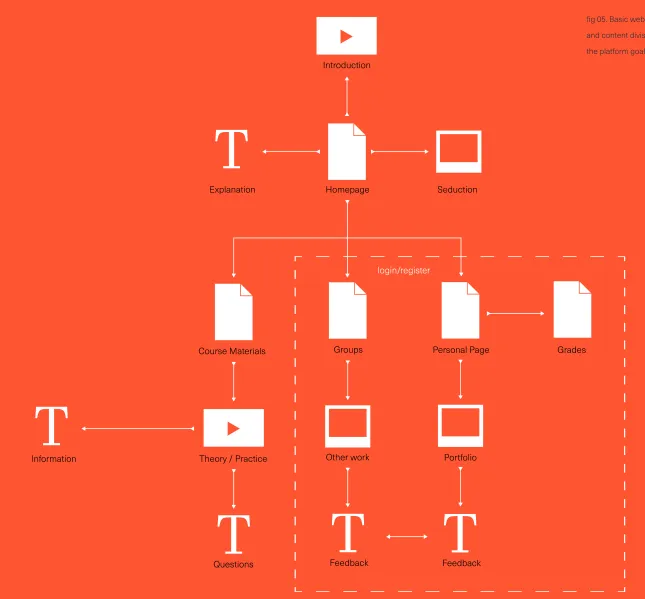
(13) Function Analysis. Function Analysis. 2.2 function analysis. Sketchlab Pilot Goals. Function analysis is a method for analyzing and developing a function structure. The function structure is an abstract model of the platform that displays what the product should do. A basic function analysis, based on the user research, provides an infrastructure for both the comparative analysis and the design phase. 2.2.1 Software Design Approach A system is composed of multiple sub-systems. All these components together create a hierarchical structure. Top-down design approaches the whole system as one entity and decomposes it based on characteristics. It is inherent that no coding can begin until a sufficient level of detail has been reached in the design of at least some part of the system. Bottom-up design emphasizes coding and early testing, by using basic level components. The complexity of the system is increased by combining low-level components. Top-down and bottom-up approaches are not practical individually. By providing a detailed design of the platform and by re-using code and combining basic modules it is possible to combine both approaches [7].. 2.2.2 Basic Platform Functionality The basics of the platform, or the features, are used to determine what distinguishes Sketchlab from other tools or platforms. It is also used to determine what links can be made between other platforms and tools.. Platform Goals. Make Sketchlab available for University of Twente. Provide students the possibility to share and. students and Teachers (Creative Technology in. upload work in a trusted environment. particular) Give students insight into their progression Sketchlab needs to be in English because concerning bachelors are in English. (Cater to international students) Lift teacher workload so that they can focus on. and information provided in the Sketchlab proposal. It focusses on what the customer wants, and how to reach these goals. The list of goals is split up in; goals that need to be reached in the pilot and goals that are to be achieved after the pilot.. Sketchlab Features The basic functions of the platform are based on both the functionality that the clients insisted upon during the brainstorm and the functions or features distilled from the platform goals. the list of platform goals and web app features is used to create a detailed program of requirements and to provide the foundation for the design phase.. 2.2.3 User Stories To identify specific users and user needs user stories based on the personas and stakeholders are used. A user story is a brief statement that identifies who the user is, what the user needs, and why the user needs it. It helps document practical differences between the users.. Provide digital design sketching course materials to. guiding and stimulating students. everyone for free Provide teacher an overview of student progression Improve the expediency of the Design Sketching education. Provide teachers the possibility to comment on students work. Make sketching education open in time and place Make a platform that fits in with the current digital. Provide teachers the possibility to review and grade. climate. students work. Sketchlab needs to complement the analog. Provide teachers the possibility to expand upon the. teaching environment. platform. Make a digital platform that suits student. Provide teachers the possibility to edit information. perceptions (Intuitive platform). on the platform. Teach students how to sketch properly and how to use sketching as a design tool. Sketchlab Future Goals. Teach students how to manage their time. Appeal to an international audience. efficiently Use the platform as a replacement for analog Motivate students to sketch. lectures in the future. Offer students a way to look at each other’s work. Make it available to external students and teachers. The goals of the platform have been based on brainstorm sessions with the client, user research,. Make sketching education less teacher dependent. in the future. Offer students the possibility to exchange feedback Offer students the possibility to give feedback in. Make revenue with the platform by selling licenses. groups. page 24. page 25.
(14) function Analysis. function Analysis. fig 05. Basic website structure. Sketchlab Features. and content division based on the platform goals. Available to Everyone. Teacher. Landing page/commercial page. Login method. Platform introduction. Review capabilities. Registration method. Grade center. Course material overview. Student overview. Course materials/assignments. Portfolio assignment overview Platform moderation capabilities. Student Login method Grouping capabilities Collective feedback capabilities Peer review capabilities Progression overview Portfolio Grade center. page 26. page 27.
(15) Comparative Analysis. Comparative Analysis. 2.3 Comparative Analysis The client, partly due to the insistence of SURF, wishes for a comparative study. In this paragraph, tools and platforms that can provide the functionality needed for Sketchlab are compared. By analyzing several relevant options and by comparing their pros and cons it is possible to make a substantiated conclusion on the matter. Application. Web app Advantages. An application or app is a software program designed. Several advantages a web app provides over. to help someone perform an activity. While the word. native applications and websites.. 2.3.1 Problem Definition. Sketchlab Risks. Native Application. According to the client, several risks need to be. Probable risks that are likely to occur during. Native applications are packaged software programs. taken into account when creating the platform. the making of Sketclab. that you download and then run on the according. “app” has gained popularity in the context of mobile devices it still applies to programs in general. It can on any electronic device.. operating system such as, a personal computer. from scratch. The client believes that finding the. A web app is updated instantly.. Development of the instruction materials (course materials) takes more time than intended.. Website. create a design sketching platform from scratch with a. The chance of occurance is medium. an application run in a web browser. That is why. short time span and a limited budget. They mentioned. and the impact is medium. semantically speaking websites and web applications. succeeding. SURF pointed out that it may not be viable to. A website is basically a web application, since it is. are not entirely exclusive but a distinction can still be. that three of the four risks cited by the client have to do. made.. the client looks into alternative platforms to minimize. Development of the platform takes more time than intended.. the risk.. The chance of occurance is medium. from the early days of the internet where the notion. and the impact is high. of a dynamic layer that can respond to user input was. with the development of the platform. SURF insists that. evident that they believed that they needed to create. Finding professional engineers to develop the platform proves difficult.. a new social media platform geared towards helping. The chance of occurance is medium. engineers with design sketching. The user analysis, on. and the impact is high. perform actions. Internet is often required to use it.. Web Application. Browsers are periodically updated.. software application which is run in a web browser.. have a “tool” that caters to their specific needs. In the functionality analysis, those needs and goals were. The chance of occurance is high. programs that use the same source code on a web. transformed into features that are used to determine. and the impact is high. server. Common web applications include e-mail,. be created.. page 28. Web app Disadvantages. informational and web application allow users to. Design Sketching teachers have a limited availability.. what kind of tool the target group needs and how it will. Web apps are easy to combine with other websites and web apps.. Website is an anachronistic term that exists. A web app or web application is a client-server. the other hand, showed that the social media market is oversaturated and that the target group would rather. No downloads and storage spage are needed.. very limited. Thus, websites are defined as primarily. 2.3.2 Program Choices After the first meeting with the client, it became. Only a web browser is needed for access on multiple devices and platforms.. (desktop software app) or a mobile device (mobile app).. right people to build the platform, and managing the limited amount of time efficiently are vital to. Fast development cycles makes it easy and cheap to build prototypes.. Hosting costs (periodically). This means that it consists out of one or multiple. search engines and wikis. [8][9]. Software companies blur the line by making online apps that offer downloadable counterparts.. As the internet connections become better and the mobile devices become more prevalent apps will shift to cloud based or online based environments.. page 29.
(16) Comparative Analysis. Comparative Analysis. Platform overview. Pros & Cons. Generally speaking, a mobile webapp should be. Social networking website. Best media distribution options. Tools, Web API. considered the first step in developing a mobile. A social networking website is an online. Users are already used to it. An API or application programming interface is a set of. presence, whereas an app is useful for developing an. platform that allows users to create a public. No custom functionality possible. requirements that govern how one application can talk. application for very specific purposes that can not be. profile and interact with other users on the. Confidential information intrusion. to another application. This way content that is created. accomplished through a web browser.. website.. Loss of intelectual property. in one place can be dynamically updated in multiple. Because web apps provide interactive. locations on the web. The practice of publishing APIs. engagement with users without any of the negative. Content management system. Usable without a coder. has allowed web communities an open architecture. aspects native apps bring, it is the obvious choice.. A content management system that. Free to use and redistribute. for sharing content and data without providing all the. supports the creation and modification of. Too much random functionality. software code.. digital content using a common interface. Custom functionality still need a coder. It is possible to include prebuilt functionality by adding. When creating a new product one cannot solely focus. and supporting multiple users working in a. Updates may break the platform. different APIs to the web app.. on goals. With goals comes risk and whereas the goals. collaborative environment.. Open source software is a hacker target. Some examples of functionality that might benefit. 2.3.3 Alternative Platforms of the platform can be described as functionality the risks contribute to the failing of the entire product.. Sketchlab are a social media login (OPENID), a. White-label social network. Built in administration tools. commentary system (Disqus), a video hosting service. A white label product or service is a product. Built in social interaction capabilities. and player(VIMEO), or even Google maps and Dropbox. shown, which can be used to create the web app that. or service produced by one company that. High startup costs. integration. Although, providing a common framework. is needed. Only viable possibilities that can provide the. other companies rebrand to make it appear. Many contraints in the layout. that allows data to be shared and reused across. desired functionality have been taken into account.. as if they had made it.. Not possible to customize needs. applications might not be the safest thing to do when. Here an overview of alternative platforms is. In the following analyses, general descriptions. working with confidential information.. and examples for each platform are provided. The. E-learning platforms. Provides access to a wide audience. pros and cons of each platform are based on essential. E-learning platforms typically include. Relative low cost. functionality and features, development cost, difficulty. 2.3.4 Picking suitable Platforms. online access to learning content and tests,. Easy to use by non-coders. Social media platforms do not provide enough features. of the development, the development time, and. communication and collaboration tools for. Only caters to big or tiny platforms. to ensure vital functionality for Sketchlab. However,. the safety concerning confidential information and. students, and course management and. No costum back-end options for moderation. several social platform APIs can be included to add. intellectual property. [10][11][12][13][14][15]. assessment facilities for instructors.. Forced updates on the platform. functionality to a custom web app. White label social media platforms and. page 30. Backend web framework. Free to use. e-learning platforms can provide Sketchlabs vital. A web framework or web application. Supported and documented. functionality. However, both of them provide too much. framework is a software framework that is. Use modules for fast development. functionality straight out of the box, and it is not or. designed to support the development of web. Available in popular programming languages. hardly possible to alter the features to create a custom. applications including web services, web. No limits to layouts and functionality. user experience.. resources and web APIs. Hard to learn/find coders. page 31.
(17) Comparative Analysis. feasibility Analysis. 2.4 feasibility Analysis A custom web app created with either a CMS or a Backend Framework will have all the vital functionality. But changing the built-in management is often harder and more costly than creating a custom experience by using a framework. Frameworks are mostly used in functionality driven development. It is possible to combine several. This feasibility analysis consists out of two important feasibility factors. One factor being the resource feasibility, which involves questions such as; how much time is available to build the system, and what are the number of resources required? The other factor being the financial feasibility, which can be judged on dependencies such as time delays, and increases and decreases in cost.. modules and quickly create prototypes or initial versions of the tool. Although white-label social media platform,. 2.4.1 Platform Cost Indiction. Average production costs. Competitive industry pressure and advancements. Planning – $0 – $600 UX (sitemap, wireframes) – $0 – $1200 Visual Design – $1,200 – $2,400. an e-learning platform, and even a basic CMS require. in web design tools have pushed the price for basic. someone experienced or someone willing to learn the. websites down. However, the price for high end. ins and outs, they provide the possibility to create a. websites and web apps has seen a steady rise.. multimedia design – $250 – $10,000. platform without coding experience. Creating custom. The drive for higher-end, interactive and highly. copyrighting – $50 – $500 (per article). solutions with a CMS and a Backend framework all. functional design made the cost of websites. Programming – $3,000 – $4,800. require coders that are experienced in the subject. become more disparate.. Content Support – $240 – $600. matter.. Asking how much a website costs is like asking To ensure safety and most of all confidential. Testing and Launch – $960 – $1200. how much a car costs. A general indication can be. usage of student information it is best to create a. given but it depends on countless variables, and mainly. Hourly rate web design/development. custom platform by using one or multiple backend. comes down to the programmers and designers used. Freelance: $30-$90. frameworks. One of the biggest risks in using an. to create the platform.. Professional: $45-$120. external platform is giving big companies access. To the right an average cost indication based. to confidential information. External companies or. on several sources can be seen. [16][17][18]. Average extra expenses. platforms can and may change their platform or. The cost indication is given in dollars mimicking the. Domain name – $5 – $15 (yearly). important clauses at any given time and render the tool. sources cited.. Website Hosting – $75 – $200 (yearly). and the content moot.. A direct conversion to euros can be made. The. CMS $0 – $1500(yearly). exchange rate is 1EUR=1.1157 at the time of writing.. E-commerce functionality $500-$5000 (1 time). The costs cover the low end and high end spectrum. They include initial startup costs, and. SEO $300-$1500 (monthly) Ongoing website maintenance $500-$1250(yearly). average expenses on common website features. The cost indication has been split up into meaningful stages and critical factors of web development to help. page 32. with the planning of possible cost reduction, and to. Average Cost:. $5,640 – $11,400. decide if creating a website is feasible with the limited. . * and up, depending. amount of time and the limited budget.. . on fixed charges. page 33.
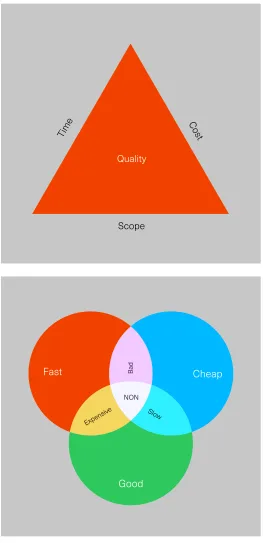
(18) feasibility Analysis. feasibility Analysis. By choosing IT students under the guidance of a senior. 2.4.2 Time Cost Quality. programmer, to program the platform, the cost for the. In the early stages of the feasibility analysis it was. platform will be significantly lower. It will, however, take. concluded, partly due to senior engineer Dennis. relatively longer to deliver a high-quality product. Thus,. Vierkant his insights that the development costs and. Waterfall has a linear, non-iterative structure characteristic. All the steps are planned out.. vital features should be done faster, which will be more. time spend on this project depends heavily on the. expensive, and low-priority features can take more time. programmers that will be used.. to develop.. The search for programmers that can provide the right expertise is usually based on functionality. 2.4.3 Project Management. driven research and budget. What goals do you have,. Proper managing of the project will be vital to. What functionality do you need and what’s the budget. make sure the IT students will provide the needed. are questions often asked.. functionality for the assigned budget in the assigned. Even though suggestions for programming. amount of time the. By properly managing the product. tools or platforms can help when searching for capable. it is possible to minimize the biggest risk, which are. programmers, how the programmers will meet the. mostly people related.. goals is decided by themselves. In one of the early feasibility brainstorms it was. Plan-driven Development. decided that to keep the production costs low students. The development of Sketchlab will be based on. of the university of Twente will be used to create the. predictive, traditional development model.. platform under the supervision of one or multiple. Plan-driven development, or waterfall, methods. senior IT engineers tied to the UT.. incorporate: repeatability and predictability, a defined. The constraints of the development process. incremental process, extensive documentation,. can be described as; scope (functionality), time. up-front system architecture, detailed plans,. (schedule), cost (resources) and product quality. process monitoring, controlling and education, risk. (performance). This is referred to as the project. management, verification and validation.. management triangle.. By using a plan-driven development method. This graphic aid shows the near infinite priorities that. it is possible to utilise previous experience and use. exist between the competing values. When we show. junior developers. An estimation of time, costs and. the project triangle as a “pick any two” we can reflect. complexity can be foreseen.[appendix vergelijking]. the fact that the three options are interrelated and. A waterfall model assumes that everything is. that it is not possible to optimize all three. You can. done according to planning. That is why it only works. design something quick and to a high standard ,design. if the developers have designed and developed similar. something quick and cheap or design something with high quality cheaply. [19]. Waterfall software development. fig 06. Project management triangle. sofware in the past. [20]. Requirement analysis The development team meets project stakeholders to identify needs and establish requirements to satisfy project goals. Requirement analysis initially is a feasibility study that identifies functional and nonfunctional requirements with its constraints.. Design The development team converts requirements into representation of architectural model. Prototypes are created with functional algorithms and data structures. Design is finalised and overall of the project outcome depends on it.. Coding and implementation The design is transformed into software. Testing The software domain is tested for bugs. Different sets of tools are available for testers and developers to detect and fix defects in the software.. Maintenance In the maintenance stage the product is updated, to meet changing needs and environments. It fixes undetected bugs and defects that might arise.. page 34. page 35.
(19) feasibility Analysis. Analysis. Incremental Model. MoSCoW. To make the product lifecycle less static, and to reduce. The MoSCoW method is a prioritization. the risks of the project, an incremental is used. Each. technique that is used to order the. iteration of the incremental model can be seen project. importance of requirements.. with its own lifecycle (this could be waterfall). The end product of each iteration is an executable system which is integrated and tested. An iteration usually lasts for a. M-Must haves. predefined, relatively short period of time. These requirements need to be met. Without. After the first increment, a core product is. this functionality the product is not usable.. delivered that can be used and tested. Based on customer feedback, requirements are refined with each. S-Should haves. iteration.. These requirements can be just as important. The requirements are prioritised, the higher a requirements ‘s priority the earlier it is to be included. as a must but they are not necessary for a working product.. in an increment. Thus, new functionality added should not be more important than that which exists in the. C-Could haves. current build. [21]. These requirements need to be met if there is enough time and budget to meet them.. MoSCoW The requirements for Sketchlab are turned into user. W-Will not haves. stories and classified using the MoSCoW system.. These requirements won’t be added to the. The MoSCoW method is a prioritization technique. current project. They are usually part of the. that is used to reach a common understanding. recommendations.. with stakeholders on the importance they place on the delivery of each requirement. For this project this method is used to distinguish and prioritize functionality to aid in the management of the development process and manage time and resources efficiently, [22]. page 36. page 00.
(20) Analysis. This part of the discovery phase is used to gain an understanding of the Interface elements that will condition the design phase. Both the user experience and graphics user interface are based on rational decision making. The design will be an evolution and not a revolution. Copying comparable functionality from existing solutions will be an integral part of the research. The third analysis in this paragraph is about digital teaching heuristics, it explains why both peer evaluation and collective feedback possibilities are to be included in the platform. The most common pitfalls and opportunities concerning giving and receiving feedback are also disclosed.. page 00. 3. Interface design. page 39.
(21) interface design. Interface design. 3.1 interface design principles The user interface (UI) or interface for short, is where the interactions between humans and products occur. The UI allows effective control of the product and feeds back information to aid in the decision making process. An interface can be physical like a keyboard or the buttons on a coffee machine but in case of Sketchlab it is digital and refers to the software layout on a screen. In this paragraph, the basics of interface design are examined. The foundation for the design phase is created by analyzing common web apps, by using accepted user experience (UX) and graphical user interface (GUI) principles, and by looking into the main goal of Sketchlab which is educating (teaching/learning). 3.1.1 Analysis of User Interfaces. 3.1.3 Interface of E-learning Apps. To create an interface that connects to the target. Popular platforms that provide e-learning possibilities. group a small market research on commonly used. have also been researched. These platforms provide. web apps was done. These web apps are visited on a. insights on digital education related problems. The list. daily basis and are part of the target groups routine.. of platforms also includes e-learning platforms that do. The web apps chosen, provide at least several. not focus on teaching creative skills.. solutions on comparable functionality. The web. E-learning platforms provide several. app comparison also provides insight in additional. possibilities for course layouts, grading methods, and. functionality that might be needed or issues that. reviewing methods.. may occur.. 3.1.2 Interface of Popular Apps. The platforms that have been researched include; Blackboard, Khan academy, Coursera, Skillshare, Lynda and Digital Tutors.. popular apps that have been researched include; Gmail, Youtube, Instagram, Twitter and Facebook. Even though all the web apps have different. Provide Information Almost every platform provides descriptive information. primary goals they still have much functionality with. about the entire platform and the essential features.. eachother and with Sketchlab in common. All the apps. General information on a platform and about the usage. are heavily based around their users and deal with. of the platform is usually provided on the main page.. multimedia sharing and user communication.. The main page is generally not interactive as it just gives an overview.. The information can be provided as a video, text, or as. To motivate users to actively use the. an infographic, but more than often, a combination of. platform, gamification elements and rewards are. methods is used.. often used. Gamification goals often go hand in. Individual information about features are. hand with other user goals and provide a fun and. usually done with small indicative texts or tooltips that. addicting environment that provide to the sense of. appear with a click or a hover.. accomplishment and progression.. Most platforms have a custom method to. Other methods that are often used to stimulate. provide an overview of the most important information. active usage is constant feedback in the form of. or media, but they are all heavily structured. Important. comments, ratings and personal media collections.. information is always easy to reach and find. Most of he important information or media is provided as an. Communication between Users. overview. Usually a search option or filter is used to. Every analyzed platform provides a form of. provide quick access. And to mark the importance. communication between users. And in most platforms,. of new or vital information iconography and color are. user communication is a primary feature.. often used as indicators.. Communication on trivial or personal matters are usually done through a PM (private message) or. Motivate Users. IM (instant messaging) system. It is a form of direct. The best way to motivate visitors to start using or. communication that can be done through text, video,. to keep using the platform is to create a lasting. and audio.. connection between the two. This relationship can be. To share information or media so called posts. either emotional or purely functional. A visitor usually. or personal updates are used. This way information is. becomes a user once he registers to the platform.. made publicly available.. It is possible to entice users into exploring the. To get feedback on specific posts or media. platform by challenging them or by providing valuable. commenting systems are often used in combination. tools or information.. with rating systems. Commenting systems provide. To seduce visitors to become active users,. users a posibility to leave a written message about the. large, friendly welcoming messages, and images are. post, whereas ratings provide a quick way to share an. often used. Several login and register indications are. opinion. Both of them combined provide an overview. given throughout the platform. Even more prompts,. about the general opinion.. in the form of popups and blocked content persuade visitors to become new users. Giving users a profile page makes the platform. Friending systems are often used as a way to get updates about certain people. Grouping systems on the other hand provide the possibility to exchange. feel personal. When users form an active part of the. information with specific groups of likeminded. community by exchanging information and media on a. individuals.. daily basis, they become inseparable.. page 40. page 41.
(22) interface design. interface design. Interface Usability Heuristics this is a list of heuristics that complement the principles for interaction design.. 3.1.4 Interface Design Principles All the Interfaces that have been analyzed look similar.. Visibility of system status. Not only do these platforms use the same graphic. Keep users informed about what is. elements, they also use comparable sizes, colors, and. happening, through appropiate feedback.. feature placement. The platforms share most characteristics. Match system and real world. because they are aimed at the same audience. The. Follow real world conventions. Speak the user. designs are based on evolution rather than revolution,. his language and use metaphors.. and they use visual elements that the general internet user already uses and understands. fig 06. Clockwise from the top left; Gmail, Youtube, Twitter. Because Sketchlab users are part of this. User control and freedom Have an emergency exit and support redo.. group of primary internet users, it is possible, and even. fig 07. Skillshare. common practice to design the interface by using the. Provide information in multiple ways. same principles.. Combine color, form, shape etc.. User Experience. Consistency and standards. User experience, or UX, is the process of enhancing. Give features with the same function the. the experience that people have while interacting. same appearance.. with a product. In short, it is design that focusses on usability to make a product user friendly, Good design is easy to digest. The brain should not be doing most of the work. Good. Recognition rather than recall Make crucial information visible or easily retrievable whenever appropriate.. information hierarchy and clear copy are good examples of digestible design. Information needs to be. Aestethic and minimalist design. explained in a human way. A design is clearer if it uses. Do not add irrelevant information. More. descriptive information instead of programming logic.. information equals less visibility.. Guidelines exist for a reason. It is possible to maximize user adaptation by using familiar patterns, icons. Help and documentation. and presentational styles. And simplifying complex. A system that can be used without. problems will make the product more enjoyable. The. documentation is better, but always provide it.. less the user has to do the more delighted he will be with the solution. To the right you can see a list of Jakob Nielsen’s heuristics of interaction design. [23]. page 42. Error recovery and prevention Help users recognize and recover from errors, or have no mistakes in the interface.. page 43.
(23) interface design. interface design. Graphical User Interface. How to give feedback. Peer Feedback. The heuristics for designing any interface can be. This list is a descriptive method on giving. An important part of learning is self-assessment.. By providing the option to give feedback in groups and. directly translated into a description for the Graphical. constructive feedback.. Self-assessment can only be done when you notice. by making feedback open to criticism it is possible to. User Interface (GUI). The GUI refers to a graphical. your mistakes. By providing the possibility to compare. overcome some of the most common peer feedback. representation of software on any screen, and the. finished assignments and by receiving and providing. obstacles. Because group feedback is based on. feedback a student is able to reflect on his own. multiple opinions students will take it more seriously. drawing.. than regular peer feedback. Students will also be more. actions in a GUI are usually performed through direct manipulation of those graphical elements.. Writing a brief summary of your view of the assignment. To create a clear, aesthetically pleasing interface you have to provide meaningful contrast, align screen elements and create groupings for example.. In big groups it becomes impossible for the. Balancing negative with positive comments. [design appendix]. 3.1.3 Digital Teaching Heuristics The children now entering school are fully fledged. Using constructive criticism to provide positive suggestions for improvement. digital natives, and using technology in the classroom is getting increasingly more important. By integrating digital tools with the current curriculum teachers can:. Asking questions which encourage reflection about the work. provide quick feedback, increase student engagement and communication, improve access to the curriculum. Explaining all your comments. and increase instructional time. By being engaged in the learning process, and by taking ownership of their learning the students can be more productive and. learning into their own hands which makes it possible. Suggesting follow up work and references Suggesting specific ways to improve the assignment. to decrease the dependence on teachers for content and answers. It is widely accepted pedagogy that most students learn best when collaborating with. Explaining the mark or the grade and explaining why. others. Thus, a digital platform would allow learning to continue beyond the confines of a classroom [24].. Offering help with specific problems Offering the opportunity to discuss the assignment and your comments.. page 44. assignment. Peer feedback can offer a solution in this. agree with them.. area. When a student is working on an assignment it. Collective Feedback. is often better to receive quick “incomplete” feedback. Collective feedback, or feedback on an entire group,. from peers, or students on the same level.. can be considered as a possible bridging method. Peer feedback is a two-way process in which. between individual teacher feedback and no teacher. feedback is exchanged between students, or peers,. feedback. The teacher can give feedback on an entire. to provide them with opportunities to learn from each. group by highlighting some of the strong and weak. other. Peer feedback most commonly consists out of. points. This method is faster than giving everyone. corrections, opinions, and suggestions. Peer feedback. individual feedback and it forces students to compare. works well when the focus lies on either assessment of. their assignments with the work of others [26].. a product such as a drawing, or the performance of a. learn faster. With digital learning students can take. teachers to give personalized feedback on every. confident in providing feedback when other students. certain skill. (tadfon) Students have a dislike for grading peers,. Teacher Feedback Even though teacher feedback falls short sometimes. particularly in small, well-established groups. But once. or can be characterized as impersonal, it is still an. students have confidence in the feedback they give. important part of the student work evaluation process.. and receive peer feedback can be very useful. Student. Students sometimes lack the ability to give peer. feedback can enhance student learning through. feedback owing to insufficient knowledge. Teacher. analysis, reflection and diplomatic criticism. By putting. feedback, on the other hand, can be based on. the emphasis on critical feedback, rather than grades,. experience in the subject matter.. it can be perceived useful and more rewarding than. Teacher feedback has proven to have more. usual lecturer marked methods or peer reviewing. influence on students than peer feedback. The strict. methods [25].. requirements are crucial for how students treat teacher commentary.. page 45.
(24) Analysis. page 46. page 00.
(25) Analysis. In this chapter, the conclusion and the decisions made throughout the research, based on information gained in the analyses, can be found. Here will be explained how these decisions came about and how they will influence the rest of the design process. The first part of the conclusion explains relevant users and any critical information they provide. The second part of the conclusion summarizes the decisions made in the comparative analysis and the feasibility analysis. This paragraph will explain key issues and how they are solved. The final section shows the program of requirements. The list of requirements will be split up into functional requirements and usability requirements, and all requirements will have their criteria specified.. page 00. 4. Analysis conclusion. page 49.
(26) Analysis conclusion. Analysis conclusion. 4.1 Conclusion of the analyses The analysis phase can be split up into the three following parts. The first one being the user goal research. In this analysis, the key users and stakeholders are defined, and their needs and wishes are translated into a basic functionality structure for Sketchlab. In the second phase, the basic features are used to see what kind of platform is actually needed and how it can be achieved. The final phase of the analysis defines three primary goals for Sketchlab namely, providing information, motivating users, and user communication. A comparative analysis of several platforms and user based design guidelines provide the foundation for the design phase. 4.1.1 Goals Features Function The goals of the platform are mostly based on goals previously stated by the important stakeholders, SURF, CES/CELT and the Design Sketching Department of the University of Twente. (bron) The other important stakeholders are the users that make up the target group. The Targetgroup can be split up into two primary users. You have the teachers and you have the students. Even though both groups have different goals, most of them overlap. The teachers and the students have most ideologies in common. Both groups are used to current technology, and they want to make the design sketching courses clear so that students can pass the course. However, students prefer Sketchlab to be available on mobile screens. They want a tool that can quickly show them what assignments they need to make and how to get a passing grade. Students do not have the time to keep up with yet another social media platform.. page 50. or multiple frameworks combined with APIs. A webapp. Apart from these studies a list of UX and GUI heuristics. focusses on interactivety between users and provides a. is used to make sure the entire platform is user-friendly.. platform independant solution.. These general design principles are commonly used. 4.1.2 Feasibililty Sketchlab A simple cost indication shows how much a web-app. when designing web apps and can be correlated to other popular web apps. All the information gained in the analysis will. “normally” costs and what areas use up most of the. be translated into a program of requirements that. budget. At the moment of writing a big part of the. in turn will be used in the design and development. planning and the design phase have already been. process.. completed or are near completion without spending any of the budget. By using students that work for free (bachelor. Functional testing is carried out to ensure that the product behaves according to the functional. assignment etc.) or for less money than professionals. requirements and does not take into consideration. (student assistant) it is possible to keep costs low.. design principles. This entails a series of tests which. Teachers want to spend less time explaining trivial. However, using inexperienced programmers will take. perform a feature by feature validation of behaviour,. course materials and grading assignmets so that they. more time, and one or multiple senior engineers are. using a wide range of normal and erroneous input. can spend more time in the classroom guiding and. needed to lead and manage the groups properly to. data. In contrast, Usability testing focuses on customer. stimulating students. The teachers also wish for a. keep the quality consistent.. acceptance and how well the customer can use the. A functional product roadmap to lead the. platform that they can expand upon with new course. product to complete the required task. Usability testing. development phase will be based on this report. This. investigates all aspects of the usability of a product,. guide specifies what functionality needs to be done. including overall structure, navigation flow, layout. Sketchlab Web Application. in a specific timespan for a given budget. By using an. of elements on a page, clarity of content and overall. The goals that the user wants to achieve can be. incremental development model combined with one. behaviour.. directly translated into features for Sketchlab. Important. or multiple frameworks it is possible to get a prototype. features that Sketchlab needs are, custom user profiles,. with primary functionality done in the given amount of. a reviewing system (comments, ratings), a portfolio. time.. materials.. system to keep track of assignments, and a custom course structure to provide the design sketching. 4.1.3 Interface Design. materials.. The Sketchlab interface has three essential functions. It. Sketchlab needs to work on a PC, a laptop, and any relatively new mobile device (phones, tablets) for the unforeseeable future. The best way to achieve the needed functionality is to create a web application by using one. has to provide information, motivate users, and provide user communication possibilities. A comparative study and a deeper look into giving feecbak offer different options, possibilities, and solutions concerning these basic functions.. page 51.
(27) Analysis functionality requirements. Analysis comments. Sketchlab will be programmed by using one or. The fameworks will be chosen by the group of. multiple front-end and back-end frameworks.. students and the senior programmer.. Sketchlab needs to have a landing page available. Introduce new students to sketchlab.. to everyone.. Seduce prospects to join sketchlab.. Sketchlab needs to be created before testing starts. Total projectcost € 97.500. Serve as a recognition point and starting point.. within the assigned budget.. Testing will start in Feb 2017. Sketchlab needs to provide Design Sketching. Provide the course materials overview and assign-. usability requirements. comments. course materials to everyone.. ments for free. Sketchlab needs to be available in English.. Concerning bachelors are given in English. Sketchlab needs to improve the expediency of the. Provide a custom, consistent learning method.. design sketching education.. Provide good examples for the assignments.. Sketchlab needs to make sketching education. Make course materials available everywhere.. open in time and place.. Make course materials always availble.. Sketchlab needs to complement the analog. Provide an overview of materials shown in the. sketching environment.. classroom.. All users need to be able to log in with their. The users in the pilot are CT students and DS. university credentials.. teachers.. Sketchlab needs to provide communication. Provide a method for peer feedback.. methods to the users.. Provide a method for teacher feedback. Provide a method for collective feedback. Provide a method for rating (quick feedback) Provide the possibility for help/questions. Provide a way to share important information.. Sketchlab needs to provide grading possibilities.. Use digital materials in the classroom.. Grades still need to be given to complete the course. Sketchlab needs to suit student perceptions.. Sketchlab needs to provide grouping capabilities.. Mimick the looks of often used web apps. Use UX and GUI heuristics. Group students together that are working on the same assignments. Classes and project groups. Sketchlab needs to be intuitive.. Sketchlab needs to provide users a way to keep. Provide a method to keep track of own work.. track of their progression.. Provide a method to keep track of finished. Mimick the looks of often used web apps. Match system and the real world. Use recognition rather than recall.. assignments. Sketchlab needs to motivate students. Sketchlab needs to provide students a way to share. Create a relationship between user and platform.. Provide a method to look at other student work.. Make the user visit the platform on a daily basis.. sketching assignments. Sketchlab needs to provide an overview of. Teachers need a fast way to see the progression of. students.. students.. Use gamification elements.. The interface needs to be clear and legible.. Mimick the looks of often used web apps. Use aestethic and minimal design. Provide information in multiple ways.. Students need a way to see people in their group.. Keep the user informed about what is happening. Be consistent and use standards by grouping infor-. Sketchlab needs to be easily updateable and expandable by teachers.. The teachers will act as the moderators. Only use logical edit functionality, no complicated menus.. Sketchlab needs to work on both desktop solutions and mobile devices.. Most browsing is done on smartphones.. page 52. mation with graphical user elements. The interface needs to recover or prevent mistakes.. Always provide redo and undo options Always provide an emergency exit. page 53.
(28) Analysis. page 54. page 00.
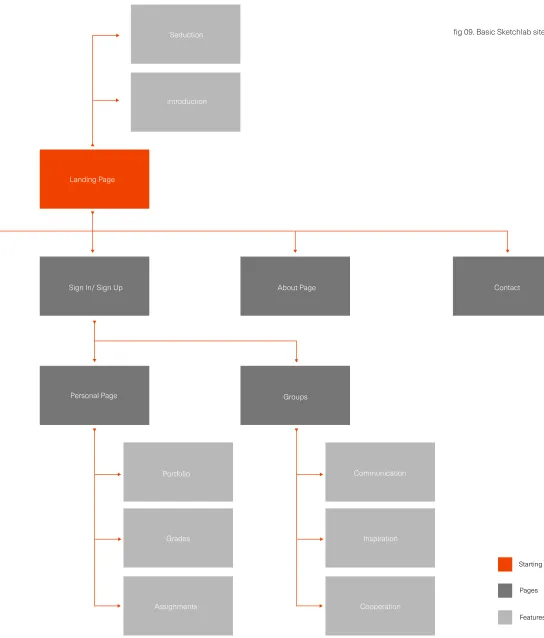
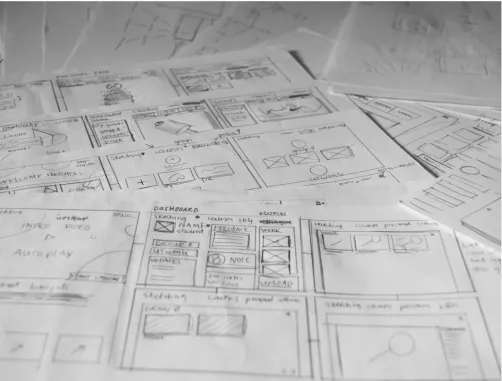
(29) Analysis. In the concept phase, critical moments and choices made during the design process are disclosed. The program of requirements and other information gathered during the research phase are used to provide a guideline throughout the concept phase. The concept phase was started by creating a general sitemap, based on the program of requirements and typical web app structures. After deciding on a basic structure, various idea sketches were created to explore the possibilities within the confines. The most promising sketches from the idea generation were combined into five presentable concepts. These concepts were, in turn, presented to several important stakeholders to decide on a general direction for the final concept. The entire design process, including sketches and wireframes, can be found in the design appendix.. page 00. 5. Concept phase. page 57.
Figure
![fig 01. Stakeholder engagement [6]](https://thumb-us.123doks.com/thumbv2/123dok_us/9804403.481621/11.1191.641.903.395.707/fig-stakeholder-engagement.webp)

+7


Related documents
The focus of this paper is on presenting a methodology for generating and optimizing test data by employing evolutionary search techniques, solely with basis on the
first cask with spent fuel was placed into storage in 1983 over 1100 casks are now in interim storage worldwide approx. 1200 casks have
of technology — including computerized coverage systems for signing out, hand-held personal digital assistants (Fig. 1), and wireless access to electronic medical records — may
Click on the assignment link from one of these locations: main course page, the assignments page or the calendar block.. Read the directions given by
Whether function or basic software (e.g. CAN or diagnostics), IAV’s Software House has the right expert to contact for your software
Based on presented studies, theory of Knowledge Management and a Civil Engineering small design firm as case study. It is developed Flowchart of Information Flows in design
The main interface of StreMa application consists of StreMa main page, Introduction to StreMa Page, Stress Speed Test Page, Stress Reliever Page and Healthy
In the qualitative theory of planar dynamical systems see [1–7], one of the most important topics is related to the second part of the unsolved Hilbert 16th problem, There is a
