http://wrap.warwick.ac.uk
Original citation:
Foss, Jonathan G. K. and Cristea, Alexandra I. (2010) Transforming a linear module into
an adaptive one : tackling the challenge. In: Aleven, Vincent and Kay, Judy and Mostow,
Jack, (eds.) Intelligent Tutoring Systems : 10th International Conference, ITS 2010,
Pittsburgh, PA, USA, June 14-18, 2010, Proceedings, Part II. Lecture Notes in Computer
Science, Volume 6095 . Springer Verlag, pp. 82-91. ISBN 9783642134364
Permanent WRAP url:
http://wrap.warwick.ac.uk/47424
Copyright and reuse:
The Warwick Research Archive Portal (WRAP) makes this work by researchers of the
University of Warwick available open access under the following conditions. Copyright ©
and all moral rights to the version of the paper presented here belong to the individual
author(s) and/or other copyright owners. To the extent reasonable and practicable the
material made available in WRAP has been checked for eligibility before being made
available.
Copies of full items can be used for personal research or study, educational, or not-for
profit purposes without prior permission or charge. Provided that the authors, title and
full bibliographic details are credited, a hyperlink and/or URL is given for the original
metadata page and the content is not changed in any way.
Copyright statement:
"The final publication is available at Springer via
http://dx.doi.org/10.1007/978-3-642-13437-1_9
"
A note on versions:
The version presented here may differ from the published version or, version of record, if
you wish to cite this item you are advised to consult the publisher’s version. Please see
the ‘permanent WRAP url’ above for details on accessing the published version and note
that access may require a subscription.
Transforming a linear module into an adaptive one:
tackling the challenge
Jonathan G. K. Foss and Alexandra I. Cristea
Department of Computer Science, University of Warwick, Coventry, CV4 7AL, United Kingdom
{J.G.K.Foss, A.I.Cristea}@warwick.ac.uk
Abstract. Every learner is fundamentally different. However, few courses are delivered in a way that is tailored to the specific needs of each student. Delivery systems for adaptive educational hypermedia have been extensively researched and found promising. Still, authoring of adaptive courses remains a challenge. In prior research, we have built an adaptive hypermedia authoring system, MOT3.0. The main focus was on enhancing the type of functionality that allows the non-technical author, to efficiently and effectively use such a tool. Here we show how teachers can start from existing course material and transform it into an adaptive course, catering for various learners. We also show how this apparent simplicity still allows for building of flexible and complex adaptation, and describe an evaluation with course authors.
Keywords: authoring of adaptive hypermedia, adaptive hypermedia, MOT3.0
1
Introduction
2
Scenarios
This paper considers the authoring process from the point of view of two types of authoring, as illustrated by the two scenarios below.
2.1 Content Authoring
Professor Smith is a lecturer in Computer Science, and has presented a ‘Web Development’ course for the last five years. The resources she currently uses are: 30 lecture presentations (written in PowerPoint); 5 videos (each 5 minutes long) and 1 online quiz (authored in Moodle).Although the Professor is keen to embrace the advantages of adaptive hypermedia, she does not want to spend a long time rewriting all of her course material. Nor does she wish to learn a new programming language. Thus she uses the MOT3.0 tool, which will allow her to structure her existing content in a way that can be integrated into an adaptive course. Her students have previously taken an ILS (Index of Learning Styles [4]) test and have shown clear preferences for two types of learning styles: some of her students are visual, some verbal. She would also like to classify her students into beginner, intermediate and advanced groups. She then selects two adaptation strategies from a pool of strategies (created by her colleague, Professor Jones) that cater for the two types of adaptivity she is envisioning. From the natural language description of the strategies, without reading the code she finds out what type of labeling and annotation she needs to add to the material she has imported into MOT3.0. Because the content has been automatically separated into many reusable pieces, she finds the annotation process simple and fast. Finally, she applies the adaptation strategies to her content and deploys the result in the adaptation engine which will display it to her students, in a personalized way.
2.2 Adaptation Authoring
Professor Jones is another Computer Science lecturer, and a colleague of Professor Smith. He understands the pedagogical benefits of adaptive hypermedia, and has recently learnt the syntax of the LAG [5] adaptation programming language. Professor Jones has been appointed by his department to create a pool of adaptation strategies that will be used by his colleagues. He has both pedagogical knowledge and programming knowledge.
However, Professor Jones has not yet had much experience of authoring LAG adaptation files. The web-based PEAL editor [6] will assist Professor Jones, providing syntax highlighting and code completion. He then creates a good number of relevant strategies in a relatively short amount of time. Importantly, he adds good natural language descriptions to each of the strategies, so that his colleagues may use them without needing to read any of his code.
Transforming a linear module into an adaptive one: tackling the challenge 3
3
Importing the Linear Content in MOT3.0
3.1 Importing Presentation Slides
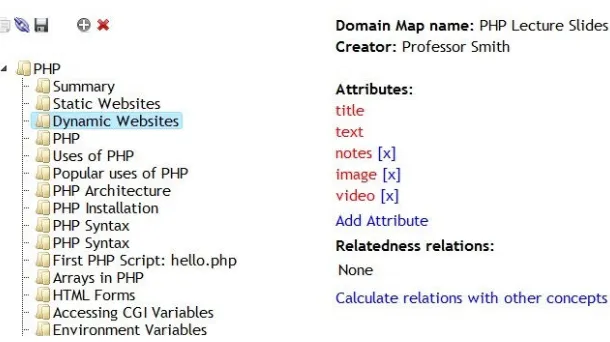
[image:4.595.146.451.292.463.2]Professor Smith starts by using MOT3.0’s presentation importer to upload one of her existing PowerPoint files on “PHP” to the MOT server. The import script analyzes the presentation content, and creates a new domain structure (called a domain map) to store her lecture (see Fig. 1). As adaptation means conditionally displaying or removing content fragments, depending on the learner’s needs, the first task for the system is to separate the existing content into reusable fragments (called attributes).
Fig. 1. Domain Model of a PowerPoint presentation on the “PHP” topic
Concretely, for each slide in her presentation, the import script creates a new concept in the domain map hierarchy (Fig. 1, left side), and a number of attributes assigned to this concept (Fig. 1, right side). The importer generates a slide image, and also automates OpenOffice.org1 to export an HTML representation of the slide. From the
latter, MOT3.0 extracts the title of the slide, the text content, and Professor Smith’s slide notes. These attributes are the various information representations for each slide, and ensure thus various adaptations (e.g., slide notes can be used to create an overview; titles can be used to generate a ‘Table of Contents’). The actual strategies she will be using are created by Professor Jones, and will be introduced in section 4. The extracted format allows Professor Smith also to add additional information to her module, either from HTML content stored previously on MOT3.0 - by simply copying a concept across from a previously authored domain map; or from additional material – e.g., she can upload one of the videos she was using in her class. She does this by creating another attribute for the concept ‘Dynamic Websites’, to which she uploads the video file (Fig. 1, right side, attribute ‘video’).
3.2 Importing Wikipedia Content
Professor Smith is keen to enhance her lectures by providing information about related topics from Wikipedia2. She is aware of the issues surrounding the reliability
of Wikipedia content; however she would like her students to be able to read about the module topics from other sources. She simply types the name of a Wikipedia article (here, “PHP”) into MOT3.0’s Wikipedia importer, which then downloads the WikiText source code of the article. Headings in WikiText are denoted by placing ‘=’ signs on both sides of the heading text. The number of signs denotes the level of the heading (e.g. 2 signs for a level 1 heading, 3 signs for a level 2 heading etc.), which allow the import script to divide the article’s content into sections, thus inferring the structure of the article. For each section of the article, a concept is created in the
domain map (Fig. 2, left side). Each concept is assigned two attributes; the title of the section, and the text of the section (converted to HTML). The import clearly generates a good number of reusable, separate concepts, grouped in hierarchies, each with at least two attributes. All these will constitute the alternatives that will be available to the adaptation strategies she will apply. As with the previous domain map, Professor Smith is able to add more content to the newly created domain map.
Fig. 2. Domain model of the imported Wikipedia PHP article
3.3 Importing Moodle Content
Another import script Professor Smith can use concerns content from other Learning Management Systems, such as Moodle or Sakai. Professor Smith has already created an online quiz using Moodle, so she exports this content to an IMS-QTI file. She can then upload the IMS-QTI file to MOT3.0, where her content will be converted into another domain map. For each question in the quiz, a concept is created. Each of these concepts contains a question attribute, and an answer attribute. These questions and
Transforming a linear module into an adaptive one: tackling the challenge 5
answers can be used within an adaptive course. For instance, it would be simple to create an adaptive course that hides all answers until the user has read all questions.
4
Creating Adaptation Strategies
Professor Jones uses PEAL to create a series of adaptation strategies.
4.1 Beginner-Intermediate-Advanced Strategy
One strategy he creates divides students into 3 groups: beginner, intermediate and
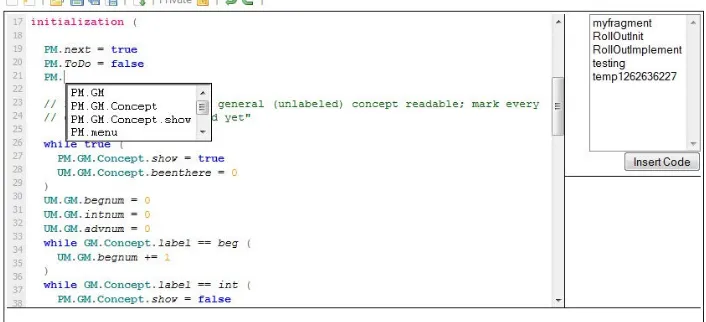
advanced, hiding content from learners until they have reached the appropriate level (Fig. 3 shows an editing snapshot). LAG is able to update the user model, to allow the user to progress from beginner to intermediate. PEAL suggests automatic completion
for the current program line (pop-up window). The available library code fragments,
[image:6.595.126.479.434.595.2]which can be inserted directly into the current code, appear in the right frame. Also, Fig. 3 shows color and formatting coding and recognition of programming instructions, as well as code line numbers to help the author to program in the LAG adaptation language, which is new for Professor Jones. Additionally, PEAL gives access to previously stored strategies (created by someone else and marked for sharing), allows parts of programs to be created directly via a Wizard, and thus overall represents a simple way for Professor Jones to accomplish his task in a short amount of time.
Fig. 3. Editing with the PEAL tool
4.2 Visual-Verbal Strategy
a weight to indicate whether the content is visual or verbal. The user’s preference variable is compared with the weight of the content, and if the result is above a predefined threshold, the content is shown.
When Professor Jones has completed his strategies, he publishes them on the university website. He has added a comment to the top of each strategy that states the purpose of the strategy, and the labels the strategy uses.
5
Combining and Enhancing Linear Input
5.1 Adding adaptive behavior to linear content
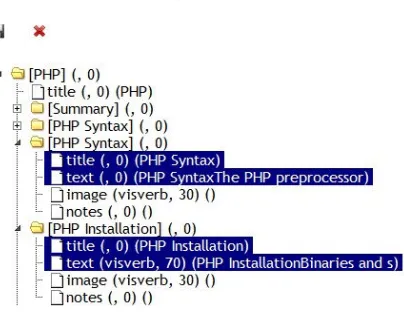
[image:7.595.138.340.515.671.2]After importing and enriching her imported material via domain maps, as shown in section 3, Professor Smith can now export them into a goal map, by clicking on an icon in MOT3.0. A goal map allows her to add pedagogical labels and weights (Fig. 4, right side), according to the adaptation strategy that she will be employing. She could import the domain maps to various goal maps and add different labels, thus using the same content for different pedagogical personalization strategies. However, she decides to create only one lesson for now, based on the content from one of her presentations. The goal model environment also allows her to combine content from different domain maps. She uses this to add information from her Wikipedia domain map. Then she labels the image version of the slide as ‘visverb’, and gives it a weight of 30 (representing visual content) and the text version of the slide as ‘visverb’ with a weight of 70 (for verbal content). These labels and weights correspond to the ones prescribed by the ‘Visual-Verbal’ strategy created by Professor Jones. The MOT3.0 system allows her to apply the same label and weight to many goal model concepts at once, thus saving her time, as most of her material is either of a visual or a verbal nature.
Transforming a line
5.2 Delivering adaptive courses
Professor Smith can now
tool, together with one of Professor Jones’s
create a course combining the educational content with the adaptation strategy. Professor Smith’s students can then
6
Evaluation and Discussion
An evaluation was performed authors and designers questions, which we group
1. … browsing other author’s materials
2. … editing with MOT3.0
3. … changing hierar
4. … copying and linking functionality
5. … editing HTML using the editor
6. … importing Wikipedia content
7. … importing Presentation content
8. … functionality of
9. … authoring for ad
10. … Semi-Automatically
Fig. 5 shows that the Easy’) to use.
Fig. 5. Evaluation results for the basic functionality of MOT3.0
0 0.5 1 1.5 2 2.5 3 3.5 4 4.5 5 browsing and using other author's materials editing with MOT3.0
Transforming a linear module into an adaptive one: tackling the challenge
Delivering adaptive courses
Professor Smith can now export her goal map and upload it to the AHA! delivery one of Professor Jones’s strategy files, and deploy it.
course combining the educational content with the adaptation strategy. Professor Smith’s students can then visit the adaptive course.
Evaluation and Discussion
was performed at the University of Warwick with six volunteer course authors and designers. They were asked to explore the system, and answer 45
grouped into 10 categories of basic functions, as below:
ing other author’s materials editing with MOT3.0
changing hierarchies of material via drag&drop pying and linking functionality
editing HTML using the editor importing Wikipedia content importing Presentation content functionality of importing content
authoring for adaptation as supported by MOT3.0
Automatically Creating and Linking Content for adaptation
the designers found most of the basic functions ‘Easy’ (or ‘
Evaluation results for the basic functionality of MOT3.0 editing with MOT3.0 changing hierarchies of material in MOT3.0 via drag &
drop copying and linking functionality in MOT3.0 Editing HTML using the editor authoring for adaptation as supported by MOT3.0
ar module into an adaptive one: tackling the challenge 7
and upload it to the AHA! delivery . This will course combining the educational content with the adaptation strategy.
volunteer course were asked to explore the system, and answer 45
:
asy’ (or ‘Very
To establish the statistical significance of these results, we have mapped the answers {‘Very Easy’, ‘Easy’, ‘Difficult’, ‘Very
assumes equidistance between these labeled values, as well as monotonicity, an assumption which is widely used in literature, and also conforms to the natural language use of these words. We have then applied
the answers against the average of 0, corresponding to ‘Neither Easy nor Difficult’, to establish if the positive average is statistically significant.
An analysis of the data showed that and editing HTML (Q5) are
(P<0.05). Also importing Wikipedia content creating content and linking
Fig. 6
However, the copying and linking functionality
general authoring (Q9) are only statistically significant with 90% confidence. analyze the reasons for this,
within these questions.
0 1 2 3 4 5 6 Importing Wikipedia content
To establish the statistical significance of these results, we have mapped the answers {‘Very Easy’, ‘Easy’, ‘Difficult’, ‘Very Difficult’} onto the values {2, 1,-1,
assumes equidistance between these labeled values, as well as monotonicity, an assumption which is widely used in literature, and also conforms to the natural language use of these words. We have then applied a one-sample T-test to compare the answers against the average of 0, corresponding to ‘Neither Easy nor Difficult’, to establish if the positive average is statistically significant.
sis of the data showed that browsing, editing,changing hierarchies
(Q5) are statistically significantly easy with 95% confidence
importing Wikipedia content, presentation, and (semi-)automatically creating content and linking are significantly useful.
6. Evaluation results for the importing features
copying and linking functionality (Q4), importing content
(Q9) are only statistically significant with 90% confidence. reasons for this, Table 1 shows the p-values for each of the sub-these questions. Importing Presentation content (semi) automatically creating content for adaptation (semi) automatically linking content for adaptation Very Useful Quite Useful Slightly Useful Not Useful
To establish the statistical significance of these results, we have mapped the answers 1, -2}. This assumes equidistance between these labeled values, as well as monotonicity, an assumption which is widely used in literature, and also conforms to the natural test to compare the answers against the average of 0, corresponding to ‘Neither Easy nor Difficult’, to
changing hierarchies (Q1,2,3), with 95% confidence
)automatically
importing content (Q8) and (Q9) are only statistically significant with 90% confidence. To -questions
Transforming a linear module into an adaptive one: tackling the challenge 9
Table 1. Sub-questions for questions 4, 8 and 9.
Question p-value
4a Dragging domain concepts between trees when copying/linking 0.001 4b Inserting goal map sublessons from domain concept attributes 0.363
4c Inserting other goal map lessons as sublessons 0.093
8a The content of the imported Wikipedia article 0.001
8b The number of attributes extracted from an article 0.001
8c The type of attributes extracted from an article 0.001
8d Speed of importing an article 0.465
8e The content of the imported Presentation 0.001
8f The number of attributes extracted from a Presentation 0.001
8g The type of attributes extracted from a Presentation 0.001
8h Speed of importing a Presentation 0.465
9a Being able to create adaptive presentations with MOT3.0 (as compared with programming adaptation from scratch)
0.001
9b Being able to (semi) automatically create content for adaptation 0.286 9c Being able to (semi) automatically link content for adaptation 0.363
9d Using graphical drag & drop interfaces in authoring for adaptation 0.001
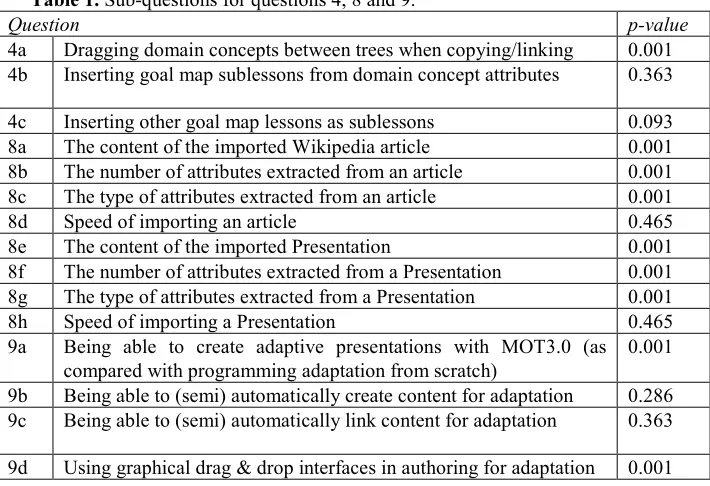
Table 1 shows that within the area of copying and linking functionality, whilst
dragging domain concepts is significantly easy, inserting goal maps from domain concept attributes or other sublessons is not. Looking at the qualitative comments, the experts noted that: “Inserting of domain map attributes needs improvement […] partial goalmaps cannot be inserted” and “it is easy, but a bit inconsistent: for GM you have to click add, for DM you have to drag & drop. I would like it not to refresh back, as I may want to add more than 1 attribute”.
With regard to the importing scripts, Table 1 shows that although the functionality was appreciated by the experts, the speed of the scripts were unsatisfactory. Some of the comments were “It will be good to see how long the article/presentation is before the import.”, and “The speed could become an issue if several presentations are imported simultaneously.”
The general authoring questions showed that the experts felt that creating adaptive presentations with MOT3.0 is preferred (in a statistically significant way) to programming adaptation from scratch, and also using graphical drag & drop interfaces in authoring for adaptation is considered beneficial. Looking at why the experts are not convinced about (semi-)automatically creating and linking content, the comments were as follows: “The physical manipulation is easy, but you have to understand what you are doing”, “Linking automatically is only possible in a hierarchical way. It would be interesting to see different types of automatic linking.”
like our imaginary Professors Smith and Jones can expect to be able to author with a reasonable degree of ease personalized courseware with a system such as MOT3.0.
7
Conclusions
Most research into adaptive hypermedia has focused on the delivery of the content rather than the authoring side. Interbook [8] is an example of a system which uses a more familiar authoring interface, and allows authors to create content based on Microsoft Word documents. Still, such documents entail annotation to create adaptivity rules. AHA! [7] also provides a set of authoring tools. However, it requires the author to manually create concepts in (X)HTML.
This paper has documented and evaluated the process that will allow educators to create adaptive courses from some of their existing resources. Specifically, we have introduced methods of generating domain models based on presentation slides and Wikipedia articles. It is hoped that authoring systems with import facilities such as those provided by MOT3.0 will encourage more educators – from a wide variety of subject areas – to author for adaptive hypermedia.
References
1. Nunan, D.: The Learner-Centred Curriculum. ELT Journal 46(2), 226-227 (1992)
2. Brusilovsky, P.: Developing adaptive educational hypermedia systems: From design models to authoring tools. In: Murray, T. et al (eds.): Authoring Tools for Advanced Technology Learning Environment. Dordrecht: Kluwer, 377-409 (2003)
3. Foss, J., Cristea, A.: Adaptive Hypermedia Content Authoring using MOT3.0. In : A3H: 7th Int. Workshop on Authoring of Adaptive and Adaptable Hypermedia Workshop, ECTEL 2009, Nice, France (2009)
4. Soloman, B., Felder, R.: Index of Learning Styles Questionnaire. In: College of
Engineering, North Carolina State University,
http://www.engr.ncsu.edu/learningstyles/ilsweb.html (Accessed March 2010) 5. Cristea, A., de Mooij, A.: Adaptive Course Authoring: My Online Teacher. In :
ICT’03, Papeete, French Polynesia, 1762-1769 (2003)
6. Cristea, A., Smits, D., Bevan, J., Hendrix, M.: LAG 2.0: Refining a reusable Adaptation Language and Improving on its Authoring. In Cress, U., Dimitrova, V., Specht, M., eds, ECTEL 2009, Nice, France, vol. 5794, 7-21 (2009)
7. De Bra, P., Smits, D., Stash, N.: Creating and Delivering Adaptive Courses with AHA! In : EC-TEL 2006, Crete, vol. Springer LNCS 4227, 22-33 (2006) 8. Eklund, J., Brusilovsky, P.: Interbook: An Adaptive Tutoring System. UniServe