International Journal of Research (IJR)
e-ISSN: 2348-6848, p- ISSN: 2348-795X Volume 2, Issue 05, May 2015Available at http://internationaljournalofresearch.org
Understanding How Effective Memory Management Optimizes
the Overall Performance of Multitasking Computers
J.O. UGAH1 & M. E. IGBOKE2
1,2 Department of Computer Science, Ebonyi State University, Abakaliki-Nigeria
email: [email protected]; [email protected]
Abstract
This paper gives a vivid explanation of how effective memory management helps to optimize the performance of multitasking computers. The memory management component of an operating system is concerned with the organization and management of computer memory. It determines how memory is allocated to processes, responds to constantly changing demands, and interacts with memory management hardware to maximize efficiency of the computer system. Execution of several processes at a goal brings about the challenge of proper memory allocation to all the processes involved. It also poses the challenge of ensuring that corruptions of processes are avoided. Operating system takes care of these challenges by performing some specific functions such as memory management. Again, speed is an important factor in data processing and in view of this, features to bring about speed must be put in place when building a computer or developing any computer software. Effective memory management helps to boost the speed of computer system. Memory management techniques discussed includes single contiguous allocation, fix partition allocation, swapping, paging, segmentation, virtual memory, buffering and spooling. The key advantage of memory management is that it makes each process in a multitasking system look as if it is having the sole control of the CPU and the memory.
Keyword: Operating system; memory management; multitasking; efficiency; CPU process
Introduction
The early electronic digital computer systems had no operating system [1]. Electronic systems of that time were programmed on rows of mechanical switches or by jumper wires on plug boards. These were special-purpose systems that, for example, generated ballistics tables for the military or controlled the printing of payroll checks from data on
International Journal of Research (IJR)
e-ISSN: 2348-6848, p- ISSN: 2348-795X Volume 2, Issue 05, May 2015Available at http://internationaljournalofresearch.org
at the same time, however, in real sense, the CPU which runs very fast spends a fraction of time on one process, jumps to another process and again spends some other fraction of time at a fast rate on the second process. This is continued until all the processes are executed to the end. Multitasking is one of the processing techniques utilized by the operating system to help computers run more efficiently. The advent of multitasking operating systems compounds the complexity of memory management, because as processes are swapped in and out of the CPU, so must their code and data be swapped in and out of memory, all at high speeds and without interfering with any other processes. Therefore, the main focus of this article is to look into how memory management helps in multitasking computer systems to bring about effectiveness and efficiency.
A review of multitasking operating system,
Operating system is software that manages the hardware and the software resources of the computer systems [6]. Operating system serves as an intermediary between the computer user and the computer hardware. Operating system performs many functions including process management, authentication, resources management, file management, memory management and others. There are different types of operating systems which include single user, batch processing, real time, multitasking and so on but our focus is on multitasking operating system. In computing, multitasking is a method by which multiple tasks, also known as processes, share common processing resources such as the memory [7].
Multitasking permits multiple programs to run concurrently. It is a method where multiple tasks are performed during the same period of time – they are executed concurrently (in overlapping time periods, new tasks starting before others have ended) instead of sequentially (one completing before the next starts). Multitasking does not necessarily mean that multiple tasks are executing at exactly the same instant. In other words, multitasking does not imply parallelism, but it does mean that more than one task can be
part-way through execution at the same time, and more than one task is advancing over a given period of time [8]. However, in real sense, a computer cannot execute two or more programs simultaneously, but it can give the impression that it is running several programs concurrently. What happens is a periodic signal to force the CPU to switch from one job to another and a mechanism to tell the computer where it stopped when it last executed a particular job so that it starts there when next it is to execute that job. The principles involved in multitasking include generally the following:-
(i) The Operating system schedules a process in the most efficient way and makes best use of the facilities available.
(ii)Operating system performs memory management. If several processes run concurrently, the operating system must allocate memory space to each of them. If the CPU is to be available to one process while another is accessing a disk or using a printer, these devices must be capable of autonomous operations i.e ability to take part in direct memory access (DMA) [9]
Types of Multitasking
Multitasking in computer systems is of two types: non-preemptive (cooperative) and preemptive multitasking.
International Journal of Research (IJR)
e-ISSN: 2348-6848, p- ISSN: 2348-795X Volume 2, Issue 05, May 2015Available at http://internationaljournalofresearch.org
simultaneously. Windows 9x also used cooperative multitasking, but only for 16-bit legacy applications. Cooperative multitasking is still used today on RISC OS systems.
One issue that is crucial here is the fact that because a cooperatively multitasked system relies on each process to regularly gives up time to other processes on the system, a poorly designed program can consume all of the CPU time for itself or cause the whole system to hang. In a server environment, this is a hazard that makes the entire network brittle and fragile. All software must be evaluated and cleared for use in a test environment before being installed on the main server or a misbehaving program on the server slows down or freezes the entire network. Despite the difficulty of designing and implementing cooperatively multitasked systems, time-constrained, real-time embedded systems (such as spacecraft) are often implemented using this paradigm. The lack of a pre-empting scheduler allows highly reliable, deterministic control of complex real time sequences, for instance, the firing of thrusters for deep space course corrections.
(ii)Preemptive multitasking: In pre-emptive multitasking, the operating system slices the CPU time and dedicates one slot to each of the programs [11]. Preemptive multitasking allows the computer system to guarantee more reliably each process a regular "slice" of operating time. It also allows the system to deal rapidly with important external events like incoming data, which might require the immediate attention of one or other process. Operating systems were developed to take advantage of these hardware capabilities and run multiple processes preemptively. Preemptive multitasking was supported on DEC's PDP-8 computers, and implemented in OS/360 MFT in 1967, in MULTICS (1964), and Unix (1969); it is a core feature of all Unix-like operating systems, such as Linux, Solaris and BSD with its derivatives [12].
At any specific time, processes can be grouped into two categories: those that are waiting for input or output called "I/O bound“,
and those that are fully utilizing the CPU called "CPU bound" [13]. In primitive systems, the software would often "poll", or "busy-wait" while waiting for requested input (such as disk, keyboard or network input). During this time, the system was not performing useful work. With the advent of interrupts and preemptive multitasking, I/O bound processes could be "blocked", or put on hold, pending the arrival of the necessary data, allowing other processes to utilize the CPU. As the arrival of the requested data would generate an interrupt, blocked processes could be guaranteed a timely return to execution.
Advantages of Multitasking
Some advantages of multitasking include; (i) It makes for maximum utilization of
the CPU by eliminating wastage of CPU time
(ii) It enables several users to gain access to a computer at the same time.
However, the principal problem of a multitasking operating system is deadlock [14]. If two processes, for instance, process A and process B demand the same facilities e.g memory access, CPU and the printer at the same time, process A may get CPU and waits for printer, while process B may get printer and waits for CPU. This leads to hanging the system indefinitely, a phenomenon called deadlock.
Memory Management
International Journal of Research (IJR)
e-ISSN: 2348-6848, p- ISSN: 2348-795X Volume 2, Issue 05, May 2015Available at http://internationaljournalofresearch.org
actual address of the data in memory [16]. The memory management function keeps track of the status of each memory location, either allocated or free. It determines how memory is allocated among competing processes, deciding who gets memory, when they receive it, and how much memory space they are allowed. When memory is allocated it determines which memory locations will be assigned. It tracks when memory is freed or unallocated and updates the status. The part of the operating system which handles this responsibility is called the memory manager. Since every process must have some amount of primary memory in order to execute, the performance of the memory manager is crucial to the performance of the entire system.
In uni-tasking systems the main memory is divided into two parts: one for operating system, the other for the program being executed. In multitasking systems, the user part of the memory has to be further subdivided to accommodate multiple processes. According to [17], memory management requirement include basically the following:
Relocation: Loading dynamically the program into an arbitrary memory space, whose address limits are known only at execution time
Protection: Each process should be protected against unwanted interference from other processes
Sharing: Any protection mechanism should be flexible enough to allow several processes to access the same portion in the main memory
Logical organization: Most programs are organized in modules some of which are un-modifiable (read only and/or execute only) and some of which contain data that can be modified; the operating system must take care of the possibility of sharing modules across processes.
• Physical organization: Memory is organized as at least two level hierarchy; The OS should hide this fact and should perform the data movement between the main memory and
secondary memory without the programmer’s concern
Memory Management Techniques
According to [18], memory management could be categorized basically into two; Those that moves processes back and forth between main memory and disk during execution (swapping and paging) and those that do not. Some specific memory management techniques discussed in this paper include; fixed partition allocation, swapping, continuous allocation, multiple partition allocation, virtual memory .paging, segmentation. These memory management techniques are discussed with a view on how they can help in optimizing the efficiency of multitasking computers.
Multiprogramming with Fixed Partitions
Multiprogramming to an ordinary computer user means the ability of computers to run more than one program at the same time. Technically, multiprogramming means that when one process is blocked waiting for input/output (I/O) to finish, another process can use the CPU [19]. In view of the fact that every process will occupy a space in the memory, the easiest way to achieve multiprogramming would be to divide memory up into unequal n possible partitions. Here, when process arrives, it can be put into input queue for the smallest partition large enough to hold it. One of the demerits of fixed partition is that sometimes jobs have to wait so long on queue to get into memory even though plenty of memory is free. This happens when the queue for large partition is empty and the queue for small partition is full and vise versa.
Swapping
International Journal of Research (IJR)
e-ISSN: 2348-6848, p- ISSN: 2348-795X Volume 2, Issue 05, May 2015Available at http://internationaljournalofresearch.org
memory allows program to run even, when they are partially in the main memory [20]. The basic difference between this and fixed partition is that in swapping, the number, location and size of the partition vary dynamically but they are fixed in the case of fixed partition. It is also worthy of note that when swapping creates multiple holes in the memory, it is possible to combine them all into one big partition by moving all processes downwards as far as possible.
Let us explain clearly that in swapping, a process can be swapped temporarily out of memory to a backing store, and then brought back into memory for continued execution. The backing store is a fast disk large enough
to accommodate copies of all memory images for all users and should also provide direct access to these memory images. The roll out, roll in are swapping variant used for priority-based scheduling algorithms; lower-priority process is swapped out so higher-priority process can be loaded and executed. Major part of swap time is transfer time; total transfer time is directly proportional to the amount of memory swapped. Modified versions of swapping are found on many systems. System maintains a ready queue of ready-to-run processes which have memory images on disk. The Schematic view of swapping among processes running concurrently is shown in the figure 1 below:
Figure 1: The schematic View of Swapping in multitasking computers. Adapted from [15]
Continuous Allocation
In continuous allocation, main memory is usually into two partitions:
(i)Resident operating system, usually held in low memory with interrupt vector (ii)User processes then held in high memory
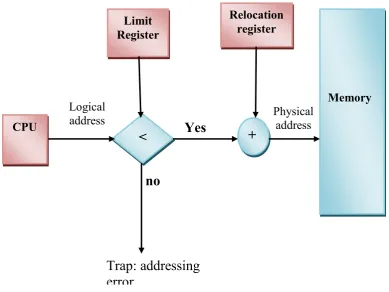
Relocation registers used to protect user processes from each other, and from changing operating-system code and data. Base register contains value of smallest physical address. Limit register contains range of logical addresses – each logical address must be less than the limit register. Memory management unit (MMU) maps logical address dynamically. The hardware support for relocation is as illustrated in figure 2 below:
Process P1
Process P2
Operating
System
User Space
Swap Out
1
Swap In
2
International Journal of Research (IJR)
e-ISSN: 2348-6848, p- ISSN: 2348-795X Volume 2, Issue 05, May 2015Available at http://internationaljournalofresearch.org
Figure 2: Hardware support for relocation. Adapted from [21]
Multiple-partition allocation
Using this technique of memory management, the entire computer memory with the exception of a small portion reserved for the operating system, is available for users program. This is possible by swapping the contents of memory to switch among users. Block of available memory (holes) of various sizes are scattered throughout memory. When a process arrives, it is allocated memory from a hole large enough to accommodate it. Operating system maintains information about the allocated partitions and free partitions (hole). The figure 3 below illustrates this phenomenon.
Figure 3: Illustration of multiple partition allocation
Virtual Memory
According to [22], the basic idea behind virtual memory is that combined size of the program, data, and stack may exceed the amount of physical memory available for it.
The operating system however keeps the only part of the program that is currently in use in the main memory and the rest on the disk. Virtual memory actually makes the system appear to the user that unlimited
Limit Register
Relocation register
CPU
Memory
<
+
Logical
address Physical address
Trap: addressing
error
Yes
no
Process 2 Terminates
Process 4 Starts
Process 1
Process 3
Unused space
Process 1
Process 2
Process 3
OS OS
Process 1
Process 4
International Journal of Research (IJR)
e-ISSN: 2348-6848, p- ISSN: 2348-795X Volume 2, Issue 05, May 2015Available at http://internationaljournalofresearch.org
amount of main memory is available. The implication of this is that individual program can be much larger than the actual number of memory cells. Virtual, memory also permits multiprogramming to operate more efficiently. The brain behind virtual memory is the creative use of direct access storage devices (DASDs) with the operating system switching portions of programs (called pages) between main memory and DASDs. Virtual memory actually allows program to run even, when they are partially in the main memory. With virtual memory only a few pages of the program are kept in main memory, with the rest relegated to DASDs. Virtual memory employs either paging or segmentation.
Paging
Paging is a memory management technique in which physical memory is broken into blocks of fixed sized blocks called page frames (size is power of 2 between 512 bytes and 8,192 bytes) and divides logical memory into the same size called pages [23]. Tracks of all free frames are kept. To run a program of size n pages, need to find n free frames and load program. Page table is also set up to translate logical address to physical addresses. Paging techniques aims at achieving certain goals such as to eliminate fragmentation due to large segments, avoid allocating memory space that will not be used and enable fine-grained sharing. Paging techniques could be summarized with the following points:
(i) Logical address space of a process can be noncontiguous; process is allocated physical memory whenever the latter is available. (ii)Divide physical memory into
fixed-sized blocks called frames (size is
power of 2, between 512 bytes and 8,192 bytes).
(iii)Divide logical memory into blocks of same size called pages.
(iv)Keep track of all free frames.
(v) To run a program of size n pages, need to find n free frames and load program
(vi)Set up a page table to translate logical to physical addresses Given below is some illustration of how paging works:
Address generated by CPU is divided into:
(i) Page number (p) – used as an index into a page table which contains base address of each page in physical memory
(ii) Page offset (d) – combined with base address to define the physical memory address that is sent to the memory unit
(iii) For given logical address space 2m and page size2n
Figure 4: Address generated by the CPU
Paging Works well if page size = size of memory block size (page frames) = size of disk section (sector, block).
Usually, before executing a program, memory manager determines number of pages in program, locates enough empty page frames in main memory and loads all of the program’s pages into them.
P d
M - n n
International Journal of Research (IJR)
e-ISSN: 2348-6848, p- ISSN: 2348-795X Volume 2, Issue 05, May 2015Available at http://internationaljournalofresearch.org
Paging hardware: The Paging model of logical and physical memory in multitasking operating system could be illustrated as shown in figure 5 below:
Figure 5: Paging model of logical and physical memory. Adapted from [21]
Demand Paging
Demand paging introduces the concept of loading only a part of the program into memory for processing [24]. When a process begins to run, pages are brought into memory only as they are needed. It was the first widely used scheme that removed the restriction of having the entire job in memory from the beginning to the end of its processing. With demand paging, jobs are still divided into equally sized pages that initially reside in secondary storage. When the job begins to run, its pages are brought into memory only as they are needed. Demand paging takes advantage of the fact that programs are written sequentially so that while one section, or module, is being processed all of the other modules are idle. Demand paging allows users to run processes with less main memory than would be required if the operating system was using any of the schemes described earlier. Demand paging can give the appearance of almost infinite amount of physical memory. Implementation of table could be summarizes as follows:
(i) Page table is kept in main memory
(ii) Page-table base register (PTBR) points to the page table
(iii) Page-table length register (PRLR) indicates size of the page table
(iv) In this scheme every data/instruction access requires two memory accesses. One for the page table and one for the data/instruction.
(v) The two memory access problem can be solved by the use of a special fast-lookup hardware cache called associative memory or translation look-aside buffers (TLBs) Some TLBs store address-space identifiers (ASIDs) in each TLB entry – uniquely identifies each process to provide address-space protection for that process
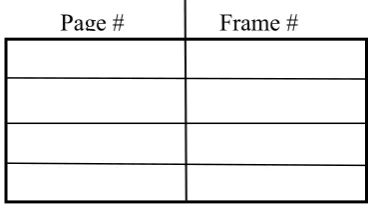
Figure 6: Illustration of page and frame structure
Associative memory – parallel search
P CPU
P d F d
Logical
address
Physical
address
Page table Physical Memory
address
f1111
…
1111 f0000…
0000 tablef
f
International Journal of Research (IJR)
e-ISSN: 2348-6848, p- ISSN: 2348-795X Volume 2, Issue 05, May 2015Available at http://internationaljournalofresearch.org
Address translation (p, d): If p is in associative register, get frame # out, otherwise get frame # from page table in memory.
Paging hardware with translation look-aside buffer (TLBs) is illustrated in figure 7 below
Figure 7: paging hardware with TLBs. Adapted from [21]
To calculate the effective Access time, you would do the following computation Associative Lookup = time unit
Assume memory cycle time is 1 microsecond
Hit ratio – percentage of times that a page number is found in the associative registers; ratio related to number of associative registers
Hit ratio =
Effective Access Time (EAT)
EAT = (1 + ) + (2 + )(1 – ) = 2 + –
Segmentation
Segmentation is a process is dividing the memory space in to a number of segments that don’t need to be equal in size. [25]. This is the only memory management technique that does not provide the user's program with a 'linear and contiguous address space. Segments are areas of memory that usually correspond to a logical grouping of information such as a code procedure or a data array. Segments require hardware support in the form of a segment table which usually contains the physical address of the segment in memory, its size, and other data such as access protection bits and status (swapped in, swapped out, etc.). Segmentation seem to allow better access protection than other schemes because memory references are relative to a specific segment and the hardware will not permit the application to reference memory not defined for that segment. It is possible to implement segmentation with or without paging. Without paging support the segment is the physical unit swapped in and out of memory if required. With paging support the pages are usually the unit of swapping and segmentation only adds an additional level of security. Addresses in a segmented system usually consist of the segment id and an offset relative to the segment base address, defined to be offset zero.
P CPU
P d
F d
Logical
address
TLB hit Page frame
number number
f
Page table TLB
TLB miss
International Journal of Research (IJR)
e-ISSN: 2348-6848, p- ISSN: 2348-795X Volume 2, Issue 05, May 2015Available at http://internationaljournalofresearch.org
Segmentation Architecture
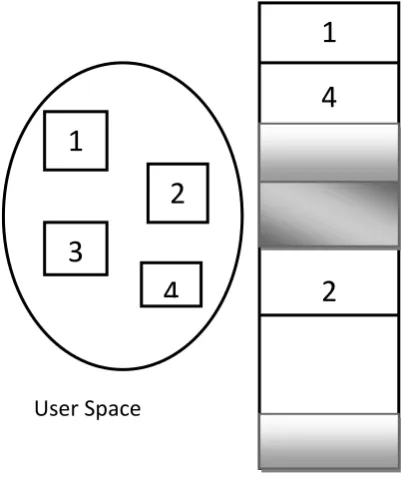
Usually, a program is a collection of segments. A segment is a logical unit such as: main program, procedure function, method, object, local variables, global variables, common block, stack, symbol table, arrays etc. User’s view of a program is as shown in the figure 8 below:
Figure 8: User’s view of a Program
The logical view of segmentation could also be illustrated as shown in figure 9 below
Figure 9: Logical View of Segmentation
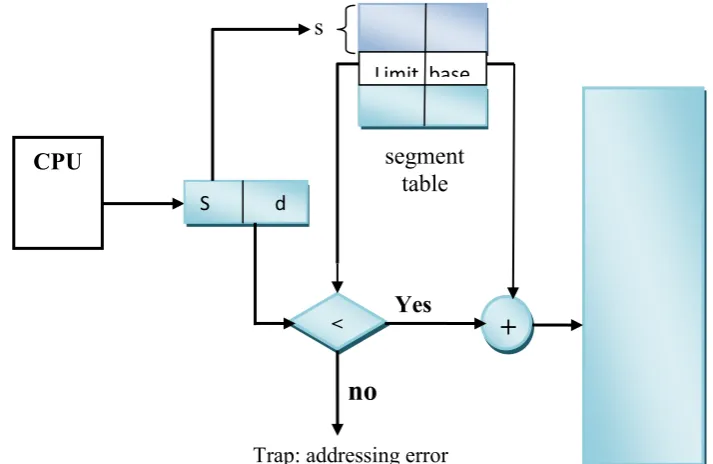
Logical address consists of a two tuple: <segment-number, offset>,
Segment table – maps two-dimensional physical addresses; each table entry has:
(i) base – contains the starting physical address where the segments reside in memory
(ii) limit – specifies the length of the segment
Segment-table base register (STBR) points to the segment table’s location in memory Segment-table length register (STLR) indicates number of segments used by a program;
1
4
2
3
1
3
2
4
User Space
Physical Memory Space Subroutine
Sqrt
Stack
Symbol Table
Main Program
International Journal of Research (IJR)
e-ISSN: 2348-6848, p- ISSN: 2348-795X Volume 2, Issue 05, May 2015Available at http://internationaljournalofresearch.org
Note: Segment number s is legal if s < STLR
Protection: With each entry in segment table associate:
validation bit = 0 illegal segment
read/write/execute privileges
Protection bits associated with segments; code sharing occurs at segment level Since segments vary in length, memory allocation is a dynamic storage-allocation.
Segmentation Hardware: The hardware view of segmentation is shown in the figure 10 below:
Figure 10: Segmentation hardware in multitasking operating system [22]
Buffering and Spooling
Compared to today’s CPU processing speed, some input and output devices are exceedingly slow. As a result of this, if the CPU had to wait for these slower devices to finish their work, the computer system would face an unbearable bottleneck. For example, suppose a user just sent a 30-page document to the printer. Assuming the printer can output 5 pages per minute, it would take 6 minutes for the document to finish printing. If the computer had to wait for the print job to be completed before performing other tasks, the computer would be tied up for 6 minutes; to avoid this problem, most operating systems uses buffering and spooling. A buffer is an area in RAM or on the hard drive designated to hold input and output on their way in or out
of the system [26]. For instance, a keyboard buffer stores a certain number of characters as they are entered on the keyboard, and a print buffer stores documents that are waiting to be printed. The process of placing items in a buffer so that they can be retrieved by the appropriate device when needed is called spooling [27]. The most common use of spooling and buffering is for print jobs. It allows multiple documents to be sent to the printer at one time and they will print, one after the other, in the background while the computer and user are performing other tasks. The documents waiting to be printed are said to be in a print queue, which designates the order the documents will be printed. While in the queue, some operating systems allow the order of the documents to
CPU
<
+
segment table s
Trap: addressing error
Yes
no
Limit base
S d
International Journal of Research (IJR)
e-ISSN: 2348-6848, p- ISSN: 2348-795X Volume 2, Issue 05, May 2015Available at http://internationaljournalofresearch.org
be rearranged, as well as the cancellation of a print job
Strategies used to Allocate Memory in a Multitasking System (Memory management policies)
The real challenge of efficiently managing the computer memory is seen in the case of a system which has multiple processes running at the same time. Since primary memory can be space-multiplexed, the memory manager can allocate a portion of primary memory to each process for its own use. However, the memory manager must keep track of which processes are running in which memory locations, and it must also determine how to allocate and de-allocate available memory when new processes are created and when old processes complete execution. While various different strategies are used to allocate space to processes competing for memory, three of the most popular are “best fit”, “worst fit”, and “first fit”. Each of these strategies are described below
(i) Best fit: In this type of strategy, the allocator places a process in the smallest block of unallocated memory in which it will fit [22],. For example, suppose a process requests 12KB of memory and the memory manager currently has a list of unallocated blocks of 6KB, 14KB, 19KB, 11KB, and 13KB blocks. The best-fit strategy will allocate 12KB of the 13KB block to the process.
(ii) Worst fit: Here the memory manager places a process in the largest block of unallocated memory available [22],. The idea is that this placement will create the largest hold after the allocations, thus increasing the possibility that compared to best fit; another process can use the remaining space. Using the same example as above, worst fit will allocate 12KB of the 19KB block to the process, leaving a 7KB block for future use.
(iii) First fit: There may be many free holes in the memory, so in order for the operating system to reduce the amount of time it spends analyzing the available spaces, it begins at the start of primary memory and
allocates memory from the first hole it encounters large enough to satisfy the request. Using the same example as above, first fit will allocate 12KB of the 14KB block to the process.
The functions memory management in a multitasking computer system
Memory management as earlier stated involves providing ways to allocate portions of memory to programs at their request, and freeing it for reuse when no longer needed. The management of main memory is critical to the computer system especially in a multitasking computer system. Some functions that memory management provides include among others the following:
(i) Memory management is used in a multitasking computer system to make it look as if each process has sole control of the Central Processing Unit (CPU).
(ii)Memory management, in conjunction with the operating system, helps in the allocation of memory to variables and processes.
(iii)Memory management permits computers with small main stores to execute programs that are far larger than the main store.
(iv)It is used to protect one process from being corrupted by another process.
(v) It prevents one process from interfering with another process since the system time is shared among the processes.
Conclusion
International Journal of Research (IJR)
e-ISSN: 2348-6848, p- ISSN: 2348-795X Volume 2, Issue 05, May 2015Available at http://internationaljournalofresearch.org
main memory. In view of the conditions, every programmer and even computer manufactures need to have a proper understanding of how operating system through memory management brings about efficient management of available memory and in turn brings about overall efficiency of computer. The requirements of memory management in a multitasking computer system are protection, relocation, sharing, logical and physical organization. First fit, worst fit and best fit are some of the strategies used in managing the memory in a multitasking computer system. Some of the importances of memory management include making the computer look as if each process has sole control of the central processing unit, helping in the allocation of memory to variables and processes. It also permits computers with small main stores to execute programs that are far larger than the main store; it is used to protect one process from being corrupted by another process and also prevents one process from interfering with another process since the system time is shared among the processes. The operating system uses memory management techniques to process, control and coordinate computer memory allocating portions called blocks to various running programs and de-allocating it after use to optimize overall system performance. Knowing this would help computer manufacturers to design and re-design new system with even more enhanced memory management techniques that would boost the performance of computers in these days of distributed processing. Programmers on their own would come to know issues to concentrate on having been delivered from bordering much about the size of the physical memory while writing programs.
.
References
[1] Ceruzzi, P., (2000). The history of modern computing. The MIT press London. Retrieved
online 10th February, 2015 from
http:/www.computerfundamental/history.html
[2] Patterson, S. and Hennessey, J. (1998).
Computer organization and design 2nd edition.
Morgan Kaufmann, San Francisco
[3] Silberschatz, A., Gagne, G., Baer, P, and Galvin, C. (2002). Operating System Concepts”, Ninth Edition. John Wiley & sons Inc. United State of America.
[4] Venkatasubramanian, N. (2004). Principles of operating systems. lecture note on introduction and overview adapted from : Silberschatz textbook authors, John Kubiatowicz (Berkeley), John Ousterhout (Stanford) and
others. Retrieved online from:
https://www.wisegeek.com
[5] Berger, E., Zorn, B., and McKinley, K., (2001). Composing High Performance Memory allocators. Proceedings of the ACM SIGPLAN 2001 conference on Programming language
design and implementation. PLDI '01. pp. 114–
124
[6] Andrew, T. (2001). Modern operating system, second edition Pearson education incorporated. China machine press, pretence hall.
[7] Abraham, S., Galvin, P. and Gagne, G. (2013). Operating system concepts. Ninth edithion. John Wiley & sons Inc. United State of America
[8] Martin, H., (2012). Understanding operating systems. Unpublished lecture materials on operating system concept. Retrieved online on
20th June 2014 from
http://www.sei.cmu.edu/library/abstracts/reports/ 10tn009.cfm
[9] Donald, K., (1997), Fundamental Algorithms: Dynamic Storage allocations. Addison-Wesley, pp. 433-456.
[10] Wilson, P, Johnstone, M., Neely, M,, and Boles, D. (1995). "Dynamic storage allocation: A
survey and critical review". memory
management. Unpublished lecture Notes in
Computer Science 986. pp. 1–116.
[11] https://www.princeton.edu
International Journal of Research (IJR)
e-ISSN: 2348-6848, p- ISSN: 2348-795X Volume 2, Issue 05, May 2015Available at http://internationaljournalofresearch.org
[13] Berger, E., Zorn, B., and McKinley, K.,
(2002). "Reconsidering Custom Memory
Allocation". Proceedings of the 17th ACM
SIGPLAN conference on Object-oriented
programming, systems, languages, and
applications. OOPSLA '02. pp. 1–12.
[14] Igboke, M., (2014), A lecture note on “Operating System” unpublished. Department of computer science Ebonyi State University, Abakaliki.
[15] Archer, H. (2002). Operating Systems. Schaum’s outlines of theory and problems of operating system. Tata McGraw-Hill publishing company limited. New Delhi
[16] Yang, J., (2010). Segmentation and paging. Lecture note adapted from modern operating systems, third edition. Operating system concepts previous W4118, and OS at MIT, Sanford, and UWisc.
[17] Insup, L. (2002). Understanding operating system memory management; unpublished lecture note from university of Pennsylvania.
[18] Bacon, J., and Harris T. (2003). Operating systems : Concurrent and distributed software design, Perason education limited, Edinburgh Gate Harlow England
[19] Abrossimov, V., Rozier M., and Gien, M.
(1989). Virtual memory management. A
proceeding in distributed operating systems management, Berlin, 1989.
[20] Silberschatz, A. and Galvin, P. (1998). Operating System Concepts. Fifth edition. Addison-Wesely.
[21] Gorman, J. (2000). Operating systems.
Grassroots series. Palgrave. Houndmils,
Basingstoke, Hampshire RG21 6XS and 175 fifth Avenue, New York.
[22] Richard, R., Avadis, T., William, J. (1987). Machine independent virtual memory for paged uniprocessor and multiprocessor architecture. Proceedings of the 2nd International Conference on Architectural Support for Programming Languages and Operating Systems (1987)
[23] Petronel, B., (2011). The basics of memory management. Unpublished lecture note on operating system concept.
[24] Mahadev, S. (2010) Mobile computing: the next decade. Proceedings of the 1st ACM Workshop on Mobile Cloud Computing and Services: Social Networks and Beyond (2010).
[25] Falla, W. (2007). Operating Systems concepts. (Slides include materials from
Operating System Concepts, 7th ed., by
Silbershatz, Galvin, & Gagne and from Modern
Operating Systems, 2nd ed., by Tanenbaum).
[26] Alan, C, (2000). The principle of computer hardware. Oxford University Press, London.
[27]
![Figure 1: The schematic View of Swapping in multitasking computers. Adapted from [15]](https://thumb-us.123doks.com/thumbv2/123dok_us/7799614.1293953/5.595.160.498.322.543/figure-schematic-view-swapping-multitasking-computers-adapted.webp)
![Figure 7: paging hardware with TLBs. Adapted from [21] table](https://thumb-us.123doks.com/thumbv2/123dok_us/7799614.1293953/9.595.91.481.137.398/figure-paging-hardware-tlbs-adapted-table.webp)