CM-5
User's Guide
Version 7.2, August 1993
i
MIT-LCS
Project SCOUT
By agreement with TMC,
photocopies of CM5 manuals
may be used by Project SCOUT
participants.
This copy is restricted to use
by project participants
_
CI~~~~FMUGA111
First printing, August 1993
The information in this document is subject to change without notice and should not be construed as a commitment by Thinking Machines Corporation. Thinking Machines reserves the right to make changes to any product described herein.
Although the information in this document has been reviewed and is believed to be reliable, Thinking Machines Corporation assumes no liability for errors in this document. Thinking Machines does not assume any liability arising from the application or use of any information or product described herein.
Connection Machine is a registered trademark of Thinking Machines Corporation.
CM, CM-2, CM-200, CM-5, CM-5 Scale 3, and DataVault are trademarks of Thinking Machines Corporation. CMosr, CMAX, and Prism are trademarks of Thinking Machines Corporation.
CO is a registered trademark of Thinking Machines Corporation.
Paris, 'Lisp, and CM Fortran are trademarks of Thinking Machines Corporation. CMMD, CMSSL, and CMX11 are trademarks of Thinking Machines Corporation. Thinking Machines® is a registered trademark of Thinking Machines Corporation. AVS is a trademark of Advanced Visualization Systems, Inc.
Motif is a trademark of Open Software Foundation, Inc.
SPARC and SPARCstation are trademarks of SPARC International, Inc. Sun, Sun-4, and Sun Workstation are trademarks of Sun Microsystems, Inc. UNIX is a registered trademark of UNIX System Laboratories, Inc.
The X Window System is a trademark of the Massachusetts Institute of Technology.
Copyright © 1993 by Thinking Machines Corporation. All rights reserved.
Contents
About This Manual ... vii
Customer Support ... ix
Chapter 1 Introduction ...
1
1.1 Parallel Progranlming on the CM-5 ... 1
1.2 The SPMD Programming Model ... . ... 2
1.2.1 Data Parallel Programming ... 2
1.2.2 Message-Passing Programming ... 3
1.3 Scalable Computing ... 4
1.4 CM-5 Hardware . ... 4
1.4.1 Processors ... 5
1.4.2 Vector Units ... 5
1.4.3 Networks ... 5
1.5 CM-5 Software ... 6
1.5.1 Data Parallel Software ... 6
1.5.2 Message-Passing Software ... 7
1.5.3 Assemblers ... 7
1.5.4 CMAX ... 8
1.5.5 The C(MOST Timeshared Operating System ... 8
1.5.6 Prism Programming Environment ... 8
1.6 I/O on the CM-5 ... 9
1.6.1 Hardware ... 9
1.6.2 Software ... 9
Chapter 2 The Basics ...
11
2.1 The User's View of the CM-5 ... 12
2.2 Gaining Access ... 13
2.2.1 The rlogin Command ... ... 13
2.2.2 The sah Command ... ... 14
2.3 Writing and Compiling Your Program ... 14
2.3.1 Linkig ... 15
2.4 Executing Your Program ... 15
Version 7.2, August 1993
ivr--
9lr-1
CM- UserrGud
2.4.1 Providing Accounting Information ... 2.4.2 Executing in Batch Mode ...
The UNIX Batch Commands ... The NQS Batch System ... DJM (Distributed Job Manager) ...
2.5 Debugging Your Program ...
2.5.1 The Errors File and Core Files ... 2.5.2 Fortran Tracebacks ...
2.6 TEming a Program ...
2.7 Getting Information ...
2.7.1 Finding Out about the CM-S's Configuration ... 2.7.2 Finding Out about the Status of the System ... 2.7.3 Finding Out about the Status of NQS ... 2.7.4 Finding Out about the Status of DJM ...
2.8 Obtaining On-Line Documentation ...
r 3 Using Prism ...
...
3.1 Starting Prism.... ... ... ...
3.2 A Tour of Prism ...
3.3 Executing a Program ...
3.3.1 Interrupting, Continuing, and Single-Stepping ...
3.4 Debugging a Program ... 3.4.1 Setting a Simple Breakpoint ... 3.4.2 Using Commands ... 3.4.3 Using the Event Table ...
3.4.4 Displaying and Moving through the Call Stack ...
3.5 Visualizing Data ... .... ... 3.5.1 Other Representations ...
3.5.2 Other Methods of Choosing the Data to Visulize ...
3.6 Obtaining Performance Data ... 3.6.1 Collecting Performance Data ... 3.6.2 Displaying Performance Data ... 3.6.3 Other Performance Analysis Features ...
3.7 Getting Help ... ... .... ...
3.7.1 Other Help Features ...
3.8 Customizing Prism ...
3.9 Leaving Prism ...
Chapte
15 16 16 16 17 18 18 20 20 21 21 22 24 25 26 27 27 28 30 31 32 32 33 33 34 35 37 38 39 40 40 42 42 44 45 45Contents v
3.10 Commands-Only Prism ... 46
3.11 Using Prism with CMAX ... 46
Chapter 4 CM-5 Languages and Libraries ...
...
47
4.1 CM Fortran ... 47
4.1.1 Programming Models ... 48
4.1.2 Intrinsic Functions ... ... 49
4.1.3 Utility Library ... 49
4.1.4 Development and Monitoring Facilities ... 49
4.1.5 Documentation Provided ... 49
4.2 C* ... 50
4.2.1 Documentation Provided ... .. ... 51
4.3 CM Scientific Software Library ... ... 52
4.3.1 Linear Algebra ... ... 52
4.3.2 FF's .
...
53
4.3.3 Ordinary Differential Equations ... 53
4.3.4 Linear Programming ... ... ... 53
4.3.5 Random Number Generation ... 53
4.3.6 Statistical Analysis ... 54
4.3.7 Communication Functions ... 54
4.4 Visualization Programming ... 54
4.4.1 A Distributed Graphics Strategy ... 54
4.4.2 An Integrated Environment ... 55
4.4.3 The CMAVS Visualization Environment ... 55
Documentation Provided ... 56
4.4.4 Vmsalization Programming with CMXll ... 56
Creating and Controlling a Display ... 56
.Rendering Your Data . ... 57
'Graphics Programming ... 57
Documentation Provided ... 57
4.5 Message Passing with CMMD ... . . . . 58
4.5.1 Programming Models ... 58
4.5.2 Cooperative Processing and Asynchronous Processing ... 58
4.5.3 Remote Memory Access and Active Messages ... 59
4.5.4 CMMD I/O ... 59
4.5.5 Supporting Utilities . . . . ... 60
4.5.6 Documentation Provided ... 60
4.6 The CMAX Converter ... 60
4.6.1 Documentation Provided ... 63
Version 7.Z2, August 1993
Copyright 0 1993 Thinking Machines Corporation
...
-User
II~· U-I
CM-S..."'I·
...
ud
4.7 Assembly Language ...
4.7.1 Documentation Provided ...
63
63
Appendix A Moving from the CM-2 to the CM-5 ...
65
A.1 Updating the Program ... 65
A.1.1 CM Fortran ... 65
A.1.2 C* ... .. 66
A.2 Compiling and Linng ... 67
A.2.1 CM Fortran ... 67
A.2.2 C* ... .. 67
A.3 Executing ... 67
A.4 *Lisp ... 68
Appendix B A Sample CM Fortran Program ....
Appendix C Glossary ...
Index ...
69
71
77
About This Manual
- -- --- -- -- - -- -- -- --- -- -- -- - -. ..
...-Objectives of This Manual
This manual is an introduction to using the Connection Machine CM-5
supercomputer. It describes the hardware and software that make up the system, and gives an overview of the commands and tools available to help you develop and run CM-5 programs.
Intended Audience
This manual is intended for people who want to write programs for and run programs on the CM-5 system. We assume that you have some familiarity with the UNIX operating system.
Revision Information
This is a new manual.
Organization of This Manual
Chapter 1 is an introduction to the CM-5.
Chapter 2 describes the basics of using the CM-5.
Chapter 3 describes how to use Prism, the CM-5's programming
environment.
Chapter 4 is an overview of the CM-S's languages, libraries, and related software.
Appendix A covers some of the issues involved in porting programs from a CM-2 or CM-200 system to the CM-5.
Version 7.2, August 1993
vii
l...._C .
ssr*··l ---
~~~~__.~.
CM-S
I-~~e
User_~_~
Guid...~..~,;~~~,_
Appendix B provides the source code for the sample program primes. fcm.
Appendix C is a glossary of UNIX and CM-5 terms used in the manual.
Related Documents
For in-depth information about the design of the CM-5, consult the CM-5 Technical Summary. Consult the other volumes of the CM-5 documentation set to learn more about may of the topics discussed in this manual.
See your Sun documentation for information about the UNIX operating system.
Notation Conventions
The table below displays the notation conventions used in this manual:
Meaning
UNIX and CMOST commands, command options, and file names.
Combinations of keystrokes are shown with a
connecting hyphen. To type the
t r 1 - d
combination, for example, press the d key while holding down the Control key.
Parameter names and placeholders in function and command formats.
typewriter
% bold
typewriter
typewriter
Code examples and code fragments.
In interactive examples, user input is shown in
bold typewriter font and system output is shown in regular typewriter font.
Convention
boldface
Ctrl-d
italics
CM-5 User f Guide
Customer Support
Thinking Machines Customer Support encourages customers to report errors in Connection Machine operation and to suggest improvements in our products.
When reporting an error, please provide as much information as possible to help us identify and correct the problem. A code example that failed to execute, a session transcript, the record of a backtrace, or other such information can greatly reduce the time it takes Thinking Machines to respond to the report.
If your site has an applications engineer or a local site coordinator, please contact that person directly for support. Otherwise, please contact Thinking Machines' home office customer support staff:
Internet
Electronic Mail:
uucp
Electronic Mail:
U.S. Mail:
Telephone:
ames! think! customer-support
Thinking Machines Corporation Customer Support
245 First Street
Cambridge, Massachusetts 02142-1264
(617) 234-4000
Version Z7.2, August 1993
Chapter 1
Introduction
The Connection Machine CM-5 supercomputer combines high performance and ease of use for programmers working on large, complex, data-intensive applications.
This chapter begins by describing parallel programming on the CM-5, and then presents an overview of the CM-S's hardware, software, and I/O. For a more in-depth discussion of these topics, see the CM-5 Technical Summary.
1.1 Parallel Programming on the
CM-5
The Connection Machine CM-5 supercomputer offers users high performance through a complete range of parallel processing approaches. The CM-5 supports both data parallel programming and message-passing programming:
' The CM's data parallel compilers (CM Fortran, C*, *Lisp) present the user with a global address space and a single thread of control.
"
The CMMD communications library, callable from Fortran 77, C, and C++ (as well as from CM Fortran and C*) provides fast communication between independent tasks (or threads of control).* Both models utilize the rapid synchronization and low-latency
commu-nication capability of the CM-5.
In the past, programmers of supercomputers were forced to choose between these two models. The CM-5, however, supports both; in fact, data parallel programs
Version 7.2, August 1993
2 l ...
1
'
C-
Usr[ G.d el
and message-passing programs can run simultaneously, under timesharing, on a single partition of a Ch-5.
1.2 The SPMD Programming Model
It is sometimes said that virtually all successful parallel programs in existence today are written in the SPMD (Single Program, Multiple Data) style of program-ming: a style in which a single program runs on a multi-processor system, with each processor acting on its share of the program's multiple data items.
Both data parallel programming and message-passing programming on the CM-5 use the SPMD model. The differences are:
• whether your program takes primarily a global view or a local view of the system
* the mechanisms by which the actions of the CM-5's processing nodes are coordinated
1.2.1 Data Parallel Programming
Data parallel programs take a global view of the system. A single program executes on the control processor. This program controls all the processing nodes, requesting synchronized computation, communication, and I/0 as needed. These programs are written in the CM's data parallel languages, such as CM For-tran or C*, using the data parallel compilers and run-time system to control data layout and inter-processor communication and synchronization. They also make use of the CM's specialized parallel library routines and I/O functionality.
With data parallel programming, the programming nodes work in synchrony. For example, let's consider a finite difference code that needs to perform one opera-tion on its boundary elements and another on interior elements. Code written to deal with this case in a data parallel language would look something like:
where (boundary_elements)
do a
elsewhere
do b
end where
Chapter 1. Introduction 3
On a CM-5, both branches can execute simultaneously. That is, each processor decides, for each data element, whether to fetch and execute the instructions for the where branch or for the elsewhere branch. All processors synchronize at the beginning and end of the where block; but within the block, each computes asynchronously with respect to the others. Most important, the synchronization is still automatic, under control of the system software, and presents no problem to the programmer.
This single flow of control, so similar to that of a standard "serial" program, makes data parallel programs the easiest of parallel programs to debug, and helps account for the popularity of this programming style.
For more information on data parallel programming, we recommend that you consult the documentation for CM Fortran or C*.
1.2.2 Message-Passing Programming
Message-passing programs take a node-level view of the system. Again, a single program executes; but in this programming style, a separate copy of the program executes independently on each node. The nodes divide tasks and data among themselves according to the needs of the application; they may stay closely syn-chronized or become completely asynchronous. All communications and synchronization, as well as data layout, are under the application's explicit
control.
The message-passing programming style is most useful when an application requires the dynamic allocation of tasks or data. Such applications typically use a class of algorithms known as node-expansion algorithms: examples are divide and conquer algorithms, branch and bound algorithms, asymmetric traveling salesman problems, and tree search problems.
On the CM-5, message-passing programs use the CM's communications library, CMMD. CMMD functions can be called from C, C++, Fortran 77, CM Fortran, or C*; the ability to use standard high-level languages is appreciated by users who have existing programs that they wish to port to a parallel supercomputer.
Won 7Z2, August 1993
4 CM-S User's Guide-~.x~
1.3 Scalable Computing
The ability to choose among programming models is an important feature of the CM-5, since it lets users choose the technique that is best, not only for their application, but for each part of their application. Also important is the Connec-tion Machine's support for Scalable Computing, and its provision of tools geared specifically to the needs of its users, such as the Prism programming environ-ment and the CMAX Fortran 77-to-CM Fortran translator.
Connection Machine data parallel programming has always been inherently scal-able. Because the CM's data parallel software lays out data arrays at run time, a single program can run on any size Connection Machine, with computation and communication patterns optimized for machine size. Now, the CM-5 allows mes-sage passing to be scalable as well.
1.4 CM-5 Hardware
The architecture of the CM-5 is optimized for data parallel processing of large, complex problems. Figure 1 shows this architecture.
Figure 1. Organization of the CM-5.
Large numbers of proce each with Its own memo
logins, /0O, and administration
I - -
---
-4 CM-5 User 's Guide
Ul...:·
interfaces
Chlua~lcper 1. Introduction -- ·-5-·-
1.4.1 Processors
A CM-5 has many parallel processing nodes, each with its own memory. Nodes can fetch from the same address in their memories to execute the same instruc-tion, or from individually chosen addresses to execute independent instructions.
These processing nodes are supervised by a control processor. The system administrator can divide the nodes into groups, known as partitions. There is a separate control processor, known as a partition manager, for each partition. Each user process executes on a single partition, but can exchange data with pro-cesses on other partitions.
Control processors that don't manage partitions manage the system's !/O devices and interfaces. This organization allows a process on any partition to gain access to any I/O device, and ensures that access to one device does not impede access to other devices.
1.4.2 Vector Units
The CM-5 can optionally contain high-performance arithmetic hardware, known as vector units. These vector units use wide data paths, deep pipelines, and large register files to improve peak computational performance. Users who have CM-5s with vector units typically compile their programs for, and run their pro-grams on, the vector units.
1.4.3 Networks
Every control processor and parallel processing node in the CM-5 is connected to two communication networks, the Data Network and the Control Network.
Wh%' Y · .
in general, the Control Network is used for operations that involve all tie noaes at once, such as synchronization operations and broadcasting. The Data Network is used for bulk data transfers where each item has a single source and destination.
A third network, the Diagnostics Network, is visible only to the system adminis-rator, it keeps tabs on the physical well-being of the system.
External networks, such as Ethernet and FDDI, can also be connected to a CM-S via the control processors.
Aug=, 1993
) 1993 Ihbindng Machines Corporation
-
6
--
M
S Usr'
Guide---1.5 CM-5 Software
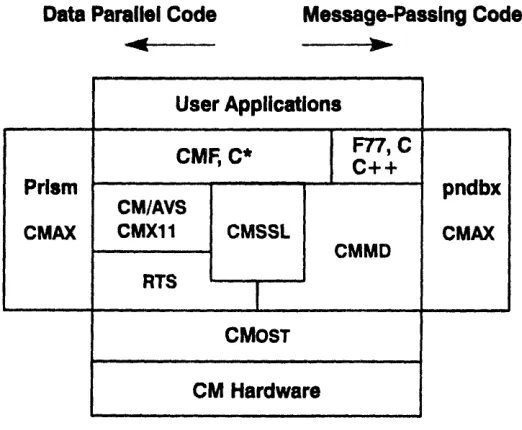
As suggested above, the Connection Machine CM-5 provides software to support both data parallel and message-passing programs. Figure 2 diagrams the current CM-5 software offerings.
Data Parallel Code Message-Passing Code
)P.--3~
CMF, C* C++
CM/AVS
CMX11 CMSSL
CMMD RTS
pndbx
CMAX
Figure 2. CM-5 software.
1.5.1 Data Parallel Software
* The CM-5 currently offers three high-level languages for data parallel pro-gramming: CM Fortran, C*, and *Lisp. These languages are nearly identical to their CM-200 counterparts. A few implementation-specific dif-ferences exist: these are detailed in Section 4.1 for CM Fortran and Section 4.2 for C*. Readers interested in *Lisp should consult the docu-ment Porting to CM-5 *Lisp.
* Data parallel libraries include CMSSL (the CM Scientific Software Library) and CMX1I (a visualization library that provides parallel exten-sions to the Xll standard). Section 4.3 briefly introduces CMSSL; Section 4.4.4 introduces CMX11.
Prism
CMAX
User Applications
CMosT
CM Hardware
Chapter 1. Introduction 7
CM/AVS is a Graphical User Interface for visualization that links the com-puting power of the CM-5 with the convenience of a specialized graphics workstation. It is described in Section 4.4.3.
1.5.2 Message-Passing Software
Message-passing programs on the CM-5 can be written in C, C++, Fortran 77, CM Fortran, or C*. They are supported by a message-passing library, CMMD. This library and its associated support utilities in the operating system are sum-marized in Section 4.5.
1.5.3 Assemblers
The assembly language for the CM-5 is DPEAC; its assembler is dpas. The CM Fortran and C* compilers compile programs into DPEAC code.
The DPEAC language is a superset of the SPARC as assembly language. Sun's C, C++, and Fortran 77 compilers compile programs into as.
On a CM-5, as statements can control the SPARC microprocessors in the nodes and in the partition manager; DPEAC statements can control both the SPARC and the vector units.
The dpas assembler reads DPEAC sources and outputs UNIX object (.o) files. It does this by preprocessing its source, translating the DPEAC-specific state-ments into SPARC assembly source, and running the resulting text through the as assembler. Any SPARC assembly statements are passed unchanged to the as assembler.
Because the dpas assembler contains an excellent preprocessor for both as and DPEAC statements, it is sometimes very useful as a preprocessor for an as program.
For full information on DPEAC and dpas, see the DPEAC Reference Manual.
Version 7.2, August 1993
Copyright 0 1993 Thinking Machines Corporation
I
8 CM-5 User 's Guide
1.5.4 CMAX
CMAX - the "CM Automated X-lator" - assists the conversion of standard Fortran 77 into CM Fortran. CMAX provides a convenient migration path for serial programs onto the CM-5. Software may be maintained in either Fortran 77 or CM Fortran. CMAX is described in Section 4.6.
1.5.5 The CMOST Timeshared Operating System
The CM-5 operating system, CMosT, is an enhanced version of the UNIX operat-ing system. As such, it enables the CM-5 to interact efficiently with other devices in a heterogeneous, networked computing environment, while at the same time managing the interactions of CM-5 system components and managing the time-shared execution of multiple parallel programs.
As a resource on a heterogeneous computing network, CMOST provides:
· standard UNIX utilities, user interfaces, protection, and security
· support for all standard UNIX-based communications protocols
· the ability to access files and exchange data with other systems
As a resource within the CM-5 system, CMOST provides:
* fast interprocessor communications
* the parallel operations required for best utilization of processing hardware, especially the array of processing nodes
* central administration and resource management to support all CM-5 com-putation and I/O facilities
* timeshared execution of parallel programs
1.5.6 Prism Programming Environment
Chapte-... r 1 Inroduction. . ~ :. ...--- 9...
primarily for use with data parallel programs, Prism can also be useful for other program development. Prism is described in Chapter 3.
1.6
1/0 on the CM-5
1.6.1 Hardware
The CM-5 supports a wide range of I/O devices, including:
* Scalable Disk Array (SDA). The SDA is an extremely high-performance, highly expandable disk storage system packaged within the CM-5 cabinetry.
* CM HII'PI interfaces. CM-HIPPI and CMS-HIPPI are bus interface control-lers that are designed to transfer data at a high speed according to the ANSI HIPPI draft standard. The interfaces are primarily intended to link the CM-5 and its storage devices to other supercomputer systems.
* CM-2/200 I/O devices. For application portability, the family of CM-2 and CM-200 peripherals continues to be supported on the CM-5. These devices reside on Thinking Machines' proprietary CMIO bus, which is connected to the Data Network. These peripherals are:
* DataVault, a high-performance, disk-based mass storage system
· CM-IOPG, an YO controller that provides four ports for connection to SCSI-based devices, such as cartridge tape drives
1.6.2 Software
CM-5 software supports three file systems:
* SFS, the Scalable File System, provides access to the CM-5's high-perfor-mance Scalable Disk Array (SDA).
* CMFS, the Connection Machine File System, provides access to all I/O devices that are shared by the CM-5, CM-2, and CM-200. These devices (sometimes called the CMIO-bus devices) include the DataVault mass stor-age system, the CM-HIPPI, and VME-based devices.
Version 7.2, August 1993
Copyright © 1993 Thinking Machines Corporation
I0 I C~.r---rry--.---YY··Y·-.~YYII--. · ·· YI~ CM- -S1I~C·l Use r'
uide-* The standard NFS-mounted UNIX file system.
The CM Fortran Utility Library, C* 1/O procedures, and CMMD V1/ routines allow applications to access disk files in any of these file systems. These proce-dures allow applications to open, close, truncate, and seek within files. They also allow applications to read and write data in parallel streams between the proces-sing nodes and the SDA or DataVault.
In addition, UNIX files can often be accessed by standard UNIX commands, while special CMFS library procedures enable you to manipulate files stored on devices accessible via VME or CM-HIPPI.
This flexibility in file access, together with the fact that the CM-5 writes files in canonical UNIX order, allows the CM-5 to share data with other machines in a heterogeneous environment.
Chapter 2
The Basics
This chapter covers the basic procedures you need to know in order to create, compile, execute, and debug programs on the CM-5. If you have used the UNIX operating system, much of what is covered in this chapter will be familiar to you. If you are not familiar with UNIX, you should begin by reading an introductory book about the operating system.
All the procedures discussed in this chapter can be carried out from within Prism, the CM-5's programming environment; Chapter 3 describes Prism.
Your CM-5 should have sample programs you can use, if you want to try running a program on the computer before writing one yourself. Typically, these pro-grams should be in the directory /usr/examplee; if this directory does not exist, check with your system administrator for the location of sample programs on your system.
In this guide, we refer to a program called primes, which is a simple data paral-lel CM Fortran program for calculating and displaying prime numbers. By default, this program, along with its source code, is in the directory
/ur/exam-ples/prism on a partition manager. Check with your system administrator if it isn't there. We provide the source code in Appendix B, in case you can't find it on-line.
We suggest that you copy the source file, primes . f cm, to your home directory, from which you can compile it and use it within Prism, following the directions we provide in this chapter.
Version 7.2. Auust 1993 11
Copyright C 1993 Thinking Machines Corporation
12 CM-S User's~
GuideC-~uarrrpafflp~nua~err----.I-2.1 The User's View of the CM-5
As we mentioned in Chapter 1, a CM-5 has one or more partition managers, each of which controls some number of parallel processing nodes. These partitions operate independently of each other, although data can be passed back and forth between partitions. Your system administrator determines the exact configura-tion of your site's CM-5.
Each partition manager is a host on a network You can log in to a partition man-ager over the network to gain access to the nodes that the partition manman-ager controls, as well as to all the CM-5's 1/0 devices. Your system administrator can determine which users can log in to a given partition manager.
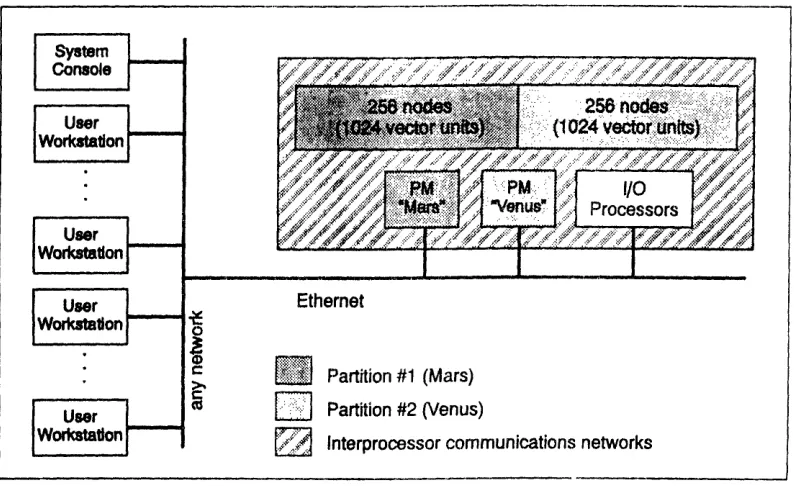
In Figure 3, the CM-5 has two partition managers, named Mars and Venus; each is currently managing a partition of 256 nodes; this CM-5 has the optional vector-unit hardware, so each partition can also be viewed as containing 1024 vector units. The system also has control processors managing some /O peripherals, and another control processor that is dedicated as a system console.
Figure 3. A sample CM-5 system.
You execute your program from the partition manager. The partition manager downloads code to the processors and broadcasts identical memory maps to each processor (node or vector unit). The processors then execute the code, each act-ing on its own data and executact-ing computations and branches accordact-ingly.
" Partition #1 (Mars)
D:"
Partition #2 (Venus),3 Interprocessor communications networks
- ·--- --- -
---CM-5 User
~
GuideChaptr 2iiiiiTaiZ-iZiiiciiiiii-iiiiZ. ... -¥ -i--T __----... 13-
Multiple users can be logged in to a partition manager at the same time, running processes under timesharing. You can also issue commands over the network to submit your program to a batch queue for execution.
2.2 Gaining Access
To gain access to a partition manager, you must know its name. Find out the names of partition managers from your system administrator. The system admin-istrator can also tell you if you have permission to use the partition manager.
From your terminal or workstation on the network, you can gain access to the partition manager via the UNIX command rlogin or rsh.
2.2.1 The rlogin Command
Use the riogin command to log in to a partition manager remotely across the network. To log in to the partition manager Mars, for example, issue the com-mand:
% rlogin mars
You will then see messages from the partition manager; it will also ask you to confirm your terminal type. For example,
term (xterm)
asks if you are using an X terminal. If the terminal type is correct, simply press your Return key. If it isn't, enter the correct terminal type and press Return. (If you don't know your terminal type, ask your system administrator for help.)
You should then see the UNIX/CMOST prompt:
You are now logged in to the partition manager. You can issue any CMOST com-mand and execute programs. For example,
% primes
executes the program primes.
Version 7.2, August 1993
Copyright @ 1993 Thinking Machines Corporation
14
~lul~uaw~aaoP~aoP~oumr~-WIY~pCM-S
----User
G-ide
To log out of the partition manager, issue the command
% logout
2.2.2 The rsh Command
Use the rsh command to execute a program or issue a CMOST command without logging in to the partition manager. The rsh command creates a "remote shell" on the partition manager. Simply specify the name of the partition manager, fol-lowed by the command or program name, on the rsh command line. For example,
% rsh mars primes
executes the program primes on Mars.
After the program executes, you are returned to your local UNIX shell.
2.3 Writing and Compiling
Your Program
You can create your program as you normally do, on your local computer.
If you are creating a C* or CM Fortran program, you can compile it on the parti-tion manager, or on any computer that has CMOST and the C* or CM Fortran compiler installed. To compile the primes program from the source file
primes. fcm, for example, issue this command:
%
cmf -cm5 -o primes primes.fcm
If you are creating a C or Fortran 77 program, you can also compile it on the partition manager, or on any computer that has a cc or f 77 compiler.
Generally it's a good idea not to compile on the partition manager (if you have a choice), to avoid overloading it.
Chapte . he Basics 11 i~1 I I 511.
2.3.1 Linking
A CM-5 executable program actually consists of two programs, one that executes on the partition manager and the other that executes on the CM processors. CMOST uses a special linker, cmld, to create this executable program. If you are developing your program in a high-level language, you typically don't need to deal with cmld. You would use it if, for example, you were creating a C* pro-gram that calls CM Fortran subroutines.
2.4 Executing Your Program
As shown above, you execute your program as you normally would on a UNIX system: you specify the name of the executable program at the UNIX prompt, or as an argument to the rsh command. The program then runs under timesharing on the CM-5.
2.4.1 Providing Accounting Information
On some CM-5 systems, users are required to provide an account ID when run-ning a program, so that time on the system can be charged to the correct project. Obtain the account ID from your system administrator. You then specify this account ID before running a program by setting the UNIX environment variable
CM_ACCOUNT_ID to your number. For example:
% setenv CM ACCONTID 1234
To avoid having to reissue this command constantly, you can put it in your
.cshrc file, so that it is executed automatically when you log in or issue an rsh command.
Note that this mechanism doesn't work if you are executing in batch mode; see below.
Version 7.2, August 1993
Copyright D 1993 7hinking Machines Corporation
16 CM- User...---'s1 gp -ide "
2.4.2 Executing In Batch Mode
You can also run your program in batch mode. You can use either the standard UNIX batch command, the NQS batch system, or (if it is available at your site)
the Distributed Job Manager (DJM).
The UNIX Batch Commands
The CM-5 supports the standard UNIX batch commands at and batch. For example,
% at 0815am Jan 24
at> primes
at> Ctrl-d
This causes the program primes to be executed at 8:15 a.m. on January 24th. Ctrl-d means "press the d key while holding down the Control key." This is the way to signal the end of information you are providing to the standard input.
The NQS Batch System
NQS is a batch system that your system administrator can set up to control the execution of programs on the CM-5. In it, you submit a request to a queue, which either runs on a partition manager or feeds requests to a queue on a partition manager. A request consists of one or more programs. When your request reaches the bead of the queue, it is executed. Queues can be configured in various ways: for example, so that they are active only at certain times, or so that they accept requests only from certain users. A partition manager can be set up so that it accepts requests only from NQS queues, or so that requests from the queue timeshare with other processes running on the partition.
Use the qsub command to submit a request to a queue. Specify the name of the queue on the command line, using the - option. You can specify the name of the program from the standard input, as with the at command. For example, if the queue's name is b_queue, you could type this:
%
qsub
--q b_queueprimes
Ctrl-d
Alternatively, you can put the program's name in a script file. This is especially useful if you have multiple programs to run, or you have CMOST commands you
Chapter2.The--..--..--B...-I---1
m m u m m~~~~~~~~~~m u~~~~~mm~~~~~---u---m---want to issue along with the program. If the script file's name is /myname/
primes_script, you would issue the command as follows:
% qsub -q b_queue /myname/primes_script
Use the -I option to specify your account ID, if one is required; obtain the account ID from your system administrator.
To find out how to obtain status information from NQS, see Section 2.7.3. For a complete discussion of NQS, see the manual NQSfor the CM-5.
DJM (Distributed Job Manager)
DJM (Distributed Job Manager) is a batch queuing system and interactive job manager available on some CM-Ss. It is similar to NQS: you submit a request to a queue for execution, and queues can be configured in various ways. Check with your system administrator to find out if DJM is available at your site.
NOTE: If DJM is running at your site, you should typically use it to run your CM-5 programs. Otherwise, you might have difficulty obtaining the resources to run your program.
Use the J sub or j run command to submit a job. You can specify the name of the program from the standard input, or in a script file. For example, if the script file's name is /myname/primes_script, you would issue the command as follows:
% sub /myname/primes_script
If you don't include the appropriate options (see below), DIM then responds by asking questions about the job:
Number of processors (32)? Estimated CPU time (5min)? Estimated memory (128M)?
(The defaults in parentheses may differ at your site.)
Make your best estimates of the resources your job will need to run. If your esti-mates are too low, DJM will not effectively schedule your job; if they are too high, the job may be delayed unnecessarily, waiting for the resources to be avail-able. The actual resources consumed by your job are printed at the end of the output file when the job finishes. You can use this information to provide better resource estimates the next time you run your job.
Version Z2, August 1993
Copyright O 1993 Thinking Machines Corporation
1...
...
C-M-
ser'...
Gd-_e__-
When you have answered DJM's questions, it prints a job ID:
Job submitted successfully. Job id is 43.
Output from the job is written to the file myjob. onnn, where myjob is the name of the program that ran and nnn is its job ID. You can override this by specifying the -stdout option; this sends output to the standard output.
Use the -queue option to specify the queue to which the job is to be submitted. If you omit the option, DJM submits the job to the first queue that meets the requirements for your job. You can also use the -nproc, -cputime, and -mem options to specify your job's resources on the command line, rather than having to respond to DJM's questions.
To fmd out how to obtain status information from DJIM, see Section 2.7.4. For complete information on DJM, see your local DJM documentation.
2.5 Debugging Your Program
The standard way of debugging a data parallel program on the CM-5 is to use Prism, as described in Chapter 3. Prism supports the CM Fortran, C*, C, and Fortran 77 languages.
Debugging of messsage-passing programs is different from conventional debug-ging, since you may need to look at the status of the program in a specific node, or group of nodes. To debug the node program, you can use the CM-5 node-level debugger pndbx, which you can run in conjunction with Prism or with a debug-ger like dbx or gdb.
2.5.1 The Errors File and Core Files
Certain errors can cause cores for some of the nodes to be dumped and an errors file to be generated. For example:
· a segmentation fault on the nodes
· a bus error on the nodes
* division by on the nodes
CM-5 User 's Guide
Chapter.2. The Basi ....-- ... __ --- ... ... 19---
These in turn can be caused by programming errors. For example, here are some C* errors that can cause core to be dumped:
* dereferencing a bad parallel pointer
* using an invalid send address
· doing out-of-bounds array referencing of parallel variables
· using an invalid parallel coordinate
Problems of this sort are generally signaled by an obscure CMOST
mes-sage - for example:
CMOST:
yellow interrupt
The errors file is called CMTSD_errors .pid, where pid is the process ID of the process you were running; it is located in the directory from which you executed your program. The file is generated by the timesharing daemon when a user pro-gram crashes; it contains a list of the status of each node (and of the partition manager, if an error was detected there). The file will tell you which nodes crashed, and give you some information about the crash, such as what memory address the node was trying to reference, whether it died because of a segmenta-tion fault, and so on.
If your program was using the CM-5's vector units, additional error files are created in the directory from which you ran the program. They are called CMTSDdp .pnX.pid, where X is the node identifier and pid is the process ID. These files contains an ASCII dump of the contents of every register on the vector units, for every node that has a different error.
The core files are named CMTSD_corepnX.pid, where X is the node identifier-and pid is the process ID; they are located in the directory from which you executed your program. You may also see a regular core file for the partition manager executable program.
To avoid wasting space, only unique cores are dumped. That is, if several nodes have the same error, only the core for the first node with that type of error is dumped. Also, the first node with no error (if there is such a node) will dump core.
You can examine these node core files using pndbx, the CM-5's node-level debugger. For information on how to do this, see the CMMD User s Guide.
If you don't want node core files generated, set the environment variable
CM_NO_PNCORE (if you are running the C shell) to any value. For example:
Version 7.2, August 1993
Copyright () 1993 Thinking Machines Corporation
-
20... IC- !r - Userllr G/d...
% setenv CM NO_PN CORE 1
You can also issue this command:
% limit coredumpsize 0
Issuing this command prevents the creation of core files from any program, whether or not it runs on the CM-5.
To re-enable the generation of CM-5 core files, unset the environment variable:
% unsetenv CM NO_PNCORE
2.5.2 Fortran Tracebacks
When a Fortran or CM Fortran program dies, it may generate a traceback. The traceback file will be called prog. trace, where prog is the name of your pro-gram. If there are multiple tracebacks in the file (because the program crashed multiple times), the last traceback is the most recent; it tells you the routine that was executing on the partition manager when the program died.
Note, however, that the information may not be especially valuable, since the partition manager is not necessarily synchronized with the nodes. For example, the partition manager may continue working for a while before an error status from the nodes is propagated to it and the program halts. Therefore, the routine or instruction that is executing on the partition manager when the nodes die may have nothing to do with the error.
2.6 Timing a Program
CMOST provides a timing utility that lets you determine how much time any part of a program takes to execute on the nodes. The timer consists of a set of instruc-tions that you insert at the appropriate places in your program.
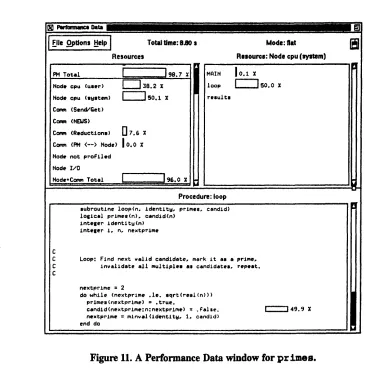
Prism also provides performance data about your program. See Chapter 3.
The timing utility has these features:
It can be used in C* or CM Fortran programs.
CM-5 User Guide
Cha7ZYpZterZ~Zl;_. 2 Teasc ... -- ._--- . ...
2...---* A timer calculates total elapsed time used by the process (or any part of it) and the total amount of time the CM processors are active, with
micro-second precision.
* Multiple timers can be active at the same time.
* Timers can be nested. This allows you, for example, to start one timer that will time the entire program, while using other timers to determine how different parts of the program contribute to the overall time.
* You can have up to 64 timers running in a program.
To get timings for the primes program, you would include these calls at the appropriate places in the code:
CALL CM TIMER CLEAR(O) ! Initialize timer 0 CALL CM TIMER START(O) ! Start timer 0 CALL CM TIMER_STOP(O) ! Stop the timer CALL CM TIMER PRINT(O) ! Print the results
For complete information on using the timing utility from CM Fortran or C*, see the user's guides for those languages.
CMMD provides comparable functions for use within message-passing pro-grams. See the CMMD User a Guide for more information.
2.7 Getting Information
CMOST provides commands you can use to find out information about the CM-5 and processes running on it. It is especially important to be able to get informa-tion about the CM-S's configurainforma-tion, since the system administrator can easily reconfigure it to add or remove partition managers, change the number of nodes in a partition, and so on.
2.7.1
Finding Out about the CM-5's Configuration
To find out the general configuration of a CM-5, log in to a partition manager and issue the command cmpartition:
% cmpartition
Version 7.2, August 1993
Copyright 0 1993 Thinking Machines Corporation
2CM-S.U
' _
IIHIF
...
...
r..e..
The output might look like this:
Name mars venus Partition Manager mars.think.com venus.think.com Size 128 128 State ACTIVE ACTIVE
This describes a CM-5 system with two partition managers, Mars and Venus, each of which controls 128 nodes.
For more complete information, use the list -1 option:
% cmpatition list -1
CM System G1 256 Processors
2 Partition Managers mars.think.com venus.think.com
Available PN Ranges: All PNs in use IOP Addresses 480
Partition Manager mars.think.com venus.think.com Size 128 128
This provides the additional useful requests only.
State ACTIVE ACTIVE Nodes 0-127 128-255 Description Batch only
information that Mars is set up to run batch
2.7.2 Finding Out about the Status of the System
To find out information about the partition and the programs running on it, use the CMOST command cmps, which is modeled after the UNIX command pa. The
command provides information about the partition on which you execute it. The
output looks like this:
32 PN System, 29168K mem. free, 6160K VU mem. free, 2 procs, TS-9/13/92-23:00
Daemon up: 1 day, 2:57
USER PID CMPID
mob *900 1 rhv 7900 0
TIME 234:13 16:36
TEXT ILH 896K 254K 200K 230K
ILS IGS IGH VUS VUH COMMAND
56K OK OK 64K 8K primes 56K OK OK 64K OK wil
The first line of the cmps output provides general information about the parti-tion, including the number of processing nodes (referred to as PNs) it contains and the amount of memory available on the nodes and the vector units.
Name mars
venus
C" ¥ " ¥¥ ?1hate¥ ¥u¥¥r~- The ----Basic ....-- ... ... ... ----... 2---...
The columns give information about each process:
* The PID and CMPID fields give the process's SunOS and CMOST pro-cess-ID number.
* The TIME field indicates the amount of time that the CMOST timesharing daemon has made available to the process, regardless of whether the pro-cess actually used the nodes.
* The TEXT field indicates the total amount of program memory allocated to the process.
* The fields ILH, ILS, IGS, IGH, vuWS, and vuH give specifics on stack and heap memory used by the process. Note these points:
* The numbers reported are the maximum for any single node or (in the case of VUS and VUH), any single vector unit. Thus, in the case of VUS and VUH, the total amount of memory taken up per node is 4 times the total of these two fields.
* Memory is allocated uniformly across the nodes, even in message-passing processes.
* To calculate the total amount of memory used by a process, you must multiply by the number of nodes or vector units in the parti-tion on which it is running.
For more details on these fields, see the cmps man page on-line.
· The coMmANi field gives the name of the program being executed.
To find out information about the partition manager and the programs running on it, use the standard UNIX command ps.
If you are running under the X Window System, you can use the xcmps com-mand to get a graphical display of CM-5 usage on your partition. Sample output is shown in Figure 4. By default, the display is updated every 10 seconds. For more details, see the xcmps man page on-line.
Version 7.2, August 1993
Copyright 0 1993 Thinking Machines Corporation
24 minir- II Ie II . . . . . ... ~- -llllFCQ^'+ CM- i111 ....I'
CPU uInge Memory usage
nwmdl: lI1 mn : 111
a.t w 2t 7 .tou: I117
0 so 100 0 SO 100
used % used
Actve proceeee 8 Free mienwy.l 27561
SBtem Uptimel I day I hour 59 minutes Pattlion Simze 4
FguRe 4. Output of the xoqis commrand.
2.7.3
Finding
Out about the Status of 40s
To find out information about NQS, issue the command qstat on a partition
manager. Use the -u option to obtain information about requests from a specific
user. For example,
% qstat -u sharon
might produce this output:
...
NOS Version: 2 REQUESTS on diamond
REQUEST NAME OWNER QUEUE PRI NICE CPU MEM STATE
oodiamond. primes sharon pn_128 32 30 3600 UNLIMITED RUNNING
This shows that user Sharon has one request running on the queue pn_la8. The other fields give information about characteristics of the request.
To find out information about batch queues, use the -b option. For example,
% qstat -b
might produce this response:
CM-5 Wj Uw S- Gatjsk
Chaper~ulluu 2. The Basics
NQS Version: 2 REQUESTS on diamond.think.com
QUEUE NAME STATUS TOTAL RUNNING QUEUED HELD TRANSITION
ql AVAILBL 1 1/1 0 0 0
q2 AVAILBL 2 2/10 0 0 0
This indicates that there are two queues on the partition manager diamond; they are named q. and q2. The TOTAL field tells you the number of requests in the queue. The other fields give information about the status of the requests in the queue.
2.7.4 Finding Out about the Status of DJM
Use the j stat command to find out information about the Distributed Job
Man-ager (DJM). With no arguments, j stat lists the current jobs. For example:
% jstat
USER JID MACH SERV PROCS TIME MEM STATUS COMMAND
sharon 43 cm5 ea 32 0:02 512M Running myjob mark 24 cm5 256 240:00 600M Que npr rdt
This indicates that user Sharon has a job running on 32 processors of partition manager ea of a CM-5; its job ID is 43. The PROCS, TIME, and N fields indicate the actual number of processors and amount of CPU time and total amount of memory being used.
User Mark's job is queued; in this case, the PROCS, TIME, and MEN fields indicate the number of processors and amount of CPU time and memory requested when the job was submitted. The status npr indicates that the job is not running because the requested number of processors is not available.
Version 7.2, August 1993
Copyright O 1993 Thinking Machines Corporation
26...
...
L --
CM~'~Z..."7
-
Use-r-'s;!!~-
...
G..d
Another use of the j stat command is to find out the available queues and the resource limits associated with them. Use the -limits option to obtain this information. For example:
% istat
foreign
default
big ded
limits
SACs MACH
50 cm5 100 cm5 100 cm5 100 cm5
TIMI 20min 1hr unlim unlim 128M 2G unlim unlim NPROC unlim 512 unlim unlim DED no no no yes FOR yes no no no UQUZ 999 4 2 1 URUN 999 4 2 1 TRUH 999 8 3 2 To= unlim unlim unlim unlim
In the output:
* SRCH indicates the order in which DIM searches the queues to determine
in which one a job will run. It searches from the lowest-numbered queue to the highest, and submits the job to the first queue that meets the job's requirements.
* TIME, ME, and NPROC give the maximum usage characteristics of the
queue.
* DED specifies whether or not the queue is for dedicated jobs (that is, jobs that require exclusive use of the partition).
* FOR indicates whether the queue is for "foreign" jobs - that is, jobs that are run directly on the machine without going through DIM.
* UQUE and unRu indicate the maximum number of jobs an individual user can have queued and running in this queue.
* TRUN and Tm indicate the total number of jobs that can be running con-currently in this queue, and the total amount of memory they can consume.
2.8 Obtaining On-Line Documentation
The CM-5 has a considerable amount of on-line documentation available to users. See Section 3.7.1 to find out how to view this documentation from within Prism.
From outside Prism, use the standard UNIX man command to view the manual
page for a UNIX or CMOST command or routine.
Chapter 3
Using Prism
The Prism programming environment is the standard way in which users interact with the CM-5 in developing and executing their data parallel programs. Prism provides an integrated graphical environment in which you can:
· execute the program
* debug the program
* analyze the program's performance
* visualize data from the program
* obtain on-line documentation for the CM-5
* ... and much more
This chapter gives an overview of how to use Prism. For complete information on Prism, see the Prism User 's Guide and Prism Reference Manual.
In this chapter we use the sample data parallel program primes to illustrate many of Prism's capabilities. If you have the program (and a CM-5) available, you can follow along on-line as we help you get started. To compile the program for debugging via Prism, specify the -g option; note that compiling with -g causes performance to be artificially slow. To compile the program to collect per-formance analysis data, specify the -cmprofile option. See Section 2.3.
3.1 Starting Prism
Prism runs under the X Window System.
Version 72, August 1993 27
28s---a--
s
--·I
~I-
Jis
^
CM
~·-Q6III
-'
--
Usr
as-
fi
Gu-de
To start Prism, first log in to a partition manager as described in Chapter 2. For example:
% rlogin mars
Start X on the partition manager as you normally do; if you're not familiar with X, ask your system administrator for help. Make sure your DIPLAY environ-ment variable is set for the terminal or workstation from which you are running X. For example, if your workstation is named Valhalla, you can issue this com-mand (if you are running the C shell):
% setenv DISPLAY valhalla:O
To start up Prism, issue the command prism at your UNIX prompt; you can include the name of your executable program as an argument. Thus,
% prism primes
loads the primes program. (This assumes that you are starting Prism from the directory in which primes is located.) The main Prism window then appears, as described below.
If you don't have an X terminal or workstation, you can run a non-graphical ver-sion of Prism; specify the -c option on the command line. This verver-sion of Prism is discussed in Section 3.10.
3.2
A Tour of Prism
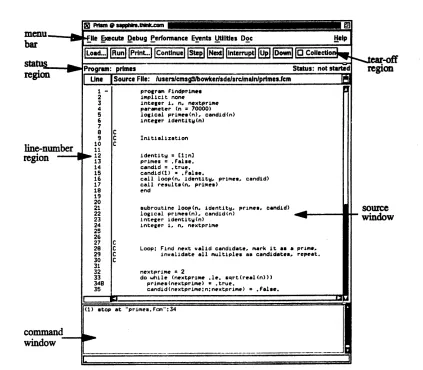
Figure 5 shows the main window of Prism with the primes program loaded. In Prism, you can operate with a mouse, use keyboard equivalents of mouse actions, or issue keyboard commands.
29
Chapter 3. Using Prism
PflnI qapers.U&C-u ,
menus..._.
bar
stat .
region
line-number region
-command
window
lFile Execute Debug Performance Events Utilities Doc
Load... unPrln.ont inue INe t lln t Il rUp Do w o Collctlo Program: primes Status: not stuted
Une Source File: luserscmsgS9bowkersdesrcimalniprimes.fcm
1 - program findprime.
2 implicit none
3 integer . n, nextprime
4 parameter (n = 70000)
5 logical primes(n). candid(n) 6 integer identit(n)
7
a C
9 C Initialization
10 C 11
l1_ 12 identity = 1:n
13 primes = .False.
14 candid = true.
15 candid(1) = false.
16 call loop(n, identity, primes, candid) 17 call results(n primes)
18 end
19 20
21 subroutine loop(n, identity. primes, candid) 22 logical primes(n), candid(n)
23 integer identity(n)
24 integer I. n. nextprime
25 26
27 C
28 C Loop: Find next valid candidate, mark it as a prime, 29 C invalidate all multiples as candidates, repeat.
30 C 31
32 nextprime 2
33 do while (nextprime .le. sqrt(real(n))) 34B primes(nextprime) .true.
35 candid(nextprime:n:nextprime) = False.
(1) stop at "primes.cm":34
Figure 5. Prism's main window.
Left-clicking on items in the menu bar displays pulldown menus that provide access to most of Prism's functionality.
You can add frequently used menu items and commands to the tear-off region, below the menu bar, to make them more accessible; many items are there by
default.
The status region displays the program's name and messages about the pro-gram's status.
The source window displays the source code for the executable program. You can scroll through this source code and display any of the source files used to compile the program. When a program stops execution, the source window updates to show the code currently being executed. You cannot edit the file in the
Version 72, August 1993
Copyright 0 1993 Thinking Machines Corporation
tear-off
region
source
window
--- ---- --- -- -- - --- -- -- - -- --.. .. .- -.. .. .- ... 1 -- -- -- ---.. ---
--He
L,
ip
30~
~~
''
C
P~-
-
D~.~I·I·~II
--
ar
CM
-S Usr' Gu-~Ide
source window; instead, you call up a separate editor if you want to make changes to your code.
The line-number region is associated with the source window. You can click to the right of a line number in this region to set a breakpoint at that line. In Figure 5, a breakpoint is set at line 34. The execution pointer (>) in the line-num-ber region shows the line at which the program is currently stopped. The scope pointer (-) shows the beginning of the scope that Prism uses in interpreting the names of variables. The symbol * appears when the execution pointer and the scope pointer are at the same line.
The command window at the bottom of the main Prism window has two areas. The history region, at the top, displays messages and output from Prism. You can type commands on the command line at the bottom of the window, rather than use the graphical interface.
3.3 Executing a Program
Once primes is loaded, you can execute it from within Prism. The simplest way to do this is to click on Run in the tear-off region of the main Prism window. (You can also choose the Run selection from the Execute menu, or issue the run command on the command line.)
After you have clicked on Run:
* The status changes to running.
* Many menu items are grayed out, indicating that they are temporarily unavailable.
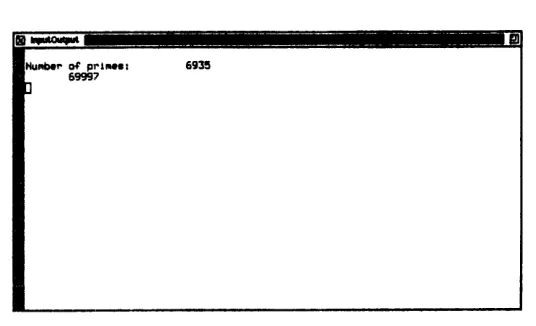
* An Input/Output window appears; when the program has finished execu-tion, the results will appear here. Figure 6 shows what it will look like for
primes.
CM-5 User Guide
Chaplulter 3. s in Prism ~ - --- 31---
U
Figure 6. The Input/Output window.
3.3.1 Interrupting, Continuing, and Single-Stepping
You can also interrupt execution of a program in Prism, and single-step through it. Let's run primes again. As before, start execution by clicking on Run; you don't need to reload the program. Notice that Prism reuses the same Input/Output window.
While the program is executing, click on the Interrupt button in the tear-off region (notice that this button doesn't turn gray; this indicates that the function is still available). When you click on Interrupt:
* Prism displays a message in the history region, stating where the program was interrupted.
* The source window updates to show the code being executed. The execu-tion pointer in the line-number region points to the line currently being executed.
* The status of the program is stopped.
When the program is stopped, you can single-step through it:
* Click on Step in the tear-off region to execute the next line.
* Click on Next in the tear-off region to execute the next statement (a func-tion call counts as a single statement).
Version 7.2, August 1993
Copyright 0 1993 Thinking Machines Corporation
HunbOr of prlme 6935 69997
]
CM-5 User a GuidaI
In both cases, the execution pointer moves to point to the new execution polq in the source window. If the step takes a long time to execute, unavailable burtalo,
and menu selections are grayed out.
We can also issue the stepi and nexti commands from the command line to
step by machine instruction. When you issue these commands, the history region displays the instruction at the address at which you stop. ~
Click on Continue in the tear-off region to continue execution without single. stepping. The program will run to completion.
3.4 Debugging a Program
In Prism, you can perform standard debugging operations like setting break-points and examining the call stack. Prism also provides a comprehensive method for controlling the execution of a program by means of an event table.
3.4.1 Setting a Simple Breakpoint
A breakpoint stops execution of a program. The easiest way to set a breakpoint in Prism is to left-click the mouse to the right of the line number at which you want the program to stop. Notice that when you move the mouse pointer into this area, it turns into a B. When you left-click next to a line, the B appears at that point.
Set a breakpoint at line 15 of primes. Note that when you do this, Prism displays a message in the history region:
(1) stop at "primes.fcm":15
Now, when you execute primes, the program will stop whenever it reaches line 15.
Chapter--
3. Usg Prism33----.
-3.4.2 Using Commands
You can set more complicated breakpoints by issuing the stop command on the command line. For example, issue this command:
stop in loop after 10
This tells Prism to stop execution the tenth time the program reaches the function loop. Note that it causes a B to be placed at line 32 in the line-number region, next to the first line in the routine loop.
Similarly, you can use the trace command to stop execution, then have it start again automatically.
3.4.3 Using the Event Table
The breakpoints and traces described above are events that control the execution of a program. Prism provides an event table that lets you create all such events in one place before you execute your program.
To display the event table, choose Event Table from the Events menu. Figure 7 shows the event table, listing the two breakpoints we discussed above.
event --list
Common Events buttons
[ Event Table I I I
(1) top at "primes. Fcm":34
(2) stop In loop after 10
Id Location l ! Watch| I
Actions 1
Condition I I After -lr
Stop i Instruction
El
SllentEl
1 eventNew Save HeplaceDelete fields
Common Events
Debugging Printing
S
top lo IIStop "Prlnt psond' '
ITrace .o¢. iTracee . IITracond Dis-pl;ay
I " L' 1Help |
Figure 7. The event table.
Version 7.2, August 1993
Copyright © 1993 Thinking Machines Corporation
I Ii I
-'- I
~~~I
0·I~L-
... i --- -:7 .... ... -;d- ... S_ Use
The top area of the event table is the event list - a scrollable region in which
events are listed. When you execute the program, Prism uses the events in this
list to control execution. Each event is listed in a format in which you could type it as a command in the command window. It is prefaced by an ID number assigned by Prism. For example, in Figure 7, the events have been assigned the IDs 1 and 2. Creating an event by issuing a command, or in any other way, adds an event to this list.
The middle area of the event table is a series of fields that you fill in when editing or adding an event; only a subset of the fields is relevant to any one event. For example:
* Fill in the Location field to specify a line number when setting a break-point at a line.
* In the Actions field, specify any actions that are to accompany the event (for example, printing the value of a variable or displaying the call stack). You can include most Prism commands in this field.
* In the Condition field, specify a logical condition that must be met if the event is to take place.
The area headed Common Events contains buttons that provide shortcuts for creating certain standard events. For example, if you click on Stop <cond>, the Condition field is highlighted and the cursor is placed in it. You can then enter a condition and click on Save to add the event to the event list. The program will stop when the specified condition is met.
3.4.4 Displaying and Moving through the Call Stack
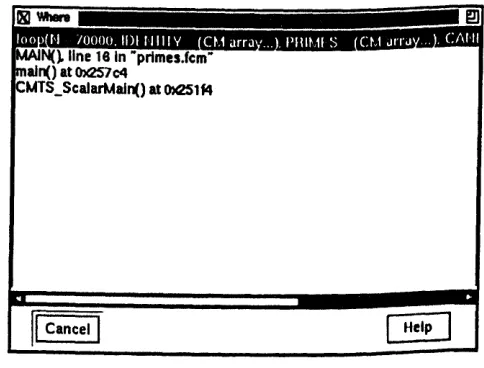
You can use Prism to display and move through the call stack - the list of proce-dures and functions currently active in a program. Choose the Where selection from the Debug menu to display a window containing the call stack; the window is updated automatically when execution stops or you issue commands that change the stack. You can click on a function in the window to make that func-tion current. You can also click on Up or Down in the tear-off region to move up or down one level in the call stack
If you run primes to the breakpoint you have set in loop, the call stack looks like the one shown in Figure 8. Note that the first two levels of the call stack are routines called by the CM-5 timesharing daemon and the run-time system,
CM-5 User 's Guide
ChpterllB8lIIBa
-3 Using
Pim
respectively; you don't have to be concerned with them in debugging your program.
Figure 8. The Where window.
3.5 Visualizing Data
One of Prism's most important features is the ability to display graphically the values of the large arrays that are typical of data parallel prognamming.
In the primes program, the largest variable is also called prines; it is an arr