Optimizing Citrix Technology for
Operation over GPRS Networks
R
Notice
The information in this publication is subject to change without notice.
THIS PUBLICATION IS PROVIDED “AS IS” WITHOUT WARRANTIES OF ANY KIND, EXPRESS OR IMPLIED, INCLUDING ANY WARRANTIES OF MERCHANTABILITY, FITNESS FOR A
PARTICULAR PURPOSE OR NON-INFRINGEMENT. CITRIX SYSTEMS, INC. (“CITRIX”), SHALL NOT BE LIABLE FOR TECHNICAL OR EDITORIAL ERRORS OR OMISSIONS CONTAINED HEREIN, NOR FOR DIRECT, INCIDENTAL, CONSEQUENTIAL OR ANY OTHER DAMAGES RESULTING FROM THE FURNISHING, PERFORMANCE, OR USE OF THIS PUBLICATION, EVEN IF CITRIX HAS BEEN ADVISED OF THE POSSIBILITY OF SUCH DAMAGES IN ADVANCE. This publication contains information protected by copyright. Except for internal distribution, no part of this publication may be photocopied or reproduced in any form without prior written consent from Citrix.
The exclusive warranty for any Citrix products discussed in this publication, if any, is stated in the product documentation accompanying such products. Citrix does not warrant products other than its own.
Product names mentioned herein may be trademarks and/or registered trademarks of their respective companies.
© 2000−2001 Citrix Systems, Inc. All rights reserved.
Version History
June 26, 2001 Citrix Systems, Inc. Version 1.0
June 29, 2001 Citrix Systems, Inc. Version 1.1
TABLE OF CONTENTS
OVERVIEW...1
ABOUT THIS DOCUMENT...1
THE CHALLENGES FACING ICA OVER GPRS...1
SOURCE OF POTENTIAL SOLUTIONS...1
NEED TO OPTIMIZE CITRIX TECHNOLOGY FOR GPRS...2
OPTIMIZING CITRIX SERVERS FOR GPRS CONNECTIONS...4
RECOMMENDATIONS...4
USING CITRIX NFUSE TO OPTIMIZE ICA CLIENTS FOR GPRS ...9
CREATING AN NFUSE SITE FOR GPRS AND WIRELESS USERS...9
RECOMMENDED MODIFICATIONS FOR TEMPLATE.ICA...11
CITRIX ICA CLIENT NOTES...15
ICA WIN32 CLIENT...15
ICA WIN CE CLIENT...15
OPTIMIZING INTERNET INFORMATION SERVICES FOR GPRS...16
CACHING NFUSE IMAGES...16
USING THE “CACHE-CONTROL” HTTP HEADER...17
QUALITY OF SERVICE PROVISIONS ON GPRS NETWORKS...19
QOS PROVISIONS ON GPRS NETWORKS...19
REAL WORLD QOS IMPLEMENTATIONS...21
GPRS INFRASTRUCTURE IMPROVEMENTS AND UPGRADES ...24
NETWORK INITIATED BASE STATION RESELECTION...24
INFRASTRUCTURE UPGRADES TO REDUCE LATENCY...24
MOBILE STATION BANDWIDTH IMPROVEMENTS...25
APPENDIX: SAMPLE TEMPLATE.ICA FILE FOR NFUSE ...29
Overview
About this Document
This document discusses the findings of a Citrix technology investigation that evaluated performance of ICA technology over General Packet Radio Services (GPRS) networks.
The investigation was carried out in a controlled environment at a GPRS incubator lab.
Information and recommendations about optimizing Citrix technology for use over GPRS networks is presented in this white paper. The usability of ICA connections is vastly improved by following the recommendations made here.
The Challenges Facing ICA Over GPRS
The three primary challenges facing MetaFrame and ICA in the type of environment found on existing GPRS networks are:
• High connection latency
• Highly variable connection latency
• Restricted bandwidth
These factors tend to have an adverse impact on the user experience.
Source of Potential Solutions
Solutions for improving the performance of ICA over GPRS networks can originate from three sources: 1. From Citrix: Through optimizations to MetaFrame and the ICA protocol for GPRS and other high
latency connections.
2. From Telecommunication carriers: Through the provisioning of QoS parameters on GPRS networks to decrease latency.
Need to Optimize Citrix Technology for GPRS
The primary focus of any GPRS-related optimizations to Citrix technologies is to improve the user experience when connecting to a Citrix server. The elements of user experience that such optimizations must target are:
• Reducing the perceived user latency
• Reducing the logon time
• Ensuring the most efficient bandwidth utilization
These objectives can be achieved in part through the following mechanisms:
• Reducing the maximum packet size used by ICA
• Reducing the number of small packets sent and received by the client device
• Using SpeedScreen Latency Reduction1 (SLR) technology to reduce the perceived latency
• Using caching and compression to optimize bandwidth usage Each of these points is explained briefly below.
1. Reducing the Maximum Packet Size Used by ICA
Publicly available data and documentation indicates that increase in latency over a GPRS connection is directly proportional to packet size. We confirmed this was true for Citrix technology by testing over a live GPRS network.
The maximum packet size used by ICA over TCP/IP networks is typically 1460 bytes. This packet size displays suboptimal latency characteristics over GPRS networks. It is important, therefore, that the maximum packet size used by ICA when connecting over GPRS is reduced to around half this size. However, reducing the maximum packet size to less than half will have a negative impact on throughput.
2. Reducing the Number of Small Packets Transmitted
3. Using SpeedScreen Latency Reduction to Reduce Perceived Latency
SpeedScreen Latency Reduction is the most important component in the Citrix GPRS solution. The features in SpeedScreen Latency Reduction substantially reduce the perceived latency felt by the user, because all keystrokes typed by the user are echoed locally. The user experiences little or no latency because feedback is immediate.
4. Using Caching and Compression to Optimize Bandwidth Usage
Factors to consider when discussing bandwidth usage over GPRS connections are: GPRS offers a bandwidth-limited connection
GPRS billing mechanisms encourage bandwidth efficiency
GPRS connections are bandwidth-limited; therefore, it is important to fully utilize available bandwidth. This can be achieved by maximum compression of the ICA stream and by maximizing use of client- side caching.
Optimizing Citrix Servers for GPRS Connections
This section describes server-side optimizations for GPRS connections. Configuration settings that need to be made using NFuse are discussed in the following section.
This section deals with the following server-side settings: Using SpeedScreen Latency Reduction features
Reducing the number of small packets sent to the client Optimizing the Windows user interface for GPRS connections
Recommendations
1. Enable SpeedScreen Latency Reduction
SpeedScreen Latency Reduction consists of two components: Local text echo
Mouse click feedback
Local text echo echoes keystrokes locally on the client as they are typed. The characters appear immediately and are later overwritten seamlessly by the server image as it becomes available. This eliminates the latency perceived when typing, because the user has instant visual feedback when typing.
Mouse click feedback changes the mouse cursor on the client to the “busy working” state when the user clicks a mouse button. When the server acknowledges the mouse click, the mouse cursor on the client reverts to the default pointer. The user is presented with instant feedback to the mouse click.
On the server, the SpeedScreen Latency Reduction Manager is used to set the options for both components. By default, mouse click feedback is enabled for the server, while local text echo is disabled.
For those applications that are published to GPRS users, enable local text echoed. Alternatively, the administrator may want to enable local text echo for the server as a whole. Numerous documents describing how this is done are available.
2. Create a new ICA listener entry for GPRS connections
By creating a second ICA listener dedicated to serve users connecting through GPRS,
customizations specific to GPRS users are made without affecting LAN users. By creating a new ICA listener and routing all GPRS connections to that listener, a Citrix server(s) can serve applications to users connecting on high latency GPRS links as well as on low latency LAN links.
This second listener is used in combination with NFuse. A second NFuse Web site is created for wireless access and NFuse routes users to the correct ICA listener. his procedure is discussed in a later section.
On multihomed servers, different listeners can be bound to different network cards. On single-homed servers, multiple listeners can be bound to the same network card, provided each listener has a different port number. The following discussion assumes a single-homed server.
To create a new ICA listener:
1. Use Regedit.exe to open the following registry key:
HKLM\System\CurrentControlSet\Terminal Server\WinStations
2. Expand and select the ICA-tcp key. 3. Export the ICA-tcp key to a registry file. 4. Rename the ICA-tcp key to ICA-tcp-GPRS.
5. Import the previously exported registry file back into the WinStations key. This recreates the ICA-tcp key.
6. Set the PortNumber value in the ICA-tcp-GPRS key. This registry setting defines the port number for the listener.
To start the new ICA listener:
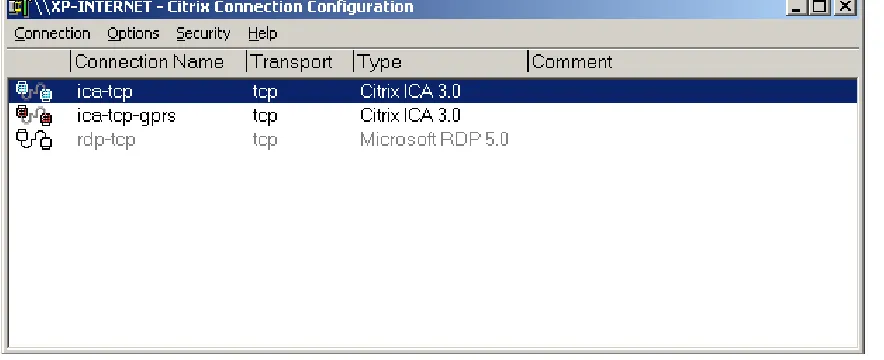
1. Start the Citrix Connection Configuration applet. 2. Disable the ICA-tcp-GPRS listener.
Figure 1: Citrix Connection Configuration showing the GPRS listener
3. Increase the Interactive Timer Delay on the GPRS ICA Listener
The interactive timer is used on the server to ensure session interactivity. The timer flushes any pending buffers when interactive (mouse or keyboard) input is detected when the timer fires. By increasing the interactive timer delay, buffers that are sent to the client will contain more data when they are flushed. This will reduce the number of small packets that are sent to the client. This reduces the perceived latency due to the lower radio overhead.
It is paradoxical that by increasing the interactive timeout, the perceived session latency actually decreases. On LAN and low latency connections, increasing this timeout results in a degradation of session latency because on GPRS connections, an extra 90ms on the interactive timeout is relatively small when compared to a session latency of around 1600ms. However, on LAN connections, an extra 90ms is a relatively large slice of time when compared with the overall session latency (in fact it exceeds the session latency).
A recommended value for the interactive timeout on the server is 100ms. The default value for MetaFrame XP is 10ms. The interactive tTimeout is controlled through the InteractiveDelay registry value in the ICA GPRS listener key. See the recommendation about creating a new ICA listener to serve GPRS users.
4. Enable SpeedScreen Latency Reduction Channel Buffering
(Virtual Channel Buffering is a new feature that is being introduced with Service Pack 1 for MetaFrame XP.)
It is assumed that you are familiar with the concept of a virtual channel.
Channel buffering connotes that server data is buffered prior to being transmitted to the client. This has the effect of coalescing many small packets into a larger packet, which on GPRS connections reduces the number of radio transactions required for the same amount of data. This benefits the session latency.
The server/client communication on the SpeedScreen Latency Reduction Channel typically consists of a large number of small packets and is an ideal candidate for buffering. The small packets are typically ack (acknowledge) packets for previously typed keystrokes.
Virtual Channel Buffering is controlled through the Buffering registry value located in the registry key HKLM\System\CurrentControlSet\Control\Terminal Server\WDs\icawd
5. Increase the Menu Show Delay
This is an optimization to the Windows user interface for GPRS connections. It is not applicable to low latency connections. Increasing Menu Show Delay provides positive benefits to users connecting over GPRS; however, it also applies when those same users connect on a high-speed link.
Therefore, this change may not be suitable for all users.
The menu show delay is the length of time that the mouse pointer needs to be held above a parent menu entry before the submenu below that entry is displayed. By increasing this timeout, navigating both the Start menu and application menus becomes easier over GPRS.
You can move the mouse to the required shortcut and launch the associated program without having to wait for each submenu that the mouse passes over to be displayed. You can still open submenus quickly by clicking the parent menu entry.
The menu show delay is controlled by the MenuShowDelay value in the HKCU\Control Panel\Desktop registry key.
Using Citrix NFuse to Optimize ICA Clients for GPRS
Citrix NFuse is the preferred configuration method for ICA Clients connecting to MetaFrame servers over GPRS connections. Users visit the NFuse logon page and follow the link for a published application. NFuse generates an ICA file that contains all of the settings needed to optimize the client for GPRS, and the ICA client makes use of these settings.
The Citrix Desktop Portal technology also uses NFuse technology. Users of this technology also inherit all settings configured through NFuse.
The settings described in this section can be applied to a generic client-side ICA file. Settings for specific client platforms are discussed in the Citrix ICA Client Notes section.
We recommend you create two separate NFuse portals to front-end your MetaFrame servers: one to serve wireless users and the other to serve LAN users. Both sites will have settings appropriate to the connection technique, and will direct users to the appropriate ICA listener on the MetaFrame server. See multiple ICA listeners in the previous section describing server optimizations.
Some compulsory server side settings that cannot be made using NFuse are discussed in later sections of this document.
The user experience when connecting to NFuse servers can be further enhanced by configuring Internet Information Services (IIS) on the Web server. These optimizations are discussed in the following section.
Creating an NFuse Site for GPRS and Wireless Users
In the previous section, we recommended that a second ICA listener be created for GPRS connections. However GPRS connections require increased Interactive Timer Delay, which means that the listener cannot be used for LAN connections due to the negative impact on session interactivity.
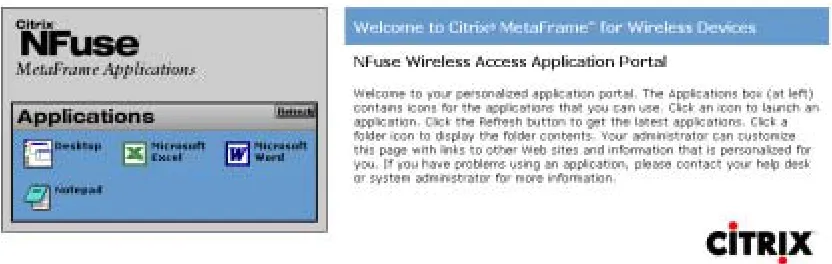
NFuse can be used to direct users to the GPRS optimized listener. This section provides details about how to set up the second NFuse page for GPRS connections. ICA settings for GPRS-enabled
connections are described in the following section. These settings, combined with the server side optimisations, provide users with the optimal GPRS experience.
To create a second NFuse site, first locate the MetaFrame folder that contains the NFuse files. Create a duplicate of the MetaFrame folder and name it “MetaFrame-Wireless” (for example).
Figure 3: Image Showing NFuse for Wireless Devices Logon Screen
User Redirection to the GPRS ICA Listener Using NFuse 1.5
To redirect users to the ICA listener optimized for GPRS, you need to modify the Template.ica file for the wireless access NFuse site to include the listener port number.
To append the port number to the address, locate the following line in the Template.ica file: Address=[NFuse_IPv4Address]
NFuse replaces the NFuse_IPv4Address tag with the dotted IP address of the server to which to connect. To direct users to the GPRS ICA listener, modify this line as follows:
Address=[NFuse_IPv4Address]: 1495
The above line assumes that the GPRS ICA listener is on port 1495. Replace this with the actual port number to which the ICA listener is configured.
Recommended Modifications for Template.ica
This section contains recommended changes to be made to the Template.ica file for the NFuse wireless access site. These changes optimize the ICA session for GPRS connections. A sample Template.ica file listing is included in the Appendix.
1. Disable Client Device Mapping
Disabling client device mapping minimizes client/server negotiation at logon, making logon faster. Application performance is also improved because the operating system does not have to discover client drives and devices. This typically occurs when a URL is entered into Internet Explorer; a Save As or File Open dialog box is displayed by a Windows application or when you press the Start button. The following ICA file settings need to be made to disable client device mapping.
ICA File Entry Value
COMAllowed Off
CPMAllowed Off
VSLAllowed Off
CDMAllowed Off
2. Disable Client Update
Disabling client update also reduces the logon time. The following ICA file setting disables client update.
ICA File Entry Value
UpdatesAllowed Off
3. Restrict the Maximum Packet Size Used by ICA
As previously explained, the maximum packet size used by ICA over TCP/IP networks is typically 1460 bytes. This packet size leads to an increase in latency. By reducing the maximum packet size used by ICA, latency is decreased.
These settings reduce the maximum packet size used by ICA. The following ICA file entries control the maximum packet size used by the client.
ICA File Entry Value
OutBufCountHost 40
OutBufCountClient 40
OutBufLength 512
4. Turn On SpeedScreen Latency Reduction
The parameters that control the two SpeedScreen Latency Reduction components are ZLMouseMode and ZLKeyboardMode, which need to be set to the following values.
ICA File Entry Value
ZLMouseMode 1
5. Enable Maximum Data Compression
Data compression increases the bandwidth efficiency of the ICA Client. Furthermore, using maximum data compression maximizes this efficiency. Maximum data compression is enabled through the following ICA file entry.
ICA File Entry Value
Compress On
MaximumCompression On
6. Enable Mouse Movement and Keystroke Queuing
Enabling this parameter reduces the number of small mouse and keyboard packets sent to the server. Intermediate mouse packets are discarded and a number of keystroke packets are coalesced into a single larger packet.
The following ICA file settings enable mouse movement and keystroke queuing:
ICA File Entry Value
MouseTimer 100
KeyboardTimer 50
7. Enable the Persistent Cache
Enabling the persistent cache decreases logon time and improves the performance of graphics operations during the life of an ICA session. To disable use of the persistent cache set
PersistentCacheEnabled=On.
ICA File Entry Value
8. Increase the Size of the Thinwire Cache to 8192KB
This change improves the bandwidth efficiency of the ICA Client. The size of the thinwire cache is controlled by the WindowsCache ICA file entry. The maximum size of the thinwire cache is 8192KB. Set the size of the thinwire cache with the following ICA file entry. This is valid only for connections using ThinWire 1.
ICA File Entry Value
Citrix ICA Client Notes
This section contains comments for specific ICA Clients.
ICA Win32 Client
The preferred connection mechanism for Win32 ICA Clients is through NFuse or the Desktop Portal technology, which also uses settings provided by NFuse. The Win32 ICA Client uses the parameters passed from the Template.ica file used by NFuse.
Alternatively, you can apply the Template.ica file settings specified in the previous section to an ICA file on the client.
ICA Win CE Client
All ICA file parameters, except PersistentCacheEnabled, described in the previous section are supported on the ICA Client for Windows CE.
Optimizing Internet Information Services for GPRS
Internet Information Services can be configured to improve the browsing experience for GPRS users. These configurations are based on client-side caching of NFuse images. By using technology introduced with IE5, administrators can decrease the time taken to display the NFuse logon page and the list of available published applications.
Caching NFuse Images
You can reduce the display time for NFuse pages by caching NFuse images, which are typically not cached. These images include both the icons for published applications and generic images used by NFuse for logos and branding.
The following folders need to be marked as being cacheable.
• The NFuseIcons folder. This is usually located in the root of the Web site. This folder contains the images for the applications published on the farm.
• The media subfolder. This is a subfolder in the Citrix\MetaFrame folder. It contains all the bitmaps associated with NFuse.
• The Default.htm file.
To mark a folder or file as cacheable, use the following procedure:
1. Start the Internet Information Services applet located under Administrative Tools. 2. Expand the default Web site entry and navigate to each of the above folders and files. 3. Right click the entity and select Properties from the Context menu.
4. Select the HTTP Headers tab in the dialog box that is displayed. 5. Check the Enable Content Expiration check box.
Using the “Cache-Control” HTTP Header
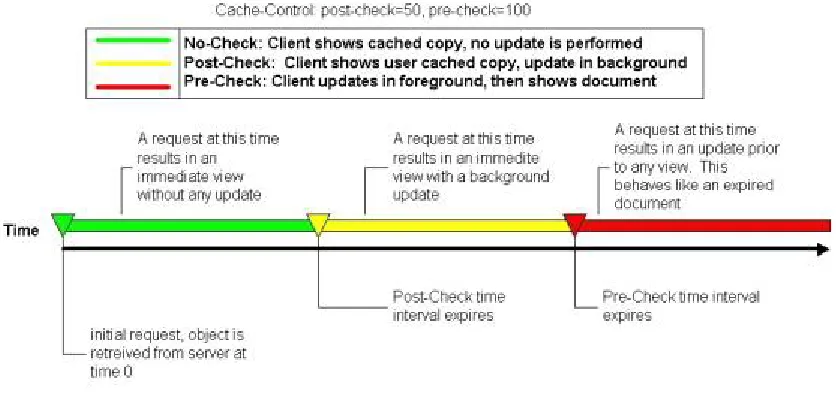
Internet Explorer Version 5.0 and later offers support for the Cache-Control HTTP header. This header defines browser behavior with respect to cached objects. The Cache-Control header consists of two parameters: the post-check time and the pre-check time.
The post-check time is an interval in seconds after which an entity must be checked for freshness. The check can occur after the user is shown the entity; this ensures that on the next round trip, the user will be shown the most up-to-date copy. (Note that you can check the cached object “post” display.)
The pre-check time defines a time interval in seconds after which an entity must be checked for freshness before being displayed to the user. (Note that the cached object is checked “pre” display.) Figure 5 below, (reproduced from http://msdn.microsoft.com/workshop/Author/perf/perftips.asp), illustrates how Internet Explorer uses these values.
Figure 5: Cache-Control HTTP Header Usage by Internet Explorer
Because changes to published applications are relatively infrequent, sensible values for these parameters are:
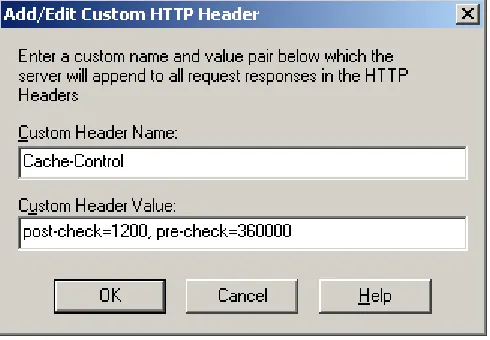
• Post-check = 1200
• Pre-check = 360000
These values correspond to 20 minutes and 4.2 days respectively. This means that:
• In the first 20 minutes, the user will see cached images displayed; no check is done
• After 20 minutes, the user will see cached images displayed; a background check is made for an up-to-date image
• After 4.2 days, if a new image has not been downloaded from the server, a check is made for an up-to-date image before that image is displayed
To set these headers, click Add… on the HTTP Headers tab of the dialog box described previously. This displays a dialog box where you can add the HTTP headersd. The entries required are shown in Figure 6 below.
Quality of Service Provisions on GPRS Networks
This section describes how telecommunication carriers can improve ICA performance over GPRS through Quality of Service (QoS) provisioning on their GPRS networks. A theoretical overview of QoS provisions in GPRS networks is presented, followed by references to a real world GPRS network that was used for ICA testing for this report.
QoS Provisions on GPRS Networks
A GPRS network can be fitted with Quality of Service mechanisms. These mechanisms permit preferential treatment of certain data streams at the expense of other data streams. Different user applications require different classes of service. While a Web browser does not typically require close to real time packet delivery, a multimedia-based application will.
The QoS mechanisms on GPRS networks allow classes of service to be assigned to the following reliability factors affecting packet traffic in the GPRS network:
• Packet loss
• Packet duplication
• Out of sequence packets
• Corrupted packets
QoS mechanisms can also be used to guarantee the following packet delay parameters:
• Mean delay
• 95% delay
Four QoS service classes are present in a GPRS network. These classes can be assigned to each of the above reliability and delay factors. An increased QoS class corresponds to a higher service level. The lowest QoS class available is “Best Effort.”
A Mobile Station can request a QoS class at connection time. The testing for this report was carried out on a Motorola P7389i GPRS phone. The software provided with this phone allows selection of QoS classes for each parameter prior to connection to the GPRS network.
The table below shows the reliability classes that can be provided for each of the QoS parameters. The source of this table is [1].
1.1.1.1.1 Probability of
QoS Class Lost Packet Duplicated Packet
Out of sequence
Packet
Corrupted packet
1 10-9 10-9 10-9 10-9 2 10-4 10-5 10-5 10-6 3 10-2 10-5 10-5 10-2 Table 1: Reliability Classes
128 Byte Packet 1024 Byte Packet QoS Class
Mean Delay 95% Delay Mean Delay 95% Delay
1 <0.5s <1.5s <2s <7s
2 <5s <2.5s <15s <75s
3 <50s <250s <75s <375s
4 Best Effort Best Effort Best Effort Best Effort Table 2: Delay Classes
The delay QoS classes have the greatest impact on session latency. With a Class I QoS class for delay, the carrier guarantees less than a 0.5 second latency for a 128-byte packet. This increases to less than 50 seconds for a class 3 QoS session.
Real World QoS Implementations
Provision of QoS facilities on a GPRS network is not a requirement and its implementation is up to the individual carriers. As a result, QoS implementations on real world networks are likely to differ from the theoretical implementation described in the previous section. The following section describes the GPRS implementation used by a telecommunications carrier in Australia.
This carrier is currently in a trial and early adopter phase for GPRS. Several companies, including Citrix, are currently testing their applications with GPRS. Other Australian carriers have begun advertising GPRS services, positioning it as a “Super WAP” service, as opposed to rich, interactive application, and content delivery. This is expected to change in the future.
On the live network, no QoS provisions are currently available. All packet delivery is “best effort” only. The carrier has assigned priority to GSM voice traffic (and hence GSM data) on their mobile network. This is detrimental to GPRS traffic but this policy is unlikely to change in the near future. With respect to QoS implementations, the indications from the carrier were that it would be up to 12 months before QoS was available on their network.
As part of the investigation phase of this project, latency curves for the live GPRS network were
generated using a TCP/IP “ping” program. The first set of measurements was taken on the live network at the Citrix offices in North Ryde. The second set of measurements was taken in the GPRS incubator lab run by the carrier. This lab provides a pure GPRS radio environment and is isolated from outside interference.
The results of these investigations are presented on the following pages. In the first case, the latency for a series of 256-byte packets on the live network is presented. Next, the results for 256-byte packet latency as measured in the laboratory are presented.
It is obvious that the radio environment in the laboratory is of much higher quality than on the live
network. There are high degrees of fluctuations in latency on the live network, which severely impact the quality of ICA user experience.
The carrier has pointed out that the Citrix offices are located in an area of poor radio coverage; moves are underway to rectify this. As the carrier dedicates more resources towards GPRS traffic, the live network latency characteristics should tend towards the results, which were seen in the incubator laboratory.
GPRS Latency with 256 Byte Packets (24th May 2001)
0 2000 4000 6000 8000 10000 12000 14000
1
10 19 28 37 46 55 64 73 82 91 100 109 118 127 136 145 154 163 172 181 190 199 208 217 226 235 244 253 262 271 280 289 298 307 316
Packet Sequence Number (Packet Transmissions were 1s apart)
Latency (m
s)
Figure 7: Latency curve for 256 byte packets on the live GPRS network. Note the high degree of fluctuations in the latency.
Summary of GPRS Latency Against Packet Size (24th May 2001)
1000 1500 2000 2500 3000 3500 4000 4500
Latency (m
s)
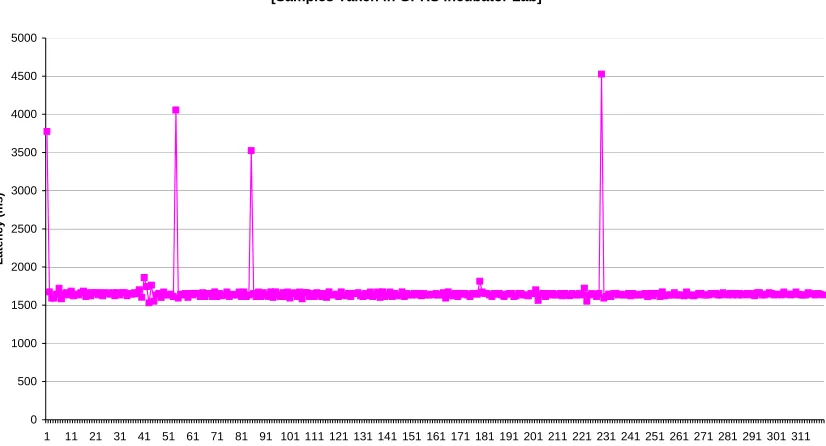
GPRS Latency with 256 Byte Packets (6th June 2001) [Samples Taken in GPRS Incubator Lab]
0 500 1000 1500 2000 2500 3000 3500 4000 4500 5000
1 11 21 31 41 51 61 71 81 91 101 111 121 131 141 151 161 171 181 191 201 211 221 231 241 251 261 271 281 291 301 311 Packet Sequence Number
L a te n cy ( m s)
Figure 9: Latency curve for 256-byte packets in the GPRS incubator laboratory
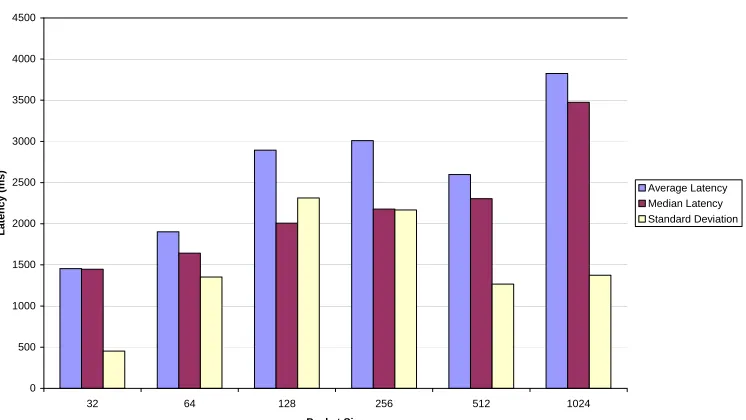
Summary of GPRS Latency Against Packet Size (June 6th 2001) [Samples Taken in GPRS Incubator Lab]
0 500 1000 1500 2000 2500 3000
32 64 128 256 512 1024
GPRS Infrastructure Improvements and Upgrades
The final contributors toward improving ICA performance over GPRS connections are the network manufacturers. Manufacturers of GPRS backbone components include Nokia, Ericsson, and Nortel Networks. Manufacturers of GPRS capable handsets include Motorola and Nokia.
As technology improves over time, so will the capabilities of the GPRS network and GPRS handsets, and as a result the performance of ICA technology.
Future improvements to GPRS networks that have been hinted at by Nokia and Ericsson include the following:
Network Initiated Base Station Reselection
On GPRS networks, it is the Mobile Station that initiates a base station reselection. This differs from the GSM network where it is the network that decides when a Mobile Station will switch to a new base station.
Each time that the handset switches to a new base station, there is a delay of 10 seconds (Motorola handsets) or greater, during which no data transmission or reception can take place. This causes a severe degradation in connection latency. It is believed that the handset reselection was the cause of the spikes in latency seen on the live GPRS network. GSM data connections do not suffer from this
phenomenon.
Nokia has indicated that network initiated handset reselection will eventually be possible, at which time the latency characteristics will again improve, to the benefit of ICA traffic, which is highly dependent on latency.
Infrastructure Upgrades to Reduce Latency
Nokia has indicated in discussions that future software upgrades to their GPRS backbone components will have the ability to halve the latency being experienced by GPRS users. Nokia states that current levels of latency expected through their GPRS backbone components is 1600ms.
This was verified in the GPRS incubator lab, the results of which were presented in the previous section. A halving of the latency will see the minimum latency fall to less than a second.
Mobile Station Bandwidth Improvements
The total bandwidth available to the handset is an important factor in improving ICA performance. The amount of user data that can be carried by the GPRS network depends on the following factors:
• Mobile terminal time slots/available radio capacity
• Radio coding scheme
• Protocol overhead
• Radio blocking level
The number of GPRS time slots usable by a handset depends on the handset type. At the time of writing (June 2001), the most common GPRS handset configuration is one uplink time slot and two downlink time slots. The more time slots a handset has available, the higher the expected throughput.
Based on discussions with handset manufacturers, future handset configurations will be two uplink and three downlink, or one uplink and four downlink time slots. For ICA users, the important characteristic is the number of downlink channels. The larger the number of downlink time slots, the better the
performance of ICA.
GPRS radio uses four coding schemes, each of which offers different throughputs. The coding schemes are referred to as CS1, CS2, CS3, and CS4.
CS4 coding provides the highest throughput and CS1 the lowest. Note that the coding scheme is
Table 3 below shows the theoretical upper limits of user data that can be sent per time slot for each coding scheme. For multiple time slot devices, the number of time slots should multiply the upper limits. The source of this data is [2].
Coding Scheme Raw User Data Rate / time slot (Kb/s)
CS1 9.05
CS2 13.4
CS3 15.6
CS4 21.4
Table 3: Raw user data rate per channel for GPRS coding schemes (Source [2])
In periods of high demand for radio resources, handsets may not be able to utilize all available time slots because competition for radio resources will increase.
As part of the investigation phase for the GPRS project, the throughput of GPRS was measured while using various packet sizes. The initial measurements were carried out at the Citrix offices, followed by measurements taken at the carrier’s GPRS incubator laboratory.
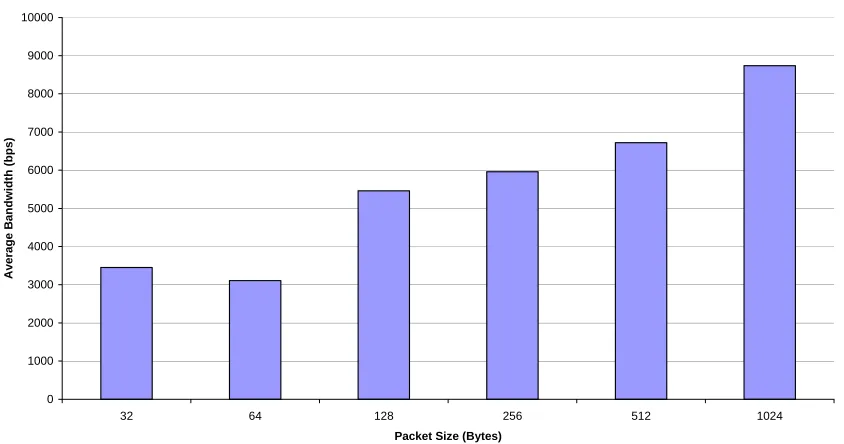
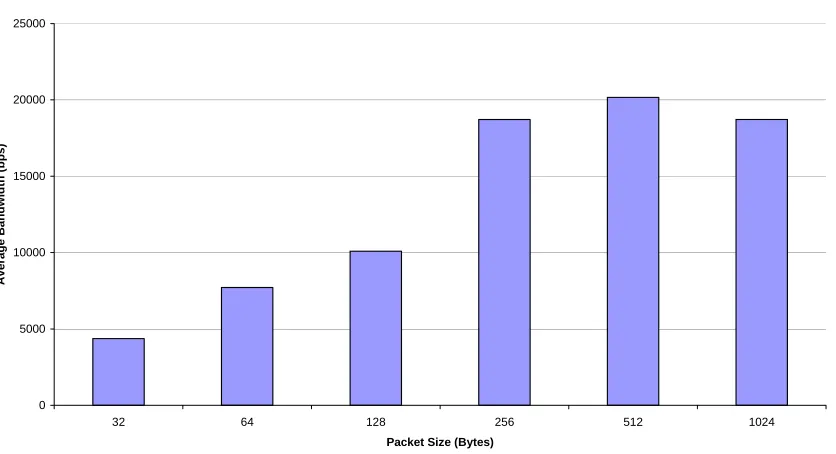
Results are presented overleaf. Note that GPRS throughput increases with packet size. More
importantly, there is little variation between the results obtained on the live network and those obtained in the incubator laboratory. The conclusion drawn is that throughput is less affected by poor radio
conditions than is latency.
Summary of Bandwidth against Packet Size for GPRS Uplink (24th May 2001) [32KByte Transfer] 0 1000 2000 3000 4000 5000 6000 7000 8000 9000 10000
32 64 128 256 512 1024 Packet Size (Bytes)
Av e rag e B a ndwi d th (bps )
Figure 11: Summary of GPRS uplink bandwidth (Field) (CS1 coding, one time slot)
Summary of Bandwidth against Packet Size for GPRS Uplink (6th June 2001) [32KByte Transfer] Measurements taken in GPRS Incubator Laboratory
0 1000 2000 3000 4000 5000 6000 7000 8000 9000 10000
32 64 128 256 512 1024
Summary of Bandwidth against Packet Size for GPRS Downlink (29th May 2001) [100KByte Transfer] 0 5000 10000 15000 20000 25000
32 64 128 256 512 1024 Packet Size (Bytes)
Av e ra g e B a ndwi dth (bps )
Figure 13: Summary of GPRS downlink bandwidth (Field) (CS1 coding, two timeslots)
Summary of Bandwidth against Packet Size for GPRS Downlink (6th June 2001) [32KByte Transfer] Measurements made in GPRS Incubator Laboratory
Appendix: Sample Template.ica File for NFuse
This section includes a sample listing of the Template.ica file to be used for wireless connections. This file implements all of the recommendations made in the NFuse section. It also contains the modification to the server address field, which directs users to the appropriate ICA listener on the MetaFrame server.
; ICA file template for the Citrix ICA Client
; Copyright 2000-2001 Citrix Systems, Inc. All rights reserved.
<[NFuse_setSessionField NFuse_ContentType=application/x-ica]> <[NFuse_setSessionField NFuse_WindowType=seamless]>
[WFClient] Version=2
ClientName=[NFuse_ClientName]
COMAllowed=Off CPMAllowed=Off VSLAllowed=Off CDMAllowed=Off ClientAudio=Off UpdatesAllowed=Off
OutBufCountHost=40 OutBufCountClient=40 OutBufLength=512
PersistentCacheEnabled=Off
[ApplicationServers] [NFuse_AppName]=
[[NFuse_AppName]]
Address=[NFuse_IPV4Address]:1495 InitialProgram=#[NFuse_AppName] DesiredHRES=-1
ClientAudio=Off
EncryptionLevelSession=Basic
ZLKeyboardMode=1 ZLMouseMode=1
MaximumCompression=On Compress=On
MouseTimer=100 KeyboardTimer=50
AutologonAllowed=ON [NFuse_Ticket]
[NFuse_IcaWindow]
[NFuse_IcaEncryption]
[EncRC5-0]
DriverNameWin16=pdc0w.dll DriverNameWin32=pdc0n.dll
[EncRC5-40]
DriverNameWin16=pdc40w.dll DriverNameWin32=pdc40n.dll
[EncRC5-56]
DriverNameWin16=pdc56w.dll DriverNameWin32=pdc56n.dll
[EncRC5-128]
DriverNameWin16=pdc128w.dll DriverNameWin32=pdc128n.dll

![Table 3: Raw user data rate per channel for GPRS coding schemes (Source [2])](https://thumb-us.123doks.com/thumbv2/123dok_us/1135887.1142444/29.612.44.492.156.265/table-raw-user-channel-gprs-coding-schemes-source.webp)