An Implementation of Servers using
Lightweight Virtualization/Containerization
Amit Kumar Bansal
1, Harsimran Kaur
21 Former Student, Dept. of IT, JEC Kukas, Rajasthan, India
2 Assistant Professor, Dept. of IT, CEC Landran, Punjab, India
ABSTRACT: The demand of virtualization in cloud computing increases in today’s world with the increase in resource consumption, but hypervisor virtualization performance is degraded with parameters such as size of VM, startup time of the VM, CPU overhead and Scalability as compared to lightweight virtualization because lightweight virtualization uses shared kernel approach. Network administrator or system administrator can create any number of virtual servers just like normal individual servers with lightweight virtualization approach without involvement of CPU overhead. As docker is the emerging technology for lightweight virtualization, in this paper, we implement two web servers with port 80 on docker and bind it with host port 8081 and 8082, host configured with load balancer (in this paper haproxy) is used for the mapping of clients’ request to a specific web server and bind the requests coming from clients’ to port 80 with 8081 and 8082. We also test our web servers by mounting a host directory to web servers as volume, so these can easily share their data with each other.
KEYWORDS: Hypervisors, lightweight virtualization, Docker, Web servers.
I. INTRODUCTION
To make servers on the physical computer is the traditional way, but as the technology goes wider, researchers focus to maintain a single machine having multiple instances. Thus, IBM came with an idea of virtualization in 1960’s. With the virtualization technique, many virtual instances can be created on a single machine called virtual machines (VMs). So the virtualization becomes the vast topic for researchers with the various types of virtualizations such as desktop virtualization, storage virtualization, hypervisor based virtualization, network virtualization etc. With the help of virtualization, user can create multiple instances on the same machine and each instance works as individual machine. Each type of virtualization has its own pros and cons, but in this paper, we have mainly used two types of virtualization that are mostly in demand these days: hypervisor based virtualization and operating system level virtualization.
Hypervisor based virtualization:This type of virtualization is of two types [10]: Type-1 and Type-2. Type-1 is a virtualization in which a hypervisor (a software program) is directly loaded on the hardware of the machine and user can create a number of VMs using this, which is why sometimes it is called native or bare-metal hypervisor. Whereas, Type-2 is the virtualization in which a hypervisor is loaded on the operating system of the host for example, VMware is loaded on Windows OS, and user can create multiple virtual instances of different OS such as Linux machine on one instance and Mac X on second and so on. Many service providers are using this approach for the reduction of hardware cost in their organizations, but still this approach has some limitations such as overhead of CPU, time to boot up a machine, scalability of the VM and creation of the limited number of virtual instances on the same machine. Therefore, the researchers enhanced the virtualization with a new approach called operating system level virtualization.
Fig.1. Architecture of hypervisor and OS based virtualizations
II. RELATED WORK
In [1] author used some macro benchmarks tools for comparing the performance of linux containers and virtual machines. He showed some use cases where containers performed very well in terms of scalability and resource utilization. So containers can be used for the deployment for the applications to reduce the resource overhead. OpenVZ is the predecessor of linux containers [3] with some advantages like live migration, security etc but also have some shortcomings such as process isolation. In [2] authors presented a detailed performance comparison of hypervisor based virtualization and lightweight virtualization. They used some benchmark tools for measuring the strength and weaknesses on different platforms in terms of storage, processing and network. Their results show that containers generally achieve better performance than hypervisors. They also introduced how docker is different from linux containers. In [11] authors compared and analyse the performance of linux container and virtual machine for building a private cloud environment. They analyse size, boot speed and CPU performance of each platform and said Docker doesn’t waste CPU resources and storage is small, and boot-time, time of generating and distributing images are short in docker which is the advantage of using docker in cloud. Docker can be used with the platform as a service or application deployment to reduce the overhead of network admin/system admin [5].
III. PROPOSED ALGORITHM A. Design Considerations and description:
Servers can be implemented on the virtual machine using the hypervisor approach of virtualization, but due to the shortcomings of hypervisor, it is better to use OS-based virtualization. In this paper, for the implementation of servers using lightweight virtualization we have used Docker. We implement the servers on our system, which has following configuration:
System Parameters Hardware/Software used Operating System of
Host: CPU: RAM: Storage: Containerization Tool:
Base Image: Servers:
Ubuntu:14.04
1 4 GB 20 GB Docker v1.5
Ubuntu:14.04 Apache2
Table-1.System Configuration
Web servers are accessing the host directory, we can also create a data container which mounts host directory and all the containers can have volume from that data container as shown in Fig 3.
Fig.2.Communication between client, host machine
and servers Fig.3. Data sharing between web servers
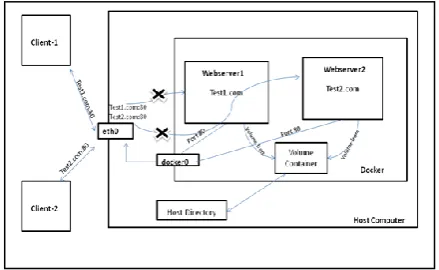
In this method, web servers are communicating with each other only, but if the clients in the outside world want to access these web servers then they can do it as given follows. When first client wants to access the web servers-1, the request came to eth0 of host with port 80, as web servers are working on this port, but, inside the host there can be a number of servers with port 80 configuration, so eth0 may get confused from where to pass the request of client as shown in Fig 4, similarly with the second client and webserver-2.
So the only solution to avoid this problem is to use some load balancer such as haproxy, nginx etc. In this paper, we have used haproxy for the management of clients’ request. With the help of haproxy, we bind the ports of host 8081 and 8082 with the port 80 of the host, when request comes to port 80 then it can be handled by the host according to the ip address or URL of the request as shown in Fig 5.
Fig.4.Clients unable to communicate with web servers Fig. 5.Communication between clients and webservers using haproxy
IV. PSEUDO CODE
Step 1: Install docker to the Ubuntu host machine
Step 2: Create a directory with name as testdirectory on host
Step 3: Run the following commands for the creation of virtual instance in docker
Syntax of docker command:
docker run -<interactive_mode><terminal> --name <name_of_container> -p <host_port>:<container_port> -v <host_directory_path>:/<name_for_which_it_appreas_in_container> <image_name> /bin/bash
Server-1
Server-2
docker run –it –-name webserver2 –p 8082:80 –v /home/amit/testdirectory:/mywebserver ubuntu:14.04 /bin/bash
Step 4: Install load balancer on the host
Step 5: Open the haproxy.conf file and configure as according to given data.
Haproxy configuration: global
daemon maxconn 4096
pidfile /var/run/haproxy.pid defaults
mode http
timeout connect 5000ms timeout client 50000ms timeout server 50000ms frontend http-in
bind *:80
acl site1_1 hdr_end (host) –i Test1.com use_backend site1 if site1_1
acl site2_2 hdr_end (host) –i Test2.com use_backend site2 if site2_2
backend site1
balance roundrobin option httpclose option forwardfor
server s1 127.0.0.1:8081 maxconn 450 backend site2
balance roundrobin option httpclose option forwardfor
server s1 127.0.0.1:8082 maxconn 450
V. CONCLUSION AND FUTURE WORK
We have used a tool of lightweight virtualization named as Docker which can be the best alternative for hypervisor virtualization. With this tool, we have implemented two apache web servers on a single host with minimum CPU overhead, and rebooted a system within seconds with start and stop commands. We can also make any number of servers, which can use same port numbers for accessibility. It can be concluded from the results that these servers work same as when these are implemented on the individual machines. With this approach, network administrator and system administrator can easily manage their multiple servers on a single host thereby reducing the cost of infrastructure. We have not considered any security issue in this implementation so users can enhance this technique with the help of various security tools available.
REFERENCES
1. A. Joy, ‘Performance comparison between Linux containers and virtual machines’, International Conference on Advances in Computer
Engineering and Applications (ICACEA), pp. 342-346, 2015.
2. R. Morabito, J. Kjallman and M. Komu, ‘Hypervisors vs. Lightweight Virtualization: A Performance Comparison’, IEEE International Conference on Cloud Engineering, pp. 386-393, 2015.
3. Openvz.org, ‘OpenVZ Virtuozzo Containers Wiki’, 2015. [Online]. Available: https://openvz.org/Main_Page. [Last Accessed: 15- Dec-
2015].
5. C. Anderson, ‘Docker [Software engineering]’, IEEE Softw., vol. 32, no. 3, pp. 102-c3, 2015.
6. Docker, ‘Docker-Build, Ship, and Run Any App, Anywhere’, 2015. [Online]. Available: http://www.docker.com/. [Last Accessed: 16-
Dec- 2015].
7. Docker-doc.readthedocs.org, ‘Docker – FAQ’, 2015. [Online]. Available: http://docker-doc.readthedocs.org/zh_CN/stable/faq.html. [Last Accessed: 16- Dec- 2015].
8. Coreos.com, ‘CoreOS’, 2014. [Online]. Available: http://coreos.com/blog/rocket/. [Last Accessed: 18- Dec- 2015].
9. Rocket.readthedocs.org, ‘rocket’, 2015. [Online]. Available: https://rocket.readthedocs.org/en/latest/. [Last Accessed: 18- Dec- 2015]. 10. Popek, J.Gerald , and R. P. Goldberg, ‘Formal requirements for virtualizable third generation architectures’, Communications of the
ACM, pp.412-421,1974.
11. Seo K., Hwang H., Moon II-Young and Kwon Oh-Young, ‘Performance Comparison Analysis of Linux Container and Virtual Machine