Encryption Tools for Secured Health Data in Public Cloud
Repu Daman1 and Manish M Tripathi2
1
School of Telemedicine & Biomedical Informatics Lucknow, UP, India
2
Dept of Computer Science, Integral University Dewa Road, Lucknow
Abstract
The healthcare sector has started adopting technologies like mobile computing and cloud computing. Large volume of data is collected, stored, processed and retrieved in a form of digital patient health record called Electronic Health Records (EHRs). The cloud is a convenient place to back up and store files, but people hesitate before uploading that sensitive data, whether they are using Dropbox, Google Drive, or SkyDrive. Files may be encrypted in transit and on the cloud provider’s servers, but the cloud storage company can decrypt them — and anyone that gets access to account can view the files. Client-side encryption is an essential way to protect important data without giving up on cloud storage. Encryption does add some complexity, however. One can’t view the files in the cloud storage service’s web interface or easily share them. There is a need of encryption tool to decrypt and access files.
Keywords: Encrption Tools, Cloud Computing, Health Data
1. Introduction
Dropbox, the world’s most popular online file sharing service has a wide-range of uses in modern health care facilities. Private practice staff and hospital employees can use Dropbox to substantially increase productivity and provide patients with better care. Medical applications using public cloud are:
Medical Imaging: Medical Images needs to be transported from one hospital to another hospital for telemedicine activities like tele-referral, Tele-Consultation, Tele-mentoring /expert opinion. With Dropbox, doctors can automatically upload digital copies of x-rays, CT scans and other diagnostic tests results and seamlessly share the files with consulting doctor sitting at remote hospital. This makes it a lot easier for a doctor to consult with a specialist doctor about a patient’s test results; the specialist doctor can examine tests from anywhere with Internet access and quickly get back to the original doctor with his or her opinion.
Transfer of Records: All the doctors working on a patient’s case can easily gain access to records using Dropbox. This is important since a patient may need to see
several doctors regarding a problem; by using Dropbox to share patient records, hospitals and doctor’s offices minimize the chance of a patient being prescribed treatment that is contraindicated by a part of a record the doctor didn’t receive.
Transcription Services: Transcription of medical records is easier than ever using Dropbox. Doctors can share encrypted voice files with transcription services, who then upload the completed transcription to Dropbox in order to return it to the doctor. This allows doctors and transcriptionists to both get instant, access to the files.
Tele-Follow-up Services: Patient doctor relationship is lifelong relationship in case of various critical cases like thyroid, cancer and complicated surgery like kidney or liver transplant. After initial treatment patient may share its test report easily with a doctors from home itself. There is no need to visit specialist hospital again for followup. Just a mail with a shared link of cases is enough to send all test reports and other relevant data.
In order to remain compliant with Health Insurance Portability and Accountability Act (HIPAA), all hospital personnel need to ensure they use Dropbox in the right way. Files should be encrypted before upload and decrypted on the receiver’s end so that unrelated third parties cannot intercept and read private medical information. In addition, hospital personnel should only share files with people who have a legitimate need for the information; files should never be made broadly accessible. Files should always be encrypted at transit and at rest, especially when they downloaded to mobile devices that can easily be lost or misplaced.
2. Security in public file sharing services like
Dropbox and Google Drive
Dropbox has implemented several layers of security to protect and store users’ files. Dropbox uses industry-leading encryption standards: Secure Sockets Layer (SSL), which protects data in transit, and AES 256-bit encryption,
which secures data at rest on Dropbox’s servers. Dropbox also has two-step verification, which adds another (albeit optional) layer of authentication. Google Drive also offers AES-256 bit encryption for their customers. Security doesn’t keep Drive from having its share of problems. Neither Google-Drive nor Dropbox support local encryption of files. Both cloud storage providers encrypt data in transit and while saved on their servers.
Different elements that constitute the overall service of Dropbox security are Desktop, Network, Application & Storage
Layer Description
Desktop The desktop or laptop computer that is running the Dropbox client software.
Network Systems and security protocols used to transport data between your computer and Dropbox’s infrastructure.
Application Security and management features available within the Dropbox application.
Storage Security and redundancy features of Dropbox storage layer where the services data is persisted.
Table 1: Dropbox Security Model
2.1 Desktop: It is a computer desktop, laptop or mobile that is running the Dropbox client software or App. Dropbox has tight integration with Windows, MAC, Android and Linux operating system. This integration also provides secured environment. locally in a Desktop user account integration, disk encryption integration and compliance software integration is managed by operating system(OS). User and password security measures required to access data / information is required and it is automatically inherited by Dropbox. If the drive of the system is encrypted on user machine then files stored by dropbox will also be encrypted automatically. File system integration is native to Dropbox, service will automatically be compatible with file based compliance tool such as data loss prevention agent and virus checking.
2.2 Network: Once the leaves dropbox, it is securely transported using Industry standard protocols and practices. The network connections and interfaces used at dropbox data center are redundant and protected using industry best practices. It constitutes transport encryption, firewall and network hardening and network redundancy. Transport encryption constitutes all communication between desktop client and the company servers are encrypted using 256-bit SSL(Secured Socket Layer), the standard for secured internet network connection. Dropbox employs industry standard network protection
techniques including firewalls and network monitoring to ensure that only eligible traffic is able to reach dropbox infrastructure. Datacenter used by dropbox are served by multiple independent Internet Service Providers (ISP), ensuring connectivity to the service will remain even.
2.3 Application: Dropbox’s application security control provide administrators with the tools necessary to ensure only authorized users have to access to given folders or set of data. It constitutes sharing controls, user management and change and deletion recovery. Sharing Controls permit users to share content selectively with a permission of read-only or with delete option. Additional team management or privileges are given when upgrade to Dropbox for team. Administrators can provision and manage users from the central console, complete with user access time and storage utilization. Administrator can purge users, removing them from the team and altering the access of the user. Change and deletion recovery help to recover deleted data. every revision of data is stored thus user can rewind in case of accidental loss of data.
2.4 Storage: Files stored via Dropbox are physically persisted in Amazon’s S3 Service. File encryption, Redundancy & durability and SAS70 II Compliance make the storage more secure. Data stored in Amazon is separated into discrete file blocks. These blocks are individually encrypted so that when the data is at rest, it remains completely protected. Amazon’s S3 service used to store Dropbox data is guaranteed for durability with data replicated in multiple data centers automatically.
The combination of Dropbox architecture with its tight operating system integration and the operation of its service infrastructure gives users and companies the assurance of local storage with the benefit of cloud computing.
3. Encryption Softwares for public file
sharing services like Dropbox and Google
Drive
Protection of data in public file sharing device before uploading the content to their server needs encryption softwares. Sookasa, Boxcryptor, CipherCloud, Cloud Fogger, Trucrypt and Viivo are few encryption software available for popular public file sharing services like dropbox, google drive, iCloud etc.
3.1 Sookasa is HIPAA and Family Educational Rights and Privacy Act (FERPA) compliant transparent on-device encryption. It is a transparent layer of file encryption for cloud services like Dropbox. It’s intended
for consumers, professionals and businesses that want to continue using their favorite cloud services, but are concerned about the security or compliance of their data. The tool is completely transparent and user friendly, and lets users continue enjoying the user experience of their favorite cloud productivity services. encrypts the files and stores the encryption keys separate from the cloud storage provider, ensuring that only the medical provider can control access to the information. It enables administrators to grant or revoke access to different users for each file shared. This ensures complete control over the files: if a file is shared by mistake, access can be revoked with a click of a button, preventing a potential HIPAA breach. Following are the steps for using Sookasa.
• Install SOOKASA and Dropbox or Drive: Once Sookasa is installed on computer, Sookasa creates a special folder within Dropbox and Google Drive that protects files.
Figure 1:Screenshot of Dropbox with Sookasa Encryption
• Protect File: Application encrypts every file placed inside special folder. Dropbox and Google Drive sync and store files within the Sookasa Folder the sameway they handle everything else. It never store files i.e the job of Dropbox or Drive but protect them before reach the cloud. Open Encrypted files on any device running the sookasa application.
• Share with Collaborators: To authorize people to share Sookasa files, right-click on an item and select “Share Securely via Sookasa." All share folders the same way as on Dropbox and Google Drive.
Figure 2:Screenshot of Share with Collaborators
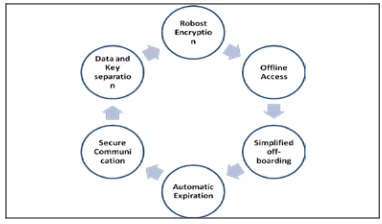
Sookasa end-to-end encryption technology ensures that files are protected on the cloud and devices, enabling professionals to safely use Dropbox and Google Drive for their most important work. Security features are
Figure 3: Sookosa end to end encryption
• Robost Encryption: Sookasa uses powerful 256-bit AES encryption for all files and keys
• Secure Communication: Sookasa uses SSL to communicate between the device applications and the cloud server on which files are stored.
• Automatic Expiration: Sookasa requires a password after a predefined period of inactivity or if a device has gone offline.
• Simplified off-boarding: To prevent access to sensitive files, revoke all the keys for a device or particular user at any time with the click of a button.
• Offline Access: Sookasa allows offline access by caching the keys securely for a specified period of time. Once a key expires, device must move online to access files.
• Data and Key separation: Sookasa does not store your files on its servers. It simply manages the encryption key distribution, access control, and audit trail collection.
3.2 Boxcryptor is another easy-to-use encryption software optimized for the cloud. It allows the secure use of cloud storage services without sacrificing comfort. Boxcryptor supports all major cloud storage providers like Dropbox, GoogleDrive, MicrosoftDrive, SugarSync and supports all the clouds that use the WebDAV standard like Cubby, Strato HiDrive, and ownCloud. With Boxcryptor files go protected to cloud provider and that information cannot fall into the wrong hands. Boxcryptor creates a virtual drive on your computer that allows to encrypt files locally before uploading them to cloud or clouds of choice. It encrypts individual files - and does not create containers. Any file dropped into an encrypted folder within the
Boxcryptor drive will get automatically encrypted before it is synced to the cloud. To protect files, Boxcryptor uses the Advanced Encryption Standard (AES)-256 and Rivest, Shamir and Adleman (RSA) encryption algorithms.
AES and RSA Encryption
AES 256 Encryption: As first publicly accessible, from the NSA for the classification "top secret" approved cipher, the AES is one of the most frequently used and most secure encryption algorithms available today. Its story of success started 1997, when the National Institute of Standards and Technology (NIST) announced the search for a successor to the aging encryption standard DES. An algorithm named "Rijndael", developed by the Belgian cryptographists Daemen and Rijmen, excelled in security as well as in performance and flexibility. It came out on top of several competitors, and was officially announced as the new encryption standard AES in 2001. The algorithm is based on several substitutions, permutations and linear transformations, each executed on data blocks of 16 byte – therefore the term blockcipher. Those operations are repeated several times, called “rounds”. During each round, a unique roundkey is calculated out of the encryption key, and incorporated in the calculations. Based on this block structure of AES, the change of a single bit either in the key, or in the plaintext block results in a completely different ciphertext block – a clear advantage over traditional stream ciphers. The difference between AES-128, AES-192 and AES-256 finally is the length of the key: 128, 192 or 256 bit – all drastic improvements compared to the 56 bit key of DES. By way of illustration: Cracking a 128 bit AES key with a state-of-the-art supercomputer would take longer than the presumed age of the universe. And Boxcryptor even uses 256 bit keys! As of today, no practicable attack against AES exists. Therefore, AES remains the preferred encryption standard for governments, banks and high security systems around the world.
RSA Encryption
RSA is one of the most successful, asymmetric encryption systems today. Originally discovered 1973 by the British intelligence agency GCHQ, it received the classification “top secret”. Its civil rediscovery is owned to the cryptologists Rivest, Shamir and Adleman, who discovered it during an attempt to break another cryptographic problem. As opposed to traditional, symmetric encryption systems, RSA works with two different keys: A “public” key, and a “private” one. Both work complementary to each other, a message encrypted with one of them can only be decrypted by its counterpart. Since the private key can’t be calculated from the public key, the latter is generally made available to the public.
Those properties enable asymmetric cryptosystems to be used in a wide array of functions, such as digital signatures. In the process of signing a document, a fingerprint, encrypted with RSA, is appended to the file, and enables the receiver to verify both the sender and the integrity of the document. The security of RSA itself is mainly based on the mathematical problem of integer factorization. A message that is about to be encrypted is treated as one large number. When encrypting the message, it is raised to the power of the key, and divided with remainder by a fixed product of two primes. By repeating the process with the other key, the plaintext can be retrieved back. The best, currently known method to break the encryption requires factorizing the product used in the division. Currently, it is not possible to calculate these factors for numbers greater than 768 bits. None the less, modern cryptosystems use a minimum key length of 3072 bits
3.3 CloudFogger: Cloudfogger is another encryption solution that can be used as a solution to encrypt data before copying to the cloud. Cloudfogger encrypts files with AES 256 Bit (Advanced Encryption Standard), an industry-grade encryption standard. Each file is encrypted with its own, unique AES Key that will be saved RSA encrypted within the file's header. This allows secure sharing of encrypted files with partners using their own RSA key pair. User passwords are never transmitted to the Cloudfogger servers and will never be saved in plaintext. A drive letter can be assigned with the tool for the drag drop on-the-fly encryption or manually use the integrated context menu to encrypt/decrypt the files.
3.4 Trucrypt: TrueCrypt is a discontinued source-available freeware utility used for on-the-fly encryption (OTFE). It can create a virtual encrypted disk within a file or encrypt a partition or (under Microsoft Windows except Windows 7/8 boot drive with GPT) the entire storage device (pre-boot authentication). TrueCrypt is a do-it-yourself method of encryption. With TrueCrypt, create an encrypted file container and save it to Dropbox folder. No one can see the inside of it without passphrase. TrueCrypt can mount the encrypted file container as a drive letter or folder on computer. Files placed inside the special TrueCrypt drive or folder will be encrypted and stored inside the TrueCrypt file container in Dropbox folder.
3.5 Viivo: Viivo uses public key cryptography to secure files before they synchronize to cloud storage provider. Unlike other approaches to encryption, Viivo accomplish this without breaking cloud provider workflows. Viivo encryption and decryption is automatic and has compression, Multi-Cloud Support, Encryption and key
management for shares, Drag n drop zone, on-the-fly edit and Rights management.
• Compression: Files are automatically compressed before encryption to minimize provider sync time and cut storage space and costs.
• Multi-Cloud Support: Automatic detection and support for: Dropbox, Box, Microsoft OneDrive and Google Drive. Advanced support for custom file-sync-and-share providers
• Automatic detection, encryption and key management for shares created in Dropbox.
• Dropzone: Drag a file to the Viivo Dropzone to instantly encrypt it to a configurable location like a cloud folder.
• BoxEdit: For Box users. Automatic encryption/decryption files in BoxEdit workflow.
• On-the-Fly Edit: For all users, Automatic decryption + re-encryption of any Viivo file double-click to edit, regardless of location. This feature operates independent of Viivo Sync.
• Rights Management: Ability to change who can access your Viivo files *after* they have been sent through email or cloud providers.
• FIPS 140-2 validation for encryption and decryption operations. Compliance with FIPS along NIST guidelines for Windows, Mac and iOS.
3.6 Cipher Cloud: CipherCloud provides comprehensive visibility and control over data as it goes from enterprise to any location in the cloud. CipherCloud enables to protect data before it leaves organization, ensuring persistent security that only can unlock. By providing a control point for data going to and from the cloud, CipherCloud makes it easy to ensure data
privacy, data residency and regulatory
compliance, prevent data leaks, encrypt or tokenize sensitive data and get unrivaled visibility into cloud activity. CipherCloud delivers the industry’s most advanced cloud security technology to discover, protect and monitor information in the cloud. Sensitive data is always protected – in transit, at rest, and in use, preventing access by unauthorized users while preserving the usability and functionality of cloud applications.
CipherCloud’s cloud encryption gateway uses AES 256-bit encryption, FIPS 140-2 validated, and featuring the highest commercially available level of encryption. AES (Advanced Encryption Standard) was established by the U.S. National Institute of Standards and Technology (NIST). CipherCloud cloud encryption solutions make it easy to protect any type of data with standards-based encryption that only can unlock – because no one else can
access your encryption keys. CipherCloud does this without disabling your applications – maintaining business-critical functions while keeping data fully protected.
Figure 4: Encryption in the Cloud Possible with Granular, Field-Level Control
CipherCloud lets you control security precisely on a per-field basis. With the widest range of encryption options, you can set the level of security and search-ability for each data type, supporting both structured and unstructured fields. Specialized encryption options support dates, phone numbers, decimal numbers, timestamps, email addresses, credit cards and social security numbers.
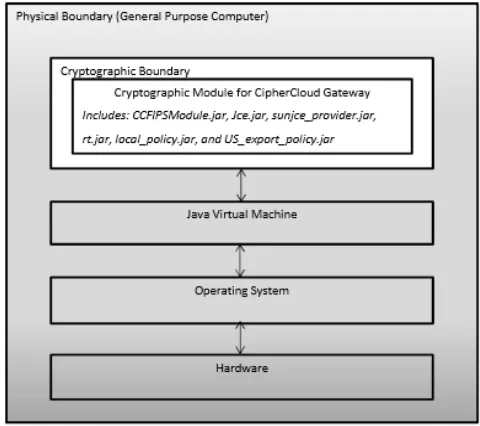
Figure 5: Cryptographic Module for CipherCloud Gateway Block Diagram
4. Conclusions
Adoptions of public file sharing applications as Cloud-based applications in medical environment has grown up with the use of HIPPA and FIPS complaint encryption tools. It has the potential to maximize the efficiency and productivity of healthcare surgeons in education, training & patient care. Cloud computing now has potential to use more effectively and we must learn how to integrate it into our healthcare sector that is secure while sharing data among group of people from multiple location and multiple platform.
References
[1] Luan A, Momeni A, Lee GK, Galvez MG. Cloud-Based Applications for Organizing and Reviewing Plastic Surgery Content. Eplasty. 2015 Nov 9;15:e48. eCollection 2015. PubMed PMID: 26576208; PubMed Central PMCID: PMC4644353.
[2] Kubaszewski Ł, Kaczmarczyk J, Nowakowski A. Management of scientific information with Google Drive. Pol Orthop Traumatol. 2013 Sep 20;78:213-7. PubMed PMID: 24056288.
[3] https://www.sookasa.com [4] https://www.boxcryptor.com
[5] https://www.boxcryptor.com/en/encryption
[6]
http://www.cloudwards.net/top-10-secure-dropbox-alternatives/
[7] http://csrc.nist.gov/groups/STM/cmvp/
documents/140-1/140sp/140sp2261.pdf
Repu Daman is currently working as Telemedicine Network Manager at National Resource Center (NRC), School of Telemedicine & Biomedical Informatics (STBMI), Sanjay Gandhi Post Graduate Institute of Medical Sciences (SGPGIMS), Lucknow. India. He was associated with various telemedicine projects and networks funded by Central Govt, State Govt. in India & International projects at North Korea and Maldive under World Health Organisation (WHO) and IHDP-World Bank.
Manish Madho Tripathi is currently working as an Associate Professor at Dept of Computer Sciences & Engineering, Integral Univesity, Kursi Road, Lucknow