Dybkjær and Dybkjær, 1998; Dybkjær, 1999). These guidelines have so far been shown to work for two-party, shared-goal human-machine dialogue. The primary focus of the Odense coding scheme is the markup of communication problems caused by the system because the emphasis is on investigating how system interaction can be improved to achieve a smoother dialogue with users. Of course, users also commit errors from time to time, which can be direct causes of communication problems. User errors have only been investigated to a limited extent in this context (Bernsen, Dybkjær and Dybkjær, 1998) and we still lack detailed knowledge of their mechanisms.
The set of tags (elements and attributes) used by the Odense scheme is small and simple, even if a three-component structure is involved, cf. the bottom of Figure 1. It is, however, a non-trivial task to identify commun-ication problems and analyse them correctly to determine which guidelines they violate and how, i.e., which types of violation we are dealing with. Communication problems are tagged as types of violation of the guidelines for co-operative spoken dialogue. A particular guideline may be violated in several different ways. For example, GG7 (avoid ambiguity) would be violated by not saying
whether the time "9 o’clock" given to the user by the system means 9 am or 9 pm. Another type of violation of the same guideline might occur if it was not made clear whether a certain flight arrival time refers to that given by the timetable or to the actual expected arrival time.
Such violation types are necessarily task dependent as they refer to concrete problems found in dialogues with particular applications. Thus, a communication problem refers both to the part of the orthographic transcription in which the guideline violation was found, and to a set of violation types which is being created along with the markup of communication problems. Each type of violation in its turn refers to the particular guideline that was violated.
For more information on how to detect and analyse communication problems using the cooperativity guidelines as a frame of reference, see (Dybkjær, 1999) and (Bernsen, Dybkjær and Dybkjær, 1998). These references include collections of examples of communication problems, violation types and references to the guidelines.
In the following we illustrate the main functionalities of the MATE workbench by describing how it is used for markup of communication problems.
Figure 1. File organisation for a corpus annotated with respect to communication problems. The dashed arrow A --> B means that elements in A refer to elements in B by their attribute IDs, while the arrow A —> B means that there is a
reference in A to B by its file name.
5.
Markup of Communication Problems
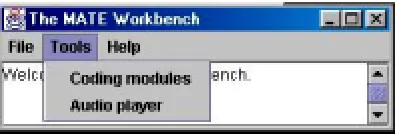
When launched, the MATE workbench comes up with the two windows shown in Figures 2a and 2b. Figure 2a shows the controller window. Figure 2b shows a corpus folder window. The workbench tools can be opened from the controller window. The list of tools is extensible and is constructed automatically from the available set of tools. Status messages are written in the blank area under the menu. The corpus folder window is used for browsing, adding or editing corpus files. Additional corpus folderwindows can be opened from the File menu of the controller window.
Figure 2b. The corpus folder window.
Figure 5. A dialogue annotated with communication problems.
In Figure 5 the dialogue is shown in the upper left-hand corner. The cooperativity guidelines are shown in shorthand version in the upper right-hand corner. Violation types are shown and can be added in the lower right-hand corner and notes in the lower left-hand corner.
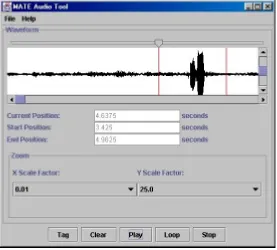
During the detection and analysis of communication problems, an orthographic transcription of the dialogue is used. Often the logfile will have to be inspected as well, cf. the reference structure in Figure 1. In some cases it may even be necessary to access the sound files to, e.g., use intonation to disambiguate an ambiguous utterance in the orthographic transcription. For example, some questions have the same form as statements, and only the information provided by the intonation will reveal whether it is one or the other. The MATE workbench includes an audio tool which allows the user to play soundfiles, cf. Figure 6.
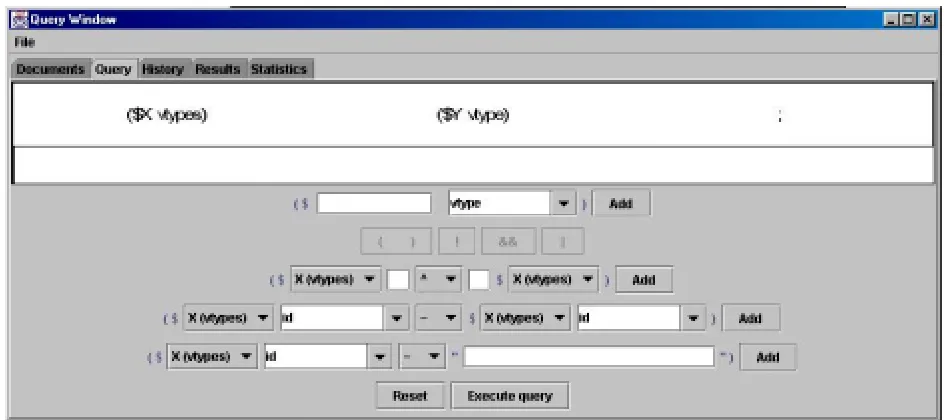
Having annotated a corpus the user may want to extract various kinds of information. The MATE
workbench includes a query tool for this purpose, cf. Figure 7. It is one of the tools accessible from the tools menu in Figure 5. First of all, the user must select the document(s) to be queried. In a second step, the user can choose the element types to be included in the query expression from those available in the selected documents. Then the query expression can be built. Buttons in the interface are active as appropriate, and the attributes which belong to the selected element types are shown. Logical combinations and bracketing of simple query expressions can also be defined.
The result of a query is a document with a list of tuples of elements that are hrefs to the elements found. Figure 8 shows the result of asking for all types of cooperativity guideline violation found in a corpus. Since the output of the query is XML, the results can be displayed to the user in the same way as the data itself, using a stylesheet.
Figure 7. The query window.
6.
Future Work
A major aim of MATE has been to support the development of spoken language dialogue systems. The market for spoken dialogue systems is growing rapidly and so is the need for re-usable resources and for tools which facilitate their creation. MATE, it would seem, has therefore in many respects been timely and appropriate in responding to actual needs. This has also been apparent from the considerable interest shown in the MATE project world-wide.
The functionality of the MATE workbench is still being improved. The next generation of spoken dialogue systems are already taking first steps towards more natural interactivity by combining speech with other modalities, such as gesture and facial expression. As such multimodal dialogue systems are gaining ground, the need for re-usable multimodal resources as well as for tools and standardisation efforts in support of the development of multimodal systems, is increasing. A natural continuation of MATE would therefore be to re-use the successful MATE approach to the extent possible in order to create a markup framework and workbench for multimodal dialogue annotation.
7.
References
Bernsen, N.O., Dybkjær, H. and Dybkjær, L., 1998. Designing Interactive Speech Systems. From First Ideas to User Testing. Springer Verlag.
Dybkjær, L., 1999. CODIAL - a Tutorial and Tool in Support of Co-operative Dialogue Design. http://www.disc2.dk/tools/codial/.
Dybkjær, L., Bernsen, N.O., Dybkjær, H., McKelvie, D. and Mengel, A., 1998. The MATE Markup Framework. MATE Deliverable D1.2.
Isard, A., McKelvie, D., Cappelli, B., Dybkjær, L., Evert, S., Fitschen, A., Heid, U., Kipp, M., Klein, M., Mengel, A., Møller, M.B. and Reithinger, N., 1998. Specification of Workbench Architecture. MATE Deliverable D3.1.
Isard, A., McKelvie, D., Mengel, A., Møller, M.B., Grosse, M. and Olsen, M.V., 2000. Data Structures and APIs for the MATE Workbench. MATE Deliverable D3.2.
Klein, M., Bernsen, N.O., Davies, S., Dybkjær, L., Garrido, J., Kasch, H., Mengel, A., Pirrelli, V., Poesio, M., Quazza, S. and Soria, S., 1998. Supported Coding Schemes. MATE Deliverable D1.1.
Mengel, A., Dybkjær, L., Garrido, J., Heid, U., Klein, M., Pirrelli, V., Poesio, M., Quazza, S., Schiffrin, A. and Soria, C., 2000. MATE Dialogue Annotation Guidelines. MATE Deliverable D2.1.
CES: http://www.cs.vassar.edu/CES/
EAGLES: http://www.ilc.pi.cnr.it/EAGLES/home.html MATE: http://mate.nis.sdu.dk
TEI: http://etext.virginia.edu/TEI.html Transcriber: