And
Calibration
User Manual
1 INTRODUCTION 7 2 ECU BASICS 7 2.1 ECU, Sensing 7Crank and Cam Sensors 7
Manifold Absolute Pressure (MAP) 8
Throttle Position Sensor (TPS) 8
Coolant and Air temperature 8
Oxygen (Lambda) sensor 9
2.2 ECU, Electronic Control 10
2.2.1 Fuel Injection 10
2.2.2 Spark Generation 10
3 USING THE ECU 11
3.1 Usual Wiring Information and Commonalities 12
3.2 Engine Calibration 14
3.2.1 Getting started with a new engine 14
Engine Details 14
3.2.2 Injection Table 15
3.2.3 Ignition Table 19
3.2.4 Starting and Coolant Temperature Compensation 19
3.2.5 Dynamometer testing 20 3.2.5.1 Compensations 22 4 GUI 23 4.1 File 24 Open Configuration 24 Save Configuration 24
Download Configuration from ECU 24
Upload Configuration to ECU 24
Comm Port Settings 25
4.2 Edit 26
Firing Order 26 Number of teeth on Crank sprocket 26 Number of missing teeth on Crank sprocket 27 Last non-missing tooth on Crank sprocket 27
Number of teeth on Cam sprocket 27
Number of missing teeth on Cam sprocket 28 Last non-missing tooth on Cam sprocket 28
Crank tooth at Cam Sensor 28
Sprocket correction angle 28
Missing teeth ratio 29
Number of strokes for RPM average 29
Cylinder correction angle 29
Load Parameter 30
Missing Tooth Algorithm 30
Crank Triggering Edge 30
Crank Sensor ON Voltage 30
Crank Sensor OFF Voltage 30
Cam Triggering Edge 30
Cam Sensor ON Voltage 31
Crank Sensor OFF Voltage 31
4.2.1.2 Ignition Setup 31
Number of coils 31
Coil dwell time 31
Number of sparks 32
Sparks off angle 32
Spark delay 32
Spark Output Pins 32
4.2.1.3 Injection Setup 32
Number of Primary Injectors 33
Primary Injector Output Pins 33
Primary Injector delay 33
Number of Secondary Injectors 33
Secondary Injector Output Pins 33
Secondary Injector delay 33
Injection angle 34
Injection angle at 34
Number of Strokes for injection 34
Max Percentage Duty Cycle 34
Primary injector flow rate 35
Secondary injector flow rate 35
Time for Fuel Pump On at boot 35
Fuel tank running time 35
Accumulated button 36
Fuel Pump Output Pin 36
4.2.1.4 Limits and Alarms 36
Cut Rev Limit 36
Tachometer Output Pin 36
Add 39 Delete 39 Edit 39 Sensor Name 39 Units 39 Filter 40 Input pin 40 Amplification 40 Thermocouple 40 Input 40
Sensor Conversion Table 40
4.2.4.1 Throttle Position 41
4.2.4.2 Manifold Absolute Pressure 41
4.2.4.3 Coolant Temperature 42
4.2.4.4 Air Temperature 43
4.2.4.5 Lambda 43
4.2.4.6 Wide Band Lambda 43
4.2.4.7 Mass Air Flow 44
4.2.4.8 Torque 44 4.2.5 Fuel Compensation 45 4.2.5.1 Starting 45 4.2.5.2 Throttle Pump 45 4.2.5.3 Coolant Temperature 46 4.2.5.4 Air Temperature 46 4.2.6 Spark Compensation 47 4.2.6.1 Air Temperature 47 4.2.7 Idle RPM Control 47
Motor Wait Time 47
Motor On Time 47
Maximum Step Constant 47
Maximum Steps Motor Can Move 48
Minimum Active RPM 48
Idle RPM when Cold 48
Idle RPM when Hot 48
Cold Temperature 48 Hot Temperature 48 Allowed Error 49 Step Constant 49 Sampling Period 49 Minimum TPS 49 4.2.8 Logs Setup 50 4.2.9 Launch Control 51 Start Line RPM 51
Number of Undriven Wheels 52
Number of Teeth on Undriven Wheels 52
Diameter of Undriven Wheels 52
Number of Driven Wheels 52
Allowed Slip when Dry 52
Allowed Slip When Wet 52
Switch Off Speed 53
Sampling Interval 53 4.2.10 Digital Inputs 53 Function name 53 Debounce time 53 Activation time 53 Input pin 54 Inverted 54
4.2.11 Gauge View Setup 54
Function name 54 Gauge type 54 Column 54 Row 54 4.2.12 Switch outputs 55 Function name 55 Switch Name 55 On-Value 55 Off-Value 55 Output pin 55
4.2.13 Closed loop Lambda 55
4.2.13.1 Target Table 56
Parameters Setup 56
Number of turns for averaging 56
Number of turns to discard 56
Lambda no correction region 57
Percentage clamping bounds 57
Correction step 57
Percentage Bounds for RPM inside cell 57 Percentage Bounds for Load inside cell 57
Fuel Compensations Setup 57
Percentage bounds for overall compensation 58 Percentage bounds for ‘ABC’ compensation 58
4.2.14 Tables in Dyno Mode 58
4.3 Action 59
Update Date and Time 59
Store Parameters in Flash 60
Restore Parameters from Flash 60
Kill Engine 60
4.4 View 60
View Closed Loop Lambda Table 60
4.5 Diagnostics 61
4.5.1 Spark 61
Morse Test 61
Flow Test 61
4.5.3 Enter Dyno Mode 62
4.5.4 Exit Dyno Mode 62
4.5.5 Crank/Cam oscilloscope view 62
4.6 Logs 64 Reset Logs 64 Disable Logs 64 Enable Logs 64 Download Logs 65 5 APPENDIX 65
5.1 Maximum value of DOI for engine 65
5.2 Idle Speed Control without Idle Speed Control Motor 67
5.3 Air Temperature Compensation on Fuel 68
5.4 General Engine Settings, Overview 72
5.4.1 Static setting 72
5.4.1.1 Case 1 No missing teeth on crank and one cam tooth 72 5.4.1.2 Case 2 Missing teeth on crank and no cam sprocket 75 Condition A when crank sensor points at a sector with no missing teeth
75 Condition B when crank sensor points inside the sector containing the
missing teeth 77
5.4.1.3 Case 3 No crank sprocket and with missing teeth on cam sprocket 79
Condition A when cam sensor points at a sector with no missing teeth 79 Condition B when cam sensor points inside the sector containing the
missing teeth 82
5.4.1.4 Case 4 No crank sprocket and with distributor 83
5.4.2 Dynamic setting 84
Case 1 Engines with no missing teeth on crank sprocket and one cam
tooth 85
Case 2 Engines with missing teeth on crank sprocket and no cam
sprocket 85
Case 3 Engines with no crank sprocket and with missing teeth on cam
sprocket 85
Case 4 Engines with no crank sprocket and number of teeth on cam equal to “Number of Cylinders” with distributor 86
5.5 Fuel injection setup 86
1 Introduction
This manual is intended to provide a brief overview on engine tuning, a detailed description of the Reata Engineering Graphical User Interface (GUI), and ECU wiring information. Readers that are new to engine tuning should find the first chapters informative and are advised to read through them. Experienced tuners can go to the GUI and wiring chapters immediately.
2 ECU basics
The Engine Control Unit is used to control the operation of internal combustion engines. Typically this involves the control of fuel quantity and spark timing as well as other ancillary controls. The ECU is a microprocessor based electronic circuit that is capable of executing its code at very high speeds and thus able to monitor and control the engine to crank angle resolution.
The ECU operates off look-up tables to determine the appropriate value of fuel quantity and spark timing. The look-up tables would usually be determined through experiment on the same engine.
2.1 ECU, Sensing
The ECU requires knowledge on the engine status in regards to its crank angle, engine rpm, engine load (determined through Manifold Absolute Pressure or Throttle Position Sensor), coolant temperature, air temperature, Exhaust Oxygen (Lambda) sensor etc. The sensors used are not unique and vary due to make and year of production. However some general description on the sensors can be drawn.
Crank and Cam Sensors
The function of the crank and cam sensors is to provide knowledge of angular position and speed of the engine to the ECU. The ECU requires knowledge of angular position of the engine crank so that spark and fuel are generated at
the desired crank angle. (details of the different crank and cam sensor configurations can be found in Appendix 5.4 ‘General Engine Settings, Overview’ )
Usually these sensors are inductive type, two wire (or three wire) and operate on the principle that a voltage is generated in a coil when iron (a tooth) goes past the sensor at some speed. Other types of position sensing is sometimes used such as optical triggering or hall effect (hall effect requires use of magnets).
Manifold Absolute Pressure (MAP)
The MAP sensor is used to provide intake manifold pressure measurement which can be used as an engine load indicator. Sometimes this is also referred to as Manifold Air Pressure, however the use of the word Absolute is more descriptive as it has to be appreciated that the pressure being measured is not gauge but absolute. Note that gauge pressure refers to pressure quantity above atmospheric pressure. Ambient pressure is 100kPa (14.7 psi) in an absolute scale and not zero. MAP sensors are typically three wire (ground, signal and supply) and vary in their pressure measuring range depending on application. Naturally aspirated engines typically utilise 100kPa sensors while turbocharged (or supercharged) engines utilize 200kPa or 300kPa sensors.
Throttle Position Sensor (TPS)
Usually a potentiometer directly connected to throttle body’s butterfly shaft. The overall electrical resistance of the potentiometer can vary from one sensor to another. However the overall resistance has practically no effect on the throttle position measurement. The ECU reads the voltage at the wiper which is a function of the orientation (angular position) of the shaft.
Coolant and Air temperature
The coolant and air temperature sensors are usually thermistors. Thermistors are resistors whose resistance changes with temperature. Used in
conjunction with a pull-up resistor, the thermistors and pull-up resistor make a potential divider whose voltage output depends on temperature. The voltage is read by the ECU to provide temperature measurement. The thermistor has two electrical terminals and therefore two connections to the harness, however sometimes the coolant temperature sensor has one side of the thermistor grounded to the engine and hence the sensor will have only one electrical terminal.
Oxygen (Lambda) sensor
This sensor has seen a lot of evolution over the years. The fundamental principle is based on the production of a voltage by zirconium dioxide element when exposed to fresh air and exhaust gas. The most basic sensor is the one-wire sensor. The single wire provides a voltage that changes in relation to exhaust oxygen. The output signal of the single wire sensor referenced to chassis ground. The two-wire sensor provides two electrical connections one for ground and the other for signal. Therefore the two-wire has better signal quality compared to the one-wire (note that the single wire’s ground connection to the chassis is through the possibly rusted exhaust system ). Oxygen sensors require an operational temperature above 300°C to function properly. The three-wire senor has an embedded heater that heats up the sensor quickly on start-up thus enabling a much faster knowledge of exhaust oxygen. In a three-wire sensor, usually two wires are for the heater (typically two white wires) and the third is signal (referenced to chassis ground). A four-wire sensor has two four-wires for heater (typically two white four-wires) and the other two wires are signal and signal ground. One, two, three and four wire sensors provide a voltage ranging from zero to 1Volt. A voltage of approximately 0.45 volts indicates stoichiometric condition, voltages lower than 0.45 imply lean combustion while voltages higher than 0.45 imply rich combustion. The measured voltage cannot provide knowledge on the Air to Fuel Ratio AFR but only knowledge whether rich or lean. Five-wire sensors do provide a voltage that provides knowledge on the AFR. Five-wire sensors are also referred to as wide- band sensors. Wide band sensors have signal conditioning circuitry and provide a linearized voltage output with AFR.
2.2 ECU, Electronic Control
The ECU controls the engine through fuel injection and spark timing. For spark ignition engines, the quantity of fuel required is in direct proportion to the quantity of air inhaled by the engine. The mass of Air to mass of Fuel ratio (AFR) for ideal operation is stoichiometric. When a three way catalytic converter is used in production vehicles, the AFR is cycled (through closed loop control) between rich and lean in order for the catalyst to be able to perform both oxidizing and reduction reactions. In racing applications the AFR is typically maintained rich (that is AFR smaller than AFR stoichiometric) because this produces more power and is safer for the engine.
2.2.1
Fuel Injection
Spark ignition engines operate at AFR close to stoichiometric. The quantity of fuel required to obtain the required AFR is controlled by the amount of time the injector is left open, and is referred to here as Duration Of Injection (DOI). The DOI required at any condition depends mostly on Volumetric Efficiency which in turn is very dependent on engine rpm. The DOI required is also dependent on engine load which is determined through the MAP or TPS sensors. It is noted here that the logical consumption of much more fuel at higher rpm is due to the fact that the DOI applicable is injected every revolution (or every other revolution). Fuel injectors are very quick-acting on-off valves capable of being cycled (that is opened and closed) in the order of a millisecond. Injectors are available in a variety of flow rates and are also divided into low impedance and high impedance injectors depending on their electrical resistance. Peak-and–hold drivers can drive both low impedance and high impedance injectors while saturation drivers can drive high impedance injectors only.
2.2.2
Spark Generation
The timing of the spark is critical for optimal engine operation. Typically spark timing has to be advanced with increasing engine rpm. This is due to the fact that spark has to be generated in an earlier crank angle if the flame front is to
travel across the combustion chamber at higher rpm while still fully combusting all gases just several degrees after top dead centre. The optimal spark timing is also dependent on engine load. Lighter engine loads require more advanced spark due to a slower moving flame in lower density combustion gases. In older mechanical systems this spark advance at low engine loads was achieved by the vacuum advance system. Various types of spark generation and delivery are available, namely, one coil with distributor, a coil every two cylinders (wasted spark) and an individual coil for each cylinder. The spark, as with the older contact breaker setup (make and break) is generated by the switching-off of current to the coil. This is so because the coil (inductor) cannot allow the magnetic flux to vanish immediately and therefore a high voltage is produced which is capable of producing an electrical discharge across the spark plug gap. The Capacitive Discharge Ignition (CDI) delivers a quantity of electricity to the coil at a very high voltage on the primary side of the coil (can be 300V). This high voltage in CDI systems charges the coil a lot faster and leaves enough time to recharge and spark the plugs more than once per engine cycle (multi spark).
3 Using the ECU
The ECU is an electronic circuit using state of the art microprocessor, memory, signal conditioning and power transistors. The wiring diagram should be well followed before connecting power to the system. Damage to the ECU can be done if wiring is not correct or not following the wiring suggestions. This applies most of all to making sure that ECU pins that are supposed to be connected to power are correctly connected to the relevant power, while pins that are not supposed to be supplied with power aren’t connected to power. It is also worthwhile mentioning that high voltage spikes (around 350V) are generated by the spark plug coils even on the low voltage side (that is ECU side). These high voltage spikes are properly handled by the coil drivers but should not be connected to any other ECU pins other than the coil drivers.
Before using the ECU, the wiring strategy must be developed. The attached wiring diagram should be used as the basis of the strategy, with modifications
as necessary for the particular user application such as fuses, starting, charging and other ancillary circuits.
3.1 Usual Wiring Information and
Commonalities
ECU’s are powered from battery voltage, nominally 12V. The battery voltage is not actually 12V all the time as during cranking voltage will surely drop, while during charging voltage would be around 13.8V. The spark plug coils, injectors, oxygen sensor heater, relays, dashboard indicator lights and other ancillaries will typically run off 12V supply. The ECU internal electronics will typically run at lower voltage. This voltage was 5V until recently and now is 3.3V. Sensors will also typically be powered by a lower voltage, typically 5V, however some sensors do get powered by the battery 12V. Sensor signals are typically between 0 and 5V, one exception is the two wire inductive pickup (used for crank and cam sensors) whose output voltage increases from less than a volt at low rpm but can reach as high as 20V depending on application. Due to the fact that ECU electronics and power electronics have a common ground but a different high side voltage as described above, switching of the power circuits by the ECU electronics is achieved by closing or opening the connection of the power circuits to ground. That is, coils and injectors would have a continuous 12V supply (battery voltage), the ECU would then turn on the coils and injections by supplying a ground connection to them. Turning-off of the power is achieved by breaking the connection to ground. Such a strategy was also used in the past on mechanical contact breakers systems. At this stage it is appropriate to note that due to the fact that all current from coils, injectors and other power circuits flows into the ECU through the low voltage side (ECU side) of these power consumers, the ground current flowing out of the ECU is very high when compared to the much smaller current flowing into the ECU from the battery positive supply to power the ECU electronics. This fact needs to be appreciated to recognize why there are typically many more ground connections compared to the 12V positive supply connections. It is advised that all these ground connections are connected so that there is ample current handling capability.
Another word on grounds, different types of grounds are cited, namely battery ground and analogue ground. Battery ground is the ground that is directly connected to battery, its main feature is its huge current carrying capacity, the current flowing from coils and injectors would be routed to this ground inside the ECU. The analogue ground is the ground that is used by analogue sensors, analogue meaning voltage that can vary continuously between ground and supply voltage. Examples of analogue sensors are TPS, MAP and temperature sensors. The voltage output of these sensors varies in direct proportion to the measured parameter. Therefore the ground voltage level of these sensors has to be very stable otherwise a slight shift in the voltage level of the ground would be erroneously translated into a change in the measured parameter value. It should be noted that battery ground would have discrete shifts in ground voltage level due to the turning on and off of coils and injectors and turning on and off of other digital electronics. A filter to cancel these shifts in ground level is typically employed to produce a clean analogue ground. The supply voltage to the analogue sensors (typically 5V) would also be a clean voltage, that is it would also be without any voltage shifts due to switching. Appreciating the differences between these ground and supplies is important so that connections are made to the appropriate terminals and not just by whatever happens to seem the easiest physical connection on the vehicle.
Heat dissipation: Electronic circuits do need to get cooled and cannot operate at high temperatures. The ECU heats up in part due to the microcontroller and associated electronics but mostly due to the power transistors associated with switching on and off of the coils, injectors and other auxiliaries. The reason behind the heat generated by power transistors is due to the fact that when switched on, the power transistors would have a voltage drop across them say of 0.8V. Therefore if a coil draws 5Amps in saturation, it would translate in 4W (P=IV, P=5*0.8=4) of heat generated in the transistor that has to be dissipated into the surroundings. Therefore ECU’s typically have there case that functions as a heat sink for the internal electronics. To make sure the heat sinking is effective, the ECU should be mounted in a relatively cool location and if possible have air current or mounted to heat sinking (and cold) metal parts.
3.2 Engine Calibration
In this section on engine calibration a strategy is described to map an engine even if no knowledge of injector DOI is known beforehand. Simple calculations of injection duration are suggested to provide a baseline fuel table from which the engine could be started, and then fuel tables are fine tuned by experiment. Similar baseline numbers for ignition timing are given. Experimental dynamometer testing would then usually be the next logical step to determine spark/fuel hooks, MBT timing and whether to inject onto open or closed intake valves.
Since the fuel quantities for a new application might be significantly different from other applications which the end user might have encountered, the look-up tables must be generated from a clean sheet. A simple process for generating fuel tables will be described herein.
3.2.1
Getting started with a new engine
This manual describes a process used to calibrate the settings for an engine which is new to the end user. It is assumed that at this point an engine and programmable ECU would have already been committed. The calibration process here is described by giving reference and going through the process as used for calibrating a 600cc Honda motorcycle engine. A simple and systematic process of establishing and building the spark and fuel tables and testing of the engine is described. The first priority would be to establish the baseline fuel table and ignition table with which to start and run the engine.
Engine Details
To get started, some basic engine parameters must be known. For the Honda F4i engine used in this study, some of the fundamental engine parameters are summarized in Table 1 below:
Engine Type F4i
Bore 67.0 mm
Engine Displacement 599 cc
Compression Ratio 12:1
Firing Order 1-2-4-3
Idle speed 1300rpm
Table 1 Honda CBR600 F4i Parameters [Honda User’s Manual]
3.2.2
Injection Table
Before starting the engine, some initial calculations need to be performed to establish a preliminary fuel look-up table. The approach is to calculate how much fuel would be necessary for stoichiometric combustion in each cylinder, assuming that each cylinder is filled with air at atmospheric pressure (100% volumetric efficiency). The fuel quantity for idle conditions is then calculated for an expected typical MAP value at idle.
For one cylinder of 150cc filled with air (only) at 100kPa and 20°C (293K), using the Ideal Gas Law we have
kg K K kg J m Pa RT PV m air of Mass a 4 3 6 3 10 78 . 1 293 287 10 150 10 100 − − × = ⋅ ⋅ × ⋅ × = = =
Next, if the stoichiometric air-to-fuel ratio is 14.5, then the mass of fuel required per cylinder per cycle would be,
kg kg AFR m m fuel of Mass a f 5 4 10 23 . 1 5 . 14 10 78 . 1 − − × = × = = =
For gasoline of Specific Gravity of 0.75 [Heywood, Internal Combustion Engine Fundamentals] ml l l kg kg V fuel of Volume f 0164 . 0 10 64 . 1 735 . 0 10 23 . 1 5 5 = × = × = = − −
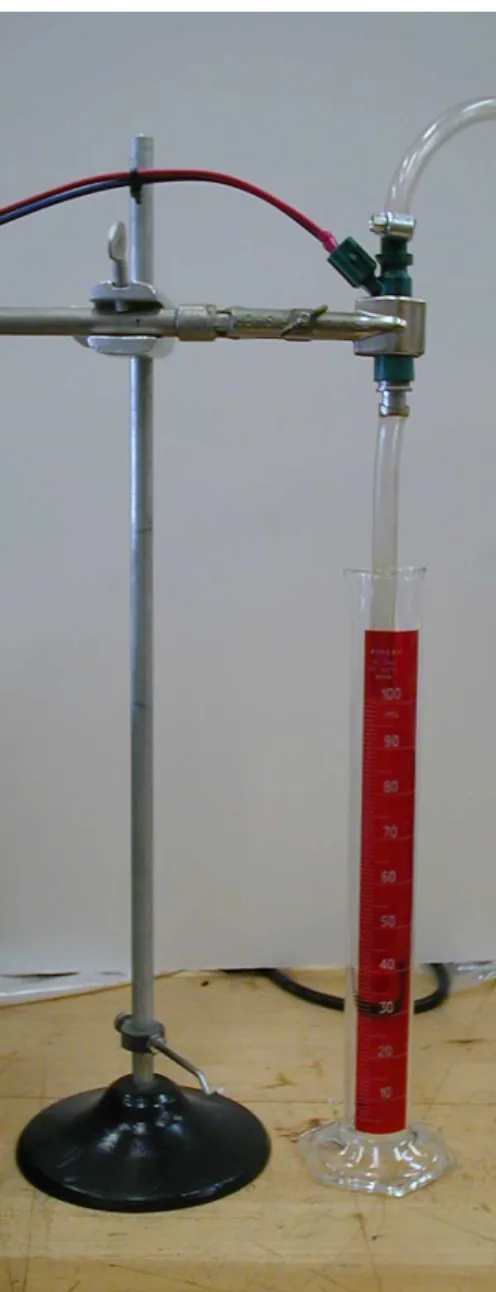
Figure 1 Injector Flow Test
As an example the flow test from the Honda 600F4i stock injectors is detailed. The flow rate was measured by pulsing the injectors for 8ms, while counting the number of injection events, and measuring the total volume of fuel collected in a graduated cylinder. Table 2 shows the fuel injector calibration measurements. A fuel flow bench feature is implemented in the Reata ECU specifically for this kind of test (in GUI: Diagnostics, Fuel, Flow test). The average volume for the injectors was 0.0280 ml per 8 ms pulse.
Injector # Fuel Press [psi] Volume [ml] Pulse Count Flow [ml /8 ms] 1 run 1 50 77 2719 0.0283 1 run 2 50 78 2749 0.0284 2 run 1 50 78.5 2827 0.0278 2 run 2 50 78 2790 0.0280 3 run 1 50 79 2867 0.0275 3 run 2 50 79 2877 0.0275 4 run 1 50 77 2732 0.0282 4 run 2 50 78 2758 0.0283
Table 2 Fuel Injector Experimental Data
Experiments on other injectors showed that the fuel flow rate is approximately linear with injector open time, that is, the actual time that the injector needle is open. It was determined that the time to open the Honda injectors was 0.2 to 0.5ms. This is the time required to activate the solenoid and open the injector, before any fuel is released. The actual injection open time would be (8 – 0.5) ms, but the small difference was not important here as the purpose is to just establish a baseline from which to begin dynamometer testing. Assuming then a linear relationship, the pulse time required for stoichiometric combustion can be calculated as:
0164 . 0 0280 . 0 8 x =
So, for this case, the injection duration, x, would be about 4.7 ms. This calculation presumed a cylinder filled with air at 100kPa, which relates to wide open throttle (WOT), 100% volumetric efficiency. At idle most engines would run close to 40kPa, which considering the Ideal Gas Law would imply that there would be close to 40% of the mass of air at WOT. Therefore we would need 40% of the 4.7ms, that is 1.9ms at idle.
For the first engine trials being described here, we did not have an idea of how the volumetric efficiency changes with rpm. Therefore, our initial fuel
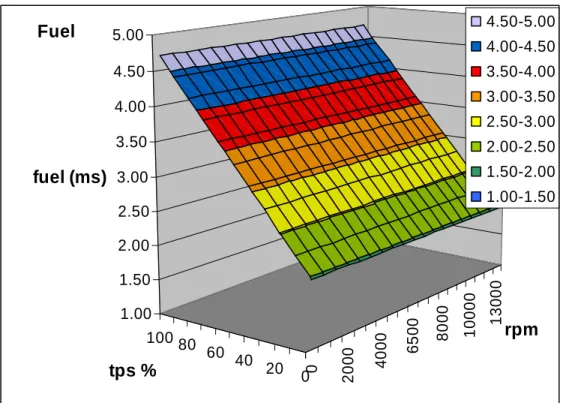
table was only a function of load. That is, our fuel injection duration was 4.7ms at WOT for all speeds, and 1.9ms at zero throttle for all speeds. The intermediate throttle positions were linearly interpolated between these end values. The initial fuel table is shown in Figure 1, which is in the form of a wedge. It is not dependent on speed, simply 1.9ms at zero throttle and 4.7ms at WOT. 0 2 0 0 0 4 0 0 0 6 5 0 0 8 0 0 0 1 0 0 0 0 1 3 0 0 0 0 20 40 60 80 100 1.00 1.50 2.00 2.50 3.00 3.50 4.00 4.50 5.00
fuel (ms)
rpm
tps %
Fuel
4.50-5.00 4.00-4.50 3.50-4.00 3.00-3.50 2.50-3.00 2.00-2.50 1.50-2.00 1.00-1.50Figure 2 Initial Fuel Table
The load parameter shown in Figure 2 is TPS, however the calculations were based on a load condition described by MAP in kPa. This equivalence in description of no-load as 40kPa in a MAP based table and 0% in a TPS based table is fine. The same applies to full load condition, where this is described by 100kPa in a MAP based table (naturally aspirated) and 100% TPS in TPS based table. However the linear relationship, described by the slope of Figure 2 is only really applicable to a MAP based table. The MAP value produced at a specific TPS opening, it not constant with engine rpm and this would effect the fuel requirement. Nonetheless Figure 2 is a valid initial table from where the engine can be started.
3.2.3
Ignition Table
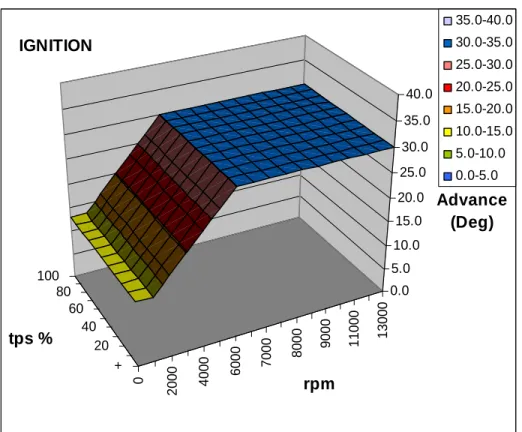
The Honda Service Manual states that the spark advance is thirteen degrees before TDC at idle. Thirty degrees advance at high rpm is quite normal for engines; hence the initial table was set to have 13°
advance at idle (1300rpm) and 30° advance at 6000 rpm. It is also quite common for racing engines not to have any load offset to timing i.e. no vacuum advance. Hence the initial ignition table was setup to be only a function of speed. Refer to Figure 3.
0 2 0 0 0 4 0 0 0 6 0 0 0 7 0 0 0 8 0 0 0 9 0 0 0 1 1 0 0 0 1 3 0 0 0 + 20 40 60 80 100 0.0 5.0 10.0 15.0 20.0 25.0 30.0 35.0 40.0 Ignition Advance (Deg) rpm tps % IGNITION 35.0-40.0 30.0-35.0 25.0-30.0 20.0-25.0 15.0-20.0 10.0-15.0 5.0-10.0 0.0-5.0
Figure 3 Initial Ignition Table
3.2.4
Starting and Coolant Temperature
Compensation
It is very well known and accepted that some extra fuel would be required to start a cold engine. In carburettor systems the choke, be it manual or automatic, would help in starting a cold engine. In electronic fuel injection systems, this extra quantity of fuel is attributed to two causes: starting
compensation, that is if engine was not rotating and is then sensed to start rotating (cranking) a quantity of extra fuel is injected; and coolant temperature compensation, another quantity of extra fuel is injected depending on the engine coolant temperature. Typical values of starting compensation can range from 150% to 200% and would be applied for the first 10 turns or so. In the Reata Engineering ECU and GUI, these percentages are multipliers not additions, that is 200% would mean that double the quantity of fuel is injected. Typical values of coolant compensation is 170% at 10°C that tapers off to 100% at 70°C, that is 70% extra fuel when the engine is at 10°C. These two compensations would both act together (and definitely also act with other compensations such as air temperature compensation etc), therefore if the engine is started at 10°c, is would get 340% for the first 10 turns.
Having set these baseline values for fuel injection, ignition values, starting and coolant compensations, the engine should crank and start. However new users should keep reading through the manual before actual attempts at wiring and cranking the engine are attempted as there are many more aspects of the ECU that need to be understood and followed.
3.2.5
Dynamometer testing
After starting the engine, the engine would then preferably be coupled to an engine dynamometer for testing. The ECU allows choice of the load parameter between either TPS or MAP. Naturally aspirated racing applications would typically be tuned with TPS as the load parameter. The load parameter would probably be MAP for naturally-aspirated engines which are not targeted for racing. Turbocharged applications would typically be tuned with MAP as the load parameter. The look-up tables are in the form of a Load parameter (either TPS or MAP) versus the engine RPM. Optimal ignition timing and fuel injection duration would then be determined at all available speed discretizations in the table at WOT, and several more at part throttle. TPS was used as the load parameter in the example of the Honda 600cc F4i engine since this is a direct input in the dynamometer setup, i.e. the Load location within the look-up tables was set by adjusting the TPS manually. Engine speed was then set by manipulating the dynamometer
loading. Ignition and Fuel hooks as determined experimentally. Figure 4 shown the spark hooks for the restricted Honda 600 engine. These ignition hooks show the expected trends, that is the MBT timing is higher at higher rpm. The MBT timing is high also where the volumetric efficiency is poor (this relates to vacuum advance, that is when cylinder is lightly filled, advance has to be larger). Volumetric efficiency can be measured from measurements of the mass air flow using automotive mass flow sensors, laboratory grade laminar flow element, or critical flow orifices. In the Reata Engineering ECU, the load-cell voltage can be read into the GUI thus providing a real–time torque measurement. The torque measurement can be logged and further analysed and plotted against ignition timing and/or injection quantity using Excel®.
Effect of Spark Advance on Torque for various engine speeds
50 60 70 80 90 100 110 15 20 25 30 35 40 45 50 55
Spark Advance, deg BTDC
T o rq u e , lb -f t 3000 rpm 4000 rpm 5000 rpm 6000 rpm 6500 rpm 8000 rpm 9000 rpm
Figure 4 Spark Advance Hooks at WOT
Additional tests can be conducted to determine the best timing for start of fuel injection. For the Honda F4i engine being described, best performance was measured with fuel injected onto open valves, versus closed valves. It was found that injection onto open valves gave 6% more torque at the point of worst volumetric efficiency (6500rpm). This was a worthwhile improvement given the fact that it did not involve any extra hardware. Note that this can
only be done if the fuel injection strategy is sequential, that is ECU is knowledgeable of each cylinder’s strokes. Sequential operation requires a cam signal into the ECU to reset and synchronize the four stroke cycle, sequential operation is described in Appendix 5.4 ‘General Engine Settings, Overview’.
3.2.5.1
Compensations
After dynamometer calibration is finalized, some additional tests would still need to be done to determine the necessary amounts of compensations. The compensations that need to be determined are: coolant temperature compensation, air temperature compensation and throttle pump. During dynamometer testing it is important to have the engine in known and stable operating conditions of coolant and air temperature. These temperatures would be the basis from where compensation is applied. That is if coolant temperature during dynamometer tests was stable between 90 and 100oC then the coolant compensation table would have to be 100% at the 90 and 100°C region and higher values than 100% at colder temperature. At hotter coolant temperatures it would be logical to have less than 100% due to the fact that the air induced into the cylinder would be hotter, hence less dense and consequently requiring less fuel. However it is usual not to lower the coolant compensation value below 100% above the baseline operating temperature in order to help in cooling the engine and keep away from possible knocking. Coolant compensation should be adjusted so that while warming up, the engine would operate adequately with an AFR close to the desired value.
Air temperature compensation would also be applied below and above the baseline air temperature maintained during dynamometer testing. For naturally aspirated engines a fairly constant air temperature during dynamometer testing can be achieved by ducting air into the engine from outside the test cell. For the baseline temperature maintained during testing the air temperature compensation would be 100%. At colder air temperature the density of the air would be bigger and hence a larger quantity of fuel can be injected. On the other hand, at hotter air temperatures the air density is less and hence less fuel can be injected. Due to the fact that it would not be
quite easy to experimentally vary the inlet air temperature by fairly large amounts, the best way to calculate the required amount of compensation is through theory using the Ideal Gas Law. Refer to Appendix 5.3 ‘Air Temperature Compensation on Fuel’ for the derivation and quantification of air temperature compensation.
In turbocharged applications the air temperature (usually measured downstream of the turbocharger) depends heavily on the turbo operating condition, that is boost pressure and rpm. Hence in turbo applications the baseline air temperature is suggested to be taken in the region of preferred operation of the engine, that is the region in which the car is intended to be driven. Such a temperature would typically be higher than atmospheric conditions, say 50°C and depends on application, especially boost pressure and intercooler size.
The throttle pump compensation injects additional fuel when the accelerator pedal is depressed quickly. The electronic throttle pump facility in ECU’s mimics the mechanical throttle (or accelerator) pump but gives a much higher modification capability. The quantity of extra fuel required will vary from application to application and would have to be finally tweaked during driving. The compensations, including the equations on which the throttle pump compensation are calculated, are discussed further in section 4.2.5 ‘Fuel Compensation’.
4 GUI
The Reata Engineering GUI is a Windows based software and has pull down menus that are very typical to Windows based applications. The pull down menus in the Reata Engineering GUI are detailed in this manual in the same order of appearance in the pull down menus: staring from left to right and then top down. This simple and structured sequence of description of the menus is intended to make access to descriptions in this manual easier. If an ECU is connected and communicating with the computer, then the GUI will load the Engine Settings File from the ECU. The execution of GUI without a communicating ECU will prompt a request for the loading of an Engine Settings File from disk. The entries in the pull down menu can be greyed out,
this happens if the ECU is not communicating and the particular pull down menu entry cannot function.
4.1 File
This tab provides management of the Files associated with the ECU. These files have an extension .esf which stands for engine settings file. It is important to appreciate that there are four locations where these settings can reside namely: disk, GUI, ECU memory and ECU flash. ECU has both memory and flash. The ECU displays, executes and saves the settings that are in memory not in flash. The settings that are stored in flash are only as backup and must first be loaded to memory to be displayed, executed or saved. Management of the flash is detailed in section 4.3 subsections Store Parameters in Flash and Restore Parameters from Flash.
Open Configuration
The Open Configuration tab allows the opening of a saved settings file from disk. If an ECU is connected to the PC and communicating with the GUI, using the Open Configuration will only load the GUI with the settings from the specified file on disk, the ECU will still have the settings it had before.
Save Configuration
The Save Configuration tab saves the current engine settings present in the GUI to disk. Note that the save feature saves the settings in the GUI and not the settings in the ECU (if the ECU settings are to be saved they first must be downloaded from ECU into GUI).
Download Configuration from ECU
The Download Configuration from ECU allows downloading of the engine settings from the ECU to the GUI on the computer. Note that this tab does not save the settings to file it only downloads the settings from ECU so that ECU and GUI are using the same settings.
Upload Configuration to ECU
The Upload Configuration to ECU allows uploading of the engine settings
from the GUI to the ECU. Once this is done the previous settings in the ECU
It should be a habit to save important settings to a file on disk to avoid unintentional overwriting of settings.
Comm Port Settings
The Comm port, short for communication, is the serial RS232 port through which the ECU and computer communicate. The most common connector associated with the RS232 is the 9 pin connector. Recent generation laptops do not have this type of connector and a USB to RS232 converter has to be employed.
Comm Port Number: set this to the desired port number, different computers
might not have the same numbers of ports. The com port is selected using a combo box from the available ports.
Baud Rate: the communicating speed between the ECU and computer. This
value is typically 57600.
Data Bits: the number of data bits in the serial communication word.
Typically set to8.
Stop Bits: the number of stop bits in the serial communication word.
Typically set to 1.
Parity: whether or not a parity bit is used, and if used whether odd or even
parity is used in the serial communication word. Available entries are: Even; Mark; None; Odd; Space. Typically set to None.
Sampling Interval: the amount of milliseconds that the GUI allows to pass
between communications with the ECU. This period is the refresh period with which the GUI obtains data from the ECU and hence is the refresh period that engine sensor data is refreshed on the computer screen. It is also the period between the data logging lines in the online logs that are automatically generated by the GUI when an ECU is communicating with the GUI. More on online logs in the ‘Logs Setup’ section. The typical value for this interval is 100 milliseconds, however if radio transmitters or other potentially slow setup is used, the interval should be increased until stable communication is established, say 300 milliseconds.
4.2 Edit
Editing of engine settings is effected through this pull down menu. The settings screens have two buttons on the right hand side namely: Done and Cancel. The function of by these buttons is as follows.
Done: if the changes effected are good and they are desired to stay in the
GUI, press Done. This only registers the values in the GUI, the ECU will still have the values prior to any modification.
Cancel: if the changes effected are not worth keeping, press Cancel and they
will be discarded. The values prior to opening the particular settings interface will be re-established in the GUI.
4.2.1
General Engine Configuration
The General Engine Settings are divided into four tabs: Mechanical Setup,
Ignition Setup, Injection Setup and Limits and Alarms.
4.2.1.1
Mechanical Setup
In this tab the details of mechanically related settings need to be set. An overview with related diagrams explaining the various cases an end user will encounter is given in Appendix 5.4 ‘General Engine Settings, Overview’.
Number of Cylinders
Set the appropriate number of cylinders in the engine. Relevance: always
Range: 1 to 8
Firing Order
Set the firing order of the engine. Note that the ignition and injector cables are connected ignition 1 to cylinder 1, ignition 2 to cylinder 2, ignition 3 to cylinder 3 and so on and same applies to injectors. That is the firing order is taken care of by the ECU and hence needs to be set in the GUI.
Relevance: always
Range: 1 to ‘Number of Cylinders’
The number of teeth on crank sprocket including any missing ones is entered here. If there are missing teeth on the crank sprocket then this entry should specify the number of existent teeth plus the imaginary number of teeth on the crank sprocket if the sprocket were to have a constant pitch equal to the pitch between two existing teeth. The ECU handles sprockets with equally spaced teeth. Any missing teeth are considered as if they are there for determining if teeth are equally spaced or not. If no crank sprocket, for example a cam sprocket is installed, the value of 0 should be entered.
Relevance: relevant only if a crank sensor is fitted otherwise this entry should be zero.
Range: 0 to 200
Number of missing teeth on Crank sprocket
Set the number of missing teeth on crank sprocket. If there are no missing teeth on crank, set to 0.
Relevance: relevant only if ‘Teeth On Crank Sprocket’ is greater than two. Range: 0 to ‘Teeth On Crank Sprocket’-1
Last non-missing tooth on Crank sprocket
Assigning numbers to the teeth as they would go by the crank sensor, input the number assigned to the last tooth before the gap due to the missing teeth arrives. The numbering sequence starts by assigning 1 to the first tooth that goes by the sensor after TDC. Refer to notes about how to determine this entry in Appendix 5.4 ‘General Engine Settings, Overview’.
Relevance: relevant only if ‘Number of missing teeth on Crank sprocket’ is greater than zero
Range: 1 to ‘Teeth On Crank Sprocket’
Number of teeth on Cam sprocket
The number of teeth on cam sprocket including any missing ones is entered here. If there are missing teeth on the cam sprocket then this entry should specify the number of existent teeth plus the imaginary number of teeth on the cam sprocket if the sprocket were to have a constant pitch equal to the pitch between two existing teeth. The ECU handles sprockets with equally spaced
teeth. Any missing teeth are considered as if they are there for determining if teeth are equally spaced or not. If no cam sprocket, for example a crank sprocket with missing teeth is installed, the value of 0 should be entered. Relevance: relevant only if a cam sensor is fitted otherwise this entry should be zero.
Range: 0 to 200
Number of missing teeth on Cam sprocket
Set the number of missing teeth on cam sprocket. If there are no missing teeth on cam, for example just one tooth on cam, set to 0.
Relevance: relevant only if ‘Teeth On Cam Sprocket’ is greater than Number of Cylinders.
Range: 0 to ‘Teeth On Cam Sprocket’ -1
Last non-missing tooth on Cam sprocket
Assigning numbers to the teeth as they would go by the cam sensor, input the number assigned to the last tooth before the gap due to the missing teeth arrives. The numbering sequence starts by assigning 1 to the first tooth that goes by the sensor after TDC. Refer to notes about how to determine this entry in Appendix 5.4 ‘General Engine Settings, Overview’.
Relevance: relevant only if ‘Number of missing teeth on Cam sprocket’ is greater than zero
Range: 0 to ‘Teeth On Cam Sprocket’
Crank tooth at Cam Sensor
Specifies the number assigned to the tooth on the crank sprocket which goes by the crank sensor after the cam tooth lines up with the cam sensor. See notes in Appendix 5.4 ‘General Engine Settings, Overview’. on how to assign this entry.
Relevance: relevant only if ‘Teeth On Crank Sprocket’ is greater than zero and ‘Teeth On Cam Sprocket’ is equal to one.
Range: 0 to ‘Teeth On Crank Sprocket’*2
Sprocket correction angle
Specifies, in crank angle degrees, the amount of offset which has to be applied so that zero degrees correspond to exact Top Dead Centre of piston
number one. Refer to notes about how to determine this entry in Appendix 5.4 ‘General Engine Settings, Overview’. This angle can be changed on the fly through the use of the ADJUST button adjacent to the value.
Relevance: always
Range: if crank sprocket is present 0 to (360/ ‘Teeth On Crank Sprocket’) or else if only cam sprocket is present 0 to (180/ ‘Teeth On Cam Sprocket’)
Missing teeth ratio
To determine the occurrence of missing teeth, the ECU calculates the ratio of time elapsed between current tooth and previous tooth divided by the time elapsed between the previous tooth and the one prior to it divided by the number of missing teeth plus one. That is for any number of missing teeth, and perfectly stable engine speed, this value is 100%. However a value of 60% is advised so that ECU detects the missing tooth even in unsteady RPM. Note, for one missing tooth and perfectly stable engine operation the lower value is 50% while for two missing teeth the lower value is 33%.
Relevance: relevant only when ‘Number of missing teeth on Crank sprocket’ is greater than zero or ‘Number of missing teeth on Cam sprocket’ is greater than zero.
Range: 0% to 100%
Number of strokes for RPM average
Specifies the number of piston strokes which are used in determining the average RPM. Using a larger value for this entry will reduce the tachometer oscillation. Suggested to use value of 1 as a starter.
Relevance: always Range: 1 to 4
Cylinder correction angle
Specifies, in crank angle degrees, the amount of offset for each individual cylinder which has to be applied, in addition to the ‘Sprocket correction angle’, which should be applied in order that the zero degrees correspond to TDC for the particular cylinder. In normal cases these entries would be zero for an inline engine.
Range: -90 to 90
Load Parameter
This combo box specifies the sensor used as load parameter. Normally this is either MAP or TPS but can be chosen to be any other analogue input, for example MAF. Refer to relevant discussion in the ECU Basics and Engine Calibration sections.
Relevance: always
Missing Tooth Algorithm
Specifies the algorithm, simple or complex, which is used to determine a missing tooth. Determination of the missing tooth occurrence is determined as by the algorithm explained in the Missing teeth ratio subsection above is termed Simple. The Complex algorithm compares the current elapsed time to the time that occurred a stroke earlier. This algorithm is intended to take care of slowing down and speeding up of the crank due to compression and power pulses especially during starting.
Relevance: relevant only when ‘Number of missing teeth on Crank sprocket’ is greater than zero.
Crank Triggering Edge
Specifies the edge, rising or falling, at which the crank input is triggered. This applicable for both two and three wire sensors.
Relevance: when ‘Teeth On Crank Sprocket’ is greater than zero
Crank Sensor ON Voltage
Specified the voltage at which the teeth signal is considered to have gone to the ON position so that a rising edge will occur.
Relevance: when ‘Teeth On Crank Sprocket’ is greater than zero.
Crank Sensor OFF Voltage
Specified the voltage at which the teeth signal is considered to have gone to the OFF position so that a falling edge will occur.
Relevance: when ‘Teeth On Crank Sprocket’ is greater than zero.
Specifies the edge, rising or falling, at which the cam input is triggered. This applicable for both two and three wire sensors.
Relevance: when ‘Teeth On Cam Sprocket’ is greater than zero
Cam Sensor ON Voltage
Specified the voltage at which the teeth signal is considered to have gone to the ON position so that a rising edge will occur.
Relevance: when ‘Teeth On Cam Sprocket’ is greater than zero.
Crank Sensor OFF Voltage
Specified the voltage at which the teeth signal is considered to have gone to the OFF position so that a falling edge will occur.
Relevance: when ‘Teeth On Cam Sprocket’ is greater than zero.
The above six parameters would be expected to a have an offset in ignition and injection timing if wrongly set. This offset would probably vary with rpm as the width of the crank pulse is not necessarily a fixed number of crank angle degrees. This understanding of whether the hardware being used provides a trigger that is consistent with the rising or falling edge has to be available. The Crank/Cam oscilloscope view (explained in section 4.5.5 ) can help in the determination of the correct values for these parameters.
4.2.1.2
Ignition Setup
Number of coilsSpecifies the number of coils fitted on the system Relevance: always
Range: 1 to ‘number of cylinders’
Coil dwell time
Specifies the time in milliseconds for which the coil is kept on before it is switched off so that the spark occurs. It is noted that spark occurs when current is turned off. The selection of this dwell time depends on the time that is required for the coil to saturate. If a very long time is specified useless electrical energy is consumed, coil unnecessary heating, and ignition events might overlap at high speeds. Typical value 4 milliseconds.
Relevance: always Range: 0 to 60
Number of sparks
Specifies the number of sparks which occur in one firing cycle.
Relevance: relevant only on multi-spark systems, specifically CDI systems as these can charge up the coil extremely fast. (not supported with the current hardware)
Range: 0 to 255
Sparks off angle
Specifies the angle, after TDC, at which sparks will be switched off irrespective of the number of sparks which have already occurred.
Range: 0 to 180
Relevance: relevant only on multi-spark systems (not supported with the current hardware)
Spark delay
Specifies the time in microseconds that pass between the switching off of the coil and the occurrence of the spark. This is a hardware related time mostly a function of the ECU hardware and software, however there is also a dependency on the coil used. A typical value is 180 microseconds. If wrongly set, a bad value in this setting can cause drifting of the ignition event, however the rising/falling setting of the crank/cam signal is much bigger cause for drift. Relevance: always
Range: 0 to 60000
Spark Output Pins
Specifies the connector pins which will be used for Spark Outputs i.e that will be connected to the low voltage side of the ignition coils. Normally the Spark pins, S1,S2,S3….., would be used for spark.
Relevance: always
Range: Selection from combo.
Number of Primary Injectors
Specifies the number of injectors fitted on the system Relevance: always
Range: 1 to ‘number of cylinders’
Primary Injector Output Pins
Specifies the connector pins which will be used for primary injectors outputs i.e that will be connected to the primary injectors. Normally the Fuel pins, F1,F2,F3….., would be used for fuel.
Relevance: always
Range: Selection from combo.
Primary Injector delay
Specifies the time in milliseconds that pass between the switching on of the injector and the injector to start injecting fuel. The dead-time of the injector is part of this time. Similar to ‘Spark Delay’ above. The effect of some drift on injection event is however much less important than spark drift and hence this values can be left 0.
Relevance: always Range: 0 to 60
Number of Secondary Injectors
Specifies the number of secondary injectors fitted on the system Relevance: always
Range: 1 to ‘number of cylinders’
Secondary Injector Output Pins
Specifies the connector pins which will be used for secondary injectors outputs i.e that will be connected to the secondary injectors.
Relevance: always
Range: Selection from combo.
Secondary Injector delay
Specifies the time in milliseconds that pass between the switching on of the injector and the injector to start injecting fuel. The dead-time of the injector is part of this time. Similar to Primary injector delay above, and similarly the
effect of some drift on injection event is much less important than spark drift and hence this values can be left 0.
Relevance: always Range: 0 to 60
Injection angle
Specifies the angle, in crank angle degrees, to which the injection event is referred. If the ‘Injection angle at’ is set to ‘Start’ then this entry specifies the crank angle at which the injector is switched on. If the ‘Injection angle at’ is set to ‘End’ then this entry specifies the crank angle at which the injector is switched off.
Relevance: always
Range: This entry can be between –360° and +360° fo r sequential operation. Noting that zero is at TDC when the valves are overlapping. For non sequential operation this entry can be between -180° to +180°. Sequential is described in Appendix 5.4 ‘General Engine Settings, Overview.
Injection angle at
Either start or end of the injection duration can be chosen to provide angular reference of the injection event with respect to engine crank angle. Refer also to description on the specification of the ‘Injection Angle’ that will follow in the Injection Setup tab.
Relevance: always
Number of Strokes for injection
Specifies the number of strokes which must elapse between successive injection events. This feature can be used with single point injection systems in order to even out the fuel delivery to each of the cylinders. For example, on a four cylinder engine with single point injection, injecting fuel every 3 strokes will tend to even out delivery to all cylinders in the long term.
Relevance: always Range: 1 to 4
Max Percentage Duty Cycle
Specifies, as a percentage of one full cycle, the maximum duration for which the injector can stay open. The injector has a dead-time which is needed to
open and close. If the duration of the injection starts to approach the duration of one whole cycle, then the injector will not be opening for the duration that it is intended to. When this limit is approached it should be considered to either fit larger injectors of install secondary injectors. Further details in appendix section 5.1 Maximum value of DOI for engine
Relevance: always Range: 0 to 100
Primary injector flow rate
Specifies the flow rate in pounds per hour (lb/hr) for the primary injectors. This value should be obtained either from the manufacturer of the injectors or by performing the injector flow test as described in section 3.2.2.
Relevance: when number of secondary injectors is not zero Range: 0 to 600
Secondary injector flow rate
Specifies, the flow rate in pounds per hour (lb/hr) for the secondary injectors. This value should be obtained either from the manufacturer of the injectors or by performing the injector flow test as described in section 3.2.2.
Relevance: when number of secondary injectors is not zero Range: 0 to 600
Time for Fuel Pump On at boot
Specifies, in seconds, the duration for which the pump is kept on when the ECU is switched on. When the ECU is switched on the fuel pump is energized so that when the engine is started the fuel pressure is already available.
Relevance: always Range: 0 to 60
Fuel tank running time
This is useful in cars with fuel tanks without gauges or with irregular shaped tanks for which level gauges might not mean much. The ECU keeps a counter of the quantity of fuel being consumed, by summing the total time of all injection events. The Fuel tank running time is an empirical (obtained
through experiments) value which specifies the amount when a full tank of fuel has been consumed.
Relevance: when an output pin is used as a fuel gauge. Range: 0 to 65536
Accumulated button
When this button is pressed the current value of the fuel consumed is copied to the ‘Fuel tank running time’ entry. This can be used so that when a full tank is known to have been consumed, the full fuel tank is taken to be the accumulated value.
Relevance: when an output pin is used as a fuel gauge. Range: N/A
Fuel Pump Output Pin
Specifies the connector pins which will be used for the fuel pump. Relevance: always
Range: Selection from combo.
4.2.1.4
Limits and Alarms
Cut Rev Limit
Set this value according to the engine’s capability. Both spark and fuel are cut if the rpm are sensed to go above the ‘Cut Rev Limit’.
Relevance: always Range: 0 to 20000
Tachometer Output Pin
Specifies the connector pin which will be used for connection to a tachometer. A pulse occurs with every spark event.
Relevance: always
4.2.2
Ignition Table
The ignition table provides the capability to change the ignition values (spark advance) for the whole operating range of the engine. The ignition table is setup with rows representing the different engine rpm points, while columns represent the different load points. The load parameter can be selected to be either TPS or MAP (or other) from the General Engine Settings. The discretization of the rpm can be changed by right clicking on any rpm entry, three possibilities will appear Edit RPM Value, Insert RPM Row and Delete RPM Row, refer to Figure 5 Setting RPM entries in Tables. Use these options to modify the RPM values representing the rows as desired. Note that the bottom RPM row value is the RPM value that is used as the highest RPM on the tachometer displayed on the screen. It is also important to specify this number higher than the Rev Limiter so that the ECU will have valid ignition and injection values beyond the Rev Limiter value. The RPM values representing the rows will be consistent throughout the settings tables, that is changes effected from the Ignition Table will also be effected in the Injection Table, a reminder to this effect appears to remind the user of such an automatic change in the other table.
Similarly the load entries can be changed by right clicking on the load entry, refer to Figure 6 Setting the Load Parameter entries. The changes effected in the load entries will also be applied to the injection table and a reminder appears to this effect when exiting the ignition table editing.
Figure 6 Setting the Load Parameter entries in Tables
The ignition values in the table can be changed by left clicking on them and typing the desired value. If mathematical manipulating of the values is required, it is suggested that the whole table or the desired part is copied by highlighting it and then pressing CTRL+C to copy it and then paste in Excel where the mathematical manipulation can be effected. Pasting back of many cells into the ignition table can be easily effected by left clicking on the upper left corner of the desired area and pressing CTRL+V. If contours of the values are desired, it is suggested to paste the table in the Excel® sheet ReataTablesView.xls provided on the website.
4.2.3
Injection Table
The same editing capabilities as for the Ignition Table are available for the Injection Table, therefore it is not necessary to repeat description.
4.2.4
Sensor Conversion
The sensor signals are acquired by the ECU as analogue signals that are converted into actual parameters such as temperature by the ECU. The Reata Engineering ECU enables the user to work with any sensor by setting up a conversion table from voltage to the measured parameter.
A sensor can be connected to any analogue input pin. The analogue input pins are pins marked A01 to A22.
A01, A02, A03 and A04 are inputs which are not amplified. These are
normally used for TPS, MAP, coolant temp and air Temp.
A05 and A06 are single ended inputs which can be assigned with an
amplification.
A07, A08, A09, A10, A11, A12, A13, A14, A15, A16, A17, A18 are inputs
which can be used as single ended as well as differential inputs. These pins, in both configurations, can be assigned with an amplification depending on their setup. These inputs, taken in pairs, can be used to connect to thermocouples.
A19 is hard-wired as cam sensor. A20 is hard-wired as crank sensor.
A21 and A22 are for future use and will be assigned to knock sensors.
Add
Choosing this entry in the Sensor Conversion pull-down menu will enable the user to create a senor entry and connect it to an input pin.
When a new sensor is created the new entry will be shown in the ‘Sensor Conversion’ pull-down menu. The user can enter and edit the desired sensor by clicking on the appropriate entry in the menu.
Delete
A combo box is displayed from which the user can select the sensor input that he wants to delete.
Edit
By clicking on any of the sensor conversion entries shown in the sensor conversion pull-down menu the user can enter the edit dialogue for the relevant sensor.
The dialogue consists of:
Sensor Name: The name to be given to this particular sensor. Units: The units of measurement for this particular sensor.
Filter is a number between 1 and 16 which is used to filter out noise that may
be present on the signal input. A value of 1 means that no filter is applied. A value between 2 and 16 means that the signal will be smoothed out. The bigger the value the smoother the signal but also the slower the response.
Input pin This combo box specifies the connector pins which will be used for
this sensor. Any pin which is already used is greyed out.
Amplification this combo box specified the amplification which will be used
with this sensor. Only the appropriate amplifications will be available according the pin chosen.
Thermocouple if this input is to be used as a thermocouple the type should
be chosen here, otherwise ‘Not thermocouple’ should be selected.
Input If the selected pin can be set as differential, a radio button will be shown so that the input can either be set to single-ended or differential.
Sensor Conversion Table
The sensor conversion table can be generated using the ECU in
CALIBRATE mode. This feature facilitates the generation of the conversion
table. The right mouse button should be used on the left ‘Voltage’ column to edit, insert and delete rows. Refer to Figure 7 Setting the Voltage entries in Sensor Conversion These right mouse button options are identical to those provided for editing the ignition and injection tables.
An Excel sheet with an example of the test measurements and conversion of a thermistor sensor is made available on the web site. This Excel sheet should be of help as thermistors are logarithmic in nature and the use of the appropriate logarithmic equation makes the conversion table a lot better.
4.2.4.1
Throttle Position
Since the throttle position sensor is usually a linear sensor the extremities of the sensor travel are usually enough for the conversion table. It is important to note that if the TPS is mechanically moved in relation to the throttle butterfly shaft, the calibration may be lost and would necessitate recalibration of the fuel and possibly ignition tables. The suggested calibration procedure is to fully close the throttle, fully retracting any idle screw, try to make the throttle plate rest against the throttle body, then read the voltage input into the ECU using the CALIBRATE button. Set the value for this voltage to 2 or 3 percent. Next open the throttle fully, set this as 95 to 97 %. Then set zero volts to 0% and 5volts to 100%. Such a method would make sure that even if due to noise a voltage lower than the fully closed voltage enters the ECU, the ECU will never get confused and interpret that as a percentage lower than zero. Same thinking applies to the 100% position.
4.2.4.2
Manifold Absolute Pressure
In order to run the calibration a method of pulling a vacuum say down to 30kPa is required. If the engine application is turbocharged the MAP sensor would also have to be calibrated to 200kPa or 300kPa depending on the boost level. A manual vacuum pump with a vacuum pressure gauge is probably the best method for the calibr
![Table 1 Honda CBR600 F4i Parameters [Honda User’s Manual]](https://thumb-us.123doks.com/thumbv2/123dok_us/971838.2627434/15.918.272.647.98.222/table-honda-cbr-f-parameters-honda-user-manual.webp)