Diagnosis
Hardware/Software
User Manual
Edition 6
This publication is not subject to any update service. You will find the latest version in INFORM
www.wabco-auto.com
© 2010
The right of amendment is reserved. Version 2/07.2010(en) 815 010 037 3
4
Abbreviations
ABS Anti-Lock Braking System
ASR Anti-Slip-Regulation
ATC Automatic Temperature Control
CAN Controller Area Network; asynchronous, serial bus system for networking control devices in vehicles
EBS Electronic Braking System
ECAS: Electronically Controlled Air Suspension ECU Electronic Control Unit
ENR (German: Elektronische Niveauregelung); Electronic Levelling Control
EPB Electro-Pneumatic Brake
EPS Electronic Power Shift; electro-pneumatic shift control ESAC Electronic Shock Absorber Control
ETS (German: Elektronische Türsteuerung); Electronic Door Control System
HPB Hydraulic Power Brake
HVAC (Engl. HVAC); Heating, Ventilation and Air Conditioning
IVTM Integrated Vehicle Tire Pressure Monitoring System for commercial vehicles LSV Automatic load-dependent brake force control (load sensing valve)
MTS (German: Modulare Tür-Steuerung); Modular door control for buses
ODR Operating Data Recorder
PC Personal Computer
SAE Society of Automotive Engineers
TCE Trailer Central Electronics
TEBS Electronic Braking System for Trailers
TECAS Electronically Controlled Air Suspension for Trailers
USB Universal Serial Bus; serial bus system for connecting a computer to external devices
VCS Vario Compact System
5
1 Safety instructions 7
2 Introduction 8
3 SD – System Diagnostics 9
3.1 Diagnostic Software 9
3.1.1 Ordering the WABCO Diagnostic Software 10
3.1.2 Where do I find the WABCO Diagnostic Software? 11
3.1.3 Package overview 11
3.1.4 Installation of the WABCO Diagnostic Software 13
3.1.5 WABCO Diagnostics Newsletter 14
3.1.6 License agreement 14
3.1.7 Activating the WABCO Diagnostic Software 15
3.1.8 License version 15
3.1.9 Extended authorisation (PIN) 16
3.1.10 PIN version 16
3.2 Hardware 16
3.2.1 PC / laptop 16
3.2.2 Diagnostic Interface 17
4 Cable for diagnosis 18
4.1 Diagnostic accessory case 18
4.1.1 Accessory case for trailer 446 301 023 0 18
4.1.2 Accessory case for towing vehicles 446 301 025 0 19
4.1.3 Accessory case Bus 446 301 026 0 19
4.2 ABS/ASR 20
4.2.1 ABS B 4-channel (towing vehicle) 20
4.2.2 ABS/ASR C 4-channel (towing vehicle) 20
4.2.3 ABS / ASR C 6-channel (towing vehicle) 20
4.2.4 ABS/ASR D/E (towing vehicle) 21
4.2.5 ABS Vario C (trailer) 21
4.2.6 ABS VCS I (trailer) 21
4.2.7 ABS VCS II (trailer) 22
4.3 ATC (bus) 22
4.3.1 ATC HVAC (bus) 22
4.4 CAN Viewer 23
4.5 EBS 23
4.5.1 EBS EPB (Mercedes) 23
4.5.2 EBS Euro (towing vehicle) 23
4.5.3 TEBS (trailer) 24
4.6 ECAS 24
4.6.1 ECAS/ESAC (towing vehicle) 24
4.6.2 ECAS/ESAC (Mercedes) 24
4.6.3 ECAS/ESAC (MAN, Iveco) 25
4.6.4 ECAS (trailer) 25
6
4.8 ETS (Bus) 25
4.9 IVTM 26
4.10 MTS (Bus) 26
4.11 TCE (Trailer) 27
4.12 ZBR (CVC) / Central Board Computer 27
5 Testing devices and ancillary equipment 28
5.1 Test kit case for compressed air braking systems 435 002 007 0 28
5.2 Compressed air test kit "Agriculture" 435 002 011 0 28
5.3 Pressure gauge 29
5.4 LSV Testing equipment 435 008 000 0 29
5.5 LSV Adjuster 899 709 1XX 2 29
5.6 Test connector 446 007 316 0 30
5.7 Flashing code connector 446 300 334 0 30
5.8 WABCO Compact Tester 446 300 400 0 / 430 0 30
6 W.EASY Complete Premium 31
7 XD – Expert Diagnostics 32
7.1 Compact package 446 302 001 0 32
7.1.1 Accessory case Generic XD 446 302 020 0 32
7.2 Advanced Package 446 302 102 0 33
7.2.1 Diagnostic accessory case 446 301 020 0 33
7.3 Advanced Package 446 302 104 0 34
7.4 Advanced Package 446 302 106 0 34
7.5 Premium package 446 302 103 0 34
7
1 Safety
instructions
• Read this document carefully. All instructions, notes, and safety instructions must be adhered to in order to avoid personal injury and/or material loss. WABCO will only guarantee the safety, reli-ability and performance of its products and sys-tems if all information provided in this document is observed. Any deviating procedure may lead to incorrect results on the vehicle.
• Only trained and qualified technicians are permit-ted to perform work on the vehicle.
• Always follow specifications and instructions of vehicle manufacturer.
• Always comply with the company's regulations for the prevention of accidents and national regula-tions.
• Wear any necessary protective clothing. • The workplace has to be dry, well lit and
suffi-ciently ventilated.
• Do not drive on public roads while a safety system of the vehicle is in diagnostic mode.
• Before you perform any further activities on this system you must query the current fault status again after you have eliminated the fault or have cleared the diagnostic memory. This is the only way to ensure that the fault has been eliminated. • If you have performed a Service Reset (reset of
the date or the odometer reading), you must query the current service status before you perform any other activities on the control unit.
Risk of suffocation!
• Perform diagnosis on vehicles with the engine running only in spaces equipped with an exhaust extraction system, or outdoors.
Breathing in carbon monoxide can cause serious damage to health and even death in enclosed spaces without an exhaust extraction system.
Danger of bodily injury!
• Pedal actions can cause serious injuries if per-sons are near the vehicle.
Ensure that pedal action is prevented by means of the following measures:
– Switch the gearbox to "neutral" and actuate the hand brake.
– Use brake wedges to secure the vehicle against rolling away.
– Attach a clearly marked note on the steering wheel saying that work is being performed on the vehicle and that the pedal must not be ap-plied.
• Do not actuate system components when there is a possibility of persons being in the danger zone of the component to be actuated.
• Do not wear a tie, wide clothing, open hair, brace-lets or watches, etc. when working on the vehicle, especially if the engine is running. Keep your hands and hair away from moving parts.
Fire hazard!
• Only use lamps with a ground connection. • Keep flammable material (cloth, paper, etc.) away
from the exhaust system.
• Do not smoke at your workplace.
• Check the electrical lines to make sure they are properly insulated and fastened.
8
2 Introduction
While previously a separate test device was required for the diagnosis of each system on the commercial vehicle, a PC or a laptop with the corresponding Di-agnostic Software is now sufficient for diagnosis. PC Diagnosis comprises multiple types of diagnostics: • SD – WABCO System Diagnostics (for WABCO
systems and components)
• WABCOWürth W.EASY® Complete Premium (for systems by WABCO and other manufacturers) • XD – WABCO Expert Diagnostics (for systems by
WABCO and other manufacturers)
Special test devices for measurements complete the diagnostics program.
9
3
SD – System Diagnostics
"System Diagnostic Software" designates the system diagnostics developed exclusively for WABCO sys-tems. SD are special programs with extensive func-tions.
The WABCO System Diagnostics allows you to per-form a diagnosis on all electronic WABCO systems. For the diagnosis, you require
• a standard PC or laptop,
• the WABCO System Diagnostic Software, • a Diagnostic Interface,
• and cables to match the vehicle type
3.1 Diagnostic
Software
The speed at which vehicle technology advances, with a growing functional range and intricate safety engineering, also produces the need for correspond-ing diagnostic software. WABCO provides diagnostic software for all electronic WABCO systems in a vari-ety of vehicles.
There are three ways to obtain the Diagnostic Soft-ware.
• as a USB flash drive version (product number 446 301 XXX 0)
• online as a Single Download (product number 246 301 XXX 0)
The XXX value in the order number stands for the currently available language version of the Diag-nostic Software(see table 3-1 "Program overview of the Diagnostic Software (07/2010)", page 12). • as part of a WABCO System Diagnostics
Sub-scription.
For the diagnosis of multiple WABCO systems, WABCO offers you four different packages with Di-agnostic Software via the Internet. These contain numerous diagnostic programs at one very low price. The most recent version of the programs can be downloaded from the internet at any time ready for immediate use.
WABCO SD Software has the advantage that you are quickly informed of new versions and you can obtain all newly developed Diagnostic Software at no extra cost.
The means of graphic representation provided by the PC make diagnosis clear and structured. Thanks to detailed repair information and circuit diagrams with measured values, successful diagnosis and repair is made easy and fast.
The diagnosis with the Diagnostic Software can be performed by any user. If parameters need to be
changed or a calibration needs to be carried out, authorisation (PIN) is required (see chapter 3.1.9 "Extended authorisation (PIN)", page 16).
You can obtain this PIN through the respective train-ing at the WABCO University. More information on WABCO University training courses can be found on the Internet under www.wabco-university.com. Below you will see excerpts from the software for the Trailer EBS E system to illustrate the Diagnostic Software,.
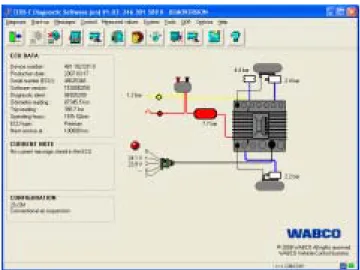
Main menu
fig. 3-1: Main menu of the Diagnostic Software Trailer EBS E
• ECU Data
• Display of the current diagnostic memory • System configuration
10
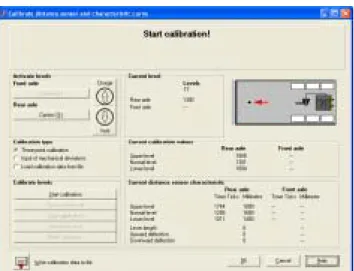
Calibration
fig. 3-2: Calibration menu of the Diagnostic Software Trailer EBS E
• Activate levels
• Current calibration values of distance sensor and pressure sensor
• Perform calibration
3.1.1 Ordering the WABCO Diagnostic Software
– Start your browser and enter the following Internet address: http://www.wabco-auto.com/mywabco If you have already have a myWABCO account, log into your myWABCO account with your user name and password.
If you do not have a myWABCO account, you will have to set one up.
– Click on the "New registration" link and fill out the necessary fields.
Since you do not yet have the access data for a WABCO SD subscription, please leave the re-spective fields empty in step 3.
You will receive an e-mail within a short time to con-firm your e-mail address.
– Click on the link in this e-mail message to activate your account.
– Log into your myWABCO account with your user name and password.
– Left-click in the quick-access menu on "Order Diagnostic Software".
If you receive a safety notice from your Internet browser now, choose the option to display the hidden objects that are unsafe.
11
Your personal data is shown on the followingscreen.
– Click the "New order" button.
– Choose the respective Diagnostic Software pack-age (see chapter 3.1.3 "Packpack-age overview", page 11).
3.1.2 Where do I find the WABCO Diagnostic Software?
– Start your browser and enter the following Internet address: http://www.wabco-auto.com/mywabco – Log into your myWABCO account with your user
name and password.
– Left-click in the quick-access menu on "Download Diagnostic Software".
Her you find an overview of the most important diag-nostic programs in your own language.
You can filter these according to criteria such as package content for instance. You can download any of the programs you see, provided they are included in your WABCO Diagnostic Software subscription. Not all programs are offered in all languages. In order to obtain a complete overview of the Diagnostic Soft-ware, switch the language selection box to English.
3.1.3 Package overview
You can choose from 4 software packages.
Full 246 301 900 0
Almost all available programs for the PC diagnosis in trucks, buses and trailers (includes 264 301 901 0, 246 301 902 0 and 246 301 904 0).
Trailer 246 301 901 0
The most common programs for diagnosis of WABCO systems in trailers.
Bus 246 301 902 0
The most common programs for diagnosis of WABCO systems in buses.
Towing vehicles 246 301 904 0
The most common programs for diagnosis of WABCO systems in towing vehicles.
The software that is included in the individual pack-ages is shown in the right-hand column of the follow-ing table.
WABCO always endeavour to provide further diag-nostic programs and more language versions. The following table is therefore only an overview. For an up-to-date overview of all versions of the Diagnostic Software, visit www.wabco-auto.com/sd, then click "Overview Product Numbers".
The program overview provides a list of currently available programs at a glance. Product numbers have the format 246 301 XXX 0. When ordering USB flash drive versions, simply use the value
446 301 XXX 0 instead of 246 301 XXX 0. Please use the following table to determine the XXX value.
12
in package:
Software cs da de el en es fi fr hr it ja ko nl pl ru sv tr zh Total Trailer Bus Towing vehicle
ABS C 621 622 620623 631 630 085 627086 X X X ABS D Hydraulic 650 651416 414 415 X X ABS D + 604 625 628633 635 634 417 640 637 X X X
ABS HPB 571 572 X X X
ABS SAE 629 624653 632 X X X
ATC CAN Standard 564 565603 614 X X
ATC Coach 864 865 618 X X
ATC KWP Citaro Travego 560 566616 617 X X
CAN Viewer 585 599 X X X
CDC 583 656063 064 065 066 X X
EBS 1C Asia 898 X X
EBS BUS Standard 577 578 947 005 006948 007 X X
EBS CBU MAN 880 882 X X X
EBS EPB Bus 558 410413 412 X X
EBS EPB MB Truck 517 547519 518 X X EBS Euro 548 545894 554 555 009 010 X X X ECAS: 4×2 S2000 860 863842 841 840 135 106 X X ECAS Bus A 059 851 861875 876 877 014070 015016 869 X X
ECAS Bus Citaro 523 539575 574 576 017 018027 X X
ECAS CAN2 866 867586 868 925 605 906 X X X ECAS ENR MB Truck 521 874873 871 872 074 075 X X ECAS Truck JED 538 529 858856 855 857 062537 069 568 X X ECAS Truck KWP K 524 850854 852 853 052 033034 X X X EPS 896 897035 037 036 038 039040 X X X HBS AddOn-E 690 691 X X IVTM 730 732733 731 734 601041 X X X X Modular AMT 952 953 MTS 580 581579 569 701 140 148 X X ODR Tracker 536 692693 655 878 X X SmartBoard 609 610917 916 X X TCE 680 682683 684 685 686687 689044 X X TEBS-D 546550540996 542544606 541608543 905 551552 549694 X X TEBS-E 597956588 589590 591915592 593594 595596598 X X TECAS 527 520 528531 525611530 532534 533 X X
Trailer CAN Router-Repeater 923 924 X X
TrailerGUARD Telematics 918 X X
VCS 501 502503 504 506 052926 507 X X
VCS II 783 508 510513 511612512 654638582 781514 780 X X
ZBR2 700 657 X X X
Table: 3-1: Program overview of the Diagnostic Software (07/2010)
13
Abbreviation Language cs Czech da Danish de German el Greek en English es Spanish fi Finnish fr French hr Croatian it Italian ja Japanese ko Korean nl Dutch pl Polish ru Russian sv Swedish tr Turkish zh ChineseTable: 3-2: Abbreviations for the language version
3.1.4 Installation of the WABCO Diagnostic Software
– Start your browser and enter the following Internet address: http://www.wabco-auto.com/mywabco – Log into your myWABCO account with your user
name and password.
– Left-click in the quick-access menu on "Download Diagnostic Software".
– Select the required Diagnostic Software package and your language.
– Click on the "Display" button. The download table is shown.
– Select the required Diagnostic Software from the download table by clicking the corresponding pro-gram.
The download starts automatically. You are prompted to select whether you want to save the program onto your PC or run it directly from the Internet.
– Select the option "Run the program from this loca-tion".
Once download of the desired program is com-plete, the program file is unzipped to a folder of your choice or the default folder
C:\wabco\download. The installation starts auto-matically after unpacking.
14
3.1.5 WABCO Diagnostics Newsletter
Is the Diagnostic Software installed on your workshop computer up-to-date? It is easy to lose track when subscribing to the Diagnostic Software package which comprises almost 40 programs.
The WABCO Diagnostic newsletter provides specific information on updates for selected programs or new language versions. Use of this service is anonymous and the newsletter only includes information pertain-ing to diagnostics - you will not receive any mails with advertisements:
• Changes to and updates for exiting diagnostic programs
• Information on new programs in a specific lan-guage
The WABCO Diagnostic Newsletter is cost-free and can be used multiple times per company.
Registering for the WABCO Diagnostic newsletter
– Start your browser and enter the following Internet address: http://www.wabco-auto.com/sd
– Click on line "WABCO Diagnostic Newsletter". – Enter your e-mail address and select the action
"subscribe" to activate the initial subscription of the newsletter.
Within a short period of time you will receive an e-mail with a link. With a click on this link you con-firm that your e-mail address has not been mis-used.
– Enter your e-mail address a second time in the login mask and then select the action "Edit set-tings".
The link that you now receive by e-mail will take you to a website where you can define in detail the topics you want to be informed about in future via e-mail newsletter.
– Click individual fields to activate the newsletter for individual programs or activate complete columns or rows by clicking the language in the column header or name of the system.
A second click on the same field will deactivate your selection. Note the other option fields for di-agnostic devices and adapters as well. You can revise your personal newsletter settings by the same procedure any time you wish.
– If you no longer wish to receive the newsletter, select the function "unsubscribe" in the login mask. The newsletter is then completely deactivated.
3.1.6 License agreement
During the installation of a WABCO Diagnostic Pro-gram the license agreement is automatically dis-played. You must accept the license agreement if you want to install the program.
You can also call up the license agreement on the WABCO homepage: http://www.wabco-auto.com. A Diagnostic Subscription lasts for one year. After the expiration of the year we remind you of the extension of the contract.
If you intend to install the Diagnostic Software on several computers, you need to purchase additional licenses. To install the software on an additional computer, copy the *.exe file of the Diagnostic Soft-ware downloaded from the Internet to the desired PC. You can now execute the program from this computer and install the Diagnostic Software.
15
3.1.7 Activating the WABCO DiagnosticSoft-ware
All WABCO diagnostic programs need to be activated. After installation, the program can be used without restrictions for 10 days. After this period, operation will no longer be possible without activation. Every time the program is started, you are informed of how long the program remains operational without activa-tion.
After activation, the Diagnostic Software is tied to the PC. This means the license is used up. Therefore, only activate the Diagnostic Software on the PC on which it is meant to be used and not, for instance, on the office PC.
– To activate the software, click "Request activation codes".
You now have two options to request an activation code:
• Online
For online activation, the computer must be con-nected to the Internet.
• Via WABCO Activation@Web
Online
– For online activation, click "Start Activation via Internet".
– Once you have established an Internet connection, click "Activate now".
The message "Activation in progress..."appears and, after activation has been successfully com-pleted, the message "Activation was successful" appears.
After successful activation, the program is started. In the event that a connection could not be estab-lished, a message will appear listing the possible causes.
If you are unable to correct the cause, you can acti-vate the software only via Activation@Web.
Activation@Web
Activation@Web is a continually available Internet portal that can generate activation codes at any time of day or night. To use it, you only need a PC and an Internet connection – it is not necessary to use the PC on which the software is to be activated for this purpose.
– Start your browser and enter the following Internet address:
http://abo.wabco.info/software_activation.php
– Enter the required data in the window.
You can enter the data manually or use the ser-vice "Activation@Web via USB" described there. This sends the data via a USB stick.
You will immediately receive the activation code for your Diagnostic Software.
Once the activation code has been successfully en-tered, the program is started.
3.1.8 License version
You are provided with the license version (LIC) in the download area as well as in the WABCO Diagnostic Newsletter if there is a software update.
If there is a change in the version compared with the version that you have, the Diagnostic Software must be reactivated.
16
3.1.9 Extended authorisation (PIN)
The diagnosis with the Diagnostic Software can be performed by any user. If parameters are to be changed however, authorisation is required (PIN). You can obtain this PIN through the respective train-ing at the WABCO University. More information on WABCO University training courses can be found on the Internet under www.wabco-university.com. After participating in a respective training course at the WABCO University, they can request a Personal Identification Number (PIN) for their WABCO Diag-nostic Software from WABCO. This PIN is used to enable extended functions of the Diagnostic Software and change the settings in the electronic control units. You can obtain this PIN directly from the Internet, provided you have received a license letter having completed a corresponding training program.
Login with License Certificate
– Start your browser and enter the following Internet address: www.wabco.info/pin.
– Login with your license number and the confirma-tion number of your license letter (as password).
fig. 3-3: License letter
B License letter number
B Confirmation number
– Confirm that your personal data are correct or request a change.
You receive a PIN for all programs and versions for which you have obtained a training certificate.
3.1.10 PIN version
You are provided with the PIN version in the
download area as well as in the WABCO Diagnostic Newsletter if there is a software update.
If there is a difference in the new version compared with the version that you are using, you will require a new PIN. You can obtain it through the respective training at the WABCO University.
3.2 Hardware
3.2.1 PC / laptop
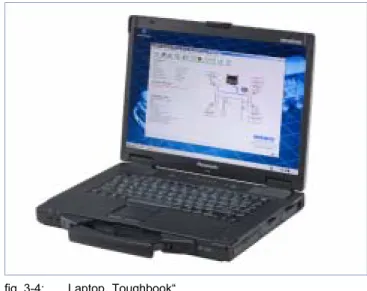
WABCO offers you a workshop-suitable, impact- and contamination-resistant laptop. On request, it can also be delivered with preinstalled diagnostic soft-ware (product number 446 301 999 0).
fig. 3-4: Laptop „Toughbook“
The Diagnostic Software will run on all standard PCs with an operating system Microsoft Windows 2000 or higher however.
There are no other special requirements of the hard-ware. The PC must have a free USB port for the Di-agnostic Interface however.
17
3.2.2 Diagnostic Interface
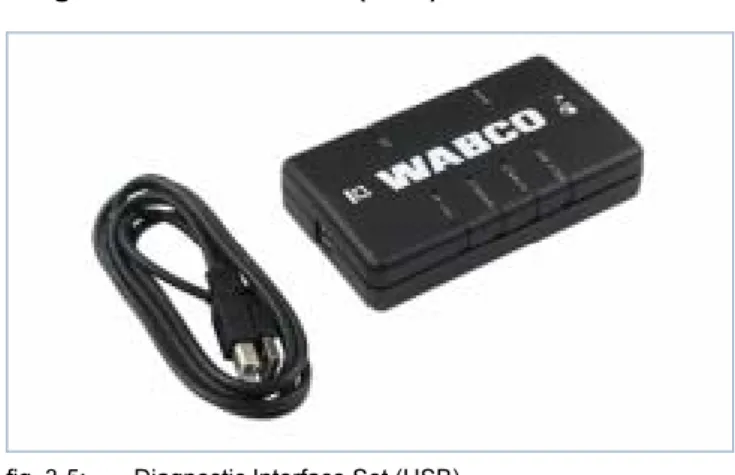
To set up the diagnosis, the WABCO Diagnostic In-terface Set with product number 446 301 030 0 (USB) is required.
The set contains the Diagnostic Interface and a USB connecting cable to the PC or laptop.
The vehicle connection on the Diagnostic Interface matches the connection for the Diagnostic Controller and earlier versions of the diagnostics interface, per-mitting the continued use of connecting cables used in the past.
Depending on the WABCO electronic system you wish to diagnose, you will require corresponding con-necting cables (see chapter 4 "Cable for diagnosis", page 18).
Diagnostic Interface Set (USB) 446 301 030 0
fig. 3-5: Diagnostic Interface Set (USB)
The set includes:
• Diagnostic Interface,
• USB connecting cable to PC/Notebook
The USB driver required for installing the Diagnostic Interface (USB) is installed during the installation of the WABCO SD Software.
The USB driver and an installation manual can also be downloaded via the Internet. It can be obtained via www.wabco-auto.com/sd on the Internet. You will find the required links in the "WABCO System Diagnos-tics" window.
The earlier versions of the Diagnostic Interfaces with serial connection (446 301 021 0) and with USB nection (446 301 022 0) can still be used. The con-necting cable of the Diagnostic Interface with serial connection is connected to the 9-pin COM interface on the PC.
18
4
Cable for diagnosis
4.1
Diagnostic accessory case
WABCO offers accessory cases matching the Diag-nostic Software packages. These cases include the cables that are most commonly used. Not all cables that WABCO offers are contained in the accessory case however.
Having these accessory cases means you will always have the most important connecting elements be-tween ECU and your PC on hand. Once the vehicle has been diagnosed, all cables can be stored in a manner where they are protected as well as easily identified. If you already own the individual compo-nents, you may also order the case without alone (without content).
The following combinations of WABCO accessory case and Diagnostic Software packages make good sense:
• Diagnostic Software package Full 246 301 900 0 – Accessory case for trailer 446 301 023 0 – Accessory case for towing vehicles
446 301 025 0
– In addition: to any bus diagnostic cables that may be required
• Diagnostic Software package Trailer
246 301 901 0
– Accessory case for trailer 446 301 023 0 • Diagnostic Software package Towing vehicle
246 301 904 0
– Accessory case for towing vehicles 446 301 025 0
– In addition: Diagnostic Interface Set 446 301 030 0 (not included in case)
• Diagnostic Software package Bus 246 301 902 0 – Accessory case Bus 446 301 026 0
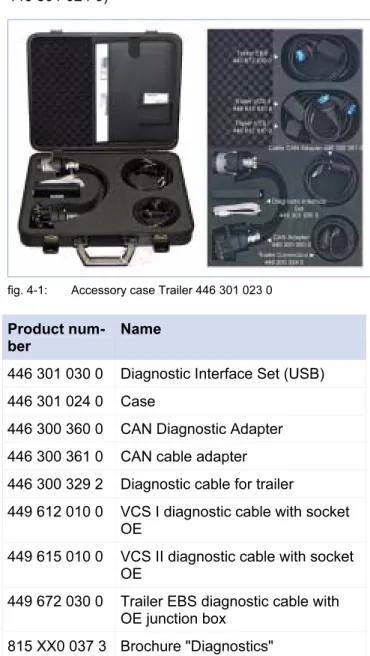
4.1.1 Accessory case for trailer 446 301 023 0
The accessory case provides accessories and cables for the diagnosis of systems in trailers.
(accessory without content: Product number 446 301 024 0)
fig. 4-1: Accessory case Trailer 446 301 023 0
Product num-ber
Name
446 301 030 0 Diagnostic Interface Set (USB) 446 301 024 0 Case
446 300 360 0 CAN Diagnostic Adapter 446 300 361 0 CAN cable adapter 446 300 329 2 Diagnostic cable for trailer
449 612 010 0 VCS I diagnostic cable with socket OE
449 615 010 0 VCS II diagnostic cable with socket OE
449 672 030 0 Trailer EBS diagnostic cable with OE junction box
19
4.1.2 Accessory case for towing vehicles446 301 025 0
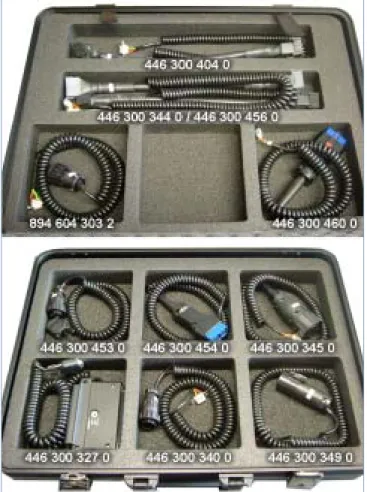
The accessory case for towing vehicles perfectly supplements the Diagnostic Software package of the same name to cover diagnosis of the towing vehicles. This case was deliberately designed without Diagnos-tic Interface. It is therefore a perfect supplement for everyone who already owns the accessory case for trailers 446 301 023 0 and do not require a second Diagnostic Interface. Customers who purchase such a case for the first time and therefore do not have a Diagnostic Interface yet, can order the interface sepa-rately. Space for the interface is provided in the case so that all required components can be stored to-gether.
(accessory without content: Product number 446 301 019 0)
fig. 4-2: Content of the accessory case for towing vehicles 446 301 025 0
Product num-ber
Name
446 300 327 0 Connection adapter EPS, 35-pin 446 300 340 0 Diagnostics cable (for Mercedes) 446 300 344 0 Diagnostic cable EBS Euro (for
Ne-oplan)
Product num-ber
Name
446 300 345 0 Diagnostic cable (for MAN)
446 300 349 0 Diagnostics cable EBS (for IVECO) 446 300 404 0 Diagnostic cable ABS-D
446 300 453 0 Diagnostic cable EBS (for DAF) 446 300 454 0 OBD Diagnostics cable (for
Mer-cedes)
446 300 456 0 Connecting cable ECAS
446 300 460 0 OBD Diagnostic cable 15-pin (for DAF, Scania, MAN)
446 301 019 0 Case
894 604 303 2 Diagnostic cable ABS D/E (ISO 9141)
4.1.3 Accessory case Bus 446 301 026 0
This accessory case contains all important cables to perform diagnosis of WABCO components in buses. This case also includes a Diagnostic Interface. It is designed to match the contents of the Diagnostic Software package "Bus".
(accessory without content: Product number 446 301 019 0)
fig. 4-3: Content of the accessory case for buses 446 301 026 0
20
Product
num-ber
Name
446 300 340 0 Diagnostics cable (for Mercedes, EvoBus)
446 300 344 0 Diagnostic cable EBS Euro (for Ne-oplan)
446 300 345 0 Diagnostic cable (for MAN) 446 300 347 0 Diagnostic cable (for Setra NF 315
MTS)
446 300 454 0 OBD Diagnostics cable (for Mer-cedes, EvoBus)
446 300 460 0 OBD Diagnostic cable 15-pin (for DAF, Scania, MAN)
446 301 019 0 Case
446 301 030 0 Diagnostic Interface Set (USB)
4.2 ABS/ASR
4.2.1 ABS B 4-channel (towing vehicle)
fig. 4-4: Accessories ABS B 4-channel
1 446 300 327 0 Connection adapter 35-pin (ABS, ECAS, EPS, Reserve)
2 446 300 314 0 Measuring adapter 35-pin
B Selector switch to position ABS
B Ignition ON / OFF
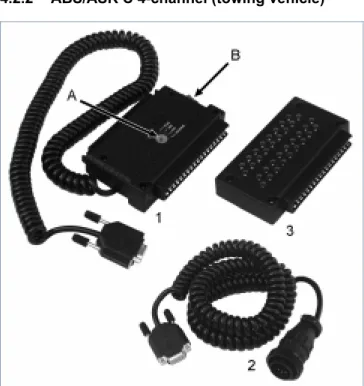
4.2.2 ABS/ASR C 4-channel (towing vehicle)
fig. 4-5: Accessory ABS / ASR C 4-channel
1 446 300 327 0 Connection adapter 35-pin (ABS, ECAS, EPS, Reserve)
2 894 604 303 2 Diagnostic cable (ISO 9141)
3 446 300 314 0 Measuring adapter 35-pin
B Switching to position ABS
B Ignition ON / OFF
4.2.3 ABS / ASR C 6-channel (towing vehicle)
fig. 4-6: Accessory ABS / ASR C 6-channel
1 446 300 319 0 Connecting cable 54-pin (ABS C 6-channel)
21
4.2.4 ABS/ASR D/E (towing vehicle)fig. 4-7: Accessory for ABS D/E
1 446 300 404 0 Connection adapter (ISO 9141)
2 894 604 303 2 Diagnostic cable (ISO9141)
446 300 408 0 Connection adapter Basic (ISO 9141)
4.2.5 ABS Vario C (trailer)
fig. 4-8: Accessory for Vario C
1 446 300 318 0 Connection cable ABS Vario C
2 446 300 329 2 Trailer diagnostic cable for external diagnostic connection
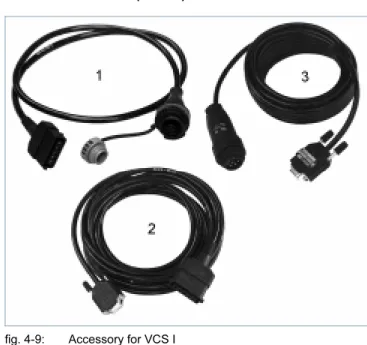
4.2.6 ABS VCS I (trailer)
fig. 4-9: Accessory for VCS I
1 449 612 010 0 Diagnostic cable with socket (length 1 m)
2 446 300 401 0 Diagnostic cable* directly to test device (length 6 m)
3 446 300 329 2 Trailer diagnostic cable * only for electronic control units with ISO supply. Electronics with a mixed supply can be tested only by using a separate diagnostic socket!
22
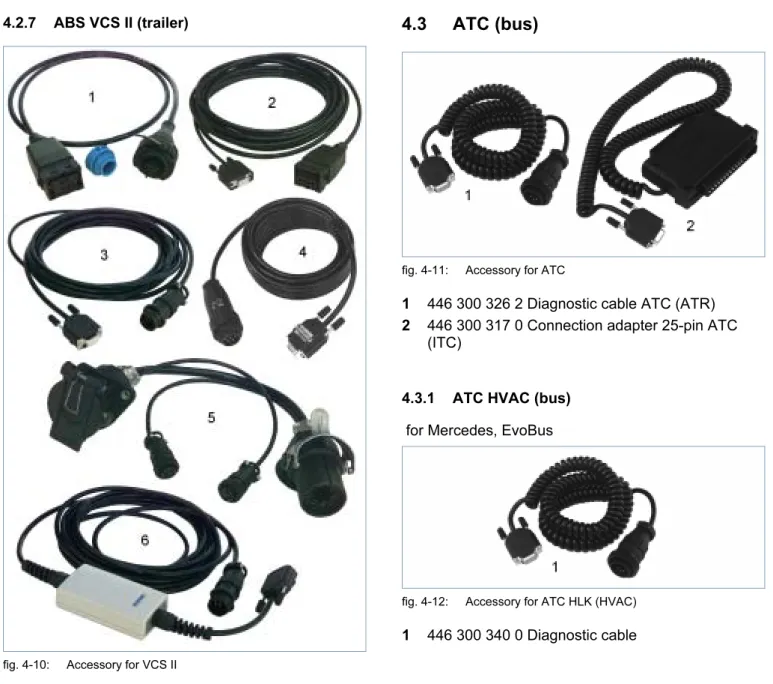
4.2.7 ABS VCS II (trailer)
fig. 4-10: Accessory for VCS II
1 449 615 010 0 Diagnostic cable with socket (length 1 m)
2 446 300 455 0 Diagnostic cable* directly to test device (length 6 m)
3 446 300 361 0 Diagnostic cable CAN between Diagnostic Interface USB (446 301 022 0) an con-nection adapter CAN
4 446 300 329 2 Trailer diagnostic cable
5 446 300 360 0 Connection adapter ISO 7638 (CAN)
6 446 300 470 0 CAN Converter. Connection be-tween Diagnostic Interface serial (446 301 021 0) and connection adapter CAN. Required for diag-nosis via ISO 7638 connection.
* only for electronic control units with ISO supply. For Premium versions 400 500 081/082/084 0 and Stan-dard version 400 500 070 0. Electronic units with mixed supply can only be diagnosed with a separate diagnostic socket!
4.3 ATC
(bus)
fig. 4-11: Accessory for ATC
1 446 300 326 2 Diagnostic cable ATC (ATR)
2 446 300 317 0 Connection adapter 25-pin ATC (ITC)
4.3.1 ATC HVAC (bus)
for Mercedes, EvoBus
fig. 4-12: Accessory for ATC HLK (HVAC)
23
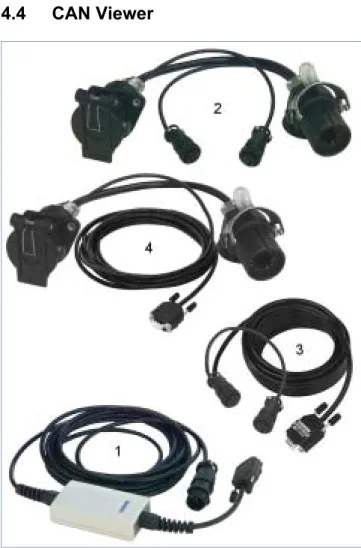
4.4 CAN
Viewer
fig. 4-13: Accessory for CAN Viewer
1 446 300 470 0 CAN Converter. Connection be-tween Diagnostic Interface serial (446 301 021 0) and connection adapter CAN. Required for diag-nosis via ISO 7638 connection.
2 446 300 360 0 Connection adapter CAN 7-pin (ISO 7638)
3 446 300 458 0 Connection cable CAN Viewer 7-pin (ISO 7638)
4 446 300 459 0 Connection adapter CAN 15-pin (ISO 12098)
Set-up of cable connection to vehicle via ISO 7638 (7-pin):
• Diagnostic Interface USB (446 301 022 0 / 030 0) or Diagnostic Interface serial (446 301 021 0) with
• CAN Converter (446 300 470 0) • Connection adapter (446 300 360 0)
with
• Connection cable (446 300 458 0)
Set-up of cable connection to vehicle via ISO 12098 (15-pin)
• Diagnostic Interface USB (446 301 022 0 / 030 0) or Diagnostic Interface serial (446 301 021 0) with
• CAN Converter (446 300 470 0) • Connection adapter (446 300 459 0)
4.5 EBS
4.5.1 EBS EPB (Mercedes)
fig. 4-14: Accessories CDC
1 446 300 340 0 Diagnostic cable
2 446 300 454 0 diagnostics cable for Mercedes
4.5.2 EBS Euro (towing vehicle)
fig. 4-15: Accessories EBS Euro
1 446 300 344 0 Connection adapter
2 446 300 349 0 Diagnostic cable for IVECO Stralis
3 446 300 453 0 Diagnostic cable for DAF
4 446 300 460 0 OBD Diagnostic cable 15-pin for DAF, Scania, MAN
24
4.5.3 TEBS (trailer)
fig. 4-16: Accessories TEBS
1 446 300 329 2 Diagnostic cable in combination with an external diagnostic socket, otherwise 449 672 030 0 is required in addition.
2 446 300 360 0 Connection adapter CAN (ISO 7638)
3 446 300 361 0 Diagnostic cable CAN. Connection between Diagnostic Interface USB (446 301 022 0 / 030 0) and connection adapter CAN.
4 446 300 470 0 CAN Converter. Connection be-tween Diagnostic Interface serial (446 301 021 0) and connection adapter CAN. Required for diag-nosis via ISO 7638 connection.
5 449 672 030 0 Diagnostic cable with connection socket should no external diagnostic socket be installed.
4.6 ECAS
4.6.1 ECAS/ESAC (towing vehicle)
fig. 4-17: Accessories ECAS
1 446 300 327 0 Connection adapter 35-pin (ABS, ECAS, EPS, Reserve), 446 300 317 0 connection adapter 25-pin (ECAS)
2 446 300 311 0 Measuring adapter 25-pin (ECAS, ATC, only ECAS 4x2-A); 446 300 314 0 measuring adapter 35-pin (ECAS, ABS)
3 894 604 303 2 Diagnostic cable (ISO 9141)
4 446 300 456 0 Connection adapter (ECAS CAN II)
B Selector switch to ECAS
B Ignition ON / OFF
4.6.2 ECAS/ESAC (Mercedes)
for ECAS/ESAC ENR/ESR (CAN) Mercedes-Benz ACTROS, ECAS Mercedes-Benz, EvoBus
fig. 4-18: Accessories ECAS / ESAC (Mercedes)
25
4.6.3 ECAS/ESAC (MAN, Iveco)fig. 4-19: Accessories ECAS/ESAC
1 446 300 345 0 Diagnostic cable for MAN
2 446 300 349 0 Diagnostic cable for IVECO
4.6.4 ECAS (trailer)
fig. 4-20: Accessories ECAS
446 300 329 2 Trailer diagnostic cable for external diagnostic connection
4.7 EPS
(Towing
vehicle)
fig. 4-21: Accessories EPS
1 446 300 327 0 Connection adapter 35-pin (ABS, ECAS, EPS, Reserve)
2 446 300 314 0 Measuring adapter 35-pin
B Switch to position EPS
B Ignition ON / OFF
4.8 ETS
(Bus)
fig. 4-22: Accessories ETS
1 446 301 200 0 Connection adapter 25-pin
26
4.9 IVTM
fig. 4-23: Accessories IVTM
1 446 300 348 0 Diagnostic cable, between Diag-nostic Interface USB (446 301 022 0 / 030 0) and ECU
2 446 300 360 0 Connection adapter* CAN (ISO 7638)
3 446 300 361 0 Diagnostic cable* CAN. Connection between Diagnostic Interface USB (446 301 022 0 / 030 0) and connection adapter CAN.
4 446 300 470 0 CAN Converter*. Connection be-tween Diagnostic Interface serial (446 301 021 0) and connection adapter CAN. Required for diag-nosis via ISO 7638 connection.
* required only for trailers
4.10 MTS
(Bus)
fig. 4-24: Accessories MTS
1 446 300 340 0 Diagnostic cable for 14-pin junction box for Mercedes-Benz, EvoBus
2 446 300 347 0 Diagnostic cable for 14-pin junction box in the footwell (for KK NF315 / SETRA)
27
4.11 TCE
(Trailer)
fig. 4-25: Accessories TCE
1 446 300 329 2 Diagnostic cable
2 446 300 360 0 Connection adapter CAN (ISO 7638)
3 446 300 361 0 Diagnostic cable CAN. Connection between Diagnostic Interface USB (446 301 022 0 / 030 0) and connection adapter CAN.
4 446 300 470 0 CAN Converter. Connection be-tween Diagnostic Interface serial (446 301 021 0) and connection adapter CAN. Required for diag-nosis via ISO 7638 connection.
4.12 ZBR (CVC) / Central Board
Com-puter
fig. 4-26: Accessories ZBR
28
5
Testing devices and ancillary equipment
5.1
Test kit case for compressed air
braking systems 435 002 007 0
fig. 5-1: Test box
Due to its comprehensive contents, the WABCO Test Case permits quick and accurate testing of com-pressed air braking systems complying with the ap-plicable guidelines.
For further information, please refer to document 815 970 035 3 "Arbeitsanleitung/Instructions 435 002 007 0" (de, en).
5.2
Compressed air test kit
"Agricul-ture" 435 002 011 0
fig. 5-2: Compressed air test kit "Agriculture"
This test kit can be used for testing compressed air systems in tractors and compressed air brake sys-tems in agricultural and forestry towing vehicles. More information can be found in the brochure "Compressed air braking systems in vehicles for agri-culture and forestry - Troubleshooting". This is avail-able in English (815 010 083 3) German
29
5.3 Pressure
gauge
Pressure gauges are used for measuring the air pressure in compressed air braking systems. De-pending on the vehicle size and the respective equipment, multiple pressure gauges can be used for measuring.
1 453 002 000 0 pressure gauge for instrument panel, max. 10 bar, Ø 60 mm, illuminated 453 004 005 0 pressure gauge calibrated, max. 10 bar, Ø 100 mm
2 453 004 007 0 pressure gauge calibrated, max. 16 bar, Ø 100 mm
453 004 009 0 pressure gauge calibrated, max. 25 bar, Ø 100 mm
3 453 004 012 0 pressure gauge calibrated, max. 16 bar, Ø 100 mm
4 453 197 000 0 double pressure gauge for instru-ment panel, max. 10 bar, Ø 60 mm, illuminated
5.4 LSV
Testing
equipment
435 008 000 0
fig. 5-3: LSV- testing exquipment
For testing and adjusting the load sensing valves on vehicles with air suspension systems.
For further information, please refer to document 815 020 032 3 "Arbeitsanleitung/Instructions 435 008 000 0" (de, en).
5.5
LSV Adjuster 899 709 1XX 2
fig. 5-4: Load Sensing Valve Adjuster
Two variants of the LSV adjuster are available for adjusting the pneumatic LSV controller:
• 899 709 109 2 for the series 475 714 … and 475 715 …
• 899 709 114 2 for the series 475 721 … and 475 723 …
30
5.6
Test connector 446 007 316 0
fig. 5-5: Test connector
For testing the function of the ISO 7638 interface on the towing vehicle (24 V). Only vehicles with hitching mechanism.
5.7 Flashing
code
connector
446 300 334 0
fig. 5-6: Flashing code connector
For VARIO Compact ABS with external diagnostic socket (flashing code read out without diagnostic controller).
5.8
WABCO Compact Tester
446 300 400 0 / 430 0
You can read the error memory of the WABCO elec-tronics system with the WABCO Compact Tester. The connecting cable for the vehicle is the same as for the Diagnostic Interface. For operating the WABCO Compact Tester, three push-buttons are used. The display is alphanumeric. The meaning of the symbols is explained in the pictograph on the unit's front and rear panels of the device.
With the WABCO Compact Tester, you can: • Read error memory
• Clear the fault memory • Display system
Special functions depending on the system e. g. • System commissioning
• Functional test
• Read total kilometre counter • Display ISS limit speed • Reset service interval • Extended error display
Depending on the WABCO system you wish to diag-nose, you will require corresponding connecting ca-bles (see chapter 4 "Cable for diagnosis", page 18). WABCO Compact Tester 446 300 400 0 for trailer ABS
WABCO Compact Tester II 446 300 430 0 for towing vehicle, trailer and hydraulic ABS (also VCS II)
31
6 W.EASY
Complete
Premium
Diagnostic tools for commercial vehicle systems by WABCO and other manufacturers can be obtained through our Joint-Venture WABCOWÜRTH Work-shop Services GmbH.
W.EASY Complete Premium is a diagnostic system for commercial vehicles that integrates the WABCO competence into a complete solution.
You can diagnose the following systems in towing vehicles and trailer vehicles of various manufacturers with the product W.EASY Complete Premium: • Engine control
• Gearbox control • Brake control • Air suspension
The original WABCO system diagnostics is also inte-grated in W.EASY. The scope of delivery for W.EASY Complete Premium includes hardware and software.
Hardware
• Laptop Panasonic "Toughbook"
• Vehicle communication unit (VCI) with USB con-nection
• extensive selection of diagnostic cables and con-nection adapters for towing vehicles and trailer vehicles of various manufacturers
• Plastic case
Software
• WABCO System Diagnostics for Commercial Ve-hicles
• Multi-brand commercial vehicle diagnostic software
• Content management software
The software has a clearly arranged menu structure, intuitive operation including text search and key-words. Integrated help functions and function descrip-tions allow diagnosis with just a few clicks.
You also get access to:
• Vehicle data, Technical data
• Service information, maintenance plans • Circuit diagrams
• Labour rates (optional)
Regular updates always keep the diagnostics system up to date.
WABCOWÜRTH offers you a custom made package for diagnostics on trailer vehicles and transporters. More information can be found on the Internet under www.wabcowuerth.com.
Use the following contact data if you have questions on W.EASY, want additional information or if you want to purchase the product.
WABCOWÜRTH Workshop Services GmbH Benzstraße 7, D-74653 Künzelsau
Phone: +49 79 40/98 18 63-800 Fax: +49 79 40/98 18 63-5555 E-mail: [email protected]
32
7
XD – Expert Diagnostics
XD stands for Expert Diagnostics and designates the WABCO diagnostics of WABCO systems and as well as systems that are not developed and manufactured by WABCO. XD is a universal tool with general func-tions.
7.1
Compact package 446 302 001 0
Productnum-ber
Name
446 302 011 0 Smart Handheld Tester (+ accesso-ries) case
246 302 003 0 Generic Software CV (for Smart Handheld Tester)
446 302 017 0 Smart Card for Handheld Tester (for initial unlocking)
446 302 020 0 Cable set Generic (towing vehicle, bus, trailer) case
7.1.1 Accessory case Generic XD 446 302 020 0 Product
num-ber
Name
446 302 400 0 Multiswitch, SL31293 446 302 401 0 Interface, FLA, SL31121 446 302 402 0 Interface, PSA, SL31122A 446 302 404 0 Interface, PSA/FIAT, 30-pin,
SL31132A
446 302 405 0 Interface, Ford, 5-pin, SL31134 446 302 406 0 Interface, Ford, 3-pin, SL31135 446 302 407 0 Interface, VW, 2+2 pin, SL31136A 446 302 408 0 Interface, Skoda, 5-pin, SL31137 446 302 409 0 Interface, Renault, SL31139 446 302 410 0 Interface, Renault, 12-pin, SL31147 446 302 411 0 Interface, Mercedes, 38-pin,
SL31191
446 302 412 0 Towing vehicle adapter cable, IVECO, 30-pin, SL31298, for Stralis, EuroStar, EuroTech, EuroTrakker, EuroCargo, EuroFire, IrisBus and Astra series
Product num-ber
Name
446 302 413 0 Towing vehicle adapter cable, IVECO, 30-pin, SL31299, for Daily 446 302 414 0 Towing vehicle adapter cable, EBS
Euro Mercedes/WABCO, 14-pin, SL31303, for Sprinter, Actros, Atego, Volkswagen LT
446 302 415 0 Trailer adapter cable, WABCO, 7-pin, SL31305, for WABCO trailer systems
446 302 416 0 Towing vehicle adapter cable, RVI, 12-pin, SL31307, for Kerax, Mag-num, Maxter, Midliner m, Premium 446 302 417 0 Towing vehicle adapter cable, DAF,
16-pin, SL31308, for DAF 446 302 418 0 Motor vehicle adaptor cable,
SCANIA, 16 pins, SL31309
446 302 419 0 Towing vehicle adapter cable, MAN, 12-pin, SL31337, for TGA
446 302 421 0 Trailer cable, HALDEX, 4-pin, SL31367, for central diagnostic plug 446 302 420 0 Interface, J1962-B, SL31350 446 302 422 0 Trailer cable, HALDEX, 4-pin,
SL31368
446 302 423 0 XD Ford specific EOBD, SL31330 446 302 427 0 XD trailer cable, Knorr, 7-pin,
SL31385
446 302 428 0 XD towing vehicle adapter, VOLVO, 8-pin, SL31424
446 302 430 0 XD Truck Adapter, MAN, 37-pin for F2000, L2000
446 302 432 0 XD Truck Cable, RENAULT, J1962-B (from 2009 in case)
33
7.2
Advanced Package 446 302 102 0
Product num-ber
Name
446 301 020 0 Cable set WABCO (towing vehicle, bus, trailer) case
246 301 900 0 WABCO Software Update 246 302 001 0 Generic Software CV (download
only)
446 302 010 0 Smart Module (+ accessories) case 446 302 018 0 Smart Card for Smart Module (for
the initial unlocking) 446 302 015 0 DVD drive for Toughbook
446 302 020 0 Cable set Generic (towing vehicle, bus, trailer) case
446 302 040 0 Laptop Toughbook (English key-board)
7.2.1 Diagnostic accessory case 446 301 020 0
The accessory case provides accessories and cables for the diagnosis of systems in trailers, towing vehi-cles and buses.
(accessory without content: Product number 446 301 019 0)
fig. 7-1: Diagnostic accessory case 446 301 020 0
Product num-ber
Name
446 301 022 0 Diagnostic Interface Set (USB) 446 301 019 0 Case
446 300 327 0 EPS connection adapter, 35-pin 446 300 404 0 ABS/ASR "D/E" Connection adapter 446 300 329 2 Diagnostic cable for trailer
446 300 340 0 EBS Mercedes-Benz ACTROS diag-nostic cable
446 300 344 0 EBS Euro diagnostic cable
449 612 010 0 VCS I diagnostic cable with socket OE
449 672 030 0 Trailer EBS diagnostic cable with OE junction box
815 XXX 037 3 Brochure Diagnosis
For further cables and accessory cases for WABCO System Diagnostics see chapter 4 "Cable for diag-nosis", page 18.
34
7.3
Advanced Package 446 302 104 0
(without WABCO cable set and WABCO Software Subscription)
Product num-ber
Name
446 302 020 0 Cable set Generic (towing vehicle, bus, trailer) case
246 302 001 0 Generic Software CV (download only)
446 302 010 0 Smart Module (+ accessories) case 446 302 018 0 Smart Card for Smart Module (for
the initial unlocking) 446 302 015 0 DVD drive for Toughbook 446 302 040 0 Laptop Toughbook (English
key-board)
7.4
Advanced Package 446 302 106 0
(without laptop and laptop accessories)
Product num-ber
Name
446 302 020 0 Cable set Generic (towing vehicle, bus, trailer) case
246 302 001 0 Generic Software CV (download only)
446 302 010 0 Smart Module (+ accessories) case 446 302 018 0 Smart Card for Smart Module (for
the initial unlocking)
7.5
Premium package 446 302 103 0
Productnum-ber
Name
446 301 020 0 Cable set WABCO (towing vehicle, bus, trailer) case
246 301 900 0 WABCO Software Update 246 302 001 0 Generic Software CV (download
only)
446 302 010 0 Smart Module (+ accessories) case 446 302 015 0 DVD drive for Toughbook
446 302 018 0 Smart Card for Smart Module (for the initial unlocking)
446 302 020 0 Cable set Generic (towing vehicle, bus, trailer) case
446 302 021 0 Trolley
446 302 024 0 Docking station for Toughbook 446 302 026 0 Bag for Toughbook
446 302 027 0 12V / 24V Adapter for Toughbook 446 302 036 0 Trolley cover
446 302 040 0 Laptop Toughbook (English key-board)
7.6
Premium package 446 302 105 0
(without WABCO cable set and WABCO Software) Content as for Premium version, without:
Product num-ber
Name
446 301 020 0 Cable set WABCO (towing vehicle, bus, trailer) case
© 2010 WABCO All rights reserved. 815 010 037 3/07.2010
WABCO Vehicle Control Systems (NYSE: WBC) is a leading supplier of safety and control systems for commer-cial vehicles.
For over 140 years, WABCO has pio-neered breakthrough electronic, me-chanical and mechatronic technologies for braking, stability, and transmission automation systems supplied to the world’s leading commercial truck, trailer, and bus manufacturers.
WABCO is headquartered in Brussels, Belgium. For more information, visit