56F800
16-bit Digital Signal Controllers
freescale.com
56F8300
Demonstration Board
User Manual
MC56F8300DBUM Rev. 4 08/2005Table of Contents, Rev. 4
Freescale Semiconductor iii
Preface ix Audience . . . ix Organization . . . ix Suggested Reading . . . ix Notation Conventions . . . x Cautionary Notes . . . xi Terminology . . . xi
Definitions, Acronyms, and Abbreviations . . . xii
References . . . xii
Chapter 1 Introduction
1.1 56F8300 Demonstration Board Features . . . 1-1 1.2 SPECIFICATIONS . . . 1-2
Chapter 2 Technical Summary
2.1 OPTIONS . . . 2-1 2.1.1 HOST_ENABLE . . . 2-1 2.1.2 JP1 - CAN PORT Termination Enable . . . 2-1 2.1.3 JP2 - Host JTAG Interface Level . . . 2-1 2.1.4 CUT_AWAY Options . . . 2-1 2.2 PORTS AND CONNECTORS . . . 2-2 2.2.1 PWR Jack . . . 2-2 2.2.2 POWER PORT . . . 2-2 2.2.3 ADC PORT . . . 2-3 2.2.4 GPIO / SERIAL. . . 2-3 2.2.5 TIMER / PWM . . . 2-3 2.2.6 SCI1 . . . 2-4 2.2.7 CAN Port . . . 2-4 2.2.8 JTAG / EOnCE . . . 2-4 2.2.9 P1 - HOST JTAG . . . 2-5
Table of Contents
Table of Contents
56F8300 Demonstration Board User Manual, Rev. 4
iv Freescale Semiconductor
Preliminary 2.3 USER FEATURES . . . 2-5 2.3.1 Microphone . . . 2-5 2.3.2 Audio Output, Headset / Speaker. . . 2-6 2.3.3 MC33794 E-Sensor . . . 2-6 2.4 Indicators . . . 2-7
Appendix A
LIST OF TABLES
List of Tables, Rev. 4
Freescale Semiconductor v
2-1 CUT_AWAY Options . . . 2-2 2-2 Connections . . . 2-6 2-3 Indicators . . . 2-7
56F8300 Demonstration Board User Manual, Rev. 4
vi Freescale Semiconductor
LIST OF FIGURES
List of Figures, Rev. 4
Freescale Semiconductor vii
1-1 56F8300 Demonstration Board . . . 1-2 2-1 Power Port . . . 2-3 2-2 CAN Port . . . 2-4
56F8300 Demonstration Board User Manual, Rev. 4
viii Freescale Semiconductor
Preface, Rev. 4
Freescale Semiconductor ix
Preface
This reference manual describes in detail the hardware on the 56F8300 Demonstration Board.
Audience
This document is intended for application developers who are creating software for devices using the 56F8300 Demonstration Board.
Organization
This manual is organized into two chapters and one appendix.
• Chapter 1, Introduction provides an overview of the Demonstration Board and its features. • Chapter 2, Technical Summary describes the 56F8300 Demonstration Board in detail.
• Appendix A, 56F8300 Demonstration Board Schematics contains the schematics of the 56F8300 Demonstration Board
Suggested Reading
Related documentation for the 56F800E family of controllers may be found at:
56F8300 Demonstration Board User Manual, Rev. 4
x Freescale Semiconductor
Preliminary
Notation Conventions
This manual uses the following notational conventions:
Typeface, Symbol or
Term Meaning Examples
Typeface, Symbol or Term
Courier
Monospaced Type
Code examples //Process command for
line flash
Courier
Monospaced Type
Italic Directory names, project names, calls, functions, statements, procedures, routines, arguments, file names, applications, variables, directives, code snippets APIs in text
...and contains these core directories:
applications contains applications software... ...CodeWarrior project,
3des.mcp is...
...the pConfig argument....
...defined in the C header file,
aec.h....
Italic
Bold Reference sources, paths,
emphasis
...refer to the Targeting MC56F80x Platform
manual....
...see: C:\Program Files\help\tutorials
Bold
Blue Text Linkable ...refer to Chapter 7, License....
Blue Text
Number Any number is considered a positive value, unless preceded by a minus symbol to signify a negative value 3V -10 DES-1 Number ALL CAPITAL LETTERS # defines/ defined constants # define INCLUDE_STACK_CHECK ALL CAPITAL LETTERS
Brackets [...] Function keys ...by pressing function key [F7]
Preface, Rev. 4
Freescale Semiconductor xi
Cautionary Notes
1. Electrostatic Discharge (ESD) prevention measures should be applied whenever handling this product. ESD damage is not a warranty repair item.
2. Axiom Manufacturing reserves the right to make changes without further notice to any products to improve reliability, function or design. Axiom Manufacturing does not assume any liability arising out of the application or use of any product or circuit described herein; neither does it convey any license under patent rights or the rights of others.
3. EMC information on the 56F8300 Demonstration Board:
a. This product, as shipped from the factory with associated power supplies and cables, has been tested and meets with requirements of CE and the FCC as a CLASS A product.
b. This product is designed and intended for use as a development platform for hardware or software in an educational or professional laboratory.
c. In a domestic environment, this product may cause radio interference, in which case, the user may be required to take adequate prevention measures.
d. Attaching additional wiring to this product or modifying the product’s operation from the factory default (as shipped) may affect its performance and also cause interference with other apparatus in the immediate vicinity. If such interference is detected, take suitable mitigating measures.
Terminology
This development board applies option selection jumpers. Terminology for application of the option jumpers is as follows:
• Jumper on, in, or installed = A jumper is a plastic shunt that fits across two pins; the shunt is installed so that the two pins are connected with the shunt.
• Jumper off, out, or idle = A jumper or shunt is installed so that only one pin holds the shunt, two pins are not connected, or the jumper is removed. It is recommended that the jumpers be idled by installing on one pin so they will not be lost.
This development board applies cut-away option selections. These option selections apply surface-mount resistor locations with a printed circuit board trace connecting both component pads. This type of connection places an equivalent 0 ohm-type resistor in series with the I/O signal and the user component or I/O connector on the board. These connections may be cut with a razor blade or knife between the component pads to isolate the default connection provided. Reconnection of the cut-away-type pads can be made by either installing a 0 ohm 0805-size surface-mount resistor or a small wire jumper on the component pads.
56F8300 Demonstration Board User Manual, Rev. 4
xii Freescale Semiconductor
Preliminary
Definitions, Acronyms, and Abbreviations
Definitions, acronyms and abbreviations for terms used in this document are defined below for reference.
References
The following sources were used to produce this manual:
DSP56800E Reference Manual, DSP56800ERM
56F8300 Peripheral User Manual, MC56F8300UM
Technical Data 56F8323 16-bit Controller, MC56F8323
Semiconductor Technical Data / Product Preview, Electric Field Imaging Device, 33794; MC33794
ADC Analog-to-Digital Converter CAN Controller Area Network
CTS Clear To Send
ESD Electrostatic Discharge
GPIO General Purpose Input and Output Port
JTAG Joint Test Action Group. A bus protocol/interface used for test and debug.
EOnCE Enhanced On-Chip Emulation, a debug bus and port created to enable
designers to create a low-cost hardware interface for a professional quality debug environment.
PC Personal Computer
PWM Pulse Width Modulation
RTS Request To Send
Introduction, Rev. 4
Freescale Semiconductor 1
Chapter 1
Introduction
The 56F8300 Demonstration Board is used to demonstrate the abilities of the 56F8300 series of devices and to provide a hardware tool allowing the development of applications that use the 56F8300 devices.
Applications developed for this demonstration board were not designed for the 56F8100 devices. The 56F8300 demonstration board does, however, fully support 56F8100 software development.
1.1 56F8300 Demonstration Board
Features
• MC56F8323 CPU• MC33794 Electric Field Imaging Device(E-Sensor) peripheral • RESET Switch
• IRQ Switch • SW1 user switch
• GPIO / SERIAL Port (16 pin)* • TIMER / PWM Port (16 Pin)* • ADC Port (10 Pin)*
• JTAG / EOnCE Port (14 pin) • Host JTAG Port (P1- DB25P)
• COM1 Port - SCI to RS-232 (DB9S)* • CAN Port - 1M baud transceiver • PWR Jack supply connector • Power Port*
• Power Indicator • 10 User Indicators
• Microphone with amplifier
• Stereo Audio output with filters and AMP 3.5mm Stereo jack, Speaker
* All components may not be installed at the factory. The user may install the components to apply associated feature.
56F8300 Demonstration Board User Manual, Rev. 4
2 Freescale Semiconductor
Preliminary
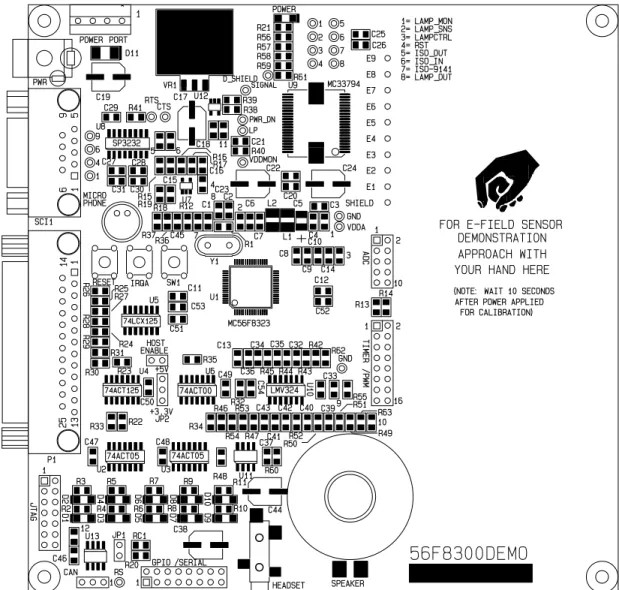
The 56F8300 Demonstration Board is detailed in Figure 1-1.
Figure 1-1. 56F8300 Demonstration Board
1.2 SPECIFICATIONS
• +9V DC input voltage typical, 300ma • Input voltage range: +7 to +15V DC
• On-board regulated +5V DC and +3.3V DC supplies • Board size: 5.5 x 5.5 inches
Technical Summary, Rev. 4
Freescale Semiconductor 2-1
Chapter 2
Technical Summary
This chapter describes the 56F8300 Demonstration Board’s available options.
2.1 OPTIONS
2.1.1 HOST_ENABLE
The HOST_ENABLE option jumper enables the Host JTAG interface on the board. With the option jumper installed, the 56F8323 device will reset into Debug mode and await Host commands on the Host JTAG port (P1). Removing the HOST_ENABLE option jumper will allow the 56F8323 device to reset normally and execute program code contained in the device’s Flash memory.
• HOST_ENABLE = INSTALLED: Debug Mode; host JTAG port is active
• HOST_ENABLE = OPEN or IDLE: Normal Mode; executes user code in Flash
(default)
2.1.2 JP1 - CAN PORT Termination Enable
JP1 provides connection of a 62 ohm termination resistor (RC1) between the CAN signals on the CAN port. This termination may or may not be required for the applied CAN network.
2.1.3 JP2 - Host JTAG Interface Level
JP2 selects the interface level of the parallel Host JTAG port (P1). The default setting is +5V, but the +3.3V position can be selected if the host parallel port is known to use this level.
2.1.4 CUT_AWAY Options
CUT_AWAY options allow the user to disconnect dedicated 56F8323 I/O port resources from development board connectors or peripherals. The CUT_AWAY options also allow for
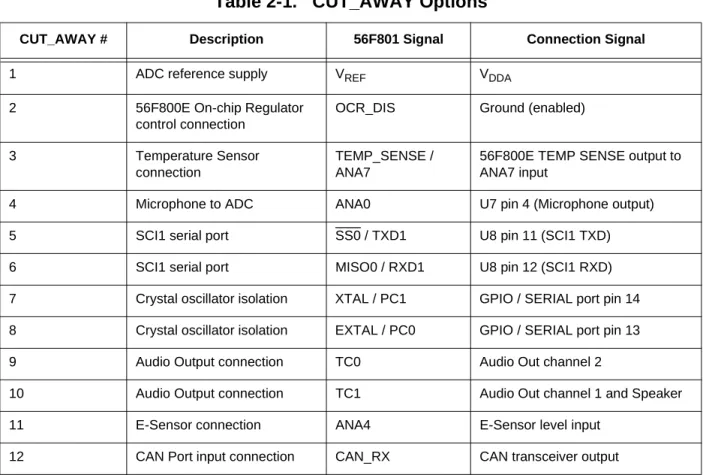
establishing the connection again by installing surface-mount 0805-size 0 ohm resistors or mod wire with the use of a soldering iron. Normal operation of the 56F8300 Demonstration Board generally does not require manipulation of the CUT_AWAY options. Table 2-1 details CUT_AWAY options.
56F8300 Demonstration Board User Manual, Rev. 4
2-2 Freescale Semiconductor
Preliminary
2.2 PORTS AND CONNECTORS
2.2.1 PWR Jack
This connector provides power input to the board by default. The PWR jack accepts a standard 2.0 ~ 2.1mm center barrel plug connector (positive voltage center) to provide the +VIN supply of +9V DC at 300ma.
2.2.2 POWER PORT
The power port provides access to the +9V DC input, GND (power ground), +5V DC and +3.3V DC power supplies. The +9V DC input should only be applied by the PWR jack or the Power Port, but not both, or a supply conflict may occur and the 56F8300 Demonstration Board could be damaged. The power port accepts a 3.5mm pin space terminal block. Figure 2-1 illustrates the power port.
Table 2-1. CUT_AWAY Options
CUT_AWAY # Description 56F801 Signal Connection Signal
1 ADC reference supply VREF VDDA
2 56F800E On-chip Regulator
control connection
OCR_DIS Ground (enabled)
3 Temperature Sensor
connection
TEMP_SENSE / ANA7
56F800E TEMP SENSE output to ANA7 input
4 Microphone to ADC ANA0 U7 pin 4 (Microphone output)
5 SCI1 serial port SS0 / TXD1 U8 pin 11 (SCI1 TXD)
6 SCI1 serial port MISO0 / RXD1 U8 pin 12 (SCI1 RXD)
7 Crystal oscillator isolation XTAL / PC1 GPIO / SERIAL port pin 14
8 Crystal oscillator isolation EXTAL / PC0 GPIO / SERIAL port pin 13
9 Audio Output connection TC0 Audio Out channel 2
10 Audio Output connection TC1 Audio Out channel 1 and Speaker
11 E-Sensor connection ANA4 E-Sensor level input
PORTS AND CONNECTORS
Technical Summary, Rev. 4
Freescale Semiconductor 2-3
Figure 2-1. Power Port
2.2.3 ADC PORT 2.2.4 GPIO / SERIAL 2.2.5 TIMER / PWM +3.3V DC GND +5V DC +9V DC 1 3 7 9 5 2 4 8 10 6 ANA6 ANA4 ANA0 VREF ANA2 ANA7 ANA5 ANA1 GND ANA3
Analog inputs. ANA0 provides MIC input. ANA4 provides E-Sensor input. ANA7 provides TEMP_SENSE input.
IRQA SS0 / TXDQ / PB0 PHASEA0 / TA0 / PB7 PHASEB0 / TA1 / PB6 RESET MISO01 / RXD1 / PB1 MOSI0 / PB2 INDEX0 / TA2 / PB5 HOME0 / TA3 / PB4 SCLK0 / PB3 1 3 7 9 5 2 4 7 10 6
Note: Most signals on this port have alternate connections on the development board. 13 15 11 14 16 12 CAN_RX / PC2 EXTAL / PC0 TEMP_SENSE CAN_TX / PC3 XTAL / PC1 RESET
Note: Most signals on this port have alternate connections on the development board. 1 3 7 9 5 2 4 7 10 6 13 15 11 14 16 12 ISA0 / PA9 ISA1 / PA10 TC1 / RXDO / PC5 ISA2 / PA11 PWMA5 / SCLK1 / PA5 PWMA3 / MISO1 / PA3 PWMA1 / PA1 FAULT2 / PA8 FAULT1 / PA7 TC0 / TXD0 /PC6 TC3 / PC4 FAULT0 / PA6
PWMA4 / MOSI1 / PA4 PWMA2 / SS1 / PA2 PWMA0 / PA0
56F8300 Demonstration Board User Manual, Rev. 4
2-4 Freescale Semiconductor
Preliminary 2.2.6 SCI1
RTS and CTS flow control connection pads are provided on the 56F8300 Demonstration Board to apply unassigned 56F800E I/O to support flow control on the SCI1 port. The RTS pad
provides RS-232 level output conversion to SCI1 port pin 8. The CTS pad provides RS-232 converted input from SCI1 pin 7.
The 1, 4, 6, and 9 pins provide RS-232 status. The 1, 4, and 6 pins are connected on the bottom of the development board to provide NULL status to the host. The user may isolate pins and provide the status connections to the host by applying I/O signals and RS-232 level conversion
2.2.7 CAN Port
The 56F800E CAN provides a 1M baud CAN transceiver and CAN_PORT I/O header. The CAN port CAN_H and CAN_L network signals are terminated with a 62 ohm resistor that is enabled or disabled with the JP1 option jumper. CUT_AWAY option number 12 will isolate the 56F800E CAN_RX signal from the transceiver so the PC2 port can be used as a general purpose I/O. Figure 2-2 illustrates the CAN port.
Figure 2-2. CAN Port
2.2.8 JTAG / EOnCE
The JTAG 14-pin connector is compatible with the EOnCE development port. This connector allows the connection of an EOnCE-style background debug cable for software development, programming and debugging in real time.
1 TXD0 4ANA0 GND RXD0 6 RTS 9 CTS 1 2 4 5 3 6 8 9 7
The SCI1 port has a femaleDB9 connector that interfaces to the 56F8323 internal SCI1 serial port via the U8 RS-232 transceiver. It uses a simple 2-wire asynchronous serial interface and is translated to RS-232 signaling levels.
1, 4, 6 connected (host null)
GROUND
CAN_L
1
USER FEATURES
Technical Summary, Rev. 4
Freescale Semiconductor 2-5
Note: This connector is only active if the HOST_ENABLE jumper is open or idle.
2.2.9 P1 - HOST JTAG
The P1 - Host JTAG connector provides development port interface to a hosting Personal Computer’s LPT or Printer port. The HOST_ENABLE option jumper must be installed for this port to operate.
Note: This connector is only active if the HOST_ENABLE jumper is installed.
2.3 USER FEATURES
Several circuits are provided for demonstration of 56F800E applications.
2.3.1 Microphone
A microphone with audio amplifier is provided on the 56F8300 Demonstration Board for user applications. The amplifier provides low-pass filtering starting at ~4000Hz for speech input. The audio signal from the microphone amplifier is provided to the ADC ANA0 input channel via CUT_AWAY option #4. TDI TDO RESET in TCK GND GND (key) TMS GND 1 3 7 9 5 2 4 7 10 6
JTAG / EOnCE BDM connection.
11 13 12 14 +3.3V DC TRST in RESET in TCK TDI TMS Pin 8 tie GND 1 2 4 5 3 14 15 17 18 16
P1 - HOST JTAG connector is a DB25 pin connector. Signals are organized for direct connection to an IBM-compatible PC with a straight-through DB25 cable.
6 7 19 20 TRST GND GND 21 22 24 25 23 13 Pin 15 tie TDO P-CON GND GND GND GND GND 8 9 11 12 10
56F8300 Demonstration Board User Manual, Rev. 4
2-6 Freescale Semiconductor
Preliminary 2.3.2 Audio Output, Headset / Speaker
Timer output channels TC0 and TC1 provide input to 4th order 4KHz low-pass filters with audio amplifier output to the headset jack or speaker. Channel TC1 is the speaker input channel. Amplifier gain is fixed by resistors R48 and R54 for channels TC0 and TC1, respectively. When using a headset, be careful to keep volume low. CUT_AWAY pads 9 and 10 will isolate the TC0 and TC1 channels respectively from the audio output.
2.3.3 MC33794 E-Sensor
The E-Sensor device is provided as a user peripheral and allows detection of an object close to one of the sensor input channels, E1 - E9. Channel E1 is provided with a large sensor plane on the 56F8300 Demonstration Board. Refer to the MC33794 data sheet for more details.
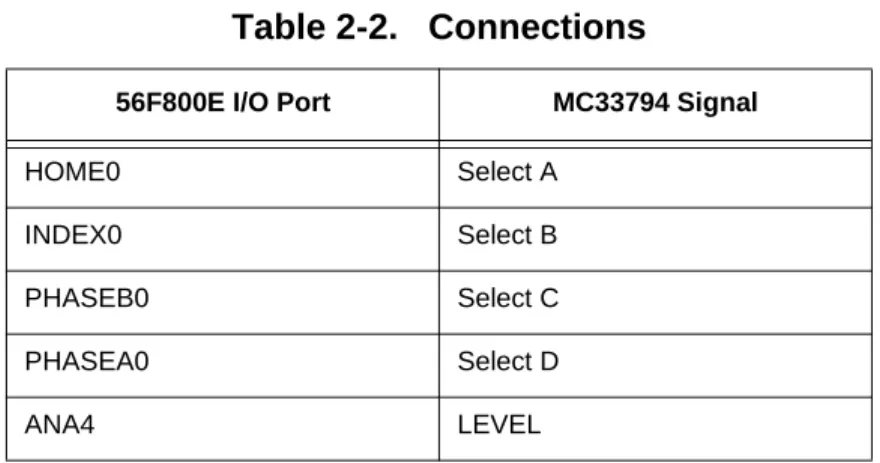
Table 2-2 details connections between the E sensor and the 56F800E; any unapplied MC33794 connections are available to the user as test pad connections near the device.
Table 2-2. Connections
56F800E I/O Port MC33794 Signal
HOME0 Select A
INDEX0 Select B
PHASEB0 Select C
PHASEA0 Select D
Indicators
Technical Summary, Rev. 4
Freescale Semiconductor 2-7
2.4 Indicators
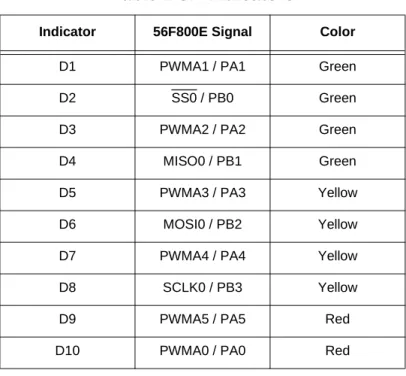
The active user indicators provided have a high level on the associated 56F800E device’s I/O port. Table 2-3 details the indicators.
Table 2-3. Indicators
Indicator 56F800E Signal Color
D1 PWMA1 / PA1 Green
D2 SS0 / PB0 Green
D3 PWMA2 / PA2 Green
D4 MISO0 / PB1 Green
D5 PWMA3 / PA3 Yellow
D6 MOSI0 / PB2 Yellow
D7 PWMA4 / PA4 Yellow
D8 SCLK0 / PB3 Yellow
D9 PWMA5 / PA5 Red
56F8300 Demonstration Board User Manual, Rev. 4
2-8 Freescale Semiconductor
56F8300 Demonstration Board Schematics, Rev. 4
Freescale Semiconductor A-1
Appendix A
DSP56F801EVM Hardware User’s Manual, Rev. 4
A-2 Freescale Semiconductor
Preliminary Figure A -1. 56 F830 0 D e monstra tion B o a rd
56F8300 Demonstration Board Schematics, Rev. 4
Freescale Semiconductor A-3
Figure A -2 . 56 F 8 30 0 De monstration Boa rd
DSP56F801EVM Hardware User’s Manual, Rev. 4
A-4 Freescale Semiconductor
Preliminary
Figure A-3. MC56F8300 Demo Board
R63 R61 SPEAKER SHIELD L1 9 6 4 1 R1 RTS CTS D3 U2 74ACT05 E7 GND JTAG 1 U4 74ACT125 R62 P1 25 13 1 14 RESET U6 74ACT00 SW1 IRQA 11 PWR GPIO 1 /SERIAL ADC 1 C44 U10 LMV324 VR1 POWER PORT 1 U7 C17 C19 15 9 6 SCI1 C38 LP C5 + JP2 +3.3V +5V C24 CAN 1 L2 C3 C4 R11 R36 C6 R38 R14 R25 R2 R4 R3 R5 R6 R7 R8 R24 R9 R10 R34 R37 R12 R20 R21 R13 R27 R28 R30 R29 R33 R35 C18 R23 C20 R22 R32 R31 C28 C27 C29 C30 C31 R41 C15 R16 R15 R18 C16R17 R47 C52 C45 C46 C47 C48 C49 C50 C51 C53 C12 C14 C13 R26 C11 C43 C36 R40 C26 C25 R43 C35 C32 R42 R44 R45 C34 C33 C40 C41 R52 R51 R49 C39 C42 R50 R46 R48 R53 R54 C9 C10 C8 RC1 R19 C21 R39 C7 C1 C2 C22 R55 R56 R57 R58 R59 2 5 6 4 7 3 8 9 D5 D6 D7 D8 D9 D10 D1 D2 10 D4 U3 74ACT05 Y1 E6 E5 E4 E3 JP1 E2 VDDMON E8 HEADSET E9 RS MICRO PHONE U12 1 U8 SP3232 VDDA R60 E1 C23 U1 MC56F8323 U13 D11 D_SHIELD U5 74LCX125 HOST ENABLE TIMER 1 /PWM C54 U9 MC33794 C37 GND POWER PWR_ON RST SIGNAL LAMP_OUT LAMPCTRL LAMP_SNS LAMP_MON ISO_OUT ISO_IN ISO-9141 12 U11 FOR CALIBRATION) AFTER POWER APPLIED (NOTE: WAIT 10 SECONDS
56F8300DEMO
16 2 10 2
YOUR HAND HERE APPROACH WITH DEMONSTRATION FOR E-FIELD SENSOR
8= 7= 6= 5= 4= 3= 2= 1= 8 7 6 5 4 3 2 1 SILKSCREEN-TOP MOTOROLA
MC56F8300DEMO AXM-0319 REV.C AXIOM MANUFACTURING
INDEX
Index, Rev. 4
Freescale Semiconductor Index-1
Numerics
56F8300 Peripheral User Manualxii A
ADCxii, 1-1, 2-2, 2-5
Analog-to-Digital Converter ADCxii
Audio Output connection2-2 C
CANxii
CAN Port1-1
CAN port input connection2-2
CExi
Clear To Send CTSxii
COM11-1
Controller Area Network CANxii
Crystal oscillator isolation2-2
CTSxii
CUT_AWAY2-5 D
DB252-5
DSP56800E Reference Manualxii E
Electrostatic Discharge ESDxi, xii
EMCxi
Enhanced On-Chip Emulation EOnCExii EOnCExii ESDxi, xii E-Sensor1-1 E-Sensor connection2-2 F FCCxi G
General Purpose Input/Output Port GPIOxii
GPIOxii
GPIO / Serial Port1-1 H
Host JTAG Port1-1
Host JTAG port (P1)2-1
HOST_ENABLE2-5 J
Joint Test Action Group JTAGxii JTAGxii JTAG / EOnCE1-1 Jumper idlexi Jumper inxi Jumper installedxi Jumper offxi Jumper onxi Jumper outxi L low-pass filtering2-5 M Microphone to ADC2-2
microphone with audio amplifier2-5 O
On-chip regulator control connection2-2 P
PCxii
Personal Computer PCxii
Pulse Width Modulation PWMxii
56F8300 Demonstration Board User Manual, Rev. 4
Index-2 Freescale Semiconductor
Preliminary R Request To Send RTSxii RS-2321-1 RTSxii S SCIxii, 1-1
SCI1 serial port2-2
Serial Communications Interface SCIxii
Stereo Audio Output1-1 T
Technical Data / Product Preview, Electric Field Imaging Device, 33794xii
Technical Data 56F8323 16-bit Hybrid Controllerxii
Temperature Sensor connection2-2
termination resistor (RC1)2-1
How to Reach Us:
Home Page: www.freescale.com
E-mail:
USA/Europe or Locations Not Listed: Freescale Semiconductor
Technical Information Center, CH370 1300 N. Alma School Road
Chandler, Arizona 85224
+1-800-521-6274 or +1-480-768-2130 [email protected]
Europe, Middle East, and Africa: Freescale Halbleiter Deutschland GmbH Technical Information Center
Schatzbogen 7 81829 Muenchen, Germany +44 1296 380 456 (English) +46 8 52200080 (English) +49 89 92103 559 (German) +33 1 69 35 48 48 (French) [email protected] Japan:
Freescale Semiconductor Japan Ltd. Headquarters ARCO Tower 15F 1-8-1, Shimo-Meguro, Meguro-ku, Tokyo 153-0064, Japan 0120 191014 or +81 3 5437 9125 [email protected] Asia/Pacific:
Freescale Semiconductor Hong Kong Ltd. Technical Information Center
2 Dai King Street Tai Po Industrial Estate Tai Po, N.T., Hong Kong +800 2666 8080
For Literature Requests Only:
Freescale Semiconductor Literature Distribution Center P.O. Box 5405
Denver, Colorado 80217 1-800-441-2447 or 303-675-2140 Fax: 303-675-2150
Freescale™ and the Freescale logo are trademarks of Freescale Semiconductor, Inc. All other product or service names are the property of their respective owners. This product incorporates SuperFlash® technology licensed from SST. © Freescale Semiconductor, Inc. 2004, 2005. All rights reserved. MC56F8300DBUM
Rev. 4 08/2005
Information in this document is provided solely to enable system and software implementers to use Freescale Semiconductor products. There are no express or implied copyright licenses granted hereunder to design or fabricate any integrated circuits or integrated circuits based on the information in this document.
Freescale Semiconductor reserves the right to make changes without further notice to any products herein. Freescale Semiconductor makes no warranty, representation or guarantee regarding the suitability of its products for any particular purpose, nor does Freescale Semiconductor assume any liability arising out of the application or use of any product or circuit, and specifically disclaims any and all liability, including without limitation consequential or incidental damages. “Typical” parameters that may be provided in Freescale Semiconductor data sheets and/or specifications can and do vary in different applications and actual performance may vary over time. All operating parameters, including “Typicals”, must be validated for each customer application by customer’s technical experts. Freescale Semiconductor does not convey any license under its patent rights nor the rights of others. Freescale Semiconductor products are not designed, intended, or authorized for use as components in systems intended for surgical implant into the body, or other applications intended to support or sustain life, or for any other application in which the failure of the Freescale Semiconductor product could create a situation where personal injury or death may occur. Should Buyer purchase or use Freescale Semiconductor products for any such unintended or unauthorized application, Buyer shall indemnify and hold Freescale Semiconductor and its officers, employees, subsidiaries, affiliates, and distributors harmless against all claims, costs, damages, and expenses, and reasonable attorney fees arising out of, directly or indirectly, any claim of personal injury or death associated with such unintended or unauthorized use, even if such claim alleges that Freescale Semiconductor was negligent regarding the design or manufacture of the part.