VMware vSphere
Automation SDKs
Programming Guide
Modified on 27 APR 2018
VMware vSphere Automation SDK 6.7
ESXi 6.7
You can find the most up-to-date technical documentation on the VMware website at:
https://docs.vmware.com/
If you have comments about this documentation, submit your feedback to
Copyright © 2015–2018 VMware, Inc. All rights reserved. Copyright and trademark information.
VMware, Inc.
3401 Hillview Ave. Palo Alto, CA 94304 www.vmware.com
Contents
1
About vSphere Automation SDKs Programming Guide 7
Updated Information 8
2
Introduction to the vSphere Automation SDKs 9
vSphere Automation SDKs Overview 9Supported Programming Languages 11
3
Components of the vSphere Automation Virtualization Layer 12
Components and Services of a Virtual Environment 12vSphere Deployment Configurations 13
4
Retrieving Service Endpoints 16
Filtering for Predefined Service Endpoints 17
Filter Parameters for Predefined Service Endpoints 18
Connect to the Lookup Service and Retrieve the Service Registration Object 18
Java Example of Connecting to the Lookup Service and Retrieving the Service Registration Object 19
.NET Example of Connecting to the Lookup Service and Retrieving a Service Registration Object 20
Python Example of Connecting to the Lookup Service and Retrieving a Service Registration Object 21
Retrieve Service Endpoints on vCenter Server Instances 22
Java Example of Retrieving a Service Endpoint on a vCenter Server Instance 22 .NET Example of Retrieving a Service Endpoint on a vCenter Server Instance 23 Python Example of Retrieving a Service Endpoint on a vCenter Server Instance 24 Perl Example of Retrieving a Service Endpoint from Multiple vCenter Server instances 25 Retrieve a vCenter Server ID by Using the Lookup Service 27
Java Example of Retrieving a vCenter Server ID by Using the Lookup Service 27 .NET Example of Retrieving a vCenter Server ID by Using the Lookup Service 28 Python Example of Retrieving a vCenter Server ID by Using the Lookup Service 29 Perl Example of Retrieving a vCenter Server ID By Using the Lookup Service 29 Retrieve a vSphere Automation Endpoint on a vCenter Server Instance 30
Java Example of Retrieving a vSphere Automation Endpoint on a vCenter Server Instance 30 .NET Example of Retrieving a vSphere Automation Endpoint on a vCenter Server Instance 31 Python Example of Retrieving a vSphere Automation Endpoint on a vCenter Server Instance 31 Perl Example of Retrieving a vSphere Automation Endpoint on a vCenter Server Instance 32
5
Authentication Mechanisms 33
Retrieve a SAML Token 34Java Example of Retrieving a SAML Token 34 .NET Example of Retrieving a SAML Token 35 Python Example of Retrieving a SAML Token 35 Perl Example of Retrieving a SAML Token 36
Create a vSphere Automation Session with a SAML Token 36
Java Example of Creating a vSphere Automation API Session with a SAML Token 37 .NET Example of Creating a vSphere Automation API Session with a SAML Token 38 Python Example of Creating a vSphere Automation API Session with a SAML Token 39 Perl Example of Creating a vSphere Automation API Session with a SAML Token 40 Create a vSphere Automation Session with User Credentials 41
Java Example of Creating a vSphere Automation API Session with User Credentials 42 Create a Web Services Session 43
Python Example of Creating a Web Services Session 43 Perl Example of Creating a Web Services Session 44
6
Accessing vSphere Automation Services 45
Access a vSphere Automation Service 46
Java Example of Accessing a vSphere Automation Service 46
7
Content Library Service 48
Content Library Overview 48Content Library Types 49 Content Library Items 49 Content Library Storage 49 Querying Content Libraries 52
Listing All Content Libraries 52
Listing Content Libraries of a Specific Type 54
List Content Libraries by Using Specific Search Criteria 55 Content Libraries 57
Create a Local Content Library 58 Publish an Existing Content Library 60 Publish a Library at the Time of Creation 63 Subscribe to a Content Library 64
Synchronize a Subscribed Content Library 68 Editing the Settings of a Content Library 69 Removing the Content of a Subscribed Library 70 Delete a Content Library 71
Library Items 71
Create an Empty Library Item 72 Querying Library Items 74
Edit the Settings of a Library Item 75
Upload a File from a Local System to a Library Item 79 Upload a File from a URL to a Library Item 82
Download Files to a Local System from a Library Item 86 Synchronizing a Library Item in a Subscribed Content Library 92 Removing the Content of a Library Item 92
Deleting a Library Item 92
8
Content Library Support for OVF Packages 94
Using the Content Library Service to Handle OVF Packages 94 Upload an OVF Package from a URL to a Library Item 94
Upload an OVF Package from a Local File System to a Library Item 97 Using the LibraryItem Service to Execute OVF-Specific Tasks 99
Deploy a Virtual Machine or Virtual Appliance from an OVF Package in a Content Library 100 Create an OVF Package in a Content Library from a Virtual Machine 102
9
Tagging Service 105
Creating Tags 105
Creating a Tag Category 106 Creating a Tag 108
Creating Tag Associations 111
Assign the Tag to a Content Library 111 Assign a Tag to a Cluster 112
Updating a Tag 115
Java Example of Updating a Tag Description 115 .NET Example of Updating a Tag Description 115 Python Example of Updating a Tag Description 116
10
Virtual Machine Configuration and Operations 117
Filtering Virtual Machines 117Java Example of Filtering Virtual Machines 117 Python Example of Filtering Virtual Machines 118 Create a Virtual Machine 118
Java Example of Creating a Basic Virtual Machine 119 Python Example of Creating a Basic Virtual Machine 120 Configuring a Virtual Machine 121
Name and Placement 121 Boot Options 124
Operating System 127 CPU and Memory 127 Networks 131
Performing Virtual Machine Power Operations 135 Java Example of Powering On a Virtual Machine 136 Python Example of Powering On a Virtual Machine 136 .NET Example of Powering On a Virtual Machine 137
About vSphere Automation
SDKs Programming Guide
1
VMware vSphere Automation SDKs Programming Guide
provides information about configuring the
VMware vSphere
®Automation™ SDKs. VMware provides different APIs and SDKs for different
applications and goals. The vSphere Automation SDKs support the development of clients that use the
vSphere Automation SDK for infrastructure support tasks.
Intended Audience
This information is intended for anyone who wants to use the vSphere Automation SDKs for the following
programming languages:
n
Java
n.NET
nPython
nPerl
Updated Information
This
VMware vSphere Automation SDKs Programming Guide
is updated with each release of the product
or when necessary.
This table provides the update history of the
VMware vSphere Automation SDKs Programming Guide
.
Revision Description
27 APR 2018 Updated some code snippets. 17 APR 2018 Initial release.
Introduction to the
vSphere Automation SDKs
2
The vSphere Automation SDKs bundle client libraries for accessing new vSphere Automation features
like Content Library and existing features like Tagging. The vSphere Automation SDKs contain sample
applications and API reference documentation for the Content Library and Tagging services. The
vSphere Automation SDKs also provide sample code that retrieves the endpoints of vSphere Automation
and vSphere services and establishes a secure connection with the vSphere Automation endpoint.
vSphere Automation supports five languages for accessing the vSphere Automation API services and
provides five SDKs for developing client applications for managing components in your virtual
environment.
This chapter includes the following topics:
nvSphere Automation SDKs Overview
nSupported Programming Languages
vSphere Automation SDKs Overview
The vSphere Automation API provides a unified programming interface to vSphere Automation services
that you can use through SDKs provided in five programming languages. The vSphere Automation API
provides a service-oriented architecture for accessing resources in the virtual environment by issuing
requests to the vSphere Automation Endpoint.
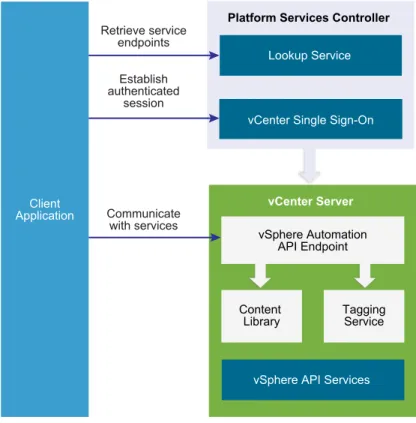
vSphere Automation API client applications communicate with services on the
Platform Services Controller and vCenter Server.
Figure 2
‑
1. Communication Model of vSphere Automation API Client Applications
vCenter Server Content Library vSphere Automation API Endpoint Тagging ServicevSphere API Services Platform Services Controller
vCenter Single Sign-On Lookup Service Client Application Retrieve service endpoints Establish authenticated session Communicate with services
vSphere Automation API client applications use the Lookup Service to retrieve the vCenter Single
Sign-On endpoint, the vSphere Automation Endpoint, and the endpoints of services that are exposed through
the vSphere API. To access vSphere Automation services such as Content Library and Tagging, client
applications issue requests to the vSphere Automation Endpoint. By using the vCenter Single Sign-On
service, client applications can either establish an authenticated vSphere Automation session, or
authenticate individual requests to the vSphere Automation Endpoint.
Client applications can access services that are exposed through the vSphere API by using the vSphere
Management SDK.
Depending on the vSphere deployment model, client applications can communicate with
vSphere Automation services on a single vCenter Server instance or multiple vCenter Server instances.
For more information about the vSphere deployment models, see
Chapter 3 Components of the vSphere
Automation Virtualization Layer
SDK Developer Setup
To start developing a vSphere Automation API client application, you must download the software and set
up a development environment. You can find instructions for setting up a development environment in the
README for each vSphere Automation SDK.
SDK Samples
The vSphere Automation SDKs provide sample applications that you can extend to implement client
applications that serve your needs. The code examples in the vSphere Automation SDKs documentation
are based on these sample applications.
Supported Programming Languages
The vSphere Automation SDKs are packed in five different programming languages that let you build
client applications on your preferred programming language.
n
vSphere Automation SDK for Java
nvSphere Automation SDK for Python
nvSphere Automation SDK for .NET
nvSphere Automation SDK for Perl
nvSphere Automation SDK for REST
Components of the
vSphere Automation
Virtualization Layer
3
At the core of vSphere Automation is vSphere, which provides the virtualization layer of the
software-defined data center. You can use vSphere deployment options for vCenter Server and ESXi hosts to build
virtual environments of different scales.
This chapter includes the following topics:
n
Components and Services of a Virtual Environment
nvSphere Deployment Configurations
Components and Services of a Virtual Environment
Starting with vSphere 6.0, the deployment of the virtual environment consists of two major components
that provide different sets of services, the VMware Platform Services Controller and vCenter Server. You
can deploy vCenter Server with an embedded or external Platform Services Controller.
Services Installed with Platform Services Controller
The Platform Services Controller group of infrastructure services contains vCenter Single Sign-On,
License Service, Lookup Service, and VMware Certificate Authority. The services installed with the
Platform Services Controller are common to the entire virtual environment. A Platform Services Controller
can be connected to one or more vCenter Server instances. In a deployment that consists of more than
one Platform Services Controller, the data of each service is replicated across all
In vSphere Automation API client applications, you use the vCenter Single Sign-On and the Lookup
Service on the Platform Services Controller to provide a range of functionality.
Authentication and
Session Management
You use the vCenter Single Sign-On service to establish an authenticated
session with the vSphere Automation Endpoint. You send credentials to the
vCenter Single Sign-On service and receive a SAML token that you use to
obtain a session ID from the vSphere Automation Endpoint. Alternatively,
you can access the vSphere Automation APIs in a sessionless manner by
including the SAML token in every request that you issue to the
vSphere Automation Endpoint.
Service Discovery
You use the Lookup Service to discover the endpoint URL for the vCenter
Single Sign-On service on the Platform Services Controller, the location of
the vCenter Server instances, and the vSphere Automation Endpoint.
Services Installed with vCenter Server
vCenter Server is a central administration point for ESXi hosts. The vCenter Server group of services
contains vCenter Server, vSphere Web Client, Inventory Service, vSphere
®Auto Deploy™, vSphere
®ESXi™ Dump Collector, VMware vSphere
®Syslog Collector on Windows and VMware vSphere Syslog
Service for the vCenter Server Appliance.
vCenter Server also provides services that you can access through the vSphere Automation Endpoint.
Content Library Service
You can use the Content Library Service to share VM templates, vApp
templates, and other files across the software-defined data center. You can
create, share, and subscribe to content libraries on the same
vCenter Server instance or on a remote instance. This promotes
consistency, compliance, efficiency, and automation in deploying workloads
at scale. By using content libraries, you can also create OVF packages
from virtual machines and virtual appliances in hosts, resource pools, and
clusters. You can then use the OVF packages to provision new virtual
machines in hosts, resource pools, and clusters.
Tagging Service
This service supports the definition of tags that you can associate with
vSphere objects or vSphere Automation resources. The
vSphere Automation SDKs provide the capability to manage tags
programmatically.
vSphere Deployment Configurations
vSphere Automation client applications communicate with services on the Platform Services Controller
and vCenter Server components of the virtual environment. vCenter Server can be deployed with an
embedded or external Platform Services Controller.
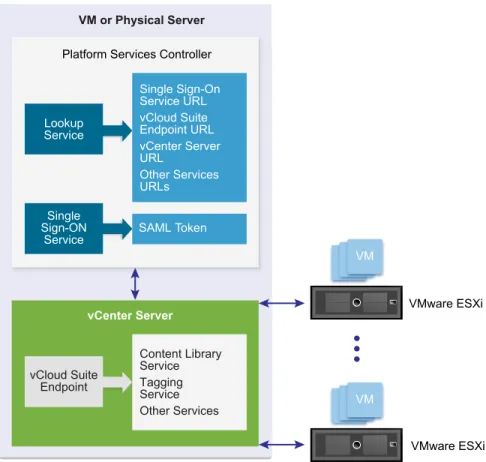
vCenter Server with an Embedded Platform Services Controller
vCenter Server and Platform Services Controller reside on the same virtual machine or physical server.
This deployment is most suitable for small environments such as development or test beds.
You can use the Platform Services Controller in two ways to establish secure, authenticated sessions for
your client application, by making requests to the Lookup Service and the vCenter Single Sign-On
Service.
One way to use the Platform Services Controller is to request an authentication token that can be used to
authenticate requests across services. The client connects to the Lookup Service and retrieves the
vCenter Single Sign-On Service endpoint and the vSphere Automation API endpoint. The client then uses
the vCenter Single Sign-On endpoint to authenticate with user credentials and receive a token that
securely verifies the client's credentials. This allows the client to authenticate with a number of service
endpoints without sending user credentials over the network repeatedly.
Alternatively, if the client connects directly to the vSphere Automation API endpoint, there is no need for
the client to interact with the vCenter Single Sign-On Service. The client sends user credentials to the
vSphere Automation API endpoint, which creates a session identifier that persists across requests.
Figure 3
‑
1. vCenter Server with Embedded Platform Services Controller
VM VM VMware ESXi VMware ESXi vCenter Server VM or Physical Server Single Sign-On Service URL vCloud Suite Endpoint URL vCenter Server URL Other Services URLs Content Library Service Тagging Service Other Services SAML Token
Platform Services Controller
Lookup Service Single Sign-ON Service vCloud Suite Endpoint
vCenter Server with an External Platform Services Controller
In the case of an external Platform Services Controller, the vCenter Server and the
Platform Services Controller are deployed on separate virtual machines or physical servers. The
Platform Services Controller can be shared across several vCenter Server instances. For larger
deployments or to provide better availability, more than one Platform Services Controller can be deployed.
When configured as replication partners within a single vCenter Single Sign-On domain,
Platform Services Controller instances replicate all user and system data within the cluster.
A client application functions in a similar way as in a Platform Services Controller with embedded
vCenter Server deployment. The only difference is that the client application can access services on
multiple vCenter Server instances, or services only on a particular vCenter Server instance.
Figure 3
‑
2. vCenter Server with External Platform Services Controller
VM or Physical Server Single Sign-On Service URL vCloud Suite Endpoint URL vCenter Server URL Other Services URLs SAML TokenPlatform Services Controller
VMware ESXi Lookup Service Single Sign-ON Service
VMware ESXi VMware ESXi VMware ESXi
VM VM VM VM or Physical Server vCenter Server Content Library Service Тagging Service Other Services vCloud Suite Endpoint vCenter Server Content Library Service Тagging Service Other Services vCloud Suite Endpoint VM or Physical Server VM
Retrieving Service Endpoints
4
To access services and resources in the virtual environment, vSphere Automation API client applications
must know the endpoints of vSphere Automation and vSphere services. Client applications retrieve
service endpoints from the Lookup Service that runs on the Platform Services Controller.
The Lookup Service provides service registration and discovery by using a Web services API. By using
the Lookup Service, you can retrieve endpoints of services on the Platform Services Controller and
vCenter Server. The following endpoints are available from the Lookup Service.
n
The vCenter Single Sign-On endpoint on the Platform Services Controller. You use the vCenter
Single Sign-On service to get a SAML token and establish an authenticated session with a
vSphere Automation endpoint or a vCenter Server endpoint.
n
The vSphere Automation Endpoint on vCenter Server. Through the vSphere Automation Endpoint,
you can make requests to vSphere Automation API services such as virtual machine management,
Content Library, and Tagging.
n
The vCenter Server endpoint. In an environment with external Platform Services Controller instances,
you can use the vCenter Server endpoint to get the node ID of a particular vCenter Server instance.
By using the node ID , you can retrieve service endpoints on that vCenter Server instance.
n
The vSphere API endpoint and endpoints of other vSphere services that run on vCenter Server.
Workflow for Retrieving Service Endpoints
The workflow that you use to retrieve service endpoints from the Lookup Service might vary depending on
the endpoints that you need and their number. Follow this general workflow for retrieving service
endpoints.
1
Connect to the Lookup Service on the Platform Services Controller and service registration object so
that you can query for registered services.
2
Create a service registration filter for the endpoints that you want to retrieve.
3
Use the filter to retrieve registration information for services from the Lookup Service.
4
Extract one or more endpoint URLs from the array of registration information that you receive from
the Lookup Service.
This chapter includes the following topics:
nFiltering for Predefined Service Endpoints
n
Filter Parameters for Predefined Service Endpoints
n
Connect to the Lookup Service and Retrieve the Service Registration Object
nRetrieve Service Endpoints on vCenter Server Instances
n
Retrieve a vCenter Server ID by Using the Lookup Service
n
Retrieve a vSphere Automation Endpoint on a vCenter Server Instance
Filtering for Predefined Service Endpoints
The Lookup Service maintains a registration list of vSphere services. You can use the Lookup Service to
retrieve registration information for any service by setting a registration filter that you pass to the
List()
function on the Lookup Service. The functions and objects that you can use with the Lookup Service are
defined in the
lookup.wsdl
file that is part of the SDK.
Lookup Service Registration Filters
You can query for service endpoints through a service registration object that you obtain from the Lookup
Service. You invoke the
List()
function on the Lookup Service to list the endpoints that you need by
passing
LookupServiceRegistrationFilter
.
LookupServiceRegistrationFilter
identifies the
service and the endpoint type that you can retrieve.
Optionally, you can include the node ID parameter in the filter to identify the vCenter Server instance
where the endpoint is hosted. When the node ID is omitted, the
List()
function returns the set of
endpoint URLs for all instances of the service that are hosted on different vCenter Server instances in the
environment.
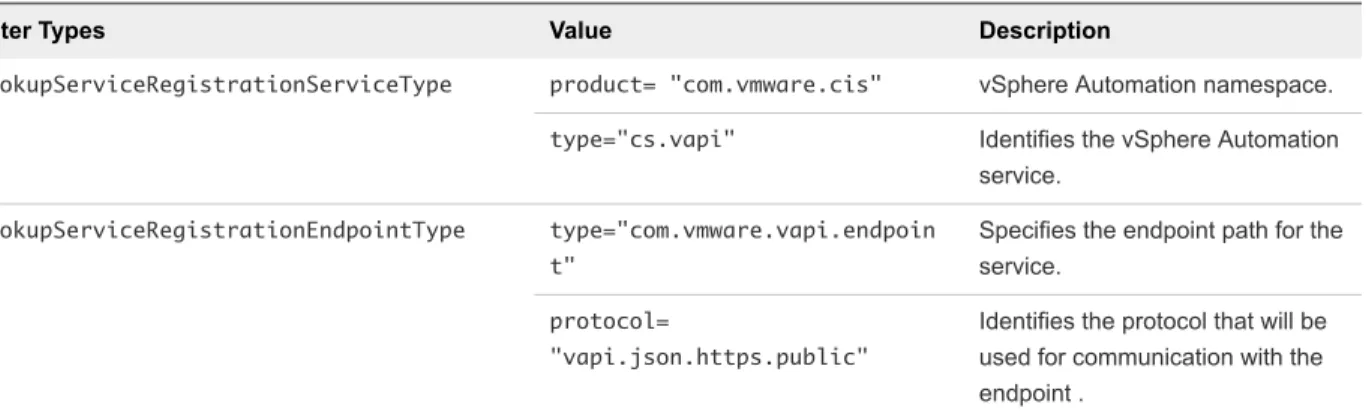
For example, a
LookupServiceRegistrationFilter
for queering the vSphere Automation service has
these service endpoint elements.
Table 4
‑
1. Service Registration Filter Parameters
Filter Types Value Description
LookupServiceRegistrationServiceType product= "com.vmware.cis" vSphere Automation namespace.
type="cs.vapi" Identifies the vSphere Automation service.
LookupServiceRegistrationEndpointType type="com.vmware.vapi.endpoin t"
Specifies the endpoint path for the service.
protocol=
"vapi.json.https.public"
Identifies the protocol that will be used for communication with the endpoint .
For information about the filter parameter of the available predefined service endpoints, see
Filter
Parameters for Predefined Service Endpoints
.
Filter Parameters for Predefined Service Endpoints
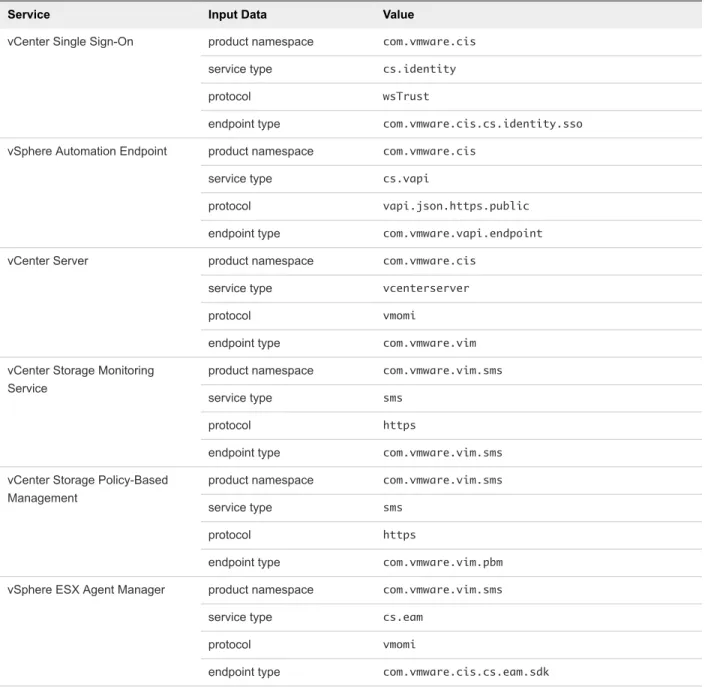
Depending on the service endpoint that you want to retrieve, you provide different parameters to the
LookupServiceRegistrationFilter
that you pass to the
List()
function on the Lookup Service. To
search for services on a particular vCenter Server instance, set the node ID parameter to the filter.
Table 4
‑
2. Input Data for URL Retrieval for the Lookup Service Registration Filter
Service Input Data Value
vCenter Single Sign-On product namespace com.vmware.cis
service type cs.identity
protocol wsTrust
endpoint type com.vmware.cis.cs.identity.sso
vSphere Automation Endpoint product namespace com.vmware.cis
service type cs.vapi
protocol vapi.json.https.public
endpoint type com.vmware.vapi.endpoint
vCenter Server product namespace com.vmware.cis
service type vcenterserver
protocol vmomi
endpoint type com.vmware.vim
vCenter Storage Monitoring Service
product namespace com.vmware.vim.sms
service type sms
protocol https
endpoint type com.vmware.vim.sms
vCenter Storage Policy-Based Management
product namespace com.vmware.vim.sms
service type sms
protocol https
endpoint type com.vmware.vim.pbm
vSphere ESX Agent Manager product namespace com.vmware.vim.sms
service type cs.eam
protocol vmomi
endpoint type com.vmware.cis.cs.eam.sdk
Connect to the Lookup Service and Retrieve the Service
Registration Object
You must connect to the Lookup Service to gain access to its operations. After you connect to the Lookup
Service, you must retrieve the service registration object to make registration queries.
n
Java Example of Connecting to the Lookup Service and Retrieving the Service Registration Object
The example is based on the code in the
LookupServiceHelper.java
sample file.
n
.NET Example of Connecting to the Lookup Service and Retrieving a Service Registration Object
The example is based on the code from the
LookupServiceHelper.cs
sample file.
n
Python Example of Connecting to the Lookup Service and Retrieving a Service Registration Object
The example is based on the code from the
lookup_service_helper.py
sample file.
Procedure
1
Connect to the Lookup Service.
a
Configure a connection stub for the Lookup Service endpoint, which uses SOAP bindings, by
using the HTTPS protocol.
b
Create a connection object to communicate with the Lookup Service.
2
Retrieve the Service Registration Object.
a
Create a managed object reference to the Service Instance.
b
Invoke the
RetrieveServiceContent()
method to retrieve the
ServiceContent
data object.
c
Save the managed object reference to the service registration object.
With the service registration object, you can make registration queries.
Java Example of Connecting to the Lookup Service and Retrieving
the Service Registration Object
The example is based on the code in the
LookupServiceHelper.java
sample file.
This example uses the steps that are described in the
Connect to the Lookup Service and Retrieve the
Service Registration Object
procedure.
Note
For a complete and up-to-date version of the sample code, see the
vSphere Automation SDK Java
samples
at GitHub.
Note
The connection code in the example disables certificate and host name checking for the
connection for simplicity. For a production deployment, supply appropriate handlers. See the SDK sample
file for a more detailed example of connection code.
... String lookupServiceUrl; LsService lookupService; LsPortType lsPort; ManagedObjectReference serviceInstanceRef; LookupServiceContent lookupServiceContent; ManagedObjectReference serviceRegistration;
HostnameVerifier hostVerifier = new HostnameVerifier (){
public boolean verify(String urlHostName, SSLSession session){ return true; } }; HttpsURLConnection.setDefaultHostnameVerifier(hostVerifier); SslUtil.trustAllHttpsCertificates();
//2 - Create the Lookup Service stub. lookupService = new LsService(); lsPort = new LsPorType.getLsPort();
((BindingProvider)lsProvider).getRequestContext().put(BindingProvider.ENDPOINT_ADDRESS_PROPERTY, lookupServiceUrl);
//4 - Create a predetermined management object. serviceInstanceRef = new ManagedObjectReference(); serviceInstanceRef.setType("LookupServiceInstance"); serviceInsanceRefl.setValue("ServiceInstance");
//5 - Retrieve the ServiceContent object.
lookupServiceContent = lsPort.retrieveServiceContent(serviceInstanceRef); //6 - Retrieve the service registration
serviceRegistration = lookupServiceContent.getServiceRegistration(); ...
.NET Example of Connecting to the Lookup Service and
Retrieving a Service Registration Object
The example is based on the code from the
LookupServiceHelper.cs
sample file.
This example uses the steps that are described in the
Connect to the Lookup Service and Retrieve the
Service Registration Object
procedure.
Note
For a complete and up-to-date version of the sample code, see the
vSphere Automation
SDK .NET samples
at GitHub.
...
// 1 - Create a custom binding for SOAP messages. var customBinding = new CustomBinding();
var textMessageEncoding = new TextMessageEncodingBindingElement(); textMessageEncoding.MessageVersion = MessageVersion.Soap11; var transport = new HttpsTransportBindingElement();
transport.MaxReceivedMessageSize = 2147483647; customBinding.Elements.Add(textMessageEncoding); customBinding.Elements.Add(transport);
var address = new EndpointAddress(lsUrl);
// 3 - Create a connection object to communicate with the Lookup Service. lsPort = new LsPortTypeClient(customBinding, address);
// 4 - Manufacture a managed object reference.
var serviceInstanceRef = new ManagedObjectReference(); serviceInstanceRef.type = "LookupServiceInstance"; serviceInstanceRef.Value = "ServiceInstance"; // 5 - Retrieve the ServiceContent managed object.
serviceContent = lsPort.RetrieveServiceContent(serviceInstanceRef); // 6 - Retrieve the service registration object.
serviceRegistration = serviceContent.serviceRegistration;
Python Example of Connecting to the Lookup Service and
Retrieving a Service Registration Object
The example is based on the code from the
lookup_service_helper.py
sample file.
This example uses the steps that are described in the
Connect to the Lookup Service and Retrieve the
Service Registration Object
procedure.
Note
For a complete and up-to-date version of the sample code, see the
vSphere Automation SDK
Python samples
at GitHub.
...
# 1 - Create SOAP client object to communicate with the Lookup Service. my_ls_stub = Client(url=wsdl_url, location=ls_url)
# 2 - Configure service & port type for client transaction. my_ls_stub.set_options(service='LsService', port='LsPort') # 3 - Manufacture a managed object reference.
managed_object_ref = \
my_ls_stub.factory.create('ns0:ManagedObjectReference') managed_object_ref._type = 'LookupServiceInstance'
managed_object_ref.value = 'ServiceInstance' # 4 - Retrieve the ServiceContent object. ls_service_content = \
my_ls_stub.service.RetrieveServiceContent(managed_object_ref) # 5 - Retrieve the service registration object.
Retrieve Service Endpoints on vCenter Server Instances
You can create a function that obtains the endpoint URLs of a service on all vCenter Server instances in
the environment. You can modify that function to obtain the endpoint URL of a service on a particular
vCenter Server instance.
Prerequisites
n
Establish a connection with the Lookup Service.
nRetrieve a service registration object.
Procedure
1
Create a registration filter object, which contains the following parts:
nA filter criterion for service information
n
A filter criterion for endpoint information
Option Description
Omit the node ID parameter Retrieves the endpoint URLs of the service on all vCenter Server instances. Include the node ID parameter Retrieves the endpoint URL of the service on a particular vCenter Server
instance.
2
Retrieve the specified service information by using the
List()
function.
Depending on whether you included the node ID parameter, the
List()
function returns one of the
following results:
n
A list of endpoint URLs for a service that is hosted on all vCenter Server instances in the
environment.
n
An endpoint URL of a service that runs on a particular vCenter Server instance.
What to do next
Call the function that you implemented to retrieve service endpoints. You can pass different filter
parameters depending on the service endpoints that you need. For more information, see
Filter
Parameters for Predefined Service Endpoints
.
To retrieve a service endpoint on a particular vCenter Server instance, you must retrieve the node ID of
that instance and pass it to the function. For information about how to retrieve the ID of a vCenter Server
instance, see
Retrieve a vCenter Server ID by Using the Lookup Service
.
Java Example of Retrieving a Service Endpoint on a
vCenter Server Instance
This example provides a common pattern for filtering Lookup Service registration data. This example is
based on the code in the
LookupServiceHelper.java
sample file.
This example uses the steps that are described in the
Retrieve Service Endpoints on vCenter Server
Instances
procedure.
Note
For a complete and up-to-date version of the sample code, see the
vSphere Automation SDK Java
samples
at GitHub.
... /**
* Define filter criterion for retrieving a service endpoint. * Omit the nodeID parameter to retrieve the endpoints hosted * on all vCenter Server instances in the environment.
*/
List<LookupServiceRegistrationInfo> lookupServiceUrls(String prod, String svcType, String proto, String epType, String nodeID){ LookupServiceRegistrationServiceType filterServiceType = new LookupServiceRegistrationServiceType(); filterServiceType.setProduct(prod); filterServiceType.setType(svcType); LookupServiceRegistrationEndpointType filterEndpointType = new LookupServiceRegistrationEndpointType(); filterEndpointType.setProtocol(proto); filterEndpointType.setType(epType);
LookupServiceRegistrationFilter filterCriteria = new LookupServiceRegistrationFilter(); filterCriteria.setServiceType(filterServiceType);
filterCriteria.setEndpointType(filterEndpointType); filterCriteria.setNode(nodeID);
return lsPort.list(serviceRegistration, filterCriteria); }
...
.NET Example of Retrieving a Service Endpoint on a
vCenter Server Instance
This example provides a common pattern for filtering Lookup Service registration data. This example is
based on the code in the
LookupServiceHelper.cs
sample file.
This example uses the steps that are described in the
Retrieve Service Endpoints on vCenter Server
Instances
procedure.
Note
For a complete and up-to-date version of the sample code, see the
vSphere Automation
SDK .NET samples
at GitHub.
...
public LookupServiceRegistrationInfo[] LookupSingleServiceUrl(string prod, string sType, string proto, string eType, string nodeId) {
// 1 - Create a filter criterion for service info.
var filterServiceType = new LookupServiceRegistrationServiceType(); filterServiceType.product = prod;
filterServiceType.type = sType;
// 2 - Create a filter criterion for endpoint info.
var filterEndpointType = new LookupServiceRegistrationEndpointType(); filterEndpointType.protocol = proto;
filterEndpointType.type = eType;
// 3 - Create the registration filter object.
var filterCriteria = new LookupServiceRegistrationFilter(); filterCriteria.serviceType = filterServiceType;
filterCriteria.endpointType = filterEndpointType; filterCriteria.nodeId = nodeId;
// 4 - Retrieve specified service info with the List() method. return lsPort.List(serviceRegistration, filterCriteria); }
Python Example of Retrieving a Service Endpoint on a
vCenter Server Instance
This example provides a common pattern for filtering Lookup Service registration data. This example is
based on the code in the
lookup_service_helper.py
sample file.
This example uses the steps that are described in the
Retrieve Service Endpoints on vCenter Server
Instances
procedure.
Note
For a complete and up-to-date version of the sample code, see the
vSphere Automation SDK
Python samples
at GitHub.
def to lookup_single_service_info(prod, svc_type, proto, ep_type, node_id) : # 1 - Create a filter criterion for service info.
my_ls_stub.factory.create('ns0:LookupServiceRegistrationServiceType') filter_service_type.product = prod
filter_service_type.type = svc_type
# 2 - Create a filter criterion for endpoint info. filter_endpoint_type = \
my_ls_stub.factory.create('ns0:LookupServiceRegistrationEndpointType') filter_endpoint_type.protocol = proto
filter_endpoint_type.type = ep_type
# 3 - Create the registration filter object. filter_criteria = \
my_ls_stub.factory.create('ns0:LookupServiceRegistrationFilter') filter_criteria.serviceType = filter_service_type
filter_criteria.endpointType = filter_endpoint_type filter_criteria.nodeId = node_id
# 4 - Retrieve specified service info with the List() method. service_infos = my_ls_stub.service.List(service_registration, filter_criteria)
return service_infos
Perl Example of Retrieving a Service Endpoint from Multiple
vCenter Server instances
This example provides a common pattern for filtering Lookup Service registration data. This example is
based on the code from the
external_psc_sso_workflow.pl
sample file.
This example uses the steps that are described in the
Retrieve Service Endpoints on vCenter Server
Instances
procedure.
Note
For a complete and up-to-date version of the sample code, see the
vSphere Automation SDK Perl
samples
at GitHub.
use LWP::UserAgent; use HTTP::Request; use HTTP::Headers; use XML::LibXML;
# Use this to set HTTP header info. sub byte_length { my ($string) = @_; use bytes; return length($string); } sub lookup_service_infos {
# Uses global $my_ls_url.
# Accepts a node_id string or '*' to search all nodes. my $prod = shift;
my $svc_type = shift; my $proto = shift; my $ep_type = shift; my $node_id = shift || '*';
# Format SOAP XML for List request.
my $node_element = ($node_id eq '*' ? '' : "<nodeId>$node_id</nodeId>"); my $soap_message = " <S:Envelope xmlns:S=\"http://schemas.xmlsoap.org/soap/envelope/\"> <S:Body> <List xmlns=\"urn:lookup\"> <_this type=\"LookupServiceRegistration\">ServiceRegistration</_this> <filterCriteria> $node_element <serviceType> <product>$prod</product> <type>$svc_type</type> </serviceType> <endpointType> <protocol>$proto</protocol> <type>$ep_type</type> </endpointType> </filterCriteria> </List> </S:Body> </S:Envelope> "; # Send HTTP request. my $user_agent = LWP::UserAgent->new( agent => 'viperl', ssl_opts => {verify_hostname=>0}); my $http_header = HTTP::Headers->new( Content_Type => 'text/xml', SOAPAction => 'urn:lookup/2.0', Content_Length => byte_length($soap_message)); my $http_request = HTTP::Request->new('POST', $my_ls_url, $http_header, $soap_message); my $response = $user_agent->request($http_request); # Parse results. my $xml_parser = XML::LibXML->new; my $result;
eval { $parsed = $xml_parser->parse_string($response->content) }; if ($@) { die 'SOAP request error.' };
my $body = $parsed->documentElement()->getChildrenByTagName('soapenv:Body')->shift; my $list_response = $body->getChildrenByTagName('ListResponse')->shift; my $return_val = $list_response->getChildrenByTagName('returnval')->shift; my @endpoints = $return_val->getChildrenByTagName('serviceEndpoints'); return @endpoints; }
Retrieve a vCenter Server ID by Using the Lookup Service
You use the node ID of a vCenter Server instance to retrieve the endpoint URL of a service on that
vCenter Server instance. You specify the node ID in the service registration filter that you pass to the
List()
function on the Lookup Service.
Managed services are registered with the instance name of the vCenter Server instance where they run.
The instance name maps to a unique vCenter Server ID. The instance name of a vCenter Server system
is specified during installation and might be an FQDN or an IP address.
Prerequisites
n
Establish a connection with the Lookup Service.
nRetrieve a service registration object.
Procedure
1
List the vCenter Server instances.
2
Find the matching node name of the vCenter Server instance and save the ID.
Use the node ID of the vCenter Server instance to filter subsequent endpoint requests. You can use the
node ID in a function that retrieves the endpoint URL of a service on a vCenter Server instance. For
information about implementing such a function, see
Retrieve Service Endpoints on vCenter Server
Instances
.
Java Example of Retrieving a vCenter Server ID by Using the
Lookup Service
This example is based on the in the
LookupServiceHelper.java
sample file.
This example uses the steps that are described in the
Retrieve a vCenter Server ID by Using the Lookup
Service
procedure.
Note
For a complete and up-to-date version of the sample code, see the
vSphere Automation SDK Java
samples
at GitHub.
...
getMgmtNodeId(String targetNodeName) {
// 1 - List the vCenter Server instances.
List<LookupServiceRegistrationInfo> serviceInfos = lookupServiceUrls(“com.vmware.cis”, “vcenterserver”, “vmomi”, “com.vmware.vim”);
// 2 - Find the matching node name and save the ID.
for (LookupServiceRegistrationAttribute serviceAtttr : serviceInfo.getServiceAttributes()) { if (“com.vmware.vim.vcenter.instanceName”.equals(serviceAttr.getKey())) { if (serviceAttr.getValue().equals(targetNodeName)) { return serviceInfo.getNodeId(); } } } } } ...
.NET Example of Retrieving a vCenter Server ID by Using the
Lookup Service
This example provides a common pattern for filtering Lookup Service registration data. This example is
based on the code in the
LookupServiceHelper.cs
sample file.
This example uses the steps that are described in the
Retrieve a vCenter Server ID by Using the Lookup
Service
procedure.
Note
For a complete and up-to-date version of the sample code, see the
vSphere Automation
SDK .NET samples
at GitHub.
...
public String getMgmtNodeId(String nodeInstanceName) {
// 1 - List the vCenter Server instances.
var services = LookupServiceUrls("com.vmware.cis", "vcenterserver", "vmomi",
"com.vmware.vim"); // 2 - Find the matching node name and save the ID. foreach (var service in services)
{
foreach (var serviceAttribute in service.serviceAttributes { if (serviceAttribute.key.Equals("com.vmware.vim.vcenter.instanceName", StringComparison.CurrentCultureIgnoreCase) && nodeInstanceName.Equals(serviceAttribute.value, StringComparison.CurrentCultureIgnoreCase)) { return service.nodeId; } } } }
Python Example of Retrieving a vCenter Server ID by Using the
Lookup Service
This example provides a common pattern for filtering Lookup Service registration data. This example is
based on the code in the
lookup_service_helper.py
sample file.
This example uses the steps that are described in the
Retrieve a vCenter Server ID by Using the Lookup
Service
procedure.
Note
For a complete and up-to-date version of the sample code, see the
vSphere Automation SDK
Python samples
at GitHub.
def get_mgmt_node_id(node_instance_name) : # 1 - List the vCenter Server instances.
mgmt_node_infos = lookup_service_infos(prod='com.vmware.cis', svc_type='vcenterserver',
proto='vmomi', ep_type='com.vmware.vim', node_id='*')
# 2 - Find the matching node name and save the ID. for node in mgmt_node_infos :
for attribute in node.serviceAttributes :
if attribute.key == 'com.vmware.vim.vcenter.instanceName' : if attribute.value == node_instance_name :
return node.nodeId
Perl Example of Retrieving a vCenter Server ID By Using the
Lookup Service
This example provides a common pattern for filtering Lookup Service registration data. When you need to
find the node ID under which a vCenter Server is registered with the Platform Services Controller, this
function accepts a node instance name and returns the node ID for future lookup requests.
This example uses the steps that are described in the
Retrieve a vCenter Server ID by Using the Lookup
Service
procedure.
sub get_mgmt_node_id {
my $node_instance_name = shift;
# 1 - List the vCenter Server instances.
my @mgmt_node_infos = lookup_service_infos('com.vmware.cis', 'vcenterserver', 'vmomi',
'com.vmware.vim', '*');
# 2 - Find the matching node name and save the ID. for my $node (@mgmt_node_infos) {
my @attrs = $node{'serviceAttributes'}; for my $attr (@attrs) {
if ($attr{'key'} == 'com.vmware.vim.vcenter.instanceName') { if ($attr{'value'} == $node_instance_name) { return $node{'nodeId'}; } } } # $attr } # $node } # get_mgmt_node_id()
Retrieve a vSphere Automation Endpoint on a
vCenter Server Instance
Through the vSphere Automation Endpoint, you can access other vSphere Automation services that run
on vCenter Server, such as Content Library and Tagging. To use a vSphere Automation service, you must
retrieve the vSphere Automation Endpoint.
Prerequisites
n
Establish a connection with the Lookup Service.
nRetrieve a service registration object.
n
Determine the node ID of the vCenter Server instance where the vSphere Automation service runs.
nImplement a function that retrieves the endpoint URL of a service on a vCenter Server instance.
Procedure
1
Invoke the function for retrieving the endpoint URL of a service on a vCenter Server instance by
passing filter strings that are specific to the vSphere Automation endpoint.
2
Save the URL from the resulting single-element list.
Java Example of Retrieving a vSphere Automation Endpoint on a
vCenter Server Instance
This example is based on the in the
LookupServiceHelper.java
sample file.
This example uses the steps that are described in the
Retrieve a vSphere Automation Endpoint on a
vCenter Server Instance
procedure.
Note
For a complete and up-to-date version of the sample code, see the
vSphere Automation SDK Java
samples
at GitHub.
...
//1 - Determine management node ID.
String targetNodeId = getMgmtNodeId(targetNodeFqdn); //2 - List filtered registration info.
List<LookupServiceRegistrationInfo> results = lookupSingleServiceUrl(“com.vmware.cis”, “cs.vapi”, “vapi.json.https.public”, “com.vmware.vapi.endpoint”, targetNodeId);
//3 - Extract endpoint URL from registration info.
LookupServiceRegistrationInfo registrationInfo = results.get(0);
LookupServiceRegistrationEndpoint serviceEndpoint = registrationInfo.getServiceEndpoints().get(0); String ssoUrl = serviceEndpoint.getUrl();
...
.NET Example of Retrieving a vSphere Automation Endpoint on a
vCenter Server Instance
This example provides a common pattern for filtering Lookup Service registration data. This example is
based on the code in the
LookupServiceHelper.cs
sample file.
This example uses the steps that are described in the
Retrieve a vSphere Automation Endpoint on a
vCenter Server Instance
procedure.
Note
For a complete and up-to-date version of the sample code, see the
vSphere Automation
SDK .NET samples
at GitHub.
targetNodeId = getMgmtNodeId(target_node_fqdn)
var serviceInfo = LookupSingleServiceUrl("com.vmware.cis", "cs.vapi",
"vapi.json.https",
"com.vmware.vapi.endpoint", targetNodeId);
var vapiUrl = serviceInfo[0].serviceEndpoints[0].url;
Python Example of Retrieving a vSphere Automation Endpoint on
a vCenter Server Instance
This example provides a common pattern for filtering Lookup Service registration data. This example is
based on the code in the
lookup_service_helper.py
sample file.
This example uses the steps that are described in the
Retrieve a vSphere Automation Endpoint on a
vCenter Server Instance
procedure.
Note
For a complete and up-to-date version of the sample code, see the
vSphere Automation SDK
Python samples
at GitHub.
service_infos = lookup_service_infos(prod='com.vmware.cis', svc_type='cs.vapi', proto='vapi.json.https.public', ep_type='com.vmware.vapi.endpoint', node_id=my_mgmt_node_id) my_vapi_url = service_infos[0].serviceEndpoints[0].url
Perl Example of Retrieving a vSphere Automation Endpoint on a
vCenter Server Instance
This example provides a common pattern for filtering Lookup Service registration data.
This example uses the steps that are described in the
Retrieve a vSphere Automation Endpoint on a
vCenter Server Instance
procedure.
my @service_infos = lookup_service_infos('com.vmware.cis', 'cs.vapi',
'vapi.json.https.public', 'com.vmware.vapi.endpoint', $my_mgmt_node_id);
my $ep = shift @service_infos;
my $url_element = $ep->getChildrenByTagName('url')->shift; $my_vapi_url = $url_element->textContent;
Authentication Mechanisms
5
To perform operations on services in the vSphere environment, you must create an authenticated
connection to the services that you want to use. With the vSphere Automation SDKs you can authenticate
and access vSphere Automation services.
Client applications can choose from two supported authentication patterns for accessing services in the
virtual environment.
For better security, client applications can request a security token to authenticate connections with the
vSphere Automation services.
To invoke operations on services, client applications must create a security context. The security context
represents the client authentication. You can achieve authentication by using one of the following
mechanisms.
Password-Based
Authentication
To authenticate with user name and password, you connect to the
vSphere Automation Endpoint with vCenter Single Sign-On user credentials
and obtain a session identifier (ID). The user account credentials are
validated by the vSphere Automation Endpoint, and must be present in the
vCenter Single Sign-On identity store. The session ID is valid only for the
service endpoint that you want to access and that issues the session ID.
Token-Based
Authentication
Client applications can authenticate by using the vCenter Single Sign-On
component on thePlatform Services Controller. vCenter Single Sign-On
includes the Security Token Service (STS) that issues security tokens. The
token must comply with the Security Assertion Markup Language (SAML)
specification, which defines an XML-based encoding for communicating
authentication data.
vCenter Single Sign-On supports two types of security tokens: bearer token
and Holder-of-Key (HoK) token. To acquire a SAML token, client
applications must issue a token request to vCenter Single Sign-On.
Client applications can present a SAML token to the vSphere Automation
Endpoint in exchange for a session identifier with which they can perform a
series of authenticated operations.
To retrieve a session ID for the vSphere Web Services endpoint, you
provide the SAML token to the vSphere Web services endpoint. For more
information about creating an authenticated session to access the vSphere
Web Services, see the
vSphere Web Services SDK Programming Guide
documentation.
This chapter includes the following topics:
nRetrieve a SAML Token
n
Create a vSphere Automation Session with a SAML Token
nCreate a vSphere Automation Session with User Credentials
nCreate a Web Services Session
Retrieve a SAML Token
The vCenter Single Sign-On service provides authentication mechanisms for securing the operations that
your client application performs in the virtual environment. Client applications use SAML security tokens
for authentication.
Client applications use the vCenter Single Sign-On service to retrieve SAML tokens. For more information
about how to acquire a SAML security token, see the
vCenter Single Sign-On Programming Guide
documentation.
Prerequisites
Verify that you have the vCenter Single Sign-On URL. You can use the Lookup Service on the
Platform Services Controller to obtain the endpoint URL. For information about retrieving service
endpoints, see
Chapter 4 Retrieving Service Endpoints
.
Procedure
1
Create a connection object to communicate with the vCenter Single Sign-On service.
Pass the vCenter Single Sign-On endpoint URL, which you can get from the Lookup Service.
2
Issue a security token request by sending valid user credentials to the vCenter Single Sign-On
service on the Platform Services Controller.
The vCenter Single Sign-On service returns a SAML token.
What to do nextYou can present the SAML token to the vSphere Automation API Endpoint or other endpoints, such as
the vSphere Web Services Endpoint. The endpoint returns a session ID and establishes a persistent
session with that endpoint. Each endpoint that you connect to uses your SAML token to create its own
session.
Java Example of Retrieving a SAML Token
This example uses the steps that are described in the
Retrieve a SAML Token
procedure.
Note
For a complete and up-to-date version of the sample code, see the
vSphere Automation SDK Java
samples
at GitHub.
...
LookupServiceHelper lookupServiceHelper = new LookupServiceHelper( this.lookupServiceUrl);
System.out.println("\nStep 2: Discover the Single Sign-On service URL" + " from lookup service.");
String ssoUrl = lookupServiceHelper.findSsoUrl();
System.out.println("\nStep 3: Connect to the Single Sign-On URL and " + "retrieve the SAML bearer token.");
SamlToken samlBearerToken = SsoHelper.getSamlBearerToken(ssoUrl, username,
password);
.NET Example of Retrieving a SAML Token
The example is based on the code in the
ExternalPscSsoWorkflow.cs
sample file.
This example uses the steps that are described in the
Retrieve a SAML Token
procedure.
Note
For a complete and up-to-date version of the sample code, see the
vSphere Automation
SDK .NET samples
at GitHub.
...
Console.WriteLine("\nStep 2: Discover the Single Sign-On service " + "URL from lookup service.");
String ssoUrl = lookupServiceHelper.FindSsoUrl();
Console.WriteLine("\nStep 3: Connect to the Single Sign-On URL and" + " retrieve the SAML bearer token.");
SamlToken samlBearerToken = SsoHelper.GetSamlBearerToken(ssoUrl, UserName, Password);
Python Example of Retrieving a SAML Token
This example is based on the code in the
external_psc_sso_workflow.py
sample file.
This example uses the steps that are described in the
Retrieve a SAML Token
procedure.
This example uses the following global variables.
n
my_vapi_hostname
nmy_sso_username
n
my_sso_password
Note
For a complete and up-to-date version of the sample code, see the
vSphere Automation SDK
Python samples
at GitHub.
from vsphere.samples.common import sso
# Use the SsoAuthenticator utility class to retrieve
# a bearer SAML token from the vCenter Single Sign-On service. sso_url = 'https://' + my_vapi_hostname + ':7444/ims/STSService' authenticator = sso.SsoAuthenticator(sso_url)
saml_token = authenticator.get_bearer_saml_assertion(my_sso_username, my_sso_password, delegatable=True)
Perl Example of Retrieving a SAML Token
This example is based on the code in the
external_psc_sso_workflow.pl
sample file.
This example uses the steps that are described in the
Retrieve a SAML Token
procedure.
Note
For a complete and up-to-date version of the sample code, see the
vSphere Automation SDK Perl
samples
at GitHub.
my $ssoConnection = new VMware::SSOConnection( 'sso_url' => $sso_url ); $ssoConnection->get_bearer_saml_token(
'user_name' => $params{'username'}, 'password' => $params{'password'} );
my $token = $ssoConnection->get_token();
Create a vSphere Automation Session with a SAML Token
To establish a vSphere Automation session, you create a connection to the vSphere Automation API
Endpoint and then you authenticate with a SAML token to create a session for the connection.
Prerequisitesn
Retrieve the vSphere Automation Endpoint URL from the Lookup Service.
nObtain a SAML token from the vCenter Single Sign-On service.
Procedure
1
Create a connection by specifying the vSphere Automation API Endpoint URL and the message
protocol to be used for the connection.
2
Create the request options or stub configuration and set the security context to be used.
The security context object contains the SAML token retrieved from the vCenter Single Sign-On
service. Optionally, the security context might contain the private key of the client application.
3
Create an interface stub or a REST path that uses the stub configuration instance.
The interface stub corresponds to the interface containing the method to be invoked.
4
Invoke the session
create
method.
The service creates an authenticated session and returns a session identification cookie to the client.
5
Create a security context instance and add the session ID to it.
6
Update the stub configuration instance with the session security context.
What to do nextUse the updated stub configuration with the session ID to create a stub for the interface that you want to
use. Method calls on the new stub use the session ID to authenticate.
Java Example of Creating a vSphere Automation API Session with
a SAML Token
This example is based on the code in the
ExternalPscSsoWorkflow.java
sample.
This example uses the steps that are described in the
Create a vSphere Automation Session with a
SAML Token
Note
For a complete and up-to-date version of the sample code, see the
vSphere Automation SDK Java
samples
at GitHub.
...
this.stubFactory = createApiStubFactory(server, httpConfig); // Create a SAML security context using SAML bearer token SecurityContext samlSecurityContext =
SecurityContextFactory.createSamlSecurityContext( samlBearerToken, null);
// Create a stub configuration with SAML security context StubConfiguration stubConfig =
new StubConfiguration(samlSecurityContext); // Create a session stub using the stub configuration. Session session =
this.stubFactory.createStub(Session.class, stubConfig); // Log in and create a session
char[] sessionId = session.create();
SessionSecurityContext sessionSecurityContext = new SessionSecurityContext(sessionId);
// Update the stub configuration to use the session id stubConfig.setSecurityContext(sessionSecurityContext); /*
* Create a stub for the session service using the authenticated * session
*/
this.sessionSvc =
this.stubFactory.createStub(Session.class, stubConfig); VM vmService = this.stubFactory.createStub(VM.class, stubConfig);
.NET Example of Creating a vSphere Automation API Session with
a SAML Token
This example is based on code in the
ExternalPscSsoWorkflow.cs
sample file.
This example uses the steps that are described in the
Create a vSphere Automation Session with a
SAML Token
Note
For a complete and up-to-date version of the sample code, see the
vSphere Automation
SDK .NET samples
at GitHub.
...
StubFactory = CreateApiStubFactory(server);
// Create a SAML security context using SAML bearer token
ExecutionContext.SecurityContext samlSecurityContext = new SamlTokenSecurityContext( samlBearerToken, null);
/*
* Create a stub configuration with saml security * context
*/
StubConfiguration stubConfig = new StubConfiguration(); stubConfig.SetSecurityContext(samlSecurityContext); // Create a session stub using the stub configuration. Session session =
StubFactory.CreateStub<Session>(stubConfig); // Log in and create a session
char[] sessionId = session.Create(); /*
* Initialize a session security context from the generated * session id
SessionSecurityContext sessionSecurityContext = new SessionSecurityContext(sessionId);
// Update the stub configuration to use the session id stubConfig.SetSecurityContext(sessionSecurityContext); /*
* Create a stub for the session service using the authenticated * session
*/
this.sessionSvc =
StubFactory.CreateStub<Session>(stubConfig); VM vmService = StubFactory.CreateStub<VM>(stubConfig);
Python Example of Creating a vSphere Automation API Session
with a SAML Token
This example is based on code in the
external_psc_sso_workflow.py
sample file.
This example uses the steps that are described in the
Create a vSphere Automation Session with a
SAML Token
This example uses the following global variables.
nmy_vapi_hostname
n
my_stub_config
nsaml_token
The example assumes that you previously obtained a vSphere Automation API URL from the Lookup
Service, and a SAML token from the vCenter Single Sign-On Service.
Note
For a complete and up-to-date version of the sample code, see the
vSphere Automation SDK
Python samples
at GitHub.
...
# Create a session object in the client. session = requests.Session()
# For development environment only, suppress server certificate checking. session.verify = False
from requests.packages.urllib3 import disable_warnings
from requests.packages.urllib3.exceptions import InsecureRequestWarning disable_warnings(InsecureRequestWarning)
# Create a connection for the session.
vapi_url = 'https://' + my_vapi_hostname + '/api'
connector = get_requests_connector(session=session, url=vapi_url) # Add SAML token security context to the connector.
saml_token_context = create_saml_bearer_security_context(saml_token) connector.set_security_context(saml_token_context)
# Create a stub configuration by using the SAML token security context. my_stub_config = StubConfigurationFactory.new_std_configuration(connector) # Create a Session stub with SAML token security context.
session_stub = Session(my_stub_config)
# Use the create operation to create an authenticated session. session_id = session_stub.create()
# Create a session ID security context.
session_id_context = create_session_security_context(session_id) # Update the stub configuration with the session ID security context. my_stub_config.connector.set_security_context(session_id_context)
Perl Example of Creating a vSphere Automation API Session with
a SAML Token
This example is based on the code in the
external_psc_sso_workflow.pl
sample file.
This example uses the steps that are described in the
Create a vSphere Automation Session with a
SAML Token
Note
For a complete and up-to-date version of the sample code, see the
vSphere Automation SDK Perl
samples
at GitHub.
...
# 1 - Create a stub configuration.
$my_stub_config = new Com::Vmware::Vapi::Bindings::StubConfiguration(); # 2 - Create a SAML token security context.
my $context_factory = new Com::Vmware::Vapi::Dsig::SecurityContextFactory(); my $saml_token_context = $context_factory->create_saml_security_context( 'token' => $my_saml_token,
'private_key' => $my_private_key); # 3 - Apply the token security context to the stub configuration. $my_stub_config->set_security_context(
security_context => $saml_token_context); # 4 - Create a session stub, using the token security context. my $protocol_factory = new Com::Vmware::Vapi::Protocol::ProtocolConnectionFactory(); $my_connection = $protocol_factory->get_connection( 'protocol_type' => 'https', 'uri' => "$my_vapi_url/api"); $my_stub_factory = new Com::Vmware::Vapi::Bindings::StubFactory( 'api_provider' => $my_connection->get_api_provider() );