A PROGRAMMING SYSTEM FOR
END-USER FUNCTIONAL PROGRAMMING
ABU SALEH MOHAMMED MAHBUBUL ALAM
A thesis submitted to The University of Gloucestershire
in accordance with the requirements of the degree of Doctor of Philosophy
in the Faculty of Media, Arts and Technology
Abstract
This research involves the construction of a programming system, HASKEU, to support end-user programming in a purely functional programming lan-guage. An end-user programmer is someone who may program a computer to get their job done, but has no interest in becoming a computer program-mer. A purely functional programming language is one that does not require the expression of statement sequencing or variable updating. The end-user is offered two views of their functional program. The primary view is a visual one, in which the program is presented as a collection of boxes (representing processes) and lines (representing dataflow). The secondary view is a textual one, in which the program is presented as a collection of written function defi-nitions. It is expected that the end-user programmer will begin with the visual view, perhaps later moving on to the textual view. The task of the program-ming system is to ensure that the visual and textual views are kept consistent as the program is constructed. The foundation of the programming system is a implementation of the Model-View-Controller (MVC) design pattern as a reactive program using the elegant Functional Reactive Programming (FRP) framework. Human-Computer Interaction (HCI) principles and methods are considered in all design decisions. A usabilty study was made to find out the effectiveness of the new system.
Keywords. Functional Programming, Visual Programming, End-User Pro-gramming, Visual Dataflow Language, Usability, Human-Computer Interac-tion, Model-View-Controller, Functional Reactive Programming, Programming Systems, HASKEU
Author’s Declaration
I declare that the work in this thesis was carried out in accordance with the regulations of the University of Gloucestershire and is original except where indicated by specific reference in the text. No part of the thesis has been sub-mitted as part of any other academic award. The thesis has not been presented to any other education institution in the United Kingdom or overseas. Any views expressed in the thesis are those of the author and in no way represent those of the University.
Acknowledgements
I have been very fortunate to have both Dr. David Wakeling and Dr. Vicky Bush as my first supervisor. Their guidance and advice throughout this re-search has been invaluable.
I would like to express my heartfelt appreciation and thanks to my super-visor Dr. David Wakeling who has been a tremendous mentor for me. I would like to thank him for his insight and guidance throughout my Ph.D. work and for encouraging my research and allowing me to grow as a research scientist. He helped me with any concern related to my study. Many thanks. It was sad and heartbreaking for me when he had to leave the University after providing a three and half years of supervision. He has continued to support me by reading and commenting on this thesis.
I am also very thankful for the feedback and support of Dr. Vicky Bush who became my first supervisor and provided my immediate support after Dr. Wakeling left. I would like to thank her for her brilliant comments and sugges-tions. Her questions and comments and her careful reading of this thesis and her vast knowledge have been very valuable. I am very grateful for the many hours that she spent discussing and critiquing my thesis. This thesis would not have been possible without her help, support and patience. Outside of this research, I have also been learning the qualities of a good academic from her and I wish I had a little pinch of her excellence. A heartfelt thanks go to her too.
I would like to thank my second supervisor Dr. Shujun Zhang for his support and encouragement. At many stages in the course of this research I benefited from his advice.
A very special thanks to a special person, outside the faculty, Dr. Robin Reeves, for reading and commenting, and helping in the many phases of my writing. A tireless, sporting and a man of great knowledge, who read the thesis patiently, and his comments were particularly useful for the end-user section. It would not have been possible to write this thesis without the help and sup-port of this kind person.
Many thanks to all of the participants in my usability study. Thanks to many additional friends who have helped me in various ways.
Especially, I would like to express my gratitude to all my family members for their support and encouragement. Words cannot express how grateful I am to them for all of their sacrifices that they have made on my behalf. I dedicate this dissertation to all my family members.
Contents
1 Introduction 1
1.1 Motivation . . . 1
1.2 Research Statement . . . 2
1.3 Who are the End-Users? . . . 3
1.4 What are End-Users’ Problems? . . . 3
1.5 Choice of Functional Language . . . 10
1.6 Design Inspiration . . . 11
1.7 Research Aims . . . 14
1.8 Research Methodology . . . 15
1.9 Design, Implementation and Testing Approach . . . 17
1.10 Contribution . . . 22
2 Background and Literature Review 24 2.1 End-user programmers . . . 24
2.2 Functional Programming Languages . . . 27
2.2.1 Motivation . . . 27
2.2.3 An Example Haskell Program . . . 32
2.2.4 Other Functional Programming Languages . . . 34
2.3 Support for Language Learning: Syntax-Directed Editor . . . . 35
2.4 Support for Language Learning: Visual Programming . . . 39
2.4.1 Motivation . . . 39
2.4.2 Visual Programming: Overview . . . 40
2.4.3 Visual Programming: Classification . . . 43
2.4.4 An Early Visual Language : Prograph . . . 50
2.4.5 An Example Prograph Program . . . 52
2.4.6 A Useful Visual Language : LabVIEW . . . 54
2.4.7 An Example LabVIEW Program . . . 57
2.4.8 Other Visual Programming Languages . . . 59
2.5 Visual Functional Programming Languages . . . 60
2.5.1 Motivation . . . 60
2.5.2 A Visual Functional Programming Language : Visual Haskell . . . 61
2.5.3 An Example Visual Haskell Program . . . 65
2.5.4 Other Visual Functional Programming Languages . . . . 66
2.6 Conclusion . . . 68
3 The Model View Controller as a Functional Reactive Program 70 3.1 Introduction . . . 70
3.2 The MVC Design Pattern . . . 72
3.3.1 Monad and Monadic IO . . . 75
3.3.2 The FRP . . . 83
3.4 An implementation of the “MVC as FRP” framework . . . 88
3.5 An Example . . . 96
3.6 Related Work . . . 100
3.7 Conclusion . . . 101
4 The Design of HASKEU 102 4.1 Visual Programming . . . 104
4.1.1 Organization . . . 104
4.1.2 Content . . . 107
4.1.3 Dataflow and Scope . . . 113
4.1.4 Direct-Manipulation . . . 114
4.1.5 One Function Per Page . . . 118
4.2 Exploratory Programming . . . 118
4.2.1 Error Reporting . . . 119
4.2.2 Infinite Undo . . . 126
4.3 Textual Programming . . . 129
4.4 Design of Concepts . . . 130
4.4.1 Synchronization between Textual and Visual view . . . . 132
4.4.2 The choice of a tree structure . . . 136
4.4.3 Higher-order functions in visual view . . . 136
5 Implementation 141 5.1 The Model . . . 143 5.2 The Controllers . . . 149 5.2.1 Visual Layout . . . 151 5.2.2 Type Management . . . 157 5.2.3 Infinite Redo/Undo . . . 161 5.2.4 To Select an Item . . . 164
5.2.5 To Add a New Item . . . 165
5.2.6 To Delete/Edit an Item . . . 168
5.2.7 To Validate Syntax Error . . . 170
5.2.8 To AdjustwxHaskell Events . . . 171
5.3 The Views . . . 173
5.3.1 To Draw the Shape Tree . . . 173
5.3.2 To Show the Annotation Text Editor . . . 175
5.3.3 To Calculate Row and Column of a Text Control from Insertion Point . . . 176
5.3.4 To Enable/Disable Redo/Undo Buttons . . . 177
5.3.5 To Add More wxHaskell Attributes . . . 178
5.3.6 Difficulties and Achievements . . . 178
6 Usability Experiment and Result 180 6.1 Experiment . . . 180
6.1.1 User Manual . . . 181
6.1.3 To Devise a Programming Exercise . . . 182
6.1.4 Instructions for the Exercise . . . 183
6.1.5 Usability Goals . . . 186
6.1.6 Experiment Process . . . 187
6.2 Result . . . 188
6.2.1 Performance Comparison Using Quantitative Data . . . 188
6.2.2 Suggestion from the Qualitative Data . . . 193
6.3 Conclusion . . . 194
7 Conclusions 196 7.1 Achievements . . . 196
7.2 Limitations and Suggested Future Developments . . . 198
Appendices 203 A Appropriateness of Using Software Analysis and Design, and UML Diagrams for Functional Programs 204 A.1 Appropriateness of using software analysis and design . . . 205
A.2 Appropriateness of using UML . . . 208
B Spaghetti Code 217 C User Manual 220 D Usability Test - Questionnaire and Consent Form 260 D.1 Usability Test - Questionnaire . . . 261
E The Library API - MVC WX 266
List of Figures
1.1 The spiral development. . . 19
2.1 An electrical circuit. . . 33
2.2 Example programs in HOPS. . . 37
2.3 Splicing of two graphs. . . 46
2.4 Example of a program in extended HI-VISUAL. . . 48
2.5 Find the names of employees who work in the toy department and earn more than 10000. . . 49
2.6 Some Prograph constructs. . . 51
2.7 Prograph - Reversing order of a list. . . 53
2.8 A non-empty list icon. . . 54
2.9 The LabVIEW control pallete. . . 55
2.10 The LabVIEW function pallete. . . 56
2.11 The LabVIEW tool pallete. . . 56
2.12 Front panel for the series circuit example in Figure 2.1. . . 57
2.13 Block diagram for the series circuit example in Figure 2.1. . . . 58
2.15 Illustrating type annotation in Visual Haskell: i) (a,b); ii)
[[a]]; iii) Stream (Vector a). . . 62
2.16 a) Source pads; b) Sink pads. . . 63
2.17 a) A data arc; b) A binding arc; c) Attached objects. . . 63
2.18 Shared object. . . 64
2.19 Currying. . . 65
2.20 Illustrating the series circuit (in Figure 2.1) implementation in Visual Haskell. . . 66
2.21 Commonly Used Arrow Combinators. . . 68
3.1 MVC Example - a volume controller system . . . 73
3.2 The volume control system using the MVC-FRP architecture. . 99
4.1 The visual display area. . . 106
4.2 Pictures of some data fields. . . 107
4.3 Compact view of a module. . . 109
4.4 Parameter icons. . . 110
4.5 Expression icons. . . 111
4.6 Data display of reverse. . . 112
4.7 Showing dataflow of function max. . . 113
4.8 Adding a new function. . . 115
4.9 Adding a new parameter. . . 116
4.10 Adding an argument. . . 117
4.11 Adding an annotation. . . 117
4.13 Type representation in map application. . . 121
4.14 Overview of errors. . . 122
4.15 Error - type mismatch. . . 123
4.16 Showing all errors. . . 124
4.17 Error - unification. . . 125
4.18 Error - undefined function. . . 125
4.19 Error - unused argument. . . 126
4.20 Changes propagate from textual to visual. . . 129
4.21 Changes propagate from visual to textual. . . 130
4.22 System views before and after a syntax error. . . 134
4.23 User and system defined textual layout of a program. . . 135
4.24 Tree vs DAG. . . 137
4.25 Higher-order functions in HASKEU visual view. . . 139
5.1 General outline of the MVC layout in the system. . . 144
5.2 Tree structure and dataflow graph of expression map ((+) a) b. 155 5.3 The redo/undo stack. . . 162
5.4 Heap profile to evaluate infinite redo/undo. . . 163
6.1 Performance of all participants - visually vs textually. . . 189
6.2 Transition rate from one system to the other of two groups. . . . 191
6.3 Transition ability of the system. . . 192
6.4 Performance difference rate between two groups. . . 193
A.2 Sequence diagram of user login action. . . 215 B.1 Spaghetti Code in LabVIEW (Carr, 2011) . . . 218 B.2 A illustration of Spaghetti Code in early HASKEU. . . 219
List of Tables
6.2 The completion times (in minutes) by the participants using the both textual and visual systems . . . 189
Chapter 1
Introduction
This thesis demonstrates an experiment to implement a novel programming system for end-user functional programming. This end-user programming sys-tem was developed to support both visual and textual programming, aiming to allow end-users to perform some useful visual programs with a small invest-ment of time and for them then go on to more advance levels of understanding textually when they are ready.
1.1
Motivation
The aim of this thesis is to make it easier for end-users to learn how to use a general purpose functional programming system. The new visual system produced for this thesis supports the current textual syntax so that switch-ing between the two will be easy. Hopefully, the new system will eliminate some of the harder syntax in functional programming and make learning the
Haskell type system easier for them at a later stage. There are some interesting areas of functional programming which may attract end-users to attempt to learn functional programming languages. Researchers have long maintained that computer programs will be developed and easily maintained in func-tional programming languages. Unlike tradifunc-tional imperative programming languages, functional programming languages have no notion of sequence or state (Hughes, 1989). A function call computes its result without any side-effects, because variables, once given a value, can never be changed, which eliminates a major source of bugs. A functional programmer does not need to specify the flow of control and an expression can be evaluated at any time. While conventional programming languages place limits on the way that con-trol theory, hybrid systems, vision, artificial intelligence, and human-computer interaction can be expressed, functional programming languages push back these limits (Hughes, 1989).
1.2
Research Statement
It is feasible to develop an end-user functional programming system that con-sists of a visual programming system and a textual programming system and for the end-user to have a smooth transition between the two, particularly as the end-users’ programming expertise improves and increases. This end-user functional programming system can be implemented in a functional paradigm.
1.3
Who are the End-Users?
The target audience for this new programming system are end-users such as chemists, librarians, teachers, architects, and accountants, who need to use their computers for calculation purposes and who intend to use their com-puter seriously. They are not “casual”, “novice”, or “naive” comcom-puter users; and they don’t want to be a professional programmer (Nardi, 1993). The key difference between professional programmers and end-users is that professional programmers write programmers as their primary occupation, and end-users write programs as just one of a range of tools to achieve a particular purpose. Many end-users use computers daily, at least for a certain period of intensive work on a project, and the development of this end-user programming system is targeted at these users. Instead of training large numbers of professional pro-grammers, end-user computing is becoming the major trend. It has become obvious that a radical departure from traditional programming is necessary if programming is to be made more accessible to a large population (Shu, 1988).
1.4
What are End-Users’ Problems?
Programmers who are already experienced with general programming con-structs such as types and recursion who have learnt them in imperative lan-guages, still find it difficult to use them in functional languages (Chambers et al., 2012; Segal, 1994; Joosten et al., 2008; Ebrahimi, 1994; Lau et al., 1994).
The end-users have the same difficulties. As well as studies showing the main difficulties of learning a functional programming language, there have also been observational studies and investigations about what information sources peo-ple use when they encounter these difficulties. These studies have also shown how effective the different information sources are in enabling them to over-come problems. It was observed that people who were learning to program frequently referred to information sources that did not help them to success-fully overcome their problems (Chambers et al., 2012). These results helped this research to analyze the learning barriers of functional programming. The following barriers to learning functional programming have been identified as well as the barriers to learning experienced by end-users. In this thesis, the opportunities of supporting the learning process in a more effective way by us-ing visual programmus-ing techniques will be revealed and shown in more detail in Chapter 4.
• People commonly encounter several conceptual difficulties when learn-ing functional languages. In particular, it was found in studies that they struggle to implement recursive functions (Segal, 1994), iteration (Joosten et al., 2008), and nested operations (Ebrahimi, 1994) while using functional languages. Recursive application, clauses, patterns and local functions are the features of functional languages which enable re-cursive functions, iteration and nested operations to be implemented. The visual system in this research allows these features to be illustrated
and can be used to assist with the editing (see sections 4.1.2 to 4.1.4) .
• While doing programming tasks, a novice programmer frequently re-ferred to information sources, particularly for overcoming compiling er-rors encountered when passing functions as arguments to other functions. Learners can easily be overwhelmed by the concept of higher-order func-tions. This concept had therefore to be included after their introduc-tory course (Chakravarty and Keller, 2004). The visual system of this research provides support for understanding and implementing higher order functions (see sections 4.2.1 and 4.4.3) .
• Functional languages also present challenges to learners such as the dif-ficulty of understanding
(a) the type of functional expressions (Joosten et al., 2008). (To see how support is provided in representing types by the visual system of this research to represent types, see Section 4.2.1);
(b) the meaning of error messages (Joosten et al., 2008). (Go to Section 4.2.1 to see the support provided).
There is existing research which has focused on developing some innova-tive integrated development environments to assist learners to overcome these problems such as DrScheme for the functional programming lan-guage Scheme (Findler et al., 2002).
in terms that the students understand. DrScheme is a graphics-enriched editor which includes a stepper, a context-sensitive syntax checker, and a static debugger. The stepper is useful for explaining the semantics of lin-guistic facilities and for studying the behaviour of small programs. The syntax checker changes the font of keywords and the text color in the place where the syntax error had occurred. The static debugger provides type inferences which are selectively overlaid on the program text.
The stepper enables students to make a program to calculate a value in a series of steps analogous to BODMAS calculations in secondary school algebra. The stepper tool has been found useful particularly for those students who prefer to learn by generalizing from examples, rather than working directly from an abstract model. DrScheme’s syntax checker helps programmers to understand the syntactic and lexical structure of their programs and has also been found very useful by beginner program-mers. The static debugger tool of DrScheme has been found very useful for programmers to perform type inference and to mark potential errors.
DrScheme has important features (syntax and semantic error checking, and error reporting for functional programming) and they have been implemented to support textual programming. These same features have been implemented in the visual system of this research. Some features such as a stepper may be implemented in future research.
• Apart from these barriers to learning functional languages, a study (Ko et al., 2004) has also found six barriers to end-users’ learning program-ming systems. These are
1. Design barriers - the inherent cognitive complications of a program-ming problem, which occur in using the correct notation to repre-sent a solution (i.e. words, diagrams, code). For example, a learner working on a program so that it sorts the names in a list into reverse-alphabetical order, might be unable to conceive a systematic way to sort the names. His/ her best solution might be to just keep moving the names until they look right! The declarative nature of functional programming and the ability to show program flow visu-ally may help programmers to overcome design barriers (Burnett et al., 2001). The visual system in this research helps to illustrate the declarative function features and program flow (see Sections sec-tions 4.1.2 and 4.1.3)
2. Selection barriers - the problem of finding what programming in-terfaces are available and what can be used to achieve a particular behaviour. For example, a learner working on designing an alarm clock may find difficulties in using a library function to get current time, to select how store alarm time (globally or locally) and then to compare it with the global/local alarm time variable. In functional programming languages, the alarm time needs to pass through func-tions as argument, and the visual system in this research shows a
function icon with its argument slots and it shows the type informa-tion of each argument. This is how visual funcinforma-tional programming can aid to overcome selection barrier.
3. Coordination barriers - the programming system’s boundaries es-tablish how a programming language’s user interfaces and libraries can be connected to achieve complex behaviours. For example, a learner may correctly assume that there is inter-module communi-cation involved in creating a new module by writing a program and accessing its data. However, he/she can make invalid assumptions about how to access data and how to try to “pull” values from the new module instead of “pushing” values to the old module. Again, as functional programming languages have no side-effects and vari-ables can never be changed, so pulling values from a function is something a user does all the time and so the coordination over-head is simpler.
4. Understanding barriers - the properties of external behaviour such as compile and run-time errors that hide what a program did or did not do at compile or runtime. For example, when a learner writes a function without a ‘=’, he/she receives the error message “expected: =”. The learner needs to learn and understand where the ‘=’ should be placed, and why it is “expected.” The visual sys-tem in this research prevents users from making syntax errors. The direct-manipulation technique helps users to construct a program
without any prior knowledge of syntax. This research also imple-ments visual error reporting which can help users to gain a better understanding and more ability to locate an error.
5. Use barriers — when learners know about the interface they want to use, but are misled by their difficulties in using them. For example, a learner can make invalid assumptions about how to use a method or what effects they would have, passing syntactically correct but semantically incorrect arguments (e.g., when a function can take two arguments, but it was given four arguments). The use of a strongly typed functional language in this research allows users to construct only semantically correct programs. Also, the visual sys-tem in this research shows standard library functions, non-standard library functions and user-defined functions as icons with a number of input slots and type information which can help users to choose a specific function.
6. Information barriers — the properties of an integrated development environment that make it hard to acquire information about a pro-grams’ internal behaviour such as a value of a variable or what calls what. For example, a learner might accidentally close a panel win-dow/ toolbar and then can not be able to determine how to redisplay it. This is a problem caused by the user interface design of the IDE. In the end-user programming system developed in this research, the 8 golden rules of user interface design have been followed to resolve
this barrier.
The design of the end-user programming system developed in this research will aim to address, these barriers. It combines visual programming techniques with HCI techniques. The HCI techniques include rules of user interface de-sign, data display dede-sign, icon dede-sign, and direct manipulation. The end-user programming system in this research aids end-users to overcome the barriers to learning a programming system and particularly to learning a functional one. For details, see Chapter 4.
1.5
Choice of Functional Language
The target domain of the new programming system in this research is a gen-eral purpose functional programming in Haskell. Haskell is a strongly typed functional language. The main difference between HASKELL and some other functional programming languages (for example, ML and Scheme) is in strict-ness. In Haskell, a function does not evaluate its arguments unless, and until their values are needed, which is known aslazy evaluation. The functional pro-gramming language, Haskell, has been tackling some of the interesting prob-lems faced by computers scientists for more than 30 years. Nondeterminism, concurrency, state, time, efficiency, and decidability are all issues that func-tional languages address (Peyton Jones et al., 1996). Concurrent programming by using coroutines is a natural consequence of lazy evaluation, for example (Hughes, 1989). However, existing functional programs are textual with unfa-miliar syntax, and involve unfaunfa-miliar concepts such as the use of higher-order
functions which have other functions as their arguments and/or their results. It is all too common for these programs to be surprisingly difficult to develop, especially when they are developed by end-user programmers (Nardi, 1993). The next section will go on to describe the inspiration for a functional pro-gramming development system that combines textual and visual elements to enable such languages to be more widely accessible.
1.6
Design Inspiration
It has been found that non-programmers can write quite complex programs in visual programming systems with little training (Halbert, 1984; Cypher, 1993). Different visual languages have developed many systems (such as sig-nal processing, image processing and instrumentation) which perform their task satisfactorily using dataflow programming techniques (Bier et al., 1990; Rasure and Williams, 1991). This is an indication that a visual functional programming system may improve the learnability of functional languages by end-users. Visual representations aid understanding and memory retention, and may provide an incentive to learn how to program without language bar-riers. In more main-stream programming languages, representation of opera-tions in different notaopera-tions, such as visual versions of textual languages can ease program understanding (Green, 1990). The visual system discussed in this thesis can be seen as a support for programming using the Haskell textual language. Visual notations can be used effectively to give the programmer an
overview of a program’s structure such as UML notations representing aspects of object-oriented languages (Larman, 2004). Similarly, relations, connectivity and type information may be grasped more easily through visual representa-tions than through textual representarepresenta-tions.
The use of Human-Computer Interaction (HCI) techniques to design visual programming systems is relevant to this investigation (Pane, 1998; Pane et al., 2002). One of the popular HCI styles is direct manipulation (Shneiderman and Plaisant, 2004) which is a continual depiction of the objects of interest, and involves fast, undo-able, and incremental actions and feedback. The ben-efits that can be gained by using direct-manipulation in the design of visual programming system are: control-display compatibility; less syntax leading to reduced error rates; help provided with language semantics; the avoidance of syntactic and semantic errors before compilation is attempted; errors are more preventable; faster learning and higher retention; encouragement to explore; the programmer is always kept aware of the result by the representation pro-viding continual feedback; and the object of interest being immediately visible.
This is not the first time the concept of a visual functional language pro-gramming system has been proposed. A previous attempt, called Visual Haskell (Reekie, 1994), a visual programming system for Haskell can be found in the literature. The Visual Haskell by Reekie was more of a visualization tool than a visual programming system. The end-user programming system in
this thesis makes use of ideas from visual programming in general, and Visual Haskell by Reekie in particular. The relevant aspects of the Visual Haskell by Reekie are described in Chapter 2. This thesis contributes to original research by creating an alternative programming system which has many advantages (see Section 1.10) beyond Visual Haskell by Reekie. Not many attempts have been made since that one, possibly because pure functional languages such as Haskell are not widely used and the challenge of creating such a system whilst being true to the functional paradigm. A recent, nominally visual, pro-gramming system to support Haskell is also called Visual Haskell (Angelov and Marlow, 2005), which is a Haskell development system to support textual programs, rather than visual ones.
This research also uses the idea of the Model-View-Controller (MVC) design pattern (Fowler, 2002) and Functional Reactive Programming (FRP) (Elliott and Hudak, 1997; Hudak, 2000; Peterson et al., 1999; Reid et al., 1999; Court-ney and Elliott, 2001). MVC has been found to be a very useful and widely used design pattern for implementing user interfaces in object-oriented pro-gramming languages. The aim of functional reactive propro-gramming (FRP) is to provide a powerful way to describe reactive systems. So, it was worth inves-tigating how easily MVC could be implemented in a functional programming language with the use of FRP (see Chapter 3), as the new reactive program-ming system in this research consists of two views (textual and visual) and many controllers.
The aim of this research was to develop a programming system for Haskell and the focus will be on solving the technical problems. Here, focusing on solving the technical problems means analyzing technological aspects such as Haskell’s syntax tree, Haskell’s type system, making use of FRP and laziness, making use of MVC, the use of HCI and finding a suitable solution to designing and implementing a supportive programming system for Haskell. Combining all these technologies to implement a new programming system in a pure func-tional paradigm is a challenge. A usability test was conducted with a range of end-users to evaluate the resulting system (see Chapter 6).
1.7
Research Aims
RESEARCH QUESTIONS:
The main research question “Is it is possible to build a usable programming system for the end-user development of functional programming?” can be split into the following three relevant questions:
1. How suitable is textual programming for the end-user development of functional programming?
2. How suitable is visual programming for the end-user development of functional programming?
functional programming system? RESEARCH OBJECTIVES:
These research questions will be answered by achieving the following objectives. 1. The development of a programming system based on textual functional programming, and a subsequent evaluation of the suitability of textual functional programming for end-user development.
2. The development of a programming system based on visual functional programming, and a subsequent evaluation of the suitability of this visual functional programming for end-user development.
3. The production of a single system that combines textual and visual pro-gramming using a Model-View-Controller (MVC) design pattern. This will allow end-users to program using both notations at the same time, and for them to compare their effectiveness.
1.8
Research Methodology
The research in this thesis is actually an implementation research rather than an action research. It refines the implementation after evaluation, at each step. Action research involves finding an answer to an instant issue, or it is a reflective continuous process, where finding an answer is led by people working with others in a group, or as part of a “community of practice”, to improve their ways of addressing and solving issues (McNiff, 1988). Implementation research is of great importance when satisfying challenges, and it gives a basis
for the context-specific, evidence-informed decision-making necessary to make what is possible in theory a reality in practice. Implementation research is a problem-focused, action-oriented research (Denicolo and Becker, 2012).
Data will be collected in user studies and by running tests. In the user stud-ies both quantitative and qualitative data will be collected. The quantitative data will be a measure of the learning time and the accuracy of the program development. The qualitative data will be how well the program meets its specification. By running tests only quantitative data will be collected to un-derstand behavioural characteristics of the system.
The following steps were taken as a research methodology:
1. The first step taken was to become familiar with the literature about functional programming, end-users, visual programming and Human-Computer Interaction (HCI). It was important to become conversant with the way that functional programs are developed using traditional textual notation. It included an examination of the typical functional programming styles in programming somePreludefunctions. There
fol-lowed an investigation into how GUI programming has been achieved in a functional programming language using standard libraries, and in partic-ular how to implement the Model-View-Controller (MVC) design pattern in a functional programming language. This provided the springboard for research objectives 1, 2 and 3.
2. The next step was to create a textual programming system for func-tional programming, taking Prelude functions as an example domain.
The textual representation of a program may be seen as one “view” of the underlying “model” that represents it. This model is, in fact, a syntax tree. This achieved research objective 1. A visual programming sys-tem for functional programming was then created, again takingPrelude
functions as an example domain. The visual representation of the pro-gram produces another “view” of the underlying “model” that represents it. This achieved research objective 2.
3. Then, there was a further literature review to determine the criteria by which textual and visual programming systems would be fairly compared. A study was conducted of a small set of end-users recruited by invitation, but with no previous involvement with this research. These end-users performed the same programming tasks with both the textual and visual programming systems in order to provide a qualitative and quantitative comparison between them. The findings were recorded anonymously, consistent with the Handbook of Research Ethics. This achieved research objective 3.
It was decided to call the newly developed programming system “HASKEU” which stands for — Haskell for End-Users.
1.9
Design, Implementation and Testing
Ap-proach
To achieve the goal of this research and hence to design and implement HASKEU, a choice of a suitable software development life cycle (SDLC) model was im-portant (Ruparelia, 2010). There are different SDLC models for various types of projects. The oldest SDLC model is the Waterfall model (Sommerville, 1995). Its main disadvantage is that it is not possible to make changes to the project as requirements change at a later stage. The Agile model is useful for projects with a large team where customer collaboration is also important (Beck et al., 2001). In Agile, requirements and solutions develop gradually through collaboration between the self-organizing and cross-functional teams. Agile supports flexible planning, progressive development, early delivery, ongo-ing advancement, and it supports fast and easy responses to change. SCRUM is one of the many iterative and incremental Agile methods. In SCRUM, the basic unit of development is called a sprint. Each sprint begins with a planning meeting. In the planning meeting, the tasks for the sprint are established and an approximate outcome is set. The Rational Unified Process (RUP) is an-other classification of waterfall model and it has a strict cut-off between phases (Sommerville, 1995). The Spiral model uses iterative methods and it allows for there to be as many changes as are needed (Boehm, 1988). There is no uni-versal SDLC model that fits all projects. The development of the HASKEU system was a Spiral development. The main benefits gained of using spiral
development in HASKEU project are outlined below:
1. Because the project was developed in an iterative way, the complexities of the problems were discovered in stages along the way rather than one major problem at the beginning.
2. In each stage, a review was undertaken and this clarified the key things which needed to be done in the next stage.
3. It was possible to add extra functionality at a later date;
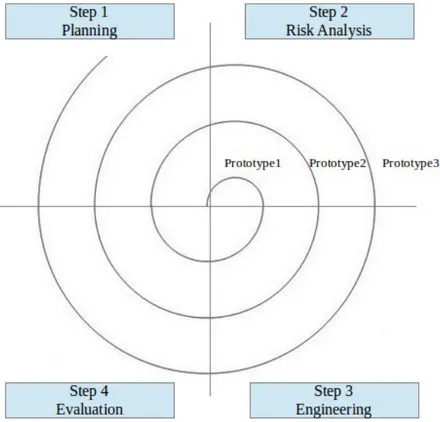
The spiral development consists of four phases: Planning, Risk Analysis, Engineering and Evaluation. In this iterative approach, a software project repeatedly passes through the four phases Figure 1.1.
The scheduling and development of different parts of the project was care-fully planned and documented at each of the iterative stages. The documen-tation created at each stage could then be easily referred to and used to create the technical documentation of the final version of HASKEU. Two of the main parts of the HASKEU system are - the visual programming and textual pro-gramming. Although they are very interdependent and changes propagate between them, the functions to make these propagations possible were written separately and in a completely declarative way (see Chapter 5). The declara-tive nature of functional programming is very suitable for iteradeclara-tive development as is demonstrated in Spiral SDLC. The concept of the HASKELL syntax tree became clear by first analysing, designing and implementing the textual sys-tem and then the same stages of the visual syssys-tem were realized. Similarly, to support the type checking and error reporting etc. in the visual system, it was important to know how to store the type information, how to check individual expressions etc.
The Design/Implementation/Testing was divided into the following steps:
• Prototype 01: Develop the textual programming system in HASKEU.
• Prototype 02: Develop the visual programming system in HASKEU. In the evaluation phase, it was felt that the design was not simple enough for end-users to do programming and it could produce spaghetti code (Van Tassel, 1974). The term “Spaghetti code” refers to those codes which are intricate and poorly organized. It was first appeared when the
jump was made from assembler to structured programming. Now, for the same reason, many developers create visual spaghetti code (Whitley and Blackwell, 1997). Examples of visual spaghetti code are given in the Appendix B. The separation into pieces and automatic layout of a screen program have been implemented in some visual programming sys-tems (such as IBM’s VisualAge) for decreasing the complexity of a visual spaghetti code (Gibbons, 2002). In the first visual system of HASKEU, a module and all its functions were shown in one graphical window. Users could draw visual programs in which functions, nodes and lines could overlap each other. Changing any part of the module was likely to affect the functionality of other parts and caused unintended changes.
• Prototype 03: After a further literature review, stage three was an im-plementation of the refined visual programming system with support for “one function definition per page” (see Section 4.1.5) and “automatic layout” (see Section 4.1.3).
• Prototype 04: Production of the combined textual and visual program-ming system with the use of MVC and FRP. The “MVC as a FRP” theory was introduced (for more details, see Chapter 3).
• Prototype 05: Changes were made in the textual implementation. Pre-viously the text editor did not need to be updated as it was the only system. When the textual and visual were combined, the text in the text editor was updated by the model value and the cursor position was lost. The syntax tree did not contain the cursor position, so then it was
decided to explicitly save the cursor position in the model.
• Prototype 06: Changes were made in the visual implementation to syn-chronize it with the textual system, as the visual system is syntax error free and the textual system can have syntax errors (for more details, see Section 4.4.1). Version 1 of HASKEU was released to support both vi-sual and textual programming. This first version had no type checking facility.
• Prototype 07: Version 2 of HASKEU was designed to support type check-ing.
• Prototype 08: Reimplementation of the visual system so that types and type errors could be shown visually (see Section 4.2.1).
• Prototype 09: The system was exhaustively tested and the final version of HASKEU was released.
Although the Software Engineering Life Cycle (SDLC) gives a general overview of ordering different phases of software engineering, the implementa-tion and documentaimplementa-tion of the phases (from analysis to maintenance) depend on the underlying programming paradigm of the programming language on which the system will be developed. HASKEU was developed in a pure func-tional programming language (Haskell) and did not use a formal analysis and design method. Appendix A gives more explanation about appropriateness of using analysis and design for functional programs.
The implemention of the above mentioned prototypes of HASKEU demon-strates the research contribution outlined in the following section.
1.10
Contribution
As well as the design of a programming system, the implementation demon-strates the purely functional Model-View-Controller (MVC) design pattern as a reactive program using the elegant Functional Reactive Programming (FRP) framework. This implementation is the foundation of the programming system, HASKEU. This thesis has produced the following new features for end-users functional programming in Haskell:
1. Support for both visual and textual functional programming allowing for a smooth transition from one to the other as programming expertise increases;
2. The propagation of changes between the visual and textual interfaces, so that they are always consistent;
3. Extensive use of Human-Computer Interaction (HCI) techniques have been included.
4. No syntax errors can be created in the visual system;
5. The provision of an automatic layout to display the dataflow graph in the visual system;
6. The use of a block-based architecture to represent the scope of expres-sions in the visual system;
7. An on-time visual display of the textual notation of the type of a function application and its individual arguments;
8. The provision of visual error reporting;
9. Unnecessary and unused argument slots are clearly shown; 10. Guidelines for the display of data in visual systems are satisfied;
The remaining six chapters of this thesis cover the following areas: Chap-ter 2 shows a liChap-terature review and related research which influenced this study. It also includes a comparison of the programming of some typical instructions using a functional programming language, a visual programming language, and a visual functional programming language. Chapter 3 shows the imple-mentation of the Model-View-Controller (MVC) design pattern as a reactive program. Chapter 4 describes the design of HASKEU - data display, icon de-sign, use of HCI, dataflow of functional program, organization of the display, and error reporting. Chapter 5 shows the implementation of the system in the following order: the model, the controllers and the views. This chapter also shows the results of the functional test of the infinite redo/undo facility of HASKEU. Chapter 6 shows the usability test process and the results of this usability test. Chapter 7 presents conclusions containing the achievements, the limitations and suggestions for future developments.
Chapter 2
Background and Literature
Review
2.1
End-user programmers
As mentioned in the introduction, according to Nardi, end-user programmers
are not “casual”,“novice”, or “naive” computer users; rather, they are people such as chemists, librarians, teachers, architects, and accountants, who want to make serious use of computers, but who are not interested in becoming pro-fessional programmers (Nardi, 1993). Such end-users may program computers daily, at least for a period of intensive work on a project. End-user systems should be targeted at them; others with infrequent computational needs can enlist contract or in-house programmers to write the few programs they need.
techni-cal skill levels, Nardi and Miller classified them into three discrete user groups — non-programmers, local developers and programmers (Nardi and Miller, 1990). Non-programmers have little or no programming education and lack an intrinsic interest in computers. Local developers have a good knowledge of specific programs. Programmers have a good education in the general use of computers and therefore have a broader technical knowledge than the other groups. If an appropriate design principle can be created for non-programmers, it is obvious that local developers and programmers can use the system as well. Also, the total number of experienced programmers and local developers is substantially smaller than the number of inexperienced non-programmers (Ko et al., 2011).
End-user programming (EUP) is defined as “programming to achieve the result of a program, rather than the program itself” (Ko et al., 2011). The developer’s goal in EUP is to use the program for a specific, personal pur-pose, whereas the goal in professional programming is to create a commercial program for other people to use. An end-user development can be an exten-sion of an existing application, or it can be a new application, which runs separately from existing applications. Some popular EUP systems are spread-sheets, computer aided design systems and statistical packages. A key feature of these systems is that a useful subset of their functionality can be learned after no more than a few hours of instruction.
EUP does not mean using only simple languages. Many scientists use general-purpose languages like Java to analyze scientific research, with no in-tention of sharing the program for commercial use or polishing it for future use (Segal, 2007). An end-user programmer may use any of the wide range of lan-guages, from task-specific languages to high-level general-purpose languages. SPSS (SPSS Inc., 2007) and Mathematica (Wolfram, 2003) are examples of task-specific language. The choice of language is important only to achieve the end-user’s personal goal. However, task-specific languages lack the power of general-purpose programming languages. Also, it is expensive to build many different task-specific languages. Users would be forced to switch between many different languages and it is difficult to know how specific a task-specific system should be (Nardi, 1993).
Many end-users have serious difficulties learning general-purpose program-ming languages. One of the major barriers in learning such languages is be-coming familiar with low-level programming primitives and assembling them into a functioning program (Lewis and Olson, 1987). Many end-user get dis-couraged at the amount of work needed to master a conventional programming language (Nardi, 1993). Novice programmers often have great difficulty un-derstanding control constructs in programming languages (Lewis and Olson, 1987; Spohrer et al., 1985). End-users also face many of the same software en-gineering challenges as professional developers do. They need to choose APIs, libraries, and functions to use (Ko and Myers, 2004). Their programs contain
errors, and they also face the critical consequences of failure (Panko, 1998). Error rates increase when they work on large programs (Panko, 2000).
End-user capabilities can be summarised as follows:
• they may not be expert programmers (Nardi and Miller, 1990);
• they may be unskilled, and make false steps (Lewis and Olson, 1987);
• they may be uncertain, and make false starts (Ko and Myers, 2004);
• they find large programs daunting (Panko, 2000).
The next section will go on to look at properties of functional languages.
2.2
Functional Programming Languages
2.2.1
Motivation
For many years, researchers have argued that computer programs would be easier to develop and maintain if they were written infunctional programming languages (Backus, 1978; Darlington et al., 1982; Hughes, 1989). Unlike tradi-tional imperative programming languages, functradi-tional programming languages do not allow functions to have any side-effect — they compute only results. This constrains the use ofsequence and state, which often cause programmers, and especially end-user programmers, to make mistakes.
2.2.2
A Functional Language : Haskell
This section describes a modern functional programming language, Haskell (Peyton Jones, 2002) which is proposed as a suitable language for EUP.
Functions
A function determines a result, which depends on one or more arguments. It may be defined by one or more equations, which may be recursive; that is, a function defined in terms of itself. For example, the factorial function may be defined as follows:
fac 0 = 1
fac n = n * fac (n - 1)
Here, the first equation will be applied when the argument value is zero, and the second otherwise. Parentheses are used to group parts of an expression explicitly, but operator precedence often allows them to be omitted. Haskell assigns numeric precedence values to operators, giving function application by juxtaposition a higher priority than all other operations. So, fac n - 1 is equivalent to (fac n) - 1.
Types
Types describe values. Among the basic types are Integer (infinite-precision integers), Char (characters) and Bool (booleans). Among the function types areInteger -> Integer(functions mapping precision integers to
identity function may be defined as follows:
id :: a -> a id x = x
Here, the typea -> a can be read as “forall typesa, a function froma toa”. By convention, a specific type begins with capital letter, and a variable type with a lower-case one.
A new type is defined by a data declaration. For example, a binary tree may be defined as follows:
data Tree a = Leaf a
| Branch (Tree a) (Tree a)
Here, the identifiers Leaf and Branch are the constructors of the type Tree. Data types may be recursive and include polymorphic components.
Lists are one of the built-in types. All items in a list have the same type. There are two list constructors,[]and(:), so that[]is an empty list,3 : []
is a list of one item, and 1 : 2 : 3 : [] is a list of three items, which may be more conveniently written as [1, 2, 3].
A tuple type is another built-in type. The items in a tuple may have different types. For example, (t1, t2,. . ., tn) is a tuple type of values
(v1, v2,. . ., vn), where each value vi has the type ti given in the
corre-sponding position in the tuple type. These objects are usually called pairs, triples, quadruples and so on.
Higher-order functions
A higher-order function is one that takes one or more functions as arguments or returns a function as a result. Two important higher-order functions for list-processing are map and filter. A map constructs a list by applying a function, passed as the first argument, to all items in a list, passed as the second argument:
map :: (a->b) -> [a] -> [b]
map f [] = []
map f (x:xs) = f x : map f xs
A filter constructs a list from the items of a list passed as the second argu-ment that satisfy a predicate passed as the first arguargu-ment:
filter :: (a->Bool) -> [a] -> [a]
filter p [] = []
filter p (x:xs) =
if p x
then x:filter p xs
Multiple arguments and currying
All functions of more than one argument are curried: i.e. they take a single argument and return another function if more arguments are needed. The following example is a function with three integer arguments:
multiplySum x y z = x * (y + z)
Given a single integer as an argument multiplySumyields a function of type Int -> Int -> Int as result.
By convention function application is left-associative, taking one argument at a time. So, the above function definition multiplySum x y zis equivalent to (((multiplySum x) y) z); that is, an application of multiplySum to x, the result of which is applied to y; so (multiplySum x) must be a function.
The result of this application, ((multiplySum x) y), is then applied to z, so
((multiplySum x) y) must also be a function.
The advantage of currying is that a function can be applied by binding some but not all of its arguments. Hence, the function yields a specialized version with the given arguments “frozen in”, which is also known as partial application (Bird and Wadler, 1988).
Local definitions
Frequently, Local definitions are used to break a big calculation into a num-ber of smaller ones. The following example uses where to make two local
definitions:
sumSquares :: Int -> Int -> Int sumSquares m n =
squareM + squareN where
squareM = m * m squareN = n * n
Another way to make a local definition uses let:
sumSquares m n =
let squareM = m * m squareN = n * n in squareM + squareN
Input and output
Haskell accommodates input and output using special values called actions. An action of type IO t may perform an input/output operation with a result
of typet. For example, a function to read a string from a file handle has type:
hGetStr :: Handle -> IO String
The keyword do may be used to introduce a sequence of actions. For example, to read a string from a file handle and print it on the standard output, the coding is the instructions are:
do
s <- hGetStr putStr s
2.2.3
An Example Haskell Program
Below is an example functional program, which shows how Haskell may be used to calculate the voltage in the electrical circuit shown in Figure 2.1.
Figure 2.1: An electrical circuit.
Suppose the values of the resistors in this circuit are: R1 = 8.0 Ω, R2 = 6.0 Ω, R3 = 4.0 Ω, and that the current through each resistor is: I = 0.5 A. By Ohm’s law, the total voltage of the circuit can be found by simply adding up the voltages at each resistor, where each is calculated as V = IR.
In Haskell, the calculation is implemented as follows:
totalVoltage :: Double
totalVoltage = sum (map (* 0.5) [8.0,6.0,4.0])
The function sum adds up all items in a list passed as an argument. The list that results from applyingmapis[4.0, 3.0, 2.0], and the value that results from applying sum is 9.0.
The next section explains the main difference between Haskell and other functional programming languages.
2.2.4
Other Functional Programming Languages
Other commonly used functional programming languages are Standard ML (Milner, 1984) and Scheme, a dialect of LISP (Steele Jr. and Sussman, 1978). The main difference between these languages and Haskell is in strictness. In ML and Scheme, a function call of the form
f (e1, e2,. . ., en)
causes the argument expressions, e1. . .en, to be evaluated before the body of the function f is executed. In Haskell, however, a function does not evaluate its arguments unless, and until their values are needed, which is also known as lazy evaluation. The main benefits of lazy evaluation are: it increases per-formance by avoiding unnecessary calculations and it is possible to construct infinite lists (Hudak, 1989). Haskell was chosen as a target domain for this research because of its laziness so that end-users do not need to put much effort into thinking about the performance of the program they develop. For the same reason, it was chosen as the development language for HASKEU.
Existing functional languages usually have an unfamiliar textual syntax, and programming in them involves unfamiliar concepts such as the use of
higher-order functions (functions having other functions as their arguments and/or their results). Hence, the development of these programs is “surpris-ingly difficult”, especially by end-user programmers (Nardi, 1993). In the next sections, various ways to support language learning will be discussed.
2.3
Support for Language Learning:
Syntax-Directed Editor
To make textual programming easier, syntax-directed editing is particularly useful (Bai, 2003). A syntax-directed editor provides alternative ways for manipulating programs by creating or modifying programs in such a way that correct syntax is always produced. In most syntax directed editors, the display cursor indicates where to enter the program text, and the program display on the screen is automatically updated. A syntax-directed editor differs from a text editor as a text editor only updates the text, whereas a syntax directed ed-itors updates the syntactic structure of the program as well as the text. When a user enters text, the syntax-directed editor immediately checks for errors and displays appropriate messages to the user. This prevents the user from writing syntactically incorrect programs. Program text is entered by making a template or a skeleton of a syntactic construct, and filling in the detail later. Novice users can benefit by using syntax-directed editing because these editors are considered to be a good medium to learn a new language and its construct. Advanced users benefit from using a syntax-directed editor for program
main-tenance (Horwitz and Teitelbaum, 1986; Reiss, 1985; Hubbell et al., 2006). A syntax-directed editor can allow more rapid program construction by auto-matically managing many of the syntactic structures, such as keywords and syntactic sugar. In spite of these advantages, the use of a syntax-directed ed-itor for trivial tasks can be expensive and it can add more difficulty for users learning more complex tools (Hubbell et al., 2006). It was found that the syntax directed editor is too complicated and irritating for inputting programs or for performing simple editing tasks as it involves a sequence of operations to be performed (e.g., select a menu, select a tree node, restriction in editing for syntactically incorrect input, press enter when finished). Also, in a complex tool, selecting and learning the right menu can be a complex task. Research has found that syntax-directed editors with some ability for “free typing” can be more effective (Waters, 1984). Many programmers find it easier to do some editing by entering text (e.g., inputing infix expressions, changing an if-statement to a while-statement).
As with other syntax-directed editors, the HOPS (Higher Object Program-ming System) is a graphically interactive term graph programProgram-ming system which is designed for transformational program development (West and Kahl, 2009). Term graphs are closely related to the terms that are encoded in the textual representation of conventional programs, but their visual appearance is different. In HOPS, with the use of an extended syntax directed editor, only syntactically correct and well-typed programs can be constructed. It makes the
program’s structure and program’s typing structure explicit and interactively accessible in the shape of term graphs. A visualisation of program execution can be achieved by displaying all intermediate graphs of an automatic transfor-mation and it has been found useful for debugging complex purely functional programs. Below are some example programs in HOPS (see Figure 2.2). The black arrows indicates successor edges and their sequence is indicated by the left-to-right order of their attachment to their source. The thick, usually curved arrows indicate binding edges. The Figure 2.2a corresponds to the terms5 * 5 + 5 * 5 * 2in arithmetic. The Figure 2.2b corresponds to the terms λx f = f x in lambda-calculus. In Figure 2.2b , it should be noticed that in the linear notation the two different bound variables need different names f and x since they occur in the same scope, but in the term graph of HOPS, different nodes are labelled x because they represent different binding
variables.
(a) Terms5 * 5 + 5 * 5 * 2 (b) Terms λx f = f x
Figure 2.2: Example programs in HOPS.
transforma-tion feature and proof assistant facility for a Haskell-like functransforma-tional program by showing the program as a term graph instead of a textual representation (Vangheluwe and de Lara, 2003). The interactive program transformation and editing environment in HOPS ensures that it will always construct syntacti-cally correct and well-typed programs (West and Kahl, 2009). The HASKEU system developed in this thesis has a different purpose from that of HOPS:
• HOPS is a text-based term-graph programming system and is not a visual programming system by any means, so it was not intended to be used to support learners. HASKEU is a hybrid textual and visual programming system and is intended to help end-users to learn functional programming.
• HOPS has an extended textually based syntax-directed editor that does not allow any syntax errors. This thesis analyses the pros and cons of a syntax directed-editor at the beginning of this section and has concluded that a program editor with the support of both a syntax directed-editor and free-typing can be helpful for both learners and expert programmers. The HASKEU system use free-typing in its textual editor and syntax-directed editing in its visual editor.
• HOPS does not allow any type errors. This research argues that high-lighting type errors in a visual way can help end-users to learn functional programs. To support this, the HASKEU system allows end-users to make type errors in the visual system and gives feedback about the type
errors in such a way that end-users can understand and correct their errors efficiently (See Section 4.2.1).
Some features in HOPS such as debugging support can be useful to carry-ing out functional programmcarry-ing tasks, and would be a useful feature if imple-mented in a future version of HASKEU.
This thesis explores the use of a visual representation as well as textual notation. The visual system incorporates the ideas gained from syntax-directed editing to allow the user to construct only a syntactically correct program. At the same time, the textual system has the flexibility of “free typing”. The next section examines the characteristics of visual programming languages.
2.4
Support for Language Learning: Visual
Programming
2.4.1
Motivation
Learning to program is often a time-consuming and frustrating endeavor. Moreover, even after the skill is learned, writing and testing programs may be a laborious activity. Conventional programming exploits our ability to think an-alytically, logically, and verbally, whereas visual programming (Zhang, 2007; Cox and Nicholson, 2008; Cox and Gauvin, 2011) — defined as “the use of meaningful graphical representations in the process of programming” — ex-ploits our ability to think nonverbally (Shu, 1988). Visual representations aid
understanding and memory retention, and may provide an incentive to learn to program without language barriers. In generic programming, notations, such as visual versions of textual languages, can ease program understanding (Green, 1990).
2.4.2
Visual Programming: Overview
Computer programming is a very difficult and challenging area and it places a very cognitive load on learners. Still after a few years of learning, novice programmers struggle to be skilled (Mow, 2008). The modern form of textual programming has been around for over 60 years, and it has been taught in universities since the 1960s. Since then, many different techniques and tools have been developed to aid in learning computer programming (Newby and Nguyen, 2010). The visualization of a program provides valuable information to the programmer while programming and thus it has the potential to result in a better and faster understanding of the program’s functionality, and can save time while programming is being carried out. As a program consists of huge amount of information, visualisation of the program is not very easy. So, it is very important to consider the human perception of information and cognitive factors required to visualize a program and hence the program un-derstanding will be improved with the aid of the visualizations (Caserta and Zendra, 2011). The principal goal of the visualization of a program to be visu-alized is to increase code comprehension. (Marques et al., 2012). The purpose
of visual programming is not only to help users to learn a new program but also to help them with the development and maintenance of programs. These processes just mentioned have been found to be time-consuming activities in practice. Especially while maintain a program, a developer does not want to read the entire code of a huge program. Hence, they can benefit from the vi-sualization of the program which can help them to get a rapid understanding of the source code (Haiduc et al., 2010). Now-a-days, end-user programming has become the most popular form of programming. This trend has led to the situation that there are now now more end-user programmers than profes-sional programmers (Hofer et al., 2013). Though the growth of the end-user programming is rapid, not much research has been conducted about how to bring the advantages of visual programming to the awareness of end-users, especially in the functional programming area.
The following section describe the differences between two common terms (“Visual programming” and “program visualizations”) used in computer sci-ence research to improve programming support.
Visual Programming vs Program Visualizations
These two terms “Visual programming” and “program visualizations” are com-monly used when there is a need to improve programming support in computer science research (Bentrad and Meslati, 2011). As there are significant differ-ences between the two systems, it would be better to give some short definitions of these two to avoid any confusions. Program visualization tools can be easily
marked incorrectly as visual programming (Myers, 1990).
As a broad definition, a system can be called a visual programming sys-tem if it allows the user to build a program in a two or more dimensions way. Textual program are one dimensional as the system treats them as a long one dimensional stream. A software which is used to define pictures, such as X-II Window Manager Toolkit (McCormack and Asente, 1988), is not a visual pro-gramming language. Similarly, drawing packages, such as Adobe Photoshop (Aaland, 1998), are not visual programming language either as they cannot make programs.
On the other hand program visualization is a completely different approach to visual programming. In visual programming, the program itself can be built using various graphics but in program visualization, the program is actually a textual program and graphics are used to visualize some features of the pro-gram such as the run-time values. Propro-gram visualization is mainly used in research and training to improve the understanding of the structure, the exe-cution mechanism and the gradual development of the software.
The main goal of both visual programming and program visualisation is to use graphics to show the program in a multi - dimensional visual way as human eye-sight and visual information processing are clearly optimized for multi-dimensional data. A conventional program shown in one-dimensional
textual form does not help to utilize the full power of the brain. It has been known for a long time that some two-dimensional visual forms of programs, such as flowcharts or even the indentations of a textual program are useful aids in program understanding (Smith, 1993). The format used in visual program-ming is very similar to a user’s mental representation of problems (Petre and Blackwell, 1999). Users, especially end-users find a visual style of program-ming easier to understand. Also, visual programprogram-ming can make programprogram-ming tasks easier even for expert programmers by showing them in graphics, bet-ter descriptions of the desired actions which are to take place. The use of direct manipulation, where items in a software interface can be pointed and manipulated with the use of a mouse, can contribute to showing such better descriptions (Ohshima et al., 2013).
It is generally believed that learnability is a most fundamental attribute of usability (Grossman et al., 2009). Although a visual program can be very useful in aiding learnability, there are others issues to consider such as HCI while designing the interface. Recent research (Lazar et al., 2006) shows that a user can have frustrating experiences which can lead to up to 40% wastage of the user’s time while learning the interface. This can be because if useful features are missing or they are hard to find or there are unusable features in the interface. In this thesis HCI issues have been carefully considered in order to make the learning of the user interface easier and while depicting visualiza-tion of a program. Also, direct-manipulavisualiza-tion has been carefully implemented
to help users to perform their desired actions (Mow, 2008).
The following section discusses the classification of visual programming language