Lean and active virtual meetings
Marika Stålnacke
1, Olof Lundström
1, Jan van der Meer
2, Cristian Norlin
1, Tommy Arngren
1,Tor Minde
11
Service Layer Technologies, Ericsson Research, Sweden
2
Research and Development, Ericsson Telecommunicatie, the Netherlands
Abstract
Virtual meetings – real-time collaboration between people in separate locations – can be greatly enhanced by centering on the mobile phone, a device many people carry with them everywhere. The concept Lean and active virtual meetings has been developed to resolve many of the problems and issues faced by users of today’s virtual meeting technology. Such issues include cumbersome login procedures and difficulties for on-the-move, mobile-phone-only participants to be active and make an impact. The idea is to evolve the concept gradually from currently existing voice conferencing into the full concept where meeting participants use their mobile phone for all meeting functions, in particular authentication, conference audio and document sharing support.
Concept tests reveal that intended target user groups find the concept credible, addressing relevant “pain-points” and containing many interesting services. Ease of use is of particular importance. A prototype based on Java and UMTS has been developed that demonstrates some key functionalities, such as simple meeting start and participant status list. We now continue to explore the concept from an end-user, a business and a technology perspective. The prototype will be further developed towards the full concept and used for more extensive user trialing. For long-term implementation, IMS (IP Multimedia Subsystem) is of key interest.
1. Introduction
Virtual meetings, where participants discuss and collaborate from several different venues, including on the move, are very common in the globalized business life of today. Technology to support such meetings includes telephone conferencing, video conferencing and PC/web based tools for document & application
sharing. Telephone conferencing is the most widely used solution today. In parallel, the use of mobile phones has become ubiquitous, which increases the demand on business applications, including collaboration tools, to support mobility. The increasing importance of collaboration services is pointed out for example by Jørstad, Dustdar and van Thanh [1].
Successful meetings require active participants, which means everyone contributes to discussions and to the work on shared documents. All participants need to have access to the same information.
Although technology works well from many aspects, participants in virtual meetings still regularly face a number of issues, which reduce efficiency and might even discourage meetings taking place at all. To explain the issues, we picture a common set-up for a virtual meeting, illustrated by Figure 1:
Figure 1. Common virtual meeting set-up
A number of people gather in a conference room equipped with a video or phone conferencing system, a PC and projector. Some of them also bring their own laptop, but many prefer to come “lean”. A couple of people attend from their own office with access to a PC and phone. Finally, a few participants are on the move, one for example sitting in an airport with a laptop connected to a wireless network, others in a car or on a train with mobile phones only. Very often two systems are used - phone conferencing for the voice part and a
web conferencing solution for sharing presentations and other documents.
The first major obstacle is that two login procedures on two separate devices must be performed. Different user names and passwords have to be remembered and entered. Then only participants logged in to the web conference are “visible” to each other in a participant list. Conference room attendees of course can see one other, but not the remote participants. Those on the move have neither overview nor visibility, and risk being ignored when they are only represented by the conference phone on the table.
Voice communication is the most central part of a virtual meeting and audio problems seriously affect meeting success. This is stated for example by Poltrock and Grudin [2]. In reality, remote participants often have problems hearing clearly what is being said, or by whom, in the conference room (due to distance to the microphone). Short comments and remarks are easily missed. Likewise, it’s not obvious to conference room attendees whose voice is currently coming in over the speaker phone. Altogether, this causes frustration and decreases meeting efficiency.
Seeing the documents being discussed, or following writings on a white-board, is currently only possible for those within reach of a logged-in PC. Phone-in-only participants have to rely on print-outs or be left out of some of the discussion. Work is being done to enable document viewing on mobile phones, for example Ericsson IMS weShare [3]. Side tasks that can add to meeting success, but are currently not doable or very inconvenient, are for example searching for information, inviting a new participant (after having looked up their phone number) or conferring quietly on the side with only one other participant.
In summary, with existing solutions, it’s difficult or impossible to attend a virtual meeting in both a fully active and yet lean manner.
In this paper we propose a novel service concept to deal with the identified issues. We then present an end-user study conducted around this concept, describe how the concept is being prototyped and finally go into some key technical issues of a potential implementation.
2. A concept for lean and active virtual
meetings
The concept, Lean and active virtual meetings, is based on the fact that the mobile phone, a device that is personal and provides excellent voice communication, is something many people always carry with them. Since voice communication is the most important function in a virtual meeting, special emphasis has
been put on providing clear audibility and talker identification.
The mobile phone contains the user identity and is used for identification and authentication at meeting start. Everyone enters personally with their own phone, which enables a complete participant list including context and capability information. The phone entering procedure makes all other functionalities available. All meeting participants use their own mobile phone for all audio communication, meaning everyone has a personal microphone and speaker. There is support for viewing and sharing media in the mobile phone, stand-alone or in combination with a second device, for example a PC. Users get easy access to relevant meeting information, such as venue and time, agenda, invited participants, referred documents and, after the meeting, a complete meeting log. Other features include “whispering” (messaging with one or a few meeting participants separately during the on-going meeting), phone directory look-up and adding of new participants to the meeting.
The idea is to evolve the concept gradually from currently existing voice conferencing into the full Lean and active virtual meeting solution. The first step, Enhanced Voice Conferencing (EVC), is to make voice conferencing easier to use and add some useful supplementary functions. This evolution path is well in line with current user behavior, since voice conferencing is by far the most used collaboration tool today.
3. End-user study
A concept evaluation study has been performed by an independent research firm with the objective of testing the interest in and accuracy of the concept and getting to understand the motivation of the intended users. To achieve this, a qualitative study based on in-depth interviews with a limited number of people from the target group was the selected method.
The main target user groups for a Lean and active virtual meeting solution are projected to be Senior Managers and Knowledge Workers of all industry verticals. They typically travel frequently, work from outside their own office and use a number of communication tools such as mobile and fixed phone, e-mail, Internet and PDAs or laptops. The study involved six senior managers from Sweden and six from the UK.
Study participants were initially questioned on their current usage of mobile services, virtual meeting habits and problems experienced today when communicating on the move. They were then presented with scenarios visualizing the concept, and interviewed about the
relevance of the different services and solutions presented. They were also encouraged to suggest changes or improvements to the concept.
The results in Sweden and the UK were very similar. Five out of six managers take part in virtual meetings regularly, with phone conferencing being the main tool used. They all found the scenarios credible, addressing relevant “pain-points” experienced in their working lives. They could easily imagine themselves using the mobile phone for virtual meetings. The use of the phone in a conference room provoked discussion, but the advantages were generally seen as outweighing the disadvantages. The scenario was not viewed as a totally “fantastical” solution, but as one containing good alternatives. Participants appreciated many of the services and especially liked the fact that the phone seems very easy to use. Ease of use and good usability in all aspects were stated as absolute key factors for any service.
Centering the concept around the mobile phone is in line with how important the phone is in the working life today. It will not replace the computer, but be a complement
On a more detailed level, the meeting invitation and easy meeting start with no entering of codes was seen as a major benefit. Participant status list is interesting provided that privacy and control is dealt with properly. Talker identification is judged valuable, as are whispering and inviting of additional participants. Viewing documents in the phone would be useful – also limited support for this could be valuable in many situations.
The specific, concrete feedback from the qualitative study was used for adjustments and revisions during the concept development. More extensive studies would include hands-on testing using a prototype.
4. Prototype
A prototype has been developed to demonstrate the first step of the concept evolution, the Enhanced Voice Conferencing (EVC). It provides easy meeting start by server call-up and automatic client activation, participant status list, the possibility to search for and invite new people, and participant re-entry. Meeting booking and editing is done via a web interface. The prototype is prepared for user location data to enable audio stream management.
At meeting start the application server establishes communication with the participant mobile terminal client. The client is started by an SMS if it is not already running. The user is informed about the coming meeting and can accept or reject participation, see user screen 1, Figure 2. After meeting entry, a
participant status list is available, user screen 2, Figure 2.
User screen 1
Request to participate in the meeting.
User screen 2 Participant status list Three participants in conference, call in setup to one, one has rejected.
Figure 2. End-user screen examples
Through the client interface it is possible to search for and select people in the phone or company address book. After confirmation, the server calls the invitee and links the voice path into the conference bridge. If the new participant has the client software available it is started and the participant status list is displayed.
If participants leave the meeting, on purpose or by force (e.g. connection interrupt), they can re-enter the meeting through the client. The server will then set up a new connection.
The phone client is built in Java. UMTS enables concurrent voice and data. Download and configuration of the phone client is done by WAP-push or an http-link by SMS.
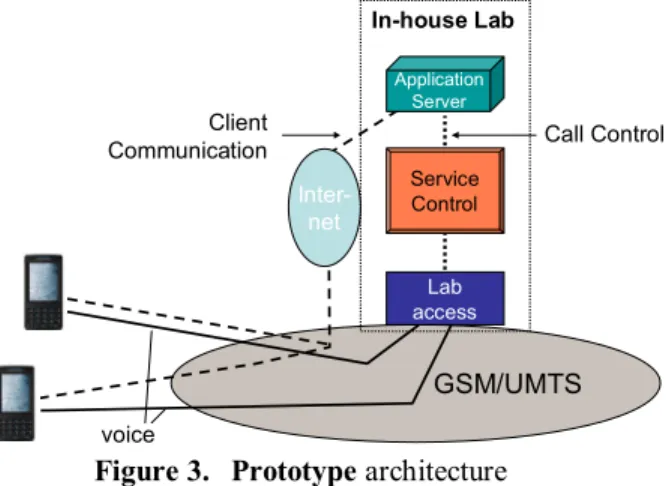
Figure 3 shows the general prototype architecture.
Service Control GSM/UMTS Inter-net Application Server Call Control Client Communication Lab access In-house Lab voice
Figure 3. Prototype architecture
It consists of an application server with access to the Internet for communication with the terminal clients and the call control server, a call control server that handles the voice channels of the virtual meeting participants and a bridge and access server which is
based on Asterisk [4] and connected to the public telecommunication network by an ISDN-link.
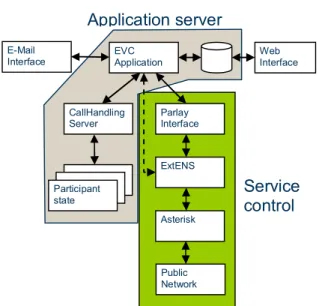
Detailed prototype architecture is shown by Figure 4
EVC
Application Web Interface
CallHandling Server Participant state Parlay Interface ExtENS Asterisk Public Network E-Mail Interface
Application server
Service
control
Figure 4. Detailed prototype architecture
The Application server contains the core Enhanced Virtual Conference (EVC) application, currently with a web-interface to handle meeting administration. An email interface that will provide the possibility to include the conference service in meeting-schedule invitations is under development. The EVC application interfaces a generic client menu engine to handle user interaction.
Service control is provided through a Parlay interface. As the EVC application requires additional capabilities, an enhanced interface is provided to handle specific events as ‘user X is speaking’ or to control the participant voice streams for ‘whispering’. The actual call control is provided through a low-level interface (ExTENS) to the public domain Asterisk PBX server.
5. Technical solutions
The paper describes some key details of a potential client-server solution, where the meeting server controls all processes. Using peer-to-peer is another option that could be further explored.
5.1. The entering procedure
The mobile phone is a personal device, unlike the PC, due to the SIM-card which connects a specific mobile device to a User ID. Therefore it can be used for authentication, without need for passwords etc. to
verify that Participant A is A. Participants are registered in the meeting server with their phone number. The meeting server calls participants on meeting start, automatically activating the device clients. Users join the meeting by accepting the call.
The described process is based on trust in the telecom operator to authenticate users, route the calls correctly and on the known connection between user and phone number. The normal encryption in mobile networks is deemed sufficient for most purposes. For extra sensitive meetings, it might be necessary to apply additional security mechanisms. Such issues are for example discussed by Treßel and Keller [5] and by Xun, Chee and Chik [6].
Device capabilities, configurations and context are sent to the server from the device clients, or fetched from the mobile network, at meeting entry. Location information, needed for audio management, can be obtained from technology such as mobile positioning systems (Ericsson MPS), Assisted GPS, sensors, etc. or be entered manually by the user. The meeting server sends the presence information to all participants and sets up media sessions with them
A second device (for instance a PC) for viewing presentations, document sharing, video, etc. can be added during the entering procedure. The audio will always go through the mobile phone.
5.2. Meeting sound improvement and control
All participants use their own, personal microphone, generating an individual voice stream which guarantees they can be clearly heard by everyone else. Individual speakers provide personal control over volume and other settings. Audio stream management based on location information ensures that people in the same room don’t hear each other in the speakers. Finally, better echo cancellation and higher sound quality is enabled.
Figure 5 illustrates voice stream handling in a meeting between A and B in the same conference room, and C participating from a remote location.
When A or B speak, their voice streams are transmitted to C’s mobile phone (blue lines). No voice stream is submitted between A and B, since they can hear each other anyway.
Participant C @ Distance Participant A @ Table Participant B @ Table
Figure 5. Voice streams between virtual meeting participants A, B and C.
Adding streams in the server means coding-decoding, adding and coding-decoding which affects audio quality negatively. Alternatively, sending both streams to C and adding them in the C device implies one step coding-decoding only but takes two streams capacity. A third option is to use voice activity detection in the server and send streams from active talkers only.
When C speaks, her voice stream is transmitted to both A and B (red lines in Figure 5). A known solution here is to use multicast to save radio capacity.
To identify which participants are at the same venue, the meeting server uses an algorithm analyzing acoustic information, or the location information obtained at log-in (updated during the meeting if location changes). An example is depicted in Figure 6.
Visited A Visited B Operator B INVITE Operator A User A -> User B P-SCSF P-SCSF S-CSCF S-CSCF INVITE 200 OK 200 OK P-CSCF P-CSCF INVITE 200 OK INVITE 200 OK S-CSCF S-CSCF I-CSCF I-CSCF HSS HSS INVITE 200 OK 200 OK INVITE I-CSCF I-CSCF INVITE 200 OK HSS HSS CxLocationQuery CxLocationQuery DNS B B A A Visited A Visited B Operator B INVITE INVITE Operator A User A -> User B User A -> User B P-SCSF P-SCSF S-CSCF S-CSCF INVITE INVITE 200 OK 200 OK 200 OK 200 OK P-CSCF P-CSCF INVITE INVITE 200 OK200 OK INVITE INVITE 200 OK200 OK S-CSCF S-CSCF I-CSCF I-CSCF HSS HSS INVITE INVITE 200 OK 200 OK 200 OK 200 OK INVITE INVITE I-CSCF I-CSCF INVITE INVITE 200 OK 200 OK HSS HSS CxLocationQuery
CxLocationQuery CxLocationQueryCxLocationQuery
DNS B BB B A AA A
Figure 6. Server connects to the cellular network (exemplified as IMS network in the figure). Stream sent from A to B and C, contains speech as well as sender and receiver addresses (in this case SIP URI). The server checks sender and receiver addresses and looks up their specific context and location stored in the server. Example:
a. Participant A URI: sip:[email protected]: conference room
b. Participant B URI: sip:[email protected]: conference room
c. Participant C URI: sip:[email protected]: at distance
The server resolves that A and B are in the same room, and forwards A’s voice stream to C’s address, but not to B.
Talker identification is also enabled by each participant using their own, separate microphone. A voice activity detection algorithm can be used to determine who is talking, and this information is presented in the participant list.
The voice whispering feature sets up separate audio streams between the involved participants only, temporarily muting them from the joint meeting.
5.3. Meeting sharing, presentation and documentation
The meeting server is connected to a database which contains all relevant meeting information and makes it available to logged-in users before, during and after the meeting. Information includes meeting details (time, venue, agenda, invitees, etc.), presentations and other documents, logged voice streams, etc.
Before the meeting, a participant can access for example a map showing the way to the venue - pulled by a request to the server or pushed in a Meeting reminder.
Presentations and documents to be shared can be stored in the database in advance, in which case the participant presenting them will send commands to the server from the mobile phone to indicate which page to send out to the others. Material stored locally will be sent as media streams from the phone and distributed by the server.
If meeting logging is activated, the server will log all voice and media streams and store them in its database, in addition to transferring them to the other participants. Both time and event stamps are used, the event stamp indicating for example a topic.
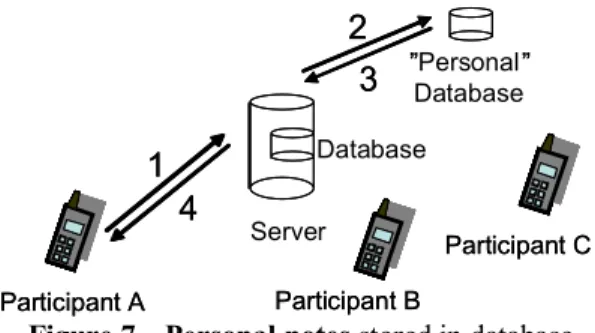
During the meeting, individual participants can also log personal data, e.g. notes, photos etc., which is logged with time stamp and event stamp and stored in a personal database, as illustrated by Figure 7.
Server
4
1
Database2
”Personal” Database3
Participant A Participant A Participant C Participant C Participant B Participant B4
1
2
” ”3
Figure 7. Personal notes stored in database. After the meeting, participants can access logged meeting content, which is searchable by meeting ID, time stamp, event stamp or other criteria. Access rights can be managed by profiles stored in the conference server. The information rendition is adapted based on the device capabilities.
6. Conclusions
The concept Lean and active virtual meeting is a proposed way to deal with the issues that create problems for participants in virtual meetings. As we have described, the concept is focused on the mobile phone, which is well suited to provide authentication and conference audio, and which most people bring with them to meetings anyway.
The Lean and active virtual meeting concept has met with interest among users representing the main target group of senior managers and knowledge workers. A prototype has been developed based on Java and UMTS to demonstrate the first version of the concept, the Enhanced Voice Conference.
We now continue to explore the concept from an end-user, a business and a technology perspective. The prototype will be further developed towards the full concept and used for more extensive user trialing. For long-term implementation, IMS (IP Multimedia Subsystem) is of key interest.
7. References
[1] I. Jørstad, S. Dustdar, D. Van Thanh, ”A Service Oriented Architecture Framework for Collaborative Services” Proceedings of the 14th IEEE International Workshops on Enabling Technologies: Infrastructure for Collaborative Enterprise (WETICE ’05) 0-7695-2362-5/05.
[2] Steven E. Poltrock and Jonathan Grudin, ”Videoconferencing: Recent Experiments and Reassessment”
Proceedings of the 38th Hawaii International Conference on System Sciences2005. 0-7695-2268-8/05
[3] Ericsson IMS weShare End-user solution description, http://www.ericsson.com
[4] Asterisk, an open source PBX http://www.asterisk.org
[5] A. Treßel and J. Keller, “A system for secure IP telephone conferences”, Fifth IEEE International Symposium NCA ’06, 0-7695-2640-3/06
[6] Xun Yi, Chee Kheong Siew, Chik How Tan, “A secure and Efficient Conference Scheme for Mobile Communications”, IEEE 0018-9545/03, 2003