COURSE: 80156
SQL SERVER INSTALLATION AND OPTIMIZATION
discussed as of the date of publication. Because Microsoft must respond to changing market conditions, it should not be interpreted to be a commitment on the part of Microsoft, and Microsoft cannot guarantee the accuracy of any information presented after the date of publication.
This document is for informational purposes only. MICROSOFT MAKES NO WARRANTIES, EXPRESS, IMPLIED OR STATUTORY, AS TO THE INFORMATION IN THIS DOCUMENT.
Complying with all applicable copyright laws is the responsibility of the user. Without limiting the rights under copyright, no part of this document may be reproduced, stored in or introduced into a retrieval system, or
transmitted in any form or by any means (electronic, mechanical, photocopying, recording, or otherwise), or for any purpose, without the express written permission of Microsoft Corporation.
Microsoft may have patents, patent applications, trademarks, copyrights, or other intellectual property rights covering subject matter in this document. Except as expressly provided in any written license agreement from Microsoft, the furnishing of this document does not give you any license to these patents, trademarks, copyrights, or other intellectual property.
© 2009 Microsoft Corporation. All rights reserved. MicrosoftDynamics®, Microsoft® PowerPoint® Microsoft® SQL Server® and Microsoft Dynamics® NAV MorphX® are trademarks or registered trademarks of Microsoft
Corporation. The names of actual companies and products mentioned herein may be the trademarks of their respective owners.
Introduction 0-1
Welcome ... 0-1 Microsoft Dynamics Courseware Contents ... 0-2 Documentation Conventions ... 0-3 Student Objectives ... 0-4Chapter 1: Introduction to the Course
1-1
Objectives ... 1-1 Introduction ... 1-1 Microsoft SQL Server tool set... 1-2 Summary ... 1-5
Chapter 2: Setup and Installation
2-1
Objectives ... 2-1 Introduction ... 2-1 Software Requirements ... 2-1 Hardware Requirements ... 2-13 Microsoft Dynamics NAV Architecture... 2-21 Configuration ... 2-24 Security Synchronization ... 2-41 Summary ... 2-53 Lab 2.1 - Change the Recovery Model ... 2-55 Lab 2.2 - Set Trace Flags ... 2-58 Lab 2.3 - Create a Login Stored Procedure... 2-60 Lab 2.4 - Use Filegroups to Change the Storage Location of a Table ... 2-63 Lab 2.5 - Create Users and Synchronize Security ... 2-66 Quick Interaction: Lessons Learned ... 2-68
Chapter 3: Advantages of SQL Server Option
3-1
Objectives ... 3-1 Introduction ... 3-1 Backup Facilities ... 3-2 Database Access Using Third-Party Tools ... 3-8 Performance Monitoring ... 3-10 Scalability ... 3-23 Summary ... 3-23 Test Your Knowledge ... 3-24 Lab 3.1 - Create a Backup and Restore to a Point in Time ... 3-26 Lab 3.2a - Transfer Data from Test to Live Database (Transact-SQL) ... 3-33 Quick Interaction: Lessons Learned ... 3-43 Solutions ... 3-44
Chapter 4: Performance Audits
4-1
Objectives ... 4-1 Introduction ... 4-1 Set up a Test Environment ... 4-2 System Monitor ... 4-4
SQL Server Profiler ... 4-34 Database Engine Tuning Advisor ... 4-45 Dynamic Management Views ... 4-50 Useful Scripts, Tools, and Reports ... 4-56 Summary ... 4-60 Test Your Knowledge ... 4-61 Lab 4.1 - Setup and Schedule System Monitor ... 4-63 Lab 4.2 - Create a SQL Server Profiler Trace ... 4-67 Lab 4.3 - Correlate System Monitor and SQL Server Profiler Data ... 4-69 Lab 4.4a - Analyze a SQL Server Profiler Trace using DTA ... 4-72 Lab 4.4b - Analyze an SQL query using DTA... 4-74 Lab 4.4c - Find Missing Indexes using DMVs ... 4-76 Quick Interaction: Lessons Learned ... 4-78 Solutions ... 4-79
Chapter 5: Improving Application Performance
5-1
Objectives ... 5-1 Introduction ... 5-1 Optimizing C/AL Code ... 5-2 SIFT ... 5-9 FIND Instructions ... 5-15 Keys ... 5-23 Locks, Blocks and Deadlocks ... 5-29 Graphical User Interface ... 5-33 Index and Rowlock Hinting ... 5-35 Bulk Insert ... 5-38 Best Practices ... 5-39 Summary ... 5-48 Test Your Knowledge ... 5-49 Lab 5.1 - Optimize C/AL Code for Performance ... 5-52 Lab 5.2a - Find Index Usage ... 5-54 Lab 5.2b - Find Unused Indexes ... 5-56 Lab 5.2c - Disable Unused Keys ... 5-61 Lab 5.3 - Create a Deadlock Trace ... 5-64 Quick Interaction: Lessons Learned ... 5-68 Solutions ... 5-69
Chapter 6: Maintenance
6-1
Objectives ... 6-1 Introduction ... 6-1 Optimizing a Microsoft Dynamics NAV Database ... 6-2 Implementing Maintenance on SQL Server... 6-2 Monitoring ... 6-23 Summary ... 6-32 Test Your Knowledge ... 6-33 Lab 6.1 - Create a Maintenance Plan ... 6-35 Lab 6.2 - Change the Fill Factor for Hot Tables ... 6-41
Solutions ... 6-50
Chapter 7: Appendix
7-1
Objectives ... 7-1 Introduction ... 7-1 Backup Facilities ... 7-2 Summary ... 7-3 Lab 7.1 - Set Up a Connection from Microsoft Excel ... 7-4 Quick Interaction: Lessons Learned ... 7-9INTRODUCTION TO SQL SERVER INSTALLATION
AND OPTIMIZATION FOR MICROSOFT DYNAMICS
®NAV 2009
Training is a vital component of retaining the value of your Microsoft Dynamics®
NAV investment. Quality training from industry experts helps keep you updated on your solution and develops skills to maximize the value of your solution. Whether choosing E-Learning, instructor-led training, or self-paced study using training materials, there is a type of training that meets your needs. Additionally, validate your training and demonstrate your expertise with one of many
certifications for Microsoft Dynamics. Choose the training or certification type that best enables you to stay ahead of the competition.
E-Learning
Online training for Microsoft Dynamics products helps you increase your productivity without spending time away from your home or office. E-Learning allows you to learn at your own pace through flexible access to training, therefore proving beneficial for those lacking the time or budget to travel. E-Learning are online training courses designed to cover detailed concepts on specific product areas and allow you to:
• Gain in-depth technical and business application training through daily on-demand training.
• Learn at your own pace - lessons can be stopped and restarted, skipped or repeated.
• Save time and increase your productivity.
• Receive product knowledge comparable to instructor-led training without the need for travel or time away from the office.
• Gain beneficial training when preparing for Microsoft Dynamics certification exams.
• Find tips and tricks to show you how to increase productivity and save time.
• Learn about the changes in features and functionality of a new Microsoft Dynamics product version.
Instructor-Led Training
With instructor-led training, you can gain a solid foundation or refresh your knowledge in Microsoft Dynamics products and processes while learning from an expert in an interactive environment. With courses on a variety of topics, you can:
• Follow demonstrations and attend presentations.
• Receive hands-on product experience.
• Participate in classroom activities and discussions with other attendees.
• Gain beneficial training when preparing for Microsoft Dynamics certification exams.
Training Materials
Training materials can be ordered for the purpose of self-paced study. These materials are comparable to courseware used with instructor-led training, and enable you to:
• Learn at your own pace, in your own time.
• Refer to an abundance of tips, tricks, and insights.
• Learn using a self-study format when preparing for Microsoft Dynamics certification exams.
For selected training materials there are training material – local functionality available which cover country specific features in the product. The training material – local functionality add on to existing training materials and are designed to teach local functionality within a given country. Please notice that training material – local functionality are used only in conjunction with the training material, not as stand-alone training materials
Certifications
Certifications help identify and distinguish an individual’s technical skill set using a Microsoft Dynamics or related business product. Certifications for Microsoft Dynamics are widely recognized by industry employers and provide an objective validation of an individual’s knowledge. Organizations that employ certified individuals benefit from a complete approach to learning – certified individuals have higher skills retention and increased productivity. Organizations can streamline their employee recruitment process and lower their external support costs plus downtime by maintaining technically skilled employees by requiring Microsoft Certified Business Management Solutions Specialist and Professional certifications.
Microsoft Certified Business Management Solutions
Specialist
The achievement of this certification demonstrates an individual’s proficiency in one module of a Microsoft Dynamics or related business product. Microsoft Certified Business Management Solutions Specialists must pass a single certification exam for a Microsoft Dynamics or related business product to earn the title.
Microsoft Certified Business Management Solutions
Professional
The Microsoft Certified Business Management Solutions Professional is a premier certification where an individual has completed a pre-determined set of required and elective certification exams. These include certification exams for Microsoft Dynamics and related business products, as well as certification exams for other Microsoft technologies such as SQL Server. The pre-determined set of required and elective exams for this certification are focused on one of three specific knowledge areas – Applications, Developer, or Installation and Configuration – for one Microsoft Dynamics product. This certification demonstrates an individual’s broad and deep knowledge of a Microsoft Dynamics product — more knowledge than what is needed to achieve a Microsoft Certified Business Management Solutions Specialist title.
Certification Exam Preparation Guides
To help prepare for a certification exam, Microsoft highly recommends the use of the certification exam preparation guides available for each exam. Certification exam preparation guides contain valuable information about a specific exam, including:
• The target audience
• Skills being measured
• Time expected to take each portion of the exam
• Pass rates and requirements
• Question types and topics
• Preparation tools, such as:
o recommended training
o supplemental learning resources
o additional recommended skills
Certification Exam Preparation Guides help you determine which learning options are appropriate to best prepare you for a certification exam. Microsoft does not expect or intend one course or type of training to be the sole preparation
Certification exam preparation guides are available through PartnerSource and CustomerSource.
Learning Plans
Learning Plans can help you plan the best learning strategy for you and your organization. Learning plans illustrate module specific learning tracks that can be easily targeted towards specific roles. Learning plans also provide a learning track towards obtaining certifications. Learning plans can be found on both PartnerSource and CustomerSource,
NOTE: For more information on E-Learning, instructor-led training, training materials and certifications for Microsoft Dynamics log in to PartnerSource or CustomerSource and visit Training & Certification.
Elements of Training Materials for Microsoft Dynamics
Training Materials for Microsoft Dynamics products contain a number of sections or elements. Each chapter includes the following elements:Objectives
Each chapter begins with a statement of the learning objectives for that chapter. Learning objectives are important because they inform you about what needs to be done to successfully complete the chapter.
Introduction
An introduction sets the stage for the learning to take place and prepares you with key statements of the chapter.
Topics
Chapters are split up into topic areas, usually according to the learning objectives for the chapter. This is especially beneficial in large chapters so that the
knowledge and skills to be learned are split up into more manageable units.
Test your Knowledge
The Test your knowledge section consists of review questions for each chapter or topic and is designed to help reinforce learning concepts. Questions can be short answer, true and false, multiple-choice, fill-in-the-blank or any other type. Answers to questions are also provided.
Conclusion
The conclusion wraps up the chapter by highlighting the important parts of the chapter as well as providing a transition to the next chapter. The conclusion also offers an opportunity to refresh earlier learning.
Labs
Labs test your skills with the learning concepts presented and learned during a topic or chapter. Labs begin with a scenario paragraph which describes the business problem to be solved, and also sets the stage for the exercise. Solutions to the labs are also provided. Labs may be offered at different levels to
accommodate the variety of skills and expertise of each student.
Challenge Yourself!
Challenge Yourself! labs are the most challenging. These exercises are designed for the experienced student who requires little instruction to complete the required task. This level of exercise states the business problem to be solved and describes the tasks the learner needs to complete.
Need a Little Help?
These exercises are designed to challenge students while providing some assistance. These exercises do not provide step-by-step instructions; however, they provide the user with helpful hints and more information to complete the lab.
We suggest you try the “Challenge Yourself!” labs first, and if you need help completing the task, look to the information in the “Need a Little Help?” labs. If additional assistance is required, refer to the “Step by Step” lab solutions located in an Appendix.
Quick Interaction: Lessons Learned
At the end of each chapter within the Training Material for Microsoft Dynamics, you will find a Quick Interaction: Lessons Learned page. This interaction is designed to provide you with a moment to reflect on the material you have learned. By outlining three key points from the chapter, you are maximizing knowledge retention, and providing yourself with an excellent resource for reviewing key points after class.
About This Training Material
This section provides you with a brief description of:
• The training material
• Audience
• Suggested prerequisites
• Training material objectives
• Student materials
• Related certification exams
Description
This three-day course is designed for students preparing to optimize performance in Microsoft Dynamics® NAV.
Audience
This course is intended for Developers, IT Professionals, Microsoft Dynamics Partner professionals and Consultants.
At Training Material Completion
The course completion objectives are:
• Conduct a performance audit
• Improve Application Performance
• Maintain Microsoft® SQL Server® • Monitor Performance
Prerequisites
Before attending this course, students must have:
• General knowledge of Microsoft Dynamics NAV.
• Attended course 80043, Introduction to Microsoft Dynamics NAV 2009, and What’s New in Microsoft Dynamics NAV 2009 - Installation and Development.
Student Objectives
What do you hope to learn by participating in this course? List three main objectives below.
1.
2.
CHAPTER 1: INTRODUCTION TO THE COURSE
Objectives
The objectives are:
• Know the structure and scope of the course.
Introduction
This chapter provides an overview of the course structure and the scope of the course.
This course focuses on Microsoft Dynamics® NAV 2009 and the way it integrates with Microsoft® SQL Server® 2005 and 2008.
This chapter starts with an introduction to the Microsoft SQL Server tool set and how you can use it with Microsoft Dynamics NAV 2009.
Next, it provides an overview of the all of the chapters in this course and explains the sequence of the topics.
Microsoft SQL Server tool set
Microsoft SQL Server Tools and Microsoft Dynamics NAV
2009
Microsoft SQL Server is a database platform for online transaction processing (OLTP), data warehousing, and e-commerce applications. It is also a business intelligence platform for data integration, analysis, and reporting solutions. SQL Server is a multi-component relational database management system centered around a high-performance, highly available database engine.
The SQL Server Database Engine is the core service for storing, processing, and securing data. The Database Engine provides controlled access and rapid transaction processing to meet the requirements of the most demanding data consuming applications within enterprises. The Database Engine also provides rich support for sustaining high availability.
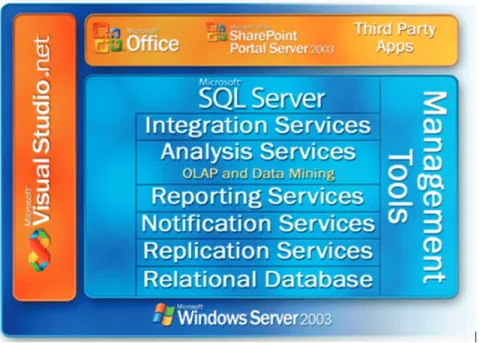
SQL Server is more than just a database. The following diagram shows the relationships among SQL Server components and identifies interoperability between components.
FIGURE 1.1 SQL SERVER COMPONENTS OVERVIEW
SQL Server consists of a suite of tools and components that support you in designing, managing, maintaining, and programming a SQL Server installation and its associated data.
This course mainly focuses on the tools that are important for the performance of the Microsoft Dynamics NAV 2009 database.
Microsoft SQL Server Management Studio, new in Microsoft SQL Server 2005, is an integrated environment for accessing, configuring, managing,
administering, and developing all components of SQL Server. SQL Server Management Studio combines a broad group of graphical tools with a number of rich script editors that provide access to SQL Server for developers and
administrators of all skill levels.
SQL Server Management Studio combines the features of Enterprise Manager, Query Analyzer, and Analysis Manager included in previous releases of SQL Server, into a single environment.
In Microsoft Dynamics NAV objects are managed and designed using the Object Designer. Within Microsoft Dynamics NAV you create tables, design keys, and implement properties using the Table Designer. The Microsoft Dynamics NAV database driver then translates these settings for SQL Server.
Although you can use SQL Server Management Studio and other SQL Server tools to change the way the database tables and indexes are designed, you must be careful when doing this. This is because Microsoft Dynamics NAV is always the master of the design.
Microsoft Dynamics NAV stores metadata describing tables and indexes. This metadata is decoupled from SQL Server metadata about tables and indexes and could be brought out of sync if changes are made directly from management studio. The consequence is that the next time a table is modified from inside Microsoft Dynamics NAV all changes made from outside Microsoft Dynamics NAV will be overwritten.
For example, Simon, the Systems Implementer, uses SQL Server Management Studio and changes the fields contained in an index for the customer table. He can use the SQL Server Management Studio to do this. Afterward, if Mort, the IT Systems Developer, opens the Microsoft Dynamics NAV table designer, the changes made by Simon will not be visible. Moreover, if Mort closes Microsoft Dynamics NAV table designer and saves or recompiles the customer table it might be that the customer table on SQL Server will be resynchronized with the design specified in the Microsoft Dynamics NAV and the changes applied in SSMS may be lost. So when Simon goes back into SQL Server Management Studio his changes will be lost and he will have to re-implement them.
This is why it is important to understand how to use the SQL Server tools. If you are required to make a change in the design of a table, you must do it from Microsoft Dynamics NAV. In Microsoft Dynamics NAV there are many properties available that influence how the database will be created on SQL Server. For example, within Microsoft Dynamics NAV there are several properties in tables and in keys that you can use to influence the way corresponding indexes are created on SQL Server. Only when there is no property available for a required change, can you make the change directly from SQL Server.
It is also important to know that if you use the Microsoft Dynamics NAV client to make a backup of your database, not all of the changes you performed directly in SQL Server will be included in the backup. After you restore the backup, you will most likely have to redo your changes.
Course Outline and Scope
The topics in this course are chosen to meet real-world implementations of Microsoft Dynamics NAV as closely as possible.
The course starts with an introduction of the technology and explains the requirements for the different components. One of the first things you do is to install and configure the software after evaluating the requirements.
Hardware is an important factor for high performance in any ERP system. Selecting the correct hardware and configuring it from the beginning helps produce optimal results for performance and will reduce the risk of encountering future problems. Although you can choose to comply with minimal hardware requirements, you also need to consider the future. The company may grow and the number of concurrent users may increase causing increased demands on the hardware. Choosing and configuring the correct hardware settings will affect the scalability of the solution.
If the customer chooses not to invest much initially and only complies with the minimal hardware requirements, and if the hardware you purchase is not
scalable, then you may encounter problems if the company and the corresponding concurrent users and database size grow greater than their expected limits. At that time you may need to expand the hardware to meet the demand. If the server is not scalable, you will have to invest again to buy a bigger server. This kind of investment can be avoided by selecting a server that is scalable at the initial implementation.
The next chapter provides an overview of the advantages of SQL Server. When selecting SQL Server as the database platform there are a number of advantages and possibilities that were not available in the old native database.
Once the application is implemented, it is important to start monitoring performance. By monitoring performance you can predict bottlenecks or problems that may occur in the future and take action to avoid issues. You can proactively monitor the database and also, for example, forecast database growth. This chapter presents and explains the tools SQL Server and Microsoft Dynamics NAV offer to monitor performance.
If you discover a performance bottleneck there are different ways to solve the problem. The chapter about improving application performance goes into detail on what you need to know when designing the Microsoft Dynamics NAV application objects, properties, C/AL code, and keys to keep them performing optimally. It is important to know that, although you can try to make the design of the application as good as possible, a part of its performance will depend on how the application is used. This is why monitoring performance is important. It provides you with information on how the application is being used allowing you to change the design accordingly.
For example, if the Microsoft Dynamics NAV application is in one case mainly used for reporting and in another case it is mainly used for data entry, then these two scenarios may have completely different requirements on indexes.
Once Microsoft Dynamics NAV is running smoothly and the design and performance are optimal, your work is not finished. Now it is important to maintain the database. If you do not maintain a database, performance will decrease and may become sub-optimal.
For example indexes may become fragmented, the transaction log will continue to grow, and so on. There are several tools you can use to maintain a SQL Server database and this chapter explains how you can use them to keep the application running optimally.
Summary
This chapter gives a high-level overview of Microsoft SQL Server. It also describes the outline of this course.
Quick Interaction: Lessons Learned
Take a moment and write down three Key Points you have learned from this chapter
1.
2.
CHAPTER 2: SETUP AND INSTALLATION
Objectives
The objectives are:
• Evaluate the software requirements for Microsoft Dynamics® NAV 2009.
• Evaluate the hardware requirements for Microsoft Dynamics NAV 2009.
• Review the Microsoft Dynamics NAV 5.0 Architecture.
• Understand the Microsoft Dynamics NAV 2009 Architecture.
• Configure the components in a Microsoft Dynamics NAV implementation.
• Explain the security model and security synchronization.
Introduction
One of the most important steps in a Microsoft Dynamics NAV implementation is the selection of the hardware and software platform.
When planning a Microsoft Dynamics NAV 2009 installation, you must make sure that the computers that will be used meet the minimum requirements and are sufficient for your current and future needs. Failure to meet these specifications can cause the installation of some or all of the components to fail.
This lesson describes the requirements for installing Microsoft Dynamics NAV 2009. Understanding the setup requirements and options help you plan a successful installation.
Software Requirements
The software requirements for a Microsoft Dynamics NAV 2009 implementation depend on the following factors:
• The architecture and the different tiers
• The database platform
• Additional components and desired functionality
Architecture and Tiers
Microsoft Dynamics NAV can be used in single-user or multiuser installations.
• In single-user installations, all the work is performed on one computer, and all the information (the database) is stored on this computer. Even if you purchase several single-user installations and run each on its own computer, the entire installation is still called "single-user" because the information is stored on each individual computer and not on one centrally located database.
• In a multiuser installation, many users share common information that is stored in one or more databases on a server. The computers that work with the data are called clients, and the way the server and the computers work together is called a client/server installation. For a single-user installation, the software requirements are limited. The client must be installed on a supported operating system. Furthermore, when you choose Microsoft SQL Server as a database platform, you also have to consider the software requirements for Microsoft® SQL Server® Express Edition. Multiuser installations require the presence of a server program that is installed on the server computer. Microsoft Dynamics NAV supports two server options: Microsoft Dynamics NAV Classic Database Server and Microsoft SQL Server. Each of these server options has its own software requirements.
In addition, in multiuser installations, you can choose between a two-tier and a three-tier architecture. (In fact, both architectures can coexist.) While the Classic client works with both database platforms, the RoleTailored client requires Microsoft SQL Server as a database platform.
Database Platform
The selected database platform affects the software requirements. While the Microsoft Dynamics NAV Database Server has its own requirements, the requirements for the Microsoft SQL Server Option fully depend on the specifications for Microsoft SQL Server.
Microsoft Dynamics NAV 2009 supports the following SQL Server platforms:
• Microsoft SQL Server 2005 SP2 Express, Workgroup, Standard, Enterprise
• Microsoft SQL Server 2008 Express, Workgroup, Standard, Enterprise
Each edition has its own software and hardware requirements.
Additional Components and Functionality
Depending on the functions and components used in or together with Microsoft Dynamics NAV, additional software requirements apply. Functional areas such as Business Analytics or Automated Data Capture System require additional software components (for example Application Server for Microsoft Dynamics NAV and Microsoft SQL Server Analysis Services). To use Office integration functions (mail merge, Outlook client integration, and export to Excel), you need Microsoft® Office.
Other software requirements can come from a more general perspective or need, such as database size, scalability, and high availability, and so on.
For a detailed overview of the software requirements for the individual Microsoft Dynamics NAV components, go to
http://www.microsoft.com/dynamics/nav/product/systemrequirements.mspx. Microsoft Dynamics NAV 2009 is designed to take advantage of the Microsoft software platform. This platform consists of the following prerequisites for Microsoft Dynamics NAV 2009:
• Windows Server 2003® or 2008
• Microsoft SQL Server 2005 or 2008
• The Microsoft® .NET Framework 3.5
• Microsoft Windows® Services Enhancements
• ASP.NET
• Microsoft Report Viewer 2008
Users must install and configure these prerequisites to prepare the server on which to load Microsoft Dynamics NAV.
These software requirements will influence the hardware configuration, which will be discussed in the next lessons.
Operating System
Microsoft Dynamics NAV 2009 introduces a three-tier RoleTailored architecture that improves the security, scalability, and flexibility of Microsoft Dynamics
In the RoleTailored architecture there are the following three tiers:
• Client tier
• Service tier
• Database server tier
Each tier has its own role and its own requirements that further determine the operating system requirements.
The Client Tier - RoleTailored Client
The Microsoft Dynamics NAV 2009 RoleTailored client can be installed on the following operating systems:
• Microsoft Windows® XP Professional SP3 or later (X86 or running 32 bit on X64)
• Windows Server 2003 SP2 or later (X86 or running 32 bit on X64)
• Windows Server 2003 R2 SP2 or later (X86 or running 32 bit on X64)
• Microsoft Windows Vista® (Business, Enterprise, or Ultimate) SP1 or later (X86 or running 32 bit on X64)
• Windows Server 2008 (X86 or running 32 bit on X64)
Furthermore, depending on the functionalities and applications used by the client, the following applications are required:
• Internet Explorer® 6.0 or later
• Microsoft .NET Framework 3.5
• Active Directory required for 3-tier configurations.
For instant messaging and TAPI Microsoft® Office Communicator 2007 is required.
For Mail Merge*, Microsoft® Outlook® Client Integration, Import and Export Budget to and from Microsoft® Excel® and Office XML and Share Point links, the following is required:
• Microsoft Office 2003 or 2007
The Client Tier - Classic Client
The Microsoft Dynamics NAV 2009 Classic client can be installed on the following operating systems:
• Windows XP Professional SP3 or later (X86 or running 32 bit on X64)
• Windows Server 2003 SP2 or later (X86 or running 32 bit on X64)
• Windows Server 2003 R2 SP2 or later (X86 or running 32 bit on X64)
• Windows Vista (Business, Enterprise, or Ultimate) SP1 or later (X86 or running 32 bit on X64)
• Windows Server 2008 (X86 or running 32 bit on X64) Depending on the functionalities and applications used by the client, the following applications are required:
• Microsoft .NET Framework 3.5
For Mail Merge*, Outlook Client Integration, Import and Export Budget to and from Microsoft Excel and Office XML and Share Point links, the following is required:
• Microsoft Office 2003 or 2007
*Mail merge requires Collaboration Data Object (CDO) installed.
For single-user installation Microsoft SQL Server 2005 Express or SQL Server 2008 Express is supported.
For developing reports for the RoleTailored client, one of the following products is required:
• Microsoft® Visual Web Developer™ 2005 Express edition SP1 or above*
• Microsoft Visual Studio 2005 Standard / Professional SP1 or later
• Microsoft Visual Studio 2008 Standard / Professional SP1 or later * If Microsoft Visual Web Developer 2005 Express edition is used, Reporting Add-in for Microsoft Visual Web Developer 2005 Express is also required. For debugging applications running on the Microsoft Dynamics NAV Server, Microsoft Visual Studio 2008 SP1 is required.
The Service Tier
The Service Tier requires one of the following operating systems:
• Windows XP Professional with SP3 or later (X86 or running 32 bit on X64)
• Windows Server 2003 SP2 or later (X86 or running 32 bit on X64)
• Windows Server 2003 R2 SP2 or later (X86 or running 32 bit on X64)
• Microsoft Small Business Server 2003 R2 SP2 or later (X86 or running 32 bit on X64)
• Microsoft Small Business Server 2008 or later (X86 or running 32 bit on X64)
• Windows Vista (Business, Enterprise, or Ultimate) SP1 or later (X86 or running 32 bit on X64)
• Windows Server 2008 (X86 or running 32 bit on X64)
• Microsoft Windows Essential Business Server 2008 Standard or Premium (running 32 bit on X64)
The following components are needed:
• Microsoft .NET Framework 3.5
• Active Directory required for 3-tier configurations.
The Database Tier - Microsoft SQL Server Option
Microsoft Dynamics NAV 2009 supports the following versions of SQL Server:
• Microsoft SQL Server 2005 SP2 Express, Workgroup, Standard, Enterprise
• Microsoft SQL Server 2008 Express, Workgroup, Standard, Enterprise
The operating system requirements depend on the specifications for both SQL Server versions. Both x86 and x64 operating systems are supported.
Windows Server 2003
Windows Server 2003 or Windows Server 2008 are the platform operating systems for Microsoft Dynamics NAV 2009. Whether you use the 2003 or 2008 depends on your hardware and infrastructure, and your performance needs.
Windows Server 2003 includes all the functionality customers have to do more with less, while providing security, reliability, availability, and scalability. Microsoft has improved the Microsoft Windows server operating systems to incorporate the benefits of Microsoft .NET. This enables information, people, systems, and devices to successfully connect to one another.
Windows Server 2003 is a multipurpose operating system that can handle a diverse set of server roles, depending on a user's needs, in either a centralized or distributed manner. Some of these server roles include the following:
• Application server
• File and print server
• Web server and Web application services
• Mail server
• Terminal server
• Remote access and Virtual Private Network (VPN) server
• Directory services including Domain Name System (DNS), Dynamic Host Configuration Protocol (DHCP) server, and Microsoft
Windows Internet Naming Service (WINS)
• Streaming media server
Windows Server 2003 Standard Edition is designed for departmental and standard workloads.
Windows Server 2003 R2 Enterprise Edition differs from Windows Server 2003 R2 Standard Edition primarily in its support for high-performance servers and its ability to cluster servers for more load handling. These capabilities include the following:
• Eight-way Symmetric Multiprocessing (SMP)
• Eight-Node Clustering
• Up to 64 Gigabytes of RAM
This powerful platform provides reliability that helps systems remain available even if problems occur.
Windows Server 2003 Datacenter Edition is designed for:
• The highest levels of scalability and reliability
• Supporting mission-critical solutions for databases
• Enterprise resource planning software
• High-volume, real-time transaction processing
Windows Server 2003 R2, Datacenter Edition, is available in both 32-bit and 64-bit versions and includes the following:
• Thirty two-way SMP
• Eight-Node Clustering
• Up to 64 Gigabytes of RAM
Microsoft Dynamics NAV uses Windows Server 2003 as an application server, and will be installed on a Windows Server 2003 Standard Edition in most production environments. Other environments may require the Enterprise or Datacenter Editions.
Windows Server 2008
Windows Server 2008, with built-in Web and virtualization technologies, enables businesses to increase the reliability and flexibility of their server infrastructure. New virtualization tools, Web resources, and security enhancements help save time, reduce costs, and provide a platform for a dynamic and optimized datacenter.
Powerful new tools, such as Internet Information Services (IIS) 7.0 and Server Manager, provide more control over servers, and streamline Web, configuration, and management tasks. Advanced security and reliability enhancements, such as Network Access Protection and the Read-Only Domain Controller, empower the operating system and help protect the server environment to make sure a solid foundation on which to build businesses.
Windows Server 2008 is available in multiple editions to support the varying server needs of organizations of all sizes. Windows Server 2008 is available in five primary editions, and three of these editions are also available without Windows Server Hyper-V, bringing the total number of editions to eight.
Windows Server 2008 Roles are specified in the following table:
Microsoft SQL Server
The software requirements for Microsoft Dynamics NAV 2009 with Microsoft SQL Server depend on the SQL Server versions supported by Microsoft Dynamics NAV. There are two supported versions:
• Microsoft SQL Server 2005 SP2 Express, Workgroup, Standard, Enterprise
• Microsoft SQL Server 2008 Express, Workgroup, Standard, Enterprise
Microsoft SQL Server is a comprehensive database platform providing
enterprise-class data management with integrated business intelligence (BI) tools. It is fully integrated into the Microsoft Data Platform.
FIGURE 2.2 THE MICROSOFT DATA PLATFORM
The Microsoft SQL Server data engine is the core of this enterprise data management solution. Additionally, Microsoft SQL Server combines analysis, reporting, integration, and notification.
Business intelligence (BI) features provide a competitive advantage. These advantages include enriching data and building complex business analytics with Analysis Services, and writing, managing, and delivering rich reports that use Reporting Services.
Software Requirements for SQL Server
SQL Server must be installed on a computer running Microsoft Windows. The specific version of Windows required depends on the edition of SQL Server being installed.
SQL Server is available in many editions to help meet the needs of your organization.
Microsoft SQL Server Enterprise Edition
Microsoft SQL Server 2008 Enterprise provides a trusted, productive, and intelligent data platform that enables you to run your most demanding business-critical applications, reduce time and cost of development and management of applications, and deliver actionable insight to your entire organization. SQL Server 2008 Enterprise provides the highest levels of security, reliability, and scalability.
Enterprise Edition is meant to support the largest enterprise online analytical processing environments, highly complex data analysis, data warehousing, and active Web servers.
For more information, go to
http://www.microsoft.com/sqlserver/2008/en/us/enterprise.aspx.
Microsoft SQL Server Standard Edition
SQL Server 2008 Standard is a complete data management and business intelligence platform providing best-in-class ease of use and manageability for running departmental applications.
Standard Edition includes the necessary functionality for e-commerce, data warehousing, and line of business solutions that most small and medium sized business use. If your organization needs to track large amounts of data but does not need all the functionality of Enterprise Edition then Standard Edition will work well with Microsoft Dynamics NAV.
For more information, go to
http://www.microsoft.com/sqlserver/2008/en/us/standard.aspx.
Microsoft SQL Server Workgroup Edition
SQL Server 2008 Workgroup is a reliable data management and reporting platform that delivers secure, remote synchronization and management
capabilities for running branch applications. It includes the core database features of the SQL Server product line and is easy to upgrade to Standard or Enterprise.
Workgroup Edition is the data management solution for small organizations that need a database that has no limit on the size or number of users and can work as a back end to small Web servers and departmental or branch office operations. For more information, go to
http://www.microsoft.com/sqlserver/2008/en/us/workgroup.aspx.
Microsoft SQL Server Developer Edition
SQL Server 2008 Developer enables developers to build and test applications that run on SQL Server on 32-bit, IA-64, and x64 platforms. SQL Server 2008 Developer includes all of the functionality of Enterprise Edition, but is licensed only for development, test, and demonstration use. The license for SQL Server 2008 Developer entitles one developer to use the software on as many systems as necessary. For rapid deployment into production, instances of SQL Server 2008 Developer can easily be upgraded to SQL Server 2008 Enterprise without reinstallation.
Developer Edition includes all the functionality of SQL Server Enterprise Edition. However, it is licensed as a development and test server, not as a production server.
For more information about SQL Server Developer Edition, go to http://www.microsoft.com/sqlserver/2008/en/us/developer.aspx.
For more information about upgrading Developer to Enterprise Edition, go to http://msdn.microsoft.com/en-us/library/ms143393.aspx.
Microsoft SQL Server Express
Microsoft SQL Server 2008 Express is a free edition of SQL Server that is ideal for learning, developing and powering desktop, Web and small server
applications, and for redistribution by Independent Software Vendors (ISVs). SQL Server 2005 Express Edition is a free, easy to use and easy to manage database that can be redistributed to act as a client database and basic server database. It is usually suited for small data sets and will not work in some Microsoft Dynamics NAV implementations.
For more information, go to
http://www.microsoft.com/sqlserver/2008/en/us/express.aspx.
Microsoft SQL Server Web Edition and Compact Edition
Microsoft SQL Server 2008 Web and Compact 3.5 Edition are specifically targeted for web application hosting and mobile application development scenarios.
Edition Features
SQL Server is available in many editions to meet the needs of your organization. To determine which SQL Server edition will work best for your Microsoft Dynamics NAV implementation, review the features in each edition.
FIGURE 2.3 SQL SERVER EDITION FEATURE COMPARISON
For a full comparison of the features available in each edition of SQL Server, please go to
http://www.microsoft.com/sqlserver/2008/en/us/editions-compare.aspx.
SQL Server 2005 on Windows Server 2008 and Windows
Vista
In order to give customers more secure products, Windows Server 2008 and Windows Vista are supported by SQL Server 2005 Express Edition Service Pack 1 (SP1). All other editions will be supported by SQL Server 2005 Service Pack 2 (SP2) or later when it becomes available. Earlier versions of SQL Server, including SQL Server 2000 (all editions including Desktop Engine edition, also known as MSDE), SQL Server 7.0, and SQL Server 6.5, will not be supported on Windows Server 2008 or Windows Vista. Customers running applications that have these earlier versions of SQL Server should consider evaluating and upgrading to SQL Server 2005, which was designed to take advantage of the upcoming security and performance enhancements in the operating environment.
SQL Server 2005 requires Microsoft SQL Server 2005 Service Pack 2
(http://www.microsoft.com/downloads/details.aspx?FamilyId=d07219b2-1e23-49c8-8f0c-63fa18f26d3a&displaylang=en) (SP2) to run on Windows Server 2008 and Windows Vista SP1. You must first install the full release version of SQL Server 2005 before you apply SP2.
Other
.NET Framework
The .NET Framework is a development and execution environment that enables different programming languages and libraries to work together seamlessly to create Microsoft Windows-based applications that are easier to build, manage, deploy, and integrate with other networked systems.
Microsoft Web Services Enhancements
The Web Services Enhancements for Microsoft .NET is an add-in to Microsoft Visual Studio 2005 and the Microsoft .NET Framework 3.5 that enables developers to build secure Web services based on the latest Web services protocol specifications.
Microsoft Report Viewer 2008
The Microsoft Report Viewer 2008 Redistributable Package includes Windows Forms and ASP.NET Web server controls for viewing reports designed by using Microsoft reporting technology. Microsoft Report Viewer control enables applications that run on the .NET Framework to display reports designed using Microsoft reporting technology. This redistributable package contains Windows Forms and ASP.NET Web server control versions of the Report Viewer.
Hardware Requirements
Microsoft Dynamics NAV does not require particularly sophisticated equipment, but as with all programs, the better your equipment, the better the results. You get the best solution with the optimal equipment and with the program settings optimized for that equipment.
In a multi-user installation, you can, in principle, use the same type of computer for both the clients and the server. However, there is a difference in how much CPU power, memory, and disk space the client and server will need.
Computers for servers that run Windows Server 2003 or Windows Server 2008 must comply with the requirements specified by Microsoft. If you use the Microsoft Dynamics NAV SQL Server option, the hardware must meet the specifications of both the operating system and the Microsoft SQL Server edition.
The database is stored on the server, making it a critical area of the application because several users can access it at the same time. Therefore, it is important to select a powerful computer for the server. In addition, the following are aspects of the server that require additional consideration:
• The hard disk and controller
• The RAID system
• The memory
• The network adapter
• The CPU
Hard Disks
The hard disk is the slowest component in a computer because it consists of mechanical parts. Access times to the hard disk are long compared to those to memory (typical access time to memory is less than 60 nanoseconds and access time to a hard disk is faster than 10 milliseconds). All of the programs and information are stored on the hard disk so that data is continuously read from and written to the disk. Because there is only one read/write head in a hard disk, only one read or write operation can be carried out at a time. By using more than one disk in your system, you can increase performance significantly.
Hard Disk Controller
You must, however, use a hard disk controller that supports control of more than one hard disk at a time without increasing access time to the disks. Furthermore, it is important for the controller to have a high transfer rate so data can travel quickly between the memory and the hard disk. The use of CPU per disk transfer must also be minimized. An example of a controller with these features is the Fast Wide SCSI 2 (Small Computer System Interface) controller.
When selecting a hard disk controller, do not use the write-back or lazy-write caching systems that are built into your hard disk controller unless the disk controller has a battery backup. Using a battery-supported hard disk controller prevents loss of data that might otherwise result if the system experiences a power failure.
You should also be aware of the write-cache facility that most of today's hard disks use. When you buy a hard disk, make sure that you can disable its write-cache (using software or a jumper on the disk). When write-write-cache is enabled and a power failure occurs when data is still in this cache, you could lose the data. It is also necessary to have some sort of error detection unit implemented to allow the controller to determine when a byte of data in the cache is corrupted (for example, caused by a single-bit error or a defective memory chip). Any errors that occur must be corrected so that a correction scheme must be implemented in the controller. An ECC (Error Correction Code) RAM is an example of this kind of correction scheme.
Disk Speed and Disk Size
Because the hard disk is the slowest component of a computer, you want to make disk read and write transactions as fast as possible. You can do this by using fast disks (15000 rpm). Fast disks definitely perform better than disks that have a lower speed (10000 rpm).
Adding hard drives to your system will increase the overall performance. To avoid poor performance in your daily work, you should add more than one hard disk to your system and divide the database among these hard disks. Four relatively slow hard disks perform much better together than one super fast hard disk.
Several "intelligent" controllers exist, which can control several hard disks simultaneously, for example, RAID (Redundant Array of Independent Disks) controllers.
Important to know is that pure disk performance is not the same as Microsoft Dynamics NAV performance because many other things are going on for example in-memory processing, network transport and so on. It would be wrong to claim that write performance is more important than read performance because Microsoft Dynamics NAV does about five reads every time it does one write. With a RAID setup you can achieve almost double performance by doubling the number of disks in a pure striping setup but most customers will run both striping and mirroring requiring more disks to achieve this performance gain.
Solid-state drive (SSD)
Solid state disks solve the problem of physical constraints by replacing hard disk drives with high speed circuitry. Instead of a rotating disk, a solid state disk uses memory chips (typically DDR RAM or Flash Memory) to read and write data. Solid state drives have several advantages over the magnetic hard drives. Most of this comes from the fact that the drive does not have any moving parts. While a traditional drive has drive motors to spin up the magnetic platters and the drive heads, all the storage on a solid state drive is handled by flash memory chips. This provides three distinct advantages:
• Less Power Usage
• Faster Data Access
• Higher Reliability
While solid state disks will often boost write performance they typically do not provider as much read performance because the memory cache on the SQL Server already serves a lot of read requests. However the initial measurements (http://blogs.msdn.com/freddyk/archive/2009/02/09/more-ssd-testing.aspx) show
drives. As with conventional hard drives it is still a good idea to build redundancy into a system using solid-state hard drives (mirroring)
RAID (Redundant Array of Independent Disks)
RAID systems provide two main advantages: reliability (RAID 1 or mirroring) and performance (RAID 0 or striping). Given the low cost of hard drives, any company should at least implement RAID 1 to be more secure from data-loss. Whether you use RAID 0 depends on the number of transactions the system is required to handle. The advantage of RAID systems is that you can add disks over time and improve performance or increase capacity.
A RAID system consists of several disks. The key feature of a RAID system is that the failure of one disk does not bring the entire system down.
Several RAID configurations exist. The most important configurations are described in the following table:
RAID Level
Description
RAID 0 This level is also known as disk striping because it uses a disk file system called a stripe set. Data is divided into blocks and spread in a fixed order among all disks in an array. RAID 0 improves read and write performance by spreading operations across multiple disks.
RAID 0 is similar to RAID 5, but RAID 0 does not provide redundancy (fault tolerance).
RAID 1 Called mirroring. The data is written redundantly to pairs of drives and can be read independently from each drive. This is fast and provides full redundancy, but the disk capacity
required is doubled. The read performance can be up to twice as fast as a single drive because both drives can process the read request simultaneously. Write performance is almost
unchanged. RAID 1 is best for transaction processing, where many small I/Os are required. RAID 1 is also the most expensive RAID configuration because of the disk overhead. In theory, RAID 1 has twice the read transaction rate of single disks and the same write transaction rate as single disks.
RAID Level
Description
RAID 5 Also known as striping with parity, this level is the most popular strategy for new designs. RAID 5 stripes the data in large blocks across the disks in an array. The parity for the stripes of data is also spread across all of the drives, so no one drive is dedicated to parity. Data redundancy is provided by the parity information. The data and parity information are
arranged on the disk array so that the two types of information are always on different disks. In general, striping with parity offers better performance than disk mirroring (RAID 1). RAID 5 requires a minimum of three drives to implement. It has the highest read transaction rate, but a medium write transaction rate.
RAID 10 (1+0)
RAID 10 uses a mirrored array of disks (RAID 1 array) that are striped to another set of disks. RAID 10 is not to be confused with RAID 0+1.
RAID 0+1 This level is also known as mirroring with striping. RAID 0+1 uses a striped array of disks that are then mirrored to another identical set of striped disks. For example, a striped array can be created by using five disks. The striped array of disks is then mirrored using another set of five striped disks. RAID 0+1 provides the performance benefits of disk striping with the disk redundancy of mirroring.
RAID Levels and SQL Server
RAID is a disk system that contains multiple disk drives, called an array, to provide better performance, reliability, storage capacity, and reduced cost. Fault-tolerant arrays are categorized in six RAID levels: 0 through 5. Each level uses a different algorithm to implement fault tolerance.
Although RAID is not a part of SQL Server, implementing RAID can directly affect the way SQL Server performs. RAID levels 0, 1, and 5 are typically used with SQL Server.
A hardware disk array improves I/O performance because I/O functions, such as striping and mirroring, are handled efficiently in firmware. Conversely, an operating system-based RAID offers reduced cost, but consumes processor cycles. When cost is an issue and redundancy and high performance are required, RAID 5 volumes are a good solution.
Data striping (RAID 0) is the RAID configuration with the best performance, but if one disk fails, all the data on the stripe set becomes inaccessible. A common installation technique for relational database management systems is to configure
and maintain data recoverability through a mirrored transaction log, assuming you perform regular database backups.
RAID 5 provides redundancy of all data on the array. This allows for a single disk to fail and be replaced most of the time without system downtime. Be aware that RAID 5 offers reduced performance compared to RAID 0 or RAID 1 (because of the parity overhead), but better reliability and faster recovery. Write performance on RAID 5 increases when more disks are added to the RAID 5 array. In general, read performance is better in RAID 5 than in RAID 1 (as RAID 5 has at least three disks, whereas RAID 1 has only two). For ERP systems, with many write transactions, RAID 5 is not always the best solution.
In general, the following RAID recommendations apply to SQL Server: SQL Server Component RAID Configuration
Operating System + SQL Server Files RAID 1
Database RAID 10
Transaction Log RAID 1 or 10
TempDB RAID 1 or 10
The operating system files on a SQL Server are not the most critical nor the most frequently used files of a SQL Server configuration; a RAID configuration with good read performance can always be recommended. However, it is not required (because reading these files does not generate much overhead).
For the database files, it is important to select a RAID level with good read and write performance. Make sure that you put the database files and the transaction log files on separate disk arrays. Otherwise you will encounter disk contention which reduces the performance of the SQL Server. You could also lose both the database and transaction log files should a disk failure occur. It is also
recommended to keep the Windows page file and the database files on separate disk arrays.
The transaction log files require a RAID level with excellent write performance, because the log files are constantly written to. Here, RAID 10 is a good choice. If you have multiple transaction log files, it is better to store each transaction log on a separate RAID 10 array.
Although it is possible to place the TempDB on a RAID 0, we recommend that you select a more fault-tolerant RAID configuration for production
environments. (For development environments or environments where downtime is not important, RAID 0 can be used.) Be aware that failure of a disk that contains the TempDB will result in server downtime, which is to be avoided in production environments.
Processor
The speed of the processor (also called Central Processing Unit or CPU) is also an important performance factor. It is the CPU that performs all the calculations involved in Microsoft Dynamics NAV - the faster the CPU, the more calculations per second.
It is also important to have as much level 2 cache in the system as possible. This increases the speed with which the CPU gets data from and saves data to RAM. However, it should be noted that adding more hard disks gives a greater
Multiple Processors
Microsoft SQL Server can be configured to use multiple processors. The maximum number of processors that can be used by SQL Server depends on the edition:
SQL Server edition Enterprise Standard Workgroup Express
Number of CPUs OS Maximum 4 2 1
If multiple processors are enabled, it is recommended that you:
• Create as many database files as there are processors
• Disable automatic database growth in SQL Server
If you have a multi-processor server, make sure not to allocate all processors to SQL Server, but keep a number of processors available for other tasks that are running on the server. For example, in a server that has four processors, allocate a maximum of three processors to SQL Server and keep at least one for the operating system and other applications.
32-bit versus 64-bit
The terms 32-bit and 64-bit refer to the way a computer's processor handles information. The 64-bit version of Windows handles large amounts of RAM more effectively than a 32-bit system.
The benefits are most apparent when you have a large amount of RAM installed on your computer (typically 4 GB of RAM or more). Because a 64-bit operating system can handle large amounts of memory more efficiently than a 32-bit operating system can, a 64-bit system can be more responsive when running several programs at the same time and switching between them frequently.
Memory
Memory is an important resource in a Microsoft SQL Server environment. Microsoft SQL Server tends to use its memory to serve the user requests.
The amount of memory that SQL Server can address depends on the SQL Server edition (and the operating system). It should be proportional to the number of users.
Edition Enterprise Standard Workgroup Express Required Minimum 512 MB 512 MB 512 MB 192 MB Recommended Minimum (SQL Server 2005) 1 GB 1 GB 1 GB 512 MB
Edition Enterprise Standard Workgroup Express Recommended Minimum(SQL Server 2008) 2 GB 2 GB 2 GB 1 GB Maximum Memory Utilization 4 GB (32-bit) or OS Maximum (64-bit) 4 GB (32-bit) or OS Maximum (64-bit) 4 GB 1 GB
The memory requirements in the table do not reflect additional memory requirements for the operating systems.
For detailed memory requirements, go to http://www.microsoft.com/sql/. The amount of memory that SQL Server can address can be configured through the Memory page in the Server Properties window in SQL Server Management Studio.
When Minimum server memory is set to 0 and Maximum server memory is set to 2147483647, SQL Server can take advantage of the optimal amount of memory at any given time, subject to how much memory the operating system and other applications are currently using. As the load on the computer and SQL Server changes, so does the memory allocated. You can further limit this
dynamic memory allocation to the minimum and maximum values.
Minimum server memory (in MB) specifies that SQL Server should start with at least the minimum amount of allocated memory and not release memory under this value. Set this value based on the size and activity of your instance of SQL Server. Always set the option to a reasonable value to ensure that the operating system does not request too much memory from SQL Server and inhibit Windows performance.
Maximum server memory (in MB) specifies the maximum amount of memory SQL Server can allocate when it starts and while it runs. This configuration option can be set to a specific value if you know there are multiple applications running at the same time as SQL Server and you want to guarantee that these applications have sufficient memory to run. If these other applications, such as Web or e-mail servers, request memory only as needed, then do not set the option, because SQL Server will release memory to them as needed. However, applications often use whatever memory is available when they start and do not request more if needed. If an application that behaves in this manner runs on the same computer at the same time as SQL Server, set the option to a value that guarantees that the memory required by the application is not allocated by SQL Server.
Be aware that sometimes you can achieve better performance by reserving a reduced amount of memory for SQL Server. However, if SQL Server has insufficient memory (because of a lack of physical memory or because of inadequate memory configuration) and Microsoft SQL Server uses all available memory, query response time, CPU usage, and disk input/output will go up (because Windows starts paging).
In general, you can say that a SQL Server cannot have too much memory. In the ideal scenario, the SQL Server has sufficient memory to keep the entire
Microsoft Dynamics NAV database in memory.
It is also important that the memory has a parity bit or is of the ECC (Error Correction Code) type.
32-bit versus 64-bit systems
If you run SQL Server on a 32-bit operating system, you can only address 4 GB of memory. For a 64-bit edition running on a 64-bit operating system, the amount of memory is limited to the operating system's maximum.
Network
Communication to and from the client passes through the network. If messages are to be delivered quickly, you must have a fast network adapter. This also ensures that the CPU use per network send/receive activity is minimal, which reduces the load on the CPU. The physical connection (the cabling) between the server and the clients must also be able to support the high speed.
The Microsoft Dynamics NAV Client requires a 100MB switched (no hubs) connection to the server. Therefore, 56K modem or broadband connections are not supported with the standard Microsoft Dynamics NAV Client. Alternative solutions are available (Windows Terminal Services, Microsoft Dynamics NAV Employee Portal or Automated Data Capture System (ADCS) for example). It is important to have a powerful network connection between the Microsoft NAV Service Tier (NST) and the SQL Server because this is where most
network communication will take place. The NST processes all business logic on behalf of the client. The Microsoft Dynamics NAV RoleTailored client is
designed to communicate less with the NST than the classic client.
Microsoft Dynamics NAV Architecture
Microsoft Dynamics NAV 2009 is built on a three-tier architecture model. This differs significantly from the two-tier architecture of Microsoft Dynamics NAV 5.0 and earlier versions.
Microsoft Dynamics NAV 2009 introduces a new layer in the architecture. This additional layer, or tier, is designed to host and execute all the business logic. In the two-tier architecture of Microsoft Dynamics NAV 5.0, the business logic
It improves security to execute the business logic on another layer that does not provide an interface, or access point, to the user. Scalability is also improved in the three-tier architecture.
Microsoft Dynamics NAV 5.0 Architecture
Two-tier architecture models are used in the true Client/Server Distributed Data solution. In two-tier architectures, the data and data manipulation layers reside on the server, whereas the application logic, presentation logic, and presentation layers reside on the client.
Microsoft Dynamics NAV 5.0 is designed according to the two-tier architecture model. It puts the application logic (Business Logic) and presentation
logic/layers (User Interface) on the client computer.
The two-tier architecture also puts the data and data manipulation layers (DML) on the server in the native database and SQL Server configurations.
The Client Tier
The Classic client is located on the client tier. It consists of an administration component for administrators and Microsoft Dynamics NAV 4.0/5.0 super users and client access for the Classic client user.
The client tier has specific connections for data transfer to the server tier and the database management component. These connections consist of the client, security approved access to the database components on the server tier, and administration access to the database management.
The Server Tier
The server tier consists of the database management system and the native database for Microsoft Dynamics NAV 4.0/5.0 or the Microsoft SQL Server database.
The existing application server or Application Server for Microsoft Dynamics NAV is an integration point to the Microsoft Dynamics NAV 4.0/5.0 application. It can be used for example, to connect to Microsoft® BizTalk Server®. The application server represents an effort to achieve three-tier architecture benefits. However, it is limited to only one process at a time. Therefore, multiple
application servers are needed for many production environments.
Microsoft Dynamics NAV 2009 Architecture
The three-tier architecture is used in the Client/Server Distributed Data and Application system. With this architecture, in which the data and data