IJSRSET1844270| Received : 10 April 2018 | Accepted : 23 April 2018 | March-April-2018 [(4) 4 : 1268-1273]
Performance Analysis of Microcontrollers Used In Iot
Technology
K. Swathi, T. Uday Sandeep, A. Roja Ramani
Computer Science and Engineering, TKR Enigineering College, Hyderabad, Telangana, India
ABSTRACT
Internet of Things, a revolutionary invention, is always transforming in to some new kind of Hardware and Software making it unavoidable for any one. An IoT microcontroller or development board is a prototyping solution that features low-power processors which support various programming environments, collect sensor data using firmware and transfer it to an on-premises or cloud-based server. Entering the era of Internet of Things, the use of small, cheap and flexible computer hardware that allow end-user programming become present. In this paper we provide an overview of the state-of-the-art hardware available and explores performance of different microcontrollers, they are Arduino, node MCU, Raspberry Pi. We present IOT device characteristics, features, applications and comparision between different boards.
Keywords: IOT Device Characteristics, Arduino, NodeMCU, Raspberry Pi.
I.
INTRODUCTION
The Internet of things ideology can be looked up as an highly dynamic and radically distributed networked system composed of a very large identifiable smart objects. Connected hardware devices are the heart of IoT. IoT devices monitor and instrument "things," or real-world objects[1]. They act as the interface between the real and digital worlds. One of the main goals of device (from an IoT perspective) is to collect data. So next we need to think about what kind of data we are collecting, and what hardware is needed to do that. So Entering the era of Internet of Things, the use of small, cheap and flexible computer hardware that allow end-user programming become present. A microcontroller focuses on integrating peripherals needed to support fast control within an embedded environment. Simply stated, a microcontroller is a single integrated circuit that at least contains the necessary elements of
a complete computer system: CPU, memory, a clock oscillator, and input and output. When you develop new IoT solutions, hardware and software components are designed, prototyped, and refined through an iterative process of feedback and evaluation. Hobbyist hardware platforms like Arduino and Raspberry Pi can help jump start this process of rapid prototyping and refinement, because they are readily available and require less investment than designing and fabricating custom printed circuit
boards (PCBs) at each iteration of the design. IoT
development board is selected based on Cost
Specifications: Memory, Processor, I/O capability, etc.
Programming support/options Reliability of supplier.
Compatibility with sensors and actuators
New devices and device platforms are continually being released as the IoT landscape grows. We can characterize IoT devices in terms of these high-level capabilities[1]:
1. Data acquisition and control 2. Connectivity
3. Power management
4. Data processing and storage
Data acquisition and control:
Data acquisition (DAQ) is the process of measuring
real-world conditions and converting these measurements into digital readings at fixed-time intervals (the data sample rate). Sensors are the input components that measure physical variables and convert them to electrical signals (voltages). Sensors includes temperature, humidity, pressure, smoke, gas, light, sound, vibration, air-flow, water-flow, speed, acceleration, proximity, GPS position, altitude, or force, and the list goes on. Sensors monitor the internal state of the device, and sensors like buttons, sliders, or a touchscreen can be used for interacting directly with the device, providing a Human-Machine Interface.
Output devices are the inverse: they convert an electrical signal to a physical outcome. Output devices include LEDs, speakers and screens,
and actuators like motors or solenoids that move or
control things in the physical world. Actuators are commonly deployed within industrial IoT applications.
Data processing and storage:
IoT devices require data processing and storage capabilities to perform basic handling, transformation, and analysis of the data that they capture. IoT devices can process data directly, or they can transmit this data to other devices, gateway devices, or cloud services or apps for aggregation and analysis. The processing power and storage that is used by an IoT application will depend on how much processing occurs on the device itself as opposed to how much
processing is performed by the services or apps that consume the data.
Connectivity:
Network connectivity is one of the defining characteristics of any IoT device. Devices communicate with other devices locally, and publish data to services and apps in the cloud. Some devices communicate wirelessly, by using 802.11(wifi), Bluetooth, RFID, cellular networks, or Low Power wide area network (LPWAN) technologies like LoRa, SigFox or NB-IoT. Wired communication is suited to stationary devices, which are installed in smart buildings, home automation, and industrial control applications, where they can be connected with Ethernet or retrofitted with Ethernet over power. Serial communication is also a form of wired connectivity between devices, using standard protocols like Universal Asynchronous Receiver Transmitter (UART), or the Controller Area Network (CAN) protocol, which has its origins in the automotive industry.
Power management:
Power management is of particular concern for portable and wearable IoT devices that rely on batteries or other non-wired power sources like solar. Depending on the usage patterns and the power requirements of the attached sensors, actuators, or Integrated Circuits (ICs) that provide data acquisition and control, storage, processing and networking capabilities, a device might need to be put into sleep mode or into low-power mode periodically to conserve power or extend battery life.
II.
IOT MICROCONTROLLERS
1.ARDUINO UNO:
gives the developer freedom to quickly create connected environments and have a high-quality hardware-oriented approach to development. Arduino is great at handling your hardware configuration and pushing the data to an external device for representation. Simply connect it to a computer with a USB cable or power it with a AC-to-DC adapter or battery to get started.
Features:It is based on ATmega328P (datasheet). It has 14 digital input/output pins (of which 6 can be used as PWM outputs), 6 analog inputs, a 16 MHz quartz crystal, a USB connection, a power jack, an ICSP header and a reset button. "Uno" means one in Italian and was chosen to mark the release of Arduino Software (IDE) 1.0.
Arduino Software (IDE) were the reference versions of Arduino, now evolved to newer releases.
Figuer 1 Performance:
The ATmega microcontroller can execute up to 16 million instructions per second. Now, 16 million instructions per second may sound like a lot (and it is, sort of), but when we consider what all an Arduino needs to do to execute even simple operations, it really isn't that much. For many projects, the clock cycles are shared between things like calculations, I2C communication, reading and writing to pins and registers, and many more operations.
Even then, seemingly simple commands can take up quite a bit of clock cycles, such as setting a digital pin to high. This is one of the simplest IO operations you
can perform on an Arduino, but it actually takes a very long time (over 50 clock cycles!) because of the amount of code used in the digitalWrite() method, which I'll address in the next section. So a faster clock would allow us to execute the instructions at a faster pace[9].
Software Capability: Raspberry Pi runs on arduino software[10].
Applications of Arduino UNO Board:
Here, some of applications developed by using ARDUINO UNO
1. Arduino based RFID Sensed Device Access 2. Arduino based Industrial Appliances Control
System by Decoding Dual Tone Multi-Frequency Signals via GSM Network
3. Arduino based Underground Cable Fault Detection
4. Arduino based Home Automation
2. RASPBERRY PI:
The raspberry pi Development Board is small size of a credit card computer. The raspberry pi can be easily plugged in to monitor, computer or your TV. Also, it uses standard keyboard and mouse. Even non-technical users depend on it for configuring their digital media systems and surveillance cameras. Raspberry Pi 3 is certainly the most affordable and powerful computing platform.
Features: The recently launched Raspberry Pi 3 included
Figure 2
Performance:
The Raspberry Pi 3, with a quad-core ARM Cortex-A53 processor, is described as 10 times the performance of a Raspberry Pi 1. This was suggested to be highly dependent upon task threading and instruction set use. Benchmarks showed the Raspberry Pi 3 to be approximately 80% faster than the Raspberry Pi 2 in parallelised tasks. In parallelised benchmarks, the Raspberry Pi 2 V1.1 could be up to 14 times faster than a Raspberry Pi 1 Model B+. While operating at 700 MHz by default, the first generation Raspberry Pi provided a real-world performance roughly equivalent to 0.041 GFLOPS. The graphical capabilities of the Raspberry Pi are roughly equivalent to the performance of the Xbox of 2001. The LINPACK single node compute benchmark results in a mean single precision performance of 0.065 GFLOPS and a mean double precision performance of 0.041 GFLOPS for one Raspberry Pi Model-B board.
Software Capability: Raspberry Pi runs on customized Debian Linux called Raspbian, to install different packages including Node.js, Java, the LAMP stack, Python and much more.
Applications: By using the raspberry pi board, 1. we can develop a mini computer.
2. It is very useful for students. We can able to launch weight wed server, because it can support all programming languages like HTML, JAVA.
3. It can even handle WordPress, so you can manage your own blogs/website.
4. The raspberry pi board based robotics are huge amount of applications in automation industries.
3. NodeMCU:
Arduino and Raspberry Pi do not have built-in support for wireless networks. Developers will have to add a wifi or cellular module to the board and write code to access the wireless module. So open source IoT development board called NodeMCU is used[7] and allows you to code your device using Lua scripts. One of its most unique features is that it has built-in support for wifi connectivity. It is a very inexpensive System-on-a-Chip (SoC) called the ESP8266. The ESP8266, designed and manufactured by Espressif Systems, contains all crucial elements of the modern computer: CPU, RAM, networking (wifi), and even a modern operating system and SDK. This makes NodeMCU a smart choice to play with the IoT.
Figure 3. The NodeMCU DEVKIT board3
Performance:
Features:
64 KiB boot ROM, 32 KiB instruction RAM, and 80 KiB user data RAM. (Also, 32 KiB instruction cache RAM and 16 KiB ETS system data RAM.) External flash memory can be accessed through SPI. The silicon chip itself is housed within a 5 mm × 5 mm Quad Flat No-Leads package with 33 connection pads — 8 pads along each side and one large thermal/ground pad in the center[11]. USB-TTL included, plug & play. 10 GPIOs D0-D10, PWM functionality, IIC and SPI communication, 1-Wire and ADC A0 etc. all in one board, PCB antenna.
Software compatibility: Arduino IDE.
Applications:
1.
Book Passes/Tickets on-line.2.
Teaching management system.3.
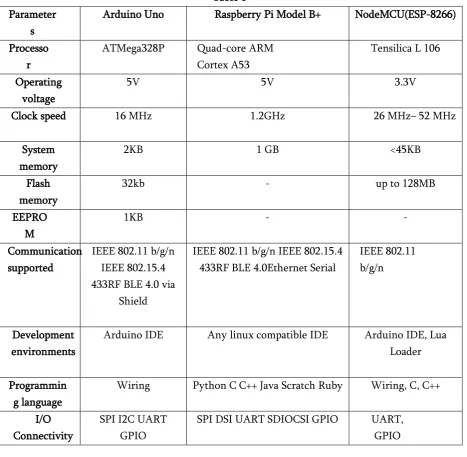
Golf game.Comparision of all Development Boards:
Table 1
III.
CONCLUSION
Parameters
Arduino Uno Raspberry Pi Model B+ NodeMCU(ESP-8266)
Processo r
ATMega328P Quad-core ARM Cortex A53
Tensilica L 106
Operating voltage
5V 5V 3.3V
Clock speed 16 MHz 1.2GHz 26 MHz– 52 MHz
System memory
2KB 1 GB <45KB
Flash memory
32kb - up to 128MB
EEPRO M
1KB - -
Communication supported
IEEE 802.11 b/g/n IEEE 802.15.4 433RF BLE 4.0 via
Shield
IEEE 802.11 b/g/n IEEE 802.15.4 433RF BLE 4.0Ethernet Serial
IEEE 802.11 b/g/n
Development environments
Arduino IDE Any linux compatible IDE Arduino IDE, Lua Loader
Programmin g language
Wiring Python C C++ Java Scratch Ruby Wiring, C, C++
I/O Connectivity
SPI I2C UART GPIO
The comparative study shows how these platforms are promoting the growth of IOT by utilizing the specific board as per the intended application. Raspberry pi-3 have high performance compared with boards like Aurdino and nodeMCU in terms of its storage and computational speed but at higher price. Raspberry Pi equipped with inbuilt wifi and Bluetooth serves as an easy means to connect to internet and push the data to the cloud servers if required for further processing. Whereas it is clearly visible from the comparison that boards like Arduino being equipped with inbuilt analog to digital conversion has a better means of sensing the analog data readily when there is a need to sense some continuous analog signals coming out of analog sensors. The applications,features, performance and software compatability of each and every board is analyzed.
IV.
REFERENCES
[1]. Choosing the best hardware for your next iot project by by anna gerber
[2]. Https://storearduinocc/usa/arduino-uno-rev3 [3]. Quality hardware list for your iot projects [4]. http://beagleboardorg/black
[5]. different microcontroller boards and its applications by tarun agarwal
[6]. http://raspberrypi3blogspotin/
[7]. Getting to know NodeMCU and its DEVKIT board by Michael Yuan
[8].
https://storefut- electronicscom/products/nodemcu-esp8266-programming-and-development-kit
[9]. Speeding Up Arduino By Scott Robinson [10]. List of Arduino boards and compatible systems
From Wikipedia, the free encyclopedia [11]. http://esp8266np-[/et/