Voice Based Email Application for Visually
Impaired
Milan Badigar Nikita Dias
UG Student UG Student
Department of Information Technology Department of Information Technology Goa College of Engineering Goa College of Engineering
Jemima Dias Mario Pinto
UG Student Assistant Professor
Department of Information Technology Department of Information Technology Goa College of Engineering Goa College of Engineering
Abstract
Email is considered as one of the most pervasive form of communication. However, all these technologies can be of no use to the people who are visually impaired as all activities that can be performed on the computer are based on visual perception. With the advent of technologies in mobile phones, many technological solutions have been implemented for visually impaired so that they can utilize them, and get benefited by them. Considering it as a key idea application will be built that will help blind people to send and read emails as ordinary people do. Speech has not been used much in the field of electronics and computers due to the complexity and variety of speech signals and sounds. However, with modern processes, algorithms, and methods, the processing of speech signals easily and recognize the text. The application will not let the user to make the use of keyboard instead will work on text to speech and vice versa to facilitate sending, reading, forwarding and replying to emails using an android smart phone. The app will be developed this on android platform. Our speech-to-text module directly acquires and converts speech to text. Speech recognition is done via the Internet, connecting to Googles server.
Keywords: Speech Recognition, Email, Visually Impaired, User Friendly, Voice, Text To Speech
________________________________________________________________________________________________________
I. INTRODUCTION
Proposed Work
Problem Definition
The key opinion kept into consideration while developing the proposed system was accessibility. Such applications will be used efficiently by anyone whether he is able or disable. Unlike existing systems which focuses more on Graphical User Interface (GUI) friendliness of normal user, our system covers expectations of both normal as well as visually impaired group.
II. INTRODUCTION TO PROJECT
III. LITERATURE REVIEW
Background
The main aim of our application is to help visually impaired people to enjoy the benefits of email and should be self-sufficient in sending and receiving them independently. There is a working module of the application which is working on instructions given specifically in English. For the future scope it can also design the Voice Based Email Application (VMAIL) working with other languages.
The basic function of the application is to provide user with a simple way to perform email operations on his phone without compromising his security. The application is totally voice-based allowing blind person to send and receive emails on the go. It converts the user spoken voice into text and performs the action accordingly. It consists of voice confirmation i.e., confirming if the user has actually spoken the recognized text or not, which minimizes the errors involved.
Components:
1) Authentication: Since users tend to forget their passwords or simply use weak passwords that allow an adversary to break into their email accounts, the application makes use of fingerprints. The Secure Hash Algorithm is used to hash the password and store the hash value in the database instead of the password itself, to enhance security. SQLite is a software library that implements a self-contained, server-less, zero-configuration, transactional SQL database engine.The Java Mail Application Programming Interface (API) provides a platform independent and protocol-independent framework to build mail and messaging applications. The Java Mail API provides a set of abstract classes defining objects that comprise a mail system. It is an optional package (standard extension) for reading, composing, and sending electronic messages. Simple Mail Transfer Protocol (SMTP) is used when email is delivered from an email client to an email server or when email is delivered from one email server to another. Post Office Protocol (POP) allows a client to download an email from mail server. Internet Message Access Protocol (IMAP) is an Internet standard protocol used by e-mail clients to retrieve e-mail messages from a mail server over a TCP/IP connection. IMAP is defined by RFC 3501[4].
2) Navigation: Here, the user will have to use certain keywords which will perform certain actions. The keywords like: Compose, Received Mails, Sent Mails, Go Back.
3) Speech to text (STT): here whatever we speak is converted to text. Their will a small icon of microphone on whose clicking the user had to speak and the speech will be converted to text format, which the naked people would see and read [5]. 4) Text to speech: Here the method is full opposite of STT. This method, converts the text format of the emails to synthesized
speech.
IV. RESULTS AND DISCUSSION
Fingerprint Authentication
To have a cryptographically protected email technology and make email security more appealing to users, biometrics can be used. Humans have used body characteristics such as face, voice, and gait for thousands of years to identify each other but only currently humans started developing and utilize biometric based systems to authenticate individuals. Biometrics is the science of deciding an identity based on the physical or behavioural characteristics of an individual such as fingerprints, face, iris , hand vein, voice, keystroke, palm print, retina etc. Biometric systems are essentially pattern recognition systems that take input as biometric data, obtain a feature set from such data, and finally differentiate it with a template set stored in a database. If the obtained feature set from the given input is proximate to a template set stored in the database then the user is permitted access. This approach uses fingerprint recognition to authenticate users and provide them with a transparent process of signing and verifying email messages. The idea is to enroll a user fingerprint, associate the fingerprint with a record that is unique to that user, and finally use the users fingerprint and unique record to authenticate the user, sign the users email message, and verify other users email messages. To send emails from our email client, the use Gmails SMTP server: smtp.gmail.com which is listening on port 465 and to download emails to our email client, use Gmails IMAP server: imap.gmail.com which is listening on port 993. Furthermore, Gmails mail servers make it mandatory for email clients to set up a secure tunnel via SSL before making an effort to communicate with them. Trusted Execution Environment (TEE) is a secure area of the Smartphones main processor. It guarantees confidentiality and integrity of the code and data loaded inside. This separation enables security and protection from hacks, malware and root access. All fingerprint data manipulation is performed within TEE. All fingerprint data must be secured within sensor hardware or trusted memory so that images of your fingerprint are inaccessible. The fingerprint data can be stored on the file system only in encrypted form, regardless of whether the file system itself is encrypted or not. The removal of the user must result in removal of the user’s existing fingerprint data and the root access must not compromise fingerprint data.
V. REQUIREMENT SPECIFICATIONS
Software Requirements
1) Android Studio 2.3.3: Android Studio is integrated development environment for Google’s android operating system. It’s task is to provide the interface for producing applications and to handle much of the intricate file management. The programming language used for this is Java. It grants you access to the android’s SDK (software development kit). SDK is the addition to the java code that grants to run effortlessly on android devices. Android Studio allows you to run your code either via an emulator or via a piece of hardware connected to your machine. Android Studio will present a list of auto-complete suggestions. Some of its features are gradle based built support, android specific renaming and prompt fixes, it supports building of android wear applications and it contains an Android Virtual Device(Emulator) which helps to run and debug its applications.
2) SQLite: SQLite is a software library that implements a self-contained, server-less, zero-configuration, transactional SQL database engine. It is the standard database provided by Android.
3) Java Mail API: The Java Mail API contributes a platform- self-sufficient and protocol self-sufficient framework to construct mail and messaging applications. The Java Mail API provides a set of undefined classes defining objects that encloses a mail system. Some of the JavaMail API protocols used are SMTP, POP and IMAP.
Hardware Requirements
An Android phone is a dynamic, high-tech smartphone that works on the Android operating system developed by Google and is used by numerous mobile phone manufacturers. Fingerprint scanning is proving to be one of the simplest, secure ways to authenticate yourself on your phone to do all things from unlocking the phone to making digital payments to locking down easily affected data in applications. The security level is also boosted and one can protect content or data from illegitimate access.
VI. DESIGN
Flow Diagram
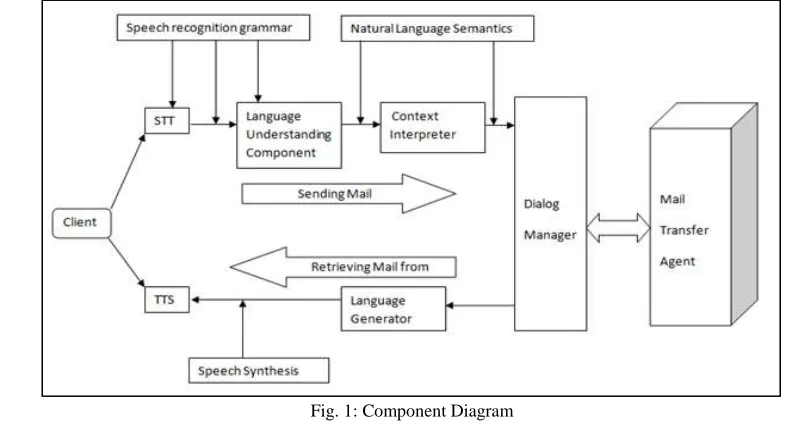
1) STT: Accepts speech from the user and produces text.
2) Language Understanding Component: Extracts semantics from a text string by using a pre-specified grammar
Fig. 1: Component Diagram
3) Context Interpreter: Enhances the semantics from the Language Understanding Module by obtaining context information from a dialog history For example; the Context Interpreter may replace a pronoun by a noun to which the pronoun referred. 4) Dialog Manager: Prompts the user for input, makes sense of the input, and determines what to do next according to instructions
in a dialog script specified.
5) Language Generator: Accepts text from the dialog manager and prepares it to the user as spoken voice via a text-to-speech synthesizer (TTS).
Detail Process Flow
The Modules of this system are as follows:
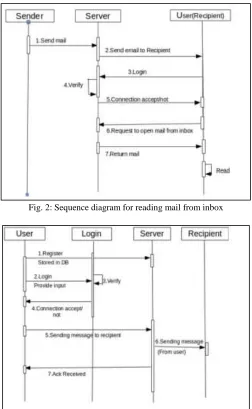
1) Registration: This is the first module of the application. The user who wants to take advantage of our application, he/she needs to register themselves. In this module, application will be invoking what details needs to be entered. Consequently, the user will hand over the details through voice inputs. Before submitting details, system will approve the information by invoking. After registration, all the information along with username and password will be kept in the database.
2) Login: Once the registration is done, user can log into application by supplying username(email id) and password for accessing his/her account. This module is utilized for authentication. It will obtain the username(email id) and password in speech format and transform it to text. Then this text will be utilized by system to decide whether that user is legitimate or not. If he/she is authorized user then system will switch that user to next GUI. After successful login, application invokes for action to be performed such as: Compose, Sent mail, Receive mail.
3) Compose Mail: In this module, user can set up mail he/she wants to send. It works as follows: a) Then application will request for recipients name/s, subject and message body.
b) User will supply this information through speech and this speech is transformed into text by the application. 3) After that application will read recipient name, subject, and message body and ask for affirmation.
c) Once the affirmation is done mail will be sent to respective recipient/s.
4) Receive mail: This alternative helps user to see all mails received to his/her account. After choosing this option, most recent mails get loaded. Then application will invoke recipients name and subject of each mail, if user wants to listen to mail then user has to execute operation specified by invocation. In order to navigate to next mails he has to give suitable voice command. 5) Sent Mail: This alternative keeps track of mails sent by the user. In order to access the sent mails user needs to execute actions provided by the invocation to navigate between mails. This will help the user in efficiently obtaining and forwarding the required mail.
VII. IMPLEMENTATION
1) On opening the Application the user can log in
2) On the login page , the user is asked for username and password
3) After logging in, a splash screen will appear and the user will be authenticated with his fingerprint every time
4) On successful authentication, the menu page will open and the user is prompted for input commands which are Compose , Received mails and Send mails. User has to say one of the commands and based on the voice commands, he will directed accordingly.
5) On Compose, the user will be directed to Compose Page and on tap on the screen will be prompted to tell the recipient's ID, subject and message of the email. The mail gets sent successfully to the recipient's ID
6) On Received, the user will be directed to received mails Page and On the tap on the screen, the user will be prompted which mail to read the first, second or third mail
VIII. CONCLUSION
This project proposes an android application, designed specifically for visually challenged people. This application provides a voice based mailing service where they could read and send mail on their own, without any guidance. Here the users have to use certain keywords which will perform certain actions for e.g. Received mails, Send mails, Compose Mail. VMAIL can be used by a blind person to access mails easily and efficiently. Thus reliance of visually impaired on other people for their activities related to mail can be reduced.
IX. FUTURE SCOPE
For the further development of the application , the attachments like images, word documents, audio and video files can be incorporated. Encryption and decryption algorithm can used to protect the username and password that is passed during login. More commands can be used to for different operations like search, mark important, delete, archive, go back, report spam, forward. Automated replying to received mails can be also integrated. The application can be adapted to different languages such that a variety of users can use the application.
REFERENCES
[1] Sonali Malap,Vaishali Shirke,Mrunali Chalke,Rohan Jain,Sonali Pakhmode.(2016). Voice based Email System for Visually Impaired People presented at IJSRD. .[Online].Available: https://www.scribd.com/doc/299063840/Voice-Based-Email-System-for-Visually-Impaired-People
[2] Poonam Pate, Zeeshan Tamboli, Harsh Panchal, Diksha Jain.(2017). Voice Based E-mail Application for Blind/Visually Impaired People presented at IJARIIE.[Online].Available: http://ijariie.com/AdminUploadPdf/ Voice_Based_E_mail_Application_for_Blind_Visually_Impaired_People_ijariie5500.pdf [3] Rahul Anwani,Usha Santuramani, Deeksha Raina,Priya R.L.(2015).VMAIL: Voice Based Email Application presented at IJCSIT.[Online].Available:
http://ijcsit.com/docs/Volume%206/vol6issue03/ijcsit20150603110.pdf [4] IMAP - https://tools.ietf.org/html/rfc3501