C2 Security: Is Big Brother Watching?
Chris Hare
As both the number and uses of computers have increased, so, too has the need for reliable security standards. Accordingly, the United States Department of Defense developed a collection of security standards and assembled them into the Trusted Computing Standards Evaluation Criteria, more commonly known as the Orange Book. C2, which is only one of several security levels, is by no means the highest, but it is the level adhered to by the majority of business-oriented UNIX vendors.
In this article, I discuss a number of concepts and ideas that are applicable to systems other than SCO, as well as some SCO-specific implementation issues. I will not explore the sysadmsh in great detail, as it is a relatively easy tool to use, but I do discuss it when I address the topic of auditing.
C2 security addresses total system security, including the physical machine, the software, backups, and the information stored on the physical media. If you follow the C2 guidelines, the end result is what is called a ”trusted” system. But this system is only as ”trusted” or ”secure” as the physical machine and media.
At the physical level, care should be taken to restrict the users who can access the system console, which is where the disk drives and keyboard are. By restricting access to the console, you limit the number of users who could alter the boot process with a different bootable disk. In addition, you must protect the software distributions: what good is it to lock access to the machine if the UNIX disks are right beside the system? Anyone could boot the system from those floppy disks, override your software protections, and access your data. The same is also true for backup media – if the backup media is freely accessible, then anyone can access your data by reading your backup tapes.
So, apart from the topics I cover here, remember that there is more to C2 than just the security of the operating system. The remainder of this article discusses:
• what C2 security is
• how SCO has implemented C2 security
• how to interact with the Security System
• Trusted vs. Secure
Because no computer yet developed is completely free from risk, computer systems are not referred to as ”secure,” but rather as ”trusted.” A trusted system is defined as one that has a higher degree of control over the users on the system and the corresponding data. A trusted system prevents, or at least identifies, unauthorized access to the system.
C2 Basics
A collection of concepts and ideas – some of them more logical than physcial – form a large part of the definition of a trusted system. This section provides an overview of those concepts and ideas, then more detailed discussions follow.
The heart of the trusted system is the ”trusted computing base,” or TCB. The base includes a collection of databases that store information on users, devices, and files, to detect unauthorized access. A wide variety of programs also form part of the computing base, which is the operating system’s enforcement mechanism.
A ”subject” in a C2 environment is an entity such as a process, which is a program running on the UNIX system. ”Objects” are such items as devices, files, and interprocess communication objects, like semaphores and shared data.
The primary issue addressed by C2 security is accountability. An action is accountable only if it can be traced back to a single person. If there is any possibility that more than one person could have taken the action, then there is no accountability. Most UNIX systems lack accountability because the actions taken cannot be traced to a single user. Take the account ”root,” for example. Most sites use it for administering their systems because it is the only account which can do it all. It is not uncommon for several people in an organization to know the root password, so that all can perform the routine system administration tasks.
This practice is one of the security holes in traditional UNIX. The question can be asked ”Who removed that file?” and all can claim innocence, knowing that there is no way to trace their actions. In a trusted system, however, each real user is associated with a real account, and specific privileges and authority are granted to each user. This will be discussed in more detail later.
The Discretionary Access Control (DAC) mechanism determines if a given user has the access rights to a given ”object.” On most UNIX systems, this object protection is imple-mented through the standard UNIX permissions mechanisms, consisting of permission bits for the owner of the file, the group owner, and all other users, as illustrated in Figure 1. The DAC mechanism allows specific users to modify the Set User ID (SUID) and Set Group ID (SGID) bits and make ownership changes, and it removes the extended permissions whenever a file is copied.
You may think that this is all there is regarding permissions, but in fact there is more. Authorizations are used to grant a given user access to a particular action. C2 security provides for two types of authorizations – kernel and subsystem. Kernel authorizations are associated with processes and allow a process to perform certain actions depending upon its authorization level. Subsystem authorizations are associated with individual users and allow a user to perform certain functions in the system. For example, manipulation of the Line
Figure 1:
The row of numbers above each example shows the octal representation of the actual permission bits. The number in brackets at the end of the line is the octal value of the permission field.
a) The typical permission bit fields
4 2 1 4 2 1 4 2 1 (777)
- r w x r w x r w x
--- ---
---owner group other
b) Set User ID. If the ’s’ in the execute field of the file is upper case ’S’, then there is no execute permission on this file.
4
4 2 1 4 - 1 4 - 1 (4755)
- r w s r - x r - x
---SUID
c) Set Group ID. See the note above.
2
4 2 1 4 - 1 4 - 1 (2755)
- r w x r - s r - x
---SGID
d) Sticky bit. This has become used to prevent users from being able to remove files they don’t own in public directories such as /tmp.
1
4 2 1 4 - 1 4 - 1 (1755)
d r w x r - x r - t
---"sticky bit"
Printer (lp) subsystem requires that the user have the lp authorization. The lp authorization allows the user to access commands such as lpadmin to perform printer maintenance.
Logging in to a C2 trusted system involves a few additional checks besides the usual password checking performed for a typical UNIX system (see ”How UNIX Password Controls Work,” Sys Admin 1:1, May/June 1992). The trusted system searches the password file as usual and validates that the password provided is in fact the correct password. A record is kept for each user account defining when the user last successfully and unsuccessfully logged in to the system. This is an easy way for users to see if their account is being violated, provided they haven’t disabled this reporting mechanism. In addition, C2 imposes further controls enforced on password generation, making passwords unusable that would be accepted on non-C2 trusted systems.
The major component in providing accountability to a C2 is the Audit Mechanism. Auditing is not just an extension of the traditional UNIX process accounting system. With process accounting, the system keeps limited records regarding what processes executed on the system and who executed them. It keeps no records regarding what objects (files or devices) were accessed.
Auditing corrects this weakness of process accounting. A wide variety of system events can be monitored, providing an audit trail or record of all actions taken by every user on the system. Using this audit trail, which according to the Orange Book must be kept until that iteration of the Operating System is destroyed, the System Administrator, Audit Administrator, or Security Office could review it to determine when a specific action occurred, what happened, and who was involved.
Finally, there are the Protected Subsystems. These subsystems make use of the SUID and SGID bits to restrict access to only those users who are members of that group. Even though it may appear that a particular command is SGID and belongs to a particular group,
that command is not necesarrily part of the subsystem. At the same time, simply putting the user in the desired group is not enough – there are other authorizations which typically must also be granted.
The Trusted Computing Base Filesystem
The files that make up the databases for the TCB are scattered in several different directory hierarchies. SCO is adamant about not editing many of these files, because corrupting one of them may make it impossible for you to log in to correct it. If you find it necessary to edit one or more of these files, make sure that you have a full backup available and proceed with caution.
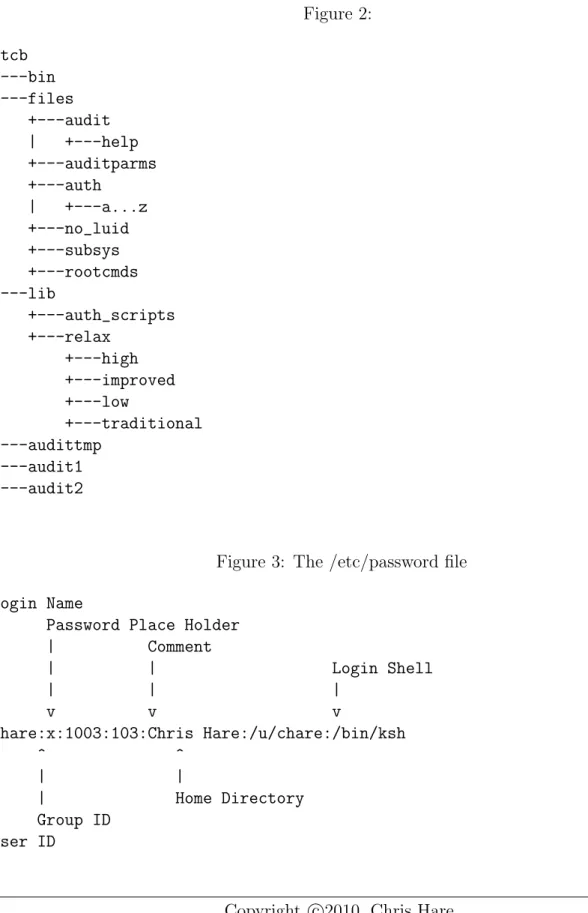
The majority of the files and programs required to maintain the TCB are in the /tcb directory structure, shown in Figure 2.
The user information is only partially stored in the /etc/passwd file. As Figure 3 shows, the /etc/passwd file contains an asterisk in the field where the password would normally be. Additional user information is stored in the /tcb directory structure, under /tcb/files/auth/[a-z]/username, where the [a-z] refers to the corresponding directory with the same first letter as the user’s name. For example, my login name is chare, so the infor-mation on my user account will be found in the directory, /tcb/files/auth/c. The contents of this file are shown in Figure 4, along with an explanation of each entry.
Information for the Terminal Control Database is also stored under /etc/auth. This is where unsuccessful logins on each terminal device are logged. When the maximum is reached, the terminal device is locked or disabled until the system administrator clears the lock. The locking mechanism makes it easier for the system administrator to see if there is a potential problem with someone trying to gain access to the system. The /etc/auth directories are
Figure 2: /tcb +---bin +---files | +---audit | | +---help | +---auditparms | +---auth | | +---a...z | +---no_luid | +---subsys | +---rootcmds +---lib | +---auth_scripts | +---relax | +---high | +---improved | +---low | +---traditional +---audittmp +---audit1 +---audit2
Figure 3: The /etc/password file
Login Name
| Password Place Holder
| | Comment | | | Login Shell | | | | v v v v chare:x:1003:103:Chris Hare:/u/chare:/bin/ksh ^ ^ ^ | | | | | Home Directory | Group ID User ID
Figure 4:
This example shows comments on the
entry. The ’# text’ notes do NOT appear in the file.
chare:u_name=chare:\ # Actual user name :u_id#1003:\ # User ID
:u_pwd=MWUNe/9lrPqck:\ # Encrypted Users :u_type=general:\ # User Type
:u_succhg#746505937:\ # Last Successful Password Change :u_unsucchg#746506114:\ # Last Unsuccessful Password Change :u_pswduser=chare:\ #
:u_suclog#747066756:\ # Last successful Login
:u_suctty=tty02:\ # Last successful login on tty :u_unsuclog#747150039:\ # Last unsuccessful login
:u_unsuctty=tty04:\ # Last unsuccessful login on tty :u_numunsuclog#1:\ # Number of unsuccessful logins
:u_lock@:\ #
:chkent: #
Figure 5: The /etc/auth directory
/etc/auth +---subsystems +---systems
illustrated in Figure 5, with the primary Terminal Control file illustrated and explained in Figure 6.
Administrative Roles
Just as in an organization an individual typically has a primary role and several secondary roles, so too does a user on a computer system. The different roles can be used to grant users specific access to the parts of the system for which they will have administrative
responsi-Figure 6: The Terminal Control Database entry
This example shows comments on the
entry. The ’# text’ notes do NOT appear in the file.
tty01:\
:t_devname=tty01:\ # identifies that this is tty01 :t_uid=root:\ # last user who logged in
:t_logtime#747066876:\ # when they logged in :t_unsucuid=root:\ # last unsuccessful login :t_unsuctime#746710243:\ # when that login was
:t_prevuid=root:\ # who was the next to last user :t_prevtime#747066869:\ # when did they log in?
:chkent:
bility. Table 1 identifies the administrative roles recognized by C2: note that the apparent correlation between the administrative roles and the protected subsystems is somewhat mis-leading. In fact, the issue is more complicated than this suggests. The primary benefit to assigning roles is to distribute the work, that is, to allow people to perform certtain tasks without needing to use the root account, thereby keeping the accountability intact.
Administrative roles are logical ones. This means that nowhere in the SCO system is a specific person identified as, say, the audit administrator. Rather, this association is performed by granting the associated privileges using the System Administration Shell, or sysadmsh.
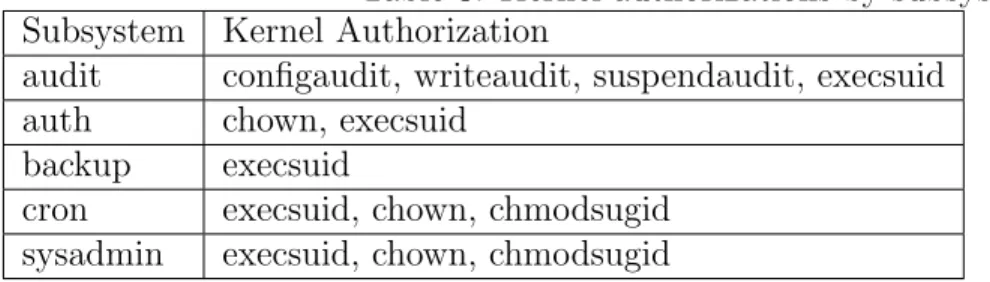
Protected subsystems often require that a user also have some kernel authorizations in order perform various operations. Table 2 lists the kernel authorizations and provides explanations of how they work. Table 3 lists the different protected subsystems and their related kernel authorizations.
Table 1:
Role Subsystem Authorization Area
System Administrator su This permits the user to use the ‘su’ command to switch to other users. Audit Administrator audit Manipulate, configure, and get reports
from the audit system.
Accounts Administrator auth Create and manipulate user accounts
Operator backups Filesystem backups
Cron Administrator cron Manipulate and configure the cron subsystem.
Printer Administrator lp Configure and maintain the Line Printer System.
Table 2: Authorization Purpose
configaudit Allows the user to configure the audit system by
modifying the audit parameters. This should not be assigned to anyone other than the Audit Administrator.
writeaudit Gives the ability to write audit records to the audit
trail. (Normally, users wouldn’t have this, but a process would need this to write audit records.) This should not be assigned to anyone other than the audit administrator.
execsuid This allows the user to run SUID programs. If the user
does not have this authority, SUID programs will not execute for this user.
chmodsugid This gives the ability to set or remove the SUID,
SGID, or sticky bits on files or directories using the chmod command.
chown This authority determines if the user can change the ownership of an object. This is enforced even if the user is the owner of the object. Without this authorization, only root can change the ownership.
suspendaudit This authority allows the process to suspend the
auditing of its activities. This should not be assigned to anyone other than the audit administrator.
Table 3: Kernel authorizations by subsystem Subsystem Kernel Authorization
audit configaudit, writeaudit, suspendaudit, execsuid auth chown, execsuid
backup execsuid
cron execsuid, chown, chmodsugid sysadmin execsuid, chown, chmodsugid
Password Control
Password control is a critical aspect of security on any system, and trusted systems focus intense attention on this area. The enhanced password control mechanisms are modeled after the United States Department of Defense Password Management Guideline, the Green Book. It enforces much more stringent controls for users who can pick their own passwords. The authorizations administrator can specify which users can choose their own passwords and which must have passwords generated for them by the system. Once the system chooses the password, it can be subjected to simple or extensive checking. Simple checking looks for circular shifts of the login name. Extensive mode checks a large system dictionary of words that cannot be used as passwords.
Another feature of the trusted environment: user accounts can be locked. For example, if the user attempts to login but consistently types the wrong password, then that user’s account will be locked by the system. This is the system’s attempt to detect and control a possible breakin. The system administrator may apply an administrative lock. In both cases, the user will get a message upon attempting to login stating that the account is locked and that the user should see the system administrator.
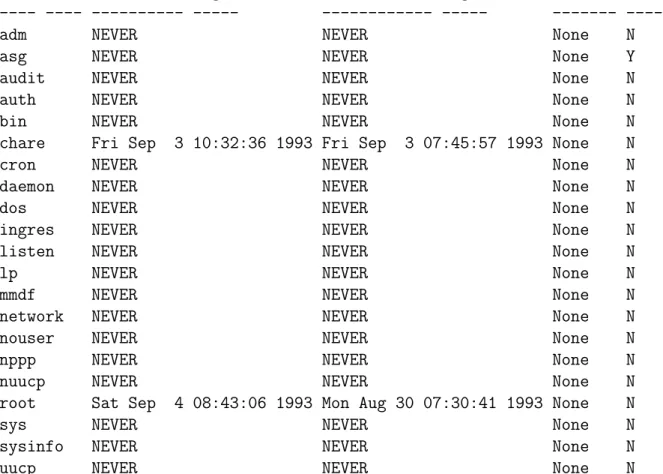
Reports can be generated about user login activity on the system, as shown in Figure 7. The report lists each user in the password file, and reports on the last sucessful and unsuccessful logins for that account. It also notes the number of failed logins and if the
account is locked. If the locked field is set to ”Y,” then the user is unable to login until the system administrator unlocks the account.
Terminal Management
Before moving on to Auditing, I want to discuss terminal control. As I mentioned earlier, the TCB records system activity on terminals. This is especially important as the terminal is the gateway to the system. A trusted system allows a predefined number of unsuccessful login attempts before disabling or locking (depending on the security level enabled) the terminal device. The default number for C2 systems is 5. This means that after five unsuccessful login attempts, the terminal is locked and all later login attempts will be advised that the terminal is disabled.
The report shown in Figure 8, which is created from the system administration shell, lists the current login states of the various terminals on the system. This is for all termi-nals, including the network terminal ports. This report lists the last good and bad logins, indicating who and when, the last logout on that port, and the number of failed attempts to login. Notice that tty04 has had six unsuccessful login attempts.
0.1
System Auditing
The primary reason for implementing C2 security is to be able to find out what everyone is doing with the available computing resources. For sites concerned about confidential information, C2 provides a means of tracking access. Through auditing it is possible to see who and what processes accessed any file in the system.
Figure 7: Login Activity Report
Login Activity Report System topgun
Sat Sep 4 09:39:53 1993
User Name Successful login Unsuccessful login #Failed Lck? ---- ---- --- --- --- --- ---
----adm NEVER NEVER None N
asg NEVER NEVER None Y
audit NEVER NEVER None N
auth NEVER NEVER None N
bin NEVER NEVER None N
chare Fri Sep 3 10:32:36 1993 Fri Sep 3 07:45:57 1993 None N
cron NEVER NEVER None N
daemon NEVER NEVER None N
dos NEVER NEVER None N
ingres NEVER NEVER None N
listen NEVER NEVER None N
lp NEVER NEVER None N
mmdf NEVER NEVER None N
network NEVER NEVER None N
nouser NEVER NEVER None N
nppp NEVER NEVER None N
nuucp NEVER NEVER None N
root Sat Sep 4 08:43:06 1993 Mon Aug 30 07:30:41 1993 None N
sys NEVER NEVER None N
sysinfo NEVER NEVER None N
Figure 8: Terminal activity report
Login Activity Report System topgun
Sat Sep 4 09:42:42 1993
Last Good Login Last Bad Login Last Logout
Tty Name User Name Date User Name Date User Name Date #Failed --- ---- ---- ---- ---- ---- ---- ---- ---- ---- ----
---console UNKNOWN NEVER UNKNOWN NEVER UNKNOWN NEVER 0 tty01 root 09/03/93 root 08/30/93 root 09/03/93 0 tty02 UNKNOWN NEVER UNKNOWN NEVER UNKNOWN NEVER 0 tty03 root 09/03/93 UNKNOWN NEVER root 09/03/93 0 tty04 root 09/04/93 UNKNOWN 09/04/93 root 09/04/93 6 tty05 UNKNOWN NEVER UNKNOWN NEVER UNKNOWN NEVER 0 tty06 UNKNOWN NEVER UNKNOWN NEVER UNKNOWN NEVER 0 tty07 UNKNOWN NEVER UNKNOWN NEVER UNKNOWN NEVER 0 tty08 UNKNOWN NEVER UNKNOWN NEVER UNKNOWN NEVER 0 tty09 UNKNOWN NEVER UNKNOWN NEVER UNKNOWN NEVER 0 tty10 UNKNOWN NEVER UNKNOWN NEVER UNKNOWN NEVER 0 tty11 UNKNOWN NEVER UNKNOWN NEVER UNKNOWN NEVER 0 tty12 UNKNOWN NEVER UNKNOWN NEVER UNKNOWN NEVER 0
• The kernel audit mechanism, which generates audit records based upon the user process activity through kernel system calls
• The audit device drivers, /dev/audit and /dev/auditw
• The audit compaction daemon, which reads the audit records and processes them into a collection of files
• The sysadmsh audit interface
• The data reduction and analysis facilities.
• The Kernel Audit Mechanism
The kernel audit mechanism tracks user activity through the system calls that each process executes to perform work. For example, the open(S) system call is classified as a ”make object available” event. It makes the object, and the data, available to the program for reading and, if authorized, for update. However, if a user who doesn’t have the necessary permission attempts to open the file for write or update, a Discretionary Access Control (DAC) denial is recorded for that file. System calls can be selectively enforced.
A few system calls, such as getpid(S), which returns the PID of a process, are not con-sidered a threat to security and so are not audited.
The Audit Device Driver
The audit device driver is responsible for:
• accepting audit records from the kernel audit mechanism and from trusted utilities
• providing audit trail data to the audit daemon for compaction
• providing for selective audit-record generation based upon event types, user IDs, and group IDs.
The audit device interacts like any other device, except that only those processes with configuaudit or writeaudit authorization can successfully open the device. In this fashion only those processes that have been deemed trusted can open and interact with the audit device. There is no need to worry about lost records because of many processes writing to it. The driver takes care of merging all of the records into the audit trail. However, only the audit daemon can read from the device.
The audit driver maintains the audit trail as a sequence of audit collection files. Each time you restart auditing, a new session is started. An audit data file grows quickly: on one test machine, after only a couple of hours, the file contained over 38,000 audit records. Interaction with this file is done through the system administration shell.
The Audit Compaction Daemon
This daemon is a trusted program which runs in the background whenever auditing is run-ning. The purpose of this daemon is to read records from the audit device and to provide a compaction and logging mechanism. In this case compaction means actually compacting the information into a size which is suitable for storage. It is not uncommon on a single user system to generate over 200Kb of audit data per hour. The compaction daemon can reduce the required space by 60 percent. This greatly saves on the amount of disk space required to store the audit records.
Table 4:
A. startup/shutdown B. Login/Logoff C. Process Create/Delete D. Make Object Available E. Map Object to Subject F. Object Modification G. Make Object Unavailable H. Object Creation I. Object Deletion J. DAC Changes K. DAC Denials L. Admin/Operator Actions M. Insufficient Authorization N. Resource Denials O. IPC Functions P. Process Modifications Q. Audit Subsystem Events R. Database Events S. Subsystem Events T. Use of Authorizations
The Audit Interface
The audit or system administrator interacts with the audit system through the system administration shell, sysadmsh. This allows for configuring the audit system parameters, maintaining the subsystem authorizations, and reviewing the audit reports.
The Data Reduction and Analysis Facility
This facility examines audit trails from previous or current sessions to analyze and report on the activity within the session.
What Is Being Audited?
The events available for audit, on both a system-wide basis and a per-user basis, are listed in Table 4. Please refer to your system documentation for an explanation of each event.
For each event, system administrators can selectively control whether the event is audited or not by changing the System Audit Event Mask. This mask is global to the entire system. If you have a need to edit or change the audited event list, it can be done during auditing. For each user, the event mask can also be adjusted. While the global event mask can only be on or off for each event, the user audit mask can be set to
• never audited
• use the system default to define whether the event is audited.
The user event mask overrides the global mask, so you can audit more or fewer events for some users, and leave the defaults in place for other users.
Guidelines for Auditing
To be effective at auditing, you must set some guidelines for your installation that define what will be audited and when. The audit system is extremely flexible and can be customized to allow for tracking the desired events.
If you use preselection to determine which user IDs or events you want to audit, you will consume less disk space (unless, of course, you decide to audit everything). However, there is a drawback: if the event you want to look for hadn’t already been specified for audit, you won’t find instances that occurred before you added it. For this reason, it is typically desirable to select all events for auditing, and to be selective when generating the reports.
Reports
F
The SCO C2 report generator can generate several predefined reports, including:
• DAC denials
• Logins and logoffs
Figure 9: Common report data
**** Audit Data Reduction Program *****
Audit session number: 1 Collection system name: topgun Collection file count: 49 Compaction file count: 1 Total audit records: 38455 Total uncompacted size: 2377854 Total compacted size: 887236 Data compression rate: 62.69
Collection start time: Sat Sep 4 09:35:52 1993 Collection end time: None
• All objects
• Authorizations
• Denials
Even with these reports, you can still create other reports to suit your own needs. Figure 9 shows the information available at the beginning of every audit system report:
• The audit session record number, which is incremented every time auditing is started, usually on system boot
• The collection system name, which is the name of the namelist
• The number of files that make up the collection set
• The number of files composing the compacted data
• The total uncompacted size in bytes
• The total compacted size in bytes
• The percent of data compression
• The start of data collection for the session
• The end of data collection for the session
• The information regarding what was included in the report
Figure 10 shows three sample records from the Discretionary Access Control Denials report. These entries show a successful open, file permission change, and a file ownership change.
Aside from the reports identified above, which ship as part of the C2 configuration, it is also possible through the reports interface in the system administration shell to define your own parameters for a report, and then generate it.
Caveats
There are a couple of caveats to running auditing on your system – it does consume disk space, at approximately 200Kb per hour on a single user system or 8 x 200K = 1.6 Megabytes per hour on an eight-user system! You must have the capacity to store these records. Also, to be truly C2-compliant, you must keep these records on some accessible storage medium until the system is reinstalled. Finally, there is a performance hit, but that is dependent on the amount of CPU power you have to begin with.
Figure 10: Sample Audit Records
These sample audit records come from the dac.denials report which identifies those events composing the Discretionary Access Control failures.
Process ID: 2002 (*INC*) Date/Time: Sat Sep 4 09:39:00 1993 Luid: uucp Euid: uucp Ruid: uucp Egid: uucp Rgid: uucp
Supp groups: uucp
Event type: Access denial
System call: Open Mode: Read Object: /tcb/files/subsys/root
Result: Failed-EACCES (Access denial) Security policy: discretionary
Process ID: 2001 (*INC*) Date/Time: Sat Sep 4 09:39:01 1993 Luid: uucp Euid: uucp Ruid: uucp Egid: uucp Rgid: uucp
Supp groups: uucp
Event type: Discretionary access change System call: Chmod
Modified object: /tmp/croutHFAa00235
Old Values for Uid: 5 Gid: 5 Mode: 100600 New Values for Uid: 5 Gid: 5 Mode: 100644 Result: Successful
Process ID: 2086 (*INC*) Date/Time: Sat Sep 4 10:09:03 1993 Luid: uucp Euid: uucp Ruid: uucp Egid: uucp Rgid: uucp
Supp groups: uucp
Event type: Discretionary access change System call: Chown
Modified object: /usr/spool/uucp/LTMP.2086 Old Values for Uid: 5 Gid: 5 Mode: 100444 New Values for Uid: 5 Gid: 5 Mode: 100444 Result: Successful
Conclusions
C2 isn’t for everyone, and because some people may feel that their every action is being watched (as it is), there may be some resistance to running C2 where it isn’t formally required. I don’t know of any legal actions that have been taken as a result of a C2 audit trail, but it wouldn’t surprise me to hear of one.
I’d be interested in hearing from readers who are actually running C2 UNIX. I’d like to know why you are running C2 and what your experiences have been with it.
I have by no means covered all there is to know about C2; rather, I have only revealed the tip of the iceberg. For more information you should consult the chapters on C2 security in your related system documentation.