using ODBC Method
Version 1.0
TalariaX Pte Ltd
76 Playfair Road
#08-01 LHK2
Singapore 367996
Phone: 65-62802881
Fax: 65-62806882
Web: www.talariax.com
Prepared by Ang Sei Heng
Date: 13th November 2010
Table of Contents
1. Introduction... 3
2. ODBC Driver (For Windows)... 3
2.1 Installation... 3
2.2 Connection Setup...4
2.3 sendQuick ODBC Authentication Configuration... 5
3. sendQuick SMS Messages Table...5
3.1 Odbc_queue - Temporary Table to Store Messages for SMS Sending...5
3.2 Queue – Queue for SMS Awaiting (Pending) to Send...6
3.3 Inbox - Table Recording Received SMS... 6
3.4 Outbox - Table Recording Sent SMS...7
1.
Introduction
sendQuick employ PostgreSQL as its backend database system, hence all relevant information of PostgreSQL would be applicable for remote access to the system.
PostgreSQL support remote access via its native library, JDBC and ODBC. However, this document would only discuss ODBC driver installation, and verification of the ODBC connection, in a Microsoft Windows environment.
For other drivers and information on PostgreSQL, go to: http://www.postgresql.org
The later part of the document also explains the table structure and fieldnames of the SMS messages tables in sendQuick.
2.
ODBC Driver (For Windows)
2.1
Installation
Download the latest ODBC driver from:
http://www.postgresql.org/ftp/odbc/versions/msi/
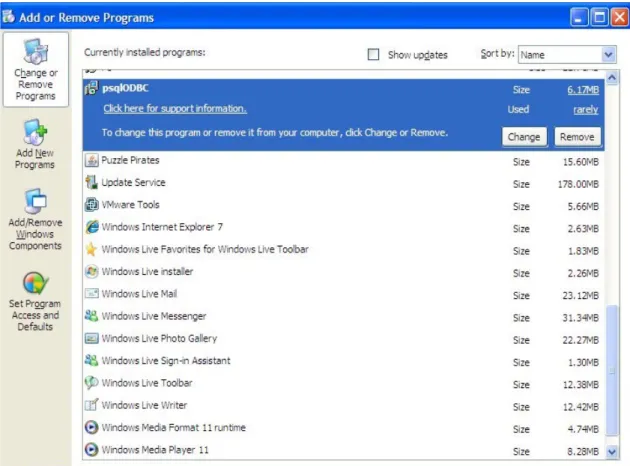
Once installation is successful, the driver would appear in the “Add and Remove Programs” in the “Control Panel” (Refer to Figure 2.2 below).
Figure 2.2 psqlODBC Driver
2.2
Connection Setup
The instructions below explains the ODBC driver connection setup for PostgrSQL.
i. Goto: “Control Panel” -> “Administrative Tools” -> “Data Sources ODBC” -> “Add”. ii. Select “PostgreSQL ANSI” from the list of driver available.
iii. Enter the following information:
Database Server Username Password
Leave other fields as default. Once entered, press the “Test” button to verify the connection.
iv. Once connection shown as successful, end user may proceed to add the ODBC data source link into their respective programming.
2.3
sendQuick ODBC Authentication Configuration
This section explains the authentication setup to access PostgreSQL.
i. Login to sendQuick as a Server Administrator (http://sendQuickIPaddress/appliance/) ii. Go to "Security Setup", enter the IP address of the client database server (the database
server that will access sendQuick)
iii. Set the appropriate password for smsapp DB in the "Change Password" section. iv. Use the following database authentication setting to access the database:
• DB Name: spooldb
• DB user: smsapp
• DB Password: (set in step iii above)
One the above steps (2.1, 2.2 and 2.3) are completed, you are ready to access to read/write into
sendQuick system.3. Database Table
3.
sendQuick SMS Messages Table
3.1 Odbc_queue - Temporary Table to Store Messages for SMS
Sending
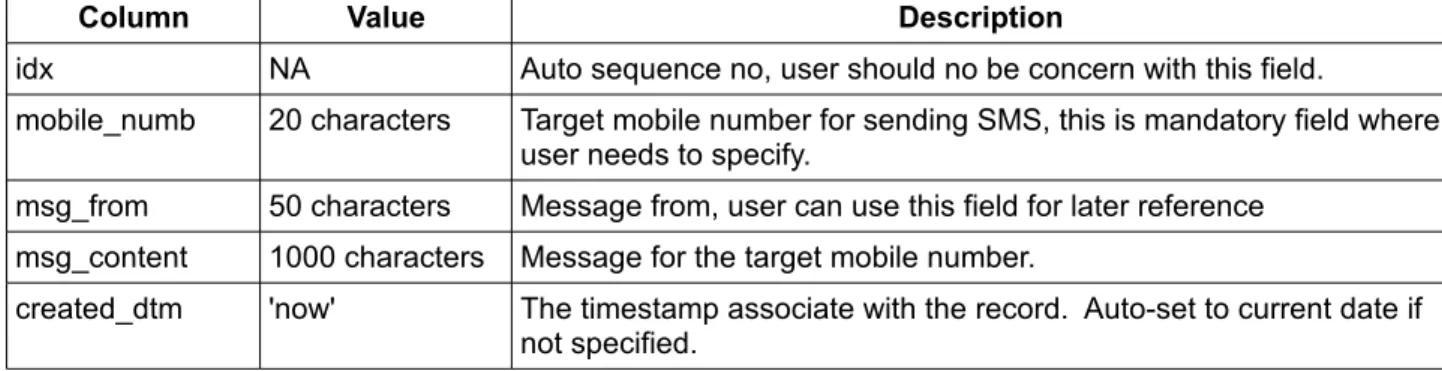
Table Name: odbc_queue
Description: This table is for inserting the records to send SMS. The messages deposited in this table will be processed to send SMS immediately.
Column Value Description
idx NA Auto sequence no, user should no be concern with this field.
mobile_numb 20 characters Target mobile number for sending SMS, this is mandatory field where user needs to specify.
msg_from 50 characters Message from, user can use this field for later reference msg_content 1000 characters Message for the target mobile number.
created_dtm 'now' The timestamp associate with the record. Auto-set to current date if not specified.
3.2
Queue – Queue for SMS Awaiting (Pending) to Send
Table Name: queue
Description: This table is for SMS messages that were processed and awaiting to be sent using the modem
Column Description
msgid Unique message ID
msg_type E - Email to SMS, W - HTTP to SMS, A - Match filter rules. created_dtm Message created timestamp
process_dtm Last known processing timestamp mobile_numb Mobile number
msg_from Message from sender information, user can use this field for later reference msg_content Message for the target mobile number.
3.3
Inbox - Table Recording Received SMS.
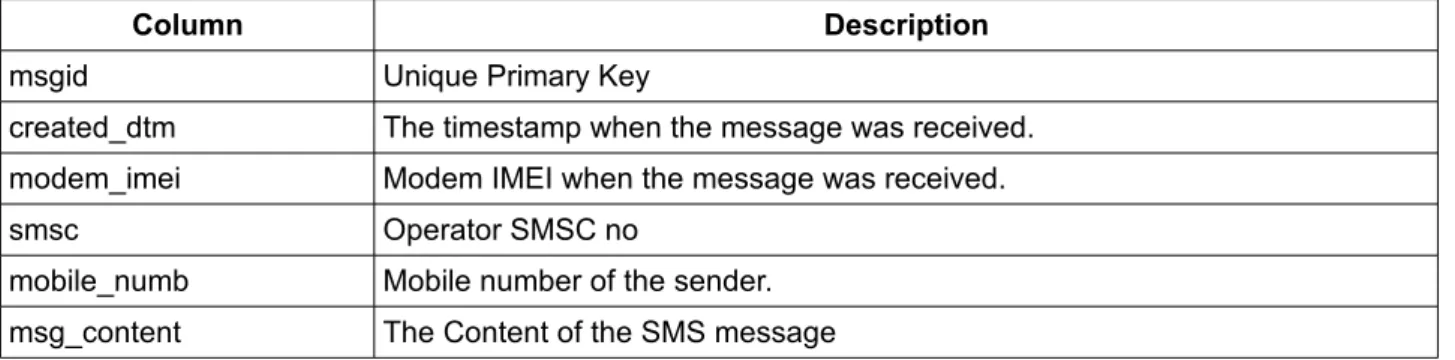
Table Name: inbox
Description: This table is for storing incoming (received) SMS that was received by sendQuick. All incoming SMS will be stored in this table, regardless of modem (for sendQuick that has multiple modems)
Column Description
msgid Unique Primary Key
created_dtm The timestamp when the message was received. modem_imei Modem IMEI when the message was received.
smsc Operator SMSC no
mobile_numb Mobile number of the sender. msg_content The Content of the SMS message
3.4
Outbox - Table Recording Sent SMS
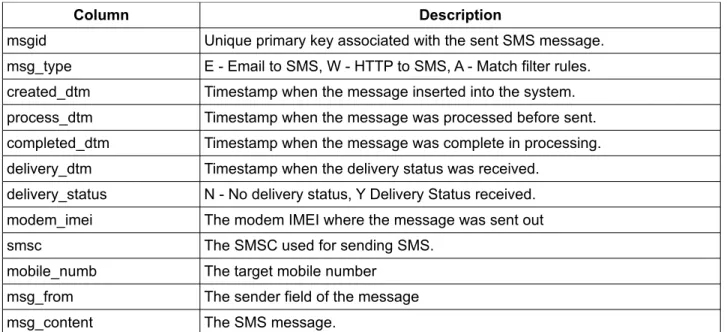
Table Name: outbox
Description: This table is for storing all SMS messages successfully sent by sendQuick.
Column Description
msgid Unique primary key associated with the sent SMS message. msg_type E - Email to SMS, W - HTTP to SMS, A - Match filter rules. created_dtm Timestamp when the message inserted into the system. process_dtm Timestamp when the message was processed before sent. completed_dtm Timestamp when the message was complete in processing. delivery_dtm Timestamp when the delivery status was received.
delivery_status N - No delivery status, Y Delivery Status received. modem_imei The modem IMEI where the message was sent out smsc The SMSC used for sending SMS.
mobile_numb The target mobile number msg_from The sender field of the message msg_content The SMS message.
3.5
Unsent - Table Recording Unsent SMS.
Table Name: unsent
Description: This table is for recording all SMS messages that were failed to send (after retries)
Column Description
msgid Unique primary
msg_type E - Email to SMS, W - HTTP to SMS, A - Match filter rules. created_dtm Timestamp when the message inserted into the system. process_dtm Timestamp when the message was processed before unsent. completed_dtm Timestamp when the message was complete in processing. mobile_numb The target mobile number
msg_from The sender field of the message msg_content The SMS message.