DRO
Deakin Research Online,
Deakin University’s Research Repository Deakin University CRICOS Provider Code: 00113B
Usability in mLearning
Citation:
Atalatti, Ajinkya, Lanham, Elicia and Coldwell-Neilson, Jo 2015, Usability in mLearning
, in
Proceedings of the 7th International Conference on Computer Supported Education
,
SCITEPRESS, Lisbon, Portugal, pp. 213-219.
DOI:
https://doi.org/10.5220/0005410702130219
© 2015, SCITEPRESS
Reproduced with permission.
Downloaded from DRO:
Ajinkya Atalatti, Elicia Lanham and Jo Coldwell-Neilson Deakin University, Burwood Hwy, Melbourne, Australia
Keywords: Mobile Learning, mLearning, Usability, Learning Technologies.
Abstract: As higher education students access educational content using a variety of mobile devices, the question then arises: Does the content across different mobile devices vary in terms of usability? Does usability determine a user’s willingness to engage in mobile learning? Hence, it is necessary to investigate the usability of the learning applications and the mobile devices used to access these applications. This paper outlines results from a pilot study conducted at a large Australian University. The study highlights the importance of usability across different mobile devices whilst accessing educational content. This research lays the foundation for a future study that will broaden the investigation to extend from usability for mLearning to usability for mLearning.
1 INTRODUCTION
Recent developments in mobile technologies have given birth to smartphones, tablet computers, and eBook readers, which offer ‘anywhere and anytime’ learning solutions, as compared to the otherwise stationary mode of learning (Kim et al., 2006). Learners are trying to incorporate these mobile technologies to facilitate their learning endeavours at an alarming rate (Cheung et al., 2011). Mobile learning (mLearning) is described as the use of mobile devices for the purpose of education (Hewagamage et al., 2012). However, every technology suffers from certain drawbacks, and mobile technologies are no different (Peterson, 2013). Furthermore, the success of mLearning depends completely on human factors (Kukulska-Hulme, 2007). The field of human-computer interaction (HCI), which deals with interaction between users and computers, shoulders the responsibility to tackle the shortcomings of mobile technologies and to provide sound and effective solutions for the masses (Zacarias and de Oliveira, 2012). Usability, a subset of HCI, is the measure of perceived satisfaction and acceptability of a system by the user (Nielsen, 1993). Usability in particular is a major concern for content developers and designers where man meets machine. Among the factors that affect usability of mobile devices, battery life and limitations in input/output devices are important to focus on (Li et al., 2008). MLearning, an emergent pedagogy, is affected
greatly with systems and interfaces that lack the sheer essence of usability principles, and is further hindered since users have access to a library of mobile devices which are currently available in the market. Every mobile device sports different features and it is the responsibility of mLearning facilitators to adhere to sound usability guidelines when designing content for users with different devices.
Many practitioners and researchers are focusing on the implementation and deployment of mLearning technologies in tertiary education, however, key factors such as usability are easily being overlooked. Conversely, mLearning applications are being developed and tested for usability (Fetaji and Fetaji, 2011), but researchers seem to disregard the fact that all students do not own the same mobile devices. Furthermore, researchers are either developing usability testing systems, proposing guidelines for mobile learning applications, or exploring the level of proliferation of mobile devices for learning in the educational sector. But there is little research addressing the usability issues of different mobile technologies, as students view educational content across a wide range of mobile devices. The following questions then arise. Do usability factors differ across various mobile devices? Do certain usability factors permit the use of a particular mobile device? Do the principles of usability vary across different mobile devices?
The problems discussed above and the overarching research question, ‘Does usability affect
the way users communicate with their devices whilst accessing educational content?' have motivated this research study. It explored the popularity of mobile devices for learning amongst students in the tertiary education sector and investigated the role of usability in the adoption of mLearning. This study was undertaken as part of an Honour’s degree.
The paper comprises of the following sections: Section 2 outlines the background literature, while Section 3 describes the survey methodology used within the study; Section 4 and Section 5 present the results and discussion respectively. Conclusion and future work are summarised in Section 6 and 7 respectively.
2 BACKGROUND
2.1 Mobile Learning
In the age of Mobilism (Norris and Soloway, 2011), learners and students, bound by family, friends and work-related commitments, are deciding on flexible learning options such as distance or online learning (Albion et al., 2012). Although there is no clear definition of Mobilism, it can be interpreted as the rapid rate at which mobile devices are being developed and used for learning, banking, browsing, online shopping, work, and leisure purposes. In the first decade of the 21st century, as students were
boarding the Electronic Learning (eLearning) and Blended Learning train, there was considerable inclination towards the use of mobile devices for the purpose of learning (Cheung et al., 2011). The phrase “anywhere and anytime” was brought to life with the dawn of mobile technology and the Internet (Cheung et al., 2011; Son et al., 2004). With wireless, mobile, portable, and handheld devices as a feasible learning tool, students could learn on the go and manage their time more efficiently.
MLearning can refer either to mobile devices and the technology itself, or the mobility of learners and their experiences of learning using such devices.
2.2 Usability
Jakob Nielsen, in his book Usability Engineering, defines usability as the combination of five key elements including learnability, efficiency, memorability, errors, and satisfaction (Nielsen, 1993). These encompass the three key elements of the ISO definition (Peterson, 2013) - efficiency, errors and satisfaction - and add the area of learnability: that the acquisition of the knowledge of how to use
something should be easy; and memorability: that when a user comes back to a device after some time they need not reacquire how to use it. These elements play a prominent role in the success of mobile learning applications. Mobile devices offer plentiful learning opportunities for users, but face challenges (Peterson, 2013) such as different screen sizes, different screen resolutions, limited processing power, moderate input capacity, restricted network bandwidth, and network unpredictability (Fetaji, 2008a; 2008b; Nayebi et al., 2012; Rauch, 2011). As the field of mLearning innovations advances by leaps and bounds, the ultimate success of the learning pedagogy relies upon the human factors exhibited whilst using mobile and wireless technologies (Kukulska-Hulme, 2007). Usability, an essential attribute of a system, impacts on user’s satisfaction, learnability and memorability of the contents of a system to abate interaction errors which provides for an effective and efficient learning environment (Fetaji, 2008b).
Usability of mobile devices features a comprehensive list of hardware and software specific usability elements or factors that determine the acceptability and efficiency of the device as a whole. Nielsen and Budiu (2012) highlighted four key usability issues with respect to mobile devices: small screens, awkward input styles, download delays, and ill-designed sites. Furthermore, they pointed out that a user’s experience with mobile devices and personal computers will never be on a level playing field, leaving users with the hope that websites will be reinvented for improved mobile usability (Nielsen and Budiu, 2012). Traxler also discerned mLearning’s infantile stage in terms of its technological shortcomings and pedagogical significances (Park, 2011).
3 METHODOLOGY
This research study investigated the level of acceptance of mobile devices by students to cater for their personal educational needs. An online survey was used for collecting research specific data for the study. The study entailed participants answering survey questions relating to a number of elements such as general demographics, study behaviours, external commitments, mobile usage, purpose and frequency of use, future motivation, and usability of mobile devices. The survey was delivered to students currently studying information technology at a large, public Australian university. It was delivered online via an email link, from a general departmental email
account. Ethics approval for the research survey was obtained from the host institution. All data collected throughout the survey was non-identifiable in nature and could not be traced back to the participants. The survey predominately included quantitative questions, gathering the data that would address the research question. However, there were also some qualitative questions included within the survey to gather the opinions and thoughts of the survey respondents.
The design of the survey was informed by the literature and focussed on the principles of usability espoused by Nielsen (1993) and Petersen (2013). The survey results will form the basis of a follow-up study which will focus on usability of mobile devices to not only access educational content but also support learning.
4 RESULTS
The literature review on current mLearning technologies and usability of mobile devices aided in the development of the research question. Does usability affect the way users communicate with their devices whilst accessing educational content? For the purpose of data analysis and discussion, the survey questions were classified into six main categories: demographic, study behaviour, external commitments, mobile device ownership, accessing educational content, mobile usage, purpose and frequency, future use and motivation, and usability of mobile devices. In this paper, however, the major focus is upon the usability of mobile devices whilst accessing educational content. Other survey results will be reported in a future publication.
We acknowledge that the reliability of this study has not been confirmed as this survey research was a pilot study to discover information on usability of mobile devices. The information from this pilot study will be used to perform a larger study that involves usability testing of learning applications on different mobile devices which is further discussed in Section 7.
4.1 Demographics
A total of 48 students participated in the survey comprising of 26 international and 22 local students. Table 1 details the demographic data of the survey participants. The participants were also asked to select the device(s) they currently owned, to which, 46 participants responded that they owned smartphones, 16 participants said they owned a tablet
computer, and 2 participants said they owned an eBook reader.
Furthermore, 39 participants identified themselves as mobile learners (mLearners). Among the 39 mLearners, 38 participants chose convenience, 31 chose portability, 27 chose accessibility, 16 chose flexible learning, and 8 chose interactivity as the reasons for engaging in mLearning.
Table 1: Demographics of participants by age and device used to access educational content (n=48).
Type of Student sorted by Age Groups
Use of mobile devices to access educational content
Yes No International 18 8 18-19 - 3 20-21 4 - 22-23 7 4 24-25 4 1 26 and above 3 - Local 21 1 18-19 7 - 20-21 8 - 22-23 4 - 26 and above 2 1 Grand Total 39 9
4.2 Usability of Mobile Devices
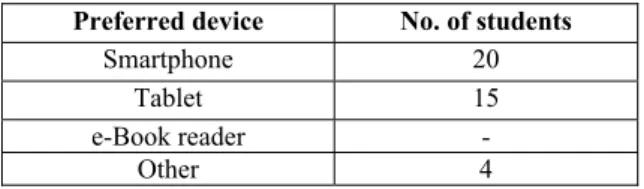
The final section of the survey comprised of questions relating to preferred mobile device to access educational content, reasons for preferring a particular mobile device, certain features that participants disliked about their mobile device and, most important, the usability of their device(s). The first question asked the participants to select their preferred choice of mobile device for accessing educational content (see Table 2).
Table 2: “I prefer using ____ for accessing educational content.” (n=39).
Preferred device No. of students
Smartphone 20 Tablet 15 e-Book reader -
Other 4
Table 3 is an extension of the data extracted from Table 2 and displays the currently owned mobile devices by students and their preferred mobile device for the purpose of accessing educational content.
The second question in this section asked the participants to identify factors that determined their choice for using the preferred mobile device (see
Table 4). Further breakdown of factors based on the type of preferred mobile device is shown in Table 3. Table 3: Currently owned mobile devices by participants and preferred mobile device (multiple responses, n=39).
Currently owned mobile device No. o f stude nts Pref er u si ng Smar tphone s Pref er u si ng Tablets Pref er u si ng eBook read ers Pref er u si ng Oth er d ev ices Smartphone 38 20 15 - 3 Tablet 15 3 11 - 1 eBook reader 2 1 - - 1 Other 3 - 3 - - Table 4: “I prefer using the above mobile device because:” (n=39).
Factors (n=39) Score Percentage (n=39)
Easy to use 27 69% Ample screen size 17 44% Content is readable 18 46% Portable 32 82% Convenient 29 74% Internet connectivity 23 59% Ability to multitask 17 44% Other - - Amongst the students who preferred mobile devices, ‘portability’ was the most popular factor followed by ‘convenience’. The majority of students also preferred using smartphones as the devices supported ‘Internet connectivity’ and were ‘easy to use’. As expected from relatively smaller screen mobile devices, very few students selected ‘ample screen size’ and ‘content readability’ as the determining factors.
Table 5: Breakdown of preferred device and determining factors. Factors Smar tphone (n=20) Tablet (n=15) Oth er Dev ic e (n=4) Easy to use 75% 60% 75% Ample screen size 20% 67% 75% Content is readable 25% 67% 75% Portable 95% 67% 75% Convenient 90% 67% 25% Internet connectivity 80% 27% 75% Ability to multitask 35% 40% 100% Other - - -
Amongst the students who preferred using a ‘Tablet’ for educational purposes (see Table 5), factors such as ‘ample screen size’, ‘content readability’, ‘portability’, and ‘convenience’ were the most popular, followed closely by ‘easy to use’. Very few students selected ‘Internet connectivity’ and ‘Ability to multitask’ as determining factors for using tablets. As tablets offer larger screens, it was expected that the majority of students would choose ample screen size and readable content as the prime factors as opposed to smartphones. Also, tablets being larger in size and consequentially heavier, they are less portable and convenient as compared to smartphones.
The third question in this section asked students to describe what they disliked about their mobile devices. The collated data was qualitative in nature. Content analysis techniques were used to identify the themes in the data (see Table 6). Responses such as “Lagging sometime/freezes of applications, loads content slow”, “screen is too small, sometimes hard to navigate, no physical keyboard”, and “Slower to load pages, screen can be too small, sometimes lagging happens.” were grouped under the theme hardware limitations.
Table 6: “Here are some of the things I do not like about my mobile device(s)” (n=39).
Issues No. of students
Device Performance 5 Internet connectivity 7 Hardware Limitations 7 Software/OS limitation 8 Battery Problems 7 Content Integration 3 Other 3 No issues 6
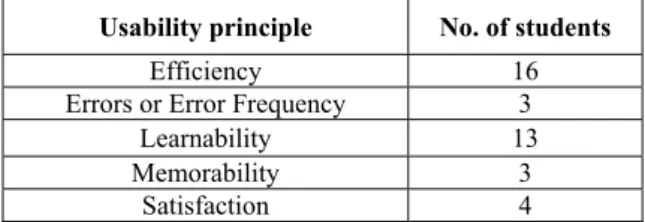
The final question in this section asked the participants to comment on which usability principle they considered the most important when viewing educational content on mobile devices (see Table 7). Table 7: “I find ____ as the most important usability principle when viewing educational content on my mobile device(s)” (n=39).
Usability principle No. of students
Efficiency 16 Errors or Error Frequency 3
Learnability 13 Memorability 3
Satisfaction 4
Forty one percent (41%) of the students stated that the speed and accuracy at which they could perform the
tasks was the most important usability principle, whereas 33% stated that the speed at which they could use an interface to perform their desired task was the most significant usability principle. Only 10% of the students confirmed that the overall satisfaction derived after using a device or an application was a notable usability principle, whereas 8% voted for low error frequency and functional memorability as the most important principles.
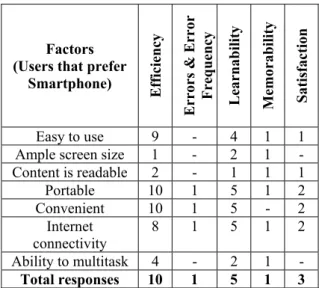
Table 8: Breakdown of preferred device and usability principles. Usability Principles Smar tphone Tablet eBook read ers Other Efficiency 10 3 - 3 Errors or Error Frequency 1 2 - - Learnability 5 7 - 1 Memorability 1 2 - - Satisfaction 3 1 - - Table 8 displays a breakdown analysis of preferred mobile device for learning and the most important usability principle. This table illustrates that students who consider a particular usability principle to be important, on most occasions, prefer a particular mobile device to access educational content. Table 9: Cross tabulation of factors, usability principles and participants that preferred using smartphones (Table 5 and Table 8).
Factors (Users that prefer
Smartphone) Efficiency Errors & Error Frequenc y Lea rna bility Memo rability Satis fa ctio n Easy to use 9 - 4 1 1 Ample screen size 1 - 2 1 - Content is readable 2 - 1 1 1 Portable 10 1 5 1 2 Convenient 10 1 5 - 2 Internet connectivity 8 1 5 1 2 Ability to multitask 4 - 2 1 - Total responses 10 1 5 1 3
Tables 9 and 10 include a cross tabulation to compare the relationship between preferred mobile device to access educational content, factors determining the
use of mobile devices to access educational content, and the most important usability principle. Further research in this area with a possible controlled experiment with a larger group would be ideal to draw solid conclusions.
Table 10: Cross tabulation of factors, usability principles and participants that preferred using tablets.
Factors (Users that prefer
Tablets) Efficiency Errors & Error Frequenc y Lea rna bility Memo rability Satis fa ctio n Easy to use 1 2 4 1 1 Ample screen size 3 2 2 2 1 Content is readable 2 2 4 2 - Portable 3 1 4 2 - Convenient 3 1 4 2 - Internet connectivity - 1 2 1 - Ability to multitask 2 1 1 1 1 Total responses 3 2 7 2 1
5 DISCUSSION
Due to the limited number of survey participants, it was difficult to strongly conclude whether these survey results were an accurate representation of the entire student population at the University. Further, the majority of the survey participants were IT students. However, it was evident that a significant number of students are currently engaging in mLearning activities and have access to a range of different mobile devices. It was observed that local students were more akin towards using mobile devices for learning as compared to international students. The age of the student did not establish any significance on the use of mobile devices for learning, however, some patterns were observed amongst ‘digital native’ students, both local and international. Section 4.2 highlighted different attributes affecting mobile device usability (Pegrum et al. 2013). Smartphones and tablets have their own advantages in terms of screen size, convenience, portability, and ease of use. The results showed that students used different mobile devices to cater to different needs, which indicated that usability across different mobile devices differs and must be taken into consideration when developing content for a diverse range of mobile devices. Furthermore, Table 4 presented the issues that can affect the usability of
a system as perceived by students, such issues are also reflected in Fetaji et al. (2008) under the following categories: diminishing the efficiency and satisfaction during task performance, making interfaces hard to learn and memorise, and resulting in unrecoverable errors and high error rates. Overcoming these hurdles is of the utmost importance as they are the means to offer sound usable systems to learners, accessible via different mobile devices, for effective and efficient learning, and advocating high rates of satisfaction and memorability, and low error rates. Upon further investigation, students who preferred using smartphones for mLearning selected ‘Efficiency’ as the most important usability factor, whereas tablet users selected ‘Learnability’ as the most important usability factor. The principles of usability, thus, vary across different mobile devices and further research in this area is needed.
Further, in the study were questions that asked participants to comment on their use or disuse of mobile devices for learning. The majority of students engaged in mLearning, pointed towards the portability and convenience factors of mobile devices, whereas the students refraining from use of mobile devices for learning noted factors such as poor content integration, battery issues, and small screen size. Given the opportunity, with the potential of resolving the issues mentioned earlier, 8 of the 9 non-mLearners had a positive approach towards using mobile devices for educational purpose in the future. There seems a strong sense of promise amongst mLearning practitioners and researchers on the success and advancement of what could possibly be, the rapidest growth area in the entire sphere of ICTs in education (Pegrum et al., 2013).
The survey data presented in this paper shows that a significant number of students have already deployed mobile devices in their personal educational spheres. However, it could be concluded that this adoption is due to certain features and affordances offered by mobile devices themselves. Pegrum et al. (2013) noted the obvious advantage of portability and convenience factors of mobile devices over the traditional counterparts such as laptop computers. Further, the survey conducted in this research study revealed similar results, exhibiting portability and convenience as the most popular factors amongst students preferring smartphones for learning as compared to ample screen size and readable content amongst students preferring tablets (see Table 4). These results therefore demonstrate that students use a particular mobile device due to its usability affordance, and the features offered by particular mobile devices allow for certain usability factors to
stand out. The study also revealed certain aspects of mobile devices disliked by the students which, despite portability, convenience, and accessibility, had a deterring effect on the use of mobile devices. These shortcomings, although not as significant, can play a detrimental role on the overall perceived usability (Raptis et al., 2013). Also, survey results of the cohort currently not engaging in mLearning, revealed that usability factors can have a negative effect on the use of such widespread learning technologies.
6 CONCLUSIONS
The study aimed at exploring the current level of adoption of mobile devices for mLearning amongst tertiary students and to investigate usability’s role in the adoption process. It was observed that, although a substantial number of students in this study were engaging in mLearning, there were certain factors that inhibited the process of mLearning. As mLearning is an infantile learning pedagogy, the potential benefits and affordances are plentiful. Therefore limiting factors must be addressed early in the development of any systems or processes so as to provide a solid learning framework for the young and growing population of ‘digital native’ users.
7 FUTURE WORK
MLearning’s current stage of infancy and the limitations presented in this research study have motivated the contents of this section. Further research is required with a larger sample group across different disciplines to cross-reference the results of this research study, and possibly validate the findings achieved from this study. In addition, a laboratory experiment is proposed to investigate if usability plays a role in the success of mLearning across various cross-platform mobile devices, and the details of the experiment are highlighted below.
The laboratory experiment proposed as future research will focus on usability testing of different mobile devices. The experiment will comprise of students that will interact with multiple mobile devices (smartphones, tablets and eBook readers, running different operating systems), performing a series of tasks set by the researcher. The primary application of focus will be a mobile application developed specifically for students at the host university. The participants will be provided with a
series of tasks to be performed using a variety of devices. These tasks will comprise of the different actions a student can perform using the mobile application. Observations will be recorded based on the number of gestures/actions required to complete the task, participant’s physical and mental state, interaction delays and so on using a five point Likert scale. The details of data analysis may vary. Once the tasks are completed, a post-task questionnaire focusing on usability guidelines and principles will be handed to the participants. The laboratory study will focus on user interaction and usability of mobile devices while accessing educational content. The study will focus on testing mobile devices while accessing educational content with the use of existing usability guidelines. The purpose of the proposed study will be to determine the difference in usability across mobile devices with different operating platforms while accessing educational content. The research experiment is built upon the hypothesis that mobile technologies are proliferating and have sound implications in the educational sector. Users own different types of mobile devices and usability differs across cross-platform, different brands, and types of mobile devices.
REFERENCES
Albion, P., Jamieson-Proctor, R., Redmond, P., Larkin, K. & Maxwell, A. 2012, 'Going mobile: Each small change requires another', in Future challenges, sustainable futures. Proceedings ascilite Wellington 2012, pp. 5-15. Cheung, S. K. S., Yuen, K. S. & Tsang, E. Y. M. 2011, 'A study on the readiness of mobile learning in open education', in IT in Medicine and Education (ITME), 2011 International Symposium on, vol. 1, pp. 133-6. Fetaji, M. 2008a, 'Case Study: Analyses of Factors that
Influence Mobile Applicative Software', paper presented to World Conference on Educational Multimedia, Hypermedia and Telecommunications 2008, Vienna, Austria.
Fetaji, M. 2008b, 'Designing Usable M-learning Application: MobileView Case Study', paper presented to World Conference on Educational Multimedia, Hypermedia and Telecommunications 2008, Vienna, Austria.
Fetaji, M. & Fetaji, B. 2011, 'Devising M-learning usability framework', in Information Technology Interfaces (ITI), Proceedings of the ITI 2011 33rd International Conference on, pp. 275-80.
Hewagamage, K. P., Wickramasinghe, W. M. A. S. B. & Jayatilaka, A. D. S. 2012, “M-Learning Not an Extension of E-Learning”: Based on a Case Study of Moodle VLE, IGI Global, 1941-8647.
Kim, S. H., Mims, C. & Holmes, K. P. 2006, 'An Introduction to Current Trends and Benefits of Mobile
Wireless Technology Use in Higher Education', AACE Journal, vol. 14, no. 1, pp. 77-100.
Kukulska-Hulme, A. 2007, 'Mobile Usability in Educational Contexts: What have we learnt?',
International Review of Research in Open and Distance Learning, vol. 8, no. 2.
Li, Q., Lau, R. W. H., Shih, T. K. & Li, F. W. B. 2008, 'Technology supports for distributed and collaborative learning over the internet', ACM Trans. Internet Technol., vol. 8, no. 2, pp. 1-24.
Nayebi, F., Desharnais, J. M. & Abran, A. 2012, 'The state of the art of mobile application usability evaluation', in
Electrical & Computer Engineering (CCECE), 2012 25th IEEE Canadian Conference on, pp. 1-4.
Nielsen, J. 1993, Usability Engineering, Morgan Kaufmann, San Francisco.
Nielsen, J. & Budiu, R. 2012, Mobile Usability, Pearson Education.
Norris, C. A. & Soloway, E. 2011, 'Learning and Schooling in the Age of Mobilism', Educational Technology, vol. 51, no. 6, pp. 3-12.
Park, Y. 2011, 'A Pedagogical Framework for Mobile Learning: Categorizing Educational Applications of Mobile Technologies into Four Types', International Review of Research in Open and Distance Learning, vol. 12, no. 2, pp. 78-102.
Pegrum, M., Oakley, G. & Faulkner, R. 2013, 'Schools going mobile: A study of the adoption of mobile handheld technologies in Western Australian independent schools', Australasian Journal of Educational Technology, vol. 29, no. 1, pp. 66-81. Peterson, D. 2013, 'Usability Heuristics for eText and
Digital Course Materials', paper presented to World Conference on Educational Multimedia, Hypermedia and Telecommunications 2013, Victoria, Canada. Raptis, D., Tselios, N., Kjeldskov, J. & Skov, M. B. 2013,
'Does size matter?: investigating the impact of mobile phone screen size on users' perceived usability, effectiveness and efficiency', paper presented to Proceedings of the 15th international conference on Human-computer interaction with mobile devices and services, Munich, Germany.
Rauch, M. 2011, 'Mobile documentation: Usability guidelines, and considerations for providing documentation on Kindle, tablets, and smartphones', in
Professional Communication Conference (IPCC), 2011 IEEE International, pp. 1-13.
Son, C., Lee, Y. & Park, S. 2004, 'Toward New Definition of M-Learning', paper presented to World Conference on E-Learning in Corporate, Government, Healthcare, and Higher Education 2004, Washington, DC, USA. Zacarias, M. & de Oliveira, J. V. 2012, Human-computer