www.novell.com/documentation
DNS/DHCP Administration Guide for
Linux
Open Enterprise Server 2 SP3
July 31, 2013
Legal Notices Novell, Inc., makes no representations or warranties with respect to the contents or use of this documentation, and specifically disclaims any express or implied warranties of merchantability or fitness for any particular purpose. Further, Novell, Inc., reserves the right to revise this publication and to make changes to its content, at any time, without obligation to notify any person or entity of such revisions or changes. Further, Novell, Inc., makes no representations or warranties with respect to any software, and specifically disclaims any express or implied warranties of merchantability or fitness for any particular purpose. Further, Novell, Inc., reserves the right to make changes to any and all parts of Novell software, at any time, without any obligation to notify any person or entity of such changes. Any products or technical information provided under this Agreement may be subject to U.S. export controls and the trade laws of other countries. You agree to comply with all export control regulations and to obtain any required licenses or classification to export, re‐export or import deliverables. You agree not to export or re‐export to entities on the current U.S. export exclusion lists or to any embargoed or terrorist countries as specified in the U.S. export laws. You agree to not use deliverables for prohibited nuclear, missile, or chemical biological weaponry end uses. See the Novell International Trade
Services Web page (http://www.novell.com/info/exports/) for more information on exporting Novell software. Novell assumes no responsibility for your failure to obtain any necessary export approvals.
Copyright ©1998‐2010 Novell, Inc. All rights reserved. No part of this publication may be reproduced, photocopied, stored on a retrieval system, or transmitted without the express written consent of the publisher.
Novell, Inc.
1800 South Novell Place Provo, UT 84606 U.S.A.
www.novell.com
Online Documentation: To access the latest online documentation for this and other Novell products, see the Novell
Contents 3
Contents
About This Guide 9
1 Understanding DNS and DHCP Services 11
1.1 DNS . . . 11 1.1.1 DNS Hierarchy . . . 12 1.1.2 DNS Name Service . . . 15 1.1.3 Resource Records . . . 18 1.1.4 DNS Structure . . . 19 1.2 Novell DNS Service . . . 21
1.2.1 Novell eDirectory and DNS . . . 22
1.2.2 eDirectory Schema Extensions for DNS . . . 25
1.2.3 Dynamic DNS . . . 27 1.2.4 Zone Transfer . . . 28 1.2.5 Dynamic Reconfiguration. . . . 29 1.2.6 Fault Tolerance . . . 29 1.2.7 Cluster Support . . . 30 1.2.8 Notify . . . 30 1.2.9 Load Balancing . . . 31 1.2.10 Forwarding . . . 31 1.2.11 No-Forwarding . . . 32
1.2.12 Benefits of Integrating a DNS Server with eDirectory . . . 32
1.2.13 rndc Support . . . 33
1.2.14 Managing DNS Objects . . . . 33
1.3 DHCP . . . 39
1.3.1 DHCP and BOOTP . . . . 39
1.3.2 IP Address Allocation. . . 40
1.3.3 Virtual LAN Environments . . . . 42
1.4 Novell DHCP Service . . . 42
1.4.1 DHCP Options . . . 43
1.4.2 eDirectory Objects for DHCP . . . 45
1.4.3 Managing DHCP Objects. . . 48
1.4.4 Java Management Console for DHCP (OES Linux) . . . 49
1.5 What’s Next . . . 51
2 What’s New 53 2.1 What’s New (OES 2 SP3 July 2013 Patches) . . . 53
2.2 What’s New (OES 2 SP3 April 2013 Patches) . . . 53
2.3 What’s New (OES 2 SP3 January 2013 Patches) . . . 54
2.4 What’s New (OES 2 SP3 November 2012 Patches) . . . 55
2.5 What’s New (OES 2 SP3 August 2011Patch) . . . 55
2.6 What’s New in DHCP . . . 55
3 Planning Your DNS/DHCP Implementation 57
3.1 Resource Requirements . . . 57
3.2 eDirectory Guidelines . . . 57
3.3 Planning a DNS Strategy . . . 58
3.3.1 Planning Zones . . . 59
3.3.2 Using the Novell DNS Server as a Primary Name Server . . . 59
3.3.3 Using the Novell DNS Server as a Secondary Name Server . . . 59
3.3.4 Configuring a DNS Server to Forward Requests . . . 59
3.3.5 Setting Up the Forward Zone Type . . . 60
3.3.6 Setting Up the in-addr.arpa Zone . . . 60
3.3.7 Registering Your DNS Server with Root Servers . . . 60
3.4 Planning a DHCP Strategy. . . 61 3.4.1 Network Topology . . . 61 3.4.2 eDirectory Implementation . . . . 62 3.4.3 Lease Considerations . . . 62 3.4.4 IP Address Availability . . . 64 3.4.5 Hostnames. . . 65 3.5 What’s Next . . . 65
4 Running DNS/DHCP Services in a Virtualized Environment 67 5 Comparing Linux and NetWare 69 5.1 DNS on NetWare versus DNS on Linux. . . 69
5.1.1 Management Interface . . . 69
5.1.2 Commands . . . 70
5.1.3 Filenames and Paths . . . 70
5.1.4 Installation Difference . . . 71
5.1.5 Features Not Supported . . . . 71
5.2 DHCP on NetWare versus DHCP on Linux . . . 71
5.2.1 Management Interface . . . 71
5.2.2 Commands . . . 72
5.2.3 Filenames and Paths . . . 72
5.2.4 Features Not Supported . . . . 72
5.3 Limitations . . . 72
5.4 What’s Next . . . 73
6 Installing and Configuring DHCP 75 6.1 Planning Your Installation . . . 75
6.1.1 Prerequisites . . . 75
6.1.2 eDirectory Permissions . . . 75
6.1.3 Recommendations . . . 76
6.2 Installing DHCP . . . 77
6.3 Post Installation . . . 81
6.4 Verifying the Installation . . . 81
6.5 Upgrading to OES 2 Linux from OES 1 Linux . . . 81
6.6 What’s Next . . . 82
Contents 5 7.1.5 Subnet Management . . . . 88 7.1.6 Pool Management . . . 90 7.1.7 Host Management . . . 91 7.1.8 Class Management . . . 93 7.1.9 Zone Management. . . 95
7.1.10 TSIG Key Management . . . 96
7.1.11 Failover Peer Management . . . 98
7.1.12 Importing and Exporting the DHCP Configuration . . . 100
7.2 Using the Java Management Console for DHCP (OES Linux) . . . 101
7.2.1 Installing Java Management Console . . . 101
7.2.2 Service Management . . . 103
7.2.3 Server Management . . . 104
7.2.4 Shared Network Management . . . 104
7.2.5 Subnet Management . . . 105
7.2.6 Pool Management . . . 105
7.2.7 Host Management . . . . 106
7.2.8 Class Management . . . . 106
7.2.9 Zone Management. . . . 107
7.2.10 TSIG Key Management . . . 107
7.2.11 Failover Peer Management . . . 108
7.2.12 Managing DHCP (OES Linux) Objects in the Java Management Console . . . 109
7.2.13 Importing and Exporting the DHCP Configuration . . . 112
7.2.14 Viewing Dynamic Leases . . . 113
7.3 Starting the DHCP Server . . . 115
7.4 Stopping the DHCP Server . . . 115
7.5 What’s Next . . . 115
8 Configuring DHCP with Novell Cluster Services for the NSS File System 117 8.1 Benefits of Configuring DHCP for High Availability . . . 117
8.2 Prerequisites . . . 117
8.3 Installation and Configuration. . . 117
8.3.1 Prerequisites . . . 118
8.3.2 Verifying the Novell Cluster Services Setup . . . 118
8.3.3 Installing and Configuring a Cluster . . . 118
8.3.4 DHCP Load and Unload Scripts . . . 120
8.4 Loading and Unloading the DHCP Server . . . 121
8.4.1 Loading the DHCP Server . . . 121
8.4.2 Unloading the DHCP Server . . . 121
8.5 What’s Next . . . 121
9 Configuring DHCP with Novell Cluster Services for the Linux File System 123 9.1 Benefits of Configuring DHCP for High Availability . . . 123
9.2 DHCP Installation and Configuration . . . 123
9.2.1 Prerequisites . . . 123
9.2.2 Configuring DHCP on the Shared Disk . . . 124
9.2.3 Configuring the dhcpd.conf File . . . 124
9.2.4 Creating a dhcpd.leases File . . . 124
9.2.5 Novell Cluster Services Configuration and Setup . . . 125
9.3 What’s Next . . . 129
10 Security Guidelines for DHCP 131 10.1 Best Practices . . . 131
11 Installing and Configuring DNS 133
11.1 Planning the Installation . . . 133
11.1.1 Prerequisites . . . 133
11.1.2 eDirectory Permissions . . . 133
11.2 Installing the DNS Server . . . 135
11.3 Setting Runtime Credentials . . . 138
11.4 Verifying Installation . . . 138
11.5 Additional Information . . . 139
11.6 What’s Next . . . 139
12 Migrating DNS/DHCP from NetWare to OES Linux 141 13 Administering and Managing a DNS Server 143 13.1 Using iManager to Manage DNS . . . 143
13.1.1 Scope Settings. . . 143
13.1.2 DNS Server Management . . . 144
13.1.3 Zone Management. . . 148
13.1.4 Resource Record Management . . . 156
13.1.5 DNS Key Management . . . 158
13.2 Using the Java Management Console to Manage DNS. . . 160
13.2.1 Installing the Java Management Console . . . 160
13.2.2 DNS Server Management . . . 160
13.2.3 Zone Management. . . 163
13.2.4 Resource Record Management . . . 169
13.2.5 DNS Key Management . . . 170
13.3 Configuring Roles for a Novell DNS Server . . . 172
13.3.1 Configuring a DNS Server to Forward Queries to Root Name Servers . . . 172
13.3.2 Configuring a DNS Server as a Cache-Only Server . . . 173
13.3.3 Configuring Child (Sub) Zone Support. . . 173
13.3.4 Configuring a Multi-Homed Server . . . 173
13.3.5 Configuring Dynamic DNS . . . 173
13.4 novell-named Command Line Options . . . 174
13.4.1 Description of Command Line Options . . . 175
13.5 Changing Proxy Users . . . 175
13.6 Starting the DNS Server. . . 176
13.7 Running DNS Server in chroot Mode . . . 177
13.8 Running DNS Server as a Non-Root User . . . 177
13.9 Stopping the DNS Server . . . 178
13.10 What’s Next . . . 178
14 Configuring DNS with Novell Cluster Services 179 14.1 Prerequisites . . . 179
14.2 Installation and Configuration. . . 179
14.2.1 Verifying the Novell Cluster Services Setup . . . 180
14.2.2 Installing and Configuring a Cluster . . . 181
14.2.3 DNS Load and Unload Scripts . . . 182
14.3 Loading and Unloading the DNS Server . . . 183
14.3.1 Loading the DNS Server . . . 183
Contents 7
15 Security Considerations for DNS 185
15.1 Logging . . . 185 15.2 Commands . . . 185 15.3 Cryptographic Algorithms . . . 185 15.4 Best Practices . . . 185 15.5 What’s Next . . . 186 16 DNS/DHCP Advanced Features 187 16.1 Configuring the ICE Zone Handler . . . 187
16.1.1 Modifying the ice.conf File . . . 187
16.1.2 Enabling Clear-Text Passwords . . . 187
16.1.3 Importing Configuration and Script Files . . . 188
16.1.4 Exporting Configuration and Script Information . . . 189
16.2 What’s Next . . . 191
17 DNS-DSfW Integration 193 17.1 Normal eDirectory with DNS . . . 193
17.2 DSfW with DNS . . . 194
17.2.1 Changes for DNS. . . 194
17.2.2 Local DNS Server Installation . . . 194
17.3 DSfW with Remote DNS (Child Domains) . . . 195
17.3.1 DSfW on a Remote DNS Server . . . 195
17.4 Scenarios . . . 195
17.5 FAQs . . . 196
17.6 What’s Next . . . 197
18 Troubleshooting DNS and DHCP Services 199 18.1 DHCP . . . 199
18.1.1 DHCP Pools Run Out of Available IP Addresses in Subnets With PXE clients . . . 199
18.1.2 DHCP Server fails to load and records a “Cannot find host LDAP entry DHCP” error in the log file . . . 200
18.1.3 Installing an OES Server inside a container with a separate partition on an existing tree that already has DHCP Server installed on it results in a constraint violation error.. . . 200
18.1.4 The dhcpd.log file is empty . . . . 201
18.1.5 The DHCP server failed to Start . . . 201
18.1.6 The DHCP Server displays “Unknown Error” on the console . . . 202
18.1.7 Permission denied to DHCP server . . . 202
18.1.8 DHCP Server Displays “Cannot Create New Lease File: Permission Denied” or “/usr/sbin/ dhcpd: U<89>Ã¥S<83>ì^T<8b>E^Lèhûúÿ<81>Ã9^[^C: Unknown error 3218701597" 202 18.1.9 segfault dhcpd - You get an error “dhcpd: Can't create new lease file: Permission denied” and “dhcpd[8249]: segfault at 0000000000000000 rip 00002abbf999db7f rsp 00007fffb18ea5e0 error 4” . . . 203
18.2 DNS . . . 203
18.2.1 DNS Loads Zone Database from the File despite eDirectory Availability . . . 203
18.2.2 Failed to Configure DNS Server . . . 204
18.2.3 Insufficient Permissions for LDAP Admin User . . . 204
18.2.4 Failed to create the DNS Server object for the Virtual NCP Server. . . 204
18.2.5 novell-named Failed to Start . . . 204
18.2.6 rcnovell-named and rcnamed interfere in their individual status/stop query functionality . 205 18.2.7 The DNS Server failed to load and provides critical error messages for NWCallsInit/ NWCLXInit/NWNetInit . . . 205
18.2.8 Error message when you add RootServInfo that gives an undefined attribute . . . 205
18.2.10 Dynamic DNS (DDNS) Fails To Work After Migrating From NetWare to OES Linux . . . . 206
18.2.11 Deleting a huge zone file through iManager throws a “Service Unavailable” error . . . 206
18.2.12 DNS Fails to Start with a Fatal Error . . . 206
18.3 Java Console . . . 206
18.3.1 Java Console login fails even with correct credentials . . . 206
18.3.2 Configuration files that were exported using old Java Console throws an error when imported into the new Java Console. . . 207
18.4 What’s Next . . . 207 19 Linux Notes 209 19.1 DNS Notes . . . 209 19.2 What’s Next . . . 209 A Appendix 211 A.1 Supported RFCs . . . 211
A.2 Types of Resource Records. . . 212
A.3 DHCP Option Descriptions. . . 214
A.3.1 Assigning Options . . . 220
A.4 DNS Root Servers . . . 221
A.5 DNS Server Configuration Utility . . . 222
dns-inst. . . 223
A.6 DNS Server Maintenance Utility. . . 224
dns-maint . . . 225
A.7 DHCP Server Maintenance Utility . . . 229
dhcp-maint . . . 230
A.8 Post-Install Maintenance Tools . . . 233
B Documentation Updates 235 B.1 September 2011. . . 235 B.2 December 2010 . . . 235 B.3 September 2009. . . 236 B.4 August 2009 . . . 236 B.5 July 2009 . . . 236 B.6 June 2009 . . . 236 B.7 May 2009 . . . 236 B.8 March 2009 . . . 237 B.9 February 2009 . . . 237 B.10 December, 2008. . . 237 C Glossary 241
About This Guide 9
About This Guide
This document describes the concepts of the Domain Name System (DNS) and the Dynamic Host Configuration Protocol (DHCP), the setup and configuration of these functions, and how to use Novell DNS and DHCP Services in Open Enterprise Server 2 Linux.
This guide is divided into the following sections:
Chapter 1, “Understanding DNS and DHCP Services,” on page 11 Chapter 2, “What’s New,” on page 53
Chapter 3, “Planning Your DNS/DHCP Implementation,” on page 57
Chapter 4, “Running DNS/DHCP Services in a Virtualized Environment,” on page 67 Chapter 5, “Comparing Linux and NetWare,” on page 69
Chapter 6, “Installing and Configuring DHCP,” on page 75 Chapter 7, “Administering and Managing DHCP,” on page 83
Chapter 8, “Configuring DHCP with Novell Cluster Services for the NSS File System,” on page 117
Chapter 9, “Configuring DHCP with Novell Cluster Services for the Linux File System,” on page 123
Chapter 10, “Security Guidelines for DHCP,” on page 131 Chapter 11, “Installing and Configuring DNS,” on page 133
Chapter 12, “Migrating DNS/DHCP from NetWare to OES Linux,” on page 141 Chapter 13, “Administering and Managing a DNS Server,” on page 143
Chapter 14, “Configuring DNS with Novell Cluster Services,” on page 179 Chapter 15, “Security Considerations for DNS,” on page 185
Chapter 16, “DNS/DHCP Advanced Features,” on page 187 Chapter 17, “DNS‐DSfW Integration,” on page 193
Chapter 18, “Troubleshooting DNS and DHCP Services,” on page 199 Chapter 19, “Linux Notes,” on page 209
Appendix A, “Appendix,” on page 211
Appendix B, “Documentation Updates,” on page 235 Appendix C, “Glossary,” on page 241
Audience
The audience for this document is network administrators. This documentation is not intended for users of the network.
Feedback
We want to hear your comments and suggestions about this manual and the other documentation included with this product. Please use the User Comments feature at the bottom of each page of the online documentation, or go to www.novell.com/documentation/feedback.html (http:// www.novell.com/documentation/feedback.html) and enter your comments there.Documentation Updates
For the most recent version of this guide, see the DNS/DHCP Services for Linux Administration Guide
for OES 2.0 SP 1 (http://www.novell.com/documentation/beta/oes2/ntwk_dnsdhcp_lx/?page=/ documentation/beta/oes2/ntwk_dnsdhcp_lx/data/bookinfo.html#bookinfo).
Additional Documentation
For information about Novell iManager, see the Novell iManager 2.7 Administration Guide (http:// www.novell.com/documentation/imanager27/index.html?page=/documentation/imanager27/ imanager_admin_27/data/bsxrjzp.html#bsxrjzp).
1
Understanding DNS and DHCP Services 11
1
Understanding DNS and DHCP Services
Novell DNS/DHCP Services in Open Enterprise Server (OES) 2 Linux integrates the Domain Name System (DNS) and Dynamic Host Configuration Protocol (DHCP) services into eDirectory. Integrating these services into eDirectory provides centralized administration and enterprise‐wide management of DNS and DHCP services. DNS and DHCP services can be managed by either iManager, which is a Web‐based management console, or you can use the Java Management Console. NOTE: A Novell DNS server can only be managed by using the iManager or Java management Console utility. The DNS YaST plug‐in does not support managing a Novell DNS server. iManager provides a Web interface to manage the objects created to support DNS and DHCP and runs in a browser window. It does not require a Novell Client or any installed component as a prerequisite. It shares a common interface with other utilities that are based on the iManager framework, and is thus tightly integrated with OES 2 Linux. iManager Plugin is supported on Internet Explorer 6, Internet Explorer 7, and Firefox. For more detailed overview information, see the following: Section 1.1, “DNS,” on page 11
Section 1.2, “Novell DNS Service,” on page 21 Section 1.3, “DHCP,” on page 39
Section 1.4, “Novell DHCP Service,” on page 42 Section 1.5, “What’s Next,” on page 51
1.1
DNS
DNS is a distributed database system that provides hostname‐to‐IP resource mapping (usually the IP address) and other information for computers on a network. Any computer on the Internet can use a DNS server to locate any other computer on the Internet. DNS is made up of two distinct components: the hierarchy and the name service. The DNS hierarchy specifies the structure, naming conventions, and delegation of authority in the DNS service. The DNS name service provides the actual name‐to‐address mapping mechanism. For more information, see: “DNS Hierarchy” on page 12 “DNS Name Service” on page 15 “DNS Resolver” on page 17 “Resource Records” on page 18 “DNS Structure” on page 19DNS/DHCP supports the standards of the Internet Request For Comments (RFCs). For more information, see Appendix A, “Appendix,” on page 211.
1.1.1
DNS Hierarchy
DNS uses a hierarchy to manage its distributed database system. The DNS hierarchy, also called the domain namespace, is an inverted tree structure, much like eDirectory. Each node in the tree has a text label, which is zero to 63 characters long. The label (zero length) is reserved and is used for the root. The DNS tree has a single domain at the top of the structure called the root domain. A period or dot (.) is the designation for the root domain. Below the root domain are the top‐level domains that divide the DNS hierarchy into segments. There are three types of top level domains (TLDs). Below the top‐level domains, the domain namespace is further divided into subdomains representing individual organizations: “Generic TLD” on page 12 “Country Code TLD” on page 13 “Infrastructure TLD” on page 13 “Domains and Subdomains” on page 13 “Domain Names” on page 14 “in‐addr.arpa Domain” on page 15 “Domain Delegation” on page 15
A list of TLDs is available at the Internet Assigned Numbers Authority Web site (http:// www.iana.org).
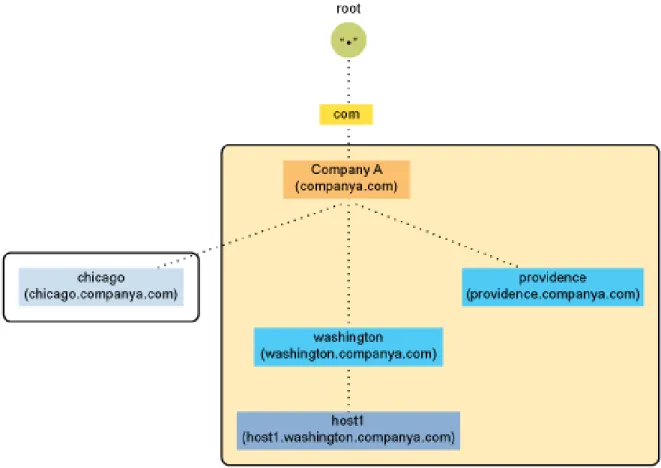
The DNS hierarchy is shown in the illustration below.
Figure 1-1 DNS Hierarchy
Understanding DNS and DHCP Services 13 Table 1-1 DNS Domains and Organization Types
Country Code TLD
Top‐level domains organize domain namespace geographically. Table 1-2 Country Code DomainsInfrastructure TLD
The .arpa (Address and Routing Parameter Area) TLD is used extensively for Internet infrastructure. It contains subdomains such as in‐addr.arpa and ipv6.arpa.Domains and Subdomains
A domain is a subtree of the DNS tree. Each node on the DNS tree represents a domain. Domains under the top‐level domains represent individual organizations or entities. These domains can be further divided into subdomains to ease administration of an organization’s host computers. For example, Company A creates a domain called companya.com under the com top‐level domain. Company A has separate LANs for its locations in Chicago, Washington, and Providence. Therefore, the network administrator for Company A decides to create a separate subdomain for each division, as shown in Figure 1‐2, “Domains and Subdomains,” on page 14.
Any domain in a subtree is considered part of all domains above it. Therefore,
chicago.companya.com is part of the companya.com domain, and both are part of the .com domain.
Domain Used by
.com Commercial organizations, such as novell.com .edu Educational organizations, such as ucla.edu .gov Governmental agencies, such as whitehouse.gov .mil Military organizations, such as army.mil
.org Nonprofit organizations, such as redcross.org .net Networking entities, such as nsf.net
.int International organizations, such as nato.int
Domain Used by
.fr France
.in India
.jp Japan
Figure 1-2 Domains and Subdomains
Domain Names
The domain name represents the position of an entity within the structure of the DNS hierarchy. The domain name of a node is the list of the labels on the path from the node to the root of the tree. Domain names are not case sensitive and their length is limited to 255 characters. Valid characters for domain names according to RFC 1034/RFC 1035 are a‐z (case insensitive), 0‐9, and hyphens. Each label in the domain name is delimited by a period. For example, the domain name for the Providence domain within Company A is providence.companya.com, as shown in Figure 1‐2 on page 14. NOTE: Novell DNS supports underscores using the check‐names option for coexistence with Windows DNS servers.Each computer that uses DNS is given a DNS hostname that represents the computer’s position within the DNS hierarchy. Therefore, the hostname for host1 in Figure 1‐2 on page 14 is
host1.washington.companya.com.
The domain names in the figure end with a period, representing the root domain. Domain names that end with a period are called fully qualified domain names (FQDNs).
Understanding DNS and DHCP Services 15
in-addr.arpa Domain
The in‐addr.arpa domain (or zone) provides the mapping of IP addresses to names within a zone, enabling a client (or resolver) to request a hostname by providing an IP address. This function, also known as reverse lookup, is used by some security‐based applications. The file that stores the in‐addr.arpa data contains pointer (PTR) records and additional name server records, including the Start of Authority (SOA) records, which are similar to the other DNS zone files. Within the in‐addr.arpa zone file, IP addresses are listed in reverse order, and in‐addr.arpa isappended to the address. A query for a host with an IP address of 10.10.11.1 requires a PTR query with the target address of 1.11.10.10.in‐addr.arpa.
Domain Delegation
Domain delegation gives authority to an organization for a domain. Having authority for a domain means that the organization’s network administrator is responsible for maintaining the DNS database of hostname and address information for that domain. Domain delegation helps in distributing the DNS namespace. A Division can be made between any two adjacent nodes in the namespace. After all divisions are made, each group of connected namespace is considered as a separate zone. The zone is authoritative for all names in the connected region, and these cuts are managed by domain delegation. All the host information for a zone is maintained in a single authoritative database.For example, in Figure 1‐2 on page 14, the companya.com. domain is delegated to company A, creating the companya.com. zone. There are three subdomains within the companya.com. domain: chicago.companya.com washington.companya.com providence.companya.com The company A administrator maintains all host information for the zone in a single database and also has the authority to create and delegate subdomains. For example, if company A’s Chicago location has its own network administrator, they could make a division between the chicago.companya.com domain and the companya.com domain and then delegate the chicago.companya.com zone. Then companya.com would have no authority over chicago.companya.com. Company A would have two domains: companya.com, which has authority over the companya.com, washington.companya.com, and providence.companya.com domains chicago.companya.com, which has authority over the chicago.companya.com domain
1.1.2
DNS Name Service
DNS uses the name service component to provide the actual name‐to‐IP address mapping that enables computers to locate each other on an internetwork. The name service uses a client/server mechanism in which clients query name servers for host address information. “Name Servers” on page 16 “Root Name Servers” on page 16 “DNS Resolver” on page 17 “Name Resolution” on page 17 “Caching” on page 18
Name Servers
Name servers are information repositories that make up the domain database. The database is divided into sections called zones, which are distributed among the name servers. The name servers answer queries by using data in their zones or caches. A DNS name server can be either a primary name server or a secondary name server. In addition to local host information, name servers maintain information about how to contact other name servers. Name servers in an intranet are able to contact each other and retrieve host information. If a name server does not have information about a particular domain, the name server relays the request to other name servers up or down the domain hierarchy until it receives an authoritative answer for the client’s query. All name servers maintain information about contacting name servers that are available in other parts of the DNS namespace. This process of maintaining information is called linking to the existing DNS hierarchy. This is done by providing information about the root name servers. The administrator also enters information into the database about name servers in the lower‐level domains. For example, when creating a subdomain, the administrator provides the name server information of the subzone. “Primary Name Servers” on page 16 “Secondary Name Servers” on page 16 “Forward Name Servers” on page 16
Primary Name Servers
One DNS name server in each administrative zone maintains the read‐write copies of hostname database and address information for an entire domain. This name server is the primary name server, and the domain administrator updates it with hostnames and addresses as changes occur. Primary and secondary name servers are also called masters and slaves.
Secondary Name Servers
Secondary name servers have read‐only copies of the primary name server’s DNS database. Secondary name servers provide redundancy and load balancing for a domain. Periodically, and when a secondary name server starts, the secondary name server contacts the primary name server and requests a full or incremental copy of the primary name server’s DNS database. This process is called zone transfer. If necessary, a primary name server can also function as a secondary name server for another zone.
Forward Name Servers
The Forward DNS server forwards all queries to another DNS server and caches the results. Unlike primary and secondary zones, there is no functional difference between a designated server and other servers.
Root Name Servers
Understanding DNS and DHCP Services 17
DNS Resolver
DNS resolvers are client programs. They interface user programs to domain name servers. A resolver receives a request from a user program and returns the desired information. It basically does a name‐ to‐address, address‐to‐name, and general lookup.Name Resolution
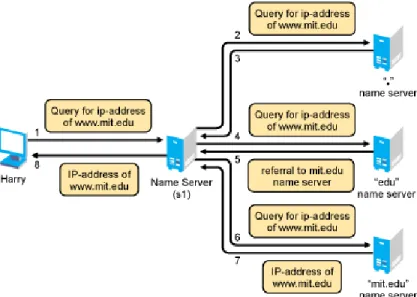
DNS is a distributed database with multiple servers that maintain different parts of the same tree. The links between the servers are through root server and domain delegation, as shown in the following figure. Figure 1-3 DNS Namespace DNS queries can be resolved in two ways: Iterative query: An iterative request from a client expects the best actual answer or referral that the DNS server can immediately provide, without contacting other DNS servers.For example, in Figure 1‐4 on page 18, Harry initiates an iterative query for the A record of www.mit.edu. After receiving this query, the name server (s1) might return the answer, if the answer is available in the cache. If the answer is not available, the server returns a referral [NS and A rrs] to the other DNS servers that are closer to the names queried by the client.
Recursive query: A recursive request from a client expects the actual answer that the DNS server can provide either from its own cache or by contacting other DNS servers.
For example, in Figure 1‐3 on page 17 and Figure 1‐4 on page 18, Harry initiates a recursive query for the A record of www.mit.edu. After receiving this query, the name server (s1) contacts the root server to resolve this query and gets the referrals (name server info) for the .edu zone. Now, s1 again initiates a query for A record of www.mit.edu to the name server (using the referrals received) of edu.zone and will get the referrals for mit.edu.zone. Server s1 will again initiate a query for the A record of www.mit.edu to the name server (using the referrals received) and gets the A record. This A record is returned to Harry.
Figure 1-4 Name Resolution
Caching
Caching is a mechanism to improve the performance of query resolution. The cache memory is empty when a server first starts. This cache is built as it starts resolving queries. It caches all the answers and referrals during recursive queries, and the cached data remains in the cache memory until the Time‐To‐Live (TTL) expires. The TTL specifies the time interval that the entries can be cached before they are discarded.1.1.3
Resource Records
Resource records (RRs) contain the host information maintained by the name servers and make up the DNS database. Different types of records contain different types of host information. For example, an Address A record provides the name‐to‐address mapping for a given host, and Start of Authority (SOA) record specifies the start of authority for a given zone. A DNS zone must contain several types of resource records in order for DNS to function properly. Other RRs can be present, but the following records are required for standard DNS: Name Server (NS): Binds a domain name with a hostname for a specific name server. The DNS zone must contain NS records (for itself) for each primary and secondary name server of the zone. It must also contain NS records of the lower‐level zones (if any) to provide links within the DNS hierarchy. Start of Authority (SOA): Indicates the start of authority for the zone. The name server must contain only one SOA record, specifying its zone of authority. For example, the name server for a zone must contain the following: An SOA record identifying its zone of authority An NS record for the primary name server within the zoneUnderstanding DNS and DHCP Services 19
For more information about Resource Record types and their RDATA (Resource Record data), see Section A.2, “Types of Resource Records,” on page 212.
1.1.4
DNS Structure
DNS is administered by building a database of information that includes all the resource records of a zone into a text file called a master file. The administration of these files is difficult and cumbersome. Initial versions of the Novell DNS server used Btrieve as its database. Other vendors also use large files to store information required for a DNS zone. Figure 1‐5 represents a traditional DNS strategy. A zone, such as novell.com, uses a primary DNS server to handle queries about the entities within it. A DNS server supports more than one zone, and it has at least one secondary server for backup (redundancy) or load‐sharing purposes. The primary DNS server provides DNS name service for two zones: novell.com and other.com. The secondary DNS server 1 provides backup support for the novell.com zone, and the secondary DNS server 2 provides backup support for the other.com zone. When changes occur to the DNS database, the master files corresponding to that zone at the secondary server are updated by zone transfers. The file storing the resource records for a zone might have hundreds or thousands of entries for different types of resources, such as users’ addresses, hosts, name servers, mail servers, and pointers to other resources. Figure 1-5 DNS StructureThe next section provides details on the following:
“DNS Master File” on page 20 “Master File Directives” on page 20
DNS Master File
A DNS master file is a text file that contains resource records that describe a zone. When you build a zone, the DNS objects and their attributes translate into resource records for that zone. You can import a DNS master file if it conforms to IETF RFCs 1034, 1035, and 1183 and is in BIND master file format. A sample DNS master file is shown in the following example: $ORIGIN companya.com.@ soa ns.companya.com. admin.novell.com ( 1996091454 /* SOA sr no */
3600 /* Zone Refresh interval*/ 300 /* Zone retry interval */ 604800 /* Zone Expire interval */ 86400) /* Zone Minimum TTL */ ns ns1.companya.com. ns ns2.companya.com. mx 5 companya.com. $ORIGIN companya.com. ns1 a 123.45.67.89 ns2 a 123.45.68.103; End of file
Master File Directives
The master file directives include $GENERATE, $ORIGIN, $INCLUDE, and $TTL.
$GENERATE: Enables you to create a series of resource records that differ from each other only by an iterator.
The syntax is:
$GENERATE range lhs type rhs [comment]
Range: Can be set to start‐stop or start‐stop/step. All values for start, stop, and step must be positive. lhs: The owner name of the records to be created. The $ symbols in the lhs are replaced by the iterator value. Using \$ allows a $ symbol in the output. A $ can be optionally followed by a modifier as $[{offset[,width[,base]]}]. A modifier can have an offset, a width, and a base. The offset is used to change the value of the iterator, base specifies the output format in which the values are printed, and width is used for padding. The available base values are decimal (d), octal (o), and hexadecimal (x or X). The default modifier is ${0, 0, d}. If the lhs is not absolute, the current value of $ORIGIN is appended to the name. Type: The resource record type. The supported types are PTR, CNAME, DNAME, A, AAAA, and NS. rhs: The domain name. Processed similarly to lhs.
Understanding DNS and DHCP Services 21 is equivalent to 0.0.0.192.IN-ADDR.ARPA NS server1.example.com 0.0.0.192.IN-ADDR.ARPA NS server2.example.com $ORIGIN: Enables you to set the domain name as the origin. The origin is appended to all domain names in the zone data file that do not end with a dot. The syntax is:
$ORIGIN domain-name [comment]
For example,
$ORIGIN example.com. WWW CNAME Web server
is equivalent to
WWW.EXAMPLE.COM. CNAME webserver.example.com.
NOTE: If the $ORIGIN directive is not already included, make sure you include this directive at the start of the zone file. $INCLUDE: Enables you to include another file in the current file. The included file can be read and processed as if it were present in the current file at that point. The domain name can also be specified with the $INCLUDE directive to process the file included with $ORIGIN set to that value. If the origin is not specified, the current $ORIGIN is used. After the included file is processed, the origin and the domain name values are reset to their previous values before processing the included file. The syntax is:
$INCLUDE filename [origin] [comment]
NOTE: The $INCLUDE directive is not supported through the management utilities. $TTL: Enables you to set the default time to live for the subsequent resource records without any TTL values. The time range for TTL is from 0 to 214748367 seconds. If the $TTL value is not present in the master file, SOA minimum TTL is used as the default. The syntax is: $TTL default-ttl [comment]
1.2
Novell DNS Service
Section 1.2.1, “Novell eDirectory and DNS,” on page 22
Section 1.2.2, “eDirectory Schema Extensions for DNS,” on page 25 Section 1.2.3, “Dynamic DNS,” on page 27
Section 1.2.4, “Zone Transfer,” on page 28
Section 1.2.5, “Dynamic Reconfiguration,” on page 29 Section 1.2.6, “Fault Tolerance,” on page 29
Section 1.2.7, “Cluster Support,” on page 30 Section 1.2.8, “Notify,” on page 30
Section 1.2.10, “Forwarding,” on page 31 Section 1.2.11, “No‐Forwarding,” on page 32
Section 1.2.12, “Benefits of Integrating a DNS Server with eDirectory,” on page 32 Section 1.2.13, “rndc Support,” on page 33
Section 1.2.14, “Managing DNS Objects,” on page 33 The Novell DNS service provides the following DNS features: All DNS configuration is stored in eDirectory, facilitating enterprise‐wide management. A Novell DNS server can be a secondary name server to a zone (DNS data loaded into eDirectory through a zone transfer), or it can be a primary name server. DNS data can be imported using a BIND Master file to populate eDirectory for convenient upgrades from BIND implementations of DNS. DNS data can be exported from eDirectory into BIND Master file format. Root server information is stored in eDirectory and shared by all eDirectory‐based DNS servers. Zone transfers are made to and from Novell servers. Full Zone Transfer‐In (AXFR) and Incremental Zone Transfer‐In (IXFR) are supported when the server is a designated secondary. Any type of server can perform a zone‐out transfer. A Novell DNS server can be authoritative for multiple domains. Novell DNS servers maintain a cache of data from eDirectory so they can quickly respond to queries. A Novell DNS server can act as a caching or forwarder server. Forwarding can be configured both at server and zone level. A forwarder specifies how the behavior of queries is controlled if the server is not authoritative and the answers do not exist in the cache A Novell DNS server supports fault tolerance when there is an eDirectory service outage. Novell DNS servers support multihoming. Novell DNS server software supports shuffling responses to queries that have multiple resource records. Novell DNS servers support dynamic reconfiguration (automatic detection of the configuration and data changes).
1.2.1
Novell eDirectory and DNS
The DNS software in Open Enterprise Server 2 Linux integrates DNS information into Novell eDirectory. Integrating DNS with eDirectory greatly simplifies network administration by enabling you to enter all configuration information into one distributed database. The DNS configuration information is replicated just like any other data in eDirectory. By integrating DNS into eDirectory, Novell has shifted the concept of a primary or secondary away from the server to the zone itself. After you have configured the zone, the data is available to any of the Novell DNS servers you select to make authoritative for the zone. The Novell DNS server takes advantage of the peer‐to‐peer nature of eDirectory by replicating the DNS data.
Understanding DNS and DHCP Services 23 servers. Alternatively, one Novell DNS server can act as a secondary DNS server and get transferred data from a non‐Novell master server. All Novell DNS servers can then access the data through eDirectory replication. Novell has integrated DNS into eDirectory by extending the eDirectory schema and creating new eDirectory objects to represent zones, resource records, and DNS name servers. Integrating these new objects into eDirectory simplifies the administration of DNS, enabling centralized administration and configuration. A Zone object is an eDirectory container object that holds RRSet objects, which are leaf objects. A DNS server object is a leaf object. For detailed information about these objects, see “Understanding DNS and DHCP Services” on page 11.
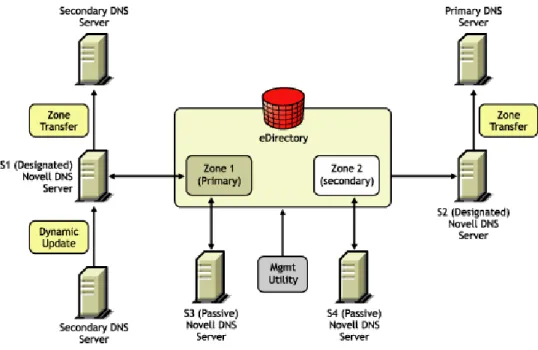
In traditional DNS, all data changes are made on a single primary name server. When changes are made, the secondary name servers request transfers of the changes from the primary name server. This process is called a zone transfer. The master‐slave approach has several disadvantages, the most significant being that all changes must be made at the primary server. Using the primary and secondary zone concept, the Novell approach allows changes from anywhere in the network through eDirectory, which is not dependent on one server. Zone data is stored within eDirectory and is replicated just like any other data in the eDirectory tree. The Novell implementation of DNS supports the traditional primary‐secondary DNS name server approach to moving DNS data in and out of eDirectory. Although all Novell servers can recognize DNS data after the data is placed in the directory through eDirectory replication, only one server is required for a zone transfer. The server assigned to perform this function in a secondary zone is called the Zone‐in (Designated Secondary) DNS server. In a secondary zone, the Zone‐in server is responsible for requesting a zone transfer of data from the external primary name server. The Zone‐in server determines which data has changed for a zone and then makes updates to eDirectory so that other servers are aware of the changes. A Forward zone, acts as a forwarder and forwards all queries on zones to primary or secondary servers of the zone. The Designated DNS (DDNS) server is a server identified by the network administrator to perform certain tasks for a primary zone. The DDNS server for a primary zone is the only server in that zone that receives dynamic updates from a DHCP server to perform Dynamic DNS (DDNS) updates. These updates cause additions and deletions of resource records and updates to the zone’s serial number. Figure 1‐6 illustrates a Novell server as the primary and secondary DNS name server and also illustrates primary and secondary zones within eDirectory. In this example, there are two zones. Any of the Novell DNS servers assigned to a zone is able to respond authoritatively to queries for the zone. For each zone, one server is designated by the administrator to act as the DDNS server. S1 is the Designated Primary DNS server for Zone 1 and S3 is a Passive Primary server. S1 accepts the Dynamic updates from the DHCP server. S2 is the Zone In (Designated Secondary) server and S4 is the Passive Secondary server for the secondary zone zone2, called the Foreign Zone. S2 occasionally requests zone transfers from the foreign server and places the modified zone data into eDirectory, where any of the Novell servers can respond to queries for it. S3 and S4 will get the latest data through eDirectory.
Figure 1-6 Novell Server As a Primary/Secondary DNS Server
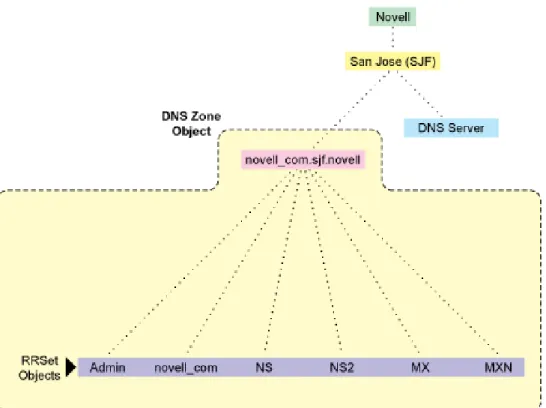
Figure 1‐7 shows a representation of eDirectory objects within a DNS zone.
Understanding DNS and DHCP Services 25
1.2.2
eDirectory Schema Extensions for DNS
The eDirectory schema extension defines additional objects needed for DNS.
“DNS eDirectory Objects and Attributes” on page 25
DNS eDirectory Objects and Attributes
When you select the Novell DNS Service during the OES 2 Linux installation, the eDirectory schema is extended to enable the creation of DNS objects and the following objects are created: DNS‐DHCP (Locator object) DNSDHCP‐Group (Group object) RootServInfo Only one copy of these objects exists in an eDirectory tree. The DNS servers, DHCP servers, iManager, and Management Console must have access to these objects. The DNSDHCP‐Group object is a standard eDirectory group object. The DNS servers gain rights to DNS data within the tree through the Group object. The DNS‐DHCP Locator object is created during the OES 2 Linux installation, if the DNS option is chosen. The creator of the Locator object grants Read and Write rights to this object to the network administrators. The DNS‐DHCP Locator object contains global defaults, DNS options, and a list of DNS servers and zones in the tree. iManager and the Java Management Console use the Locator object contents instead of searching the entire tree to display these objects. The Locator object is hidden by iManager and the Java Management Console. The RootServInfo is a Zone object, which is an eDirectory container object that contains resource records for the DNS root servers. The resource record sets contain Name Server records and Address records of name servers that provide pointers for DNS queries to the root servers. The RootServInfo object is the equivalent of the BIND db.root file.
The following new eDirectory objects are also required for DNS:
“DNS Server Object” on page 26 “DNS Zone Object” on page 26
“DNS Resource Record Set Object” on page 27 “DNS Resource Records” on page 27
Figure 1-8 eDirectory Objects for DNS
DNS Server Object
The DNS server object (or dnipDNSServer object) is created during installation. It is created in same context as the NCP server, contains DNS server configuration parameters, and includes the following: Zone List DNS Server IP Address Domain Name of the DNS Server DNS Server Options Forwarding List No‐Forwarding List Key List Access Control List for zone transfer, query, recursion, notify, etc. Other additional advanced options to fine‐tune the DNS serverDNS Zone Object
The DNS Zone object is a container object that contains all the data for a single DNS zone. A Zone object is the first level of the DNS zone description. A Zone object can be contained under an Organization (O), Organizational Unit (OU), a Country (C), or a Locality (L).Understanding DNS and DHCP Services 27 The DNS Zone object contains data that correlates to a DNS Start of Authority (SOA) resource record (RR) and a member list of all eDirectory‐based DNS servers that serve the zone. The DNS namespace hierarchy is not represented within the eDirectory hierarchy. A zone and its child zone might appear as peers within the eDirectory hierarchy, even though they have a parent‐ child relationship within the DNS hierarchy. DNS object names are created using the DNS Zone names. Valid characters for domain names according to RFC 1034/RFC 1035 are a‐z (case insensitive), 0‐9, and hyphens. For example, the name of the Zone object for newyork.companya.com zone, which exists in an eDirectory context sjf.us., shall be newyork_companya_com.sjf.us NOTE: Novell DNS supports underscore character in domain names and Resource Records using Novell DNS server check‐names statement for co‐existence with Windows DNS servers.
DNS Resource Record Set Object
The DNS Resource Record Set (RRSet) object is an eDirectory leaf object contained within a DNS Zone object. An RRSet object represents an individual domain name within a DNS zone. Its required attributes are a DNS domain name and resource records (RRs). Each domain name within a DNS zone object has an RRSet object. Each RRSet object has one or more resource records beneath it that contain additional information about the zone data.
DNS Resource Records
A DNS resource record (RR) is an attribute of an RRSet that contains the resource record type and data of a single RR. RRs are configured beneath their respective RRSet objects. Resource records describe their associated RRset object. The most common resource records are Address (A) records, which map a domain name to an IP address, and Pointer (PTR) records, which map an IP address to a domain name within an in‐ addr.arpa zone.1.2.3
Dynamic DNS
Dynamic DNS (DDNS) provides a way to dynamically update DNS with resource records from applications such as DHCP servers, and DNS clients. DDNS eliminates the need for any additional configuration of DNS for each host address change. A Novell DNS server supports the following DDNS mechanisms: Novell DDNS, a mechanism by which NetWare DHCP servers update Novell DNS servers RFC 2136‐based dynamic updates All changes made to a zone through dynamic updates are stored in the zoneʹs journal file. This file is automatically created by the server in a binary format when the first dynamic update takes place. The journal file name has the .jnl extension. This file is also used for IXFR. We recommend that you do not edit the contents of the journal file. “Novell DDNS” on page 28Novell DDNS
The Dynamic DNS (DDNS) feature of the Novell DNS service provides a way to update DNS with accurate Address (A) records and Pointer (PTR) records for address assignments made by a DHCP server. Address (A) records map a domain name to an IP address. A Pointer (PTR) record specifies a domain name that points to some location in the domain namespace. These resource records are required for both name‐to‐address and address‐to‐name resolutions. When DDNS is active, the DHCP server updates the DDNS server for the zone, adding or deleting the corresponding Address and Pointer records. The DHCP server also notifies the DDNS server when leases expire, causing the A and PTR records to be deleted. When the DHCP server grants a lease to a client that is subject to DDNS updates, the DHCP server updates its IP address database and eDirectory to store the transaction. The DHCP server also contacts the DNS server and submits a request for a DNS update. For DDNS updates, the DNS server requires the fully qualified domain name (FQDN) and the IP address of the client. The DHCP server knows the IP address, but it must assemble the FQDN from the hostname and the subnet’s domain name. The DNS server usually maintains two resource records for each client. One maps FQDNs to IP addresses using A records. The other maps the IP address to the FQDN using PTR records. When DDNS is enabled and a client receives an address from the DHCP server, the DNS server updates both of these records. When a client loses or ends its lease and is subject to DDNS updates, the DNS server receives the DDNS update request and deletes the PTR and A records associated with the client. NOTE: While using the Novell DHCP server, both the forward and reverse zones must be designated primary on a single server.2136 Dynamic Update
A Novell DNS server supports dynamic updates complying the RFC 2136 standards. This support provides the ability to update various types of resource records into DNS under certain specified conditions. Dynamic update is fully described in RFC 2136. A 2136 dynamic update can be enabled or disabled on a zone‐by‐zone basis, by specifying the allow‐update filter for the zone. It grants permission to the clients to update any record or name in the zone. DNS Key provides a means of authentication for dynamic DNS updates and for queries to a secured DNS Server. DNS Key uses shared secret keys as a cryptographically secure means of authenticating a DNS update/query.1.2.4
Zone Transfer
Zone transfer is essential for maintaining up‐to‐date zone data in the server. When a Novell server is designated as primary, all the changes made by the designated primary to eDirectory are reflected in the eDirectory replicas, using the eDirectory sync property. When a Novell server is designated secondary, zone transfer is needed for receiving the most up‐to‐date zone data from any primaryUnderstanding DNS and DHCP Services 29
The final step in a successful zone transfer‐in is to update the SOA serial number. The passive secondary servers compare the eDirectory SOA serial number with their own copy to determine whether there is a need to synchronize the data from eDirectory.
The following types of zone transfers are supported:
“Full‐Zone Transfer‐In” on page 29
“Incremental Zone Transfer‐In” on page 29
NOTE: No zone transfers‐in are initiated if it fails while the zone transfer is taking place. The changed data is overwritten during the next zone transfer.
Full-Zone Transfer-In
The secondary server receives a full zone transfer‐in (AXFR) into a different zone database. After the complete zone data is received, the server replaces the old database with the new one, and tries to identify the difference between the existing zone database and the new database that is received. This difference is then applied to eDirectory for better performance. For more information on DNS AXFR, refer to RFC 1034.Incremental Zone Transfer-In
Incremental zone transfer‐in (IXFR) is considered to be a more efficient zone transfer mechanism than AXFR because it transfers only the changed data of the zone. IXFR transfers only the modified data, using the journal file maintained by the DNS server. When a server gets an IXFR request (which has the current SOA serial number of the requester), the server looks into the JNL file to identify the modified data, then sends the data to the requester. For more information on DNS IXFR, refer to RFC 1995.
1.2.5
Dynamic Reconfiguration
A Novell DNS server supports dynamic reconfiguration. The DNS server automatically detects and updates any change in the serverʹs or zoneʹs configuration data. This enables the server to configure itself with these changes without having the administrator intervene to stop and restart the server. Also, out‐of‐band data changes (creating, modifying, deleting RRs through management utility) are addressed. The dynamic reconfiguration is also used to monitor the availability of eDirectory with respect to the individual zones, and to detect and log changes that can be used for fault tolerance.1.2.6
Fault Tolerance
A Novell DNS server supports fault tolerance during an eDirectory service outage. The DNS server loads the configuration and zone data from eDirectory during startup. Also, the dynamic updates received for zone data are updated to eDirectory. It is essential for the DNS server to maintain backup copies of eDirectory so it can get to the zone database during eDirectory unavailability. The DNS server supports standard DNS queries during fault tolerance mode. However, dynamic updates and zone‐in transfers are not supported during this mode because eDirectory cannot be updated.NOTE: During fault tolerance mode operation, eDirectory might not be available for all zones. Operations other than dynamic update and zone‐in are supported for zones that are unavailable.
1.2.7
Cluster Support
A Novell DNS server supports cluster services with active‐passive and cluster‐safe modes. When a DNS server is run on any node, it uses a DNS server object in eDirectory. The cluster‐enabled DNS service uses the same DNS server object for the other nodes during a node outage. When there is a node (node1) outage, clustering enables a DNS server to automatically bring up any other node (node2), using the same server object that was used before the outage. The DNS server object contains a reference to the virtual NCP server, which is used to locate the DNS server object. For more information, see Chapter 14, “Configuring DNS with Novell Cluster Services,” on page 179. The Novell DNS server supports only NSS file systems. Figure 1-9 Cluster Support1.2.8
Notify
DNS Notify is a mechanism that allows master name servers to notify their slave servers of changes to a zoneʹs data. In response to a notification from a master server, the slave verifies which SOA serial number for the zone (sent through the notify mechanism) is the newer compared to the current SOA serial number. If the serial number is newer, a zone transfer is initiated. For Novell DNS servers, receiving Notify is valid only for designated secondary servers. Passive servers receive the latest data through eDirectory replication.Understanding DNS and DHCP Services 31 Figure 1-10 Notify For more information on DNS notify, refer to RFC 1996.
1.2.9
Load Balancing
If all resolvers querying for a name get the same response, and if all of them contact the same host, that host becomes overloaded. Primitive load balancing can be achieved in DNS by using multiple records for one name. When a resolver queries for these records, the DNS server shuffles them and responds to the query with the records in a different order. For example, suppose you have three Web servers with these three different IP addresses: www 3600 IN A 10.10.0.1 3600 IN A 10.10.0.2 3600 IN A 10.10.0.3 The DNS server randomly shuffles the RRs so that clients randomly receive records in the order 1, 2,3; 2, 3, 1; and 3, 1, 2. Most clients use the first record returned and discard the rest.1.2.10
Forwarding
The name server can forward some or all of the queries that it cannot satisfy from its authoritative data or cache to another name server; this is commonly referred to as a forwarder. Forwarders are typically used when all servers at a given site should not be allowed to interact directly with the rest of the Internet servers. A typical scenario involves a number of internal DNS servers and Internet firewall servers unable to pass packets through the firewall. They forward to the server that can do it, which queries the Internet DNS servers on the internal serverʹs behalf. An added benefit of using the forwarding feature is that the central machine develops a much more complete cache of information that all of the clients can take advantage of. Forwarding occurs only on those queries for which the server is not authoritative and does not have the answer in its cache. A forwarding list is a list of IP addresses for the DNS servers to forward the queries to. For example, if a name server is configured to forward queries to 10.10.10.2, all queries that do not have resolutions to the name server are forwarded to 10.10.10.2. (See “DNS Namespace” on page 17). Forwarding is also possible at the zone level. When forwarders are configured at the zone level, they override the forwarders list configured at server level.1.2.11
No-Forwarding
No‐Forwarding is blocking queries to the list of DNS domains. The No‐Forward list is the list of domain names whose unresolved queries are not forwarded to other DNS servers.
On a query from the client, the authoritative database is first checked. If the domain name is not found, the No‐Forward list is checked. If the No‐Forward list contains the entry, the query is not answered and the response domain does not exist (NXDOMAIN) is sent to the client. See “Name Resolution” on page 18. For example, having the domain name “abc.com” in the No‐Forward list blocks the queries to “abc.com”, “support.abc.com”, or any other subdomain of abc.com. Wildcard characters are not supported in the No‐Forward list. An asterisk or a root domain in the No‐Forward list cannot be used to block queries to all domain names. For example, developer.*.com cannot be used to block the queries to developer.novell.com or developer.xyz.com, etc. Figure 1-11 No‐Forwarding
1.2.12
Benefits of Integrating a DNS Server with eDirectory
The primary benefits of integrating a DNS server with eDirectory include: Centralized eDirectory‐based DNS configuration and management. Configuration must typically be done on a per‐server basis with non‐Novell DNS servers. DNS data is centrally managed in eDirectory, so all servers associated with a zone become primary or secondary. You get the benefit of all zones being primary, as opposed to a single zone being primary. DNS zone data is replicated through eDirectory replication, which eliminates the need for
Understanding DNS and DHCP Services 33
1.2.13
rndc Support
BIND includes the rndc utility that allows you to administer the named daemon, locally or remotely, with command line statements. The rndc program uses the /etc/rndc.conf file for its
configuration options, which can be overridden with command line options.
For more details on the options supported by rndc, enter rndc at the command prompt. The following rndc commands are not supported:
restart
recursing
flushname name [view]
flush [view]
1.2.14
Managing DNS Objects
This section provides information about iManager and the Java Management Console.
“iManager Management Utility” on page 33 “Java Management Console” on page 35
iManager Management Utility
iManager can be used to configure and manage eDirectory‐based DNS objects and can run on any browser workstation. It does not require the Novell Client or any installed component as a
prerequisite. It operates within the common iManager framework and is thus tightly integrated with OES 2 Linux.
For more information, see:
“Management Utility Interface” on page 33 “Managing Roles and Tasks” on page 34
Management Utility Interface
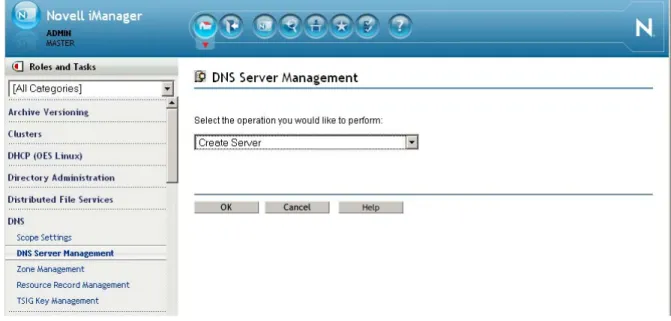
iManager manages one eDirectory tree at a time. When iManager is started in the browser, the first screen you see is the login screen. You are prompted to provide your username, password, and the eDirectory tree whose objects you want to manage. Administration authentication in iManager is based on the common authentication mechanism. To manage objects in a different eDirectory tree, you must log in to the utility again, specifying the eDirectory tree you want to access. Your login identity is displayed at the top of the screen.