C. Boldyreff et al. (Eds.): OSS 2009, IFIP AICT 299, pp. 237–250, 2009. © IFIP International Federation for Information Processing 2009
An Analysis of User Experience Design in
Firefox and OpenOffice.org
Paula M. Bach and John M. Carroll The Pennsylvania State University, University Park, PA
{pbach,jcarroll}@ist.psu.edu
Abstract. We describe two cases of open user experience (UX) design using the Firefox web browser and OpenOffice.org office suite as case studies. We analyze the social complexity of integrating UX practices into the two open source projects using activity awareness, a framework for understanding team performance in collective endeavors of significant scope, duration, and complexity. The facets of activity awareness are common ground, community of practice, social capital, and human development. We found that differences between the communities include different strategies for community building, UX status in the community, type of open UX design, and different ways to share information.
Keywords: User experience, open UX design, Firefox, OpenOffice.org, design, FLOSS, open source, activity awareness, complex teamwork.
1 Introduction
Open UX design practice refers to UX design in free/libre/open source (FLOSS)
contexts. FLOSS projects are characteristically managed on the web and therefore much of the process is open to the public. FLOSS development environments are distinguished by their socio-technical structures. Socio-technical structures are important because anyone interested in contributing to the production of a FLOSS project must learn to negotiate the structures in order to participate. Social structures include understanding the skills and procedures necessary for contribution. The technical structures include engaging in distributed development activities through communication and coordination via email, inter-relay chat (IRC), discussion forums, and concurrent version systems (CVS).
User experience refers broadly to the encounter people have with interactive systems. The goal is to design interactive systems so that they elicit a positive user experience. User experience designers bring several different methodologies and theories to their practice. User experience design practice includes other design approaches such as user research [9], interaction design [17], and usability engineering [13], among others. These design approaches combine in various ways, depending on the audience and the product, to ensure a positive user experience. Not many open source projects engage in UX design, however, some projects do have
particular UX strategies in place. For example the Firefox web browser and OpenOffice.org office suite employ UX practitioners that are responsible for UX strategies.
Open UX design is a recent phenomenon. FLOSS development is clearly different from traditional software development approaches, thus, it is a question of whether and how existing UX approaches apply to open UX design. FLOSS developers find bugs, submit features, write code, review code, and coordinate code integration, in fast iterations that are released often [6]. Developer work is merit-based and developers who are highly skilled and knowledgeable hold leadership positions and make decisions while they gain trust from other developers [14]. Any developer can find a FLOSS project to work on as long as he or she adheres to the project’s social and technical structures.
We investigate Firefox and OpenOffice.org to understand how UX theories and methodologies operate within a FLOSS development environment. To frame our analysis, we use a theory that describes team performance using four facets required for information sharing in collaborative activities.
2 Activity Awareness
Activity awareness is a theoretical framework used for analyzing and understanding coordinated team performance [3]. Because UX practitioners often have to coordinate activities among various stakeholders (e.g. users, developers, and managers), social interactions can be challenging and particularly in FLOSS environments where UX activities are unfamiliar. In the highly distributed FLOSS development environment, activity awareness provides facets that aid in capturing the dynamics of social interaction where FLOSS developers work on complex projects over long spans of time. This is a paradigmatic example of where the challenge of awareness is far greater than merely being aware of who is online, where people are pointing their cursors, or other low-level awareness challenges that Computer-Supported Cooperative Work (CSCW) has studied. Thus, awareness at the activity level is important for members of FLOSS projects, both developers and UX practitioners. The four facets of activity awareness are common ground [4], communities of practice [19], social capital [5], and human development [18]. Analysis of awareness at the activity level provides insight into UX activities in the FLOSS developer environment. See Schmidt [15] for an excellent review of awareness in CSCW.
2.1 Common Ground
Common ground is a communication protocol for checking and indicating shared knowledge and beliefs. Clark [4] states that two people converse through joint action. During conversation, participants reach common ground through their ability to coordinate the source of their joint action. Common ground is therefore the set of knowledge, beliefs, and suppositions the people conversing believe each other shares. Conversation can only progress successfully if people establish and maintain common ground. This concept is particularly critical for multidisciplinary teams with differing knowledge sets and disciplinary perspectives. In addition, distributed groups have to
continually work at and monitor common ground; they cannot ever take it for granted the way that face-to-face teams sometimes can.
2.2 Communities of Practice
Communities enact activities that they share through practice. These activities are specific to the community members and also share a tacit understanding of how to participate in the community. Developers wishing to join an open source community must understand how members enact activities and figure out social practices. This poses problems for UX designers in open source communities, because sharing practices with developers involves a process of enculturation: learning a rich set of moves and expectations, a variety of signals that members may not even be able to readily articulate but which they regularly and fluently enact. When UX practitioners join a FLOSS community of practice they must achieve a high level of awareness – they must know and recognize they can do the same things the other members do.
2.3 Social Capital
Complex teamwork requires successful interactions. When continued beneficial interactions build trust among team members and other networks toward a social good, teams overcome adversity. These favorable interactions toward a persistent social good build social capital. Open source developers build networks of social capital to help them solve problems. UX designers have a tougher time engaging in open source projects because building trust, social networks, and beneficial interactions with developers can be challenging. Challenges arise because being at the level of having built trust, social networks, and beneficial interactions requires already being a member of the community of practice. Generalized reciprocity is difficult to attain when the other members of the community do not yet respect an outside member’s ability to perform and participate in ordinary activities of the community.
2.4 Human Development
When people engage in open-ended, highly interactive, complex problem solving, in team environments, over spans of time, they change. This is due to the socio-cultural aspects of learning where a person’s thought, language, and reasoning processes are understood through social interactions with others. Such human development favors change and bringing UX designers to FLOSS communities can capitalize on that. In addition, communities of practice either learn and develop, or die [20]. FLOSS communities with UX strategies integrated offer new ways for the community to conceptualize and engage in a more design-centered community of practice.
3 Case Study: UX in Firefox
Firefox UX started in 2006 when Mozilla hired a UX director to lead design. Subsequently two more UX practitioners were hired. While much of the design process is open and available on the web, some decisions are made behind the scenes with the management teams, board of directors, and core development team. The
description of the development process reported here is based on an interview with the UX director1 conducted in October 2007 and analysis of the online documents and conversations as part of an ongoing research project. A wiki document outlining the planning and design for Firefox 3 was created in late May 2006. This wiki contained a requirements document and feature list, among other information. The community was encouraged to participate in the planning and design through two discussion groups. The development team and the UX team participated in the discussions addressing concerns amongst each other and with the community of users. The feature list was continually updated based on the discussions in the list and at some point a ‘bug’ was created to initiate work on the feature and depending on the complexity of the work, a feature requirements document was created. FLOSS community members track all work on a project in a bug tracker. Work items are what we know as traditional bugs, errors in the system. But also bugs are new features or any other tasks that affect the code base. Much discussion, including design decisions, also occured in Bugzilla, the bug tracker used for Firefox development. When tasks are complete, the bug is closed and status marked as complete in the requirements document.
New features are discussed in the discussion forum. For example, a lively discussion from May to September 2007 took place over a proposal to change the location bar in the following ways:
1. Remove the favicon from the URL bar. We want to make the URL bar totally trusted, and that means not allowing sites to control parts of it to spoof locks or things like that. We can either remove it entirely or replace it with a generic page icon/folder icon/whatever under our control.
2. Change the URL bar so that everything except “Public Suffix + 2” is greyed out. If the URL bar is focussed or hovered over, the colour switches back to black throughout. This should be possible using CSS only. The “greyed-out” colour is a pref; people who don’t like this feature can set it to “black”.
Following a review of the prototype with the UX and development leads, a Firefox developer put forth the proposal to see how the community would react to such a change. The motivation for the proposal was security-based and suggested providing the user with information about “who they’re dealing with online,” according to the Mozilla security developer (who is different from the developer who initially proposed the change). The discussion about URL highlighting was summarized by the UX lead and entered into the wiki. This change, however, did not make it into the requirements document and hence Firefox 3 because it was unclear how much highlighting would help the user. However, developers and users posted different mockups for review, and one of the Mozilla UX practitioners suggested that even if they had an eye tracker available, reading highlighted text would probably be only milliseconds quicker when parsing the URL to determine if it was familiar.
A discussion in Bugzilla about information in the security tab, in the preferences dialog, occurred about how to present security information to users because information in the Firefox 2 security tab dialog was too technical. The lead security
1
The UX director is now the director of front-end development, user experience, and product delivery at Mozilla.
developer and two other developers submitted patches to a redesign, the UX director conducted a design review, and feedback from five other developers/users guided the design until another bug was created titled “Clean up Security Page Info visuals” to address the layout. Some discussion ensued, patches were proposed, and after the final UI review both of these bugs were closed and thus considered fixed.
At first glance UX design is not easy to recognize. Design work is carried out in discussion lists, bug trackers, and requirements documents. No obvious single design space exists, whereas, code exists in repositories and is easy to download and work with. For example, a developer can download modules of the code base and work on patches but UX designers can’t download various designs form a central repository and work on iterations. A unique aspect of open UX design is the participation of the community in the design and development of Firefox. The Firefox community consists of about2 forty core developers, 100 daily contributors, 1000 contributors, 10,000 nightly testers, and 100,000 beta testers, and 30 million daily users. And although not all members contribute, or contribute evenly, the UX team has a considerable amount of information to integrate into UX design.
When interacting with the community and their suggestions and feedback, the lead UX director weighs two different philosophies for how to interject UX knowledge into the community. The first way is to be the expert. This approach states that the Firefox UX practitioners are experts and they know what is better for the user experience, just like developers are experts about code. The other approach is to provide research and data, to back the UX design with science. Commenting on these two approaches, the UX director states that,
“What needs to happen is that we need to say that our opinions are rooted in observational science, perceptual science, that there are foundations for our expertise. And that we need to build credibility with these kinds of expertise, but we should be given a free rein to play around with things. And we should be trusted a little more.”
The quote differentiates the level to which a UX designer has to present rationale. On one hand, the designer should be trusted to come up with appropriate designs for the community to experiment with. On the other hand, designers should provide rationale based on science. Of course, these two approaches are not mutually exclusive. They both occur to some extend in the community depending on the designer’s reputation.
To introduce UX information such as design rationale or perceptual science, one of the Mozilla UX practitioners maintains a blog about UX to share information with the community. For example, one blog entry about quantitative design talks about cognitive performance modeling and why ‘your mom3’ is not statistically significant, or more formally, why it could be a mistake to rely on cursory single cases, or worse, imagined single cases. According to the UX director, the downside of providing data all of the time for design decisions is that the community is afraid to commit to changes unless they are backed up by science and that what the UX team is striving
2
These numbers are from spring 2007.
3
In open source communities, developers often justify UX design decisions based on how their mom or their grandma might easily use the software.
for is to have the community accept that some design changes can be playful and open for discussion. But he also states that,
“[The Mozilla community is] highly motivated and users care more. Paranoia and nervousness to protect the user experience result in conservatism.”
Given the complexities surrounding open UX design, awareness of UX activities in and by the Mozilla community is essential for understanding benefits and challenges of UX methods and theories.
4 UX Activity Awareness in Firefox
Activity awareness in Firefox UX indicates where information is being understood appropriately for common ground to be reached; how communities of practice meet in a common space; where successful interactions, even if they were heated interactions, build social capital; and where learning exchanges occur through social interactions.
4.1 Common Ground in Firefox UX
In the location bar discussion both the security lead developers and the UX director provided summaries of the discussion to check that information was being understood appropriately. Also the UX blog post about quantitative design provides a mechanism in the comments section where the UX team can see how community members are sharing common knowledge and beliefs, if any, or where breakdowns might occur. Perhaps the biggest breakdown in common ground, as described by the UX director, occurs when developers don’t appear to understand the knowledge base of the UX practitioners and this gap requires the UX people to work extra hard to be understood.
4.2 Communities of Practice in Firefox UX
The Firefox UX practitioners have negotiated the socio-technical structures by integrating their activities, for example, design reviews and rationale for changes into existing structures. Firefox UX practitioners work in the bug tracker to monitor and guide the design changes and provide design reviews for final changes before a bug is closed. Furthermore, the UX team provides research-based rationale among opinions. In the location bar discussion, a Firefox UX practitioner posted a link to a study exploring how users responded to toolbars with information about phishing and the legitimacy of a website. Traditional UX practices have been adapted to the project’s socio-technical structure, and to some extent, developer practices have been adapted to accommodate UX design, for example, where developers ask for a design review. As such, the entire community, by adopting new practices, moves toward a open UX design community of practice.
4.3 Social Capital in Firefox UX
The Firefox UX team experienced frustrations regarding conservatism with design explorations. As an example, in the location bar thread, one of the Firefox UX team members empathizes that “I understand that you (and likely a minority of other users
similar to you) will *hate* these changes.” The user responds with “I don’t think you understand. My friends will make fun of me for this. It’s that bad.” Here the user is so passionate about Firefox features that he resists change. He has built social capital through his friends, and the strength of this capital is difficult to penetrate. This is, however, where the team can leverage community passion to build more social capital and work with this user, through many discussions, and perhaps get his friends involved so that discussions can continue. Through these discussions, new social capital is built, as long as the discussions continue until understanding, or satisfaction is met. Social capital builds strongly through frustrating interactions that are solved. UX participation in many ways throughout the community provides opportunities for successful interactions. Thus with time, the community will be able to understand that design proposals are explorations and not planned changes to get upset about. In addition, building social capital through interactions builds trust in UX expertise, which is an alternative to demanding respect because of expertise. Throughout the entire location bar thread, heated discussion occurred, but in the end social capital allowed people to disagree bitterly, compromise and then move on with no lasting resentment.
4.4 Human Development in Firefox UX
The integration of UX in Firefox includes bringing new knowledge to the discussion forums where developers interact with UX practitioners and both learn from each other. An indication of change is the promotion of the UX director to director of front-end development, user experience, and product delivery. This position provides an opportunity for human development across the Mozilla organization because the UX perspective is being perpetuated from a broader position. An example of community learning occurred in a UX blog about polishing the UI in Firefox 3. The Firefox UX team member posts several screenshots and related bugs referring to small changes in the UI that would polish the menus in Firefox 3. In the comments, five different users suggested other areas in the menu that needed polish based on what the UX team member presented in the blog. The users took the UX expertise presented in the blog and applied it to finding similar polish problems.
5 Case Study: UX in OpenOffice.org
This case study is also part of an ongoing research project. Data was collected from May 2007 and has been continuing. Data collection includes observation of the following OpenOffice.org UX online activities: five email lists, website, blog, and wiki. In addition, we followed up on some discussions in the bug tracker. Finally, data also comes from articles published by a member of the UX team. OpenOffice.org (OOo) is an open source office suite derived from the StarOffice suite which was developed by StarDivision and acquired by Sun Microsystems in 1999. Sun released the source code in July 2000. In January 2007, the UX project was launched. OOo consists of several projects surrounding the community development of the office suite product. Projects begin as incubator projects and can move to ‘accepted’ status with evidence that the community supports the project. Categories of projects include product development, helping users, promotion, and language support, among others.
The UX project is one of several product development projects. Project leads have a vote in the decision making process. A community council and an engineering steering committee govern the OOo community. The UX project began via a new mailing list intended to gather a community of user experience experts wanting to help improve OpenOffice.org. To that end, the UX team has established a user experience community infrastructure that includes a user experience home page on a sub-domain, i.e. ux.openoffice.org, a wiki, five mailing lists (cvs, commits, discuss, issues, and request), inter-relay chat channel, and user experience blog. Since the community infrastructure has been deployed, the project has seen a sharp increase in UX expert participation [11]. The UX team consists of six Sun employees and other community members who have an interest in UX.
The OOo UX website offers detailed instructions for how to become a member of the UX team. To become a member, a UX-interested person must register, request a membership on the team, make introductions, explore the UX resources (includes usability studies, literature, specifications, and so on), and finally, pick one of the many issues on the todo list. Currently, 38 UX team members are listed on the UX wiki. The members range from Sun UX practitioners to OOo users, interaction designers, a medical doctor, developers, and students. The UX website provides a quick link to a todo list which is compiled by the UX lead and other members of the UX team. The list includes links and descriptions of issues categorized, for example, by release version, number of votes, and expert talks with customers. Issues are linked to the bug tracker and, if applicable, to a specification.
Community building for the UX project was deliberate. The UX lead wanted to change the project’s status from incubation to accepted. An incubation project on OOo is one that has not been fully accepted by the community. A project that is a testing ground for ideas is categorized as an incubator project and is governed by less strict rules. Such projects may later make it into the accepted category. As such, the decision to move the UX project from the incubator category to an accepted project was ignited by a post on the discuss list with the subject title “UX – the secret project…”. Before the project came out of incubation, it was only discoverable via search because it was not listed on the projects page and therefore difficult to find. The UX lead worked with the community to assess the project’s usefulness and to establish it as an accepted project. He posted a message asking developers what they expect for resources and how they would like to collaborate with the OOo UX community. Nobody responded. However, a few weeks later, another member of the UX team posted a survey to the OOo UX community with the goal of understanding the community better to change the project’s status and learn about the UX community in the following areas: IT infrastructure usage, satisfaction level, and critical gaps to close.
The results indicated that the UX community (in July 2007) mainly consisted of users and few UX practitioners; needed tools and space for collaborative design; used the mailing lists for two way communication; and wanted more closure from the discussions on the mailing lists, that is, more decision-making. One survey participant noted that the UX portal is missing crucial information such as process and usability information, which another participant, dissatisfied with being part of the community noted, “Seeing user-experience issues actually implemented in the released software – it just takes way too long and takes too low a priority.” In addition, a comment about
information flow noted blockages, “Huge barrier to entry. Discussion on mail list is just opinion; next step is to write a complex spec. Developers then make the final decision.” While the Sun UX team took steps for community building, barriers existed both within the OOo UX community and the larger OOo community.
The top UX Calc (spreadsheet application) issue for April 2008 was a bug reported in fall 2002. The top twenty voted-on-issues were listed on the UX Calc todo list and ranked by number of votes from users. The UX issue list was taken from a second quarter review of Calc posted on the main OOo wiki. In the comments section of the bug tracker, users discussed the behavior of the bug and specified how the application should work given the task. Five years later a patch was proposed, but it lacked full functionality for the task. Two users posted descriptions of the patch and one posted his specification on the UX list for feedback. In this case, the users specified how they think the interaction should work. The discussion continued for two more threads on the UX discuss email list with the user who posted the specification and a contributing developer4. It is unclear if the patch will be reviewed against and developed according to the specification created by the user, and submitted to the issue tracker for the core team to commit to the code base. Alternatively, the issue can be pushed by the UX lead to a core developer. Core developers are often available immediately after a release, but developer resources begin to be used up throughout the release cycle. Although the Sun UX lead and co-lead have not been involved in this bug fix, UX leads must be involved with creating specifications for new features, but not for reviewing bug fixes, as was evidenced by the five-year old bug.
The OOo UX team posts blog entries about important design decisions. For example, the team was working on a new design for adding editing notes to Writer, the word processing application in the OOo suite. A team, that included two UX team members, two developers, a QA and a document specialist, worked on the feature. A first blog post included a step-by-step rationale for design decisions. A later blog post responded to complaints about the color palette used for the notes. The post explained why color is important for accessibility (e.g. color blindness) and information visualization. In addition, these blog posts provide opportunities for community learning. Given that the OOo UX team is focused on community awareness, activity awareness is important for understanding how UX activities are integrated into the larger OpenOffice.org community.
6 UX Activity Awareness in OpenOffice.org
Building a community is an important activity for OOo because of its size and complexity. The community is multinational and multidisciplinary. Therefore awareness of the many components and projects is important for the UX team’s successful integration.
6.1 Common Ground in OpenOffice.org UX
Although UX has an established presence as a project in the OOo community, the multidisciplinary nature of all projects associated with OOo presents challenges for
4
Contributors are developers that are users, but not part of the core development team employed by Sun or otherwise nominated and voted into the core development team.
common ground. For example, with the initial Notes blog, a UX team member posted twice, explaining rationale for Notes, and the second blog about colors indicated that some members of the OOo community did not know about accessibility issues with color, for example. This demonstrated a lack of knowledge about accessibility that members other than UX practitioners share. Furthermore, the comment about lack of decision-making and no closure on discussion is the result of high cost for common ground with electronic, asynchronous (e.g. email lists) communication [4, 7]. Email list participants simply have to work too hard to reach common ground on issues. This situation is complicated further by the global nature of members. Although English is the language used for discussion on the UX lists, it is not always the first language spoken by its discussants.
6.2 Communities of Practice in OpenOffice.org UX
Within the OOo UX community, implicit understanding of practices has not been achieved. Evidence of this is the need for guided direction in how to participate in and navigate the community. Furthermore, one survey participant found difficulty in ascertaining the general processes for achieving a good UX and finding usability methods used by the UX team. A gap exists even within the UX community. While the Sun UX team members are trained UX practitioners, not all of the members signed up for the UX team are knowledgeable UX practitioners. While users and developers can provide helpful feedback, their lack of understanding of UX activities in general results in the gap in practices. The community is further divided through a lack of understanding of FLOSS UX activities. While UX practitioners outside of FLOSS may share practices with other communities of UX practitioners, coming to FLOSS UX is a different kind of practice that cannot be understood through practices in non-FLOSS environments, for example.
The OOo UX community of practice participates in some activities enacted by the larger OOo community. As such, the communities of practice have some overlap. For example, the UX lead must participate in new feature specifications and UX team members are active in bug tracker discussions. Different email lists roughly map to the different kinds of activities that occur on the OOo project. While these lists differentiate several communities of practices being enacted in many different sub-projects, the lists are open for anyone to join. Participation, however, is not a consequence of openness. A barrier to discussion carries over from the inability to cross communities of practice because even though participants may be lurking, they may lack the understanding needed to be full members of the community of practice associated with the activities on any given list and therefore be on the periphery. On the other hand, lurking is a good way to learn how to participate and gain legitimacy in the community [10].
6.3 Social Capital in OpenOffice.org UX
Building social capital requires building trust through successful social interactions. Because the UX team is required to participate in creating feature specifications, over time, they will build trust with other members. For example, the Notes feature included two UX members, two developers, a quality assurance person and a
documentation specialist. These people, from four different communities of practice, collaborated on the same activity to produce a feature. In the future, members of this team, because they built trust through successfully producing a feature, can ask one another for help or seek advice. For example, the Notes team could work together to fix the top Calc issue mentioned above. As such, different members of different communities of practice build social capital every time they work together successfully.
6.4 Human Development in OpenOffice.org UX
Community building by the UX team keeps both the UX community and the larger OOo community thriving. The survey results indicated that the UX team has some weaknesses to overcome, for example, finding better ways to collaborate over visual designs and encouraging more UX practitioners to participate in OOo. These weaknesses result in changes to both the tacit and explicit understanding of how the UX community can thrive. These continuous changes to the UX community in turn drive change in the larger OOo community and members of each community of practice within the OOo community find new ways of engaging with each other. This continual striving to overcome challenges for the good of the community results in human development. The OOo communities continue to thrive because technical and social challenges drive change both within and outside the UX community.
7 Comparison of UX Practices in Both Cases
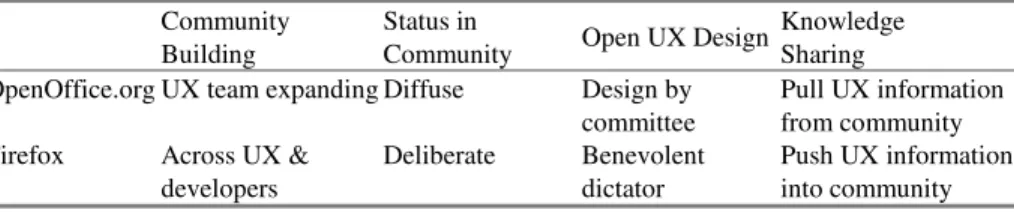
The social and technical structures make integrating traditional UX approaches challenging. Such challenges include whether emphasis is on building community within the UX group, as the OOo case, or and building community between developers and UX, as in the Firefox case. Another challenge is resolving where to integrate UX practices. Evidence of UX activities exists in various communication media, but the status of UX in the community determines to what extend UX activities integrate into the larger community. Integration of UX not only includes pushing UX into the community, but also, includes pulling information from the community. The challenge is strengthening the signal despite the noise. UX knowledge sharing occurs in both cases, but challenges occur with common ground. Table 1 summarizes the discussion below.
Table 1. Open UX design differences in Firefox and OpenOffice.org Community
Building
Status in
Community Open UX Design
Knowledge Sharing OpenOffice.org UX team expanding Diffuse Design by
committee
Pull UX information from community Firefox Across UX &
developers
Deliberate Benevolent dictator
Push UX information into community
Several differences in UX activities exist between OOo and Firefox. The OOo UX community is legitimized through project status and through mandatory participation in feature development, whereas Firefox UX continually has to prove their status in the community. One explanation for status is due to size and complexity of the community. A larger more complex community thrives better with more structure. The OOo is more complex with several projects including different applications within the office suite and Firefox is one application. At most, the Mozilla UX team oversees two applications: Firefox and Thunderbird mail client. The Firefox UX team is not as complex as the OOo UX team, which invites anybody to become a member. While less complexity in Firefox provides more opportunity for common ground, at the same time it limits opportunity for change because the Firefox UX team lacks diversity, as it does not allow outside UX practitioners. This simplicity leaves less room for change and growth. Yet, additional members bring more noise to the UX design system.
High user participation in design discussions brings much noise to the system. But Firefox creates summaries on which to make decisions and OOo posts lists of issues by top vote. The OOo UX approach resembles design by committee whereas the Firefox UX approach resembles benevolent dictator approaches and is more efficient. Evidence of this efficiency includes Firefox UX making clearer decisions via UX design reviews in the bug tracker. Yet the OOo UX team could strengthen the signal to noise ratio in user feedback to get a more efficient information flow. Information summarized by a UX practitioner is less noisy than a ratings list because a summary provides focused information in which to base decisions and a ratings list merely tallies votes. The reasons users voted for changes are not known whereas a summary provides the much needed rationale. As such, Firefox is better at crowdsourcing [8], that is, better at leveraging mass collaboration from their passionate user base. Both of these decision-making strategies, while different, offer opportunities for building trust through successful human interactions, and thus building social capital.
Both UX communities have different strategies for UX knowledge sharing. The Firefox UX blog disseminates UX knowledge to the broader Firefox community, whereas the OOo UX blog asks for feedback from the OOo community. However, the OOo UX blog tries to pull information from the developers and users, and the Firefox blog tries to disseminate UX knowledge to developers and users. The Firefox UX team is actively sharing knowledge by disseminating it to the community and therefore actively building common ground. The OOo UX team, by pulling information into the UX community, strengthens common ground by eliciting knowledge from the broader OOo community.
8 Conclusion
A salient aspect of open UX design is using the community for new ideas and feedback. This is somewhat akin to participatory design [16]. One difference is that in FLOSS users care a great deal about the software they are helping to design and build, whereas users of business applications, for example, are empowered to help with the design of software that they usually are required to use. FLOSS communities usually choose to use the software. One aspect of UX design missing from the two cases is
complex data gathering through ethnography [1, 12]. Although both cases hear about many problems with the software’s user experience through various channels, this information is not focused. Design ethnographers study software use, and most importantly, context of use. Rich context is lost through user reporting. In addition, the UX methods used by the cases do not align with innovative design practices that espouse design thinking with iterations to get the “right design and the design right” [2]. However, we have seen efforts by the UX teams to bring design theories to the community—color theory in OOo and cognitive performance modeling in Firefox. Although pointing to science does not always bring a discussion to consensus, it does bring UX activity awareness to the community along with the other ways OOo and Firefox UX practitioners have worked on building common ground, a community of practice, social capital, and human development.
Acknowledgements
We thank the Mozilla and OpenOffice.org UX teams for sharing their practices with the world.
References
1. Beyer, H., Holtzblatt, K.: Contextual Design: A Customer-Centered Approach to Systems Designs. Morgan Kaufmann, San Francisco (1997)
2. Buxton, B.: Sketching User Experiences: Getting the Design Right and the Right Design. Morgan Kaufmann, San Francisco (2007)
3. Carroll, J.M., Rosson, M.B., Convertino, G., Ganoe, C.: Awareness and teamwork in computer-supported collaborations. Interacting with Computers 18, 21–46 (2006)
4. Clark, H.: Using Language. Cambridge University Press, New York (1996)
5. Coleman, J.S.: Social capital in the creation of human capital. American Journal of Sociology 94, 95–120 (1988)
6. Crowston, K., Annabi, H., Howison, J., Masango, C.: Effective Work Practices for Software Engineering: Free/Libre Open Source Software Development. In: Proceedings of the 2004 ACM Workshop on interdisciplinary Software Engineering Research, WISER 2004, Newport Beach, CA, USA, November 05, 2004, pp. 18–26. ACM, New York (2004) 7. Daft, R.L., Lengel, R.H.: Organizational Information Requirements, Media Richness and
Structural Design. Management Science 32(5), 554–571 (1986) 8. Howe, J.: The Rise of Crowdsourcing. Wired 14, 06 (2006)
9. Kuniavsky, M.: Observing the User Experience: A Practitioner’s Guide to User Research. Morgan Kaufmann, San Francisco (2003)
10. Lave, J., Wenger, E.: Situated Learning: Legitimate Peripheral Participation. Cambridge University Press, New York (1991)
11. Mueller-Prove, M.: User Experience for OpenOffice.org. Interfaces 71, 8–9 (Summer 2007)
12. Randall, D., Harper, R., Rouncefield, M.: Fieldwork for Design: Theory and Practice. Springer, London (2007)
13. Rosson, M.B., Carroll, J.M.: Usability Engineering: Scenario-Based Development of Human Computer Interaction. Morgan Kaufmann, San Francisco (2001)
14. Scacchi, W.: Socio-Technical Interaction Networks in Free/Open Source Software Development Processes. Springer, New York (2005)
15. Schmidt, K.: The problem with ‘awareness’. Computer Supported Cooperative Work 11, 285–298 (2002)
16. Schuler, D., Namioka, A.: Participatory Design: Principles and Practices. LEA, Hillsdale (1993)
17. Sharp, H., Rogers, Y., Preece, J.: Interaction Design: Beyond Human-Computer Interaction. Wiley, Hoboken (2007)
18. Vygotsky, L.S.: Mind in Society: The Development of Higher Psychological Processes. Harvard University Press, Cambridge (1978)
19. Wenger, E.: Communities of Practice: Learning, Meaning, and Identity. Cambridge University Press, Cambridge (1998)
20. Wenger, E., McDermott, R., Snyder, W.M.: Cultivating Communities of Practice. Harvard Business School Press, Boston (2002)