1.800.548.4264
www.ftshydrology.com
DTS-12
SDI Turbidity Sensor
Contact information
FTS
1065 Henry Eng Place Victoria, B.C., V9B 6B2 CANADA
www.ftshydrology.com
Toll-free 1-800-548-4264
Local 250-478-5561
Revision History
Date Person Description
27 Jan 2012 RG Update for DTS-12A and format to current standard 10 Dec 2012 PB Correction made to BES equation on pg 12
16 May 2013 CV Clarification improvements and added appendices
13 June 2013 CV Updated cable connect/disconnect instructions and deployment guide 12 July 2013 CV Updated deployment guide drawings
Table of contents
Contact information ... ii Chapter 1 Operation ... 5 1.1 General description ...6 1.2 Unpacking ...7 1.3 Installation ...7 1.4 SDI Connection ...9 1.5 Operation ... 11 1.6 Address configuration ... 121.7 Calibration and maintenance ... 12
1.8 Replacement Parts ... 14
Chapter 2 SDI Commands ... 15
2.1 Notation for SDI commands ... 16
2.2 Commands recognized by the DTS-12 ... 16
2.3 General SDI commands ... 18
2.4 SDI measurement and data commands ... 18
2.5 Extended command set ... 21
Chapter 3 Technical specifications ... 22
Appendix A Commands recognized by the DTS-12 (historical) ... 25
Chapter 1
Operation
Chapter contents
1.1 General description ... 6 1.2 Unpacking ... 7 1.3 Installation ... 7 1.4 SDI Connection ... 91.4.1 SDI-12 connectorized cable 1.4.1.1 Cable connection 1.4.1.2 Cable disconnection 1.5 Operation ... 11
1.5.1 Startup Operation of Turbidity Sensor 1.5.2 Turbidity measurement 1.5.3 DTS-12 calculations 1.6 Address configuration ... 12
1.7 Calibration and maintenance ... 12
1.1
General description
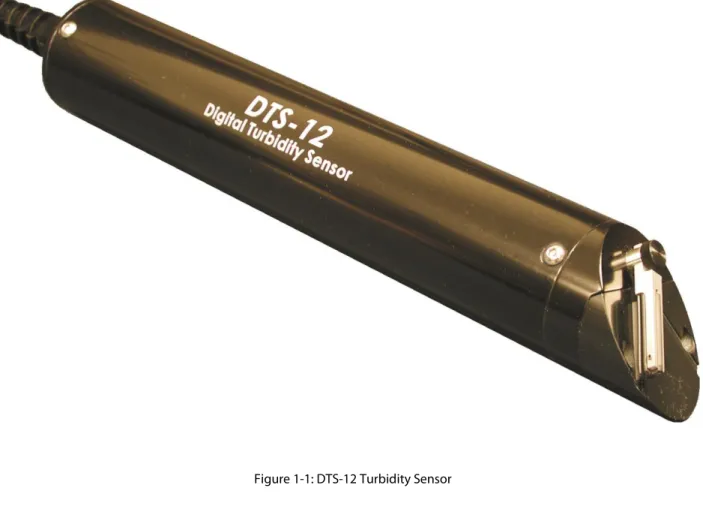
The FTS DTS-12 Turbidity Sensor (DTS-12) measures turbidity and suspended solids concentrations in liquids. The method used is called optical back scatter and employs a detector at 90 degrees to the incident light beam. In practice what this means is that light is emitted into a liquid medium and any amount of reflection detected from suspended matter is a measure of the turbidity of the medium. To achieve this result the latest in micro power, solid state, and infrared laser technology is used. The laser light output is modulated and synchronously detected so that any effects from ambient light conditions are minimized. The measurement range of the DTS-12 is 0 to 1500 NTU, making it ideal for stream and river applications.
The DTS-12 has a built in wiper that is useful for reducing the effects of silt build up and biological fouling of the sensor optics. The DTS-12 is factory programmed with turbidity calibration coefficients. The micro controller applies these coefficients to the raw measurement data and computes mean, median, maximum, minimum, variance, and BES (Best Easy Systematic estimator). All turbidity data is returned in NTUs (Nephelometric Turbidity Units).
All control and measurement functions of the DTS-12 are initiated by sending it a SDI-12 command. SDI-12 stands for Serial Data Interface at 1200 baud. It is a standardized protocol that defines how microprocessor based sensors can communicate with data loggers.
1.2
Unpacking
You should have received the following materials with each DTS-12 sensor:
1. DTS-12 Turbidity Sensor complete with 25’ (or user specification) of polyurethane cable. 2. Spare wiper blade.
3. DTS-12 SDI Turbidity Sensor Operating Manual.
1.3
Installation
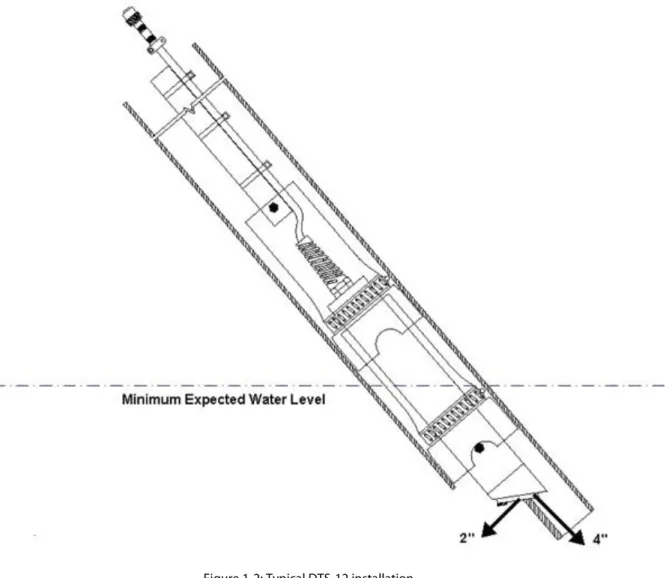
In most cases the best deployment for a turbidity sensor is inside protective tubing (typically PVC pipe) that is placed in the river and fastened securely to the shore by various means (concrete pillars, metal stakes etc.). Figure 1-2 shows such an installation. If in doubt consult FTS regarding the best deployment options for your site. The DTS-12 must be oriented such that the optical window has at least 4 inches axial end clearance and 2 inches radial side clearance from any physical objects (e.g. the river bottom). The sensor should be located in an area that is representative of the water to be measured.
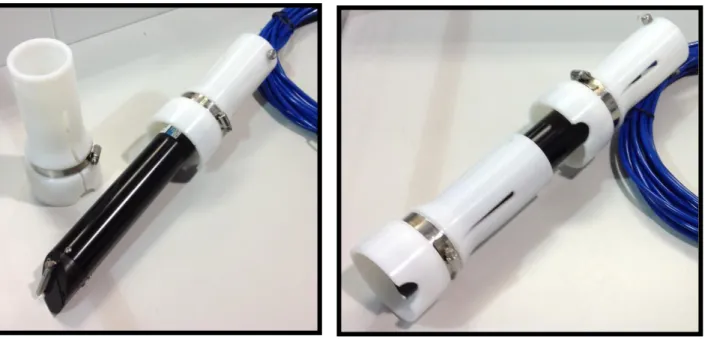
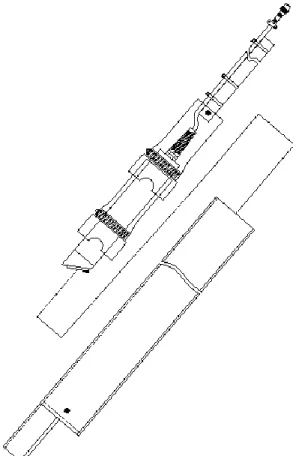
To aid in installation, FTS can supply a DTS-12 sensor deployment guide. This “deployment guide” can be used in conjunction with the user supplied and constructed 4-inch ID deployment tube. The deployment guide can be slid down the inside of the protective tubing (typically schedule 40 Aluminum or PVC pipe) that is placed in the river. Examples are shown in the figures below.
Figure 1-3: DTS-12 deployment guide (diagram)
Figure 1-5: Typical DTS-12 deployment tube and deployment guide combination
1.4
SDI Connection
The SDI cable (nominally 25 feet long) may be connected to the DTS-12 by waterproof gland or underwater connector. Normally the free end of the cable is shipped with a length of the polyurethane jacket removed to expose the three 20 AWG conductors. This allows maximum flexibility when connecting to a data logger that uses a terminal strip.
The SDI cable may be optionally terminated with a 3-pin military connector for connection to similar connector on the data logger. Cable wire colour coding and FTS standard connector1 pinouts are shown in the table and diagram below:
Wire colour Pin1 Function
Red A +12 V DC power supply
White B Data
Black C Ground
1
Waterproof military-style bayonet connector 851-06JC8-3AP50; FTS part number 520-83AP; compatible with FTS Axiom dataloggers.
1.4.1
SDI-12 connectorized cable
The DTS-12 can be ordered with fixed length connectorized cables (60 and 100 ft.) that allow for quick disconnect and re-connection. This watertight connection is submersible and permits easy sensor removal from a field installation without removing the cable. In complex installations or on installations with long cable runs this is a very desirable attribute.
A thin film of dielectric grease is placed on the End Cap Flange during connection at the factory. This facilitates the operation of the connection and should be reapplied as needed to ensure the connection can be unplugged. If doing so, ensure that the grease is kept out of contact with the electrical prongs and receptacles to avoid a poor electrical connection.
Warning: Because of the tight fit of this connection, inexperienced users tend to twist and bend the connection when connecting or disconnecting the cable. This inappropriate handling WILL damage the female
receptacles inside the Cable Connection.
See “How to connect and disconnect the DTS-12 turbidity sensor waterproof connectorized cable” video on the FTS web page for proper procedure. http://www.ftsenvironmental.com/video/
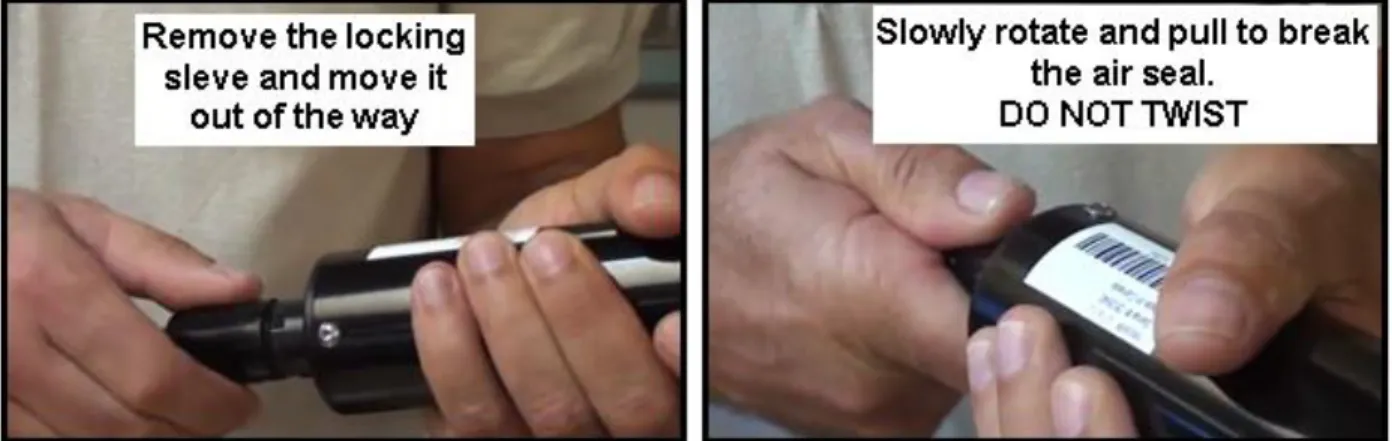
1.4.1.2 Cable disconnection
After unscrewing the locking collar slide it up the cable out of your way. Firmly grip the probe and cable
connection as outlined below and rotate and pull the connection apart. Ensure you do not bend or twist the cable connection.
Figure 1-7: Cable disconnection details Caution:
The female receptacles inside the cable connection are susceptible to damage if the connection is bent or twisted. These actions can splay out the female connections to the point that electrical contact with the male prongs becomes intermittent. In addition, one of the male prongs on the DTS-12 end cap has a larger diameter than the other two. This larger diameter prong must be aligned with the two reference nipples on the cable connector (as shown in the connection photos above) to ensure that the prongs are inserted into the correct receptacles. Forcing insertion into the wrong position will permanently damage the connection. Aggressive twisting can also result in bending and breaking prongs.
Do’s and Don’ts:
1. Do use clean dielectric grease to lubricate the DTS-12 End Cap 2. Do keep prongs and receptacles free from grease
3. Do keep the End Cap Prongs and Cable Connection Receptacles dry 4. Do not disconnect the cable under water
5. Do not leave an unconnected cable connection underwater
6. Do not bend or twist the cable connection during connection or disconnection
1.5
Operation
1.5.1
Startup Operation of Turbidity Sensor
When power is first applied to the DTS-12 a wipe cycle will occur. This is a normal part of the sensor initialization. When the wiper returns to its normal parked position the DTS-12 is ready to accept SDI commands.
1.5.2
Turbidity measurement
A measurement is initiated when the logger sends an appropriate SDI command to the DTS-12. When this happens, the DTS-12 will execute a measurement cycle consisting of the following steps:
1. Power up the sensor head.
2. Calibrate the analog to digital converter circuitry. 3. Read the water temperature
4. Do a wipe (if the command calls for a wipe) if the water temperature is not too low 5. Acquire 100 samples at 20 samples per second.
6. Perform statistical calculations as required.
After about 10 or 20 seconds (this time is dependent on the type of measurement requested) the sensor will respond with a service request and the logger will retrieve the measurement by issuing a SDI “D0” command. The wiper may be activated explicitly as a single operation or implicitly as the first part of a measurement command. See the section on SDI commands for the individual command descriptions.
Note: A wipe operation will add an additional 5 seconds to the measurement operation.
1.5.3
DTS-12 calculations
The statistical calculations performed by the DTS-12 on the 100 samples are shown below:
mean(average) ̅ ∑ variance ∑( ) median S
Where is measurement ‘I’ in the sorted list
1.6
Address configuration
The DTS-12 is shipped with default address 0 (unless shipped as part of an integrated FTS system). Refer to section 2.3.3 Change Address for instructions on setting the sensor’s address.
1.7
Calibration and maintenance
The only field maintenance required by the DTS-12 is a periodic check of the wiper for deterioration or fouling with biological or other material. If fouling is detected and the wiper blade is in otherwise good condition it may
abrasive cleansers or petroleum products. If the wiper blade edge appears ragged or uneven then the wiper assembly should be replaced. Each DTS-12 is shipped with a spare piece of wiper material (698-DTS12-WIPER) packaged in a small zip-lock bag attached to the cable. These can be changed as shown below. Complete
replacement wiper arm assemblies may also be purchased from FTS (part # DTS12-WIPER). The complete assembly can be changed by loosening the thumbscrew to remove the old wiper assembly and replacing it with the new wiper assembly.
If tools and a work area are available then replacing the wiper blade is an option. To replace the wiper blade refer to Figure 1-8 and perform the following operations:
1. Remove the wiper assembly consisting of the wiper arm and wiper blade by undoing the wiper arm thumbscrew with your fingers. To reduce unnecessary stress on the wiper drive system hold the wiper arm while turning the thumbscrew counter clockwise
2. On older models remove the split pin from the wiper arm by tapping it out with a punch of the same diameter. The current design incorporates a slot with a circular opening at one end that allows the wiper material to be maneuvered out of, or into the slot.
3. In both cases slide the old blade off the wiper arm.
4. Reassemble using a fresh wiper blade following the previous steps in reverse order.
Wiper Blade Wiper Armature
M3 X 8 Thumbscrew
1.8
Replacement Parts
If replacement parts are required, the entire wiper assembly shown in Figure 1-8 (p. 13) can be ordered from FTS by specifying part number DTS12-WIPER. If individual components are required, specify part number according to the table below.
FTS Part Number Description
DTS12-WIPER Wiper and Armature assembly
993-WIPER-ARM Wiper Armature
698-DTS12-WIPER Wiper Blade
Chapter 2
SDI Commands
Chapter contents
2.1 Notation for SDI commands... 16 2.2 Commands recognized by the DTS-12 ... 16 2.3 General SDI commands ... 18
2.3.1 Address Query 2.3.2 Acknowledge Active 2.3.3 Change Address 2.3.4 Send Identification
2.4 SDI measurement and data commands ... 18 2.4.1 Start Measurement
2.4.2 Start Concurrent Measurement 2.4.3 Request Data
2.4.4 Continuous Measurement 2.4.5 Start Verification
2.5 Extended command set ... 21 2.5.1 Enable Median in M command
2.5.2 Enable Mean (average) in M command 2.5.3 Report M command status
2.5.4 Set low temperature wipe cutoff value 2.5.5 Enable low temperature wipe cutoff 2.5.6 Disable low temperature wipe cutoff 2.5.7 Report low temperature wipe cutoff status
2.1
Notation for SDI commands
In the end, SDI commands are strings of characters sent to the SDI device. The format of those strings is important, of course, and to specify the format of SDI commands we use different typefaces. All commands (and the replies from the device) are represented in a monospaced font. Different parts of a command are represented with variants on this text format.
Item Explanation Text representation
Command literal Part of a command that must be reproduced literally as it appears
X
Command parameter
Part of a command that must be filled in with an appropriate value
data
Address part of command
First character of command (except Address Query). Valid values 0-9, a-z, A-Z.
a
2.2
Commands recognized by the DTS-12
The table below provides a quick reference to the commands recognized by the DTS-12. For details on these commands, see the following sections.
IMPORTANT ! The commands below are for DTS-12 version 20 and up. To determine your version number perform an Identification Command and look at the VX field. Identification response = aCN#FTS----DTS12—VX -SN#. See Appendix A for older command sets.
Command name Command code Notes
Address Query ?!
Acknowledge Active a!
Change Address aAb! b is the new address, a single alphanumeric
character in the range 0-9, a-z, A-Z
Send Identification aI! Resp = aCN#FTS----DTS12—VX-SN#
a = address
CN# = SDI-12 compatibility number FTS = manufacturer identifier DTS12 = sensor type
VX = firmware version number SN# = serial number
Start Measurement (general) aM!, aMC!,
aMn!, aMCn!
C following a command requests a CRC code in the data return (D command)
n is a digit between 1 and 9 Start Concurrent Measurement
(general)
aC!, aCC!,
aCn!, aCCn!
C following a command requests a CRC code in the data return (D command)
n is a digit between 1 and 9 Start Measurement:
Median Mode (factory default)= Temperature, Median Turbidity,
aM! , aMC!,
aM0!,aM0C! aC!, aCC!
Causes a wipe before the measurement Median mode returns 4 data points.
Command name Command code Notes
Start Measurement:
Mean (average) Mode = Temperature, Mean Turbidity, Variance of the Mean
aM! , aMC!,
aM0!,aM0C! aC!, aCC!
No wipe before measurement
Mean (average) mode returns 3 data points.
Start Measurement: Mean, Variance, Median, BES, Min, Max, Temperature
aM1!, aMC1!,
aC1!, aCC1!
No wipe Start Measurement: Mean, Variance,
Median, BES, Min, Max, Temperature, wipe status*
aM2!, aMC2!,
aC2!, aCC2!
Wipe before measurement
Start Measurement: Single turbidity measurement
aM3!, aMC3!,
aC3!, aCC3!
No wipe Reserved for factory use aM4! , aMC4!,
aC4!, aCC4!
Not used aM5!, aMC5!,
aC5!, aCC5!
Not used aM6!, aMC6!,
aC6!, aCC6!
Not used aM7!, aMC7!,
aC7!, aCC7!
Wipe sensor window: wipe status* aM8!, aMC8!,
aC8!, aCC8!
Data return is wipe status Reserved for factory use aM9!, aMC9!,
aC9!, aCC9!
Request Data aDn! n is a digit between 0 and 9
aD0…aDM! commands return all available data from the most recent measurement command
Continuous Measurements (Read) aR!, aRC! C following a command requests a CRC code in the data return
Start Verification: no data returned aV! Verifies SDI communication Enable Median M command aX se mc m! Reports median turbidity Enable Mean(average) M command aX se mc a! Reports average (mean) turbidity Report M command status aX g mc! Returns ‘a’ (average) or ‘m’ (median) Set low temperature wipe cutoff
value
aX se ct xxx! Temperature xxx (any decimal number), C Enable low temperature wipe cutoff aX se ce y!
Disable low temperature wipe cutoff
aX se ce n! Default setting (disabled) Report low temperature wipe cutoff
status
aX g ce! Temperature, C
* Wipe Code 0 = Wiped
1 = Too cold (below set temperature value so wipe suppressed) 2=No wipe for any other reason other than temperature suppressed 3=Attempted wipe
2.3
General SDI commands
General SDI commands are used for housekeeping issues such as device address configuration, device
identification and confirmation of device communications. General SDI-12 version 1.3 commands are as follows.
2.3.1
Address Query
This command requests the address of the SDI sensor.
String Note
Cmd ?! request the (single) device on this bus to report its address
Resp 0 the device is configured for address 0
only one SDI device should be connected to the bus when using this command; problems arise when several devices respond on the same bus
2.3.2
Acknowledge Active
This command queries whether a sensor is present on the SDI bus at the specified address.
String Note
Cmd 0! request the device at address 0 to confirm it is active
Resp 0 a device is present at address 0
2.3.3
Change Address
This command changes a sensor’s SDI address.
String Note
Cmd 0A3! change the address of the device at SDI address 0 to 3
Resp 3 response confirms change
2.3.4
Send Identification
This command requests detailed identification information from the addressed sensor.
String Note
Cmd 3I!
Resp 313FTS---DTS12--v1SN#-34567 3 device SDI address
13 compatible with SDI-12 version 1.3
FTS--- manufacturer’s identifier
DTS12- sensor model
-v1 version 1 of sensor firmware
SN#-34567 sensor serial number
2.4.1
Start Measurement
This command is used trigger a measurement on the addressed sensor. The sensor will not return data, instead the sensor will return the duration of the measurement as well as the number of data points returned by the
measurement. The data is read using a subsequent Request Data command. Refer to Tables 2 and 3 for the specifics of the data returned from the sensor.
String Note
Cmd 3M! or 3MC! start a measurement on sensor at address 3 (without or with CRC in data response, respectively)
Resp 30124 3 device SDI address
012 measurement delay (until data is ready; seconds)
4 number of data points returned
2.4.2
Start Concurrent Measurement
The concurrent measurement command allows a sensor to take a measurement while other SDI sensors are also taking measurements. The Start Concurrent Measurement Command operates in the same manner and returns the same information as the Start Measurement command (refer to Table 2).
String Note
Cmd 3C! or 3CC! start a concurrent measurement on sensor at address 3 (without or with CRC in data response, respectively)
Resp 300704 3 device SDI address
007 measurement delay (until data is ready; seconds)
04 number of data points returned
2.4.3
Request Data
This command requests the data generated by the preceding Measurement (M or C) command. An aD0!command is always the first command sent to retrieve the data. If additional data needs to be read, then an aD1!command is sent, then and aD2!etc., up to aD9! as required to retrieve all data.
String Note
Cmd 3M2! start a measurement on sensor at address 3
Resp 30288 3 device SDI address
028 measurement delay (until data is ready; seconds)
8 number of data points returned
Cmd 3D0! request data from previous measurement command
Resp 3+2.18+0.0007+2.17+2.17+2.15+2.26 3 sensor SDI address
+2.18 mean turbidity +0.0007 variance +0.217 median +2.17 BES +2.15 min 2.26 max
Cmd 3D1! request more data from previous measurement
Resp 3+23.4 3 sensor SDI address
+23.4 temperature
Cmd 0MC! start a measurement on sensor at address 0, with CRC
in data response
Resp 00074 0 device SDI address
007 measurement delay (until data is ready; seconds)
4 number of data points returned
Cmd 0D0! request data from previous measurement command
Resp 3+23.5+0.0+0.244694+0@Pu 3 sensor SDI address
+23.5 temperature in degrees Celsius
+0.0 mean turbidity
+0.244694 variance
0 wipe code (median mode)
@Pu CRC code
2.4.4
Continuous Measurement
This command is not supported by the sensor. The response of the sensor to a Continuous Measurement command is shown below.
String Note
Cmd 1R! perform a continuous measurement read on sensor at
address 3
Resp 1 1 sensor SDI address
DTS-12 is not a continuous measurement device. No data is returned.
Cmd 1RC! perform a continuous measurement read on sensor at
address 3, with CRC code in data response
Resp 1MSA 1 sensor SDI address
MSA CRC code
DTS-12 is not a continuous measurement device. No data is returned.
2.4.5
Start Verification
This command is not supported by the sensor. The response of the sensor to a Start Verification command is shown below.
String Note
Cmd 3V! start verification on sensor at address 3
Resp 30000 3 device SDI address
000 measurement delay (until data is ready; seconds)
2.5
Extended command set
2.5.1
Enable Median in M command
String Note
Cmd 3X se mc m! Enable Median M command on sensor at address 3
Resp 3 3 device SDI address
2.5.2
Enable Mean (average) in M command
String Note
Cmd 3X se mc a! Enable Mean (average) M command on sensor at address 3
Resp 3 3 device SDI address
2.5.3
Report M command status
String Note
Cmd 3X g mc! Report M command status on sensor at address 3
Resp 3m 3 device SDI address
m sensor is in ‘m’ (median, default) mode
2.5.4
Set low temperature wipe cutoff value
String Note
Cmd 3X se ct 4! Set low temperature wipe cutoff value on sensor at address
3 to 4 C
Resp 3 3 device SDI address
2.5.5
Enable low temperature wipe cutoff
String Note
Cmd 3X se ce y! Enable low temperature wipe cutoff
Resp 3 3 device SDI address
2.5.6
Disable low temperature wipe cutoff
String Note
Cmd 3X se ce n! Disable low temperature wipe cutoff
Resp 3 3 device SDI address
2.5.7
Report low temperature wipe cutoff status
String Note
Cmd 3X g ce! Report low temperature wipe cutoff status
Resp 3y 3 device SDI address
Sensor type Temperature: Encapsulated thermistor Turbidity: Optical nephelometer (sidescatter)
Interface SDI-12 v.1.3
Operating temperature range 0°C to +40°C (non-freezing)
Depth rating 30 m
Wipe time 5 s (nom.)
Accuracy – Temperature ±0.2°C
Range – Turbidity 0 – 1600 NTU
Resolution – Turbidity 0.01 NTU
Accuracy – Turbidity (at 25 C) 0 – 399.99 NTU: ± 2% of reading 400 – 1600 NTU: ±4% of reading Zero Offset: ± 0.2 NTU
Measurement time ~ 10–20 s, depending on measurement mode Power supply voltage +12 V DC (nominal range: 9.6 V – 16 V)
Standby current 0.35 mA
Active current 50 mA
Wiping motor current 200 mA
Weight 604g
Length 30.48 cm
Commands recognized by the DTS-12 (historical)
This section is intended for historical purposes only and is not applicable to new DTS-12’s.
IMPORTANT ! The commands below are for DTS-12 version 12 and lower (serial number 048911 and lower). To determine your version number perform an Identification Command and look at the VX field. Identification response = aCN#FTS----DTS12—VX-SN#. See section 2.2 for newer command set.
The DTS-12 supports an extended SDI-12 command set to enable certain features that are not supported by the standard SDI-12 version 1.1 protocol. One of these Extended Commands adds the ability to change the address of the sensor. Other Extended Commands are used in factory calibration and testing.
Unlock Command aU OPEN!
Example: 7U OPEN! Response: 7
The sensor is powered up in the locked mode and can only be unlocked by sending the Unlock command with an Unlock code. The Unlock Code is a character string that the user must enter and it must match the internal Lock code exactly. Entry into the Unlock state is indicated by a response from the sensor. The unlock
command was unsuccessful if no response is received. The current unlock code is <space>OPEN.
Lock Command aL!
Example: 7L! Response: 7
The sensor is re-locked by executing the Lock command. A response from the sensor indicates success. No response indicates the command failed.
The table below provides a quick reference to the commands recognized by the DTS-12. For details on these commands, see the following sections.
Command name Command code Notes
Address Query ?!
Acknowledge Active a!
Change Address aAb! b is the new address, a single alphanumeric
character in the range 0-9, a-z, A-Z
Unlock command is required prior to address change on all versions 11 and lower
Send Identification aI! Resp = aCN#FTS----DTS12—VX-SN#
a = address
CN# = SDI-12 compatibility number FTS = manufacturer identifier DTS12 = sensor type
VX = firmware version number SN# = serial number
Start Measurement (general) aM!,
aMn!,
Command name Command code Notes
Start Measurement:
Median Mode (factory default)= Temperature, Median Turbidity, Variance of the Mean, Wipe Status*
aM! aM0!
Only Version 11 and up can toggle between Median and Mean(avg) mode. If less than Version 11 then mode will be set to Mean. Causes a wipe before the measurement if and only if the sensor has V11 firmware or later. Median mode returns 4 data points. Start Measurement:
Mean (average) Mode = Temperature, Mean Turbidity, Variance of the Mean
aM! ,
aM0!
Only Version 11 and up can toggle between Median and Mean(avg) mode. If less than Version 11 then mode will be set to Mean. No wipe before measurement
Mean (average) mode returns 3 data points. Start Measurement: Mean, Variance,
Median, BES, Min, Max, Temperature
aM1! No wipe
Start Measurement: Mean, Variance, Median, BES, Min, Max,
Temperature, Wipe status*(median mode)
aM2! Wipe before measurement
Start Measurement: Single turbidity measurement
aM3! No wipe
Start Measurement: single turbidity measurement, voltage, counts range
aM4! No wipe
Not used aM5!
Not used aM6!
Not used aM7!
Wipe sensor window aM8!
Reserved for factory use aM9!
Request data aDn! n is a digit between 0 and 9
aD0…aDM! commands return all available data from the most recent measurement command
Start Verification aV! Verifies SDI communication
Subsequent D0! Request retrieves results Expected results: aD0!a+1+0+0+xx (xx = numbers for internal diagnostics)
Enable Median M command aC83! Unlock is required prior to command
Reports median turbidity Version 11 or higher
Command name Command code Notes
Set low temperature wipe cutoff value
aC80n! Unlock is required prior to command
Temperature=n (default is 2), C Version 11 or higher
Enable low temperature wipe cutoff aC81! Unlock is required prior to command Will not wipe below cutoff
Version 11 or higher Disable low temperature wipe
cutoff
aC82! Unlock is required prior to command
Attempts wipe regardless of temp Version 11 or higher
* Wipe Code 0 = Wiped
1 = Too cold (below set temperature value so wipe suppressed) 2=No wipe for any other reason other than temperature suppressed 3=Attempted wipe