IVA Task Script Language
Version 1.2
IVA Task Script Language Table of Contents | en 3
Table of Contents
1 Change Log 4 1.1 Version 1.0 4 1.2 Upgrade to Version 1.1 4 1.3 Upgrade to Version 1.2 4 2 Definitions 52.1 Events and States 5
2.2 Properties 5
2.3 Rules 5
2.4 Alarm Task Engine 5
3 System Integration 6 3.1 System Overview 6 3.2 User-Defined Tasks 7 4 Syntax 8 4.1 Types 8 4.1.1 Basic Types 8 4.1.2 Example: Speeding 8 4.1.3 Attributes 8
4.1.4 Example: Crossing Two Lines 9
4.2 Comments 9 4.3 Primitives 9 4.3.1 Field 10 4.3.2 Line 11 4.3.3 Route 12 4.3.4 Loitering 13 4.3.5 ColorHistogram 14 4.3.6 FlowDetector 15 4.4 Object-Specific Events 16 4.5 Object Properties 17 4.5.1 States 18 4.6 Tamper States 19 4.7 User-Defined States 20 4.7.1 SimpleStates 20
4.7.2 Boolean Composition of Conditions 21
4.7.3 Properties in Conditions 21
4.7.4 ObjectState 22
1
Change Log
1.1
Version 1.0
Version 1.0 is integrated in firmware 3.0 together with IVA 3.0.
1.2
Upgrade to Version 1.1
Version 1.1 is integrated in firmware 3.5 together with IVA 3.5. – added definition of ColorHistogram
– added state SimilarToColor for comparison of object histogram and user-defined histogram
– added states HasObjectSize, HasAspectRatio, HasVelocity, HasDirection, and HasColor in order to check presence and absence of object properties
1.3
Upgrade to Version 1.2
Version 1.2 is integrated in firmware 4.0 together with IVA 4.0. – added definition of FlowDetector
– added state FlowDetected
– added states HasFace and HadFace
– added properties FaceWidth and MaxFaceWidth – added Field options ObjectSet and SetRelation
IVA Task Script Language Definitions | en 5
2
Definitions
2.1
Events and States
Whereas states are temporal functions, events occur each time a state changes its value. The script language provides both, events and states, because of the different operations defined for them. On the one hand, events allow expressing temporal relations between objects. On the other hand, non-temporal (e.g. spatial) relations of objects are more easily described by states.
2.2
Properties
In order to distinguish between Boolean and non-Boolean states, the notion property is introduced referring to non-Boolean states.
2.3
Rules
When speaking about rules, both – events and states – are meant which are output by the Alarm Task engine, i.e. which have been declared external. A rule is said to be active, if the corresponding state is active or the corresponding event has been triggered. In case of an event, the corresponding rule is active from the frame on where the event has been triggered to the next processed frame where the rule is inactive again.
2.4
Alarm Task Engine
The Alarm Task engine parses the output of the video content analysis module and searches within this stream for rules defined according to the IVA Task script language.
3
System Integration
3.1
System Overview
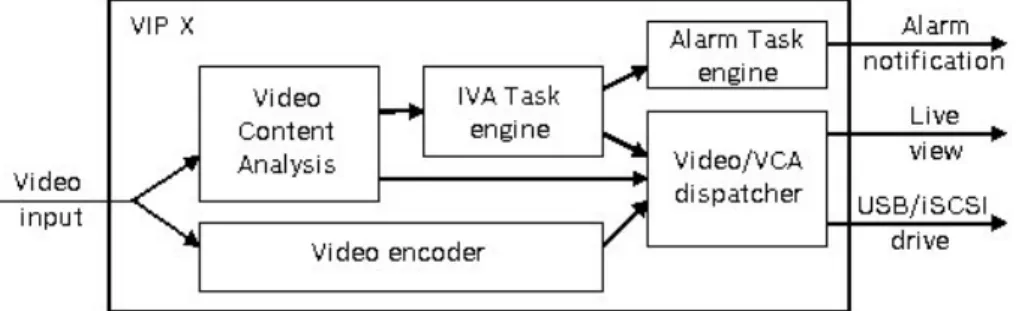
Figure 3.1 shows the parts of the VIP X architecture which are relevant for Video Content Analysis (VCA). First, the video signal is sent to the video encoder and the VCA software. The former outputs e.g. H.263 or H.264 streams, the latter produces a meta stream encoded in the Bosch VCD format. Both outputs are received by the video/VCA dispatcher which forwards them to clients which are interested in the data. Thereby, a recording task is treated as just another client.
Figure 3.1 VIP X Architecture
The VCA module detects objects in the scene independently of any user defined rules. The extracted objects and their properties are forwarded as a VCD stream to the Alarm Task engine which does the detection of user defined rules. The output of the Alarm Task engine are up to 16 alarm flags. On the one hand, these are merged into the VCD stream. On the other hand, the IVA Task engine is notified about changes of alarm flags. The IVA Task engine allows association of any kind of actions to alarm flags; actions like sending e-mail, triggering a relay output, notification of a video management system.
Figure 3.2 Archive Player Architecture
The Alarm Task engine is configured with a script specified in the IVA Task script language. The same language is used in Bosch’s forensic search applications (see Figure 3.2) to look for unforeseen events in recordings. There, the recorded VCD streams are fed through another instance of the Alarm Task engine which can run with another set of rules. The occurrences of events are displayed in a timeline which allows fast navigation to relevant video sequences. In order to provide different kinds of forensic search tools, the Alarm Task engine is packed into a plugin which can be easily exchanged. The IVA 3.0 plugin is the first one supporting the IVA Task script language and configuration of the corresponding Alarm Task engine.
IVA Task Script Language System Integration | en 7
3.2
User-Defined Tasks
Via the IVA 3.0 plugin the Alarm Task engine can be configured. To simplify matters, the plugin provides a comprehensive list of predefined queries with corresponding wizards. The wizards automatically enter IVA Task script code into the Alarm Task script. Such code fragments are framed by comments which allow editing of tasks at a later time. Modification of automatically generated code can lead to corrupt tasks which can no longer be interpreted by wizards. The IVA 3.0 plugin enables the definition of up to 8 tasks corresponding to the first 8 external rules of the script. However, in order to make a user-defined rule visible in this task list, it must be wrapped as follows:
Thereby, <n> is a placeholder for the ID of the user-defined rule. Furthermore, there must be no other task with the same ID. The name of the task can be specified within the quotation marks.
//@Task T:0 V:0 I:<n> “user defined task” { external ObjectState #<n> := true;
4
Syntax
4.1
Types
4.1.1
Basic Types
The IVA Task script language supports BOOLEAN, INTEGER, FLOAT, ANGLE and OID as basic types. The domains of these types are as follows: BOOLEANs take either the value true or false, INTEGERs are signed 32-bit integral numbers, FLOATs represent 32-bit floating numbers, ANGLEs are specified in degrees, and OIDs are unique identifiers of objects.
In order to account for the periodic structure of angles, the special type ANGLE is introduced. The only operation allowed for angles is a range check. It returns true, if there exists an equivalent angle within the specified range. Two angles are equivalent if their difference is a multiple of 360 degrees.
There exists a special value NAN (not a number) which indicates that the value does not exist. The return value is NAN when, for instance, the direction of an object is accessed which does no longer exist.
4.1.2
Example: Speeding
The subsequent IVA Task script example checks for all objects if they are moving faster than 30 meters per second; objects which exceed this limit trigger an alarm:
The Velocity function returns the speed of an object. The within operation takes the corresponding FLOAT value and compares it with the left bounded interval (30.0,*). The resulting BOOLEAN is assigned to the ObjectState #1 of the considered object.
4.1.3
Attributes
Events and states can be augmented with attributes. Each attribute is characterized by a basic type and a unique name. The name is needed in order to distinguish attributes of the same type and to access the attribute. When introducing events, the following syntax will be used to describe their attributes:
For states, a similar syntax is used:
The attribute list can be empty in both cases.
external ObjectState #1 := Velocity within (30.0,*);
<event> -> ( <type> : <name>, ... , <type> : <name> )
IVA Task Script Language Syntax | en 9
4.1.4
Example: Crossing Two Lines
The subsequent IVA Task script defines two lines and triggers Event #1 if the same object passes the first line and afterwards the second line. In order to check whether both CrossedLine events have been triggered by the same object, the oid attributes of both events are compared. Without this condition, Event #1 would be triggered even if one object had passed Line #1 before a completely different crossed Line #2. The first and second keywords allow access to the attribute lists of the two events involved in a before relation.
4.2
Comments
The IVA Task script language supports C-style comments. That means, all characters of a line following two slashes // are ignored by the Alarm Task engine as well as all characters which are framed by /* and */. The latter kind of commenting can be used to comment out several lines at once or a part of a single line.
Example
4.3
Primitives
The IVA Task script language supports several geometrical primitives. These primitives observe single objects and trigger events on certain actions. The number of primitives which can be instantiated is limited by the memory of the device on which the Alarm Task engine is running. In the firmware 3.0 this limits the number of routes to 8, and the total number of primitives to 32.
Line #1 := {
Point( 10,10 ) Point( 10, 50 ) Direction( 0 ) };
Line #2 := {
Point( 50,10 ) Point( 50, 50 ) Direction( 0 ) };
external Event #1 := {
CrossedLine #1 before CrossedLine #2 where first.oid == second.oid
};
Field #1 := { // this is a comment
Point( 10, 10 ) /*Point( 10, 50 )*/ Point( 50, 50 ) Point( 50, 10 )
};
/* all characters within this block are commented out */
4.3.1
Field
Syntax
Field primitives are defined in the following way:
<n> is the number of the field and must be between 1 and 32. The specified points span a polygon. This polygon must have between 3 and 16 points, and must be simple, i.e. it must not intersect with itself. The coordinates of the points are specified in pixels with the image resolution processed by the IVA algorithm. <time> specifies the optional DebounceTime in seconds. Its default value is 0. When the DebounceTime is set, the state of an object, whether it is inside or outside of the field, only changes if the object stays on the other side for at least the time specified by <time>. This way, one can get rid of positional errors in the object tracking or multiple alarms of objects moving along the border of a field.
If a flow detector is used the DebounceTime has a different meaning. The <time> specifies the post-alarm time for the area. This ensures that if many short flow alarms are detected within the debounce time <time> they are merged to a long alarm period.
ObjectSet and SetRelation specify which parts of the object are considered to determine whether it is regarded as inside or outside. Thereby, <objectset> can be set to either BaryCenter or BoundingBox, where BaryCenter is the default value. The <relation> can be switched between Intersection and Covering with Intersection as default value. For instance, if BoundingBox and Covering are selected, an object’s bounding box must be completely inside the specified polygon to be regarded as inside. If <objectset> is set to BaryCenter, both <relation> options result in the same behavior, since the object set consists only of a single point.
States
The state InsideField #<n> is set if object oid is inside Field #<n>
ObjectsInField #<n> returns the number of objects which are currently in Field #<n> Events
The event EnteredField is triggered, when an object enters Field #<n>. The object which has caused the event can be queried by the argument oid.
The event LeftField is triggered, when an object leaves Field #<n>. The object which has caused the event can be queried by the attribute oid.
Note that an object which is first detected within a field does not trigger the corresponding EnteredField #<n> event. Field #<n> := { Point(<x>,<y>) ... Point(<x>,<y>) [DebounceTime(<time>)] [ObjectSet(<objectset>)] [SetRelation(<relation>)] };
InsideField #<n>( OID:oid ) -> BOOLEAN
ObjectsInField #<n> -> INTEGER
EnteredField #<n> -> ( OID:oid )
IVA Task Script Language Syntax | en 11
Example
The following example triggers an alarm if the same object has first entered the specified field and later left it again.
4.3.2
Line
Syntax
Line primitives are defined in the following way:
<n> is the number of the line and must be between 1 and 16. A line consists of exactly two points, whose coordinates are specified in pixels with the image resolution processed by the IVA algorithm. With the argument <dir>, one can choose whether any object which passes the line triggers an event or whether only objects which pass from left to right respectively right to left are relevant. In the former case <dir> is expected to be 0, in the latter cases <dir> takes the value 1 respectively 2. <time> specifies the optional DebounceTime in seconds. Its default value is 0. When the DebounceTime is set, a CrossedLine #<n> event is only triggered, if the same object will not cross the same line in the opposite direction within the specified time window <time> afterwards. This way, one can get rid of positional errors in the object tracking or multiple alarms of objects moving along the line.
Events
The event CrossedLine #<n> is triggered, when an object crosses Line #<n> in the specified way. The object which has caused the event can be queried by the attribute oid. Example
See Section 4.1.4 Example: Crossing Two Lines, page 9. Field #1 := {
Point( 10, 10 ) Point( 10, 50 ) Point( 50, 50 ) Point( 50, 10 ) };
external Event #1 := {
EnteredField #1 before LeftField #1 where first.oid == second.oid };
Line #<n> := {
Point(<x>,<y>) Point( <x>,<y> ) Direction(<dir>)
[DebounceTime(<time>)] };
4.3.3
Route
Syntax
Route primitives are defined in the following way:
<n> is the number of the route and must be between 1 and 32. A route has at least 2 and at most 8 points. The coordinates of the points are specified in pixels with the image resolution processed by the IVA algorithm. Each point is followed by a tolerance <r>. With these tolerances, the path of points is broadened to a stripe. Objects which move along the stripe in the specified direction trigger the event FollowedRoute #<n>. If <dir> is set to 1, only object movements are considered which go from the first towards the last point. Is <dir> set to 2, only object movements are considered which go in the opposite direction. If <dir> equals 0, any object movement within the stripe is taken into account. Object movements which do not satisfy the directional constraint are ignored.
The parameters MinPercentage and MaxGap specify the tolerance of the detector. If Direction is set to 0, the meaning of the two parameters is as follows. The detector remembers for each object which parts of the stripe have been visited. If more than
MinPercentage of the whole stripe are visited and the largest gap between two visited parts (including the gap the very beginning and the very end of the stripe) is smaller than MaxGap, then the FollowedRoute #<n> event is triggered. If a direction has been assigned to the route, object movements within the route are only taken into account if the movement fits the specified direction and if the distance to the last visited part is not larger than MaxGap.
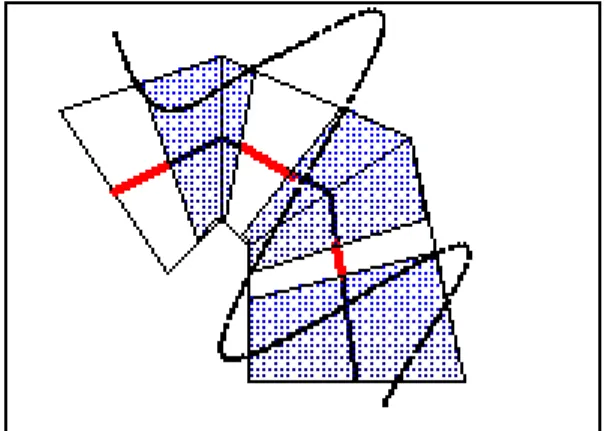
Figure 4.1 Illustration of an Object Following a Predefined Route
Figure 4.1 illustrates an object following a predefined route. The parts of the route which have been visited by the object are marked in blue. The gaps in between are highlighted with a red line. Route #<n> := { Point(<x>,<y>) Distance(<r>) ... Point(<x>,<y>) Distance(<r>) Direction(<dir>) MinPercentage(<min>) MaxGap(<max>) };
IVA Task Script Language Syntax | en 13
Events
The event FollowedRoute #<n> is triggered, when an object has followed the Route #<n>. The object which has caused the event can be queried by the attribute oid.
Example
4.3.4
Loitering
Syntax
Loitering primitives are defined in the following way:
<n> is the number of the loitering primitive and must be between 1 and 32. The loitering primitive detects objects which stay at one place for <time> seconds. <r> specifies the spatial tolerance in meters of the loitering detector. For the measurement of object movements in meters, the camera calibration must have been calibrated beforehand. States
The state IsLoitering #<n> of an object oid is set, while the object stays at the same place for at least the specified time.
Example FollowedRoute #<n> -> ( OID:oid ) Route #1 := { Point( 20, 20 ) Distance( 5 ) Point( 20, 50 ) Distance( 5 ) Point( 50, 50 ) Distance( 5 ) Direction( 0 ) MinPercentage( 90 ) MaxGap( 20 ) };
external Event #1 := FollowedRoute #1;
Loitering #<n> := { Radius(<r>) Time(<time>) };
IsLoitering #<n> ( OID:oid ) -> BOOLEAN
Loitering #1 := { Radius(5) Time(10) };
4.3.5
ColorHistogram
Syntax
ColorHistogram primitives are defined in the following way:
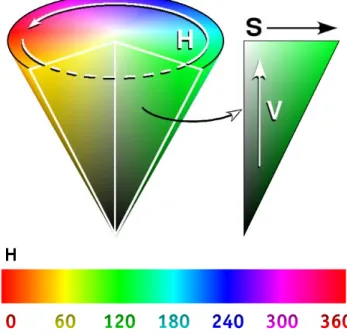
<n> is the number of the color histogram primitive and must be between 1 and 32. The color histogram primitive compares object colors with user-defined colors. Up to 5 basic colors can be selected with the HSV keyword. The default value of the optional parameter <weight> is 1. The total weight of the basic colors must not exceed 255. Basic colors are defined in the HSV color space, where <h> (a value between 0 and 360) represents the hue component, <s> (a value between 0 and 100) the saturation, and <v> (a value between 0 and 100) the intensity. Figure 4 .2 The HSV cone visualizes the three components of the HSV color space.
Figure 4.2 The HSV Cone
<similarity> is a value between 0 and 100 and specifies how similar a color histogram must be in order to be regarded as a match. The more similar two histograms are the larger is their <similarity>. The parameter <outlier> allows partial matches between the user-defined colors and the object’s color histogram, i.e. the user-defined colors cover only a subset of the object’s color histogram and the remaining colors should be regarded as outliers. For instance, when looking for persons wearing a red jacket, about 50% of the object’s colors should be red and the other 50% are not important.
States
The state SimilarToColor #<n> of an object oid is set, while the latest color histogram of ColorHistogram #<n> := { HSV(<h>,<s>,<v>[,<weight>]) ... HSV(<h>,<s>,<v>[,<weight>]) Similarity(<similarity>) Outlier(<outlier>) };
IVA Task Script Language Syntax | en 15
Example
The following color histogram detects objects, which contain at least 25% reddish colors and at least 25% dark colors.
4.3.6
FlowDetector
Syntax
FlowDetector primitives can be defined in one of the following ways:
or
The flow detector operates on the significant flow field computed by the IVA algorithms. Each detected flow vector has to pass a set of user defined filters before it triggers an alarm. In the first definition, up to two directional filters can be defined. If two directions are specified, a motion vector must pass at least one for further processing. Each directional filter consists of a <minangle> and <maxangle> specified in degrees. The coordinate system for angles is shown in Figure 5.
In the second definition, the direction is automatically determined based on a main flow analysis. The last <timewindow> seconds are considered in order to compute the main flow direction. As soon as a dominant direction could be detected, this direction defines the main flow and activates the flow detector. If there is no dominant direction within the last
<timewindow> seconds, the flow detector is inactive. A motion vector going in the opposite ColorHistogram #1 := { HSV(0,100,100) HSV(0,0,0) Similarity(90) Outliers(50) };
external ObjectState #1 := SimilarToColor #1;
FlowDetector #<n> := { [Direction(<minangle>,<maxangle>)] [Direction(<minangle>,<maxangle>)] [Velocity(<minvelocity>,<maxvelocity>)] [Activity(<minactivity>,<maxactivity>)] [Field #<m>] }; FlowDetector #<n> := { CounterFlow(<timewindow>,<angletol>) [Velocity(<minvelocity>,<maxvelocity>)] [Activity(<minactivity>,<maxactivity>)] [Field #<m>] };
added to the definition, motion vectors outside the Field #<m> are ignored during
processing. If no field is added, all motion vectors are considered. The activity measures the number of active motion vectors, i.e. the number of motion vectors which have passed all filters. Thereby, the activity is 0 if no motion vector is active. The maximum activity of 100 is reached when the complete specified field is filled with active motion vectors. With
<minactivity> and <maxactivity> the user can define an activation interval within which the flow detector triggers an alarm. Thereby, the lower bound <minactivity> is excluded from the interval. This implies that the flow detector will only trigger an alarm if there is any motion.
If a Field #<m> is present in the definition of a flow detector, the flow detector inherits the DebounceTime of the specified field. Thereby, the meaning of the DebounceTime is that the flow field must pass all the constraints for at least DebounceTime many seconds, before the flow detector will trigger an alarm.
States
The state DetectedFlow #<n> is set, while there is a significant flow fulfilling all the constraints defined in the corresponding FlowDetector #<n> definition.
Example
The following example triggers an alarm, if a significant motion from right to left has been detected within the specified rectangle.
4.4
Object-Specific Events
The main task of the IVA algorithm is object detection and object tracking. Besides the position and other properties of the currently detected objects, the algorithm notifies about basic object events. When the algorithm detects a new object, an Appeared event is triggered. Correspondingly, a Disappeared event is sent, as soon as an object gets lost. Merged, Idled, and Removed are special cases of disappearing objects with the following meaning. If two objects come too close to each other, one of the two becomes partially hidden by the other. This situation is indicated by a Merged event. If an object does not move at all for a certain time, an Idled event is triggered. This happens if a person leaves an object like a bag. Similarly, an object can be picked up by a person triggering a Removed event. A special case of an appearing object is when it was previously hidden by another object. E.g. if two pedestrians pass each other, one can become hidden during the passing and reappears after the passing. This reappearing is indicated by a Split event, the counterpart of the Merged event. DetectedFlow #<n> -> BOOLEAN Field #1 := { Point( 10, 10 ) Point( 10, 50 ) Point( 50, 50 ) Point( 50, 10 ) }; FlowDetector #1 := { Direction(-45,45) Field #1 };
IVA Task Script Language Syntax | en 17
Events
The object which is hidden after a merge has OID oid2.
The object which becomes visible after a split has OID oid2. Example
The following IVA Task script looks for objects which were hidden by another object at some time. Note that this IVA Task script will fail if the VCA algorithm cannot assign the correct oid after the split.
4.5
Object Properties
Each tracked object has a set of properties. These properties include the object’s position, its direction of movement, its speed, its size, and its bounding box. Whereas the position is only indirectly accessible via geometrical primitives, the other properties are directly available in conditional expressions via the subsequent functions. All the following functions return NAN, if either the object does not have this property or if the object does not exist at all. For all functions, the oid is optional if the attribute list of the current scope contains the argument OID:oid.
Functions
This function returns the current direction in degrees of object oid. If no direction is available for this object, the result is NAN. Directions are expressed in image coordinates. Thereby, a movement from the right image border to the left border corresponds to 0 degree, from the top border to the bottom border to 90 degrees, from the left border to the right border to 180 degrees, and from the bottom border to the top border to 270 degrees (see the figure below).
Appeared ( OID: oid ) Disappeared ( OID: oid ) Idled ( OID: oid ) Removed ( OID: oid )
Merged ( OID: oid, OID: oid2 )
Split ( OID: oid, OID: oid2 )
external Event #1 := {
Merged before Split where first.oid2 == second.oid2 };
This function returns the current velocity in meters per second of object oid. The speed is estimated using the object’s translation in object coordinates and camera calibration parameters. If no velocity is available for this object, the result is NAN.
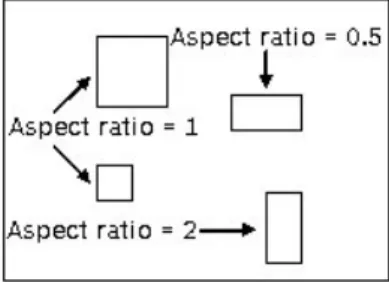
This function returns the current aspect ratio of object oid. It is defined as the ratio of height and width of the object’s bounding box. If no bounding box is available for this object, the result is NAN. A square has an aspect ratio of 1. An object, which is two times higher than wide, has an aspect ratio of 2 (see the figure below).
Figure 4.4 Current Aspect Ration
This function returns the current the size in square meters of object oid. The size is estimated based on the shape of the object and camera calibration parameters. If no size is available for this object, the result is NAN.
This function returns the current width of a detected head in pixels assigned to object oid. If no face has been detected for this object, the result is NAN.
This function returns the maximum width over all so far detected heads assigned to object oid. If there was no detection for this object so far, the result is NAN.
4.5.1
States
returns true, if the direction of the object with object ID is available for the current frame. If the object is not present in the current frame, the return value is false.
returns true, if the velocity of the object with object ID is available for the current frame. If the object is not present in the current frame, the return value is false.
returns true, if a bounding box of the object with object ID is available for the current frame. If the object is not present in the current frame, the return value is false.
returns true, if a bounding box of the object with object ID is available for the current frame. If the object is not present in the current frame, the return value is false.
AspectRatio ( OID:oid ) -> FLOAT
ObjectSize ( OID:oid ) -> FLOAT
FaceWidth ( OID:oid ) -> FLOAT
MaxFaceWidth ( OID:oid ) -> FLOAT
HasDirection ( OID:oid ) -> BOOLEAN
HasVelocity ( OID:oid ) -> BOOLEAN
HasAspectRatio ( OID:oid ) -> BOOLEAN
HasObjectSize ( OID:oid ) -> BOOLEAN
IVA Task Script Language Syntax | en 19
returns true, if a color histogram of the object with object ID is available since the last appearance of the object. If the object is not present in the current frame, the return value is false.
returns true, if a head is detected on the object with object ID in the current frame. If the object is not present in the current frame, the return value is false.
returns true, if a head has been detected on the object with object ID since the last
appearance of the object. If the object is not present in the current frame, the return value is false.
4.6
Tamper States
The IVA algorithms can detect tampering of cameras. The output of the tamper detection is available via the following Boolean states:
If the video signal becomes too noisy, such that automatic object detection becomes
impossible, the SignalTooNoisy state is enabled. This can happen, if an analog video signal is transmitted over a large distance or if the sensitivity of the camera sensor is not sufficient in night vision applications.
If the video signal becomes too dark, such that automatic object detection becomes
impossible, the SignalTooDark state is enabled. This can happen, if the camera is covered by a sheet, such that almost black images are recorded.
If the video signal becomes too bright, such that automatic object detection becomes impossible, the SignalTooBright state is enabled. This can happen, if the camera is dazzled by a strong light source.
If the video signal is lost, the SignalLoss state is set.
If most of the image content has changed, the GlobalChange state is enabled. This can happen, if the camera is moved or if an object comes too close to the camera.
If a reference image has been set during the configuration of the IVA algorithm and the reference checking of the IVA algorithm has been enabled, IVA detects manipulations of the camera by comparing the current video signal with the preset reference image. Significant differences between the two images are recorded in the VCD stream. This information can be accessed from the IVA Task script language via the RefImageCheckFailed state.
HasFace ( OID:oid ) -> BOOLEAN
HadFace ( OID:oid ) -> BOOLEAN
SignalTooNoisy -> BOOLEAN SignalTooDark -> BOOLEAN SignalTooBright -> BOOLEAN SignalLoss -> BOOLEAN GlobalChange -> BOOLEAN RefImageCheckFailed -> BOOLEAN
Example
The following IVA Task script triggers an alarm on any detected tamper action.
Note that in this example it is important to work with a user-defined SimpleState instead of an ObjectState, since the latter is only evaluated for detected objects. However, when the camera is tampered, there are usually no detections.
4.7
User-Defined States
User-defined states are always Boolean states, i.e. these states take either the value true or false. A user-defined state has either no attributes or the object ID as an attribute. The former state is called SimpleState, whereas the latter is called ObjectState. In the subsequent sections their syntax and usage is explained in more detail.
4.7.1
SimpleStates
A SimpleState is defined in the following way:
Thereby, <condition> is a placeholder for a Boolean expression. The user can specify up to 32 states (from 1 to 32) via the number <n>, but only the first 16 states can be external. The same SimpleState cannot be defined twice. The attribute list of a SimpleState is always empty. Therefore, one cannot access object specific properties in the condition clause of a SimpleState.
The following table summarizes the predefined states which can be used instead of the <condition> placeholder besides other previously defined SimpleStates:
external SimpleState #1 :=
SignalTooNoisy or SignalTooDark or SignalTooBright or SignalLoss or GlobalChange or RefImageCheckFailed;
[external] SimpleState #<n> := <condition>;
SignalTooNoisy SignalTooDark SignalTooBright SignalLoss GlobalChange RefImageCheckFailed
IVA Task Script Language Syntax | en 21
4.7.2
Boolean Composition of Conditions
Several conditions can be composed. The syntax of conjunctions is as follows:
Similarly, disjunctions are written as:
The negation of conditions is:
Ambiguities in the evaluation of expressions are resolved by priorities. Negations have the highest priority, followed by conjunctions, and last disjunctions. Furthermore, the priority can be controlled by embracing sub-expressions with brackets:
4.7.3
Properties in Conditions
Properties and non-Boolean states can be used as condition in the following way:
The within keyword checks if the specified <num-expr> is within the specified interval. The interval bounds, <min> and <max>, are constant values. If one of the two bounds is replaced by an asterisk *, the corresponding bound is ignored. A <num-expr> can either be an attribute, a constant value, a non-Boolean state or a property. In combination with the within keyword, <num-expr> must be either of type INTEGER, FLOAT, or ANGLE.
Besides the within relation, a simple equal operation is allowed for any non-Boolean type, as long as both operands are of the same type:
ObjectsOnScreen is the only non-Boolean state which can be used in the definition of a SimpleState #<n>. It returns the number of objects which are currently detected by the VCA algorithm.
Note that the conditions described in this section return false, if the value of one <num-expr> is NAN.
<condition> := <condition> and <condition> <condition> := <condition> && <condition>
<condition> := <condition> or <condition> <condition> := <condition> || <condition>
<condition> := not <condition> <condition> := !<condition>
<condition> := ( <condition> )
<condition> := <num-expr> within ( <min>, <max> )
<condition> := <num-expr> == <num-expr> <condition> := <num-expr> != <num-expr>
Example
The following IVA Task script triggers an alarm if at least 2 objects are detected by the VCA algorithm.
The subsequent example triggers an event, if two different objects cross the same line. Thereby, the second object must cross the line at most 10 seconds after the first.
4.7.4
ObjectState
An ObjectState is defined in the following way:
Thereby, <condition> is a placeholder for a Boolean expression. The user can specify up to 32 states (from 1 to 32) via the number <n>, but only the first 16 states can be external. The same ObjectState cannot be defined twice.
In contrast to a SimpleState which is instantiated only once, an ObjectState is instantiated for each object visible in the processed frame. In order to distinguish all the instances, the object ID is associated with each instance as an attribute. Hence, an ObjectState’s attribute list is:
In the <condition> clause, this object ID can be used to access object properties or an earlier defined ObjectState of the same object in addition to the ones which are allowed within the <condition> clause of a SimpleState. The following list enumerates Boolean states which require an object ID as attribute and which can therefore be used as condition of ObjectState:
The following object properties and non-Boolean states are also available within the definition of ObjectState:
external SimpleState #1 := ObjectsOnScreen within (2,*);
Line #1 := {
Point( 10,10 ) Point( 50,50 ) Direction( 0 )
};
external Event #1 := {
CrossedLine #1 before(0,10) CrossedLine #1 where first.oid != second.oid
};
[external] ObjectState #<n> := <condition>;
ObjectState #<n>( OID:oid ) -> BOOLEAN
InsideField #<n> where n is the number of a field primitive IsLoitering #<n> where n is the number of a loitering primitive
ObjectsInField #<n> where n is the number of a field primitive Direction
Velocity AspectRatio ObjectSize
IVA Task Script Language Syntax | en 23
Example
The following IVA Task script detects objects which are speeding within a specified field.
4.8
User-Defined Events
In the previous sections, several events have been introduced which are automatically generated together with the corresponding primitives. The user can define new events by using temporal relations between events. Besides temporal relations, additional conditions can be formulated in order to constrain events further. With these conditions, the user has access to event attributes and can formulate constraints for them. In the subsequent sections, the different possibilities are described in more detail.
4.8.1
Basic Syntax
User events are defined in the following way:
Thereby, <event> is a placeholder for any predefined event (like EnteredField as introduced in the previous sections or a user-defined event), or more complex event
expressions as described in the upcoming subsections. The user can specify up to 32 events (from 1 to 32) via the number <n>, but only the first 16 events (<n> from 1 to 16) can be external. The same user event cannot be defined twice. Event #<n> inherits the attribute list from <event>, i.e. it provides the same list of attributes as <event>.
When the Alarm Task engine detects an external user-defined event, the corresponding alarm flag is set for exactly one processed frame. If the same alarm flag is used by several external rules (e.g. external ObjectState or external SimpleState), the alarm flag is set if any of the rules is active.
The following table summarizes the predefined events which can be used as <event> placeholder:
Field #1 := {…};
external ObjectState #1 :=
Velocity within (30,*) and InsideField #1;
[external] Event #<n> := <event>;
FollowedRoute #<n> where n is the number of a route primitive CrossedLine #<n> where n is the number of a line primitive EnteredField #<n> where n is the number of a field primitive LeftField #<n> where n is the number of a field primitive Appeared Disappeared Idled Removed Merged Split
4.8.2
Temporal Relations
The most interesting operations on events are temporal relations. The before keyword combines two <event>s in the following way. If the second event is triggered and the first event has been triggered before, another event with the same attributes as the second one is triggered. In its simplest form the syntax is as follows:
The curly brackets are mandatory to avoid ambiguous associations of nested constructions. With the following extension, a time interval can be specified which limits the chronology of the two events further.
In this formulation, the first event is only a candidate for the second event, if it has occurred at least <from> seconds and at most <to> seconds before the second event. By replacing <to> by the * symbol, an infinite time interval can be defined starting with <from>.
Adding the not keyword, it is even possible to check whether the first event has not occurred before the second event in the specified time interval (the time interval is again optional):
The or keyword can be used to trigger an event if either event A or event B has happened. The attribute list of both events must be the same:
In this case curly brackets can be omitted. Example
Event #1 marks objects which cross one of two lines. Event #2 detects a pair of objects where one object passed the first Line #1 and one object passed the second Line #2 after at most 5 seconds. Event #3 is triggered by objects which pass Line #2 while Line #1 was not crossed for 5 seconds.
4.8.3
Conditions
Often it is necessary to constrain events by their attributes or by properties of involved objects. In the IVA Task script language, this is supported via the where clause.
The Alarm Task engine will only trigger, if the <condition> is satisfied at the time when the <event> occurred. Which states and properties can be used in the <condition> clause depends on the attribute list of <event>. In principle, events with an empty attribute list can have a <condition> clause similar to the one of SimpleState. If the attribute list contains
<event> := { <event> before <event> }
<event> := { <event> before(<from>,<to>) <event> }
<event> := { <event> not before(<from>,<to>) <event> }
<event> := <event> or <event>
Line #1 := {…}; Line #2 := {…};
external Event #1 := CrossedLine #1 or CrossedLine #2; external Event #2 := {
CrossedLine #1 before(0,5) CrossedLine #2 };
external Event #2 := {
CrossedLine #1 not before(0,5) CrossedLine #2 };
IVA Task Script Language Syntax | en 25
With the so far introduced concepts, it would be possible to detect whether the same object has passed first one line and afterwards another line. The IVA Task script language solves this task with a combination of before and where keywords.
In the <condition> clause following the where keyword, it is possible to access attributes of both events involved in the before relation. An attribute <x> of the left event can be accessed via first.<x> whereas attributes of the right event are available via second.<x>. If an attribute <x> belongs exclusively to one of the two events, the specification of first and second is optional. If an attribute <x> belongs to both events, the attribute is associated to the second event, which is the more recent one. Any of the other before variants described in subsection Temporal Relations can be similarly combined with a <condition> clause. Example
With these extensions, objects can be found which cross two lines in a row at a certain speed, as shown by Event #1. Event #2 detects if two persons were passing a gate close to each other and were separating on the other side. For robustness, the size of the objects is checked.
4.8.4
State Changes
In order to detect e.g. changes of an object’s appearance, the keywords OnChange, OnSet, and OnClear are introduced. They can be combined with any user-defined state and trigger an event either if the state changes its value, if the state becomes true, or if the state becomes false. The syntax is as follows:
Thereby, <state> is either a previously defined ObjectState #<n> or SimpleState #<n>. <event> := { <event> before <event> where <condition> }
Line #1 := {…}; Line #2 := {…};
external Event #1 := {
CrossedLine #1 before(0,5) CrossedLine #2 where first.oid == second.oid and
Velocity( second.oid ) within (30,*) };
external Event #2 := {
CrossedLine #1 before(0,5) Split where first.oid == second.oid and
ObjectSize( second.oid2 ) within (1,*) and ObjectSize( second.oid ) within (1,*) };
<event> := OnChange <state> <event> := OnSet <state> <event> := OnClear <state>
Example
The following IVA Task script detects objects which are changing their shape from tall and thin to flat and wide.
ObjectState #1 is true, if the object is taller than wide. ObjectState #2 is true, if the object is wider than tall. For objects which are almost quadratic both states are false. The task is to look for objects whose ObjectState #1 was set some time ago and whose ObjectState #2 is set now. Hence, it is sufficient to wait for OnSet ObjectState #2 and check if OnClear ObjectState #1 has happened before.
ObjectState #1 := AspectRatio within (1.2,*); ObjectState #2 := AspectRatio within (*,0.8); external Event #1 := {
OnClear ObjectState #1 before OnSet ObjectState #2 where first.oid == second.oid
Germany
Phone +49 89 6290-0 Fax +49 89 6290-1020
www.boschsecurity.com