Existing gaming controllers are limited in their end-user configurability. As a complement to current game control technology, we present the VoodooIO Gaming Kit, a real-time adaptable gaming controller. We introduce the concept of appropriable gaming devices, which allow players to define and actively reconfigure their gaming space, making it appropriate to their personal preference and gaming needs. The technology and its conceived usage are illustrated through its application to two commercially available computer games, as well as through the results of a formal user study.
Categories and Subject Descriptors: K.8.0 [Personal Computing]: General – Games
General Terms: Human Factors
Additional Key Words and Phrases: Game controllers, appropriable gaming devices, adaptable interfaces, VoodooIO
ACM Reference Format:
Villar, N., Gilleade, K.M., Ramduny-Ellis, D., and Gellersen, H. 2007. The voodooIO gaming kit: A real-time adaptable gaming controller. ACM Comput. Entertain., 5, 3, Article 7 (November 2007), 16 Pages. DOI = 10.1145/1316511.1316518 http://doi.acm.org/ 10.1145/1316511.1316518
__________________________________________________________________________________________
1. INTRODUCTION
The majority of computer gaming devices suffer from being either generic or specific. Generic devices – the prime exemplars being the keyboard and mouse – can be used to play a large number of computer games, although they may not be the ideal interface for a single one of them. Specific gaming devices, such as bespoke flight simulator cockpits, are made to provide a perfect match to a very particular type or instance of a game, but are not useful for any others. In contrast, we propose an appropriable gaming device: an interface that can be made to be appropriate to any game for any game player’s preference.
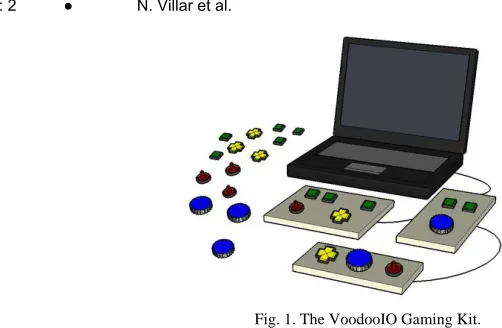
We present the VoodooIO Gaming Kit (VGK) as a new type of game controller that can be easily adapted to suit the control needs and preferences of an individual user, for a
__________________________________________________________________________________________
This research was supported by the UK Engineering and Physical Sciences Research Council as part of the Equator IRC (grant GR/N15986/0), and by the Ministry of Economic Affairs of the Netherlands as part of the Smart Surroundings project (contract 03060).
Authors’ address: Computing Department Infolab21, Lancaster University Lancaster LA1 4WA UK; email:
{villar, gilleade, devina,hwg}@comp.lancs.ac.uk
Permission to make digital/hard copy of part of this work for personal or classroom use is granted without fee provided that the copies are not made or distributed for profit or commercial advantage, the copyright notice, the title of the publication, and its date of appear, and notice is given that copying is by permission of the ACM, Inc. To copy otherwise, to republish, to post on servers, or to redistribute to lists, requires prior specific permission and/or a fee. Permission may be requested from the Publications Dept., ACM, Inc., 2 Penn Plaza, New York, NY 11201-0701, USA, fax: +1 (212) 869-0481, [email protected]
Fig. 1. The VoodooIO Gaming Kit.
particular game, and over a period of time. This is achieved by having flexibility of physical form and adaptability of configuration as principal characteristics of the interface.
In traditional game controllers, configurability usually refers to the ability to map a fixed set of control elements onto a selection of in-game actions. A typical example would be a programmable joystick, with a number of buttons and additional controls that are software-configurable. The physical composition of the device - the number, type, and layout of control elements - cannot be altered. This can often lead to compromises in how the device is used, for example having to settle for mapping only the most critical game functions to the limited number of available controls, or creating uncomfortable or unintuitive control bindings.
We propose that for a gaming device to be truly appropriate to its user’s control preference for a particular game, and yet remain useful for a variety of others, its physical composition must be user-definable to a large extent and in an easy manner. With the VGK, we are specifically looking to support the user in defining and constructing their own game-playing interface device and to enable the ability to actively expand and modify the interface composition at any time and inclusively during game play, and to allow for adaptation to changing game conditions or player requirements.
The VGK has no predefined shape or functionality. Rather, it provides a flexible fabric that can be used to augment exiting areas of the environment, such as the surfaces of furniture, equipment, or architecture. Any surface that is covered in the fabric becomes part of the interface, acting as a substrate on which collections of independent control elements, called the VoodooPins, can be arranged. Individual substrate areas are interconnected among themselves and collectively connected to the game-playing computer (c.f., Figure 1).
The user has complete freedom in deciding:
• where they deploy the substrate fabric to define interface areas;
• what control types are used;
• which particular combination of controls is used at any point in time; and
• how controls are arranged and oriented on the interface substrate areas.
through examples where it is applied to two different commercially available computer games. As further evidence for our argument, we present the results of an experiment based on using the VGK with a purposely-designed game, which was conducted to gain further insights into user comprehension and acceptance of the idea.
2. RELATED WORK
Game controllers that can be readily adapted to suit the physical and cognitive needs of the players have been somewhat of a rarity, as a one-size fits all controller has been well-suited to the demands placed on players by the majority of existing games (e.g., console games are mainly controlled by using a gamepad). In cases where the de facto controller for a games platform is inadequate in supporting the demands placed on the user by a task, new control devices have been provided. For example, light guns are designed to support target acquisition tasks, which require greater fidelity and speed of movement than a finger on a gamepad can normally offer. When the task being asked of a player is specific to a game and not just a particular range of games, bespoke controllers have been built. For example, the futuristic tanks of Steel Battalion™ can only be controlled using the Steel Battalion controller [http://www.capcom.com/SB], where the physical design of the controller imitates the cockpits in the video-game.
However, as a result of the increasing complexity of more modern video-games, the one-size-fits-all model is insufficient in supporting the demands of certain genres of video-games. Unfortunately, bespoke controllers are expensive to develop and don't support many kinds of games, so game designers try to make the best use of the controllers available.
Hence we argue the need for a physically configurable game controller which is a adaptable in real-time - a device that can be appropriated by players to suit a range of different game genres more readily and on an ad hoc basis. What follows is an overview of the physical configurations available in game controllers today.
2.1 Remappable Controllers
Elementary to physical configuration is the remapping of the game controls over the physical inputs available to a controller in a different manner. For example: the Y button on an Xbox™ game-pad controls the acceleration of a car in a particular racing game. Should this position become unsuitable, the player could remap it to another button such as A.. This level of configuration is limited by three factors: the first is that physical inputs on a controller cannot be moved from their default position; the second is that physical inputs are limited to a set number, therefore each input may have to support more than one game control. Not all designers allow players to remap the game controls, and players have to rely on the decisions of interface designers.
2.2 Cockpit Kits
wheels, and throttle controls are available for constructing various cockpits. In these situations it is important that the look-and-feel of the controller is similar in nature to that of its real-life counter-part. However, the level of configuration is limited to the arrangement of individual control units, and the high cost usually associated with this specialized hardware can often make it prohibitive to freely explore different interface configurations.
2.3 Construction Toolkits
Research in the tangible and physical interface field has resulted in the production of numerous toolkits that support ease of development and deployment of custom interfaces [Ballagas et al. 2003; Greenberg and Fitchett 2001; Lee et al. 2004]. These tools provide developers with building blocks and supporting infrastructure for interface construction, and wee shown to be effective in supporting creation of very diverse and highly customized physical interfaces. However, while technically proficient players may be able to apply these toolkits to build their own game controllers, use of the toolkits is really aimed at the developer and not the user of the interface. Once a physical interface has been deployed, its physical composition cannot be easily customized by their users.
2.4 Real-Time Adaptable Controllers
Adapting controllers ad hoc during game-play is the pinnacle of physical configuration. Not only can the game controller be configured to suit a particular task for a given user, but it can be reconfigured while the user is playing and meet any changes in task demand. For example, the DX1 Input System [http://www.ergodex.com/] is a PC keyboard that allows users to relocate the position of the physical keys within the active space of the input device (6.6" x 9.4" tray) on an ad hoc basis. It is not a keyboard replacement (i.e, supports up to 50 unique keys) but is intended to allow the user to bind the most useful/used functions to the DX1 keys and thus reduce the mental effort in locating the necessary keys and allow users to place them in an ergonomically suitable position.
VooodooIO [Villar and Gellersen 2006] is a malleable platform for physical interaction, which allows users to construct and actively adapt the composition of their physical interface. Rather than being an interface construction kit for users, the platform is concerned with enabling and exploring the ability of the physical interface to be customized and reconfigured after its deployment into use. VoodooIO was developed with the hypothesis that physical reconfigurability of such interfaces can be beneficial for users in many ways. For example, it may support personalization, adaptation to particular tasks, and exploration of alternative interface configurations.
3. THE VOODOOIO GAMING KIT
The VGK is a collection of VoodooIO components, both hardware and software, that can be easily appropriated by a player into adaptable gaming spaces of his own design.
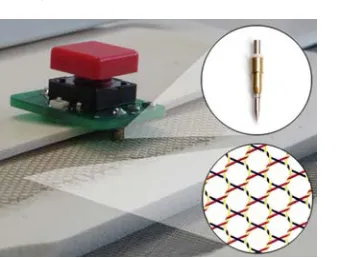
The hardware components of VoodooIO are built on Pin&Play technology [Van Laerhoven 2003], which developed a mechanism for the ad hoc networking of devices that connect to a common network surface, to which they could attach and detach through the use of pin-like connectors (c.f., Figure 2).
Fig. 2. Vooodoo Pin button control with Pin&Play, connector, and cross-section of Pin&Play substrate fabric revealing internal network layers.
same time becomes connected to the substrate network. Its presence is detected and recognized by the VGK software on the computer, making it available as a new input capability of the interface, which can then be associated with a game parameter.
The Voodoo Gaming Kit, illustrated in Figure 3, includes the following:
• Substrate fabric: This is manufactured as 1m2 (1.5-cm-thick) flexible sheets, which can be easily cut to size by hand. Peeling off a label on the back of the fabric reveals a sticky surface, which can optionally be used to permanently affix pieces of fabric onto a surface.
• Pin controls: A set of VoodooPins with dial, knob, slider, button, switch, and joystick controls that can be freely attached, detached, and manipulated on the substrate fabric.
[image:5.612.196.415.413.609.2]• Interconnects: Cables of various lengths to connect different substrate pieces together and a substrate-to-USB connector to attach the entire substrate network to a computer.
• Software: Device drivers, including a keyboard, mouse, and joystick input-emulators, that allow for player-defined mappings and easy interfacing with existing games. There is also a programming API to enable ease of integration into new games that can be reactive to the VGK’s dynamic reconfiguration properties.
4. BUILDING A MECH COCKPIT
To illustrate the application of the VGK as a way to improve the gaming experience of an existing space, we set ourselves the task of designing a control space that enhances the experience of playing Microsoft’s MechWarrior 4.
4.1 Baseline
In MechWarrior the player is in control of a large battle robot, known as a “mech.” The game’s interface is similar to that of a flight simulator’s. The player is presented with a first-person view of a pilot sitting in a mech cockpit, with the screen replicating a head-up-display on which navigation and status information is overlaid. Most of the game-play centers on the piloting of the mech, steering it across the 3D environment around enemy units and other obstacles. Other important functions deal with speed control and the use of weapons, but in total there are dozens of separate parameters that the user has access to. By default, most of these functions are mapped to the keyboard, but it is also common for this game to be played with an additional joystick for steering control, and with the most essential game functions mapped to any additional programmable buttons on the device.
As a starting point for our exercise we tried to replicate an average gaming setup: an office chair and desk, with a 17” flat-screen monitor, keyboard, mouse, and a Logitech Wingman force-feedback joystick. This particular joystick includes seven programmable buttons, eight-way hat switch, and throttle lever.
4.2 Exercise Goals
In thinking about how our baseline interface could be made more appropriate in this case, an early decision was that we wanted to do away with the keyboard. It provided a large number of buttons onto which most of the game’s many functions could be mapped. But it also made it difficult to remember what the function (if any) of each key was. This was mainly due to the lack of any visual prompt or mnemonic to act as a reminder of specified key bindings. The keyboard itself took up a lot of space, competing for desk area in the middle of the desk with the joystick, which we wanted to use as our primary input device The first goal in appropriating this interface was to provide sufficient controls for all the functions we wanted, without using the keyboard and aiming to make it more comfortable and easier to use. Our second goal was to try and make the gaming space more immersive by making it feel more like a cockpit than an office desk.
4.3 Usage Example
Fig.4. The completed mech cockpit, with four control substrates: Lower monitor bezel, desk (right and left of the joystick), and left chair armrest.
In the end we settled on four areas to augment: desk space to the left and right of the joystick, the lower bezel of the monitor frame, and the left armrest of the chair. The two desk areas we chose for their ready accessibility and efficient use of the space previously taken up by the keyboard, allowing controls to be arranged around the joystick, without displacing it from its central position on the desk. In selecting the monitor bezel we had in mind that through its proximity to the simulated head-up-display (HUD), it could be used as an appropriate place to arrange controls related to the visualization settings of the HUD. The armrest was chosen because we felt it would reinforce the feeling of sitting in a cockpit, with controls to the side as well as in front of the player.
From a single sheet of substrate fabric, four different pieces were cut to measure and then networked together using interconnects of appropriate lengths (c.f., Figure 4). The monitor and chair pieces were affixed to their designated surfaces to hold them fast, while the desk pieces were left unfixed and able to be moved freely across the desktop.
without any predefined functionality, but simply intended to strengthen the effect of sitting in a cockpit and being surrounded by controls.
The VGK emulation software was configured to simulate key-down events in response to button Pins being pressed. This allowed seamless mapping of buttons to functions through the game’s key-binding configuration screen. In order to incorporate some of the analog controls, it was necessary to specify simple mappings that simulated different key combinations from the current state of the control. For example, selecting the speed was, by default, set by pressing the numbers 1 through 9 on the keyboard. The continuous output of the analog slider was then reinterpreted by the mapping as nine discrete steps, each triggering the appropriate key-down event.
4.4. Discussion
We believe that the end result was successful in meeting our original goals. The ability to arrange different types of devices in a meaningful way contributed to the legibility of the interface’s functionality, making it easier to remember the use of different controls by their different types, colors, and locations. Additionally, the way in which different sections of the furniture and equipment were incorporated into the design made for a more immersive use of the space. Even though the joystick had a perfectly suitable throttle control built onto its base, we particularly enjoyed controlling the speed of the mech via the armrest-mounted slider.
The necessity to reinterpret the output of analog controls as series of key-presses was due to the game’s limitation to bind its functionality only to binary keyboard or joystick keys. As a result, in order to incorporate analog controls required some additional configuration effort, but from it emerged a useful “hack” for interfacing with existing games when no other mechanism is available.
While this illustrates how initial interface adaptability is a desirable trait, one of our assumptions is that in order to remain appropriate, the interface must be able to be continually adapted to reflect changing game conditions. In this case, we imagine that throughout the course of the game a player would, from time to time, make gradual changes to the setup. A player may, for example, find that original assumptions about a comfortable arrangement might prove uncomfortable after extended use. The ability to adjust the layout of controls on-the-fly would prove useful in this situation. In an extreme case, a number of people may be sharing the same "cockpit" and may want to make changes to the interface to suit their preferences whenever it is their turn to play.
5. ARRANGING CHARACTER ABILITIES
As further proof of concept we set out to see how the VGK could be applied to the interface of another popular commercial title, Blizzard’s World of Warcraft.
5.1 Baseline
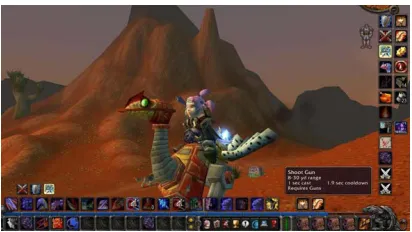
Fig. 5. An example arrangement of abilities and skills around the edges of the World of Warcraft™ GUI.
character will be eligible to develop skills relating to the use of hunting weapons, setting traps, and taming beasts. If, instead, the character is a Mage, as its level increases it has the opportunity to gradually learn how to use increasingly powerful spells. Even within each class there are opportunities for further specialization, to the degree where it is rare for two characters to have exactly the same abilities and strengths. Furthermore, the way in which a player may choose to actually use those abilities or apply them in a particular situation, is of course a matter of personal preference, and will vary widely from player to player.
The main points we are trying to convey are that, in this example, the gaming situation is not only unique to every player, but also changeable over time as their character develops and gains new skills. As such, the interface to control the character must also be player-configurable and adaptable throughout the course of the game.
This fact is clearly reflected by the design of WoW graphical user interface: around the edges of the screen are toolbars with a set number of slots where icons, representing the various character abilities, can be dragged into and freely arranged as they become available (c.f., Figure 5). These abilities can then be accessed via the toolbar icons by clicking directly on them, or triggered by shortcuts on the keyboard.
5.2 Exercise Goals
Our main goal in this exercise is to design a game space to complement the existing setup, alongside the keyboard and mouse, to allow for a better mechanism for organizing and using the capabilities of the various characters. We want to use these capabilities effectively in a timely manner and in a speicific sequence, particularly in combat situations.
The keyboard and mouse are very appropriate controllers for this particular game, as the mouse lets us steer a character around the world comfortably, and the keyboard is perfectly suited for typing text into the game console, and is often used to communicate with other players. So our aim in this exercise is to create an additional control area into which we can factor direct control of various possibilities as they are introduced throughout the game, and allow a space on which to arrange and label those controls in meaningful ways.
5.3 Usage Example
Fig.6. Controls are arranged to depict the intended use-sequence. Note the paper sheet between Pins and substrate to label the controls and annotate use sequence.
concave curvature along its lower edge to accommodate the convex upper edge of our keyboard. This a small detail, but it allowed us to appropriate valuable desk space which would otherwise be wasted.
As an additional feature, we placed a plain sheet of paper over the substrate. Our intention was to label and annotate the arrangement of Pins once they were attached in place. The pin-like connectors are able to penetrate the paper easily and to fasten correctly to the substrate underneath.
We used a character of the hunter class in our exercise, that is, the abilities our character had accumulated up to that point were mostly related to the use of traps and long-range weapons. From experience, we developed a specific sequence for using these abilities in the process of hunting (e.g., setting a trap is only permitted before entering combat). We arranged a number of button controls in such a way as to visually represent our chosen sequence of actions and labeled them accordingly (c.f., Figure 6).
In our arrangement, the player begins the hunt by pressing the button to trigger one of two mutually exclusive tasks: setting a “fire” or “frost” trap. The next two steps always follow each other, applying a “hunter’s mark” to the target, followed by a concussive shot. These two actions will only be used once, at the beginning of combat; the sequence of arrows from one to the other reflects this. The next step is to select between another two mutually exclusive actions: applying a “scorpid sting” or “serpent sting”. Which is used depends on the particular prey being hunted; therespective buttons are laid out and labeled to reflect this choice. The final step is the use of the “arcane shot.” This action, in contrast to the others, will be done repeatedly for the remainder of the hunt. An arrow from the control and doubling back onto itself is drawn on the paper to illustrate this.
5.4 Discussion
Our original goals in appropriating the gaming space were met successfully, in that the additional gaming control gave a comfortable place in which to arrange abilities in a meaningful way. The possibility to freely annotate the surface contributed towards it being a legible and usable interface, which exactly reflected our particular character’s abilities and player preferences in using them.
Our previous examples were initiated by curiosity about the applicability of the VGK as a way to augment existing gaming spaces and make their control more appropriable. In order to further understand the particular properties afforded by such a real-time adaptable controller, we conducted an experiment that would allow a number of participants to be exposed to its concepts. To this end, we developed a simple game, designed with the VGK in mind, which actively supports the process of interface construction and personalization.
The game was designed as a two-player cannon game, where players take turns taking shots at each other’s cannon (c.f., Figure 7). The cannons are placed on a randomized terrain. The challenge for the players is to judge how to land a direct shot on their opponent’s cannon, taking into account variable wind conditions that affect the trajectory of their shot.
The player can control three variables relating to their cannon: they can specify the initial angle of trajectory, the power behind the shot, and when to fire.
6.1 Experimental Setup
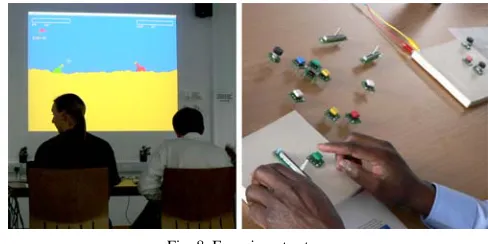
The experiment involved three rounds of play with the cannon game. Figure 8 shows the experiment setup - the game is projected onto a large display with the interaction device laid out in front for both players to manipulate. Before game-play commences, each player is handed a one-page guide providing a brief overview of the cannon game and what each round would involve.
In the first round, a keyboard is used as the game controller. The controls for both players, namely the cannon angle, power and fire, are mapped onto a set of predefined keys on the same keyboard.
Fig. 8. Experiment setup.
In the second round, players are presented with individual gamepads, measuring about 20x15 cm, and made of VoodooIO substrate. They are also provided with a collection of assorted Pin controls.
At the beginning of the round, each player is prompted by the game via the process of constructing their gaming controller from the available Pin controls. First, the player is asked to select a control for setting the cannon’s angle.At this stage, they are free to insert a Pin, which will automatically be bound to that function. The process is repeated for the power and fire controls. The cannon angle and power controls can be mapped onto either a dial, a slider, or two button (increasing and decreasing) Pins. The “fire” control must always be mapped to a button Pin, labeled with a color of their choosing.
After each step the choice of control is confirmed by the system, and the player can test its operation before the game begins. Although the association between controls and Pins is persistent for the duration of the round, the spatial arrangement of the Pins is fully configurable during game-play; hence if the physical arrangement is found unsuitable, the player can detach it from the substrate and place it again in a new location. In this manner the control interface reflects each player’s preference for the control types used, as well as for their layout on the gaming pad layout (c.f., Figure 8).
Before the third round begins, players are asked to remove all the Pins from the board and rebuild their physical interface by repeating the setup process. The reason behind this is to encourage players to rethink their choices of control types and layouts so they can explore other possibilities in this final round.
It should be noted that the Pin controls are not labeled, so for instance there is no way of telling which end of a Pin slider is the “maximum” or “minimum.” This is done deliberately in order to encourage mistakes in the way the controls are initially arranged, and thus trigger players to rearrange the controls to match their expectations.
6.2 Results
What follows is an analysis of the results from our study, which is mainly based on observation and asking the players a few directed questions at the end of the final round of the game.
players took turns in using the keyboard, but they tended to move the keyboard closer to their end when it was their turn to play.
6.2.3 Using the VGK. One of the first things we observed was that as soon as players were presented with the gaming pads, theyimmediately pulled their pads away from their opponents and placed it in front of themselves.
Choice of controls. For angle control, 12 participants opted for the dial, 6 chose the slider (4 arranged it vertically, 1 at a 45° angle, 1 aligned it vertically) and none chose the buttons in the second round. In the third round, 10 participants chose the dial, 4 chose the slider (3 arranged it vertically and 1 at a 45° angle), and 4 chose the buttons.
The preference for using the dial as the angle control in the second round is interesting, as it shows that the majority of participants intuitively chose the Pin that most closely matches the affordance of the control (i.e., the dial matches the cannon’s angular movement). Although no player chose to use buttons for the angle in the second round, some did experiment with using them in the third round.
For power control: in the second round 10 participants chose the slider (4 aligned it vertically, 5 horizontally, but 1 participant later changed to a vertical position; 1 participant aligned the slider at a 45° angle). Five participants chose the dial, and only 3 participants opted for using two buttons. In the third round, 11 participants chose the slider for power control (4 arranged it vertically and 7 aligned it horizontally), 3 chose the dial and 4 chose the buttons.
The high popularity of the slider as the power control in both rounds does show that participants opted for a Pin that resembled the graphical representation of the function, as depicted by the power bar on the projected display.
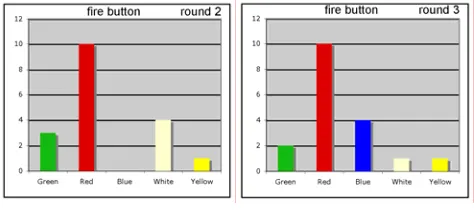
Figure 9 shows the choice of button for fire control in rounds 2 and 3. Although we did not initially set out to assess the impact of the colored button Pins, the high preference for the red button for fire control was remarkable, but not totally unexpected. So the choice of control types suggests that it is important to have a control interface that conforms to particular tasks. But as some participants did choose Pins that did not correspond to the nature of the control or the task at hand, it shows that it is useful to allow users to personalize their controls.
Reorientation of controls. Half of the participants did actually rearrange their slider controls during the second round. They did so when they felt unhappy after testing out the control to discover that it reacted in the opposite manner than expected: for example, the top-end of the vertical slider mapped to minimum power or maximum angle. So players would thereafter turn the controls 180 degrees to fix the mapping. Other types of reorientation included changing the alignment of the power slider from horizontal to vertical or physically moving the control to a different location on the pad.
the third round, however, fewer participants actually reoriented their controls during game play.
Fig.9. Choice of fire button in rounds 2 and 3.
Spatial layout of controls. There were a lot of variations in how the participant laid out their controls on the gaming pad. A few manipulated the controls using one hand but most used both hands.
[image:14.612.184.399.344.390.2]Some participants lined up their angle, power, and fire controls in sequence, either horizontally across or vertically downwards, on the gaming pad (c.f., Figure 10), thus matching the order they were taken through during set up.
Fig.10. Sequential layout of controls.
[image:14.612.196.407.487.531.2]Some participants laid out the controls to match the layout on the projected display (c.f., Figure 11). One participant went so far as putting the slider at a 45° angle to match the cannon’s gun barrel.
Fig.11. Layout of controls to match projected display.
Some participants preferred their angle and fire controls close together, so once they decided on the amount of power, they carefully adjusted the angle and hit the fire control. However, most participants preferred to have their fire control placed away from the other controls, usually at the top or bottom right-hand corners, although a few did opt for the bottom left-hand corner. This placement of the fire control was especially visible in round 3, and any players who had their fire control placed in the center of the pad in the second round did actually change its location in the third. This suggests that the ability to
Fire Power
- Angle +
Fire Angle
-Power
+
Fire Angle Power
Fire Angle Power
Fire Angle Power
Fire Power
Angle
Fire Angle
Power Power Fire
+
using the Pin controls and the gaming pad. Some of the features that the players liked are the following:
(1) The ability to choose a control that matches the function, that is, the slider for power control,which someone likened to “the gear box” and the dial to adjust the angle “as a knob.” A player mentioned that this feature was very useful as “one did not have to think which keys to press for which function.” Although one player mentioned that the slider worked equally well for the angle and the dial for the slider, most preferred using them the other way round.
(2) The ability to arrange the controls, which gave the players the opportunity to organize the controls sequentially, or in a manner that corresponds with the interface, or even arrange them in a way that suits one’s own preference: for instance, “how one wants to feel the control under one’s fingers” or “so one can play with both hands.”
(3) The ability to layout controls spatially, which allows players to separate the different functions further apart or to place some controls closer together. (4) The ability to and ease of moving the controls around or swapping the direction
of control during game-play.
(5) The choice of colors for the fire control, particularly the red fire button, which “had its own special place so one can get to it easily.”
A few players, namely expert and some casual ones, did prefer using the keyboard to manipulate the controls, mainly because they were more familiar with the keyboard and felt that given that the cannon game was based on turn-taking, it did not really matter. Also, they did not have to remember many keys to press, as the cannon game only had three controls. However, they all agreed that the Pin control and gaming pad “gave a nice set-up” and would be very useful in a game where players had to manipulate several controls.
7. SUMMARY AND FURTHER WORK
To sum up our contribution, we have presented a real-time adaptable gaming controller: the VooodooIO Gaming Kit. We demonstrated how, when used alongside existing gaming controllers, it enables making gaming spaces more appropriable for players, allowing them to customize and tailor their preferences to suit their needs on an ad hoc
basis and during game-play.
Furthermore, we presented the results of a small-scale study into the initial user exploration and acceptance of the technology. Results indicate that users are comfortable with the idea of adapting their gaming interface to better reflect their personal preference and control requirements.
Further work in this area will focus on developing a deeper understanding of the possibilities provided by real-time, physical, adaptable game controllers via study of more complex gaming situations and over longer periods of time, using the VoodooIO Gaming Kit.
REFERENCES
BALLAGAS, R., RINGEL, M., STONE, M., AND BORCHERS, J. 2003. istuff: A physical user interface toolkit for ubiquitous computing environments. In Proceedings of the CHI 2003 Conference, ACM, New York. ERGODEX. DX1 Input System. http://www.ergodex.com/
GOFLIGHT, INC. http://www.goflightinc.com.
GREENBERG, S. AND FITCHETT, C. 2001. Phidgets: Easy development of physical interfaces through physical widgets. In Proceedings of the UIST ’01 Conference: User Interface Software and Technology, ACM, New York.
LEE, J. C., AVRAHAMI, D., HUDSON, S. E., FORLIZZI, J., DIETZ, P. H., AND LEIGH. D. 2004. The Calder toolkit: Wired and wireless components for rapidly prototyping interactive devices. In Proceedings of the DIS ’04 Conference: Designing Interactive Systems, ACM, New York.
STEEL BATALLION. http://www.capcom.com/SB
VAN LAERHOVEN, K., VILLAR, N., SCHMIDT, A., GELLERSEN, H.-W., HÅKANSSON, M., AND HOLMQUIST, L. E. 2003. Pin&Play: The surface as network medium. IEEE Communications Mag. 41, 4 (April), 90-96. VILLAR, N. AND GELLERSEN. H. 2006. VoodooIO. Emerging Technologies program, SIGGRAPH ‘06.