http://dx.doi.org/10.4236/jsea.2014.73019
Islay3D
—
A Programming Environment for
Authoring Interactive 3D Animations in
Terms of State-Transition Diagram
Dandy Ling Kwong1, Michitoshi Niibori1, Shusuke Okamoto2, Masaru Kamada3, Tatsuhiro Yonekura3
1Graduate School of Science and Engineering, Ibaraki University, Hitachi, Japan 2Graduate School of Science and Technology, Seikei University, Musashino, Japan 3Department of Computer and Information Sciences, Ibaraki University, Hitachi, Japan
Email: [email protected], [email protected], [email protected], [email protected], [email protected]
Received 17 February 2014; revised 11 March 2014; accepted 18 March 2014
Copyright © 2014 by authors and Scientific Research Publishing Inc.
This work is licensed under the Creative Commons Attribution International License (CC BY). http://creativecommons.org/licenses/by/4.0/
Abstract
An educational programming language is a programming language that is designed primarily as a learning instrument and not so much as a tool for writing programs for production. Three-dimen- sional (3D) interactive animations provide an effective means to engage the attention of the au- dience to learn programming language. Traditionally, creating 3D games had been difficult as it requires specialized programming skills. However, it had been proven that the state-transition diagram, which is the most fundamental principle for automata, is intuitively so comprehensive that even children can create programs for interactive animations and video games in the two- dimensional world. Islay3D is a programming environment for authoring interactive 3D anima- tions based on this concept. In this paper, the Islay3D animation language is introduced, where a character is modeled as an object, and its behavior is defined in term of a set of state-transition diagrams. The interpretation of the state-transition diagrams to JavaScript is also presented. Fi- nally, the web-based programming environment is introduced. With the web-based platform, the public will be able express their creativity in creating interactive 3D animations and video games easily from within their browser.
Keywords
and play their own computer games.
Traditionally, creating 3D games had been difficult as it requires specialized programming skills. However, it had been proven that the state-transition diagram, which is the most fundamental principle for automata, is intui- tively so comprehensive that even children can create programs for interactive animations and video games in the two-dimensional world [2]. Islay3D is a programming environment for authoring interactive 3D animations based on this concept.
Islay3D was first developed on the MFC framework and run on Microsoft Windows. To reach a wider user base, it was rewritten for use on the web using JavaScript and WebGL. In this paper, the Islay3D animation language is introduced, where a character is modeled as an object, and its behavior is defined in term of a set of state-transition diagrams. The interpretation of the state-transition diagrams to JavaScript is also presented. Fi- nally, the web-based programming environment is introduced.
2. Islay3D Programming Language
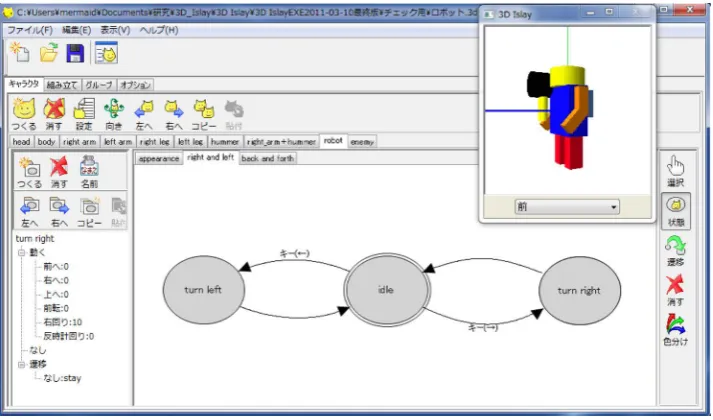
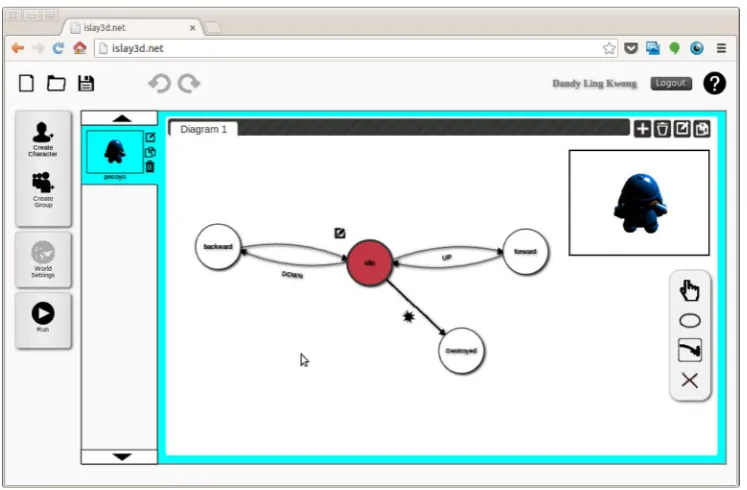
The visual programming language of Islay3D is one where the behavior of a character is described in terms of state-transition diagram. Figure 1 shows a robot with a set of state-transition diagrams. A state is represented by a circle, showing the action for the character to take in that state. A transition represented by an arrow means that the character shifts its state to the pointed one on condition written along the arrow.
In Figure 1, the state-transition diagram is defined so that the robot turns left or right when arrow keys are pressed. It is also possible to attach other diagrams to the same character. Attaching another diagram for moving forward or backward, for example, we can make the robot moving around a circular path.
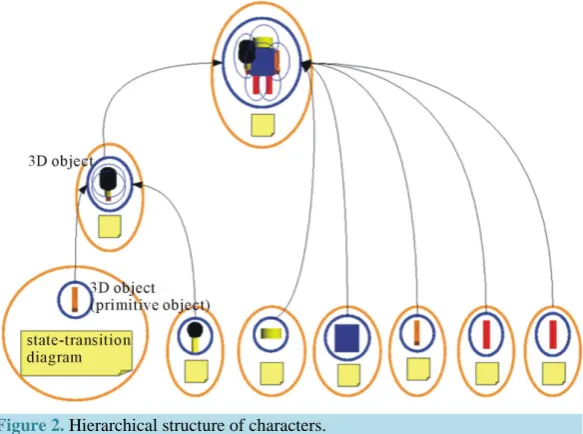
[image:2.595.136.493.496.706.2]A character can be recursively composed of lower-level characters as illustrated in Figure 2. Each character encapsulated in an orange oval has its shape in the blue oval and state-transition diagrams marked in yellow. The robot character on the top level has its appearance composed of other characters representing its head, body,
Figure 2.Hierarchical structure of characters.
right and left arms, and legs. This robot actually has a hammer in the right arm so that the right arm is defined as a higher-level character composed of an arm character and a hammer character. The 3D objects representing the bottom-level characters can be called the atomic 3D objects.
This hierarchical structure is nothing special but a standard model for composing 3D objects. The lower-level characters behave relative to the local coordinate system of the upper-level character. The top-level characters behave relative to the global coordinate system [3].
2.1. Actions
In a particular state, the character executes one or more actions. The actions are divided into two categories—1) geometrical translation actions, and 2) logical actions.
Geometrical translation actions allow the character to perform in-game physical movements. The actions are such as translation and rotational movements. It also includes the positioning of the character at a specified or random position. It is also possible to reset the action of the character to its default condition at the start of the game. Table 1 shows a list of the geometrical translation actions.
Logical actions allow the character to perform game actions. For example, a character may be able to fork in- to other character. A character may also be able to send messages to other characters, such that other characters may respond to the message. Table 2 shows a list of the logical actions.
2.2. Transition Conditions
After executing the action in a state, the transition condition is evaluated. If the condition is true, the current state of the character will shift to the next state in the direction indicated by the arrow.
The transition conditions range from user input such as mouse clicks and keyboard, to game conditions such as collision with other character. There are also transition conditions based on functions such as probability and state repetition. The list of transition conditions is shown in Table 3.
The combination of the execution of the state, and the evaluation of the transition condition, forms a control flow which defines the animation behavior of the 3D character in Islay3D. This control flow which is repre- sented as circles and arrows in the state-transition diagram forms the core of the visual programming language in Islay3D.
3. Interpretation to JavaScript
Table 2.Logical actions [4].
Logical Action Description
Broadcast Send message to all characters
Upcast Send message upwards in the character hierachical structure
Downcast Send message downwards in the character hierachical structure
Group Fork Fork a specified group of characters
Transform Transform to a specified character
Hide Make the character invisible
Show Make the character visible
Disappear Remove the character from the game
The End End the game
Table 3.Transition conditions [4].
Transition Condition Description
Keyboard Key Transition when a particular keyboard key is pressed
Click Transition when the character is clicked
Bump Transition when the character collide with other characters
Message Transition when the character receive a message from broadcast, upcast, or downcast action
Probablity Transition when a specified probability occured
Timeout Transition after the current state is repeated a specified times
Default When other transition conditions are not fulfilled
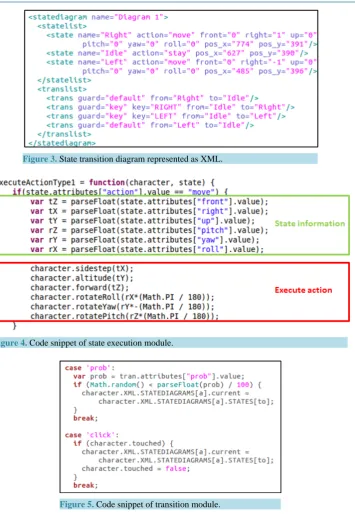
file as shown in Figure 3. This XML file is an internal representation of the state transition diagram drawn by the user, defined as per the animation definition of Islay3D elaborated in [3]. It contains a list of states, which has actions to be taken in those states. It also contains a list of transitions, which is a triple of the transition con- dition, source and destination states. The player takes these as input and produces the 3D animation output.
The player is developed with enchant.js [5], an open source framework for developing simple games and ap-plications in HTML5 + JavaScript, with support for WebGL using a plugin [6]. The player is an interpreter, which takes the input XML file and calls the corresponding JavaScript functions during run time.
Figure 3. State transition diagram represented as XML.
Figure 4.Code snippet of state execution module.
Figure 5.Code snippet of transition module.
4. Programming Environment
In this section, the user interface of the web version of Islay3D is introduced.
4.1. 3D Characters
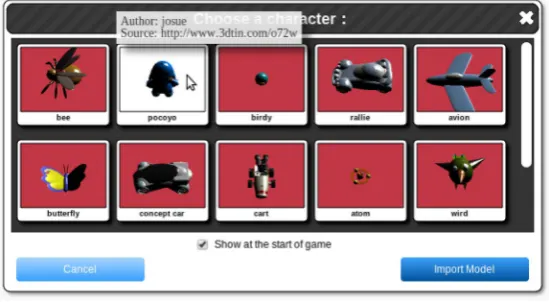
At the start of Islay3D, the user chooses a 3D model from the character selection panel. This is shown in Figure 6. Hovering over the model will show a tooltip that shows a description of the model. All the characters are pro- grammable by using the state-transition diagram based visual language described in Section II. It is possible to set the character to be invisible when first inserted into the game.
4.3. Toolbox
To define the action for the circles, an action toolbox will pop up whenever a circle is clicked. Figure 8 shows the toolbox, with the geometrical actions grouped into move, jump, and logical actions grouped into message, fork, change, transform. Further clicking on the toolbox brings up a dialog box, allowing the user to define the parameter for the action. Figure 8 shows the move setting dialog box, where the user will be able to enter the movement and rotation value for the x, y, and z axis.
A corresponding transition toolbox shows up when an arrow is clicked, with the list of transition options as listed in Table 3.
4.4. Previewer
While setting geometrical translation actions as listed in Table 1, the user will be able to preview immediately the effect to the character. This allows the user to perform on-the-fly manipulation, without having to run the game to confirm the movement of the character. Figure 7 shows the previewer in the top right corner of the dia- gram editor.
4.5. Step-by-Step Tutorial
Figure 9 shows a step-by-step tutorial is provided when the program first started up. This tutorial will guide the users to use the features in the program, as well as teaching them the concept of state-transition diagram in Is- lay3D. This is done by walking through the users through creating a simple interactive animation using one of the characters in the game.
4.6. Player
[image:6.595.175.450.542.693.2]When the user has created their game, they can run it anytime by using the Run button. This creates a new win- dow as shown in Figure 10 where the user will be able to play their game. When finished playing the game,
Figure 7.Diagram editor where the user draws the state-transition diagram.
Figure 8.The action toolbox with the move setting dialog box.
Figure 9.A tutorial which guides the users step-by-step.
they can close the window, and get back to the graphical editor to continue editing their game with ease.
5. Related Works
Figure 10.Player which runs the game in a new win- dow.
Figure 11.Scene editor and scripting language in Alice.
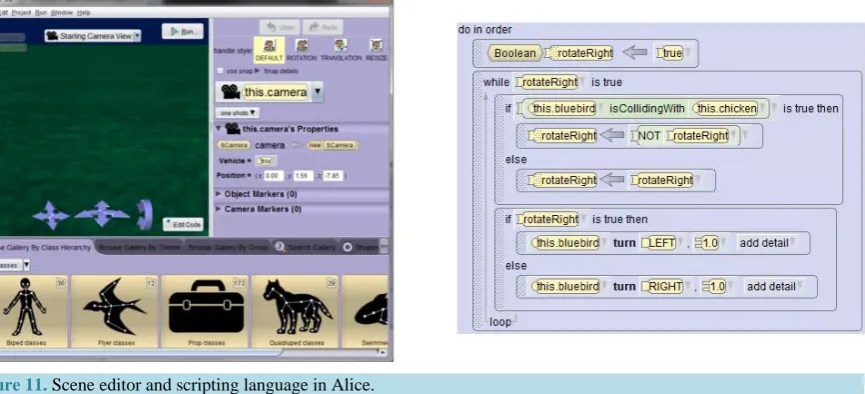
through selecting statements corresponding to production-oriented programming language such as Java, C++, and C#. Learning a scripting language is required because it is the very purpose of Alice to educate non-pro- grammers to be programmers. On the other hand, Islay3D does not requires the user to write text-based pro- grams, and they only need to draw a set of state-transition diagrams.
Kodu Game Lab [9] is a tile-based visual programming tool that enables users to learn programming concepts through making and playing computer games in real-time isometric 3D gaming environment. It is designed spe- cifically for young children, with a real-time isometric 3D gaming environment that is designed to compete with modern console games in terms of intuitive user interface and graphical production values.
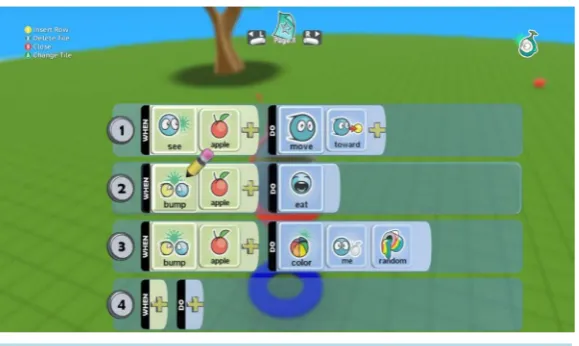
Kodu’s programming language is a high-level visual language that can be represented as a context-free grammar. Unlike other programming languages like Java or C++, Kodu is entirely event driven, whereby pro- gramming involves the placement of tiles in a meaningful sequence to form a condition and action on each rule as shown in Figure 12. Each Kodu rule has two clauses, a condition and an action, which is similar to Islay3D’s transition and state.
Figure 12.Programming interface in Kodu.
6. Evaluation
The web version of Islay3D is still under development and there have been limited number of studies on the ef- fectiveness of the tool. In an evaluation of the basic function of the web version Islay3D which were carried out with a number of elementary and secondary school students in the local community, it was suggested that:
1) The concept of using state-transition diagram for animating character is easy to learn for the students after being given a tutorial.
2) The students enjoyed expressing their creativity in the manipulation of 3D characters, and would like to recommend and play Islay3D with their friends.
7. Conclusions
Islay3D was developed to allow novice programmer to create 3D interaction animations without the need to learn a text-based scripting language. The Islay3D programming language allows user to learn about automation through the serial control flow which is visually comprehensive in a state-transition diagram, the learning of which forms the building block for learning programming languages.
The implementation and the graphical interface of the web-based tool is presented. The web-based program- ming environment facilitates ease of use by providing easy accessibility within a browser, and step-by-step tu- torial to guide first time users. It is available now at islay3d.net.
User-generated content is an important feature for users to express their creativity in artistic endeavor. As of the time of writing, Islay3D still doesn’t support a 3D world editor for the users to edit the game world, and a 3D model editor for the users to create their own 3D models. Integration of the later with the behavior definition of complex character is a potential future work.
As Islay3D was traditionally developed on the Windows platform, more usability studies is recommended to investigate it’s usage on the web. The comprehensiveness of the state-transition diagram in describing 3D ani- mations compared to its 2D counterpart is also recommended.
Acknowledgements
The authors would like to thank Satomi Sugai, NaoyukiSone, Hideki Kotani, KatsuhisaKanno, MakotoRokujo for their pioneering work in the 3D version of Islay.
References
[1] Brennan, K., Monroy-Hernndez, A. and Resnick, M. (2009) Scratch: Creating and Sharing Interactive Media. Pro- ceedings of the 9th International Conference on Computer Supported Collaborative Learning (CSCL’09), Rhodes, 8-13 June 2009, 217. http://dx.doi.org/10.3115/1599503.1599576
[9] Fowler, A., Fristace, T. and MacLauren, M. (2012) Kodu Game Lab: A Programming Environment. The Computer Games Journal. http://tcjg.weebly.com/fowler-et-al.html