System Identification,
Time Series Analysis and Forecasting.
The Captain Toolbox.
Handbook v2.0 February 2007
D. J. Pedregal, C. J. Taylor and P. C. Young
Copyright (c) 2007
Centre for Research on Environmental Systems and Statistics (CRES),
Lancaster University, Lancaster, LA1 4YQ, United Kingdom.
ii
Captain Toolbox
CAPTAIN is a MATLAB® compatible toolbox for non stationary time series analysis, system identification, signal processing and forecasting, using unobserved components models, time variable parameter models, state dependent parameter models and multiple input transfer function models. CAPTAIN also includes functions for true digital control.
Toolbox Authors by Department
Department of Environmental Science, Faculty of Science and Technology, Lancaster University, Lancaster, LA1 4YQ, United Kingdom –
Prof. Peter C. Young [email protected] Dr. Wlodek Tych [email protected]
Engineering Department, Faculty of Science and Technology, Lancaster University, Lancaster, LA1 4YR, United Kingdom –
Dr. C. James Taylor [email protected]
Escuela Técnica Superior de Ingenieros Industriales, Edificio Politécnico, Campus Universitario s/n, 13071 Ciudad Real, Spain –
Dr. Diego J. Pedregal [email protected]
Additional Contributors
Dr Paul McKenna, Department of Environmental Science, Lancaster University
iii
Toolbox Installation
CAPTAIN is usually distributed as a mixture of pre-parsed MATLAB® pseudo-code (P-files) and conventional M-files. The following installation instructions assume MATLAB® itself is already installed.
1 Copy all the M- and P-files to a directory where you want the toolbox to reside, such as
Program Files\Matlab\Toolbox\Captain or similar.
2 Start MATLAB®and add the above location of the toolbox to your path. You can use the
standard addpath function or the graphical user interface to do this. Refer to your MATLAB® documentation for more information.
3 Once installed, typing captdemo in the MATLAB® Command Window starts a simple graphical user interface for access to the on-line demos. If this does not work, then check that you have correctly added the toolbox location to your MATLAB® path.
4 To obtain a full list of CAPTAIN functions, type help captain in the MATLAB®
Command Window, replacing captain with the name of the installation directory chosen in item 1 above.
To uninstall CAPTAIN,simply delete the files and remove the associated path.
Conditions of use
The CAPTAIN software package may be freely used for scientific or educational purposes. However, if you publish any results using CAPTAIN you should state clearly that you used the tools. The full reference is:
Young, P.C., Taylor, C.J., Tych, W. and Pedregal, D.J. (2007)
The Captain Toolbox. Centre for Research on Environmental Systems and Statistics,
Lancaster University, UK. Internet: www.es.lancs.ac.uk/cres/captain
For commercial applications, permission is required from the authors.
The Toolbox is provided without formal support, although questions and bug reports can be emailed to the authors.
Version Tracking
Recent versions of CAPTAIN are developed for MATLAB® v7.0 (R14) onwards.
The examples in the handbook were originally developed with CAPTAIN v5.2 and
MATLAB® v6.5 (R13) on a Windows PC. They have subsequently been tested for CAPTAIN
v6.0 and MATLAB® v7.3 (R2006b). However, updates to the optimisation routines and default values may yield different numerical results in some cases.
iv
Contents
Preface
Chapter 1 Introduction 1
Chapter 2 State Space models 18
Chapter 3 Unobserved Components models 42
Chapter 4 Time Variable Parameter models 70
Chapter 5 State Dependent Parameter models 93
Chapter 6 Discrete-Time Transfer Function models 110
Chapter 7 Continuous-Time Transfer Function models 143
Chapter 8 True Digital Control 156
Bibliography 166
Appendix 1 Reference Guide 173
v
Examples
1.1 Interpolation of advertising data using DLR adv.dat 11
1.2 Transfer function model estimation using RIV vent.dat 13
2.1 Estimation of a trend for the air passenger series air.dat 23
2.2 Hyper-parameter estimation for the air passenger series air.dat 30
2.3 Interpolation and variance intervention for steel consumption steel.dat 33
2.4 Time variable mean estimation for volume in the Nile river nile.dat 38
3.1 Analysis of the Mauna Loa CO2 data using DHR co2.dat 54
3.2 Modelling the US GDP using Trend + AR models usgdp.dat 59
3.3 Steel consumption in the UK revisited steel.dat 63
3.4 Car drivers killed and seriously injured cars.dat 66
4.1 Initial Evaluation of the River Cam data using DLR cam.dat 72
4.2 Analysis of a signal with changing frequency using DAR sdar.dat 78
4.3 River Cam Data analysed using DARX cam.dat 82
4.4 Comparison of DARX and DTFM for simulated data sdtfm1.dat 90
5.1 Analysis of a simulated SDARX model - 98
5.2 Final parameter estimates for the model in Example 5.1 - 102
5.3 Analysis of squid data squid.dat 104
5.4 Hydraulic Actuator - 106
6.1 Simulation showing the bias of the LS parameter estimates - 114
6.2 Simulation experiment using the IV algorithm - 121
6.3 Simulation comparing the SRIV, RIV and ML estimates - 125
6.4 Gas furnace gas.dat 133
6.5 Unemployment rate in the USA usemp.dat 137
6.6 Ventilation data re-visited vent.dat 141
7.1 Model identification for the WG Example swg01.dat 150
7.2 Parameter Estimation for the WG Example swg01.dat 151
7.3 Analysis of winding pilot plant data wind.dat 153
8.1 Non-minimal state space form for the ventilation model - 157
8.2 Pole assignment design for the ventilation mode - 160
CAPTAIN is a MATLAB® compatible toolbox for non-stationary time series analysis and forecasting. Based around a powerful state space framework, CAPTAIN extends MATLAB®
to allow, in the most general case, for the identification of Unobserved Components (UC)
models. Here, the time series is assumed to be composed of an additive or multiplicative
combination of different components that have defined statistical characteristics but which
cannot be observed directly. With Maximum Likelihood estimation of most models and the
inclusion of several popular model forms, such as the Basic Structural Model of Harvey
(1989) and the Dynamic Linear Model of West and Harrison (1989), together with a
standard set of data pre-processing, system identification and model validation tools,
CAPTAIN is a wide-ranging package for signal processing and general time series analysis.
Uniquely, however, CAPTAIN focuses on Time Variable Parameter (TVP) models, where the stochastic evolution of each parameter is assumed to be described by a generalised
random walk process (Jakeman and Young, 1981). In this regard, the state space
formulation utilised is particularly well suited to estimation based on optimal recursive
estimation, in which the time variable parameters are estimated sequentially whilst
working through the data in temporal order. In the off-line situation, where all the time
series data are available for analysis, this Kalman filtering operation (Kalman, 1960) is
accompanied by optimal recursive smoothing. Here the estimates obtained from the
forward pass filtering algorithm are updated sequentially whilst working through the data
in reverse temporal order using a backwards-recursive Fixed Interval Smoothing (FIS)
algorithm (Bryson and Ho, 1969).
In this manner, CAPTAIN provides novel tools for TVP analysis, allowing for the optimal estimation of dynamic regression models, including linear regression, auto-regression
(Young, 1998b) and harmonic regression (Young et al., 1999). Furthermore, a closely
related algorithm for state dependent parameter estimation provides for the non-parametric
identification and forecasting of a very wide class of nonlinear systems, including chaotic
systems. The identification stage in this process again exploits the recursive FIS
algorithms, combined with special data re-ordering and ‘back-fitting’ procedures, to obtain
estimates of any state dependent parameter variations (Young, 2000).
CHAPTER 1
Chapter 1 Introduction
CAPTAIN handbook – D. J. Pedregal, C. J. Taylor and P. C. Young – page 2
Of course, in many cases, specifying time invariant parameters for the model yields the
equivalent, conventional, stationary model. In this regard, one model that has received
special treatment in the toolbox is the multiple-input, single-output Transfer Function (TF)
model. CAPTAIN includes functions for robust unbiased identification and estimation of
both discrete- time (Young, 1984, 1985) and continuous- time (Young, 2002) TF models.
One advantage of the TF model is its simplicity and ability to characterise the dominant
modal behaviour of a dynamic system. This makes such a model an ideal basis for control
system design.
In the latter regard, the toolbox includes a set of functions for True Digital Control (TDC),
based on the Proportional-Integral-Plus (PIP) control system design methodology (Young
et al., 1987; Taylor et al. 1998, 2000). The underlying philosophy of the approach is that
the entire design procedure, from the identification and estimation of a suitable model
through to the practical implementation of the final control algorithm, is carried out in
discrete time. This differs from many conventional digital controllers, where an inherently
continuous time algorithm is digitised for implementation purposes. Indeed, CAPTAIN has
been successfully utilised for the design of practical PIP control systems for many years
(e.g. Young et al., 1994; Gu et al., 2003; Taylor et al., 2004; Taylor and Shaban, 2006).
As demonstrated by the numerous publications and examples below, the CAPTAIN package is useful for system identification, signal extraction, interpolation, backcasting, forecasting
and Data-Based Mechanistic (DBM) analysis of a wide range of linear and non-linear
stochastic systems. In the latter case, the resulting DBM model is only considered fully
acceptable if, in addition to explaining the data well, it also provides a description that has
relevance to the physical reality of the system under study (e.g. Young, 1998b).
Some of the estimation algorithms considered here were developed originally in the
1960/1970/1980’s for the CAPTAIN and microCAPTAIN time series analysis and
forecasting packages (MS-DOS based). The associated optimisation algorithms were
developed in the 1980/1990’s and are used in the latest version of microCAPTAIN (Young
and Benner, 1991). However, the MATLAB® implementation is much more flexible than microCAPTAIN and includes the latest innovations and improvements to the algorithms.
Note that the present text refers exclusively to this CAPTAIN Toolbox for Time Series
Analysis and Forecasting using MATLAB®(Taylor et al., 2007).
1.1
Modelling Philosophy
As we look around us, we perceive complexity in all directions: environmental, biological
and ecological systems, socio-economic systems, and some of the more complex
Chapter 1 Introduction
CAPTAIN handbook – D. J. Pedregal, C. J. Taylor and P. C. Young – page 3
processes, many of which are inherently nonlinear dynamic systems, often with
considerable uncertainty about both their nature and their interconnections. It is not too
surprising, therefore, that the mathematical models of such systems, as constructed by
scientists, social scientists and engineers, are often similarly complex. What is perhaps
surprising, however, is the apparently widespread belief that such systems can be described
very well, if not exactly, by deterministic mathematical equations, with little or no
quantification of the associated uncertainty. Such deterministic reductionism leads
inexorably to large, nonlinear simulation models which reflect the popular view that
complex systems must be described by similarly complex models.
The CAPTAIN toolbox has evolved from a different DBM modelling philosophy, developed
by the present third author and colleagues, which is almost the antithesis of deterministic
reductionism. DBM models are obtained initially from the analysis of observational
time-series but are only considered credible if they can be interpreted in physically meaningful
terms. It is a philosophy that emphasises the importance of parametrically efficient, low
order, dominant mode models, as well as the development of stochastic methods and the
associated statistical analysis required for the identification and estimation of such models.
Furthermore, it stresses the importance of explicitly acknowledging the basic uncertainty
that is essential to any characterisation of physical, chemical, biological and
socio-economic processes.
Previous publications map the evolution of the DBM philosophy and its methodological
underpinning. Such publications utilise the approach for the analysis of numerous natural
and man-made systems. An incomplete list includes: Beck and Young (1975); Jarvis et al.
(1999); Parkinson and Young (1998); Price et al. (1999, 2000, 2001); Shackley et al.
(1998); Tych et al. (1999); Ye et al. (1998); Young (1978, 1981; 1983, 1984; 1985; 1993a,
1993b; 1994; 1998a, 1998b, 1999a, 1999b, 2000a, 2000b, 2000c, 2001a, 2001b, 2002);
Young and Beven (1994); Young and Lees (1993); Young and Minchin (1991); Young and
Pedregal (1996; 1997; 1998, 1999a, 1999b); Young et al. (1996, 1997, 1999, 2000).
Naturally, these publications introduce a wide range of modelling tools, encompassing
various model structures and identification algorithms. However, they can be broadly
categorised into the four closely related and overlapping themes below.
1. Many of the tools that underpin the DBM modelling philosophy can be unified in terms
of the discrete-time UC model. Here, the components may include a trend or low
frequency component, a seasonal component (e.g. annual seasonality), additional
sustained cyclical or quasi-cyclical components, stochastic perturbations, a component
to capture the influence of exogenous input signals and so on. CAPTAIN allows for a
Chapter 1 Introduction
CAPTAIN handbook – D. J. Pedregal, C. J. Taylor and P. C. Young – page 4
2. Nonstationary and nonlinear signal processing based on the identification and
estimation of stochastic models with time varying parameters. In this case, the term
‘nonstationarity’ is assumed to mean that the statistical properties of the signal, as
defined by the parameters in an associated stochastic model, are changing over time at
a rate which is ‘slow’ in relation to the rates of change of the stochastic state variables
in the system under study. Although such nonstationary systems exhibit nonlinear
behaviour, this can often be approximated well by TVP (or piece-wise linear) models,
the parameters of which are recursively estimated.
3. Further to item 2. above, if the changes in the parameters are functions of the state or
input variables (i.e. they actually constitute stochastic state variables), then the system
is truly nonlinear and likely to exhibit severe nonlinear behaviour. Normally, this
cannot be approximated in a simple TVP manner; in which case, recourse must be
made to alternative, and more powerful in this context State Dependent Parameter
(SDP) modelling methods.
4. Finally, if the essential small perturbation behaviour of the system can be approximated
by linearised TF models, then robust unbiased, Refined Instrumental Variable (RIV)
and Simplified Refined Instrumental Variable (SRIV) algorithms are employed. Here,
either discrete-time TF models represented in terms of the backward shift operator
(often denoted in the statistical and engineering literature by either z−1, q, B or L, where the latter is utilised in the present text) or continuous-time TF models based on
the Laplace Transform s-operator are identified and estimated.
1.2 Toolbox Overview
MATLAB® is a high performance language published by The MathWorks, Inc., integrating
computation, visualisation and programming in a single environment (MathWorks, 2001).
CAPTAIN is a collection of MATLAB® functions for the estimation of UC, TVP, SDP and TF models. By also including a number of tools for data pre-processing, system identification
and model validation, CAPTAIN provides a powerful all round package for the analysis of complex stochastic systems. The following subsections introduce these main areas of
functionality.
Unobserved Components models
CAPTAIN includes a range of UC models, a number of which are unique to this toolbox. In
particular, the Dynamic Harmonic Regression (DHR) model, estimated using the function
dhr, is very useful for signal extraction and forecasting of periodic or quasi-periodic series.
This function provides smoothed estimates of the series, as well as all its components
Chapter 1 Introduction
CAPTAIN handbook – D. J. Pedregal, C. J. Taylor and P. C. Young – page 5
changing amplitude and phase of the latter. Typical applications are for the analysis of
periodic environmental and economic time-series; restoration of noisy signals with gaps or
other aberrations; and the evaluation of temporal changes in environmental data etc.
Furthermore, the same function allows for the estimation of the well-known Basic
Structural Models (BSM) of Harvey (1989).
It should be pointed out that, while it is sometimes convenient to categorise the
functionality of the toolbox, there is considerable overlap between the methodological
areas chosen. For example, the DHR model is a particular case of the general stochastic
TVP model discussed in the following subsection. In this regard, the hyper-parameters of
the model, which define the statistical properties of the time variable parameters, need to
be estimated in some manner. CAPTAIN provides three approaches, all through the function
dhropt, namely: Maximum Likelihood (ML) based on prediction error decomposition;
minimisation of the multiple-steps-ahead forecasting errors; and a special frequency
domain optimisation, based on fitting the model pseudo-spectrum to the logarithm of the
Auto-Regression (AR) spectrum.
An alternative to dhr/dhropt is provided by the pair univ/univopt, which allow for the
estimation of various additional UC model forms. Here, the trend is extracted from the
time series and a peturbational component about the trend is modelled as a pure AR
component. Although they may also be utilised for modelling seasonal series,
univ/univopt are particularly useful in cases where the periodic behaviour of the
perturbation about the trend is not very marked. In this case, the models are estimated
using either standard statistical methods or a sequential spectral decomposition approach
that has been developed for the toolbox in order to avoid identifiably problems.
Time Variable Parameter models
The class of TVP, or ‘dynamic’, regression models, includes: Dynamic Linear Regression
(DLR), Dynamic Harmonic Regression (DHR), Dynamic Auto-Regression (DAR),
Dynamic Auto-Regression with eXogenous variables (DARX) and the closely related
Dynamic Transfer Function (DTF) model. It should be noted that the term ‘dynamic’,
which is used to differentiate time variable parameter regression models from their
standard constant parameter relatives, is somewhat misleading, since not all of these
models are inherently dynamic in a systems sense. However, it is a common term in certain
areas of statistics (e.g. West and Harrison, 1989 and the references therein) and is retained
for this reason.
Chapter 1 Introduction
CAPTAIN handbook – D. J. Pedregal, C. J. Taylor and P. C. Young – page 6
obtained, under the assumption that the parameters vary as one of a family of generalised
random walks (see Chapter 2), namely: Random Walk (RW); Integrated Random Walk
(IRW); Smoothed Random Walk (SRW); and Local Linear Trend (LLT). The associated
filtering and FIS algorithms are accessible via shells, namely the functions dlr, dhr, dar,
darx and dtfm. Since the regressors are freely defined by the user, the most flexible
toolbox function for TVP analysis is dlr, which can include all the remaining models as
special cases. The other functions all restrict the model to the most commonly used forms.
For example, dhr automatically constrains the regressors to model harmonic components.
As one of the key tools for estimating UC models, it has already been discussed above.
At this juncture, it is worth pointing out that CAPTAIN includes the functions mar and
arspec for Auto-Regression (AR) model and spectrum estimation. However, in the context
of dynamic regression, dar and darsp are instead useful for evaluating changing signal
spectra and time-frequency analysis based on DAR models, since they provide the AR
spectrum at each point in time based on the locally optimum time variable AR parameters.
Further to this, darx is an extension of the DAR model to include measured eXogeneous or
input time series that are thought to affect the output, while dtfm augments the model in
order to allow for coloured noise in the output signal. The latter function employs
instrumental variables in the solution to ensure that the parameter estimates are unbiased
(see below and Chapter 4). In this manner, the functions darx and dtfm are truly dynamic
in a systems sense and form a link between the dynamic regression analysis considered
here and the dedicated TF modelling component of the toolbox discussed below.
In the case of dlr, dar, darx and dtfm, the Noise Variance Ratio (NVR) and other
hyper-parameters, which define the statistical properties of the TVP’s, are optimised via ML
based on prediction error decomposition. The relevant toolbox functions are dlropt,
daropt, darxopt and dtfmopt. In comparison with most other algorithms for TVP
estimation, the main innovations in CAPTAIN are this automatic hyper-parameter optimisation, the provision of FIS rather than the filtered TVP estimates and the various
special uses outlined above.
State Dependent Parameter models
The approach to TVP estimation discussed above works very well in situations where the
parameters are slowly varying when compared to the observed temporal variation in the
measured system inputs and outputs. Although such models are nonlinear systems, since
the same inputs, injected at different times, will elicit quite different output responses, the
resultant nonlinearity is fairly mild. It is only when the parameters are varying at a rate
Chapter 1 Introduction
CAPTAIN handbook – D. J. Pedregal, C. J. Taylor and P. C. Young – page 7
heavily nonlinear or even chaotic manner. For such cases, CAPTAIN includes a novel algorithm for state dependent parameter estimation, sdp, allowing for the non-parametric
identification and forecasting of a very wide class of nonlinear systems.
Multi-Input Transfer Function models
There are numerous algorithms for estimating TF models. However, the primary technique
employed in CAPTAIN, is the least squares- based instrumental variable approach. Here, an adaptive auxiliary model is introduced into the solution in order to avoid parameter bias
and to optimally filter the data, so making the estimation more statistically efficient.
In particular, CAPTAIN provides the recursive and en-block RIV and SRIV algorithms, as well as more conventional least squares based approaches, primarily through the functions
riv (for discrete-time systems) and rivc (continuous-time). Both these functions return the
modelling results in the form of a special matrix from which the various parameters and
standard errors may be extracted using getpar. Such parameters may subsequently be
utilised for simulation and forecasting through conventional MATLAB® commands like
filter, or by using SIMULINK® (MathWorks, 2001).
For a given physical system, an appropriate structure first needs to be identified, i.e. the
most appropriate values for the time delay and the orders of the numerator and
denominator polynomials in the TF. In this regard, CAPTAIN utilises two functions, namely
rivid (discrete-time) and rivcid (continuous-time), which provide numerous statistical
diagnostics associated with the model. These include the Coefficient of Determination RT2,
based on the response error, which is a simple measure of model fit; and the more
sophisticated Young Identification Criterion (YIC), which provides a combined measure of
fit and parametric efficiency.
True Digital Control
Following the identification of a suitable discrete-time time TF model, PIP control systems
are determined using either the pip or pipopt functions, for pole assignment or Linear
Quadratic (LQ) optimal design respectively. PIP control with command input anticipation
is implemented using pipcom. Finally, gains and pipcl are used to analyse the closed-loop
system. The above functions are for the single input, single output (SISO) case, while
mfdform, mfd2nmss, mpipqr and mpipinit are used for multivariable PIP control.
Finally, dlrqri provides the iterative linear quadratic regulator solution for either the SISO
or multivariable cases; while piplib is the associated Simulink® library for various PIP control structures, including the conventional feedback form and an alternative forward
Chapter 1 Introduction
CAPTAIN handbook – D. J. Pedregal, C. J. Taylor and P. C. Young – page 8 Conventional Models, Identification Tools and Auxiliary functions
As pointed out above, specifying time invariant parameters in CAPTAIN usually yields the
equivalent stationary time series model. In this manner, many of the functions above may
be utilised to estimate either the well known conventional model or the more sophisticated
TVP version, depending on the input arguments chosen.
Similarly, system identification is inherent to the modelling approach utilised by most of
the functions already discussed. However, identification tools not yet mentioned, include:
acf to determine the sample and partial autocorrelation function; ccf for the sample
cross-correlation; period to estimate the periodogram; and statist for some sample descriptive
statistics. Additional statistical diagnostics include: boxcox, cusum and histon.
Finally, del generates a matrix of delayed variables; fcast may be employed to prepare data
for forecasting and interpolation; irwsm for smoothing, decimation or for fitting a simple
trend to a time series; prepz to prepare data for TF modelling (e.g. baseline removal and
input scaling); scaleb to rescale the estimated TF model numerator polynomial following
initial prepz use; stand to standardise or de-standardise a matrix by columns; and reconst
to reconstruct a time series by removing any dramatic jumps in the trend.
1.3 Getting Started
Installation instructions and conditions of use are given in the preface. Since CAPTAIN is
largely a command line toolbox, it is assumed that the reader is already familiar with basic
MATLAB® usage, such as loading data, plotting graphs and writing simple M-files.
Introductory guides to the package include Etter (1993) and Biran and Breiner (1995). For
example, to plot the well known airline passenger series (e.g. Box and Jenkins, 1970),
enter the following text at the MATLAB® Command Window prompt,
>> load air.dat
>> plot(air)
>> title(‘thousands of passengers per month (1949-1960)’)
These data are included with CAPTAIN for demonstration purposes, in a standard text file. If an error occurs, then check that you have correctly added the toolbox location to your
MATLAB® path. Note that the Courier New font is used to indicate such worked examples throughout the text. Another convention employed here, is that function and variable
Chapter 1 Introduction
CAPTAIN handbook – D. J. Pedregal, C. J. Taylor and P. C. Young – page 9 Getting Help
On-line help information follows MATLAB® conventions. For example, to obtain a full list
of functions, type help captain in the Command Window, where captain is the name of
the installation directory. Similarly, the brief calling syntax for each function is obtained
by entering its name without any input arguments, while more information is provided
using the standard help command, as illustrated below.
>> irwsm
IRWSM Integrated Random Walk smoothing and decimation
[t,deriv,err,filt,h,w,y0]=irwsm(y,TVP,nvr,Int,dt)
>> help irwsm
IRWSM Integrated Random Walk smoothing and decimation
[t,deriv,err,filt,h,w,y0]=irwsm(y,TVP,nvr,Int,dt)
y: Time series (*)
TVP: Model type (RW=0, IRW=1, DIRW=2) (1) nvr: NVR hyper-parameter (1605*(1/(2*dt))^4) Int: Vector of variance intervention points (0)
dt: Sampling (1)
t: Decimated (or simply smoothed if dt=1) series deriv: Derivatives
err: Standard error
filt: Filter frequency response h: Frequency response
w: Frequency axis for plots
y0: Interpolated data
See also IRWSMOPT, FCAST, STAND, DHR, DHROPT, SDP
In the latter case, each input argument is described in turn, followed by the output
arguments and any other information. Note that the default values for any optional inputs
are given in brackets, whilst any necessary inputs, such as the data vector y above, are
listed with an asterix. In this case, the default TVP = 1 implies the following model based
on an IRW plus noise,
t t
t T e
y = + (1.1)
t t t
t T T
T =2 −1− −2 +η (1.2)
where yt is the time series, Tt is the smoothed signal at sample t, returned by irwsm as the
first output argument, and Tt−1 and Tt−2 are their values at the two previous samples,
respectively. Here, Tt is effectively a time variable parameter, whose stochastic evolution
Chapter 1 Introduction
CAPTAIN handbook – D. J. Pedregal, C. J. Taylor and P. C. Young – page 10
zero mean white noise sequences with variance q2 and σ2, representing the system
disturbances and measurement noise respectively.
It should be pointed out that the on-line help messages in CAPTAIN are kept deliberately concise, so that the experienced user can find information quickly (some of the more
advanced functions can have ten or more input arguments). For new users, the Reference
Guide in Chapter 8 provides more descriptive information about each of the options, whilst
the various models implemented in the toolbox are defined in Chapters 2 to 7.
Empty variables [] may be used to indicate default values when a mixture of defaults and
user specified arguments are required. For example, a smoothed trend may be fitted to the
airline passengers series as follows,
>> load air.dat
>> t = irwsm(air, [], 0.0001); % equivalent to t = irwsm(air, 1, 0.0001)
>> plot([air t])
In Chapter 2, the ‘IRW plus noise’ model is developed within a state space framework,
based on the definition of suitable observation (1.1) and state (1.2) equations. Note that the
3rd input argument to irwsm specifies the associated Noise Variance Ratio (NVR)
hyper-parameter. Defined here as q2 σ2 =0.0001, this variable is closely related to the
bandwidth of the filter, as discussed in Example 2.1 (Chapter 2).
Demonstrations
The following command initialises the standard MATLAB® Demo Window for access to the on-line demonstrations,
>> captdemo
This simple graphical user interface provides basic background information about
CAPTAIN, slideshows and numerous Command Line demos. The latter demos utilise the MATLAB® Command Window for input and output, as well as generating graphs in a
separate figure window, so make sure the command window is visible while you run these.
Experience suggests that one of the most effective ways to get started with CAPTAIN, is to examine each Command Line Demo in turn and then to personally adapt them for each
new data set. The following examples are based on two of these demos. The intention is to
provide a brief illustration of toolbox functionality for users already familiar with the
methodology, or at least to introduce some of the ideas to the open minded reader who is
not. In this regard, it should be pointed out that formal stochastic descriptions of the
models are withheld until later chapters. For brevity, note that the straightforward
Chapter 1 Introduction
CAPTAIN handbook – D. J. Pedregal, C. J. Taylor and P. C. Young – page 11
0 10 20 30 40 50 60 70 80 90
0 0.1 0.2 0.3 0.4
R
e
sp
ons
e
0 10 20 30 40 50 60 70 80 90
0 200 400 600 800
E
x
p
e
n
d
itu
re
[image:16.612.134.486.85.364.2]Time (sample number)
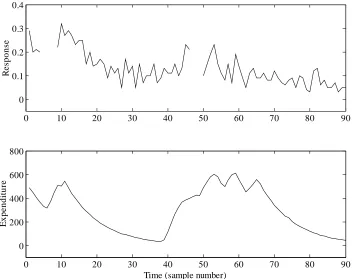
Figure 1.1 Scaled advertising data plotted against an arbitrary fixed sampling rate. Top: response to advertising. Bottom: expenditure on advertising.
Example 1.1 Interpolation of advertising data using DLR
Dynamic Linear Regression or DLR provides an excellent vehicle for the analysis of data
in areas such as economic, business and social data, where regression analysis is a popular
method of modelling relationships between variables and where these relationships may
change over time. In this regard, consider the following straightforward demonstration
from the Toolbox, which examines the relationship between a particular company’s
expenditure on advertising and their measure of the public’s response to this expenditure,
as illustrated in Figure 1.1.
For the purposes of the example, these confidential data have been scaled in an arbitrary
manner, so no units are given in the plots. The output data are in the range 0-1, where a
larger number implies a more successful response to the advertising. It is clear that the
response data contain missing values, represented in MATLAB® by special Not-a-Number or nan values and forming gaps in the top plot of Figure 1.1. The filtering and smoothing
algorithms implemented in CAPTAIN automatically account for these.
Chapter 1 Introduction
CAPTAIN handbook – D. J. Pedregal, C. J. Taylor and P. C. Young – page 12 90
..., , 2 , 1 =
+ +
=T bu e t
yt t t t t (1.3)
where yt is the response and ut is the expenditure, while Tt and bt are the time variable
parameters. Finally, et is a serially uncorrelated and normally distributed Gaussian
sequence with zero mean value and variance σ2. Note that a full description of the general
DLR methodology is given in Chapter 4.
For constant parameters Tt =T and bt =b, equation (1.3) takes the form of a conventional
regression model based on the equation of a straight line. However, here we utilise dlropt
to determine if the optimal values of the parameters, in a Maximum Likelihood sense, in
fact vary over time. In this regard, assuming a default random walk model for each of the
parameters, the associated NVR hyper-parameters are estimated as follows,
>> load adv.dat
>> u = adv(:, 1); % expenditure
>> y = adv(:, 2); % response
>> z = [ones(size(u)) u]; % regressors
>> nvr = dlropt(y, z)
nvr =
0.0078
0.0000
While dlropt is running, a window will briefly appear on screen indicating the
optimisation algorithm being utilised, together with an update of the Log-Likelihood. If the
solution fails to converge the optimisation may be terminated by pressing the STOP button,
although this should not prove necessary in the present case.
It should be pointed out that default values for the Toolbox have been carefully chosen, in
order to be as widely applicable as possible. In the present case, the default initial
conditions and optimisation settings converge to a solution without any problem, hence
only the first two input arguments are required.
From this analysis, it appears that the Tt level or trend parameter varies significantly over
time (NVR = 0.0078), while the bt slope parameter is relatively time invariant and has a
NVR value close to zero. To determine the fit and parameters,
>> [fit, fitse, par] = dlr(y, z, [], nvr);
By default, dlr assumes NVR’s of zero, so the 4th input argument above is necessary to
specify the previously optimised values. The 3rd input argument selects the model type: in
this case, empty brackets imply the default random walk model again. Examination of the
parameters, returned as the first and second columns of par, show how these evolve
Chapter 1 Introduction
CAPTAIN handbook – D. J. Pedregal, C. J. Taylor and P. C. Young – page 13
0 10 20 30 40 50 60 70 80 90
0 0.1 0.2 0.3 0.4
R
e
sp
ons
e
[image:18.612.139.484.86.219.2]Time (sample number)
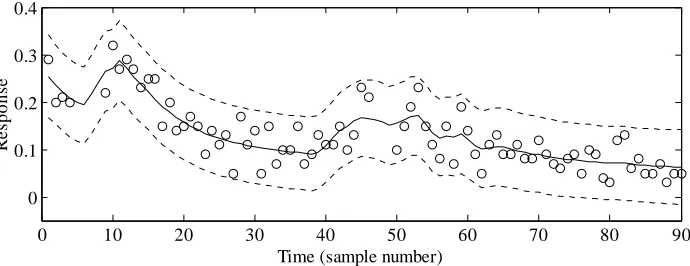
Figure 1.2 Scaled response to advertising plotted against an arbitrary fixed sampling rate. Data (circles), DLR fit (solid) and standard errors (dashed).
The model fit and associated standard errors are shown in Figure 1.2, which is obtained
using the code below,
>> plot(y, 'o')
>> hold on
>> plot(fit)
>> plot(fit+2*fitse, ':')
>> plot(fit-2*fitse, ':')
It is clear from Figure 1.2 that the data all lie within the standard error bounds. Note also
that no user intervention was required to interpolate over the missing response data: both
fit and par apply over the entire time series. Refer to Chapter 8 for a full list of
optimisation settings and output arguments. For example, dlr can return the interpolated
output y0, consisting of the original series with any missing data replaced by the model fit.
Example 1.2 Transfer function model estimation using RIV
Many control systems, both classical and modern, are analysed by means of TF models.
Indeed, CAPTAIN has been successfully utilised for the design of control systems for many years, particularly with regards to the development of Proportional-Integral-Plus (PIP)
control methods (Young et al., 1987; Taylor et al., 2000). One recent practical application
is concerned with forced ventilation in animal houses (Taylor et al., 2003). Here,
uncontrolled data are first collected in order to identify the dominant dynamics of the fan.
For a particular test installation at the Katholieke Universiteit Leuven, the SRIV algorithm,
combined with the RT2 and YIC identification criteria (Chapter 6), reveal that a first order
model with 6 seconds time delay provides the best estimated model and most optimum fit
to the data across a wide range of operating conditions. In a typical experiment, based on a
Chapter 1 Introduction
CAPTAIN handbook – D. J. Pedregal, C. J. Taylor and P. C. Young – page 14 3
1 79.8 438
.
0 − + −
= t t
t y u
y (1.4)
where yt is the airflow rate (m3/h) and ut is the applied voltage to the fan expressed as a percentage. Equation (1.4) shows that the output variable yt, is a simple linear function of it’s value at the previous sample and the delayed input variable. Equation (1.4) may alternatively be represented in terms of the backward shift operator L, i.e. Ljyt yt j
−
= , by the following discrete-time TF model,
t t u L L y 438 . 0 1 8 . 79 3 −
= (1.5)
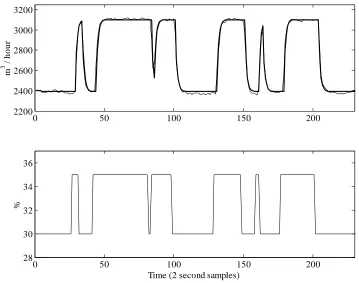
The response of the model (1.5) closely follows the noisy measured data, as illustrated by
Figure 1.3. These data are included with CAPTAIN for demonstration purposes and the
associated MATLAB®commands for estimating the model are shown below.
>> load vent.dat
>> [z, m] = prepz(vent, [], 25);
>> [th, stats, e] = riv(z, [1 1 3 0]);
>> [a, b] = getpar(th)
a =
1.0000 -0.4381
b =
0 0 0 79.7835
>> rt2 = stats(3)
rt2 =
0.9873
>> subplot(211); plot([z(:, 1) z(:, 1)-e]+m(1))
>> subplot(212); plot(z(:, 2)+m(2))
Here, the experimental data are organised into matrix form, with the first column of vent
consisting of the output variable yt, and the second the input variable ut. The function
prepz is utilised to prepare the data for modelling. In particular, the 3rd input argument
subtracts the mean of the first 25 samples from the data in order to remove the baseline
from the series. Such data pre-processing often yields better results in the context of TF
model estimation, as discussed in Chapter 6.
The TF is estimated using riv, where the second input argument defines the model
structure: in this case, 1 denominator parameter, 1 numerator parameter, 3 samples time
delay and no model required for the noise. Refer to Chapters 6 and 7 for a full description
of the TF modelling tools and the syntax required. In particular, note that MISO and
continuous-time models are also possible, while additional functions allow for the
Chapter 1 Introduction
CAPTAIN handbook – D. J. Pedregal, C. J. Taylor and P. C. Young – page 15
0 50 100 150 200
2200 2400 2600 2800 3000 3200
m
3 /
hou
r
0 50 100 150 200
28 30 32 34 36
Time (2 second samples)
[image:20.612.125.484.85.368.2]%
Figure 1.3 Top: ventilation rate (m3/h) and response of the identified TF model (thick trace) Bottom: applied voltage to the control fan expressed as a percentage.
The first riv output argument, th, is a matrix containing information about the TF model
structure, the estimated parameters and their estimated accuracy. In this case, getpar is
utilised to extract the required parameter estimates for later control system design. Note
that these parameter vectors include the leading unity of the TF denominator, and that the
time delays are represented as zero valued elements in the numerator. The second riv
output argument, stats, lists nine statistical diagnostics associated with the model,
including RT2 =0.9873, implying that the model describes nearly 99% of the variation in
the data. Finally, the modelling errors are returned as the variable e and are used in the
code above to compare the TF response with the original data, as shown in Figure 1.3. In
this graph, the baseline is returned to the series.
Note that the built-in MATLAB®function filter may also be employed to simulate the TF response using these parameter vectors. As discussed in Chapter 6, filter can be useful for
simulation and (if estimates of the future input variable are available) forecasting purposes.
1.4 How to use this book
This publication is primarily intended as a tutorial guide to the data-based mechanistic
Chapter 1 Introduction
CAPTAIN handbook – D. J. Pedregal, C. J. Taylor and P. C. Young – page 16
regard, the chapter headings follow a logical structured progress through the relevant
methodology, using worked examples throughout the text.
Time variable parameter modelling is introduced in Chapter 2. Here, the filtering
algorithm, smoothing algorithm, generalised random walk model and hyper-parameter
optimisation routines are formally described. This chapter presents the models in their
most general state space form, while the following three chapters introduce the various
special cases, namely: unobserved component models (Chapter 3); dynamic regression
models (Chapter 4); and state dependent parameter models (Chapter 5). Next, discrete-time
(Chapter 6) and continuous-time (Chapter 7) transfer function models are considered,
followed by a chapter on control system design (Chapter 8).
Finally, Appendix 1 lists each CAPTAIN function in alphabetical order, showing the calling syntax, together with a brief description of the associated input and output arguments.
Appendix 1 is designed to augment the concise on-line help messages. To learn about a
particular model, turn to Table A2 for the appropriate function name, then to Appendix 1
for its description. The See Also section for each entry in Appendix 1 lists the relevant
worked examples from the text.
Some of the algorithms discussed here have been in constant use for over 20 years. The
present authors hope that the CAPTAIN toolbox for MATLAB® will allow interested researchers to add to the ever expanding list of successful applications, which already
includes time series analysis, forecasting and control of numerous biological, engineering,