SECURITY AND USABILITY IN A HYBRID
PROPERTY BASED GRAPHICAL
AUTHENTICATION SYSTEM
PhD Thesis
HASSAN UMAR SURU
School of Computing Science and Engineering
University of Salford
Declaration
I hereby declare that the research contained in this thesis is original work conducted and
composed by me except where explicitly stated otherwise.
Acknowledgement
First of all I will like to express my gratitude to God Almighty for seeing me through this program successfully. I will also like to express my utmost gratitude to my main supervisor Dr. Pietro Murano for the immense support, motivation and encouragement he has given me throughout the duration of this course. He has painstakingly read every line of my work and offered useful suggestions that have helped in the conduct and compilation of this work. My gratitude also goes to my supervisor at Salford, Prof. Apostolos Antonacopoulos for his support, guidance and immense contributions to my work. I also extend my profound gratitude to Prof. Sahalu Junaidu of Ahmadu Bello University, Zaria, for offering to work as my advisor and giving me all the help and support I need for the success of the programme.
On a special note, I sincerely thank and appreciate the efforts of my brother, Hussaini Umar Suru, for his support financially and morally, without which the programme would not have been possible. I humbly appreciate the support of my mother and my family, Shafaatu, Nafisa and the children, whom had to continuously cope with my long absences. I thank everyone for their support.
Table of Contents
Declaration ... i
Acknowledgement ... ii
List of Figures ... ix
List of Tables ... xiii
Abstract ... xv
Chapter One - Introduction ... 1
1.1 Introduction ... 1
1.2 Aim and Objectives of Research ... 3
1.3 Research Question ... 3
1.4 Motivation for the Research ... 4
1.5 Research Approach and Methodology ... 4
1.6 Contributions to Knowledge ... 6
1.7 Cognitive Theories and Information Retrieval... 9
1.7.1 Basic Components of Human Memory... 9
1.7.2 Human Memory and Information Processing ... 9
1.7.3 Password Memorability Problem ... 11
1.7 Thesis Structure ... 12
Chapter Two – Literature Review ... 14
2.1 Introduction ... 14
2.2 Overview of Existing Authentication Methods ... 14
2.3 Overview of Recognition Based Systems ... 15
2.4 Overview of Recall Based Systems ... 25
2.4.1 Pure Recall Based Systems ... 25
2.4.2 Cued Recall Based Systems ... 30
2.5 Hybrid Authentication Schemes... 35
2.6 Two Factor Authentication... 39
2.7 Password Security Threats ... 40
2.8 The Evaluation of System Security ... 41
2.8.1 Analysing the Guessing Attack ... 43
2.8.2 Analysing the Shoulder Surfing Problem ... 44
2.8.3 Description Vulnerabilities and Social Engineering Attacks ... 45
2.9 Combining Usability and Security ... 47
2.10 The Passpoints Scheme ... 49
2.11 The Passfaces scheme ... 51
Chapter Three – A Conceptual Model for PBASs ... 56
3.1 Introduction – Property Based Authentication ... 56
3.2 A Simplistic Example... 57
3.3 Presentation of the Grid... 58
3.4 Classification of Property Based Schemes ... 60
3.5 Mixing of Models ... 61
3.6 Cardinality and Fragmentation in Fill Based Models ... 62
3.7 Integrated Models ... 64
3.8 Multiplicity of Design Options ... 65
3.9 Order in the Magnitude Based Scheme: ... 66
3.10 Extensions to the Property Based Methods ... 66
3.11 Assistive and Organised Image Selection ... 68
3.12 Conclusion ... 69
Chapter Four – Operational Procedure for PBASs ... 71
4.1 Introduction ... 71
4.2 Operational Procedures for Experimental Prototypes ... 71
4.3 Registration and Authentication ... 71
4.3.1 The Colour Based Model ... 72
4.3.2 The Pattern Based Model ... 76
4.3.3 The Mixed (Colour-Pattern) Model ... 77
4.3.4 The Butterfly Model ... 79
4.3.5 The Magnitude Based Scheme... 80
4.3.6 The Form Based Scheme ... 82
4.3.7 The Digit Based Model ... 84
4.3.8 The Representation Based Model ... 85
4.3.9 The Character Based Model ... 86
4.3.10 The Word Based Model ... 88
4.4 Conclusion ... 89
Chapter Five – Usability in PBASs ... 90
5.1 Introduction ... 90
5.2 HCI Usability Evaluation and Metrics ... 90
5.2.1 Usability Metrics ... 91
5.2.2 Usability Evaluations ... 92
5.2.3 Memorability Evaluations ... 93
5.2.4 Study Design and Empirical Evaluation ... 93
5.3.2 Preliminary Results ... 95
5.3.3 Observations ... 96
5.4 Experiment 1 ... 96
5.4.1 Hypothesis... 96
5.4.2 Research Participants ... 97
5.4.3 Experimental Design ... 97
5.4.4 Experimental Variables ... 97
5.4.5 Apparatus and Materials ... 98
5.4.6 Experimental Procedure ... 99
5.4.7 Experimental Results for Experiment 1 ... 100
5.4.8 Discussion of Results for Experiment 1... 100
5.4.9 Analysis of Subjective Opinion (Experiment 1) ... 101
5.5 Experiment 2 ... 103
5.5.1 Main Hypotheses ... 103
5.5.2 Research Participants ... 104
5.5.3 Experimental Design ... 104
5.5.4 Experimental Variables ... 105
5.5.5 Apparatus and Materials ... 105
5.5.6 Experimental Procedure ... 106
5.5.7 Experimental Results for Experiment 2 ... 107
5.5.8 Discussion of Results for Experiment 2... 107
5.5.9 Analysis of Subjective Opinion (Experiment 2) ... 108
5.5.10 Discussion of Research Findings ... 109
5.6 Experiment 3 ... 110
5.6.1 Main Hypotheses ... 110
5.6.2 Research Participants ... 111
5.6.3 Experimental Design ... 111
5.6.4 Experimental Variables ... 112
5.6.5 Apparatus and Materials ... 112
5.6.6 Experimental Procedure ... 113
5.6.7 Experimental Results for Experiment 3 ... 114
5.6.8 Discussion of Results for Experiment 3... 114
5.6.9 Analysis of Subjective Opinion (Experiment 3) ... 115
5.7 Experiment 4 ... 117
5.7.1 Main Hypotheses ... 118
5.7.4 Experimental Variables ... 119
5.7.5 Apparatus and Materials ... 119
5.7.6 Experimental Procedure ... 120
5.7.7 Experimental Results for Experiment 4 ... 120
5.7.8 Discussion of Results for Experiment 4... 122
5.8 Experiment 5 ... 122
5.8.1 Main Hypotheses ... 123
5.8.2 Research Participants ... 123
5.8.3 Experimental Design ... 123
5.8.4 Experimental Variables ... 124
5.8.5 Apparatus and Materials ... 124
5.8.6 Experimental Procedure ... 124
5.8.7 Experimental Results for Experiment 5 ... 125
5.8.8 Discussion of Results for Experiment 5... 125
5.9 Experiment 6 ... 126
5.9.1 Main Hypotheses ... 126
5.9.2 Research Participants ... 127
5.9.3 Experimental Design ... 127
5.9.4 Experimental Variables ... 127
5.9.5 Apparatus and Materials ... 127
5.9.6 Experimental Procedure ... 128
5.9.7 Experimental Results for Experiment 6 ... 129
5.9.8 Discussion of Results for Experiment 6... 129
5.10 Experiment 7... 129
5.10.1 Main Hypotheses ... 130
5.10.2 Research Participants ... 130
5.10.3 Experimental Design ... 130
5.10.4 Experimental Variables ... 131
5.10.5 Apparatus and Materials ... 131
5.10.6 Experimental Procedure ... 131
5.10.7 Experimental Results for Experiment 7 ... 132
5.10.8 Discussion of Results for Experiment 7... 132
5.11 Experiment 8... 133
5.11.1 Main Hypotheses ... 133
5.11.2 Research Participants ... 133
5.11.5 Apparatus and Materials ... 134
5.11.6 Experimental Procedure ... 135
5.11.7 Experimental Results for Experiment 8 ... 135
5.11.8 Discussion of Results for Experiment 8... 136
5.12 Conclusion ... 136
Chapter Six – Security Evaluation of Property Based Models ... 138
6.1 Introduction ... 138
6.2 Security Metrics ... 138
6.3 Analysis of Shoulder Surfing for Prototype Set 1 ... 139
6.3.1 Experimental Variables ... 140
6.3.2 Research Participants ... 140
6.3.3 Experimental Procedure ... 140
6.3.4 Results for 1 Step Single Login Authentication ... 141
6.3.5 Results for 2 Step Single Login Authentication ... 143
6.3.6 Results for Dual Login Authentication ... 144
6.3.7 Comparison of Results for Vulnerability Test ... 145
6.3.8 Discussion of Results for Observability Tests ... 146
6.4 Predictability Test ... 146
6.4.1 The Guessability Test ... 147
6.4.2 Experimental Variables ... 147
6.4.3 Research Participants ... 148
6.4.4 Experimental Procedure ... 148
6.4.5 Results for guessability test ... 149
6.5 Analysis of Shoulder Surfing for Prototype Set 2 ... 150
6.5.2 Experimental Variables ... 151
6.5.3 Research Participants ... 151
6.5.4 Experimental Procedure ... 151
6.5.5 Results for 1 Login Authentication ... 152
6.5.6 Results for Dual Login Observational Test ... 153
6.5.7 Discussion and Comparison of Results for Observability Test (Set 2) ... 154
6.6 Vulnerability to Verbal and Written Description ... 155
6.6.2 Experimental Variables ... 156
6.6.3 Research Participants ... 156
6.6.4 Experimental Procedure ... 157
6.6.5 Results for Verbal Description Experiment ... 157
6.7 Conclusion ... 161
Chapter Seven – Comparative Overview of Authentication Systems ... 163
7.1 Introduction ... 163
7.2 Usability Studies ... 163
7.3 Security Comparisons ... 168
7.4 More Critical Analysis ... 173
7.4.1 Previous Study ... 173
7.4.2 Usability Analysis of Existing Systems ... 176
7.4.4 Discussions on Usability Analysis ... 177
7.4.5 Security Analysis of Existing Systems ... 180
7.4.6 Discussions on Security Analysis ... 181
7.6 Conclusion ... 188
Chapter Eight – Conclusion and Future Work ... 189
8.1 Background ... 189
8.2 Thesis Summary ... 190
8.3 Summary of Research Findings ... 192
8.4 Significance of Research Findings ... 196
8.5 Answering the Research Question ... 199
8.6 Meeting the Research Objectives ... 200
8.7 Limitations ... 201
8.8 Future Work ... 202
8.8 Conclusion ... 202
List of Figures
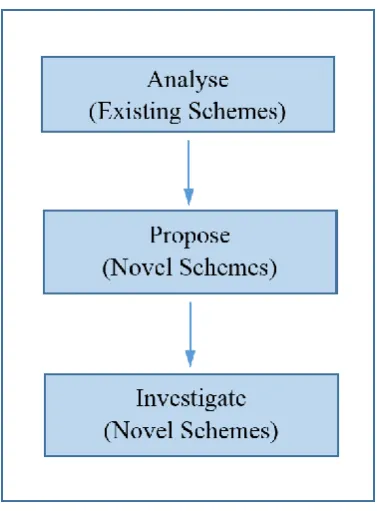
Fig. 1.1: The Research Approach……….……5
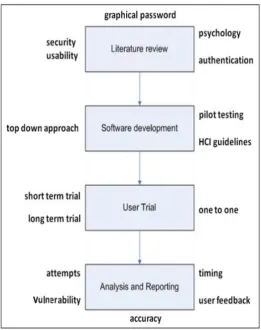
Figure 1.2: Research methodology……….…..6
Figure 1.3: Human memory and information processing ...11
Fig. 2.1: Abstract images (Déjà vu) ………17
Fig. 2.2: Sobrado and Birget schemes: a – Convex hull, b – Movable frame, c – Intersection………..19
Fig. 2.3: Shoulder surfing resistant scheme by Hong et al………..……21.
Fig. 2.4: The Passfaces Scheme………..……22
Fig. 2.5: Theme based graphical technique …...25
Fig. 2.6: The "Draw-a-Secret" (DAS) system……….26
Fig. 2.7: Grid based techniques developed ………..28
Fig. 2.8: The Background DAS (BDAS) scheme……….29
Fig. 2.9: The signature scheme…...29
Fig.2.10: Blonder's scheme ………..31
Fig. 2.11: The Passlogix scheme …...31
Fig. 2.12: The Passpoints scheme by Weidenbeck et al. …...33
Fig. 2.13: Intersection letter for the passwords pair ‘AN’………..….……….35
Fig. 2.14: Authentication grid and associated colour pairs………..………36
Fig. 2.15: The first authentication phase, 4x4 grid and associated colour balls………...……36
Fig. 2.18: Usability and Security…...48
Fig. 2.19: Passfaces scheme: Older vs. Younger Adults………..…53
Fig. 2.20: Random Art Images for Déjà vu………..54
Fig 3.1: Image from a simple model with four properties………...……….58
Fig. 3.2: Basic property based grid (1st login)……….………59
Fig. 3.3: Basic property based grid (2nd login) ……….………..59
Fig. 3.4: Classification of Property based models………61
Fig. 3.5: Grid of a mixed model of colours and patterns. …...62
Fig. 3.6: Image cardinality; (a) High (b) Medium and (c) Low………...………63
Fig. 3.7: Image fragmentation: (a) partly fragmented (b) fully fragmented (c) non-fragmented (d) mixed ……….63
Fig. 3.8: An Integrated Model……….……….64
Fig 3.9: Fill Based Scheme - Sample butterfly model…...65
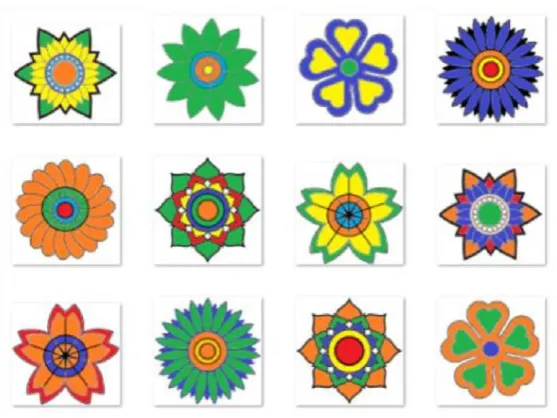
Fig. 3.10: Fill Based Scheme - Sample flower model ……….………65
Fig 3.11: Magnitude based model: (a) Ordered (b) Unordered……….….……..66
Fig. 3.12: System Enhancements: Sample net based model…...67
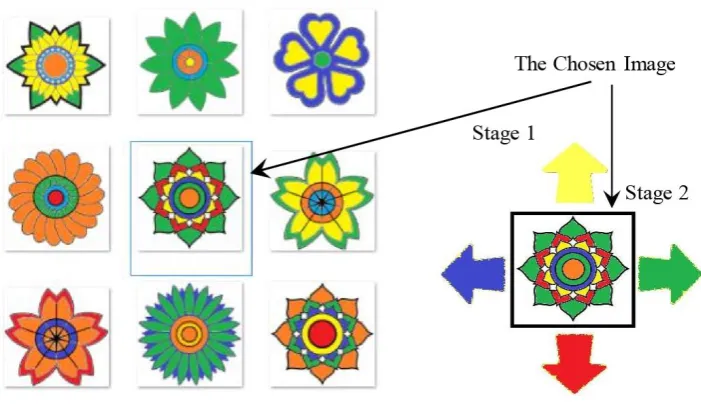
Fig. 3.13: System Enhancements: Sample directional model……….……….68
Fig. 4.2: Login window ……….…….72
Fig. 4.3: Username, grid and steps selection window for new users……….……….…..72
Fig. 4.4: image properties selection window (basic shapes colour) ………….………...73
Fig. 4.5: Registration success message ………73
Fig. 4.8: Image properties selection and preview (basic shapes pattern) ………76
Fig. 4.9: Image selection grid for the pattern model. ………..77
Fig. 4.10: Properties and variants selection window for the mixed model ……….78
Fig. 4.11: Image selection grid for first step in mixed model………..…………79
Fig. 4.12: A preview of properties and variants for butterfly model …………..……….……80
Fig. 4.13: Image selection grid for butterfly model ……….80
Fig. 4.14: Properties and variants selection window for magnitude based model ……….….81
Fig. 4.15: Image selection grid for magnitude model………..………82
Fig. 4.16: Properties and variants selection window for form based model ………..……….83
Fig. 4.17: Image selection grid for form based model………...…….83
Fig. 4.18: Properties and variants selection window for digit based model …...84
Fig. 4.19: Image selection grid for digit based model……….….85
Fig. 4.20: Properties and variants selection window for representation based model …..…..86
Fig. 4.21: Image selection grid for representation based model……….….86
Fig. 4.22: Properties and variants selection window for character based model ………87
Fig. 4.23: Image selection grid for character based model……….……..87
Fig. 4.24: Properties and variants selection window for word based model …………...……88
Fig. 4.25: Image selection grid for word based model…...89
Fig. 5.1 Comparison of mean ranks of models (Experiment 1)…...103
Fig. 5.2: Comparison of mean ranks for authentication models (Experiment 2)...109
Fig 5.3: Comparison of mean ranks for authentication models (Experiment 3)...117
Fig. 6.2: Observation chart for 2 step single login authentication………143
Fig. 6.3: Observation chart for dual logins authentication………144
Fig. 6.4: A comparison of observation fail percent. for 1 step, 2 steps and dual login authentication ………...……….145
Fig. 6.5: Chart for guessability success rate………..………148
Fig. 6.6: Representative chart for single login observational failure rates……… 152
Fig. 6.7: Representative chart for dual login observational test……….153
Fig. 6.8: Chart of Observation Failure Rates for Single and Dual Logins………....……….155
Fig. 6.9: Representative chart guessability due to verbal descriptions………..………158
Fig. 6.10: Representative chart for dual login observational test………...……159
List of Tables
Table 5.1: Dependent variables for usability tests ………...………91
Table 5:2 Statistical data analysis tools ... 94
Table 5.3: User Choice of Grid Size and Step Number for Preliminary Test………..95
Table 5.4: Comparison of mean ranks (Experiment 1) …...102
Table 5.5: Comparison of mean ranks authentication models (Experiment 2) …...109
Table 5.6: Comparison of mean ranks for authentication models (Experiment 3)…...…117
Table 5.7: Data table for login success rates of all models ………...121
Table 6.1: Success and failure rates for 1 step single login authentication………141
Table 6.2: Success and failure rates for 2 step single login authentication………143
Fig. 6.3: Results for dual login observation test ………...……144
Table 6.4: Percentage failure rates for 1 step single, 2 steps single and dual login authentication………. ...145
Table 6.5: Success and failure rates for guessability test………...……148
Table 6.6: Failure rates for single login observation…...152
Table 6.7: Success and failure rates for dual login observation ………....……….153
Table 6.8: Observation Failure Rates for Single and Dual Logins………….……....……….154
Table 6.9: Guessability success rates for verbal description…...157
Table 6.10: Guessability success rates for written descriptions…...159
Table 6.11: Comparing success rates for verbal and written descriptions…...160
Table 7.1: A Usability Comparison of Existing Authentication Systems …...….164
Table 7.4. Authentication systems’ security features and vulnerability ………...171
Table 7.5: Security and Usability Comparisons for Recognition Based Systems ...174
Table 7.6: Critical Usability Analysis of Existing Graphical Systems...184
Abstract
Alphanumeric text and PINs continue to be the dominant authentication methods in spite of the numerous concerns by security researchers of their inability to properly address usability and security flaws and to effectively combine usability and security. These flaws have, however, contributed to the growing research interest in the development and use of graphical authentication systems as alternatives to text based systems. Graphical passwords or graphical authentication systems are password systems that use images rather than characters or numbers in user authentication. The picture superiority effect, a belief that humans are better able to memorise images than text, has very much influenced the proliferation of and support for graphical authentication systems.
In spite of their growing acceptance, however, empirical studies have shown that graphical authentication systems have also inherited some of the flaws of text based passwords. These flaws include predictability, vulnerability to observational attacks and the inability of systems to efficiently combine security with usability. Hence there is a continued quest among usable security researchers to find that hypothetical system that has both strong usability and strong security.
In this research, a novel concept for hybrid graphical authentication systems is developed. This consists of a class of systems that are called ‘property based authentication systems’ which adopt the use of image properties for user authentication, rather than specific images as used in existing systems. Image properties are specified contents of images which gives the image a set of characteristics. Several implementations of these systems have been developed and evaluated. Significant empirical performance studies have been conducted to evaluate these systems in terms of usability and security. The usability evaluations conducted evaluate the systems in terms effectiveness, efficiency and user satisfaction, while security evaluations measure their susceptibility to common attacks. The results from these studies suggests that property based systems have better usability and security when compared to commonly known and well researched graphical authentication systems.
Chapter One - Introduction
1.1 Introduction
Human Computer Interaction (HCI) is that branch of computer science involved with the study of how computing systems can best be designed to the satisfaction of human users. HCI thus encourages what is often termed as a "Human centred" approach to systems design and development [1,2]. HCI emerged in the early 1980s and has brought together professionals from diverse fields and aggregated many semi-autonomous areas of research in human centred computing [3]. Usable security is a branch of computer system security and human computer interaction that studies the role of human factors in system security. This is particularly important as humans are often considered the weakest link in the system security chain due to vulnerabilities infused by human attributes. According to Patrick, et al. [4], there are three main areas in which human computer interaction is most important. These areas are: (1) authentication, (2) security operations, and (3) the development of secure systems. The focus of this research is in the area of authentication which is the act of allowing system access to legitimate users and denying same to illegitimate users, and is a vibrant field open to ongoing research. Several authentication systems have been developed and evaluated [4]. Biometric systems use human traits and physical characteristics for user authentication, token based systems use hardware tokens and smart cards, while knowledge based systems make use of some secret information only known to the legitimate user in user authentication. Each of these systems has its inherent problems [4].
activities previously undertaken on locations previously identified. Research shows recall based systems to be more secure, and recognition based systems to be more usable [12].
This research focuses on a system that combines recall and recognition, in which properties are assigned to images and used in user authentication instead of subsets of large image sets as used in existing recognition based systems. Properties are like cloths on a human, they do not tell you who a person is, but what he is putting on. When sales or students representatives are asked to meet potential clients or new students at train stations or airports, the clients or new students normally do not know the person they will meet and may only recognise the person through some sort of ‘uniform’. In traditional recognition based graphical authentication systems, specific images are selected and used for authentication. In property based systems, a set of ‘contents’ or ‘characteristics’ are defined for an image set and are designated as properties that are used in a user’s authentication process. During authentication, any image bearing that ‘property’ is selected as the authentication or pass image. In this research, a number of prototypes of systems representing the various implementations of this concept have been developed and the underlying usability and security issues and ideas investigated. Based on the prototypes’ simplicity in use and understanding, as well as their strong security, it is believed that this novel system effectively mitigates current usability and security contention in existing systems through combining the strengths of recognition and recall. The work is aimed at establishing the following:
o The strengths and weaknesses of existing graphical authentication systems.
o The feasibility and applicability of the use of image properties in graphical user authentication.
o The ability of the system to provide better security and usability as compared to existing graphical authentication systems.
o The ability of the system to mutually combine strong usability and strong security in one system.
o An understanding of the various possible implementation of this concept.
o An evaluation of the strengths and weaknesses of various implementations of this system. o An understanding of underlying issues that may be brought forward in the course of the
research.
1.2 Aim and Objectives of Research
The aim of the research is to develop a more efficient hybrid graphical authentication technique that utilizes both recognition and recall as an effective means of combining usability and security as well as to build a concise conceptual model of the system. This aim shall be achieved through the following objectives:
1. To investigate usability and security issues in relation to currently developed (existing) graphical authentication systems.
2. To develop an alternative novel system towards improving usability and security.
3. To identify the various possible approaches towards the implementation of the new system. 4. To empirically evaluate the performances of the new system.
5. To evaluate novel ideas developed in the course of objective 2 so as to determine their effects on system performance
6. To develop a concise conceptual model for the implementation of the system.
1.3 Research Question
Graphical (picture based) authentication has been proposed as an alternative to conventional (text based) authentication systems (passwords and PINs) due to their vulnerabilities. These vulnerabilities include predictability and observability (especially shoulder surfing). Shoulder surfing is the tendency that a keen observer is able to acquire a user’s password by simply looking over his shoulder during password entry. Several graphical authentication models have been implemented and tested. In spite of their promise in addressing the security and usability challenges of text based passwords, they also inherit some of their vulnerabilities. Most graphical passwords have predictable patterns and are prone to observational attacks. They have also failed in merging the required usability with the required security. The quest for a system that is both highly usable and highly secure has remained elusive.
“Can images, assigned properties and associated variants, be used in user authentication as
hybrid graphical authentication systems to effectively combine usability and security?”
1.4 Motivation for the Research
Graphical authentication systems are a new form of authentication systems introduced to mitigate the usability and security challenges associated with the use of alphanumeric texts. These challenges include usability issues such as memorability and ease of use, and security issues such as predictability and observability. Although many graphical authentication systems attempt to address some of these issues, none has been able to effectively combine usability with security. Secure systems have mostly not been usable and usable systems have not been secure [14]. The quest to find a system that is both usable and secure has remained elusive. This research aims at providing the long awaited solution to the security/usability contention problem in graphical authentication systems through a novel scheme that has never been considered previously in usability and security research. The motivation for the research work and the proposed approach have been driven by the following:
➢ To develop and test novel systems that are both usable and secure and that could be usable across all system user groups.
➢ To develop authentication systems that are efficiently applicable across small and large computing devices.
➢ To develop a graphical system that can help tackle the growing trend of online and offline electronic data theft.
➢ To present and investigate a new concept that will form the foundation for new and continued research.
1.5 Research Approach and Methodology
implementation of the various models of the proposed graphical authentication model. The third step deals with a detailed analysis and evaluation of the proposed authentication model. This is capped with a comprehensive report on the research findings.
Fig. 1.1: The Research Approach
For each of the research studies, software prototypes have been developed to reflect the underlying concept of the proposed model and the purpose of the study. The methodology is presented in figure 1.2, a modification of the methodology in [15, 16, 17, 18, 19]. All system prototypes are first subjected to a preliminary tests before extensive user trials. These tests help identify inconsistencies in system design as well as provide a glimpse into user observations and opinions. Although the research suggests both long term and short term usability trials for each of the proposed models so as to more efficiently analyse system performance, as well as user choice and satisfaction, due to the rigour and timing demands for longitudinal (long term) trials, only a number of prototypes are tested in the long term user studies. Hence participants were mostly tested for short term recognition and recall. In order to reflect a mixed user population in a one-to-one user study, the participants are drawn from the university community (mainly students) obtained through open call for volunteers.
studies are based on the three elements of success rate, timing and user feedback. The success rate indicates the number of login success or failure of participants as they try to authenticate, the timing reflects the amount of time taken by a participant in both the registration and authentication phases of the various user sessions, while the user feedback provides quantitative or qualitative feedback on user choices and perceptions on system use and performance through research questionnaires. The security evaluations were designed to analyse the vulnerability of the various system implementations to observational attacks, guessing attacks as well as vulnerability to verbal and written descriptions. The metrics for all security evaluations are based on the number of successful login attempts.
Fig. 1.2: Research methodology
1.6 Contributions to Knowledge
bridging this gap has remained almost impossible [20]. Moreover, some security challenges, such as shoulder surfing, have become a recurring problem in graphical authentication.
This work is aimed at the development and evaluation a novel system that integrates the recognition and recall based concepts in order to harness the benefits of both systems. From the literature studied in the course of this work, no research has been uncovered that has exploited the tendency for user authentication based on the use of characteristics of images (properties) instead of a selected subset of images that has been used consistently in the design of existing systems. Software prototypes of several models have been developed and evaluated. Hence, this novel method is believed to be as close to the "ideal" authentication system as possible. According to [21], "an ideal authentication system should provide strong security while maintaining high usability". Hence, an ideal system should be able eliminate the usability/security contention that has constituted a major challenge in the design of authentication systems. Specifically, there are ten (10) significant contributions to the body of academic knowledge that have been achieved from this research:
1. Property based systems combine recognition and recall in a picture style grid based presentation. Since it is assumed that recall based systems are more secure, while recognition based systems are more usable, a system that can effectively combine them will guarantee good usability as well as good security. This ensures that the system provides better usability and security than other grid based schemes such as the passfaces scheme or the déjà vu scheme that are purely recognition based.
2. Property based authentication sees the introduction of a new authentication factor that has not been discovered and used in previous studies. Authentication factors play a significant role, if not the most significant, in ensuring the usability and security of authentication systems.
4. Through the concept of property based authentication, a new class of authentication systems is born with numerous implementation and design options. This multiplicity of design options provides users with a multiplicity of choices. For these studies, a variety of designs were implemented, and system users had many models to choose from. No authentication model is known to provide as much freedom of choice. In most existing systems, a user only has a single system or design to work with.
5. Property based systems offer flexibility. All existing graphical authentication systems are rigid. That is, there is normally a fixed grid size and a fixed number of authentication steps. In property based systems, however, the size of the authentication grid as well as the number of authentication steps are appropriately selected by the user.
6. The system is highly adaptable. Unlike in the implementation of existing systems, every implementation of the property based concept could be redesigned to accommodate more properties. In doing this, the complexity of the system is increased with a proportional increase in the security of the system without compromise to the system’s usability.
7. One important issue that has hindered the development of graphical passwords is the issue of image selection. This is an issue which many systems, even commercialized systems such as the passfaces scheme have to contend with. System supplied images are more secure, while user chosen images are more usable. The tradeoff between that two has remained a topic of discussion. In property based systems, however, a user selects his ‘properties’ during registration, but the system supplies the images for authentication, thus eliminating the contention between user-chosen and system-supplied images.
8. Novel concepts and ideas have been developed and evaluated as part of this work alongside and apart from basic research into the various subdivisions of property based systems. Ideas such as the mixing of models, property based ordering and organised image selection styles have all been implemented and investigated in the course of the research work. 9. The development of this novel approach to user authentication is one of the contributions
to knowledge as presented in chapter three.
1.7 Cognitive Theories and Information Retrieval
One of the most important issues relating to the development and use of authentication systems is the ability of users to use and retain passwords over long periods of time. Hence there is a very close relationship between the design of authentication systems and how they are stored in and subsequently retrieved from user memory. Recognition and recall are the main design concepts in authentication systems and also determine the way information is both stored and retrieved.
1.7.1 Basic Components of Human Memory
To understand the ideas of recognition and recall, one also has to understand the underlying psychological principles governing human memory. Several models have been proposed to depict the relationship between memory structure and processes and how they interrelate. A model proposed by [22] is discussed in this section. To better understand the workings of the system, the following definitions need to be understood:
Sensory Register: Information collected by various sensory organs from the external environment are stored in the sensory register. The information stays there for a very short time.
Short-term memory (STM): If the individual is paying attention when the information is obtained, then the information is transferred from the sensory memory to the STM. The STM holds the information as memory codes, that is, mental representations of the selected parts of the information.
Long term memory (LTM): Through rehearsals and other control processes from the user, information contained in the short term memory is transferred to the long term memory where it is further processed and encoded. The encoding is, however, most effective if the information can be attributed to something meaningful.
Control processes: Control processes are those processes that are undertaken by the user. These processes help encode information into the registers. The ability to store and retrieve a piece of information depends on the particular encoding. A superior encoding helps to remember and retrieve processed information easily over extended periods of time. Encoded information is retained by the long term memory as it is rehearsed and practiced over long periods of time.
1.7.2 Human Memory and Information Processing
sensory register, the short term memory, the long term memory and the processes that pass information between these components. To aid in the understanding of the workings of the system, a diagrammatic representation of the model is presented in fig. 1.3.
When and external sensory stimulus is received, there is an immediate registration of the stimulus within the appropriate sensory dimensions. This registration is particularly significant in terms of a visual stimulus (as is the case with authentication systems) as it is understood to form a distinct component of memory unlike the registration of other forms of external stimulus.
The second basic component of the system is the short term memory which is also referred to as a person’s working memory. Information in the short term memory may decay and eventually get lost completely. This memory loss is, however, much slower than the one that takes place in the sensory register. The duration of him within which information is retained in the short term register is independent of the information source. It is, however, dependent on the type of memory process invoked upon by the user. If the user engages in rehearsal process, information in the short term memory takes longer to be lost.
The third and last major component of the system is the long term memory. Information stored in the long term memory does not decay or get lost in a similar way like as does in the sensory register or the short term memory. All information is eventually lost in the sensory register and short term memory, but information in the long term register is relatively permanent.
The process by which information flows or is being transferred from one memory component to another is entirely dependent of the system user who generates the processes. During such transfers, part of the information in the memory is copied into the memory to which it needs to be transferred without deleting it from the memory from which it is transferred. It remains in the memory from which it is transferred and decays according to the characteristics of the memory component.
in the long term memory is gradually lost due to interference with other information learned. The phenomenon is part of a concept known as interference theory.
Fig. 1.3: Human memory and information processing [22].
1.7.3 Password Memorability Problem
1.7 Thesis Structure
The report presents a comprehensive study of a novel hybrid graphical authentication algorithm that is able to combine usability and security in graphical authentication through the association of images with properties and using the properties as means of user identification rather than specific images as used in existing systems.
The first chapter (the introduction) provides a generalized overview of the research study. It gives a statement of the research problem, the motivation for the research, the research question, the research aim and objectives, as well as the research methodology and its contributions to existing body of knowledge.
Chapter Two (literature review) provides a review related literature. In this chapter, a number of existing recall and recognition based graphical authentication systems are discussed and their usability and security strengths and weakness analysed based on data from available literature. The chapter also explains the significance of predictability and shoulder surfing as significant security issues in the design and implementation of authentication systems.
Chapter Three provides a conceptual overview of the property based graphical authentication approach. It provides simplistic explanation of the idea of image properties and their corresponding variants, the classification of property based schemes and models, as well as underlying concepts, ideas and terminologies.
Chapter Four (operational procedures for property based authentication systems) provides detailed explanation on the metrics used in the security and usability evaluation of property based authentication models. It also provides details of the design and operational procedures of the various system prototypes used in the conduct of the research work.
Chapter Six, as Chapter Five, provides details of the experimental design, procedures and results of all security experiments conducted in the research. This includes results for various vulnerability tests conducted as part of the security evaluation of the various prototypes used in the research Chapter Seven provides discussion of comparative usability and security evaluations in relation to existing graphical authentication systems. The existing systems include representative models from the recognition based, recall based and cued recall based systems compared to the performance of a fill based property based model.
Chapter Two – Literature Review
SECTION I – Review of Existing Authentication Systems
2.1 Introduction
This chapter provides a literature based review on the evolution and evaluation of existing authentication systems. The chapter is divided into the two sections. The first section provides a general overview of the developmental trends in the design and proliferation of authentication systems focusing on the security and usability issues in relation to these systems. The section also looks more closely into some of the most common user-related security issues which include guessability, shoulder surfing (observability) and vulnerability to description that have all been investigated in the course of this work. The second section takes a closer examination of three of the existing graphical authentication systems; the passpoints scheme, the passfaces scheme and déjà vu, a system that uses pictures and random art (abstract) images. Random art (abstract) images are coloured computer generated images that do not have a definite form. The section provides insight into important research finding related to the usability and security of these systems.
2.2 Overview of Existing Authentication Methods
In the literature, authentication methods have been developed and classified based on what is required of a systems user in the process of authentication. These methods include:
Something you have (Token based authentication) [26,27] Something you are (Biometric authentication)
Something you know (Knowledge based authentication)
Token based authentication involves the use of additional devices such as key fobs, bank cards and tokens provided to the user for the process of authentication. Token based systems, such as in ATM machines, however, are often combined with a knowledge based component.
with biometric systems include ‘spoof attacks’ [28] and ‘template database leakage’ [29]. They also mostly require the attachment of additional components to traditional computing systems and handheld devices, which are often very expensive.
The most widely used systems today are knowledge based systems which utilise something known only to the user for authentication. The most common of these techniques is the text based system that uses alphanumeric text and numeric PINs [30, 31, 32]. Considerable research has been conducted on the usage and performance of text based passwords including that on people’s attitudes towards the selection of passwords, the strength and memorability of user chosen passwords, the number of passwords users have, as well as the use of passwords by corporations [30]. Graphical passwords were developed as an alternative to text based systems and are subdivided into recognition based, recall based and cued recall based systems [33, 34].
2.3 Overview of Recognition Based Systems
Recognition based graphical authentication systems are graphical systems that depend on the user's ability to recognise images that he had selected earlier from a large collection of images. In each round of authentication, the user is presented with many images from which he is expected to recognise and correctly select the images that represent his chosen password.
art and photo based schemes. In spite of the improved memorability, a usability issue with the déjà vu system is that the seeds of each of the algorithms had to be stored separately to ensure that the exact image could be reproduced in the future. Another basic flaw of this work is the very low sample size. An improved version of this scheme was developed in [36]. Their Image Based Registration and Authentication System (IBRAS) used a function called a SHA-1 harsh function. It was more secure and used less memory than the earlier version. Although similar in their storage of initial seeds, the main difference between the implementation of the IBRAS and the déjà vu system is that in the IBRAS, a user chooses and uses a single graphical authentication image. Although the déjà vu scheme performed well with its use of abstract images, researchers believe it is easier to remember images that have some meaning attached to them [33].
In order to compare with other recognition based systems, the researchers detailed a number of experiments to compare the usability of the passfaces, déjà vu and the VIP schemes with alphanumeric PINs and passwords. The VIP scheme is a graphical PIN authentication system that is meant for use with both a PIN and an ATM card. The researchers discovered that although déjà vu compared better to the alphanumeric PINs and passwords in terms of memorability, the efficiency of déjà vu was lower due to the longer times it took to authenticate. Weinshall and Kirkpatrick proposed a number of graphical schemes in [35]. Their methods used picture, object and pseudo word recognition schemes with a considerably large number of images. With the aid of prototypes, they ran user trials that lasted for three months. They realized that for the picture based model three aspects of their procedure made the largest influence on the accuracy and retention. These were: choosing picture groups with a clear theme but individual distinctions, the number of training sessions, and the frequency of testing. Overall, the systems had good memorability as users could recognise their chosen images even after several weeks. The picture based implementation, however, proved to be more effective than the others. While the pseudo-word model had a 70% success rate at the end of the three months period, the picture based model recorded about 90%.
Fig. 2.1: Abstract images (Déjà vu)
with any other two of the user’s chosen images to authenticate. The researchers also introduced a third scheme in which the a user had to locate any four of his chosen images and then click on the point of intersection of invisible lines joining the images placed at the opposite vertices of the quadrilateral formed by the four images. No details of experimentation with these schemes has been reported in the literature. To decrease guessability, the researchers suggested the use of thousands of images. According to the researchers, the number of possible passwords is a “Binomial Coefficient” (𝑁𝐾) (choose any K object among N). Hence when N = 100 and K = 10, the number of possible passwords becomes (100010 ) ≈ 2.6 ∗ 1023, which is a little more than the number of alphanumeric passwords of length 15. However, a large number of images on a small computer screen makes the screen highly compacted thereby creating usability issues. In fact researchers in [43] discussed two significant drawbacks of this scheme. The first was a technical drawback in which the researchers developed a system prototype using 1000 icons as suggested in [40]. However due to the size of a standard computer screen, it became impossible to distinguish one icon from the other. The second drawback was a “theoretical complication”. Let K denote the number of user chosen pass-images, N the total number of images displayed on the screen and h the number of authentication screens for an authentication round. They argued that 10 pass icons (K) were suggested on [40] and that from a theoretical assumption: “There is a constant c > 1,
which depends only on the size of the screen used such that the probability of the center of the
screen being in the convex hull of the K randomly placed pass-objects is greater than 1 - 1
𝐶𝑘−1 “.
This meant that if K objects are randomly placed on computer screen, an attacker can play a wait-and-hunt. For each image (screen), the attacker may just click in the center of the screen and the probability of a successful login is q = (1 - 1
𝐶𝑘−1 )
h. For a standard sized screen, c ≈ 1.5, and thus,
Fig. 2.2: Sobrado and Birget schemes [40]: a – Convex hull, b – Movable frame, c – Intersection. An algorithm for filtering distractor (doodle) images was suggested in [42]. The algorithm was used to filter out images due to their similarities based on the number of black and white regions as well as the number of joints possessed by each image. The aim of the algorithm was to identify similarities in distractor images to be presented as decoy images in the course of authentication. The assurance that simple doodle distractor images do not possess obvious similarities with the users pass images improves usability by reducing user input errors.
non-pass objects such that during authentication the user can select any of the various perturbations (or variants) of his chosen images. A monitor’s screen can be viewed as a rectangle with width a, and height b. Each scene is displayed on such a screen. For each scene, WIW renders two small icons of eye shape at (𝑎
3, 𝑏 2) and (
2𝑎 3 ,
𝑏
2), respectively. These icons are designated as the left and the right eye. In the process of authentication, as the pass and non-pass objects are shuffled across each scene, the user has to relate the position of each of the designated eyes to the various positions of his pass objects within the scene. Although a prototype of the system was developed and experimentation was performed using a number of research participants, the methodology adopted for the experiment as well as the details of its results were not provided in the paper.
Fig. 2.3: Shoulder surfing resistant scheme by Hong et al. [44]
Fig. 2.4: The Passfaces Scheme [45]
Studies into the effectiveness of the passfaces scheme conducted by [46, 47] indicated that passfaces could easily be remembered even after a prolonged period of time. One of these was a within user study conducted by T. Valentine [46] involving 77 staff and students of Goldsmith’s College to test the memorability of the passfaces scheme. All participants used the passfaces scheme to test 3 conditions. For the first condition, 29 participants were asked to login to the system every working day for a period of 2 weeks. The participants remembered their passwords in 99.98% of logins. The second condition used 29 participants to login after about 7 days of initial enrolment. Most (83%) of the participants were able to login on their first attempt. Everyone was, however, able to login on the third attempt. For the third condition, 19 participants were asked to login once after about 30 days of initial enrolment. In this condition too, 84% of participants were able to login on their first attempt, while all others were able to login by their third attempts. The passfaces scheme is also believed to withstand long term recall as the study participants were asked to login to the systems after more than five months of their last use [47]. While 56 participants were able to participate in the follow up trial, 72% were able to login on their first attempt and 84% by the third attempt. It was also reported that the participants that used the everyday login condition could remember their passwords the best, with 87% remembering the passwords in the first attempt and 100% remembering them in the third attempt.
of 22 Standard dev. = 7 that conducted lab based trials during a computer science practical sessions. Five face grids were provided for each test condition out of which each participant was expected to identify a target face among decoy images assembled based on the criteria for the test condition in a within users study. A group of 18 contributors (9 males and 9 females) were recruited for the decoy image selection process. The results indicated that of all the 158 login attempts collectively made in the entirety of the experiment, only 13 (8%) were successful. That is, only 8% identified all five target face images in the five face grids of any particular test condition. The random groups had the highest login success rate and the verbal groups had the lowest. The average login success (out of 5) for the random groups was 3.57 (standard deviation = 0.91), for the visual groups was 2.87 (standard deviation = 1.07). The mean variation was statistically significant (t=3.63 p< 0.0). The average login success rate for the verbal group condition was 2.81 (standard deviation = 1.14). The mean variation between the verbal and he random conditions was also statistically significant (t=3.64 p < 0.01). The study concluded that passfaces could effectively be described and suggested the presentation of similar faces in a grid as an effective way of reducing facial disparity, and hence description. It is observed in [41] that keyboard entry was a better alternative in the implementation of the passfaces scheme in a study that compared the security of keyboard based versus mouse based data entry in the passfaces scheme.
needs to recognise the images he had submitted among other decoy images. If none of the user’s images are presented on the screen, the user selects nothing. The idea of an online registration for every image submitted by the user as well as the use of image notifications as provided by the system greatly improve security. No experimental or design details were, however, reported for the system. Submitting one's own images greatly improves memorability, but also makes it easier for an intruder who knows the user to easily guess the password [48, 55], a great setback on security.
Fig. 2.5: Theme based graphical technique
2.4 Overview of Recall Based Systems
Recall based systems are systems in which a user performs a series of actions during registration and is expected to repeat the actions, in the same order, during each authentication round. They are mainly divided into two subgroups: (1) Pure recall based systems (2) Cued recall based systems.
2.4.1 Pure Recall Based Systems
A technique called Draw a Secret (or DAS) was proposed by Jermyn et al [56] which allowed users to draw their own pass images on a 2D grid using a touch sensitive screen. The coordinates of the drawn image on the grid are stored on the system in the order in which the drawing occurred. The user has to repeat the drawing in exactly the same order each time he wants to authenticate. The password space for the DAS system is larger than the text password space. Another advantage of the DAS scheme is that since it is independent of any alphanumeric strings, it can well be used by speakers of any language.
Fig. 2.6: The "Draw-a-Secret" (DAS) system by Jermyn, et al. [56]
first five minutes (96% and 100%), the recall rates were same at the end of the first week (95% for both). The study also indicated that the complexity of the passwords selected by the BDAS users was significantly higher than that for the DAS users with t-test indicating t=2.78 p < 0.01. In spite of the increased complexity and length of the BDAS passwords over the DAS passwords, user performances in both systems were similar. Hence the researchers concluded that in spite of its apparent increased complexity, the implementation of BDAS helped improve the memorability of DAS passwords.
Fig. 2.7: Grid based techniques developed by Thorpe and Van Oorschot [58]
Goldberg et al [60] proposed the passdoodle technique in which the user produces a small design or text on a touch screen. The researchers used a between-user design with 13 participants using paper prototypes to investigate the viability of the passdoodle scheme in user authentication through an understanding of the memorability and user preferences in comparing the passdoodle scheme to alphanumeric passwords. The study was divided into two login sessions one week apart to create and recall a username and one alphanumeric and one doodle password. Their studies observed that users could accurately remember how they drew complete graphical images, yet mostly forget the sequence in which the various components of the image were initially produced. Hence the researchers observed that if the restriction of ordered login is removed for subsequent implementations of the passdoodle scheme, it will greatly enhance the usability and memorability of the system.
at understanding if predictable patterns will appear in the implementation of the DAS password scheme, the researchers discovered that approximately 45% of the users chose symmetric passwords, 2/3 of which were mirror symmetric (reflective). Approximately 80% of users chose passwords composed of 1-3 strokes, 10% chose passwords composed of 4-6 strokes, and 10% of the users chose 6 or more strokes. With regards to the centering of passwords within grids, 56% of the passwords were centered, an additional 30% more were approximately centered, that is, centered on a set of cells adjacent to the central grid lines.
Fig. 2.8: The Background DAS (BDAS) scheme [59]
Fig. 2.9: The signature scheme
to memorize their signatures. Users could also replicate their signatures with almost exact precision. To understand the distinguishing factors between user and imposter signatures, the researchers developed a set of signature writing parameters such as number of signature points, coordinates of points, signature writing time, velocity and acceleration and used these parameters against user and imposter signatures. The greatest variation was observed in the use of the acceleration parameter. This was then used in the experiments to differentiate user and imposter signatures. The researchers evaluated the system using two experiments; one with a static signature database in which signature data is registered into the system and kept in the system’s database during the registration phase. The data is kept and used for user authentication until a new copy of the signature data is again registered onto the system and used to replace previous data. It was however discovered by the researchers that users become more efficient in the use of the scheme as the number of authentication cycles increased. The signatures became more accurate and took less time to write. Hence, in the second experiment, the researchers used a dynamic database in which the signature data in the system’s database was changed occasionally and automatically by new signatures written by the users. In the static DB experiment, the successful verification rate was 91%, while the successful rejection rate was 92%, while in the dynamic DB experiment, the successful verification rate was 93% and the successful rejection rate was 96%. The signature scheme, however, needed proficiency with the stylus as well as the need for additional devices. Moreover, some tolerance threshold had to be set as the password is captured. This allows for better usability, while compromising security.
2.4.2 Cued Recall Based Systems
Fig.2.10: Blonder's scheme
Passlogix [64] developed a scheme based on repetitive actions (fig. 2.11) which a user had to choose such as preparing a meal or picking of cards as his password. Researchers have also proposed the variation of grid sizes [65] for grid based systems during each authentication round. Through a web based prototype, the researchers reported that the system was 92% resistant to shoulder surfing attacks. No details of experimentation and or analysis were, however, reported. It was also reported in [66] that Microsoft proposed a graphical scheme in which users click on predefined areas on an image to register and authenticate. The details of the system was not, however, published.
Fig. 2.11: The Passlogix scheme
scheme. Further studies conducted in [69] showed that click-based graphical passwords had better security than text passwords, although user training may also take longer. The problem of hotspots in picture based passwords was studied in [72]. The aim of the study was to explore popular points (hotspots) in click based passwords and examine the strategies to predict and exploit them in guessing attacks. The researchers reported both short-term and long-term studies. The first was lab controlled test 43 participants and 17 diverse images and the second was a field trial involving 223 user accounts. The research discovered that hotspots existed in varying degrees from one image to another. The researchers explored the use of ‘human computation’ to predict hotspots from images and to generate two ‘human seeded’ attacks. The first was based on a first-order Markov model while the second was based on an independent probability model. Within 100 guesses, the first-order Markov model based attack reveals 4% of passwords in one image’s data set and 10% of passwords in a second image’s data set. The independent model based attack reveals 20% of passwords within 233 guesses in one image’s data set and 36% passwords within 231 guesses in a second image’s data set. The researchers also evaluated the first-order Markov model based attack with cross-validation of the field study data, which revealed an average of 7-10% of user passwords within 3 guesses. The research concluded that all click based graphical passwords were predictable and hence vulnerable to online and offline attacks.
Fig. 2.12: The Passpoints scheme by Weidenbeck et al.
was incorporated into a number of graphical systems. In [73], a between-users retention test was conducted for multiple passwords for a control group (Group 0) using PIN based password entry, a graphical password group (Group 1), a group with graphical passwords with signature color background for graphical images to augment memorability (Group 2), a group with graphical passwords with mnemonic strategy to augment memorability (Group 3) and a groups with graphical passwords with mnemonic strategy and colour background to augment memorability (Group 4) where each participant was randomly allocated one of the groups. The study was conducted over a period of four weeks and each participant was allocated 5 passwords. A total of 172 participants participated in the user study. Due to the high dropout rate, however, only 61 participants completed the study. The dropout rate was highest in group 0 in which some participants thought it was impossible to retain multiple PIN based passwords over a relatively long period of time. Their study results proved the superiority of retention of multiple graphical passwords over multiple PINs and that mnemonics could aid even the recall of multiple graphical passwords. The use of mnemonics and degraded images in a recognition based system was also studied in [74]. This scheme, which borrowed its ideas from the story scheme, used a trace line across both the user’s pass-images and the distractor images, to safeguard against the shoulder-surfing problem. In a between-user study with 20 participants (10 males and 10 females) with an age range of 20 to 30 years, the researchers compared the new scheme called CDS (meaning “Come from DAS and Story” scheme), with the story scheme in two login sessions, an initial session and a follow up session one week later. The mean password creation time was 42.9 seconds for the story scheme and 49.5 seconds for the CDS scheme. The mean login time was 9.2 seconds for the story scheme in the first session and 23.1 seconds in the second session, while it was 13.7 seconds for the CDS scheme in the first session and 19.8 seconds in the second session. The success rate for the CDS was 80% as compared to 60% for the story scheme. A comparison of the new scheme with the story scheme in terms of observational attacks, was, however, not conducted in the research.
2.5 Hybrid Authentication Schemes
A number of hybrid authentication systems have also been developed. These are systems that combine the elements of recall and recognition based authentication systems or text and graphical authentication systems in order to benefit from the usability and security advantages of both systems [76, 77]. A hybrid system for the generation of session based passwords was presented in [76] and [78], and extended in [79]. The system combines graphical and text based authentication schemes, and during registration, a user needs to select both a graphical and a text based password. To authenticate, the user has to correctly enter both the graphical and text based passwords. Two implementations of the system were proposed. In the first implementation, the user is presented with a text grid (figure 2.13) from which he chooses his password from an intersection of the various rows and columns of the grid which represent his password, while the second implementation suggested the ranking of colours, both of which the user has to remember accurately. The mixing of upper and lower case letters and augmentation with special characters was suggested for the text-based password. The registration phase for this model is presented in figure 2.14. Although the system is believed to be resistant to most common password security attacks, there is high likelihood that the system will suffer from usability issues. A usability evaluation has, however, not been conducted.
Fig. 2.14: Authentication grid and associated colour pairs [76]
Another hybrid graphical scheme is presented in [77] which incorporates a recognition based scheme with dynamic graphics. In this scheme, during the registration process, a user is presented with a 4x4 grid of images from which he selects his chosen password images. Below each image, however, is a random three digit number, and at the bottom of the image grid is a text box. On selecting an image, the user needs to enter the three digit code for his chosen image in the text box. At the end of the selection of all password images, the textbox contains a string of digits which represent the user’s password that is saved by the system. The user thus has to remember the exact order in which the password images were chosen.
The authentication phase for this system is divided into two phases for each of the chosen password images. In the first phase, the user is presented with a 4x4 grid (fig. 2.15) to select his password images. Associated with each of the images and below each image is, however, a colour ball. The user has to both recognise each of his chosen images in the grid as well as remember their associated colour balls. The colour balls associated with each image are randomly assigned per session. In the second authentication phase (fig. 2.16), the user is presented with a 16x1 grid also with a colour ball associated with each of the images. The colour ball associated with each image in this grid is, however, randomly reassigned according to a specific timeframe. The user has to recognise his first selected image and its associated colour ball in phase one and click on this image in phase two only at the time when the colour ball bears the same colour as that associated with it in phase one. The user then repeats phase two for all of his remaining images.
Fig. 2.16: The second authentication phase, 16x1 grid and associated colour balls