SOLVING NON LINEAR SYSTEMS BY
NEWTON'S METHOD USING
SPREADSHEET EXCEL
TAY KIM GAIK
ROSMILA ABDUL KAHAR
KEK SIE LONG
3
r dINTERNATIONALCONFERENCE ON SCIENCE
AND MATHEMATICS EDUCATION
10-12 NOVEMBER 2009
S O L V I N G N O N - L I N E A R S Y S T E M S B Y N E W T O N ' S M E T H O D USING
S P R E A D S H E E T E X C E L
Tay Kim Gaik Kek Sie Long
Universiti Tun Hussein Onn Malaysia Universiti Tun Hussein Onn Malaysia
<[email protected]> <[email protected]> Rosmila Abdul-Kahar
Universiti Tun Hussein Onn Malaysia <[email protected]>
Abstract
Tay (2006) had proposed solving numerical methods using the Casio fx-570MS calculator to overcome the tediousness of doing recursive calculations. Here, we present another alternative, that is solving a non-linear system using Newton's method in Microsoft Office Excel. For this, we just make use of the MULT function to do matrix multiplication and MINVERSE function to do the matrix inverse operation. The concept presented here can be developed into a solver where the user just needs to input the initial vector X, the corresponding formula of Jacobian matrix J(x, y) and non-linear system vector F(x, y) The full solutions will be displayed automatically. The solver is easy and user friendly for students and educator who needs its full solutions quickly.
Introduction
Many real-life problems are linear. A couple of linear equations form a system of non-linear equations. Systems of non-non-linear equations can be solved numerically by Newton's method, fixed-point iteration method. Solving a system of non-linear equations by Newton's method is tedious. Tay (2006) proposed a step by step instruction on how to use Casio fx-570MS in Numerical methods, while Guerreri-Garcia and Santos-Polomo (2008) presented a collection of keystroke sequences helping in solving numerical methods. Tay and Kek (2008) developed a solver to solve the most dominant eigenvalue by the power method through Microsoft Office Excel. On the other hand, Kek and Tay (2008) developed a solver to solve system of linear equations using Excel too. None of the literature works dealt with a system of non-linear equations. Hence, in this paper, we have developed a solver for solving system of non-linear equations by using Newton's method through Excel 2003.
Newton's Method
Given the continuous functions
f(x,y) = 0, g(x,y) = 0.
we would like to find the values x = x and y = y such that f(x*,y') = 0 and g(x*,y*) = 0.
Assume that an initial approximate solution to equation (1) is known as (x.,yt) . Express f(x,y)
and g(x,y) in two-variables Taylor series about (x,,.y,), we get
f{xM ,yM) = f(xl,yl) + —f(xt, y )(xM-xi) + — f(x, ,y,)(yM-y,) + ... = 0,
ox dy
g(xM,yl+l) = g(xl,yl) + — g(xl,y,-xt) + — g(x,,y)(yM -y,.) + ... = 0
ox oy
f(xM,yM) — 0 and g ( x ,+ ],yi + l) = 0 because will be the roots. Truncating Eq. (2) after the first
derivatives terms and rearranging yields
-fix, ,y) = — fix,, yt) Ax,. + — /(*,., y, )Ay,,
ox oy
5 5
-g(x, ,y,) = — g(x, ,y,)Ax,+ — g(x,, yt )Ay,,
ox oy
where Ax, = xM - x,, Ay, = yM - y,,
Writing Eq. (3) in matrix notation yields the small changes below: r
d
„.
. a
- / ( W , ) —f{x„y,) ox oy
-rgix„y,) —g(x„y,)
ox oy
Mu
-g(x,,y,).
J(x„y,)AXi=-Y(x„y,),
AX.=-J(x„yi)-lF(xt,y,),
where J(x, y) is the Jacobian matrix.
Thus the new approximation solution will be
xM=x,+Ax„
yM =y,+tyi,
fx } V
+ (Ax; +
or equivalently
X,+ 1=X,+AX,..
Procedure
(3)
(4)
' 1
d
for solving nonlinear system
f(x,y) = 0, g(x,y) = 0.
by Newton's method.
Step 1. Obtain Jacobian matrix, J(x,y):
( fix v S\ Step 2 Obtain F(x,, y,,) =
\g(.x„y,)J
Step 3: Solve Jix„yi)AXi = -F(x„y,) for A X , .
Step 4: Calculate Xi + 1= X , + AX,.
Step 5: Repeat Steps 3 and 4 until | X,+ 1 - XJ < s
a f(x„y,) —f(x„y,)
ox oy
d
a g(x„y,) —g(x„y,)
Step 6: Roots is X/ + 1.
Numerical Example
Given the system of non-linear equation below:
f(x,y) = x2-y-l = 0,
g(x, y) = y2- x = 0.
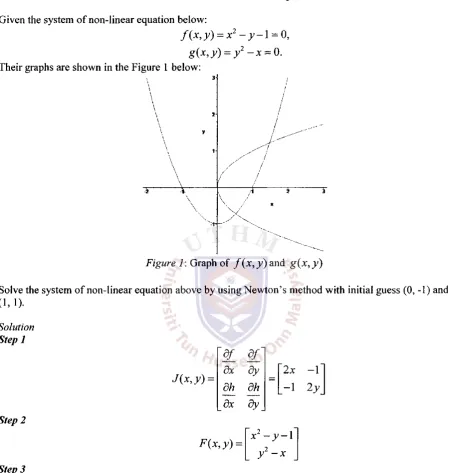
Their graphs are shown in the Figure 1 below:
\
\ \
\
/
/ / /
\
/\ .
\
/ '
1
f
\
\
/
3\
\
X "
Figure 1: Graph of / ( x , y) and g(x, y)
Solve the system of non-linear equation above by using Newton's method with initial guess (0, -1) and 0 , 1 ) .
Solution Stepl
df
Ax,y) = dx
dh
dx dy
dh
dy_
-
2x- 1
F{x,y) = ~x2
y -y 2 _
- l "
X
2y
Step 3
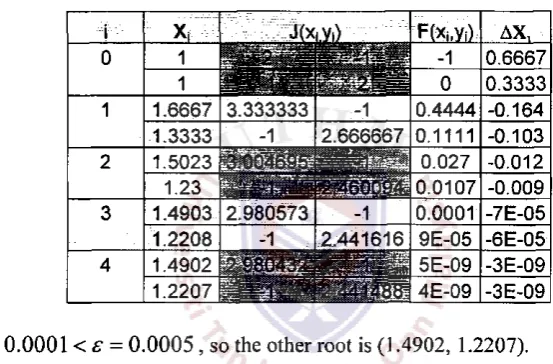
By using X .+ 1= X( + A Xf where A X; = -J{xj,yi)~xY{xj,yj) , we obtain the numerical solution
[image:4.596.66.517.113.587.2]with initial guesses (0,-1) and (1, 1) as in Tables 1 and 2, respectively.
Table 1
Initial guess (0, -1)
i X, J.'x .V.) F(x„yi) A X ,
0 0 0 1
1 1 2 -1 1 -0.4 1
-1 -1 -2 0 0.2 2 0.6
mx&
:•.
p g i • 0.16 -0.0742
-0.8 W , 6 ' 0.04 0 . 0 7 1 2 3 0 . 5 2 6 1.052055 -1 0 . 0 0 5 5 -0.001 3
- 0 . 7 2 9 -1 - 1 . 4 5 7 5 3 0.0051 0 . 0 0 4 3 4 0 . 5 2 4 9 1E-06 6E-06 4
-0.725 :.JS^ l l i 4 9 ' 2E-05 8E-06
5 0 . 5 2 4 9 1.049777 -1 4E-11 2 E - 1 2 5
-0.724 -1 - 1 . 4 4 8 9 8 7E-11 4E-11 6 0.5249
$6497p.
0 0 6 [image:5.596.174.420.66.225.2] [image:5.596.141.418.285.467.2]-0.724 -1.44898 0 0
Since | X6 -X51= 0.0000 < £ = 0.0005 , so one of the root is (0.5249, -0.7240).
Table 2
Initial guess (1, 1)
i X , J(XiVi) F(X|,Yi) A X ,
0 1 v.: - 1 . . -1 0 . 6 6 6 7
0
1 • . 2 H - 0 0 . 3 3 3 3
1 1.6667 3 . 3 3 3 3 3 3 -1 0 . 4 4 4 4 -0.164 1
1.3333 -1 2 . 6 6 6 6 6 7 0.1111 - 0 . 1 0 3 2 1.5023 3 0 0 4 6 9 5 0.027 -0.012 2
1.23 2 4 6 0 0 9 4 0.0107 -0.009 3 1.4903 2 . 9 8 0 5 7 3 -1 0.0001 -7E-05 3
1.2208 -1 2 . 4 4 1 6 1 6 9E-05 -6E-05 4 1.4902 2 980432'' "r 1 - 5E-09 -3E-09
4
1.2207 2 . 4 4 1 4 8 8 4E-09 -3E-09
Since | X4 -X3 \= 0.0001 < £ = 0.0005, so the other root is (1.4902, 1.2207).
Steps In Using The Solver For Solving The System Of Non-Linear Equation
Step 1: User input the initial vector X0 .
Step 2: User input formula for initial Jacobian matrix, J(x0,y0
)-Step 3: User input formula for initial vector, F(x0,y0).
Step 3: The results will be automatically displayed up to 10 iterations.
Step 4: User needs to copy and drag the iteration if the stopping criteria is not met yet.
Step 5: User needs to cut the appropriate number of iterations if the number of iterations
is less than 10 iterations.
n
Microsoft Excel - COSMED09 02Efe Edit \flew Insert Format Tools Qgta Window Help
Arial 10 / .D I i
A
- Ufa
B C D E F 1 2 3 4 5 6 Example
/ ( „ ) = ^ - , - i = o
J U y ) mg(xzy) = y2 - x = 0
~Bf_ $
dx c
Bh B dx c
7 i
x
f J(x..yi) AX,8 0 0 0 1 9
0
-1 ' 1 0 10 1 1 2 -1 1 -0.4 11
1
-1
r
-1' -2 ' 0 0.2 12 2 0.6 -\ «- 0.16 -0.074 13
2
-0.8 ' 0.04 0.0712 14 3 0.526 1.052055 -1 0.0055 -0.001 15
3
-0.729 ' -1
r -1.45753
'0.0051 0.0043 16 4 0.5249 1.(89754 • M 1E-06 6E-06 17
4
-0.725 " -1.449 '2E-05 8E-06 18 5 0.5249 1.049777 -1 4E-11 2E-12 19
5
-0.724 ' -1 '-1.44898 '7E-11 4E-11 20 6 0.5249 1.0497?7 -1 ' 0 0 21
6
-0.724 -1.44898 ' 0 0 2 2 7 0.5249 1.049777 -1 0 0 23
7
-0.724 ' -1 '-1.44898 ' 0 0 24 8 0.5249 1.W9777 -1 '. 0 0 25
8
-0.724
ri-J,448S8 ' 0 0
2 6 9 0.5249 1.049777 -1 0 0 2 7
9
-0.724 ' -1
r-1.44898
' 0 0 28 10 0.5249 1.049777. -1 0 0 29
10
-0.724 :% £1.44898 0 0
H
2x
-1 2v.
Figure 7. Excel Solver for Solving the System o f Non-Linear Equations
The Excel Command Involved In Building the Solver
Step 1: We select cells F8:F9 and type in = -MMULT(MINVERSE(C8:D9), E8:E9), then press SHIFT, CRTL and ENTER at the same time to calculate AX0.
Step 2: We select cells B10:B11 and type in = B8:B9+F8:F9 and then press SHIFT, CRTL and ENTER
at the same time to calculate Xx.
Step 3: We then select cells C8:F9 and then copy it to F l 1.
Advantages and Shortcomes of The Solver
This solver helps educators and students who need the full numerical solutions of a system of non-linear equations by inputting the initial vector X0, Jacobian matrix J(x0,y0) and initial vector F(x0,y0).
Even though it is designed for a system of two non-linear equations, the EXCEL command involved is not that difficult if compared to the MATHCAD, MAPLE, MATLAB, or C Programming. Hence users can extend the concept presented here to a system of n non-linear equations. One of the limitations here is the solver is not yet fully automated so that the users need to control the number of iterations themselves manually by dragging to increase the number of iterations or select only the desired number of iterations from the given ten iterations. However, this manual option is suitable for the purpose of teaching and learning in the class room and evaluation in the examination hall, where students need to know where to stop the iterations.
Conclusion
A solver is developed to get the full numerical solutions of a system of two non-linear equations by Newton's method through Excel. This solver helps educators and students who need full numerical solutions of a system of two non-linear equations by just inputting the initial vector X0, Jacobian matrix
J(x0,y0) and initial vector F(x0,y0), but the solver is not yet fully automated where user needs to
control the number of iterations themselves manually. So, we intend to study the Microsoft Excel VBA language to overcome this shortage in future.
Acknowledgement(s)
We wish to acknowledge registrar of Universiti Tun Hussein Onn Malaysia for supporting the budget of the presentation of this paper in 3r d CoSMED 2009 in Penang.
References
Guerrero-Garcia, P. and Santos-Palomo, A. (2008): Squeezing the Most Out of the Casio fx-570ms for Electrical/Electronics Engineers. Proceedings of the International Conference on Computational and Mathematical Methods in Science
Kek, S. L. & Tay, K. G (2008). Solver For System of Linear Equations. Prosiding Seminar Kebangsaan Aplikasi Sains dan Matematik 2008 (SKASM2008). Batu Pahat: Penerbit UTHM. Pg 605-615.
Tay, K.G. (2006). How To Use Calculator Casio FX-570MS In Numerical Methods, Batu Pahat: Penerbit KUiTTHO.
Tay, K. G & Kek, S. L. (2008). Approximating The Dominant Eigenvalue Using Power Method Through Spreedsheet Excel. Prosiding Seminar Kebangsaan Aplikasi Sains dan Matematik 2008 (SKASM 2008). Batu Pahat: Penerbit UTHM. Pg 599-604.
Copyright Statement
Copyright © 2009 <Tay Kim Gaik>, <Kek Sie Long>& <Rosmila Abdul Kahar>. The authors grant a non-exclusive license to the organisers of the 3r d CosMED International Conference 2009, SEAMEO RECSAM