Virtualization and their Security Threats
Hiteshi
Thapar University 913/6 C/o, prints corner Quilla road, Rohtak. Haryana-124001.ABSTRACT
Few issues in the IT arena are regarded with more interest and passion than virtualization. Virtualization refers to technologies designed to provide a layer of abstraction between computer hardware systems and the software running on them. Here, we are discussing the key concepts of virtualization if you want to implement the virtualization within your environment. Many different vendors have many different virtualization products according to their size of business viz. small, medium or large. In case of server consolidation, many small physical servers are replaced by one larger physical server, to increase the utilization of costly hardware resources such as CPU.
In section1, we give introduction to virtualization and their types. Section2 describes application performance using Xen VMM.
Section3 describes how we can virtualize datacenter and some of their solutions.
In section 4 and 5, we describe some of the security threats and some of the benefits and finally we conclude our discussion.
General Terms
Virtual machines, VMware, Xen
Keywords
Virtualization, cloud computing and security.
1.
INTRODUCTION
Virtualization is one of the enabling technologies of cloud computing using the concept of partitioning, divides a single physical resources such as server into multiple digital resources. Virtualization is the key feature of cloud computing and is important to understand especially, if you are deploying it in an enterprise environments. Cloud computing and virtualization are two synonymous terms used, having same meaning but used interchangeably. Virtualization is a component within cloud computing, and cloud computing is something much much larger than simply virtualization. In virtualization, we are separating the operating system in the underlying hardware but in cloud computing we are separating the applications in the underlying hardware. So, we can say that virtualization is a component within cloud computing. Virtualization gives you a layer on the hardware on which you can install an instance(s) of the operating system(s). Earlier we can install the operating system directly on the hardware but for virtualization we can install hypervisor onto the hardware and then install the operating system onto that hypervisor which becomes an instance of the operating system. Technically, virtualization refers to the simulation of the software and/or hardware upon which the other software runs. This simulated environment is called the “virtual machine” (VM). Virtualization has many forms
which can be distinguished by computing layer. Let’s say, for example, Application virtualization provides a virtual implementation of the application programming interface (API) that a running application expects to use, allowing applications developed for one platform to run on another without modifying the application itself. The Java Virtual Machine (JVM), is an example of application virtualization in which JVM acts as an intermediary between the Java Application Code and the Operating System. Another form of virtualization is known as Operating System virtualization which provides a virtual implementation of the OS interface that can be used to run the applications written for the same OS as a host, with each application in a separate VM container.
Virtual machines (VM) are the simulated machines which executes directly on the hardware without software interpretations. Virtual machines were originally developed to overcome some of the shortcomings of the typical third generation architectures and multi-programming operating systems. The architectural characteristics of these systems were the dual-state hardware organization with a privileged and non-privileged mode. In privileged mode, all the instructions are available to the software whereas in non-privileged, they are not. The major innovation of the virtual machine is to solve the problem of extended machines in which only one bare machine interface is provided for multiple machines. Thus, only one privileged software can be run at a given time. Consequently, it is not possible to run or diagnose other operating systems and programs which requires a bare machine interface instead of an extended machine interface. To solve the above problem virtual machine monitor (VMM) software was used which is known as the heart of virtual machine systems, which transforms the single machine interface in an efficient replica of the original computer system, complete with all of the process instructions( i.e both privileged and non-privileged) and system resources (i.e memory and I/O devices). So, by running each operating system on its own virtual machine it becomes possible to run several different operating systems.
Three main types of virtualization for all important business tasks are:
1. Storage virtualization: It is the process of completely abstracting logical storage from physical storage i.e. the resources of many different network storage devices such as hard drives are pooled so that appear to be a single storage device, which then managed by a central system that appears simple to the network administrator. 2. Network virtualization: It is the creation of a
available bandwidth into independent channels that can be assigned to a particular server or device in real-time.
3. Server virtualization: The main area of virtualization which hides the physical nature of the server resources, including the number and identity of individual servers, processors and operating systems, from the software running on them.
2.
VIRTUALIZATION BASED ON
APPLICATION PERFORMANCE
Modern data center requires storage capacity of hundreds of terabytes to petabytes, which uses virtual machine based implementation due to their numerous advantages like resource isolation, hardware utilization, security and easy management. There are some time-critical applications which depends on getting adequate performance from storage subsystems, otherwise they’ll fail. At this level of complexity, it is difficult to provide predictable quality of service because I/O workloads are extremely variable. So, for controlling the statistical performance we can use SLEDS that manages client workload or VMM tool like Xen, a popular tool to manage virtual machines by scheduling them to use resources such as CPU, memory and network.
2.1
Xen Virtual Machine Monitor
2.1.1
Architecture
Xen is the open source virtual machine developed at computer laboratory, University of Cambridge, UK. It supports para-virtualization methodology in resource para-virtualization. Figure 1 shows the Xen architecture which elaborates the basic blocks in it.
Figure 1: Xen Architecture
Xen designates VMs as domains, labeled as Dom0 and DomU. Dom0 is the first VM created used to manage the other domains known as user domains. Management through Dom0 consists of creating, destroying, migrating, saving or restoring user domains (DomU). An operating system running
in a user domain is configured so that privileged operations are executed via calls to hypervisor. Within the Xen environment each VM, as well as the hypervisor, has its own resources. Hypervisor resources are like CPU, I/O memory and hypervisor memory. VM resources includes vMemory and vCPU.
2.1.2
Scheduling
Xen scheduler acts as the refree between the running domains and in some ways it is like the Linux scheduler: it can preempt processes as needed, tries it’s best to ensure the fair allocation and also ensures that CPU wastes as few cycles as possible. Xen scheduler schedules domains to run on the physical CPU which in turn then schedule and run processes from their internal queues. There are three scheduling strategies as:
1. BVT (Borrowed Virtual Time) : It is designed as a fair-share scheduler based on the concept of “virtual time” dispatching the runnable virtual machine with the smallest virtual time first. It also provides low-latency support for real and interactive applications by allowing latency-sensitive clients to “wrap” back in virtual time to gain scheduling priority. The client effectively “borrows” the virtual time from its future CPU allocation.
Running time of scheduler are in terms of a minimum charging unit (mcu) , typically the frequency of clock interrupts. The scheduler is configured with a context switch allowance C, which the real time by which the current VM is allowed to advance beyond another runnable VM with equal claim on the CPU (the basic time slice or time quantum of the algorithm). C is typically some multiple of mcu. Each runnable domain receives a share of CPU in proportional to its weight weight (i). To achieve this, the virtual time of the currently running Dom (i) is incremented by its running time divided by weight.
So, we can summarize the features of BVT as:
Preempt (if wrap is used), WC-mode only;
Optimally-fair: the error between fair share and actual allocation is never greater than the context switch allowance C plus one mcu ;
Low-overhead implementation on multiprocessors as well as uni-processors.
together represent the CPU share that Dom (i) request: Dom(i) will receive atleast s(i) units of time in each period of length p(i). The boolean flag x(i) indicates whether Dom(i) is eeligible to receive extra CPU time (WC-mode). sEDF distributed this slack time in fairly manner, after all runnable domains receive their CPU share.
So, we can summarize the features of SEDF as:
Preemptive; WC and NWC modes ;
Fairness dependes on a value of period;
Implements per CPU queue; this implementation lacks global load balancing on multiprocessors.3.
Credit scheduler: It is the Xens’s latest PS scheduler featuring automatic load balancing of virtual CPUs across physical CPUs on an SMP host. Before a CPU goes idle it will consider other CPUs in order to find any runnable vCPU. This approach guarantees that no CPU idles when there is runnable work in the system. Each VM is assigned with a weight and a cap. If a cap is 0, then the VM can receive any extra CPU (WC-mode). A non-zero cap limits the amount of CPU a VM receives (NWC-mode). So, we can summarize it as: Non-preemptive, WC and NWC-mode;
Global load-balancing on multiprocessors.
3.
DATACENTER VIRTUALIZATION
A datacenter is known is a sever farm or a computer room where the majority of enterprise servers and storage are located, operated and managed. For many large private datacenters and cloud computing environments, virtualization is an important enabling technology. There are four major steps for flexible datacenter: consolidation, standardization, virtualization and utility. Whether we are looking at storage, computing, networking or identity management, the same four steps can lead to a utility- and service-oriented architecture. Each company may choose one of these areas, say storage- to start on the virtualization. But, there are some companies which may attempt to push all aspects of the datacenter towards virtualization. While the efforts are challengeable, but it can bring benefits, especially in the form of reduced operational costs and greater agility. For achieving higher efficiency in datacenter there are proven VMware solutions which leads industry’s virtualized environment and simplify business infrastructure to create a more dynamic and flexible datacenter. Datacenter solutions includes: Server consolidation, disaster recovery, business continuity, security and compliances. Now, let’s examine some of the datacenter solutions briefly in section 3.1.
3.1
Datacenter solutions:
3.1.1
Server consolidation:
By consolidation sever hardware with VMware vSphere, an organization can reduce hardware requirements, reduce hardware and operation costs by as much as 50% and energy cost by 80%. It also reduces the time to provision the new servers by upto 70%. Consolidation of servers faces unique challenges but it does not means cramming as many applications as possible into larger computer that one can find or afford. The main goal ofconsolidation is to create a group of systems located so that they can managed and maintained more efficiently. One of the major barriers to consolidations in some companies has been the lack of scalability of the platform, the operating systems, and the applications because with some exceptions most PC’s are single-processor systems and the operating system derived from this environment were neither design to take advantage of multiple-processors nor were the application. Based on some IT professional surveys by VMware team, they identified seven key advantages of VMware in server-consolidation projects as:
Isolation of the virtual machines.
Encapsulation.
Hardware independence of the virtual machines.
Compatibility with the Workstation version of VMware.
Remote management
Disk management
Virtual networking and file sharing.
3.1.2
Disaster recovery:
According to VMware, disaster recovery is a form of insurance to protect your IT assets when your disaster strikes. The best disaster recovery should provide great protection, with minimum hassle at the lowest possible cost. VMware provides the most reliable, simple and cost-effective disaster protection for all virtualized applications. Disaster recovery consists of planning and activities that allow an organization to return to an acceptable state of work and associated activity after a sudden unplanned calamitous event, which causes damage and/or physical loss. Disaster recovery planning recognizes the possibility of severe damage to infrastructure and physical resources. Using VMware, an organization can effectively meet requirements for disaster recovery: rapid recovery with automation
reliable recovery, non-disruptive testing automation, and simplified testing of recovery plans.
Affordable recovery without requiring a duplicate, idle datacenter.
3.1.3
Business continuity:
In today’s globally connected world, customers need inbound access to data and applications, while datacenters require redundant paths and immediate fail-over to send that information. IT organizations are also increasingly facing challenges in protecting critical applications and IT infrastructures against various causes of downtime. Implementing plans to ensure business continuity for IT infrastructure is an essential requirement for organizations. While most organization recognizes the importance of business continuity, their ability to deliver effective protection for important applications is limited by some challenges as: Difficulty meeting recovery time and availability goals.
High costs.
High complexity.
Unreliable solutions.
Some of the key benefits realized by VMware customers are: reduced downtime, lower costs, simplified processes, and expanded protection.
4.
Virtualization security issues and threats
As today’s small and medium business (SMB) companies are increasingly realizing that simply by cloud they can gain fast access to best business applications or drastically reduce their infrastructure resources, all at negligible cost. Almost every IT department deploying virtualization technology today to reduce power usage, make server and OS deployments more flexible and better use of storage and system resources, but still administrators are more concerned with security implications.
Two main trends occur in IT: virtualization and cyber-physical systems. First concerns the creation of Virtualization, refers to presenting the single physical resources as many individual logical resources (say, platform virtualization), as well as making many physical resources appear to function as a single logical unit (say, resources virtualization). Second concerns the creation of cyber-physical systems (CPS), comprising interacting physical and computational components. In CPS computation and communication are deeply embedded in and interacting with physical processes adds new capabilities to physical systems. Both the above mention trends are the causes of security problems. CPS can be attacked from both cyberspace and physical space. Leading to new classes of attacks, which combine both; cyber-enabled physical attacks and physically-enabled cyber attacks. Likewise virtualization also leads to security issues; virtualized system scaled very well, but so do the attacks on these systems, which are no longer hindered by physical barriers. But practically, these two trends blur: virtualized systems are given physical components, and CPS are being virtualized.
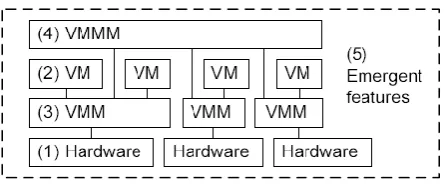
Virtualization technology consist of features which are divided into five groups:
1. Features of virtualization capable hardware
2. Features of VMs
3. Features of individual VMMs
4. Features of VMMMs
5. Features arising from unintended interactions between features.
[image:4.595.317.541.145.240.2]Figure 2 gives the graphical representation of these groups. The hardware (1) enables virtualization, several VMs (2) run on top of a group of VMMs (3) and the VMMs are managed by a VMMM (4), leading to emergent features (5).
Figure 2: Groups of virtualization features
Here, we are considering our main security objective is to protect the application running inside a VM. The threats to the application can originate from five different components: (i) hardware (ii) other VMs (iii) VMMs (iv) VMMMs (v) network. We are not discussing hardware threats in this paper as these are mostly generic threats such as theft that are not specifically relevant virtualization.
We can now list some of the security impacts of all different features per group.
I.
Features of hardware:
There are two important hardware features.a)
Trap program execution:
It is the essential hardware features which enabling virtualization present in all modern x86 hardware. It is the ability to extract the execution of a running process and hand over control of the CPU to the VMM which allows the VMM to intervene in the execution of the process. In such a way, VMM can perform the two critical tasks as: (i) emulate certain hardware, (ii) isolate the virtual machine from other virtual processes.b)
Trusted platform module:
it is an optional hardware feature called Trusted Platform Module (TPM) chip, which can be used to verify the proper VMM is indeed running, as opposed to an insecure version installed by an attacker.[6]II.
Features of VMs:
a)
Store VM as image:
VMs consist of files, holding the machine owns data as well as some metadata. This approach allows easy copying of the VM by a VMM, at the cost of possible confidentiality and integrity breaches.III.
Features of individual VMMs:
a)
Small footprint:
Generally the amount of exploitable vulnerabilities is proportional to the amount of code. VMMs are notably smaller than the previous hardware interface layer, the Operating System and are therefore deemed to be more secure.b)
Hierarchal control:
The VMM layer is designed to control the VMs using the underlying hardware. Therefore it should not be possible for code running inside the VM to “escape” to the VMM and gain control over it. Such escapes are possible, both in laboratory experiments [9] and as well as in production experiments [10].c)
Isolation
between
processes:
VMMs provide better isolation between virtual machines than an operating systems, in which applications can normally interact.
d)
Logging:
Virtualization can help to implement secure logging; during the execution of VM, the VMM collects data and stores it in a place outside of the VM. Therefore it cannot be altered by an exploit that is contained inside the VM.e)
Load
balancing:
VMMs candetermine and limit the CPU cycles and disk space VM uses. This prevents a VM from starving the other VMs of resources.
f)
Copy and backup VMs:
Making backups and copies of VMs is easier than making copies of data on physical machines. Therefore, a defective VM can be easily replaced by a working version.IV.
Features of VMMMs:
a)
Transfer:
VMMM can transfer or migrate running virtual machines between physical servers. This feature can be useful if a physical machine has to undergo maintenance. Unfortunately, this feature also creates an identity problem. Some VMMs can retain the MAC address during the live transfer.b)
Replication:
Apart from being transferred, VMs can also be replicated on different physical servers. This is useful towards DOS attack, to distribute workload and to cope with hardware failures.c)
Patching:
A benefit of VMMs is that they can contain software to ease the process of patching, such as VMware’s vCenter Update Manager. This software inspects VMs to check for missing patches. Before patching, a snapshot is made of the system. If the patching fails, the VM can revert to the snapshot. ThusVMMs make it extremely easy to rollback patches, making patching a non-monotonic process.[11]
d)
VMM management:
If several VMMs are linked together, their work needs to be coordinated from a special server, such as vCenter from VMware [12]V.
Features emerging from interactions:
There are three emerging features that were not explicitly designed, but rather evolved from the interaction between existing features.
a)
Loss of uniqueness of machines
and data:
In a non-virtualized server environment, applications, servers, and data are to a great extent. However, the replication and copy/backup features reduce the uniqueness of these.b)
Loss of location-boundedness of
data:
It is difficult to ascertain the location of a certain VM, since it can move between different physical servers, due to features such as transfer, replication and backup.c)
Loss of monotonicity of program
execution:
Virtualization technology causes a server history to stop being a straight line. Instead it becomes a graph, where branches are made on replication and copy operations, and a previous state can be reached when a restore is performed. Data is hard to delete as there are potentially many copies and the VM can be restored to an earlier version.5.
BENEFITS OF VIRTUALIZATION
Virtualization has become the commonplace throughout the world; however few if any organizations know the risks associated with running multiple machines on the same physical hardware. Estimates shows that between 60 and 80 percent of IT departments are pursuing server consolidation projects, because by reducing the numbers and the types of servers that support their business applications, organizations are looking at significant cost savings.
Still another benefit of virtualization is the lowered power consumption, both from the servers themselves and the facilities cooling systems.
Virtualization’s benefit goes far beyond efficiency, functionalities and continuity, however virtualization also offers much for information security. VMs can be used to isolate processes from attackers and malwares, making systems and applications more difficult to successfully attack or infect.
Some other significant benefits of virtualization includes failover functionality, ability to maintain systems without taking them down, the ability to pool computing resources, the ability to have custom virtual machines (VMs), each of which serves as a container for application delivery and many more.
6.
CONCLUSION
As described in this paper, Virtualization is the key feature of the current cloud computing architecture. It forms the basis for sharing of software and hardware for multiple cloud users. We described types of virtualization and various security issues in virtualization. Though there are extreme advantages in using cloud-based systems, there are yet many practical problems which have to be solved. We also discussed isolation methodology provided by Xen. Xen in many domain environments provide good isolation when running high throughput and non-real time applications with credit-scheduler but it becomes difficult to predict the performance and time guarantees when running soft real-time applications on it. SEDF requires effective deadline setting and it may have more context switches with the smaller slices.
Currently security has lot of loose ends which scars away a lot of potential users. Until a proper security module is not in place, potential users will not be able to leverage the advantages of this technology. This research is based on the conceptualization of the cloud security based on real world security system where in security depends on the requirements and asset value of an individual or organization. Though there are many practical concerns regarding to dynamic security and data storage based on meta-data information my research is much concentrated on concepts and a practical solutions.
7.
REFERENCES
[1] DMTF System Virtualization, Partitioning and Clustering Working Group, “Open Virtualization Format (OVF) Specification, Version 0.90”, April 2008.
[2] M. Armbrust, A. Fox, R. Griffith, A. Joseph, R. Katz, A.Konwinski, G. Lee, D. Patterson, A. Rabkin, I. Stoica, M.Zaharia, “Above the Clouds: A Berkeley View of Cloud Computing”, University of California at Berkeley Technical Report No. UCB/EECS-209-28, February 10 2009.
[3] B-hive, Application Performance Management for VMware Infrastructure, http://www.bhive.net/
[4] J. Matthews, J. Herne, T. Deshane, P. Jablonski, L. Cherian, M. McCabe, “Data Protection and Rapid Recovery From Attack With A Virtual Private File Server and Virtual Machine Appliances”, Proceedings of the IASTED International Conference on Communication, Network and Information Security (CNIS 2005), p. 170-181, November 2005.
[5] www.cs.ucla.edu/~kohler/class/aosref/duda99borrowed. pdThesis. UMI Order Number: UMI Order No. GAX95-09398., University of Washington. (BVT)
[6] R. Perez, L. van Doorn, and R. Sailer, “Virtualization and Hardware-Based Security,” IEEE Security & Privacy, vol. 6, no. 5, pp. 24–31, 2008.
[7] B. D. Payne, M. Carbone, M. Sharif, and W. Lee, “Lares: An architecture for secure active monitoring using virtualization,” Security and Privacy,IEEE Symposium on, pp. 233–247, 2008.
[8] P. Karger and D. Safford, “I/O for Virtual Machine Monitors: Security and Performance Issues,” IEEE Security & Privacy, vol. 6, no. 5, pp.16–23, 2008.
[9] T. Ormandy, “An empirical study into the security exposure to host of hostile virtualized environments,” in CanSecWest 2007, Vancouver BC, April 2007.
[10]NIST, “CVE-2009-1244,”
http://web.nvd.nist.gov/view/vuln/detail vulnId=CVE-2009-1244, April 2009, retrieved 2009-04-20.
[11]T. Garfinkel and M. Rosenblum, “When virtual is harder than real: Security challenges in virtual machine based computing environments,” VMware.
[12]“VMware vCenter Update Manager,” www.vmware.com/files/pdf/update manager datasheet.pdf, 2008, product datasheet, Retrieved 2009-04-20.
[13]Waters, John K. “ABC: An Introduction to Virtualization,” CIO, March 15, 2008 http://www.cio.com/article/40701/ABC_An_Introduction _to_Virtualization.
[14]van Cleeff A, Pieters W, Wieringa R. Security implications of virtualization: a literature study. In: 2009 International conference on computational science and engineering. IEEE; 2009. p. 353e8.