CBASIc-n™
ALL SOFTWARE IS WARRANTED AS SET OUT IN THE XEROX OFFICE PRODUCTS SOFTWARE LICENSE AND SOFTW ARE MAINTENANCE AGREEMENT
A commercially oriented, compiler/interpreter BASIC
language facility for CP/M (tm) systems.
Version 2
January 1981
CBASIC is a trademark of Compiler Systems, Inc.
No part of this publication may be reproduced, transmitted, transcribed, stored in a retrieval system, or translated into any language or computer language, in any form or by any means, electronic, mechanical, magnetic, optical, chemical, manual or otherwise, without the prior written permission of Compiler Systems Inc., Post Office Box 145, Sierra Madre, California, 91924.
DISCLAIMER
1 .
2 .
3 .
4.
INTRODUCTION . . 1
1 .1 1 .2 1 .3
Introduction . . . . . For CBASIC I Programmers .
An Explanation of Identification Numbers .
1 2 3
GENERAL INFORMATION . . 4
2.1 2.2 2.3 2.4 2.5
Statements . . . . Notation . . . . .
Statement Numbers . . .
REM Statement. . . . . . . . Executing a CBASIC Program
4 5
5
6 7
FORMING EXPRESSIONS . . . . 10
3.1 3.2 3.3 3.4 3.5 3.6
Strings. . . Numbers . . . . Identifiers. .
Variables and Subscripted Variables . . . . Expressions. . . .
Assignment Statements . . . .
· 10 10 · 12 · 12 · 15 · 17·
CONTROL STATEMENTS . · 19
4.1 4.2 4.3 4.4 4.5 4.6 4.7 4.8 4.9 4.10 4.11 4.12 4.13
GOSUB Statement . .
RETURN Statement . . . . . GOTO Statement . . . . . IF ... THEN . . . ELSE Statement.
WHILE Statement.
WEND Statement . . . . . FOR Statement . .
NEXT Statement . .
ON ... GOSUB, ON ... GOTO Statements. STOP Statement . . .
RANDOMIZE Statement . . . . CHAIN Statement . .
COMMON Statement . .
5.1 General Information.
·
31 5.2 PRINT Statement.· ·
. .
·
·
·
·
315.3 LPRINTER Statement
·
325.4 CONSOLE Statement.
.
.
.
· ·
·
·
·
33 5.5 POS Predefined Function.·
·
·
·
·
34 5.6 TAB Predefined Function.· ·
·
·
·
·
345.7 READ Statement
. ·
·
.
·
·
355.8 DATA Statement
.
· ·
·
355.9 RESTORE Statement.
·
· ·
365.10 INPUT Statement.
·
·
· ·
·
365.11 OUT Statement.
· ·
·
·
·
·
385.12 INP Predefined Function.
·
395.13 CONSTAT% Predefined Function
· ·
· ·
·
·
39 5.14 CONCHAR% Predefined Function·
·
· ·
· ·
396. MACHINE LANGUAGE LINKAGE STATEMENTS AND FUNCTIONS . . 41
7 . 6.1· 6.2 6.3 6.4 6.5
PEEK Predefined Function POKE Statement . .
CALL Statement . . SAVEMEM Statement . . Use of Integers
PREDEFINED FUNCTIONS 7.1
7.2 7.3
Numeric Functions. String Functions . . Disk Functions . . .
8. USER DEFINED FUNCTIONS 8.1 Function Names . .
8.2 Function Definition . . . . 8.3 Function Reference
9. FORMATTED PRINTING . . 9.1 General . . . .
9.2 String Character Fiel~ . 9.3 Fixed Length String Fields. ~.4 Variable Length String Fields. 9.5 Numeric Data Fields.
9.6 Escape Characters.
10.1 10.2 10.3
FILES . .
How CP/M Maintains Files . . OPEN Statement . .
CLOSE Statement . . . .
· . 41 41 · . 42 · . 42 · 43 · . . . 45 · . . . . 45 · . . 49 · . . 56
· . 59
· 59 · 60 · 62 · . 63 · . . . . 63 · 64 · . 64 · . . . 64 · 65 · 68
11. 12. 13. A. B. C. D. E. 10.6 10.7 10.8 10.9 10.10 10.11
IF END Statement . . FILE Statement . . READ Statement . . . PRINT Statement . . Appending to a File . .
Re-Initializing the Disk System PROGRAMMING WITH FILES . .
11.1 11.2 11.3 11.4 11.5 11.6 11.7 11.8 12.1 12.2 12.3 12.4 12.5
File Facilities . . . . File Organization . . . . Stream Organization . . . . . Fixed Organization
File Accessing Methods . . . Sequential Access .
Random Access . .
Special Features . . . . COMPILER DIRECTIVES . . .
Directive Format . .
Listing Control Directives . . % INCLUDE . . . .
%CHAIN. . . . END Statement .
OPERATIONAL CONSIDERATIONS . . . 13.1
13.2 13.3 13.4 13.5
System Requirements
CBASIC Compile-Time Toggles . Compiler Output . . . . TRACE . . . . .
Cross Reference Lister.
APPENDICES
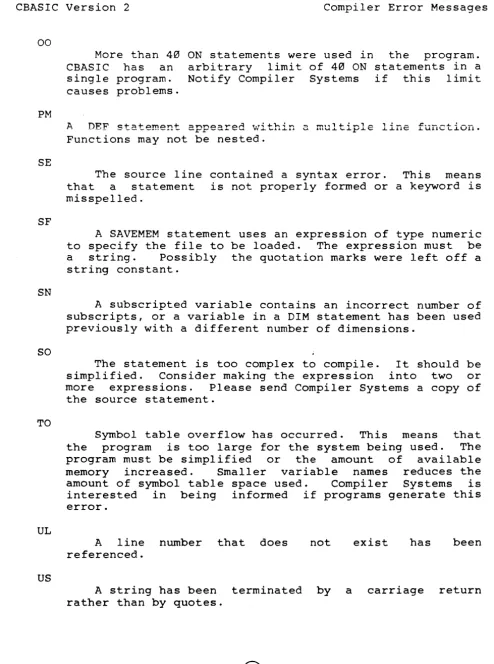
COMPILER ERROR MESSAGES . RUNTIME ERROR MESSAGES. KEY WORDS
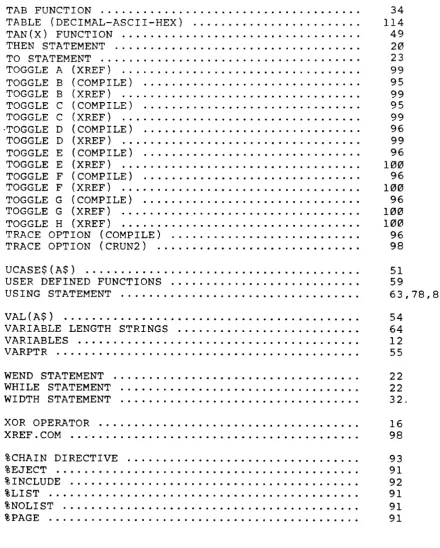
DECIMAL - ASCII - HEX TABLE MASTER INDEX
· 73 · 74 · 75 · 77
"71'\
• • • • • 1;;1 · . . 80
· 82 · 82 · 82 · 83 · 83 · 86 · 86 · 88 · 89 · 91 · 91 · 91 · 92 · 93 · 93 · . . 95 · 95 · 95 · 97 · 98 · 98
101 1~7
1. CBASIC
1.1 Introduction
This manual describes version two of CBASIC, a comprehensive, commercially oriented compiler/interpreter designed for use with the CP/M (tm) and MP/M-80 (tm) operating systems. CP/M and MP/M-80 are trademarks of Digital Research. CP/M is available on a multitude of 8080, 8085, and Z80 microcomputer systems.
In this manual, unless i t is stated otherwise, will be used to indicate version 1 or 2 of CP/M or There are many derivations of CP/M. CBASIC should operate with these systems. CPU will refer to microprocessor chip installed in the system.
CP/M MP/M.
also the
CBASIC has a variety of extended features including the IF ... THEN ... ELSE and WHILE constructs and access to disk files. CBASIC also allows the use of 31-character variable names, and the free use of comments, spaces, and tabs. These aid in creating programs that are self-documenting and maintainable.
Version two of CBASIC adds integer variables, multiple line functions, chaining with. common variables, and additional pre-defined functions as well as other improvements. A cross-reference lister is also provided.
To use CBASIC a microcomputer system using the CP/M operating system must be available. This manual assumes a working knowledge of the following CP/M documentation:
(a) AN INTRODUCTION TO CP/M FEATURES AND FACILITIES (b) ED: A CONTEXT EDITOR FOR THE CP/M DISK SYSTEM (c) CP/M INTERFACE GUIDE
These manuals are available from Digital Research, PO Box
759, Pacific Grove, California.
A newcomer to the field of computers would do well to read an introductory text on the Basic Language.
The reference section, chapters 2 through 10, describes the facilities of the language. Chapter 11 expands on the use of files. Chapters 12 and 13 describe operation of the compiler. Three appendices follow which list compiler and runtime error messages and list key words ..
1.2 For CBASIC I Programmers
Programmers familiar with version 1 of CBASIC should review this manual paying particular attention to the use of integer variables. Chapter 3 provides details on using integers in expressions. The sections concerning new statements and functions should be re9d in detail. Chapters 12 and 13 also contain much new information.
A program that compiled and executed with version 1 should op~rate properly with version 2. However, an INT file created by the version 1 compiler will not execute with the version 2 runtime monitor. The source program must be recompiled.
1.3 Program Identification Numbers
All Compiler Systems programs sign-on with the program name followed by an identification number. These numbers are in the following form:
v.eR
2. GENERAL INFORMATION
2.1 Statements
A program consists of zero or more properly formed CBASIC statements contained in a diskette file. CBASIC source statements are also called source code or source statements. An END statement, if present, terminates the program, and any statements following the END statement are ignored. An end-of-file on the source file also terminates the program. In this case the END statement is supplied by CBASIC.
In this manual the term line, in the context of a line of source code, means a string of characters terminated with a carriage return and line feed. A statement may span more than one line or multiple statements may appear on the same line.
The entire ASCII character set is accepted, but most statements may be written using the common 64 character subset. Lower case letters are converted by the compiler to upper case except when they appear in strings or remarks. A compiler toggle, described in Chapter 13, will inhibit all conversion to upper case.
CBASIC statements are free-form with the following requirements:
(l) When a statement is not completed on a sing le line, a continuation character (\) must be used. (Note that with configuration 1 an at sign (@) may also be used as the continuation character). The statement can then be continued on the next line. CBASIC keywords, variable names and string constants may not be broken in the middle and continued on the next line. A continuation character may not be used in a Data Statement since i t is treated as a character within a string constant. Likewise backslash characters within string constants inclosed in quotation marks (see section 3.1) are not treated as continuation characters.
( 2) All character compiler.
characters which follow on the same line are
(3) Multiple statements are allowed on one line but they must be separated by a colon (:). DATA, DEF, DIM, and END must be the only statement on a line; an IF statement must be the first statement on a line. See the REM statement (section 2.4) for an exception to this rule.
Spaces may precede statements: any number of spaces may appear wherever one space is permitted. Extra spaces, such as for indenting statements to enhance readability, do not increase the size of the intermediate file created by the compiler.
2.2 Notation
All of the CBASIC statements are described in this manual. Each description includes a synopsis which presents the general form of the statement. The following notation is used for the synopsis:
Keywords and Symbols
All special characters and capitalized words represent symbols which have special meaning in the language. For instance READ, REM and PRINT are keywords in CBASIC. Appendix C contains a list of all keywords used by CBASIC.
Angle Brackets < >
Angle brackets enclose an item which is defined in greater detail in the text.
Brackets [ ]
Brackets denote an optional feature. Braces { }
Braces indicate that the enclosed section may be repeated zero or more times.
2.3 Statement Numbers
Statement numbers are optional. They are ignored except when they appear in a GOTO, GOSUB, ON, or IF statement. In these cases, the statement number must appear as the label of one and only one statement in the programe Statement numbers do not have to be in sequential order. For example:
In this program the line number 30 is not required; i t is ignored during compilation. However, the 40 appears in a GOTO statement and thus must be used as a statement number once and only once in the program. Statement numbers may contain any number of digits but only the first 31 are considered significant by the compiler.
An additional feature of CBASIC statement numbering is that any valid number may be used as a statement number. This allows the use of non-integer statement numbers. It
is possible to write an entire program or subprogram with statement numbers that are all decimal fractions and range between two consecutive integers.
Statement numbers can even be in exponential (E) format. This is a convenient feature when writing procedures that will be included in other programs because it helps to insure that statement numbers will be unique.
The following are examples of valid CBASIC statement numbers:
1
o
100 100 .. 0 100.213 l00E21
The statement numbers 100 and 100.0 are treated as different statement numbers by the compiler. In other words i t is the string of characters which determines the
statement number and not the numeric value.
2.4 REM Statement
{ < stmt number>] REM [<string 'terminated with CR>] [<stmt number>] REMARK [<string. terminated with CR>]
Examples of REM statements follow:
REM THIS IS A REMARK
remark This is also a remark
tax
=
0.15*
income rem lowest tax rate REM \ this section contains the \tax tables for California
The final example shows-a" REM statement on the same line with another statement. When using the REM statement in this manner, a colon is optional between the two statements. In all other cases involving multiple statements on the same line, the colon must separate the statements. In addition, if the REM statement is used on the same line with other statements, i t must be the last statement on the line.
2.5 Executing a CBASIC Program
Execution of a CBASIC program consists of three steps. First the source program must be created on disk. Next the program is compiled by executing the CBASIC compiler with the name of the source program provided as a file name. Finally the intermediate (INT) file created by the compiler is executed by invoking the runtime program, again using the source program name as a file name.
The source program will normally be created using a text editor. The source program must have a file type of BAS. Each line of a source program is terminated by a carriage return and line feed. The line may be any length, however, the compiler listing will only print the first 132 characters of each line.
CBASIC differs from many other basics in its requirement that keywords and identifiers may not be run together. For instance:
READA
is not accepted by the CBASIC compiler. must be written:
READ A
The statement
FORI=JT010 is a valid CBASIC statement, but i t assigns the variable JT010 to the variable FORI.
The CBASIC compiler is invoked as follows:
CBAS2 <filename> [<disk ref>] [$<toggle> {<toggle>}]
where filename is the name of the source file. A file type of BAS is assumed by the compiler. Compiler toggles, preceded by a dollar sign, may follow the file name. They are discussed in Chapter 13.
The compiler produces an intermediate file in the CBASIC machine language. The intermediate file uses the same name as the source program but of type INT. The INT file is normally placed on the same disk as· the source file. The disk reference is used to specify the drive on which the programmer desires to have the INT file placed. The disk reference is optional: if present i t is of the form A:, B:, etc.
The following command will compile the program INVENTORY. BAS taking the source from the currently selected drive, and place the INT file on drive B:
CBAS2 INVENTORY B:
If a listing is selected (section 13.2), the name of the program as it appears following CBAS2 and any other characters up to the dollar sign or end of the command will appear in the heading of each page of the listing. For instance:
CBAS2 COST ON 7 NOVEMBER 1980 $EBF
will result in the following heading:
The source program is normally listed on the console device. Any error messages will be listed after the statement in which the error was detected (see section 13.3). If errors are detected during compilation, the source file must be corrected using the text editor. The compiler error messages are listed in appendix A. The program is then recompiled. If no errors occur during compilation, the intermediate file may be executed by typing the command:
CRUN2 <filename> [TRACE [<lnl>[,<ln2>]]] [<cmd>]
The trace option is described in chapter command field «cmd» is used with the pre-defined function discussed in chapter 7.
13. The COMMAND $
3. FORMING EXPRESSIONS
This chapter discusses the formation of expressions. First the components of expressions, constants and variables, are described 0 These elements are then combined to form
expressions. Expressions are a fundamental building block used in many CBASIC statements.
3.1 Strings
A string constant is defined as zero or more valid alphanumeric characters enclosed by quotation marks ("). Since a continuation character is treated as part of the string, strings defined as constants in the source program must be contained on a single line. A carriage return may not be part of a string. Embedded quotation marks are entered as two adjacent quotes.
The following constants:
"123"
examples
" Ma y __ 24 , 1 944 "
"Enter your name please"
demonstrate
"""Look, look,lIl1 said Torn"
In the final example the string is: "Look, look," said Tom
valid string
Internally, strings are stored with the length of the string as the first byte. The characters of the string follow. The length is stored as a binary number from 0 to 255.
3.2 Numbers
Two types of numeric quantities are supported by CBASIC, Integer and Real. A real constant may be written in either fixed format or exponential notation. In both cases i t may contain from 1 to 14 digits, a sign, and a decimal point. In exponential notation the exponent is of the form "Esdd", where IS', if present, is a valid sign (+, , or blank) and where 'ddt is one or two valid digits. The sign is the sign of the exponent and should not be confused with the optional sign of the mantissa.
The numbers range from 1.0E-64 to 9.9999999999999E62. Although only 14 significant digits are maintained internally by CBASIC, more digits may be included in a real constant. Real constants are rounded to 14 significant digits.
Real numbers are stored in eight bytes of memory. The first byte is the sign and exponent. The exponent is maintai:ned in excess 64 code. The seven remaining bytes contain a normalized mantissa stored as packed decimal digits. The high order four bits of the rightmost byte is the most significant digit of the mantissa.
If a constant does not contain an embedded decimal point, is not in exponential notation, and ranges from -32768 to +32767, the constant is treated as an integer. Integer values are stored as sixteen bit two's complement binary numbers.
Integer constants may also be expressed as hexidecimal and binary constants. If tqe constant is terminated by the letter H i t is hexidecimal. The le.tter B terminates a binary constant. The first digit of a hexidecimal constant must be numeric. For instance 255 in hexidecimal would be 0FFH, not FFH. FFH would be a valid identifier
(see section 3.3).
Binary and heiidecimal constants may not contain a decimal point. The value retained is the sixteen least significant bits of the number specified.
In this manual the term real number and floating point nu~ber will be used interchangeably. The term numeric will apply to either a real or integer quantity.
Examples of valid numbers are:
1, 1.0, -99, 123456.789
1.993, .01, 4E12, 1.77E-9
1.5E+3 is equivalent to 1500.0 1.5E-3 is equivalent to .e015
1abeH, 10111110B, 0FFFFH
3.3 Identifiers
An identifier begins with an alphabetic character followed by any number of alphanumeric chaFacters or periods. Identifiers identify or name variables used within a program. Only the first 31 characters are considered unique, however the identifier may be of any length. If the last character in the identifier is a dollar sign, the identifier is of type string. If the
identifier ends in a percent sign, it represents an integer. Those identifiers not ending with a dollar sign or percent sign are of type real.
All lower case letters appearing in an identifier are converted to upper case unless compiler toggle D is set (Chapter 13). Using periods in identifiers make programs more readable. For instance BAD.DEBT% is clearer than
BADDEBT%.
Using identifiers which are longer than two characters improves program readabili~y without increasing the size of the intermediate file created by the compiler.
Examples of valid identifiers are: A, B$, cl, c1234%
Payroll.Record, NEW.SUM.AMT INDEX%, FLAG.3%, counter%
ANSWER$, file.name$, CUSTOMER.ADDRESS$
3.4 Variables and Subscripted Variables The general form of a variable is:
<identifier> [;( <subscript list> )
J
The general form of a subscript list is:
The expressions in a subscript list must be numeric. Access to array elements is more efficient if integer expressions are used in subscript lists. If the expression is real, th~ value is rounded to the nearest integer prior to using the value. If an expression in a subscript list is of type string,
an
error occurs. The subscript list indicates that the variable is asubscripted ·variable and indicates which element of the array is being referenced.
Each variable has a value associated with i t - at all times during execution of a program. Initially numbers are zero and strings are null strings. A string variable does not have a fixed length associated with it. Rather, as different strings are assigned to the variable, the storage is dynamically allocated. ~ne maximum length which may be assigned to a string variable is 255 characters.
The identifier used to represent a variable may not begin with FN. Such identifiers are used to specify user defined functions (See chapter 8).
A variable in CBASIC may represent number, or a string depending on identifier.
Examples of variables are: X$
PAYMENT
day.of.deposit%
an the
integer, type of
The following examples show subscripted variables:
y$(i%,j%) COST(3,5)
POS%(XAXIS%,YAXIS%)
INCOME(AMT(CLIENT%),CURRENT.MONTH%)
real the
When subscripts are calculated, a check is made to ensure that the element selected resides in the referenced array. A runtime error occurs if i t does not. The runtime check insures that the location calculated is included within the physical storage area of the array. It is not necessarily a valid entry.
Before a subscripted variable may be referenced in a program, i t must be dimensioned using the DIM statement. The DIM statement specifies the upper bound of each subscript and allocates storage for the array.
A DIM statement is an executable statement; each execution will allocate a new array. If the array contains numeric data the previous array is deleted prior to allocating space for a new array. If the array is of type string each element must be set to a null string prior to re-executing the DIM statement to regain the maximum amount of storage. The general form of a DIM statement is:
[<stmt number>] DIM <identifier> «subscript list» {,<identifier> «subscript list»}
The dimension statement dy'namically allocates space for numeric or string arrays. Elements of string arrays may be any length up to 255 bytes, and change in length as they assume different values. Initially numeric arrays are set to zero and all elements of string arrays are null strings.
An array must be dimensioned options are provided. Arrays order.
explicitly; no default are stored in row-major
The subscript list is used to specify the number of dimensions and the extent of each dimension of the array being declared. The subscript list may not contain a reference to the array being dimensioned.
All subscripts have an implied lower bound of zero. Examples of DIM statements:
DIM A(10)
DIM ACCOUNT$(100),ADDRESS$(100),NAME$(100) DIM B%(2,5,10), SALES.PERSON%(STAFF.SIZE%) DIM X(A%(I%),M%,N%)
The same identifier may be used as both a variable and as a subscripted variable within the same program.
3.5 Expressions
Expressions consist of algebraic combinations of function references, variables, constants, and operators. They evaluate to an integer, real, or string value. Function references are discussed in chapter 8. The hierarchy of operators is:
nested parenthesis A power operator
*, /
1 )
2 )
3 )
4)
5 )
+, -, concatenation (+), unary +, unary -relational operators <, <=, >, >=, =, <>
LT, LE, GT, GE, EQ, NE
6) NOT
7) AND
8) OR, XOR
Arithmetic and relational operations may be performed on either integer or real numbers. If an integer and real number are to be combined using one of these operators, the integer value is first converted to a real number. The operation is then performed on the two real values resulting in a real value. This is referred to as mixed mode ari thmet-ic.
Mixed mode operations take additional time to execute and the compiler generates more code. A mixed mode expression will always evaluate to a real value.
If real values are used, the power operator calculates the logarithm of the number being raised to the power. Since the logarithm of a negative number is undefined, a warning results when the number to the left of the operator is negative. The absolute value of the negative quantity is used to calculate the result. The exponent may be either positive or negative.
If both values used with the power operator are either integer constants or integer variables, the result is calculated by successive multiplication. This allows a negative integer number to be raised to an integer power. In the case of integers, if the exponent is negative, the result is zero. In all cases, 0 A 0 is 1 and 0 A X (when X is not equal to 0) is ~.
If the exponent is an integer but the the integer is converted to a real calculating the result. Likewise, i f the but the base is an integer quantity, calculated using real values.
@
String variables may only be operated on by relational operators and the concatenation operator. Mixed string and numeric operations are not permitted. The mnemonic relational operators (LT, LE, etc.) are interchangeable with the corresponding algebraic operators (<; <=, etc.). Examples of expressions:
amount
*
taxcost + overhead
*
percent a*b/c(1.2+xyz)last.name$ +.. .. + first.name$ index% + 1
Relational operators result in integer values. A 0 is false and a -1 is true. Logical operators NOT, AND, OR, and XOR operate on integer values and result in an integer number. If a real value is used with logical. operators i t is first converted to an integer.
If a numeric quantity is greater than 32,767 or less than -32, 768, i t cannot be represented by a .16 bit two's complement binary number. Logical operations on such a number will give unpredictable results.
Results of logical operations:
12 AND 3 = 0 1100B AND 0101B = 4 NOT -1 = 0 NOT 3H = -4
12 OR 3 = 15 0CH OR 5H =13
12 XOR 3 = 15 12 XOR 5 = 9
12.4 XOR 3.2 = 15 12.4 XOR 3.7 = 8
By using integer expressions for relational tests and logical operations a substantial increase in efficiency results. Programs written in version 1 of CBASIC should be converted to use integer variables where ever possible.
The following point should be understood about numeric constants. If the string of digits contains no decimal point or ends in a decimal point, CBASIC attempts to store
it as an integer. If the resulting number is in the range of CBASIC integers, i t is treated as an integer. If the constant is then required in an expression as a real number, a conversion to a real number occurs at runtime. For instance:
x
=
X + 1.would cause the integer constant 1. to be converted to a real value prior to adding it to X. This extra conversion can be eliminated by embedding the decimal within the number as shown below:
X = X + 1.0
In actual practice there is very little execution speed. A similar situation following statement:
Y%
=
X% + 1.0difference exists in
in the
In this case the X% is converted to a real number prior to the addition to the real constant. The result is then converted back to an integer prior to assignment to Y%.
In general, the programmer should avoid mixed mode expressions when possible, and should not use real constants with integer variables. Most whole numbers used in a program will be stored as integers. This normally provides the most efficient execution.
If an overflow occurs during an operation between real values, a warning is printed and execution continues with the result of the operation set to the largest real number.
In the case of integers no checking for overflow is performed since this would reduce the efficiency of integer operations. It should be understood that if the results of an integer operation fall outside the range of integer values, the calculated value will be incorrect.
3.6 Assignment Statements
[<stmt number>] [LET]
<variable>
=
<expresaion>
The expression is evaluated and assigned to the variable appearing on the left side of the equal sign. The variable and expression must either both be of type string or both be a numeric type.
If the variable and expression are both numeric but one is integer and the other is real, an automatic conversion to the type of the the variable on the left of the equal sign is performed.
Examples:
100 LET A = B + C
X(3,POINTER%)
=
7.32*
Y + X(2,3)SALARY = (HOURS.WORKED
*
RATE) - DEDUCTIONS date$ = month$ + " .. + day$ +" "+ year$INDEX% = INDEX% + 1
REC.NUMBER
=
OFFSET% + NEXTREC%4. CONTROL STATEMENTS
4.1 GOSUB Statement
[<stmt.number>] GOSUB <stmt number> [<stmt number>] GO SUB <stmt number>
The location of the next sequential instruction is saved on the return stack. Control is then transferred to the statement labeled with the statement number following the GOSUB ..
Subroutine calls may not be nested greater than 20 deep.
Examples:
GOSUB 700
PRINT GOSUB PRINT STOP 200
"BEFORE TABLE"
200 REM PRINT THE TABLE "AFTER TABLE"
REM PRINT THE TABLE
FOR INDEX%
=
1 TO TABLE.SIZE% PRINT TABLE(INDEX%)NEXT INDEX% RETURN
4.2 RETURN Statement
[<stmt·number>] 'RETURN
The RETURN statement causes the execution of the program to return to the statement that immediately follows the most recently executed subroutine call. That is, execution continues at the location at the top of the return stack. The call may be a GOSUB statement, ON .
. GOSUB statement, or multiple line function call. See Chapter 8 for a discussion of multiple line functions. Refer also to section 4.12 for information on the effect of CHAINING on subroutine linkage.
If a return is executed without previously executing a GOSUB, ON ... GOSUB, or multiple line function call, a runtime error occurs.
Examples:
500 RETURN
IF ANSWER.VALID% THEN RETURN
4.3 GOTO Statement
[<stmt number>] GOTO <stmt number> [<stmt number>] GO TO <stmt number>
Execution continues at the statement labeled with the statement number following the GOTO or GO TO. If the statement number branched to is not an executable statement, execution continues with the next executable statement after the statement number.
If the statement number to which control is being transferred does not exist, an error will result.
Examples:
80 GO TO 35 GOTO 100.5
4.4 IF Statement
[<stmt number>] IF <expression> THEN <statement list> [ELSE <statement list>]
[<stmt number>] IF <expression> THEN <stmt number>
If the value of the expression is not zero, the statements which make up the first statement list are executed. Otherwise, the statement list following the ELSE is executed, if present, or the next seq~ential
statement following the IF statement is executed.
The expression in an IF statement will normally be a logical expression. That is, i t evaluates to either true (-1) or false (0). However, CBASIC will accept any numeric expression treating a value other than zero as true. The expression should be of type integer. This will reduce execution time and also reduce the size of the intermediate file generated by the compiler. If the expression is real, the value is rounded and converted to an integer. A string expression will result in an error.
A statement list is composed of one or more statements in which each pair of statements is separated by a colon (:). The colon is not required after the THEN nor is i t required before or after the ELSE. It is only used to separate statements. An IF statement must be the first statement on a line: i t may not follow a colon. In other words IF statements may not be nested.
Examples:
IF ANSWER$="YES" THEN GOSUB 500
IF DIMENSIONS.WANTED% THEN PRINT LENGTH, HEIGHT
IF VALID% THEN \
PRINT MSG$(CURRENT.MSG%) :\ GOSUB 200 :\ UPDATE RECORD GOSUB 210 :\ WRITE RECORD NO.OF.RECORDS%=NO.OF;RECORDS%+l :\ RETURN
IF X > 3 THEN X = 0 : Y = 0 : Z = 0
IF YES% = TRUE% THEN PRINT MSG${l) \ ELSE PRINT MSG$(2)
IF TIME>LIMIT THEN \
PRINT TIME.OUT.MSG$ :\
BAD.RESPONSES% = BAD.RESPONSES%+l :\ QUESTION% = QUESTION%+l \
ELSE \
PRINT THANKS.MSG$ :\
GOSUB 1000:\ ANALYSE RESPONSE ON RESPONSE% GOSUB \
2000, 2010, 2020, 2030, 2040 :\ RETURN
In the examples above, note that the colon (:) is used to separate statements within a statement list and the backslash (\) is used to continue a statement onto another
line.
Since the compiler ignores anything following and on the same line with the backslash, comments may be inserted without using the keyword REM.
4.5 WHILE Statement
«stmt number>] WHILE <expression>
Execution of all statements between the WHILE statement and its corresponding WEND is repeated until the value of the expression is zero. If the value is zero initially the statements between the WHILE and WEND will not be executed. Variables used in the WHILE expression may change during execution of the loop.
The expression should be of type integer. This will reduce execution time and also reduce the size of the intermediate file generated by the compiler. If the expression is real, the value is rounded and then converted to an integer. A string expression will result in an error.
4.6 WEND Statement
«stmt number>] WEND
A WEND statement denotes the end of the unmatched WHILE statement. A WEND statement present for each WHILE statement in a program.
closest must be
Branching to a WEND statement is the same as branching to its corresponding WHILE statement.
Examples: WHILE -1
PRINT "X" WEND
WHILE X > Z PRINT X X
=
X - 1.0 WENDTIME = 0.0
TIME.EXPIRED%
=
FALSE% WHILE TIME < LIMITWEND
TIME = TIME + 1.0 IF CONSTAT% THEN \
RETURN REM ANSWERED IN TIME
RETURN
WHILE ACCOUNT.IS.ACTIVE%
GOSUB 100 REM ACCUMULATE INTEREST WEND
WHILE FILE.EXISTS% WHILE TRUE%
WEND WEND
IF ARG$
=
ACCT$ THEN \ ACTIVITY%=
TRUE% :\ RETURNIF ARG$ < ACCT$ THEN \ ACTIVITY% = FALSE% :\ RETURN
GOSUB 3000 REM READ ACCT$ REC
ACTIVITY% = FALSE% RETURN
WHILE TRUE%
INPUT LINE STRING$
IF STRING$
=
CONTINUE$ THEN RETURN WEND4.7 FOR Statement
[<stmt number>] FOR <index>
=
<expression> TO <expression> [STEP <expression>]Execution of all statements between the FOR statement and its corresponding NEXT statement is repeated until the indexing variable, which is i"ncremented by the STEP expression after each iteration, reaches the exit criteria.
If the step expression is positive, the loop exit criteria is met when the index exceeds the value of the TO expression. If the step expression is negative, the index must be less than the value of the TO expression for the exit criteria to be satisfied.
The index must be an unsubscripted variable. It is initially set to the value of the first expression. Both the TO and STEP expressions are evaluated on each .loop: all variables associated with these expressions may change within the loop.
Additionally, the index may be changed during execution of the loop. The type of the index and all expressions should be the same. They may be either real or integer. If any of the expressions are of type string, an error occurs. Particular care should be taken to insure proper matching of the expression types. For instance:
FOR I% = 1 to DONE
will generate unneccessary code because DONE is real but I% and 1 are integers. A more subtle example is:
FOR I = 1. to DONE
In this case I and DONE are real but 1. is an integer. There is one situation when a FOR statement that appears to be valid will generate a compiler err 0 r II FEll. Th i soc cur 5 if the type 0 f the ex pre s s ion
following the TO is not the same as the type of the loop index variable.
For example:
FOR I = 1 TO 13 STEP 3
results in an error IIFE" because the index variable I is real but the value following the TO is an integer. Changing the index to I% will eliminate the error.
If the STEP clause is omitted, a default value of one is assumed. The type of the STEP expression in this case will be the same as the type of the index.
The statements within a FOR loop are always executed at least once. Examples:
FOR INDEX% = 1 TO 10
SUM = SUM + VECTOR(INDEX%) NEXT INDEX%
FOR POSITION=MARGIN+TABS TO PAPER. WIDTH STEP TABS PRINT TAB(POSITION):SET.TAB$:
NEXT POSITION
If a step of one is desired, the STEP clause should be omitted. The execution will be much faster since fewer runtime checks will be made. In addition, less intermediate code is produced.
The speed of execution will also be substantially improved if all the expressions are of type integer.
4.8 NEXT Statement
«stmt number>] NEXT [<identifier> {,<identifier>}]
A NEXT statement denotes the end of the closest unmatched FOR statement. If the optional identifier is present, it must match the index variable of the FOR statement being terminated.
The list of identifiers allows terminating multiple FOR statements. The statement number of a NEXT statement may appear in an ON or GOTO statement, in which case execution of the FOR loop continues with the loop variables assuming their current values.
The following example of nested FOR loops shows the use of a list o~ identifiers:
FOR I%
=
1 TO 10FOR J%
=
1 TO 20X(I%,J%)
=
I% + J% NEXT J%, I%The final example shows the use of a NEXT statement without an identifier.
FOR LOOP%
=
1 TO ARRAY.SIZE% GOSUB 200GOSUB 300 NEXT
4.10
The expression is used to select the statement number at which execution will continue. If the expression evaluates to I, the first statement number is selected, and so forth. In the case of an ON ... GOSUB statement the address of the statement following the ON statement is saved on the return stack. A runtime error occurs if the
expression is less than one or greater than the number of statement numbers in the list.
The expression must be numeric. A string expression will generate an error. Integer expressions will improve execution speed. If a real value is used, it is rounded to the nearest integer prior to selecting the statement number to branch to.
The keywords GOTO and GOSUB may alternately be coded as GO TO and GO SUB.
Examples:
ON I% GOTO 10, 20, 30
ON J% - 1 GO SUB 12.10, 12.20, 12.30, 12.40 WHILE TRUE%
GOSUB 100 REM ENTER PROCESS DESIRED
GOSUB 110 REM TRANSLATE PROCESS TO NUMBER IF PROCESS.DESIRED% = 0 THEN RETURN
IF PROCESS.DESIRED% < 6 THEN \ ON PROCESS.DESIRED% GOSUB \ 1000, \ ADD A RECORD 1010, \ ALTER NAME
1020, \ UPDATE QUANTITY 1030, \ DELETE A RECORD 1040, \ CHANGE COMPANY CODE 1050 \ REM GET PRINTOUT ELSE GOSUB 400 REM ERROR - RETRY WEND
STOP Statement [<stmt number>] STOP
4.11
4.12
A STOP statement is appended to all programs by the compiler.
Examples:
400 STOP
IF STOP.REQUESTED THEN STOP
RANDOMIZE Statement
[<stmt number>] RANDOMIZE
The RANDOMIZE statement initializes or seeds the random number generator. The time taken by the operator to respond to an INPUT statement (chapter 5) is used to set the seed. This time will vary with each execution of a program. Therefore, for RANDOMIZE to work correctly, i t must be preceded by an INPUT statement.
The configuration 3 runtime package uses the real-time clock to seed the random number generator when operating under MP/M.
Examples:
450 RANDOMIZE RANDOMIZE
CHAIN Statement
[<stmt number>] CHAIN <expression>
The CHAIN Statement transfers control from the program currently being executed to the program selected by the expression. The expression must be of type . string or an error will occur. The expression must also evaluate to any unambiguous file name. A file with that name and of type INT must reside on the specified drive. If no drive is specified, the currently logged-in drive is used. In the discussion on chaining the first program executed is the main program.
4.13
The following statement:
CHAIN "B:PAYROLLII
will cause execution to continue with the first statement in the program PAYROLL. PAYROLL.INT must reside on drive B. Regardless of the file type specified, a type of INT is forced.
The CBASIC runtime monitor maintains four partitions in memory. They are designated the constant, code, data statement, and variable areas. The size of these areas is determined by the compiler. If in a chained program one or more of these areas is larger than that corresponding area in the original or main program, a runtime error occurs. In other words the main program constant, code, data statement, and variables areas must be as large or larger than any corresponding area in a program that is subsequently chained. If this is not the case, the programmer must use the %CHAIN compiler directive to adjust the size of the main programs partitions. The %CHAIN directive is discussed in Chapter 12.
In order to determine the size of each partition in a program the compiler produces-a table of these values after each compilation. The values include the effect of the %CHAIN directive if present. The %CHAIN directive need only be used in the main program. The relationship of partition size between programs chained is not
significant.
A CHAIN statement may appear in any program. A program may chain back to the program which invoked it, to a new program, or to itself. If a STOP statement is executed in any program, execution stops and control is returned to CP/M.
Upon execution of a CHAIN statement the return stack is reset. All open files are closed and a restore is performed. Data may be passed from one program to another using the COMMON statement discussed below.
COMMON Statement
.; .... : .•. : ... .: ... : ..
<vari..able>i'··· }
If present, COMMON statements must be the first statements in a program except that blank lines and REM statements may precede COMMON statements. A COMMON
statement is a non-executable statement and specifies that the variables listed will be common to the main program and all programs execu'ted through a CHAIN statement.
If the main program contains COMMON statements, each chained program must have COMMON statements that match the COMMON statements in the main program. Matching means that there are the same number of variables in each COMMON statement and, that the type of each variable in the main program's COMMON statement matches the type of each variable in the chained program's COMMON statement. Also, dimensioned variables must have the same number of subscripts in each program.
Subscripted variables are specified by placing the number of subscripts in parenthesis following the array name. For instance:
COMMON X, Y, A(3), B$(2)
specifies that X and Yare nonsubscripted real variables and will be common to all chained programs. A and B$ are arrays which may be accessed by all programs. A has three subscripts while B$ has two. The COMMON Statement does not indicate the size of any subscript.
The specification of an array in a COMMON statement is not, in general, the same as the specification in a DIM statement. This point must be clearly understood. For example:
COMMON A(3)
might be used with DIM A(20,30,20) but if i t was used with
DIM A(3)
an error would occur.
Prior to accessing an element in an array in COMMON, the array must be created using the DIM statement. Failure to do this will lead to catastrophic results! The first program requiring access to the array should insure that a DIM statement is executed specifying the desired range for each subscript. Subsequent programs may access this array with the data remaining unchanged through the chaining process. If a subsequent program
5. INPUT/OUTPUT STATEMENTS AND FUNCTIONS 5.1 General Information
This chapter introduces input and output statements and functions. File accessing statements are discussed in chapter 10: formatted printing is explained in chapter 9.
CBASIC prints each character as i t is generated. If the length of the line being printed exceeds the width of a print line, printing continues on the next line. That is, a carriage return and a linefeed are output. The width of the print line may be controlled by the user.
Input from the console is read a line at a time instead of a character at a time. This allows the user to take advantage of the CP/M line-editing functions. A control-C entered from the keyboard may return the user to CP/M without closing open files.
In this manual console refers to the physical device assigned to the CP/M logical device CON:. Likewise the list device refers to the physical unit assigned to the CP/M logical device LST:. For more information on logical and physical devices refer to the Digital Research publication "An Introduction To CP/M Features and Facilities."
5.2 PRINT Statement
[stmt number> ] PRINT .... < express~()n> .<ae:fi:m>
[ <expression>«delitn>}
The PRINT statement outputs the value of each expression to the console unless an LPRINTER statement (described below) is in effect. In the latter case output is directed to the list device (see section 5.3). If the length of a numeric item would result in the line width being exceeded, the number to be printed begins on the next line. Strings are output until the line width is reached and then the remainder of the string, if any, is output on the next line.
The delimiter between expressions may be either a comma or a semicolon. The comma causes automatic spacing to the next column that is a multiple of 20. If this spacing results in a print position greater than the currently specified width, printing continues on the next line. A semicolon causes one blank to be output after a number and no spacing to occur after a string.
A carriage return and a linefeed are automatically printed when the end of a print statement is encountered unless the last expression is followed by a comma or a semicolone These partial lines are not terminated until one of the following conditions occur: (1) another PRINT whose list does not end in either a comma or semicolon is executed, (2) the line width is exceeded, (3) an LPRINTER or CONSOLE statement is executed, or (4) the program executes a stop statement. A PRINT statement with no expression list will cause a carriage return and a linefeed to be printed.
If execution of a program is terminated due to an error, a carriage return and a linefeed are output.
Examples: PRINT
PRINT AMOUNT.PAID
PRINT QUANTITY, PRICE, QUANTITY
*
PRICEPRINT nTODAY'S DATE IS: n;MONTH$;n n;DAy%;n, n;YEAR%
5.3 LPRINTER Statement
[stmt number>] LPRINTER [WIDTH <expression>]
After execution of the LPRINTER statement all PRINT statement output, which would normally be directed to the console, will be output on the list device. The list device is the physical unit currently assigned to LST: by CP/M. The WIDTH clause is optional. If present the expression will be used to set the line width of the list device.
If the console's cursor position is not I, a carriage return and linefeed is output to the console. In this context the cursor position is the value that would be returned by the POS function (see section 5.5) just prior to executing the LPRINTER statement.
The expression should be of type integer. If i t is real, the value is rounded to an integer. An error occurs if the expression is of type string.
If the width option is not present, the most recently assigned width is used. Initially the width is set to 132. A width of 0 will result in an infinite line width. With a zero width in effect carriage returns and linefeeds are never automatically output to the printer as a result of exceeding the line width.
500 LPRINTER
IF HARDCOPY.WANTED% THEN LPRINTER WIDTH 120
LP.RINTER WIDTH REQUESTED.WIDTH%
5.4 CONSOLE Statement [stmt number>] CONSOLE
Execution of the CONSOLE statement restores printed output to the console. the console is the physical unit currently assigned to CON: by CP/M.
If the list device print position is not I, a carriage return and linefeed are output to the list device.
Examples:
490 CONSOLE
IF END.OF.PAGE% THEN \ CONSOLE :\
PRINT USING "##,### WORDS THIS PAGE":WORDS% :\ INPUT "INSERT NEW PAGE, THEN CR":LINE TRASH$ :\ LPRINTER
The width of the console device may be changed with the POKE statement (Chapter 6). The console width is one byte at location 272 base 10 or 110H. The new console width will become effective at the next execution of a CONSOLE statement. The console line width is initially set to 80 (50H).
A width of zero (0) results in an infinite width. With a zero width in effect, carriage returns and linefeeds are never automatically output to the console as a result of exceeding the line width.
5.5 POS Pre-defined Function POS
POS returns the next position to be printed on either the console or the line printer. This value will range from 1 to the line width currently in effect.
If a LPRINTER statement is in effect, POS will return the next position to be printed on the printer. Note that POS returns the actual number of characters sent to the output device. If cursor control characters are transmitted, they are also counted even though the cursor is not advanced.
Examples:
PRINT liTHE PRINT HEAD IS AT COLUMN: "; POS IF (WIDTH.LINE - POS) < 15 THEN PRINT
5.6 TAB Pre-defined Function TAB «expression»
TAB causes the cursor or print head to be positioned to a position specified by the value of the expression. If the value of the expression is less than or equal to the current print position, a carriage return and linefeed are output and then the tab is executed.
The TAB function is implemented by outputting blank characters until the desired position is reached. If cursor or printer control characters have been output, the cursor or print head could be positioned incorrectly.
The TAB function may only statements.
be used in PRINT
The expression must be numeric. If a string expression is specified, an error occurs. If the expression is real, i t is first rounded to an integer. ~f the expression is greater than the current line width, an error occurs.
Examples:
PRINT TAB(l5):"X"
PRINT "THIS IS COL. l":TAB(50):"THIS IS COL. 50"
PRINT TAB(X%+Y%/Z%):"l":TAB(POS%+OFFSET%): PRINT TAB(LEN(STR$(NUMBER»):"*"
5.7 READ Statement
[stmt number>] READ <variable> {, <variable>}
A READ statement assigns values from DATA statements to the variables. DATA statements are processed sequentially as they appear in the program. An attempt to read past the end of the last DATA statement produces a runtime error.
Examples:
READ NAME$,AGE%,EMPLOYER$,SSN
FOR PROD.NO%
=
1 TO NO.OF.PRODUCTS% READ PRODUCT.NAME$(PROD.NO%) NEXT PROD.NO%5.8 DATA Statement
(s,tmt . number>)
1)ATA'<const~tlt> {,·<.cOri1fJt·an~~i}
DATA statements are nonexecutable statements which define string, floating point, and integer constants which are assigned to variables using a READ statement. Any number of DATA statements may occur in a program. They may be placed anywhere in the program.
The constants are stored consecutively in a data area as they appear in the program and are not syntax checked by the compiler. Strings may be enclosed in quotation marks or optionally delimited by commas.
Examples:
400 DATA 332.33, 43.0089E5, II ALGORITHM II
DATA ONE, TWO, THREE, 4, 5, 6
In the second example ONE, TWO and THREE are strings. If a real constant is assigned to an integer variable with a READ statement, the constant is truncated to the integer portion of the real number. If the value of a number assigned to an integer is outside the range of CBASIC integers, incorrect values will be assigned. If a real number exceeds the range of real numbers, an overflow warning occurs and the largest CBASIC number is used in
its place.
5.9 RESTORE Statement
5.10
Estmt
number>] RESTOREA RESTORE statement repositions the pointer into the data area so that the next value read with a READ statement will be the first item in the first DATA statement.
The purpose of a RESTORE statement is to ~llow re-reading the constants contained in DATA statements.
Examples:
500 RESTORE
IF END.OF.DATA% THEN RESTORE
When a CHAIN statement is executed a RESTORE is performed.
~NPUT Statement
iti~ nUn!be~Jl;)~ ~~~'~~~~~j'j
~'Var.:Labi.e> {. i/<variable>}
The variables may be either simple or subscripted string or numeric variables.
At most 255 characters may be entered in response to an INPUT statement. If 255 or more characters are entered, inputing is automatically terminated and the first 255 charactgrs are retained. Additional characters may be lost. The 255 characters include all characters entered in response to an input statement no matter how many variables appear in the variable list.
All CP/M line editing functions such as control-U and rubout are in effect. A control-C may terminate the program without closing open files. If a control-Z is the first character entered in response to an INPUT statement the program is terminated in the same manner as if a STOP statement had been executed.
The data items entered at the console must be . separated by commas and are terminated by a carriage return. Strings may be enclosed in quotation marks in which case commas and leading blanks may be included in the string.
The prompt string must be a string constant. If i t is an expression or a numeric constant, an error occ~rs.
If the value entered for assignment to an integer is real, the number entered is truncated to the integer portion of the real number. If the value of a number assigned to an integer variable is outside the range of integers, an incorrect value will be assigned. If a real number exceeds the range of CBASIC real numbers, the largest real number is assigned to the variable, and a warning is printed on the console.
If too many or too warning is printed on must be re-entered.
Examples:
few data items are entered, a the console, and the entire line
INPUT AMOUNTl, AMOUNT2, AMOUNT3
INPUT "WHAT FILE, PLEASE?":FILE.NAME$
INPUT "YOUR PHONE NUMBER PLEASE:": PHONE.N$
INPUT "":ZIP.CODE%
5.11
A special type of INPUT statement is the LINE INPUT. The general form of this statement is:
[stmt number>] INPUT [<prompt strin9>
:J
LINE <variable>
This statement functions as described above with the following exception. Only one variable is permitted following the keyword LINE. It must be of type string. Any data entered from the console is accepted and assigned to this variable. The data is terminated by a carriage return.
A null string may be accepted by responding to an INPUT LINE Statement with a carriage return.
An error occurs if the variable specified to receive the input is not of type string.
Examples:
INPUT "ENTER ADDRESS"~LINE ADDR$
INPUT "TYPE RETURN TO CONTINUE"~LINE DUMMY$
Prompt strings are directed to the console even when an LPRINTER statement is in effect.
OUT Statement
[stmtnumber>] OUT <expression> I <expression>
The low-order eight bits of the second expression are sent to the CPU output port selected by the low-order eight bits of the first expression.
Both arguments must be numeric~ they should be in the range of 0 to 255 for the results to be meaningful. An error occurs if either expression is of type string. Real values are converted to integers prior to performing an OUT instruction. Examples:
OUT 1,58
OUT FRONT.PANEL%, RESULT%
5.12
5.13
INP Pre-defined Function INP «expression»
INP returns the value input from the CPU 1/0 port specified by the expression. This function is useful for accessing peripheral devices directJy from the CBASIC program.
The argument must be numeric. An error occurs if i t is a string. A real value will be rounded to the nearest integer. For the results to be meaningful, the argument must be in the range of 0 to 255.
Examples:
PRINT INP(ADDR%)
IF INP(255) > 0 THEN PRINT CHR$(7) ON INP(INPUT.DEVICE.PORT%) GOSUB \
100, 200, 300, 400, 400, 400, 500
CONSTAT% Pre-defined Function CONSTAT%
CONSTAT% returns the console status as an integer value. If the console device is ready, a logical true is returned otherwise a logical false is returned.
Examples:
IF CONSTAT% THEN \
GOSUB 100 REM PROCESS OPERATOR INTERRUPT WHILE NOT CONSTAT% \
WEND
5.14 CONCHAR% Pre-defined Function CONCHAR%
Examples:
I%
=
CONCHAR% CHAR% = 0IF CONSTAT% THEN \ CHAR% = CONCHAR%
IF CHAR% = STOPCHAR% THEN \ RETURN
6. MACHINE LANGUAGE LINKAGE STATEMENTS AND FUNCTIONS
6.1 PEEK Predefined Function PEEK «expression»
The PEEK function returns the contents of the memory location given by the expression. The value returned is an integer ranging from 0 to 255. The memory location must be within the address space of the computer being used for the results to be meaningful.
The expression must be numeric. An error occurs if a string expression is specified. Real values are rounded to the nearest integer.
Examples:
100 MEMORY%=PEEK(l)
FOR INDEX% = 1 TO PEEK%(BUFFER%)
IN. BUFFER$ (INDEX%) = CHR$(PEEK%(BUFFER%+INDEX%)) NEXT INDEX%
6.2 POKE Statement
[<stmt number>] POKE <expression> , <expression>
The low-order eight bits of the the second expression are stored at the memory address selected by the first expression. The first expression must evaluate to a valid address for the computer being used for the results to be meaningful.
Both expressions must be numeric. An error occurs if a string expression is specified. Real -values are rounded to the nearest integer 0
Examples:
750 POKE 1700,ASC("$")
FOR LOC%
=
1 TO LEN(OUT.MSG$)POKE MSG.LOC%+LOC%, ASC(MID$(OUT.MSG$,LOC%,l» NEXT LOC%
6.3 CALL Statement
[<stmt number>] CALL <expression>
The CALL statement is used to link to a machine language subroutine. The expression is the address of the subroutine being referenced. This value must be within the address space of the computer being used.
Control is returned to the CBASIC program by executing a 8080 RET instruction. The hardware registers may be altered by the subroutine, and, with the exception of the stack-pointer, they need not be restored prior to returning.
The expression must be numeric. An error occurs if a string expression is used. Real values are rounded to the nearest integer.
Examples:
CALL 5H
2000 CALL ANALOG.INPUT%
WHILE PEEK(PARAMETER%) <> 1 CALL GET.RESPONSE% WEND
RETURN
Arguments may be passed to machine language subroutines with the POKE and PEEK instructions.
6.4 SAVEMEM Statement
Ii:
<iJett:e··
humber>j···s~_~ ··~~<,nstari~~····i,···
...
~~~pression>·
.. _The SAVEMEM statement reserves space for a machine language subroutine, and loads the specified file during execution. Only one SAVEMEM statement may appear in a program.